Photo by Niilo Isotalo on Unsplash
Measuring front-end
energy consumption
with Firefox Profiler
Janne Kalliola
Contents
About me, Exove and my book
Why does software energy consumption
matter?
Why software energy consumption is
growing?
How to tackle energy consumption
Measure with Firefox Profiler
Live demo
Final words
1
2
3
4
5
6
7
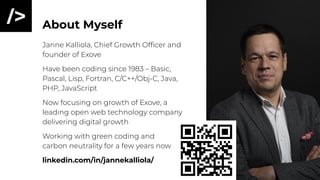
About Myself
Janne Kalliola, Chief Growth Officer and
founder of Exove
Have been coding since 1983 – Basic,
Pascal, Lisp, Fortran, C/C++/Obj-C, Java,
PHP, JavaScript
Now focusing on growth of Exove, a
leading open web technology company
delivering digital growth
Working with green coding and
carbon neutrality for a few years now
linkedin.com/in/jannekalliola/
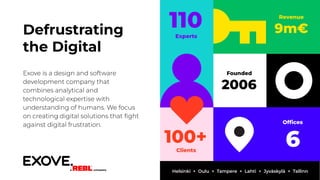
Revenue
9m€
110
Experts
Offices
6
Founded
2006
100+
Clients
Defrustrating
the Digital
Exove is a design and software
development company that
combines analytical and
technological expertise with
understanding of humans. We focus
on creating digital solutions that fight
against digital frustration.
Helsinki + Oulu + Tampere + Lahti + Jyväskylä + Tallinn
My Book
exove.com/fi/vihrea-koodi exove.com/green-code
Second edition
published – AI,
cryptos, IoT, data
+ others
Why Does
Software
Energy
Consumption
Matter?
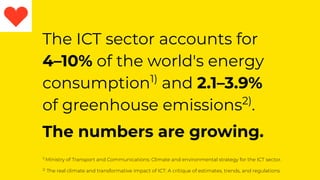
The ICT sector accounts for
4–10% of the world's energy
consumption1)
and 2.1–3.9%
of greenhouse emissions2)
.
The numbers are growing.
1)
Ministry of Transport and Communications: Climate and environmental strategy for the ICT sector.
2)
The real climate and transformative impact of ICT: A critique of estimates, trends, and regulations
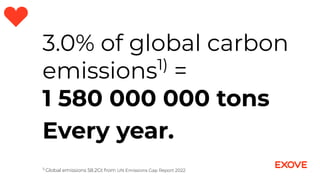
3.0% of global carbon
emissions1)
=
1 580 000 000 tons
Every year.
1)
Global emissions 58.2Gt from UN Emissions Gap Report 2022
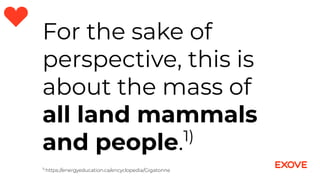
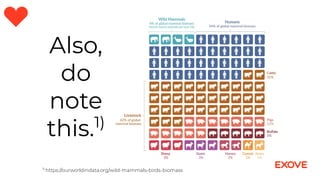
For the sake of
perspective, this is
about the mass of
all land mammals
and people.1)
1)
https://energyeducation.ca/encyclopedia/Gigatonne
Also,
do
note
this.1)
1)
https://ourworldindata.org/wild-mammals-birds-biomass
Why Software
Energy
Consumption
Is Growing?
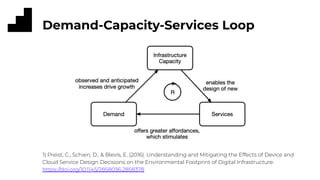
Demand-Capacity-Services Loop
1) Preist, C., Schien, D., & Blevis, E. (2016). Understanding and Mitigating the Effects of Device and
Cloud Service Design Decisions on the Environmental Footprint of Digital Infrastructure.
https://doi.org/10.1145/2858036.2858378
Dominant Paradigm
The dominant design practice of digital services, dubbed the
cornucopian paradigm1)
, is based on user-centered design,
technical and business drivers that drive the development as
discussed on the previous slide.
The paradigm is based on the belief in the continuation of Moore’s
law2)
and the ‘infinite scalability’ of services in the cloud
environment. Both may be untrue in the future.
1)
Preist, C., Schien, D., & Blevis, E. (2016). Understanding and Mitigating the Effects of Device and
Cloud Service Design Decisions on the Environmental Footprint of Digital Infrastructure.
https://doi.org/10.1145/2858036.2858378
2)
https://en.wikipedia.org/wiki/Moore%27s_law
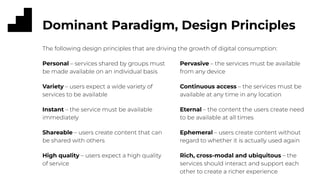
Dominant Paradigm, Design Principles
Pervasive – the services must be available
from any device
Continuous access – the services must be
available at any time in any location
Eternal – the content the users create need
to be available at all times
Ephemeral – users create content without
regard to whether it is actually used again
Rich, cross-modal and ubiquitous – the
services should interact and support each
other to create a richer experience
Personal – services shared by groups must
be made available on an individual basis
Variety – users expect a wide variety of
services to be available
Instant – the service must be available
immediately
Shareable – users create content that can
be shared with others
High quality – users expect a high quality
of service
The following design principles that are driving the growth of digital consumption:
How to
Tackle
Energy
Consumption
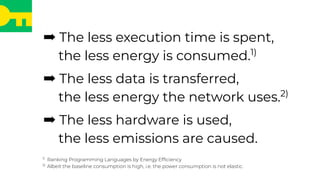
➡ The less execution time is spent,
the less energy is consumed.1)
➡ The less data is transferred,
the less energy the network uses.2)
➡ The less hardware is used,
the less emissions are caused.
1)
Ranking Programming Languages by Energy Efficiency
2)
Albeit the baseline consumption is high, i.e. the power consumption is not elastic.
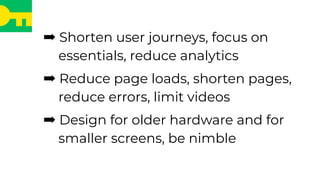
➡ Shorten user journeys, focus on
essentials, reduce analytics
➡ Reduce page loads, shorten pages,
reduce errors, limit videos
➡ Design for older hardware and for
smaller screens, be nimble
Try to do less.
Straight to the point,
transaction, done.
Measure
with Firefox
Profiler
Firefox Profiler
Firefox has an extensive Profiler that can be used to view and
measure browser internal activities during loading and interacting
with a web page.
To activate the Profiler, open Firefox and go to
https://profiler.firefox.com/
The Profiler will add a button to the Firefox toolbar.
N.B. to be able to measure energy consumption, the system
should be either Windows 11 or Linux with Intel CPU or Mac OS X
with Apple M-series CPU.
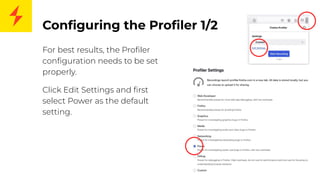
Configuring the Profiler 1/2
For best results, the Profiler
configuration needs to be set
properly.
Click Edit Settings and first
select Power as the default
setting.
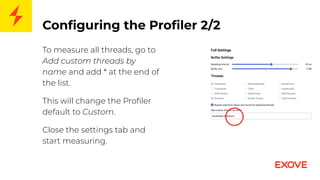
Configuring the Profiler 2/2
To measure all threads, go to
Add custom threads by
name and add * at the end of
the list.
This will change the Profiler
default to Custom.
Close the settings tab and
start measuring.
How to Use
1. Open a new blank tab. Clear cache, if needed.
2. Write the name of the page on the address bar, but do not press Enter.
3. Click Profiler button to start profiling.
4. Go back to the address bar and press Enter.
5. Interact with the page
6. Click Profiler button to stop profiling.
7. Study the results.
8. ???
9. Profit.
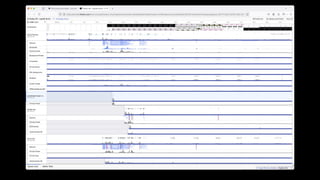
What’s Available?
The Profiler provides the following information:
● Screenshots during profiling
● Loaded assets and bandwidth consumption
● Memory usage
● CPU/GPU utilisation and energy consumption (per Firefox
thread in Mac OS X)
The measured profile can be saved and loaded to another Profiler.
Energy Measurements
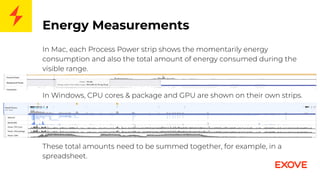
In Mac, each Process Power strip shows the momentarily energy
consumption and also the total amount of energy consumed during the
visible range.
In Windows, CPU cores & package and GPU are shown on their own strips.
These total amounts need to be summed together, for example, in a
spreadsheet.
Energy Measurement Notes / Pitfalls
The energy measurement is based on the CPU’s capabilities and
they are different between Intel and Apple M-series CPUs.
In Intel, the measurement includes all running processes within
the system. You need to shut down all other software and ensure
that Windows is not downloading updates or something else in
the background.
In Apple M, the measurement includes only Firefox processes. You
cannot measure the network stack or work done by other OS
processes, such as the window manager.
Other Pitfalls
Active plugins consume energy—that is dutifully recorded by the
Profiler.
Starting from non-blank page will consume energy that cannot
be separated from the actual page energy consumption.
Scrolling consumes energy and if not executed properly, the
results may be non-comparable.
Profiler uses the best unit that is typically either mWh or µWh.
There is a thousandfold difference. So, check them carefully.
Plugins to Help
Install a plugin to delete cache, such as Clear Cache. This helps to
reduce issues related to cached content. Remember to clear
cache on a blank page, as newly loaded items would otherwise be
added to the cache before the measurement starts.
Install an automated scrolling plugin, such as FoxScroller, if you
want to test scrolling behaviour.
Automation
Firefox Profiler measurements can also be automated using
Sitespeed.io.
You need to configure the Sitespeed.io to a) use Firefox, b)
measure energy consumption, and c) use all threads.
Further, you may need scripts to accept or decline cookies or scroll
the page down.
Some examples can be found from
https://github.com/bebraw/green-computing-result-parser
Live Demo
Three Measurements
1. Drupal.org, not scrolled
2. Drupal.org, scrolled down
3. hs.fi, scrolled somewhat
The demo should show you the difference between visiting just
above the fold or scrolling down the site.
Also the difference between a clean site and a commercial site
with a lot of third party scripts.
Final Words
Energy Saving Is a Journey
● Do not expect that all changes can be done at once.
● Instead, we need to keep the client – internal or external –
needs in primary focus, and operate within agreed budgets.
● Satisfied clients allow us to make more changes to the
systems, including also making it more energy efficient, than
dissatisfied clients.
● Do not set too ambitious goals or try to gobble everything up
at once.
Photo by Todd Trapani on Unsplash
The most important
thing in starting a
journey is to take
the first step.
Questions?
Comments?
exove.com/fi/vihrea-koodi
exove.com/green-code
Drupalcamp Finland – Measuring Front-end Energy Consumption

Drupalcamp Finland – Measuring Front-end Energy Consumption

  • 1.
    Photo by NiiloIsotalo on Unsplash Measuring front-end energy consumption with Firefox Profiler Janne Kalliola
  • 2.
    Contents About me, Exoveand my book Why does software energy consumption matter? Why software energy consumption is growing? How to tackle energy consumption Measure with Firefox Profiler Live demo Final words 1 2 3 4 5 6 7
  • 3.
    About Myself Janne Kalliola,Chief Growth Officer and founder of Exove Have been coding since 1983 – Basic, Pascal, Lisp, Fortran, C/C++/Obj-C, Java, PHP, JavaScript Now focusing on growth of Exove, a leading open web technology company delivering digital growth Working with green coding and carbon neutrality for a few years now linkedin.com/in/jannekalliola/
  • 4.
    Revenue 9m€ 110 Experts Offices 6 Founded 2006 100+ Clients Defrustrating the Digital Exove isa design and software development company that combines analytical and technological expertise with understanding of humans. We focus on creating digital solutions that fight against digital frustration. Helsinki + Oulu + Tampere + Lahti + Jyväskylä + Tallinn
  • 5.
    My Book exove.com/fi/vihrea-koodi exove.com/green-code Secondedition published – AI, cryptos, IoT, data + others
  • 6.
  • 7.
    The ICT sectoraccounts for 4–10% of the world's energy consumption1) and 2.1–3.9% of greenhouse emissions2) . The numbers are growing. 1) Ministry of Transport and Communications: Climate and environmental strategy for the ICT sector. 2) The real climate and transformative impact of ICT: A critique of estimates, trends, and regulations
  • 8.
    3.0% of globalcarbon emissions1) = 1 580 000 000 tons Every year. 1) Global emissions 58.2Gt from UN Emissions Gap Report 2022
  • 9.
    For the sakeof perspective, this is about the mass of all land mammals and people.1) 1) https://energyeducation.ca/encyclopedia/Gigatonne
  • 10.
  • 11.
  • 12.
    Demand-Capacity-Services Loop 1) Preist,C., Schien, D., & Blevis, E. (2016). Understanding and Mitigating the Effects of Device and Cloud Service Design Decisions on the Environmental Footprint of Digital Infrastructure. https://doi.org/10.1145/2858036.2858378
  • 13.
    Dominant Paradigm The dominantdesign practice of digital services, dubbed the cornucopian paradigm1) , is based on user-centered design, technical and business drivers that drive the development as discussed on the previous slide. The paradigm is based on the belief in the continuation of Moore’s law2) and the ‘infinite scalability’ of services in the cloud environment. Both may be untrue in the future. 1) Preist, C., Schien, D., & Blevis, E. (2016). Understanding and Mitigating the Effects of Device and Cloud Service Design Decisions on the Environmental Footprint of Digital Infrastructure. https://doi.org/10.1145/2858036.2858378 2) https://en.wikipedia.org/wiki/Moore%27s_law
  • 14.
    Dominant Paradigm, DesignPrinciples Pervasive – the services must be available from any device Continuous access – the services must be available at any time in any location Eternal – the content the users create need to be available at all times Ephemeral – users create content without regard to whether it is actually used again Rich, cross-modal and ubiquitous – the services should interact and support each other to create a richer experience Personal – services shared by groups must be made available on an individual basis Variety – users expect a wide variety of services to be available Instant – the service must be available immediately Shareable – users create content that can be shared with others High quality – users expect a high quality of service The following design principles that are driving the growth of digital consumption:
  • 15.
  • 16.
    ➡ The lessexecution time is spent, the less energy is consumed.1) ➡ The less data is transferred, the less energy the network uses.2) ➡ The less hardware is used, the less emissions are caused. 1) Ranking Programming Languages by Energy Efficiency 2) Albeit the baseline consumption is high, i.e. the power consumption is not elastic.
  • 17.
    ➡ Shorten userjourneys, focus on essentials, reduce analytics ➡ Reduce page loads, shorten pages, reduce errors, limit videos ➡ Design for older hardware and for smaller screens, be nimble
  • 18.
    Try to doless. Straight to the point, transaction, done.
  • 19.
  • 20.
    Firefox Profiler Firefox hasan extensive Profiler that can be used to view and measure browser internal activities during loading and interacting with a web page. To activate the Profiler, open Firefox and go to https://profiler.firefox.com/ The Profiler will add a button to the Firefox toolbar. N.B. to be able to measure energy consumption, the system should be either Windows 11 or Linux with Intel CPU or Mac OS X with Apple M-series CPU.
  • 22.
    Configuring the Profiler1/2 For best results, the Profiler configuration needs to be set properly. Click Edit Settings and first select Power as the default setting.
  • 23.
    Configuring the Profiler2/2 To measure all threads, go to Add custom threads by name and add * at the end of the list. This will change the Profiler default to Custom. Close the settings tab and start measuring.
  • 24.
    How to Use 1.Open a new blank tab. Clear cache, if needed. 2. Write the name of the page on the address bar, but do not press Enter. 3. Click Profiler button to start profiling. 4. Go back to the address bar and press Enter. 5. Interact with the page 6. Click Profiler button to stop profiling. 7. Study the results. 8. ??? 9. Profit.
  • 25.
    What’s Available? The Profilerprovides the following information: ● Screenshots during profiling ● Loaded assets and bandwidth consumption ● Memory usage ● CPU/GPU utilisation and energy consumption (per Firefox thread in Mac OS X) The measured profile can be saved and loaded to another Profiler.
  • 26.
    Energy Measurements In Mac,each Process Power strip shows the momentarily energy consumption and also the total amount of energy consumed during the visible range. In Windows, CPU cores & package and GPU are shown on their own strips. These total amounts need to be summed together, for example, in a spreadsheet.
  • 27.
    Energy Measurement Notes/ Pitfalls The energy measurement is based on the CPU’s capabilities and they are different between Intel and Apple M-series CPUs. In Intel, the measurement includes all running processes within the system. You need to shut down all other software and ensure that Windows is not downloading updates or something else in the background. In Apple M, the measurement includes only Firefox processes. You cannot measure the network stack or work done by other OS processes, such as the window manager.
  • 28.
    Other Pitfalls Active pluginsconsume energy—that is dutifully recorded by the Profiler. Starting from non-blank page will consume energy that cannot be separated from the actual page energy consumption. Scrolling consumes energy and if not executed properly, the results may be non-comparable. Profiler uses the best unit that is typically either mWh or µWh. There is a thousandfold difference. So, check them carefully.
  • 29.
    Plugins to Help Installa plugin to delete cache, such as Clear Cache. This helps to reduce issues related to cached content. Remember to clear cache on a blank page, as newly loaded items would otherwise be added to the cache before the measurement starts. Install an automated scrolling plugin, such as FoxScroller, if you want to test scrolling behaviour.
  • 30.
    Automation Firefox Profiler measurementscan also be automated using Sitespeed.io. You need to configure the Sitespeed.io to a) use Firefox, b) measure energy consumption, and c) use all threads. Further, you may need scripts to accept or decline cookies or scroll the page down. Some examples can be found from https://github.com/bebraw/green-computing-result-parser
  • 31.
  • 32.
    Three Measurements 1. Drupal.org,not scrolled 2. Drupal.org, scrolled down 3. hs.fi, scrolled somewhat The demo should show you the difference between visiting just above the fold or scrolling down the site. Also the difference between a clean site and a commercial site with a lot of third party scripts.
  • 33.
  • 34.
    Energy Saving Isa Journey ● Do not expect that all changes can be done at once. ● Instead, we need to keep the client – internal or external – needs in primary focus, and operate within agreed budgets. ● Satisfied clients allow us to make more changes to the systems, including also making it more energy efficient, than dissatisfied clients. ● Do not set too ambitious goals or try to gobble everything up at once. Photo by Todd Trapani on Unsplash
  • 35.
    The most important thingin starting a journey is to take the first step.
  • 36.