What is a Cache?
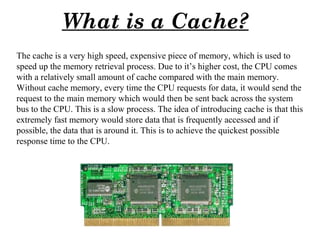
The cache is a very high speed, expensive piece of memory, which is used to
speed up the memory retrieval process. Due to it’s higher cost, the CPU comes
with a relatively small amount of cache compared with the main memory.
Without cache memory, every time the CPU requests for data, it would send the
request to the main memory which would then be sent back across the system
bus to the CPU. This is a slow process. The idea of introducing cache is that this
extremely fast memory would store data that is frequently accessed and if
possible, the data that is around it. This is to achieve the quickest possible
response time to the CPU.
1
Role of Cache in Computers
In early PCs, the various components had one thing in common: they were all really
slow. The processor was running at 8 MHz or less, and taking many clock cycles to get
anything done. In fact, on some machines the memory was faster than the processor.
With the advancement of technology, the speed of every component has increased
drastically. Now processors run much faster than everything else in the computer. This
means that one of the key goals in modern system design is to ensure that to whatever
extent possible, the processor is not slowed down by the storage devices it works with.
Slowdowns mean wasted processor cycles, where the CPU can't do anything because it
is sitting and waiting for information it needs.
The best way to keep the processor from having to wait is to make everything that it
uses as fast as it is. But that would be very expensive.
There is a good compromise to this however. Instead of trying to make the whole 64
MB out of this faster, expensive memory, you make a smaller piece, say 256 KB. Then
you find a smart algorithm (process) that allows you to use this 256 KB in such a way
that you get almost as much benefit from it as you would if the whole 64 MB was
made from the faster memory. How do you do this? The answer is by using this small
cache of 256 KB to hold the information most recently used by the processor.
Computer science shows that in general, a processor is much more likely to need again
information it has recently used, compared to a random piece of information in
memory. This is the principle behind caching
2
Types of Cache Memory
• Memory Cache: A memory cache, sometimes called a cache store or RAM cache, is a
portion of memory made of high-speed static RAM (SRAM) instead of the slower and
cheaper dynamic RAM (DRAM) used for main memory. Memory caching is effective
because most programs access the same data or instructions over and over. By keeping as
much of this information as possible in SRAM, the computer avoids accessing the slower
DRAM.
• Disk Cache: Disk caching works under the same principle as memory caching, but
instead of using high-speed SRAM, a disk cache uses conventional main memory. The
most recently accessed data from the disk (as well as adjacent sectors) is stored in a
memory buffer. When a program needs to access data from the disk, it first checks the
disk cache to see if the data is there. Disk caching can dramatically improve the
performance of applications, because accessing a byte of data in RAM can be thousands
of times faster than accessing a byte on a hard disk.
3
Levels of Cache: Cache memory is categorized in levels based on it’s closeness
and accessibility to the microprocessor. There are three levels of a cache.
Level 1(L1) Cache: This cache is inbuilt in the processor and is made of SRAM(Static RAM) Each
time the processor requests information from memory, the cache controller on the chip uses special
circuitry to first check if the memory data is already in the cache. If it is present, then the system is
spared from time consuming access to the main memory. In a typical CPU, primary cache ranges in size
from 8 to 64 KB, with larger amounts on the newer processors. This type of Cache Memory is very fast
because it runs at the speed of the processor since it is integrated into it.
Level 2(L2) Cache: The L2 cache is larger but slower in speed than L1 cache. It is used to see
recent accesses that is not picked by L1 cache and is usually 64 to 2 MB in size. A L2 cache is also
found on the CPU. If L1 and L2 cache are used together, then the missing information that is not
present in L1 cache can be retrieved quickly from the L2 cache. Like L1 caches, L2 caches are
composed of SRAM but they are much larger. L2 is usually a separate static RAM (SRAM) chip and it
is placed between the CPU & DRAM(Main Memory)
Level 3(L3) Cache: L3 Cache memory is an enhanced form of memory present on the motherboard
of the computer. It is an extra cache built into the motherboard between the processor and main memory
to speed up the processing operations. It reduces the time gap between request and retrieving of the data
and instructions much more quickly than a main memory. L3 cache are being used with processors
nowadays, having more than 3 MB of storage in it.
4
Diagram showing different types of cache and their
position in the computer system
5
Principle behind Cache Memory
Cache is a really amazing technology. A 512 KB level 2 cache, caching 64 MB of
system memory, can supply the information that the processor requests 90-95% of the
time. The level 2 cache is less than 1% of the size of the memory it is caching, but it is
able to register a hit on over 90% of requests. That's pretty efficient, and is the reason
why caching is so important.
The reason that this happens is due to a computer science principle called locality of
reference. It states basically that even within very large programs with several
megabytes of instructions, only small portions of this code generally get used at once.
Programs tend to spend large periods of time working in one small area of the code,
often performing the same work many times over and over with slightly different data,
and then move to another area. This occurs because of "loops", which are what
programs use to do work many times in rapid succession.
6
Locality of Reference
Let's take a look at the following pseudo-code to see how locality of reference works
Output to screen « Enter a number between 1 and 100 »
Read input from user
Put value from user in variable X
Put value 100 in variable Y
Put value 1 in variable Z
Loop Y number of time Divide Z by X
If the remainder of the division = 0
then output « Z is a multiple of X »
Add 1 to Z
Return to loop
End
This small program asks the user to enter a number between 1 and 100. It reads the value entered by the user.
Then, the program divides every number between 1 and 100 by the number entered by the user. It checks if
the remainder is 0. If so, the program outputs "Z is a multiple of X", for every number between 1 and 100.
Then the program ends.
Now it is easy to understand that in the 11 lines of this program, the loop part (lines 7 to 9) are executed 100
times. All of the other lines are executed only once. Lines 7 to 9 will run significantly faster because of
caching. This program is very small and can easily fit entirely in the smallest of L1 caches, but let's say this
program is huge. The result remains the same. When you program, a lot of action takes place inside loops.
This 95%-to-5% ratio (approximately) is what we call the locality of reference, and it's why a cache works so
efficiently. This is also why such a small cache can efficiently cache such a large memory system. You can
see why it's not worth it to construct a computer with the fastest memory everywhere. We can deliver 95
percent of this effectiveness for a fraction of the cost
7
Importance of Cache
Cache is responsible for a great deal of the system performance
improvement of today's PCs. The cache is a buffer of sorts between
the very fast processor and the relatively slow memory that serves
it. The presence of the cache allows the processor to do its work
while waiting for memory far less often than it otherwise would.
Without cache the computer will be very slow and all our works get
delay. So cache is a very important part of our computer system.
8
Tightly Coupled System
- Tasks and/or processors communicate in a highly synchronized fashion
- Communicates through a common shared memory
- Shared memory system
Loosely Coupled System
- Tasks or processors do not communicate in a
synchronized fashion
- Communicates by message passing packets
- Overhead for data exchange is high
- Distributed memory system
COUPLING OF PROCESSORS
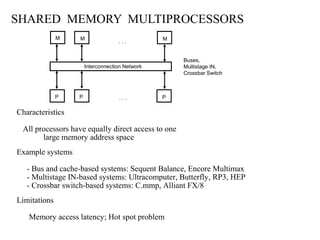
SHARED MEMORY MULTIPROCESSORS
Characteristics
All processors have equally direct access to one
large memory address space
Example systems
- Bus and cache-based systems: Sequent Balance, Encore Multimax
- Multistage IN-based systems: Ultracomputer, Butterfly, RP3, HEP
- Crossbar switch-based systems: C.mmp, Alliant FX/8
Limitations
Memory access latency; Hot spot problem
Interconnection Network
. . .
. . .P PP
M MM
Buses,
Multistage IN,
Crossbar Switch
* Time-Shared Common Bus
* Multiport Memory
* Crossbar Switch
* Multistage Switching Network
* Hypercube System
INTERCONNECTION STRUCTURES
Bus
All processors (and memory) are connected to a
common bus or busses
- Memory access is fairly uniform, but not very scalable
- A collection of signal lines that carry module-to-module communication
- Data highways connecting several digital system elements
Operations of Bus
Bus
M3 wishes to communicate with S5
[1] M3 sends signals (address) on the bus that causes
S5 to respond
[2] M3 sends data to S5 or S5 sends data to
M3(determined by the command line)
Master Device: Device that initiates and controls the communication
Slave Device: Responding device
Multiple-master buses
-> Bus conflict
-> need bus arbitration
Devices
M3 S7 M6 S5 M4
S2
BUS
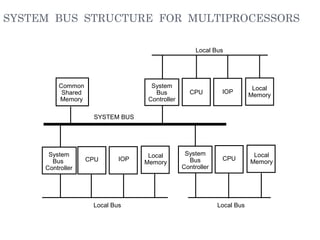
SYSTEM BUS STRUCTURE FOR MULTIPROCESSORS
Common
Shared
Memory
System
Bus
Controller
CPU IOP
Local
Memory
System
Bus
Controller
CPU
Local
Memory
System
Bus
Controller
CPU IOP
Local
Memory
Local Bus
SYSTEM BUS
Local Bus Local Bus
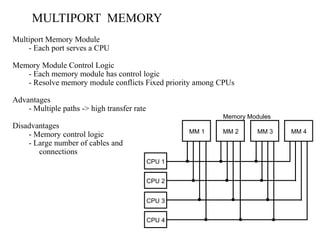
MULTIPORT MEMORY
Multiport Memory Module
- Each port serves a CPU
Memory Module Control Logic
- Each memory module has control logic
- Resolve memory module conflicts Fixed priority among CPUs
Advantages
- Multiple paths -> high transfer rate
Disadvantages
- Memory control logic
- Large number of cables and
connections
MM 1 MM 2 MM 3 MM 4
CPU 1
CPU 2
CPU 3
CPU 4
Memory Modules
CROSSBAR SWITCH
MM1
CPU1
CPU2
CPU3
CPU4
Memory modules
MM2 MM3 MM4
Block Diagram of Crossbar Switch
Memory
Module
data
address
R/W
memory
enable
}
}
}
}
data,address, and
control from CPU 1
data,address, and
control from CPU 2
data,address, and
control from CPU 3
data,address, and
control from CPU 4
Multiplexers
and
arbitration
logic
MULTISTAGE SWITCHING NETWORK
A
B
0
1
A connected to 0
A
B
0
1
A connected to 1
A
B
0
1
B connected to 0
A
B
0
1
B connected to 1
Interstage Switch
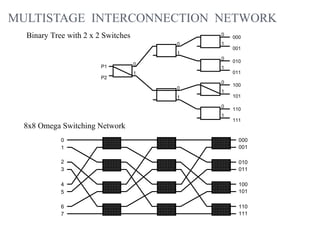
MULTISTAGE INTERCONNECTION NETWORK
0
1
000
001
0
1
010
011
0
1
100
101
0
1
110
111
0
1
0
1
0
1
P1
P2
8x8 Omega Switching Network
0
1
2
3
4
5
6
7
000
001
010
011
100
101
110
111
Binary Tree with 2 x 2 Switches
HYPERCUBE INTERCONNECTION
- p = 2n
- processors are conceptually on the corners of a
n-dimensional hypercube, and each is directly
connected to the n neighboring nodes
- Degree = n
One-cube Two-cube Three-cube
11010
1 00 10
010
110
011 111
101
100
001
000
n-dimensional hypercube (binary n-cube)
19
THANK YOU

Cache memory and cache

  • 1.
    What is aCache? The cache is a very high speed, expensive piece of memory, which is used to speed up the memory retrieval process. Due to it’s higher cost, the CPU comes with a relatively small amount of cache compared with the main memory. Without cache memory, every time the CPU requests for data, it would send the request to the main memory which would then be sent back across the system bus to the CPU. This is a slow process. The idea of introducing cache is that this extremely fast memory would store data that is frequently accessed and if possible, the data that is around it. This is to achieve the quickest possible response time to the CPU. 1
  • 2.
    Role of Cachein Computers In early PCs, the various components had one thing in common: they were all really slow. The processor was running at 8 MHz or less, and taking many clock cycles to get anything done. In fact, on some machines the memory was faster than the processor. With the advancement of technology, the speed of every component has increased drastically. Now processors run much faster than everything else in the computer. This means that one of the key goals in modern system design is to ensure that to whatever extent possible, the processor is not slowed down by the storage devices it works with. Slowdowns mean wasted processor cycles, where the CPU can't do anything because it is sitting and waiting for information it needs. The best way to keep the processor from having to wait is to make everything that it uses as fast as it is. But that would be very expensive. There is a good compromise to this however. Instead of trying to make the whole 64 MB out of this faster, expensive memory, you make a smaller piece, say 256 KB. Then you find a smart algorithm (process) that allows you to use this 256 KB in such a way that you get almost as much benefit from it as you would if the whole 64 MB was made from the faster memory. How do you do this? The answer is by using this small cache of 256 KB to hold the information most recently used by the processor. Computer science shows that in general, a processor is much more likely to need again information it has recently used, compared to a random piece of information in memory. This is the principle behind caching 2
  • 3.
    Types of CacheMemory • Memory Cache: A memory cache, sometimes called a cache store or RAM cache, is a portion of memory made of high-speed static RAM (SRAM) instead of the slower and cheaper dynamic RAM (DRAM) used for main memory. Memory caching is effective because most programs access the same data or instructions over and over. By keeping as much of this information as possible in SRAM, the computer avoids accessing the slower DRAM. • Disk Cache: Disk caching works under the same principle as memory caching, but instead of using high-speed SRAM, a disk cache uses conventional main memory. The most recently accessed data from the disk (as well as adjacent sectors) is stored in a memory buffer. When a program needs to access data from the disk, it first checks the disk cache to see if the data is there. Disk caching can dramatically improve the performance of applications, because accessing a byte of data in RAM can be thousands of times faster than accessing a byte on a hard disk. 3
  • 4.
    Levels of Cache:Cache memory is categorized in levels based on it’s closeness and accessibility to the microprocessor. There are three levels of a cache. Level 1(L1) Cache: This cache is inbuilt in the processor and is made of SRAM(Static RAM) Each time the processor requests information from memory, the cache controller on the chip uses special circuitry to first check if the memory data is already in the cache. If it is present, then the system is spared from time consuming access to the main memory. In a typical CPU, primary cache ranges in size from 8 to 64 KB, with larger amounts on the newer processors. This type of Cache Memory is very fast because it runs at the speed of the processor since it is integrated into it. Level 2(L2) Cache: The L2 cache is larger but slower in speed than L1 cache. It is used to see recent accesses that is not picked by L1 cache and is usually 64 to 2 MB in size. A L2 cache is also found on the CPU. If L1 and L2 cache are used together, then the missing information that is not present in L1 cache can be retrieved quickly from the L2 cache. Like L1 caches, L2 caches are composed of SRAM but they are much larger. L2 is usually a separate static RAM (SRAM) chip and it is placed between the CPU & DRAM(Main Memory) Level 3(L3) Cache: L3 Cache memory is an enhanced form of memory present on the motherboard of the computer. It is an extra cache built into the motherboard between the processor and main memory to speed up the processing operations. It reduces the time gap between request and retrieving of the data and instructions much more quickly than a main memory. L3 cache are being used with processors nowadays, having more than 3 MB of storage in it. 4
  • 5.
    Diagram showing differenttypes of cache and their position in the computer system 5
  • 6.
    Principle behind CacheMemory Cache is a really amazing technology. A 512 KB level 2 cache, caching 64 MB of system memory, can supply the information that the processor requests 90-95% of the time. The level 2 cache is less than 1% of the size of the memory it is caching, but it is able to register a hit on over 90% of requests. That's pretty efficient, and is the reason why caching is so important. The reason that this happens is due to a computer science principle called locality of reference. It states basically that even within very large programs with several megabytes of instructions, only small portions of this code generally get used at once. Programs tend to spend large periods of time working in one small area of the code, often performing the same work many times over and over with slightly different data, and then move to another area. This occurs because of "loops", which are what programs use to do work many times in rapid succession. 6
  • 7.
    Locality of Reference Let'stake a look at the following pseudo-code to see how locality of reference works Output to screen « Enter a number between 1 and 100 » Read input from user Put value from user in variable X Put value 100 in variable Y Put value 1 in variable Z Loop Y number of time Divide Z by X If the remainder of the division = 0 then output « Z is a multiple of X » Add 1 to Z Return to loop End This small program asks the user to enter a number between 1 and 100. It reads the value entered by the user. Then, the program divides every number between 1 and 100 by the number entered by the user. It checks if the remainder is 0. If so, the program outputs "Z is a multiple of X", for every number between 1 and 100. Then the program ends. Now it is easy to understand that in the 11 lines of this program, the loop part (lines 7 to 9) are executed 100 times. All of the other lines are executed only once. Lines 7 to 9 will run significantly faster because of caching. This program is very small and can easily fit entirely in the smallest of L1 caches, but let's say this program is huge. The result remains the same. When you program, a lot of action takes place inside loops. This 95%-to-5% ratio (approximately) is what we call the locality of reference, and it's why a cache works so efficiently. This is also why such a small cache can efficiently cache such a large memory system. You can see why it's not worth it to construct a computer with the fastest memory everywhere. We can deliver 95 percent of this effectiveness for a fraction of the cost 7
  • 8.
    Importance of Cache Cacheis responsible for a great deal of the system performance improvement of today's PCs. The cache is a buffer of sorts between the very fast processor and the relatively slow memory that serves it. The presence of the cache allows the processor to do its work while waiting for memory far less often than it otherwise would. Without cache the computer will be very slow and all our works get delay. So cache is a very important part of our computer system. 8
  • 9.
    Tightly Coupled System -Tasks and/or processors communicate in a highly synchronized fashion - Communicates through a common shared memory - Shared memory system Loosely Coupled System - Tasks or processors do not communicate in a synchronized fashion - Communicates by message passing packets - Overhead for data exchange is high - Distributed memory system COUPLING OF PROCESSORS
  • 10.
    SHARED MEMORY MULTIPROCESSORS Characteristics Allprocessors have equally direct access to one large memory address space Example systems - Bus and cache-based systems: Sequent Balance, Encore Multimax - Multistage IN-based systems: Ultracomputer, Butterfly, RP3, HEP - Crossbar switch-based systems: C.mmp, Alliant FX/8 Limitations Memory access latency; Hot spot problem Interconnection Network . . . . . .P PP M MM Buses, Multistage IN, Crossbar Switch
  • 11.
    * Time-Shared CommonBus * Multiport Memory * Crossbar Switch * Multistage Switching Network * Hypercube System INTERCONNECTION STRUCTURES Bus All processors (and memory) are connected to a common bus or busses - Memory access is fairly uniform, but not very scalable
  • 12.
    - A collectionof signal lines that carry module-to-module communication - Data highways connecting several digital system elements Operations of Bus Bus M3 wishes to communicate with S5 [1] M3 sends signals (address) on the bus that causes S5 to respond [2] M3 sends data to S5 or S5 sends data to M3(determined by the command line) Master Device: Device that initiates and controls the communication Slave Device: Responding device Multiple-master buses -> Bus conflict -> need bus arbitration Devices M3 S7 M6 S5 M4 S2 BUS
  • 13.
    SYSTEM BUS STRUCTUREFOR MULTIPROCESSORS Common Shared Memory System Bus Controller CPU IOP Local Memory System Bus Controller CPU Local Memory System Bus Controller CPU IOP Local Memory Local Bus SYSTEM BUS Local Bus Local Bus
  • 14.
    MULTIPORT MEMORY Multiport MemoryModule - Each port serves a CPU Memory Module Control Logic - Each memory module has control logic - Resolve memory module conflicts Fixed priority among CPUs Advantages - Multiple paths -> high transfer rate Disadvantages - Memory control logic - Large number of cables and connections MM 1 MM 2 MM 3 MM 4 CPU 1 CPU 2 CPU 3 CPU 4 Memory Modules
  • 15.
    CROSSBAR SWITCH MM1 CPU1 CPU2 CPU3 CPU4 Memory modules MM2MM3 MM4 Block Diagram of Crossbar Switch Memory Module data address R/W memory enable } } } } data,address, and control from CPU 1 data,address, and control from CPU 2 data,address, and control from CPU 3 data,address, and control from CPU 4 Multiplexers and arbitration logic
  • 16.
    MULTISTAGE SWITCHING NETWORK A B 0 1 Aconnected to 0 A B 0 1 A connected to 1 A B 0 1 B connected to 0 A B 0 1 B connected to 1 Interstage Switch
  • 17.
    MULTISTAGE INTERCONNECTION NETWORK 0 1 000 001 0 1 010 011 0 1 100 101 0 1 110 111 0 1 0 1 0 1 P1 P2 8x8Omega Switching Network 0 1 2 3 4 5 6 7 000 001 010 011 100 101 110 111 Binary Tree with 2 x 2 Switches
  • 18.
    HYPERCUBE INTERCONNECTION - p= 2n - processors are conceptually on the corners of a n-dimensional hypercube, and each is directly connected to the n neighboring nodes - Degree = n One-cube Two-cube Three-cube 11010 1 00 10 010 110 011 111 101 100 001 000 n-dimensional hypercube (binary n-cube)
  • 19.