What’s New in CA Spectrum 9.4.1 
November 2014
2 © 2014 CA. ALL RIGHTS RESERVED. 
Legal Statement 
These educational materials (hereinafter referred to as the “Materials”) are for the end user’s educational purposes only andare subject to change or withdrawal by CA, Inc. (“CA”) at any time. 
These Materials may not be copied, transferred, reproduced, disclosed, modified or duplicated, in whole or in part, without the prior written consent of CA. These Materials are confidential and proprietary information of CA and protected by the copyright laws of the United States and international treaties. 
EXCEPT AS OTHERWISE STATED IN THE APPLICABLE AGREEMENT, TO THE EXTENT PERMITTED BY APPLICABLE LAW, CA PROVIDES THESE MATERIALS “AS IS” WITHOUT WARRANTY OF ANY KIND, INCLUDING WITHOUT LIMITATION, ANY IMPLIED WARRANTIES OF MERCHANTABILITY, FITNESS FOR A PARTICULAR PURPOSE OR NONINFRINGEMENT. IN NO EVENT WILL CA BE LIABLE TO THE END USER OR ANY THIRD PARTY FOR ANY LOSS OR DAMAGE, DIRECT OR INDIRECT, FROM THE USE OF THESE MATERIALS, INCLUDING WITHOUT LIMITATION, LOST PROFITS, BUSINESS INTERRUPTION, GOODWILL, OR LOST DATA, EVEN IF CA IS EXPRESSLY ADVISED OF SUCH LOSS OR DAMAGE. 
The use of any software or product referenced in the Materials is governed by the end user’s applicable license agreement. 
The manufacturer of these Materials is CA. 
Provided with “Restricted Rights.” Use, duplication or disclosure by the United States Government is subject to the restrictionsset forth in FAR Sections 12.212, 52.227-14, and 52.227-19(c)(1) -(2) and DFARS Section 252.227-7014(b)(3), as applicable, or their successors. 
Copyright © 2014 CA. All rights reserved. All trademarks, trade names, service marks and logos referenced herein belong to theirrespective companies. This document is for your informational purposes only. CA assumes no responsibility for the accuracy or completeness of the information. To the extent permitted by applicable law, CA provides this document “as is” without warranty of any kind, including, without limitation, any implied warranties of merchantability, fitness for a particular purpose, or non-infringement. In no event will CA be liable for any loss or damage, direct or indirect, from the use of this document, including, without limitation, lost profits, business interruption, goodwill or lost data, even if CA is expressly advised in advance of the possibility of such damages.
3 © 2014 CA. ALL RIGHTS RESERVED. 
CA Spectrum 9.4.1 
 
Update and Enhance CA Spectrum and CA Unified Infrastructure Management*Integration to Support VMWare 
 
Key Content: 
– 
CA Spectrum to CA UIM Integration for VMWare 
– 
CA Spectrum Mobile Application 
– 
High Impacting Outages View 
– 
Device Certification Updates 
*CA UIM is formerly known as CA Nimsoft
CA Spectrum and CA UIM Integration for VMWare Support
5 © 2014 CA. ALL RIGHTS RESERVED. 
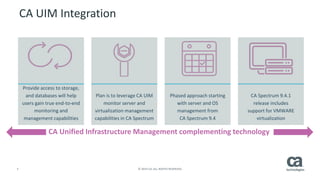
CA UIM Integration 
Provide access to storage, and databases will help users gain true end-to-end monitoring and management capabilities 
Plan is to leverage CA UIM monitor server and virtualization management capabilities in CA Spectrum 
Phased approach starting with server and OS management from CA Spectrum 9.4 
CA Spectrum 9.4.1 release includes support for VMWARE virtualization 
CA Unified Infrastructure Management complementing technology
6 © 2014 CA. ALL RIGHTS RESERVED. 
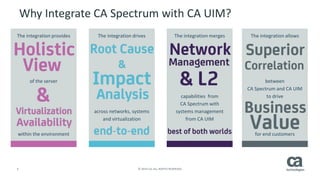
Why Integrate CA Spectrum with CA UIM? 
The integration provides 
of the server 
within the environment 
The integration drives 
across networks, systems and virtualization 
The integration merges 
capabilities from CA Spectrum with 
systems management from CA UIM 
The integration allows 
between CA Spectrum and CA UIM 
to drive 
for end customers
7 © 2014 CA. ALL RIGHTS RESERVED. 
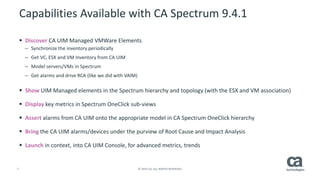
Capabilities Available with CA Spectrum 9.4.1 
 
DiscoverCA UIM Managed VMWare Elements 
– 
Synchronize the inventory periodically 
– 
Get VC, ESX and VM Inventory from CA UIM 
– 
Model servers/VMs in Spectrum 
– 
Get alarms and drive RCA (like we did with VAIM) 
 
ShowUIM Managed elements in the Spectrum hierarchy and topology (with the ESX and VM association) 
 
Displaykey metrics in Spectrum OneClicksub-views 
 
Assertalarms from CA UIM onto the appropriate model in CA Spectrum OneClickhierarchy 
 
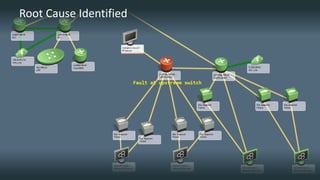
Bringthe CA UIM alarms/devices under the purview of Root Cause and Impact Analysis 
 
Launchin context, into CA UIM Console, for advanced metrics, trends
8 © 2014 CA. ALL RIGHTS RESERVED. 
VMWare Hierarchy under CA Unified Infrastructure Management Manager
9 © 2014 CA. ALL RIGHTS RESERVED. 
L2 Connectivity for Virtual Environment
10 © 2014 CA. ALL RIGHTS RESERVED. 
QoS Metrics for ESX
Alarms
12 © 2014 CA. ALL RIGHTS RESERVED. 
Threshold Violation Alarm on a VM
13 © 2014 CA. ALL RIGHTS RESERVED. 
Root Cause Identified
CA Spectrum Mobile Interface
15 © 2014 CA. ALL RIGHTS RESERVED. 
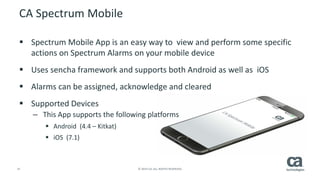
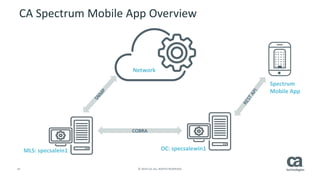
CA Spectrum Mobile 
 
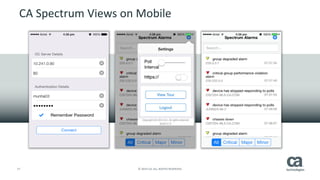
Spectrum Mobile App is an easy way to view and perform some specific actions on Spectrum Alarms on your mobile device 
 
Uses sencha framework and supports both Android as well as iOS 
 
Alarms can be assigned, acknowledge and cleared 
 
Supported Devices 
– 
This App supports the following platforms 
 
Android (4.4 –Kitkat) 
 
iOS (7.1)
16 © 2014 CA. ALL RIGHTS RESERVED. 
CA Spectrum Mobile App Overview 
MLS: specsalein1 
OC: specsalewin1 
COBRA 
Network 
Spectrum Mobile App
17 © 2014 CA. ALL RIGHTS RESERVED. 
CA Spectrum Views on Mobile
18 © 2014 CA. ALL RIGHTS RESERVED. 
CA Spectrum Views on Mobile
19 © 2014 CA. ALL RIGHTS RESERVED. 
CA Spectrum Views on Mobile
High Impacting Outages
21 © 2014 CA. ALL RIGHTS RESERVED. 
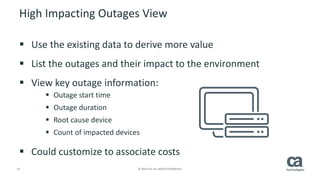
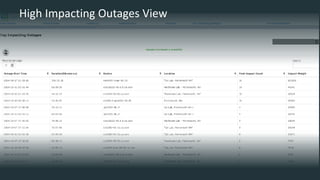
High Impacting Outages View 
 
Use the existing data to derive more value 
 
List the outages and their impact to the environment 
 
View key outage information: 
 
Outage start time 
 
Outage duration 
 
Root cause device 
 
Count of impacted devices 
 
Could customize to associate costs
22 © 2014 CA. ALL RIGHTS RESERVED. 
High Impacting Outages View
ca.com/Spectrum

CA Spectrum 9.4.1 Features and Enhancements

  • 1.
    What’s New inCA Spectrum 9.4.1 November 2014
  • 2.
    2 © 2014CA. ALL RIGHTS RESERVED. Legal Statement These educational materials (hereinafter referred to as the “Materials”) are for the end user’s educational purposes only andare subject to change or withdrawal by CA, Inc. (“CA”) at any time. These Materials may not be copied, transferred, reproduced, disclosed, modified or duplicated, in whole or in part, without the prior written consent of CA. These Materials are confidential and proprietary information of CA and protected by the copyright laws of the United States and international treaties. EXCEPT AS OTHERWISE STATED IN THE APPLICABLE AGREEMENT, TO THE EXTENT PERMITTED BY APPLICABLE LAW, CA PROVIDES THESE MATERIALS “AS IS” WITHOUT WARRANTY OF ANY KIND, INCLUDING WITHOUT LIMITATION, ANY IMPLIED WARRANTIES OF MERCHANTABILITY, FITNESS FOR A PARTICULAR PURPOSE OR NONINFRINGEMENT. IN NO EVENT WILL CA BE LIABLE TO THE END USER OR ANY THIRD PARTY FOR ANY LOSS OR DAMAGE, DIRECT OR INDIRECT, FROM THE USE OF THESE MATERIALS, INCLUDING WITHOUT LIMITATION, LOST PROFITS, BUSINESS INTERRUPTION, GOODWILL, OR LOST DATA, EVEN IF CA IS EXPRESSLY ADVISED OF SUCH LOSS OR DAMAGE. The use of any software or product referenced in the Materials is governed by the end user’s applicable license agreement. The manufacturer of these Materials is CA. Provided with “Restricted Rights.” Use, duplication or disclosure by the United States Government is subject to the restrictionsset forth in FAR Sections 12.212, 52.227-14, and 52.227-19(c)(1) -(2) and DFARS Section 252.227-7014(b)(3), as applicable, or their successors. Copyright © 2014 CA. All rights reserved. All trademarks, trade names, service marks and logos referenced herein belong to theirrespective companies. This document is for your informational purposes only. CA assumes no responsibility for the accuracy or completeness of the information. To the extent permitted by applicable law, CA provides this document “as is” without warranty of any kind, including, without limitation, any implied warranties of merchantability, fitness for a particular purpose, or non-infringement. In no event will CA be liable for any loss or damage, direct or indirect, from the use of this document, including, without limitation, lost profits, business interruption, goodwill or lost data, even if CA is expressly advised in advance of the possibility of such damages.
  • 3.
    3 © 2014CA. ALL RIGHTS RESERVED. CA Spectrum 9.4.1  Update and Enhance CA Spectrum and CA Unified Infrastructure Management*Integration to Support VMWare  Key Content: – CA Spectrum to CA UIM Integration for VMWare – CA Spectrum Mobile Application – High Impacting Outages View – Device Certification Updates *CA UIM is formerly known as CA Nimsoft
  • 4.
    CA Spectrum andCA UIM Integration for VMWare Support
  • 5.
    5 © 2014CA. ALL RIGHTS RESERVED. CA UIM Integration Provide access to storage, and databases will help users gain true end-to-end monitoring and management capabilities Plan is to leverage CA UIM monitor server and virtualization management capabilities in CA Spectrum Phased approach starting with server and OS management from CA Spectrum 9.4 CA Spectrum 9.4.1 release includes support for VMWARE virtualization CA Unified Infrastructure Management complementing technology
  • 6.
    6 © 2014CA. ALL RIGHTS RESERVED. Why Integrate CA Spectrum with CA UIM? The integration provides of the server within the environment The integration drives across networks, systems and virtualization The integration merges capabilities from CA Spectrum with systems management from CA UIM The integration allows between CA Spectrum and CA UIM to drive for end customers
  • 7.
    7 © 2014CA. ALL RIGHTS RESERVED. Capabilities Available with CA Spectrum 9.4.1  DiscoverCA UIM Managed VMWare Elements – Synchronize the inventory periodically – Get VC, ESX and VM Inventory from CA UIM – Model servers/VMs in Spectrum – Get alarms and drive RCA (like we did with VAIM)  ShowUIM Managed elements in the Spectrum hierarchy and topology (with the ESX and VM association)  Displaykey metrics in Spectrum OneClicksub-views  Assertalarms from CA UIM onto the appropriate model in CA Spectrum OneClickhierarchy  Bringthe CA UIM alarms/devices under the purview of Root Cause and Impact Analysis  Launchin context, into CA UIM Console, for advanced metrics, trends
  • 8.
    8 © 2014CA. ALL RIGHTS RESERVED. VMWare Hierarchy under CA Unified Infrastructure Management Manager
  • 9.
    9 © 2014CA. ALL RIGHTS RESERVED. L2 Connectivity for Virtual Environment
  • 10.
    10 © 2014CA. ALL RIGHTS RESERVED. QoS Metrics for ESX
  • 11.
  • 12.
    12 © 2014CA. ALL RIGHTS RESERVED. Threshold Violation Alarm on a VM
  • 13.
    13 © 2014CA. ALL RIGHTS RESERVED. Root Cause Identified
  • 14.
  • 15.
    15 © 2014CA. ALL RIGHTS RESERVED. CA Spectrum Mobile  Spectrum Mobile App is an easy way to view and perform some specific actions on Spectrum Alarms on your mobile device  Uses sencha framework and supports both Android as well as iOS  Alarms can be assigned, acknowledge and cleared  Supported Devices – This App supports the following platforms  Android (4.4 –Kitkat)  iOS (7.1)
  • 16.
    16 © 2014CA. ALL RIGHTS RESERVED. CA Spectrum Mobile App Overview MLS: specsalein1 OC: specsalewin1 COBRA Network Spectrum Mobile App
  • 17.
    17 © 2014CA. ALL RIGHTS RESERVED. CA Spectrum Views on Mobile
  • 18.
    18 © 2014CA. ALL RIGHTS RESERVED. CA Spectrum Views on Mobile
  • 19.
    19 © 2014CA. ALL RIGHTS RESERVED. CA Spectrum Views on Mobile
  • 20.
  • 21.
    21 © 2014CA. ALL RIGHTS RESERVED. High Impacting Outages View  Use the existing data to derive more value  List the outages and their impact to the environment  View key outage information:  Outage start time  Outage duration  Root cause device  Count of impacted devices  Could customize to associate costs
  • 22.
    22 © 2014CA. ALL RIGHTS RESERVED. High Impacting Outages View
  • 23.