cumulusnetworks.com
Ravi Nittur - Dell EMC
Diane Patton - Cumulus Networks
Building a Scalable Network for Private Cloud
with Layer 3 and BGP
cumulusnetworks.com
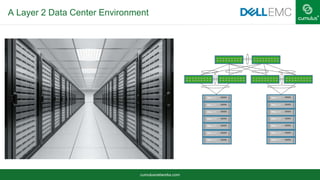
A Layer 2 Data Center Environment
cumulusnetworks.com
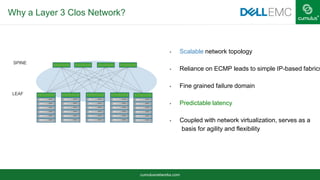
Why a Layer 3 Clos Network?
 Scalable network topology
 Reliance on ECMP leads to simple IP-based fabrics
 Fine grained failure domain
 Predictable latency
 Coupled with network virtualization, serves as a
basis for agility and flexibility
SPINE
LEAF
cumulusnetworks.com
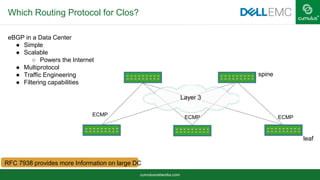
Which Routing Protocol for Clos?
eBGP in a Data Center
● Simple
● Scalable
○ Powers the Internet
● Multiprotocol
● Traffic Engineering
● Filtering capabilities
spine
leaf
ECMP
ECMP ECMP
Layer 3
RFC 7938 provides more Information on large DC
cumulusnetworks.com
2 Tier Clos with eBGP
leaf
AS65100
AS65200 AS65201 AS65203 AS65204AS65202
spine
Layer 3
cumulusnetworks.com
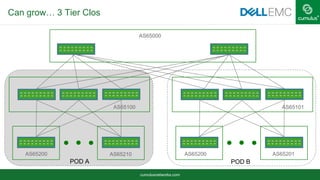
Can grow… 3 Tier Clos
AS65000
AS65100
AS65200 AS65210
POD A
AS65200 AS65201
AS65101
POD B
cumulusnetworks.com
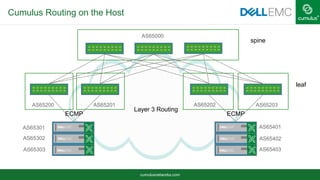
Layer 3 Routing
Cumulus Routing on the Host
spine
leaf
ECMP ECMP
AS65301
AS65302
AS65303
AS65401
AS65402
AS65403
AS65000
AS65200 AS65202AS65201 AS65203
cumulusnetworks.com
Automating the Clos Topology
Many switches to configure
Automation is the same for 10 switches or 100 switches
Same automation for switches and hosts
Want cookie-cutter configuration
• As little node specific variation as possible
Cumulus Quagga BGP unnumbered configuration is very
simple
cumulusnetworks.com
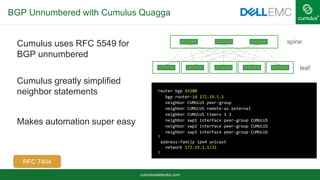
BGP Unnumbered with Cumulus Quagga
Cumulus uses RFC 5549 for
BGP unnumbered
Cumulus greatly simplified
neighbor statements
Makes automation super easy
router bgp 65200
bgp router-id 172.19.1.1
neighbor CUMULUS peer-group
neighbor CUMULUS remote-as external
neighbor CUMULUS timers 1 3
neighbor swp1 interface peer-group CUMULUS
neighbor swp2 interface peer-group CUMULUS
neighbor swp3 interface peer-group CUMULUS
!
address-family ipv4 unicast
network 172.19.1.1/32
!
leaf
spine
RFC 7404
cumulusnetworks.com
RFC 5549 in Action
leaf01# sh ip route
Codes: K - kernel route, C - connected, S - static, R - RIP,
O - OSPF, I - IS-IS, B - BGP, P - PIM, T - Table, v - VNC,
V - VPN,
> - selected route, * - FIB route
K>* 0.0.0.0/0 via 192.168.0.254, eth0
B>* 172.16.0.1/32 [20/0] via fe80::4638:39ff:fe00:5c, swp1, 00:08:03
B>* 172.16.0.2/32 [20/0] via fe80::4638:39ff:fe00:2b, swp2, 00:08:03
B>* 172.16.0.3/32 [20/0] via fe80::4638:39ff:fe00:3c, swp3, 00:08:03
C>* 172.16.1.1/32 is directly connected, lo
B>* 172.16.1.2/32 [20/0] via fe80::4638:39ff:fe00:5c, swp1, 00:08:03
* via fe80::4638:39ff:fe00:2b, swp2, 00:08:03
via fe80::4638:39ff:fe00:3c, swp3, 00:08:03
B>* 172.16.1.3/32 [20/0] via fe80::4638:39ff:fe00:5c, swp1, 00:08:03
* via fe80::4638:39ff:fe00:2b, swp2, 00:08:03
via fe80::4638:39ff:fe00:3c, swp3, 00:08:03
cumulusnetworks.com
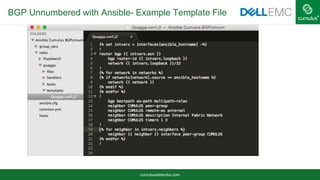
BGP Unnumbered with Ansible- Example Template File
cumulusnetworks.com
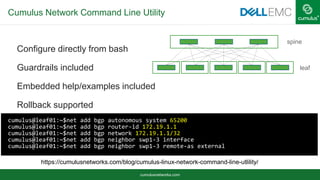
Cumulus Network Command Line Utility
Configure directly from bash
Guardrails included
Embedded help/examples included
Rollback supported
cumulus@leaf01:~$net add bgp autonomous system 65200
cumulus@leaf01:~$net add bgp router-id 172.19.1.1
cumulus@leaf01:~$net add bgp network 172.19.1.1/32
cumulus@leaf01:~$net add bgp neighbor swp1-3 interface
cumulus@leaf01:~$net add bgp neighbor swp1-3 remote-as external
leaf
spine
https://cumulusnetworks.com/blog/cumulus-linux-network-command-line-utlility/
cumulusnetworks.com
Cumulus Quagga Logging
Logs: log file /var/log/quagga/quagga.log
sudo journalctl -f -u quagga
Oct 28 21:31:44 leaf01 quagga[1076]: Starting Quagga monitor daemon: watchquagga.
Oct 28 21:31:44 leaf01 quagga[1076]: Exiting from the script
Oct 28 21:31:44 leaf01 watchquagga[1130]: watchquagga 0.99.24+cl3eau5 watching [zebra bgpd ], mode
[phased zebra restart]
Oct 28 21:31:45 leaf01 watchquagga[1130]: bgpd state -> up : connect succeeded
Oct 28 21:31:45 leaf01 watchquagga[1130]: zebra state -> up : connect succeeded
2016/11/03 16:49:26.613476 BGP: %ADJCHANGE: neighbor swp1 Up
2016/11/03 16:49:26.613527 BGP: %ADJCHANGE: neighbor swp2 Up
2016/11/03 16:49:26.613545 BGP: %ADJCHANGE: neighbor swp3 Up
cumulusnetworks.com
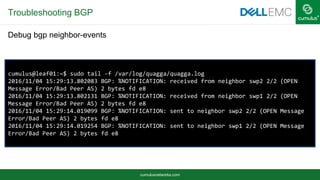
Troubleshooting BGP
Show ip bgp summary
leaf01# show ip bgp summary
BGP router identifier 1.1.1.1, local AS number 65001 vrf-id 0
BGP table version 2
RIB entries 5, using 640 bytes of memory
Peers 2, using 42 KiB of memory
Neighbor V AS MsgRcvd MsgSent TblVer InQ OutQ Up/Down State/PfxRcd
spine01(swp1) 4 65000 99 100 0 0 0 00:04:37 1
spine02(swp2) 4 65000 46 48 0 0 0 00:02:02 1
spine03(swp3) 4 65000 87 88 0 0 0 00:01:04 1
Total number of neighbors 3
leaf01# show ip bgp nei spine01
BGP neighbor on swp1: fe80::4638:39ff:fe00:5c, remote AS 65000, local AS 65001, external link
Hostname: spine01
BGP version 4, remote router ID 10.10.2.1
[snip]
cumulusnetworks.com
Troubleshooting BGP
cumulus@leaf01:~$ sudo tail -f /var/log/quagga/quagga.log
2016/11/04 15:29:13.802083 BGP: %NOTIFICATION: received from neighbor swp2 2/2 (OPEN
Message Error/Bad Peer AS) 2 bytes fd e8
2016/11/04 15:29:13.802131 BGP: %NOTIFICATION: received from neighbor swp1 2/2 (OPEN
Message Error/Bad Peer AS) 2 bytes fd e8
2016/11/04 15:29:14.019099 BGP: %NOTIFICATION: sent to neighbor swp2 2/2 (OPEN Message
Error/Bad Peer AS) 2 bytes fd e8
2016/11/04 15:29:14.019254 BGP: %NOTIFICATION: sent to neighbor swp1 2/2 (OPEN Message
Error/Bad Peer AS) 2 bytes fd e8
Debug bgp neighbor-events
cumulusnetworks.com
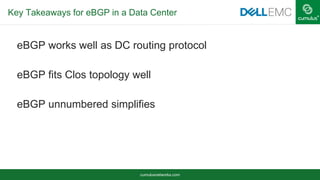
Key Takeaways for eBGP in a Data Center
eBGP works well as DC routing protocol
eBGP fits Clos topology well
eBGP unnumbered simplifies
cumulusnetworks.com
Network Virtualization Technologies, such as VXLAN can create
Layer 2 Overlays over the Layer 3 fabric
Openstack requires VXLAN for server communications over Layer 3
Fitting Existing Applications in Layer 3 Fabric
leaf
spine
cumulusnetworks.com
Solution Deployment
cumulusnetworks.com
Dell EMC Open Networking
Optional 3rd party SDN/ NVO
solutions
Standard orchestration &
automation tools
Any networking OS
Open standard hardware
Merchant silicon
ON Switches
OrchestrationAutomation Monitoring
NetOpsDevOps
OS10
Software defined data center through
open/disaggregated networking
cumulusnetworks.com
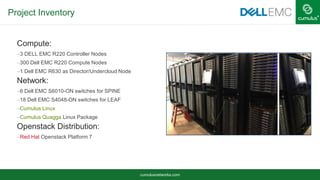
Project Inventory
Compute:
–3 DELL EMC R220 Controller Nodes
–300 Dell EMC R220 Compute Nodes
–1 Dell EMC R630 as Director/Undercloud Node
Network:
–6 Dell EMC S6010-ON switches for SPINE
–18 Dell EMC S4048-ON switches for LEAF
–Cumulus Linux
–Cumulus Quagga Linux Package
Openstack Distribution:
–Red Hat Openstack Platform 7
cumulusnetworks.com
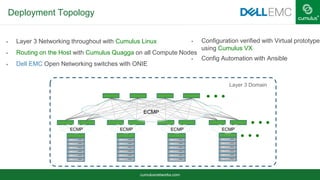
Deployment Topology
 Layer 3 Networking throughout with Cumulus Linux
 Routing on the Host with Cumulus Quagga on all Compute Nodes
 Dell EMC Open Networking switches with ONIE
 Configuration verified with Virtual prototype
using Cumulus VX
 Config Automation with Ansible
ECMP
ECMPECMPECMPECMP
Layer 3 Domain
cumulusnetworks.com
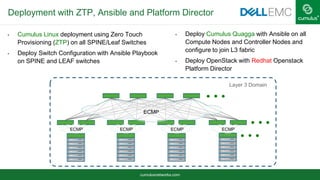
Deployment with ZTP, Ansible and Platform Director
 Cumulus Linux deployment using Zero Touch
Provisioning (ZTP) on all SPINE/Leaf Switches
 Deploy Switch Configuration with Ansible Playbook
on SPINE and LEAF switches
 Deploy Cumulus Quagga with Ansible on all
Compute Nodes and Controller Nodes and
configure to join L3 fabric
 Deploy OpenStack with Redhat Openstack
Platform Director
ECMP
ECMPECMPECMPECMP
Layer 3 Domain
cumulusnetworks.com
Automation with Ansible
cumulusnetworks.com
Automation with Ansible
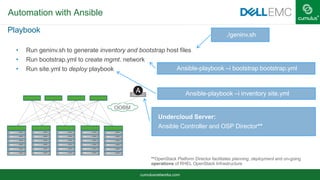
Playbook
• Run geninv.sh to generate inventory and bootstrap host files
• Run bootstrap.yml to create mgmt. network
• Run site.yml to deploy playbook
./geninv.sh
Ansible-playbook –i bootstrap bootstrap.yml
Ansible-playbook –i inventory site.yml
Undercloud Server:
Ansible Controller and OSP Director**
**OpenStack Platform Director facilitates planning, deployment and on-going
operations of RHEL OpenStack Infrastructure
OOBM
cumulusnetworks.com
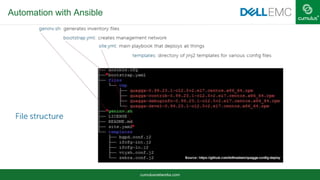
Automation with Ansible
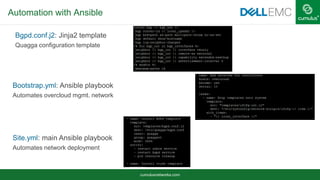
Bgpd.conf.j2: Jinja2 template
Quagga configuration template
Site.yml: main Ansible playbook
Automates network deployment
Bootstrap.yml: Ansible playbook
Automates overcloud mgmt. network
cumulusnetworks.com
Deployment Results
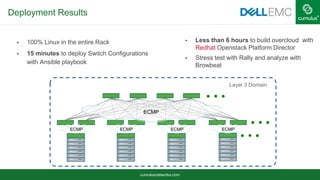
• 100% Linux in the entire Rack
• 15 minutes to deploy Switch Configurations
with Ansible playbook
• Less than 6 hours to build overcloud with
Redhat Openstack Platform Director
• Stress test with Rally and analyze with
Browbeat
ECMP
ECMPECMPECMPECMP
Layer 3 Domain
cumulusnetworks.com
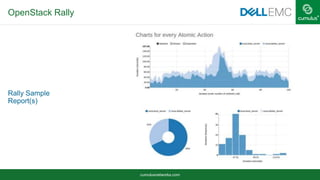
OpenStack Rally
Rally Sample
Report(s)
cumulusnetworks.com
Openstack Deployment Benefits with Routing on the Host
Keeps the Network Simple
Only using Layer 3 Routing
Advertise loopbacks only
No ML2 Driver needed on the switches
VXLAN VTEP created Host to Host through Neutron
cumulusnetworks.com
Thank You!
© 2015 Cumulus Networks. Cumulus Networks, the Cumulus Networks Logo, and Cumulus Linux are trademarks or registered trademarks of Cumulus Networks, Inc. or its affiliates in
the U.S. and other countries. Other names may be trademarks of their respective owners. The registered trademark Linux® is used pursuant to a sublicense from LMI, the exclusive
licensee of Linus Torvalds, owner of the mark on a world-wide basis.

Building Scalable Data Center Networks

  • 1.
    cumulusnetworks.com Ravi Nittur -Dell EMC Diane Patton - Cumulus Networks Building a Scalable Network for Private Cloud with Layer 3 and BGP
  • 2.
    cumulusnetworks.com A Layer 2Data Center Environment
  • 3.
    cumulusnetworks.com Why a Layer3 Clos Network?  Scalable network topology  Reliance on ECMP leads to simple IP-based fabrics  Fine grained failure domain  Predictable latency  Coupled with network virtualization, serves as a basis for agility and flexibility SPINE LEAF
  • 4.
    cumulusnetworks.com Which Routing Protocolfor Clos? eBGP in a Data Center ● Simple ● Scalable ○ Powers the Internet ● Multiprotocol ● Traffic Engineering ● Filtering capabilities spine leaf ECMP ECMP ECMP Layer 3 RFC 7938 provides more Information on large DC
  • 5.
    cumulusnetworks.com 2 Tier Closwith eBGP leaf AS65100 AS65200 AS65201 AS65203 AS65204AS65202 spine Layer 3
  • 6.
    cumulusnetworks.com Can grow… 3Tier Clos AS65000 AS65100 AS65200 AS65210 POD A AS65200 AS65201 AS65101 POD B
  • 7.
    cumulusnetworks.com Layer 3 Routing CumulusRouting on the Host spine leaf ECMP ECMP AS65301 AS65302 AS65303 AS65401 AS65402 AS65403 AS65000 AS65200 AS65202AS65201 AS65203
  • 8.
    cumulusnetworks.com Automating the ClosTopology Many switches to configure Automation is the same for 10 switches or 100 switches Same automation for switches and hosts Want cookie-cutter configuration • As little node specific variation as possible Cumulus Quagga BGP unnumbered configuration is very simple
  • 9.
    cumulusnetworks.com BGP Unnumbered withCumulus Quagga Cumulus uses RFC 5549 for BGP unnumbered Cumulus greatly simplified neighbor statements Makes automation super easy router bgp 65200 bgp router-id 172.19.1.1 neighbor CUMULUS peer-group neighbor CUMULUS remote-as external neighbor CUMULUS timers 1 3 neighbor swp1 interface peer-group CUMULUS neighbor swp2 interface peer-group CUMULUS neighbor swp3 interface peer-group CUMULUS ! address-family ipv4 unicast network 172.19.1.1/32 ! leaf spine RFC 7404
  • 10.
    cumulusnetworks.com RFC 5549 inAction leaf01# sh ip route Codes: K - kernel route, C - connected, S - static, R - RIP, O - OSPF, I - IS-IS, B - BGP, P - PIM, T - Table, v - VNC, V - VPN, > - selected route, * - FIB route K>* 0.0.0.0/0 via 192.168.0.254, eth0 B>* 172.16.0.1/32 [20/0] via fe80::4638:39ff:fe00:5c, swp1, 00:08:03 B>* 172.16.0.2/32 [20/0] via fe80::4638:39ff:fe00:2b, swp2, 00:08:03 B>* 172.16.0.3/32 [20/0] via fe80::4638:39ff:fe00:3c, swp3, 00:08:03 C>* 172.16.1.1/32 is directly connected, lo B>* 172.16.1.2/32 [20/0] via fe80::4638:39ff:fe00:5c, swp1, 00:08:03 * via fe80::4638:39ff:fe00:2b, swp2, 00:08:03 via fe80::4638:39ff:fe00:3c, swp3, 00:08:03 B>* 172.16.1.3/32 [20/0] via fe80::4638:39ff:fe00:5c, swp1, 00:08:03 * via fe80::4638:39ff:fe00:2b, swp2, 00:08:03 via fe80::4638:39ff:fe00:3c, swp3, 00:08:03
  • 11.
    cumulusnetworks.com BGP Unnumbered withAnsible- Example Template File
  • 12.
    cumulusnetworks.com Cumulus Network CommandLine Utility Configure directly from bash Guardrails included Embedded help/examples included Rollback supported cumulus@leaf01:~$net add bgp autonomous system 65200 cumulus@leaf01:~$net add bgp router-id 172.19.1.1 cumulus@leaf01:~$net add bgp network 172.19.1.1/32 cumulus@leaf01:~$net add bgp neighbor swp1-3 interface cumulus@leaf01:~$net add bgp neighbor swp1-3 remote-as external leaf spine https://cumulusnetworks.com/blog/cumulus-linux-network-command-line-utlility/
  • 13.
    cumulusnetworks.com Cumulus Quagga Logging Logs:log file /var/log/quagga/quagga.log sudo journalctl -f -u quagga Oct 28 21:31:44 leaf01 quagga[1076]: Starting Quagga monitor daemon: watchquagga. Oct 28 21:31:44 leaf01 quagga[1076]: Exiting from the script Oct 28 21:31:44 leaf01 watchquagga[1130]: watchquagga 0.99.24+cl3eau5 watching [zebra bgpd ], mode [phased zebra restart] Oct 28 21:31:45 leaf01 watchquagga[1130]: bgpd state -> up : connect succeeded Oct 28 21:31:45 leaf01 watchquagga[1130]: zebra state -> up : connect succeeded 2016/11/03 16:49:26.613476 BGP: %ADJCHANGE: neighbor swp1 Up 2016/11/03 16:49:26.613527 BGP: %ADJCHANGE: neighbor swp2 Up 2016/11/03 16:49:26.613545 BGP: %ADJCHANGE: neighbor swp3 Up
  • 14.
    cumulusnetworks.com Troubleshooting BGP Show ipbgp summary leaf01# show ip bgp summary BGP router identifier 1.1.1.1, local AS number 65001 vrf-id 0 BGP table version 2 RIB entries 5, using 640 bytes of memory Peers 2, using 42 KiB of memory Neighbor V AS MsgRcvd MsgSent TblVer InQ OutQ Up/Down State/PfxRcd spine01(swp1) 4 65000 99 100 0 0 0 00:04:37 1 spine02(swp2) 4 65000 46 48 0 0 0 00:02:02 1 spine03(swp3) 4 65000 87 88 0 0 0 00:01:04 1 Total number of neighbors 3 leaf01# show ip bgp nei spine01 BGP neighbor on swp1: fe80::4638:39ff:fe00:5c, remote AS 65000, local AS 65001, external link Hostname: spine01 BGP version 4, remote router ID 10.10.2.1 [snip]
  • 15.
    cumulusnetworks.com Troubleshooting BGP cumulus@leaf01:~$ sudotail -f /var/log/quagga/quagga.log 2016/11/04 15:29:13.802083 BGP: %NOTIFICATION: received from neighbor swp2 2/2 (OPEN Message Error/Bad Peer AS) 2 bytes fd e8 2016/11/04 15:29:13.802131 BGP: %NOTIFICATION: received from neighbor swp1 2/2 (OPEN Message Error/Bad Peer AS) 2 bytes fd e8 2016/11/04 15:29:14.019099 BGP: %NOTIFICATION: sent to neighbor swp2 2/2 (OPEN Message Error/Bad Peer AS) 2 bytes fd e8 2016/11/04 15:29:14.019254 BGP: %NOTIFICATION: sent to neighbor swp1 2/2 (OPEN Message Error/Bad Peer AS) 2 bytes fd e8 Debug bgp neighbor-events
  • 16.
    cumulusnetworks.com Key Takeaways foreBGP in a Data Center eBGP works well as DC routing protocol eBGP fits Clos topology well eBGP unnumbered simplifies
  • 17.
    cumulusnetworks.com Network Virtualization Technologies,such as VXLAN can create Layer 2 Overlays over the Layer 3 fabric Openstack requires VXLAN for server communications over Layer 3 Fitting Existing Applications in Layer 3 Fabric leaf spine
  • 18.
  • 19.
    cumulusnetworks.com Dell EMC OpenNetworking Optional 3rd party SDN/ NVO solutions Standard orchestration & automation tools Any networking OS Open standard hardware Merchant silicon ON Switches OrchestrationAutomation Monitoring NetOpsDevOps OS10 Software defined data center through open/disaggregated networking
  • 20.
    cumulusnetworks.com Project Inventory Compute: –3 DELLEMC R220 Controller Nodes –300 Dell EMC R220 Compute Nodes –1 Dell EMC R630 as Director/Undercloud Node Network: –6 Dell EMC S6010-ON switches for SPINE –18 Dell EMC S4048-ON switches for LEAF –Cumulus Linux –Cumulus Quagga Linux Package Openstack Distribution: –Red Hat Openstack Platform 7
  • 21.
    cumulusnetworks.com Deployment Topology  Layer3 Networking throughout with Cumulus Linux  Routing on the Host with Cumulus Quagga on all Compute Nodes  Dell EMC Open Networking switches with ONIE  Configuration verified with Virtual prototype using Cumulus VX  Config Automation with Ansible ECMP ECMPECMPECMPECMP Layer 3 Domain
  • 22.
    cumulusnetworks.com Deployment with ZTP,Ansible and Platform Director  Cumulus Linux deployment using Zero Touch Provisioning (ZTP) on all SPINE/Leaf Switches  Deploy Switch Configuration with Ansible Playbook on SPINE and LEAF switches  Deploy Cumulus Quagga with Ansible on all Compute Nodes and Controller Nodes and configure to join L3 fabric  Deploy OpenStack with Redhat Openstack Platform Director ECMP ECMPECMPECMPECMP Layer 3 Domain
  • 23.
  • 24.
    cumulusnetworks.com Automation with Ansible Playbook •Run geninv.sh to generate inventory and bootstrap host files • Run bootstrap.yml to create mgmt. network • Run site.yml to deploy playbook ./geninv.sh Ansible-playbook –i bootstrap bootstrap.yml Ansible-playbook –i inventory site.yml Undercloud Server: Ansible Controller and OSP Director** **OpenStack Platform Director facilitates planning, deployment and on-going operations of RHEL OpenStack Infrastructure OOBM
  • 25.
    cumulusnetworks.com Automation with Ansible Bgpd.conf.j2:Jinja2 template Quagga configuration template Site.yml: main Ansible playbook Automates network deployment Bootstrap.yml: Ansible playbook Automates overcloud mgmt. network
  • 26.
    cumulusnetworks.com Deployment Results • 100%Linux in the entire Rack • 15 minutes to deploy Switch Configurations with Ansible playbook • Less than 6 hours to build overcloud with Redhat Openstack Platform Director • Stress test with Rally and analyze with Browbeat ECMP ECMPECMPECMPECMP Layer 3 Domain
  • 27.
  • 28.
    cumulusnetworks.com Openstack Deployment Benefitswith Routing on the Host Keeps the Network Simple Only using Layer 3 Routing Advertise loopbacks only No ML2 Driver needed on the switches VXLAN VTEP created Host to Host through Neutron
  • 29.
    cumulusnetworks.com Thank You! © 2015Cumulus Networks. Cumulus Networks, the Cumulus Networks Logo, and Cumulus Linux are trademarks or registered trademarks of Cumulus Networks, Inc. or its affiliates in the U.S. and other countries. Other names may be trademarks of their respective owners. The registered trademark Linux® is used pursuant to a sublicense from LMI, the exclusive licensee of Linus Torvalds, owner of the mark on a world-wide basis.

Editor's Notes

  • #2 Thank you Vashuha. I’m Diane Patton and with me is Ravi Nittur from Dell/EMC. Today we are going to cover the benefits of using eBGP in a Data Center, along with deployment scenerios and the setup and results of a real live POC we did with RedHat using Openstack. By the end of the webinar, we are hoping you will learn why eBGP is a RP of choice in the data center, how to deploy it, along with one possible use case.
  • #3 Many data centers today are Layer 2 networks. Generally they have servers that are dual homed to 2 top of rack switches, which are also often called leaf switches. To provide redundancy and increase the BW, MLAG is often used and spanning tree is deployed. Now, mLAG is a propiretary protocol but it does allow us to be able to utilitze both of these ToR switches by fooling spanning tree into thinking there is only one ToR, thereby SPT won’t block one of these links. However, in order for this to work, the 2 ToR must be connected together via peer-links, which utiltze additional ports. For connectivity between racks, a spine layer exists and the same conecpt is used there too. To provide mobility, VLANS are often used throughout the data center and this increases the failure and broadcast domains. This design does not scale well and there can be issues with it. Not as stable either. Large failure domain, no standards based. Troubleshooting – trace route
  • #4 3
  • #5 Now, which RP to use? We could use link-state protocols like OSPF or ISIS. Link-state IGP implements adjacency information, maintenance and flow control .. On the other hand event propagation scope of link state is entire area, regardless of failure type. BGP just relies on TCP and underlaying transport and the flooding overhead is less BGP flooding overhead is less Greacefully direct traffic off a switch when doing an upgrade.
  • #6 Mention showing 3 spines to show that routing and not MLAG is being used. Same AS on one spine helps with route convergence, makes convergence faster. However, the spines cannot talk with each other. The reason you cannot use this is if the spines need to communicate with each other, like in the case if you are running multicast along with MSDP for RP Anycast, or in the case of Cumulus LNV. If you put spines in different Ass can get around convergence issues by implementing a route policy to only announce locally originated routes on leafs and spine loopback (BGP speakers will drop if sees same AS in path) Each ToR in different AS Each as for troubleshooting – can watch AS path One AS for spine to reduce path hunting Using private as 1023 AS’s unless use 4 byte Ass About 95K AS private AS numbers S ad then strip at the edge remote-private-AS
  • #7 Rememeber to mention allow-as 1 as config for this option. Mention that I show 3 to show it’s not pairs, like you would with MLAG Mention how Pod A is what we showed on the prior slide. Can easily grow by adding Super spine layer to the setup. AS numbers remain the same on Pod A – so easy scale. RFC 6793 – BGP Support for 4 Octet AS numbers
  • #8 Reason each host has it’s own AS is because this is what we did for the Openstack Redhat/Dell/Cumulus trial. Will mention this is not necessary. Routing all the way to the host eliminates SPT, MLAG completely, ECMP used up to the leafs, adds mobility back. 4 octet ASNs if needed Advantage to move VTEP directly on the host, as we will talk about later during the deployment section If both ToR in different AS, need bgp bestpath as-path multipath-relax command Bgp always compare med No SPT – no MLAG, ECMP – no max number ToR switches Eliminates peer-link ports on leaf swithes One more port
  • #9 The downside of any clos topology is that there are many switches to manage, however if automation is used then it’s the same for 10 swithe
  • #10  Mention the title of RFC 5549 – what is it for, how it works, Menotine you don’t need ipv6 routing tfor this to work Advertising IPv4 Network Layer Reachability Information with an IPv6 Next Hop - don’t need to configure IPv6 address because it uses the automatic link-local address Config in VTYSH Uses IPv6 Router Advertisement to learn neighbors lin local address Reduces FIB size Reduces attack vector since only single reachable address As opposed to as many addresses as there are links See RFC 7404 for more details IETF, other network vendors also advocating the use of LLA: https://blog.apnic.net/2016/02/16/change-of-paradigm-with-ipv6-no-global-addresses-on-router-interfaces/
  • #11 Use of ipv4 link local address to make up next hop
  • #13 If you choose to not use automation, we will be coming out with a new utitily, NCLU. This adds a easy to use command line to cumullus Linux. You never leave bash, so it interoperates with the traditinoal way of doing things with Linux, but it’s nice becaue guardrails are inlcude, meaning if you make a typo you are notified and even a suggestion is made. Examples are included within, for example if you type net example bgp unnum – you will see an entier setup and config commands needed to achieve it.
  • #14 Rsyslog sends to server SNMP Kernel log messages Watchquagga watches the quagga daemons. -f follow –u unit (follow quagga) In this mode, whenever a single daemon hangs or crashes, the given command is used to restart this daemon only. The only exception is the zebra daemon; in this case, the following steps are taken: (1) all other daemons are stopped, (2) zebra is restarted, and (3) other daemons are started again. Example usage: watchquagga -adz -r '/sbin/service %s restart' \ -s '/sbin/service %s start' \ -k '/sbin/service %s stop' zebra ospfd bgpd
  • #15 Say which tier was this command Mention hostnames are used. Etc.
  • #16 Make sure font is consolas Similar to a term mon. In this case, I purposely configured the wrong AS – configured internal when the AS number was external. Allows you to see as things are added to the log file.
  • #18 Describe how VXLAN works Run VTEP on the host itself – no changes on underlay – this is what we did for the openstack trial.
  • #19 Route-map set-src permit 10 set src X Ip prototocl bgp
  • #20 Virtualization has revolutionized data centers, facilitating extraordinary gains in efficiency and ROI. A similar transformation is underway in networking. Break free from the proprietary restrictions of single vendor network platforms, with switches based on open standards. By adopting a Dell Open Networking platform, you can choose an operating system (OS) that’s best suited for your needs. Gaining this level of network control and flexibility is a requirement for software-defined networking (SDN) and an important step toward realizing the ultimate agility a software-defined data center delivers. You’ll notice that the hardware platforms for traditional and Open-Networking are the same. You choose the hardware that fits your requirements, whether its 1gb or 100gb, or anywhere in between with our multi-rate platforms and choose the software that best fits your requirements.
  • #27 Openstack Platform Director is based on project TripleO that provides toolset for installing and managing a complete OpenStack environment. Rally is a benchmarking and profiling openstack tool used for – checking how openstack works at scale/stress Browbeat is a performance tuning and analysis tool for openstack [ open source/free]. Analyze and tune cloud for optimal performance, create Rally workloads for performance and scale testing.