Building Design Systems
That Work for Design and
Dev
SCALING BEST PRACTICES
Parisa Bazl
Head of UX
May 2024 © Commvault 2024
© Commvault 2023 2
[redacted screenshot of v15]
© Commvault 2023 3
[redacted screenshot of v32]
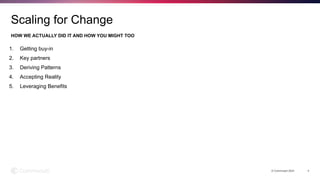
1. Getting buy-in
2. Key partners
3. Deriving Patterns
4. Accepting Reality
5. Leveraging Benefits
HOW WE ACTUALLY DID IT AND HOW YOU MIGHT TOO
© Commvault 2024 4
Scaling for Change
Getting Buy-in
© Commvault 2024 5
Everybody’s opportunity but mostly our problem
© Commvault 2024 6
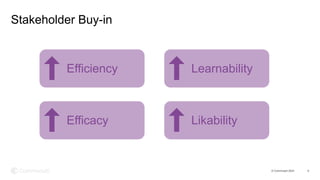
Stakeholder Buy-in
Efficiency
Efficacy
Learnability
Likability
© Commvault 2024 7
Developer Buy-in
SCALE
SCALE
SCALE
SCALE
SCALE
© Commvault 2024 8
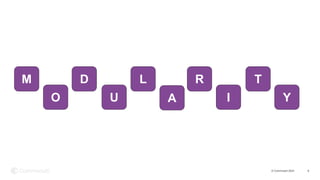
M
O
D
I
U
L
A
R T
Y
Key Partners
© Commvault 2024 9
We gotta start somewhere
© Commvault 2024 10
The Right People
© Commvault 2024 11
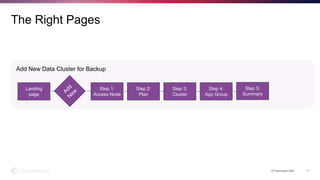
The Right Pages
Landing
page
Add
N
ew
Step 1:
Access Node
Step 2:
Plan
Step 3:
Cluster
Step 4:
App Group
Step 5:
Summary
Add New Data Cluster for Backup
Deriving Patterns
© Commvault 2024 12
Abstracting example pages into replicable templates and flows
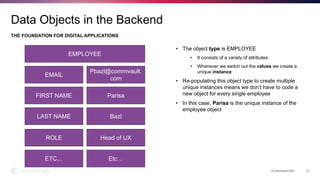
• The object type is EMPLOYEE
• It consists of a variety of attributes
• Whenever we switch out the values we create a
unique instance
• Re-populating this object type to create multiple
unique instances means we don’t have to code a
new object for every single employee
• In this case, Parisa is the unique instance of the
employee object
THE FOUNDATION FOR DIGITAL APPLICATIONS
© Commvault 2024 13
Data Objects in the Backend
EMPLOYEE
EMAIL
Pbazl@commvault.
com
FIRST NAME Parisa
LAST NAME Bazl
ROLE Head of UX
ETC… Etc…
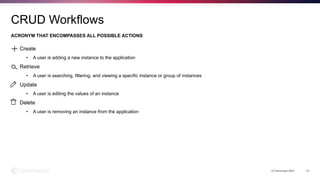
Create
• A user is adding a new instance to the application
Retrieve
• A user is searching, filtering, and viewing a specific instance or group of instances
Update
• A user is editing the values of an instance
Delete
• A user is removing an instance from the application
ACRONYM THAT ENCOMPASSES ALL POSSIBLE ACTIONS
© Commvault 2024 14
CRUD Workflows
[redacted screenshot of delete
confirmation]
[redacted screenshot of modal]
[redacted screenshot of grid]
[redacted screenshot of wizard]
Viewing group of clusters = Retrieving an object set
© Commvault 2024 15
Data Objects in the Front-end
Configuring for backup = Creating an object
Deleting a plan= Deleting an object
Editing cluster details = Updating an object
© Commvault 2024 16
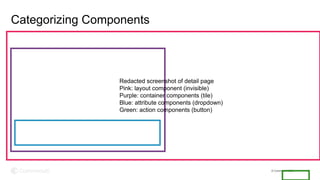
Categorizing Components
Redacted screenshot of detail page
Pink: layout component (invisible)
Purple: container components (tile)
Blue: attribute components (dropdown)
Green: action components (button)
© Commvault 2024 17
© Commvault 2024 18
Accepting Reality
© Commvault 2024 19
Creating opportunities and overcoming challenges
© Commvault 2023 20
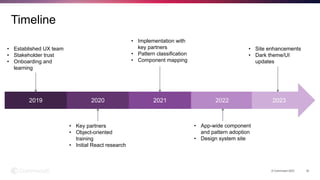
Timeline
2019 2020 2021 2022 2023
• Established UX team
• Stakeholder trust
• Onboarding and
learning
• Key partners
• Object-oriented
training
• Initial React research
• Implementation with
key partners
• Pattern classification
• Component mapping
• App-wide component
and pattern adoption
• Design system site
• Site enhancements
• Dark theme/UI
updates
© Commvault 2024 21
[redacted screenshot of page with no page title]
i.e. you won’t win every battle
© Commvault 2024 22
[redacted screenshot of page with slightly different components]
i.e. some teams take longer and so the app may have slightly different UX throughout
Leveraging Benefits
© Commvault 2024 23
Creating opportunities and overcoming challenges
© Commvault 2024 24
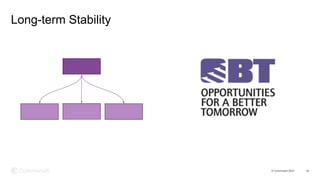
Long-term Stability
Thank You
© Commvault 2024

Building Design Systems that Work for Design and Development

  • 1.
    Building Design Systems ThatWork for Design and Dev SCALING BEST PRACTICES Parisa Bazl Head of UX May 2024 © Commvault 2024
  • 2.
    © Commvault 20232 [redacted screenshot of v15]
  • 3.
    © Commvault 20233 [redacted screenshot of v32]
  • 4.
    1. Getting buy-in 2.Key partners 3. Deriving Patterns 4. Accepting Reality 5. Leveraging Benefits HOW WE ACTUALLY DID IT AND HOW YOU MIGHT TOO © Commvault 2024 4 Scaling for Change
  • 5.
    Getting Buy-in © Commvault2024 5 Everybody’s opportunity but mostly our problem
  • 6.
    © Commvault 20246 Stakeholder Buy-in Efficiency Efficacy Learnability Likability
  • 7.
    © Commvault 20247 Developer Buy-in SCALE SCALE SCALE SCALE SCALE
  • 8.
    © Commvault 20248 M O D I U L A R T Y
  • 9.
    Key Partners © Commvault2024 9 We gotta start somewhere
  • 10.
    © Commvault 202410 The Right People
  • 11.
    © Commvault 202411 The Right Pages Landing page Add N ew Step 1: Access Node Step 2: Plan Step 3: Cluster Step 4: App Group Step 5: Summary Add New Data Cluster for Backup
  • 12.
    Deriving Patterns © Commvault2024 12 Abstracting example pages into replicable templates and flows
  • 13.
    • The objecttype is EMPLOYEE • It consists of a variety of attributes • Whenever we switch out the values we create a unique instance • Re-populating this object type to create multiple unique instances means we don’t have to code a new object for every single employee • In this case, Parisa is the unique instance of the employee object THE FOUNDATION FOR DIGITAL APPLICATIONS © Commvault 2024 13 Data Objects in the Backend EMPLOYEE EMAIL Pbazl@commvault. com FIRST NAME Parisa LAST NAME Bazl ROLE Head of UX ETC… Etc…
  • 14.
    Create • A useris adding a new instance to the application Retrieve • A user is searching, filtering, and viewing a specific instance or group of instances Update • A user is editing the values of an instance Delete • A user is removing an instance from the application ACRONYM THAT ENCOMPASSES ALL POSSIBLE ACTIONS © Commvault 2024 14 CRUD Workflows
  • 15.
    [redacted screenshot ofdelete confirmation] [redacted screenshot of modal] [redacted screenshot of grid] [redacted screenshot of wizard] Viewing group of clusters = Retrieving an object set © Commvault 2024 15 Data Objects in the Front-end Configuring for backup = Creating an object Deleting a plan= Deleting an object Editing cluster details = Updating an object
  • 16.
    © Commvault 202416 Categorizing Components Redacted screenshot of detail page Pink: layout component (invisible) Purple: container components (tile) Blue: attribute components (dropdown) Green: action components (button)
  • 17.
  • 18.
  • 19.
    Accepting Reality © Commvault2024 19 Creating opportunities and overcoming challenges
  • 20.
    © Commvault 202320 Timeline 2019 2020 2021 2022 2023 • Established UX team • Stakeholder trust • Onboarding and learning • Key partners • Object-oriented training • Initial React research • Implementation with key partners • Pattern classification • Component mapping • App-wide component and pattern adoption • Design system site • Site enhancements • Dark theme/UI updates
  • 21.
    © Commvault 202421 [redacted screenshot of page with no page title] i.e. you won’t win every battle
  • 22.
    © Commvault 202422 [redacted screenshot of page with slightly different components] i.e. some teams take longer and so the app may have slightly different UX throughout
  • 23.
    Leveraging Benefits © Commvault2024 23 Creating opportunities and overcoming challenges
  • 24.
    © Commvault 202424 Long-term Stability
  • 25.