M402K2
DISCUSS GRAPHICAL USER-
INTERFACE (GUI) DESIGN
M402K2.2
Describe the building blocks
of GUI
Windows
Prinsip asas penghurufan… Samb.
Human-Computer Interaction
The Menu System
Dialog Windows
Smartening up Applications
Windows
Prinsip asas penghurufan… Samb.
Human-Computer Interaction
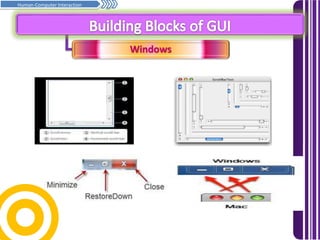
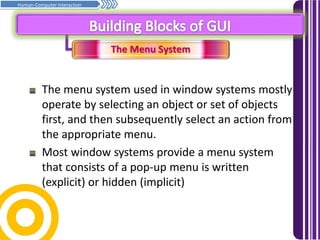
The window is a rectangular display that can be changed,
drawn freely on the screen. In most circumstances, each
views or views can be changed with scrolling and editing
Most window systems provide a standard window border
(border area) to control the window itself, and the
content area to allow the user to interact with the
content.
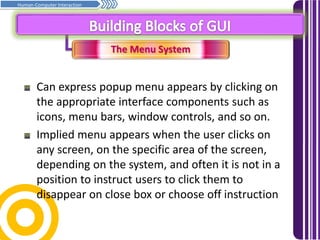
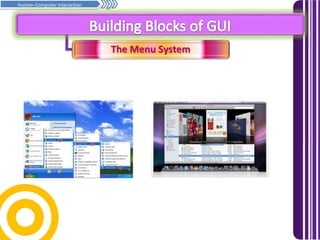
The controls are standard window close, minimize,
maximize, revert to previous, system menu and scroll bars
Windows
Prinsip asas penghurufan… Samb.
Human-Computer Interaction
The Menu System
Prinsip asas penghurufan… Samb.
Human-Computer Interaction
The menu system used in window systems mostly
operate by selecting an object or set of objects
first, and then subsequently select an action from
the appropriate menu.
Most window systems provide a menu system
that consists of a pop-up menu is written
(explicit) or hidden (implicit)
The Menu System
Prinsip asas penghurufan… Samb.
Human-Computer Interaction
Can express popup menu appears by clicking on
the appropriate interface components such as
icons, menu bars, window controls, and so on.
Implied menu appears when the user clicks on
any screen, on the specific area of ​​the screen,
depending on the system, and often it is not in a
position to instruct users to click them to
disappear on close box or choose off instruction
The Menu System
Prinsip asas penghurufan… Samb.
Human-Computer Interaction
Dialog Windows
Prinsip asas penghurufan… Samb.
Human-Computer Interaction
Graphical Control dialog box (or dialog box) is a
small window that provides information to the
user and ask the user to give a response.
The dialogue box is classified as "capital" or
"modeless", depending on whether the block
interaction with the software to start a dialogue
or not. The type of dialogue box that is displayed
is depending on user interaction required.
Dialog Windows
Prinsip asas penghurufan… Samb.
Human-Computer Interaction
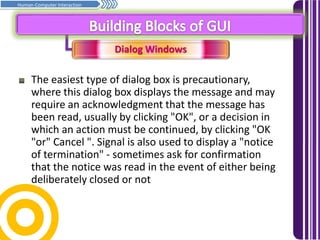
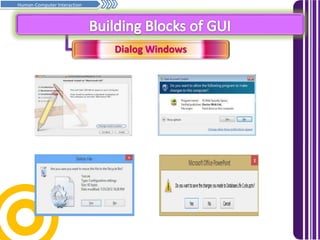
The easiest type of dialog box is precautionary,
where this dialog box displays the message and may
require an acknowledgment that the message has
been read, usually by clicking "OK", or a decision in
which an action must be continued, by clicking "OK
"or" Cancel ". Signal is also used to display a "notice
of termination" - sometimes ask for confirmation
that the notice was read in the event of either being
deliberately closed or not
Dialog Windows
Prinsip asas penghurufan… Samb.
Human-Computer Interaction
Smartening up Applications
Prinsip asas penghurufan… Samb.
Human-Computer Interaction
Tugasan K402K2/K2.2/KK1/E1
Prinsip asas penghurufan… Samb.
Human-Computer Interaction
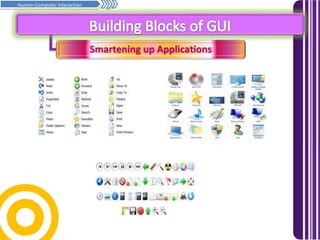
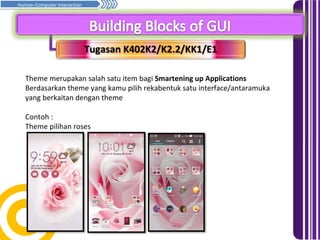
Theme merupakan salah satu item bagi Smartening up Applications
Berdasarkan theme yang kamu pilih rekabentuk satu interface/antaramuka
yang berkaitan dengan theme
Contoh :
Theme pilihan roses

Building blocks of gui

  • 1.
    M402K2 DISCUSS GRAPHICAL USER- INTERFACE(GUI) DESIGN M402K2.2 Describe the building blocks of GUI
  • 2.
    Windows Prinsip asas penghurufan…Samb. Human-Computer Interaction The Menu System Dialog Windows Smartening up Applications
  • 3.
    Windows Prinsip asas penghurufan…Samb. Human-Computer Interaction The window is a rectangular display that can be changed, drawn freely on the screen. In most circumstances, each views or views can be changed with scrolling and editing Most window systems provide a standard window border (border area) to control the window itself, and the content area to allow the user to interact with the content. The controls are standard window close, minimize, maximize, revert to previous, system menu and scroll bars
  • 4.
    Windows Prinsip asas penghurufan…Samb. Human-Computer Interaction
  • 5.
    The Menu System Prinsipasas penghurufan… Samb. Human-Computer Interaction The menu system used in window systems mostly operate by selecting an object or set of objects first, and then subsequently select an action from the appropriate menu. Most window systems provide a menu system that consists of a pop-up menu is written (explicit) or hidden (implicit)
  • 6.
    The Menu System Prinsipasas penghurufan… Samb. Human-Computer Interaction Can express popup menu appears by clicking on the appropriate interface components such as icons, menu bars, window controls, and so on. Implied menu appears when the user clicks on any screen, on the specific area of ​​the screen, depending on the system, and often it is not in a position to instruct users to click them to disappear on close box or choose off instruction
  • 7.
    The Menu System Prinsipasas penghurufan… Samb. Human-Computer Interaction
  • 8.
    Dialog Windows Prinsip asaspenghurufan… Samb. Human-Computer Interaction Graphical Control dialog box (or dialog box) is a small window that provides information to the user and ask the user to give a response. The dialogue box is classified as "capital" or "modeless", depending on whether the block interaction with the software to start a dialogue or not. The type of dialogue box that is displayed is depending on user interaction required.
  • 9.
    Dialog Windows Prinsip asaspenghurufan… Samb. Human-Computer Interaction The easiest type of dialog box is precautionary, where this dialog box displays the message and may require an acknowledgment that the message has been read, usually by clicking "OK", or a decision in which an action must be continued, by clicking "OK "or" Cancel ". Signal is also used to display a "notice of termination" - sometimes ask for confirmation that the notice was read in the event of either being deliberately closed or not
  • 10.
    Dialog Windows Prinsip asaspenghurufan… Samb. Human-Computer Interaction
  • 11.
    Smartening up Applications Prinsipasas penghurufan… Samb. Human-Computer Interaction
  • 12.
    Tugasan K402K2/K2.2/KK1/E1 Prinsip asaspenghurufan… Samb. Human-Computer Interaction Theme merupakan salah satu item bagi Smartening up Applications Berdasarkan theme yang kamu pilih rekabentuk satu interface/antaramuka yang berkaitan dengan theme Contoh : Theme pilihan roses