Software Engineering: 19
User interface Design Elements
Prof Neeraj Bhargava
Vaibhav Khanna
Department of Computer Science
School of Engineering and Systems Sciences
Maharshi Dayanand Saraswati University Ajmer
User-system interaction
• Two problems must be addressed in
interactive systems design
– How should information from the user be
provided to the computer system?
– How should information from the computer
system be presented to the user?
• User interaction and information presentation
may be integrated through a coherent
framework such as a user interface metaphor
Interaction styles
1. Direct manipulation
2. Menu selection
3. Form fill-in
4. Command language
5. Natural language
1. Direct manipulation Advantages
• Users feel in control of the computer and are
less likely to be intimidated by it
• User learning time is relatively short
• Users get immediate feedback on their actions
so mistakes can be quickly detected and
corrected
1. Direct manipulation problems
• The derivation of an appropriate information
space model can be very difficult
• Given that users have a large information
space, what facilities for navigating around
that space should be provided?
• Direct manipulation interfaces can be complex
to program and make heavy demands on the
computer system
2.Menu systems
• Users make a selection from a list of
possibilities presented to them by the system
• The selection may be made by pointing and
clicking with a mouse, using cursor keys or by
typing the name of the selection
• May make use of simple-to-use terminals such
as touchscreens
2. Menu systems Advantages
• Users need not remember command names
as they are always presented with a list of
valid commands
• Typing effort is minimal
• User errors are trapped by the interface
• Context-dependent help can be provided. The
user’s context is indicated by the current
menu selection
Problems with menu systems
• Actions which involve logical conjunction
(and) or disjunction (or) are awkward to
represent
• Menu systems are best suited to presenting a
small number of choices. If there are many
choices, some menu structuring facility must
be used
• Experienced users find menus slower than
command language
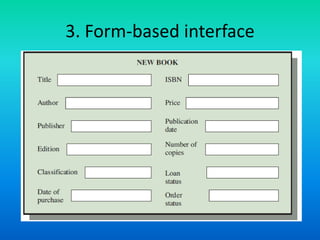
3. Form-based interface
4. Command interfaces
• User types commands to give instructions to
the system e.g. UNIX
• May be implemented using cheap terminals.
• Easy to process using compiler techniques
• Commands of arbitrary complexity can be
created by command combination
• Concise interfaces requiring minimal typing
can be created
Problems with command interfaces
• Users have to learn and remember a
command language. Command interfaces are
therefore unsuitable for occasional users
• Users make errors in command. An error
detection and recovery system is required
• System interaction is through a keyboard so
typing ability is required
Command languages
• Often preferred by experienced users because
they allow for faster interaction with the
system
• Not suitable for casual or inexperienced users
• May be provided as an alternative to menu
commands (keyboard shortcuts). In some
cases, a command language interface and a
menu-based interface are supported at the
same time.
5. Natural language interfaces
• The user types a command in a natural
language.
• Generally, the vocabulary is limited and these
systems are confined to specific application
domains
• NL processing technology is now good enough
to make these interfaces effective for casual
users but experienced users find that they
require too much typing
Assignment
• Discuss in detail the various interaction style
elements in user interface design
• Thank You
Software engineering 19 user interface design elements

Software engineering 19 user interface design elements

  • 1.
    Software Engineering: 19 Userinterface Design Elements Prof Neeraj Bhargava Vaibhav Khanna Department of Computer Science School of Engineering and Systems Sciences Maharshi Dayanand Saraswati University Ajmer
  • 2.
    User-system interaction • Twoproblems must be addressed in interactive systems design – How should information from the user be provided to the computer system? – How should information from the computer system be presented to the user? • User interaction and information presentation may be integrated through a coherent framework such as a user interface metaphor
  • 3.
    Interaction styles 1. Directmanipulation 2. Menu selection 3. Form fill-in 4. Command language 5. Natural language
  • 4.
    1. Direct manipulationAdvantages • Users feel in control of the computer and are less likely to be intimidated by it • User learning time is relatively short • Users get immediate feedback on their actions so mistakes can be quickly detected and corrected
  • 5.
    1. Direct manipulationproblems • The derivation of an appropriate information space model can be very difficult • Given that users have a large information space, what facilities for navigating around that space should be provided? • Direct manipulation interfaces can be complex to program and make heavy demands on the computer system
  • 6.
    2.Menu systems • Usersmake a selection from a list of possibilities presented to them by the system • The selection may be made by pointing and clicking with a mouse, using cursor keys or by typing the name of the selection • May make use of simple-to-use terminals such as touchscreens
  • 7.
    2. Menu systemsAdvantages • Users need not remember command names as they are always presented with a list of valid commands • Typing effort is minimal • User errors are trapped by the interface • Context-dependent help can be provided. The user’s context is indicated by the current menu selection
  • 8.
    Problems with menusystems • Actions which involve logical conjunction (and) or disjunction (or) are awkward to represent • Menu systems are best suited to presenting a small number of choices. If there are many choices, some menu structuring facility must be used • Experienced users find menus slower than command language
  • 9.
  • 10.
    4. Command interfaces •User types commands to give instructions to the system e.g. UNIX • May be implemented using cheap terminals. • Easy to process using compiler techniques • Commands of arbitrary complexity can be created by command combination • Concise interfaces requiring minimal typing can be created
  • 11.
    Problems with commandinterfaces • Users have to learn and remember a command language. Command interfaces are therefore unsuitable for occasional users • Users make errors in command. An error detection and recovery system is required • System interaction is through a keyboard so typing ability is required
  • 12.
    Command languages • Oftenpreferred by experienced users because they allow for faster interaction with the system • Not suitable for casual or inexperienced users • May be provided as an alternative to menu commands (keyboard shortcuts). In some cases, a command language interface and a menu-based interface are supported at the same time.
  • 13.
    5. Natural languageinterfaces • The user types a command in a natural language. • Generally, the vocabulary is limited and these systems are confined to specific application domains • NL processing technology is now good enough to make these interfaces effective for casual users but experienced users find that they require too much typing
  • 14.
    Assignment • Discuss indetail the various interaction style elements in user interface design • Thank You