Building An Application
Overview
Objective
Learn how to build a basic applications. Includes a tutorial on
building a LinkedIn Application.
Requirements
 Installed version of ProdigyView with a database
 Understanding of how to install an application
 Understanding of the DEFINES
Estimated Time
12 minutes

                        www.prodigyview.com
Follow Along With Code
                 Example
1. Download a copy of the example code at
  www.prodigyview.com/source.
2. Install the system in an environment you feel comfortable testing in.
3. Proceed to apps/front/HelloWorld/HelloWorld.php


                            www.prodigyview.com
Starts with PV_EXEC
Applications are called with pv_exec. The application’s
access file will be included and a new instance made.

This tutorial is going to start building the application by
creating the access file. The access file is defined when
installing the application.If you are unsure of how to
install an application, read the tutorial on installing an
application.


        Singe Point of Entry
Command Interpreter
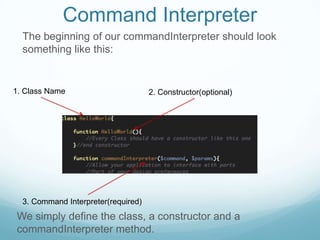
  The beginning of our commandInterpreter should look
  something like this:


1. Class Name                        2. Constructor(optional)


  3. Command Interpreter(required)
We simply define the class, a constructor and a
commandInterpreter method.
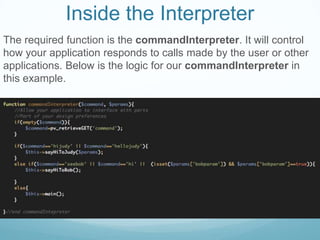
Inside the Interpreter
The required function is the commandInterpreter. It will control
how your application responds to calls made by the user or other
applications. Below is the logic for our commandInterpreter in
this example.
Break Down
       1. If no command was passed, get
       the command from $_GET


       2.If the command is hijudy or
       hellojudy, call the method
       sayHiToJudy()


       3. If no command matches, call the
       main function
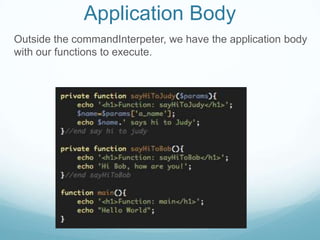
Application Body
Outside the commandInterpeter, we have the application body
with our functions to execute.
Application Body Complete
Our application body should look like this. Next we are going to start executing commands.
Private/Protected Function
If you noticed in the body of the application, all the
methods were private except for the default method. One
ability of the application is make all the methods private or
protected and only allow access to that application
through the commandInterpreter.

This can be considered a form of access control for your
application.
Switch Documents

Now that we have the application built, we can call it.
Switch to HelloWorldTest.php to test it out.
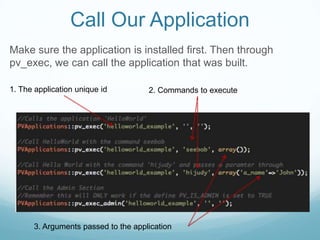
Call Our Application
Make sure the application is installed first. Then through
pv_exec, we can call the application that was built.

1. The application unique id          2. Commands to execute


       3. Arguments passed to the application
Automatic
             CommandInterpeter
There is an easier path to implementing an command
Interpreter. First start by reviewing the tutorial on the chain of
command command design pattern. Now we are going to
switch examples and view our LinkedIn application.
Extending PVApplication
Just like in the tutorial on the chain of command design
pattern, we are going to extend PVApplication. The
PVApplication will implement the commandInterpreter without
the developer having to define it.

Using PVApplication, the command will actually become the
name of the function to be called.
Application Layout
Our application extending PVApplication then look like this, no
commandInterpreter. All that has to be done is called pv_exec.
Switch Documents

Again, switch back to HelloWorldTest.php file and head
towards the bottom of it.
Calling our Application

  Now execute our LinkedIn application. It will display the
  share button for LinkedIn.


1. Application unique id          2. Command to execute
API Reference
For a better understanding of the applications, visit the api
by clicking on the link below.

PVApplications


                 More Tutorials
For more tutorials, please visit:

http://www.prodigyview.com/tutorials


                       www.prodigyview.com

Building An Application

  • 1.
  • 2.
    Overview Objective Learn how tobuild a basic applications. Includes a tutorial on building a LinkedIn Application. Requirements  Installed version of ProdigyView with a database  Understanding of how to install an application  Understanding of the DEFINES Estimated Time 12 minutes www.prodigyview.com
  • 3.
    Follow Along WithCode Example 1. Download a copy of the example code at www.prodigyview.com/source. 2. Install the system in an environment you feel comfortable testing in. 3. Proceed to apps/front/HelloWorld/HelloWorld.php www.prodigyview.com
  • 4.
    Starts with PV_EXEC Applicationsare called with pv_exec. The application’s access file will be included and a new instance made. This tutorial is going to start building the application by creating the access file. The access file is defined when installing the application.If you are unsure of how to install an application, read the tutorial on installing an application. Singe Point of Entry
  • 5.
    Command Interpreter The beginning of our commandInterpreter should look something like this: 1. Class Name 2. Constructor(optional) 3. Command Interpreter(required) We simply define the class, a constructor and a commandInterpreter method.
  • 6.
    Inside the Interpreter Therequired function is the commandInterpreter. It will control how your application responds to calls made by the user or other applications. Below is the logic for our commandInterpreter in this example.
  • 7.
    Break Down 1. If no command was passed, get the command from $_GET 2.If the command is hijudy or hellojudy, call the method sayHiToJudy() 3. If no command matches, call the main function
  • 8.
    Application Body Outside thecommandInterpeter, we have the application body with our functions to execute.
  • 9.
    Application Body Complete Ourapplication body should look like this. Next we are going to start executing commands.
  • 10.
    Private/Protected Function If younoticed in the body of the application, all the methods were private except for the default method. One ability of the application is make all the methods private or protected and only allow access to that application through the commandInterpreter. This can be considered a form of access control for your application.
  • 11.
    Switch Documents Now thatwe have the application built, we can call it. Switch to HelloWorldTest.php to test it out.
  • 12.
    Call Our Application Makesure the application is installed first. Then through pv_exec, we can call the application that was built. 1. The application unique id 2. Commands to execute 3. Arguments passed to the application
  • 13.
    Automatic CommandInterpeter There is an easier path to implementing an command Interpreter. First start by reviewing the tutorial on the chain of command command design pattern. Now we are going to switch examples and view our LinkedIn application.
  • 14.
    Extending PVApplication Just likein the tutorial on the chain of command design pattern, we are going to extend PVApplication. The PVApplication will implement the commandInterpreter without the developer having to define it. Using PVApplication, the command will actually become the name of the function to be called.
  • 15.
    Application Layout Our applicationextending PVApplication then look like this, no commandInterpreter. All that has to be done is called pv_exec.
  • 16.
    Switch Documents Again, switchback to HelloWorldTest.php file and head towards the bottom of it.
  • 17.
    Calling our Application Now execute our LinkedIn application. It will display the share button for LinkedIn. 1. Application unique id 2. Command to execute
  • 18.
    API Reference For abetter understanding of the applications, visit the api by clicking on the link below. PVApplications More Tutorials For more tutorials, please visit: http://www.prodigyview.com/tutorials www.prodigyview.com