Server – side
Technologies
Server-side scripting language (PHP)
MARIO B. CADAY
Instructor I
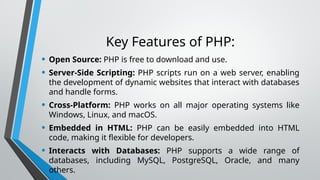
INTRODUCTION
PHP (Hypertext Preprocessor) is a widely-
used, open-source scripting language that is
especially suited for web development. It is
executed on the server, meaning that PHP
scripts are processed by the server and the
result is sent to the client (usually in the form
of HTML).
Key Features of PHP:
• Open Source: PHP is free to download and use.
• Server-Side Scripting: PHP scripts run on a web server, enabling
the development of dynamic websites that interact with databases
and handle forms.
• Cross-Platform: PHP works on all major operating systems like
Windows, Linux, and macOS.
• Embedded in HTML: PHP can be easily embedded into HTML
code, making it flexible for developers.
• Interacts with Databases: PHP supports a wide range of
databases, including MySQL, PostgreSQL, Oracle, and many
others.
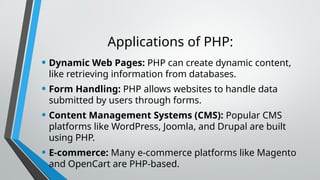
Applications of PHP:
• Dynamic Web Pages: PHP can create dynamic content,
like retrieving information from databases.
• Form Handling: PHP allows websites to handle data
submitted by users through forms.
• Content Management Systems (CMS): Popular CMS
platforms like WordPress, Joomla, and Drupal are built
using PHP.
• E-commerce: Many e-commerce platforms like Magento
and OpenCart are PHP-based.
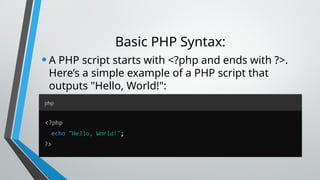
Basic PHP Syntax:
•A PHP script starts with <?php and ends with ?>.
Here’s a simple example of a PHP script that
outputs "Hello, World!":
Why Use PHP?
• Simplicity: PHP is relatively easy to learn for beginners,
especially for those with basic knowledge of HTML.
• Large Community and Support: Being popular for over
two decades, PHP has extensive documentation and a
large community of developers.
• Scalability: PHP can handle simple websites to large-
scale enterprise applications efficiently.
• PHP continues to be a relevant tool in web development,
especially for server-side programming.
CREATING LOGIN FUNCTIONALITY
•Creating a login system using PHP is a
common task in web development. Below is
a basic example of how to build a simple PHP
login system. It includes a form for users to
enter their credentials, checks the credentials
against stored values (in a database), and
logs the user in if they are correct.
Prerequisites:
•Basic knowledge of HTML, PHP, and SQL.
•A database (e.g., MySQL) to store user
credentials.
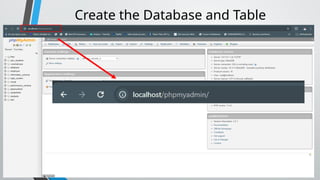
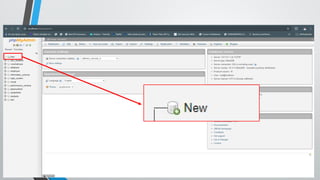
Create the Database and Table
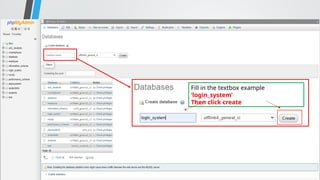
Fill in the textbox example
‘login_system’
Then click create
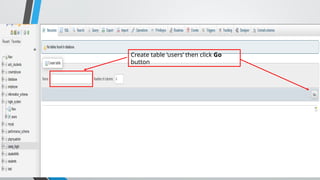
Create table ‘users’ then click Go
button
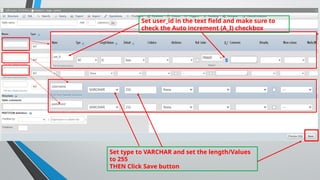
Set user_id in the text field and make sure to
check the Auto increment (A_I) checkbox
Set type to VARCHAR and set the length/Values
to 255
THEN Click Save button
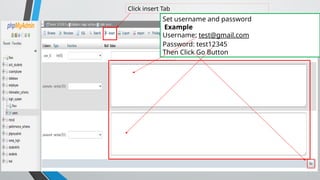
Click insert Tab
Set username and password
Example
Username: test@gmail.com
Password: test12345
Then Click Go Button
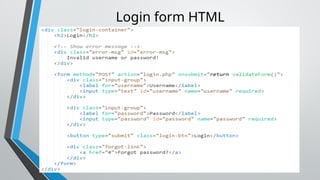
Login form HTML
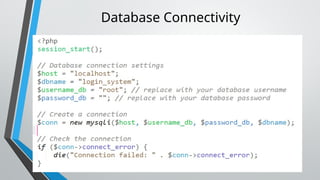
Database Connectivity
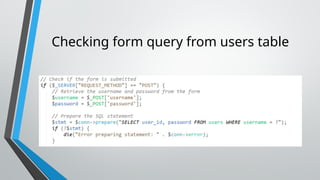
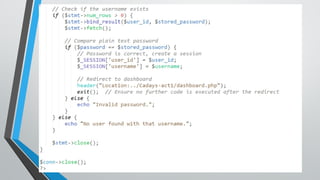
Checking form query from users table
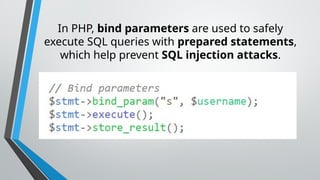
In PHP, bind parameters are used to safely
execute SQL queries with prepared statements,
which help prevent SQL injection attacks.
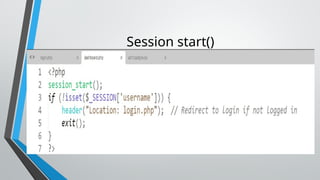
Session start()
END
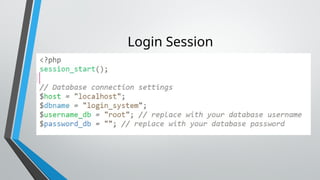
Login Session

Server – side Technologies PHP for web dev.pptx

  • 1.
    Server – side Technologies Server-sidescripting language (PHP) MARIO B. CADAY Instructor I
  • 2.
    INTRODUCTION PHP (Hypertext Preprocessor)is a widely- used, open-source scripting language that is especially suited for web development. It is executed on the server, meaning that PHP scripts are processed by the server and the result is sent to the client (usually in the form of HTML).
  • 3.
    Key Features ofPHP: • Open Source: PHP is free to download and use. • Server-Side Scripting: PHP scripts run on a web server, enabling the development of dynamic websites that interact with databases and handle forms. • Cross-Platform: PHP works on all major operating systems like Windows, Linux, and macOS. • Embedded in HTML: PHP can be easily embedded into HTML code, making it flexible for developers. • Interacts with Databases: PHP supports a wide range of databases, including MySQL, PostgreSQL, Oracle, and many others.
  • 4.
    Applications of PHP: •Dynamic Web Pages: PHP can create dynamic content, like retrieving information from databases. • Form Handling: PHP allows websites to handle data submitted by users through forms. • Content Management Systems (CMS): Popular CMS platforms like WordPress, Joomla, and Drupal are built using PHP. • E-commerce: Many e-commerce platforms like Magento and OpenCart are PHP-based.
  • 5.
    Basic PHP Syntax: •APHP script starts with <?php and ends with ?>. Here’s a simple example of a PHP script that outputs "Hello, World!":
  • 6.
    Why Use PHP? •Simplicity: PHP is relatively easy to learn for beginners, especially for those with basic knowledge of HTML. • Large Community and Support: Being popular for over two decades, PHP has extensive documentation and a large community of developers. • Scalability: PHP can handle simple websites to large- scale enterprise applications efficiently. • PHP continues to be a relevant tool in web development, especially for server-side programming.
  • 7.
    CREATING LOGIN FUNCTIONALITY •Creatinga login system using PHP is a common task in web development. Below is a basic example of how to build a simple PHP login system. It includes a form for users to enter their credentials, checks the credentials against stored values (in a database), and logs the user in if they are correct.
  • 8.
    Prerequisites: •Basic knowledge ofHTML, PHP, and SQL. •A database (e.g., MySQL) to store user credentials.
  • 9.
  • 11.
    Fill in thetextbox example ‘login_system’ Then click create
  • 12.
    Create table ‘users’then click Go button
  • 13.
    Set user_id inthe text field and make sure to check the Auto increment (A_I) checkbox Set type to VARCHAR and set the length/Values to 255 THEN Click Save button
  • 14.
    Click insert Tab Setusername and password Example Username: test@gmail.com Password: test12345 Then Click Go Button
  • 15.
  • 16.
  • 17.
    Checking form queryfrom users table
  • 18.
    In PHP, bindparameters are used to safely execute SQL queries with prepared statements, which help prevent SQL injection attacks.
  • 20.
  • 21.
  • 24.