Email Configuration
Overview
Objective

Learn how to configure the default values of the PVMail
class.

Requirements

 Understanding the basics of sending an email and
  SMTP email in ProdigyView

Estimated Time

10 Minutes


                     www.prodigyview.com
Follow Along With Code
               Example
1. Download a copy of the example code at
  www.prodigyview.com/source.
2. Install the system in an environment you feel comfortable testing
  in.
3. Proceed to examples/util/Mail_Configuration.php
Configuration Init
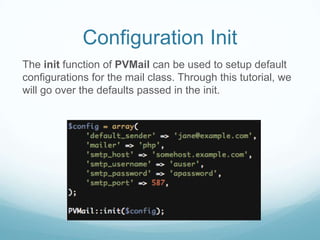
The init function of PVMail can be used to setup default
configurations for the mail class. Through this tutorial, we
will go over the defaults passed in the init.
Default Sender
Normally, the sender has to be applied to the header of an
email before sending an email. Applying a default sender
will ensure that if no sender is set in the header, the email
will be sent from the supplied email address.
Mailer
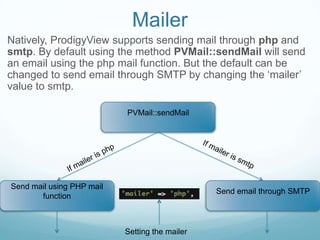
Natively, ProdigyView supports sending mail through php and
smtp. By default using the method PVMail::sendMail will send
an email using the php mail function. But the default can be
changed to send email through SMTP by changing the ‘mailer’
value to smtp.

                           PVMail::sendMail


Send mail using PHP mail
                                                Send email through SMTP
       function


                           Setting the mailer
Default SMTP HOST
If the mailer is set to SMTP, a default SMTP host can be
set here. When PVMail::sendMail or
PVMail::sendEmailSMTP is called, this value will act as
the default host if none is supplied.
Default SMTP Username
If the mailer is set to SMTP, a default SMTP username
can be set here. When PVMail::sendMail or
PVMail::sendEmailSMTP is called, this value will act as
the default username if none is supplied.
Default SMTP Password
If the mailer is set to SMTP, a default SMTP password can
be set here. When PVMail::sendMail or
PVMail::sendEmailSMTP is called, this value will act as
the default password if none is supplied.
Default SMTP Port
If the mailer is set to SMTP, a default SMTP port can be
set here. When PVMail::sendMail or
PVMail::sendEmailSMTP is called, this value will act as
the default port if none is supplied.
API Reference
For a better understanding of the email, visit the api by
clicking on the link below.

PVMail


                 More Tutorials
For more tutorials, please visit:

http://www.prodigyview.com/tutorials


                       www.prodigyview.com

Email Configuration

  • 1.
  • 2.
    Overview Objective Learn how toconfigure the default values of the PVMail class. Requirements  Understanding the basics of sending an email and SMTP email in ProdigyView Estimated Time 10 Minutes www.prodigyview.com
  • 3.
    Follow Along WithCode Example 1. Download a copy of the example code at www.prodigyview.com/source. 2. Install the system in an environment you feel comfortable testing in. 3. Proceed to examples/util/Mail_Configuration.php
  • 4.
    Configuration Init The initfunction of PVMail can be used to setup default configurations for the mail class. Through this tutorial, we will go over the defaults passed in the init.
  • 5.
    Default Sender Normally, thesender has to be applied to the header of an email before sending an email. Applying a default sender will ensure that if no sender is set in the header, the email will be sent from the supplied email address.
  • 6.
    Mailer Natively, ProdigyView supportssending mail through php and smtp. By default using the method PVMail::sendMail will send an email using the php mail function. But the default can be changed to send email through SMTP by changing the ‘mailer’ value to smtp. PVMail::sendMail Send mail using PHP mail Send email through SMTP function Setting the mailer
  • 7.
    Default SMTP HOST Ifthe mailer is set to SMTP, a default SMTP host can be set here. When PVMail::sendMail or PVMail::sendEmailSMTP is called, this value will act as the default host if none is supplied.
  • 8.
    Default SMTP Username Ifthe mailer is set to SMTP, a default SMTP username can be set here. When PVMail::sendMail or PVMail::sendEmailSMTP is called, this value will act as the default username if none is supplied.
  • 9.
    Default SMTP Password Ifthe mailer is set to SMTP, a default SMTP password can be set here. When PVMail::sendMail or PVMail::sendEmailSMTP is called, this value will act as the default password if none is supplied.
  • 10.
    Default SMTP Port Ifthe mailer is set to SMTP, a default SMTP port can be set here. When PVMail::sendMail or PVMail::sendEmailSMTP is called, this value will act as the default port if none is supplied.
  • 11.
    API Reference For abetter understanding of the email, visit the api by clicking on the link below. PVMail More Tutorials For more tutorials, please visit: http://www.prodigyview.com/tutorials www.prodigyview.com