Presented by:
Building a Production
Grade PaaS like Bluemix
on OpenStack
Animesh Singh
Jim Busche
Andrew Bodine
http://www.meetup.com/OpenStack http://www.meetup.com/CloudFoundry
Building a Production Grade PaaS Platform like Bluemix on OpenStack
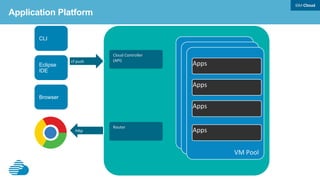
Apps
@AnimeshSingh @jim1348b @Bodine_Andrew
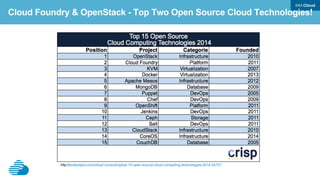
Cloud Foundry & OpenStack - Top Two Open Source Cloud Technologies!
http://analystpov.com/cloud-computing/top-15-open-source-cloud-computing-technologies-2014-24727
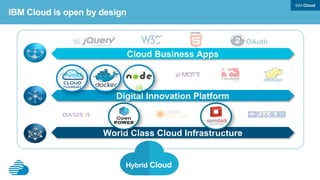
World Class Cloud Infrastructure
Cloud Business Apps
OAuth
Digital Innovation Platform
IBM Cloud is open by design
Hybrid Cloud
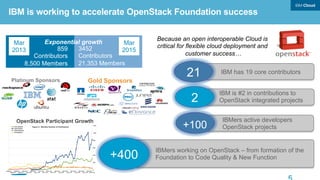
IBM is working to accelerate OpenStack Foundation success
Gold Sponsors
Because an open interoperable Cloud is
critical for flexible cloud deployment and
customer success…
IBM has 19 core contributors21
IBMers working on OpenStack – from formation of the
Foundation to Code Quality & New Function+400
IBMers active developers
OpenStack projects
2
Mar
2013
Mar
2015859
Contributors
8,500 Members
3452
Contributors
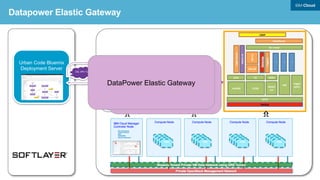
21,353 Members
Exponential growth
OpenStack Participant Growth
IBM is #2 in contributions to
OpenStack integrated projects
+100
Platinum Sponsors
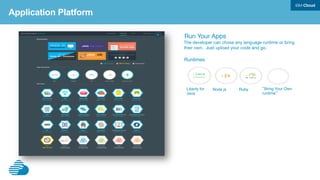
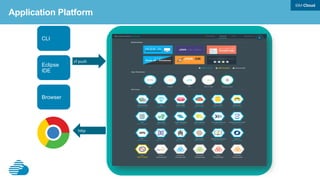
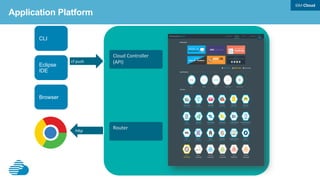
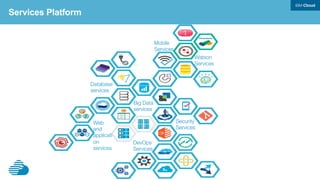
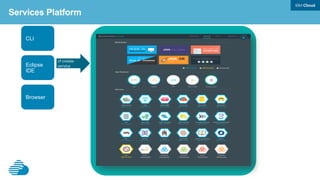
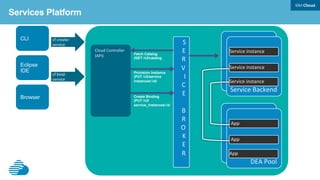
Bluemix - What it is?
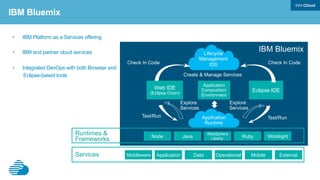
•  IBM Platform as a Services offering
•  IBM and partner cloud services
•  Integrated DevOps with both Browser and
Eclipse-based tools
IBM Bluemix
Services
Lifecycle
Management
IDS
Application
Runtime
Runtimes &
Frameworks
Middleware Application Operational Mobile ExternalData
Node Java Ruby Worklight
WebSphere
Liberty
Eclipse IDE
Application
Composition
Environment
Create & Manage Services
Test/Run Test/Run
Explore
Services
Explore
Services
IBM Bluemix
Check In Code Check In Code
Web IDE
(Eclipse Orion)
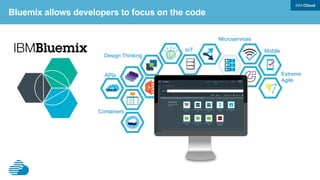
Bluemix allows developers to focus on the code
Design Thinking
Containers
Extreme
Agile
MobileIoT
APIs
Microservices
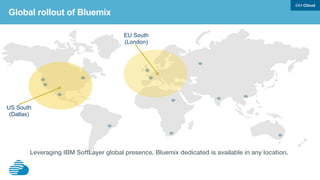
Global rollout of Bluemix
US South
(Dallas)
EU South
(London)
Leveraging IBM SoftLayer global presence. Bluemix dedicated is available in any location.!
!
A polyglot “platform for the people”
• Quickly becoming the de facto open
PaaS platform
• Foundation established Dec. 2014;
Executive Director & Board named Feb.
11, 2015
Bluemix powered by Cloud Foundry
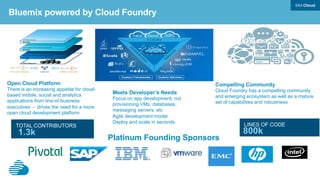
Meets Developer’s Needs
Focus on app development, not
provisioning VMs, databases,
messaging servers, etc
Agile development model
Deploy and scale in seconds
Open Cloud Platform
There is an increasing appetite for cloud-
based mobile, social and analytics
applications from line-of-business
executives - drives the need for a more
open cloud development platform
Compelling Community
Cloud Foundry has a compelling community
and emerging ecosystem as well as a mature
set of capabilities and robustness
Platinum Founding Sponsors
1.3k 800k
LINES OF CODETOTAL CONTRIBUTORS
Bluemix powered by Cloud Foundry
12
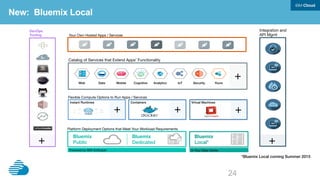
New: Bluemix Local
Flexible Compute Options to Run Apps / Services
Instant Runtimes! Containers! Virtual Machines!
Platform Deployment Options that Meet Your Workload Requirements 
Bluemix !
Public!
Bluemix !
Dedicated!
Bluemix !
Local*!
DevOps
Tooling
 Your Own Hosted Apps / Services
Integration and
API Mgmt
Powered by IBM SoftLayer
 In Your Data Center
+
 +
 +
+
 +
Catalog of Services that Extend Apps’ Functionality
Web! Data! Mobile! Analytics!Cognitive! IoT! Security! Yours!
+
*Bluemix Local coming Summer 2015!
IBM Cloud Manager with OpenStack

What it is?

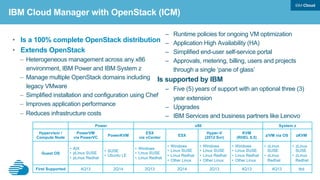
•  Is a 100% complete OpenStack distribution
•  Extends OpenStack
–  Heterogeneous management across any x86
environment, IBM Power and IBM System z
–  Manage multiple OpenStack domains including
legacy VMware
–  Simplified installation and configuration using Chef
–  Improves application performance
–  Reduces infrastructure costs
IBM Cloud Manager with OpenStack (ICM)
Power x86 System z
Hypervisor /
Compute Node
PowerVM
via PowerVC
PowerKVM
ESX
via vCenter
ESX
Hyper-V
(2012 Svr)
KVM
(RHEL 6.5)
z/VM via OS zKVM
Guest OS
•  AIX
•  pLinux SUSE
•  pLinux Redhat
•  SUSE
•  Ubuntu LE
•  Windows
•  Linux SUSE
•  Linux Redhat
•  Windows
•  Linux SUSE
•  Linux Redhat
•  Other Linux
•  Windows
•  Linux SUSE
•  Linux Redhat
•  Other Linux
•  Windows
•  Linux SUSE
•  Linux Redhat
•  Other Linux
•  zLinux
SUSE
•  zLinux
Redhat
•  zLinux
SUSE
•  zLinux
Redhat
First Supported 4Q13 2Q14 2Q13 2Q14 2Q13 4Q13 4Q13 tbd
–  Runtime policies for ongoing VM optimization
–  Application High Availability (HA)
–  Simplified end-user self-service portal
–  Approvals, metering, billing, users and projects
through a single ‘pane of glass’
Is supported by IBM
–  Five (5) years of support with an optional three (3)
year extension
–  Upgrades
–  IBM Services and business partners like Lenovo
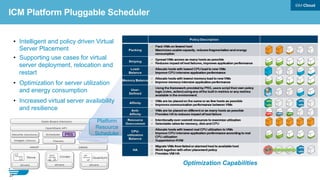
Platform
Resource
Scheduler
•  Intelligent and policy driven Virtual
Server Placement
•  Supporting use cases for virtual
server deployment, relocation and
restart
•  Optimization for server utilization
and energy consumption
•  Increased virtual server availability
and resilience
Optimization Capabilities
15
PRS
ICM Platform Pluggable Scheduler
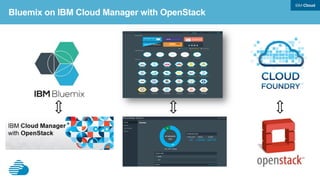
Goal – Bluemix on IBM 

Cloud Manager with OpenStack

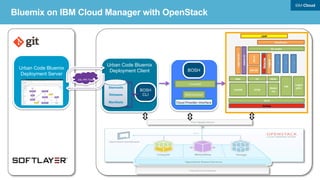
Bluemix on IBM Cloud Manager with OpenStack
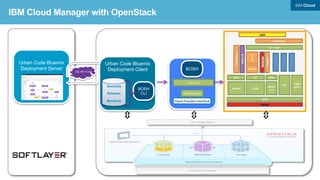
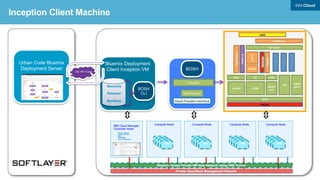
Urban Code Bluemix
Deployment Client
Stemcells
Releases
Manifests
BOSH
CLI
SSL VPN Tunnel
Urban Code Bluemix
Deployment Server
BOSH
Cloud	
  Provider	
  Interface	
  
DataPower	
  
BM	
  UI	
  
Metering	
  	
  
Admin	
  UI	
  
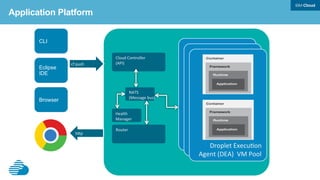
NATS	
  
BM	
  DB	
  
Backup	
  
Login	
  server	
  
UAA	
   CC	
  
Blobst
ore	
  
HM	
  
CCDB	
  
Loggre
gator	
  
Go	
  router	
  
Logging	
  
DEAs	
  
UAADB	
  
LDAP	
  
…	
  
…	
  
…	
  
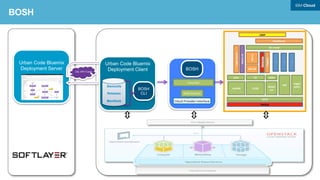
BOSH	
  blobstore	
  
PowerDNS	
  
Bluemix on IBM Cloud Manager with OpenStack
BOSH - Deployment and Lifecycle
management tool


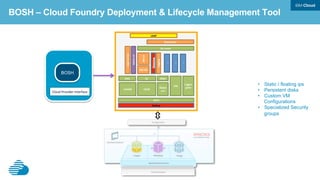
•  Static / floating ips
•  Persistent disks
•  Custom VM
Configurations
•  Specialized Security
groups
DataPower	
  
BM	
  UI	
  
Metering	
  	
  
Admin	
  UI	
  
NATS	
  
BM	
  DB	
  
Backup	
  
Login	
  server	
  
UAA	
   CC	
  
Blobst
ore	
  
HM	
  
CCDB	
  
Loggre
gator	
  
Go	
  router	
  
Logging	
  
DEAs	
  
UAADB	
  
LDAP	
  
…	
  
…	
  
…	
  
BOSH – Cloud Foundry Deployment & Lifecycle Management Tool
BOSH
Cloud	
  Provider	
  Interface	
  
•  BOSH deploys Cloud
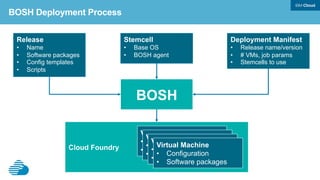
BOSH Deployment Process
Deployment Manifest
•  Release name/version
•  # VMs, job params
•  Stemcells to use
Stemcell
•  Base OS
•  BOSH agent
Release
•  Name
•  Software packages
•  Config templates
•  Scripts
BOSH
Cloud Foundry
Virtual Machine
•  Configuration
•  Software Packages
Virtual Machine
•  Configuration
•  Software Packages
Virtual Machine
•  Configuration
•  Software Packages
Virtual Machine
•  Configuration
•  Software packages
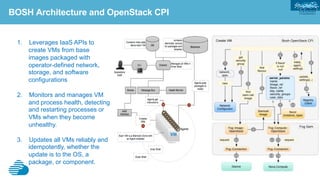
BOSH Architecture and OpenStack CPI	
1.  Leverages IaaS APIs to
create VMs from base
images packaged with
operator-defined network,
storage, and software
configurations
2.  Monitors and manages VM
and process health, detecting
and restarting processes or
VMs when they become
unhealthy.
3.  Updates all VMs reliably and
idempotently, whether the
update is to the OS, a
package, or component.
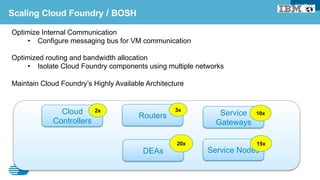
Scaling Cloud Foundry / BOSH
Optimize Internal Communication
•  Configure messaging bus for VM communication
Optimized routing and bandwidth allocation
•  Isolate Cloud Foundry components using multiple networks
Maintain Cloud Foundry’s Highly Available Architecture
Service
Gateways
10x
Routers
3x
Service Nodes
15x
DEAs
20x
Cloud
Controllers
2x
IaaS Configuration

IBM Cloud Manager with OpenStack


Self Service UI
Cloud Manager
OpenStac
k Adapter
User management
Project
Network mapping
Cloud admin
VM management
Approvals
Billing/accounts
Metering reports
Expiration policies
Image activation
OpenStack core projects
Hyper
-V
KVM
ppc
Nova drivers for
Hyper-V, KVM, vCenter
zVM
zVM driver PowerVC driver
PowerVC Standard
PowerVM
Power Systems
OpenStack 2014-2 API
vCenter
Power >=8
Horizon UI
SCE API
Cloud User
SCE Cloud
Applications
OpenStack
Applications
OpenStack Cloud Admin
KVM
x86
not in self
service UI
OSGI python
CLI
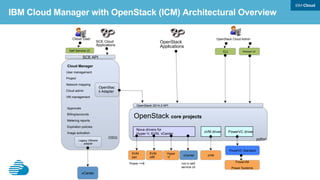
IBM Cloud Manager with OpenStack (ICM) Architectural Overview
vCenter
Legacy VMware
adapter
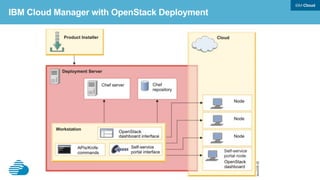
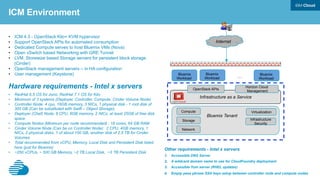
IBM Cloud Manager with OpenStack Deployment
Internet
Bluemix
Workload
Bluemix
Workload
Bluemix
Workload…
Infrastructure as a Service
Compute
Storage
Network
Virtualization
Infrastructure
Security
Bluemix Tenant
Horizon Cloud
Management
OpenStack APIs
•  ICM 4.3 - OpenStack Kilo+ KVM hypervisor
•  Support OpenStack APIs for automated consumption
•  Dedicated Compute serves to host Bluemix VMs (Nova)
•  Open vSwitch based Networking with GRE Tunnel
•  LVM, Storewize based Storage servers for persistent block storage
(Cinder)
•  OpenStack management servers – in HA configuration
•  User management (Keystone)
Hardware requirements - Intel x servers
•  RedHat 6.5 OS for Juno, RedHat 7.1 OS for Kilo
•  Minimum of 3 systems (Deployer, Controller, Compute, Cinder Volume Node)
•  Controller Node: 4 cpu, 16GB memory, 3 NICs, 1 physical disk - 1 root disk of
300 GB (Can be substituted with Swift – Object Storage),
•  Deployer (Chef) Node: 8 CPU, 8GB memory, 2 NICs, at least 25GB of free disk
space
•  Compute Nodes (Minimum per node recommended) : 16 cores, 64 GB RAM
•  Cinder Volume Node (Can be on Controller Node): 2 CPU, 4GB memory, 1
NICs, 2 physical disks, 1 of about 100 GB, another disk of 2.5 TB for Cinder
Volumes
•  Total recommended from vCPU, Memory, Local Disk and Persistent Disk listed
here (just for Bluemix)
•  ~250 vCPUs, ~ 500 GB Memory, ~2 TB Local Disk, ~3 TB Persistent Disk
ICM Environment
Other requirements - Intel x servers
1.  Accessible DNS Server
2.  A wildcard domain name to use for CloudFoundry deployment
3.  Accessible Yum server (RHEL updates)
4.  Empty pass phrase SSH keys setup between controller node and compute nodes
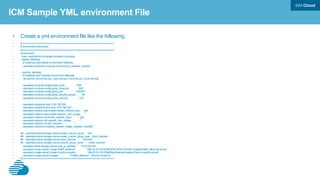
ICM Sample YML environment File
•  Create a yml environment file like the following:
•  # ================================================================
•  # Environment Information
•  # ================================================================
•  environment:
•  base: example-ibm-os-single-controller-n-compute
•  default_attributes:
•  # (Optional) Add Default Environment Attributes
•  openstack.endpoints.compute-vnc-bind.bind_interface: 'ens224'
•  override_attributes:
•  # (Optional) Add Override Environment Attributes
•  ntp.servers: [0.pool.ntp.org, 1.pool.ntp.org, 2.pool.ntp.org, 3.pool.ntp.org]
•  openstack.compute.config.quota_cores : '500'
•  openstack.compute.config.quota_instances : '500'
•  openstack.compute.config.quota_ram : '500000'
•  openstack.compute.config.quota_security_groups : '50'
•  openstack.compute.config.quota_volumes : '100'
•  openstack.endpoints.host: '9.30.182.239'
•  openstack.endpoints.bind-host: '9.30.182.239'
•  openstack.network.openvswitch.tenant_network_type : 'gre'
•  openstack.network.openvswitch.network_vlan_ranges : ''
•  openstack.network.ml2.tenant_network_types : 'gre'
•  openstack.network.ml2.network_vlan_ranges : ''
•  openstack.network.ml2.flat_networks : ''
•  openstack.network.l3.external_network_bridge_interface: "ens256"
•  ## openstack.block-storage.volume.create_volume_group : 'true'
•  ## openstack.block-storage.volume.create_volume_group_type : 'block_devices'
•  ## openstack.block-storage.volume.block_devices : '/dev/sdb'
•  ## openstack.block-storage.volume.volume_group_name : 'cinder-volumes'
•  openstack.block-storage.volume.iscsi_ip_address : '10.22.22.238'
•  openstack.image.upload_image.rhel65_allowroot : 'http://9.30.140.50/allFiles/iCMO41/Sample-Images/rhel65_allowroot.qcow2'
•  openstack.image.upload_image.Ubuntu-Inception : 'http://9.30.140.50/allFiles/bluemix/Inception/Clean-Inception.qcow2'
•  openstack.image.upload_images : ['rhel65_allowroot' , 'Ubuntu-Inception']
•  # ================================================================
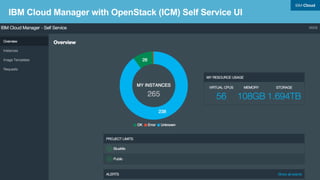
IBM Cloud Manager with OpenStack (ICM) Self Service UI
Inception Machine

Bluemix Client

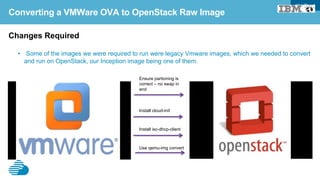
Converting a VMWare OVA to OpenStack Raw Image
Changes Required
•  Some of the images we were required to run were legacy Vmware images, which we needed to convert
and run on OpenStack, our Inception image being one of them.
Ensure partioning is
correct – no swap in
end
Install cloud-init
Install isc-dhcp-client
Use qemu-img convert
Bluemix-ICM Networking

Neutron

SSL VPN Tunnel
Urban Code Bluemix
Deployment Server
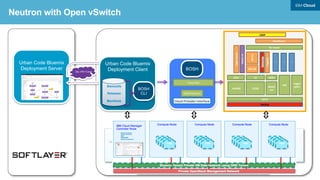
Neutron with Open vSwitch
Urban Code Bluemix
Deployment Client
Stemcells
Releases
Manifests
BOSH
CLI
BOSH
Cloud	
  Provider	
  Interface	
  
DataPower	
  
BM	
  UI	
  
Metering	
  	
  
Admin	
  UI	
  
NATS	
  
BM	
  DB	
  
Backup	
  
Login	
  server	
  
UAA	
   CC	
  
Blobst
ore	
  
HM	
  
CCDB	
  
Loggre
gator	
  
Go	
  router	
  
Logging	
  
DEAs	
  
UAADB	
  
LDAP	
  
…	
  
…	
  
…	
  
BOSH	
  blobstore	
  
PowerDNS	
  
Nova-Compute
Neutron-Network
DB2
RabbitMQ
IBM Cloud Manager
Controller Node
External shared Customer Network
Compute Node
Bluemix Local
Inception VA
Stemcells
Releases
Manifests
BOSH
CLI
UCD Agent
Compute Node(s)
Cinder Storage
Chef
Server
Chef
Repository
Private OpenStack Management Network
Neutron
Bluemix Tenant
Router
Bluemix Tenant Private VM Data Network using GRE Tunnel
Bluemix Deployment
Server
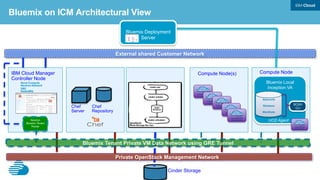
Bluemix on ICM Architectural View
Nova-Compute
Cinder-Volume
DB2
RabbitMQ
Neutron-Network
IBM Cloud Manager
Controller Node
External Shared Customer Network
Compute Node Compute Node
Private OpenStack Management Network
Bluemix Tenant Private VM Data Network using GRE Tunnel
Neutron
Bluemix
Tenant
Router
Other
VMs
Other
VMs
Other
VMs
Other
VMs
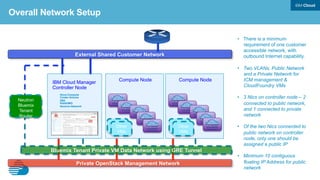
•  There is a minimum
requirement of one customer
accessible network, with
outbound Internet capability.
•  Two VLANs, Public Network
and a Private Network for
ICM management &
CloudFoundry VMs
•  3 Nics on controller node – 2
connected to public network,
and 1 connected to private
network
•  Of the two Nics connected to
public network on controller
node, only one should be
assigned a public IP
•  Minimum 10 contiguous
floating IP Address for public
network
Overall Network Setup
External Shared Customer Network
Bluemix Tenant Private VM Data Network using GRE Tunnel
Neutron
Bluemix
Tenant
Router
Bluemix Tenant VMs Other Tenant VMs
Other
VMs
Other
VMs
Other
VMs
Tenant Private Network
Other
Tenant
Router
Physical Router
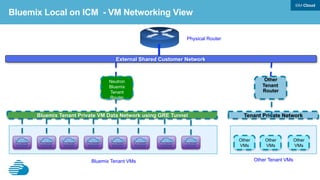
Bluemix Local on ICM - VM Networking View
Bluemix Gateway 

Datapower


DataPower is the Elastic Gateway
•  Proxy – Connection Termiation Point
–  TCP Connection End Point
–  SSL Connection End Point / SSL Offloading
–  WebSockets
•  IP Spraying
–  Using DataPower Self-Balancing Technology
•  Backend Load Balancing
•  URL Rewrites
•  SLM
–  Service Level Monitoring to protect DataPower and the backend apps
•  Backend can be applications, services, or members of the Bluemix fabric (gorouter, logging server)
•  Global rate limiting
•  Platform Enforcement Point (PEP) for OAuth
–  Protecting access to applications
38
DataPower is the Ingress to Bluemix
User	
  Account	
  and	
  
Authentication	
  
Server	
  (UAA)	
  
App	
  Router	
  
(go)router	
  1	
  
(go)router	
  2	
  
.	


(go)router	
  n	
  
HA	
  Proxy	
  
DataPower	
  1	
  
DataPower	
  2	
  
Cloud	
  	
  
Controller	
  
All	
  Inbound	
  Traffic	


HTTP/HTTPS/WebSockets	
  
Applications	
  
Barry.myblueix.net	
  
Acme.myblueix.net	
  
.	
  
Services	
  
Cloud	
  Integration	
  
Elastic	
  Caching	
  
Services	
  
Mongodb	
  
WorkFlow	
  
geocoding	
  
.	
  
Logging/Heath/Analytics/
License	
  Acceptance	
  
ACE	
  
WebConsole/Dashboard	


ExternalSharedCustomerNetwork
Neutron
Bluemix
Tenant
Router
Datapower Networking View
DataPower
Elastic
Gateway
All	
  Inbound	
  Traffic	


HTTP/HTTPS/WebSockets	
  
BluemixTenant
VMDataNetworkusingGRETunnel
local.bluemix.net	


local.mybluemix.net	


Go Router
Go Router
Custom	


Domain(s)	
  
Bluemix Automated Deployment

Urban Code Deploy


Server Server
Load
Balancer
Agent
Rational Asset
Manager
Agent
Agent
SCM Systems
GitHub/RTC
Maven e.g.
Nexus
Agent
Docker / IBM
Container Services
Containers
Restricted Cloud or Public Internet
Agent Relay Server
Urban Code Deploy
Importing Component Artifacts Into UCD For Deployment Purposes
* Agent Relays can be optionally used as a
network proxy to handle restricted network paths
Server Server
Load
Balancer
Agent
Agent
Agent
Agent Relay Server
Agent
Agent
Agent
Agent
Agent
Environment A
Environment B
Relay Server
Agent Relay Server
Deploying and Configuring UCD Endpoints
Urban Code Deploy
Bluemix UCD Process Design
Bluemix UCD Deployment Flow
OpenStack Discovery:
•  Leverage the open source Fog gem to discover OpenStack artifacts in an automated manner
•  Require OpenStack credentials and discover OpenStack compute and network information.
Fog for OpenStack Discovery Automation
Discover VM
Configuration Sizes
Discover Network
Subnets
Discover Network
Security Rules
Discover DHCP , DNS
Gateway and floating IPs
Discover Security
Credentials
Fog for OpenStack Setup Automation
Cloud Foundry Pre-req setup on OpenStack:
•  Leverage the open source Fog gem to setup Cloud Foundry requirements in an automated manner
•  Setup according to best practices and guidelines – still giving users the flexibility to change if desired
Create Security
Credentials
Create VM configs for
Router, DEAs, Cloud
Controller, Service
Nodes
Create network
Security Rules
Setup tenant quota
Fog for Datapower VM Setup Automation
Datapower setup on OpenStack:
•  Leverage fog Neutron and Nova support to provision and configure Datapower VM
Create Neutron port
requesting multiple IP
addresses from
DHCP
Call Nova compute to
provision a VM with
that port
Pass Metadata file to
persist those Ips to
VM`s ethernet
interface
BOSH and Ruby for Cloud Foundry Deployment Automation
Cloud Foundry Deployment Automation
•  Automate base OS image creation or modification
•  Automate Cloud Foundry deployment manifest file genration using Ruby ERB
•  Automate upload of Cloud Foundry core release, services and runtime frameworks, followed by Cloud
Foundry deployment
Stemcell Creation
and Upload
Generate BOSH and
Cloud Foundry
Manifest
Upload Cloud
Foundry core,
Services and runtime
Deploy Cloud Foundry
Deploy Microbosh


  RUBY	


  BOSH	
  
Automate the update/upgrade lifecycle operations
•  Updates can be automated using code from the initial automated deployment (e.g. bosh deploy)
•  Follow the same workflow – do OpenStack discovery operation, and then leverage BOSH for update/
upgrade/
•  To ensure application availability throughout the update, use tools like JMeter to test application
responsiveness
Updates/Upgrades Automation!
Monitoring/Logging

Graphite/Grafana/ELK Stack


Monitoring based on open source Graphite/Graphana
Graphite is a highly scalable real-time graphing system. As a user, you write an application that collects numeric time-series data
that you are interested in graphing, and send it to Graphite’s processing backend, carbon, which stores the data in Graphite’s
specialized database.
Logging based on open source ELK Stack
The “ELK” Stack
elasticsearch -
indexes and stores all
the log data
logstash - plays
multiple roles from
receiving, parsing, and
archiving data
kibana - displays log
data in meaningful
charts and tables
Talk to an IBM
Recruiter @ the
Summit

Building a PaaS Platform like Bluemix on OpenStack

  • 1.
    Presented by: Building aProduction Grade PaaS like Bluemix on OpenStack Animesh Singh Jim Busche Andrew Bodine
  • 2.
    http://www.meetup.com/OpenStack http://www.meetup.com/CloudFoundry Building aProduction Grade PaaS Platform like Bluemix on OpenStack Apps @AnimeshSingh @jim1348b @Bodine_Andrew
  • 3.
    Cloud Foundry &OpenStack - Top Two Open Source Cloud Technologies! http://analystpov.com/cloud-computing/top-15-open-source-cloud-computing-technologies-2014-24727
  • 4.
    World Class CloudInfrastructure Cloud Business Apps OAuth Digital Innovation Platform IBM Cloud is open by design Hybrid Cloud
  • 5.
    IBM is workingto accelerate OpenStack Foundation success Gold Sponsors Because an open interoperable Cloud is critical for flexible cloud deployment and customer success… IBM has 19 core contributors21 IBMers working on OpenStack – from formation of the Foundation to Code Quality & New Function+400 IBMers active developers OpenStack projects 2 Mar 2013 Mar 2015859 Contributors 8,500 Members 3452 Contributors 21,353 Members Exponential growth OpenStack Participant Growth IBM is #2 in contributions to OpenStack integrated projects +100 Platinum Sponsors
  • 6.
  • 7.
    •  IBM Platformas a Services offering •  IBM and partner cloud services •  Integrated DevOps with both Browser and Eclipse-based tools IBM Bluemix Services Lifecycle Management IDS Application Runtime Runtimes & Frameworks Middleware Application Operational Mobile ExternalData Node Java Ruby Worklight WebSphere Liberty Eclipse IDE Application Composition Environment Create & Manage Services Test/Run Test/Run Explore Services Explore Services IBM Bluemix Check In Code Check In Code Web IDE (Eclipse Orion)
  • 8.
    Bluemix allows developersto focus on the code Design Thinking Containers Extreme Agile MobileIoT APIs Microservices
  • 9.
    Global rollout ofBluemix US South (Dallas) EU South (London) Leveraging IBM SoftLayer global presence. Bluemix dedicated is available in any location.! !
  • 10.
    A polyglot “platformfor the people” • Quickly becoming the de facto open PaaS platform • Foundation established Dec. 2014; Executive Director & Board named Feb. 11, 2015 Bluemix powered by Cloud Foundry
  • 11.
    Meets Developer’s Needs Focuson app development, not provisioning VMs, databases, messaging servers, etc Agile development model Deploy and scale in seconds Open Cloud Platform There is an increasing appetite for cloud- based mobile, social and analytics applications from line-of-business executives - drives the need for a more open cloud development platform Compelling Community Cloud Foundry has a compelling community and emerging ecosystem as well as a mature set of capabilities and robustness Platinum Founding Sponsors 1.3k 800k LINES OF CODETOTAL CONTRIBUTORS Bluemix powered by Cloud Foundry
  • 12.
    12 New: Bluemix Local FlexibleCompute Options to Run Apps / Services Instant Runtimes! Containers! Virtual Machines! Platform Deployment Options that Meet Your Workload Requirements Bluemix ! Public! Bluemix ! Dedicated! Bluemix ! Local*! DevOps Tooling Your Own Hosted Apps / Services Integration and API Mgmt Powered by IBM SoftLayer In Your Data Center + + + + + Catalog of Services that Extend Apps’ Functionality Web! Data! Mobile! Analytics!Cognitive! IoT! Security! Yours! + *Bluemix Local coming Summer 2015!
  • 13.
    IBM Cloud Managerwith OpenStack
 What it is?

  • 14.
    •  Is a100% complete OpenStack distribution •  Extends OpenStack –  Heterogeneous management across any x86 environment, IBM Power and IBM System z –  Manage multiple OpenStack domains including legacy VMware –  Simplified installation and configuration using Chef –  Improves application performance –  Reduces infrastructure costs IBM Cloud Manager with OpenStack (ICM) Power x86 System z Hypervisor / Compute Node PowerVM via PowerVC PowerKVM ESX via vCenter ESX Hyper-V (2012 Svr) KVM (RHEL 6.5) z/VM via OS zKVM Guest OS •  AIX •  pLinux SUSE •  pLinux Redhat •  SUSE •  Ubuntu LE •  Windows •  Linux SUSE •  Linux Redhat •  Windows •  Linux SUSE •  Linux Redhat •  Other Linux •  Windows •  Linux SUSE •  Linux Redhat •  Other Linux •  Windows •  Linux SUSE •  Linux Redhat •  Other Linux •  zLinux SUSE •  zLinux Redhat •  zLinux SUSE •  zLinux Redhat First Supported 4Q13 2Q14 2Q13 2Q14 2Q13 4Q13 4Q13 tbd –  Runtime policies for ongoing VM optimization –  Application High Availability (HA) –  Simplified end-user self-service portal –  Approvals, metering, billing, users and projects through a single ‘pane of glass’ Is supported by IBM –  Five (5) years of support with an optional three (3) year extension –  Upgrades –  IBM Services and business partners like Lenovo
  • 15.
    Platform Resource Scheduler •  Intelligent andpolicy driven Virtual Server Placement •  Supporting use cases for virtual server deployment, relocation and restart •  Optimization for server utilization and energy consumption •  Increased virtual server availability and resilience Optimization Capabilities 15 PRS ICM Platform Pluggable Scheduler
  • 16.
    Goal – Bluemixon IBM 
 Cloud Manager with OpenStack

  • 17.
    Bluemix on IBMCloud Manager with OpenStack
  • 18.
    Urban Code Bluemix DeploymentClient Stemcells Releases Manifests BOSH CLI SSL VPN Tunnel Urban Code Bluemix Deployment Server BOSH Cloud  Provider  Interface   DataPower   BM  UI   Metering     Admin  UI   NATS   BM  DB   Backup   Login  server   UAA   CC   Blobst ore   HM   CCDB   Loggre gator   Go  router   Logging   DEAs   UAADB   LDAP   …   …   …   BOSH  blobstore   PowerDNS   Bluemix on IBM Cloud Manager with OpenStack
  • 19.
    BOSH - Deploymentand Lifecycle management tool
 

  • 20.
    •  Static /floating ips •  Persistent disks •  Custom VM Configurations •  Specialized Security groups DataPower   BM  UI   Metering     Admin  UI   NATS   BM  DB   Backup   Login  server   UAA   CC   Blobst ore   HM   CCDB   Loggre gator   Go  router   Logging   DEAs   UAADB   LDAP   …   …   …   BOSH – Cloud Foundry Deployment & Lifecycle Management Tool BOSH Cloud  Provider  Interface  
  • 21.
    •  BOSH deploysCloud BOSH Deployment Process Deployment Manifest •  Release name/version •  # VMs, job params •  Stemcells to use Stemcell •  Base OS •  BOSH agent Release •  Name •  Software packages •  Config templates •  Scripts BOSH Cloud Foundry Virtual Machine •  Configuration •  Software Packages Virtual Machine •  Configuration •  Software Packages Virtual Machine •  Configuration •  Software Packages Virtual Machine •  Configuration •  Software packages
  • 22.
    BOSH Architecture andOpenStack CPI 1.  Leverages IaaS APIs to create VMs from base images packaged with operator-defined network, storage, and software configurations 2.  Monitors and manages VM and process health, detecting and restarting processes or VMs when they become unhealthy. 3.  Updates all VMs reliably and idempotently, whether the update is to the OS, a package, or component.
  • 23.
    Scaling Cloud Foundry/ BOSH Optimize Internal Communication •  Configure messaging bus for VM communication Optimized routing and bandwidth allocation •  Isolate Cloud Foundry components using multiple networks Maintain Cloud Foundry’s Highly Available Architecture Service Gateways 10x Routers 3x Service Nodes 15x DEAs 20x Cloud Controllers 2x
  • 24.
    IaaS Configuration
 IBM CloudManager with OpenStack
 

  • 25.
    Self Service UI CloudManager OpenStac k Adapter User management Project Network mapping Cloud admin VM management Approvals Billing/accounts Metering reports Expiration policies Image activation OpenStack core projects Hyper -V KVM ppc Nova drivers for Hyper-V, KVM, vCenter zVM zVM driver PowerVC driver PowerVC Standard PowerVM Power Systems OpenStack 2014-2 API vCenter Power >=8 Horizon UI SCE API Cloud User SCE Cloud Applications OpenStack Applications OpenStack Cloud Admin KVM x86 not in self service UI OSGI python CLI IBM Cloud Manager with OpenStack (ICM) Architectural Overview vCenter Legacy VMware adapter
  • 26.
    IBM Cloud Managerwith OpenStack Deployment
  • 27.
    Internet Bluemix Workload Bluemix Workload Bluemix Workload… Infrastructure as aService Compute Storage Network Virtualization Infrastructure Security Bluemix Tenant Horizon Cloud Management OpenStack APIs •  ICM 4.3 - OpenStack Kilo+ KVM hypervisor •  Support OpenStack APIs for automated consumption •  Dedicated Compute serves to host Bluemix VMs (Nova) •  Open vSwitch based Networking with GRE Tunnel •  LVM, Storewize based Storage servers for persistent block storage (Cinder) •  OpenStack management servers – in HA configuration •  User management (Keystone) Hardware requirements - Intel x servers •  RedHat 6.5 OS for Juno, RedHat 7.1 OS for Kilo •  Minimum of 3 systems (Deployer, Controller, Compute, Cinder Volume Node) •  Controller Node: 4 cpu, 16GB memory, 3 NICs, 1 physical disk - 1 root disk of 300 GB (Can be substituted with Swift – Object Storage), •  Deployer (Chef) Node: 8 CPU, 8GB memory, 2 NICs, at least 25GB of free disk space •  Compute Nodes (Minimum per node recommended) : 16 cores, 64 GB RAM •  Cinder Volume Node (Can be on Controller Node): 2 CPU, 4GB memory, 1 NICs, 2 physical disks, 1 of about 100 GB, another disk of 2.5 TB for Cinder Volumes •  Total recommended from vCPU, Memory, Local Disk and Persistent Disk listed here (just for Bluemix) •  ~250 vCPUs, ~ 500 GB Memory, ~2 TB Local Disk, ~3 TB Persistent Disk ICM Environment Other requirements - Intel x servers 1.  Accessible DNS Server 2.  A wildcard domain name to use for CloudFoundry deployment 3.  Accessible Yum server (RHEL updates) 4.  Empty pass phrase SSH keys setup between controller node and compute nodes
  • 28.
    ICM Sample YMLenvironment File •  Create a yml environment file like the following: •  # ================================================================ •  # Environment Information •  # ================================================================ •  environment: •  base: example-ibm-os-single-controller-n-compute •  default_attributes: •  # (Optional) Add Default Environment Attributes •  openstack.endpoints.compute-vnc-bind.bind_interface: 'ens224' •  override_attributes: •  # (Optional) Add Override Environment Attributes •  ntp.servers: [0.pool.ntp.org, 1.pool.ntp.org, 2.pool.ntp.org, 3.pool.ntp.org] •  openstack.compute.config.quota_cores : '500' •  openstack.compute.config.quota_instances : '500' •  openstack.compute.config.quota_ram : '500000' •  openstack.compute.config.quota_security_groups : '50' •  openstack.compute.config.quota_volumes : '100' •  openstack.endpoints.host: '9.30.182.239' •  openstack.endpoints.bind-host: '9.30.182.239' •  openstack.network.openvswitch.tenant_network_type : 'gre' •  openstack.network.openvswitch.network_vlan_ranges : '' •  openstack.network.ml2.tenant_network_types : 'gre' •  openstack.network.ml2.network_vlan_ranges : '' •  openstack.network.ml2.flat_networks : '' •  openstack.network.l3.external_network_bridge_interface: "ens256" •  ## openstack.block-storage.volume.create_volume_group : 'true' •  ## openstack.block-storage.volume.create_volume_group_type : 'block_devices' •  ## openstack.block-storage.volume.block_devices : '/dev/sdb' •  ## openstack.block-storage.volume.volume_group_name : 'cinder-volumes' •  openstack.block-storage.volume.iscsi_ip_address : '10.22.22.238' •  openstack.image.upload_image.rhel65_allowroot : 'http://9.30.140.50/allFiles/iCMO41/Sample-Images/rhel65_allowroot.qcow2' •  openstack.image.upload_image.Ubuntu-Inception : 'http://9.30.140.50/allFiles/bluemix/Inception/Clean-Inception.qcow2' •  openstack.image.upload_images : ['rhel65_allowroot' , 'Ubuntu-Inception'] •  # ================================================================
  • 29.
    IBM Cloud Managerwith OpenStack (ICM) Self Service UI
  • 30.
  • 31.
    Converting a VMWareOVA to OpenStack Raw Image Changes Required •  Some of the images we were required to run were legacy Vmware images, which we needed to convert and run on OpenStack, our Inception image being one of them. Ensure partioning is correct – no swap in end Install cloud-init Install isc-dhcp-client Use qemu-img convert
  • 32.
  • 33.
    SSL VPN Tunnel UrbanCode Bluemix Deployment Server Neutron with Open vSwitch Urban Code Bluemix Deployment Client Stemcells Releases Manifests BOSH CLI BOSH Cloud  Provider  Interface   DataPower   BM  UI   Metering     Admin  UI   NATS   BM  DB   Backup   Login  server   UAA   CC   Blobst ore   HM   CCDB   Loggre gator   Go  router   Logging   DEAs   UAADB   LDAP   …   …   …   BOSH  blobstore   PowerDNS  
  • 34.
    Nova-Compute Neutron-Network DB2 RabbitMQ IBM Cloud Manager ControllerNode External shared Customer Network Compute Node Bluemix Local Inception VA Stemcells Releases Manifests BOSH CLI UCD Agent Compute Node(s) Cinder Storage Chef Server Chef Repository Private OpenStack Management Network Neutron Bluemix Tenant Router Bluemix Tenant Private VM Data Network using GRE Tunnel Bluemix Deployment Server Bluemix on ICM Architectural View
  • 35.
    Nova-Compute Cinder-Volume DB2 RabbitMQ Neutron-Network IBM Cloud Manager ControllerNode External Shared Customer Network Compute Node Compute Node Private OpenStack Management Network Bluemix Tenant Private VM Data Network using GRE Tunnel Neutron Bluemix Tenant Router Other VMs Other VMs Other VMs Other VMs •  There is a minimum requirement of one customer accessible network, with outbound Internet capability. •  Two VLANs, Public Network and a Private Network for ICM management & CloudFoundry VMs •  3 Nics on controller node – 2 connected to public network, and 1 connected to private network •  Of the two Nics connected to public network on controller node, only one should be assigned a public IP •  Minimum 10 contiguous floating IP Address for public network Overall Network Setup
  • 36.
    External Shared CustomerNetwork Bluemix Tenant Private VM Data Network using GRE Tunnel Neutron Bluemix Tenant Router Bluemix Tenant VMs Other Tenant VMs Other VMs Other VMs Other VMs Tenant Private Network Other Tenant Router Physical Router Bluemix Local on ICM - VM Networking View
  • 37.
  • 38.
    DataPower is theElastic Gateway •  Proxy – Connection Termiation Point –  TCP Connection End Point –  SSL Connection End Point / SSL Offloading –  WebSockets •  IP Spraying –  Using DataPower Self-Balancing Technology •  Backend Load Balancing •  URL Rewrites •  SLM –  Service Level Monitoring to protect DataPower and the backend apps •  Backend can be applications, services, or members of the Bluemix fabric (gorouter, logging server) •  Global rate limiting •  Platform Enforcement Point (PEP) for OAuth –  Protecting access to applications 38
  • 39.
    DataPower is theIngress to Bluemix User  Account  and   Authentication   Server  (UAA)   App  Router   (go)router  1   (go)router  2   .       (go)router  n   HA  Proxy   DataPower  1   DataPower  2   Cloud     Controller   All  Inbound  Traffic     HTTP/HTTPS/WebSockets   Applications   Barry.myblueix.net   Acme.myblueix.net   .   Services   Cloud  Integration   Elastic  Caching   Services   Mongodb   WorkFlow   geocoding   .   Logging/Heath/Analytics/ License  Acceptance   ACE   WebConsole/Dashboard    
  • 40.
    ExternalSharedCustomerNetwork Neutron Bluemix Tenant Router Datapower Networking View DataPower Elastic Gateway All  Inbound  Traffic     HTTP/HTTPS/WebSockets   BluemixTenant VMDataNetworkusingGRETunnel local.bluemix.net     local.mybluemix.net     Go Router Go Router Custom     Domain(s)  
  • 41.
  • 42.
    Server Server Load Balancer Agent Rational Asset Manager Agent Agent SCMSystems GitHub/RTC Maven e.g. Nexus Agent Docker / IBM Container Services Containers Restricted Cloud or Public Internet Agent Relay Server Urban Code Deploy Importing Component Artifacts Into UCD For Deployment Purposes * Agent Relays can be optionally used as a network proxy to handle restricted network paths
  • 43.
    Server Server Load Balancer Agent Agent Agent Agent RelayServer Agent Agent Agent Agent Agent Environment A Environment B Relay Server Agent Relay Server Deploying and Configuring UCD Endpoints Urban Code Deploy
  • 44.
  • 45.
  • 46.
    OpenStack Discovery: •  Leveragethe open source Fog gem to discover OpenStack artifacts in an automated manner •  Require OpenStack credentials and discover OpenStack compute and network information. Fog for OpenStack Discovery Automation Discover VM Configuration Sizes Discover Network Subnets Discover Network Security Rules Discover DHCP , DNS Gateway and floating IPs Discover Security Credentials
  • 47.
    Fog for OpenStackSetup Automation Cloud Foundry Pre-req setup on OpenStack: •  Leverage the open source Fog gem to setup Cloud Foundry requirements in an automated manner •  Setup according to best practices and guidelines – still giving users the flexibility to change if desired Create Security Credentials Create VM configs for Router, DEAs, Cloud Controller, Service Nodes Create network Security Rules Setup tenant quota
  • 48.
    Fog for DatapowerVM Setup Automation Datapower setup on OpenStack: •  Leverage fog Neutron and Nova support to provision and configure Datapower VM Create Neutron port requesting multiple IP addresses from DHCP Call Nova compute to provision a VM with that port Pass Metadata file to persist those Ips to VM`s ethernet interface
  • 49.
    BOSH and Rubyfor Cloud Foundry Deployment Automation Cloud Foundry Deployment Automation •  Automate base OS image creation or modification •  Automate Cloud Foundry deployment manifest file genration using Ruby ERB •  Automate upload of Cloud Foundry core release, services and runtime frameworks, followed by Cloud Foundry deployment Stemcell Creation and Upload Generate BOSH and Cloud Foundry Manifest Upload Cloud Foundry core, Services and runtime Deploy Cloud Foundry Deploy Microbosh      RUBY        BOSH  
  • 50.
    Automate the update/upgradelifecycle operations •  Updates can be automated using code from the initial automated deployment (e.g. bosh deploy) •  Follow the same workflow – do OpenStack discovery operation, and then leverage BOSH for update/ upgrade/ •  To ensure application availability throughout the update, use tools like JMeter to test application responsiveness Updates/Upgrades Automation!
  • 51.
  • 52.
    Monitoring based onopen source Graphite/Graphana Graphite is a highly scalable real-time graphing system. As a user, you write an application that collects numeric time-series data that you are interested in graphing, and send it to Graphite’s processing backend, carbon, which stores the data in Graphite’s specialized database.
  • 53.
    Logging based onopen source ELK Stack The “ELK” Stack elasticsearch - indexes and stores all the log data logstash - plays multiple roles from receiving, parsing, and archiving data kibana - displays log data in meaningful charts and tables
  • 54.
    Talk to anIBM Recruiter @ the Summit