Machine Learning Exchange (MLX)
Animesh Singh, Christian Kadner, Tommy Li, Andrew Butler
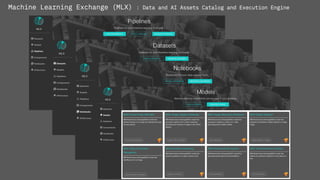
Machine Learning Exchange (MLX) : Data and AI Assets Catalog and Execution Engine
Machine Learning Exchange (MLX)
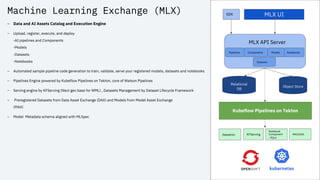
– Data and AI Assets Catalog and Execution Engine
– Upload, register, execute, and deploy
-AI pipelines and Components
-Models
-Datasets
-Notebooks
– Automated sample pipeline code generation to train, validate, serve your registered models, datasets and notebooks
– Pipelines Engine powered by Kubeflow Pipelines on Tekton, core of Watson Pipelines
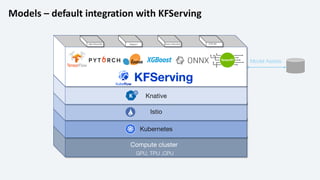
– Serving engine by KFServing (Next gen base for WML) , Datasets Management by Dataset Lifecycle Framework
– Preregistered Datasets from Data Asset Exchange (DAX) and Models from Model Asset Exchange
(MAX)
– Model Metadata schema aligned with MLSpec
MLX API Server
Components
Pipelines Notebooks
Object Store
Kubeflow Pipelines on Tekton
MLX UI
SDK
Relational
DB
Models
Datasets
Datashim KFServing
Notebook
Component
- Elyra
MAX/DAX
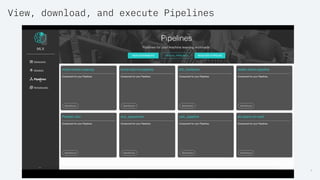
View, download, and execute Pipelines
4
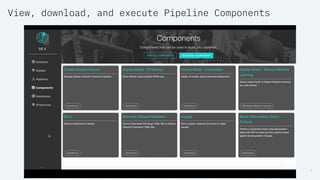
View, download, and execute Pipeline Components
5
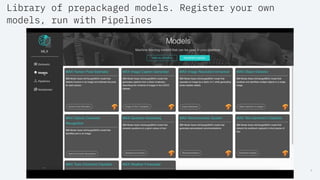
Library of prepackaged models. Register your own
models, run with Pipelines
6
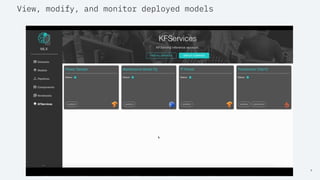
View, modify, and monitor deployed models
7
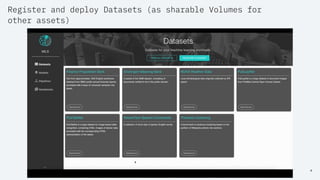
Register and deploy Datasets (as sharable Volumes for
other assets)
8
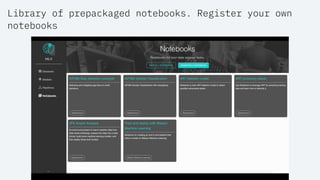
Library of prepackaged notebooks. Register your own
notebooks
10
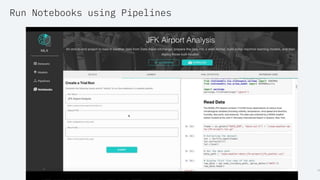
Run Notebooks using Pipelines
Integration
Pluggable Components
Watson
Studio WML
Open
Scale
Kubeflow
Training
Seldon AIF360 ART KATIB KFSERVING
…
…
TASK
STEP
POD
STEP
TASK
STEP STEP
POD
Container Container Container Container
TEKTON
KFP API Server
Components
Pipelines
Object
Store
KFP UI
Relational
DB
COMPILE
KFP SDK
Intermediate
Representation [IR]
Pipelines - default integration with Kubeflow Pipelines and Tekton
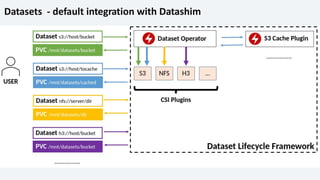
Datasets - default integration with Datashim
Models – default integration with KFServing
Kubernetes
Compute cluster
GPU, TPU ,CPU
Model Assets.
Istio
Knative
KFServing
PRE-PROCESS PREDICT POST-PROCESS EXPLAIN
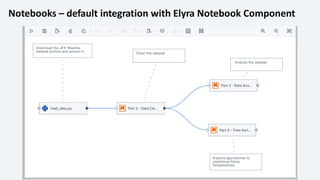
Notebooks – default integration with Elyra Notebook Component

Machine Learning Exchange (MLX)

  • 1.
    Machine Learning Exchange(MLX) Animesh Singh, Christian Kadner, Tommy Li, Andrew Butler
  • 2.
    Machine Learning Exchange(MLX) : Data and AI Assets Catalog and Execution Engine
  • 3.
    Machine Learning Exchange(MLX) – Data and AI Assets Catalog and Execution Engine – Upload, register, execute, and deploy -AI pipelines and Components -Models -Datasets -Notebooks – Automated sample pipeline code generation to train, validate, serve your registered models, datasets and notebooks – Pipelines Engine powered by Kubeflow Pipelines on Tekton, core of Watson Pipelines – Serving engine by KFServing (Next gen base for WML) , Datasets Management by Dataset Lifecycle Framework – Preregistered Datasets from Data Asset Exchange (DAX) and Models from Model Asset Exchange (MAX) – Model Metadata schema aligned with MLSpec MLX API Server Components Pipelines Notebooks Object Store Kubeflow Pipelines on Tekton MLX UI SDK Relational DB Models Datasets Datashim KFServing Notebook Component - Elyra MAX/DAX
  • 4.
    View, download, andexecute Pipelines 4
  • 5.
    View, download, andexecute Pipeline Components 5
  • 6.
    Library of prepackagedmodels. Register your own models, run with Pipelines 6
  • 7.
    View, modify, andmonitor deployed models 7
  • 8.
    Register and deployDatasets (as sharable Volumes for other assets) 8
  • 9.
    Library of prepackagednotebooks. Register your own notebooks
  • 10.
  • 11.
  • 12.
    Pluggable Components Watson Studio WML Open Scale Kubeflow Training SeldonAIF360 ART KATIB KFSERVING … … TASK STEP POD STEP TASK STEP STEP POD Container Container Container Container TEKTON KFP API Server Components Pipelines Object Store KFP UI Relational DB COMPILE KFP SDK Intermediate Representation [IR] Pipelines - default integration with Kubeflow Pipelines and Tekton
  • 13.
    Datasets - defaultintegration with Datashim
  • 14.
    Models – defaultintegration with KFServing Kubernetes Compute cluster GPU, TPU ,CPU Model Assets. Istio Knative KFServing PRE-PROCESS PREDICT POST-PROCESS EXPLAIN
  • 15.
    Notebooks – defaultintegration with Elyra Notebook Component