Presentation On
# 
Index 
1. Abstract 
2. Introduction 
3. Software Requirements Specifications 
4. System Design 
5. Implementation 
6. Testing 
7. Screen Shots 
8. Conclusion 
9. Future Enhancements 
10.References 
SJEC Dept.Of Computer Application 1
For many years Bug Tracking mechanism is employed only in some 
of the large software development houses. Most of the others never bothered 
with bug tracking at all and instead simply relied on shared lists and email to 
monitor the status of defects 
Bug Tracking System is a web-based application that is designed to 
help quality assurance and programmers keep track of reported software bugs 
in their work. Bugs will be assigned to a person with a bug id, flag, 
description, project name. 
Nowadays, when project are so extensive defects or bugs have been 
existed as a problem in the system and they are normally inevitable in software 
development.A bug could be in either a program’s source code or its design. 
# 
ABSTRACT 
SJEC Dept.Of Computer Application 2
# 
Introduction 
• Bug Tracking System is a web-based application that is designed 
to help quality assurance and programmers keep track of reported 
software bugs in their work.. 
• Bugs will be assigned to a person with a bug id, flag, description, 
project name. 
• Bug can be submitted to the tester with an attachment for the bug 
detailed report. 
• Admin can maintain users, projects, organizations, bug 
categories, bug priorities, status of bug etc. 
SJEC Dept.Of Computer Application 3
# 
Purpose Of The Project 
• Bug Tracking System is to test the application for the 
bugs and report it to the project manager and 
developer. 
• The main intention behind the Bug Tracking System 
is that to track bugs and report them. 
• Store the bug information with a unique id in the 
database. 
SJEC Dept.Of Computer Application 4
# 
Software Requirement Specification 
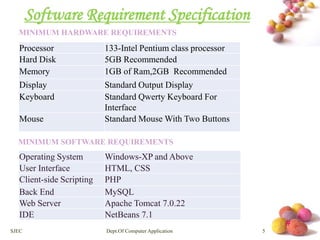
MINIMUM HARDWARE REQUIREMENTS 
Processor 133-Intel Pentium class processor 
Hard Disk 5GB Recommended 
Memory 1GB of Ram,2GB Recommended 
Display Standard Output Display 
Keyboard Standard Qwerty Keyboard For 
Interface 
Mouse Standard Mouse With Two Buttons 
MINIMUM SOFTWARE REQUIREMENTS 
Operating System Windows-XP and Above 
User Interface HTML, CSS 
Client-side Scripting PHP 
Back End MySQL 
Web Server Apache Tomcat 7.0.22 
IDE NetBeans 7.1 
SJEC Dept.Of Computer Application 5
# 
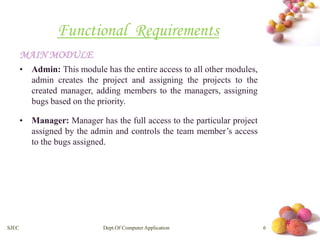
Functional Requirements 
MAINMODULE 
• Admin: This module has the entire access to all other modules, 
admin creates the project and assigning the projects to the 
created manager, adding members to the managers, assigning 
bugs based on the priority. 
• Manager: Manager has the full access to the particular project 
assigned by the admin and controls the team member’s access 
to the bugs assigned. 
SJEC Dept.Of Computer Application 6
# 
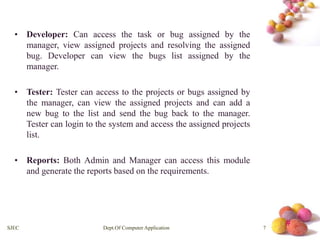
• Developer: Can access the task or bug assigned by the 
manager, view assigned projects and resolving the assigned 
bug. Developer can view the bugs list assigned by the 
manager. 
• Tester: Tester can access to the projects or bugs assigned by 
the manager, can view the assigned projects and can add a 
new bug to the list and send the bug back to the manager. 
Tester can login to the system and access the assigned projects 
list. 
• Reports: Both Admin and Manager can access this module 
and generate the reports based on the requirements. 
SJEC Dept.Of Computer Application 7
# 
System Design Document 
SOFTWARE PRODUCT ARCHITECTURE 
ARCHITECTURAL DESIGN 
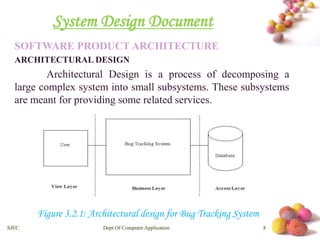
Architectural Design is a process of decomposing a 
large complex system into small subsystems. These subsystems 
are meant for providing some related services. 
Figure 3.2.1: Architectural design for Bug Tracking System 
SJEC Dept.Of Computer Application 8
# 
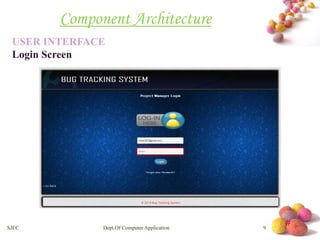
Component Architecture 
USER INTERFACE 
Login Screen 
SJEC Dept.Of Computer Application 9
# 
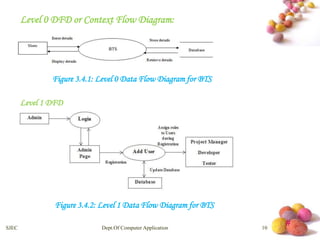
Level 0 DFD or Context Flow Diagram: 
Figure 3.4.1: Level 0 Data Flow Diagram for BTS 
Level 1 DFD 
Figure 3.4.2: Level 1 Data Flow Diagram for BTS 
SJEC Dept.Of Computer Application 10
# 
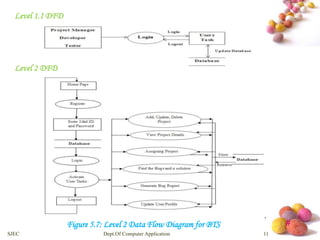
Level 1.1 DFD 
Level 2 DFD 
Figure 5.7: Level 2 Data Flow Diagram for BTS 
SJEC Dept.Of Computer Application 11
# 
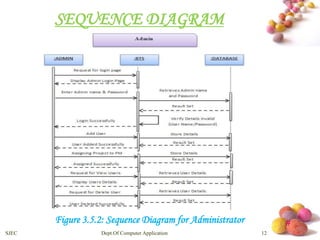
SEQUENCE DIAGRAM 
Figure 3.5.2: Sequence Diagram for Administrator 
SJEC Dept.Of Computer Application 12
# 
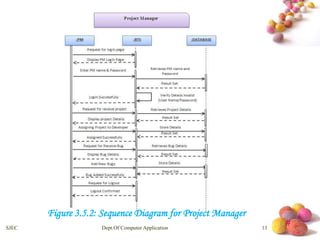
Figure 3.5.2: Sequence Diagram for Project Manager 
SJEC Dept.Of Computer Application 13
# 
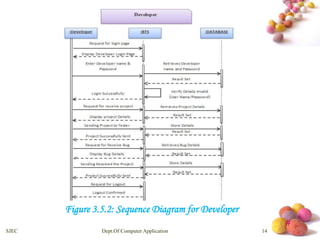
Figure 3.5.2: Sequence Diagram for Developer 
SJEC Dept.Of Computer Application 14
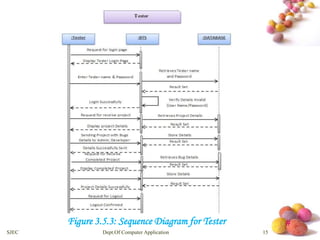
Figure 3.5.3: Sequence Diagram for Tester # 
SJEC Dept.Of Computer Application 15
# 
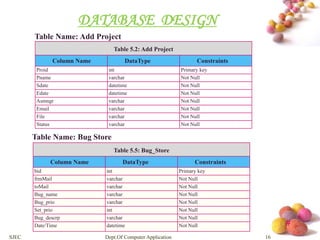
DATABASE DESIGN 
Table Name: Add Project 
Table 5.2: Add Project 
Column Name DataType Constraints 
Proid int Primary key 
Pname varchar Not Null 
Sdate datetime Not Null 
Edate datetime Not Null 
Asmngr varchar Not Null 
Email varchar Not Null 
File varchar Not Null 
Status varchar Not Null 
Table Name: Bug Store 
Table 5.5: Bug_Store 
Column Name DataType Constraints 
bid int Primary key 
frmMail varchar Not Null 
toMail varchar Not Null 
Bug_name varchar Not Null 
Bug_prio varchar Not Null 
Set_prio int Not Null 
Bug_descrp varchar Not Null 
Date/Time datetime Not Null 
SJEC Dept.Of Computer Application 16
# 
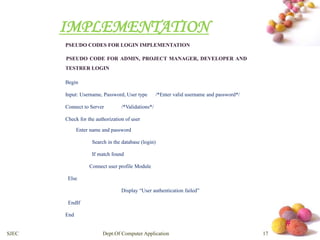
IMPLEMENTATION 
PSEUDO CODES FOR LOGIN IMPLEMENTATION 
PSEUDO CODE FOR ADMIN, PROJECT MANAGER, DEVELOPER AND 
TESTRER LOGIN 
Begin 
Input: Username, Password, User type /*Enter valid username and password*/ 
Connect to Server /*Validations*/ 
Check for the authorization of user 
Enter name and password 
Search in the database (login) 
If match found 
Connect user profile Module 
Else 
Display “User authentication failed” 
EndIf 
End 
SJEC Dept.Of Computer Application 17
# 
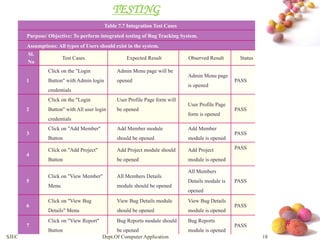
TESTING 
Table 7.7 Integration Test Cases 
Purpose/ Objective: To perform integrated testing of Bug Tracking System. 
Assumptions: All types of Users should exist in the system. 
Sl. 
No 
Test Cases Expected Result Observed Result Status 
1 
Click on the "Login 
Button" with Admin login 
credentials 
Admin Menu page will be 
opened 
Admin Menu page 
is opened 
PASS 
2 
Click on the "Login 
Button" with All user login 
credentials 
User Profile Page form will 
be opened 
User Profile Page 
form is opened 
PASS 
3 
Click on "Add Member" 
Button 
Add Member module 
should be opened 
Add Member 
module is opened 
PASS 
4 
Click on "Add Project" 
Button 
Add Project module should 
be opened 
Add Project 
module is opened 
PASS 
5 
Click on "View Member" 
Menu 
All Members Details 
module should be opened 
All Members 
Details module is 
opened 
PASS 
6 
Click on "View Bug 
Details" Menu 
View Bug Details module 
should be opened 
View Bug Details 
module is opened 
PASS 
7 
Click on "View Report" 
Button 
Bug Reports module should 
be opened 
Bug Reports 
module is opened 
PASS 
SJEC Dept.Of Computer Application 18
# 
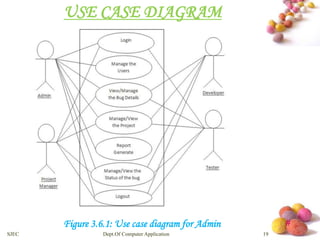
USE CASE DIAGRAM 
Figure 3.6.1: Use case diagram for Admin 
SJEC Dept.Of Computer Application 19
# 
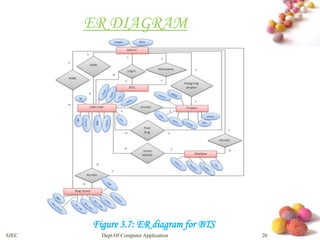
ER DIAGRAM 
Figure 3.7: ER diagram for BTS 
SJEC Dept.Of Computer Application 20
# 
SCREEN SHOTS 
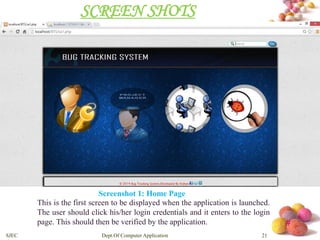
Screenshot 1: Home Page 
This is the first screen to be displayed when the application is launched. 
The user should click his/her login credentials and it enters to the login 
page. This should then be verified by the application. 
SJEC Dept.Of Computer Application 21
# 
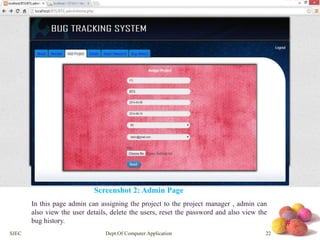
Screenshot 2: Admin Page 
In this page admin can assigning the project to the project manager , admin can 
also view the user details, delete the users, reset the password and also view the 
bug history. 
SJEC Dept.Of Computer Application 22
# 
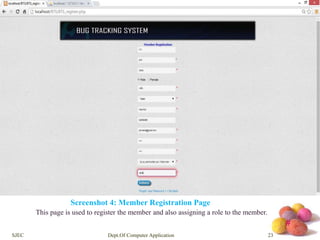
Screenshot 4: Member Registration Page 
This page is used to register the member and also assigning a role to the member. 
SJEC Dept.Of Computer Application 23
# 
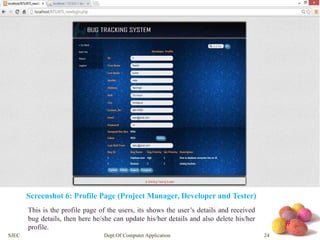
Screenshot 6: Profile Page (Project Manager, Developer and Tester) 
This is the profile page of the users, its shows the user’s details and received 
bug details, then here he/she can update his/her details and also delete his/her 
profile. 
SJEC Dept.Of Computer Application 24
# 
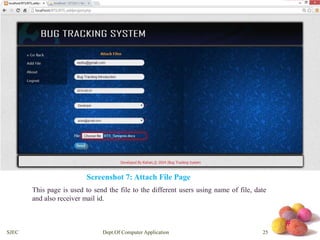
Screenshot 7: Attach File Page 
This page is used to send the file to the different users using name of file, date 
and also receiver mail id. 
SJEC Dept.Of Computer Application 25
# 
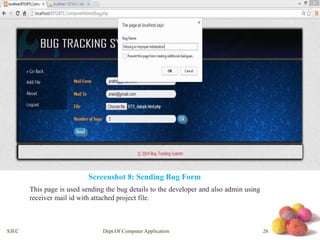
Screenshot 8: Sending Bug Form 
This page is used sending the bug details to the developer and also admin using 
receiver mail id with attached project file. 
SJEC Dept.Of Computer Application 26
# 
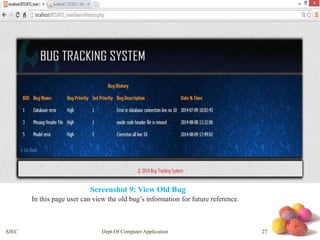
Screenshot 9: View Old Bug 
In this page user can view the old bug’s information for future reference. 
SJEC Dept.Of Computer Application 27
# 
CONCLUSION 
• Bug Tracking System helps to detect and manage the bugs in 
software products effectively. 
• This project BTS can be used to track the bugs in the project modules 
and assist in troubleshooting errors for testing and for development 
processes. 
• This project highly avoids all sources of delay in bugs reporting level 
within the project modules in the software industry. As application is 
deployed in a company server, it is much more secure. 
SJEC Dept.Of Computer Application 28
# 
FUTURE ENHANCEMENTS 
• This Bug Tracking System can be modified and enhanced for performing more 
complex task related to bug tracking system. 
• There are many more enhancements that are pending to make this project more 
interactive and professional, apart from this online facility, chat room, SMS alerts 
to the user and a separate account will be created for the testing team to compare 
severity of the incoming bugs. 
SJEC Dept.Of Computer Application 29
# 
REFERENCES 
[1] The Complete Reference PHP 5.0 by Steven Holzner. 
[2] http://en.wikipedia.org/wiki/Comparison_of_issue_tracking_systems. 
[3] An Integrated Approach to Software Engineering, Third Edition – Pankaj Jalote 
[4] Fundamentals Of Database Systems, Third Edition – Ramez Elmasri and Shamka 
Navathe 
[5] Professional Web Widgets with CSS, DOM, JSON and Ajax – Rajesh Lal and Lakshmi 
Chava 
[6] Beginning JavaScript and CSS Development with jQuery- Richard York 
SJEC Dept.Of Computer Application 30
# 
YOU

Bug Tracking System

  • 1.
  • 2.
    # Index 1.Abstract 2. Introduction 3. Software Requirements Specifications 4. System Design 5. Implementation 6. Testing 7. Screen Shots 8. Conclusion 9. Future Enhancements 10.References SJEC Dept.Of Computer Application 1
  • 3.
    For many yearsBug Tracking mechanism is employed only in some of the large software development houses. Most of the others never bothered with bug tracking at all and instead simply relied on shared lists and email to monitor the status of defects Bug Tracking System is a web-based application that is designed to help quality assurance and programmers keep track of reported software bugs in their work. Bugs will be assigned to a person with a bug id, flag, description, project name. Nowadays, when project are so extensive defects or bugs have been existed as a problem in the system and they are normally inevitable in software development.A bug could be in either a program’s source code or its design. # ABSTRACT SJEC Dept.Of Computer Application 2
  • 4.
    # Introduction •Bug Tracking System is a web-based application that is designed to help quality assurance and programmers keep track of reported software bugs in their work.. • Bugs will be assigned to a person with a bug id, flag, description, project name. • Bug can be submitted to the tester with an attachment for the bug detailed report. • Admin can maintain users, projects, organizations, bug categories, bug priorities, status of bug etc. SJEC Dept.Of Computer Application 3
  • 5.
    # Purpose OfThe Project • Bug Tracking System is to test the application for the bugs and report it to the project manager and developer. • The main intention behind the Bug Tracking System is that to track bugs and report them. • Store the bug information with a unique id in the database. SJEC Dept.Of Computer Application 4
  • 6.
    # Software RequirementSpecification MINIMUM HARDWARE REQUIREMENTS Processor 133-Intel Pentium class processor Hard Disk 5GB Recommended Memory 1GB of Ram,2GB Recommended Display Standard Output Display Keyboard Standard Qwerty Keyboard For Interface Mouse Standard Mouse With Two Buttons MINIMUM SOFTWARE REQUIREMENTS Operating System Windows-XP and Above User Interface HTML, CSS Client-side Scripting PHP Back End MySQL Web Server Apache Tomcat 7.0.22 IDE NetBeans 7.1 SJEC Dept.Of Computer Application 5
  • 7.
    # Functional Requirements MAINMODULE • Admin: This module has the entire access to all other modules, admin creates the project and assigning the projects to the created manager, adding members to the managers, assigning bugs based on the priority. • Manager: Manager has the full access to the particular project assigned by the admin and controls the team member’s access to the bugs assigned. SJEC Dept.Of Computer Application 6
  • 8.
    # • Developer:Can access the task or bug assigned by the manager, view assigned projects and resolving the assigned bug. Developer can view the bugs list assigned by the manager. • Tester: Tester can access to the projects or bugs assigned by the manager, can view the assigned projects and can add a new bug to the list and send the bug back to the manager. Tester can login to the system and access the assigned projects list. • Reports: Both Admin and Manager can access this module and generate the reports based on the requirements. SJEC Dept.Of Computer Application 7
  • 9.
    # System DesignDocument SOFTWARE PRODUCT ARCHITECTURE ARCHITECTURAL DESIGN Architectural Design is a process of decomposing a large complex system into small subsystems. These subsystems are meant for providing some related services. Figure 3.2.1: Architectural design for Bug Tracking System SJEC Dept.Of Computer Application 8
  • 10.
    # Component Architecture USER INTERFACE Login Screen SJEC Dept.Of Computer Application 9
  • 11.
    # Level 0DFD or Context Flow Diagram: Figure 3.4.1: Level 0 Data Flow Diagram for BTS Level 1 DFD Figure 3.4.2: Level 1 Data Flow Diagram for BTS SJEC Dept.Of Computer Application 10
  • 12.
    # Level 1.1DFD Level 2 DFD Figure 5.7: Level 2 Data Flow Diagram for BTS SJEC Dept.Of Computer Application 11
  • 13.
    # SEQUENCE DIAGRAM Figure 3.5.2: Sequence Diagram for Administrator SJEC Dept.Of Computer Application 12
  • 14.
    # Figure 3.5.2:Sequence Diagram for Project Manager SJEC Dept.Of Computer Application 13
  • 15.
    # Figure 3.5.2:Sequence Diagram for Developer SJEC Dept.Of Computer Application 14
  • 16.
    Figure 3.5.3: SequenceDiagram for Tester # SJEC Dept.Of Computer Application 15
  • 17.
    # DATABASE DESIGN Table Name: Add Project Table 5.2: Add Project Column Name DataType Constraints Proid int Primary key Pname varchar Not Null Sdate datetime Not Null Edate datetime Not Null Asmngr varchar Not Null Email varchar Not Null File varchar Not Null Status varchar Not Null Table Name: Bug Store Table 5.5: Bug_Store Column Name DataType Constraints bid int Primary key frmMail varchar Not Null toMail varchar Not Null Bug_name varchar Not Null Bug_prio varchar Not Null Set_prio int Not Null Bug_descrp varchar Not Null Date/Time datetime Not Null SJEC Dept.Of Computer Application 16
  • 18.
    # IMPLEMENTATION PSEUDOCODES FOR LOGIN IMPLEMENTATION PSEUDO CODE FOR ADMIN, PROJECT MANAGER, DEVELOPER AND TESTRER LOGIN Begin Input: Username, Password, User type /*Enter valid username and password*/ Connect to Server /*Validations*/ Check for the authorization of user Enter name and password Search in the database (login) If match found Connect user profile Module Else Display “User authentication failed” EndIf End SJEC Dept.Of Computer Application 17
  • 19.
    # TESTING Table7.7 Integration Test Cases Purpose/ Objective: To perform integrated testing of Bug Tracking System. Assumptions: All types of Users should exist in the system. Sl. No Test Cases Expected Result Observed Result Status 1 Click on the "Login Button" with Admin login credentials Admin Menu page will be opened Admin Menu page is opened PASS 2 Click on the "Login Button" with All user login credentials User Profile Page form will be opened User Profile Page form is opened PASS 3 Click on "Add Member" Button Add Member module should be opened Add Member module is opened PASS 4 Click on "Add Project" Button Add Project module should be opened Add Project module is opened PASS 5 Click on "View Member" Menu All Members Details module should be opened All Members Details module is opened PASS 6 Click on "View Bug Details" Menu View Bug Details module should be opened View Bug Details module is opened PASS 7 Click on "View Report" Button Bug Reports module should be opened Bug Reports module is opened PASS SJEC Dept.Of Computer Application 18
  • 20.
    # USE CASEDIAGRAM Figure 3.6.1: Use case diagram for Admin SJEC Dept.Of Computer Application 19
  • 21.
    # ER DIAGRAM Figure 3.7: ER diagram for BTS SJEC Dept.Of Computer Application 20
  • 22.
    # SCREEN SHOTS Screenshot 1: Home Page This is the first screen to be displayed when the application is launched. The user should click his/her login credentials and it enters to the login page. This should then be verified by the application. SJEC Dept.Of Computer Application 21
  • 23.
    # Screenshot 2:Admin Page In this page admin can assigning the project to the project manager , admin can also view the user details, delete the users, reset the password and also view the bug history. SJEC Dept.Of Computer Application 22
  • 24.
    # Screenshot 4:Member Registration Page This page is used to register the member and also assigning a role to the member. SJEC Dept.Of Computer Application 23
  • 25.
    # Screenshot 6:Profile Page (Project Manager, Developer and Tester) This is the profile page of the users, its shows the user’s details and received bug details, then here he/she can update his/her details and also delete his/her profile. SJEC Dept.Of Computer Application 24
  • 26.
    # Screenshot 7:Attach File Page This page is used to send the file to the different users using name of file, date and also receiver mail id. SJEC Dept.Of Computer Application 25
  • 27.
    # Screenshot 8:Sending Bug Form This page is used sending the bug details to the developer and also admin using receiver mail id with attached project file. SJEC Dept.Of Computer Application 26
  • 28.
    # Screenshot 9:View Old Bug In this page user can view the old bug’s information for future reference. SJEC Dept.Of Computer Application 27
  • 29.
    # CONCLUSION •Bug Tracking System helps to detect and manage the bugs in software products effectively. • This project BTS can be used to track the bugs in the project modules and assist in troubleshooting errors for testing and for development processes. • This project highly avoids all sources of delay in bugs reporting level within the project modules in the software industry. As application is deployed in a company server, it is much more secure. SJEC Dept.Of Computer Application 28
  • 30.
    # FUTURE ENHANCEMENTS • This Bug Tracking System can be modified and enhanced for performing more complex task related to bug tracking system. • There are many more enhancements that are pending to make this project more interactive and professional, apart from this online facility, chat room, SMS alerts to the user and a separate account will be created for the testing team to compare severity of the incoming bugs. SJEC Dept.Of Computer Application 29
  • 31.
    # REFERENCES [1]The Complete Reference PHP 5.0 by Steven Holzner. [2] http://en.wikipedia.org/wiki/Comparison_of_issue_tracking_systems. [3] An Integrated Approach to Software Engineering, Third Edition – Pankaj Jalote [4] Fundamentals Of Database Systems, Third Edition – Ramez Elmasri and Shamka Navathe [5] Professional Web Widgets with CSS, DOM, JSON and Ajax – Rajesh Lal and Lakshmi Chava [6] Beginning JavaScript and CSS Development with jQuery- Richard York SJEC Dept.Of Computer Application 30
  • 32.