Data for decision-making across the
data value chain
11 February 2020
SESSION 4
Making better
figures:
visualising data
for different
audiences
Tricia Aung & Youssouf Keita
26 February 2020
Session goals
• Learn how to choose the most appropriate data
visualization based on your key message
• Identify what makes a good (and bad) data visualization
11 February 2020
What is the most
appropriate graph
based on key
message?
Exercise
26 February 2020
26 February 2020
0% 20% 40% 60% 80% 100%
2015 DHS
2016 DHS
2017 DHS
Breastfeeding status children <6
months in Senegal1
2017 DHS2016 DHS2015 DHS
Breastfeeding status children <6
months in Senegal2
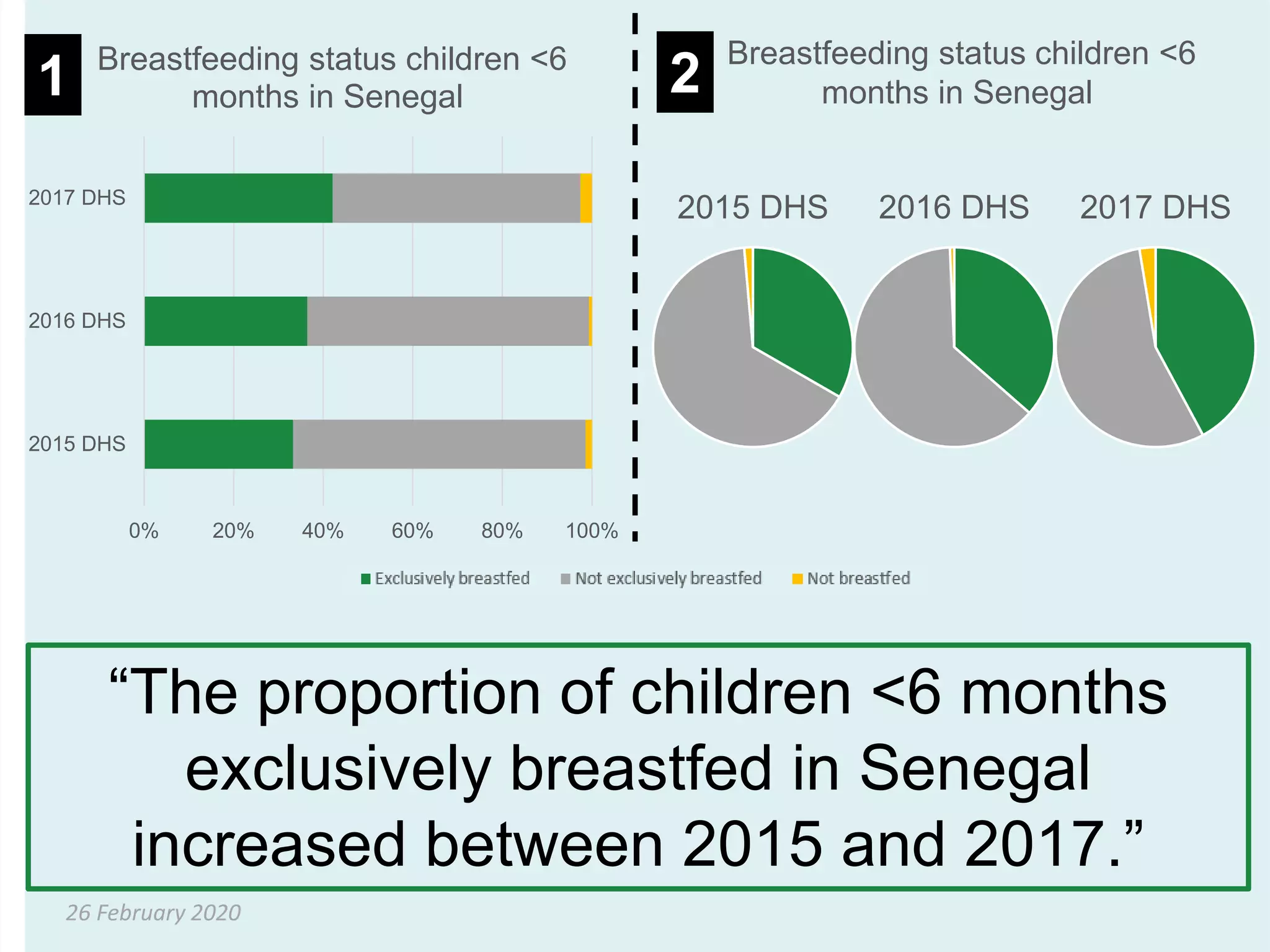
“The proportion of children <6 months
exclusively breastfed in Senegal
increased between 2015 and 2017.”
26 February 2020
0
10
20
30
40
50
60
70
80
2018 DHS 2012/13 DHS 2006 DHS
Percent
Percentage of women age 15-
49 with any anaemia in Mali
by wealth quintile
1 2
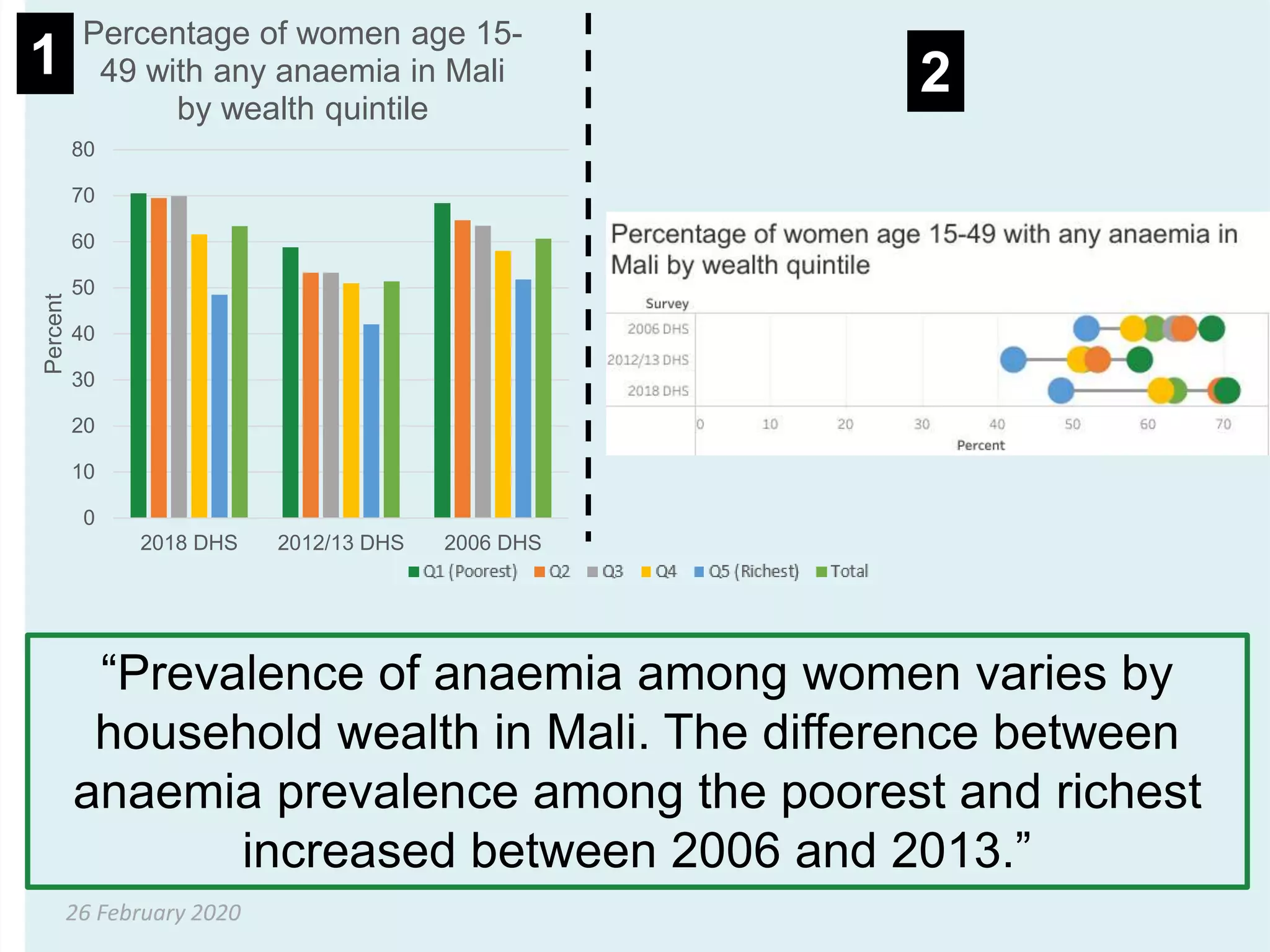
“Prevalence of anaemia among women varies by
household wealth in Mali. The difference between
anaemia prevalence among the poorest and richest
increased between 2006 and 2013.”
“the graphic is only as
useful as the audience
finds it”
26 February 2020
How do we make good data
visualizations?
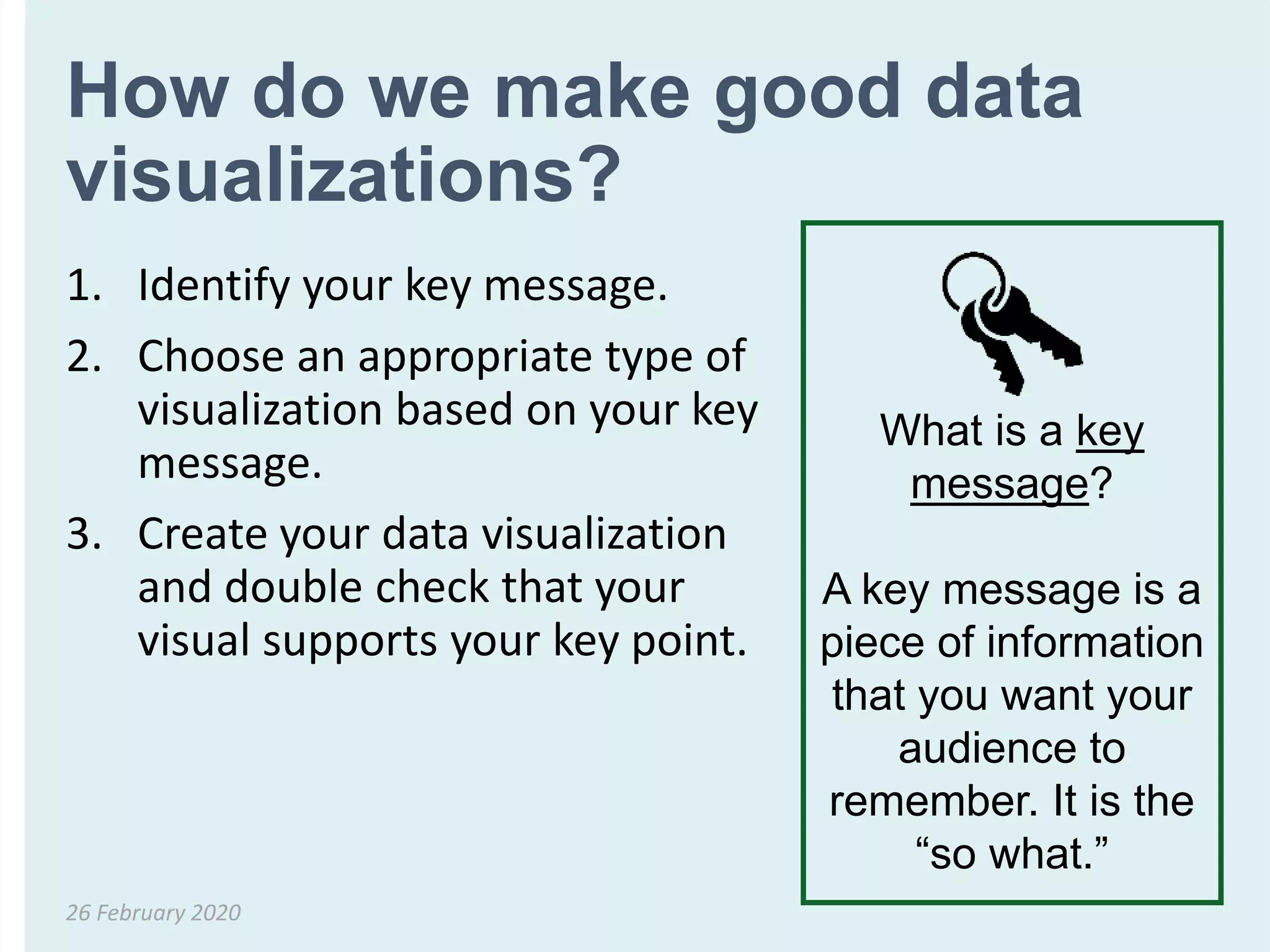
1. Identify your key message.
2. Choose an appropriate type of
visualization based on your key
message.
3. Create your data visualization
and double check that your
visual supports your key point.
26 February 2020
What is a key
message?
A key message is a
piece of information
that you want your
audience to
remember. It is the
“so what.”
Based on your key message, what
do you want your visualization to
show?
26 February 2020
Category Key Message
Comparisons • “This is how two or more numbers are
the same (or different)”
• “This is how one number/numbers
compare to the total”
• “This is how things change over time”
Small numbers,
percentages,
frequencies
• “This one number is VERY important
for you to remember”
Adapted from Evergreen, Stephanie DH. Effective Data Visualization: The Right Chart for the Right Data. SAGE Publications, 2016 and Chart Chooser.
How 2 or more
numbers are the same
(or different)
Comparisons
26 February 2020
Most effective ways to
compare 2 or more numbers
• For comparing 2 (or more) numbers…
• Side by side column graph (bar chart)
• Slope graph
• Dot plot
• Back-to-back bar chart
26 February 2020
Side by side column graph (bar
chart)
• Suitable for displaying categorical data and to
compare discrete data in distinct categories
• Each bar represents one category
• Can be organized horizontally or vertically
• Height of the bars are proportional to the
number of events (e.g. cases) in the category
• Variables in a bar graph can be discrete (e.g.
sex, region, race) or continuous (e.g. age) but
organized in categories (e.g. age groups)
26 February 2020
Side by side column graph (bar
chart)
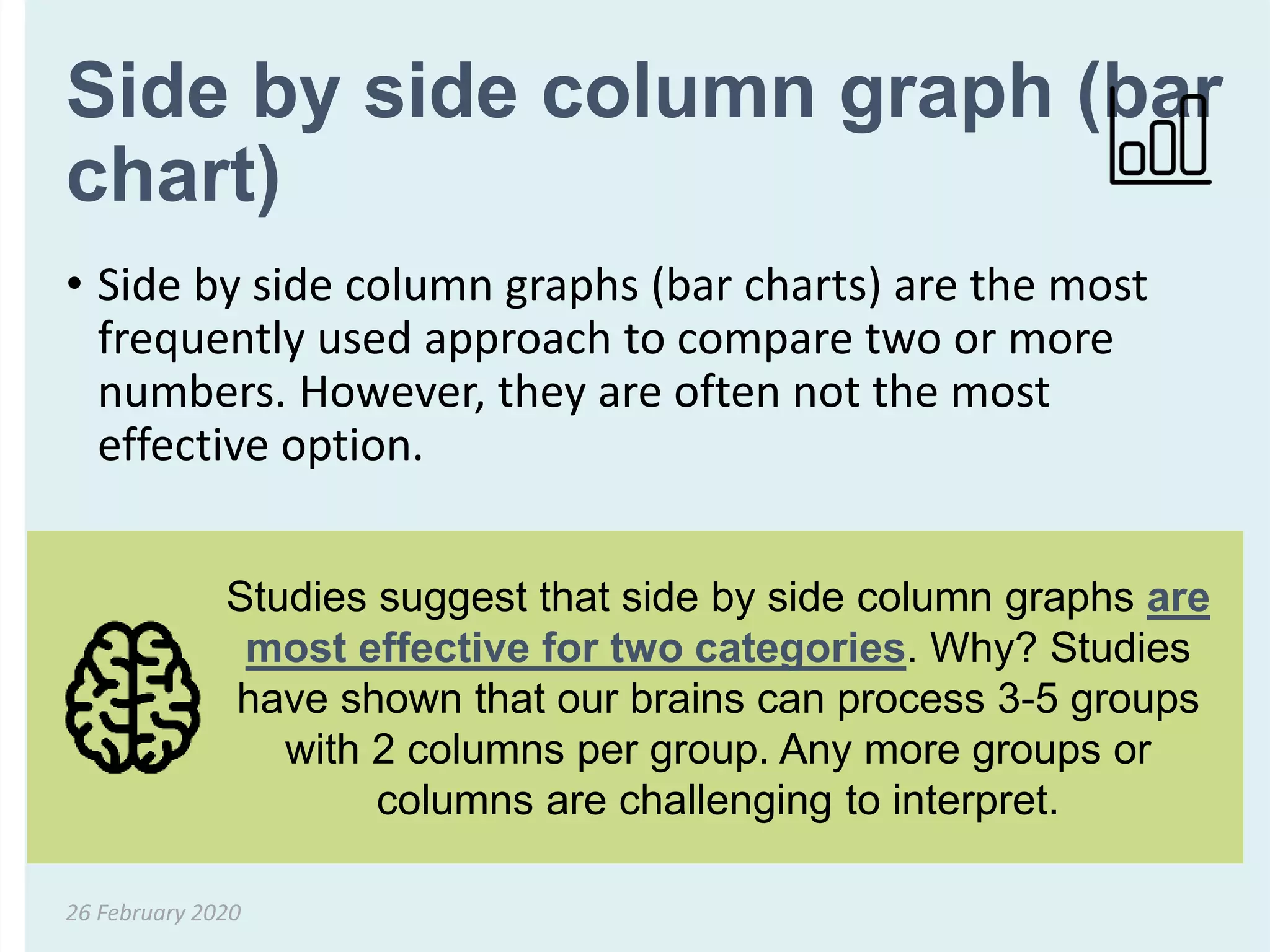
• Side by side column graphs (bar charts) are the most
frequently used approach to compare two or more
numbers. However, they are often not the most
effective option.
26 February 2020
Studies suggest that side by side column graphs are
most effective for two categories. Why? Studies
have shown that our brains can process 3-5 groups
with 2 columns per group. Any more groups or
columns are challenging to interpret.
Slope graph
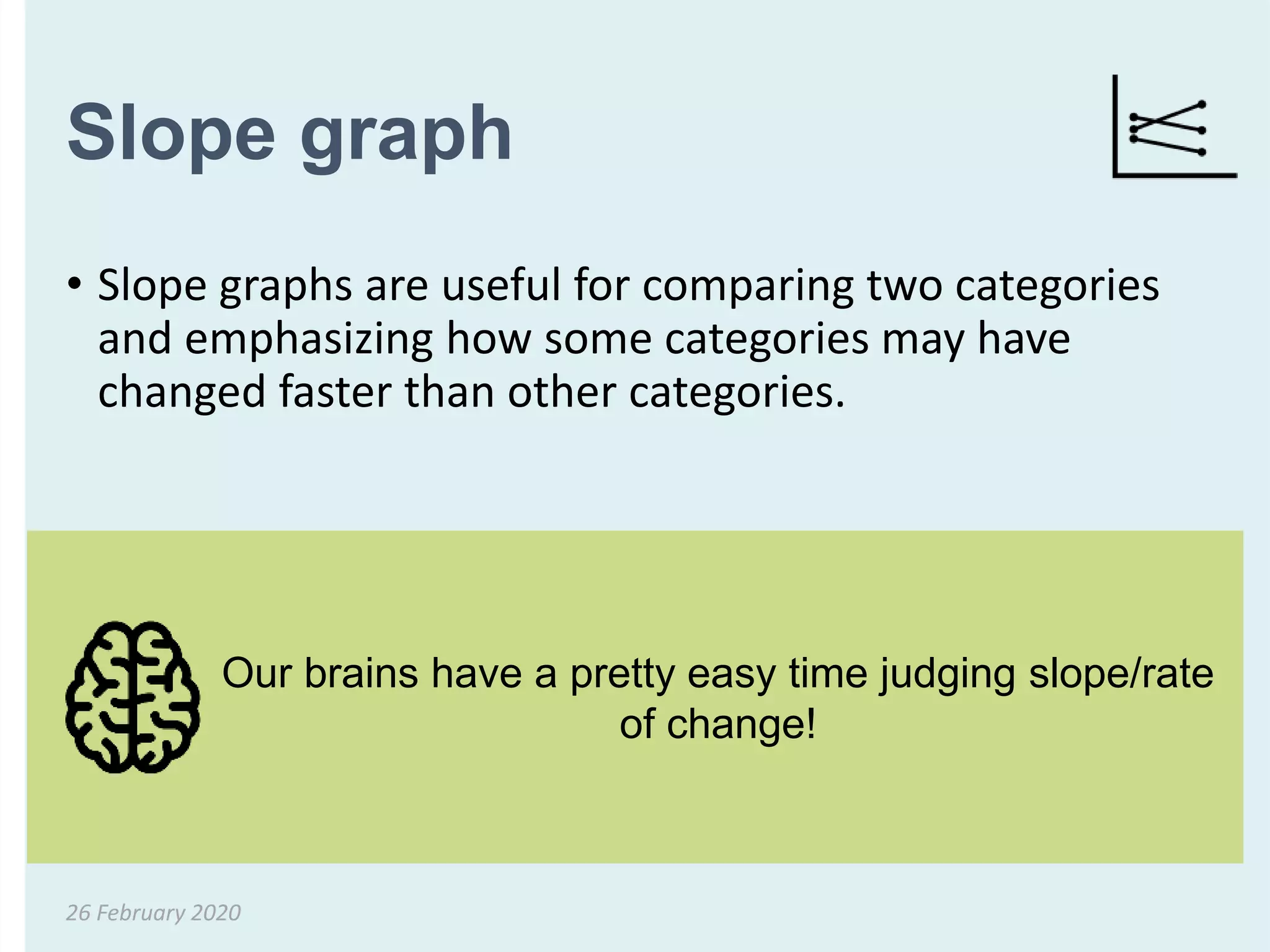
• Slope graphs are useful for comparing two categories
and emphasizing how some categories may have
changed faster than other categories.
26 February 2020
Our brains have a pretty easy time judging slope/rate
of change!
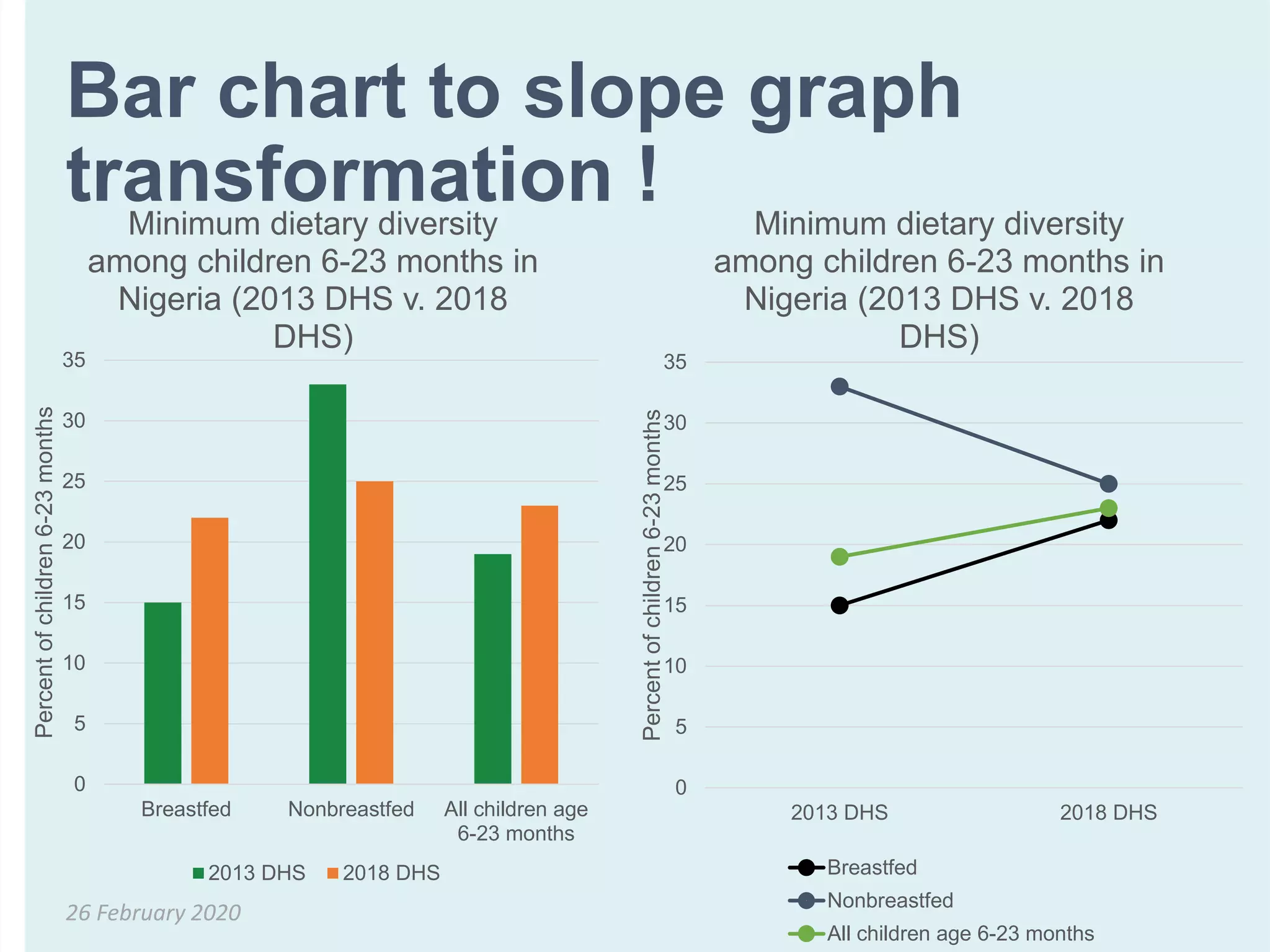
Bar chart to slope graph
transformation !
26 February 2020
0
5
10
15
20
25
30
35
Breastfed Nonbreastfed All children age
6-23 months
Percentofchildren6-23months
Minimum dietary diversity
among children 6-23 months in
Nigeria (2013 DHS v. 2018
DHS)
2013 DHS 2018 DHS
0
5
10
15
20
25
30
35
2013 DHS 2018 DHS
Percentofchildren6-23months
Minimum dietary diversity
among children 6-23 months in
Nigeria (2013 DHS v. 2018
DHS)
Breastfed
Nonbreastfed
All children age 6-23 months
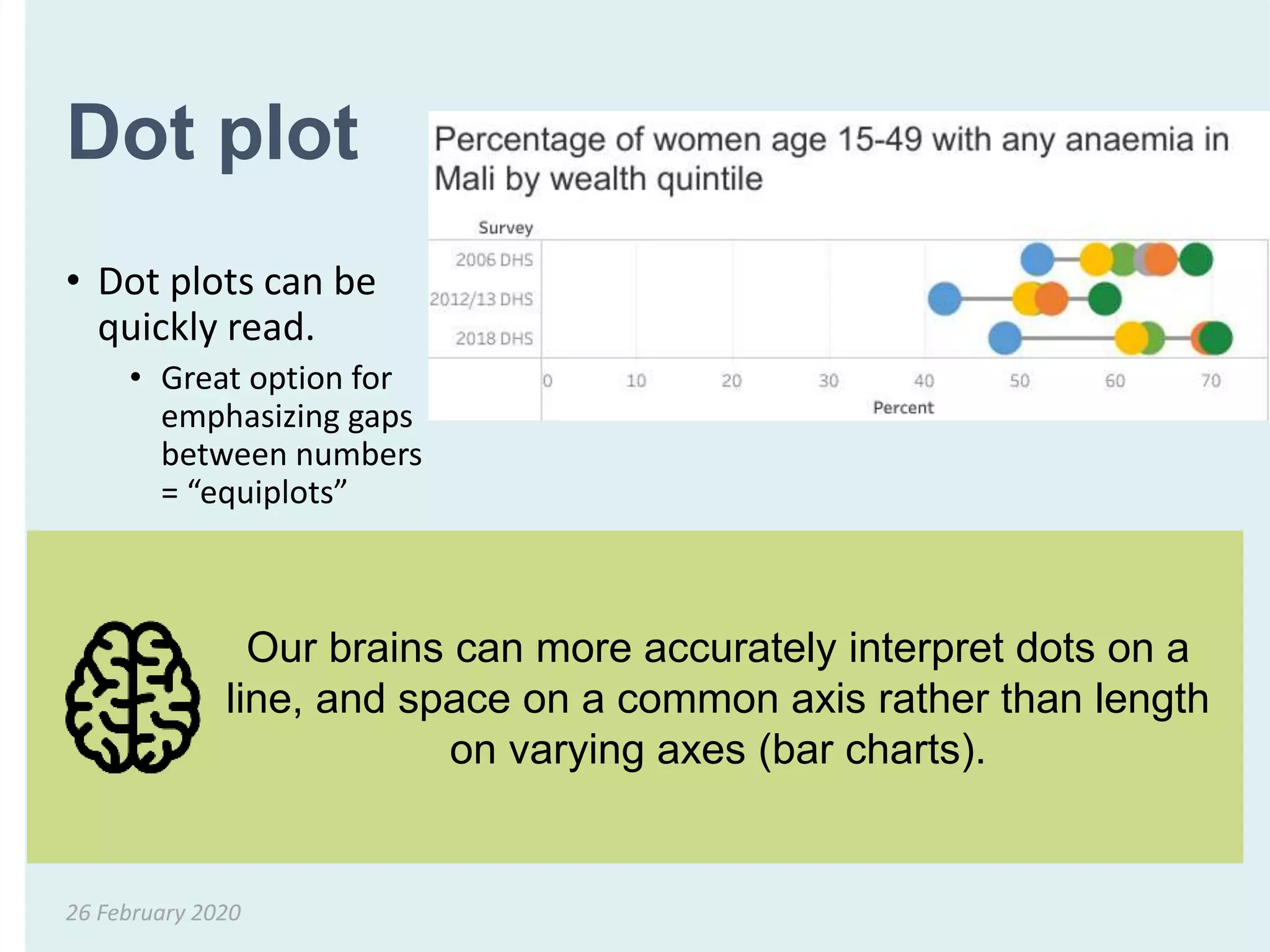
Dot plot
• Dot plots can be
quickly read.
• Great option for
emphasizing gaps
between numbers
= “equiplots”
26 February 2020
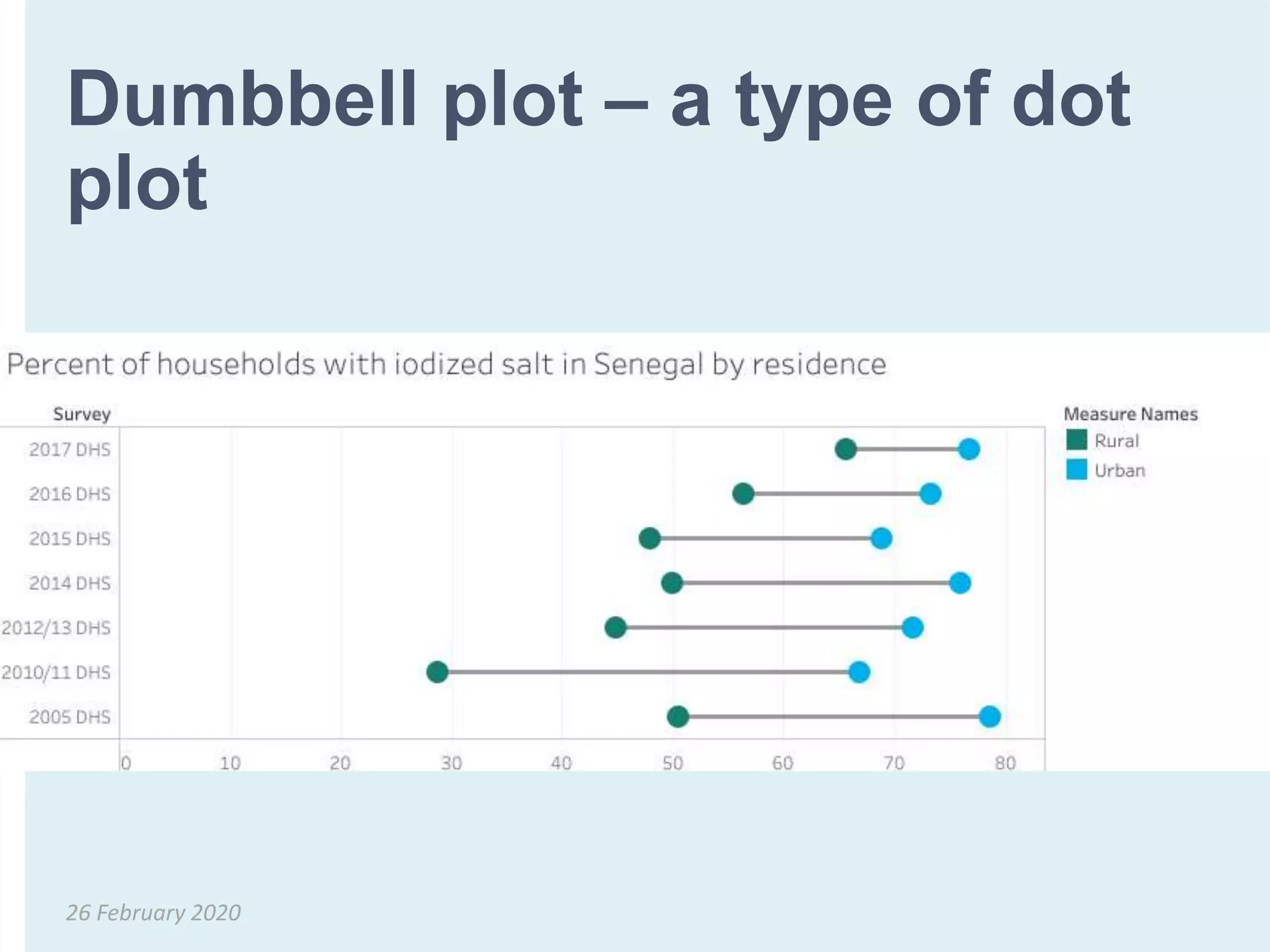
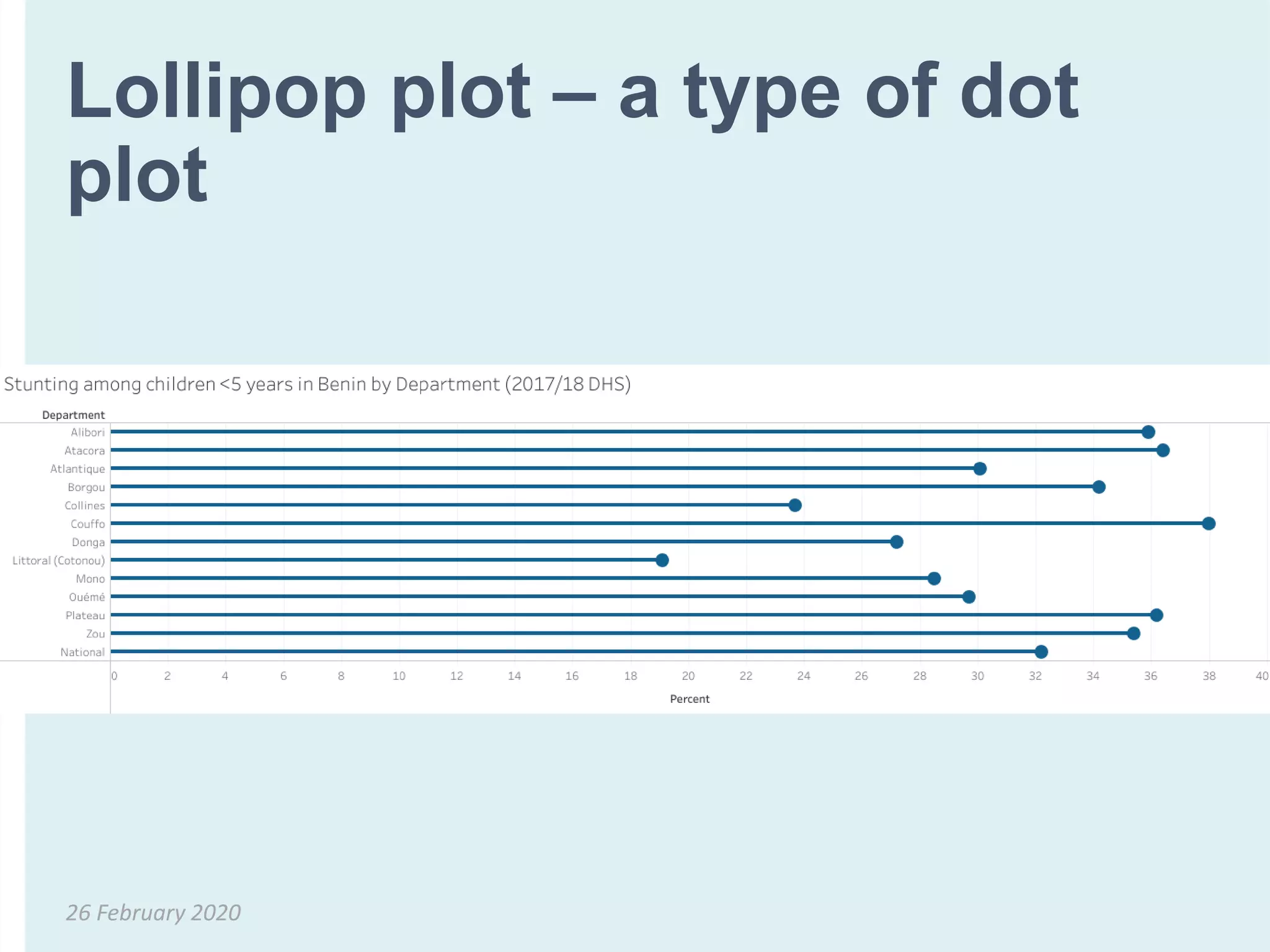
Our brains can more accurately interpret dots on a
line, and space on a common axis rather than length
on varying axes (bar charts).
Dumbbell plot – a type of dot
plot
26 February 2020
Lollipop plot – a type of dot
plot
26 February 2020
Back-to-back bar chart
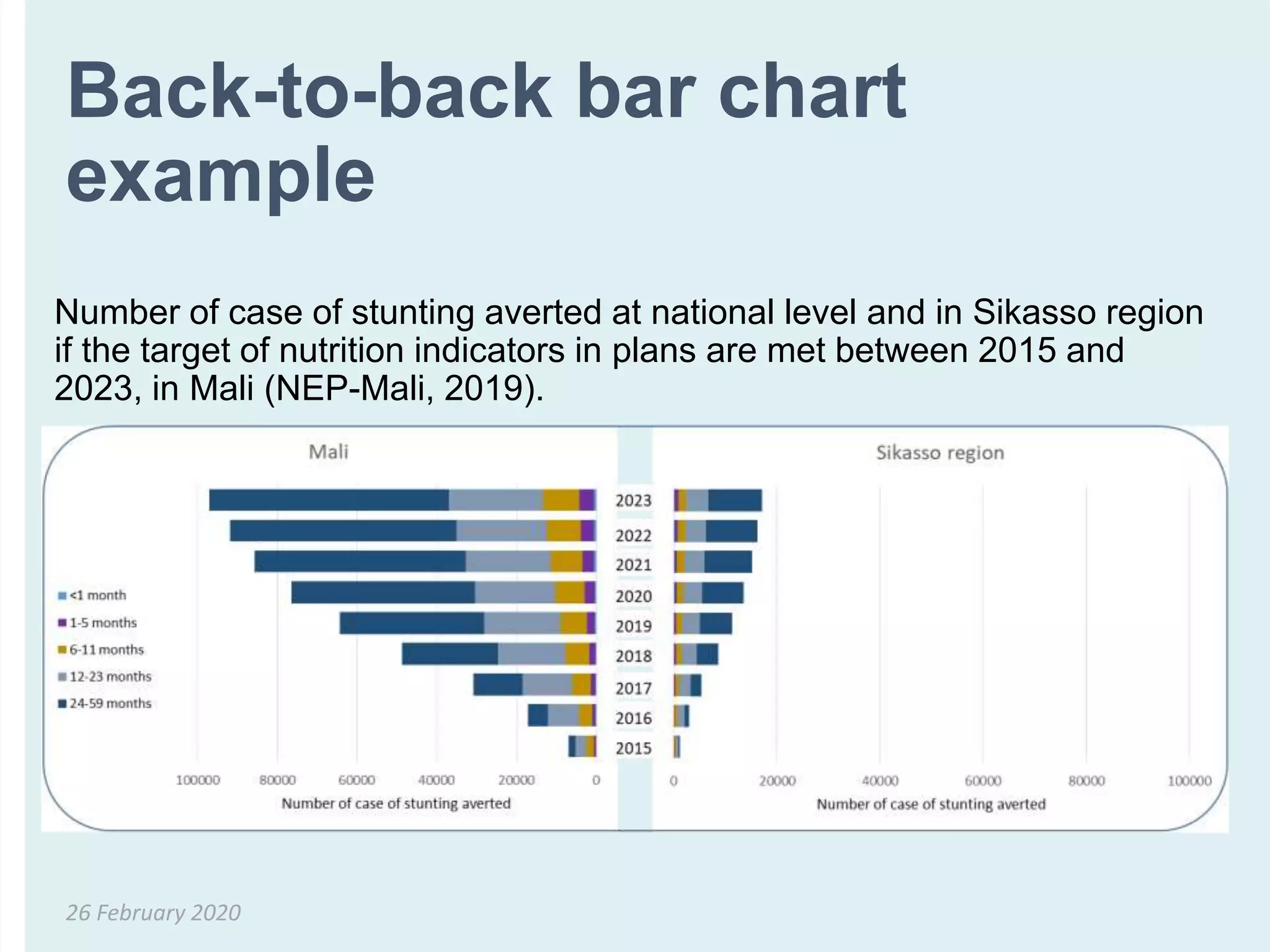
• Back-to-back bar charts are two bar charts that are
aligned back-to-back
• Purpose is not to highlight specific values, but distributions
• One familiar example is the population pyramid
26 February 2020
Our brains can easily assess symmetry.
Back-to-back bar chart
example
26 February 2020
Number of case of stunting averted at national level and in Sikasso region
if the target of nutrition indicators in plans are met between 2015 and
2023, in Mali (NEP-Mali, 2019).
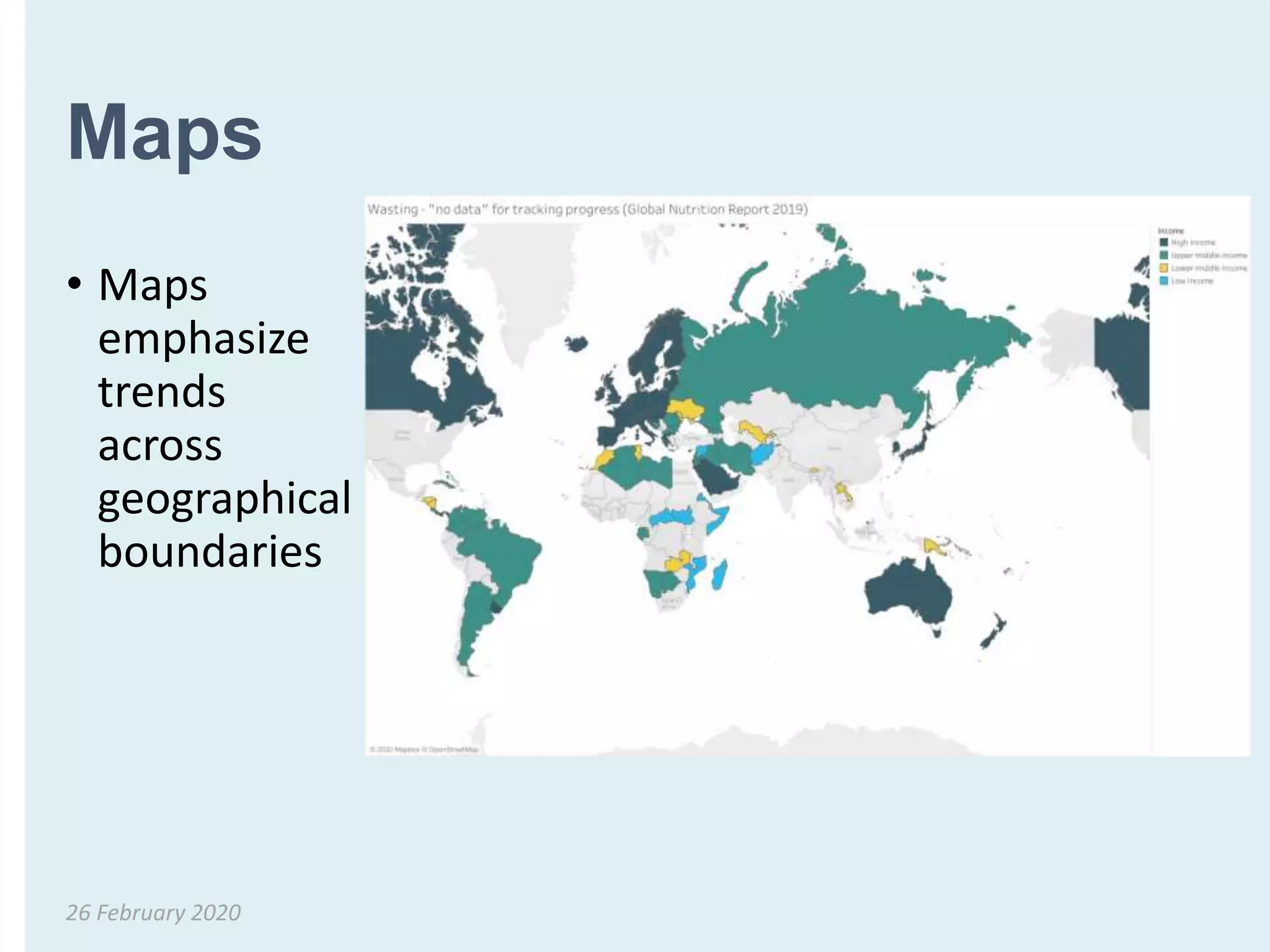
Maps
• Maps
emphasize
trends
across
geographical
boundaries
26 February 2020
How 1
number/numbers
compares to the total
Comparisons
26 February 2020
Two ways to compare parts of
a whole
• Pie chart
• Stacked bar chart
• 100% stacked bar chart
26 February 2020
Usually the
better option !
Pie charts
• Circular chart split into segments which show
components of a larger group
• Suitable for displaying categorical data, or discrete data
in distinct categories
• The size of a “slice” is proportional to the amount of
data (e.g., number of cases) it represents
• Proportion (%) of the total each component represents
is frequently added on the slice
• Different colors can be used to identify various slices
26 February 2020
When NOT to use a pie chart
• When you have more than 5 slices
• When the values of each slice are similar because it is
difficult to see differences between slice sizes
• For comparisons (one pie chart vs. another pie chart)
26 February 2020
Studies show that our brains have trouble quickly interpreting pie
charts compared to bar charts and line graphs, which are
composed of straight lines and 90 degree angles. Only choose a
pie chart when you are sure that the data cannot be effectively
visualized by a bar chart.
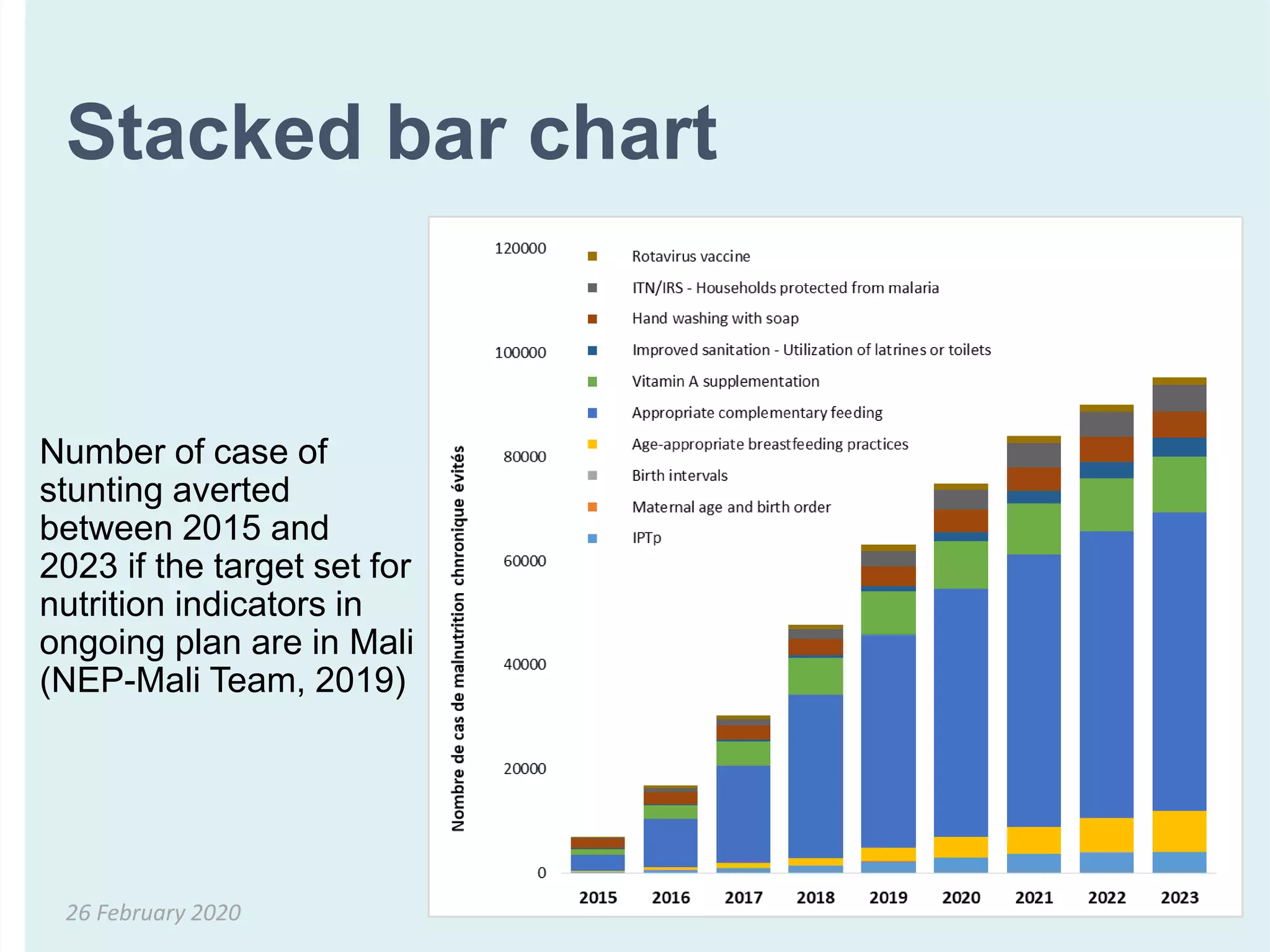
Stacked bar chart
26 February 2020
Number of case of
stunting averted
between 2015 and
2023 if the target set for
nutrition indicators in
ongoing plan are in Mali
(NEP-Mali Team, 2019)
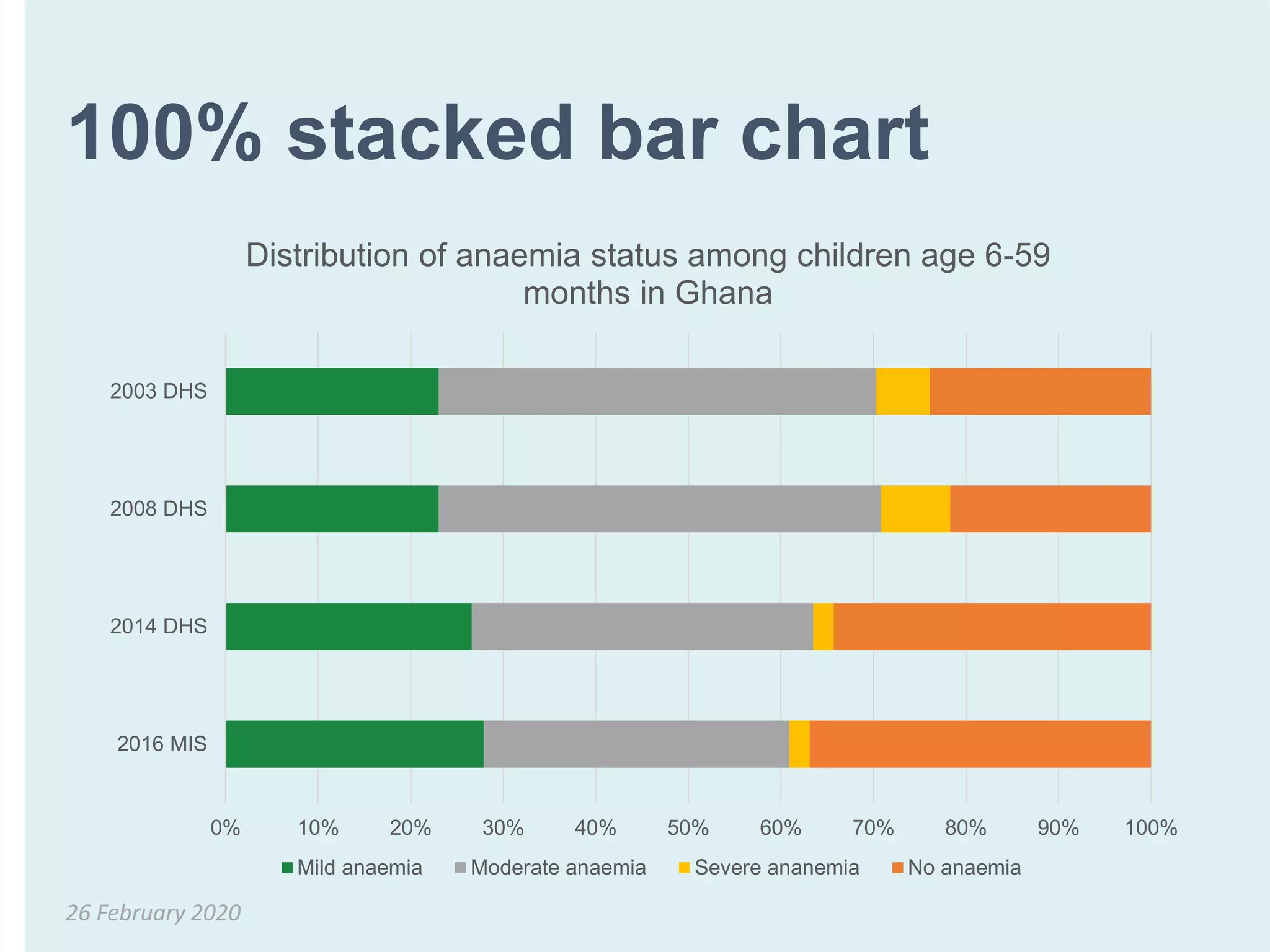
100% stacked bar chart
26 February 2020
0% 10% 20% 30% 40% 50% 60% 70% 80% 90% 100%
2016 MIS
2014 DHS
2008 DHS
2003 DHS
Distribution of anaemia status among children age 6-59
months in Ghana
Mild anaemia Moderate anaemia Severe ananemia No anaemia
How numbers change
over time
Comparisons
26 February 2020
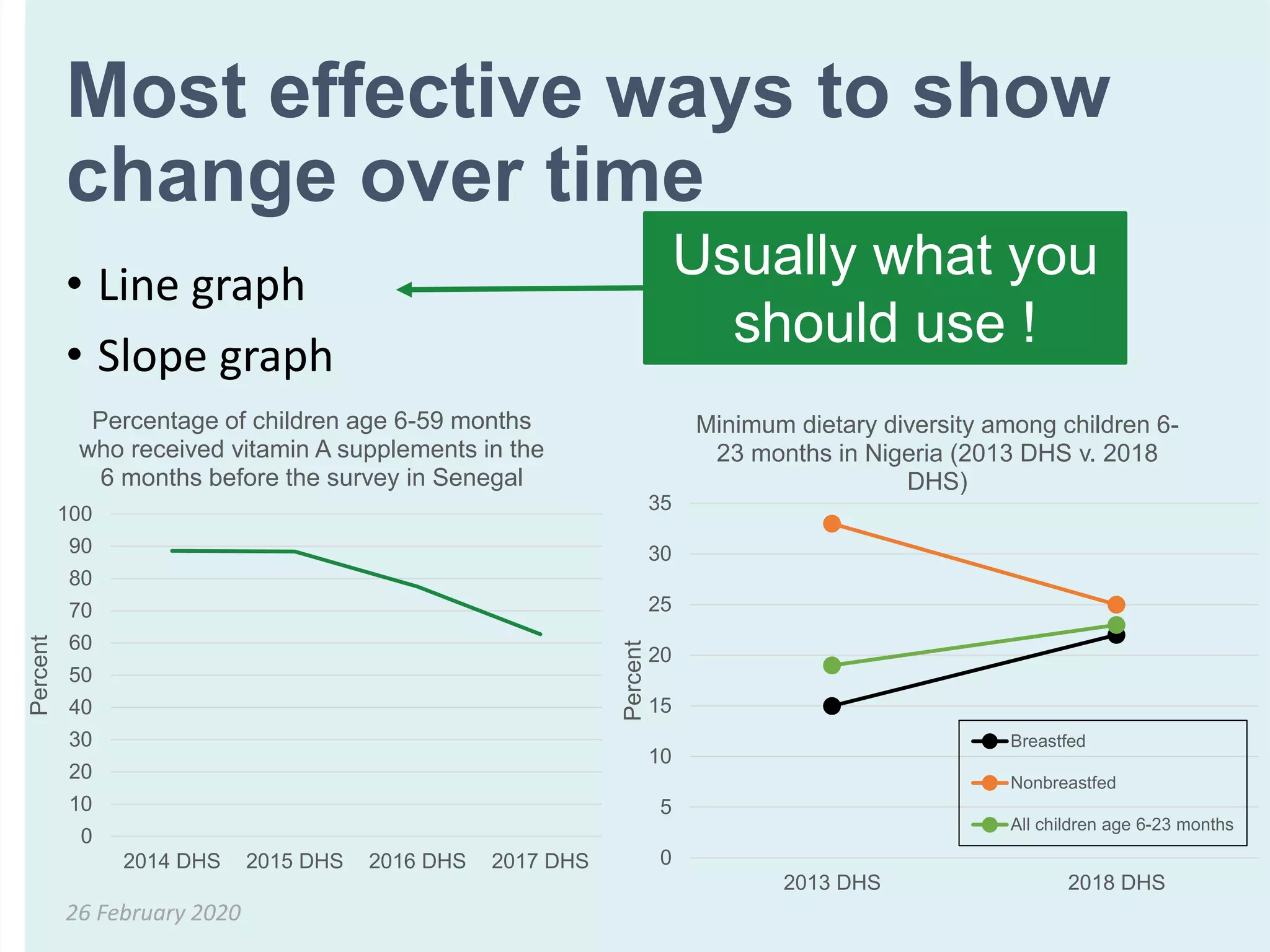
Most effective ways to show
change over time
• Line graph
• Slope graph
26 February 2020
Usually what you
should use !
0
5
10
15
20
25
30
35
2013 DHS 2018 DHS
Percent
Minimum dietary diversity among children 6-
23 months in Nigeria (2013 DHS v. 2018
DHS)
Breastfed
Nonbreastfed
All children age 6-23 months
0
10
20
30
40
50
60
70
80
90
100
2014 DHS 2015 DHS 2016 DHS 2017 DHS
Percent
Percentage of children age 6-59 months
who received vitamin A supplements in the
6 months before the survey in Senegal
When one number is
very important
Small numbers, percentages, frequencies
26 February 2020
Single numbers can have a big
impact
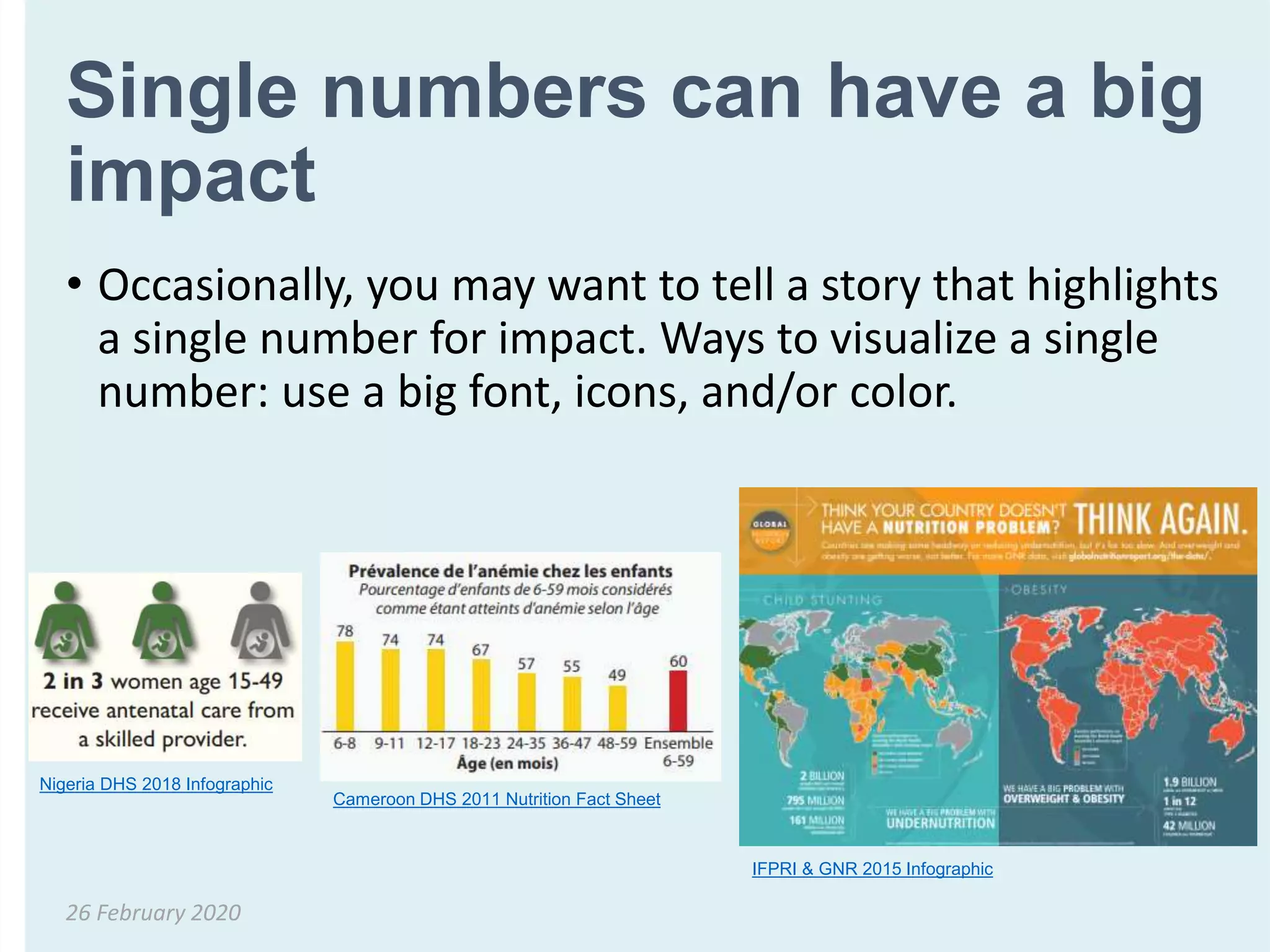
• Occasionally, you may want to tell a story that highlights
a single number for impact. Ways to visualize a single
number: use a big font, icons, and/or color.
26 February 2020
Nigeria DHS 2018 Infographic
Cameroon DHS 2011 Nutrition Fact Sheet
IFPRI & GNR 2015 Infographic
Other tips
26 February 2020
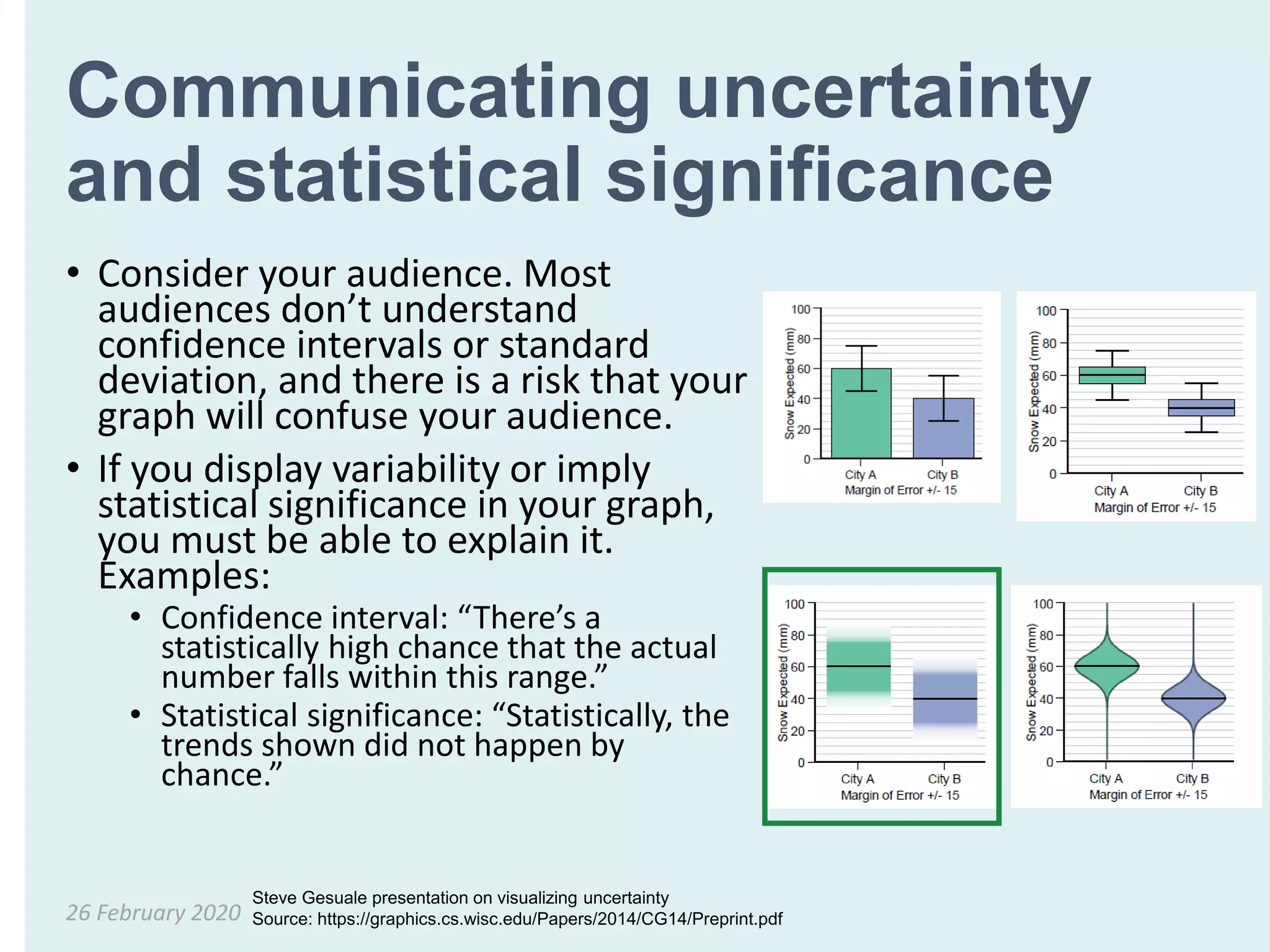
Communicating uncertainty
and statistical significance
• Consider your audience. Most
audiences don’t understand
confidence intervals or standard
deviation, and there is a risk that your
graph will confuse your audience.
• If you display variability or imply
statistical significance in your graph,
you must be able to explain it.
Examples:
• Confidence interval: “There’s a
statistically high chance that the actual
number falls within this range.”
• Statistical significance: “Statistically, the
trends shown did not happen by
chance.”
26 February 2020
Steve Gesuale presentation on visualizing uncertainty
Source: https://graphics.cs.wisc.edu/Papers/2014/CG14/Preprint.pdf
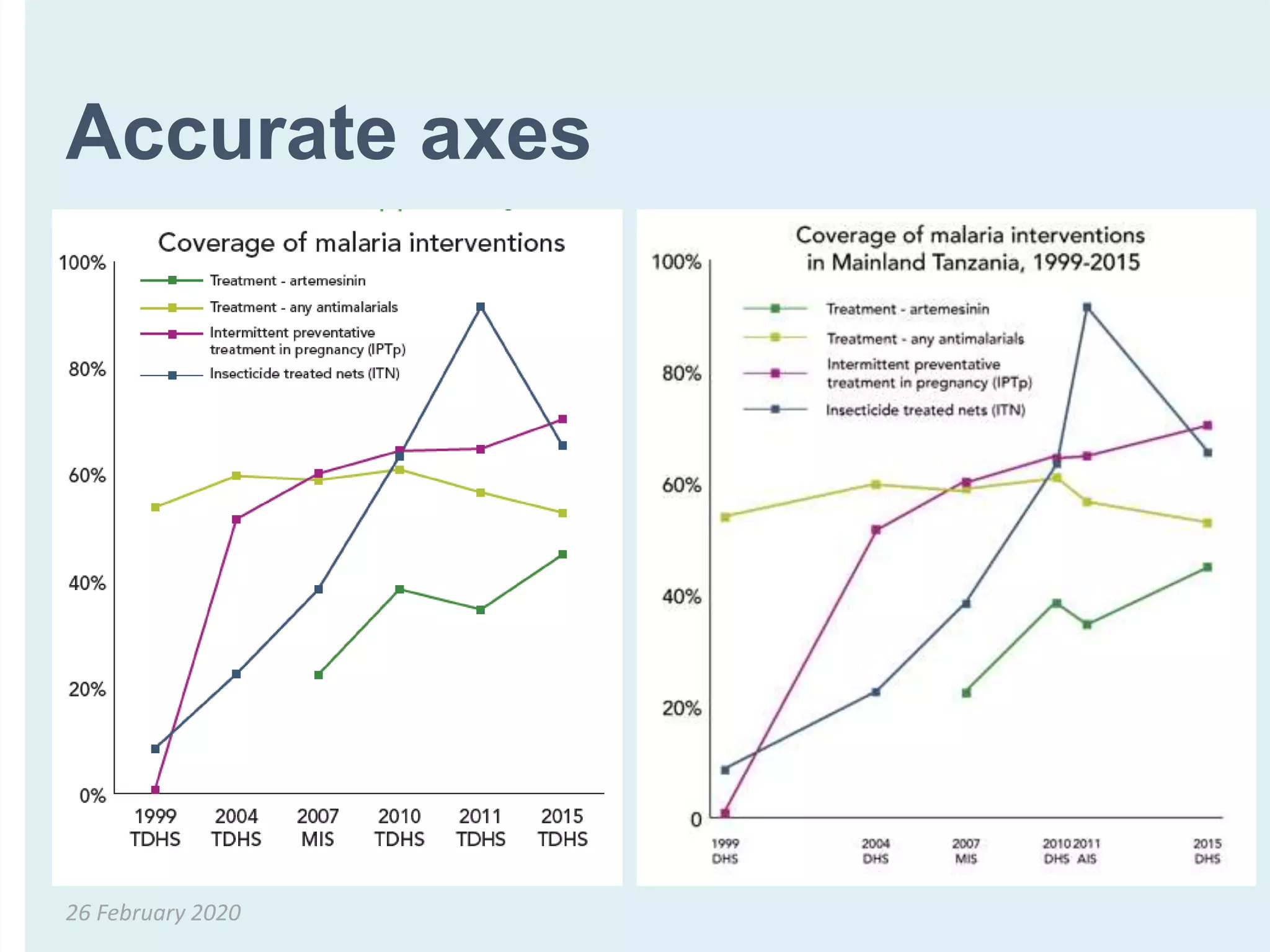
Accurate axes
26 February 2020
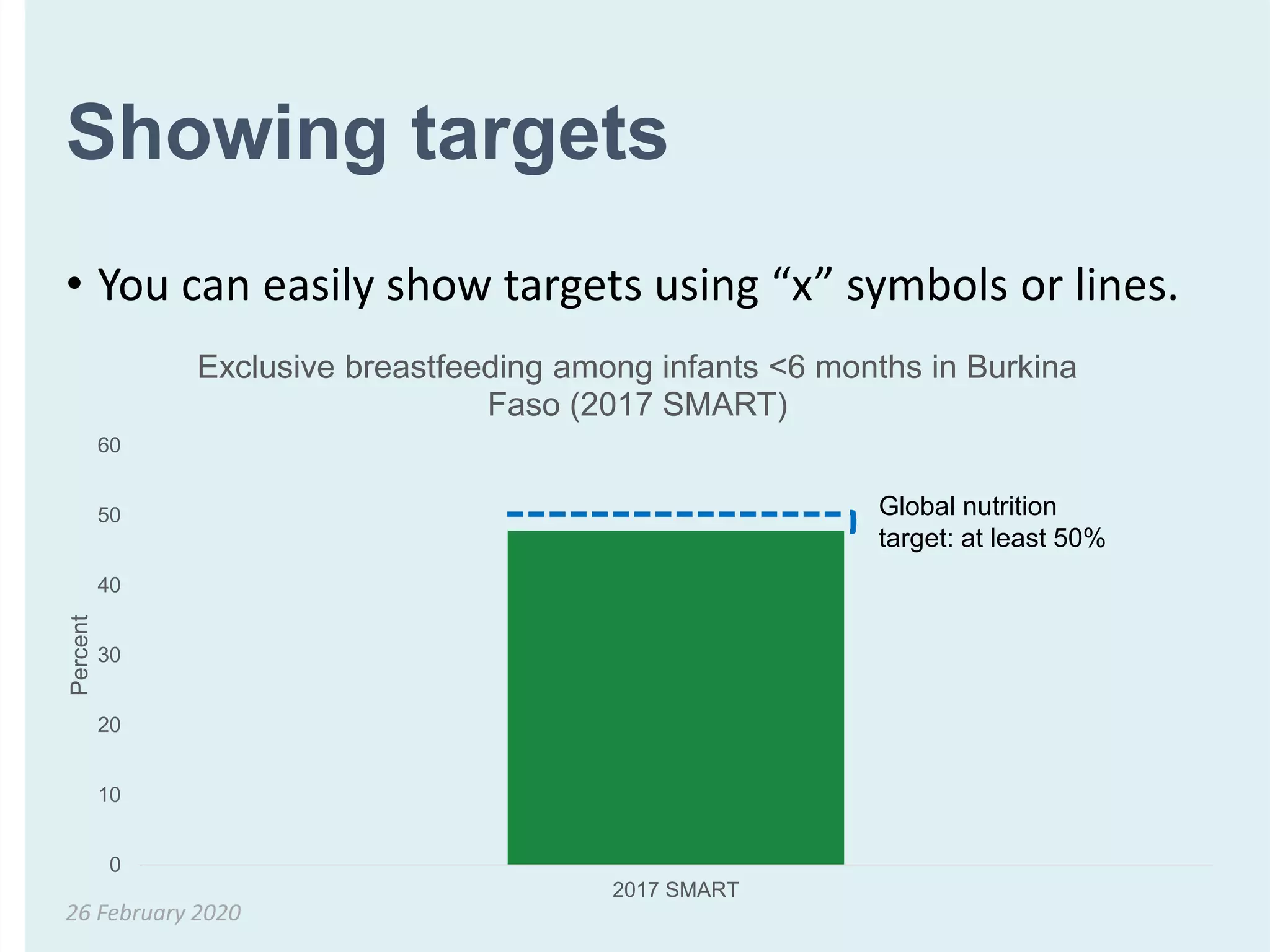
Showing targets
• You can easily show targets using “x” symbols or lines.
26 February 2020
0
10
20
30
40
50
60
2017 SMART
Percent
Exclusive breastfeeding among infants <6 months in Burkina
Faso (2017 SMART)
Global nutrition
target: at least 50%
Retain formatting dimensions
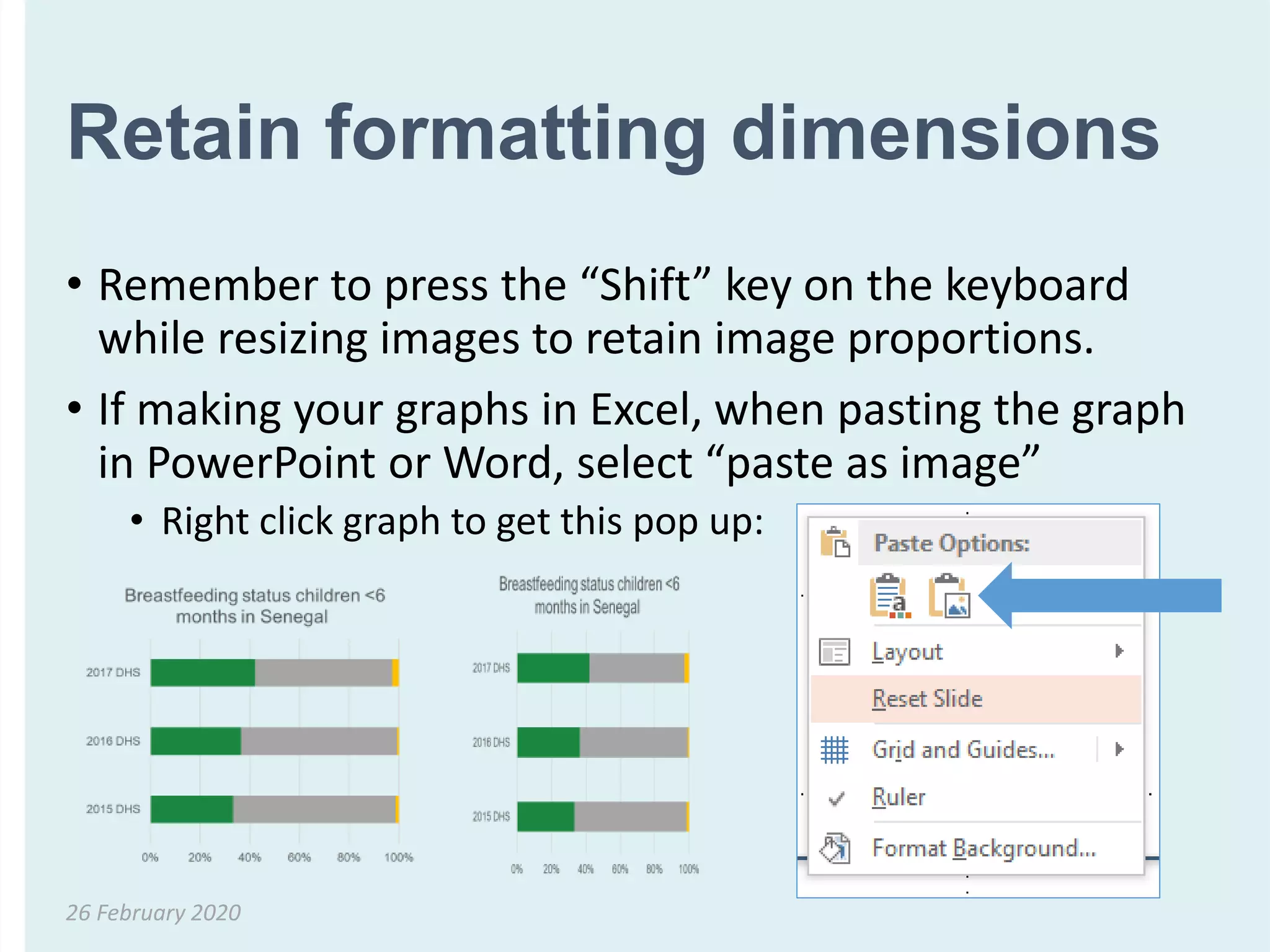
• Remember to press the “Shift” key on the keyboard
while resizing images to retain image proportions.
• If making your graphs in Excel, when pasting the graph
in PowerPoint or Word, select “paste as image”
• Right click graph to get this pop up:
26 February 2020
What is the most
appropriate graph based
on key message?
Revisiting exercise
26 February 2020
26 February 2020
0% 20% 40% 60% 80% 100%
2015 DHS
2016 DHS
2017 DHS
Breastfeeding status children <6
months in Senegal1
2017 DHS2016 DHS2015 DHS
Breastfeeding status children <6
months in Senegal2
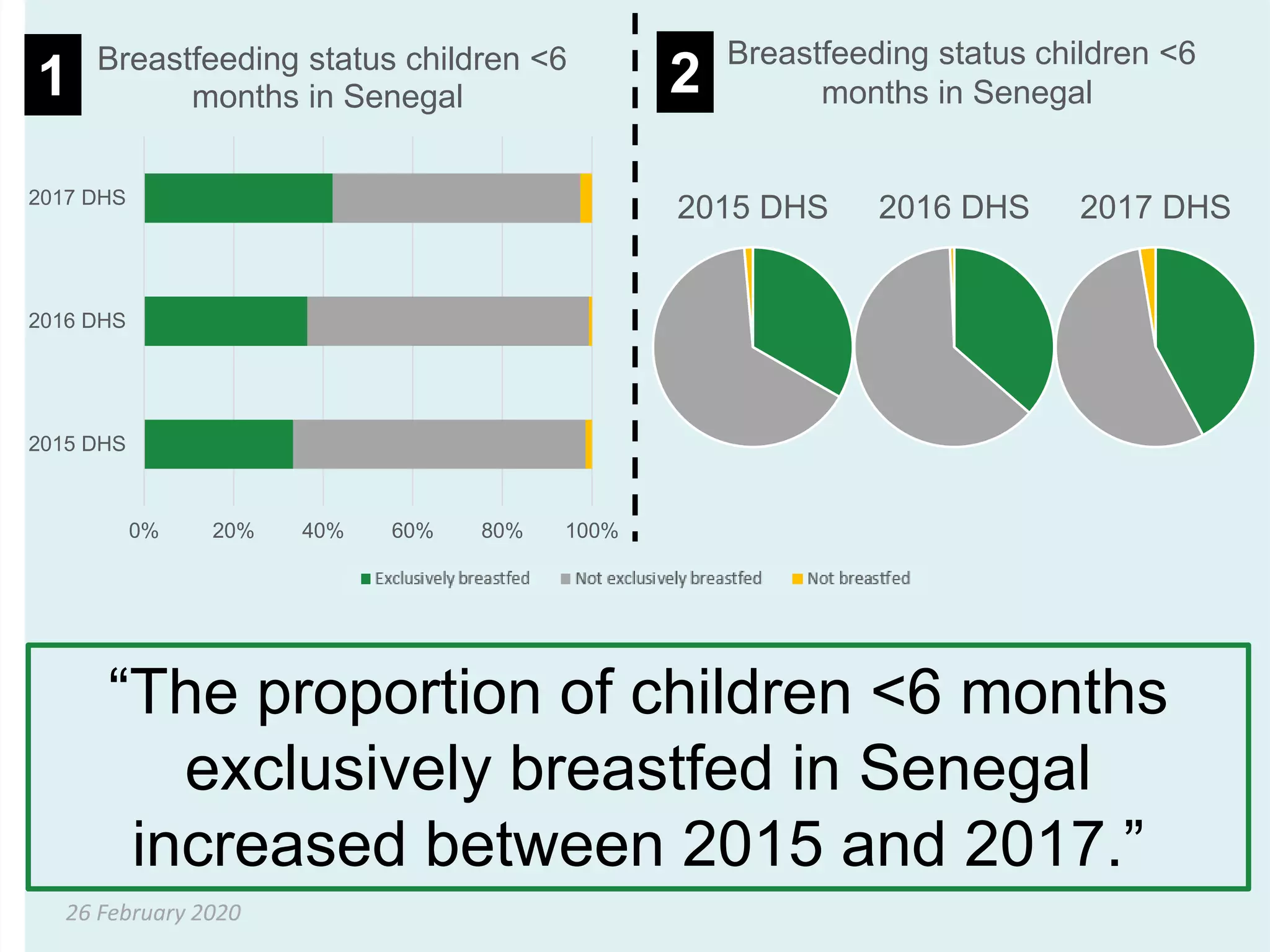
“The proportion of children <6 months
exclusively breastfed in Senegal
increased between 2015 and 2017.”
26 February 2020
0
10
20
30
40
50
60
70
80
2018 DHS 2012/13 DHS 2006 DHS
Percent
Percentage of women age 15-
49 with any anaemia in Mali
by wealth quintile
1 2
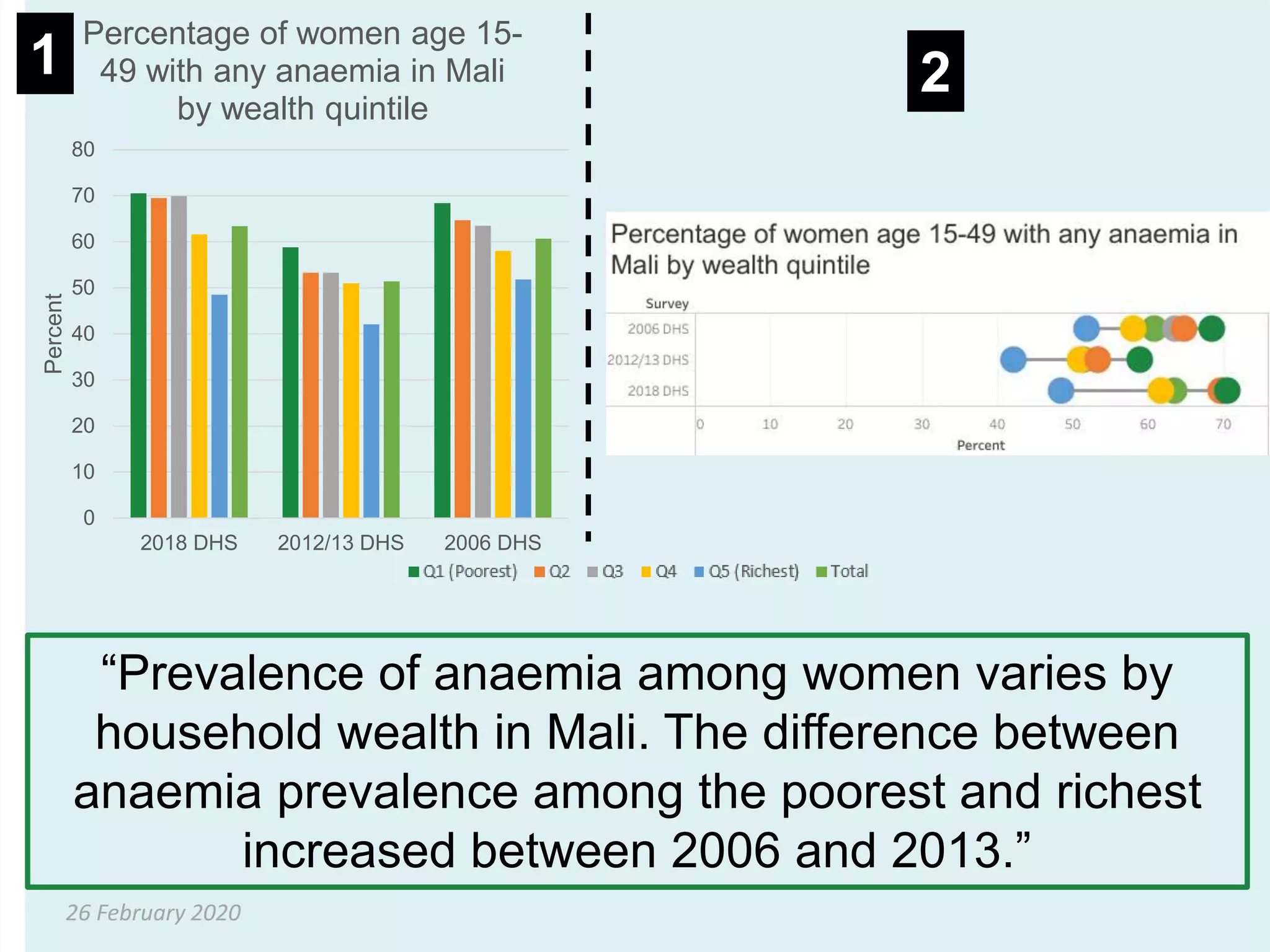
“Prevalence of anaemia among women varies by
household wealth in Mali. The difference between
anaemia prevalence among the poorest and richest
increased between 2006 and 2013.”
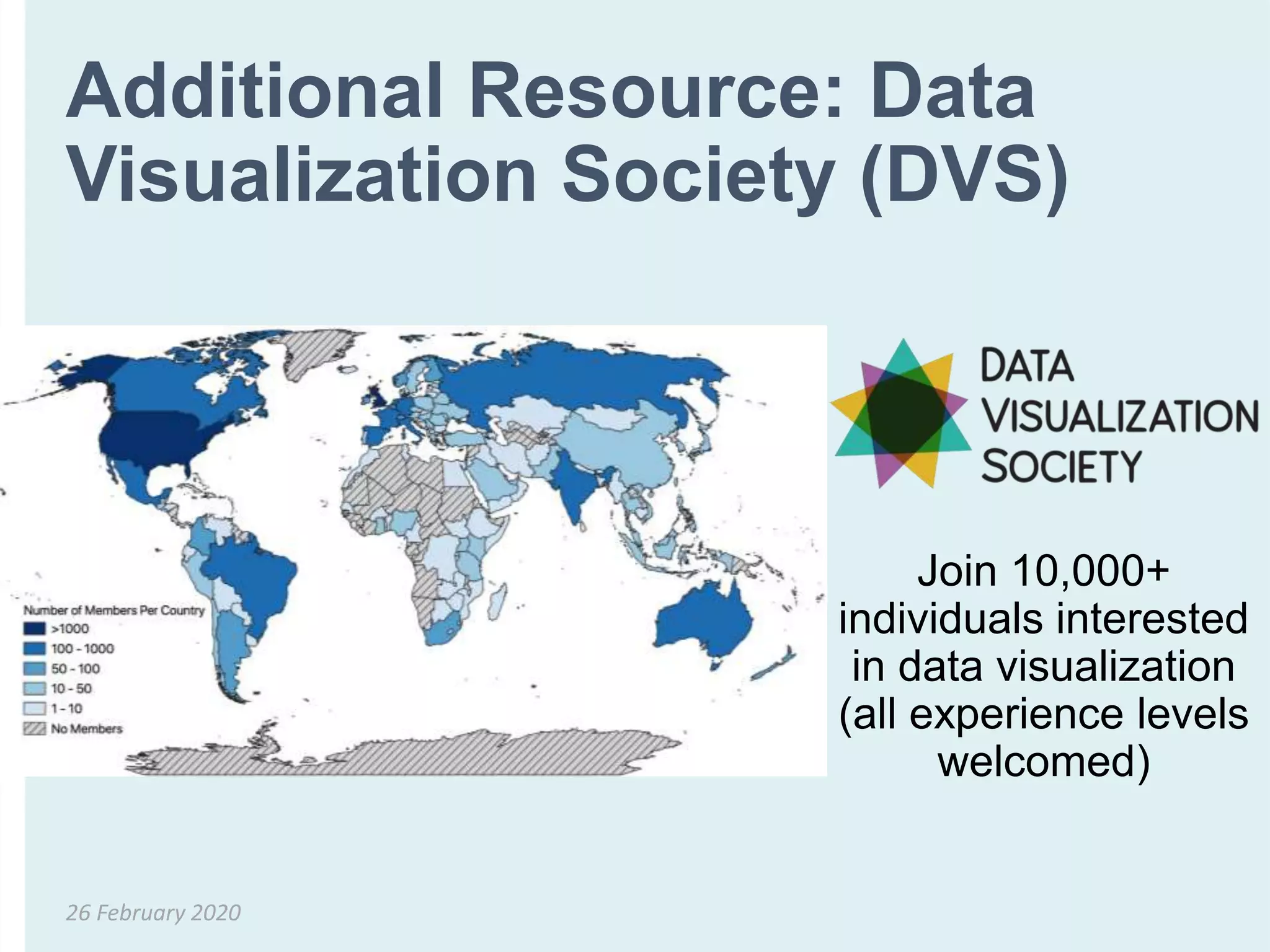
Additional Resource: Data
Visualization Society (DVS)
26 February 2020
Join 10,000+
individuals interested
in data visualization
(all experience levels
welcomed)
Additional Reading
• Aung T, Niyeha D, Shagihilu S, Mpembeni R, Kaganda J, Sheffel A, Heidkamp R. Optimizing data
visualization for reproductive, maternal, newborn, child health, and nutrition (RMNCH&N) policymaking:
data visualization preferences and interpretation capacity among decision-makers in Tanzania. Global
health research and policy. 2019 Dec 1;4(1):4. [link]
• Aung T, Niyeha D, Heidkamp R. Leveraging data visualization to improve the use of data for global health
decision-making. Journal of Global Health. 2019 Dec;9(2). [link]
• Aung, T. Data Visualization for Audiences in Low & Middle-Income Countries. Data Visualization Society
Nightingale. 2019. [link]
• Evergreen, Stephanie DH. Effective Data Visualization: The Right Chart for the Right Data. SAGE
Publications, 2016.
• Global Health eLearning Center. Data Visualization - An Introduction [Internet]. 2015. Available from:
https://www.globalhealthlearning.org/course/data-visualization-brave-new-world
• Graybeal, Carolyn. “Exploring a Culture of Health: How Can We Visualize Health Data for Better
Communication?” PLOS CitizenSci Blog
• Pandey, Anshul Vikram, et al. "The persuasive power of data visualization." IEEE transactions on
visualization and computer graphics 20.12 (2014): 2211-2220.
26 February 2020
Thank you!
More information on
https://www.nationalevaluationplatform.org/
This training was developed with funding from
the Government of Canada & the Bill & Melinda
Gates Foundation

T4N - Breakout Session 3: Making better figures: visualising data for different audiences

  • 1.
    Data for decision-makingacross the data value chain 11 February 2020 SESSION 4
  • 2.
    Making better figures: visualising data fordifferent audiences Tricia Aung & Youssouf Keita 26 February 2020
  • 3.
    Session goals • Learnhow to choose the most appropriate data visualization based on your key message • Identify what makes a good (and bad) data visualization 11 February 2020
  • 4.
    What is themost appropriate graph based on key message? Exercise 26 February 2020
  • 5.
    26 February 2020 0%20% 40% 60% 80% 100% 2015 DHS 2016 DHS 2017 DHS Breastfeeding status children <6 months in Senegal1 2017 DHS2016 DHS2015 DHS Breastfeeding status children <6 months in Senegal2 “The proportion of children <6 months exclusively breastfed in Senegal increased between 2015 and 2017.”
  • 6.
    26 February 2020 0 10 20 30 40 50 60 70 80 2018DHS 2012/13 DHS 2006 DHS Percent Percentage of women age 15- 49 with any anaemia in Mali by wealth quintile 1 2 “Prevalence of anaemia among women varies by household wealth in Mali. The difference between anaemia prevalence among the poorest and richest increased between 2006 and 2013.”
  • 7.
    “the graphic isonly as useful as the audience finds it” 26 February 2020
  • 8.
    How do wemake good data visualizations? 1. Identify your key message. 2. Choose an appropriate type of visualization based on your key message. 3. Create your data visualization and double check that your visual supports your key point. 26 February 2020 What is a key message? A key message is a piece of information that you want your audience to remember. It is the “so what.”
  • 9.
    Based on yourkey message, what do you want your visualization to show? 26 February 2020 Category Key Message Comparisons • “This is how two or more numbers are the same (or different)” • “This is how one number/numbers compare to the total” • “This is how things change over time” Small numbers, percentages, frequencies • “This one number is VERY important for you to remember” Adapted from Evergreen, Stephanie DH. Effective Data Visualization: The Right Chart for the Right Data. SAGE Publications, 2016 and Chart Chooser.
  • 10.
    How 2 ormore numbers are the same (or different) Comparisons 26 February 2020
  • 11.
    Most effective waysto compare 2 or more numbers • For comparing 2 (or more) numbers… • Side by side column graph (bar chart) • Slope graph • Dot plot • Back-to-back bar chart 26 February 2020
  • 12.
    Side by sidecolumn graph (bar chart) • Suitable for displaying categorical data and to compare discrete data in distinct categories • Each bar represents one category • Can be organized horizontally or vertically • Height of the bars are proportional to the number of events (e.g. cases) in the category • Variables in a bar graph can be discrete (e.g. sex, region, race) or continuous (e.g. age) but organized in categories (e.g. age groups) 26 February 2020
  • 13.
    Side by sidecolumn graph (bar chart) • Side by side column graphs (bar charts) are the most frequently used approach to compare two or more numbers. However, they are often not the most effective option. 26 February 2020 Studies suggest that side by side column graphs are most effective for two categories. Why? Studies have shown that our brains can process 3-5 groups with 2 columns per group. Any more groups or columns are challenging to interpret.
  • 14.
    Slope graph • Slopegraphs are useful for comparing two categories and emphasizing how some categories may have changed faster than other categories. 26 February 2020 Our brains have a pretty easy time judging slope/rate of change!
  • 15.
    Bar chart toslope graph transformation ! 26 February 2020 0 5 10 15 20 25 30 35 Breastfed Nonbreastfed All children age 6-23 months Percentofchildren6-23months Minimum dietary diversity among children 6-23 months in Nigeria (2013 DHS v. 2018 DHS) 2013 DHS 2018 DHS 0 5 10 15 20 25 30 35 2013 DHS 2018 DHS Percentofchildren6-23months Minimum dietary diversity among children 6-23 months in Nigeria (2013 DHS v. 2018 DHS) Breastfed Nonbreastfed All children age 6-23 months
  • 16.
    Dot plot • Dotplots can be quickly read. • Great option for emphasizing gaps between numbers = “equiplots” 26 February 2020 Our brains can more accurately interpret dots on a line, and space on a common axis rather than length on varying axes (bar charts).
  • 17.
    Dumbbell plot –a type of dot plot 26 February 2020
  • 18.
    Lollipop plot –a type of dot plot 26 February 2020
  • 19.
    Back-to-back bar chart •Back-to-back bar charts are two bar charts that are aligned back-to-back • Purpose is not to highlight specific values, but distributions • One familiar example is the population pyramid 26 February 2020 Our brains can easily assess symmetry.
  • 20.
    Back-to-back bar chart example 26February 2020 Number of case of stunting averted at national level and in Sikasso region if the target of nutrition indicators in plans are met between 2015 and 2023, in Mali (NEP-Mali, 2019).
  • 21.
  • 22.
    How 1 number/numbers compares tothe total Comparisons 26 February 2020
  • 23.
    Two ways tocompare parts of a whole • Pie chart • Stacked bar chart • 100% stacked bar chart 26 February 2020 Usually the better option !
  • 24.
    Pie charts • Circularchart split into segments which show components of a larger group • Suitable for displaying categorical data, or discrete data in distinct categories • The size of a “slice” is proportional to the amount of data (e.g., number of cases) it represents • Proportion (%) of the total each component represents is frequently added on the slice • Different colors can be used to identify various slices 26 February 2020
  • 25.
    When NOT touse a pie chart • When you have more than 5 slices • When the values of each slice are similar because it is difficult to see differences between slice sizes • For comparisons (one pie chart vs. another pie chart) 26 February 2020 Studies show that our brains have trouble quickly interpreting pie charts compared to bar charts and line graphs, which are composed of straight lines and 90 degree angles. Only choose a pie chart when you are sure that the data cannot be effectively visualized by a bar chart.
  • 26.
    Stacked bar chart 26February 2020 Number of case of stunting averted between 2015 and 2023 if the target set for nutrition indicators in ongoing plan are in Mali (NEP-Mali Team, 2019)
  • 27.
    100% stacked barchart 26 February 2020 0% 10% 20% 30% 40% 50% 60% 70% 80% 90% 100% 2016 MIS 2014 DHS 2008 DHS 2003 DHS Distribution of anaemia status among children age 6-59 months in Ghana Mild anaemia Moderate anaemia Severe ananemia No anaemia
  • 28.
    How numbers change overtime Comparisons 26 February 2020
  • 29.
    Most effective waysto show change over time • Line graph • Slope graph 26 February 2020 Usually what you should use ! 0 5 10 15 20 25 30 35 2013 DHS 2018 DHS Percent Minimum dietary diversity among children 6- 23 months in Nigeria (2013 DHS v. 2018 DHS) Breastfed Nonbreastfed All children age 6-23 months 0 10 20 30 40 50 60 70 80 90 100 2014 DHS 2015 DHS 2016 DHS 2017 DHS Percent Percentage of children age 6-59 months who received vitamin A supplements in the 6 months before the survey in Senegal
  • 30.
    When one numberis very important Small numbers, percentages, frequencies 26 February 2020
  • 31.
    Single numbers canhave a big impact • Occasionally, you may want to tell a story that highlights a single number for impact. Ways to visualize a single number: use a big font, icons, and/or color. 26 February 2020 Nigeria DHS 2018 Infographic Cameroon DHS 2011 Nutrition Fact Sheet IFPRI & GNR 2015 Infographic
  • 32.
  • 33.
    Communicating uncertainty and statisticalsignificance • Consider your audience. Most audiences don’t understand confidence intervals or standard deviation, and there is a risk that your graph will confuse your audience. • If you display variability or imply statistical significance in your graph, you must be able to explain it. Examples: • Confidence interval: “There’s a statistically high chance that the actual number falls within this range.” • Statistical significance: “Statistically, the trends shown did not happen by chance.” 26 February 2020 Steve Gesuale presentation on visualizing uncertainty Source: https://graphics.cs.wisc.edu/Papers/2014/CG14/Preprint.pdf
  • 34.
  • 35.
    Showing targets • Youcan easily show targets using “x” symbols or lines. 26 February 2020 0 10 20 30 40 50 60 2017 SMART Percent Exclusive breastfeeding among infants <6 months in Burkina Faso (2017 SMART) Global nutrition target: at least 50%
  • 36.
    Retain formatting dimensions •Remember to press the “Shift” key on the keyboard while resizing images to retain image proportions. • If making your graphs in Excel, when pasting the graph in PowerPoint or Word, select “paste as image” • Right click graph to get this pop up: 26 February 2020
  • 37.
    What is themost appropriate graph based on key message? Revisiting exercise 26 February 2020
  • 38.
    26 February 2020 0%20% 40% 60% 80% 100% 2015 DHS 2016 DHS 2017 DHS Breastfeeding status children <6 months in Senegal1 2017 DHS2016 DHS2015 DHS Breastfeeding status children <6 months in Senegal2 “The proportion of children <6 months exclusively breastfed in Senegal increased between 2015 and 2017.”
  • 39.
    26 February 2020 0 10 20 30 40 50 60 70 80 2018DHS 2012/13 DHS 2006 DHS Percent Percentage of women age 15- 49 with any anaemia in Mali by wealth quintile 1 2 “Prevalence of anaemia among women varies by household wealth in Mali. The difference between anaemia prevalence among the poorest and richest increased between 2006 and 2013.”
  • 40.
    Additional Resource: Data VisualizationSociety (DVS) 26 February 2020 Join 10,000+ individuals interested in data visualization (all experience levels welcomed)
  • 41.
    Additional Reading • AungT, Niyeha D, Shagihilu S, Mpembeni R, Kaganda J, Sheffel A, Heidkamp R. Optimizing data visualization for reproductive, maternal, newborn, child health, and nutrition (RMNCH&N) policymaking: data visualization preferences and interpretation capacity among decision-makers in Tanzania. Global health research and policy. 2019 Dec 1;4(1):4. [link] • Aung T, Niyeha D, Heidkamp R. Leveraging data visualization to improve the use of data for global health decision-making. Journal of Global Health. 2019 Dec;9(2). [link] • Aung, T. Data Visualization for Audiences in Low & Middle-Income Countries. Data Visualization Society Nightingale. 2019. [link] • Evergreen, Stephanie DH. Effective Data Visualization: The Right Chart for the Right Data. SAGE Publications, 2016. • Global Health eLearning Center. Data Visualization - An Introduction [Internet]. 2015. Available from: https://www.globalhealthlearning.org/course/data-visualization-brave-new-world • Graybeal, Carolyn. “Exploring a Culture of Health: How Can We Visualize Health Data for Better Communication?” PLOS CitizenSci Blog • Pandey, Anshul Vikram, et al. "The persuasive power of data visualization." IEEE transactions on visualization and computer graphics 20.12 (2014): 2211-2220. 26 February 2020
  • 42.
    Thank you! More informationon https://www.nationalevaluationplatform.org/ This training was developed with funding from the Government of Canada & the Bill & Melinda Gates Foundation

Editor's Notes

  • #4 The goal of today’s session is to: (1) learn how to choose the most appropriate data visualization based on your key message and (2) identify what makes a good (and bad) data visualization.
  • #5 First, we will do an exercise for you to think about your own preferences. We will then revisit these examples at the end of the presentation. This exercise is similar to an exercise that the National Evaluation Platform project conducted with government decision-makers in Tanzania. The objective of that study was to characterize data visualization interpretation capacity and preferences among RMNCH&N Tanzanian program implementers and policymakers (“decision-makers”) to design more effective approaches towards promoting evidence-based RMNCH&N decisions in Tanzania.
  • #6 Here is one key message and two different ways to visualize the data. <Read the key message>. Of the two graphs, which do you think better represents the key message? Raise your hand if you believe 1 is better. (Estimate number of hands). Raise your hand if you believe 2 is better. (Estimate number of hands).
  • #7 Here is another key message and two different ways to visualize the data. <Read the key message>. Of the two graphs, which do you think better represents the key message? Raise your hand if you believe 1 is better. (Estimate number of hands). Raise your hand if you believe 2 is better. (Estimate number of hands).
  • #8 Through the Data Visualization Society, a community of practice for those interested in data visualization, Tricia has led discussions on visualizing data for low- and middle-income audiences. One individual shared this comment, which is the key theme for today and should drive your data visualization choices. What does this mean? Making a beautiful, fancy graph is fruitless if the audience can’t understand it.
  • #9 How do we make sure we make a graph that an audience can understand? First, figure out what you are trying to get across – the key message. Key messages are short (1-2 sentences), relevant, easy to understand, and memorable. This presentation will focus on step 2 – choosing the right graph based on your key message. Step 3 accounts for the necessity to reflect on whether you’ve chosen the right graph, which can be done by yourself and/or with peers.
  • #10 Here is a summary of key message categories which correspond to the handout (decision tree) that you can keep. This presentation is organized based on these common categories. This presentation includes many examples using nutrition data from West Africa. Some graphs can be made in Excel, and other graphs are not Excel options but can be made using R or Tableau. Tricia can help those interested in making graphs in R or Tableau.
  • #14 This is the most frequently used approach to visualizing comparisons, but is sometimes not the most effective (and you’ll learn other ways to visualize comparisons). The brain symbol will appear in this presentation when referencing data visualization studies. This brain symbol will appear throughout the presentation. This symbol represents related research to this recommendation.
  • #16 This is the same data visualized two different ways. In the slope graph, it is more apparently how minimum dietary diversity has dropped among non-breastfed children (negative slope).
  • #17 Dot plots are often a great option because they are easy to read and emphasize a gap between numbers, which can be useful for equity graphs. University of Pelotas/Countdown to 2030 calls these “equiplots.”
  • #18 What do you see? (Pause) The gap in coverage of iodized salt between rural/urban has decreased between 2005 and 2017!
  • #26 Our brains are better at interpreting 90 degree angles and looking up-to-down and left-to-right. This is why stacked bar charts can be a better alternative than pie charts. Has anyone heard of a donut chart? (Pause and ask audience.) Donut charts are actually more challenging for our brains to interpret than even pie charts. This is because the center axis helps our brains figure out how big is the pie slice. Donut charts do not have a center axis, so can make interpretation more difficult.
  • #28 What does this graph tell us? (Pause and let people look at it.) Proportion with no anaemia has increased over time while proportion of severe anaemia has decreased over time. How can we see this? (Point up-and-down to yellow (no anaemia) and up-and-down to dark blue (severe anaemia)).
  • #30 The left is a line graph. The right is a slope graph.
  • #32 Making a single number very large/in a different color, can be the most effective way to make your audience remember one important number. In one study, a team found that when individuals were shown disease prevalence in four different ways (single large number, icon array, pie chart, bar chart), a single large number was the most accurately interpreted in terms of disease significance and scope.
  • #34 According to a study by Correll and Gleicher (2014), even individuals with a background in science have trouble interpreting graphs with confidence intervals, which is why they advised to only display them when necessary. Of the four options on the right, the one circled was most accurately interpreted.
  • #35 What’s wrong with the graph on the left? (Pause and see if there are any reactions.) Double check that any continuous data (like time) is accurately reflected on an axis.
  • #38 Let us revisit our exercise from the beginning.
  • #39 Let’s see if you’ve decided to change your mind after today’s session. Of the two graphs, which do you think better represents the key message? Raise your hand if you believe 1 is better. (Count number of hands). Raise your hand if you believe 2 is better. (Count number of hands).
  • #40 Of the two graphs, which do you think better represents the key message? Raise your hand if you believe 1 is better. (Count number of hands). Raise your hand if you believe 2 is better. (Count number of hands).
  • #41 The purpose of DVS: 1) Foster collaboration and discussion on data visualization 2) Serve as a resource for data visualization practioners 3) Encourage growth of the field. Over 10,000 members and membership is currently free with growing resources to help those interested in expanding and sharing their data visualization knowledge. DVS could particularly benefit from more members from West Africa based on this map!
  • #42 Here are additional resources if you want to learn more about the National Evaluation Platform’s data visualization work and data visualization research.