Branding, Design &
Email Marketing Basics
APRIL EDWARDS
Digital Strategist + Designer + Owner
HELLO!
I’M APRIL EDWARDS
Digital Strategist + Designer + Owner
……………………………………………
A LIT’ HISTORY
Bachelor of Fine Arts
in Illustration
+
Minor in Technology Integrated
Media Arts
Education:
Experience…
Animated emoticons & avatars for MSN Messenger.
Designed packaging, displays and managed Bonne Bell
& Lip Smackers digital efforts.
Served as the creative director to a reputable niche
insurance company.
Moved to San Diego where I subcontracted as a
Flash Animator, Web Designer & Email Marketer
for various marketing and digital agencies.
Like to help people so they can get back to doing the
things they love the most.
Started { ae } Design Co. to provide growing businesses
clarity and a stronger foundation with modern
websites that they can easily manage on their own.
We also provide the training, tools and support they
need to better reach their customers and to market
smarter.
Company…
Recently relocated our office to beautiful Carlsbad
(full of sunshine, motivation and inspiration) where
I’m looking forward to being an active roll in the
success of local businesses. 
And…being here today is my first step to paying it
forward in my professional life. THANK YOU!
Today…
WHAT ARE WE
DOING HERE?
• PART 1: Branding Basics
• PART 2: Tips for Creating Stand-Out Designs
• WORKSHEET: Strategic Design
• PART 3: Email Communications Made Easy
• Helpful Resources
• Q & A
• One-on-one Knowledge Bar
The Master Plan…
PART 1:
BRANDING BASICS
Positioning
You need to be clear so your audience is too!
Understand how you serve your audience differently
and what is unique about you.
Speak (write) in a tone that will reflect your
organization’s personality.
Visual Representation...
Choose a few words that represent the essence of
your organization.
Use these words to guide the look & feel
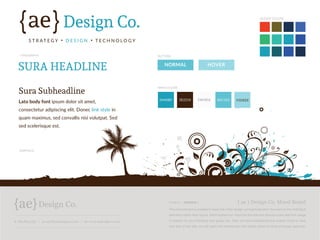
Create a Brand Guideline or simple Mood Board:
Define the fonts and colors you will use for headlines,
main copy, calls-to-action and graphical treatments
you’ll use
t: 760.814.1851 | e: april@aedesignco.com | w: www.aedesignco.com
The mood board is created to keep the initial design conceptualization focused on the individual
elements rather than layout. We’ll explain our vision for the site and discuss color and font usage
in relation to your branding and goals, etc. After we have established the overall mood or look
and feel of the site, we will paint the wireframes with these styles for final protoype approval.
{ ae } Design Co. Mood Board12/23/15 | VERSION 1
ae{ {Design Co.
S T R AT E G Y � D E S I G N � T E C H N O L O G Y
SURA HEADLINE
BUTTONS
MAIN COLORS
ACCENT COLORS
TYPOGRAPHY
GRAPHICS
Sura Subheadline
Lato body font ipsum dolor sit amet,
consectetur adipiscing elit. Donec link style in
quam maximus, sed convallis nisi volutpat. Sed
sed scelerisque est.
NORMAL
04A0B9 3E2210 FAFAFA 60C1D3 95DEE8
HOVER
PART 2: TIPS FOR
CREATING STAND-
OUT DESIGNS
Design Basics…
The most effective designs have…
1. Have balance between elements
2. Keep the most important information in the spotlight
3. Use white space/ negative well
You can do this by emphasizing focal points with:
1. Use of color
2. Graphic treatment
3. Scale.
Composition/ Layout…
Use grids & guides to properly align elements. This
will keep your designs clean and enjoyable to look at.
Look at your composition by squinting your eyes. If
everything is blending together, then re-adjust for
more interest.
If using columns in your layouts, try to use justified
paragraphs for a distraction free design.
Scannable Content…
Always make content scannable by breaking it up
with headlines and sub-headlines. It will actually help
you keep your copy focused as well!
Think in terms of main content and then secondary.
Use white space as a design element. It should frame
and seperate content. The less crammed things are the
easier it is to read.
Typography…
Headlines should be bold and large sometimes with
more letter spacing (kerning). My general rule of
thumb is that they are 2x larger than the main copy.
Keep main body fonts simple. When all else fails go
with Arial or Helvetica and leave the creative touches
for the headlines and textures.
Calls-to-actions should be treated differently so it is
very apparent what your audience is to do next.
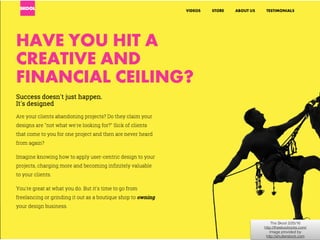
The Skool 2/25/16

http://theskoolrocks.com/

Image provided by

http://shutterstock.com
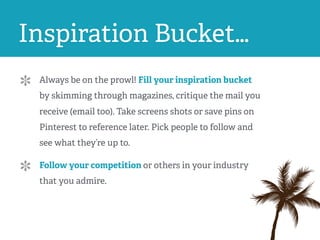
Inspiration Bucket…
Always be on the prowl! Fill your inspiration bucket
by skimming through magazines, critique the mail you
receive (email too). Take screens shots or save pins on
Pinterest to reference later. Pick people to follow and
see what they’re up to.
Follow your competition or others in your industry
that you admire.
PART 3:
WORKSHEET:
DESIGN GUIDELINE
Download Worksheet Here:
http://www.aedesignco.com/worksheet
PART 4: EMAIL
COMMUNICATIONS
MADE EASY
Layout…
Make sure your copy flows well from subject to
preview text to main headline. 
Sidebars are extremely difficult for people to read on
mobile devices.
Think “sections” within your content to help seperate
content areas and make it more scannable and
enjoyable to read
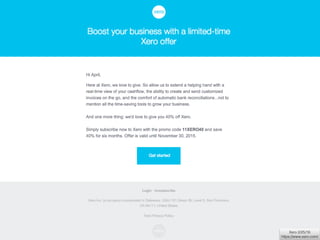
Call-To-Action…
Newsletters are great to keep your audience informed
and up-to-date with everything going on, but don’t
forget to have a main call-to-action on them as well
preferably at the bottom in a large colored block as a
secondary element, i.e. "Giving Goals: We’re on our way!
Help us help others by giving today.”
End with clear contact information including other
ways to connect, i.e. email, address, social accounts.
Xero 2/25/16

https://www.xero.com/
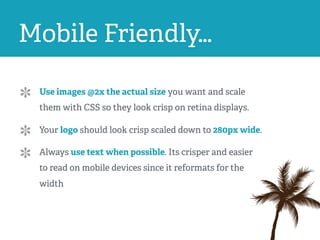
Mobile Friendly…
Use images @2x the actual size you want and scale
them with CSS so they look crisp on retina displays.
Your logo should look crisp scaled down to 280px wide.
Always use text when possible. Its crisper and easier
to read on mobile devices since it reformats for the
width
Test. Test. Test…
Use inbox previews to ensure proper rendering on the
main email clients your list uses. MailChimp has this
feature built in and its quite impressive.
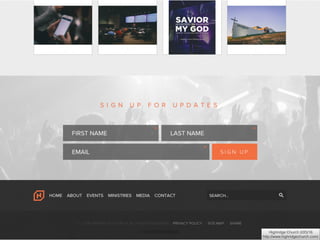
Subscribers…
Make it extremely easy for people to subscribe to your list. People
may just not be ready yet and are looking for more information
before they are comfortable.
1. Clear sign up form on website
2. Add “Forward to a Friend” and “Join our Mailing List" links on
your emails to attract others that may have not received it directly.
3. Create a sign up form on your social media accounts
4. Add a link in your email signature asking to join your list
5. Have an iPad or collect email address manually at events
Highridge Church 2/25/16

http://www.highridgechurch.com/
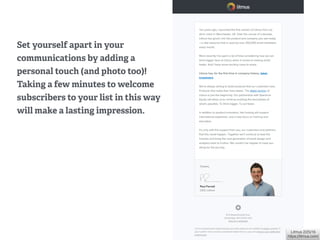
Litmus 2/25/16

https://litmus.com/
Set yourself apart in your
communications by adding a
personal touch (and photo too)!
Taking a few minutes to welcome
subscribers to your list in this way
will make a lasting impression.
SUMMARY
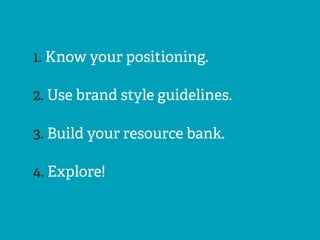
1. Know your positioning.
2. Use brand style guidelines.
3. Build your resource bank.
4. Explore!
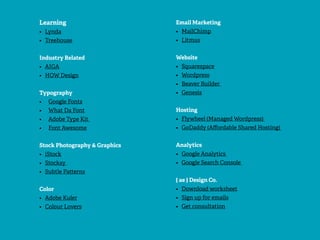
RESOURCES
Learning
• Lynda
• Treehouse
Industry Related
• AIGA
• HOW Design
Typography
• Google Fonts
• What Da Font
• Adobe Type Kit
• Font Awesome
Stock Photography & Graphics
• iStock
• Stocksy
• Subtle Patterns
Color
• Adobe Kuler
• Colour Lovers
Email Marketing
• MailChimp
• Litmus
Website
• Squarespace
• Wordpress
• Beaver Builder
• Genesis
Hosting
• Flywheel (Managed Wordpress)
• GoDaddy (Affordable Shared Hosting)
Analytics
• Google Analytics
• Google Search Console
{ ae } Design Co.
• Download worksheet
• Sign up for emails
• Get consultation
? ? Q & A ? ?
KNOWLEDGE BAR

Branding, Design & Email Marketing Basics

  • 1.
    Branding, Design & EmailMarketing Basics APRIL EDWARDS Digital Strategist + Designer + Owner
  • 2.
    HELLO! I’M APRIL EDWARDS DigitalStrategist + Designer + Owner ……………………………………………
  • 3.
  • 4.
    Bachelor of FineArts in Illustration + Minor in Technology Integrated Media Arts Education:
  • 5.
    Experience… Animated emoticons &avatars for MSN Messenger. Designed packaging, displays and managed Bonne Bell & Lip Smackers digital efforts. Served as the creative director to a reputable niche insurance company. Moved to San Diego where I subcontracted as a Flash Animator, Web Designer & Email Marketer for various marketing and digital agencies.
  • 6.
    Like to helppeople so they can get back to doing the things they love the most. Started { ae } Design Co. to provide growing businesses clarity and a stronger foundation with modern websites that they can easily manage on their own. We also provide the training, tools and support they need to better reach their customers and to market smarter. Company…
  • 7.
    Recently relocated ouroffice to beautiful Carlsbad (full of sunshine, motivation and inspiration) where I’m looking forward to being an active roll in the success of local businesses.  And…being here today is my first step to paying it forward in my professional life. THANK YOU! Today…
  • 8.
  • 9.
    • PART 1:Branding Basics • PART 2: Tips for Creating Stand-Out Designs • WORKSHEET: Strategic Design • PART 3: Email Communications Made Easy • Helpful Resources • Q & A • One-on-one Knowledge Bar The Master Plan…
  • 10.
  • 11.
    Positioning You need tobe clear so your audience is too! Understand how you serve your audience differently and what is unique about you. Speak (write) in a tone that will reflect your organization’s personality.
  • 12.
    Visual Representation... Choose afew words that represent the essence of your organization. Use these words to guide the look & feel Create a Brand Guideline or simple Mood Board: Define the fonts and colors you will use for headlines, main copy, calls-to-action and graphical treatments you’ll use
  • 13.
    t: 760.814.1851 |e: april@aedesignco.com | w: www.aedesignco.com The mood board is created to keep the initial design conceptualization focused on the individual elements rather than layout. We’ll explain our vision for the site and discuss color and font usage in relation to your branding and goals, etc. After we have established the overall mood or look and feel of the site, we will paint the wireframes with these styles for final protoype approval. { ae } Design Co. Mood Board12/23/15 | VERSION 1 ae{ {Design Co. S T R AT E G Y � D E S I G N � T E C H N O L O G Y SURA HEADLINE BUTTONS MAIN COLORS ACCENT COLORS TYPOGRAPHY GRAPHICS Sura Subheadline Lato body font ipsum dolor sit amet, consectetur adipiscing elit. Donec link style in quam maximus, sed convallis nisi volutpat. Sed sed scelerisque est. NORMAL 04A0B9 3E2210 FAFAFA 60C1D3 95DEE8 HOVER
  • 14.
    PART 2: TIPSFOR CREATING STAND- OUT DESIGNS
  • 15.
    Design Basics… The mosteffective designs have… 1. Have balance between elements 2. Keep the most important information in the spotlight 3. Use white space/ negative well You can do this by emphasizing focal points with: 1. Use of color 2. Graphic treatment 3. Scale.
  • 16.
    Composition/ Layout… Use grids& guides to properly align elements. This will keep your designs clean and enjoyable to look at. Look at your composition by squinting your eyes. If everything is blending together, then re-adjust for more interest. If using columns in your layouts, try to use justified paragraphs for a distraction free design.
  • 17.
    Scannable Content… Always makecontent scannable by breaking it up with headlines and sub-headlines. It will actually help you keep your copy focused as well! Think in terms of main content and then secondary. Use white space as a design element. It should frame and seperate content. The less crammed things are the easier it is to read.
  • 18.
    Typography… Headlines should bebold and large sometimes with more letter spacing (kerning). My general rule of thumb is that they are 2x larger than the main copy. Keep main body fonts simple. When all else fails go with Arial or Helvetica and leave the creative touches for the headlines and textures. Calls-to-actions should be treated differently so it is very apparent what your audience is to do next.
  • 19.
    The Skool 2/25/16
 http://theskoolrocks.com/
 Imageprovided by
 http://shutterstock.com
  • 20.
    Inspiration Bucket… Always beon the prowl! Fill your inspiration bucket by skimming through magazines, critique the mail you receive (email too). Take screens shots or save pins on Pinterest to reference later. Pick people to follow and see what they’re up to. Follow your competition or others in your industry that you admire.
  • 21.
  • 22.
  • 23.
  • 24.
    Layout… Make sure yourcopy flows well from subject to preview text to main headline.  Sidebars are extremely difficult for people to read on mobile devices. Think “sections” within your content to help seperate content areas and make it more scannable and enjoyable to read
  • 25.
    Call-To-Action… Newsletters are greatto keep your audience informed and up-to-date with everything going on, but don’t forget to have a main call-to-action on them as well preferably at the bottom in a large colored block as a secondary element, i.e. "Giving Goals: We’re on our way! Help us help others by giving today.” End with clear contact information including other ways to connect, i.e. email, address, social accounts.
  • 26.
  • 27.
    Mobile Friendly… Use images@2x the actual size you want and scale them with CSS so they look crisp on retina displays. Your logo should look crisp scaled down to 280px wide. Always use text when possible. Its crisper and easier to read on mobile devices since it reformats for the width
  • 28.
    Test. Test. Test… Useinbox previews to ensure proper rendering on the main email clients your list uses. MailChimp has this feature built in and its quite impressive.
  • 29.
    Subscribers… Make it extremelyeasy for people to subscribe to your list. People may just not be ready yet and are looking for more information before they are comfortable. 1. Clear sign up form on website 2. Add “Forward to a Friend” and “Join our Mailing List" links on your emails to attract others that may have not received it directly. 3. Create a sign up form on your social media accounts 4. Add a link in your email signature asking to join your list 5. Have an iPad or collect email address manually at events
  • 30.
  • 31.
    Litmus 2/25/16
 https://litmus.com/ Set yourselfapart in your communications by adding a personal touch (and photo too)! Taking a few minutes to welcome subscribers to your list in this way will make a lasting impression.
  • 32.
  • 33.
    1. Know yourpositioning. 2. Use brand style guidelines. 3. Build your resource bank. 4. Explore!
  • 34.
  • 35.
    Learning • Lynda • Treehouse IndustryRelated • AIGA • HOW Design Typography • Google Fonts • What Da Font • Adobe Type Kit • Font Awesome Stock Photography & Graphics • iStock • Stocksy • Subtle Patterns Color • Adobe Kuler • Colour Lovers Email Marketing • MailChimp • Litmus Website • Squarespace • Wordpress • Beaver Builder • Genesis Hosting • Flywheel (Managed Wordpress) • GoDaddy (Affordable Shared Hosting) Analytics • Google Analytics • Google Search Console { ae } Design Co. • Download worksheet • Sign up for emails • Get consultation
  • 36.
    ? ? Q& A ? ?
  • 37.