© 2022, IRJET | Impact Factor value: 7.529 | ISO 9001:2008 Certified Journal | Page 724
Braille refreshable display using Arduino for visually challenged people
M. Ramgopal1, S. Vijaykumar2, R. Rakesh3, S. Ranjith4, S. Senthilkumar5*, V. Parthasaradi6, T.
Senthil Kumar7
1-4UG Scholar, Department of Electronics and Communication Engineering, E.G.S. Pillay Engineering College,
Nagapattinam, Tamilnadu.
5*-7Assistant Professor, Department of Electronics and Communication Engineering, E.G.S. Pillay Engineering College,
Nagapattinam, Tamilnadu.
Corresponding Author: S. Senthilkumar
-----------------------------------------------------------------------------***---------------------------------------------------------------------
ABSTRACT
This article presents an idea to provide visually impaired people access to any printed material or soft copies available
on the computer. This project is a suitable alternative to Braille books. This initiative enables a blind person to read texts
which are not available in the Braille format. An image sensor enables the user to take images of the text to be read. The dots of
the script sensed by the user are elevated electromagnetically by precise actuators. Different experiments are carried out and
the results analyzed for distinct cases. Analysis shows that proposed system have the benefits like accurate processing,
recognition and detection. It is possible to extract text from the image. The blind can therefore read any printed work or text
by clicking an image. The developed algorithm can be further improved with noise rejection techniques, for increased user
convenience when interacting with the real world.
KEYWORD: Braille, Arduino, IDE Program, Actuators.
1. INTRODUCTION
The subject of blindness and education has included evolving approaches and public perceptions of how best to
address the special needs of blind students. The practice of institutionalizing the blind in asylums has a history extending back
over a thousand years, but it was not until the 18th century that authorities created schools for them where blind children,
particularly those more privileged, were usually educated in such specialized settings. These institutions provided simple
vocational and adaptive training, as well as grounding in academic subjects offered through alternative formats. Literature, for
example, was being made available to blind students by way of embossed Roman letters. Louis Braille attended Haüy's school
in 1819 and later taught there. He soon became determined to fashion a system of reading and writing that could bridge the
critical gap in communication between the sighted and the blind. In his own words: "Access to communication in the widest
sense is access to knowledge, and that is vitally important for us if we [the blind] are not to go on being despised or patronized
by condescending sighted people.
Blind and visually impaired individuals use a matrix of dots called Braille to read. Currently only a limited number of
books get translated in to Braille which requires a human to read and type the entire book in Braille. The books which are
translated are bulky due to the minimum size requirement of a Braille cell. The challenge the blind people face is having to
source the desired books in Braille and then not being able to carry more than a few because of the large size. Refreshable
Braille displays exist which have a line of Braille cells and can display text from a computer when connected to one. These
allow the blind to be able to use computers and access the vast catalogue of literature online. The drawback of these is the
phenomenal costs and size of one. There is a clear need for a device which can overcome these obstacles for the blind. This
works looks into the feasibility of designing a device which would allow a blind user to access any digital text document by
converting it to Braille and displaying it in a manner suitable for them to read. Braille is a tactile writing system used by people
who are visually impaired. It is traditionally written with embossed paper. Braille users can read computer screens and other
electronic supports using refreshable braille displays. They can write braille with the original slate and stylus or type it on a
braille writer, such as a portable braille notetaker or computer that prints with a braille embosser. Braille is named after its
creator, Louis Braille, a Frenchman who lost his sight as a result of a childhood accident. In 1824, at the age of fifteen, he
International Research Journal of Engineering and Technology (IRJET) e-ISSN: 2395-0056
Volume: 09 Issue: 12 | Dec 2022 www.irjet.net p-ISSN: 2395-0072
© 2022, IRJET | Impact Factor value: 7.529 | ISO 9001:2008 Certified Journal | Page 725
developed a code for the French alphabet as an improvement on night writing. He published his system, which subsequently
included musical notation, in 1829.
The second revision, published in 1837, was the first small binary form of writing developed in the modern era. These
characters have rectangular blocks called cells that have tiny bumps called raised dots.The number and arrangement of these
dots distinguish one character from another. Since the various braille alphabets originated as transcription codes for printed
writing, the mappings (sets of character designations) vary from language to language, and even within one; in English Braille
there are three levels of encoding: Grade 1 – a letter-by-letter transcription used for basic literacy; Grade 2 – an addition of
abbreviations and contractions; and Grade 3 – various non-standardized personal stenography. Braille cells are not the only
thing to appear in braille text. There may be embossed illustrations and graphs, with the lines either solid or made of series of
dots, arrows, bullets that are larger than braille dots, etc.
A full braille cell includes six raised dots arranged in two columns, each column having three dots. The dot positions
are identified by numbers from one to six. There are 64 possible combinations, including no dots at all for a word space. A cell
can be used to represent a letter, digit, punctuation mark, or even a word. Braille literacy is a social-justice issue.Early braille
education is crucial to literacy, education and employment among the blind. However, in the face of changes in education
policy and screen reader software, braille usage has declined in recent decades, despite the fact that technologies such as
braille displays have also made braille more accessible and practical.
2. LITERATURE REVIEW
In this work presents an idea to had visually impaired people access to any printed material or soft copies available on
the computer. The work is a suitable alternative to Braille books. This initiative enables a blind person to read texts which are
not available in the Braille format. Sensor plays a major role in recent technological development [1,2]. An image sensor
enables the user to take images of the text to be read. The dots of the script sensed by the user are elevated
electromagnetically by precise actuators. Experiments were carried out and the results analyzed for distinct cases. It was
found that with accurate processing, recognition and detection techniques; it is possible to extract text from the image. The
blind can therefore read any printed work or text by clicking an image. The algorithm can be further improved with noise
rejection techniques, for increased user convenience when interacting with the real world [3-5].
In this invention of the Braille method, it became possible to use prominent symbols consisting of six or eight that
distinguish the letters that make up words or letters, and this innovation became adopted all over the world despite the
different languages, as the prominent symbols were formed for all languages Almost all of this language helped children in
developing the educational system for children. In this work, a system was designed that to convert text into Braille through
electromechanical control, "DC-Motor" and it is controlled via an Arduino to convert the text into a set of characters and then
convert each letter into ASCII and BINARY and then into a braille cell. The electronic circuit has been working and running
successfully [6].
This paper presents the design, implementation, and prototype of a low-cost Braille embossing mechanism. The
proposal is a printer head integrating three hammers that, upon actuation, stamp readable dots on the paper. Braille
characters can be quickly embossed using the proposed printer head. Affordable and efficient Braille embossers for home use
can be envisaged using this new action approach [7-9].
3. TYPES OF BRAILLE
3.1 Six Dot Braille
There are many variations of Braille in existence which could be used for the Electronic Braille Document Reader (EBDR).
The most commonly used Braille system is the original six-dot Braille(fig-1), which consists of a cell of six raised dots
arranged in two columns of three dots. The dot positions are numbered top to bottom 1 to 3 on the first column (left), and 4 to
6 on the second column (right).
International Research Journal of Engineering and Technology (IRJET) e-ISSN: 2395-0056
Volume: 09 Issue: 12 | Dec 2022 www.irjet.net p-ISSN: 2395-0072
© 2022, IRJET | Impact Factor value: 7.529 | ISO 9001:2008 Certified Journal | Page 726
Figure 1. Six dot braille
The six-dot Braille has a total of 63 combinations, but some of the combinations feel too similar to be used e.g. ⠊ and ⠔ so are
omitted. The punctuations are represented by their own set of patterns. But numbers use the same patterns as the alphabets
‘a’ to ‘j’. They are recognized by the context they are in and the symbol placed before it e.g. before a number a Braille pattern 3-
4-5-6 ⠼ is placed.
3.2 Eight dot braille
As the restriction of the six-dot Braille became evident it was extended to eight dot Braille which gave 256 combinations. The
eight-dot Braille has two extra dots at the bottom of the cell; each eight-dot cell consists of two columns of four dots. The two
extra dots positions are numbered 6(left) and 7(right). The extra combinations allow all special characters to have a unique
pattern. The main advantage of the eight-dot Braille is that all details of the character can be represented in a single cell e.g.
case, number or punctuation. The eight dot Braille (fig-2) is also popular in technical areas such as mathematics and sciences.
It has also gained popularity in refreshable Braille displays as the extra two dots can represent extra information such as
cursor position and various text attributes.
Figure 2. Eight dot braille
3.3 Grade 1
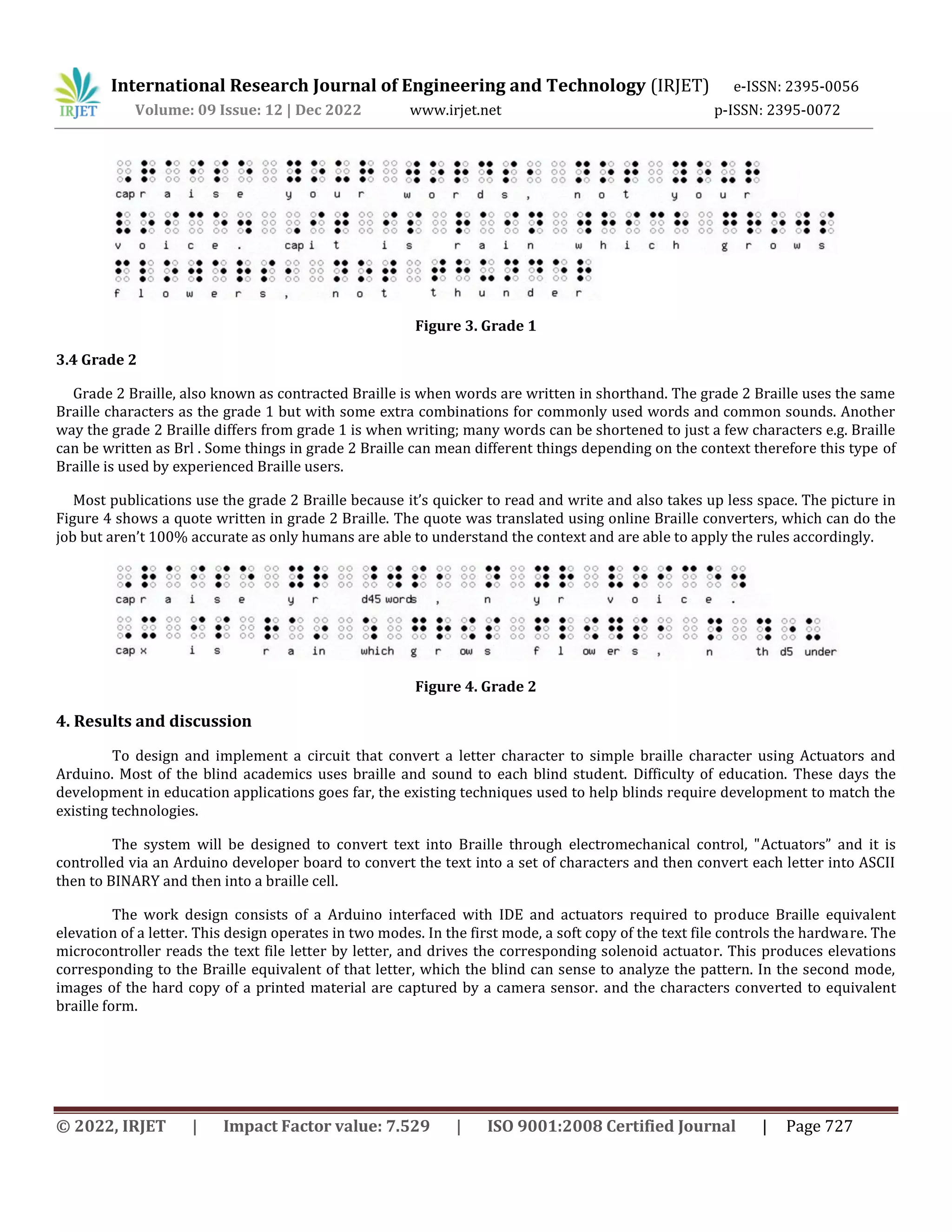
Grade 1 Braille, which is sometimes also called uncontracted Braille, is the exact substitution of each letters to its
corresponding Braille patterns of the alphabet. It is usually used for teaching beginners and labelling because it takes more
space and slow to read. Figure 3 shows a quote written in grade 1 Braille.
International Research Journal of Engineering and Technology (IRJET) e-ISSN: 2395-005
Volume: 09 Issue: 12 | Dec 2022 www.irjet.net p-ISSN: 2395-0072
International Research Journal of Engineering and Technology (IRJET) e-ISSN: 2395-0056
Volume: 09 Issue: 12 | Dec 2022 www.irjet.net p-ISSN: 2395-0072
© 2022, IRJET | Impact Factor value: 7.529 | ISO 9001:2008 Certified Journal | Page 727
Figure 3. Grade 1
3.4 Grade 2
Grade 2 Braille, also known as contracted Braille is when words are written in shorthand. The grade 2 Braille uses the same
Braille characters as the grade 1 but with some extra combinations for commonly used words and common sounds. Another
way the grade 2 Braille differs from grade 1 is when writing; many words can be shortened to just a few characters e.g. Braille
can be written as Brl . Some things in grade 2 Braille can mean different things depending on the context therefore this type of
Braille is used by experienced Braille users.
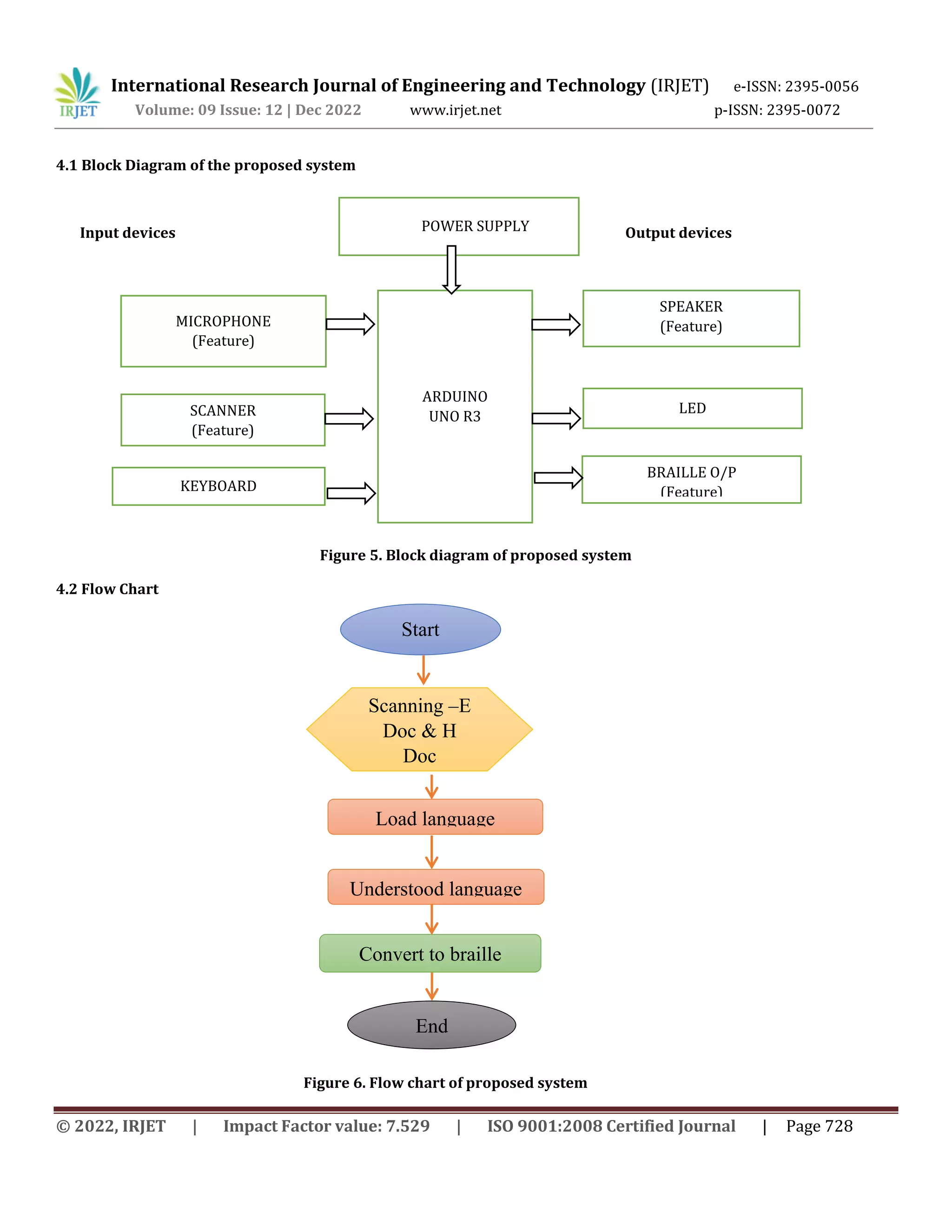
Most publications use the grade 2 Braille because it’s quicker to read and write and also takes up less space. The picture in
Figure 4 shows a quote written in grade 2 Braille. The quote was translated using online Braille converters, which can do the
job but aren’t 100% accurate as only humans are able to understand the context and are able to apply the rules accordingly.
Figure 4. Grade 2
4. Results and discussion
To design and implement a circuit that convert a letter character to simple braille character using Actuators and
Arduino. Most of the blind academics uses braille and sound to each blind student. Difficulty of education. These days the
development in education applications goes far, the existing techniques used to help blinds require development to match the
existing technologies.
The system will be designed to convert text into Braille through electromechanical control, "Actuators” and it is
controlled via an Arduino developer board to convert the text into a set of characters and then convert each letter into ASCII
then to BINARY and then into a braille cell.
The work design consists of a Arduino interfaced with IDE and actuators required to produce Braille equivalent
elevation of a letter. This design operates in two modes. In the first mode, a soft copy of the text file controls the hardware. The
microcontroller reads the text file letter by letter, and drives the corresponding solenoid actuator. This produces elevations
corresponding to the Braille equivalent of that letter, which the blind can sense to analyze the pattern. In the second mode,
images of the hard copy of a printed material are captured by a camera sensor. and the characters converted to equivalent
braille form.
International Research Journal of Engineering and Technology (IRJET) e-ISSN: 2395-0056
Volume: 09 Issue: 12 | Dec 2022 www.irjet.net p-ISSN: 2395-0072
© 2022, IRJET | Impact Factor value: 7.529 | ISO 9001:2008 Certified Journal | Page 728
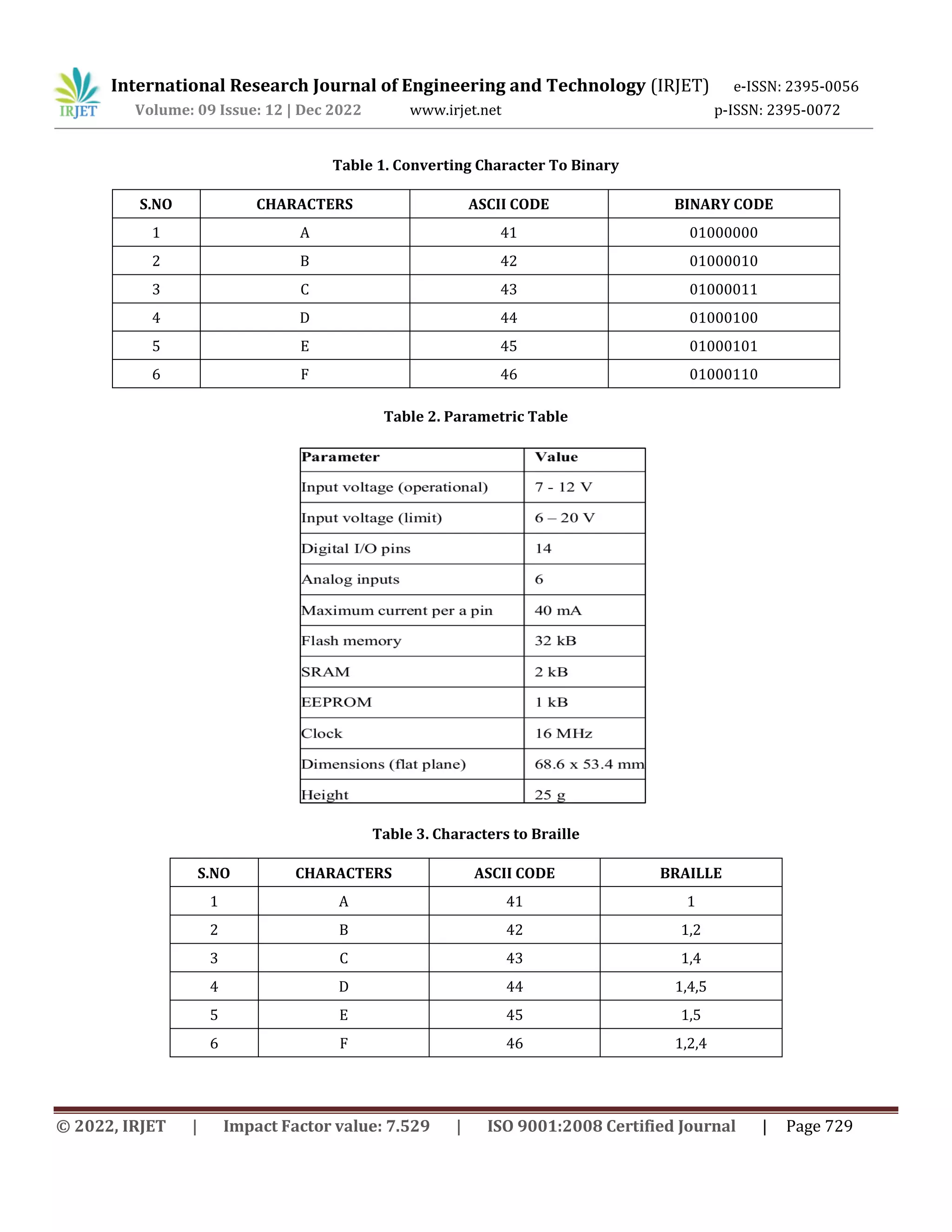
4.1 Block Diagram of the proposed system
Input devices Output devices
Figure 5. Block diagram of proposed system
4.2 Flow Chart
Figure 6. Flow chart of proposed system
ARDUINO
UNO R3
POWER SUPPLY
MICROPHONE
(Feature)
SCANNER
(Feature)
KEYBOARD
SPEAKER
(Feature)
LED
BRAILLE O/P
(Feature)
Start
Scanning –E
Doc & H
Doc
Load language
Understood language
Convert to braille
End
International Research Journal of Engineering and Technology (IRJET) e-ISSN: 2395-0056
Volume: 09 Issue: 12 | Dec 2022 www.irjet.net p-ISSN: 2395-0072
© 2022, IRJET | Impact Factor value: 7.529 | ISO 9001:2008 Certified Journal | Page 729
Table 1. Converting Character To Binary
S.NO CHARACTERS ASCII CODE BINARY CODE
1 A 41 01000000
2 B 42 01000010
3 C 43 01000011
4 D 44 01000100
5 E 45 01000101
6 F 46 01000110
Table 2. Parametric Table
Table 3. Characters to Braille
S.NO CHARACTERS ASCII CODE BRAILLE
1 A 41 1
2 B 42 1,2
3 C 43 1,4
4 D 44 1,4,5
5 E 45 1,5
6 F 46 1,2,4
International Research Journal of Engineering and Technology (IRJET) e-ISSN: 2395-0056
Volume: 09 Issue: 12 | Dec 2022 www.irjet.net p-ISSN: 2395-0072
© 2022, IRJET | Impact Factor value: 7.529 | ISO 9001:2008 Certified Journal | Page 730
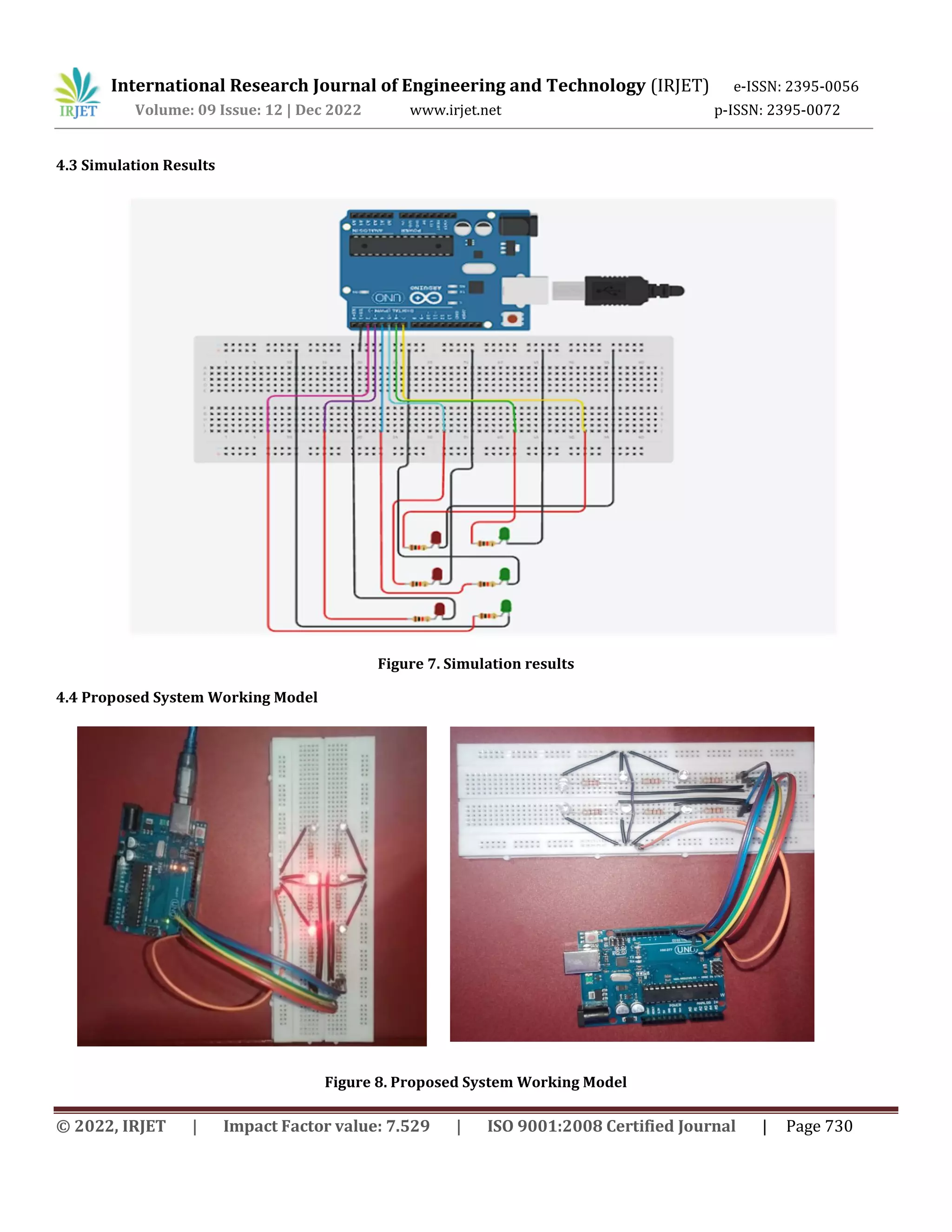
4.3 Simulation Results
Figure 7. Simulation results
4.4 Proposed System Working Model
Figure 8. Proposed System Working Model
International Research Journal of Engineering and Technology (IRJET) e-ISSN: 2395-0056
Volume: 09 Issue: 12 | Dec 2022 www.irjet.net p-ISSN: 2395-0072
© 2022, IRJET | Impact Factor value: 7.529 | ISO 9001:2008 Certified Journal | Page 731
5. Conclusion
In this work a design of hardware circuit based on Arduino was done to convert characters into braille, the circuit
design with a low cost tools and components in order to reduce the overall cost on disable blind peoples, the problem behind
the work is text messages in mobile phones or tablets that blind users cannot read and Most of the blind academics uses braille
and sound to each blind student. In this work the programming of the Arduino has three stages, the first to capture the
character or letter, then the convert it to ascii code, then to binary code, this is the basic algorithm used to convert any
character into braille. The circuit was tested and reach the work goals successfully.
REFERENCES
1. Senthilkumar. S, Lakshmi Rekha, Ramachandran. L & Dhivya. S, “Design and Implementation of secured wireless
communication using Raspberry Pi”, International Research Journal of Engineering and Technology, vol. 3, no. 2, pp.
1015-1018, 2016.
2. S. Suganya, R. Sinduja, T. Sowmiya & S. Senthilkumar, “Street Light Glow on Detecting Vechile Movement Using
Sensor”, International Journal for Advance Research in Engineering and Technology, ICIRET-2014.
3. Touchpad for the Blind to Read Text Documents – 2014 - College of Engineering, Pune.
4. Design and Implementation of a Low-Cost Printer Head for Embossing Braille Dots on Paper – 2020 – by France
University of Salento students.
5. Kohlmann W, Lucke U. Alternative concepts for accessible virtual classrooms for blind users. Proceedings of 15th
International Conference on Advanced Learning Technologies; 2015. p. 413–17.
6. Sudan University Of Science and Technology College of Engineering , Text to Braille Converter-2020 ,School of
Electrical and Nuclear Engineering
7. Dias MB, Teves EA. Towards technology with a global heart through compassionate engineering. Proceedings of
Raising Awareness for the Societal and Environmental Role of Engineering and (Re)Training Engineers for
Participatory Design (Engineering4Society); 2015. p. 96–100.
8. Mikułowski D, Brzostek-Pawłowska J. Problems encountered in technical education of the blind, and related aids:
Virtual cubarythms and 3D drawings. Proceedings of IEEE Global Engineering Education Conference (EDUCON); 2014.
p. 995–8.
9. Bauwens B, Evenepoel F, Engelen JJ. Standardization as a prerequisite for accessibility of electronic text information
for persons who cannot use printed material. IEEE Transactions on Rehabilitation Engineering,.1995 Mar; 5(1):84–9.

Braille refreshable display using Arduino for visually challenged people

  • 1.
    © 2022, IRJET| Impact Factor value: 7.529 | ISO 9001:2008 Certified Journal | Page 724 Braille refreshable display using Arduino for visually challenged people M. Ramgopal1, S. Vijaykumar2, R. Rakesh3, S. Ranjith4, S. Senthilkumar5*, V. Parthasaradi6, T. Senthil Kumar7 1-4UG Scholar, Department of Electronics and Communication Engineering, E.G.S. Pillay Engineering College, Nagapattinam, Tamilnadu. 5*-7Assistant Professor, Department of Electronics and Communication Engineering, E.G.S. Pillay Engineering College, Nagapattinam, Tamilnadu. Corresponding Author: S. Senthilkumar -----------------------------------------------------------------------------***--------------------------------------------------------------------- ABSTRACT This article presents an idea to provide visually impaired people access to any printed material or soft copies available on the computer. This project is a suitable alternative to Braille books. This initiative enables a blind person to read texts which are not available in the Braille format. An image sensor enables the user to take images of the text to be read. The dots of the script sensed by the user are elevated electromagnetically by precise actuators. Different experiments are carried out and the results analyzed for distinct cases. Analysis shows that proposed system have the benefits like accurate processing, recognition and detection. It is possible to extract text from the image. The blind can therefore read any printed work or text by clicking an image. The developed algorithm can be further improved with noise rejection techniques, for increased user convenience when interacting with the real world. KEYWORD: Braille, Arduino, IDE Program, Actuators. 1. INTRODUCTION The subject of blindness and education has included evolving approaches and public perceptions of how best to address the special needs of blind students. The practice of institutionalizing the blind in asylums has a history extending back over a thousand years, but it was not until the 18th century that authorities created schools for them where blind children, particularly those more privileged, were usually educated in such specialized settings. These institutions provided simple vocational and adaptive training, as well as grounding in academic subjects offered through alternative formats. Literature, for example, was being made available to blind students by way of embossed Roman letters. Louis Braille attended Haüy's school in 1819 and later taught there. He soon became determined to fashion a system of reading and writing that could bridge the critical gap in communication between the sighted and the blind. In his own words: "Access to communication in the widest sense is access to knowledge, and that is vitally important for us if we [the blind] are not to go on being despised or patronized by condescending sighted people. Blind and visually impaired individuals use a matrix of dots called Braille to read. Currently only a limited number of books get translated in to Braille which requires a human to read and type the entire book in Braille. The books which are translated are bulky due to the minimum size requirement of a Braille cell. The challenge the blind people face is having to source the desired books in Braille and then not being able to carry more than a few because of the large size. Refreshable Braille displays exist which have a line of Braille cells and can display text from a computer when connected to one. These allow the blind to be able to use computers and access the vast catalogue of literature online. The drawback of these is the phenomenal costs and size of one. There is a clear need for a device which can overcome these obstacles for the blind. This works looks into the feasibility of designing a device which would allow a blind user to access any digital text document by converting it to Braille and displaying it in a manner suitable for them to read. Braille is a tactile writing system used by people who are visually impaired. It is traditionally written with embossed paper. Braille users can read computer screens and other electronic supports using refreshable braille displays. They can write braille with the original slate and stylus or type it on a braille writer, such as a portable braille notetaker or computer that prints with a braille embosser. Braille is named after its creator, Louis Braille, a Frenchman who lost his sight as a result of a childhood accident. In 1824, at the age of fifteen, he International Research Journal of Engineering and Technology (IRJET) e-ISSN: 2395-0056 Volume: 09 Issue: 12 | Dec 2022 www.irjet.net p-ISSN: 2395-0072
  • 2.
    © 2022, IRJET| Impact Factor value: 7.529 | ISO 9001:2008 Certified Journal | Page 725 developed a code for the French alphabet as an improvement on night writing. He published his system, which subsequently included musical notation, in 1829. The second revision, published in 1837, was the first small binary form of writing developed in the modern era. These characters have rectangular blocks called cells that have tiny bumps called raised dots.The number and arrangement of these dots distinguish one character from another. Since the various braille alphabets originated as transcription codes for printed writing, the mappings (sets of character designations) vary from language to language, and even within one; in English Braille there are three levels of encoding: Grade 1 – a letter-by-letter transcription used for basic literacy; Grade 2 – an addition of abbreviations and contractions; and Grade 3 – various non-standardized personal stenography. Braille cells are not the only thing to appear in braille text. There may be embossed illustrations and graphs, with the lines either solid or made of series of dots, arrows, bullets that are larger than braille dots, etc. A full braille cell includes six raised dots arranged in two columns, each column having three dots. The dot positions are identified by numbers from one to six. There are 64 possible combinations, including no dots at all for a word space. A cell can be used to represent a letter, digit, punctuation mark, or even a word. Braille literacy is a social-justice issue.Early braille education is crucial to literacy, education and employment among the blind. However, in the face of changes in education policy and screen reader software, braille usage has declined in recent decades, despite the fact that technologies such as braille displays have also made braille more accessible and practical. 2. LITERATURE REVIEW In this work presents an idea to had visually impaired people access to any printed material or soft copies available on the computer. The work is a suitable alternative to Braille books. This initiative enables a blind person to read texts which are not available in the Braille format. Sensor plays a major role in recent technological development [1,2]. An image sensor enables the user to take images of the text to be read. The dots of the script sensed by the user are elevated electromagnetically by precise actuators. Experiments were carried out and the results analyzed for distinct cases. It was found that with accurate processing, recognition and detection techniques; it is possible to extract text from the image. The blind can therefore read any printed work or text by clicking an image. The algorithm can be further improved with noise rejection techniques, for increased user convenience when interacting with the real world [3-5]. In this invention of the Braille method, it became possible to use prominent symbols consisting of six or eight that distinguish the letters that make up words or letters, and this innovation became adopted all over the world despite the different languages, as the prominent symbols were formed for all languages Almost all of this language helped children in developing the educational system for children. In this work, a system was designed that to convert text into Braille through electromechanical control, "DC-Motor" and it is controlled via an Arduino to convert the text into a set of characters and then convert each letter into ASCII and BINARY and then into a braille cell. The electronic circuit has been working and running successfully [6]. This paper presents the design, implementation, and prototype of a low-cost Braille embossing mechanism. The proposal is a printer head integrating three hammers that, upon actuation, stamp readable dots on the paper. Braille characters can be quickly embossed using the proposed printer head. Affordable and efficient Braille embossers for home use can be envisaged using this new action approach [7-9]. 3. TYPES OF BRAILLE 3.1 Six Dot Braille There are many variations of Braille in existence which could be used for the Electronic Braille Document Reader (EBDR). The most commonly used Braille system is the original six-dot Braille(fig-1), which consists of a cell of six raised dots arranged in two columns of three dots. The dot positions are numbered top to bottom 1 to 3 on the first column (left), and 4 to 6 on the second column (right). International Research Journal of Engineering and Technology (IRJET) e-ISSN: 2395-0056 Volume: 09 Issue: 12 | Dec 2022 www.irjet.net p-ISSN: 2395-0072
  • 3.
    © 2022, IRJET| Impact Factor value: 7.529 | ISO 9001:2008 Certified Journal | Page 726 Figure 1. Six dot braille The six-dot Braille has a total of 63 combinations, but some of the combinations feel too similar to be used e.g. ⠊ and ⠔ so are omitted. The punctuations are represented by their own set of patterns. But numbers use the same patterns as the alphabets ‘a’ to ‘j’. They are recognized by the context they are in and the symbol placed before it e.g. before a number a Braille pattern 3- 4-5-6 ⠼ is placed. 3.2 Eight dot braille As the restriction of the six-dot Braille became evident it was extended to eight dot Braille which gave 256 combinations. The eight-dot Braille has two extra dots at the bottom of the cell; each eight-dot cell consists of two columns of four dots. The two extra dots positions are numbered 6(left) and 7(right). The extra combinations allow all special characters to have a unique pattern. The main advantage of the eight-dot Braille is that all details of the character can be represented in a single cell e.g. case, number or punctuation. The eight dot Braille (fig-2) is also popular in technical areas such as mathematics and sciences. It has also gained popularity in refreshable Braille displays as the extra two dots can represent extra information such as cursor position and various text attributes. Figure 2. Eight dot braille 3.3 Grade 1 Grade 1 Braille, which is sometimes also called uncontracted Braille, is the exact substitution of each letters to its corresponding Braille patterns of the alphabet. It is usually used for teaching beginners and labelling because it takes more space and slow to read. Figure 3 shows a quote written in grade 1 Braille. International Research Journal of Engineering and Technology (IRJET) e-ISSN: 2395-005 Volume: 09 Issue: 12 | Dec 2022 www.irjet.net p-ISSN: 2395-0072
  • 4.
    International Research Journalof Engineering and Technology (IRJET) e-ISSN: 2395-0056 Volume: 09 Issue: 12 | Dec 2022 www.irjet.net p-ISSN: 2395-0072 © 2022, IRJET | Impact Factor value: 7.529 | ISO 9001:2008 Certified Journal | Page 727 Figure 3. Grade 1 3.4 Grade 2 Grade 2 Braille, also known as contracted Braille is when words are written in shorthand. The grade 2 Braille uses the same Braille characters as the grade 1 but with some extra combinations for commonly used words and common sounds. Another way the grade 2 Braille differs from grade 1 is when writing; many words can be shortened to just a few characters e.g. Braille can be written as Brl . Some things in grade 2 Braille can mean different things depending on the context therefore this type of Braille is used by experienced Braille users. Most publications use the grade 2 Braille because it’s quicker to read and write and also takes up less space. The picture in Figure 4 shows a quote written in grade 2 Braille. The quote was translated using online Braille converters, which can do the job but aren’t 100% accurate as only humans are able to understand the context and are able to apply the rules accordingly. Figure 4. Grade 2 4. Results and discussion To design and implement a circuit that convert a letter character to simple braille character using Actuators and Arduino. Most of the blind academics uses braille and sound to each blind student. Difficulty of education. These days the development in education applications goes far, the existing techniques used to help blinds require development to match the existing technologies. The system will be designed to convert text into Braille through electromechanical control, "Actuators” and it is controlled via an Arduino developer board to convert the text into a set of characters and then convert each letter into ASCII then to BINARY and then into a braille cell. The work design consists of a Arduino interfaced with IDE and actuators required to produce Braille equivalent elevation of a letter. This design operates in two modes. In the first mode, a soft copy of the text file controls the hardware. The microcontroller reads the text file letter by letter, and drives the corresponding solenoid actuator. This produces elevations corresponding to the Braille equivalent of that letter, which the blind can sense to analyze the pattern. In the second mode, images of the hard copy of a printed material are captured by a camera sensor. and the characters converted to equivalent braille form.
  • 5.
    International Research Journalof Engineering and Technology (IRJET) e-ISSN: 2395-0056 Volume: 09 Issue: 12 | Dec 2022 www.irjet.net p-ISSN: 2395-0072 © 2022, IRJET | Impact Factor value: 7.529 | ISO 9001:2008 Certified Journal | Page 728 4.1 Block Diagram of the proposed system Input devices Output devices Figure 5. Block diagram of proposed system 4.2 Flow Chart Figure 6. Flow chart of proposed system ARDUINO UNO R3 POWER SUPPLY MICROPHONE (Feature) SCANNER (Feature) KEYBOARD SPEAKER (Feature) LED BRAILLE O/P (Feature) Start Scanning –E Doc & H Doc Load language Understood language Convert to braille End
  • 6.
    International Research Journalof Engineering and Technology (IRJET) e-ISSN: 2395-0056 Volume: 09 Issue: 12 | Dec 2022 www.irjet.net p-ISSN: 2395-0072 © 2022, IRJET | Impact Factor value: 7.529 | ISO 9001:2008 Certified Journal | Page 729 Table 1. Converting Character To Binary S.NO CHARACTERS ASCII CODE BINARY CODE 1 A 41 01000000 2 B 42 01000010 3 C 43 01000011 4 D 44 01000100 5 E 45 01000101 6 F 46 01000110 Table 2. Parametric Table Table 3. Characters to Braille S.NO CHARACTERS ASCII CODE BRAILLE 1 A 41 1 2 B 42 1,2 3 C 43 1,4 4 D 44 1,4,5 5 E 45 1,5 6 F 46 1,2,4
  • 7.
    International Research Journalof Engineering and Technology (IRJET) e-ISSN: 2395-0056 Volume: 09 Issue: 12 | Dec 2022 www.irjet.net p-ISSN: 2395-0072 © 2022, IRJET | Impact Factor value: 7.529 | ISO 9001:2008 Certified Journal | Page 730 4.3 Simulation Results Figure 7. Simulation results 4.4 Proposed System Working Model Figure 8. Proposed System Working Model
  • 8.
    International Research Journalof Engineering and Technology (IRJET) e-ISSN: 2395-0056 Volume: 09 Issue: 12 | Dec 2022 www.irjet.net p-ISSN: 2395-0072 © 2022, IRJET | Impact Factor value: 7.529 | ISO 9001:2008 Certified Journal | Page 731 5. Conclusion In this work a design of hardware circuit based on Arduino was done to convert characters into braille, the circuit design with a low cost tools and components in order to reduce the overall cost on disable blind peoples, the problem behind the work is text messages in mobile phones or tablets that blind users cannot read and Most of the blind academics uses braille and sound to each blind student. In this work the programming of the Arduino has three stages, the first to capture the character or letter, then the convert it to ascii code, then to binary code, this is the basic algorithm used to convert any character into braille. The circuit was tested and reach the work goals successfully. REFERENCES 1. Senthilkumar. S, Lakshmi Rekha, Ramachandran. L & Dhivya. S, “Design and Implementation of secured wireless communication using Raspberry Pi”, International Research Journal of Engineering and Technology, vol. 3, no. 2, pp. 1015-1018, 2016. 2. S. Suganya, R. Sinduja, T. Sowmiya & S. Senthilkumar, “Street Light Glow on Detecting Vechile Movement Using Sensor”, International Journal for Advance Research in Engineering and Technology, ICIRET-2014. 3. Touchpad for the Blind to Read Text Documents – 2014 - College of Engineering, Pune. 4. Design and Implementation of a Low-Cost Printer Head for Embossing Braille Dots on Paper – 2020 – by France University of Salento students. 5. Kohlmann W, Lucke U. Alternative concepts for accessible virtual classrooms for blind users. Proceedings of 15th International Conference on Advanced Learning Technologies; 2015. p. 413–17. 6. Sudan University Of Science and Technology College of Engineering , Text to Braille Converter-2020 ,School of Electrical and Nuclear Engineering 7. Dias MB, Teves EA. Towards technology with a global heart through compassionate engineering. Proceedings of Raising Awareness for the Societal and Environmental Role of Engineering and (Re)Training Engineers for Participatory Design (Engineering4Society); 2015. p. 96–100. 8. Mikułowski D, Brzostek-Pawłowska J. Problems encountered in technical education of the blind, and related aids: Virtual cubarythms and 3D drawings. Proceedings of IEEE Global Engineering Education Conference (EDUCON); 2014. p. 995–8. 9. Bauwens B, Evenepoel F, Engelen JJ. Standardization as a prerequisite for accessibility of electronic text information for persons who cannot use printed material. IEEE Transactions on Rehabilitation Engineering,.1995 Mar; 5(1):84–9.