BPMN 2.0
GET STARTED WITH PROCESS MODELING USING
Vitalii Sharavara
Wikipedia
WHAT IS BUSINESS PROCESS
A business process or business method is a collection of
related, structured activities or tasks that produce a
specific service or product (serve a particular goal) for a
particular customer or customers. It may often be
visualized as a flowchart of a sequence of activities with
interleaving decision points or as a process matrix of a
sequence of activities with relevance rules based on data
in the process.
https://en.wikipedia.org/wiki/Business_process
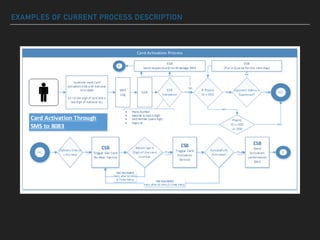
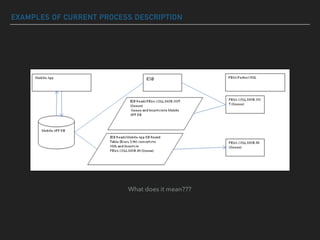
EXAMPLES OF CURRENT PROCESS DESCRIPTION
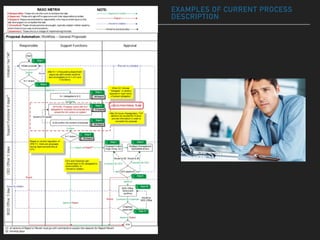
EXAMPLES OF CURRENT PROCESS
DESCRIPTION
EXAMPLES OF CURRENT PROCESS DESCRIPTION
What does it mean???
WHY SHOULD I CARE ABOUT BPMN?
▸ Standard
BPMN is not owned by a certain enterprise but by an institution (OMG), which is already established
through other world-wide standards, e.g., UML. The standard is supported by many software products;
you are less dependent on any particular vendor's products.
▸ Simplicity
The principle behind BPMN is rather simple which is why you can start working with this notation very
quickly.
▸ Power of expression
If necessary, you can describe precisely how a process functions with BPMN. However, this is more
difficult than only roughly describing the process. This way of precise modeling is possible, but not
mandatory.
▸ Implementation in IT
BPMN has been primarily developed to support technical implementation of processes ("Process
Automation"). The more important the IT is in a company, the more helpful the use of BPMN becomes.
Business Process Model and Notation (BPMN) is the global standard for process modeling
and one of the most important components of successful Business-IT-Alignment.
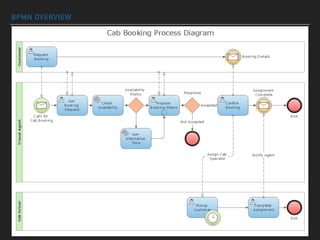
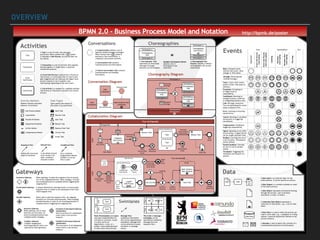
BPMN OVERVIEW
BUSINESS PROCESS MODEL AND NOTATION
BPMN 2.0
▸ A standard Business Process Model and Notation (BPMN) will
provide businesses with the capability of understanding their
internal business procedures in a graphical notation and will
give organizations the ability to communicate these procedures
in a standard manner. Furthermore, the graphical notation will
facilitate the understanding of the performance collaborations
and business transactions between the organizations. This will
ensure that businesses will understand themselves and
participants in their business and will enable organizations to
adjust to new internal and B2B business circumstances quickly.
OVERVIEW
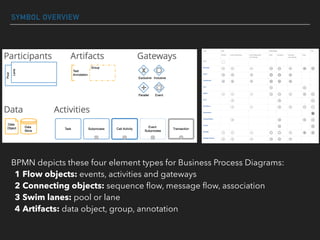
SYMBOL OVERVIEW
BPMN depicts these four element types for Business Process Diagrams:
1 Flow objects: events, activities and gateways
2 Connecting objects: sequence flow, message flow, association
3 Swim lanes: pool or lane
4 Artifacts: data object, group, annotation
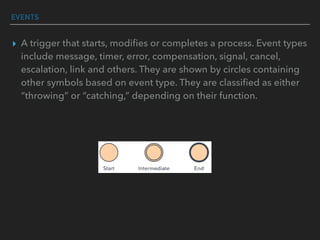
EVENTS
▸ A trigger that starts, modifies or completes a process. Event types
include message, timer, error, compensation, signal, cancel,
escalation, link and others. They are shown by circles containing
other symbols based on event type. They are classified as either
“throwing” or “catching,” depending on their function.
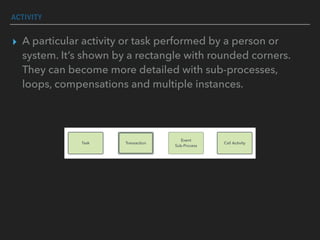
ACTIVITY
▸ A particular activity or task performed by a person or
system. It’s shown by a rectangle with rounded corners.
They can become more detailed with sub-processes,
loops, compensations and multiple instances.
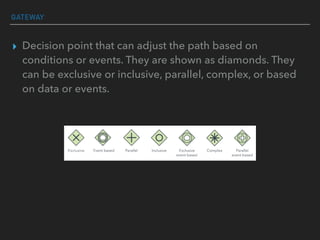
GATEWAY
▸ Decision point that can adjust the path based on
conditions or events. They are shown as diamonds. They
can be exclusive or inclusive, parallel, complex, or based
on data or events.
CONNECTING OBJECTS
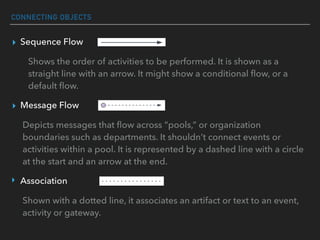
▸ Sequence Flow
Shows the order of activities to be performed. It is shown as a
straight line with an arrow. It might show a conditional flow, or a
default flow.
▸ Message Flow
Depicts messages that flow across “pools,” or organization
boundaries such as departments. It shouldn’t connect events or
activities within a pool. It is represented by a dashed line with a circle
at the start and an arrow at the end.
‣ Association
Shown with a dotted line, it associates an artifact or text to an event,
activity or gateway.
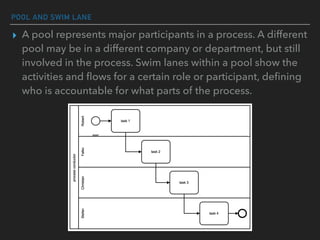
POOL AND SWIM LANE
▸ A pool represents major participants in a process. A different
pool may be in a different company or department, but still
involved in the process. Swim lanes within a pool show the
activities and flows for a certain role or participant, defining
who is accountable for what parts of the process.
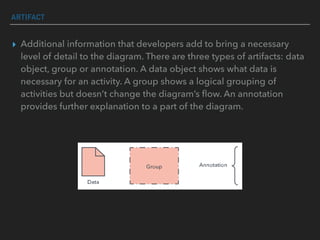
ARTIFACT
▸ Additional information that developers add to bring a necessary
level of detail to the diagram. There are three types of artifacts: data
object, group or annotation. A data object shows what data is
necessary for an activity. A group shows a logical grouping of
activities but doesn’t change the diagram’s flow. An annotation
provides further explanation to a part of the diagram.
KEY TIPS FOR BUSINESS PROCESS MODELING
▸ Clearly define the scope of the process with a beginning and end.
▸ You might first map the current business process to highlight inefficiencies
before modeling a better way with BPMN.
▸ Aim for BPMN diagrams that fit on one page, even if the page is poster-
sized, as some are.
▸ Lay out sequence flows horizontally. Show associations and data flows
vertically.
▸ You can create different versions of the diagram for different stakeholders,
depending on the level of detail needed for their role.
▸ BPMN is not appropriate for modeling organizational structures, functional
breakdowns, or data flow models. Although BPMN depicts some
information flows in business processes, it’s not a Data Flow Diagram (DFD.)

BPMN 2.0

  • 1.
    BPMN 2.0 GET STARTEDWITH PROCESS MODELING USING Vitalii Sharavara
  • 2.
    Wikipedia WHAT IS BUSINESSPROCESS A business process or business method is a collection of related, structured activities or tasks that produce a specific service or product (serve a particular goal) for a particular customer or customers. It may often be visualized as a flowchart of a sequence of activities with interleaving decision points or as a process matrix of a sequence of activities with relevance rules based on data in the process. https://en.wikipedia.org/wiki/Business_process
  • 3.
    EXAMPLES OF CURRENTPROCESS DESCRIPTION
  • 4.
    EXAMPLES OF CURRENTPROCESS DESCRIPTION
  • 5.
    EXAMPLES OF CURRENTPROCESS DESCRIPTION What does it mean???
  • 6.
    WHY SHOULD ICARE ABOUT BPMN? ▸ Standard BPMN is not owned by a certain enterprise but by an institution (OMG), which is already established through other world-wide standards, e.g., UML. The standard is supported by many software products; you are less dependent on any particular vendor's products. ▸ Simplicity The principle behind BPMN is rather simple which is why you can start working with this notation very quickly. ▸ Power of expression If necessary, you can describe precisely how a process functions with BPMN. However, this is more difficult than only roughly describing the process. This way of precise modeling is possible, but not mandatory. ▸ Implementation in IT BPMN has been primarily developed to support technical implementation of processes ("Process Automation"). The more important the IT is in a company, the more helpful the use of BPMN becomes. Business Process Model and Notation (BPMN) is the global standard for process modeling and one of the most important components of successful Business-IT-Alignment.
  • 7.
  • 8.
    BUSINESS PROCESS MODELAND NOTATION BPMN 2.0 ▸ A standard Business Process Model and Notation (BPMN) will provide businesses with the capability of understanding their internal business procedures in a graphical notation and will give organizations the ability to communicate these procedures in a standard manner. Furthermore, the graphical notation will facilitate the understanding of the performance collaborations and business transactions between the organizations. This will ensure that businesses will understand themselves and participants in their business and will enable organizations to adjust to new internal and B2B business circumstances quickly.
  • 9.
  • 10.
    SYMBOL OVERVIEW BPMN depictsthese four element types for Business Process Diagrams: 1 Flow objects: events, activities and gateways 2 Connecting objects: sequence flow, message flow, association 3 Swim lanes: pool or lane 4 Artifacts: data object, group, annotation
  • 11.
    EVENTS ▸ A triggerthat starts, modifies or completes a process. Event types include message, timer, error, compensation, signal, cancel, escalation, link and others. They are shown by circles containing other symbols based on event type. They are classified as either “throwing” or “catching,” depending on their function.
  • 12.
    ACTIVITY ▸ A particularactivity or task performed by a person or system. It’s shown by a rectangle with rounded corners. They can become more detailed with sub-processes, loops, compensations and multiple instances.
  • 13.
    GATEWAY ▸ Decision pointthat can adjust the path based on conditions or events. They are shown as diamonds. They can be exclusive or inclusive, parallel, complex, or based on data or events.
  • 14.
    CONNECTING OBJECTS ▸ SequenceFlow Shows the order of activities to be performed. It is shown as a straight line with an arrow. It might show a conditional flow, or a default flow. ▸ Message Flow Depicts messages that flow across “pools,” or organization boundaries such as departments. It shouldn’t connect events or activities within a pool. It is represented by a dashed line with a circle at the start and an arrow at the end. ‣ Association Shown with a dotted line, it associates an artifact or text to an event, activity or gateway.
  • 15.
    POOL AND SWIMLANE ▸ A pool represents major participants in a process. A different pool may be in a different company or department, but still involved in the process. Swim lanes within a pool show the activities and flows for a certain role or participant, defining who is accountable for what parts of the process.
  • 16.
    ARTIFACT ▸ Additional informationthat developers add to bring a necessary level of detail to the diagram. There are three types of artifacts: data object, group or annotation. A data object shows what data is necessary for an activity. A group shows a logical grouping of activities but doesn’t change the diagram’s flow. An annotation provides further explanation to a part of the diagram.
  • 17.
    KEY TIPS FORBUSINESS PROCESS MODELING ▸ Clearly define the scope of the process with a beginning and end. ▸ You might first map the current business process to highlight inefficiencies before modeling a better way with BPMN. ▸ Aim for BPMN diagrams that fit on one page, even if the page is poster- sized, as some are. ▸ Lay out sequence flows horizontally. Show associations and data flows vertically. ▸ You can create different versions of the diagram for different stakeholders, depending on the level of detail needed for their role. ▸ BPMN is not appropriate for modeling organizational structures, functional breakdowns, or data flow models. Although BPMN depicts some information flows in business processes, it’s not a Data Flow Diagram (DFD.)