AJAVASCRIPTLIBRARYFORBUILDINGUSERINTERFACE
React
React First Impressions
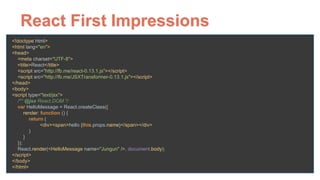
<!doctype html>

<html lang="en">

<head>

<meta charset="UTF-8">

<title>React</title>

<script src="http://fb.me/react-0.13.1.js"></script>

<script src="http://fb.me/JSXTransformer-0.13.1.js"></script>

</head>

<body>

<script type="text/jsx">

/** @jsx React.DOM */

var HelloMessage = React.createClass({

render: function () {

return (

<div><span>hello {this.props.name}</span></div>

)

}

});

React.render(<HelloMessage name="Jungun" />, document.body);

</script>

</body>

</html>
React First Impressions
<!doctype html>

<html lang="en">

<head>

<meta charset="UTF-8">

<title>React</title>

<script src="http://fb.me/react-0.13.1.js"></script>

<script src="http://fb.me/JSXTransformer-0.13.1.js"></script>

</head>

<body>

<script type="text/jsx">

/** @jsx React.DOM */

var HelloMessage = React.createClass({

render: function () {

return (

<div><span>hello {this.props.name}</span></div>

)

}

});

React.render(<HelloMessage name="Jungun" />, document.body);

</script>

</body>

</html>
React First Impressions
<!doctype html>

<html lang="en">

<head>

<meta charset="UTF-8">

<title>React</title>

<script src="http://fb.me/react-0.13.1.js"></script>

<script src="http://fb.me/JSXTransformer-0.13.1.js"></script>

</head>

<body>

<script type="text/jsx">

/** @jsx React.DOM */

var HelloMessage = React.createClass({

render: function () {

return (

<div><span>hello {this.props.name}</span></div>

)

}

});

React.render(<HelloMessage name="Jungun" />, document.body);

</script>

</body>

</html>
React First Impressions
<!doctype html>

<html lang="en">

<head>

<meta charset="UTF-8">

<title>React</title>

<script src="http://fb.me/react-0.13.1.js"></script>

<script src="http://fb.me/JSXTransformer-0.13.1.js"></script>

</head>

<body>

<script type="text/jsx">

/** @jsx React.DOM */

var HelloMessage = React.createClass({

render: function () {

return (

<div><span>hello {this.props.name}</span></div>

)

}

});

React.render(<HelloMessage name="Jungun" />, document.body);

</script>

</body>

</html>
React First Impressions
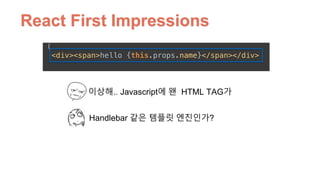
이상해.. Javascript에 왠 HTML TAG가
Handlebar 같은 템플릿 엔진인가?
React First Impressions
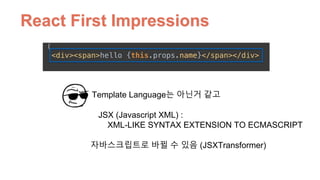
JSX (Javascript XML) : 

XML-LIKE SYNTAX EXTENSION TO ECMASCRIPT
Template Language는 아닌거 같고
자바스크립트로 바뀔 수 있음 (JSXTransformer)
Full stack Javascript랑 비교하면?

Angular.js, Ember.js, Backbone.js
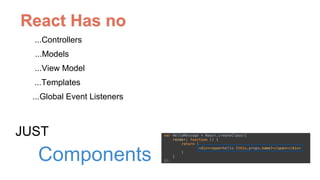
React Has no
...Controllers
...Templates
...Global Event Listeners
...Models
...View Model
JUST
Components
Part 1.
Component 그것은 무엇인가?
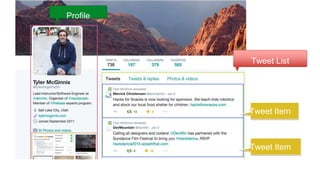
Profile
Tweet List
Tweet Item
Tweet Item
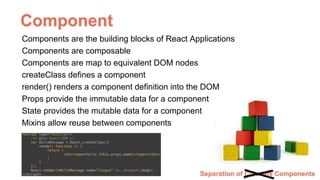
Separation of Concens Components
Components are the building blocks of React Applications
Components are composable
Components are map to equivalent DOM nodes
createClass defines a component
render() renders a component definition into the DOM
Props provide the immutable data for a component
State provides the mutable data for a component
Mixins allow reuse between components
Component
Part 2.
React JSX는 왜 쓰는거지?
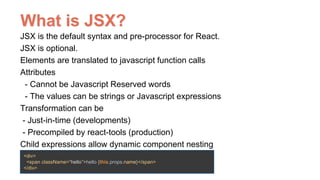
What is JSX?
JSX is the default syntax and pre-processor for React.
JSX is optional.
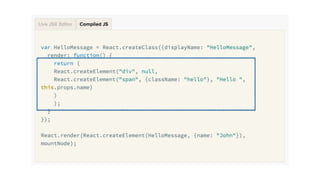
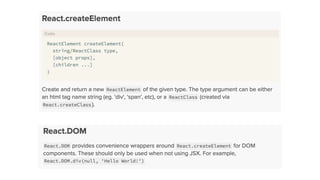
Elements are translated to javascript function calls
Attributes

- Cannot be Javascript Reserved words
- The values can be strings or Javascript expressions
Transformation can be
- Just-in-time (developments)
- Precompiled by react-tools (production)
Child expressions allow dynamic component nesting
<div>
<span className=“hello”>hello {this.props.name}</span>
</div>
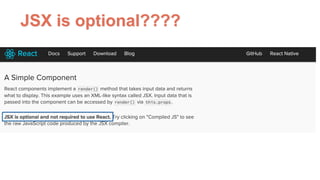
JSX is optional????
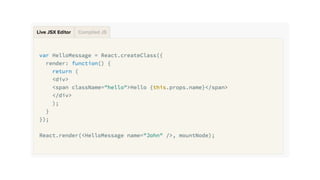
Demo. JSX Transformer
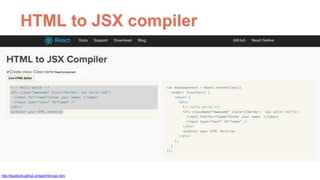
기존에 Markup을 어떻게
JSX로 만들지
HTML to JSX compiler
http://facebook.github.io/react/html-jsx.html
React는 어떻게 하다가
JSX를 이용하게 되었을까?
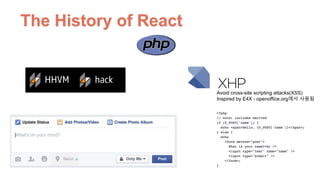
The History of React
Avoid cross-site scripting attacks(XSS)
Inspired by E4X - openoffice.org에서 사용됨
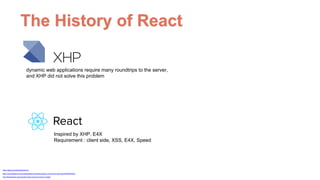
The History of React
https://github.com/facebook/xhp-lib
https://www.facebook.com/notes/facebook-engineering/xhp-a-new-way-to-write-php/294003943919
dynamic web applications require many roundtrips to the server,
and XHP did not solve this problem
Inspired by XHP, E4X
Requirement : client side, XSS, E4X, Speed
http://thenewstack.io/javascripts-history-and-how-it-led-to-reactjs/
Part 3.
Virtual DOM : React가 빠른 이유
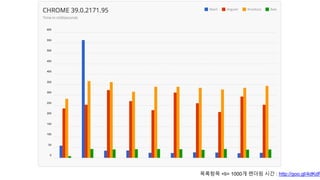
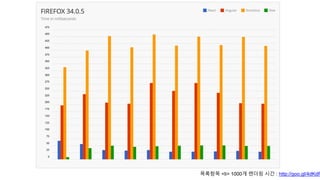
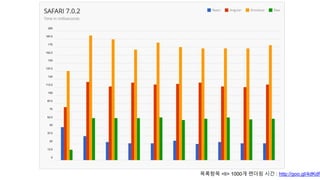
React는 왜 빠른가?
목록항목 <li> 1000개 렌더링 시간 : http://goo.gl/4dKdPz
Virtual DOM
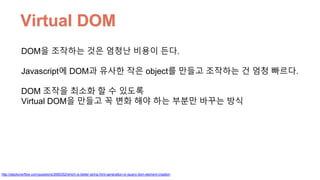
DOM을 조작하는 것은 엄청난 비용이 든다.
Javascript에 DOM과 유사한 작은 object를 만들고 조작하는 건 엄청 빠르다.
DOM 조작을 최소화 할 수 있도록
Virtual DOM을 만들고 꼭 변화 해야 하는 부분만 바꾸는 방식
http://stackoverflow.com/questions/2690352/which-is-better-string-html-generation-or-jquery-dom-element-creation
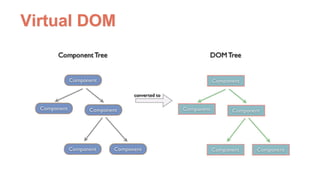
Virtual DOM
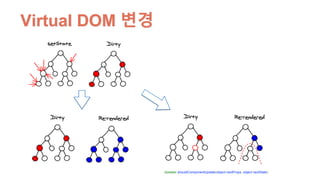
Virtual DOM 변경
boolean shouldComponentUpdate(object nextProps, object nextState)
Virtual DOM
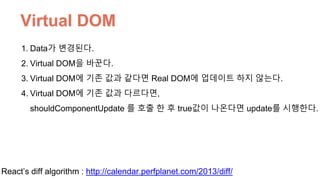
1. Data가 변경된다.
2. Virtual DOM을 바꾼다.
3. Virtual DOM에 기존 값과 같다면 Real DOM에 업데이트 하지 않는다.
4. Virtual DOM에 기존 값과 다르다면, 

shouldComponentUpdate 를 호출 한 후 true값이 나온다면 update를 시행한다.
React’s diff algorithm : http://calendar.perfplanet.com/2013/diff/
Part 4.
Data Flow
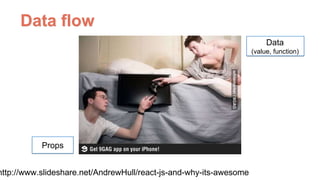
Data flow
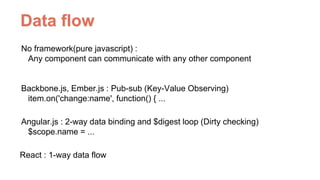
No framework(pure javascript) : 

Any component can communicate with any other component
Backbone.js, Ember.js : Pub-sub (Key-Value Observing)

item.on('change:name', function() { ...
Angular.js : 2-way data binding and $digest loop (Dirty checking)

$scope.name = ...
React : 1-way data flow
Data flow
Data
(value, function)
Props
http://www.slideshare.net/AndrewHull/react-js-and-why-its-awesome
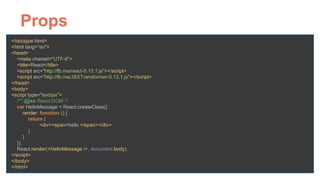
Props
<!doctype html>

<html lang="en">

<head>

<meta charset="UTF-8">

<title>React</title>

<script src="http://fb.me/react-0.13.1.js"></script>

<script src="http://fb.me/JSXTransformer-0.13.1.js"></script>

</head>

<body>

<script type="text/jsx">

/** @jsx React.DOM */

var HelloMessage = React.createClass({

render: function () {

return (

<div><span>hello </span></div>

)

}

});

React.render(<HelloMessage />, document.body);

</script>

</body>

</html>
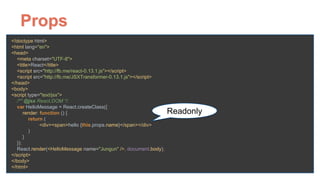
Props
<!doctype html>

<html lang="en">

<head>

<meta charset="UTF-8">

<title>React</title>

<script src="http://fb.me/react-0.13.1.js"></script>

<script src="http://fb.me/JSXTransformer-0.13.1.js"></script>

</head>

<body>

<script type="text/jsx">

/** @jsx React.DOM */

var HelloMessage = React.createClass({

render: function () {

return (

<div><span>hello {this.props.name}</span></div>

)

}

});

React.render(<HelloMessage name="Jungun" />, document.body);

</script>

</body>

</html>
Readonly
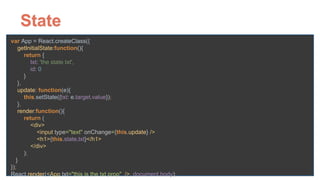
Component에 변화되는 상태를 저장
하고 싶을 때는 State
State
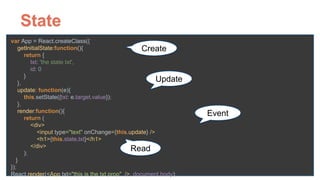
var App = React.createClass({

getInitialState:function(){

return {

txt: 'the state txt',

id: 0

}

},

update: function(e){

this.setState({txt: e.target.value});

},

render:function(){

return (

<div>

<input type="text" onChange={this.update} />

<h1>{this.state.txt}</h1>

</div>

);

}

});

React.render(<App txt="this is the txt prop" />, document.body);
State
var App = React.createClass({

getInitialState:function(){

return {

txt: 'the state txt', 

id: 0

}

},

update: function(e){

this.setState({txt: e.target.value});

},

render:function(){

return (

<div>

<input type="text" onChange={this.update} />

<h1>{this.state.txt}</h1>

</div>

);

}

});

React.render(<App txt="this is the txt prop" />, document.body);
Read
Update
Create
Event
Data flow
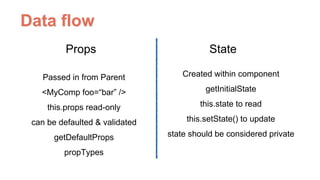
Props State
Passed in from Parent
<MyComp foo=“bar” />
this.props read-only
can be defaulted & validated
getDefaultProps
propTypes
Created within component
getInitialState
this.state to read
this.setState() to update
state should be considered private
Data only flows 1-way
자식Element에서 부모 Element에
Data을 전달하려면?
Javascript is 

Functional Language
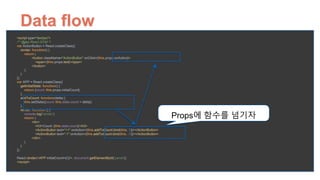
<script type="text/jsx">

/** @jsx React.DOM */

var ActionButton = React.createClass({

render: function() {

return (

<button className="ActionButton" onClick={this.props.onAction}>

<span>{this.props.text}</span>

</button>

);

}

});

var APP = React.createClass({

getInitialState: function() {

return {count: this.props.initialCount};

},

addToCount: function(delta) {

this.setState({count: this.state.count + delta})

},

render: function () {

console.log('render')

return (

<div>

<h3>Count: {this.state.count}</h3>

<ActionButton text="+1" onAction={this.addToCount.bind(this, 1)}></ActionButton>

<ActionButton text="-1" onAction={this.addToCount.bind(this, -1)}></ActionButton>

</div>

)

}

});


React.render(<APP initialCount={0}/>, document.getElementById('panel'));

</script>
Props에 함수를 넘기자
Data flow
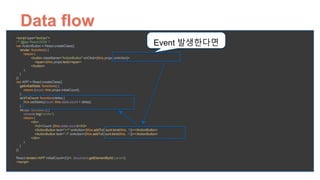
<script type="text/jsx">

/** @jsx React.DOM */

var ActionButton = React.createClass({

render: function() {

return (

<button className="ActionButton" onClick={this.props.onAction}>

<span>{this.props.text}</span>

</button>

);

}

});

var APP = React.createClass({

getInitialState: function() {

return {count: this.props.initialCount};

},

addToCount: function(delta) {

this.setState({count: this.state.count + delta})

},

render: function () {

console.log('render')

return (

<div>

<h3>Count: {this.state.count}</h3>

<ActionButton text="+1" onAction={this.addToCount.bind(this, 1)}></ActionButton>

<ActionButton text="-1" onAction={this.addToCount.bind(this, -1)}></ActionButton>

</div>

)

}

});


React.render(<APP initialCount={0}/>, document.getElementById('panel'));

</script>
Event 발생한다면
Data flow
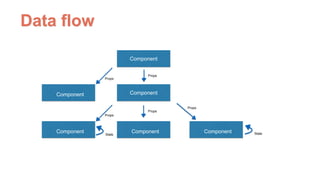
Component
Component
ComponentComponent
Component
Component
Props
Props
Props
Props
Props
State
Data flow
State
Component
Component
ComponentComponent
Component
Component
Props
Props
Props
Props
Props
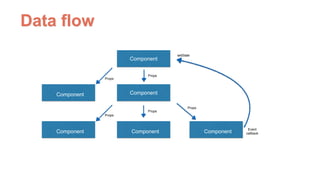
Event
callback
Data flow
setState
Part 5.
Lifecycle
http://facebook.github.io/react/docs/component-specs.html
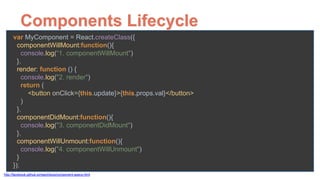
Components Lifecycle
var MyComponent = React.createClass({

componentWillMount:function(){

console.log(“1. componentWillMount")

},

render: function () {

console.log("2. render")

return (

<button onClick={this.update}>{this.props.val}</button>

)

},

componentDidMount:function(){

console.log("3. componentDidMount")

},

componentWillUnmount:function(){

console.log("4. componentWillUnmount")

}

});
http://facebook.github.io/react/docs/component-specs.html
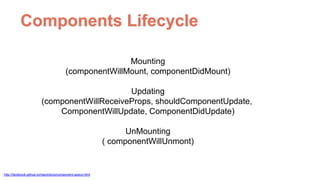
Components Lifecycle
Mounting
(componentWillMount, componentDidMount)
Updating
(componentWillReceiveProps, shouldComponentUpdate,
ComponentWillUpdate, ComponentDidUpdate)
UnMounting
( componentWillUnmont)
http://facebook.github.io/react/docs/component-specs.html
Demo. Component Lifecycle
Part 5.
Flux
Flux
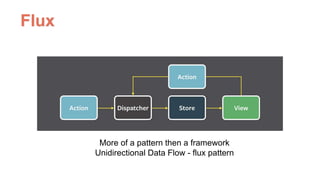
More of a pattern then a framework
Unidirectional Data Flow - flux pattern
Flux
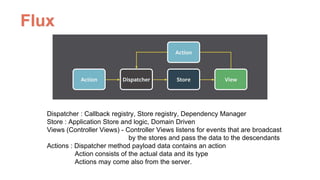
Dispatcher : Callback registry, Store registry, Dependency Manager
Store : Application Store and logic, Domain Driven
Views (Controller Views) - Controller Views listens for events that are broadcast 

by the stores and pass the data to the descendants
Actions : Dispatcher method payload data contains an action
Action consists of the actual data and its type
Actions may come also from the server.
Flux
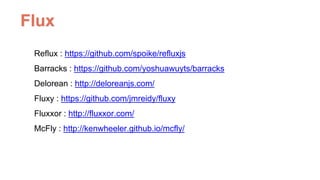
Reflux : https://github.com/spoike/refluxjs
Barracks : https://github.com/yoshuawuyts/barracks
Delorean : http://deloreanjs.com/
Fluxy : https://github.com/jmreidy/fluxy
Fluxxor : http://fluxxor.com/
McFly : http://kenwheeler.github.io/mcfly/
Demo. Simple Flux
Part 5.
Relay & GraphQL
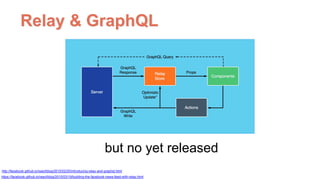
Relay & GraphQL
but no yet released
https://facebook.github.io/react/blog/2015/03/19/building-the-facebook-news-feed-with-relay.html
http://facebook.github.io/react/blog/2015/02/20/introducing-relay-and-graphql.html
Tip
React
React
React

React

  • 1.
  • 3.
    React First Impressions <!doctypehtml>
 <html lang="en">
 <head>
 <meta charset="UTF-8">
 <title>React</title>
 <script src="http://fb.me/react-0.13.1.js"></script>
 <script src="http://fb.me/JSXTransformer-0.13.1.js"></script>
 </head>
 <body>
 <script type="text/jsx">
 /** @jsx React.DOM */
 var HelloMessage = React.createClass({
 render: function () {
 return (
 <div><span>hello {this.props.name}</span></div>
 )
 }
 });
 React.render(<HelloMessage name="Jungun" />, document.body);
 </script>
 </body>
 </html>
  • 4.
    React First Impressions <!doctypehtml>
 <html lang="en">
 <head>
 <meta charset="UTF-8">
 <title>React</title>
 <script src="http://fb.me/react-0.13.1.js"></script>
 <script src="http://fb.me/JSXTransformer-0.13.1.js"></script>
 </head>
 <body>
 <script type="text/jsx">
 /** @jsx React.DOM */
 var HelloMessage = React.createClass({
 render: function () {
 return (
 <div><span>hello {this.props.name}</span></div>
 )
 }
 });
 React.render(<HelloMessage name="Jungun" />, document.body);
 </script>
 </body>
 </html>
  • 5.
    React First Impressions <!doctypehtml>
 <html lang="en">
 <head>
 <meta charset="UTF-8">
 <title>React</title>
 <script src="http://fb.me/react-0.13.1.js"></script>
 <script src="http://fb.me/JSXTransformer-0.13.1.js"></script>
 </head>
 <body>
 <script type="text/jsx">
 /** @jsx React.DOM */
 var HelloMessage = React.createClass({
 render: function () {
 return (
 <div><span>hello {this.props.name}</span></div>
 )
 }
 });
 React.render(<HelloMessage name="Jungun" />, document.body);
 </script>
 </body>
 </html>
  • 6.
    React First Impressions <!doctypehtml>
 <html lang="en">
 <head>
 <meta charset="UTF-8">
 <title>React</title>
 <script src="http://fb.me/react-0.13.1.js"></script>
 <script src="http://fb.me/JSXTransformer-0.13.1.js"></script>
 </head>
 <body>
 <script type="text/jsx">
 /** @jsx React.DOM */
 var HelloMessage = React.createClass({
 render: function () {
 return (
 <div><span>hello {this.props.name}</span></div>
 )
 }
 });
 React.render(<HelloMessage name="Jungun" />, document.body);
 </script>
 </body>
 </html>
  • 7.
    React First Impressions 이상해..Javascript에 왠 HTML TAG가 Handlebar 같은 템플릿 엔진인가?
  • 8.
    React First Impressions JSX(Javascript XML) : 
 XML-LIKE SYNTAX EXTENSION TO ECMASCRIPT Template Language는 아닌거 같고 자바스크립트로 바뀔 수 있음 (JSXTransformer)
  • 9.
    Full stack Javascript랑비교하면?
 Angular.js, Ember.js, Backbone.js
  • 10.
    React Has no ...Controllers ...Templates ...GlobalEvent Listeners ...Models ...View Model JUST Components
  • 11.
  • 13.
  • 14.
    Separation of ConcensComponents Components are the building blocks of React Applications Components are composable Components are map to equivalent DOM nodes createClass defines a component render() renders a component definition into the DOM Props provide the immutable data for a component State provides the mutable data for a component Mixins allow reuse between components Component
  • 15.
    Part 2. React JSX는왜 쓰는거지?
  • 16.
    What is JSX? JSXis the default syntax and pre-processor for React. JSX is optional. Elements are translated to javascript function calls Attributes
 - Cannot be Javascript Reserved words - The values can be strings or Javascript expressions Transformation can be - Just-in-time (developments) - Precompiled by react-tools (production) Child expressions allow dynamic component nesting <div> <span className=“hello”>hello {this.props.name}</span> </div>
  • 17.
  • 21.
  • 22.
  • 23.
    HTML to JSXcompiler http://facebook.github.io/react/html-jsx.html
  • 24.
    React는 어떻게 하다가 JSX를이용하게 되었을까?
  • 25.
    The History ofReact Avoid cross-site scripting attacks(XSS) Inspired by E4X - openoffice.org에서 사용됨
  • 26.
    The History ofReact https://github.com/facebook/xhp-lib https://www.facebook.com/notes/facebook-engineering/xhp-a-new-way-to-write-php/294003943919 dynamic web applications require many roundtrips to the server, and XHP did not solve this problem Inspired by XHP, E4X Requirement : client side, XSS, E4X, Speed http://thenewstack.io/javascripts-history-and-how-it-led-to-reactjs/
  • 27.
    Part 3. Virtual DOM: React가 빠른 이유
  • 29.
  • 30.
    목록항목 <li> 1000개렌더링 시간 : http://goo.gl/4dKdPz
  • 31.
    목록항목 <li> 1000개렌더링 시간 : http://goo.gl/4dKdPz
  • 32.
    목록항목 <li> 1000개렌더링 시간 : http://goo.gl/4dKdPz
  • 33.
    Virtual DOM DOM을 조작하는것은 엄청난 비용이 든다. Javascript에 DOM과 유사한 작은 object를 만들고 조작하는 건 엄청 빠르다. DOM 조작을 최소화 할 수 있도록 Virtual DOM을 만들고 꼭 변화 해야 하는 부분만 바꾸는 방식 http://stackoverflow.com/questions/2690352/which-is-better-string-html-generation-or-jquery-dom-element-creation
  • 34.
  • 35.
    Virtual DOM 변경 booleanshouldComponentUpdate(object nextProps, object nextState)
  • 36.
    Virtual DOM 1. Data가변경된다. 2. Virtual DOM을 바꾼다. 3. Virtual DOM에 기존 값과 같다면 Real DOM에 업데이트 하지 않는다. 4. Virtual DOM에 기존 값과 다르다면, 
 shouldComponentUpdate 를 호출 한 후 true값이 나온다면 update를 시행한다. React’s diff algorithm : http://calendar.perfplanet.com/2013/diff/
  • 37.
  • 38.
    Data flow No framework(purejavascript) : 
 Any component can communicate with any other component Backbone.js, Ember.js : Pub-sub (Key-Value Observing)
 item.on('change:name', function() { ... Angular.js : 2-way data binding and $digest loop (Dirty checking)
 $scope.name = ... React : 1-way data flow
  • 39.
  • 40.
    Props <!doctype html>
 <html lang="en">
 <head>
 <metacharset="UTF-8">
 <title>React</title>
 <script src="http://fb.me/react-0.13.1.js"></script>
 <script src="http://fb.me/JSXTransformer-0.13.1.js"></script>
 </head>
 <body>
 <script type="text/jsx">
 /** @jsx React.DOM */
 var HelloMessage = React.createClass({
 render: function () {
 return (
 <div><span>hello </span></div>
 )
 }
 });
 React.render(<HelloMessage />, document.body);
 </script>
 </body>
 </html>
  • 41.
    Props <!doctype html>
 <html lang="en">
 <head>
 <metacharset="UTF-8">
 <title>React</title>
 <script src="http://fb.me/react-0.13.1.js"></script>
 <script src="http://fb.me/JSXTransformer-0.13.1.js"></script>
 </head>
 <body>
 <script type="text/jsx">
 /** @jsx React.DOM */
 var HelloMessage = React.createClass({
 render: function () {
 return (
 <div><span>hello {this.props.name}</span></div>
 )
 }
 });
 React.render(<HelloMessage name="Jungun" />, document.body);
 </script>
 </body>
 </html> Readonly
  • 42.
    Component에 변화되는 상태를저장 하고 싶을 때는 State
  • 43.
    State var App =React.createClass({
 getInitialState:function(){
 return {
 txt: 'the state txt',
 id: 0
 }
 },
 update: function(e){
 this.setState({txt: e.target.value});
 },
 render:function(){
 return (
 <div>
 <input type="text" onChange={this.update} />
 <h1>{this.state.txt}</h1>
 </div>
 );
 }
 });
 React.render(<App txt="this is the txt prop" />, document.body);
  • 44.
    State var App =React.createClass({
 getInitialState:function(){
 return {
 txt: 'the state txt', 
 id: 0
 }
 },
 update: function(e){
 this.setState({txt: e.target.value});
 },
 render:function(){
 return (
 <div>
 <input type="text" onChange={this.update} />
 <h1>{this.state.txt}</h1>
 </div>
 );
 }
 });
 React.render(<App txt="this is the txt prop" />, document.body); Read Update Create Event
  • 45.
    Data flow Props State Passedin from Parent <MyComp foo=“bar” /> this.props read-only can be defaulted & validated getDefaultProps propTypes Created within component getInitialState this.state to read this.setState() to update state should be considered private
  • 46.
  • 47.
  • 48.
  • 49.
    <script type="text/jsx">
 /** @jsxReact.DOM */
 var ActionButton = React.createClass({
 render: function() {
 return (
 <button className="ActionButton" onClick={this.props.onAction}>
 <span>{this.props.text}</span>
 </button>
 );
 }
 });
 var APP = React.createClass({
 getInitialState: function() {
 return {count: this.props.initialCount};
 },
 addToCount: function(delta) {
 this.setState({count: this.state.count + delta})
 },
 render: function () {
 console.log('render')
 return (
 <div>
 <h3>Count: {this.state.count}</h3>
 <ActionButton text="+1" onAction={this.addToCount.bind(this, 1)}></ActionButton>
 <ActionButton text="-1" onAction={this.addToCount.bind(this, -1)}></ActionButton>
 </div>
 )
 }
 });
 
 React.render(<APP initialCount={0}/>, document.getElementById('panel'));
 </script> Props에 함수를 넘기자 Data flow
  • 50.
    <script type="text/jsx">
 /** @jsxReact.DOM */
 var ActionButton = React.createClass({
 render: function() {
 return (
 <button className="ActionButton" onClick={this.props.onAction}>
 <span>{this.props.text}</span>
 </button>
 );
 }
 });
 var APP = React.createClass({
 getInitialState: function() {
 return {count: this.props.initialCount};
 },
 addToCount: function(delta) {
 this.setState({count: this.state.count + delta})
 },
 render: function () {
 console.log('render')
 return (
 <div>
 <h3>Count: {this.state.count}</h3>
 <ActionButton text="+1" onAction={this.addToCount.bind(this, 1)}></ActionButton>
 <ActionButton text="-1" onAction={this.addToCount.bind(this, -1)}></ActionButton>
 </div>
 )
 }
 });
 
 React.render(<APP initialCount={0}/>, document.getElementById('panel'));
 </script> Event 발생한다면 Data flow
  • 51.
  • 52.
  • 53.
  • 54.
    http://facebook.github.io/react/docs/component-specs.html Components Lifecycle var MyComponent= React.createClass({
 componentWillMount:function(){
 console.log(“1. componentWillMount")
 },
 render: function () {
 console.log("2. render")
 return (
 <button onClick={this.update}>{this.props.val}</button>
 )
 },
 componentDidMount:function(){
 console.log("3. componentDidMount")
 },
 componentWillUnmount:function(){
 console.log("4. componentWillUnmount")
 }
 });
  • 55.
  • 56.
  • 57.
  • 58.
    Flux More of apattern then a framework Unidirectional Data Flow - flux pattern
  • 59.
    Flux Dispatcher : Callbackregistry, Store registry, Dependency Manager Store : Application Store and logic, Domain Driven Views (Controller Views) - Controller Views listens for events that are broadcast 
 by the stores and pass the data to the descendants Actions : Dispatcher method payload data contains an action Action consists of the actual data and its type Actions may come also from the server.
  • 60.
    Flux Reflux : https://github.com/spoike/refluxjs Barracks: https://github.com/yoshuawuyts/barracks Delorean : http://deloreanjs.com/ Fluxy : https://github.com/jmreidy/fluxy Fluxxor : http://fluxxor.com/ McFly : http://kenwheeler.github.io/mcfly/
  • 61.
  • 62.
  • 63.
    Relay & GraphQL butno yet released https://facebook.github.io/react/blog/2015/03/19/building-the-facebook-news-feed-with-relay.html http://facebook.github.io/react/blog/2015/02/20/introducing-relay-and-graphql.html
  • 64.