Recommended
PDF
[XECon+PHPFest 2014] jQuery 개발자에서 AngularJS 개발자 되기
PDF
PDF
PDF
옛날 웹 개발자가 잠깐 맛본 Vue.js 소개
PDF
PPTX
PDF
PPTX
PDF
Event source 학습 내용 공유
PDF
처음배우는 자바스크립트, 제이쿼리 #3
PPTX
PDF
PPTX
PDF
처음배우는 자바스크립트, 제이쿼리 #4
PDF
PDF
Angular를 활용한 웹 프론트단 개발과 2.0에서 달라진점
PDF
PDF
Celltrion Healthcare 102 weeks with Remsima(non-HCP)
PDF
PPTX
PPTX
PDF
PPTX
PDF
웹프레임워크를 이용하여 개발된 오픈소스 CMS프로젝트 샤인
PDF
PPTX
위플래닛 발표자료 Meteor_js
PPT
Meteor를 통해서 개발하는 웹어플리케이션 서비스
PPTX
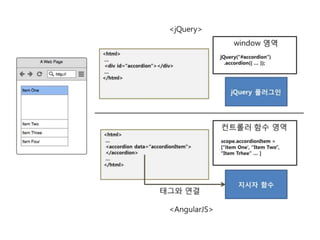
PDF
막하는 스터디 네 번째 만남 AngularJs (20151108)
PPTX
More Related Content
PDF
[XECon+PHPFest 2014] jQuery 개발자에서 AngularJS 개발자 되기
PDF
PDF
PDF
옛날 웹 개발자가 잠깐 맛본 Vue.js 소개
PDF
PPTX
PDF
PPTX
What's hot
PDF
Event source 학습 내용 공유
PDF
처음배우는 자바스크립트, 제이쿼리 #3
PPTX
PDF
PPTX
PDF
처음배우는 자바스크립트, 제이쿼리 #4
PDF
Viewers also liked
PDF
Angular를 활용한 웹 프론트단 개발과 2.0에서 달라진점
PDF
PDF
Celltrion Healthcare 102 weeks with Remsima(non-HCP)
PDF
PPTX
PPTX
PDF
PPTX
PDF
웹프레임워크를 이용하여 개발된 오픈소스 CMS프로젝트 샤인
PDF
PPTX
위플래닛 발표자료 Meteor_js
PPT
Meteor를 통해서 개발하는 웹어플리케이션 서비스
PPTX
Similar to Webframeworks angular js 세미나
PDF
막하는 스터디 네 번째 만남 AngularJs (20151108)
PPTX
PDF
PDF
PDF
AngularJS 2, version 1 and ReactJS
PPTX
PDF
처음배우는 자바스크립트, 제이쿼리 #1
PDF
Angularjs 도입 선택 가이드
PPTX
스파르탄스터디 E04 Javascript 객체지향, 함수형 프로그래밍
PDF
KSUG 스프링캠프 2019 발표자료 - "무엇을 테스트할 것인가, 어떻게 테스트할 것인가"
PDF
PPTX
PDF
PDF
PPTX
PPTX
PPTX
프론트엔드스터디 E05 js closure oop
PDF
PPTX
Angular2를 활용한 컴포넌트 중심의 개발
PDF
2023.06.12 발표 자료 : JPA / 스프링 구조
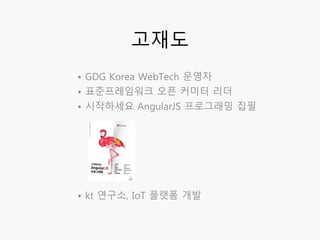
Webframeworks angular js 세미나 1. 2. • GDG Korea WebTech 운영자
• 표준프레임워크 오픈 커미터 리더
• 시작하세요 AngularJS 프로그래밍 집필
• kt 연구소, IoT 플랫폼 개발
고재도
3. 4. 5. <body>
<div ng-controller="sampleCtrl">
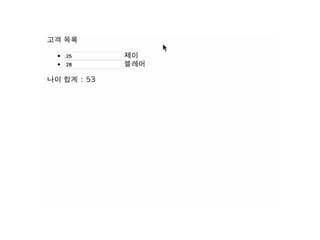
고객 목록
<ul>
<li ng-repeat="user in userList">
<input type="number" ng-model="user.age"> {{user.name}}
</li>
</ul>
<div>나이 합계 : {{userList[0].age + userList[1].age}}</div>
</div>
</body>
$scope.userList = [
{name:'제이', age:25},
{name:'블레어', age:28}
];
반복적인 데이터 표현 템플릿
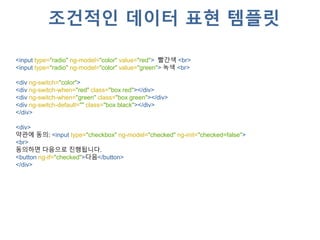
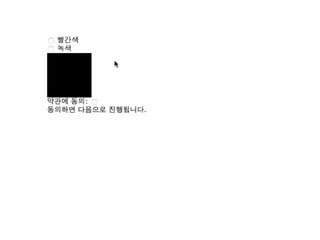
7. <input type="radio" ng-model="color" value="red"> 빨간색 <br>
<input type="radio" ng-model="color" value="green"> 녹색 <br>
<div ng-switch="color">
<div ng-switch-when="red" class="box red"></div>
<div ng-switch-when="green" class="box green"></div>
<div ng-switch-default="" class="box black"></div>
</div>
<div>
약관에 동의: <input type="checkbox" ng-model="checked" ng-init="checked=false">
<br>
동의하면 다음으로 진행됩니다.
<button ng-if="checked">다음</button>
</div>
조건적인 데이터 표현 템플릿
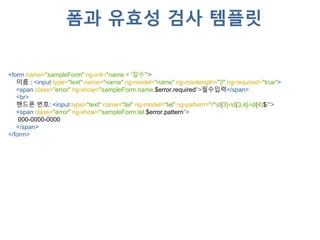
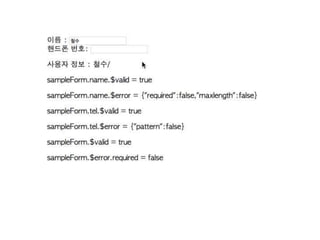
9. <form name="sampleForm" ng-init="name = '철수'">
이름 : <input type="text" name="name" ng-model="name" ng-maxlength="3" ng-required="true">
<span class="error" ng-show="sampleForm.name.$error.required">필수입력</span>
<br>
핸드폰 번호: <input type="text" name="tel" ng-model="tel" ng-pattern="/^d{3}-d{3,4}-d{4}$/">
<span class="error" ng-show="sampleForm.tel.$error.pattern">
000-0000-0000
</span>
</form>
폼과 유효성 검사 템플릿
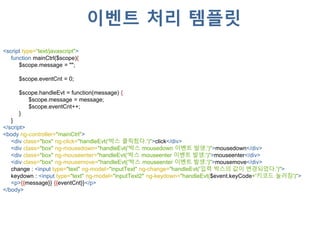
11. <script type=“text/javascript">
function mainCtrl($scope){
$scope.message = "";
$scope.eventCnt = 0;
$scope.handleEvt = function(message) {
$scope.message = message;
$scope.eventCnt++;
}
}
</script>
<body ng-controller="mainCtrl">
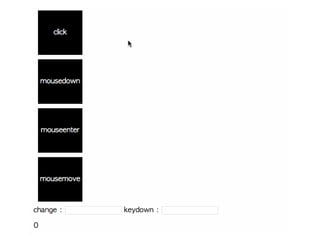
<div class="box" ng-click="handleEvt('박스 클릭됬다.')">click</div>
<div class="box" ng-mousedown="handleEvt('박스 mousedown 이벤트 발생.')">mousedown</div>
<div class="box" ng-mouseenter="handleEvt('박스 mouseenter 이벤트 발생.')">mouseenter</div>
<div class="box" ng-mousemove="handleEvt('박스 mouseenter 이벤트 발생.')">mousemove</div>
change : <input type="text" ng-model="inputText" ng-change="handleEvt('입력 박스의 값이 변경되었다.')">
keydown : <input type="text" ng-model="inputText2" ng-keydown="handleEvt($event.keyCode+'키코드 눌러짐')">
<p>{{message}} {{eventCnt}}</p>
</body>
이벤트 처리 템플릿
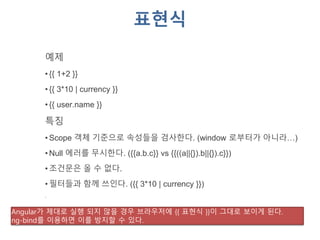
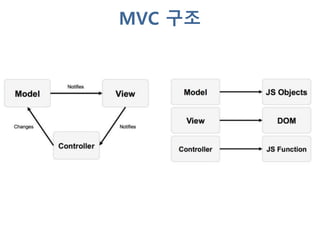
13. 14. 표현식
예제
• {{ 1+2 }}
• {{ 3*10 | currency }}
• {{ user.name }}
특징
• Scope 객체 기준으로 속성들을 검사한다. (window 로부터가 아니라…)
• Null 에러를 무시한다. ({{a.b.c}} vs {{((a||{}).b||{}).c}})
• 조건문은 올 수 없다.
• 필터들과 함께 쓰인다. ({{ 3*10 | currency }})
.
Angular가 제대로 실행 되지 않을 경우 브라우저에 {{ 표현식 }}이 그대로 보이게 된다.
ng-bind를 이용하면 이를 방지할 수 있다.
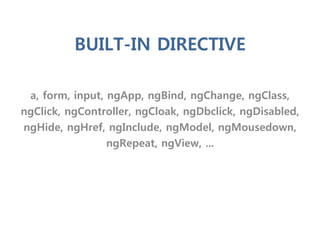
15. a, form, input, ngApp, ngBind, ngChange, ngClass,
ngClick, ngController, ngCloak, ngDbclick, ngDisabled,
ngHide, ngHref, ngInclude, ngModel, ngMousedown,
ngRepeat, ngView, ...
BUILT-IN DIRECTIVE
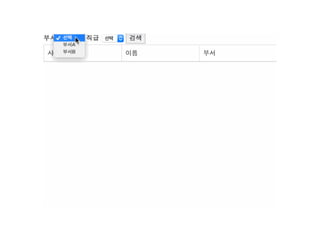
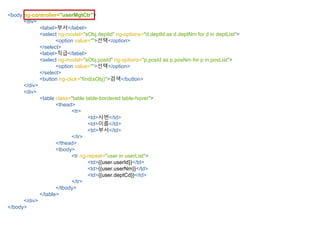
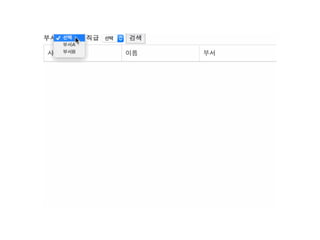
16. 17. 18. <body ng-controller="userMgtCtr">
<div>
<label>부서</label>
<select ng-model="sObj.deptId" ng-options="d.deptId as d.deptNm for d in deptList">
<option value="">선택</option>
</select>
<label>직급</label>
<select ng-model="sObj.posId" ng-options="p.posId as p.posNm for p in posList">
<option value="">선택</option>
</select>
<button ng-click="find(sObj)">검색</button>
</div>
<div>
<table class="table table-bordered table-hover">
<thead>
<tr>
<td>사번</td>
<td>이름</td>
<td>부서</td>
</tr>
</thead>
<tbody>
<tr ng-repeat="user in userList">
<td>{{user.userId}}</td>
<td>{{user.userNm}}</td>
<td>{{user.deptCd}}</td>
</tr>
</tbody>
</table>
</div>
</body>
19. angular.module(‘mvcApp’,[])
.controller('userMgtCtr', [‘$scope','$http', function ($scope, $http) {
$scope.sObj={deptId:'',posId:''};
$scope.deptList = [
{ deptId: '001', deptNm: '부서A'},
{ deptId: '002', deptNm: '부서B'}
];
$scope.posList = [
{ posId: '001', posNm: '사원'},
{ posId: '002', posNm: '대리'}
];
$scope.find = function (sObj) {
$http({
method: 'GET', url: 'user.json',
params: { deptId: sObj.deptId, posId: sObj.posId }
})
.success(function(data, status, headers, config) {
$scope.userList = data;
});
};
}]);
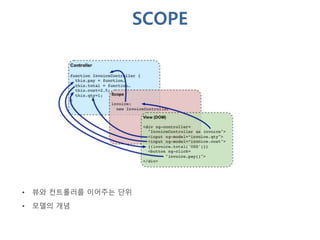
20. 21. 22. 템플릿 뷰데이터 +
<ul>
<li ng-repeat="user in userList">
<input type="number" ng-model="user.age">
{{user.name}}
</li>
</ul>
<div>
나이 합계 : {{userList[0].age + userList[1].age}}
</div>
=
사용자 화면 값 변경
$scope.userList = [
{name:'제이', age:25},
{name:'블레어', age:28}
];
24. 25. 26. 27. 28. 29. 30. 서비스
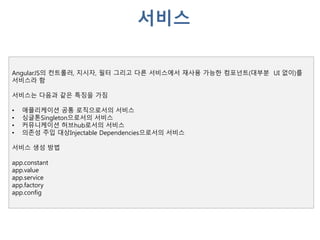
AngularJS의 컨트롤러, 지시자, 필터 그리고 다른 서비스에서 재사용 가능한 컴포넌트(대부분 UI 없이)를
서비스라 함
서비스는 다음과 같은 특징을 가짐
• 애플리케이션 공통 로직으로서의 서비스
• 싱글톤Singleton으로서의 서비스
• 커뮤니케이션 허브hub로서의 서비스
• 의존성 주입 대상Injectable Dependencies으로서의 서비스
서비스 생성 방법
app.constant
app.value
app.service
app.factory
app.config
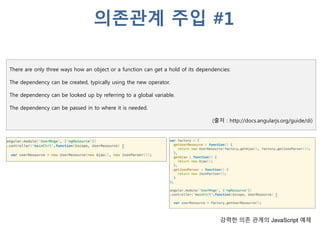
31. There are only three ways how an object or a function can get a hold of its dependencies:
The dependency can be created, typically using the new operator.
The dependency can be looked up by referring to a global variable.
The dependency can be passed in to where it is needed.
(출처 : http://docs.angularjs.org/guide/di)
강력한 의존 관계의 JavaScript 예제
의존관계 주입 #1
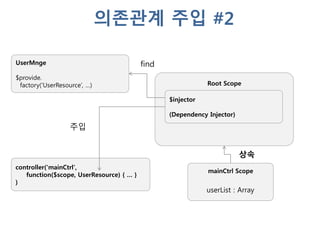
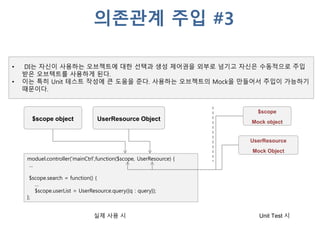
32. 33. moduel.controller('mainCtrl',function($scope, UserResource) {
…
$scope.search = function() {
…
$scope.userList = UserResource.query({q : query});
};
$scope object UserResource Object
• DI는 자신이 사용하는 오브젝트에 대한 선택과 생성 제어권을 외부로 넘기고 자신은 수동적으로 주입
받은 오브텍트를 사용하게 된다.
• 이는 특히 Unit 테스트 작성에 큰 도움을 준다. 사용하는 오브젝트의 Mock을 만들어서 주입이 가능하기
때문이다.
$scope
Mock object
UserResource
Mock Object
Unit Test 시실제 사용 시
의존관계 주입 #3
34. 35. 36. function Calculator () {
this.lastValue = 0;
this.add = function(a,b) {
var returnV = a+b;
this.lastValue = returnV;
return returnV;
};
this.minus = function(a,b) {
var returnV = a-b;
this.lastValue = returnV;
return returnV;
};
}
angular.module('sampleApp', []).
service('Calculator', Calculator).
controller('mainCtrl',function($scope, Calculator) {
$scope.val1 = Calculator.add(10,3);
$scope.val2 = Calculator.minus(20,10);
});
SERVICE
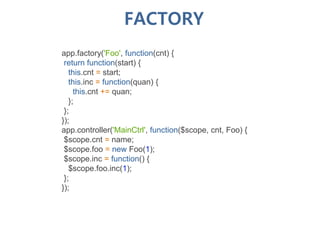
37. app.factory('Foo', function(cnt) {
return function(start) {
this.cnt = start;
this.inc = function(quan) {
this.cnt += quan;
};
};
});
app.controller('MainCtrl', function($scope, cnt, Foo) {
$scope.cnt = name;
$scope.foo = new Foo(1);
$scope.inc = function() {
$scope.foo.inc(1);
};
});
FACTORY
38. angular.module('sampleApp', []).
provider('Logger', function () {
function Logger(msg) {
if(checkNativeLogger) console.log(msg);
}
Logger.debug = function(msg) { if(checkNativeLogger) console.debug(msg); };
Logger.info = function(msg) { if(checkNativeLogger) console.info(msg); };
function checkNativeLogger() {
if(console) return true;
return false;
}
this.$get = [function() {
return Logger;
}];
}).
controller('mainCtrl',function($scope, Logger) {
Logger("console.log로 출력하는 로그메시지");
Logger.debug("console.debug 출력하는 로그메시지");
});
PROVIDER
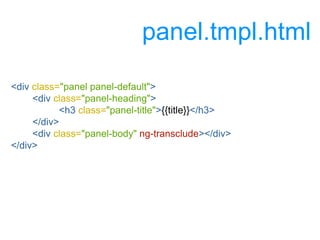
39. 41. 42. 43. <script type="text/javascript">
angular.module('demo', []).
directive('panel', ['$log', function($log){
return {
scope: {
title : "@",
contents : "@",
},
restrict: 'AE',
templateUrl: 'panel.tmpl.html',
transclude: true,
link: function($scope, iElm, iAttrs, controller) {
$(iElm).find('.panel-heading').click(function () {
$(iElm).find('.panel-body').toggle();
})
}
};
}]);
}]);
</script>
app.js
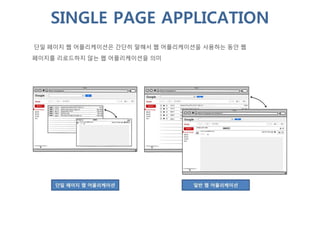
44. 45. 단일 페이지 웹 어플리케이션은 간단히 말해서 웹 어플리케이션을 사용하는 동안 웹
페이지를 리로드하지 않는 웹 어플리케이션을 의미
SINGLE PAGE APPLICATION
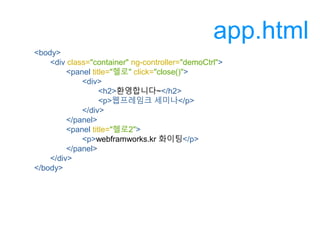
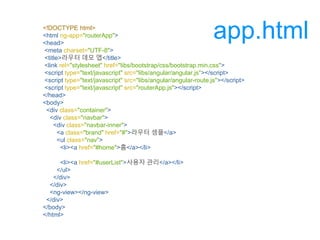
46. 47. <!DOCTYPE html>
<html ng-app="routerApp">
<head>
<meta charset="UTF-8">
<title>라우터 데모 엡</title>
<link rel="stylesheet" href="libs/bootstrap/css/bootstrap.min.css">
<script type="text/javascript" src="libs/angular/angular.js"></script>
<script type="text/javascript" src="libs/angular/angular-route.js"></script>
<script type="text/javascript" src="routerApp.js"></script>
</head>
<body>
<div class="container">
<div class="navbar">
<div class="navbar-inner">
<a class="brand" href="#">라우터 셈플</a>
<ul class="nav">
<li><a href="#home">홈</a></li>
<li><a href="#userList">사용자 관리</a></li>
</ul>
</div>
</div>
<ng-view></ng-view>
</div>
</body>
</html>
app.html
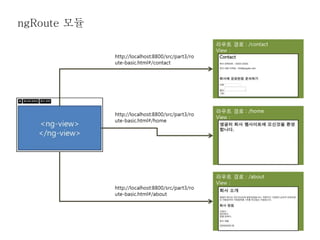
48. angular.module('routerApp', ['ngRoute'])
.config(function ($routeProvider) {
$routeProvider
.when('/home', {templateUrl: 'views/home.html'})
.when('/userList', {templateUrl: 'views/userList.html', controller: 'userListCtrl'})
.otherwise({redirectTo: '/home'});
})
.controller('userListCtrl',function($scope) {
$scope.userList = [
{
name : '존',
email : 'john@gmail.com',
regDate : '2012-03-12'
},
{
name : '제시카',
email : 'jess@gmail.com',
regDate : '2012-03-12'
}
];
});
routeApp.js
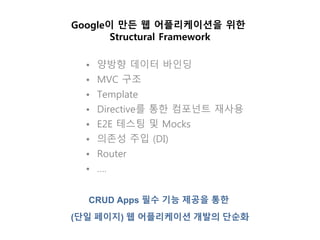
49. 51. Google이 만든 웹 어플리케이션을 위한
Structural Framework
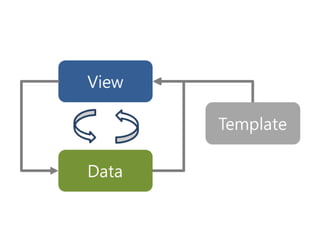
• 양방향 데이터 바인딩
• MVC 구조
• Template
• Directive를 통한 컴포넌트 재사용
• E2E 테스팅 및 Mocks
• 의존성 주입 (DI)
• Router
• ….
CRUD Apps 필수 기능 제공을 통한
(단일 페이지) 웹 어플리케이션 개발의 단순화
52.

![<body>
<div ng-controller="sampleCtrl">
고객 목록
<ul>
<li ng-repeat="user in userList">
<input type="number" ng-model="user.age"> {{user.name}}
</li>
</ul>
<div>나이 합계 : {{userList[0].age + userList[1].age}}</div>
</div>
</body>
$scope.userList = [
{name:'제이', age:25},
{name:'블레어', age:28}
];
반복적인 데이터 표현 템플릿](https://image.slidesharecdn.com/webframeworksangularjs-150827003938-lva1-app6892/85/Webframeworks-angular-js-5-320.jpg)

![angular.module(‘mvcApp’,[])
.controller('userMgtCtr', [‘$scope','$http', function ($scope, $http) {
$scope.sObj={deptId:'',posId:''};
$scope.deptList = [
{ deptId: '001', deptNm: '부서A'},
{ deptId: '002', deptNm: '부서B'}
];
$scope.posList = [
{ posId: '001', posNm: '사원'},
{ posId: '002', posNm: '대리'}
];
$scope.find = function (sObj) {
$http({
method: 'GET', url: 'user.json',
params: { deptId: sObj.deptId, posId: sObj.posId }
})
.success(function(data, status, headers, config) {
$scope.userList = data;
});
};
}]);](https://image.slidesharecdn.com/webframeworksangularjs-150827003938-lva1-app6892/85/Webframeworks-angular-js-19-320.jpg)
![템플릿 뷰데이터 +
<ul>
<li ng-repeat="user in userList">
<input type="number" ng-model="user.age">
{{user.name}}
</li>
</ul>
<div>
나이 합계 : {{userList[0].age + userList[1].age}}
</div>
=
사용자 화면 값 변경
$scope.userList = [
{name:'제이', age:25},
{name:'블레어', age:28}
];](https://image.slidesharecdn.com/webframeworksangularjs-150827003938-lva1-app6892/85/Webframeworks-angular-js-22-320.jpg)

![angular.module('sampleApp', []).
constant('PI', 3.14159).
config(function (CalProvider, PI) {
CalProvider.setDefaultRadius(5);
console.log(PI);
}).
directive('circle', ['Cal','PI',function (Cal,PI) {
//생략..
}])
CONSTANT](https://image.slidesharecdn.com/webframeworksangularjs-150827003938-lva1-app6892/85/Webframeworks-angular-js-34-320.jpg)
![angular.module('sampleApp', []).
value('AppNm', 'demo app').
controller('mainCtrl',function($scope, AppNm) {
$scope.appNm = AppNm;
});
VALUE](https://image.slidesharecdn.com/webframeworksangularjs-150827003938-lva1-app6892/85/Webframeworks-angular-js-35-320.jpg)
![function Calculator () {
this.lastValue = 0;
this.add = function(a,b) {
var returnV = a+b;
this.lastValue = returnV;
return returnV;
};
this.minus = function(a,b) {
var returnV = a-b;
this.lastValue = returnV;
return returnV;
};
}
angular.module('sampleApp', []).
service('Calculator', Calculator).
controller('mainCtrl',function($scope, Calculator) {
$scope.val1 = Calculator.add(10,3);
$scope.val2 = Calculator.minus(20,10);
});
SERVICE](https://image.slidesharecdn.com/webframeworksangularjs-150827003938-lva1-app6892/85/Webframeworks-angular-js-36-320.jpg)
![angular.module('sampleApp', []).
provider('Logger', function () {
function Logger(msg) {
if(checkNativeLogger) console.log(msg);
}
Logger.debug = function(msg) { if(checkNativeLogger) console.debug(msg); };
Logger.info = function(msg) { if(checkNativeLogger) console.info(msg); };
function checkNativeLogger() {
if(console) return true;
return false;
}
this.$get = [function() {
return Logger;
}];
}).
controller('mainCtrl',function($scope, Logger) {
Logger("console.log로 출력하는 로그메시지");
Logger.debug("console.debug 출력하는 로그메시지");
});
PROVIDER](https://image.slidesharecdn.com/webframeworksangularjs-150827003938-lva1-app6892/85/Webframeworks-angular-js-38-320.jpg)

![<script type="text/javascript">
angular.module('demo', []).
directive('panel', ['$log', function($log){
return {
scope: {
title : "@",
contents : "@",
},
restrict: 'AE',
templateUrl: 'panel.tmpl.html',
transclude: true,
link: function($scope, iElm, iAttrs, controller) {
$(iElm).find('.panel-heading').click(function () {
$(iElm).find('.panel-body').toggle();
})
}
};
}]);
}]);
</script>
app.js](https://image.slidesharecdn.com/webframeworksangularjs-150827003938-lva1-app6892/85/Webframeworks-angular-js-43-320.jpg)

![angular.module('routerApp', ['ngRoute'])
.config(function ($routeProvider) {
$routeProvider
.when('/home', {templateUrl: 'views/home.html'})
.when('/userList', {templateUrl: 'views/userList.html', controller: 'userListCtrl'})
.otherwise({redirectTo: '/home'});
})
.controller('userListCtrl',function($scope) {
$scope.userList = [
{
name : '존',
email : 'john@gmail.com',
regDate : '2012-03-12'
},
{
name : '제시카',
email : 'jess@gmail.com',
regDate : '2012-03-12'
}
];
});
routeApp.js](https://image.slidesharecdn.com/webframeworksangularjs-150827003938-lva1-app6892/85/Webframeworks-angular-js-48-320.jpg)



![[XECon+PHPFest 2014] jQuery 개발자에서 AngularJS 개발자 되기](https://cdn.slidesharecdn.com/ss_thumbnails/xeconphpfest2014-angularjs-141110181025-conversion-gate01-thumbnail.jpg?width=640&height=640&fit=bounds)


