Angular를 활용한 웹 프론트단 개발과
2.0에서 달라진점
고재도
W3C HTML5 Conference 2015
+jeado.ko
haibane84@gmail.com
- “Bitfinder.co” Software Engineer
- “kt” IoT Platform Researcher
- “http://webframeworks.kr” AngularJS Tutorial Contributor
- “Google Developer Group Korea WebTech” Organizer
- “시작하세요 AngularJS wikibooks” Author
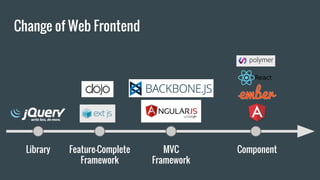
Change of Web Frontend
Library Feature-Complete
Framework
MVC
Framework
Component
component?
<select>
<input>
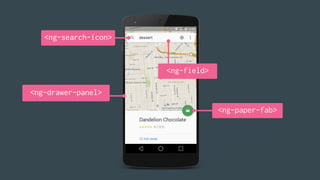
<ng-search-icon>
<ng-paper-fab>
<ng-drawer-panel>
<ng-field>
Component
= Building block (LEGO)
= a group of HTML elements
Component is made of two
main parts
- View
- Logic
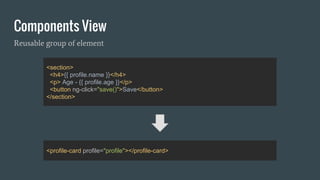
Components View
<section>
<h4>{{ profile.name }}</h4>
<p> Age - {{ profile.age }}</p>
<button ng-click="save()">Save</button>
</section>
<profile-card profile="profile"></profile-card>
Reusable group of element
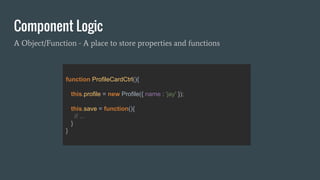
Component Logic
A Object/Function - A place to store properties and functions
function ProfileCardCtrl(){
this.profile = new Profile({ name : 'jay' });
this.save = function(){
// ...
}
}
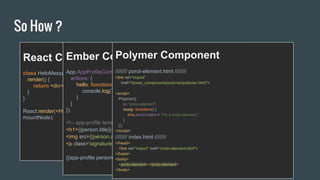
So How ?
React Component
class HeloMessage extends React.Component {
render() {
return <div>Hello {this.props.name}</div>;
}
}
React.render(<HelloMessage name="Jay" />,
mountNode);
Ember Component
App.AppProfileComponent = Ember.Component.extend({
actions: {
hello: function(name) {
console.log("Hello", name);
}
}
});
<!-- app-profile template -->
<h1>{{person.title}}</h1>
<img src={{person.avatar}}>
<p class='signature'>{{person.signature}}</p>
{{app-profile person=currentUser}}
Polymer Component
//////// porot-element.html ////////
<link rel="import"
href="bower_components/polymer/polymer.html">
<script>
Polymer({
is: "proto-element",
ready: function() {
this.textContent = "I'm a proto-element."
}
});
</script>
//////// index.html ////////
</head>
<link rel="import" href="proto-element.html">
</head>
<body>
<proto-element></proto-element>
</body>
Angular Connect, London, October 2015
Angular 2.0
Angular Connect, London, October 2015
2.0.0-alpha.48 (2015-12-05)
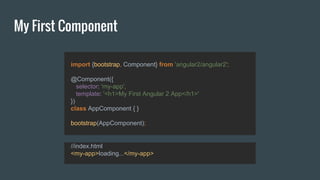
My First Component
import {bootstrap, Component} from 'angular2/angular2';
@Component({
selector: 'my-app',
template: '<h1>My First Angular 2 App</h1>'
})
class AppComponent { }
bootstrap(AppComponent);
//index.html
<my-app>loading...</my-app>
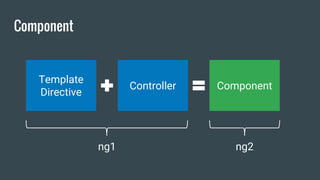
Component
Template
Directive
Controller Component
ng1 ng2
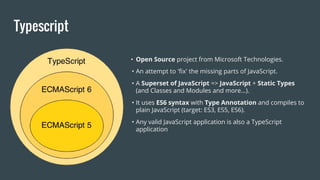
Typescript
• Open Source project from Microsoft Technologies.
• An attempt to 'fix' the missing parts of JavaScript.
• A Superset of JavaScript => JavaScript + Static Types
(and Classes and Modules and more…).
• It uses ES6 syntax with Type Annotation and compiles to
plain JavaScript (target: ES3, ES5, ES6).
• Any valid JavaScript application is also a TypeScript
application
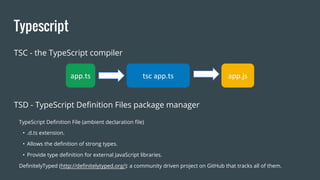
Typescript
tsc app.tsapp.ts app.js
TSC - the TypeScript compiler
TSD - TypeScript Definition Files package manager
TypeScript Definition File (ambient declaration file)
• .d.ts extension.
• Allows the definition of strong types.
• Provide type definition for external JavaScript libraries.
DefinitelyTyped (http://definitelytyped.org/): a community driven project on GitHub that tracks all of them.
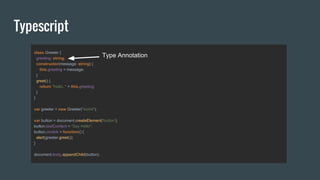
Typescript
class Greeter {
greeting: string;
constructor(message: string) {
this.greeting = message;
}
greet() {
return "Hello, " + this.greeting;
}
}
var greeter = new Greeter("world");
var button = document.createElement('button');
button.textContent = "Say Hello";
button.onclick = function() {
alert(greeter.greet());
}
document.body.appendChild(button);
Type Annotation
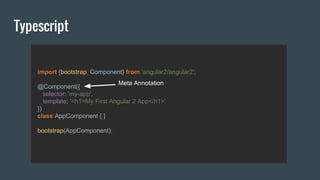
Typescript
import {bootstrap, Component} from 'angular2/angular2';
@Component({
selector: 'my-app',
template: '<h1>My First Angular 2 App</h1>'
})
class AppComponent { }
bootstrap(AppComponent);
Meta Annotation

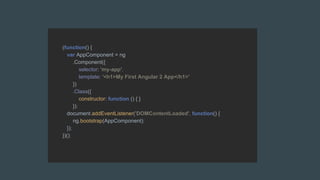
ES5 Support
(function() {
var AppComponent = ng
.Component({
selector: 'my-app',
template: '<h1>My First Angular 2 App</h1>'
})
.Class({
constructor: function () { }
});
document.addEventListener('DOMContentLoaded', function() {
ng.bootstrap(AppComponent);
});
})();
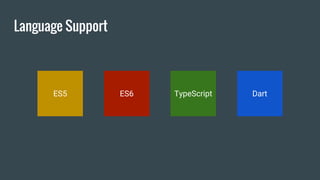
Language Support
ES5 ES6 TypeScript Dart
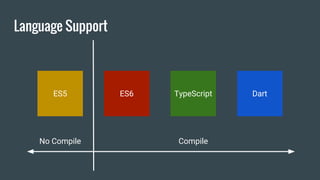
Language Support
CompileNo Compile
ES5 ES6 TypeScript Dart
Language Support
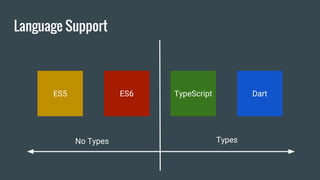
TypesNo Types
ES5 ES6 TypeScript Dart
Language Support
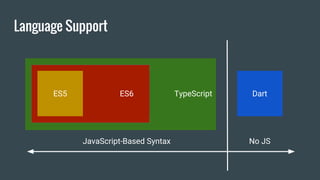
TypeScriptES6 Dart
No JS
TypeScriptES6
JavaScript-Based Syntax
ES5
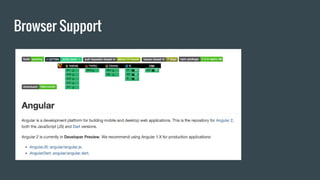
Browser Support
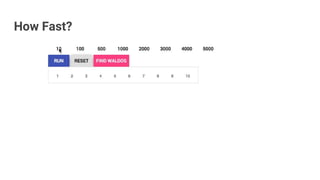
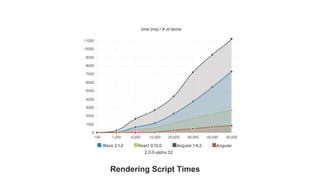
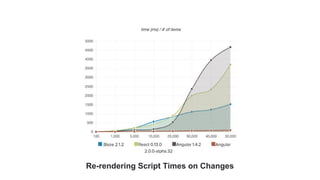
How Fast?
Rendering Script Times
Re-rendering Script Times on Changes
Details at bit.ly/1RTFFWG
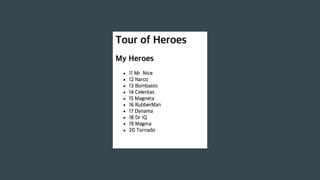
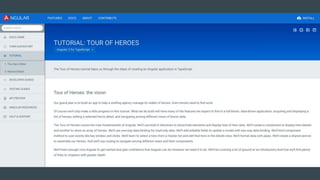
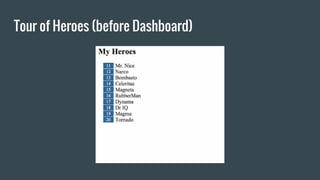
Tour of Heroes (before Dashboard)
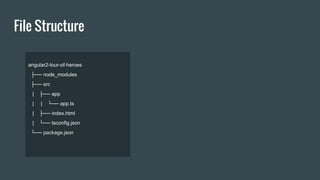
File Structure
angular2-tour-of-heroes
├── node_modules
├── src
| ├── app
| | └── app.ts
| ├── index.html
| └── tsconfig.json
└── package.json
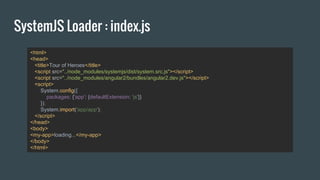
SystemJS Loader : index.js
<html>
<head>
<title>Tour of Heroes</title>
<script src="../node_modules/systemjs/dist/system.src.js"></script>
<script src="../node_modules/angular2/bundles/angular2.dev.js"></script>
<script>
System.config({
packages: {'app': {defaultExtension: 'js'}}
});
System.import('app/app');
</script>
</head>
<body>
<my-app>loading...</my-app>
</body>
</html>
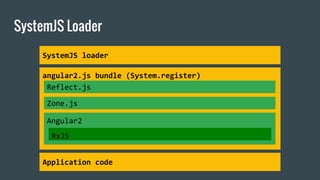
SystemJS Loader
angular2.js bundle (System.register)
Angular2
RxJS
Reflect.js
Zone.js
Application code
SystemJS loader
Define Hero Type - app.ts
class Hero {
id: number;
name: string;
}
Add few heroes - app.ts
var HEROES: Hero[] = [
{ "id": 11, "name": "Mr. Nice" },
{ "id": 12, "name": "Narco" },
{ "id": 13, "name": "Bombasto" },
{ "id": 14, "name": "Celeritas" },
{ "id": 15, "name": "Magneta" },
{ "id": 16, "name": "RubberMan" },
{ "id": 17, "name": "Dynama" },
{ "id": 18, "name": "Dr IQ" },
{ "id": 19, "name": "Magma" },
{ "id": 20, "name": "Tornado" }
];
ES6 Module load - app.ts
import {Component, bootstrap, NgFor} from 'angular2/angular2';
angular.module('app',[ ‘ng’, ‘.....’ ])
angular 1.x
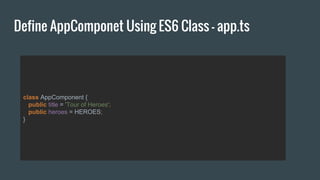
Define AppComponet Using ES6 Class - app.ts
class AppComponent {
public title = 'Tour of Heroes';
public heroes = HEROES;
}
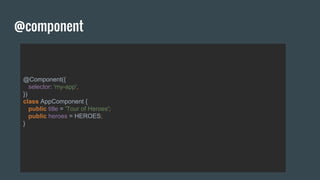
@component
@Component({
selector: 'my-app',
})
class AppComponent {
public title = 'Tour of Heroes';
public heroes = HEROES;
}
@Component({
selector: 'my-app',
template:`
<h1>{{title}}</h1>
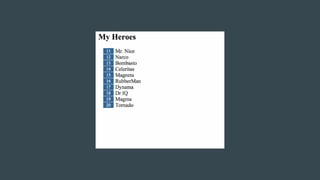
<h2>My Heroes</h2>
<ul class="heroes">
<template ng-for #hero [ng-for-of]="heroes">
<li><span class="badge">{{hero.id}}</span> {{hero.name}}</li>
</template>
</ul>
`,
directives: [NgFor]
})
class AppComponent {
public title = 'Tour of Heroes';
public heroes = HEROES;
}
template
@Component({
selector: 'my-app',
template:`
<h1>{{title}}</h1>
<h2>My Heroes</h2>
<ul class="heroes">
<li *ng-for="#hero of heroes" (click)="onSelect(hero)">
<span class="badge">{{hero.id}}</span> {{hero.name}}
</li>
</ul>
`,
directives: [NgFor]
})
class AppComponent {
public title = 'Tour of Heroes';
public heroes = HEROES;
}
template
Bootstrap
bootstrap(AppComponent);
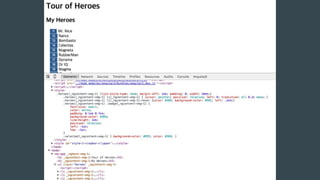
Add Encapsulation Style to Component
@Component({
selector: 'my-app',
template:`
...
`,
styles:[`
.heroes {list-style-type: none; margin-left: 1em; padding: 0; width: 10em;}
.heroes li { cursor: pointer; position: relative; left: 0; transition: all 0.2s ease; }
.heroes li:hover {color: #369; background-color: #EEE; left: .2em;}
.heroes .badge {
font-size: small;
color: white;
padding: 0.1em 0.7em;
background-color: #369;
line-height: 1em;
position: relative;
left: -1px;
top: -1px;
}
.selected { background-color: #EEE; color: #369; }
`],
directives: [NgFor]
})
class AppComponent {
public title = 'Tour of Heroes';
public heroes = HEROES;
}
Three way to add style
● Component inline styles
● Styles urls
● Template inline styles
Add Style to Component - Styles urls
@Component({
selector: 'my-app',
template:`
<h1>{{title}}</h1>
<h2>My Heroes</h2>
<ul class="heroes">
<li *ng-for="#hero of heroes">
<span class="badge">{{hero.id}}</span> {{hero.name}}
</li>
</ul>
`,
styleUrls : ['app.css'],
directives: [NgFor]
})
class AppComponent {
public title = 'Tour of Heroes';
public heroes = HEROES;
}
Add Style to Component - Template inline styles
@Component({
selector: 'my-app',
template:`
<style>
.heroes {list-style-type: none; margin-left: 1em; padding: 0; width: 10em;}
.heroes li { cursor: pointer; position: relative; left: 0; transition: all 0.2s ease; }
.heroes li:hover {color: #369; background-color: #EEE; left: .2em;}
.heroes .badge {
font-size: small;
color: white;
padding: 0.1em 0.7em;
background-color: #369;
line-height: 1em;
position: relative;
left: -1px;
top: -1px;
}
.selected { background-color: #EEE; color: #369;
</style>
….
`,
directives: [NgFor]
})
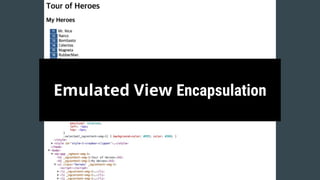
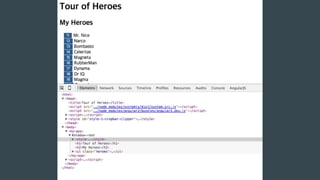
Emulated View Encapsulation
Using Shadow Dom
import {Component, bootstrap, NgFor, ViewEncapsulation} from 'angular2/angular2';
@Component({
selector: 'my-app',
template:`
<h1>{{title}}</h1>
<h2>My Heroes</h2>
<ul class="heroes">
<li *ng-for="#hero of heroes" (click)="onSelect(hero)">
<span class="badge">{{hero.id}}</span> {{hero.name}}
</li>
</ul>
`,
styles:[`
….
`],
directives: [NgFor],
encapsulation : ViewEncapsulation.Native
})
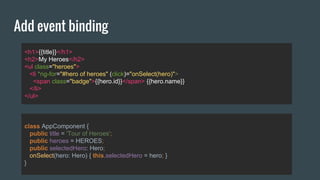
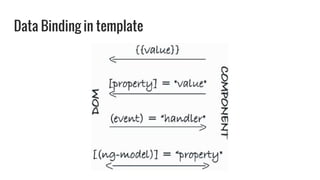
Add event binding
<h1>{{title}}</h1>
<h2>My Heroes</h2>
<ul class="heroes">
<li *ng-for="#hero of heroes" (click)="onSelect(hero)">
<span class="badge">{{hero.id}}</span> {{hero.name}}
</li>
</ul>
class AppComponent {
public title = 'Tour of Heroes';
public heroes = HEROES;
public selectedHero: Hero;
onSelect(hero: Hero) { this.selectedHero = hero; }
}
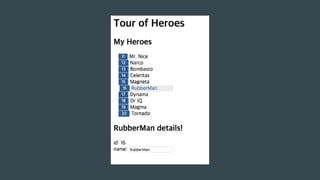
Two-way Data binding
<div *ng-if="selectedHero">
<h2>{{selectedHero.name}} details!</h2>
<div><label>id: </label>{{selectedHero.id}}</div>
<div>
<label>name: </label>
<input [(ng-model)]="selectedHero.name" placeholder="name"></input>
</div>
</div>
Data Binding in template
ng-class
<li *ng-for="#hero of heroes" [ng-class]="getSelectedClass(hero)" (click)="onSelect(hero)">
<span class="badge">{{hero.id}}</span> {{hero.name}}
</li>
class AppComponent {
public title = 'Tour of Heroes';
public heroes = HEROES;
public selectedHero: Hero;
onSelect(hero: Hero) { this.selectedHero = hero; }
getSelectedClass(hero: Hero) {
return { 'selected': hero === this.selectedHero };
}
}
References
- https://angular.io/
- AngularConnect Keynote 2015
- ngVegas The Angular 2 Glossary
- TRY Angular 2
- View Encapsulation in Angular 2
- http://info.meteor.com/blog/comparing-performance-of-blaze-react-angular-
meteor-and-angular-2-with-meteor
Thanks you
QnA

Angular를 활용한 웹 프론트단 개발과 2.0에서 달라진점

  • 1.
    Angular를 활용한 웹프론트단 개발과 2.0에서 달라진점 고재도 W3C HTML5 Conference 2015
  • 2.
    +jeado.ko haibane84@gmail.com - “Bitfinder.co” SoftwareEngineer - “kt” IoT Platform Researcher - “http://webframeworks.kr” AngularJS Tutorial Contributor - “Google Developer Group Korea WebTech” Organizer - “시작하세요 AngularJS wikibooks” Author
  • 3.
    Change of WebFrontend Library Feature-Complete Framework MVC Framework Component
  • 4.
  • 7.
  • 8.
  • 9.
  • 10.
    Component = Building block(LEGO) = a group of HTML elements
  • 11.
    Component is madeof two main parts - View - Logic
  • 12.
    Components View <section> <h4>{{ profile.name}}</h4> <p> Age - {{ profile.age }}</p> <button ng-click="save()">Save</button> </section> <profile-card profile="profile"></profile-card> Reusable group of element
  • 13.
    Component Logic A Object/Function- A place to store properties and functions function ProfileCardCtrl(){ this.profile = new Profile({ name : 'jay' }); this.save = function(){ // ... } }
  • 14.
    So How ? ReactComponent class HeloMessage extends React.Component { render() { return <div>Hello {this.props.name}</div>; } } React.render(<HelloMessage name="Jay" />, mountNode); Ember Component App.AppProfileComponent = Ember.Component.extend({ actions: { hello: function(name) { console.log("Hello", name); } } }); <!-- app-profile template --> <h1>{{person.title}}</h1> <img src={{person.avatar}}> <p class='signature'>{{person.signature}}</p> {{app-profile person=currentUser}} Polymer Component //////// porot-element.html //////// <link rel="import" href="bower_components/polymer/polymer.html"> <script> Polymer({ is: "proto-element", ready: function() { this.textContent = "I'm a proto-element." } }); </script> //////// index.html //////// </head> <link rel="import" href="proto-element.html"> </head> <body> <proto-element></proto-element> </body>
  • 15.
    Angular Connect, London,October 2015 Angular 2.0
  • 16.
    Angular Connect, London,October 2015 2.0.0-alpha.48 (2015-12-05)
  • 17.
    My First Component import{bootstrap, Component} from 'angular2/angular2'; @Component({ selector: 'my-app', template: '<h1>My First Angular 2 App</h1>' }) class AppComponent { } bootstrap(AppComponent); //index.html <my-app>loading...</my-app>
  • 18.
  • 19.
    Typescript • Open Sourceproject from Microsoft Technologies. • An attempt to 'fix' the missing parts of JavaScript. • A Superset of JavaScript => JavaScript + Static Types (and Classes and Modules and more…). • It uses ES6 syntax with Type Annotation and compiles to plain JavaScript (target: ES3, ES5, ES6). • Any valid JavaScript application is also a TypeScript application
  • 20.
    Typescript tsc app.tsapp.ts app.js TSC- the TypeScript compiler TSD - TypeScript Definition Files package manager TypeScript Definition File (ambient declaration file) • .d.ts extension. • Allows the definition of strong types. • Provide type definition for external JavaScript libraries. DefinitelyTyped (http://definitelytyped.org/): a community driven project on GitHub that tracks all of them.
  • 21.
    Typescript class Greeter { greeting:string; constructor(message: string) { this.greeting = message; } greet() { return "Hello, " + this.greeting; } } var greeter = new Greeter("world"); var button = document.createElement('button'); button.textContent = "Say Hello"; button.onclick = function() { alert(greeter.greet()); } document.body.appendChild(button); Type Annotation
  • 22.
    Typescript import {bootstrap, Component}from 'angular2/angular2'; @Component({ selector: 'my-app', template: '<h1>My First Angular 2 App</h1>' }) class AppComponent { } bootstrap(AppComponent); Meta Annotation

  • 23.
  • 24.
    (function() { var AppComponent= ng .Component({ selector: 'my-app', template: '<h1>My First Angular 2 App</h1>' }) .Class({ constructor: function () { } }); document.addEventListener('DOMContentLoaded', function() { ng.bootstrap(AppComponent); }); })();
  • 25.
    Language Support ES5 ES6TypeScript Dart
  • 26.
  • 27.
  • 28.
    Language Support TypeScriptES6 Dart NoJS TypeScriptES6 JavaScript-Based Syntax ES5
  • 29.
  • 30.
  • 32.
  • 33.
  • 34.
  • 35.
    Tour of Heroes(before Dashboard)
  • 36.
    File Structure angular2-tour-of-heroes ├── node_modules ├──src | ├── app | | └── app.ts | ├── index.html | └── tsconfig.json └── package.json
  • 37.
    SystemJS Loader :index.js <html> <head> <title>Tour of Heroes</title> <script src="../node_modules/systemjs/dist/system.src.js"></script> <script src="../node_modules/angular2/bundles/angular2.dev.js"></script> <script> System.config({ packages: {'app': {defaultExtension: 'js'}} }); System.import('app/app'); </script> </head> <body> <my-app>loading...</my-app> </body> </html>
  • 38.
    SystemJS Loader angular2.js bundle(System.register) Angular2 RxJS Reflect.js Zone.js Application code SystemJS loader
  • 39.
    Define Hero Type- app.ts class Hero { id: number; name: string; }
  • 40.
    Add few heroes- app.ts var HEROES: Hero[] = [ { "id": 11, "name": "Mr. Nice" }, { "id": 12, "name": "Narco" }, { "id": 13, "name": "Bombasto" }, { "id": 14, "name": "Celeritas" }, { "id": 15, "name": "Magneta" }, { "id": 16, "name": "RubberMan" }, { "id": 17, "name": "Dynama" }, { "id": 18, "name": "Dr IQ" }, { "id": 19, "name": "Magma" }, { "id": 20, "name": "Tornado" } ];
  • 41.
    ES6 Module load- app.ts import {Component, bootstrap, NgFor} from 'angular2/angular2'; angular.module('app',[ ‘ng’, ‘.....’ ]) angular 1.x
  • 42.
    Define AppComponet UsingES6 Class - app.ts class AppComponent { public title = 'Tour of Heroes'; public heroes = HEROES; }
  • 43.
    @component @Component({ selector: 'my-app', }) class AppComponent{ public title = 'Tour of Heroes'; public heroes = HEROES; }
  • 44.
    @Component({ selector: 'my-app', template:` <h1>{{title}}</h1> <h2>My Heroes</h2> <ulclass="heroes"> <template ng-for #hero [ng-for-of]="heroes"> <li><span class="badge">{{hero.id}}</span> {{hero.name}}</li> </template> </ul> `, directives: [NgFor] }) class AppComponent { public title = 'Tour of Heroes'; public heroes = HEROES; } template
  • 45.
    @Component({ selector: 'my-app', template:` <h1>{{title}}</h1> <h2>My Heroes</h2> <ulclass="heroes"> <li *ng-for="#hero of heroes" (click)="onSelect(hero)"> <span class="badge">{{hero.id}}</span> {{hero.name}} </li> </ul> `, directives: [NgFor] }) class AppComponent { public title = 'Tour of Heroes'; public heroes = HEROES; } template
  • 46.
  • 48.
    Add Encapsulation Styleto Component @Component({ selector: 'my-app', template:` ... `, styles:[` .heroes {list-style-type: none; margin-left: 1em; padding: 0; width: 10em;} .heroes li { cursor: pointer; position: relative; left: 0; transition: all 0.2s ease; } .heroes li:hover {color: #369; background-color: #EEE; left: .2em;} .heroes .badge { font-size: small; color: white; padding: 0.1em 0.7em; background-color: #369; line-height: 1em; position: relative; left: -1px; top: -1px; } .selected { background-color: #EEE; color: #369; } `], directives: [NgFor] }) class AppComponent { public title = 'Tour of Heroes'; public heroes = HEROES; }
  • 49.
    Three way toadd style ● Component inline styles ● Styles urls ● Template inline styles
  • 50.
    Add Style toComponent - Styles urls @Component({ selector: 'my-app', template:` <h1>{{title}}</h1> <h2>My Heroes</h2> <ul class="heroes"> <li *ng-for="#hero of heroes"> <span class="badge">{{hero.id}}</span> {{hero.name}} </li> </ul> `, styleUrls : ['app.css'], directives: [NgFor] }) class AppComponent { public title = 'Tour of Heroes'; public heroes = HEROES; }
  • 51.
    Add Style toComponent - Template inline styles @Component({ selector: 'my-app', template:` <style> .heroes {list-style-type: none; margin-left: 1em; padding: 0; width: 10em;} .heroes li { cursor: pointer; position: relative; left: 0; transition: all 0.2s ease; } .heroes li:hover {color: #369; background-color: #EEE; left: .2em;} .heroes .badge { font-size: small; color: white; padding: 0.1em 0.7em; background-color: #369; line-height: 1em; position: relative; left: -1px; top: -1px; } .selected { background-color: #EEE; color: #369; </style> …. `, directives: [NgFor] })
  • 53.
  • 54.
    Using Shadow Dom import{Component, bootstrap, NgFor, ViewEncapsulation} from 'angular2/angular2'; @Component({ selector: 'my-app', template:` <h1>{{title}}</h1> <h2>My Heroes</h2> <ul class="heroes"> <li *ng-for="#hero of heroes" (click)="onSelect(hero)"> <span class="badge">{{hero.id}}</span> {{hero.name}} </li> </ul> `, styles:[` …. `], directives: [NgFor], encapsulation : ViewEncapsulation.Native })
  • 56.
    Add event binding <h1>{{title}}</h1> <h2>MyHeroes</h2> <ul class="heroes"> <li *ng-for="#hero of heroes" (click)="onSelect(hero)"> <span class="badge">{{hero.id}}</span> {{hero.name}} </li> </ul> class AppComponent { public title = 'Tour of Heroes'; public heroes = HEROES; public selectedHero: Hero; onSelect(hero: Hero) { this.selectedHero = hero; } }
  • 57.
    Two-way Data binding <div*ng-if="selectedHero"> <h2>{{selectedHero.name}} details!</h2> <div><label>id: </label>{{selectedHero.id}}</div> <div> <label>name: </label> <input [(ng-model)]="selectedHero.name" placeholder="name"></input> </div> </div>
  • 58.
  • 60.
    ng-class <li *ng-for="#hero ofheroes" [ng-class]="getSelectedClass(hero)" (click)="onSelect(hero)"> <span class="badge">{{hero.id}}</span> {{hero.name}} </li> class AppComponent { public title = 'Tour of Heroes'; public heroes = HEROES; public selectedHero: Hero; onSelect(hero: Hero) { this.selectedHero = hero; } getSelectedClass(hero: Hero) { return { 'selected': hero === this.selectedHero }; } }
  • 63.
    References - https://angular.io/ - AngularConnectKeynote 2015 - ngVegas The Angular 2 Glossary - TRY Angular 2 - View Encapsulation in Angular 2 - http://info.meteor.com/blog/comparing-performance-of-blaze-react-angular- meteor-and-angular-2-with-meteor
  • 64.