Bootstrap Jump Start
Haim Michael
August 10th
, 2021
All logos, trade marks and brand names used in this presentation belong
to the respective owners.
life
michae
l
www.lifemichael.com
08/10/21 © Haim Michael 2021. All Rights Reserved. 2
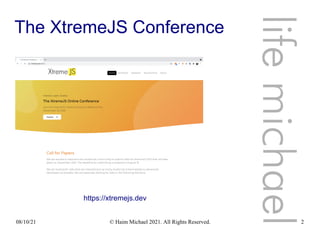
The XtremeJS Conference
life
michae
l
https://xtremejs.dev
08/10/21 © Haim Michael 2021. All Rights Reserved. 3
Introduction
08/10/21 © Haim Michael 2021. All Rights Reserved. 4
What is Twitter Bootstrap?
 Twitter Bootstrap is a front end web development framework
that provides us with the capability to develop a responsive
front end in according with most of today common UI
standard conventions.
 The Twitter Bootstrap framework includes files in
JavaScript, HTML and CSS.
https://getbootstrap.com/
08/10/21 © Haim Michael 2021. All Rights Reserved. 5
Responsive Web Pages
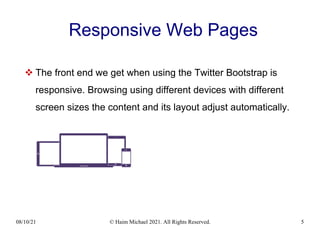
 The front end we get when using the Twitter Bootstrap is
responsive. Browsing using different devices with different
screen sizes the content and its layout adjust automatically.
08/10/21 © Haim Michael 2021. All Rights Reserved. 6
Awesome Websites
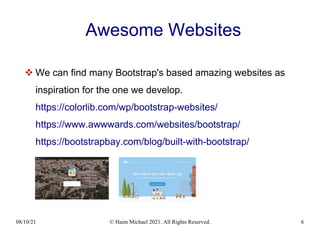
 We can find many Bootstrap's based amazing websites as
inspiration for the one we develop.
https://colorlib.com/wp/bootstrap-websites/
https://www.awwwards.com/websites/bootstrap/
https://bootstrapbay.com/blog/built-with-bootstrap/
08/10/21 © Haim Michael 2021. All Rights Reserved. 7
Popularity
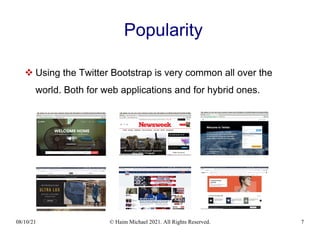
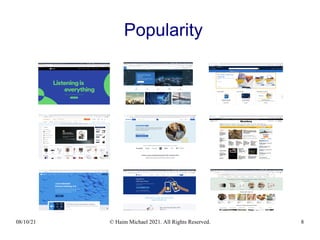
 Using the Twitter Bootstrap is very common all over the
world. Both for web applications and for hybrid ones.
08/10/21 © Haim Michael 2021. All Rights Reserved. 8
Popularity
08/10/21 © Haim Michael 2021. All Rights Reserved. 9
Popularity
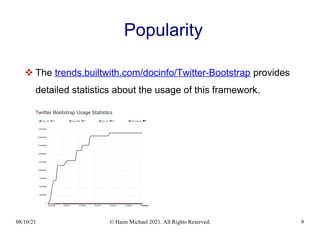
 The trends.builtwith.com/docinfo/Twitter-Bootstrap provides
detailed statistics about the usage of this framework.
08/10/21 © Haim Michael 2021. All Rights Reserved. 10
Popularity
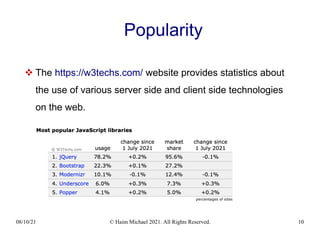
 The https://w3techs.com/ website provides statistics about
the use of various server side and client side technologies
on the web.
08/10/21 © Haim Michael 2021. All Rights Reserved. 11
Popularity
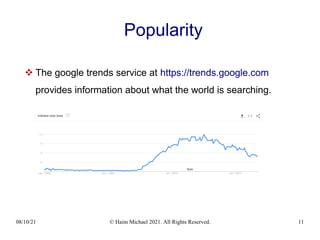
 The google trends service at https://trends.google.com
provides information about what the world is searching.
08/10/21 © Haim Michael 2021. All Rights Reserved. 12
Vanilla JavaScript
 As of version 5 the use of jQuery was removed, and the
framework switched to vanilla JavaScript.
08/10/21 © Haim Michael 2021. All Rights Reserved. 13
Responsive Font Sizes
 RFS is a unit resizing engine that was initially developed to
resize font sizes. RFS is also capable of rescaling basically
every value for any css property with units. As of version 5
Bootstrap uses this engine.
https://github.com/twbs/rfs
08/10/21 © Haim Michael 2021. All Rights Reserved. 14
The Support for IE Was Dropped
 As of Bootstrap 5.x, the support for Internet Explorer was
dropped.
 Following the removal of the support for IE, the JavaScript
code no longer need to be compiled to ES5. It can be
compiled to ES6. Thanks to that, the size of the files is
smaller.
 The removal of the support for IE enables the use of new
features of JavaScript and CSS.
08/10/21 © Haim Michael 2021. All Rights Reserved. 15
Amazing Icons
 As of Bootstrap 5.x, the framework includes a brand new
SVG icon library crafted carefully by Mark Otto, Bootstrap's
co-founder.
https://icons.getbootstrap.com/
08/10/21 © Haim Michael 2021. All Rights Reserved. 16
Alternative Frameworks
 Twitter Bootstrap is not alone. There are other alternative
frameworks we can use:
Foundation - http://foundation.zurb.com
Gumby - http://gumbyframework.com
Ground - http://groundworkcss.github.io/groundwork
Zimit - http://firezenk.github.io/zimit/
Kickstrap – http://www.getkickstrap.com
UI Kit – https://getuikit.com
08/10/21 © Haim Michael 2021. All Rights Reserved. 17
Alternative Frameworks
Materialize - https://materializecss.com
Metro - https://themes.org.ua
YUI Library - http://www.yuilibrary.com
TailwindCSS - https://tailwindcss.com/
Bulma - https://bulma.io/
Pure - https://purecss.io/
MaterialUI - https://material-ui.com/ 66K Starts on Github
Spectre - https://material-ui.com/
08/10/21 © Haim Michael 2021. All Rights Reserved. 18
Alternative Frameworks
LuxaCSS - https://luxacss.com/
MUI - https://www.muicss.com
Milligram - https://milligram.io
Cirrus - https://cirrus-ui.netlify.app
Cardinal - https://cardinalcss.com
Skeleton - http://getskeleton.com
08/10/21 © Haim Michael 2021. All Rights Reserved. 19
Jump Start
08/10/21 © Haim Michael 2021. All Rights Reserved. 20
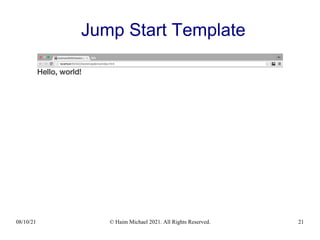
Jump Start Template
 You can find a basic template to start with at
www.getbootstrap.com
08/10/21 © Haim Michael 2021. All Rights Reserved. 21
Jump Start Template
08/10/21 © Haim Michael 2021. All Rights Reserved. 22
The HTML5 Doc Type Declaration
 The HTML5 doctype declaration <!DOCTYPE html> tells the
web browser to treat the file in according with the HTML5
specification.
08/10/21 © Haim Michael 2021. All Rights Reserved. 23
The charset Meta Data
 The <meta charset="utf-8"> meta data element tells
the web browser that UTF-8 is the encoding of this file.
08/10/21 © Haim Michael 2021. All Rights Reserved. 24
The View Port Meta Data
 The <meta name="viewport"
content="width=device-width, initial-scale=1,
shrink-to-fit=no"> meta data element tells the web
browser that the page should be browsed as if its width is the
same width of the device, with initial scale of 1. The user will
be able to zoom in and out changing that scale.
08/10/21 © Haim Michael 2021. All Rights Reserved. 25
The View Port Meta Data
 The shrink-to-fil=no fixes a bug in iOS9 as described at
http://kihlstrom.com/2015/shrink-to-fit-no-fixes-zoom-problem-in-ios-9
As of iOS 10 This Meta Element is not Needed
08/10/21 © Haim Michael 2021. All Rights Reserved. 26
Internet Explorer Edge Mode
 Using the <meta http-equiv="x-ua-compatible"
content="ie=edge"> meta element we forces the internet
explorer to render the content in the recent Edge mode.
As of Bootstrap 5 This Meta Element is not Needed
08/10/21 © Haim Michael 2021. All Rights Reserved. 27
The crossorigin Attribute
 Using the crossorigin attribute inside the link element that
points at the external CSS file means that a cross-origin
request is performed, and no credential is sent.
08/10/21 © Haim Michael 2021. All Rights Reserved. 28
The integrity Attribute
 Using the integrity attribute allows the browser to check
the file source to ensure that the code won't be loaded if the
source has been manipulated.
 When using bootstrap we should use the integrity
attribute both inside the link and inside the script
elements.
08/10/21 © Haim Michael 2021. All Rights Reserved. 29
Components
08/10/21 © Haim Michael 2021. All Rights Reserved. 30
Introduction
 When using the Twitter Bootstrap framework there is a huge
range of ready to use components.
08/10/21 © Haim Michael 2021. All Rights Reserved. 31
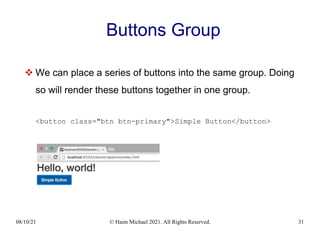
Buttons Group
 We can place a series of buttons into the same group. Doing
so will render these buttons together in one group.
<button class="btn btn-primary">Simple Button</button>
08/10/21 © Haim Michael 2021. All Rights Reserved. 32
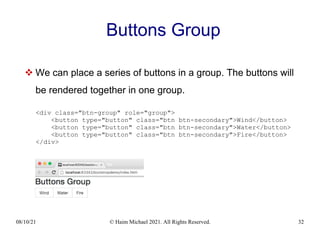
Buttons Group
 We can place a series of buttons in a group. The buttons will
be rendered together in one group.
<div class="btn-group" role="group">
<button type="button" class="btn btn-secondary">Wind</button>
<button type="button" class="btn btn-secondary">Water</button>
<button type="button" class="btn btn-secondary">Fire</button>
</div>
08/10/21 © Haim Michael 2021. All Rights Reserved. 33
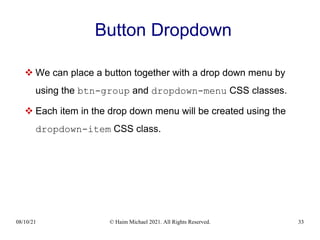
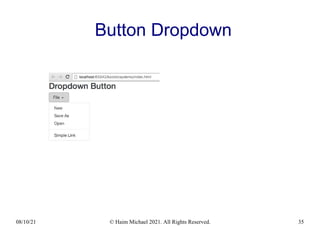
Button Dropdown
 We can place a button together with a drop down menu by
using the btn-group and dropdown-menu CSS classes.
 Each item in the drop down menu will be created using the
dropdown-item CSS class.
08/10/21 © Haim Michael 2021. All Rights Reserved. 34
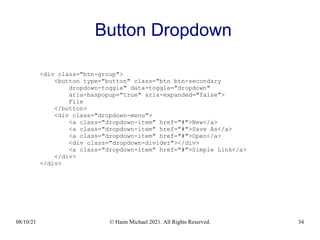
Button Dropdown
<div class="btn-group">
<button type="button" class="btn btn-secondary
dropdown-toggle" data-toggle="dropdown"
aria-haspopup="true" aria-expanded="false">
File
</button>
<div class="dropdown-menu">
<a class="dropdown-item" href="#">New</a>
<a class="dropdown-item" href="#">Save As</a>
<a class="dropdown-item" href="#">Open</a>
<div class="dropdown-divider"></div>
<a class="dropdown-item" href="#">Simple Link</a>
</div>
</div>
08/10/21 © Haim Michael 2021. All Rights Reserved. 35
Button Dropdown
08/10/21 © Haim Michael 2021. All Rights Reserved. 36
Forms
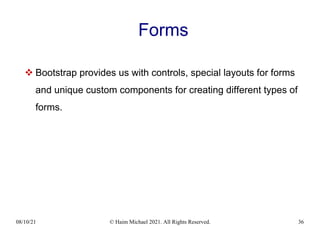
 Bootstrap provides us with controls, special layouts for forms
and unique custom components for creating different types of
forms.
08/10/21 © Haim Michael 2021. All Rights Reserved. 37
Forms
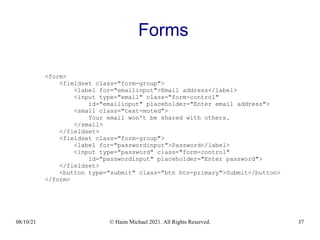
<form>
<fieldset class="form-group">
<label for="emailinput">Email address</label>
<input type="email" class="form-control"
id="emailinput" placeholder="Enter email address">
<small class="text-muted">
Your email won't be shared with others.
</small>
</fieldset>
<fieldset class="form-group">
<label for="passwordinput">Password</label>
<input type="password" class="form-control"
id="passwordinput" placeholder="Enter password">
</fieldset>
<button type="submit" class="btn btn-primary">Submit</button>
</form>
08/10/21 © Haim Michael 2021. All Rights Reserved. 38
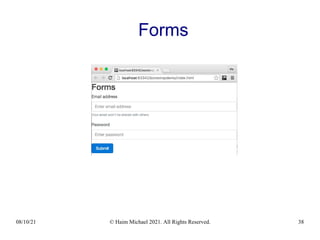
Forms
08/10/21 © Haim Michael 2021. All Rights Reserved. 39
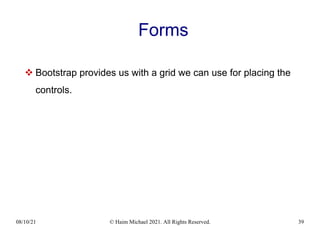
Forms
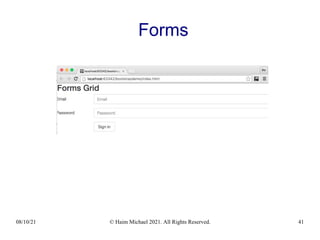
 Bootstrap provides us with a grid we can use for placing the
controls.
08/10/21 © Haim Michael 2021. All Rights Reserved. 40
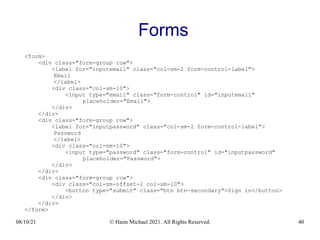
Forms
<form>
<div class="form-group row">
<label for="inputemail" class="col-sm-2 form-control-label">
Email
</label>
<div class="col-sm-10">
<input type="email" class="form-control" id="inputemail"
placeholder="Email">
</div>
</div>
<div class="form-group row">
<label for="inputpassword" class="col-sm-2 form-control-label">
Password
</label>
<div class="col-sm-10">
<input type="password" class="form-control" id="inputpassword"
placeholder="Password">
</div>
</div>
<div class="form-group row">
<div class="col-sm-offset-2 col-sm-10">
<button type="submit" class="btn btn-secondary">Sign in</button>
</div>
</div>
</form>
08/10/21 © Haim Michael 2021. All Rights Reserved. 41
Forms
08/10/21 © Haim Michael 2021. All Rights Reserved. 42
Input Group
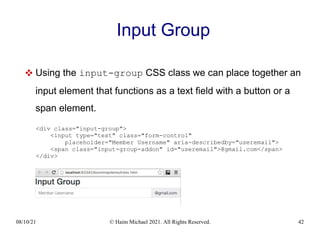
 Using the input-group CSS class we can place together an
input element that functions as a text field with a button or a
span element.
<div class="input-group">
<input type="text" class="form-control"
placeholder="Member Username" aria-describedby="useremail">
<span class="input-group-addon" id="useremail">@gmail.com</span>
</div>
08/10/21 © Haim Michael 2021. All Rights Reserved. 43
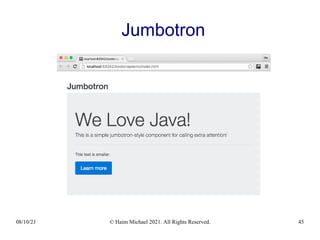
Jumbotron
 We will usually use the jumbotron for displaying a key
marketing message on our website.
08/10/21 © Haim Michael 2021. All Rights Reserved. 44
Jumbotron
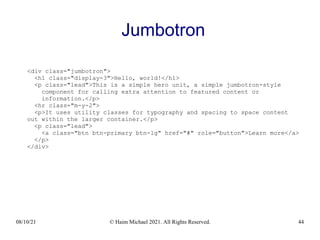
<div class="jumbotron">
<h1 class="display-3">Hello, world!</h1>
<p class="lead">This is a simple hero unit, a simple jumbotron-style
component for calling extra attention to featured content or
information.</p>
<hr class="m-y-2">
<p>It uses utility classes for typography and spacing to space content
out within the larger container.</p>
<p class="lead">
<a class="btn btn-primary btn-lg" href="#" role="button">Learn more</a>
</p>
</div>
08/10/21 © Haim Michael 2021. All Rights Reserved. 45
Jumbotron
08/10/21 © Haim Michael 2021. All Rights Reserved. 46
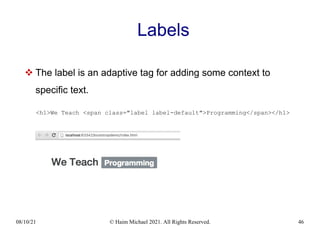
Labels
 The label is an adaptive tag for adding some context to
specific text.
<h1>We Teach <span class="label label-default">Programming</span></h1>
08/10/21 © Haim Michael 2021. All Rights Reserved. 47
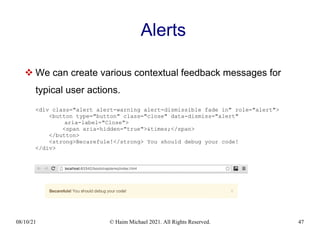
Alerts
 We can create various contextual feedback messages for
typical user actions.
<div class="alert alert-warning alert-dismissible fade in" role="alert">
<button type="button" class="close" data-dismiss="alert"
aria-label="Close">
<span aria-hidden="true">&times;</span>
</button>
<strong>Becarefule!</strong> You should debug your code!
</div>
08/10/21 © Haim Michael 2021. All Rights Reserved. 48
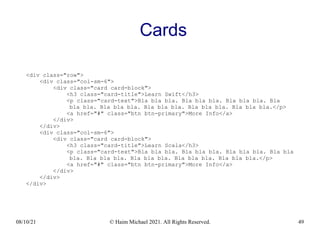
Cards
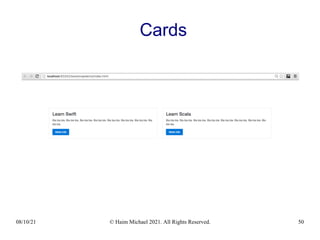
 The card is a flexible and extensible content container. It
includes options for header and footer, as well as a wide
variety of content, contextual background colors, and powerful
display options.
08/10/21 © Haim Michael 2021. All Rights Reserved. 49
Cards
<div class="row">
<div class="col-sm-6">
<div class="card card-block">
<h3 class="card-title">Learn Swift</h3>
<p class="card-text">Bla bla bla. Bla bla bla. Bla bla bla. Bla
bla bla. Bla bla bla. Bla bla bla. Bla bla bla. Bla bla bla.</p>
<a href="#" class="btn btn-primary">More Info</a>
</div>
</div>
<div class="col-sm-6">
<div class="card card-block">
<h3 class="card-title">Learn Scala</h3>
<p class="card-text">Bla bla bla. Bla bla bla. Bla bla bla. Bla bla
bla. Bla bla bla. Bla bla bla. Bla bla bla. Bla bla bla.</p>
<a href="#" class="btn btn-primary">More Info</a>
</div>
</div>
</div>
08/10/21 © Haim Michael 2021. All Rights Reserved. 50
Cards
08/10/21 © Haim Michael 2021. All Rights Reserved. 51
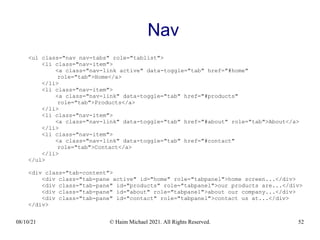
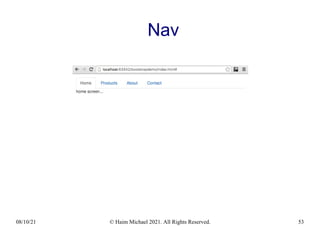
Nav
 Bootstrap provides us with various types of navigation
components.
 We can create simple links either horizontal or vertical, we
can create tabs or pills. We can have our pills stacked on
each other. We can add dropdowns to our tabs or to our pills.
08/10/21 © Haim Michael 2021. All Rights Reserved. 52
Nav
<ul class="nav nav-tabs" role="tablist">
<li class="nav-item">
<a class="nav-link active" data-toggle="tab" href="#home"
role="tab">Home</a>
</li>
<li class="nav-item">
<a class="nav-link" data-toggle="tab" href="#products"
role="tab">Products</a>
</li>
<li class="nav-item">
<a class="nav-link" data-toggle="tab" href="#about" role="tab">About</a>
</li>
<li class="nav-item">
<a class="nav-link" data-toggle="tab" href="#contact"
role="tab">Contact</a>
</li>
</ul>
<div class="tab-content">
<div class="tab-pane active" id="home" role="tabpanel">home screen...</div>
<div class="tab-pane" id="products" role="tabpanel">our products are...</div>
<div class="tab-pane" id="about" role="tabpanel">about our company...</div>
<div class="tab-pane" id="contact" role="tabpanel">contact us at...</div>
</div>
08/10/21 © Haim Michael 2021. All Rights Reserved. 53
Nav
08/10/21 © Haim Michael 2021. All Rights Reserved. 54
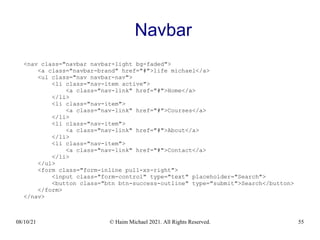
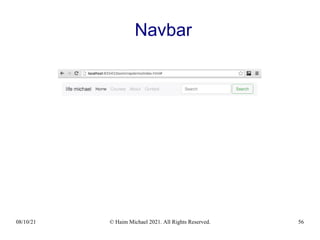
Navbar
 The navbar is a simple wrapper for putting together the logo,
the navigation and other elements.
08/10/21 © Haim Michael 2021. All Rights Reserved. 55
Navbar
<nav class="navbar navbar-light bg-faded">
<a class="navbar-brand" href="#">life michael</a>
<ul class="nav navbar-nav">
<li class="nav-item active">
<a class="nav-link" href="#">Home</a>
</li>
<li class="nav-item">
<a class="nav-link" href="#">Courses</a>
</li>
<li class="nav-item">
<a class="nav-link" href="#">About</a>
</li>
<li class="nav-item">
<a class="nav-link" href="#">Contact</a>
</li>
</ul>
<form class="form-inline pull-xs-right">
<input class="form-control" type="text" placeholder="Search">
<button class="btn btn-success-outline" type="submit">Search</button>
</form>
</nav>
08/10/21 © Haim Michael 2021. All Rights Reserved. 56
Navbar
08/10/21 © Haim Michael 2021. All Rights Reserved. 57
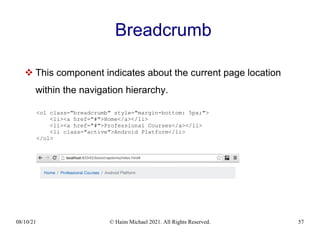
Breadcrumb
 This component indicates about the current page location
within the navigation hierarchy.
<ol class="breadcrumb" style="margin-bottom: 5px;">
<li><a href="#">Home</a></li>
<li><a href="#">Professional Courses</a></li>
<li class="active">Android Platform</li>
</ol>
08/10/21 © Haim Michael 2021. All Rights Reserved. 58
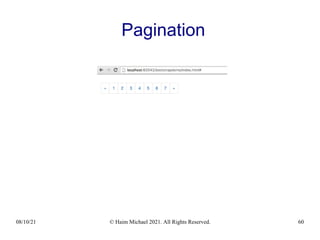
Pagination
 This component provides us with the capability to display
pages the user can click on.
08/10/21 © Haim Michael 2021. All Rights Reserved. 59
Pagination
<nav>
<ul class="pagination">
<li class="page-item">
<a class="page-link" href="#" aria-label="Previous">
<span aria-hidden="true">&laquo;</span>
<span class="sr-only">Previous</span>
</a>
</li>
<li class="page-item"><a class="page-link" href="#">1</a></li>
<li class="page-item"><a class="page-link" href="#">2</a></li>
<li class="page-item"><a class="page-link" href="#">3</a></li>
<li class="page-item"><a class="page-link" href="#">4</a></li>
<li class="page-item"><a class="page-link" href="#">5</a></li>
<li class="page-item"><a class="page-link" href="#">6</a></li>
<li class="page-item"><a class="page-link" href="#">7</a></li>
<li class="page-item">
<a class="page-link" href="#" aria-label="Next">
<span aria-hidden="true">&raquo;</span>
<span class="sr-only">Next</span>
</a>
</li>
</ul>
</nav>
08/10/21 © Haim Michael 2021. All Rights Reserved. 60
Pagination
08/10/21 © Haim Michael 2021. All Rights Reserved. 61
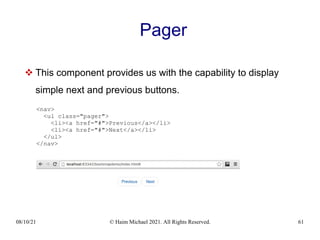
Pager
 This component provides us with the capability to display
simple next and previous buttons.
<nav>
<ul class="pager">
<li><a href="#">Previous</a></li>
<li><a href="#">Next</a></li>
</ul>
</nav>
08/10/21 © Haim Michael 2021. All Rights Reserved. 62
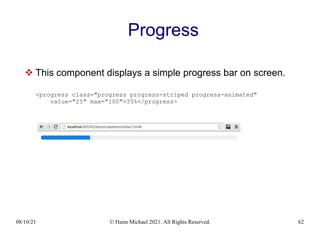
Progress
 This component displays a simple progress bar on screen.
<progress class="progress progress-striped progress-animated"
value="25" max="100">35%</progress>
08/10/21 © Haim Michael 2021. All Rights Reserved. 63
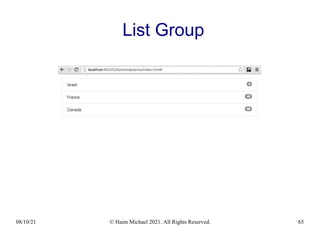
List Group
 Using this component we can display both simple and
complex lists of elements.
08/10/21 © Haim Michael 2021. All Rights Reserved. 64
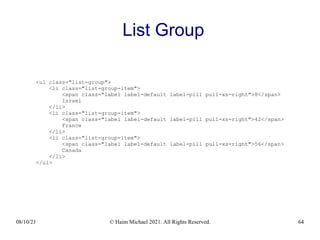
List Group
<ul class="list-group">
<li class="list-group-item">
<span class="label label-default label-pill pull-xs-right">8</span>
Israel
</li>
<li class="list-group-item">
<span class="label label-default label-pill pull-xs-right">42</span>
France
</li>
<li class="list-group-item">
<span class="label label-default label-pill pull-xs-right">56</span>
Canada
</li>
</ul>
08/10/21 © Haim Michael 2021. All Rights Reserved. 65
List Group
08/10/21 © Haim Michael 2021. All Rights Reserved. 66
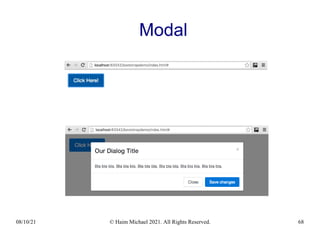
Modal
 The Modal component is a streamlined flexible dialog prompt.
08/10/21 © Haim Michael 2021. All Rights Reserved. 67
Modal
<div class="modal fade" id="myModal" tabindex="-1" role="dialog"
aria-labelledby="myModalLabel" aria-hidden="true">
<div class="modal-dialog" role="document">
<div class="modal-content">
<div class="modal-header">
<button type="button" class="close" data-dismiss="modal"
aria-label="Close">
<span aria-hidden="true">&times;</span>
</button>
<h4 class="modal-title" id="myModalLabel">
Our Dialog Title
</h4>
</div>
<div class="modal-body">
Bla bla bla. Bla bla bla. Bla bla bla. Bla bla bla. Bla bla
</div>
<div class="modal-footer">
<button type="button" class="btn btn-secondary"
data-dismiss="modal">Close</button>
<button type="button" class="btn btn-primary">
Save changes</button>
</div>
</div>
</div>
</div>
08/10/21 © Haim Michael 2021. All Rights Reserved. 68
Modal
08/10/21 © Haim Michael 2021. All Rights Reserved. 69
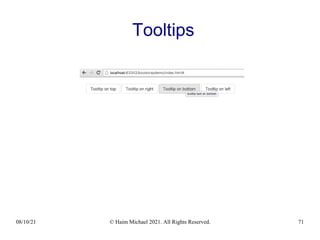
Tooltips
 Using the tooltip component we can display small tooltips next
to specific elements on our page.
08/10/21 © Haim Michael 2021. All Rights Reserved. 70
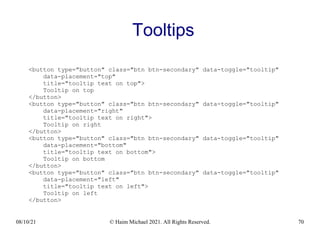
Tooltips
<button type="button" class="btn btn-secondary" data-toggle="tooltip"
data-placement="top"
title="tooltip text on top">
Tooltip on top
</button>
<button type="button" class="btn btn-secondary" data-toggle="tooltip"
data-placement="right"
title="tooltip text on right">
Tooltip on right
</button>
<button type="button" class="btn btn-secondary" data-toggle="tooltip"
data-placement="bottom"
title="tooltip text on bottom">
Tooltip on bottom
</button>
<button type="button" class="btn btn-secondary" data-toggle="tooltip"
data-placement="left"
title="tooltip text on left">
Tooltip on left
</button>
08/10/21 © Haim Michael 2021. All Rights Reserved. 71
Tooltips
08/10/21 © Haim Michael 2021. All Rights Reserved. 72
Popover
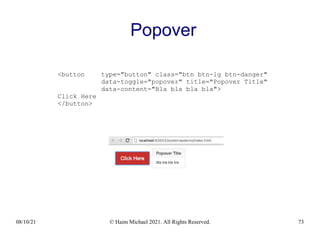
 The popover component allows us to display overlay content
next to any element on our page.
 In order to use this component we must include the tether.js
before bootstrap.js. You can find the tether.js file at
https://github.com/HubSpot/tether
08/10/21 © Haim Michael 2021. All Rights Reserved. 73
Popover
<button type="button" class="btn btn-lg btn-danger"
data-toggle="popover" title="Popover Title"
data-content="Bla bla bla bla">
Click Here
</button>
08/10/21 © Haim Michael 2021. All Rights Reserved. 74
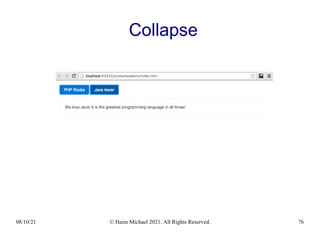
Collapse
 Using the collapse plugin we can toggle content on a web
page.
08/10/21 © Haim Michael 2021. All Rights Reserved. 75
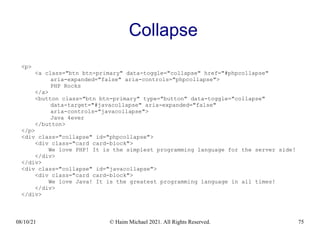
Collapse
<p>
<a class="btn btn-primary" data-toggle="collapse" href="#phpcollapse"
aria-expanded="false" aria-controls="phpcollapse">
PHP Rocks
</a>
<button class="btn btn-primary" type="button" data-toggle="collapse"
data-target="#javacollapse" aria-expanded="false"
aria-controls="javacollapse">
Java 4ever
</button>
</p>
<div class="collapse" id="phpcollapse">
<div class="card card-block">
We love PHP! It is the simplest programming language for the server side!
</div>
</div>
<div class="collapse" id="javacollapse">
<div class="card card-block">
We love Java! It is the greatest programming language in all times!
</div>
</div>
08/10/21 © Haim Michael 2021. All Rights Reserved. 76
Collapse
08/10/21 © Haim Michael 2021. All Rights Reserved. 77
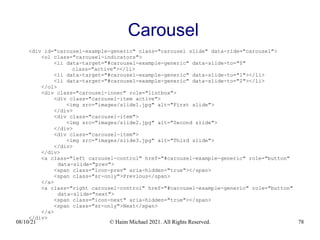
Carousel
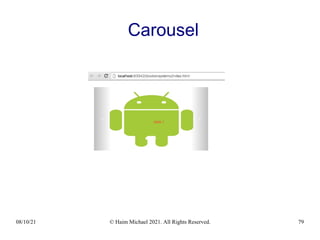
 Using the carousel component we can get a magnificent
slideshow.
08/10/21 © Haim Michael 2021. All Rights Reserved. 78
Carousel
<div id="carousel-example-generic" class="carousel slide" data-ride="carousel">
<ol class="carousel-indicators">
<li data-target="#carousel-example-generic" data-slide-to="0"
class="active"></li>
<li data-target="#carousel-example-generic" data-slide-to="1"></li>
<li data-target="#carousel-example-generic" data-slide-to="2"></li>
</ol>
<div class="carousel-inner" role="listbox">
<div class="carousel-item active">
<img src="images/slide1.jpg" alt="First slide">
</div>
<div class="carousel-item">
<img src="images/slide2.jpg" alt="Second slide">
</div>
<div class="carousel-item">
<img src="images/slide3.jpg" alt="Third slide">
</div>
</div>
<a class="left carousel-control" href="#carousel-example-generic" role="button"
data-slide="prev">
<span class="icon-prev" aria-hidden="true"></span>
<span class="sr-only">Previous</span>
</a>
<a class="right carousel-control" href="#carousel-example-generic" role="button"
data-slide="next">
<span class="icon-next" aria-hidden="true"></span>
<span class="sr-only">Next</span>
</a>
</div>
08/10/21 © Haim Michael 2021. All Rights Reserved. 79
Carousel
08/10/21 © Haim Michael 2021. All Rights Reserved. 80
Images
08/10/21 © Haim Michael 2021. All Rights Reserved. 81
Introduction
 Bootstrap provides us with CSS classes that assist us with the
inclusion of images in the web page we develop.
08/10/21 © Haim Michael 2021. All Rights Reserved. 82
Image Shapes
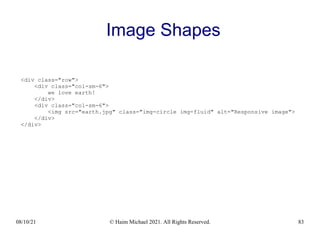
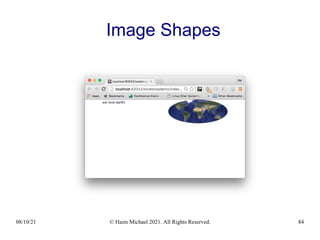
 Using the img-rounded, img-circle and the img-
thumbnail CSS classes we can create styled images
shaped with rounded corners, as a circle or as a simple
rectangular thumbnail.
08/10/21 © Haim Michael 2021. All Rights Reserved. 83
Image Shapes
<div class="row">
<div class="col-sm-6">
we love earth!
</div>
<div class="col-sm-6">
<img src="earth.jpg" class="img-circle img-fluid" alt="Responsive image">
</div>
</div>
08/10/21 © Haim Michael 2021. All Rights Reserved. 84
Image Shapes
08/10/21 © Haim Michael 2021. All Rights Reserved. 85
Layout
08/10/21 © Haim Michael 2021. All Rights Reserved. 86
Introduction
 Bootstrap provides us with a powerful grid system we can use
for setting the layouts we want for each and every platform we
target.
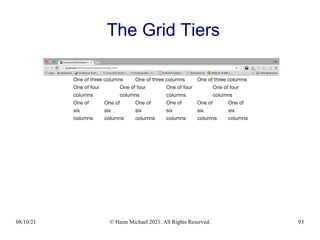
 The grid system is based on a 12 column layout, and has
multiple tiers. Each tier refers a specific media query range.
08/10/21 © Haim Michael 2021. All Rights Reserved. 87
Introduction
 Bootstrap provides us with CSS classes we can use for
setting the containers, the rows and the columns we want to
have in our layout.
https://getbootstrap.com/docs/5.0/layout/grid/
08/10/21 © Haim Michael 2021. All Rights Reserved. 88
Rows
 The rows are horizontal groups of columns that ensure our
columns are lined up properly.
 The content is placed within columns. The columns are the
only children the rows can have.
08/10/21 © Haim Michael 2021. All Rights Reserved. 89
Columns
 The column CSS class we are using indicates about the
number of columns we would like to use out of the possible
12 columns each row has (e.g. using the .col-sm-4 CSS
class means that we want to have a three equal width
columns row).
08/10/21 © Haim Michael 2021. All Rights Reserved. 90
The Grid Tiers
 There are six grid tiers. Each tier refers a specific
responsive breakpoint (extra small, small, medium, large
and extra large).
 The tiers are based on minimum widths. They apply to the
one tier they specifically refer, and all of the other ones that
above it.
08/10/21 © Haim Michael 2021. All Rights Reserved. 91
The Grid Tiers
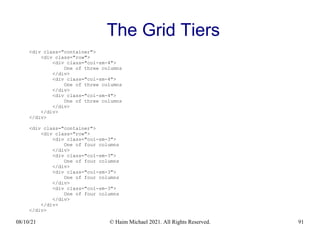
<div class="container">
<div class="row">
<div class="col-sm-4">
One of three columns
</div>
<div class="col-sm-4">
One of three columns
</div>
<div class="col-sm-4">
One of three columns
</div>
</div>
</div>
<div class="container">
<div class="row">
<div class="col-sm-3">
One of four columns
</div>
<div class="col-sm-3">
One of four columns
</div>
<div class="col-sm-3">
One of four columns
</div>
<div class="col-sm-3">
One of four columns
</div>
</div>
</div>
08/10/21 © Haim Michael 2021. All Rights Reserved. 92
The Grid Tiers
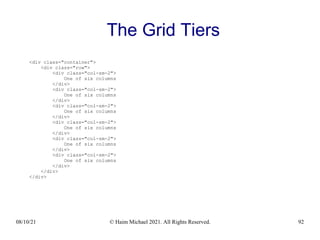
<div class="container">
<div class="row">
<div class="col-sm-2">
One of six columns
</div>
<div class="col-sm-2">
One of six columns
</div>
<div class="col-sm-2">
One of six columns
</div>
<div class="col-sm-2">
One of six columns
</div>
<div class="col-sm-2">
One of six columns
</div>
<div class="col-sm-2">
One of six columns
</div>
</div>
</div>
08/10/21 © Haim Michael 2021. All Rights Reserved. 93
The Grid Tiers
08/10/21 © Haim Michael 2021. All Rights Reserved. 94
The Grid Tiers
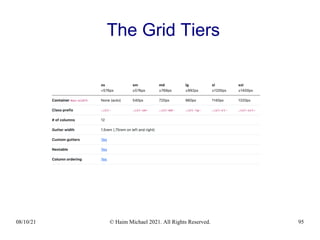
 The documentation includes a detailed table that describes
the supported tiers.
08/10/21 © Haim Michael 2021. All Rights Reserved. 95
The Grid Tiers
08/10/21 © Haim Michael 2021. All Rights Reserved. 96
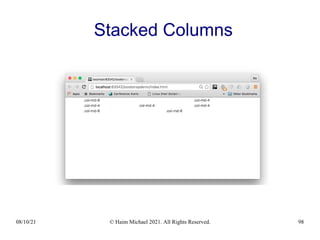
Stacked Columns
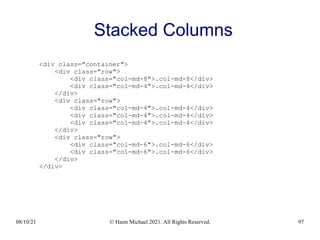
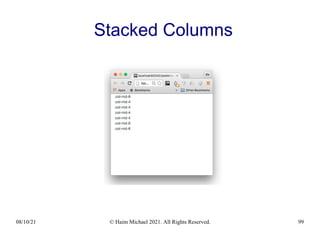
 When the device width is too small for having the columns
we created to apply we will have those columns stacked on
each other.
08/10/21 © Haim Michael 2021. All Rights Reserved. 97
Stacked Columns
<div class="container">
<div class="row">
<div class="col-md-8">.col-md-8</div>
<div class="col-md-4">.col-md-4</div>
</div>
<div class="row">
<div class="col-md-4">.col-md-4</div>
</div>
<div class="row">
<div class="col-md-6">.col-md-6</div>
</div>
</div>
08/10/21 © Haim Michael 2021. All Rights Reserved. 98
Stacked Columns
08/10/21 © Haim Michael 2021. All Rights Reserved. 99
Stacked Columns
08/10/21 © Haim Michael 2021. All Rights Reserved. 100
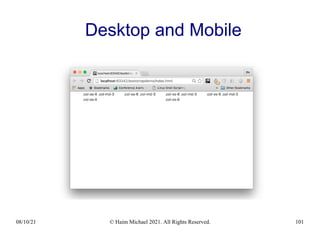
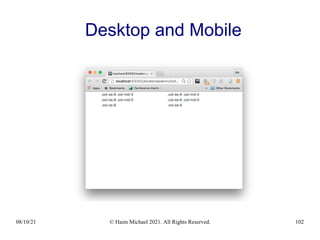
Desktop and Mobile
 If we don’t want our columns to be stacked in smaller
devices we can use the extra small and medium device grid
classes by adding the .col-xs-* and .col-md-* to the
columns.
08/10/21 © Haim Michael 2021. All Rights Reserved. 101
Desktop and Mobile
08/10/21 © Haim Michael 2021. All Rights Reserved. 102
Desktop and Mobile
08/10/21 © Haim Michael 2021. All Rights Reserved. 103
Themes
08/10/21 © Haim Michael 2021. All Rights Reserved. 104
Introduction
 Bootstrap themes are packages of HTML, CSS and
JavaScript code that provide styling, UI components and page
layouts you can use in your Bootstrap based website.
08/10/21 © Haim Michael 2021. All Rights Reserved. 105
Types of Themes
 When it comes to Bootstrap there are four different types of
themes.
 There are themes that modify the look and feel of Bootstrap’s
existing components, there are themes that add new
components and new page layouts, there are themes that do
both of the two, and there are themes that integrate with an
existing CMS, such as WordPress.
08/10/21 © Haim Michael 2021. All Rights Reserved. 106
Bootstrap Official Themes
 You can find them all organized and ready for purchase at
https://themes.getbootstrap.com
08/10/21 © Haim Michael 2021. All Rights Reserved. 107
Templates
08/10/21 © Haim Michael 2021. All Rights Reserved. 108
Introduction
 The bootstrap template is kind of a collection of single themed
pages.
 You can find many websites that sell ready to use Bootstarp
templates.
https://colorlib.com/wp/cat/bootstrap/
https://themeforest.net
https://startbootstrap.com/template-categories/all/
08/10/21 © Haim Michael 2021. All Rights Reserved. 109
Visual Designers
08/10/21 © Haim Michael 2021. All Rights Reserved. 110
Introduction
 There are many tools that simplify the creation of a Bootstrap
based web page, some of them are available for free, and
some of them are even available online.
08/10/21 © Haim Michael 2021. All Rights Reserved. 111
The Bootstrap Studio
 The Bootstrap studio is a powerful desktop application
for creating responsive websites using the Bootstrap
framework. You can try it online for free!
https://bootstrapstudio.io/
08/10/21 © Haim Michael 2021. All Rights Reserved. 112
The Bootstrap Build
 Bootstrap Build allows you to create Bootstrap themes
and Bootstrap templates!
https://bootstrap.build
08/10/21 © Haim Michael 2021. All Rights Reserved. 113
The Bootsnipp Website
 Bootsnipp is an element gallery for web designers and
web developers. We can use it for creating well designed
pages using the Bootstrap framework.
https://bootsnipp.com
08/10/21 © Haim Michael 2021. All Rights Reserved. 114
The Simbla Website
 The Simbla website allows us to develop web
applications and data driven websites without writing
code. It uses Bootstrap.
https://www.simbla.com
08/10/21 © Haim Michael 2021. All Rights Reserved. 115
Questions & Answers
Thanks for Your Time!
Haim Michael
haim.michael@lifemichael.com
+972+3+3726013 ext:700
life
michael

Bootstrap Jump Start

  • 1.
    Bootstrap Jump Start HaimMichael August 10th , 2021 All logos, trade marks and brand names used in this presentation belong to the respective owners. life michae l www.lifemichael.com
  • 2.
    08/10/21 © HaimMichael 2021. All Rights Reserved. 2 The XtremeJS Conference life michae l https://xtremejs.dev
  • 3.
    08/10/21 © HaimMichael 2021. All Rights Reserved. 3 Introduction
  • 4.
    08/10/21 © HaimMichael 2021. All Rights Reserved. 4 What is Twitter Bootstrap?  Twitter Bootstrap is a front end web development framework that provides us with the capability to develop a responsive front end in according with most of today common UI standard conventions.  The Twitter Bootstrap framework includes files in JavaScript, HTML and CSS. https://getbootstrap.com/
  • 5.
    08/10/21 © HaimMichael 2021. All Rights Reserved. 5 Responsive Web Pages  The front end we get when using the Twitter Bootstrap is responsive. Browsing using different devices with different screen sizes the content and its layout adjust automatically.
  • 6.
    08/10/21 © HaimMichael 2021. All Rights Reserved. 6 Awesome Websites  We can find many Bootstrap's based amazing websites as inspiration for the one we develop. https://colorlib.com/wp/bootstrap-websites/ https://www.awwwards.com/websites/bootstrap/ https://bootstrapbay.com/blog/built-with-bootstrap/
  • 7.
    08/10/21 © HaimMichael 2021. All Rights Reserved. 7 Popularity  Using the Twitter Bootstrap is very common all over the world. Both for web applications and for hybrid ones.
  • 8.
    08/10/21 © HaimMichael 2021. All Rights Reserved. 8 Popularity
  • 9.
    08/10/21 © HaimMichael 2021. All Rights Reserved. 9 Popularity  The trends.builtwith.com/docinfo/Twitter-Bootstrap provides detailed statistics about the usage of this framework.
  • 10.
    08/10/21 © HaimMichael 2021. All Rights Reserved. 10 Popularity  The https://w3techs.com/ website provides statistics about the use of various server side and client side technologies on the web.
  • 11.
    08/10/21 © HaimMichael 2021. All Rights Reserved. 11 Popularity  The google trends service at https://trends.google.com provides information about what the world is searching.
  • 12.
    08/10/21 © HaimMichael 2021. All Rights Reserved. 12 Vanilla JavaScript  As of version 5 the use of jQuery was removed, and the framework switched to vanilla JavaScript.
  • 13.
    08/10/21 © HaimMichael 2021. All Rights Reserved. 13 Responsive Font Sizes  RFS is a unit resizing engine that was initially developed to resize font sizes. RFS is also capable of rescaling basically every value for any css property with units. As of version 5 Bootstrap uses this engine. https://github.com/twbs/rfs
  • 14.
    08/10/21 © HaimMichael 2021. All Rights Reserved. 14 The Support for IE Was Dropped  As of Bootstrap 5.x, the support for Internet Explorer was dropped.  Following the removal of the support for IE, the JavaScript code no longer need to be compiled to ES5. It can be compiled to ES6. Thanks to that, the size of the files is smaller.  The removal of the support for IE enables the use of new features of JavaScript and CSS.
  • 15.
    08/10/21 © HaimMichael 2021. All Rights Reserved. 15 Amazing Icons  As of Bootstrap 5.x, the framework includes a brand new SVG icon library crafted carefully by Mark Otto, Bootstrap's co-founder. https://icons.getbootstrap.com/
  • 16.
    08/10/21 © HaimMichael 2021. All Rights Reserved. 16 Alternative Frameworks  Twitter Bootstrap is not alone. There are other alternative frameworks we can use: Foundation - http://foundation.zurb.com Gumby - http://gumbyframework.com Ground - http://groundworkcss.github.io/groundwork Zimit - http://firezenk.github.io/zimit/ Kickstrap – http://www.getkickstrap.com UI Kit – https://getuikit.com
  • 17.
    08/10/21 © HaimMichael 2021. All Rights Reserved. 17 Alternative Frameworks Materialize - https://materializecss.com Metro - https://themes.org.ua YUI Library - http://www.yuilibrary.com TailwindCSS - https://tailwindcss.com/ Bulma - https://bulma.io/ Pure - https://purecss.io/ MaterialUI - https://material-ui.com/ 66K Starts on Github Spectre - https://material-ui.com/
  • 18.
    08/10/21 © HaimMichael 2021. All Rights Reserved. 18 Alternative Frameworks LuxaCSS - https://luxacss.com/ MUI - https://www.muicss.com Milligram - https://milligram.io Cirrus - https://cirrus-ui.netlify.app Cardinal - https://cardinalcss.com Skeleton - http://getskeleton.com
  • 19.
    08/10/21 © HaimMichael 2021. All Rights Reserved. 19 Jump Start
  • 20.
    08/10/21 © HaimMichael 2021. All Rights Reserved. 20 Jump Start Template  You can find a basic template to start with at www.getbootstrap.com
  • 21.
    08/10/21 © HaimMichael 2021. All Rights Reserved. 21 Jump Start Template
  • 22.
    08/10/21 © HaimMichael 2021. All Rights Reserved. 22 The HTML5 Doc Type Declaration  The HTML5 doctype declaration <!DOCTYPE html> tells the web browser to treat the file in according with the HTML5 specification.
  • 23.
    08/10/21 © HaimMichael 2021. All Rights Reserved. 23 The charset Meta Data  The <meta charset="utf-8"> meta data element tells the web browser that UTF-8 is the encoding of this file.
  • 24.
    08/10/21 © HaimMichael 2021. All Rights Reserved. 24 The View Port Meta Data  The <meta name="viewport" content="width=device-width, initial-scale=1, shrink-to-fit=no"> meta data element tells the web browser that the page should be browsed as if its width is the same width of the device, with initial scale of 1. The user will be able to zoom in and out changing that scale.
  • 25.
    08/10/21 © HaimMichael 2021. All Rights Reserved. 25 The View Port Meta Data  The shrink-to-fil=no fixes a bug in iOS9 as described at http://kihlstrom.com/2015/shrink-to-fit-no-fixes-zoom-problem-in-ios-9 As of iOS 10 This Meta Element is not Needed
  • 26.
    08/10/21 © HaimMichael 2021. All Rights Reserved. 26 Internet Explorer Edge Mode  Using the <meta http-equiv="x-ua-compatible" content="ie=edge"> meta element we forces the internet explorer to render the content in the recent Edge mode. As of Bootstrap 5 This Meta Element is not Needed
  • 27.
    08/10/21 © HaimMichael 2021. All Rights Reserved. 27 The crossorigin Attribute  Using the crossorigin attribute inside the link element that points at the external CSS file means that a cross-origin request is performed, and no credential is sent.
  • 28.
    08/10/21 © HaimMichael 2021. All Rights Reserved. 28 The integrity Attribute  Using the integrity attribute allows the browser to check the file source to ensure that the code won't be loaded if the source has been manipulated.  When using bootstrap we should use the integrity attribute both inside the link and inside the script elements.
  • 29.
    08/10/21 © HaimMichael 2021. All Rights Reserved. 29 Components
  • 30.
    08/10/21 © HaimMichael 2021. All Rights Reserved. 30 Introduction  When using the Twitter Bootstrap framework there is a huge range of ready to use components.
  • 31.
    08/10/21 © HaimMichael 2021. All Rights Reserved. 31 Buttons Group  We can place a series of buttons into the same group. Doing so will render these buttons together in one group. <button class="btn btn-primary">Simple Button</button>
  • 32.
    08/10/21 © HaimMichael 2021. All Rights Reserved. 32 Buttons Group  We can place a series of buttons in a group. The buttons will be rendered together in one group. <div class="btn-group" role="group"> <button type="button" class="btn btn-secondary">Wind</button> <button type="button" class="btn btn-secondary">Water</button> <button type="button" class="btn btn-secondary">Fire</button> </div>
  • 33.
    08/10/21 © HaimMichael 2021. All Rights Reserved. 33 Button Dropdown  We can place a button together with a drop down menu by using the btn-group and dropdown-menu CSS classes.  Each item in the drop down menu will be created using the dropdown-item CSS class.
  • 34.
    08/10/21 © HaimMichael 2021. All Rights Reserved. 34 Button Dropdown <div class="btn-group"> <button type="button" class="btn btn-secondary dropdown-toggle" data-toggle="dropdown" aria-haspopup="true" aria-expanded="false"> File </button> <div class="dropdown-menu"> <a class="dropdown-item" href="#">New</a> <a class="dropdown-item" href="#">Save As</a> <a class="dropdown-item" href="#">Open</a> <div class="dropdown-divider"></div> <a class="dropdown-item" href="#">Simple Link</a> </div> </div>
  • 35.
    08/10/21 © HaimMichael 2021. All Rights Reserved. 35 Button Dropdown
  • 36.
    08/10/21 © HaimMichael 2021. All Rights Reserved. 36 Forms  Bootstrap provides us with controls, special layouts for forms and unique custom components for creating different types of forms.
  • 37.
    08/10/21 © HaimMichael 2021. All Rights Reserved. 37 Forms <form> <fieldset class="form-group"> <label for="emailinput">Email address</label> <input type="email" class="form-control" id="emailinput" placeholder="Enter email address"> <small class="text-muted"> Your email won't be shared with others. </small> </fieldset> <fieldset class="form-group"> <label for="passwordinput">Password</label> <input type="password" class="form-control" id="passwordinput" placeholder="Enter password"> </fieldset> <button type="submit" class="btn btn-primary">Submit</button> </form>
  • 38.
    08/10/21 © HaimMichael 2021. All Rights Reserved. 38 Forms
  • 39.
    08/10/21 © HaimMichael 2021. All Rights Reserved. 39 Forms  Bootstrap provides us with a grid we can use for placing the controls.
  • 40.
    08/10/21 © HaimMichael 2021. All Rights Reserved. 40 Forms <form> <div class="form-group row"> <label for="inputemail" class="col-sm-2 form-control-label"> Email </label> <div class="col-sm-10"> <input type="email" class="form-control" id="inputemail" placeholder="Email"> </div> </div> <div class="form-group row"> <label for="inputpassword" class="col-sm-2 form-control-label"> Password </label> <div class="col-sm-10"> <input type="password" class="form-control" id="inputpassword" placeholder="Password"> </div> </div> <div class="form-group row"> <div class="col-sm-offset-2 col-sm-10"> <button type="submit" class="btn btn-secondary">Sign in</button> </div> </div> </form>
  • 41.
    08/10/21 © HaimMichael 2021. All Rights Reserved. 41 Forms
  • 42.
    08/10/21 © HaimMichael 2021. All Rights Reserved. 42 Input Group  Using the input-group CSS class we can place together an input element that functions as a text field with a button or a span element. <div class="input-group"> <input type="text" class="form-control" placeholder="Member Username" aria-describedby="useremail"> <span class="input-group-addon" id="useremail">@gmail.com</span> </div>
  • 43.
    08/10/21 © HaimMichael 2021. All Rights Reserved. 43 Jumbotron  We will usually use the jumbotron for displaying a key marketing message on our website.
  • 44.
    08/10/21 © HaimMichael 2021. All Rights Reserved. 44 Jumbotron <div class="jumbotron"> <h1 class="display-3">Hello, world!</h1> <p class="lead">This is a simple hero unit, a simple jumbotron-style component for calling extra attention to featured content or information.</p> <hr class="m-y-2"> <p>It uses utility classes for typography and spacing to space content out within the larger container.</p> <p class="lead"> <a class="btn btn-primary btn-lg" href="#" role="button">Learn more</a> </p> </div>
  • 45.
    08/10/21 © HaimMichael 2021. All Rights Reserved. 45 Jumbotron
  • 46.
    08/10/21 © HaimMichael 2021. All Rights Reserved. 46 Labels  The label is an adaptive tag for adding some context to specific text. <h1>We Teach <span class="label label-default">Programming</span></h1>
  • 47.
    08/10/21 © HaimMichael 2021. All Rights Reserved. 47 Alerts  We can create various contextual feedback messages for typical user actions. <div class="alert alert-warning alert-dismissible fade in" role="alert"> <button type="button" class="close" data-dismiss="alert" aria-label="Close"> <span aria-hidden="true">&times;</span> </button> <strong>Becarefule!</strong> You should debug your code! </div>
  • 48.
    08/10/21 © HaimMichael 2021. All Rights Reserved. 48 Cards  The card is a flexible and extensible content container. It includes options for header and footer, as well as a wide variety of content, contextual background colors, and powerful display options.
  • 49.
    08/10/21 © HaimMichael 2021. All Rights Reserved. 49 Cards <div class="row"> <div class="col-sm-6"> <div class="card card-block"> <h3 class="card-title">Learn Swift</h3> <p class="card-text">Bla bla bla. Bla bla bla. Bla bla bla. Bla bla bla. Bla bla bla. Bla bla bla. Bla bla bla. Bla bla bla.</p> <a href="#" class="btn btn-primary">More Info</a> </div> </div> <div class="col-sm-6"> <div class="card card-block"> <h3 class="card-title">Learn Scala</h3> <p class="card-text">Bla bla bla. Bla bla bla. Bla bla bla. Bla bla bla. Bla bla bla. Bla bla bla. Bla bla bla. Bla bla bla.</p> <a href="#" class="btn btn-primary">More Info</a> </div> </div> </div>
  • 50.
    08/10/21 © HaimMichael 2021. All Rights Reserved. 50 Cards
  • 51.
    08/10/21 © HaimMichael 2021. All Rights Reserved. 51 Nav  Bootstrap provides us with various types of navigation components.  We can create simple links either horizontal or vertical, we can create tabs or pills. We can have our pills stacked on each other. We can add dropdowns to our tabs or to our pills.
  • 52.
    08/10/21 © HaimMichael 2021. All Rights Reserved. 52 Nav <ul class="nav nav-tabs" role="tablist"> <li class="nav-item"> <a class="nav-link active" data-toggle="tab" href="#home" role="tab">Home</a> </li> <li class="nav-item"> <a class="nav-link" data-toggle="tab" href="#products" role="tab">Products</a> </li> <li class="nav-item"> <a class="nav-link" data-toggle="tab" href="#about" role="tab">About</a> </li> <li class="nav-item"> <a class="nav-link" data-toggle="tab" href="#contact" role="tab">Contact</a> </li> </ul> <div class="tab-content"> <div class="tab-pane active" id="home" role="tabpanel">home screen...</div> <div class="tab-pane" id="products" role="tabpanel">our products are...</div> <div class="tab-pane" id="about" role="tabpanel">about our company...</div> <div class="tab-pane" id="contact" role="tabpanel">contact us at...</div> </div>
  • 53.
    08/10/21 © HaimMichael 2021. All Rights Reserved. 53 Nav
  • 54.
    08/10/21 © HaimMichael 2021. All Rights Reserved. 54 Navbar  The navbar is a simple wrapper for putting together the logo, the navigation and other elements.
  • 55.
    08/10/21 © HaimMichael 2021. All Rights Reserved. 55 Navbar <nav class="navbar navbar-light bg-faded"> <a class="navbar-brand" href="#">life michael</a> <ul class="nav navbar-nav"> <li class="nav-item active"> <a class="nav-link" href="#">Home</a> </li> <li class="nav-item"> <a class="nav-link" href="#">Courses</a> </li> <li class="nav-item"> <a class="nav-link" href="#">About</a> </li> <li class="nav-item"> <a class="nav-link" href="#">Contact</a> </li> </ul> <form class="form-inline pull-xs-right"> <input class="form-control" type="text" placeholder="Search"> <button class="btn btn-success-outline" type="submit">Search</button> </form> </nav>
  • 56.
    08/10/21 © HaimMichael 2021. All Rights Reserved. 56 Navbar
  • 57.
    08/10/21 © HaimMichael 2021. All Rights Reserved. 57 Breadcrumb  This component indicates about the current page location within the navigation hierarchy. <ol class="breadcrumb" style="margin-bottom: 5px;"> <li><a href="#">Home</a></li> <li><a href="#">Professional Courses</a></li> <li class="active">Android Platform</li> </ol>
  • 58.
    08/10/21 © HaimMichael 2021. All Rights Reserved. 58 Pagination  This component provides us with the capability to display pages the user can click on.
  • 59.
    08/10/21 © HaimMichael 2021. All Rights Reserved. 59 Pagination <nav> <ul class="pagination"> <li class="page-item"> <a class="page-link" href="#" aria-label="Previous"> <span aria-hidden="true">&laquo;</span> <span class="sr-only">Previous</span> </a> </li> <li class="page-item"><a class="page-link" href="#">1</a></li> <li class="page-item"><a class="page-link" href="#">2</a></li> <li class="page-item"><a class="page-link" href="#">3</a></li> <li class="page-item"><a class="page-link" href="#">4</a></li> <li class="page-item"><a class="page-link" href="#">5</a></li> <li class="page-item"><a class="page-link" href="#">6</a></li> <li class="page-item"><a class="page-link" href="#">7</a></li> <li class="page-item"> <a class="page-link" href="#" aria-label="Next"> <span aria-hidden="true">&raquo;</span> <span class="sr-only">Next</span> </a> </li> </ul> </nav>
  • 60.
    08/10/21 © HaimMichael 2021. All Rights Reserved. 60 Pagination
  • 61.
    08/10/21 © HaimMichael 2021. All Rights Reserved. 61 Pager  This component provides us with the capability to display simple next and previous buttons. <nav> <ul class="pager"> <li><a href="#">Previous</a></li> <li><a href="#">Next</a></li> </ul> </nav>
  • 62.
    08/10/21 © HaimMichael 2021. All Rights Reserved. 62 Progress  This component displays a simple progress bar on screen. <progress class="progress progress-striped progress-animated" value="25" max="100">35%</progress>
  • 63.
    08/10/21 © HaimMichael 2021. All Rights Reserved. 63 List Group  Using this component we can display both simple and complex lists of elements.
  • 64.
    08/10/21 © HaimMichael 2021. All Rights Reserved. 64 List Group <ul class="list-group"> <li class="list-group-item"> <span class="label label-default label-pill pull-xs-right">8</span> Israel </li> <li class="list-group-item"> <span class="label label-default label-pill pull-xs-right">42</span> France </li> <li class="list-group-item"> <span class="label label-default label-pill pull-xs-right">56</span> Canada </li> </ul>
  • 65.
    08/10/21 © HaimMichael 2021. All Rights Reserved. 65 List Group
  • 66.
    08/10/21 © HaimMichael 2021. All Rights Reserved. 66 Modal  The Modal component is a streamlined flexible dialog prompt.
  • 67.
    08/10/21 © HaimMichael 2021. All Rights Reserved. 67 Modal <div class="modal fade" id="myModal" tabindex="-1" role="dialog" aria-labelledby="myModalLabel" aria-hidden="true"> <div class="modal-dialog" role="document"> <div class="modal-content"> <div class="modal-header"> <button type="button" class="close" data-dismiss="modal" aria-label="Close"> <span aria-hidden="true">&times;</span> </button> <h4 class="modal-title" id="myModalLabel"> Our Dialog Title </h4> </div> <div class="modal-body"> Bla bla bla. Bla bla bla. Bla bla bla. Bla bla bla. Bla bla </div> <div class="modal-footer"> <button type="button" class="btn btn-secondary" data-dismiss="modal">Close</button> <button type="button" class="btn btn-primary"> Save changes</button> </div> </div> </div> </div>
  • 68.
    08/10/21 © HaimMichael 2021. All Rights Reserved. 68 Modal
  • 69.
    08/10/21 © HaimMichael 2021. All Rights Reserved. 69 Tooltips  Using the tooltip component we can display small tooltips next to specific elements on our page.
  • 70.
    08/10/21 © HaimMichael 2021. All Rights Reserved. 70 Tooltips <button type="button" class="btn btn-secondary" data-toggle="tooltip" data-placement="top" title="tooltip text on top"> Tooltip on top </button> <button type="button" class="btn btn-secondary" data-toggle="tooltip" data-placement="right" title="tooltip text on right"> Tooltip on right </button> <button type="button" class="btn btn-secondary" data-toggle="tooltip" data-placement="bottom" title="tooltip text on bottom"> Tooltip on bottom </button> <button type="button" class="btn btn-secondary" data-toggle="tooltip" data-placement="left" title="tooltip text on left"> Tooltip on left </button>
  • 71.
    08/10/21 © HaimMichael 2021. All Rights Reserved. 71 Tooltips
  • 72.
    08/10/21 © HaimMichael 2021. All Rights Reserved. 72 Popover  The popover component allows us to display overlay content next to any element on our page.  In order to use this component we must include the tether.js before bootstrap.js. You can find the tether.js file at https://github.com/HubSpot/tether
  • 73.
    08/10/21 © HaimMichael 2021. All Rights Reserved. 73 Popover <button type="button" class="btn btn-lg btn-danger" data-toggle="popover" title="Popover Title" data-content="Bla bla bla bla"> Click Here </button>
  • 74.
    08/10/21 © HaimMichael 2021. All Rights Reserved. 74 Collapse  Using the collapse plugin we can toggle content on a web page.
  • 75.
    08/10/21 © HaimMichael 2021. All Rights Reserved. 75 Collapse <p> <a class="btn btn-primary" data-toggle="collapse" href="#phpcollapse" aria-expanded="false" aria-controls="phpcollapse"> PHP Rocks </a> <button class="btn btn-primary" type="button" data-toggle="collapse" data-target="#javacollapse" aria-expanded="false" aria-controls="javacollapse"> Java 4ever </button> </p> <div class="collapse" id="phpcollapse"> <div class="card card-block"> We love PHP! It is the simplest programming language for the server side! </div> </div> <div class="collapse" id="javacollapse"> <div class="card card-block"> We love Java! It is the greatest programming language in all times! </div> </div>
  • 76.
    08/10/21 © HaimMichael 2021. All Rights Reserved. 76 Collapse
  • 77.
    08/10/21 © HaimMichael 2021. All Rights Reserved. 77 Carousel  Using the carousel component we can get a magnificent slideshow.
  • 78.
    08/10/21 © HaimMichael 2021. All Rights Reserved. 78 Carousel <div id="carousel-example-generic" class="carousel slide" data-ride="carousel"> <ol class="carousel-indicators"> <li data-target="#carousel-example-generic" data-slide-to="0" class="active"></li> <li data-target="#carousel-example-generic" data-slide-to="1"></li> <li data-target="#carousel-example-generic" data-slide-to="2"></li> </ol> <div class="carousel-inner" role="listbox"> <div class="carousel-item active"> <img src="images/slide1.jpg" alt="First slide"> </div> <div class="carousel-item"> <img src="images/slide2.jpg" alt="Second slide"> </div> <div class="carousel-item"> <img src="images/slide3.jpg" alt="Third slide"> </div> </div> <a class="left carousel-control" href="#carousel-example-generic" role="button" data-slide="prev"> <span class="icon-prev" aria-hidden="true"></span> <span class="sr-only">Previous</span> </a> <a class="right carousel-control" href="#carousel-example-generic" role="button" data-slide="next"> <span class="icon-next" aria-hidden="true"></span> <span class="sr-only">Next</span> </a> </div>
  • 79.
    08/10/21 © HaimMichael 2021. All Rights Reserved. 79 Carousel
  • 80.
    08/10/21 © HaimMichael 2021. All Rights Reserved. 80 Images
  • 81.
    08/10/21 © HaimMichael 2021. All Rights Reserved. 81 Introduction  Bootstrap provides us with CSS classes that assist us with the inclusion of images in the web page we develop.
  • 82.
    08/10/21 © HaimMichael 2021. All Rights Reserved. 82 Image Shapes  Using the img-rounded, img-circle and the img- thumbnail CSS classes we can create styled images shaped with rounded corners, as a circle or as a simple rectangular thumbnail.
  • 83.
    08/10/21 © HaimMichael 2021. All Rights Reserved. 83 Image Shapes <div class="row"> <div class="col-sm-6"> we love earth! </div> <div class="col-sm-6"> <img src="earth.jpg" class="img-circle img-fluid" alt="Responsive image"> </div> </div>
  • 84.
    08/10/21 © HaimMichael 2021. All Rights Reserved. 84 Image Shapes
  • 85.
    08/10/21 © HaimMichael 2021. All Rights Reserved. 85 Layout
  • 86.
    08/10/21 © HaimMichael 2021. All Rights Reserved. 86 Introduction  Bootstrap provides us with a powerful grid system we can use for setting the layouts we want for each and every platform we target.  The grid system is based on a 12 column layout, and has multiple tiers. Each tier refers a specific media query range.
  • 87.
    08/10/21 © HaimMichael 2021. All Rights Reserved. 87 Introduction  Bootstrap provides us with CSS classes we can use for setting the containers, the rows and the columns we want to have in our layout. https://getbootstrap.com/docs/5.0/layout/grid/
  • 88.
    08/10/21 © HaimMichael 2021. All Rights Reserved. 88 Rows  The rows are horizontal groups of columns that ensure our columns are lined up properly.  The content is placed within columns. The columns are the only children the rows can have.
  • 89.
    08/10/21 © HaimMichael 2021. All Rights Reserved. 89 Columns  The column CSS class we are using indicates about the number of columns we would like to use out of the possible 12 columns each row has (e.g. using the .col-sm-4 CSS class means that we want to have a three equal width columns row).
  • 90.
    08/10/21 © HaimMichael 2021. All Rights Reserved. 90 The Grid Tiers  There are six grid tiers. Each tier refers a specific responsive breakpoint (extra small, small, medium, large and extra large).  The tiers are based on minimum widths. They apply to the one tier they specifically refer, and all of the other ones that above it.
  • 91.
    08/10/21 © HaimMichael 2021. All Rights Reserved. 91 The Grid Tiers <div class="container"> <div class="row"> <div class="col-sm-4"> One of three columns </div> <div class="col-sm-4"> One of three columns </div> <div class="col-sm-4"> One of three columns </div> </div> </div> <div class="container"> <div class="row"> <div class="col-sm-3"> One of four columns </div> <div class="col-sm-3"> One of four columns </div> <div class="col-sm-3"> One of four columns </div> <div class="col-sm-3"> One of four columns </div> </div> </div>
  • 92.
    08/10/21 © HaimMichael 2021. All Rights Reserved. 92 The Grid Tiers <div class="container"> <div class="row"> <div class="col-sm-2"> One of six columns </div> <div class="col-sm-2"> One of six columns </div> <div class="col-sm-2"> One of six columns </div> <div class="col-sm-2"> One of six columns </div> <div class="col-sm-2"> One of six columns </div> <div class="col-sm-2"> One of six columns </div> </div> </div>
  • 93.
    08/10/21 © HaimMichael 2021. All Rights Reserved. 93 The Grid Tiers
  • 94.
    08/10/21 © HaimMichael 2021. All Rights Reserved. 94 The Grid Tiers  The documentation includes a detailed table that describes the supported tiers.
  • 95.
    08/10/21 © HaimMichael 2021. All Rights Reserved. 95 The Grid Tiers
  • 96.
    08/10/21 © HaimMichael 2021. All Rights Reserved. 96 Stacked Columns  When the device width is too small for having the columns we created to apply we will have those columns stacked on each other.
  • 97.
    08/10/21 © HaimMichael 2021. All Rights Reserved. 97 Stacked Columns <div class="container"> <div class="row"> <div class="col-md-8">.col-md-8</div> <div class="col-md-4">.col-md-4</div> </div> <div class="row"> <div class="col-md-4">.col-md-4</div> <div class="col-md-4">.col-md-4</div> <div class="col-md-4">.col-md-4</div> </div> <div class="row"> <div class="col-md-6">.col-md-6</div> <div class="col-md-6">.col-md-6</div> </div> </div>
  • 98.
    08/10/21 © HaimMichael 2021. All Rights Reserved. 98 Stacked Columns
  • 99.
    08/10/21 © HaimMichael 2021. All Rights Reserved. 99 Stacked Columns
  • 100.
    08/10/21 © HaimMichael 2021. All Rights Reserved. 100 Desktop and Mobile  If we don’t want our columns to be stacked in smaller devices we can use the extra small and medium device grid classes by adding the .col-xs-* and .col-md-* to the columns.
  • 101.
    08/10/21 © HaimMichael 2021. All Rights Reserved. 101 Desktop and Mobile
  • 102.
    08/10/21 © HaimMichael 2021. All Rights Reserved. 102 Desktop and Mobile
  • 103.
    08/10/21 © HaimMichael 2021. All Rights Reserved. 103 Themes
  • 104.
    08/10/21 © HaimMichael 2021. All Rights Reserved. 104 Introduction  Bootstrap themes are packages of HTML, CSS and JavaScript code that provide styling, UI components and page layouts you can use in your Bootstrap based website.
  • 105.
    08/10/21 © HaimMichael 2021. All Rights Reserved. 105 Types of Themes  When it comes to Bootstrap there are four different types of themes.  There are themes that modify the look and feel of Bootstrap’s existing components, there are themes that add new components and new page layouts, there are themes that do both of the two, and there are themes that integrate with an existing CMS, such as WordPress.
  • 106.
    08/10/21 © HaimMichael 2021. All Rights Reserved. 106 Bootstrap Official Themes  You can find them all organized and ready for purchase at https://themes.getbootstrap.com
  • 107.
    08/10/21 © HaimMichael 2021. All Rights Reserved. 107 Templates
  • 108.
    08/10/21 © HaimMichael 2021. All Rights Reserved. 108 Introduction  The bootstrap template is kind of a collection of single themed pages.  You can find many websites that sell ready to use Bootstarp templates. https://colorlib.com/wp/cat/bootstrap/ https://themeforest.net https://startbootstrap.com/template-categories/all/
  • 109.
    08/10/21 © HaimMichael 2021. All Rights Reserved. 109 Visual Designers
  • 110.
    08/10/21 © HaimMichael 2021. All Rights Reserved. 110 Introduction  There are many tools that simplify the creation of a Bootstrap based web page, some of them are available for free, and some of them are even available online.
  • 111.
    08/10/21 © HaimMichael 2021. All Rights Reserved. 111 The Bootstrap Studio  The Bootstrap studio is a powerful desktop application for creating responsive websites using the Bootstrap framework. You can try it online for free! https://bootstrapstudio.io/
  • 112.
    08/10/21 © HaimMichael 2021. All Rights Reserved. 112 The Bootstrap Build  Bootstrap Build allows you to create Bootstrap themes and Bootstrap templates! https://bootstrap.build
  • 113.
    08/10/21 © HaimMichael 2021. All Rights Reserved. 113 The Bootsnipp Website  Bootsnipp is an element gallery for web designers and web developers. We can use it for creating well designed pages using the Bootstrap framework. https://bootsnipp.com
  • 114.
    08/10/21 © HaimMichael 2021. All Rights Reserved. 114 The Simbla Website  The Simbla website allows us to develop web applications and data driven websites without writing code. It uses Bootstrap. https://www.simbla.com
  • 115.
    08/10/21 © HaimMichael 2021. All Rights Reserved. 115 Questions & Answers Thanks for Your Time! Haim Michael haim.michael@lifemichael.com +972+3+3726013 ext:700 life michael