Developer
Bootstrap frameworkBootstrap framework
front-end framework for developing responsive
http://getbootstrap.com/
Latest version v3.1.1
Presented by : vison sunon
Developer
Getting started
Bootstrap source code
bootstrap/
├── css/
│ ├── bootstrap.css
│ ├── bootstrap.min.css
│ ├── bootstrap-theme.css
│ └── bootstrap-theme.min.css
├── js/
│ ├── bootstrap.js
│ └── bootstrap.min.js
└── fonts/
├── glyphicons-halflings-regular.eot
├── glyphicons-halflings-regular.svg
├── glyphicons-halflings-regular.ttf
└── glyphicons-halflings-regular.woff
-----------------------------------------------------
bootstrap/
├── less/
├── js/
├── fonts/
├── dist/
│ ├── css/
│ ├── js/
│ └── fonts/
└── docs/
└── examples/
<!DOCTYPE html>
<html lang="en">
<head>
<meta charset="utf-8">
<meta http-equiv="X-UA-Compatible" content="IE=edge">
<meta name="viewport" content="width=device-width, initial-scale=1">
<title>Bootstrap 101 Template</title>
<!-- Bootstrap -->
<link href="css/bootstrap.min.css" rel="stylesheet">
<!-- HTML5 Shim and Respond.js IE8 support of HTML5 elements and media queries -->
<!-- WARNING: Respond.js doesn't work if you view the page via file:// -->
<!--[if lt IE 9]>
<script src="https://oss.maxcdn.com/libs/html5shiv/3.7.0/html5shiv.js"></script>
<script src="https://oss.maxcdn.com/libs/respond.js/1.4.2/respond.min.js"></script>
<![endif]-->
</head>
<body>
<h1>Hello, world!</h1>
<!-- jQuery (necessary for Bootstrap's JavaScript plugins) -->
<script src="https://ajax.googleapis.com/ajax/libs/jquery/1.11.0/jquery.min.js"></script>
<!-- Include all compiled plugins (below), or include individual files as needed -->
<script src="js/bootstrap.min.js"></script>
</body>
</html>
Developer
CDN
<!-- Latest compiled and minified CSS -->
<link rel="stylesheet" href="//netdna.bootstrapcdn.com/bootstrap/3.1.1/css/bootstrap.min.css">
<!-- Optional theme -->
<link rel="stylesheet" href="//netdna.bootstrapcdn.com/bootstrap/3.1.1/css/bootstrap-theme.min.css">
<!-- Latest compiled and minified JavaScript -->
<script src="//netdna.bootstrapcdn.com/bootstrap/3.1.1/js/bootstrap.min.js"></script>
Developer
Browser and device support
Chrome Firefox
Internet
Explorer
Opera Safari
Android Supported
Not
Supported
N/A
Not
Supported
N/A
iOS Supported N/A
Not
Supported
Supported
Mac OS X Supported Supported Supported Supported
Windows Supported Supported Supported Supported
Not
Supported
Developer
How to use
• CSS
• Components
• Javascript
• Customize
Developer
CSS
Overview
<!DOCTYPE html>
<html lang="en">
...
</html>
Mobile
----------------------------------------------------
<meta name="viewport"
content="width=device-width, initial-
scale=1">
- disable zooming
<meta name="viewport"
content="width=device-width, initial-scale=1,
maximum-scale=1, user-scalable=no">
Containers
----------------------------------------------------
<div class="container">
...
</div>
oGrid system
oTypography
oCode
oTables
oForms
oButtons
oImages
oHelper classes
oResponsive utilities
oUsing Less
oUsing Sass
Developer
Grid system
Introduction
12 columns
Rows must be placed within a .container
(fixed-width) or .container-fluid (full-width)
for proper alignment and padding.
Use rows to create horizontal groups of
columns.
Extra small
devices
Phones
(<768px)
Small devices
Tablets
(≥768px)
Medium
devices
Desktops
(≥992px)
Large devices
Desktops
(≥1200px)
Grid behavior
Horizontal at
all times
Collapsed to start, horizontal above breakpoints
Container
width
None (auto) 750px 970px 1170px
Class prefix .col-xs- .col-sm- .col-md- .col-lg-
# of columns 12
Column width Auto 60px 78px 95px
Gutter width 30px (15px on each side of a column)
Nestable Yes
Offsets Yes
Column
ordering
Yes
Developer
Grid Example
<div class="container">
<div class="row">
...
</div>
</div>
<div class="container-fluid">
<div class="row">
...
</div>
</div>
<div class="container">
<div class="row">
<div class="col-md-8 col-sm-6 col-xs-6 ">.col-md-8</div>
<div class="col-md-4 col-sm-6 col-xs-6">.col-md-4</div>
</div>
</div>
.col-md-8 .col-md-4
.col-
md-1
.col-
md-1
.col-
md-1
.col-
md-1
.col-
md-1
.col-
md-1
.col-
md-1
.col-
md-1
.col-
md-1
.col-
md-1
.col-
md-1
.col-
md-1
Example: Mobile, tablet, desktop
<div class="row">
<div class="col-xs-12 col-sm-6 col-md-8">.col-xs-12 .col-sm-6 .col-md-8</div>
<div class="col-xs-6 col-md-4">.col-xs-6 .col-md-4</div>
</div>
. col-xs-12 .col-sm-6 .col-md-8 . col-xs-6 .col-md-4
Developer
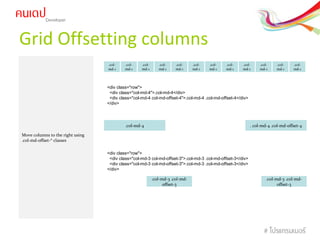
Grid Offsetting columns
.col-
md-1
.col-
md-1
.col-
md-1
.col-
md-1
.col-
md-1
.col-
md-1
.col-
md-1
.col-
md-1
.col-
md-1
.col-
md-1
.col-
md-1
.col-
md-1
<div class="row">
<div class="col-md-4">.col-md-4</div>
<div class="col-md-4 col-md-offset-4">.col-md-4 .col-md-offset-4</div>
</div>
. col-md-4 .col-md-offset-4.col-md-4
Move columns to the right using
.col-md-offset-* classes
<div class="row">
<div class="col-md-3 col-md-offset-3">.col-md-3 .col-md-offset-3</div>
</div>
.col-md-3 .col-md-
offset-3
.col-md-3 .col-md-
offset-3
Developer
Grid Nesting columns
.col-
md-1
.col-
md-1
.col-
md-1
.col-
md-1
.col-
md-1
.col-
md-1
.col-
md-1
.col-
md-1
.col-
md-1
.col-
md-1
.col-
md-1
.col-
md-1
<div class="row">
<div class="col-md-9">
Level 1: .col-md-9
<div class="row">
<div class="col-md-6">
Level 2: .col-md-6
</div>
<div class="col-md-6">
Level 2: .col-md-6
</div>
</div>
</div>
</div>
To nest your content with the
default grid, add a new .row and
set of .col-md-* columns within an
existing .col-md-* column. Nested
rows should include a set of
columns that add up to 12 or less.
.col-md-6 .col-md-6
.col-md-9
Developer
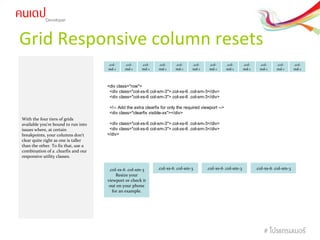
Grid Responsive column resets
With the four tiers of grids
available you're bound to run into
issues where, at certain
breakpoints, your columns don't
clear quite right as one is taller
than the other. To fix that, use a
combination of a .clearfix and our
responsive utility classes.
.col-
md-1
.col-
md-1
.col-
md-1
.col-
md-1
.col-
md-1
.col-
md-1
.col-
md-1
.col-
md-1
.col-
md-1
.col-
md-1
.col-
md-1
.col-
md-1
<div class="row">
<div class="col-xs-6 col-sm-3">.col-xs-6 .col-sm-3</div>
<!-- Add the extra clearfix for only the required viewport -->
<div class="clearfix visible-xs"></div>
<div class="col-xs-6 col-sm-3">.col-xs-6 .col-sm-3</div>
</div>
.col-xs-6 .col-sm-3
Resize your
viewport or check it
out on your phone
for an example.
.col-xs-6 .col-sm-3 .col-xs-6 .col-sm-3 .col-xs-6 .col-sm-3
Developer
Media queries
/* Large desktops and laptops */
@media (min-width: 1200px) {
}
/* Portrait tablets and medium desktops */
@media (min-width: 992px) and (max-width: 1199px) {
}
/* Portrait tablets and small desktops */
@media (min-width: 768px) and (max-width: 991px) {
}
/* Landscape phones and portrait tablets */
@media (max-width: 767px) {
}
/* Landscape phones and smaller */
@media (max-width: 480px) {
}
/* Extra Small */
@media(max-width:767px){}
/* Small */
@media(min-width:768px) and (max-width:991px){}
/* Medium */
@media(min-width:992px) and (max-width:1199px){}
/* Large */
@media(min-width:1200px){}
Developer
Other
oTypography
oCode
oTables
oForms
oButtons
oImages
oHelper classes
oResponsive utilities
oUsing Less
oUsing Sass
Developer
Helper classes
• Contextual colors
• Contextual backgrounds
• Close icon
• Carets
• Quick floats
• Center content blocks
• Clearfix
• Showing and hiding content
• Screen reader content
• Image replacement
Developer
Responsive utilities
Extra small devices Phones
(<768px)
Small devices Tablets
(≥768px)
Medium devices Desktops
(≥992px)
Large devices Desktops
(≥1200px)
.visible-xs Visible Hidden Hidden Hidden
.visible-sm Hidden Visible Hidden Hidden
.visible-md Hidden Hidden Visible Hidden
.visible-lg Hidden Hidden Hidden Visible
.hidden-xs Hidden Visible Visible Visible
.hidden-sm Visible Hidden Visible Visible
.hidden-md Visible Visible Hidden Visible
.hidden-lg Visible Visible Visible Hidden
Available classes
Class Browser Print
.visible-print Hidden Visible
.hidden-print Visible Hidden
Print classes
Developer
LESS CSS
LESS CSS เป็นการเขียน
CSS ที่เรียกว่า CSS
Preprocessors หมายถึง
ต้องมีการ Process ก่อนถึง
จะใช้งานได้
LESS CSS จะช่วยนำา
เทคนิคในภาษา
Programming เข้ามาร่วม
ในการเขียน CSS ซึ่งจะ
ทำาให้โค้ดที่เราเขียนเป็น
ระเบียบ และนำามาใช้ใหม่
ได้ง่ายขึ้น
1. การกำาหนดตัวแปร (Variables)
2. การกำาหนด Property (Mixins)
3. การเขียน Selector แบบเป็นชั้น ๆ (Nested Rules)
4. การแก้ไขค่าด้วยการบวกลบคูณหาร (Functions &
Operations)
Developer
LESS variable
@maincolor: #7d2717;
#header { color: @maincolor; }
h2 { color: @maincolor; }
footer h3 { color: @maincolor; }
#header { color: #7d2717; }
h2 { color: #7d2717; }
footer h3 { color: #7d2717; }
LESS
Out put
Developer
.bordered {
border-top: dotted 1px black;
border-bottom: solid 2px black;
}
.box{
. bordered ;
}
Developer
Components
• Glyphicons
• Dropdowns
• Button groups
• Button dropdowns
• Input groups
• Navs
• Navbar
• Breadcrumbs
• Pagination
• Labels
• Badges
• Jumbotron
• Page header
• Thumbnails
• Alerts
• Progress bars
• Media object
• List group
• Panels
• Wells
Developer
Javascript
• Overview
• Transitions
• Modal
• Dropdown
• Scrollspy
• Tab
• Tooltip
• Popover
• Alert
• Button
• Collapse
• Carousel
• Affix
Developer
Customize and download
• Common CSS
• Components
• JavaScript components
• Utilities
• jQuery plugins
Developer
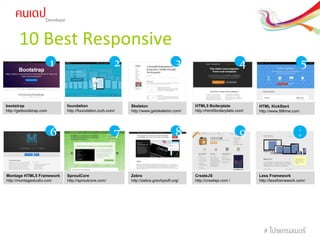
10 Best Responsive
HTML5 Boilerplate
http://html5boilerplate.com/
foundation
http://foundation.zurb.com/
Skeleton
http://www.getskeleton.com/
HTML KickStart
http://www.99lime.com
Montage HTML5 Framework
http://montagestudio.com
SproutCore
http://sproutcore.com/
Zebra
http://zebra.gravitysoft.org/
bootstrap
http://getbootstrap.com
CreateJS
http://createjs.com /
Less Framework
http://lessframework.com/
21 3 4 5
6 7 8 9 1
0

Bootstrap 3 training

  • 1.
    Developer Bootstrap frameworkBootstrap framework front-endframework for developing responsive http://getbootstrap.com/ Latest version v3.1.1 Presented by : vison sunon
  • 2.
    Developer Getting started Bootstrap sourcecode bootstrap/ ├── css/ │ ├── bootstrap.css │ ├── bootstrap.min.css │ ├── bootstrap-theme.css │ └── bootstrap-theme.min.css ├── js/ │ ├── bootstrap.js │ └── bootstrap.min.js └── fonts/ ├── glyphicons-halflings-regular.eot ├── glyphicons-halflings-regular.svg ├── glyphicons-halflings-regular.ttf └── glyphicons-halflings-regular.woff ----------------------------------------------------- bootstrap/ ├── less/ ├── js/ ├── fonts/ ├── dist/ │ ├── css/ │ ├── js/ │ └── fonts/ └── docs/ └── examples/ <!DOCTYPE html> <html lang="en"> <head> <meta charset="utf-8"> <meta http-equiv="X-UA-Compatible" content="IE=edge"> <meta name="viewport" content="width=device-width, initial-scale=1"> <title>Bootstrap 101 Template</title> <!-- Bootstrap --> <link href="css/bootstrap.min.css" rel="stylesheet"> <!-- HTML5 Shim and Respond.js IE8 support of HTML5 elements and media queries --> <!-- WARNING: Respond.js doesn't work if you view the page via file:// --> <!--[if lt IE 9]> <script src="https://oss.maxcdn.com/libs/html5shiv/3.7.0/html5shiv.js"></script> <script src="https://oss.maxcdn.com/libs/respond.js/1.4.2/respond.min.js"></script> <![endif]--> </head> <body> <h1>Hello, world!</h1> <!-- jQuery (necessary for Bootstrap's JavaScript plugins) --> <script src="https://ajax.googleapis.com/ajax/libs/jquery/1.11.0/jquery.min.js"></script> <!-- Include all compiled plugins (below), or include individual files as needed --> <script src="js/bootstrap.min.js"></script> </body> </html>
  • 3.
    Developer CDN <!-- Latest compiledand minified CSS --> <link rel="stylesheet" href="//netdna.bootstrapcdn.com/bootstrap/3.1.1/css/bootstrap.min.css"> <!-- Optional theme --> <link rel="stylesheet" href="//netdna.bootstrapcdn.com/bootstrap/3.1.1/css/bootstrap-theme.min.css"> <!-- Latest compiled and minified JavaScript --> <script src="//netdna.bootstrapcdn.com/bootstrap/3.1.1/js/bootstrap.min.js"></script>
  • 4.
    Developer Browser and devicesupport Chrome Firefox Internet Explorer Opera Safari Android Supported Not Supported N/A Not Supported N/A iOS Supported N/A Not Supported Supported Mac OS X Supported Supported Supported Supported Windows Supported Supported Supported Supported Not Supported
  • 5.
    Developer How to use •CSS • Components • Javascript • Customize
  • 6.
    Developer CSS Overview <!DOCTYPE html> <html lang="en"> ... </html> Mobile ---------------------------------------------------- <metaname="viewport" content="width=device-width, initial- scale=1"> - disable zooming <meta name="viewport" content="width=device-width, initial-scale=1, maximum-scale=1, user-scalable=no"> Containers ---------------------------------------------------- <div class="container"> ... </div> oGrid system oTypography oCode oTables oForms oButtons oImages oHelper classes oResponsive utilities oUsing Less oUsing Sass
  • 7.
    Developer Grid system Introduction 12 columns Rowsmust be placed within a .container (fixed-width) or .container-fluid (full-width) for proper alignment and padding. Use rows to create horizontal groups of columns. Extra small devices Phones (<768px) Small devices Tablets (≥768px) Medium devices Desktops (≥992px) Large devices Desktops (≥1200px) Grid behavior Horizontal at all times Collapsed to start, horizontal above breakpoints Container width None (auto) 750px 970px 1170px Class prefix .col-xs- .col-sm- .col-md- .col-lg- # of columns 12 Column width Auto 60px 78px 95px Gutter width 30px (15px on each side of a column) Nestable Yes Offsets Yes Column ordering Yes
  • 8.
    Developer Grid Example <div class="container"> <divclass="row"> ... </div> </div> <div class="container-fluid"> <div class="row"> ... </div> </div> <div class="container"> <div class="row"> <div class="col-md-8 col-sm-6 col-xs-6 ">.col-md-8</div> <div class="col-md-4 col-sm-6 col-xs-6">.col-md-4</div> </div> </div> .col-md-8 .col-md-4 .col- md-1 .col- md-1 .col- md-1 .col- md-1 .col- md-1 .col- md-1 .col- md-1 .col- md-1 .col- md-1 .col- md-1 .col- md-1 .col- md-1 Example: Mobile, tablet, desktop <div class="row"> <div class="col-xs-12 col-sm-6 col-md-8">.col-xs-12 .col-sm-6 .col-md-8</div> <div class="col-xs-6 col-md-4">.col-xs-6 .col-md-4</div> </div> . col-xs-12 .col-sm-6 .col-md-8 . col-xs-6 .col-md-4
  • 9.
    Developer Grid Offsetting columns .col- md-1 .col- md-1 .col- md-1 .col- md-1 .col- md-1 .col- md-1 .col- md-1 .col- md-1 .col- md-1 .col- md-1 .col- md-1 .col- md-1 <divclass="row"> <div class="col-md-4">.col-md-4</div> <div class="col-md-4 col-md-offset-4">.col-md-4 .col-md-offset-4</div> </div> . col-md-4 .col-md-offset-4.col-md-4 Move columns to the right using .col-md-offset-* classes <div class="row"> <div class="col-md-3 col-md-offset-3">.col-md-3 .col-md-offset-3</div> <div class="col-md-3 col-md-offset-3">.col-md-3 .col-md-offset-3</div> </div> .col-md-3 .col-md- offset-3 .col-md-3 .col-md- offset-3
  • 10.
    Developer Grid Nesting columns .col- md-1 .col- md-1 .col- md-1 .col- md-1 .col- md-1 .col- md-1 .col- md-1 .col- md-1 .col- md-1 .col- md-1 .col- md-1 .col- md-1 <divclass="row"> <div class="col-md-9"> Level 1: .col-md-9 <div class="row"> <div class="col-md-6"> Level 2: .col-md-6 </div> <div class="col-md-6"> Level 2: .col-md-6 </div> </div> </div> </div> To nest your content with the default grid, add a new .row and set of .col-md-* columns within an existing .col-md-* column. Nested rows should include a set of columns that add up to 12 or less. .col-md-6 .col-md-6 .col-md-9
  • 11.
    Developer Grid Responsive columnresets With the four tiers of grids available you're bound to run into issues where, at certain breakpoints, your columns don't clear quite right as one is taller than the other. To fix that, use a combination of a .clearfix and our responsive utility classes. .col- md-1 .col- md-1 .col- md-1 .col- md-1 .col- md-1 .col- md-1 .col- md-1 .col- md-1 .col- md-1 .col- md-1 .col- md-1 .col- md-1 <div class="row"> <div class="col-xs-6 col-sm-3">.col-xs-6 .col-sm-3</div> <div class="col-xs-6 col-sm-3">.col-xs-6 .col-sm-3</div> <!-- Add the extra clearfix for only the required viewport --> <div class="clearfix visible-xs"></div> <div class="col-xs-6 col-sm-3">.col-xs-6 .col-sm-3</div> <div class="col-xs-6 col-sm-3">.col-xs-6 .col-sm-3</div> </div> .col-xs-6 .col-sm-3 Resize your viewport or check it out on your phone for an example. .col-xs-6 .col-sm-3 .col-xs-6 .col-sm-3 .col-xs-6 .col-sm-3
  • 12.
    Developer Media queries /* Largedesktops and laptops */ @media (min-width: 1200px) { } /* Portrait tablets and medium desktops */ @media (min-width: 992px) and (max-width: 1199px) { } /* Portrait tablets and small desktops */ @media (min-width: 768px) and (max-width: 991px) { } /* Landscape phones and portrait tablets */ @media (max-width: 767px) { } /* Landscape phones and smaller */ @media (max-width: 480px) { } /* Extra Small */ @media(max-width:767px){} /* Small */ @media(min-width:768px) and (max-width:991px){} /* Medium */ @media(min-width:992px) and (max-width:1199px){} /* Large */ @media(min-width:1200px){}
  • 13.
  • 14.
    Developer Helper classes • Contextualcolors • Contextual backgrounds • Close icon • Carets • Quick floats • Center content blocks • Clearfix • Showing and hiding content • Screen reader content • Image replacement
  • 15.
    Developer Responsive utilities Extra smalldevices Phones (<768px) Small devices Tablets (≥768px) Medium devices Desktops (≥992px) Large devices Desktops (≥1200px) .visible-xs Visible Hidden Hidden Hidden .visible-sm Hidden Visible Hidden Hidden .visible-md Hidden Hidden Visible Hidden .visible-lg Hidden Hidden Hidden Visible .hidden-xs Hidden Visible Visible Visible .hidden-sm Visible Hidden Visible Visible .hidden-md Visible Visible Hidden Visible .hidden-lg Visible Visible Visible Hidden Available classes Class Browser Print .visible-print Hidden Visible .hidden-print Visible Hidden Print classes
  • 16.
    Developer LESS CSS LESS CSSเป็นการเขียน CSS ที่เรียกว่า CSS Preprocessors หมายถึง ต้องมีการ Process ก่อนถึง จะใช้งานได้ LESS CSS จะช่วยนำา เทคนิคในภาษา Programming เข้ามาร่วม ในการเขียน CSS ซึ่งจะ ทำาให้โค้ดที่เราเขียนเป็น ระเบียบ และนำามาใช้ใหม่ ได้ง่ายขึ้น 1. การกำาหนดตัวแปร (Variables) 2. การกำาหนด Property (Mixins) 3. การเขียน Selector แบบเป็นชั้น ๆ (Nested Rules) 4. การแก้ไขค่าด้วยการบวกลบคูณหาร (Functions & Operations)
  • 17.
    Developer LESS variable @maincolor: #7d2717; #header{ color: @maincolor; } h2 { color: @maincolor; } footer h3 { color: @maincolor; } #header { color: #7d2717; } h2 { color: #7d2717; } footer h3 { color: #7d2717; } LESS Out put
  • 18.
    Developer .bordered { border-top: dotted1px black; border-bottom: solid 2px black; } .box{ . bordered ; }
  • 19.
    Developer Components • Glyphicons • Dropdowns •Button groups • Button dropdowns • Input groups • Navs • Navbar • Breadcrumbs • Pagination • Labels • Badges • Jumbotron • Page header • Thumbnails • Alerts • Progress bars • Media object • List group • Panels • Wells
  • 20.
    Developer Javascript • Overview • Transitions •Modal • Dropdown • Scrollspy • Tab • Tooltip • Popover • Alert • Button • Collapse • Carousel • Affix
  • 21.
    Developer Customize and download •Common CSS • Components • JavaScript components • Utilities • jQuery plugins
  • 22.
    Developer 10 Best Responsive HTML5Boilerplate http://html5boilerplate.com/ foundation http://foundation.zurb.com/ Skeleton http://www.getskeleton.com/ HTML KickStart http://www.99lime.com Montage HTML5 Framework http://montagestudio.com SproutCore http://sproutcore.com/ Zebra http://zebra.gravitysoft.org/ bootstrap http://getbootstrap.com CreateJS http://createjs.com / Less Framework http://lessframework.com/ 21 3 4 5 6 7 8 9 1 0