BLUETOOTH
   What is Bluetooth?
   Goals
   Requirements
   Usage Models
   Bluetooth Architecture
   Conclusion
What is bluetooth
   Bluetooth is a new standard developed by a
    group of electronics manufacturers that will
    allow any sort of electronic equipment -- from
    computers and cell phones to keyboards and
    headphones -- to make its own connections,
    without wires, cables or any direct action from
    a user.
   A key difference with other existing wireless
    technologies is that bluetooth enables
    combined usability models based on
    functions provided by different devices.
The Name –Bluetooth?
   The name is attributed to Harald Bluetooth
    was king of Denmark around the turn of the
    last millennium.
   Choosing this name for the standard indicates
    how important companies from the Baltic
    region (nations including Denmark, Sweden,
    Norway and Finland) are to the
    communications industry
Advantage
   It provides agreement at the physical level --
    Bluetooth is a radio-frequency standard.
   Provides agreement at the data link level
    where products have to agree on
   when bits are sent
   how many will be sent at a time
   how the parties in a conversation can be
    sure that the message received is the same
    as the message sent
The Basic Idea
   Bluetooth is a standard for a small , cheap
    radio chip to be plugged into computers,
    printers, mobile phones, etc
   Bluetooth chip is designed to replace
    cables.Information normally carried by
    the cable, is transmitted at a special
    frequency to a receiver Bluetooth chip.
   These devices can form a quick ad-hoc
    secure “piconet” and start communication.
   Connections in the “piconets” can occur even
    when mobile.
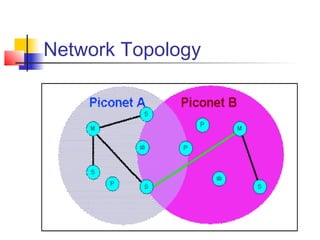
“Piconet”
    A collection of devices connected via
     Bluetooth technology in an ad hoc fashion.
    A piconet starts with two connected
     devices, and may grow to eight connected
     devices.
    All Bluetooth devices are peer units and
     have identical implementations. However,
     when establishing a piconet, one unit will
     act as a Master and the other(s) as
     slave(s) for the duration of the piconet
     connection.
Requirements
   Low cost as cables – chip $5
   Secure as cables – must support authentication and
    encryption
   Must support both data and voice.
   Must connect to a variety of devices.
   Must be able to function in a noisy environment.
   Data rates – 721kbps , using the 2.45Ghz radio
    frequency band –I.S.M (Industrial, scientific and
    medical)
   Must support many simultaneous and private
    “piconets”.
   Must be low power, compact and global.
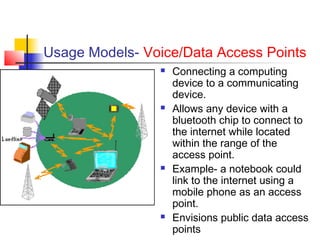
Usage Models- Voice/Data Access Points
                   Connecting a computing
                    device to a communicating
                    device.
                   Allows any device with a
                    bluetooth chip to connect to
                    the internet while located
                    within the range of the
                    access point.
                   Example- a notebook could
                    link to the internet using a
                    mobile phone as an access
                    point.
                   Envisions public data access
                    points
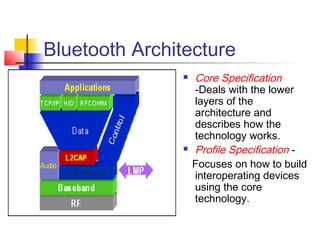
Bluetooth Architecture
                  Core Specification
                   -Deals with the lower
                   layers of the
                   architecture and
                   describes how the
                   technology works.
                  Profile Specification -
                   Focuses on how to build
                   interoperating devices
                   using the core
                   technology.
Network Topology
conclusion
 It is not the last but the least.
 In our day-to-day life we got so

  frequented use of Bluetooth
 In my knowledge the next generation

  of blue tooth will be th
“JIGBEE”.
References
   Bluetooth Architecture Overview
       ramananda panda
   www.bluetooth.com
   www.palowireless.com

Bluetooth1

  • 1.
  • 2.
    What is Bluetooth?  Goals  Requirements  Usage Models  Bluetooth Architecture  Conclusion
  • 3.
    What is bluetooth  Bluetooth is a new standard developed by a group of electronics manufacturers that will allow any sort of electronic equipment -- from computers and cell phones to keyboards and headphones -- to make its own connections, without wires, cables or any direct action from a user.  A key difference with other existing wireless technologies is that bluetooth enables combined usability models based on functions provided by different devices.
  • 4.
    The Name –Bluetooth?  The name is attributed to Harald Bluetooth was king of Denmark around the turn of the last millennium.  Choosing this name for the standard indicates how important companies from the Baltic region (nations including Denmark, Sweden, Norway and Finland) are to the communications industry
  • 5.
    Advantage  It provides agreement at the physical level -- Bluetooth is a radio-frequency standard.  Provides agreement at the data link level where products have to agree on  when bits are sent  how many will be sent at a time  how the parties in a conversation can be sure that the message received is the same as the message sent
  • 6.
    The Basic Idea  Bluetooth is a standard for a small , cheap radio chip to be plugged into computers, printers, mobile phones, etc  Bluetooth chip is designed to replace cables.Information normally carried by the cable, is transmitted at a special frequency to a receiver Bluetooth chip.  These devices can form a quick ad-hoc secure “piconet” and start communication.  Connections in the “piconets” can occur even when mobile.
  • 7.
    “Piconet”  A collection of devices connected via Bluetooth technology in an ad hoc fashion.  A piconet starts with two connected devices, and may grow to eight connected devices.  All Bluetooth devices are peer units and have identical implementations. However, when establishing a piconet, one unit will act as a Master and the other(s) as slave(s) for the duration of the piconet connection.
  • 8.
    Requirements  Low cost as cables – chip $5  Secure as cables – must support authentication and encryption  Must support both data and voice.  Must connect to a variety of devices.  Must be able to function in a noisy environment.  Data rates – 721kbps , using the 2.45Ghz radio frequency band –I.S.M (Industrial, scientific and medical)  Must support many simultaneous and private “piconets”.  Must be low power, compact and global.
  • 9.
    Usage Models- Voice/DataAccess Points  Connecting a computing device to a communicating device.  Allows any device with a bluetooth chip to connect to the internet while located within the range of the access point.  Example- a notebook could link to the internet using a mobile phone as an access point.  Envisions public data access points
  • 10.
    Bluetooth Architecture  Core Specification -Deals with the lower layers of the architecture and describes how the technology works.  Profile Specification - Focuses on how to build interoperating devices using the core technology.
  • 11.
  • 12.
    conclusion  It isnot the last but the least.  In our day-to-day life we got so frequented use of Bluetooth  In my knowledge the next generation of blue tooth will be th “JIGBEE”.
  • 13.
    References  Bluetooth Architecture Overview ramananda panda  www.bluetooth.com  www.palowireless.com