INTRODUCTION TO JAVA
• INTRODUCTION
• ABOUT JAVA
• SIMPLE JAVA PROGRAM (HELLO WORLD)
• BLUEJ – A QUICK INTRODUCTION
• THE METHOD MAIN()
Introduction of
JAVA
About JAVA
History
Bytecode
About JAVA
Java is both a programming language and a platform.
Like any other programming language. We can use
JAVA to write or create various types of computer
applications. Thus, JAVA fits the definition of a
programming language.
JAVA is also a platform for application development.
The word platform generally is used to refer to some
combination of hardware and system software e.g.,
operating system Windows 10 on Intel Core i7 or
Windows 10 on DEC Alphas or MacOS 13.2 on
PowerMacs etc. The JAVA platform is a software
platform designed to deliver and run highly interactive,
dynamic and secure applications on networked
computer systems.
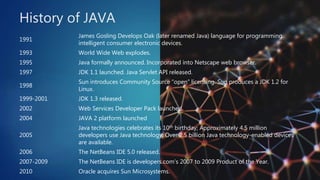
History of JAVA
1991
James Gosling Develops Oak (later renamed Java) language for programming
intelligent consumer electronic devices.
1993 World Wide Web explodes.
1995 Java formally announced. Incorporated into Netscape web browser.
1997 JDK 1.1 launched. Java Servlet API released.
1998
Sun introduces Community Source “open” licensing. Sun produces a JDK 1.2 for
Linux.
1999-2001 JDK 1.3 released.
2002 Web Services Developer Pack launched.
2004 JAVA 2 platform launched
2005
Java technologies celebrates its 10th birthday; Approximately 4.5 million
developers use Java technology; Over 2.5 billion Java technology-enabled devices
are available.
2006 The NetBeans IDE 5.0 released.
2007-2009 The NetBeans IDE is developers.com’s 2007 to 2009 Product of the Year.
2010 Oracle acquires Sun Microsystems.
2013
Java resurges with major improvements – major updates, lambdas, streams,
method references, defender methods, new HTTP clients etc.
2017-2018 Released updates of latest Java versions Java SE 8 and Java SE 9
2020-2021 JDK 16.4 launched for all operating systems.
History of JAVA continued…
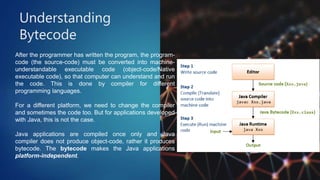
Understanding
Bytecode
After the programmer has written the program, the program-
code (the source-code) must be converted into machine-
understandable executable code (object-code/Native
executable code), so that computer can understand and run
the code. This is done by compiler for different
programming languages.
For a different platform, we need to change the compiler
and sometimes the code too. But for applications developed
with Java, this is not the case.
Java applications are compiled once only and Java
compiler does not produce object-code, rather it produces
bytecode. The bytecode makes the Java applications
platform-independent.
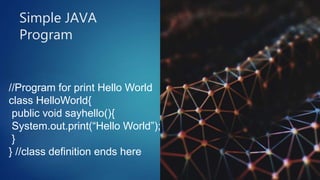
Simple JAVA
Program
//Program for print Hello World
class HelloWorld{
public void sayhello(){
System.out.print(“Hello World”);
}
} //class definition ends here
Bluej is a Java development environment specially designed for
teaching at an introductory level.
Bluej is basically an IDE. It includes the following tools in it:
1. An editor, which we can use to write our program.
2. A debugger, which help us to find our mistakes.
3. A viewer, which let us see parts of our program graphically.
Bluej Quick Reference
The Method main()
In a Java stand-alone program, the execution begins from main().
Therefore, to execute any other method, we need to execute it
through main(). A program having main() method can be executed
by selecting void main(String[] args) from the class’s menu that
appears when we right click on the class icon (in Bluej).
Thank You!
WWW.AOE.EDUCATION
SAURABH@AOE.EDUCATION

BlueJ Two

  • 1.
    INTRODUCTION TO JAVA •INTRODUCTION • ABOUT JAVA • SIMPLE JAVA PROGRAM (HELLO WORLD) • BLUEJ – A QUICK INTRODUCTION • THE METHOD MAIN()
  • 2.
  • 3.
    About JAVA Java isboth a programming language and a platform. Like any other programming language. We can use JAVA to write or create various types of computer applications. Thus, JAVA fits the definition of a programming language. JAVA is also a platform for application development. The word platform generally is used to refer to some combination of hardware and system software e.g., operating system Windows 10 on Intel Core i7 or Windows 10 on DEC Alphas or MacOS 13.2 on PowerMacs etc. The JAVA platform is a software platform designed to deliver and run highly interactive, dynamic and secure applications on networked computer systems.
  • 4.
    History of JAVA 1991 JamesGosling Develops Oak (later renamed Java) language for programming intelligent consumer electronic devices. 1993 World Wide Web explodes. 1995 Java formally announced. Incorporated into Netscape web browser. 1997 JDK 1.1 launched. Java Servlet API released. 1998 Sun introduces Community Source “open” licensing. Sun produces a JDK 1.2 for Linux. 1999-2001 JDK 1.3 released. 2002 Web Services Developer Pack launched. 2004 JAVA 2 platform launched 2005 Java technologies celebrates its 10th birthday; Approximately 4.5 million developers use Java technology; Over 2.5 billion Java technology-enabled devices are available. 2006 The NetBeans IDE 5.0 released. 2007-2009 The NetBeans IDE is developers.com’s 2007 to 2009 Product of the Year. 2010 Oracle acquires Sun Microsystems.
  • 5.
    2013 Java resurges withmajor improvements – major updates, lambdas, streams, method references, defender methods, new HTTP clients etc. 2017-2018 Released updates of latest Java versions Java SE 8 and Java SE 9 2020-2021 JDK 16.4 launched for all operating systems. History of JAVA continued…
  • 6.
    Understanding Bytecode After the programmerhas written the program, the program- code (the source-code) must be converted into machine- understandable executable code (object-code/Native executable code), so that computer can understand and run the code. This is done by compiler for different programming languages. For a different platform, we need to change the compiler and sometimes the code too. But for applications developed with Java, this is not the case. Java applications are compiled once only and Java compiler does not produce object-code, rather it produces bytecode. The bytecode makes the Java applications platform-independent.
  • 7.
    Simple JAVA Program //Program forprint Hello World class HelloWorld{ public void sayhello(){ System.out.print(“Hello World”); } } //class definition ends here
  • 8.
    Bluej is aJava development environment specially designed for teaching at an introductory level. Bluej is basically an IDE. It includes the following tools in it: 1. An editor, which we can use to write our program. 2. A debugger, which help us to find our mistakes. 3. A viewer, which let us see parts of our program graphically. Bluej Quick Reference
  • 9.
    The Method main() Ina Java stand-alone program, the execution begins from main(). Therefore, to execute any other method, we need to execute it through main(). A program having main() method can be executed by selecting void main(String[] args) from the class’s menu that appears when we right click on the class icon (in Bluej).
  • 10.