History of Java
Java is a general purpose object oriented
programming language.
Developed by James Gosling, Patrick
Naughton, Chris Warth, Ed Frank, and Mike
Sheridan at Sun Microsystems, Inc. in 1991.
Initially called “Oak” but was renamed as “Java” in
1995 after the coffee used to named „Java coffee‟.
Initial motivation is to develop a platform
independent language to create software to be
embedded in various consumer electronics
devices, evenly over mobile devices.
Become the language of internet. (portability and
security).
Features of Java
1. Simple, Small and Familiar
2. Compiled and Interpreted
3. Object Oriented
4. Platform Independent and portable
5. Robust and Secure
6. Distributed / Network Oriented
7. Multithreaded and Interactive
8. High Performance
9. Dynamic
Simple, Small and Familiar
Similar to C/C++ in syntax
But eliminates several complexities like -
No operator overloading
No direct pointer manipulation or pointer
arithmetic
No multiple inheritance (exclusion of Dimond
problem).
No malloc() and free(). It handles memory
automatically with the help of garbage collector.
Compiled and Interpreted
Java works in two stage
Java compiler translate the source code into byte
code. (javac.exe)
Java interpreter converts the byte code into
machine level representation. (Java /Just-In-Time)
Byte Code:
-A highly optimized set of instructions to be
executed by the java runtime environment, known
as java virtual machine (JVM).
Java Virtual Machine (JVM):
- Need to be implemented for each platform.
- Although the details vary from machine to
machine, all JVM understand the same byte code.
Java Virtual Machine
Java compiler produces an intermediate
code known as byte code for a
machine, known as JVM.
It exists only inside the computer memory.
Machine code is generated by the java
interpreter by acting as an intermediary
between the virtual machine and real
machine.
Java Program
Java Compiler
(JavaC)
Java Virtual Machine
(Java)
Bytecode
Java Interpreter /
Just In Time
Machine Code
/ 01010101
Start
End
.java
.class
Object Oriented
Fundamentally based on OOP
Classes and Objects
Efficient re-use of packages such
that the programmer only cares
about the interface and not the
implementation.
The object model in java is simple
and easy to extend.
Platform Independent and
Portable
“Write-Once Run-Anywhere”
Changes in system resources will not
force any change in the program.
The Java Virtual Machine (JVM) hides
the complexity of working on a
particular platform
Convert byte code into machine level
representation automatically.
Robust and Secure
Designed with the intention of being secure
No pointer arithmetic or manual memory
management.
Strict compile time and run time checking
of data type.
Exception handling
It verify all memory access
Ensure that no viruses are communicated
with an applet.
Distributed and Network Oriented
 Java grew up in the days of the Internet After
FreeBSD came in the picture.
 Berkeley Software Distribution (pioneers
of internet).
Inherently network friendly
Original release of Java came with
Networking libraries
Newer releases contain even more for
handling distributed applications.
RMI (remote method
Multithreaded and Interactive
Handles multiple tasks simultaneously.
Java runtime system contains tools to
support multiprocess synchronization and
construct smoothly running interactive
systems.
Java supports Threading to modulate the
task and is capable of handling it.
High Performance
Java performance is slower than C, because it
handles more complicated task than C language.
Incorporation of multithreading enhance the
overall execution speed.
Just-in-Time (JIT) can compile the byte code into
machine code.
Can sometimes be even faster than compiled C
code.
As it dose not include the library files as like C
into the byteCode file, its linking & working is
faster.
Dynamic
Capable of dynamically linking a new class
libraries, methods and objects, with the OOPS
pillar ‘Modularity’.
Java can use efficient functions available in
C/C++. Means it can connect the source code of
C,C++ with its source code.
Installing new version of library
files, automatically updates all programs as the
library is linked and not included.
The C# Connection
 The reach and power of Java continues to be felt in the
world of computer language development.
 Many of its innovative features, constructs, and
concepts have become part of the baseline for any
new language. The success of Java is simply too
important to ignore.
 Perhaps the most important example of Java‟s
influence is C#. Created by Microsoft to support the
.NET Framework, C# is closely related to Java. For
example, both share the same general syntax, support
distributed programming, and utilize the same object
model.
 There are, of course, differences between Java and
C#, but the overall “look and feel” of these languages
is very similar. This “cross-pollination” from Java to C#
is the strongest testimonial to date that Java redefined
the way we think about and use a computer language.
Language of Internet
Programming
1. Applets:
 Special java program that can transmitted over the
network and automatically executed by a java-compatible
web browser or Applet runner.
2. Security:
 Java compatible web browser can download java
applets without fear of viral infection and malicious
agent.
 As the Applet dose not request for the main() function
to run it, so it cannot hamper the computer system. No
Admin rights provided to Applet.
3. Portable:
 Java applets can be dynamically downloaded to all the
various types of platforms connected to the internet.
Why portable and Secure?
The output of java compiler is not executable code.
Once JVM exists for a platform, any java program can
run on it.
The execution of byte code by the JVM makes java
programs portable.
Actually for different platform separate JVM is made.
Java program is limited within the java execution
environment (JVM) and cannot access the other part of
the computer. That why it is secure.
Basics of Java Environments
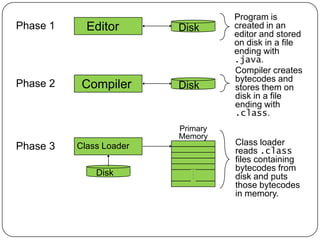
Java programs normally undergo five phases
Edit
Programmer writes program / source code (and stores program on disk in
.java file).
Compile
Compiler creates bytecodes from source code (.class file)
Load
Class loader stores bytecodes in memory (it is part of JVM). There are 3
loaders in JVM –
Bootstrap class loader
Extensions class loader
System class loader
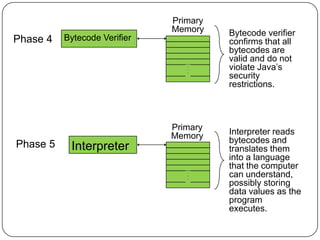
Verify
Verifier ensures bytecodes do not violate security requirements
Execute
Interpreter translates bytecodes into machine language
.
.
.
.
.
.
Primary
Memory
Disk
Disk
Disk
Editor
Compiler
Class Loader
Program is
created in an
editor and stored
on disk in a file
ending with
.java.
Compiler creates
bytecodes and
stores them on
disk in a file
ending with
.class.
Class loader
reads .class
files containing
bytecodes from
disk and puts
those bytecodes
in memory.
Phase 1
Phase 2
Phase 3
Primary
Memory
.
.
.
.
.
.
Bytecode Verifier
Bytecode verifier
confirms that all
bytecodes are
valid and do not
violate Java‟s
security
restrictions.
Phase 4
.
.
.
.
.
.
Interpreter
Interpreter reads
bytecodes and
translates them
into a language
that the computer
can understand,
possibly storing
data values as the
program
executes.
Phase 5
Primary
Memory
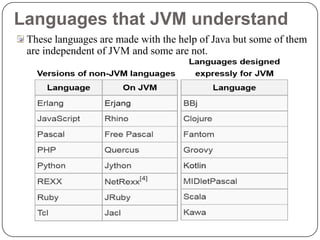
Languages that JVM understand
These languages are made with the help of Java but some of them
are independent of JVM and some are not.
Java Environment
Development tools - part of java development kit (JDK).
Runtime Environment – Java Runtime Environment.
(JRE).
Classes and methods - part of Java Standard Library
(JSL), also known as Application Programming Interface
(API).
Inclusions in JDK:
Appletviewer ( for viewing applets)
Javac (Compiler)
Java (Interpreter)
Javap (Java disassembler)
Javah (for C header files)
Javadoc ( for creating HTML description)
Jdb (Java Debugger)
Java Environment (Cntd.)
2. Application Package Interface (API)
Contains hundreds of classes and methods grouped
into several functional packages:
Language Support Package
Utility Packages
Input / Output Packages
Networking Packages
AWT Package
Applet Package
The Evolution of Java
1. Java 1.0 (January 23, 1996)
2. Java 1.1 (February 19, 1997) (Add new library, redefine applet
handling and reconfigured many features.)
3. Java 2 (Second generation) (December 8, 1998) . Version
no:1.2 (Internal version number of java library). Also known as
J2SE [ Java 2 Platform Standard Edition].
- Add swing, the collection framework, enhanced JVM etc.
4. J2SE 1.3 (May 8, 2000)
5. J2SE 1.4 (February 6, 2002)
6. Java 5 (fifth generation). Version no: 1.5 (Internal version
number of java library) (September 30, 2004)
7. Java 6 (sixth generation). Version no: 1.6 (Internal version
number of java library) (December 11, 2006).
8. Java 7 (sixth generation). Version no: 1.7 (Internal version
number of java library) (July 28, 2011)
Versions of Java
Three versions of the Java 2 Platform, targeted at different uses
Java 2 Micro Edition (J2ME)
Very small Java environment for smart
cards, pages, phones, and set-top boxes
Subset of the standard Java libraries aimed at limited size and
processing power
Java 2 Standard Edition (J2SE)
The basic platform
J2SE can be used to develop client-side standalone
applications or applets.
Java 2 Enterprise Edition (J2EE)
For business applications, web services, mission-critical
systems
Transaction processing, databases, distribution, replication

Java Lecture 1

  • 1.
    History of Java Javais a general purpose object oriented programming language. Developed by James Gosling, Patrick Naughton, Chris Warth, Ed Frank, and Mike Sheridan at Sun Microsystems, Inc. in 1991. Initially called “Oak” but was renamed as “Java” in 1995 after the coffee used to named „Java coffee‟. Initial motivation is to develop a platform independent language to create software to be embedded in various consumer electronics devices, evenly over mobile devices. Become the language of internet. (portability and security).
  • 2.
    Features of Java 1.Simple, Small and Familiar 2. Compiled and Interpreted 3. Object Oriented 4. Platform Independent and portable 5. Robust and Secure 6. Distributed / Network Oriented 7. Multithreaded and Interactive 8. High Performance 9. Dynamic
  • 3.
    Simple, Small andFamiliar Similar to C/C++ in syntax But eliminates several complexities like - No operator overloading No direct pointer manipulation or pointer arithmetic No multiple inheritance (exclusion of Dimond problem). No malloc() and free(). It handles memory automatically with the help of garbage collector.
  • 4.
    Compiled and Interpreted Javaworks in two stage Java compiler translate the source code into byte code. (javac.exe) Java interpreter converts the byte code into machine level representation. (Java /Just-In-Time) Byte Code: -A highly optimized set of instructions to be executed by the java runtime environment, known as java virtual machine (JVM). Java Virtual Machine (JVM): - Need to be implemented for each platform. - Although the details vary from machine to machine, all JVM understand the same byte code.
  • 5.
    Java Virtual Machine Javacompiler produces an intermediate code known as byte code for a machine, known as JVM. It exists only inside the computer memory. Machine code is generated by the java interpreter by acting as an intermediary between the virtual machine and real machine. Java Program Java Compiler (JavaC) Java Virtual Machine (Java) Bytecode Java Interpreter / Just In Time Machine Code / 01010101 Start End .java .class
  • 6.
    Object Oriented Fundamentally basedon OOP Classes and Objects Efficient re-use of packages such that the programmer only cares about the interface and not the implementation. The object model in java is simple and easy to extend.
  • 7.
    Platform Independent and Portable “Write-OnceRun-Anywhere” Changes in system resources will not force any change in the program. The Java Virtual Machine (JVM) hides the complexity of working on a particular platform Convert byte code into machine level representation automatically.
  • 8.
    Robust and Secure Designedwith the intention of being secure No pointer arithmetic or manual memory management. Strict compile time and run time checking of data type. Exception handling It verify all memory access Ensure that no viruses are communicated with an applet.
  • 9.
    Distributed and NetworkOriented  Java grew up in the days of the Internet After FreeBSD came in the picture.  Berkeley Software Distribution (pioneers of internet). Inherently network friendly Original release of Java came with Networking libraries Newer releases contain even more for handling distributed applications. RMI (remote method
  • 10.
    Multithreaded and Interactive Handlesmultiple tasks simultaneously. Java runtime system contains tools to support multiprocess synchronization and construct smoothly running interactive systems. Java supports Threading to modulate the task and is capable of handling it.
  • 11.
    High Performance Java performanceis slower than C, because it handles more complicated task than C language. Incorporation of multithreading enhance the overall execution speed. Just-in-Time (JIT) can compile the byte code into machine code. Can sometimes be even faster than compiled C code. As it dose not include the library files as like C into the byteCode file, its linking & working is faster.
  • 12.
    Dynamic Capable of dynamicallylinking a new class libraries, methods and objects, with the OOPS pillar ‘Modularity’. Java can use efficient functions available in C/C++. Means it can connect the source code of C,C++ with its source code. Installing new version of library files, automatically updates all programs as the library is linked and not included.
  • 13.
    The C# Connection The reach and power of Java continues to be felt in the world of computer language development.  Many of its innovative features, constructs, and concepts have become part of the baseline for any new language. The success of Java is simply too important to ignore.  Perhaps the most important example of Java‟s influence is C#. Created by Microsoft to support the .NET Framework, C# is closely related to Java. For example, both share the same general syntax, support distributed programming, and utilize the same object model.  There are, of course, differences between Java and C#, but the overall “look and feel” of these languages is very similar. This “cross-pollination” from Java to C# is the strongest testimonial to date that Java redefined the way we think about and use a computer language.
  • 14.
    Language of Internet Programming 1.Applets:  Special java program that can transmitted over the network and automatically executed by a java-compatible web browser or Applet runner. 2. Security:  Java compatible web browser can download java applets without fear of viral infection and malicious agent.  As the Applet dose not request for the main() function to run it, so it cannot hamper the computer system. No Admin rights provided to Applet. 3. Portable:  Java applets can be dynamically downloaded to all the various types of platforms connected to the internet.
  • 15.
    Why portable andSecure? The output of java compiler is not executable code. Once JVM exists for a platform, any java program can run on it. The execution of byte code by the JVM makes java programs portable. Actually for different platform separate JVM is made. Java program is limited within the java execution environment (JVM) and cannot access the other part of the computer. That why it is secure.
  • 16.
    Basics of JavaEnvironments Java programs normally undergo five phases Edit Programmer writes program / source code (and stores program on disk in .java file). Compile Compiler creates bytecodes from source code (.class file) Load Class loader stores bytecodes in memory (it is part of JVM). There are 3 loaders in JVM – Bootstrap class loader Extensions class loader System class loader Verify Verifier ensures bytecodes do not violate security requirements Execute Interpreter translates bytecodes into machine language
  • 17.
    . . . . . . Primary Memory Disk Disk Disk Editor Compiler Class Loader Program is createdin an editor and stored on disk in a file ending with .java. Compiler creates bytecodes and stores them on disk in a file ending with .class. Class loader reads .class files containing bytecodes from disk and puts those bytecodes in memory. Phase 1 Phase 2 Phase 3
  • 18.
    Primary Memory . . . . . . Bytecode Verifier Bytecode verifier confirmsthat all bytecodes are valid and do not violate Java‟s security restrictions. Phase 4 . . . . . . Interpreter Interpreter reads bytecodes and translates them into a language that the computer can understand, possibly storing data values as the program executes. Phase 5 Primary Memory
  • 19.
    Languages that JVMunderstand These languages are made with the help of Java but some of them are independent of JVM and some are not.
  • 20.
    Java Environment Development tools- part of java development kit (JDK). Runtime Environment – Java Runtime Environment. (JRE). Classes and methods - part of Java Standard Library (JSL), also known as Application Programming Interface (API). Inclusions in JDK: Appletviewer ( for viewing applets) Javac (Compiler) Java (Interpreter) Javap (Java disassembler) Javah (for C header files) Javadoc ( for creating HTML description) Jdb (Java Debugger)
  • 21.
    Java Environment (Cntd.) 2.Application Package Interface (API) Contains hundreds of classes and methods grouped into several functional packages: Language Support Package Utility Packages Input / Output Packages Networking Packages AWT Package Applet Package
  • 22.
    The Evolution ofJava 1. Java 1.0 (January 23, 1996) 2. Java 1.1 (February 19, 1997) (Add new library, redefine applet handling and reconfigured many features.) 3. Java 2 (Second generation) (December 8, 1998) . Version no:1.2 (Internal version number of java library). Also known as J2SE [ Java 2 Platform Standard Edition]. - Add swing, the collection framework, enhanced JVM etc. 4. J2SE 1.3 (May 8, 2000) 5. J2SE 1.4 (February 6, 2002) 6. Java 5 (fifth generation). Version no: 1.5 (Internal version number of java library) (September 30, 2004) 7. Java 6 (sixth generation). Version no: 1.6 (Internal version number of java library) (December 11, 2006). 8. Java 7 (sixth generation). Version no: 1.7 (Internal version number of java library) (July 28, 2011)
  • 23.
    Versions of Java Threeversions of the Java 2 Platform, targeted at different uses Java 2 Micro Edition (J2ME) Very small Java environment for smart cards, pages, phones, and set-top boxes Subset of the standard Java libraries aimed at limited size and processing power Java 2 Standard Edition (J2SE) The basic platform J2SE can be used to develop client-side standalone applications or applets. Java 2 Enterprise Edition (J2EE) For business applications, web services, mission-critical systems Transaction processing, databases, distribution, replication