Course materials may not be reproduced in whole or in part without the prior written permission of IBM. 5.3
© Copyright IBM Corporation 2009
Blade server technology
© Copyright IBM Corporation 2009
Unit objectives
After completing this unit, you should be able to:
• Identify and describe the components implemented on a blade server
• List the methods used for blade server communications through the chassis
• Identify the procedures used to access the blade server console
• Select and describe the features enabling blade server scalability
• List the hard drive options available in the blade server models
• Select the appropriate high speed expansion card options by chassis model
© Copyright IBM Corporation 2009
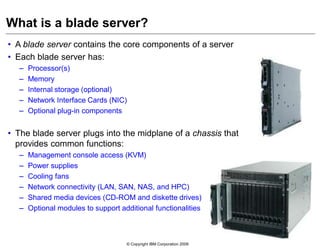
• A blade server contains the core components of a server
• Each blade server has:
– Processor(s)
– Memory
– Internal storage (optional)
– Network Interface Cards (NIC)
– Optional plug-in components
• The blade server plugs into the midplane of a chassis that
provides common functions:
– Management console access (KVM)
– Power supplies
– Cooling fans
– Network connectivity (LAN, SAN, NAS, and HPC)
– Shared media devices (CD-ROM and diskette drives)
– Optional modules to support additional functionalities
What is a blade server?
© Copyright IBM Corporation 2009
IBM Blade Server
• IBM Blade Server overview
• Common components
• Expansion cards
• Enhanced features
• Specialized function
• Model comparison
• Expansion blades
© Copyright IBM Corporation 2009
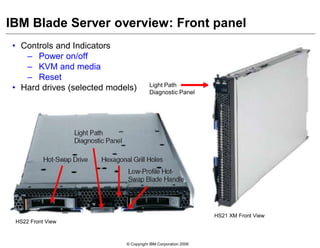
IBM Blade Server overview: Front panel
• Controls and Indicators
– Power on/off
– KVM and media
– Reset
• Hard drives (selected models) Light Path
Diagnostic Panel
HS22 Front View
HS21 XM Front View
© Copyright IBM Corporation 2009
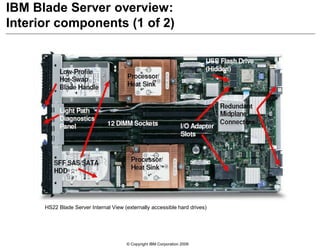
IBM Blade Server overview:
Interior components (1 of 2)
HS22 Blade Server Internal View (externally accessible hard drives)
© Copyright IBM Corporation 2009
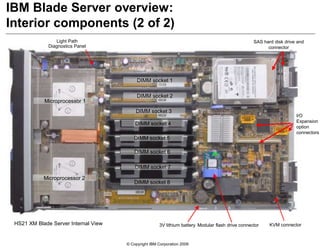
IBM Blade Server overview:
Interior components (2 of 2)
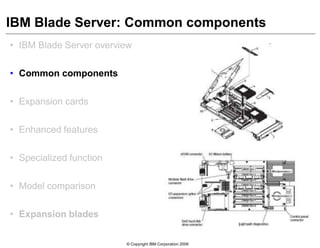
KVM connector
Light Path
Diagnostics Panel
DIMM socket 7
DIMM socket 5
DIMM socket 3
DIMM socket 1
DIMM socket 8
DIMM socket 6
DIMM socket 4
DIMM socket 2
3V lithium battery Modular flash drive connector
Microprocessor 1
Microprocessor 2
SAS hard disk drive and
connector
I/O
Expansion
option
connectors
HS21 XM Blade Server Internal View
© Copyright IBM Corporation 2009
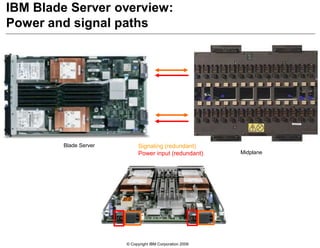
IBM Blade Server overview:
Power and signal paths
Signaling (redundant)
Power input (redundant)
Blade Server
Midplane
© Copyright IBM Corporation 2009
IBM Blade Server: Common components
• IBM Blade Server overview
• Common components
• Expansion cards
• Enhanced features
• Specialized function
• Model comparison
• Expansion blades
© Copyright IBM Corporation 2009
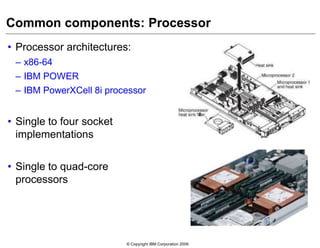
Common components: Processor
• Processor architectures:
– x86-64
– IBM POWER
– IBM PowerXCell 8i processor
• Single to four socket
implementations
• Single to quad-core
processors
© Copyright IBM Corporation 2009
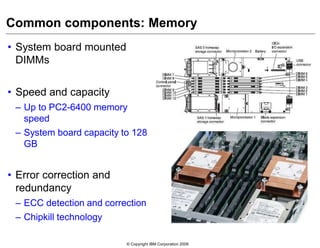
Common components: Memory
• System board mounted
DIMMs
• Speed and capacity
– Up to PC2-6400 memory
speed
– System board capacity to 128
GB
• Error correction and
redundancy
– ECC detection and correction
– Chipkill technology
© Copyright IBM Corporation 2009
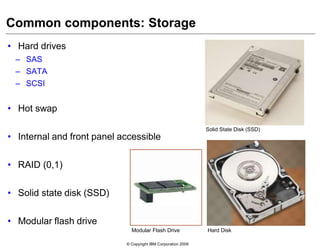
Common components: Storage
• Hard drives
– SAS
– SATA
– SCSI
• Hot swap
• Internal and front panel accessible
• RAID (0,1)
• Solid state disk (SSD)
• Modular flash drive
Solid State Disk (SSD)
Hard DiskModular Flash Drive
© Copyright IBM Corporation 2009
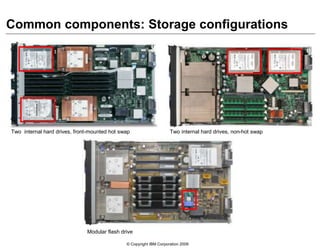
Common components: Storage configurations
Modular flash drive
Two internal hard drives, non-hot swapTwo internal hard drives, front-mounted hot swap
© Copyright IBM Corporation 2009
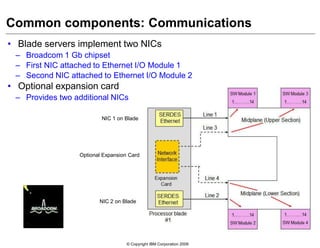
Common components: Communications
• Blade servers implement two NICs
– Broadcom 1 Gb chipset
– First NIC attached to Ethernet I/O Module 1
– Second NIC attached to Ethernet I/O Module 2
• Optional expansion card
– Provides two additional NICs
NIC 1 on Blade
NIC 2 on Blade
Optional Expansion Card
© Copyright IBM Corporation 2009
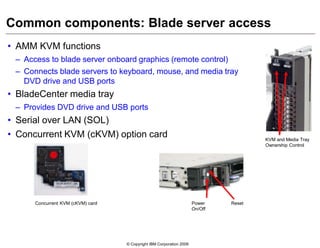
Common components: Blade server access
• AMM KVM functions
– Access to blade server onboard graphics (remote control)
– Connects blade servers to keyboard, mouse, and media tray
DVD drive and USB ports
• BladeCenter media tray
– Provides DVD drive and USB ports
• Serial over LAN (SOL)
• Concurrent KVM (cKVM) option card KVM and Media Tray
Ownership Control
Concurrent KVM (cKVM) card Power
On/Off
Reset
© Copyright IBM Corporation 2009
IBM Blade Server: Expansion cards
• IBM Blade Server overview
• Common components
• Expansion cards
• Enhanced features
• Specialized function
• Model comparison
• Expansion blades
© Copyright IBM Corporation 2009
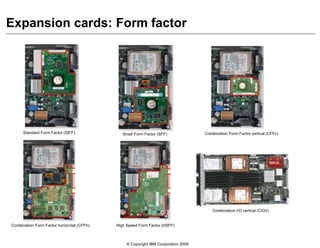
Expansion cards: Form factor
Standard Form Factor (StFF) Small Form Factor (SFF) Combination Form Factor vertical (CFFv)
Combination Form Factor horizontal (CFFh) High Speed Form Factor (HSFF)
Combination I/O vertical (CIOv)
© Copyright IBM Corporation 2009
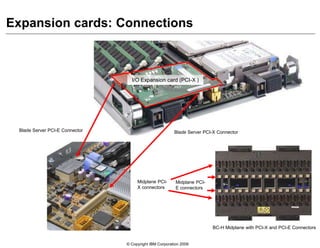
Expansion cards: Connections
I/O connector
I/O Expansion card (PCI-X )
Blade Server PCI-X ConnectorBlade Server PCI-E Connector
Midplane PCI-
E connectors
Midplane PCI-
X connectors
BC-H Midplane with PCI-X and PCI-E Connectors
© Copyright IBM Corporation 2009
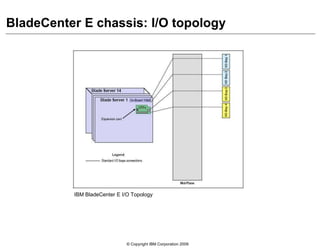
BladeCenter E chassis: I/O topology
IBM BladeCenter E I/O Topology
© Copyright IBM Corporation 2009
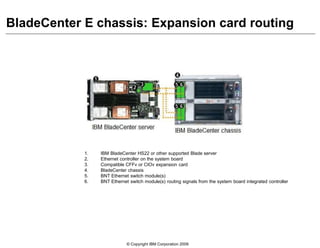
BladeCenter E chassis: Expansion card routing
1. IBM BladeCenter HS22 or other supported Blade server
2. Ethernet controller on the system board
3. Compatible CFFv or CIOv expansion card
4. BladeCenter chassis
5. BNT Ethernet switch module(s)
6. BNT Ethernet switch module(s) routing signals from the system board integrated controller
© Copyright IBM Corporation 2009
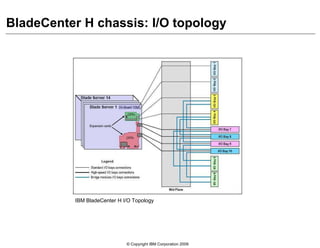
BladeCenter H chassis: I/O topology
IBM BladeCenter H I/O Topology
© Copyright IBM Corporation 2009
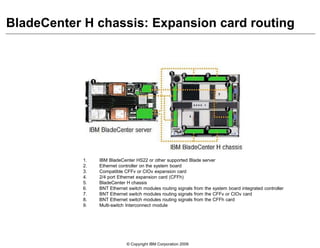
BladeCenter H chassis: Expansion card routing
1. IBM BladeCenter HS22 or other supported Blade server
2. Ethernet controller on the system board
3. Compatible CFFv or CIOv expansion card
4. 2/4 port Ethernet expansion card (CFFh)
5. BladeCenter H chassis
6. BNT Ethernet switch modules routing signals from the system board integrated controller
7. BNT Ethernet switch modules routing signals from the CFFv or CIOv card
8. BNT Ethernet switch modules routing signals from the CFFh card
9. Multi-switch Interconnect module
© Copyright IBM Corporation 2009
IBM Blade Server: Enhanced features
• IBM Blade Server overview
• Common components
• Expansion cards
• Enhanced features
• Specialized function
• Model comparison
• Expansion blades
© Copyright IBM Corporation 2009
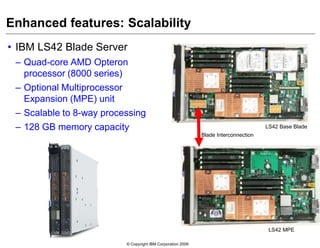
Enhanced features: Scalability
• IBM LS42 Blade Server
– Quad-core AMD Opteron
processor (8000 series)
– Optional Multiprocessor
Expansion (MPE) unit
– Scalable to 8-way processing
– 128 GB memory capacity
Blade Interconnection
LS42 Base Blade
LS42 MPE
© Copyright IBM Corporation 2009
Enhanced features: Embedded hypervisor (1 of 2)
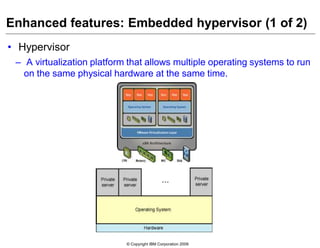
• Hypervisor
– A virtualization platform that allows multiple operating systems to run
on the same physical hardware at the same time.
© Copyright IBM Corporation 2009
Enhanced features: Embedded hypervisor (2 of 2)
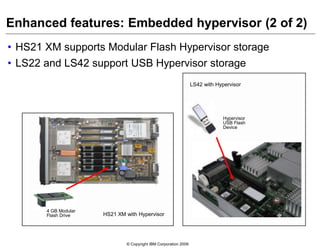
• HS21 XM supports Modular Flash Hypervisor storage
• LS22 and LS42 support USB Hypervisor storage
Hypervisor
USB Flash
Device
LS42 with Hypervisor
HS21 XM with Hypervisor
4 GB Modular
Flash Drive
© Copyright IBM Corporation 2009
Enhanced features: Advanced management
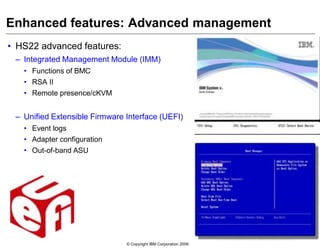
• HS22 advanced features:
– Integrated Management Module (IMM)
• Functions of BMC
• RSA II
• Remote presence/cKVM
– Unified Extensible Firmware Interface (UEFI)
• Event logs
• Adapter configuration
• Out-of-band ASU
© Copyright IBM Corporation 2009
IBM Blade Server: Specialized function
• IBM Blade Server overview
• Common components
• Expansion cards
• Enhanced features
• Specialized function
• Model comparison
• Expansion blades
© Copyright IBM Corporation 2009
Specialized blade servers: Specialized function
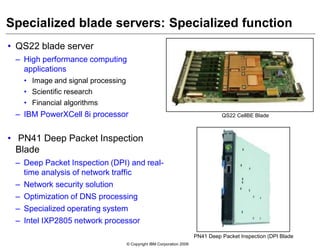
• QS22 blade server
– High performance computing
applications
• Image and signal processing
• Scientific research
• Financial algorithms
– IBM PowerXCell 8i processor
• PN41 Deep Packet Inspection
Blade
– Deep Packet Inspection (DPI) and real-
time analysis of network traffic
– Network security solution
– Optimization of DNS processing
– Specialized operating system
– Intel IXP2805 network processor
QS22 CellBE Blade
PN41 Deep Packet Inspection (DPI Blade
© Copyright IBM Corporation 2009
IBM Blade Server: Model comparison
• IBM Blade Server overview
• Common components
• Expansion cards
• Enhanced features
• Specialized function
• Model comparison
• Expansion blades
© Copyright IBM Corporation 2009
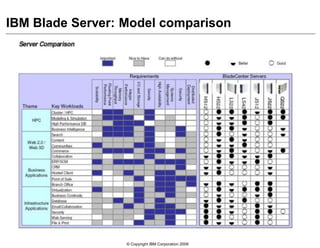
IBM Blade Server: Model comparison
© Copyright IBM Corporation 2009
IBM Blade Server: Expansion blades
• IBM Blade Server overview
• Common components
• Expansion cards
• Enhanced features
• Specialized function
• Model comparison
• Expansion blades
© Copyright IBM Corporation 2009
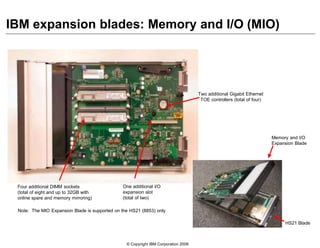
HS21 Blade
Memory and I/O
Expansion Blade
Two additional Gigabit Ethernet
TOE controllers (total of four)
Four additional DIMM sockets
(total of eight and up to 32GB with
online spare and memory mirroring)
One additional I/O
expansion slot
(total of two)
IBM expansion blades: Memory and I/O (MIO)
Note: The MIO Expansion Blade is supported on the HS21 (8853) only
© Copyright IBM Corporation 2009
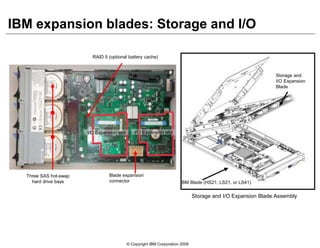
Three SAS hot-swap
hard drive bays
Blade expansion
connector
IBM expansion blades: Storage and I/O
IBM Blade (HS21, LS21, or LS41)
Storage and
I/O Expansion
Blade
Storage and I/O Expansion Blade Assembly
RAID 5 (optional battery cache)
I/O Expansion slot I/O Expansion slot
© Copyright IBM Corporation 2009
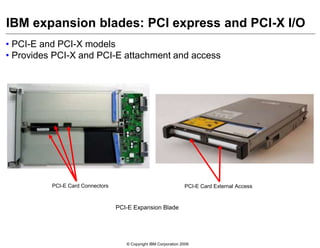
IBM expansion blades: PCI express and PCI-X I/O
• PCI-E and PCI-X models
• Provides PCI-X and PCI-E attachment and access
PCI-E Expansion Blade
PCI-E Card Connectors PCI-E Card External Access
© Copyright IBM Corporation 2009
Key words
• AMD
• Intel
• Cell Broadband Engine
• Dual-Core
• High Performance Computing (HPC)
• Local Area Network (LAN)
• Memory and I/O Expansion Unit (MIO)
• Modular Flash Drive
Network Interface Cards (NIC)
• PCI Expansion Unit
• Power6
• Quad-core
• Redundant Connection
• Serial Over LAN (SOL)
• Single-core
• Storage and I/O Expansion Unit (SIO)
• Uni-processor
© Copyright IBM Corporation 2009
Checkpoint (1 of 2)
1. Select the correct statement regarding the components implemented on a blade server.
a. Each Blade server contains processor, memory, power supply and graphics components
b. A Blade server contains processor, memory, storage and communications components
c. All Blade servers contain a minimum of two processors
d. In order to implement Ethernet, each Blade server must have an expansion card installed
2. Access to the blade server console is accomplished by which of the following?
a. An externally attached KVM
b. Through a shared KVM facility through the Advanced Management Module or through SOL
c. Only through an Ethernet connection from a switch module
d. Only after an operating system has been loaded on a blade
3. A blade server communicates through the BladeCenter chassis through which of the following?
a. High density cabling within the BladeCenter chassis
b. Blade server to blade server over external bus
c. Through the BladeCenter midplane
d. A blade server expansion card is required
4. Select the correct statement regarding blade server scalability.
a. Blade server scaling to 4 processors is done by adding processors 3 and 4 to the system board
b. Blade servers are limited to implementing 2 processors maximum
c. Scaling a blade server requires the addition of scalability cables
d. The LS42 blade server can be scaled to 4 processors by adding the MPE expansion blade
© Copyright IBM Corporation 2009
Checkpoint solutions (1 of 2)
1. Select the correct statement regarding the components implemented on a blade server.
a. Each Blade server contains processor, memory, power supply and graphics components
b. A Blade server contains processor, memory, storage and communications components
c. All Blade servers contain a minimum of two processors
d. In order to implement Ethernet, each blade server must have an expansion card installed
Answer: b
2. Access to the blade server console is accomplished by which of the following?
a. An externally attached KVM
b. Through a shared KVM facility through the Advanced Management Module or through SOL
c. Only through an Ethernet connection from a switch module
d. Only after an operating system has been loaded on a blade
Answer: b
3. A blade server communicates through the BladeCenter chassis through which of the following?
a. High density cabling within the BladeCenter chassis
b. Blade server to blade server over external bus
c. Through the BladeCenter midplane
d. A blade server expansion card is required
Answer: c
4. Select the correct statement regarding blade server scalability.
a. Blade server scaling to 4 processors is done by adding processors 3 and 4 to the system board
b. Blade servers are limited to implementing 2 processors maximum
c. Scaling a blade server requires the addition of scalability cables
d. The LS42 blade server can be scaled to 4 processors by adding the MPE expansion blade
Answer: d
© Copyright IBM Corporation 2009
Checkpoint (2 of 2)
5. True/False: In order to implement hot swap hard drive capability and expansion
blade must be added to the HS22 blade server.
6. True/False: The CFFh form factor Ethernet PCI-E Expansion card will function
on a blade server in the BladeCenter H, HT, and S chassis.
7. Select the correct statement regarding the memory and I/O expansion (MMIO)
blade.
a. The MMIO expansion blade supports 2 internal hard disk drives
b. An MMIO expansion blade cannot be attached to any another expansion blade
c. The MMIO can be attached to any model blade server
d. The MMIO contains four DIMM sockets and two 1 Gb Ethernet connections
8. Which statement is correct regarding the QS22 blade server?
a. The QS22 is used primarily for applications requiring large disk storage capacity
b. The QS22 is optimized for applications requiring parallel processing and streaming
capabilities
c. Processing in the QS22 is accomplished with one POWER6 processor and one numeric co-
processor
d. Implementation of the QS22 requires the attachment of an MMIO expansion blade
© Copyright IBM Corporation 2009
Checkpoint solutions (2 of 2)
5. True/False: In order to implement hot swap hard drive capability and expansion blade must be
added to the HS22 blade server.
Answer: False
6. True/False: The CFFh form factor Ethernet PCI-E expansion card will function on a blade server
in the BladeCenter H, HT, and S chassis.
Answer: True
7. Select the correct statement regarding the memory and I/O expansion (MMIO) blade.
a. The MMIO expansion blade supports 2 internal hard disk drives
b. An MMIO expansion blade cannot be attached to any another expansion blade
c. The MMIO can be attached to any model blade server
d. The MMIO contains four DIMM sockets and two 1 Gb Ethernet connections
Answer: d
8. Which statement is correct regarding the QS22 blade server?
a. The QS22 is used primarily for applications requiring large disk storage capacity
b. The QS22 is optimized for applications requiring parallel processing and streaming
capabilities
c. Processing in the QS22 is accomplished with one POWER6 processor and one numeric
co-processor
d. Implementation of the QS22 requires the attachment of an MMIO expansion blade
Answer: b
© Copyright IBM Corporation 2009
Unit summary
Having completed this unit, you should be able to:
• Identify and describe the components implemented on a blade server
• List the methods used for blade server communications through the chassis
• Identify the procedures used to access the blade server console
• Select and describe the features enabling blade server scalability
• List the hard drive options available in the blade server models
• Select the appropriate high speed expansion card options by chassis model

Bladeservertechnology 111018061151-phpapp02

  • 1.
    Course materials maynot be reproduced in whole or in part without the prior written permission of IBM. 5.3 © Copyright IBM Corporation 2009 Blade server technology
  • 2.
    © Copyright IBMCorporation 2009 Unit objectives After completing this unit, you should be able to: • Identify and describe the components implemented on a blade server • List the methods used for blade server communications through the chassis • Identify the procedures used to access the blade server console • Select and describe the features enabling blade server scalability • List the hard drive options available in the blade server models • Select the appropriate high speed expansion card options by chassis model
  • 3.
    © Copyright IBMCorporation 2009 • A blade server contains the core components of a server • Each blade server has: – Processor(s) – Memory – Internal storage (optional) – Network Interface Cards (NIC) – Optional plug-in components • The blade server plugs into the midplane of a chassis that provides common functions: – Management console access (KVM) – Power supplies – Cooling fans – Network connectivity (LAN, SAN, NAS, and HPC) – Shared media devices (CD-ROM and diskette drives) – Optional modules to support additional functionalities What is a blade server?
  • 4.
    © Copyright IBMCorporation 2009 IBM Blade Server • IBM Blade Server overview • Common components • Expansion cards • Enhanced features • Specialized function • Model comparison • Expansion blades
  • 5.
    © Copyright IBMCorporation 2009 IBM Blade Server overview: Front panel • Controls and Indicators – Power on/off – KVM and media – Reset • Hard drives (selected models) Light Path Diagnostic Panel HS22 Front View HS21 XM Front View
  • 6.
    © Copyright IBMCorporation 2009 IBM Blade Server overview: Interior components (1 of 2) HS22 Blade Server Internal View (externally accessible hard drives)
  • 7.
    © Copyright IBMCorporation 2009 IBM Blade Server overview: Interior components (2 of 2) KVM connector Light Path Diagnostics Panel DIMM socket 7 DIMM socket 5 DIMM socket 3 DIMM socket 1 DIMM socket 8 DIMM socket 6 DIMM socket 4 DIMM socket 2 3V lithium battery Modular flash drive connector Microprocessor 1 Microprocessor 2 SAS hard disk drive and connector I/O Expansion option connectors HS21 XM Blade Server Internal View
  • 8.
    © Copyright IBMCorporation 2009 IBM Blade Server overview: Power and signal paths Signaling (redundant) Power input (redundant) Blade Server Midplane
  • 9.
    © Copyright IBMCorporation 2009 IBM Blade Server: Common components • IBM Blade Server overview • Common components • Expansion cards • Enhanced features • Specialized function • Model comparison • Expansion blades
  • 10.
    © Copyright IBMCorporation 2009 Common components: Processor • Processor architectures: – x86-64 – IBM POWER – IBM PowerXCell 8i processor • Single to four socket implementations • Single to quad-core processors
  • 11.
    © Copyright IBMCorporation 2009 Common components: Memory • System board mounted DIMMs • Speed and capacity – Up to PC2-6400 memory speed – System board capacity to 128 GB • Error correction and redundancy – ECC detection and correction – Chipkill technology
  • 12.
    © Copyright IBMCorporation 2009 Common components: Storage • Hard drives – SAS – SATA – SCSI • Hot swap • Internal and front panel accessible • RAID (0,1) • Solid state disk (SSD) • Modular flash drive Solid State Disk (SSD) Hard DiskModular Flash Drive
  • 13.
    © Copyright IBMCorporation 2009 Common components: Storage configurations Modular flash drive Two internal hard drives, non-hot swapTwo internal hard drives, front-mounted hot swap
  • 14.
    © Copyright IBMCorporation 2009 Common components: Communications • Blade servers implement two NICs – Broadcom 1 Gb chipset – First NIC attached to Ethernet I/O Module 1 – Second NIC attached to Ethernet I/O Module 2 • Optional expansion card – Provides two additional NICs NIC 1 on Blade NIC 2 on Blade Optional Expansion Card
  • 15.
    © Copyright IBMCorporation 2009 Common components: Blade server access • AMM KVM functions – Access to blade server onboard graphics (remote control) – Connects blade servers to keyboard, mouse, and media tray DVD drive and USB ports • BladeCenter media tray – Provides DVD drive and USB ports • Serial over LAN (SOL) • Concurrent KVM (cKVM) option card KVM and Media Tray Ownership Control Concurrent KVM (cKVM) card Power On/Off Reset
  • 16.
    © Copyright IBMCorporation 2009 IBM Blade Server: Expansion cards • IBM Blade Server overview • Common components • Expansion cards • Enhanced features • Specialized function • Model comparison • Expansion blades
  • 17.
    © Copyright IBMCorporation 2009 Expansion cards: Form factor Standard Form Factor (StFF) Small Form Factor (SFF) Combination Form Factor vertical (CFFv) Combination Form Factor horizontal (CFFh) High Speed Form Factor (HSFF) Combination I/O vertical (CIOv)
  • 18.
    © Copyright IBMCorporation 2009 Expansion cards: Connections I/O connector I/O Expansion card (PCI-X ) Blade Server PCI-X ConnectorBlade Server PCI-E Connector Midplane PCI- E connectors Midplane PCI- X connectors BC-H Midplane with PCI-X and PCI-E Connectors
  • 19.
    © Copyright IBMCorporation 2009 BladeCenter E chassis: I/O topology IBM BladeCenter E I/O Topology
  • 20.
    © Copyright IBMCorporation 2009 BladeCenter E chassis: Expansion card routing 1. IBM BladeCenter HS22 or other supported Blade server 2. Ethernet controller on the system board 3. Compatible CFFv or CIOv expansion card 4. BladeCenter chassis 5. BNT Ethernet switch module(s) 6. BNT Ethernet switch module(s) routing signals from the system board integrated controller
  • 21.
    © Copyright IBMCorporation 2009 BladeCenter H chassis: I/O topology IBM BladeCenter H I/O Topology
  • 22.
    © Copyright IBMCorporation 2009 BladeCenter H chassis: Expansion card routing 1. IBM BladeCenter HS22 or other supported Blade server 2. Ethernet controller on the system board 3. Compatible CFFv or CIOv expansion card 4. 2/4 port Ethernet expansion card (CFFh) 5. BladeCenter H chassis 6. BNT Ethernet switch modules routing signals from the system board integrated controller 7. BNT Ethernet switch modules routing signals from the CFFv or CIOv card 8. BNT Ethernet switch modules routing signals from the CFFh card 9. Multi-switch Interconnect module
  • 23.
    © Copyright IBMCorporation 2009 IBM Blade Server: Enhanced features • IBM Blade Server overview • Common components • Expansion cards • Enhanced features • Specialized function • Model comparison • Expansion blades
  • 24.
    © Copyright IBMCorporation 2009 Enhanced features: Scalability • IBM LS42 Blade Server – Quad-core AMD Opteron processor (8000 series) – Optional Multiprocessor Expansion (MPE) unit – Scalable to 8-way processing – 128 GB memory capacity Blade Interconnection LS42 Base Blade LS42 MPE
  • 25.
    © Copyright IBMCorporation 2009 Enhanced features: Embedded hypervisor (1 of 2) • Hypervisor – A virtualization platform that allows multiple operating systems to run on the same physical hardware at the same time.
  • 26.
    © Copyright IBMCorporation 2009 Enhanced features: Embedded hypervisor (2 of 2) • HS21 XM supports Modular Flash Hypervisor storage • LS22 and LS42 support USB Hypervisor storage Hypervisor USB Flash Device LS42 with Hypervisor HS21 XM with Hypervisor 4 GB Modular Flash Drive
  • 27.
    © Copyright IBMCorporation 2009 Enhanced features: Advanced management • HS22 advanced features: – Integrated Management Module (IMM) • Functions of BMC • RSA II • Remote presence/cKVM – Unified Extensible Firmware Interface (UEFI) • Event logs • Adapter configuration • Out-of-band ASU
  • 28.
    © Copyright IBMCorporation 2009 IBM Blade Server: Specialized function • IBM Blade Server overview • Common components • Expansion cards • Enhanced features • Specialized function • Model comparison • Expansion blades
  • 29.
    © Copyright IBMCorporation 2009 Specialized blade servers: Specialized function • QS22 blade server – High performance computing applications • Image and signal processing • Scientific research • Financial algorithms – IBM PowerXCell 8i processor • PN41 Deep Packet Inspection Blade – Deep Packet Inspection (DPI) and real- time analysis of network traffic – Network security solution – Optimization of DNS processing – Specialized operating system – Intel IXP2805 network processor QS22 CellBE Blade PN41 Deep Packet Inspection (DPI Blade
  • 30.
    © Copyright IBMCorporation 2009 IBM Blade Server: Model comparison • IBM Blade Server overview • Common components • Expansion cards • Enhanced features • Specialized function • Model comparison • Expansion blades
  • 31.
    © Copyright IBMCorporation 2009 IBM Blade Server: Model comparison
  • 32.
    © Copyright IBMCorporation 2009 IBM Blade Server: Expansion blades • IBM Blade Server overview • Common components • Expansion cards • Enhanced features • Specialized function • Model comparison • Expansion blades
  • 33.
    © Copyright IBMCorporation 2009 HS21 Blade Memory and I/O Expansion Blade Two additional Gigabit Ethernet TOE controllers (total of four) Four additional DIMM sockets (total of eight and up to 32GB with online spare and memory mirroring) One additional I/O expansion slot (total of two) IBM expansion blades: Memory and I/O (MIO) Note: The MIO Expansion Blade is supported on the HS21 (8853) only
  • 34.
    © Copyright IBMCorporation 2009 Three SAS hot-swap hard drive bays Blade expansion connector IBM expansion blades: Storage and I/O IBM Blade (HS21, LS21, or LS41) Storage and I/O Expansion Blade Storage and I/O Expansion Blade Assembly RAID 5 (optional battery cache) I/O Expansion slot I/O Expansion slot
  • 35.
    © Copyright IBMCorporation 2009 IBM expansion blades: PCI express and PCI-X I/O • PCI-E and PCI-X models • Provides PCI-X and PCI-E attachment and access PCI-E Expansion Blade PCI-E Card Connectors PCI-E Card External Access
  • 36.
    © Copyright IBMCorporation 2009 Key words • AMD • Intel • Cell Broadband Engine • Dual-Core • High Performance Computing (HPC) • Local Area Network (LAN) • Memory and I/O Expansion Unit (MIO) • Modular Flash Drive Network Interface Cards (NIC) • PCI Expansion Unit • Power6 • Quad-core • Redundant Connection • Serial Over LAN (SOL) • Single-core • Storage and I/O Expansion Unit (SIO) • Uni-processor
  • 37.
    © Copyright IBMCorporation 2009 Checkpoint (1 of 2) 1. Select the correct statement regarding the components implemented on a blade server. a. Each Blade server contains processor, memory, power supply and graphics components b. A Blade server contains processor, memory, storage and communications components c. All Blade servers contain a minimum of two processors d. In order to implement Ethernet, each Blade server must have an expansion card installed 2. Access to the blade server console is accomplished by which of the following? a. An externally attached KVM b. Through a shared KVM facility through the Advanced Management Module or through SOL c. Only through an Ethernet connection from a switch module d. Only after an operating system has been loaded on a blade 3. A blade server communicates through the BladeCenter chassis through which of the following? a. High density cabling within the BladeCenter chassis b. Blade server to blade server over external bus c. Through the BladeCenter midplane d. A blade server expansion card is required 4. Select the correct statement regarding blade server scalability. a. Blade server scaling to 4 processors is done by adding processors 3 and 4 to the system board b. Blade servers are limited to implementing 2 processors maximum c. Scaling a blade server requires the addition of scalability cables d. The LS42 blade server can be scaled to 4 processors by adding the MPE expansion blade
  • 38.
    © Copyright IBMCorporation 2009 Checkpoint solutions (1 of 2) 1. Select the correct statement regarding the components implemented on a blade server. a. Each Blade server contains processor, memory, power supply and graphics components b. A Blade server contains processor, memory, storage and communications components c. All Blade servers contain a minimum of two processors d. In order to implement Ethernet, each blade server must have an expansion card installed Answer: b 2. Access to the blade server console is accomplished by which of the following? a. An externally attached KVM b. Through a shared KVM facility through the Advanced Management Module or through SOL c. Only through an Ethernet connection from a switch module d. Only after an operating system has been loaded on a blade Answer: b 3. A blade server communicates through the BladeCenter chassis through which of the following? a. High density cabling within the BladeCenter chassis b. Blade server to blade server over external bus c. Through the BladeCenter midplane d. A blade server expansion card is required Answer: c 4. Select the correct statement regarding blade server scalability. a. Blade server scaling to 4 processors is done by adding processors 3 and 4 to the system board b. Blade servers are limited to implementing 2 processors maximum c. Scaling a blade server requires the addition of scalability cables d. The LS42 blade server can be scaled to 4 processors by adding the MPE expansion blade Answer: d
  • 39.
    © Copyright IBMCorporation 2009 Checkpoint (2 of 2) 5. True/False: In order to implement hot swap hard drive capability and expansion blade must be added to the HS22 blade server. 6. True/False: The CFFh form factor Ethernet PCI-E Expansion card will function on a blade server in the BladeCenter H, HT, and S chassis. 7. Select the correct statement regarding the memory and I/O expansion (MMIO) blade. a. The MMIO expansion blade supports 2 internal hard disk drives b. An MMIO expansion blade cannot be attached to any another expansion blade c. The MMIO can be attached to any model blade server d. The MMIO contains four DIMM sockets and two 1 Gb Ethernet connections 8. Which statement is correct regarding the QS22 blade server? a. The QS22 is used primarily for applications requiring large disk storage capacity b. The QS22 is optimized for applications requiring parallel processing and streaming capabilities c. Processing in the QS22 is accomplished with one POWER6 processor and one numeric co- processor d. Implementation of the QS22 requires the attachment of an MMIO expansion blade
  • 40.
    © Copyright IBMCorporation 2009 Checkpoint solutions (2 of 2) 5. True/False: In order to implement hot swap hard drive capability and expansion blade must be added to the HS22 blade server. Answer: False 6. True/False: The CFFh form factor Ethernet PCI-E expansion card will function on a blade server in the BladeCenter H, HT, and S chassis. Answer: True 7. Select the correct statement regarding the memory and I/O expansion (MMIO) blade. a. The MMIO expansion blade supports 2 internal hard disk drives b. An MMIO expansion blade cannot be attached to any another expansion blade c. The MMIO can be attached to any model blade server d. The MMIO contains four DIMM sockets and two 1 Gb Ethernet connections Answer: d 8. Which statement is correct regarding the QS22 blade server? a. The QS22 is used primarily for applications requiring large disk storage capacity b. The QS22 is optimized for applications requiring parallel processing and streaming capabilities c. Processing in the QS22 is accomplished with one POWER6 processor and one numeric co-processor d. Implementation of the QS22 requires the attachment of an MMIO expansion blade Answer: b
  • 41.
    © Copyright IBMCorporation 2009 Unit summary Having completed this unit, you should be able to: • Identify and describe the components implemented on a blade server • List the methods used for blade server communications through the chassis • Identify the procedures used to access the blade server console • Select and describe the features enabling blade server scalability • List the hard drive options available in the blade server models • Select the appropriate high speed expansion card options by chassis model