Vince Kellen, CIO and Christopher S. Rice, Ph.D.
University of Kentucky
Using the Experience Analysis and
Design Methodology to Increase Faculty
Adoption of and Student Satisfaction
with the LMS
@vkellen (Vince)
@ricetopher (Chris)
#E11_SESS068
#EDU11
Backchannel
History
Who uses Blackboard?
About 44% of faculty
Use Blackboard (beyond simply posting a syllabus)
About 90% of students
Have taken at least one class in which Bb was used
Blackboard EAD Project
70%GOAL:
Identify tactics to support U.K.
strategic initiative to reach
70% faculty adoption of the
LMS by 2014
Experience Analysis and Design (EAD) history
n The methodology was inspired by early experience analysis
collaboration with a few of us in 1999 and has grown since then
with a small group of collaborators
• Vince Kellen, Andy Drefahl, Bob Furniss, Keith Stefanczyk, Chris Rice
n The methodology uses observation, structured interviews, surveys,
qualitative data analysis and analysis of system usage and other
behavioral data. Think of it as usability and brand analysis on
steroids
n Methodology goals
• To be more conclusive than anecdote and small sample sizes (N=1)
• To get beyond usability and attitudinal data. Collect behavior-based
data
• To get the focus more broadly based than a pure technical perspective
EAD is an approach to driving customer value through
managing experiences from the customer’s perspective.
Relationship
Experience
Event
Activity
1. Relationship:
Highest level of
association with
customer; sets
of experiences
2. Experience: The
series of interactions
involving the customer
to achieve an overall
outcome – to fulfill a
specific need
3. Event: The high-
level set of
processes that a
customer goes
through as part
of an experience
4. Activity: Individual
incidents which
comprise an event,
each with one more
steps
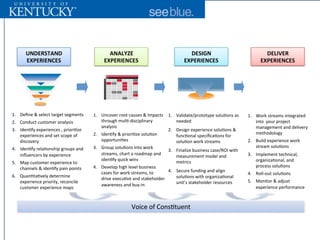
EAD deconstructs customer relationships into more manageable “Experiences”,
“Events”, and “Activities” to develop a tactical, actionable blueprint of the relationship
UNDERSTAND)
EXPERIENCES
ANALYZE)
EXPERIENCES
DESIGN)
EXPERIENCES
DELIVER)
EXPERIENCES
1.  Define'&'select'target'segments'
2.  Conduct'customer'analysis'
3.  Iden:fy'experiences','priori:ze'
experiences'and'set'scope'of'
discovery'
4.  Iden:fy'rela:onship'groups'and'
influencers'by'experience'
5.  Map'customer'experience'to'
channels'&'iden:fy'pain'points'
6.  Quan:ta:vely'determine'
experience'priority,'reconcile'
customer'experience'maps'
1.  Uncover'root'causes'&'Impacts'
through'mul:Jdisciplinary'
analysis'
2.  Iden:fy'&'priori:ze'solu:on'
opportuni:es'
3.  Group'solu:ons'into'work'
streams,'chart'a'roadmap'and'
iden:fy'quick'wins'
4.  Develop'high'level'business'
cases'for'work'streams,'to''
drive'execu:ve'and'stakeholder'
awareness'and'buyJin'
1.  Validate/prototype'solu:ons'as'
needed''
2.  Design'experience'solu:ons'&'
func:onal'specifica:ons'for'
solu:on'work'streams'
3.  Finalize'business'case/ROI'with'
measurement'model'and'
metrics'
4.  Secure'funding'and'align'
solu:ons'with'organiza:onal'
unit’s'stakeholder'resources'
1.  Work'streams'integrated'
into''your'project'
management'and'delivery'
methodology'
2.  Build'experience'work'
stream'solu:ons'
3.  Implement'technical,'
organiza:onal,'and'
process'solu:ons'
4.  RollJout'solu:ons'
5.  Monitor'&'adjust'
experience'performance'
Voice'of'Cons:tuent''
EAD Process Overview
Research Questions
Understand negative perceptions of
Blackboard LMS – What does it mean for
Blackboard to be “broken” from various
perspectives?
Understand instructor and student
learning technology needs
Identify opportunities to lower barriers
to instructor and student adoption
and continued use of Blackboard
Phase I:
Qualitative
Interviews
of Students
& Instructors
Student Experience Inventory (1 of 2)
Student Experience Inventory (2 of 2)
Instructor Experience Inventory
Phase II:
Quantitative
Online
Surveys
of Students
& Instructors
Valid Student Survey Respondents
(26133 total students in panel)
Valid Instructor Survey Respondents
(4272 total instructors in panel)
Survey Analysis Methodology
n Gap = Importance score – Satisfaction score
n Weighted Gap = Importance * Gap
n Total pain = (weighted gap) * (# of respondents)
n Rank descending on Weighted Gap
n Rank descending on Total Pain
n Code activities that belong to the same events in the survey
n Identify themes within Bb / technology events or related activities
• Ex. clusters of weighted Satisfaction / Importance Gap
Student Data: Blackboard Pain Themes
Theme 1:
High Stakes
Events (quizzes,
exams, paper
submission) using
Bb causing stress
Theme 2:
Inherent
challenges to
group work,
collaboration
exacerbated
Theme 3:
Communication
with instructors &
TAs around
assignments
causing stress
Question Gap
Mean	
Satisfaction
Mean	
Importance Cases
Exams 0.75 3.54 4.29 746
Submit	papers	/	SafeAssign 0.69 3.55 4.24 837 Theme	1	-	High	Stakes	Events
Taking	Quizzes 0.64 3.67 4.31 1175
Resolving	Group	Conflict 0.62 3.24 3.86 532 -----------
Meeting	with	group 0.60 3.31 3.91 642 ----------- Theme	2	-	Group	Collaboration
Conducting	Project	Work 0.60 3.34 3.94 679 -----------
Interacting	with	Instructors	During	before	after 0.54 3.62 4.16 985 ----------- -----------
Interacting	with	Instructors	Outside	of	class 0.54 3.62 4.16 989 ----------- ----------- Theme	3	-	Communication	Around	Assignments
Organizing	Electronic	Course	Documents 0.54 3.84 4.38 1583 -----------
Producing	Project	Documents 0.54 3.46 4 651 -----------
Presenting	Group	Project 0.53 3.43 3.96 594 -----------
Getting	questions	answered	via	BB	Q&A	discussion	thread 0.52 3.3 3.82 846 ----------- -----------
Uploading	content	other	than	papers 0.52 3.52 4.04 972 -----------
interacting	with	TA	outside	of	Labs/recitation 0.51 3.35 3.86 693 ----------- -----------
Acquiring	required	cource	materials 0.49 3.78 4.27 1546 ----------- -----------
Get	assignments	for	instructor 0.48 4.03 4.51 1484 ----------- -----------
interacting	with	TA	via	Labs/recitation 0.46 3.45 3.91 697 ----------- -----------
Submit	papers	/	without	SafeAssign 0.43 3.63 4.06 674 ----------- -----------
reviewing	course	presentations 0.42 3.78 4.2 1068
live	discussion	using	chat 0.42 3.22 3.64 37 Theme	4:	Low-Stakes	and	Low	Pain
forming	group 0.41 3.46 3.87 652
submit	paper	to	instructor	via	paper 0.41 3.88 4.29 1170
research	topic 0.41 3.6 4.01 967
sharing	contact	info 0.38 3.56 3.94 721
evaluating	group	participants 0.38 3.5 3.88 617
reviewing	course	lectures 0.36 3.86 4.22 1045
reviewing	course	materials 0.34 4.01 4.35 1506
engaging	in	class	discussion	using	BB	discussion	forum 0.33 3.29 3.62 626
Using	the	online	supplement 0.32 3.58 3.9 1000
finding	TA	or	instructors	contact	info 0.31 3.88 4.19 1280
reviewing	supplemental	conent 0.31 3.71 4.02 1029
submit	papers	via	email 0.30 3.99 4.29 1136
taking	notes	using	my	laptop 0.28 3.64 3.92 683
setting	up	an	account	for	online	supplement 0.28 3.54 3.82 855
determining	required	course	materials 0.23 3.83 4.06 1552
using	my	mobile	device	in	class 0.22 3.32 3.54 630
participate	with	clickers 0.19 3.46 3.65 864
STUDENT BLACKBOARD EVENT COLOR-KEY
Interactions	with	Course	Materials
Completing	Homework	and	Quizzes
Preparing	for	exams
Completing	Research	Papers	and	Written	
Assigments
Communicating	with	Instructors
Group	Work	With	Other	Students
Attending	Class
Student Activity Pain Points with Themes
Theme 1:
High Stakes Events (quizzes, exams, paper
submission) using Blackboard causing stress
Activity
Gap
Score
Mean
Satisfaction
Mean
Importance Cases
Exams 0.75 3.54 4.29 746
Submit Papers /
SafeAssign
0.69 3.55 4.24 837
Taking Quizzes 0.64 3.67 4.31 1175
Blackboard makes taking quizzes and
exams impossible.With these being
timed, too much delay time happens (a
few seconds here and a few seconds
there adds up to a lot at the end of it all).
I completely missed completing a mid-
term exam due to issues with
Blackboard...totally unacceptable!!!To
be frank, I spend enough money in
tuition to not have this as a concern.
If UK wishes to go green,why do I still have
to turn in papers and homework via a paper
copy?
I don't like submitting things via paper when
there are electronic paperless options.
I can't read his handwriting aboutthe things I
need to fix.
... I don't prefer to pay for paper.
When you take quizzes, many times
Blackboard will log you off in the middle of it.
This causes a lot of trouble for students
because they must contact their professor/TA,
somehow prove they were logged outinstead
of logging outthemselves,and find a way to be
allowed back in to the quiz.
I've had to end up wasting hours of emailing,
traveling and discussing in a professor's office
questions which I answered correctly yet
Blackboard did notrecognize as correct. So again,
a seemingly simple process turned into a pain in my
ass and added burden on my part because of
Blackboard.Blackboarddoes not save as much
time as intended and often times makes
students have to apply more effort and time for
some of the most trivial issues.
Any failure of blackboard or staff at utilizing blackboard
decreases the quality of my education.I have studied
online 100% and when the teacher is competent with
blackboard I feel I have learned.When a teacher
cannot use bb effectively I feel I learn nothing and
waste both my time and money.
Again,submitting through the
blackboard platform is unreliable.
Sometimes it says it is sent, but it really
didn't go through and if you don't check
your grades constantly you won't even
know the prof didn't get it.
Survey Results: What Students Said
Theme 2:
Inherent challenges to group work and
collaboration exacerbated
Activity Gap Score
Mean
Satisfaction
Mean
Importance Cases
Resolving Group
Conflict
0.62 3.24 3.86 532
Meeting with group 0.60 3.31 3.91 642
Conducting Project
Work
0.60 3.34 3.94 679
Organizing
Electronic Course
Documents
0.54 3.84 4.38 1583
Producing Project
Documents
0.54 3.46 4 651
Presenting Group
Project
0.53 3.43 3.96 594
Uploading content
other than papers
0.52 3.52 4.04 972
I don't think the instructor is
using the available tools to
facilitate these tasks. We were
told to use the discussion board to
set up groups, and that didn't really
work very well, so people went
offsite to Google docs instead. Our
group is currently exploring the
group tools now, but without
support or training…
Most of this was done easier through
just emailing each other. If
blackboard developed a very user
friendly way to set up meetings with
my group I would definitely utilize it.
The groups I have worked with went
outside of Blackboard to complete
group assignments. We used
Etherpad and now Google Docs.
Worst tool ever to use to try and
organize and prepare a project
because no one checks it or takes it
seriously. Texting and email are much
more efficient.
Bb was more of a hindrance to my
group(s). We tried during first project,
and found the system to be unreliable
and masking.
We did not know who was in our group
initially. Contact info was only obtained
after I gave everyone mine, and they
emailed me back- and I created a
Google group in my contacts. There is no
efficient way to collaborate on Bb- please
look at Google wave.
Survey Results: What Students Said
Theme 3:
Communication with instructors & TAs around
assignments causes stress
Activity
Gap
Score
Mean
Satisfaction
Mean
Importance Cases
Interacting with Instructors
During before after
0.54 3.62 4.16 985
Interacting with Instructors
Outside of class
0.54 3.62 4.16 989
Getting questions answered via
BB Q&A discussion thread
0.52 3.3 3.82 846
Interacting with TAoutside of
Labs/recitation
0.51 3.35 3.86 693
Acquiring required cource
materials
0.49 3.78 4.27 1546
Get assignments from Instructor 0.48 4.03 4.51 1484
Interacting with TAvia
recitation/lab section sessions
0.46 3.45 3.91 697
Submit papers through
Blackboard without SafeAssign
0.43 3.63 4.06 674
I have found that there is a tendency for
professors to expect students to be able to
get assignments even if they only put them
on blackboard shortly before class. This is
not a problem with blackboard, but rather
poor performance by the faculty member.
Some professors rely heavily on Blackboard but
they all seem to approach how to use it differently.
Where one professor uses the discussions to post
for groups, another wants everyone in the group to
work under one post. It can be very confusing
where and how to find things if the professor does
not seem to know which way they want to use the
program. I had one professor who wanted Q&A
questions answered in one type of posting for the
first few weeks of class and then changed to
another style, without notice, and threw everyone
off balance.
Consistency would be beneficial.
I was unable to reach any of my
teachers or TAs through Blackboard's
tools.
It was horrible.
This section continuously stopped working
and randomly deleted posts. Some times I
could post a question and sometimes I
couldn't, without warning.
My professor had to redesign this portion of
the class because the Q&A was unreliable.
It takes too long for TA's/instructors to respond and
they prefer using email.
sometimes u never get teachers to respond and its
irritating
I have never seen a Q&A thread on blackboard,
FAQ yes, but not a direct back and forth discussion
thread
Most classes using blackboard used the discussion
thread to turn in papers, not to ask questions.
You will not get answers right away. Face to face
and e-mail are a lot faster
Survey Results: What Students Said
Instructor Data: Blackboard Pain Themes
Theme 1:
High instructor
frustration with
reactive Bb
support
Theme 2:
Instructors frustrated
and dissatisfied with
assessment
interactions using
Blackboard.
Theme 3:
Instructor pain
from serving as
unwitting tech
support for
students
Question Gap
Mean	
Satisfaction
Mean	
Importance Cases
getting	updates	on	problem	resolution	progress	/	exam2.01 2.83 4.84 49 Theme	1:	Reactive	Support
getting	timely	resolution	to	a	problem	/	exam 2.00 2.91 4.91 53
contacting	a	technology	support	person	/	exam 1.91 2.96 4.87 53
getting	timely	resolution	to	a	problem 1.80 2.99 4.79 176
getting	updates	on	problem	resolution	progress 1.65 2.97 4.62 158
contacting	a	tech	support	person 1.57 3.18 4.75 175
view	or	receive	student	assignments 0.93 3.3 4.23 136 ----- Theme	2:	Assessment	Interactions
provide	feedback	on	assignments 0.92 3.26 4.18 128 -----
supporting	students	accessing	and	submitting	course	content0.86 3.36 4.22 134 ----- Theme	3:	Un-Witting	Support	Agents
submitting	grades 0.81 3.66 4.47 135 -----
grade	assignments	and	quizzes 0.79 3.44 4.23 135 -----
setup	quizzes 0.74 3.02 3.76 101 ----- Theme	4:	Quiz	Administration
providing	grades	to	students 0.68 3.95 4.63 168 -----
administer	quizzes 0.61 3.28 3.89 100 -----
demonstrating	to	students	how	to	use	technologies	for	the	course0.59 3.21 3.8 83 -----
interacting	with	students	outside	of	class 0.50 3.52 4.02 136 -----
customize	blackboard	shell 0.47 3.1 3.57 164 Theme	5:	Low	Stakes	OR	Low	Pain
sharing	multimedia	artifacts	with	students	in	blackboard0.37 3.53 3.9 122
delivering	a	class	session 0.26 3.48 3.74 72
sharing	your	notes	and	outlines	with	students	on	blackboard0.25 3.99 4.24 162
sharing	your	powerpoint	presentations	with	students	in	blackboard0.16 4.17 4.33 173
setup	e-reserves 0.15 3.3 3.45 67
moderating	discussion	boards	in	blackboard 0.12 3.44 3.56 93
share	my	course	capture	video	and	audio	with	students	-	asynchrynous-0.07 3.05 2.98 43
adding	supplementary	content	from	textbook	companies-0.11 3.38 3.27 83
share	my	course	capture	video	and	audio	with	students	-	synchrynous-0.14 3.17 3.03 45
coordinate	and	or	manage	student	field	work,	internships-0.30 3.17 2.87 33
testing	previous	course	content	prior	to	start	of	semester-0.35 3.38 3.03 63
standardizing	grading	techniques	amongst	Tas -0.42 3.35 2.93 26
assessing	Tas -0.44 3.05 2.61 20
delivering	support	to	students	when	Tas	cannot	solve	problem-0.51 3.48 2.97 28
meeting	with	Tas -0.54 3.36 2.82 22
training	Tas -0.65 3.5 2.85 26
managing	Tas	using	bloackboard -0.75 3.48 2.73 22
INSTRUCTOR	BLACKBOARD	EVENT	COLOR-KEY
Administrative	Activities
Interacting	with	Students
Managing	Instructor	Generated	Course	Content
Managing	Student	Generated	Course	Content
Preparing	for	a	Course
Receiving	Technology	Support
Receiving	Technology	Support	During	an	Exam	or	Near	a	Deadline
Instructor Activity Pain Points with Themes
Theme 1:
High instructor frustration with reactive Bb
support, and the causes for support to be needed
Activity Gap Score
Mean
Satisfaction
Mean
Importance Cases
Getting updates on
problem resolution
progress / exam
2.01 2.83 4.84 49
Getting timely
resolution to a
problem / exam
2.00 2.91 4.91 53
Contacting a
technology support
person / exam
1.91 2.96 4.87 53
Getting timely
resolution to a
problem
1.80 2.99 4.79 176
Getting updates on
problem resolution
progress
1.65 2.97 4.62 158
Contacting a tech
support person
1.57 3.18 4.75 175
One of the problems is that there
does not seem to be a way to get
expedited service when time is
critical.
And getting updates on a problem
usually requires more effort, i.e.
making additional calls and or
emails, and there is little
confidence that such a follow up
effort will be worthwhile; often the
response is that is in the queue or
worse, that there is no record of it.
How does the University expect us to
incorporate more online teaching
techniques if the IT infrastructure
cannot provide adequate support for
these technologies?
My department has its own IT
person; he's v.v. helpful. I prefer
this be centered in a department,
as opposed to the college.
I came from a university where
each dept had it's own contact
person for technology (Bb)
support. This worked well and
gave us continuity. I have one
person who I tend to contact (and
she is usually quite responsive) as
using the main help desk contact
info results in a very slow response
time and often requires more than
one request.
233
366
102
54
86
370
291
114
95
165
270
122
773
737
363
0
100
200
300
400
500
600
700
800
900
August
September
October
November
December
January
February
March
April
May
June
July
August
September
October
2009 2010
AxisTitle Blackboard Tickets per month
and
SLA Restore Success
Total for month
Successful Restore
Theme 2:
Instructor frustration with assessment
mechanics and related student interactions
Activity Gap Score
Mean
Satisfaction
Mean
Importance Cases
View or receive
student
assignments
0.93 3.3 4.23 136
Provide feedback
on assignments to
students
0.92 3.26 4.18 128
Submit grades 0.81 3.66 4.47 135
Grade
assignments and
quizzes
0.79 3.44 4.23 135
Provide grades to
students
0.68 3.95 4.63 168
Interact with
students outside of
class
0.50 3.52 4.02 136
Blackboard is clunky, takes forever to reload, often
reloads mid-page causing loss of information, and
offers limited customization.
The grade book is slow and cumbersome. I don't like
the fact that I don't have a student view. I want to be
able to add uses to my Bb shell (grad students, etc.),
which requires several extra steps on my part.
Overall, it's NOT a technology I enjoy using at all. In
general, I just use it as a secure place to share
grades with students.
When I tried to transfer a test from one
semester to another, I worked on it for two
days, called IT help and still was unable to
transfer the test.
I had to take another day to re-type the test
in the course shell this semester, which was
a waste of my time.
Cumbersome process. Students have trouble
understanding how to submit quizzes. I get too many
"in progress" scores. It is a tricky process to set up
end times for quizzes. If you have to allow one
student or a few students extended time on a quiz
there is a "simple" twelve step procedure for allowing
this.
It is difficult (time-consuming) to develop the quizzes.
The quizzes can crash while the students are in them.
Students have trouble finding the quizzes in the
Blackboard shell.
The system was a pain to use. I had open and close
dates, and students would miss these. Or the system
would boot them out for no good reason.
If there is an easy way to do this, then the instructions
on the wiki should be revised and the help desk
trained to assist people in the process.
Survey Results: What Instructors Said
Theme 3:
Instructors are the first people students
turn to for support of technologies they
associate with the course
Activity Gap Score
Mean
Satisfaction
Mean
Importance Cases
Supporting
students accessing
and submitting
course content
0.86 3.36 4.22 134
Demonstrating to
students how to
use technologies
for the course
0.59 3.21 3.8 83
Students are always confused
as to where to drop
assignments and often their
work is late as a result, they
always glut my email sending
their projects to 'document' they
did their work on time.
I have at least one student per
assignment that seems to encounter a
problem. It is usually a different student
each time, so I think I can rule out
human error to some degree.
It functions but not as smoothly or as
intuitively as I would like.
Students hate it. They groan as soon as
you say Blackboard.
Students are not comfortable using the
Blackboard platform. They do not view it
as an interactive environment but rather
a repository of information and
resources for the course.
It felt as though students had no training
using Bb.
I don't know why these things are hard
for students, but I've had multiple
students not be able to do it even after
I've showed them how in class. It's
simply not intuitive for most people.
Survey Results: What Instructors Said
Students vs. Instructors on Support
Uncertainty
“How Likely Are You To Recommend Blackboard to a Colleague?”
Paradox and Contradiction
n On the whole, Students are happier, more satisfied with their
Blackboard experience than faculty.
• Is the difference Content Preparation?
n Students and Faculty each say that the other cannot effectively use
Blackboard. Who’s right?
• Could it be they are BOTH right?
n Is there a winning pedagogical model that uses Blackboard in such
a way as to yield both high Student and High Faculty Satisfaction?
• College-Specific Data may yield the answers.
How do U.K.’s Colleges Compare with One Another?
Adoption
Stories
How do U.K.’s Colleges Compare with One Another?
College of Arts & Sciences
-1 -0.8 -0.6 -0.4 -0.2 0 0.2 0.4 0.6 0.8 1
Enrollment
Content
Announcement
Assessment
Collab
Post
Assignments
Groups
StudentAccess
InstructorAccess
StaffAccess
BlogEntry
BlogComment
Wiki
AdaptiveRule
EWSRule
Instructors&Tas
BB Enroll Pct
FacRecommend(S)
Student UK Satis (S)
Student BB Satis (S)
Student BB Gap (S)
How do U.K.’s Colleges Compare with One Another?
College of Communications & Information Studies
-1 -0.8 -0.6 -0.4 -0.2 0 0.2 0.4 0.6 0.8 1
Enrollment
Content
Announcement
Assessment
Collab
Post
Assignments
Groups
StudentAccess
InstructorAccess
StaffAccess
BlogEntry
BlogComment
Wiki
AdaptiveRule
EWSRule
Instructors&Tas
BB Enroll Pct
FacRecommend(S)
Student UK Satis (S)
Student BB Satis (S)
Student BB Gap (S)
How do U.K.’s Colleges Compare with One Another?
College of Dentistry
-1 -0.8 -0.6 -0.4 -0.2 0 0.2 0.4 0.6 0.8 1
Enrollment
Content
Announcement
Assessment
Collab
Post
Assignments
Groups
StudentAccess
InstructorAccess
StaffAccess
BlogEntry
BlogComment
Wiki
AdaptiveRule
EWSRule
Instructors&Tas
BB Enroll Pct
FacRecommend(S)
Student UK Satis (S)
Student BB Satis (S)
Student BB Gap (S)
How do U.K.’s Colleges Compare with One Another?
College of Nursing
-1 -0.8 -0.6 -0.4 -0.2 0 0.2 0.4 0.6 0.8 1
Enrollment
Content
Announcement
Assessment
Collab
Post
Assignments
Groups
StudentAccess
InstructorAccess
StaffAccess
BlogEntry
BlogComment
Wiki
AdaptiveRule
EWSRule
Instructors&Tas
BB Enroll Pct
FacRecommend(S)
Student UK Satis (S)
Student BB Satis (S)
Student BB Gap (S)
IDEATION
Solutions: What to do?
1. Simplify and streamline user access to key Bb features
§ Lock-Down Browser
§ Improved User Interface
§ Blackboard Product Improvements
2. Address support issues
§ Expanded Training Material Availability
§ Increased Staff Support for Issue Resolution & Course Creation
3. Improve the institutional approach to LMS adoption
§ Faculty Blackboard Community of Practice
§ Proctored Testing Centers
§ Culture of Teaching and Technology
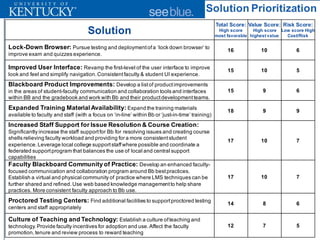
Solution Prioritization
Solution
Total Score:
High score
most favorable
Value Score:
High score
highest value
Risk Score:
Low score High
Cost/Risk
Lock-Down Browser: Pursue testing and deploymentofa ‘lock down browser’ to
improve exam and quizzes experience.
16 10 6
Improved User Interface: Revamp the first-level of the user interface to improve
look and feel and simplify navigation.Consistentfaculty & student UI experience.
15 10 5
Blackboard Product Improvements: Develop a listof productimprovements
in the areas of student-faculty communication and collaboration tools and interfaces
within BB and the gradebook and work with Bb and their productdevelopmentteams.
15 9 6
Expanded Training Material Availability: Expand the training materials
available to faculty and staff (with a focus on ‘in-line’ within Bb or ‘just-in-time’ training)
18 9 9
Increased Staff Support for Issue Resolution & Course Creation:
Significantly increase the staff supportfor Bb for resolving issues and creating course
shells relieving faculty workload and providing for a more consistentstudent
experience.Leverage local college supportstaffwhere possible and coordinate a
federated supportprogram that balances the use of local and central support
capabilities
17 10 7
Faculty Blackboard Community of Practice: Develop an enhanced faculty-
focused communication and collaboration program around Bb bestpractices.
Establish a virtual and physical community of practice where LMS techniques can be
further shared and refined.Use web based knowledge managementto help share
practices. More consistent faculty approach to Bb use.
17 10 7
Proctored Testing Centers: Find additional facilities to supportproctored testing
centers and staff appropriately
14 8 6
Culture of Teaching and Technology: Establish a culture ofteaching and
technology.Provide faculty incentives for adoption and use.Affect the faculty
promotion,tenure and review process to reward teaching
12 7 5
0
1
2
3
4
5
6
7
8
9
10
0 2 4 6 8 10 12
Value
Cost/Risk
Culture of Teaching
and Technology
Improved User
Interface
Proctored
Testing
Centers
Blackboard Product
Improvements
Lock-Down
Browser
Expanded
Training
Material
Availability
Increased Staff
Support for Issue
Resolution & Course
Creation
Faculty
Blackboard
Community
of Practice
Implementation Timeline
1-3 Months 4-6 Months 7-9 Months 10-12 Months 13-15 Months 16-18 Months
Improved User Interface
Blackboard Product Improvements
1)
Simplify and
streamline
user access
to key Bb
features
2)
Address
support
issues
3)
Improve the
institutional
approach to
LMS adoption
Expanded Training Material
Availability
Faculty Blackboard Community of Practice
Lock-Down Browser
IncreasedStaff Support for Issue Resolution & Course Creation
Proctored Testing Centers
Culture of Teaching and Technology
Questions & Discussion

Blackboard EAD Presentation (Educause 2011)

  • 1.
    Vince Kellen, CIOand Christopher S. Rice, Ph.D. University of Kentucky Using the Experience Analysis and Design Methodology to Increase Faculty Adoption of and Student Satisfaction with the LMS
  • 2.
  • 3.
  • 4.
    Who uses Blackboard? About44% of faculty Use Blackboard (beyond simply posting a syllabus) About 90% of students Have taken at least one class in which Bb was used
  • 5.
    Blackboard EAD Project 70%GOAL: Identifytactics to support U.K. strategic initiative to reach 70% faculty adoption of the LMS by 2014
  • 6.
    Experience Analysis andDesign (EAD) history n The methodology was inspired by early experience analysis collaboration with a few of us in 1999 and has grown since then with a small group of collaborators • Vince Kellen, Andy Drefahl, Bob Furniss, Keith Stefanczyk, Chris Rice n The methodology uses observation, structured interviews, surveys, qualitative data analysis and analysis of system usage and other behavioral data. Think of it as usability and brand analysis on steroids n Methodology goals • To be more conclusive than anecdote and small sample sizes (N=1) • To get beyond usability and attitudinal data. Collect behavior-based data • To get the focus more broadly based than a pure technical perspective
  • 7.
    EAD is anapproach to driving customer value through managing experiences from the customer’s perspective. Relationship Experience Event Activity 1. Relationship: Highest level of association with customer; sets of experiences 2. Experience: The series of interactions involving the customer to achieve an overall outcome – to fulfill a specific need 3. Event: The high- level set of processes that a customer goes through as part of an experience 4. Activity: Individual incidents which comprise an event, each with one more steps EAD deconstructs customer relationships into more manageable “Experiences”, “Events”, and “Activities” to develop a tactical, actionable blueprint of the relationship
  • 8.
    UNDERSTAND) EXPERIENCES ANALYZE) EXPERIENCES DESIGN) EXPERIENCES DELIVER) EXPERIENCES 1.  Define'&'select'target'segments' 2.  Conduct'customer'analysis' 3. Iden:fy'experiences','priori:ze' experiences'and'set'scope'of' discovery' 4.  Iden:fy'rela:onship'groups'and' influencers'by'experience' 5.  Map'customer'experience'to' channels'&'iden:fy'pain'points' 6.  Quan:ta:vely'determine' experience'priority,'reconcile' customer'experience'maps' 1.  Uncover'root'causes'&'Impacts' through'mul:Jdisciplinary' analysis' 2.  Iden:fy'&'priori:ze'solu:on' opportuni:es' 3.  Group'solu:ons'into'work' streams,'chart'a'roadmap'and' iden:fy'quick'wins' 4.  Develop'high'level'business' cases'for'work'streams,'to'' drive'execu:ve'and'stakeholder' awareness'and'buyJin' 1.  Validate/prototype'solu:ons'as' needed'' 2.  Design'experience'solu:ons'&' func:onal'specifica:ons'for' solu:on'work'streams' 3.  Finalize'business'case/ROI'with' measurement'model'and' metrics' 4.  Secure'funding'and'align' solu:ons'with'organiza:onal' unit’s'stakeholder'resources' 1.  Work'streams'integrated' into''your'project' management'and'delivery' methodology' 2.  Build'experience'work' stream'solu:ons' 3.  Implement'technical,' organiza:onal,'and' process'solu:ons' 4.  RollJout'solu:ons' 5.  Monitor'&'adjust' experience'performance' Voice'of'Cons:tuent''
  • 9.
  • 10.
  • 11.
    Understand negative perceptionsof Blackboard LMS – What does it mean for Blackboard to be “broken” from various perspectives?
  • 12.
    Understand instructor andstudent learning technology needs
  • 13.
    Identify opportunities tolower barriers to instructor and student adoption and continued use of Blackboard
  • 14.
  • 15.
  • 16.
  • 17.
  • 18.
  • 19.
    Valid Student SurveyRespondents (26133 total students in panel)
  • 20.
    Valid Instructor SurveyRespondents (4272 total instructors in panel)
  • 22.
    Survey Analysis Methodology nGap = Importance score – Satisfaction score n Weighted Gap = Importance * Gap n Total pain = (weighted gap) * (# of respondents) n Rank descending on Weighted Gap n Rank descending on Total Pain n Code activities that belong to the same events in the survey n Identify themes within Bb / technology events or related activities • Ex. clusters of weighted Satisfaction / Importance Gap
  • 23.
    Student Data: BlackboardPain Themes Theme 1: High Stakes Events (quizzes, exams, paper submission) using Bb causing stress Theme 2: Inherent challenges to group work, collaboration exacerbated Theme 3: Communication with instructors & TAs around assignments causing stress
  • 24.
    Question Gap Mean Satisfaction Mean Importance Cases Exams0.75 3.54 4.29 746 Submit papers / SafeAssign 0.69 3.55 4.24 837 Theme 1 - High Stakes Events Taking Quizzes 0.64 3.67 4.31 1175 Resolving Group Conflict 0.62 3.24 3.86 532 ----------- Meeting with group 0.60 3.31 3.91 642 ----------- Theme 2 - Group Collaboration Conducting Project Work 0.60 3.34 3.94 679 ----------- Interacting with Instructors During before after 0.54 3.62 4.16 985 ----------- ----------- Interacting with Instructors Outside of class 0.54 3.62 4.16 989 ----------- ----------- Theme 3 - Communication Around Assignments Organizing Electronic Course Documents 0.54 3.84 4.38 1583 ----------- Producing Project Documents 0.54 3.46 4 651 ----------- Presenting Group Project 0.53 3.43 3.96 594 ----------- Getting questions answered via BB Q&A discussion thread 0.52 3.3 3.82 846 ----------- ----------- Uploading content other than papers 0.52 3.52 4.04 972 ----------- interacting with TA outside of Labs/recitation 0.51 3.35 3.86 693 ----------- ----------- Acquiring required cource materials 0.49 3.78 4.27 1546 ----------- ----------- Get assignments for instructor 0.48 4.03 4.51 1484 ----------- ----------- interacting with TA via Labs/recitation 0.46 3.45 3.91 697 ----------- ----------- Submit papers / without SafeAssign 0.43 3.63 4.06 674 ----------- ----------- reviewing course presentations 0.42 3.78 4.2 1068 live discussion using chat 0.42 3.22 3.64 37 Theme 4: Low-Stakes and Low Pain forming group 0.41 3.46 3.87 652 submit paper to instructor via paper 0.41 3.88 4.29 1170 research topic 0.41 3.6 4.01 967 sharing contact info 0.38 3.56 3.94 721 evaluating group participants 0.38 3.5 3.88 617 reviewing course lectures 0.36 3.86 4.22 1045 reviewing course materials 0.34 4.01 4.35 1506 engaging in class discussion using BB discussion forum 0.33 3.29 3.62 626 Using the online supplement 0.32 3.58 3.9 1000 finding TA or instructors contact info 0.31 3.88 4.19 1280 reviewing supplemental conent 0.31 3.71 4.02 1029 submit papers via email 0.30 3.99 4.29 1136 taking notes using my laptop 0.28 3.64 3.92 683 setting up an account for online supplement 0.28 3.54 3.82 855 determining required course materials 0.23 3.83 4.06 1552 using my mobile device in class 0.22 3.32 3.54 630 participate with clickers 0.19 3.46 3.65 864 STUDENT BLACKBOARD EVENT COLOR-KEY Interactions with Course Materials Completing Homework and Quizzes Preparing for exams Completing Research Papers and Written Assigments Communicating with Instructors Group Work With Other Students Attending Class Student Activity Pain Points with Themes
  • 25.
    Theme 1: High StakesEvents (quizzes, exams, paper submission) using Blackboard causing stress Activity Gap Score Mean Satisfaction Mean Importance Cases Exams 0.75 3.54 4.29 746 Submit Papers / SafeAssign 0.69 3.55 4.24 837 Taking Quizzes 0.64 3.67 4.31 1175
  • 26.
    Blackboard makes takingquizzes and exams impossible.With these being timed, too much delay time happens (a few seconds here and a few seconds there adds up to a lot at the end of it all). I completely missed completing a mid- term exam due to issues with Blackboard...totally unacceptable!!!To be frank, I spend enough money in tuition to not have this as a concern. If UK wishes to go green,why do I still have to turn in papers and homework via a paper copy? I don't like submitting things via paper when there are electronic paperless options. I can't read his handwriting aboutthe things I need to fix. ... I don't prefer to pay for paper. When you take quizzes, many times Blackboard will log you off in the middle of it. This causes a lot of trouble for students because they must contact their professor/TA, somehow prove they were logged outinstead of logging outthemselves,and find a way to be allowed back in to the quiz. I've had to end up wasting hours of emailing, traveling and discussing in a professor's office questions which I answered correctly yet Blackboard did notrecognize as correct. So again, a seemingly simple process turned into a pain in my ass and added burden on my part because of Blackboard.Blackboarddoes not save as much time as intended and often times makes students have to apply more effort and time for some of the most trivial issues. Any failure of blackboard or staff at utilizing blackboard decreases the quality of my education.I have studied online 100% and when the teacher is competent with blackboard I feel I have learned.When a teacher cannot use bb effectively I feel I learn nothing and waste both my time and money. Again,submitting through the blackboard platform is unreliable. Sometimes it says it is sent, but it really didn't go through and if you don't check your grades constantly you won't even know the prof didn't get it. Survey Results: What Students Said
  • 27.
    Theme 2: Inherent challengesto group work and collaboration exacerbated Activity Gap Score Mean Satisfaction Mean Importance Cases Resolving Group Conflict 0.62 3.24 3.86 532 Meeting with group 0.60 3.31 3.91 642 Conducting Project Work 0.60 3.34 3.94 679 Organizing Electronic Course Documents 0.54 3.84 4.38 1583 Producing Project Documents 0.54 3.46 4 651 Presenting Group Project 0.53 3.43 3.96 594 Uploading content other than papers 0.52 3.52 4.04 972
  • 28.
    I don't thinkthe instructor is using the available tools to facilitate these tasks. We were told to use the discussion board to set up groups, and that didn't really work very well, so people went offsite to Google docs instead. Our group is currently exploring the group tools now, but without support or training… Most of this was done easier through just emailing each other. If blackboard developed a very user friendly way to set up meetings with my group I would definitely utilize it. The groups I have worked with went outside of Blackboard to complete group assignments. We used Etherpad and now Google Docs. Worst tool ever to use to try and organize and prepare a project because no one checks it or takes it seriously. Texting and email are much more efficient. Bb was more of a hindrance to my group(s). We tried during first project, and found the system to be unreliable and masking. We did not know who was in our group initially. Contact info was only obtained after I gave everyone mine, and they emailed me back- and I created a Google group in my contacts. There is no efficient way to collaborate on Bb- please look at Google wave. Survey Results: What Students Said
  • 29.
    Theme 3: Communication withinstructors & TAs around assignments causes stress Activity Gap Score Mean Satisfaction Mean Importance Cases Interacting with Instructors During before after 0.54 3.62 4.16 985 Interacting with Instructors Outside of class 0.54 3.62 4.16 989 Getting questions answered via BB Q&A discussion thread 0.52 3.3 3.82 846 Interacting with TAoutside of Labs/recitation 0.51 3.35 3.86 693 Acquiring required cource materials 0.49 3.78 4.27 1546 Get assignments from Instructor 0.48 4.03 4.51 1484 Interacting with TAvia recitation/lab section sessions 0.46 3.45 3.91 697 Submit papers through Blackboard without SafeAssign 0.43 3.63 4.06 674
  • 30.
    I have foundthat there is a tendency for professors to expect students to be able to get assignments even if they only put them on blackboard shortly before class. This is not a problem with blackboard, but rather poor performance by the faculty member. Some professors rely heavily on Blackboard but they all seem to approach how to use it differently. Where one professor uses the discussions to post for groups, another wants everyone in the group to work under one post. It can be very confusing where and how to find things if the professor does not seem to know which way they want to use the program. I had one professor who wanted Q&A questions answered in one type of posting for the first few weeks of class and then changed to another style, without notice, and threw everyone off balance. Consistency would be beneficial. I was unable to reach any of my teachers or TAs through Blackboard's tools. It was horrible. This section continuously stopped working and randomly deleted posts. Some times I could post a question and sometimes I couldn't, without warning. My professor had to redesign this portion of the class because the Q&A was unreliable. It takes too long for TA's/instructors to respond and they prefer using email. sometimes u never get teachers to respond and its irritating I have never seen a Q&A thread on blackboard, FAQ yes, but not a direct back and forth discussion thread Most classes using blackboard used the discussion thread to turn in papers, not to ask questions. You will not get answers right away. Face to face and e-mail are a lot faster Survey Results: What Students Said
  • 31.
    Instructor Data: BlackboardPain Themes Theme 1: High instructor frustration with reactive Bb support Theme 2: Instructors frustrated and dissatisfied with assessment interactions using Blackboard. Theme 3: Instructor pain from serving as unwitting tech support for students
  • 32.
    Question Gap Mean Satisfaction Mean Importance Cases getting updates on problem resolution progress / exam2.012.83 4.84 49 Theme 1: Reactive Support getting timely resolution to a problem / exam 2.00 2.91 4.91 53 contacting a technology support person / exam 1.91 2.96 4.87 53 getting timely resolution to a problem 1.80 2.99 4.79 176 getting updates on problem resolution progress 1.65 2.97 4.62 158 contacting a tech support person 1.57 3.18 4.75 175 view or receive student assignments 0.93 3.3 4.23 136 ----- Theme 2: Assessment Interactions provide feedback on assignments 0.92 3.26 4.18 128 ----- supporting students accessing and submitting course content0.86 3.36 4.22 134 ----- Theme 3: Un-Witting Support Agents submitting grades 0.81 3.66 4.47 135 ----- grade assignments and quizzes 0.79 3.44 4.23 135 ----- setup quizzes 0.74 3.02 3.76 101 ----- Theme 4: Quiz Administration providing grades to students 0.68 3.95 4.63 168 ----- administer quizzes 0.61 3.28 3.89 100 ----- demonstrating to students how to use technologies for the course0.59 3.21 3.8 83 ----- interacting with students outside of class 0.50 3.52 4.02 136 ----- customize blackboard shell 0.47 3.1 3.57 164 Theme 5: Low Stakes OR Low Pain sharing multimedia artifacts with students in blackboard0.37 3.53 3.9 122 delivering a class session 0.26 3.48 3.74 72 sharing your notes and outlines with students on blackboard0.25 3.99 4.24 162 sharing your powerpoint presentations with students in blackboard0.16 4.17 4.33 173 setup e-reserves 0.15 3.3 3.45 67 moderating discussion boards in blackboard 0.12 3.44 3.56 93 share my course capture video and audio with students - asynchrynous-0.07 3.05 2.98 43 adding supplementary content from textbook companies-0.11 3.38 3.27 83 share my course capture video and audio with students - synchrynous-0.14 3.17 3.03 45 coordinate and or manage student field work, internships-0.30 3.17 2.87 33 testing previous course content prior to start of semester-0.35 3.38 3.03 63 standardizing grading techniques amongst Tas -0.42 3.35 2.93 26 assessing Tas -0.44 3.05 2.61 20 delivering support to students when Tas cannot solve problem-0.51 3.48 2.97 28 meeting with Tas -0.54 3.36 2.82 22 training Tas -0.65 3.5 2.85 26 managing Tas using bloackboard -0.75 3.48 2.73 22 INSTRUCTOR BLACKBOARD EVENT COLOR-KEY Administrative Activities Interacting with Students Managing Instructor Generated Course Content Managing Student Generated Course Content Preparing for a Course Receiving Technology Support Receiving Technology Support During an Exam or Near a Deadline Instructor Activity Pain Points with Themes
  • 33.
    Theme 1: High instructorfrustration with reactive Bb support, and the causes for support to be needed Activity Gap Score Mean Satisfaction Mean Importance Cases Getting updates on problem resolution progress / exam 2.01 2.83 4.84 49 Getting timely resolution to a problem / exam 2.00 2.91 4.91 53 Contacting a technology support person / exam 1.91 2.96 4.87 53 Getting timely resolution to a problem 1.80 2.99 4.79 176 Getting updates on problem resolution progress 1.65 2.97 4.62 158 Contacting a tech support person 1.57 3.18 4.75 175
  • 34.
    One of theproblems is that there does not seem to be a way to get expedited service when time is critical. And getting updates on a problem usually requires more effort, i.e. making additional calls and or emails, and there is little confidence that such a follow up effort will be worthwhile; often the response is that is in the queue or worse, that there is no record of it. How does the University expect us to incorporate more online teaching techniques if the IT infrastructure cannot provide adequate support for these technologies? My department has its own IT person; he's v.v. helpful. I prefer this be centered in a department, as opposed to the college. I came from a university where each dept had it's own contact person for technology (Bb) support. This worked well and gave us continuity. I have one person who I tend to contact (and she is usually quite responsive) as using the main help desk contact info results in a very slow response time and often requires more than one request.
  • 35.
  • 36.
    Theme 2: Instructor frustrationwith assessment mechanics and related student interactions Activity Gap Score Mean Satisfaction Mean Importance Cases View or receive student assignments 0.93 3.3 4.23 136 Provide feedback on assignments to students 0.92 3.26 4.18 128 Submit grades 0.81 3.66 4.47 135 Grade assignments and quizzes 0.79 3.44 4.23 135 Provide grades to students 0.68 3.95 4.63 168 Interact with students outside of class 0.50 3.52 4.02 136
  • 37.
    Blackboard is clunky,takes forever to reload, often reloads mid-page causing loss of information, and offers limited customization. The grade book is slow and cumbersome. I don't like the fact that I don't have a student view. I want to be able to add uses to my Bb shell (grad students, etc.), which requires several extra steps on my part. Overall, it's NOT a technology I enjoy using at all. In general, I just use it as a secure place to share grades with students. When I tried to transfer a test from one semester to another, I worked on it for two days, called IT help and still was unable to transfer the test. I had to take another day to re-type the test in the course shell this semester, which was a waste of my time. Cumbersome process. Students have trouble understanding how to submit quizzes. I get too many "in progress" scores. It is a tricky process to set up end times for quizzes. If you have to allow one student or a few students extended time on a quiz there is a "simple" twelve step procedure for allowing this. It is difficult (time-consuming) to develop the quizzes. The quizzes can crash while the students are in them. Students have trouble finding the quizzes in the Blackboard shell. The system was a pain to use. I had open and close dates, and students would miss these. Or the system would boot them out for no good reason. If there is an easy way to do this, then the instructions on the wiki should be revised and the help desk trained to assist people in the process. Survey Results: What Instructors Said
  • 38.
    Theme 3: Instructors arethe first people students turn to for support of technologies they associate with the course Activity Gap Score Mean Satisfaction Mean Importance Cases Supporting students accessing and submitting course content 0.86 3.36 4.22 134 Demonstrating to students how to use technologies for the course 0.59 3.21 3.8 83
  • 39.
    Students are alwaysconfused as to where to drop assignments and often their work is late as a result, they always glut my email sending their projects to 'document' they did their work on time. I have at least one student per assignment that seems to encounter a problem. It is usually a different student each time, so I think I can rule out human error to some degree. It functions but not as smoothly or as intuitively as I would like. Students hate it. They groan as soon as you say Blackboard. Students are not comfortable using the Blackboard platform. They do not view it as an interactive environment but rather a repository of information and resources for the course. It felt as though students had no training using Bb. I don't know why these things are hard for students, but I've had multiple students not be able to do it even after I've showed them how in class. It's simply not intuitive for most people. Survey Results: What Instructors Said
  • 40.
  • 41.
  • 42.
    “How Likely AreYou To Recommend Blackboard to a Colleague?”
  • 43.
    Paradox and Contradiction nOn the whole, Students are happier, more satisfied with their Blackboard experience than faculty. • Is the difference Content Preparation? n Students and Faculty each say that the other cannot effectively use Blackboard. Who’s right? • Could it be they are BOTH right? n Is there a winning pedagogical model that uses Blackboard in such a way as to yield both high Student and High Faculty Satisfaction? • College-Specific Data may yield the answers.
  • 44.
    How do U.K.’sColleges Compare with One Another? Adoption Stories
  • 45.
    How do U.K.’sColleges Compare with One Another? College of Arts & Sciences -1 -0.8 -0.6 -0.4 -0.2 0 0.2 0.4 0.6 0.8 1 Enrollment Content Announcement Assessment Collab Post Assignments Groups StudentAccess InstructorAccess StaffAccess BlogEntry BlogComment Wiki AdaptiveRule EWSRule Instructors&Tas BB Enroll Pct FacRecommend(S) Student UK Satis (S) Student BB Satis (S) Student BB Gap (S)
  • 46.
    How do U.K.’sColleges Compare with One Another? College of Communications & Information Studies -1 -0.8 -0.6 -0.4 -0.2 0 0.2 0.4 0.6 0.8 1 Enrollment Content Announcement Assessment Collab Post Assignments Groups StudentAccess InstructorAccess StaffAccess BlogEntry BlogComment Wiki AdaptiveRule EWSRule Instructors&Tas BB Enroll Pct FacRecommend(S) Student UK Satis (S) Student BB Satis (S) Student BB Gap (S)
  • 47.
    How do U.K.’sColleges Compare with One Another? College of Dentistry -1 -0.8 -0.6 -0.4 -0.2 0 0.2 0.4 0.6 0.8 1 Enrollment Content Announcement Assessment Collab Post Assignments Groups StudentAccess InstructorAccess StaffAccess BlogEntry BlogComment Wiki AdaptiveRule EWSRule Instructors&Tas BB Enroll Pct FacRecommend(S) Student UK Satis (S) Student BB Satis (S) Student BB Gap (S)
  • 48.
    How do U.K.’sColleges Compare with One Another? College of Nursing -1 -0.8 -0.6 -0.4 -0.2 0 0.2 0.4 0.6 0.8 1 Enrollment Content Announcement Assessment Collab Post Assignments Groups StudentAccess InstructorAccess StaffAccess BlogEntry BlogComment Wiki AdaptiveRule EWSRule Instructors&Tas BB Enroll Pct FacRecommend(S) Student UK Satis (S) Student BB Satis (S) Student BB Gap (S)
  • 49.
  • 50.
    Solutions: What todo? 1. Simplify and streamline user access to key Bb features § Lock-Down Browser § Improved User Interface § Blackboard Product Improvements 2. Address support issues § Expanded Training Material Availability § Increased Staff Support for Issue Resolution & Course Creation 3. Improve the institutional approach to LMS adoption § Faculty Blackboard Community of Practice § Proctored Testing Centers § Culture of Teaching and Technology
  • 51.
    Solution Prioritization Solution Total Score: Highscore most favorable Value Score: High score highest value Risk Score: Low score High Cost/Risk Lock-Down Browser: Pursue testing and deploymentofa ‘lock down browser’ to improve exam and quizzes experience. 16 10 6 Improved User Interface: Revamp the first-level of the user interface to improve look and feel and simplify navigation.Consistentfaculty & student UI experience. 15 10 5 Blackboard Product Improvements: Develop a listof productimprovements in the areas of student-faculty communication and collaboration tools and interfaces within BB and the gradebook and work with Bb and their productdevelopmentteams. 15 9 6 Expanded Training Material Availability: Expand the training materials available to faculty and staff (with a focus on ‘in-line’ within Bb or ‘just-in-time’ training) 18 9 9 Increased Staff Support for Issue Resolution & Course Creation: Significantly increase the staff supportfor Bb for resolving issues and creating course shells relieving faculty workload and providing for a more consistentstudent experience.Leverage local college supportstaffwhere possible and coordinate a federated supportprogram that balances the use of local and central support capabilities 17 10 7 Faculty Blackboard Community of Practice: Develop an enhanced faculty- focused communication and collaboration program around Bb bestpractices. Establish a virtual and physical community of practice where LMS techniques can be further shared and refined.Use web based knowledge managementto help share practices. More consistent faculty approach to Bb use. 17 10 7 Proctored Testing Centers: Find additional facilities to supportproctored testing centers and staff appropriately 14 8 6 Culture of Teaching and Technology: Establish a culture ofteaching and technology.Provide faculty incentives for adoption and use.Affect the faculty promotion,tenure and review process to reward teaching 12 7 5
  • 52.
    0 1 2 3 4 5 6 7 8 9 10 0 2 46 8 10 12 Value Cost/Risk Culture of Teaching and Technology Improved User Interface Proctored Testing Centers Blackboard Product Improvements Lock-Down Browser Expanded Training Material Availability Increased Staff Support for Issue Resolution & Course Creation Faculty Blackboard Community of Practice
  • 53.
    Implementation Timeline 1-3 Months4-6 Months 7-9 Months 10-12 Months 13-15 Months 16-18 Months Improved User Interface Blackboard Product Improvements 1) Simplify and streamline user access to key Bb features 2) Address support issues 3) Improve the institutional approach to LMS adoption Expanded Training Material Availability Faculty Blackboard Community of Practice Lock-Down Browser IncreasedStaff Support for Issue Resolution & Course Creation Proctored Testing Centers Culture of Teaching and Technology
  • 54.