BitTorrent
       sharing files has never been easier


Done by Mohamed Essa and Buti Mohamed
Under the instructions of Dr. Basel Al Mourad
List of Content
1.   Introduction
2.   Definition of BitTorrent
3.   History of BitTorrent
4.   How to install BitTorrent
5.   How to use BitTorrent
6.   Issues and solutions
7.   Conclusion
Introduction
      BitTorrent is one of the widely used programs
that made sharing files easier and faster. The
program enables the user to transfer large
amounts of data through internet. This
presentation will discuss the following:

•Definition of BitTorrent
•History of BitTorrent
•How to install BitTorrent
•How to use BitTorrent
•Issues and solutions
Definition of BitTorrent
• The word BitTorrent could refer to three things;
  BitTorrent as a company, protocol, and software.
  This presentation will only discuss the following:

 Protocol

 Software
Protocol
• BitTorrent (protocol): A peer-to-peer (P2P) file
  sharing protocol used for distributing large amount
  of data over the internet.

• P2P: downloading or sharing files from another
  person (computer) instead of downloading them
  from a server (website).
Software
• BitTorrent (software): A P2P client used to connect
  through the internet so users can download and
  upload (.torrent) files using the program.
History of BitTorrent
      BitTorrent was designed and developed by a
programmer called Bram Cohen in 2001 and was also
released in the same year. Bram Cohen then created
a company of BitTorrent with a partner named Ashwin
Navin in 2004.
How to install
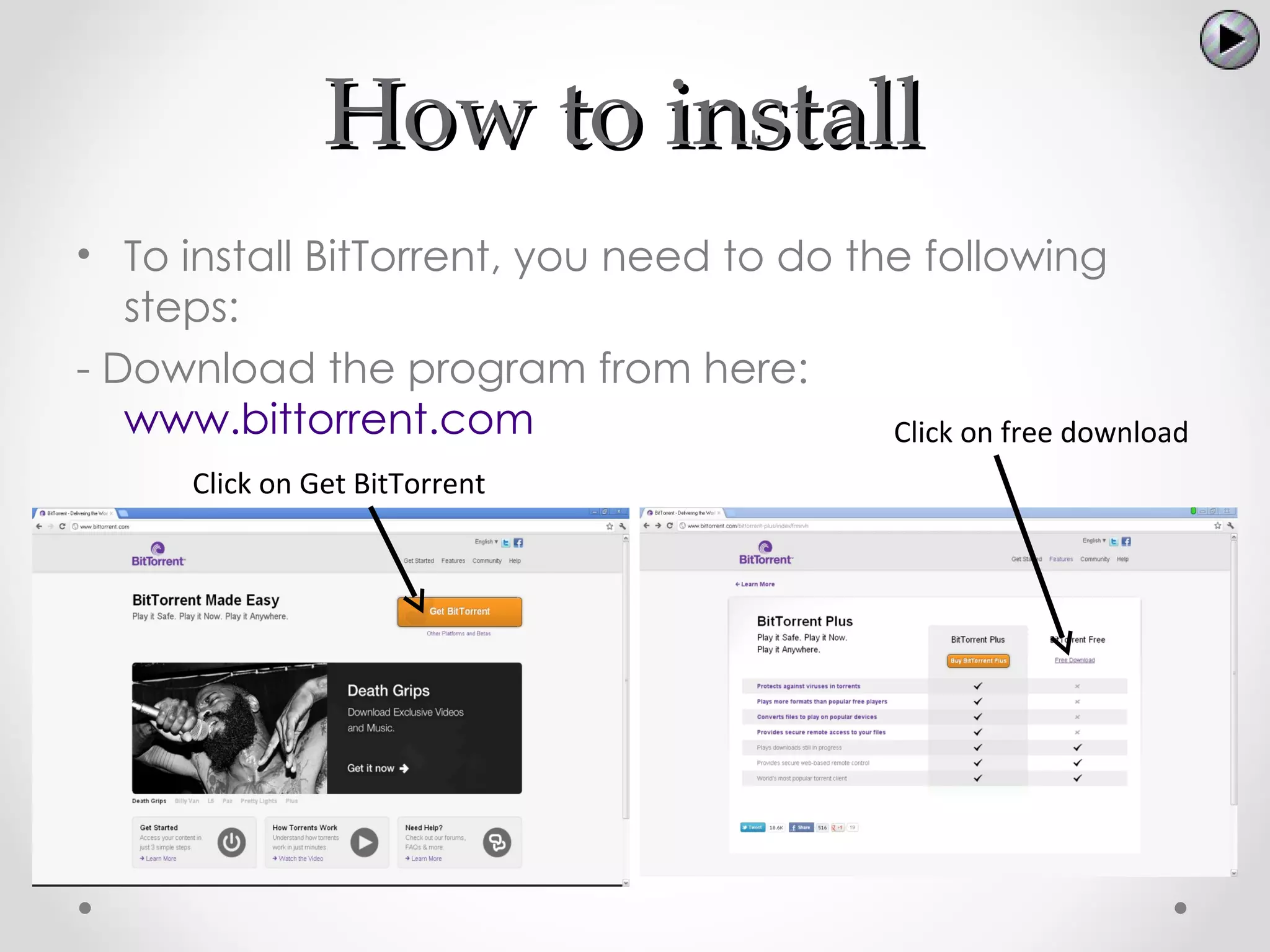
• To install BitTorrent, you need to do the following
   steps:
- Download the program from here:
   www.bittorrent.com                     Click on free download
      Click on Get BitTorrent
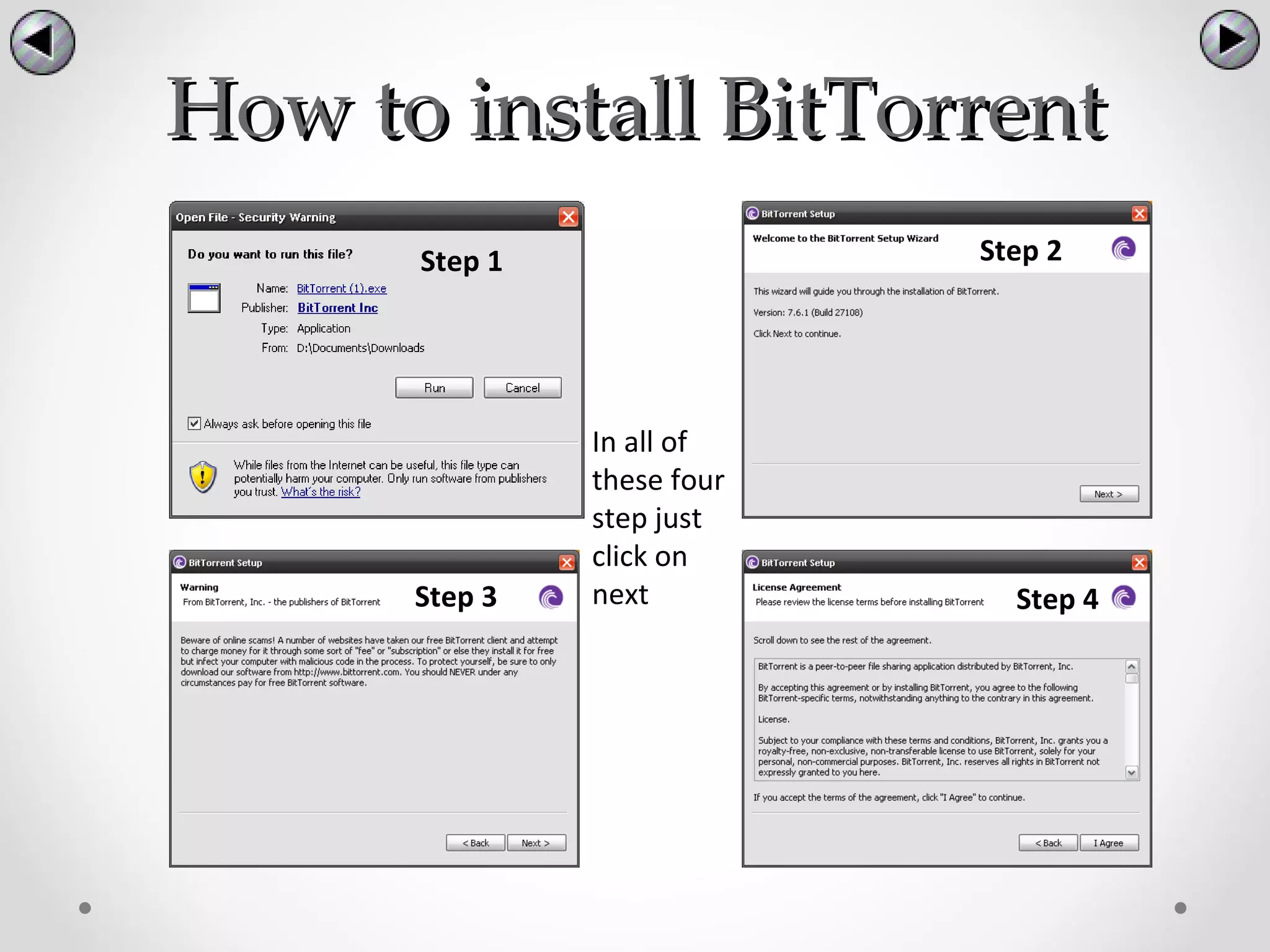
How to install BitTorrent
      Step 1                Step 2


               In all of
               these four
               step just
               click on
      Step 3   next           Step 4
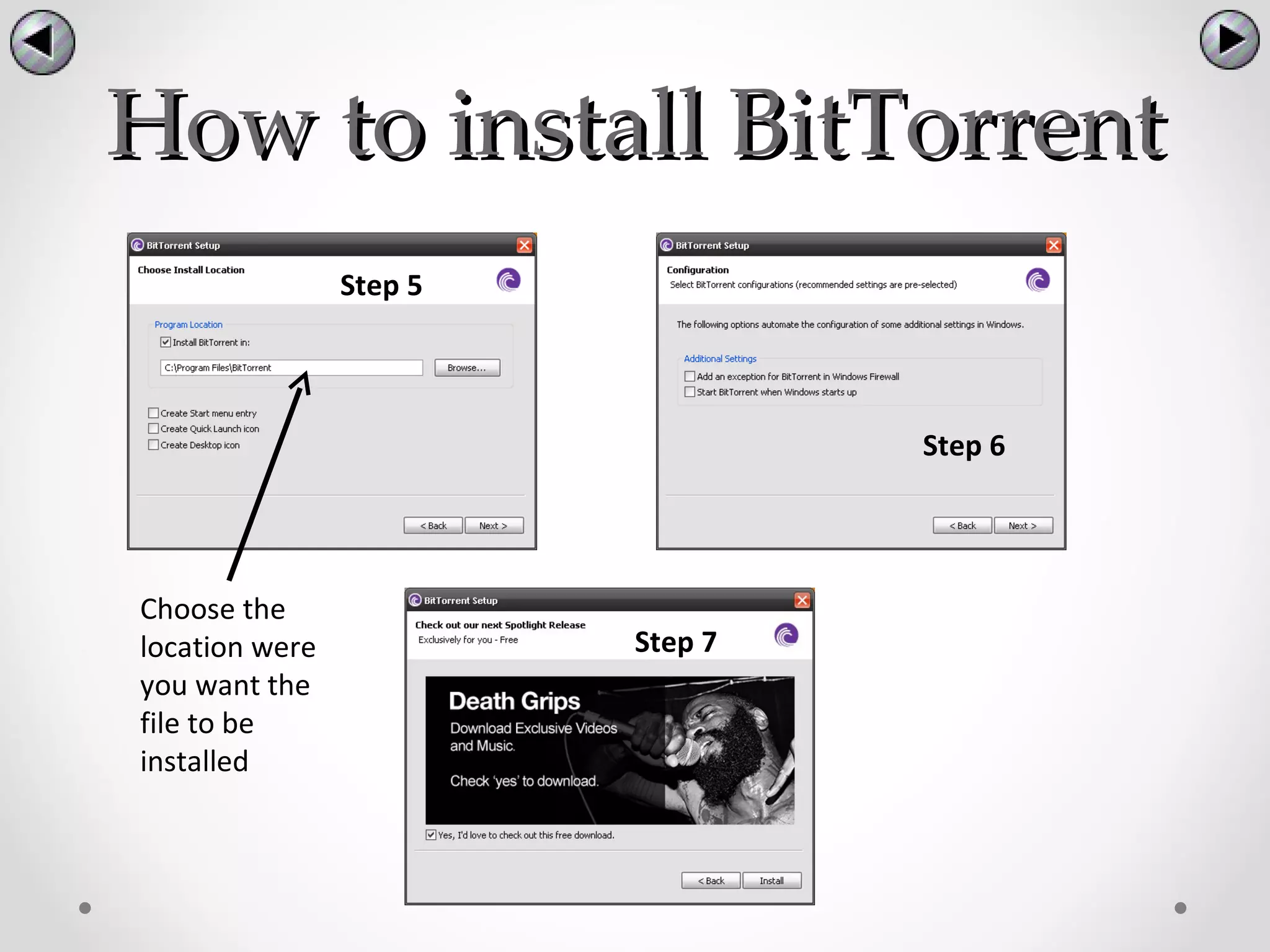
How to install BitTorrent
                Step 5


                                  Step 6


Choose the
location were            Step 7
you want the
file to be
installed
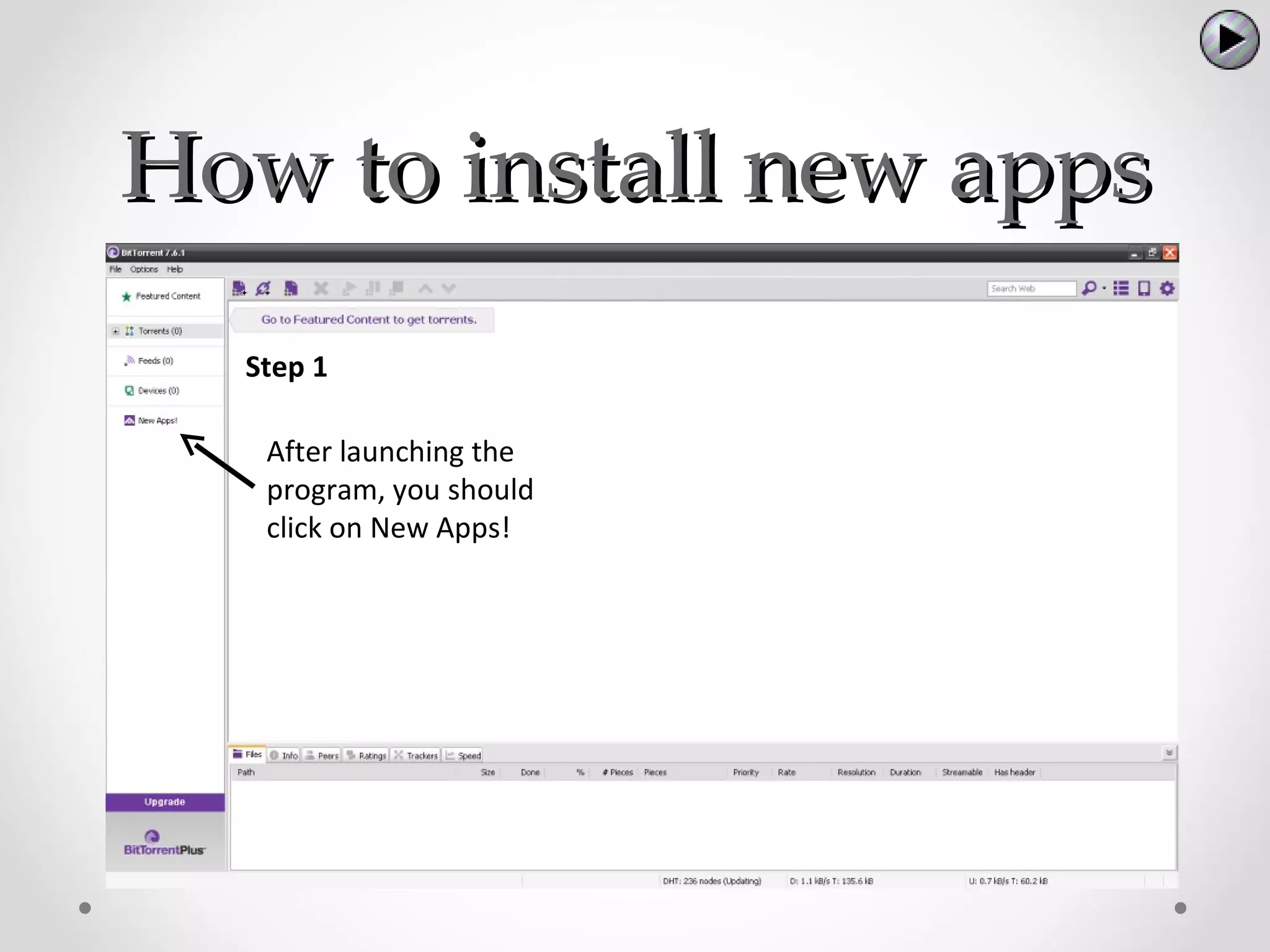
How to install new apps
  Step 1

   After launching the
   program, you should
   click on New Apps!
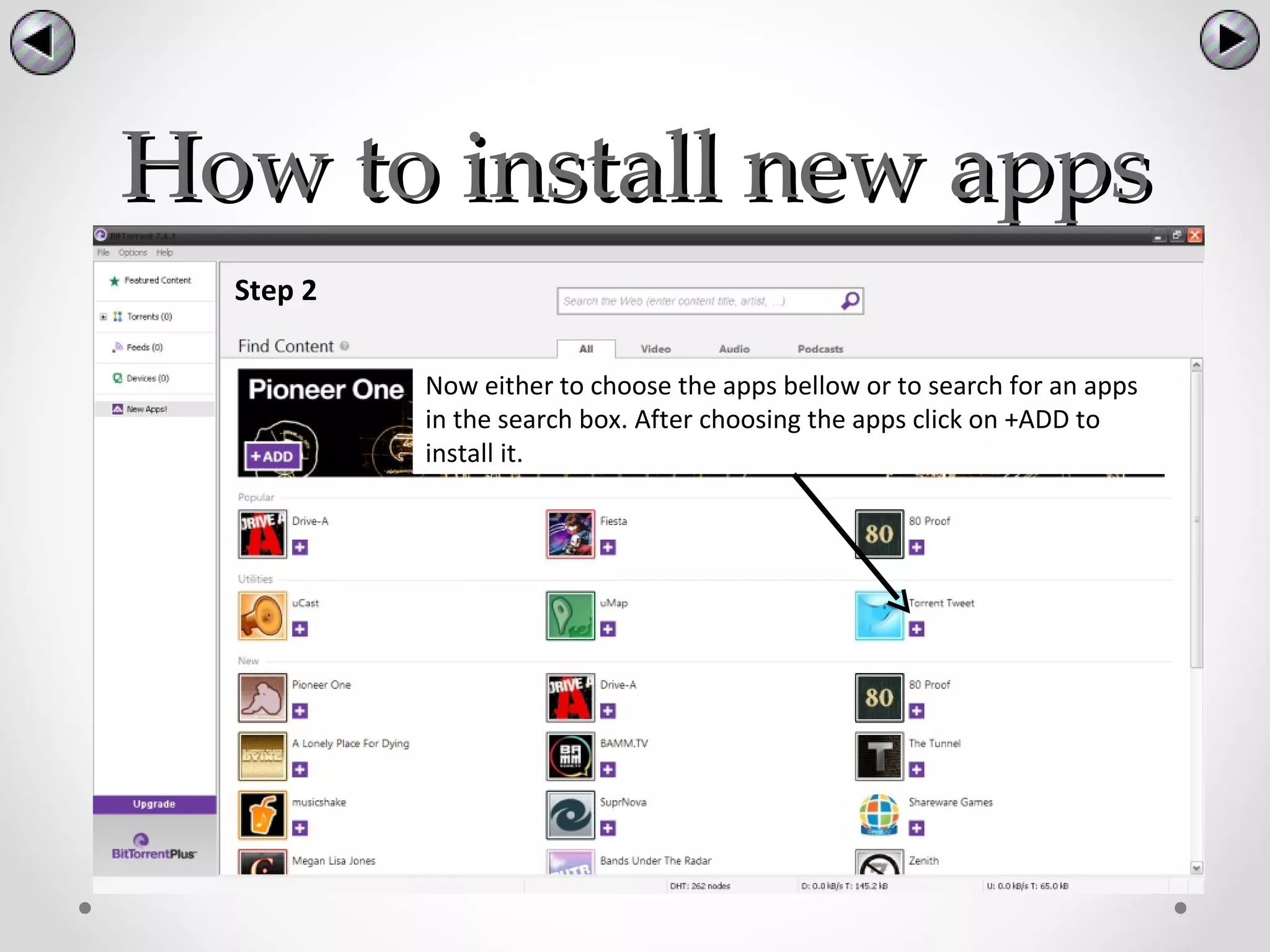
How to install new apps
  Step 2

           Now either to choose the apps bellow or to search for an apps
           in the search box. After choosing the apps click on +ADD to
           install it.
How to install new apps

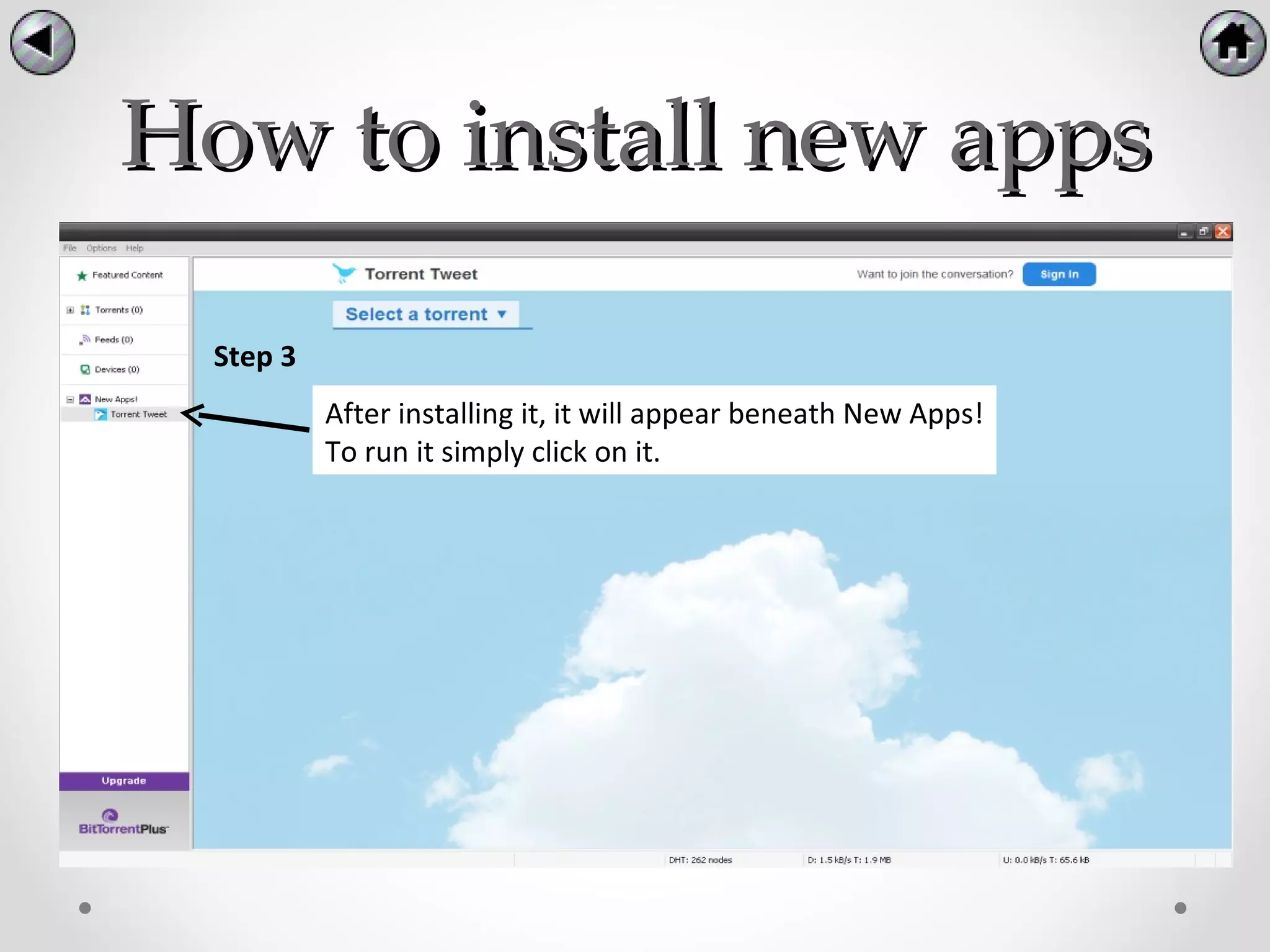
  Step 3
           After installing it, it will appear beneath New Apps!
           To run it simply click on it.
How to use BitTorrent
       BitTorrent has many functions, the functions that
will be featured in the presentation are:


•How to create a torrent file.

•How to download a torrent file.
How to create a torrent file
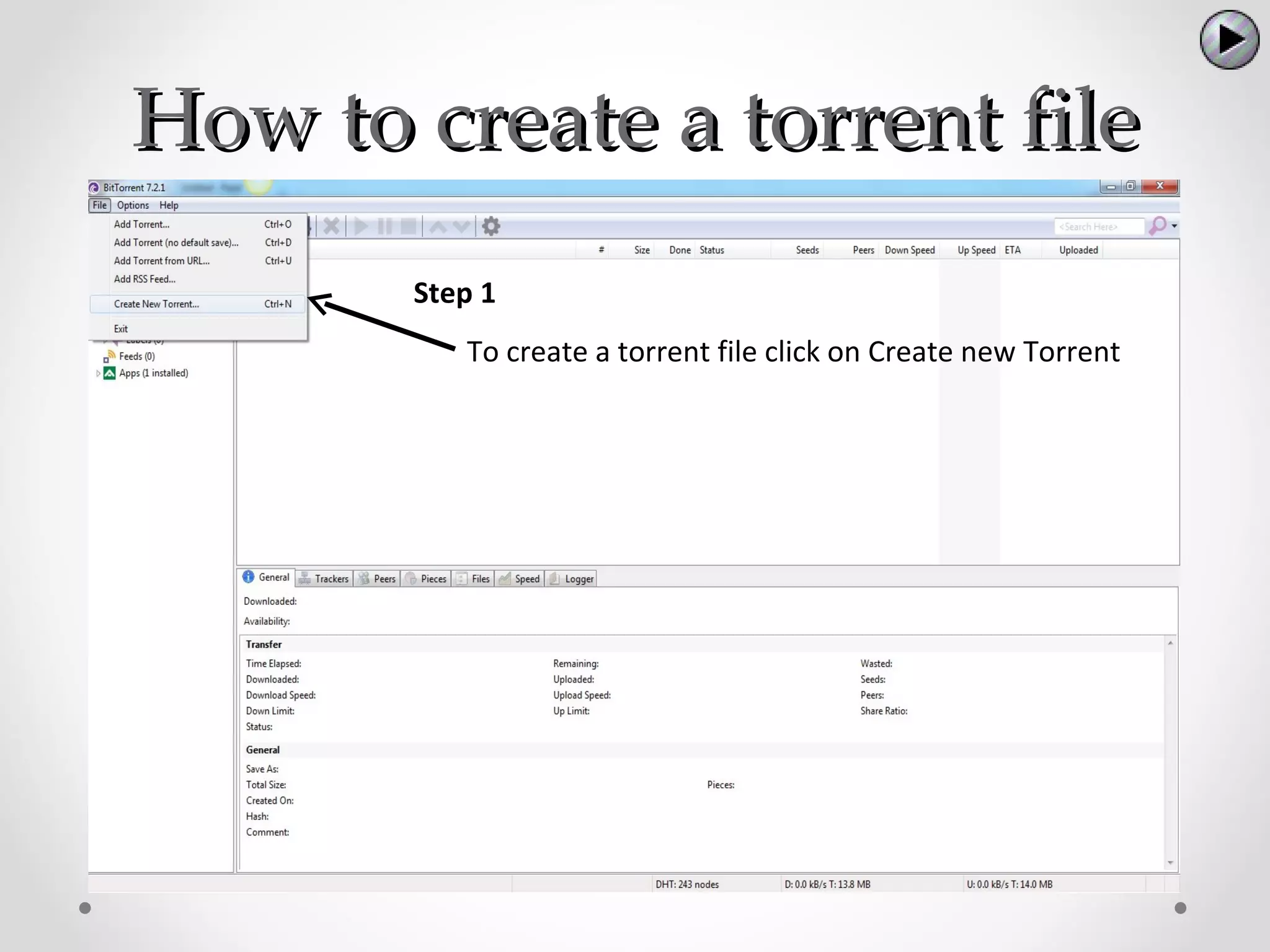
       Step 1
          To create a torrent file click on Create new Torrent
How to create a torrent file
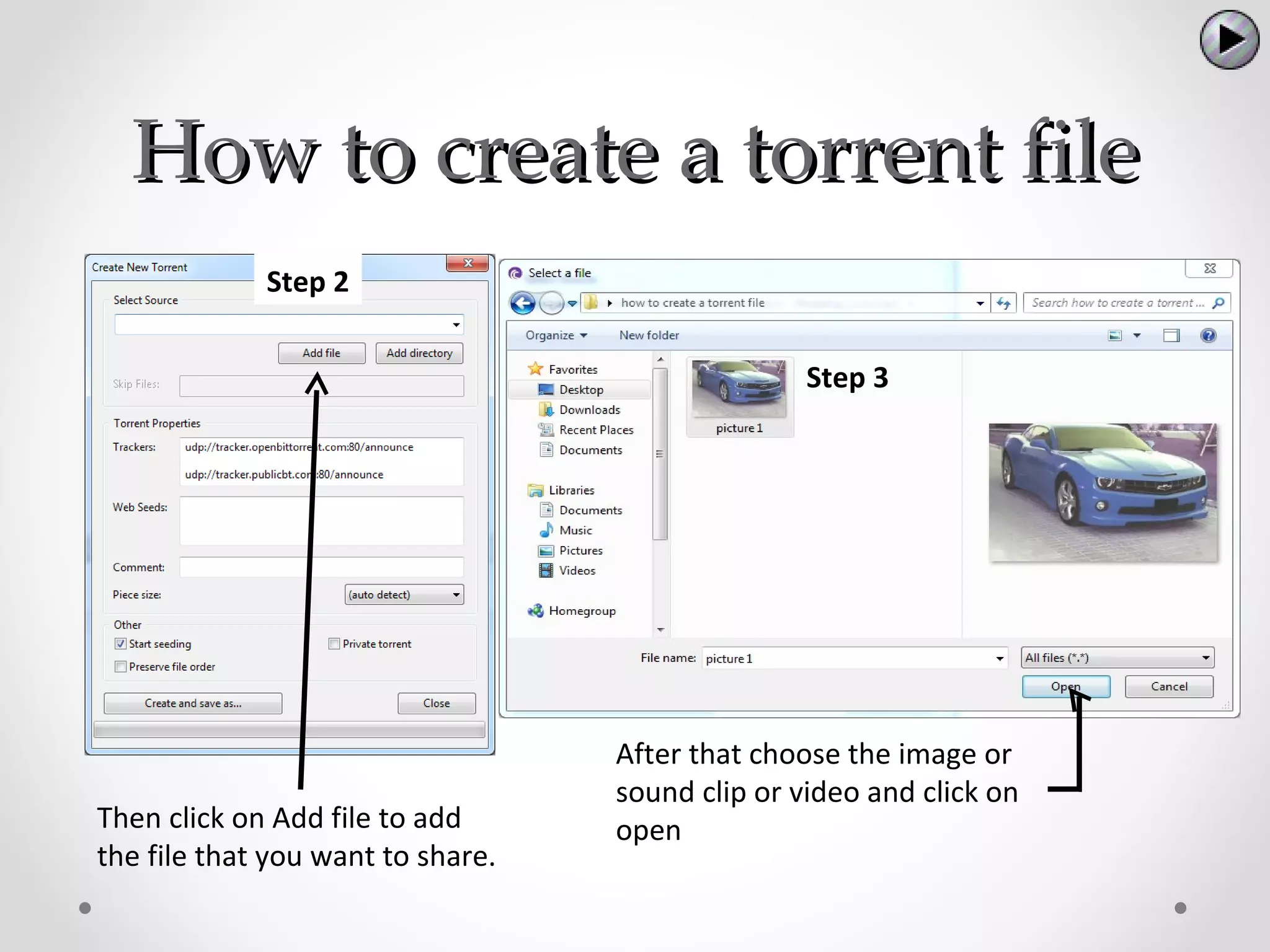
             Step 2


                                                  Step 3


                                   After that choose the image or
                                   sound clip or video and click on
Then click on Add file to add      open
the file that you want to share.
How to create a torrent file

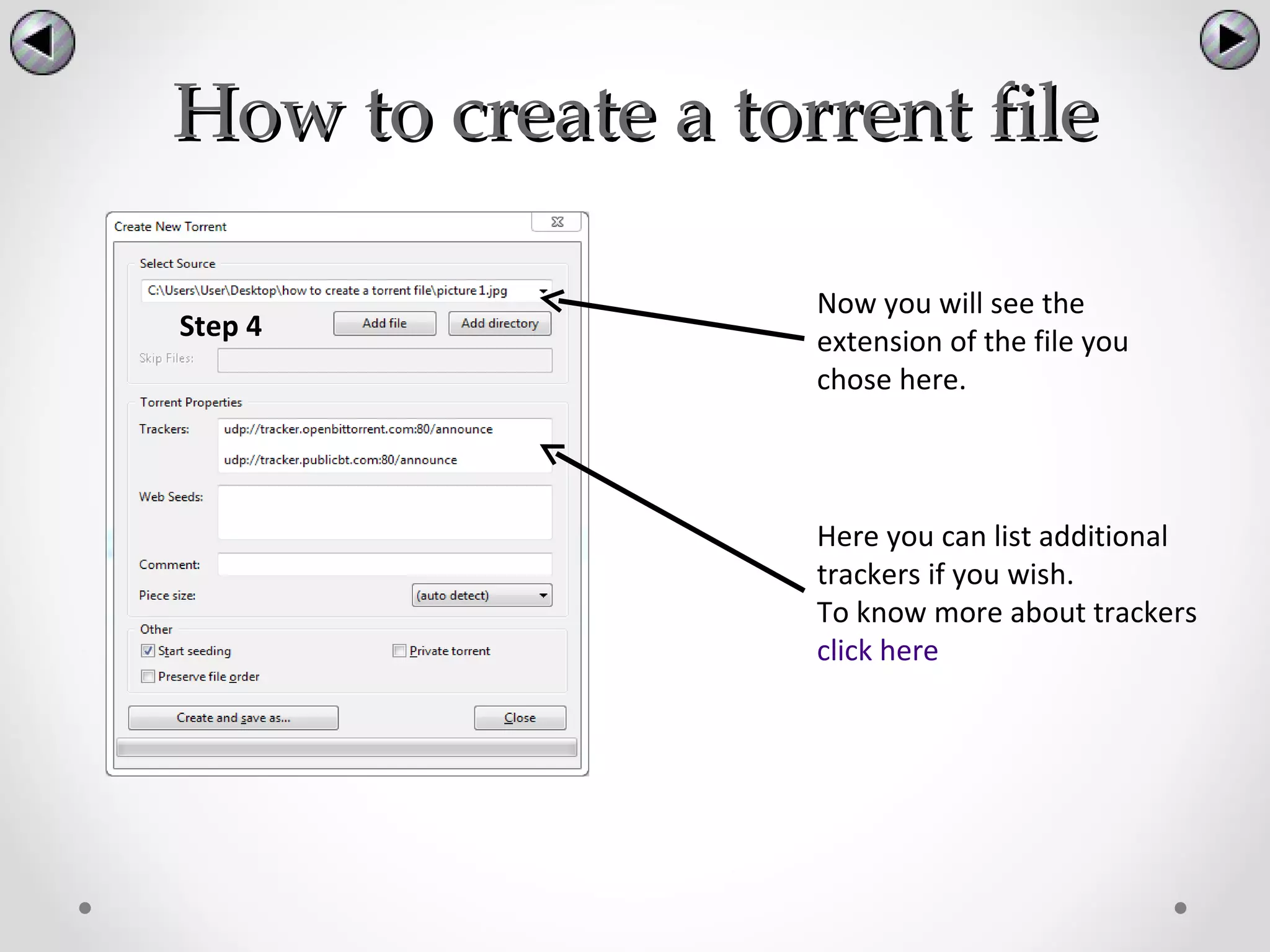
                   Now you will see the
Step 4             extension of the file you
                   chose here.


                   Here you can list additional
                   trackers if you wish.
                   To know more about trackers
                   click here
How to create a torrent file

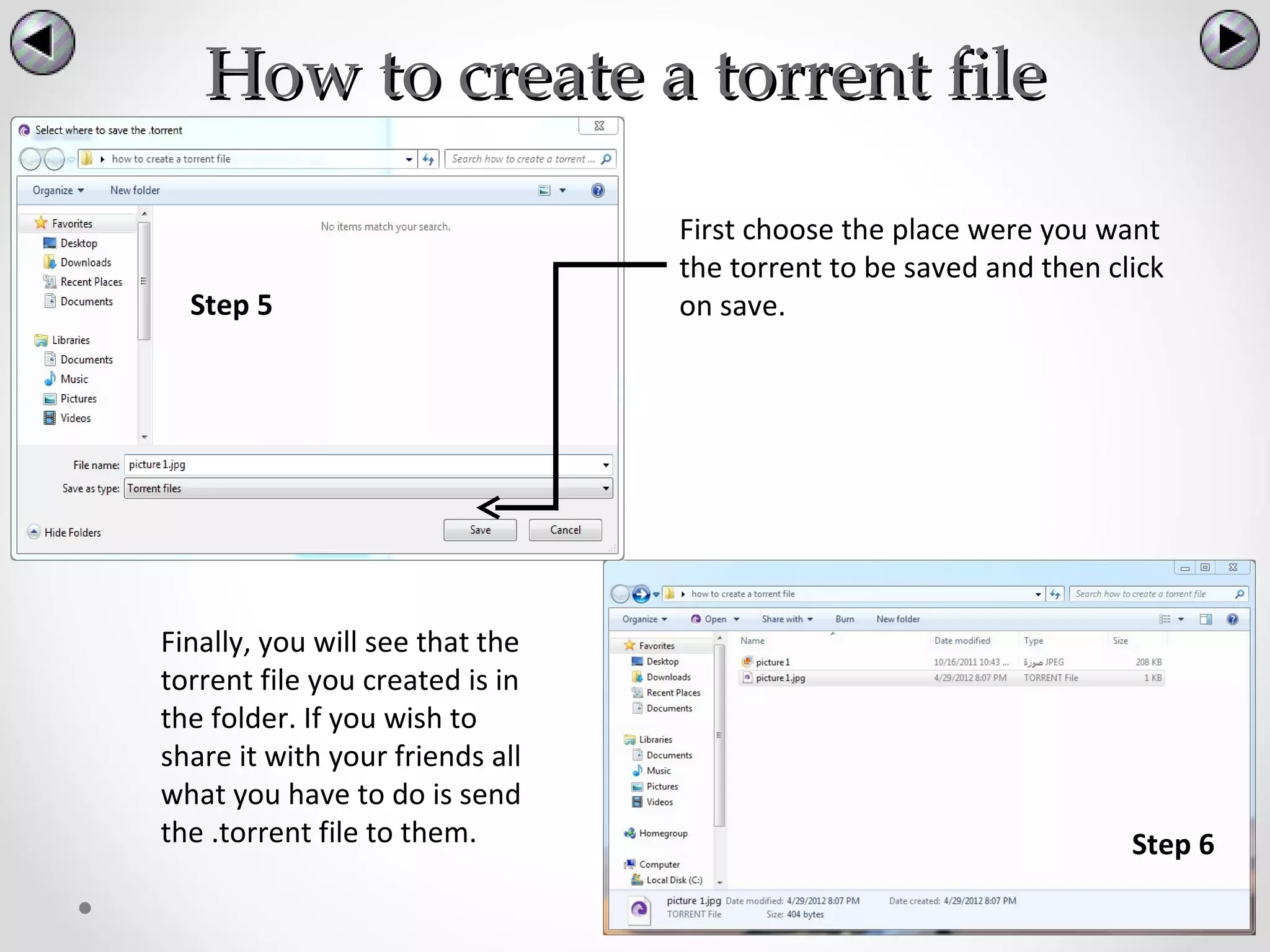
                                 First choose the place were you want
                                 the torrent to be saved and then click
  Step 5                         on save.


Finally, you will see that the
torrent file you created is in
the folder. If you wish to
share it with your friends all
what you have to do is send
the .torrent file to them.                                          Step 6
How to download a torrent file


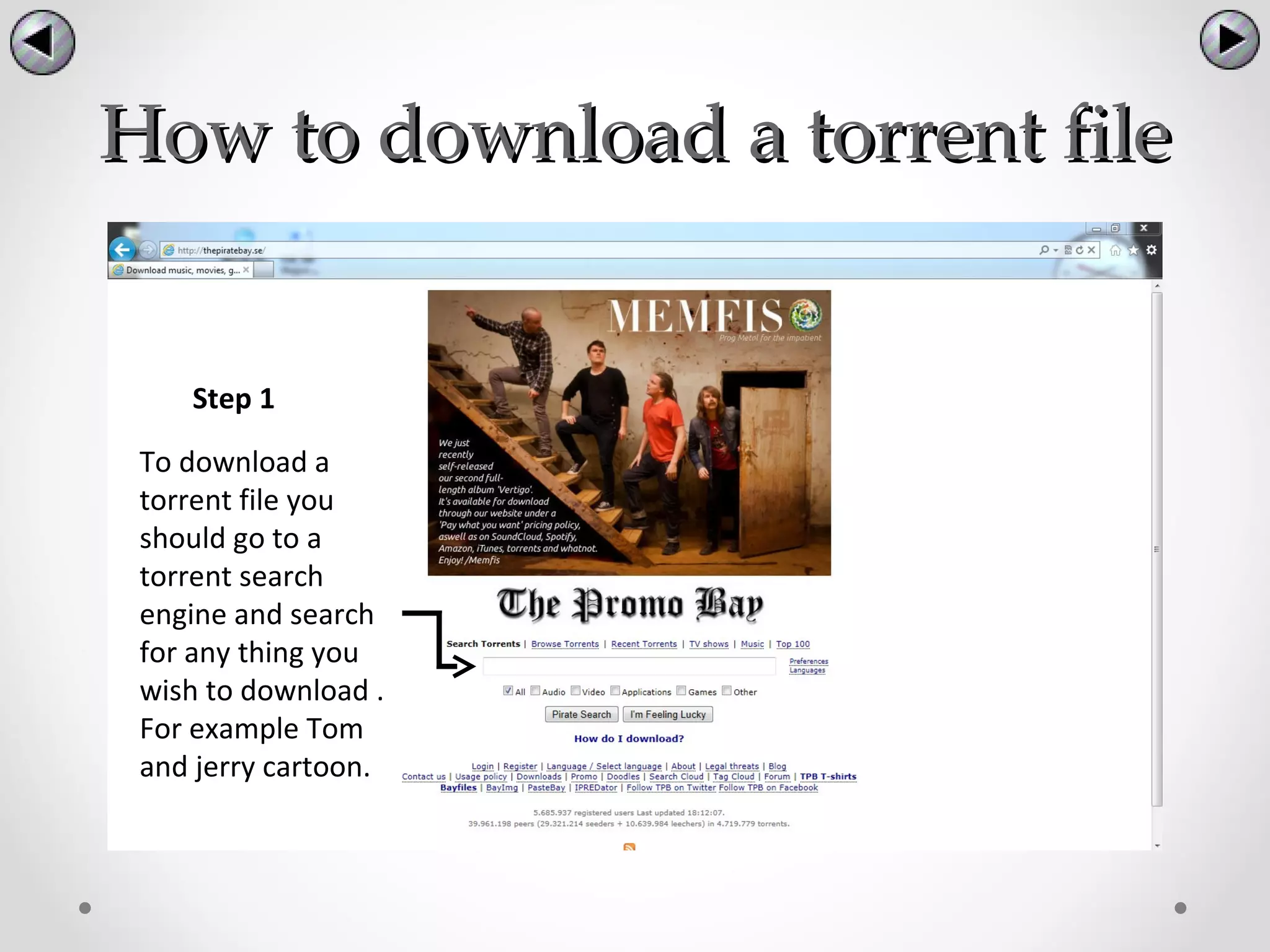
    Step 1

 To download a
 torrent file you
 should go to a
 torrent search
 engine and search
 for any thing you
 wish to download .
 For example Tom
 and jerry cartoon.
How to download a torrent file


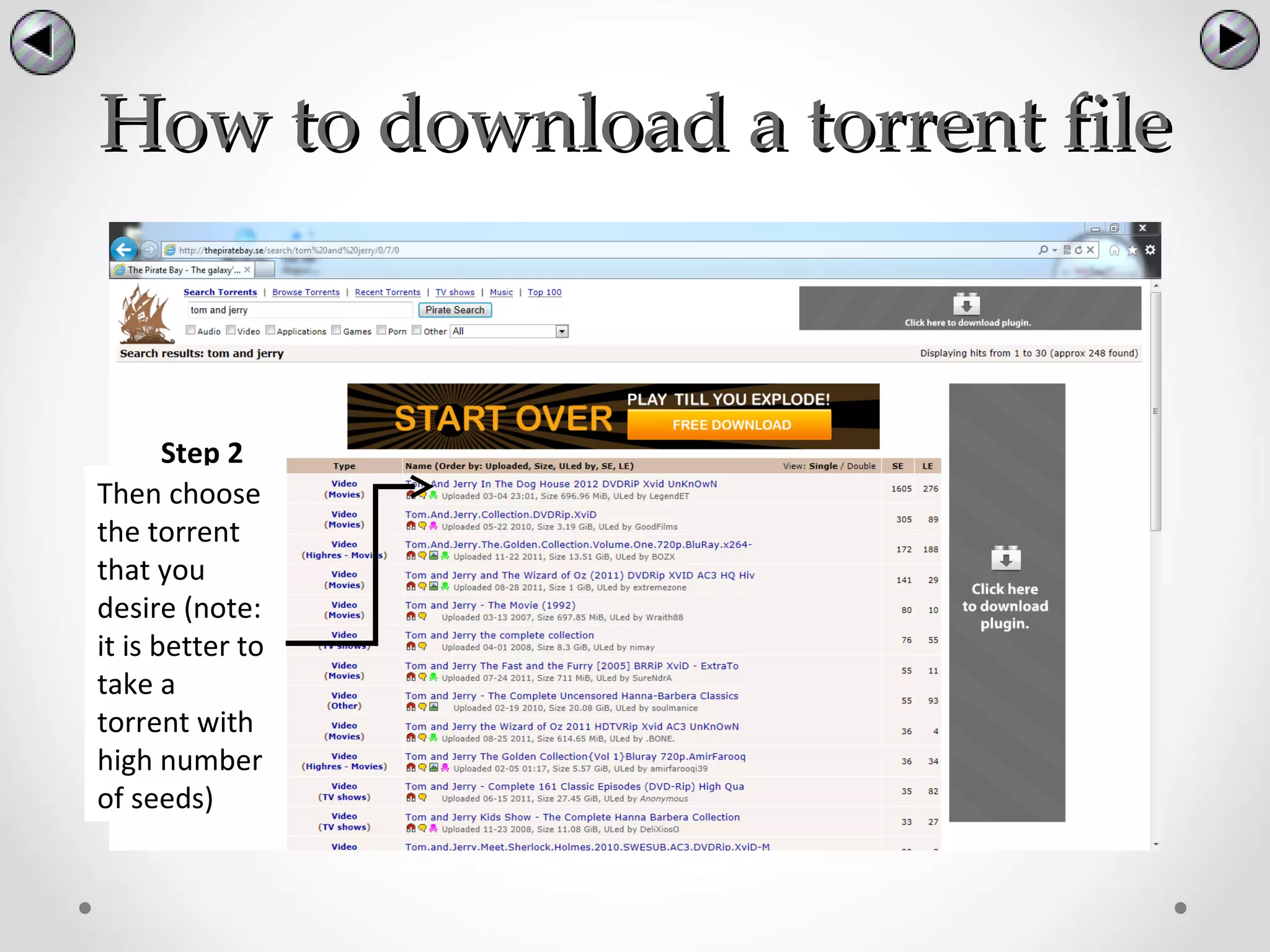
       Step 2
Then choose
the torrent
that you
desire (note:
it is better to
take a
torrent with
high number
of seeds)
How to download a
          torrent file

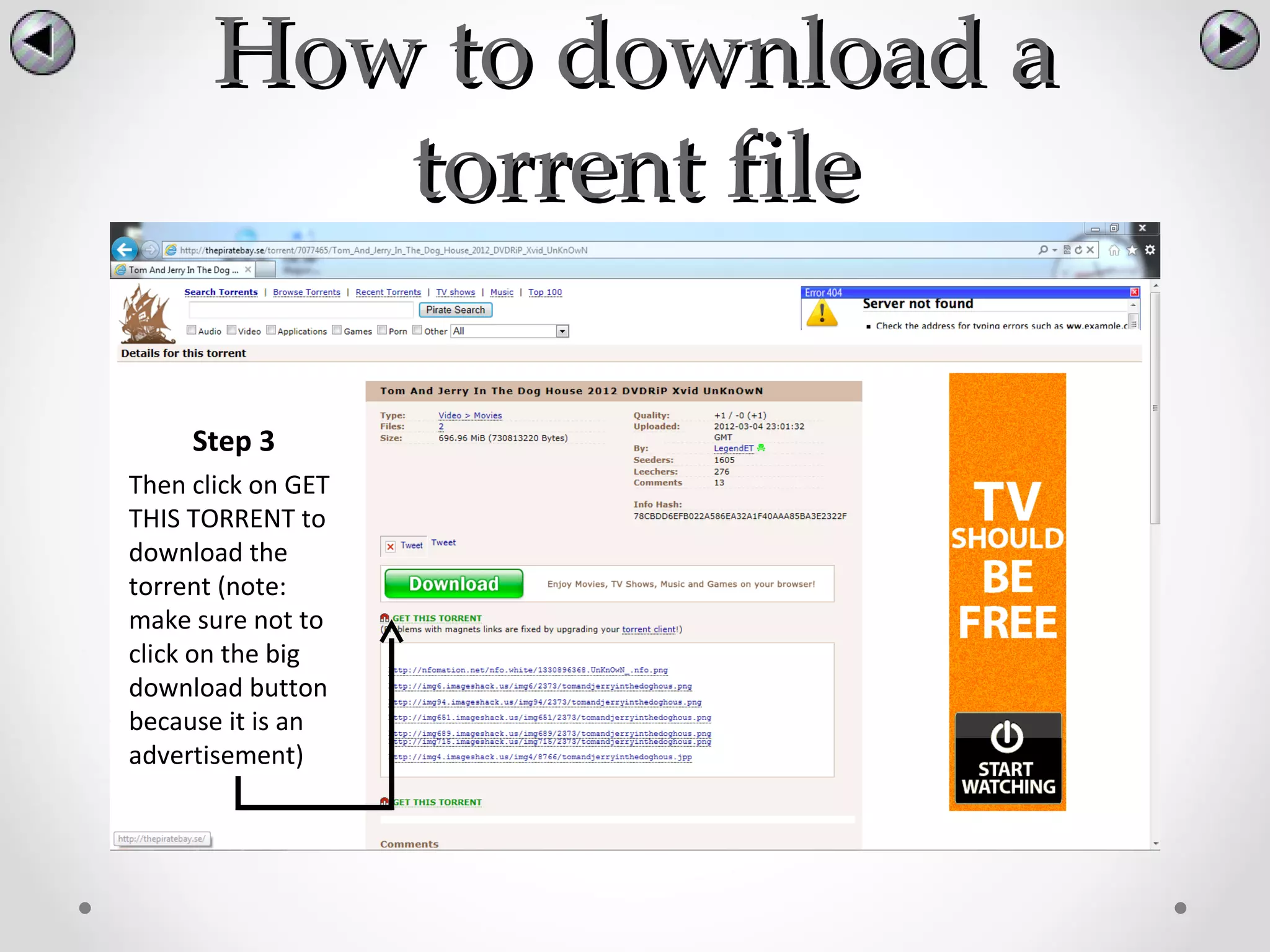
     Step 3
Then click on GET
THIS TORRENT to
download the
torrent (note:
make sure not to
click on the big
download button
because it is an
advertisement)
How to download a
     torrent file

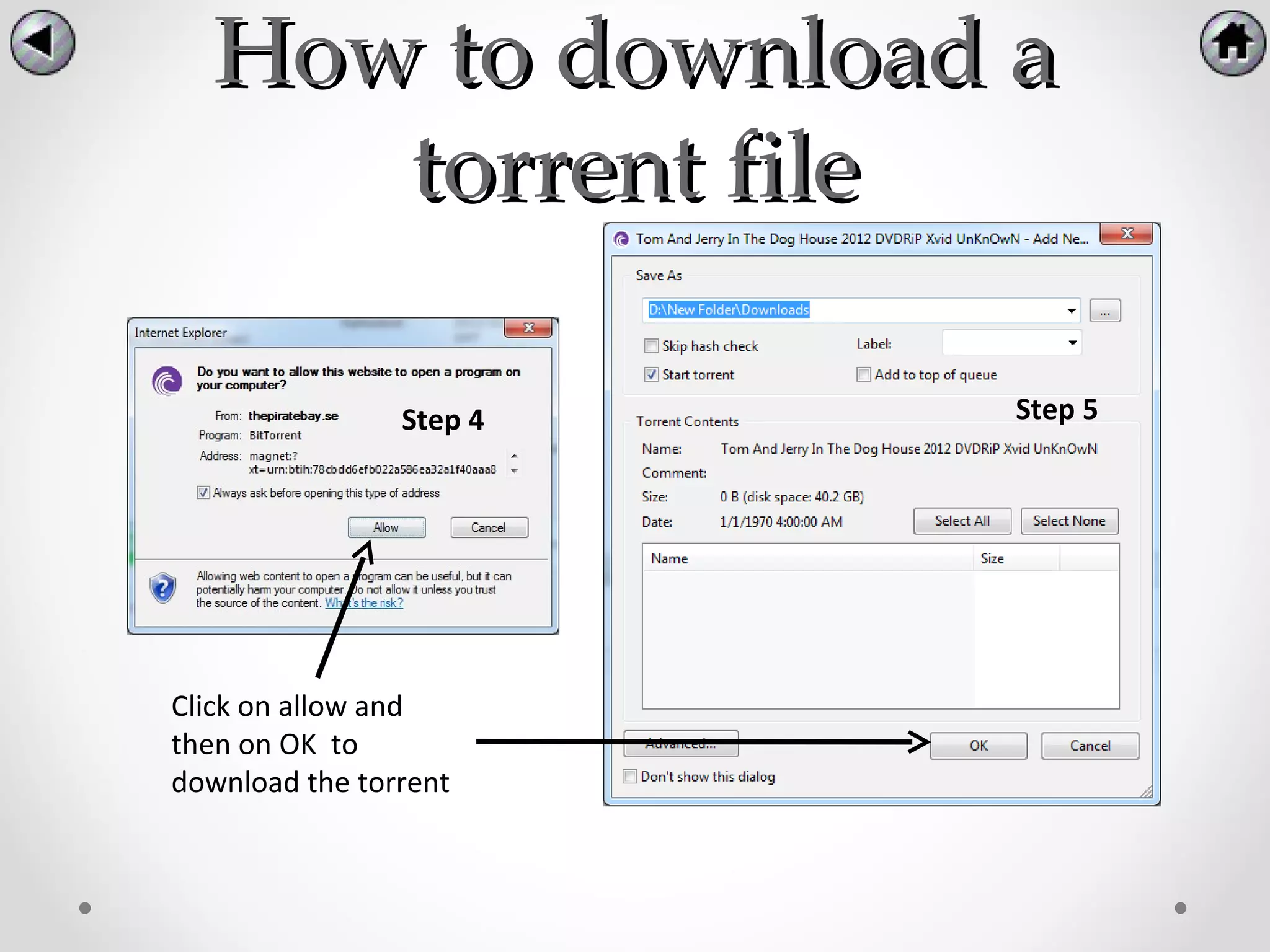
                Step 4   Step 5


Click on allow and
then on OK to
download the torrent
Issues and solutions
     There are some issues with BitTorrent and
at the same time there are solutions. The issues
are:

  • Visible identity
  • Copy right issues
  • Viruses
  • Bandwidth
Visible identity
           :
• Problem when you download or upload files using
  BitTorrent, your IP address is visible to others. This
  gives a chance for pirates and hackers to access
  your computer and go through your files.

• Solution: unfortunately, you cant hide your IP
  address because its needed to connect with other
  people. However, by using special program called
  PeerBlock, you can block suspicious people and
  having an Anti-Virus in your computer could help
  protecting from hackers and Viruses.
Copyright issues
• Problem: Many people who use BitTorrent are
  downloading copyrighted torrent files that are
  illegal to get for free from the internet. Doing this
  could result in serious problems that leads to courts
  or even jail.

• Solution: Avoid downloading files that are
  copyrighted like most of the Music files and Movies,
  or check if it is legal to download them for free.
Viruses
• Problem: Sometimes, when you download a torrent
  file from the internet, it could be fake or it may
  contain viruses within it.


• Solution: keep your Anti-Virus client running all the
  time and check the files you download from the
  internet before you run them. You should also avoid
  downloading torrent files from untrusted websites.
  Furthermore, you can download an App in
  BitTorrent client called Virus Guard that scan torrent
  files before downloading them.
Bandwidth
• Problem: if you are downloading files using a shared
  network (ZU) for example, this could result in slowing
  internet speed (Bandwidth) for other people that
  are using the same internet.


• Solution: there is an option in BitTorrent that let you
  limit your download or upload speed (Bandwidth)
  so other users would not complain about a slow
  internet browsing.
Conclusion
To Sum up, we provided for the viewer a list of tracker
and websites that he can download torrents from.

List of trackers:
http://ca.isohunt.com/forum/viewtopic.php?t=135049

List of links to download torrents from:
•http://www.mininova.org/
•http://isohunt.com/
•http://thepiratebay.se/
References
      BitTorrent. In (pp. 285-317) Syngress. doi:10.1016/
B978-159749017-7/50016-1

BitTorrent - sharing files has never been easier

  • 1.
    BitTorrent sharing files has never been easier Done by Mohamed Essa and Buti Mohamed Under the instructions of Dr. Basel Al Mourad
  • 2.
    List of Content 1. Introduction 2. Definition of BitTorrent 3. History of BitTorrent 4. How to install BitTorrent 5. How to use BitTorrent 6. Issues and solutions 7. Conclusion
  • 3.
    Introduction BitTorrent is one of the widely used programs that made sharing files easier and faster. The program enables the user to transfer large amounts of data through internet. This presentation will discuss the following: •Definition of BitTorrent •History of BitTorrent •How to install BitTorrent •How to use BitTorrent •Issues and solutions
  • 4.
    Definition of BitTorrent •The word BitTorrent could refer to three things; BitTorrent as a company, protocol, and software. This presentation will only discuss the following:  Protocol  Software
  • 5.
    Protocol • BitTorrent (protocol):A peer-to-peer (P2P) file sharing protocol used for distributing large amount of data over the internet. • P2P: downloading or sharing files from another person (computer) instead of downloading them from a server (website).
  • 6.
    Software • BitTorrent (software):A P2P client used to connect through the internet so users can download and upload (.torrent) files using the program.
  • 7.
    History of BitTorrent BitTorrent was designed and developed by a programmer called Bram Cohen in 2001 and was also released in the same year. Bram Cohen then created a company of BitTorrent with a partner named Ashwin Navin in 2004.
  • 8.
    How to install •To install BitTorrent, you need to do the following steps: - Download the program from here: www.bittorrent.com Click on free download Click on Get BitTorrent
  • 9.
    How to installBitTorrent Step 1 Step 2 In all of these four step just click on Step 3 next Step 4
  • 10.
    How to installBitTorrent Step 5 Step 6 Choose the location were Step 7 you want the file to be installed
  • 11.
    How to installnew apps Step 1 After launching the program, you should click on New Apps!
  • 12.
    How to installnew apps Step 2 Now either to choose the apps bellow or to search for an apps in the search box. After choosing the apps click on +ADD to install it.
  • 13.
    How to installnew apps Step 3 After installing it, it will appear beneath New Apps! To run it simply click on it.
  • 14.
    How to useBitTorrent BitTorrent has many functions, the functions that will be featured in the presentation are: •How to create a torrent file. •How to download a torrent file.
  • 15.
    How to createa torrent file Step 1 To create a torrent file click on Create new Torrent
  • 16.
    How to createa torrent file Step 2 Step 3 After that choose the image or sound clip or video and click on Then click on Add file to add open the file that you want to share.
  • 17.
    How to createa torrent file Now you will see the Step 4 extension of the file you chose here. Here you can list additional trackers if you wish. To know more about trackers click here
  • 18.
    How to createa torrent file First choose the place were you want the torrent to be saved and then click Step 5 on save. Finally, you will see that the torrent file you created is in the folder. If you wish to share it with your friends all what you have to do is send the .torrent file to them. Step 6
  • 19.
    How to downloada torrent file Step 1 To download a torrent file you should go to a torrent search engine and search for any thing you wish to download . For example Tom and jerry cartoon.
  • 20.
    How to downloada torrent file Step 2 Then choose the torrent that you desire (note: it is better to take a torrent with high number of seeds)
  • 21.
    How to downloada torrent file Step 3 Then click on GET THIS TORRENT to download the torrent (note: make sure not to click on the big download button because it is an advertisement)
  • 22.
    How to downloada torrent file Step 4 Step 5 Click on allow and then on OK to download the torrent
  • 23.
    Issues and solutions There are some issues with BitTorrent and at the same time there are solutions. The issues are: • Visible identity • Copy right issues • Viruses • Bandwidth
  • 24.
    Visible identity : • Problem when you download or upload files using BitTorrent, your IP address is visible to others. This gives a chance for pirates and hackers to access your computer and go through your files. • Solution: unfortunately, you cant hide your IP address because its needed to connect with other people. However, by using special program called PeerBlock, you can block suspicious people and having an Anti-Virus in your computer could help protecting from hackers and Viruses.
  • 25.
    Copyright issues • Problem:Many people who use BitTorrent are downloading copyrighted torrent files that are illegal to get for free from the internet. Doing this could result in serious problems that leads to courts or even jail. • Solution: Avoid downloading files that are copyrighted like most of the Music files and Movies, or check if it is legal to download them for free.
  • 26.
    Viruses • Problem: Sometimes,when you download a torrent file from the internet, it could be fake or it may contain viruses within it. • Solution: keep your Anti-Virus client running all the time and check the files you download from the internet before you run them. You should also avoid downloading torrent files from untrusted websites. Furthermore, you can download an App in BitTorrent client called Virus Guard that scan torrent files before downloading them.
  • 27.
    Bandwidth • Problem: ifyou are downloading files using a shared network (ZU) for example, this could result in slowing internet speed (Bandwidth) for other people that are using the same internet. • Solution: there is an option in BitTorrent that let you limit your download or upload speed (Bandwidth) so other users would not complain about a slow internet browsing.
  • 28.
    Conclusion To Sum up,we provided for the viewer a list of tracker and websites that he can download torrents from. List of trackers: http://ca.isohunt.com/forum/viewtopic.php?t=135049 List of links to download torrents from: •http://www.mininova.org/ •http://isohunt.com/ •http://thepiratebay.se/
  • 29.
    References BitTorrent. In (pp. 285-317) Syngress. doi:10.1016/ B978-159749017-7/50016-1