An Introduction to Computer
Hardware - BKHS
Binary Numbers

1
01/08/14
Introduction
 Importance

of the Binary Number
 Use of binary numbers in computers

2
01/08/14
Agenda
 Binary

Theory
 Binary to Decimal Conversion
 Decimal to Binary Conversion
 Data Flow using Binary Numbers

3
01/08/14
Overview
 Binary

numbers are used extensively
in digital electronics
 Binary numbers are the foundation of
other numbering systems such as
Hexadecimal and Octal when used in
digital electronics.

4
01/08/14
Binary Numbers Defined
 A single

“bit” is the foundation
 Only 2 states possible
 Hi – Lo, On – Off, True – False, Open
– Closed
 8 “bits” makeup a single “byte”
 Data typically stored in “bytes”

5
01/08/14
Converting Decimal to Binary
 LSB

– least significant bit
 MSB – Most significant bit
 Divide the number by 2
 If no remainder, record a zero (0) for LSB
 If there is a remainder, record a one (1)
for LSB
 Divide the previous answer by 2
 If no remainder, record a zero in the next
bit position (to the left of the LSB)
 If there is a remainder, record a one.
 Repeat previous 3 steps until the answer
is no longer divisible by 2.

6
01/08/14
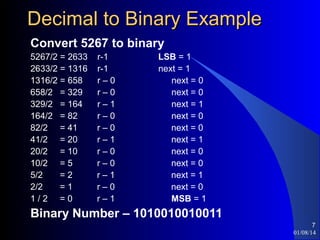
Decimal to Binary Example
Convert 5267 to binary
5267/2 = 2633
2633/2 = 1316
1316/2 = 658
658/2 = 329
329/2 = 164
164/2 = 82
82/2 = 41
41/2 = 20
20/2 = 10
10/2 = 5
5/2
=2
2/2
=1
1/2 =0

r-1
r-1
r–0
r–0
r–1
r–0
r–0
r–1
r–0
r–0
r–1
r–0
r–1

LSB = 1
next = 1
next = 0
next = 0
next = 1
next = 0
next = 0
next = 1
next = 0
next = 0
next = 1
next = 0
MSB = 1

Binary Number – 1010010010011
7
01/08/14
Converting Binary to Decimal
Convert 1101001 to decimal
Each bit position is calculated using the formula:
(value in position) x 2^(position #)
so, if bit position 2 = 1 then, applying the formula
1 x 2^2 = 4
Any bit position containing a zero is skipped
Bit position 0 is the LSB. LSB = 1, so 2^0 = 1, add it.
Bit position 1 is 0, so skip it
Bit position 2 is 0, so skip it also
Bit position 3 is 1, so 2^3 = 8, add it.
Bit position 4 is 0, so skip it
Bit position 5 is 1, so 2^5 = 32, add it.
Bit position 6 is the MSB, MSB = 1 so 2^6 = 64, add it.
1 + 8 + 32 + 64 = 105.
Decimal value = 105

8
01/08/14
Adding Binary Numbers
1010 +1111 ______
 Step one:
Column 2^0: 0+1=1.
Record the 1.
Temporary Result: 1; Carry: 0
 Step two:
Column 2^1: 1+1=10.
Record the 0, carry the 1.
Temporary Result: 01; Carry: 1
 Step three:
Column 2^2: 1+0=1 Add 1 from carry: 1+1=10.
Record the 0, carry the 1.
Temporary Result: 001; Carry: 1
 Step four:
Column 2^3: 1+1=10. Add 1 from carry: 10+1=11.
Record the 11.
Final result: 11001
9
01/08/14
Binary Multiplication
Multiplication in the binary system works the same
way as in the decimal system:
 1*1=1
 1*0=0
 0*1=0
101
* 11
-----101
1010
-----1111
10
01/08/14
Data Streams using Binary numbers

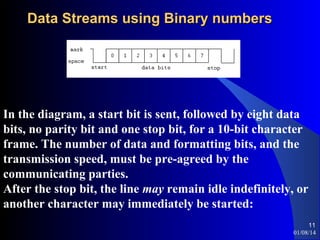
In the diagram, a start bit is sent, followed by eight data
bits, no parity bit and one stop bit, for a 10-bit character
frame. The number of data and formatting bits, and the
transmission speed, must be pre-agreed by the
communicating parties.
After the stop bit, the line may remain idle indefinitely, or
another character may immediately be started:
11
01/08/14

Binary numbers

  • 1.
    An Introduction toComputer Hardware - BKHS Binary Numbers 1 01/08/14
  • 2.
    Introduction  Importance of theBinary Number  Use of binary numbers in computers 2 01/08/14
  • 3.
    Agenda  Binary Theory  Binaryto Decimal Conversion  Decimal to Binary Conversion  Data Flow using Binary Numbers 3 01/08/14
  • 4.
    Overview  Binary numbers areused extensively in digital electronics  Binary numbers are the foundation of other numbering systems such as Hexadecimal and Octal when used in digital electronics. 4 01/08/14
  • 5.
    Binary Numbers Defined A single “bit” is the foundation  Only 2 states possible  Hi – Lo, On – Off, True – False, Open – Closed  8 “bits” makeup a single “byte”  Data typically stored in “bytes” 5 01/08/14
  • 6.
    Converting Decimal toBinary  LSB – least significant bit  MSB – Most significant bit  Divide the number by 2  If no remainder, record a zero (0) for LSB  If there is a remainder, record a one (1) for LSB  Divide the previous answer by 2  If no remainder, record a zero in the next bit position (to the left of the LSB)  If there is a remainder, record a one.  Repeat previous 3 steps until the answer is no longer divisible by 2. 6 01/08/14
  • 7.
    Decimal to BinaryExample Convert 5267 to binary 5267/2 = 2633 2633/2 = 1316 1316/2 = 658 658/2 = 329 329/2 = 164 164/2 = 82 82/2 = 41 41/2 = 20 20/2 = 10 10/2 = 5 5/2 =2 2/2 =1 1/2 =0 r-1 r-1 r–0 r–0 r–1 r–0 r–0 r–1 r–0 r–0 r–1 r–0 r–1 LSB = 1 next = 1 next = 0 next = 0 next = 1 next = 0 next = 0 next = 1 next = 0 next = 0 next = 1 next = 0 MSB = 1 Binary Number – 1010010010011 7 01/08/14
  • 8.
    Converting Binary toDecimal Convert 1101001 to decimal Each bit position is calculated using the formula: (value in position) x 2^(position #) so, if bit position 2 = 1 then, applying the formula 1 x 2^2 = 4 Any bit position containing a zero is skipped Bit position 0 is the LSB. LSB = 1, so 2^0 = 1, add it. Bit position 1 is 0, so skip it Bit position 2 is 0, so skip it also Bit position 3 is 1, so 2^3 = 8, add it. Bit position 4 is 0, so skip it Bit position 5 is 1, so 2^5 = 32, add it. Bit position 6 is the MSB, MSB = 1 so 2^6 = 64, add it. 1 + 8 + 32 + 64 = 105. Decimal value = 105 8 01/08/14
  • 9.
    Adding Binary Numbers 1010+1111 ______  Step one: Column 2^0: 0+1=1. Record the 1. Temporary Result: 1; Carry: 0  Step two: Column 2^1: 1+1=10. Record the 0, carry the 1. Temporary Result: 01; Carry: 1  Step three: Column 2^2: 1+0=1 Add 1 from carry: 1+1=10. Record the 0, carry the 1. Temporary Result: 001; Carry: 1  Step four: Column 2^3: 1+1=10. Add 1 from carry: 10+1=11. Record the 11. Final result: 11001 9 01/08/14
  • 10.
    Binary Multiplication Multiplication inthe binary system works the same way as in the decimal system:  1*1=1  1*0=0  0*1=0 101 * 11 -----101 1010 -----1111 10 01/08/14
  • 11.
    Data Streams usingBinary numbers In the diagram, a start bit is sent, followed by eight data bits, no parity bit and one stop bit, for a 10-bit character frame. The number of data and formatting bits, and the transmission speed, must be pre-agreed by the communicating parties. After the stop bit, the line may remain idle indefinitely, or another character may immediately be started: 11 01/08/14