Year 7 DigitalTechnology: BellarineSecondary College
When you are a computer, letters are numbers.
Learning Objectives
1. Student can explain how numbers are used for characters.
2. Student can convert numbers between decimal and binary
Proficiency scale for this learning
Score Learning shown
4.0 Studenthas shownsolidunderstandingof ASCIIcode andbinarynumbers,ANDhasdemonstratedadditional insightsintohow
computershandle numbersandletters
3.00 Studenthasshownsolidunderstandingof ASCIIcode andbinarynumbers
2.00 Studenthasshownsome understandingof ASCIIcode andbinarynumbers,orhas onlyshownunderstandingof one of these ideas.
1.00 Withsteadysupportfromthe teacher,studentshasshownsome understandingof ASCIIcode andbinarynumbers
The firstthingwe needto understand isthatmoderncomputersencode lettersasnumbers.And,acrossthe planet,there are anawful lotof letterstobe
encoded,soitwas a bigjob.This videotellsthe startof the story.
https://www.youtube.com/watch?v=MijmeoH9LT4
Year 7 DigitalTechnology: BellarineSecondary College
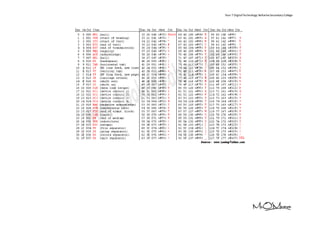
Now, use this table to decode the message, just like a computer
does.
104 101 108 108 111 044 032 115 116 117
100 101 110 116 115 046 032 073 032 104
111 112 101 032 116 104 105 115 032 109
097 107 101 115 032 115 111 109 101 032
115 101 110 115 101 046
Year 7 DigitalTechnology: BellarineSecondary College
Which would be pretty easy, if not for binary.
https://www.youtube.com/watch?v=LpuPe81bc2w
01010111 01101000 01111001 00100000 01100100 01101111 00100000 01100101 01101100 01100101
01110000 01101000 01100001 01101110 01110100 01110011 00100000 01100100 01110010 01101001
01101110 01101011 00111111
The table on the nextpage will getyoufrombinaryto decimal.Thenuse the table above togetto lettersandwordsusingthe ASCIIcode.
Year 7 DigitalTechnology: BellarineSecondary College
Decimal to Binary Reference
1 00000001 21 00010101 41 00101001 61 00111101 81 01010001 101 01100101 121 01111001
2 00000010 22 00010110 42 00101010 62 00111110 82 01010010 102 01100110 122 01111010
3 00000011 23 00010111 43 00101011 63 00111111 83 01010011 103 01100111 123 01111011
4 00000100 24 00011000 44 00101100 64 01000000 84 01010100 104 01101000 124 01111100
5 00000101 25 00011001 45 00101101 65 01000001 85 01010101 105 01101001 125 01111101
6 00000110 26 00011010 46 00101110 66 01000010 86 01010110 106 01101010 126 01111110
7 00000111 27 00011011 47 00101111 67 01000011 87 01010111 107 01101011 127 01111111
8 00001000 28 00011100 48 00110000 68 01000100 88 01011000 108 01101100 128 10000000
9 00001001 29 00011101 49 00110001 69 01000101 89 01011001 109 01101101 129 10000001
10 00001010 30 00011110 50 00110010 70 01000110 90 01011010 110 01101110 130 10000010
11 00001011 31 00011111 51 00110011 71 01000111 91 01011011 111 01101111 131 10000011
12 00001100 32 00100000 52 00110100 72 01001000 92 01011100 112 01110000 132 10000100
13 00001101 33 00100001 53 00110101 73 01001001 93 01011101 113 01110001 133 10000101
14 00001110 34 00100010 54 00110110 74 01001010 94 01011110 114 01110010 134 10000110
15 00001111 35 00100011 55 00110111 75 01001011 95 01011111 115 01110011 135 10000111
16 00010000 36 00100100 56 00111000 76 01001100 96 01100000 116 01110100 136 10001000
17 00010001 37 00100101 57 00111001 77 01001101 97 01100001 117 01110101 137 10001001
18 00010010 38 00100110 58 00111010 78 01001110 98 01100010 118 01110110 138 10001010
19 00010011 39 00100111 59 00111011 79 01001111 99 01100011 119 01110111 139 10001011
20 00010100 40 00101000 60 00111100 80 01010000 100 01100100 120 01111000 140 10001100
Extension
Usingthe tablesabove,write yourownsecretmessage inbinary.

Binary and ASCII

  • 1.
    Year 7 DigitalTechnology:BellarineSecondary College When you are a computer, letters are numbers. Learning Objectives 1. Student can explain how numbers are used for characters. 2. Student can convert numbers between decimal and binary Proficiency scale for this learning Score Learning shown 4.0 Studenthas shownsolidunderstandingof ASCIIcode andbinarynumbers,ANDhasdemonstratedadditional insightsintohow computershandle numbersandletters 3.00 Studenthasshownsolidunderstandingof ASCIIcode andbinarynumbers 2.00 Studenthasshownsome understandingof ASCIIcode andbinarynumbers,orhas onlyshownunderstandingof one of these ideas. 1.00 Withsteadysupportfromthe teacher,studentshasshownsome understandingof ASCIIcode andbinarynumbers The firstthingwe needto understand isthatmoderncomputersencode lettersasnumbers.And,acrossthe planet,there are anawful lotof letterstobe encoded,soitwas a bigjob.This videotellsthe startof the story. https://www.youtube.com/watch?v=MijmeoH9LT4
  • 2.
    Year 7 DigitalTechnology:BellarineSecondary College
  • 3.
    Year 7 DigitalTechnology:BellarineSecondary College Now, use this table to decode the message, just like a computer does. 104 101 108 108 111 044 032 115 116 117 100 101 110 116 115 046 032 073 032 104 111 112 101 032 116 104 105 115 032 109 097 107 101 115 032 115 111 109 101 032 115 101 110 115 101 046
  • 4.
    Year 7 DigitalTechnology:BellarineSecondary College Which would be pretty easy, if not for binary. https://www.youtube.com/watch?v=LpuPe81bc2w 01010111 01101000 01111001 00100000 01100100 01101111 00100000 01100101 01101100 01100101 01110000 01101000 01100001 01101110 01110100 01110011 00100000 01100100 01110010 01101001 01101110 01101011 00111111 The table on the nextpage will getyoufrombinaryto decimal.Thenuse the table above togetto lettersandwordsusingthe ASCIIcode.
  • 5.
    Year 7 DigitalTechnology:BellarineSecondary College Decimal to Binary Reference 1 00000001 21 00010101 41 00101001 61 00111101 81 01010001 101 01100101 121 01111001 2 00000010 22 00010110 42 00101010 62 00111110 82 01010010 102 01100110 122 01111010 3 00000011 23 00010111 43 00101011 63 00111111 83 01010011 103 01100111 123 01111011 4 00000100 24 00011000 44 00101100 64 01000000 84 01010100 104 01101000 124 01111100 5 00000101 25 00011001 45 00101101 65 01000001 85 01010101 105 01101001 125 01111101 6 00000110 26 00011010 46 00101110 66 01000010 86 01010110 106 01101010 126 01111110 7 00000111 27 00011011 47 00101111 67 01000011 87 01010111 107 01101011 127 01111111 8 00001000 28 00011100 48 00110000 68 01000100 88 01011000 108 01101100 128 10000000 9 00001001 29 00011101 49 00110001 69 01000101 89 01011001 109 01101101 129 10000001 10 00001010 30 00011110 50 00110010 70 01000110 90 01011010 110 01101110 130 10000010 11 00001011 31 00011111 51 00110011 71 01000111 91 01011011 111 01101111 131 10000011 12 00001100 32 00100000 52 00110100 72 01001000 92 01011100 112 01110000 132 10000100 13 00001101 33 00100001 53 00110101 73 01001001 93 01011101 113 01110001 133 10000101 14 00001110 34 00100010 54 00110110 74 01001010 94 01011110 114 01110010 134 10000110 15 00001111 35 00100011 55 00110111 75 01001011 95 01011111 115 01110011 135 10000111 16 00010000 36 00100100 56 00111000 76 01001100 96 01100000 116 01110100 136 10001000 17 00010001 37 00100101 57 00111001 77 01001101 97 01100001 117 01110101 137 10001001 18 00010010 38 00100110 58 00111010 78 01001110 98 01100010 118 01110110 138 10001010 19 00010011 39 00100111 59 00111011 79 01001111 99 01100011 119 01110111 139 10001011 20 00010100 40 00101000 60 00111100 80 01010000 100 01100100 120 01111000 140 10001100 Extension Usingthe tablesabove,write yourownsecretmessage inbinary.