
Big Data Analytics with
AWS RedShift, EC2, S3
Prepared by Pappaiah Paulraj
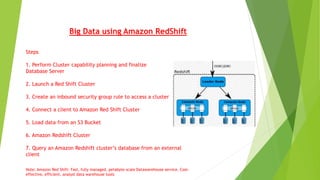
Big Data using Amazon RedShift
Steps
1. Perform Cluster capability planning and finalize
Database Server
2. Launch a Red Shift Cluster
3. Create an inbound security group rule to access a cluster
4. Connect a client to Amazon Red Shift Cluster
5. Load data from an S3 Bucket
6. Amazon Redshift Cluster
7. Query an Amazon Redshift cluster’s database from an external
client
Note: Amazon Red Shift: Fast, fully managed, petabyte-scale Datawarehouse service. Cost-
effective, efficient, analyst data warehouse tools
Amazon RedShift
What is Amazon Red Shift technology
It’s a fast, fully managed, petabyte-scale Datawarehouse service. Cost-effective,
efficient, analyst data warehouse tools
Optimized datasets ranging GB to TB to PB or more for cheap cost price compare to
other data warehousing solutions
Capable of delivering faster query results, I/O performance for virtual datasets
parallel processing into multiple nodes
Amazon RedShift takes administrative tasks such as provisioning, configuring,
monitoring, backup, security a data warehousing
Amazon EC2 ( web service) interface to allow, configure capacity with minimal
friction.
Amazon Management Console
Steps:
Connect to panel and open the Management Console
Verify the regions and connect with the AWS management Console
Launch an Amazon Red Shift Cluster
( Manage data warehouse consists of set computer nodes. Cluster runs Amazon
RedShift engine contains databases. Node type CPU, RAM, storage capacity and
storage )
Setup Cluster through AWS Management Console, Services and click Red Shift
Launch Cluster to open Red Shift Cluster creation, Node configuration, Parameter
group, Encrypt database
Configure network options including VPC, Subnet, Public IP, Availability zone, VPC
security group
Create an alert in Cloud Watch
Configure Security Client Access to Amazon Red Shift
Cluster
Steps:
Create an account to interact with database
Configure an AWS Security Group from that client to your Amazon Red Shift Cluster
Add a Data-source, click Amazon Red Shift to create a data source
Define Security and network section with IP address
Grant client access to Cluster using AWS Console, Services, EC2, Security Groups,
Inbound and add rule and specify RedShift with TCP protocol and source details
Connect client software to an Amazon Red Shift
Cluster
Steps:
Utilize Cluster Capacity plan details to connect client software to an Amazon red
Shift Cluster
Open AWS RedShift Console, Services, change Cluster status on configuration details
including Cluster prosperities, Cluster status, Cluster database, Backup, Audit
logging, Capacity details, SSH Ingestion setting
Locate and specify the End Point for Database
Load data into Amazon RedShift Cluster
Steps:
Create or modify database table
Execute SQL to query and get the results
Connect and access keys with security credentials
Load data from S3 into database table
Query an Amazon Red Shift database from external client wherever if applicable
Thank you

BigData: AWS RedShift with S3, EC2

  • 1.
    Big Data Analyticswith AWS RedShift, EC2, S3 Prepared by Pappaiah Paulraj
  • 2.
    Big Data usingAmazon RedShift Steps 1. Perform Cluster capability planning and finalize Database Server 2. Launch a Red Shift Cluster 3. Create an inbound security group rule to access a cluster 4. Connect a client to Amazon Red Shift Cluster 5. Load data from an S3 Bucket 6. Amazon Redshift Cluster 7. Query an Amazon Redshift cluster’s database from an external client Note: Amazon Red Shift: Fast, fully managed, petabyte-scale Datawarehouse service. Cost- effective, efficient, analyst data warehouse tools
  • 3.
    Amazon RedShift What isAmazon Red Shift technology It’s a fast, fully managed, petabyte-scale Datawarehouse service. Cost-effective, efficient, analyst data warehouse tools Optimized datasets ranging GB to TB to PB or more for cheap cost price compare to other data warehousing solutions Capable of delivering faster query results, I/O performance for virtual datasets parallel processing into multiple nodes Amazon RedShift takes administrative tasks such as provisioning, configuring, monitoring, backup, security a data warehousing Amazon EC2 ( web service) interface to allow, configure capacity with minimal friction.
  • 4.
    Amazon Management Console Steps: Connectto panel and open the Management Console Verify the regions and connect with the AWS management Console Launch an Amazon Red Shift Cluster ( Manage data warehouse consists of set computer nodes. Cluster runs Amazon RedShift engine contains databases. Node type CPU, RAM, storage capacity and storage ) Setup Cluster through AWS Management Console, Services and click Red Shift Launch Cluster to open Red Shift Cluster creation, Node configuration, Parameter group, Encrypt database Configure network options including VPC, Subnet, Public IP, Availability zone, VPC security group Create an alert in Cloud Watch
  • 5.
    Configure Security ClientAccess to Amazon Red Shift Cluster Steps: Create an account to interact with database Configure an AWS Security Group from that client to your Amazon Red Shift Cluster Add a Data-source, click Amazon Red Shift to create a data source Define Security and network section with IP address Grant client access to Cluster using AWS Console, Services, EC2, Security Groups, Inbound and add rule and specify RedShift with TCP protocol and source details
  • 6.
    Connect client softwareto an Amazon Red Shift Cluster Steps: Utilize Cluster Capacity plan details to connect client software to an Amazon red Shift Cluster Open AWS RedShift Console, Services, change Cluster status on configuration details including Cluster prosperities, Cluster status, Cluster database, Backup, Audit logging, Capacity details, SSH Ingestion setting Locate and specify the End Point for Database
  • 7.
    Load data intoAmazon RedShift Cluster Steps: Create or modify database table Execute SQL to query and get the results Connect and access keys with security credentials Load data from S3 into database table Query an Amazon Red Shift database from external client wherever if applicable
  • 8.