Developing Android Apps
FOR FUN!
CLAIRE HYUNJUNG LEE
Contens
 Getting Started
 Activity and Fragment
 Start Your Own Project
 Bug and Trouble Shooting
Getting Started
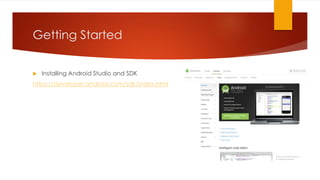
 Installing Android Studio and SDK
https://developer.android.com/sdk/index.html
Getting Started
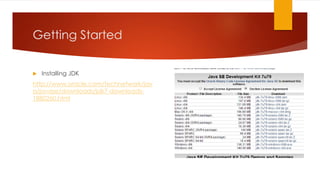
 Installing JDK
http://www.oracle.com/technetwork/jav
a/javase/downloads/jdk7-downloads-
1880260.html
Getting Started
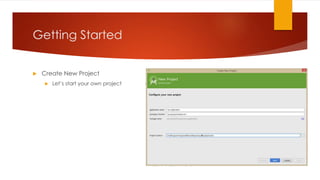
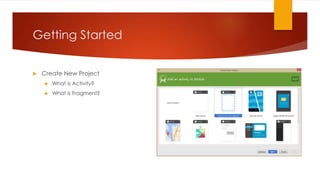
 Create New Project
 Let’s start your own project
Getting Started
 Create New Project
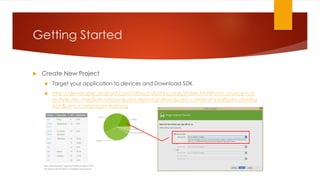
 Target your application to devices and Download SDK
 http://developer.android.com/about/dashboards/index.html?utm_source=ud
acity&utm_medium=mooc&utm_term=android&utm_content=platform_distribu
tion&utm_campaign=training
Getting Started
 Create New Project
 What is Activity?
 What is Fragment?
Activity & Fragment
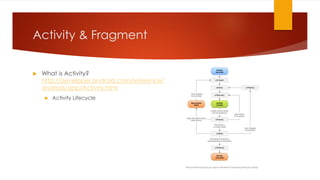
 What is Activity?
http://developer.android.com/reference/
android/app/Activity.html
 Activity Lifecycle
Activity & Fragment
 What is Activity?
http://developer.android.com/reference/
android/app/Activity.html
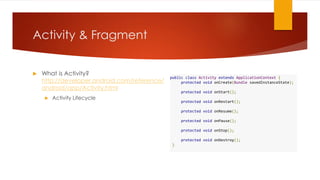
 Activity Lifecycle
public class Activity extends ApplicationContext {
protected void onCreate(Bundle savedInstanceState);
protected void onStart();
protected void onRestart();
protected void onResume();
protected void onPause();
protected void onStop();
protected void onDestroy();
}
Activity & Fragment
 What is Activity?
http://developer.android.com/reference/
android/app/Activity.html
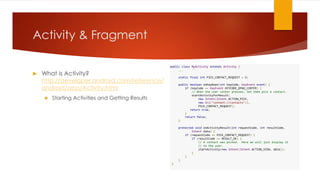
 Starting Activities and Getting Results
public class MyActivity extends Activity {
...
static final int PICK_CONTACT_REQUEST = 0;
public boolean onKeyDown(int keyCode, KeyEvent event) {
if (keyCode == KeyEvent.KEYCODE_DPAD_CENTER) {
// When the user center presses, let them pick a contact.
startActivityForResult(
new Intent(Intent.ACTION_PICK,
new Uri("content://contacts")),
PICK_CONTACT_REQUEST);
return true;
}
return false;
}
protected void onActivityResult(int requestCode, int resultCode,
Intent data) {
if (requestCode == PICK_CONTACT_REQUEST) {
if (resultCode == RESULT_OK) {
// A contact was picked. Here we will just display it
// to the user.
startActivity(new Intent(Intent.ACTION_VIEW, data));
}
}
}
}
Activity & Fragment
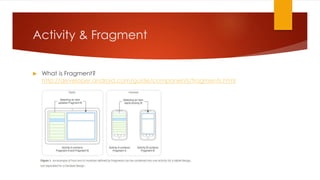
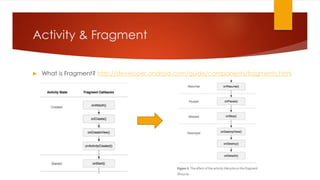
 What is Fragment?
http://developer.android.com/guide/components/fragments.html
Activity & Fragment
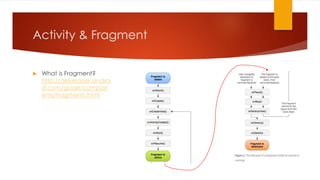
 What is Fragment?
http://developer.androi
d.com/guide/compon
ents/fragments.html
Activity & Fragment
 What is Fragment?
http://developer.android.com/guide/components/fragments.html
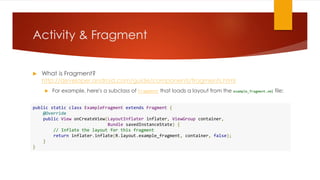
 For example, here's a subclass of Fragment that loads a layout from the example_fragment.xml file:
public static class ExampleFragment extends Fragment {
@Override
public View onCreateView(LayoutInflater inflater, ViewGroup container,
Bundle savedInstanceState) {
// Inflate the layout for this fragment
return inflater.inflate(R.layout.example_fragment, container, false);
}
}
Activity & Fragment
 What is Fragment?
http://developer.android.co
m/guide/components/fragm
ents.html
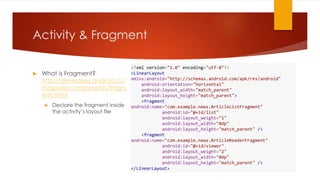
 Declare the fragment inside
the activity’s layout file
<?xml version="1.0" encoding="utf-8"?>
<LinearLayout
xmlns:android="http://schemas.android.com/apk/res/android"
android:orientation="horizontal"
android:layout_width="match_parent"
android:layout_height="match_parent">
<fragment
android:name="com.example.news.ArticleListFragment"
android:id="@+id/list"
android:layout_weight="1"
android:layout_width="0dp"
android:layout_height="match_parent" />
<fragment
android:name="com.example.news.ArticleReaderFragment"
android:id="@+id/viewer"
android:layout_weight="2"
android:layout_width="0dp"
android:layout_height="match_parent" />
</LinearLayout>
Activity & Fragment
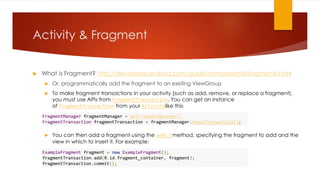
 What is Fragment? http://developer.android.com/guide/components/fragments.html
 Or, programmatically add the fragment to an existing ViewGroup
 To make fragment transactions in your activity (such as add, remove, or replace a fragment),
you must use APIs from FragmentTransaction. You can get an instance
of FragmentTransaction from your Activitylike this:
 You can then add a fragment using the add() method, specifying the fragment to add and the
view in which to insert it. For example:
FragmentManager fragmentManager = getFragmentManager()
FragmentTransaction fragmentTransaction = fragmentManager.beginTransaction();
ExampleFragment fragment = new ExampleFragment();
fragmentTransaction.add(R.id.fragment_container, fragment);
fragmentTransaction.commit();
Activity & Fragment
 What is Fragment? http://developer.android.com/guide/components/fragments.html
Start your own project
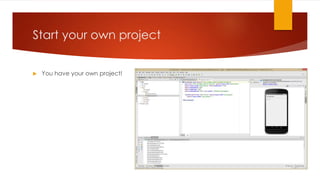
 You have your own project!
Bug & Trouble Shooting
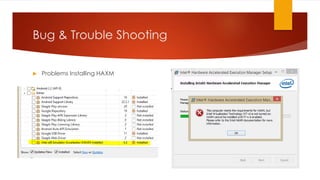
 Problems Installing HAXM
Bug & Trouble Shooting
 How to Solve
 Here’s some cases that you can solve this problem on Intel website
 https://software.intel.com/en-us/android/articles/installation-instructions-for-
intel-hardware-accelerated-execution-manager-windows
 In this case, Execute Disable was disabled in the system BIOS.
Bug & Trouble Shooting
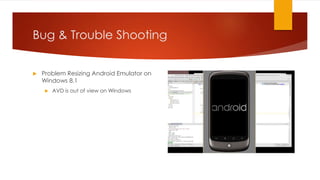
 Problem Resizing Android Emulator on
Windows 8.1
 AVD is out of view on Windows
Bug & Trouble Shooting
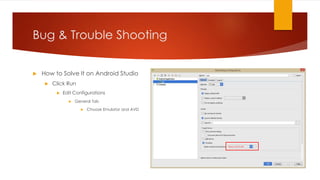
 How to Solve It on Android Studio
 Click Run
 Edit Configurations
 General Tab
 Choose Emulator and AVD
Bug & Trouble Shooting
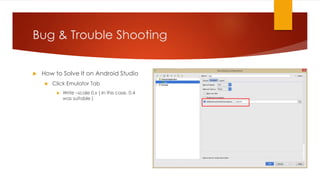
 How to Solve It on Android Studio
 Click Emulator Tab
 Write –scale 0.x ( In this case, 0.4
was suitable )
Bug & Trouble Shooting
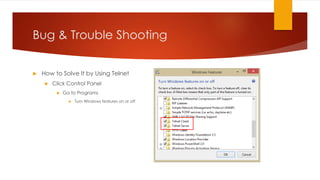
 How to Solve It by Using Telnet
 Click Control Panel
 Go to Programs
 Turn Windows features on or off
Bug & Trouble Shooting
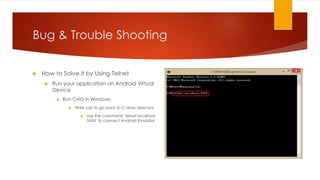
 How to Solve it by Using Telnet
 Run your application on Android Virtual
Device
 Run CMD in Windows
 Write cd/ to go back to C drive directory
 Use the command ‘telnet localhost
5554’ to connect Android Emulator
Bug & Trouble Shooting
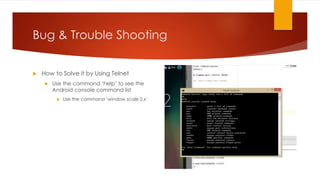
 How to Solve it by Using Telnet
 Use the command ‘help’ to see the
Android console command list
 Use the command ‘window scale 0.x’
To be Continue
AUGUST 2015

Developing Android Apps

  • 1.
    Developing Android Apps FORFUN! CLAIRE HYUNJUNG LEE
  • 2.
    Contens  Getting Started Activity and Fragment  Start Your Own Project  Bug and Trouble Shooting
  • 3.
    Getting Started  InstallingAndroid Studio and SDK https://developer.android.com/sdk/index.html
  • 4.
    Getting Started  InstallingJDK http://www.oracle.com/technetwork/jav a/javase/downloads/jdk7-downloads- 1880260.html
  • 5.
    Getting Started  CreateNew Project  Let’s start your own project
  • 6.
    Getting Started  CreateNew Project  Target your application to devices and Download SDK  http://developer.android.com/about/dashboards/index.html?utm_source=ud acity&utm_medium=mooc&utm_term=android&utm_content=platform_distribu tion&utm_campaign=training
  • 7.
    Getting Started  CreateNew Project  What is Activity?  What is Fragment?
  • 8.
    Activity & Fragment What is Activity? http://developer.android.com/reference/ android/app/Activity.html  Activity Lifecycle
  • 9.
    Activity & Fragment What is Activity? http://developer.android.com/reference/ android/app/Activity.html  Activity Lifecycle public class Activity extends ApplicationContext { protected void onCreate(Bundle savedInstanceState); protected void onStart(); protected void onRestart(); protected void onResume(); protected void onPause(); protected void onStop(); protected void onDestroy(); }
  • 10.
    Activity & Fragment What is Activity? http://developer.android.com/reference/ android/app/Activity.html  Starting Activities and Getting Results public class MyActivity extends Activity { ... static final int PICK_CONTACT_REQUEST = 0; public boolean onKeyDown(int keyCode, KeyEvent event) { if (keyCode == KeyEvent.KEYCODE_DPAD_CENTER) { // When the user center presses, let them pick a contact. startActivityForResult( new Intent(Intent.ACTION_PICK, new Uri("content://contacts")), PICK_CONTACT_REQUEST); return true; } return false; } protected void onActivityResult(int requestCode, int resultCode, Intent data) { if (requestCode == PICK_CONTACT_REQUEST) { if (resultCode == RESULT_OK) { // A contact was picked. Here we will just display it // to the user. startActivity(new Intent(Intent.ACTION_VIEW, data)); } } } }
  • 11.
    Activity & Fragment What is Fragment? http://developer.android.com/guide/components/fragments.html
  • 12.
    Activity & Fragment What is Fragment? http://developer.androi d.com/guide/compon ents/fragments.html
  • 13.
    Activity & Fragment What is Fragment? http://developer.android.com/guide/components/fragments.html  For example, here's a subclass of Fragment that loads a layout from the example_fragment.xml file: public static class ExampleFragment extends Fragment { @Override public View onCreateView(LayoutInflater inflater, ViewGroup container, Bundle savedInstanceState) { // Inflate the layout for this fragment return inflater.inflate(R.layout.example_fragment, container, false); } }
  • 14.
    Activity & Fragment What is Fragment? http://developer.android.co m/guide/components/fragm ents.html  Declare the fragment inside the activity’s layout file <?xml version="1.0" encoding="utf-8"?> <LinearLayout xmlns:android="http://schemas.android.com/apk/res/android" android:orientation="horizontal" android:layout_width="match_parent" android:layout_height="match_parent"> <fragment android:name="com.example.news.ArticleListFragment" android:id="@+id/list" android:layout_weight="1" android:layout_width="0dp" android:layout_height="match_parent" /> <fragment android:name="com.example.news.ArticleReaderFragment" android:id="@+id/viewer" android:layout_weight="2" android:layout_width="0dp" android:layout_height="match_parent" /> </LinearLayout>
  • 15.
    Activity & Fragment What is Fragment? http://developer.android.com/guide/components/fragments.html  Or, programmatically add the fragment to an existing ViewGroup  To make fragment transactions in your activity (such as add, remove, or replace a fragment), you must use APIs from FragmentTransaction. You can get an instance of FragmentTransaction from your Activitylike this:  You can then add a fragment using the add() method, specifying the fragment to add and the view in which to insert it. For example: FragmentManager fragmentManager = getFragmentManager() FragmentTransaction fragmentTransaction = fragmentManager.beginTransaction(); ExampleFragment fragment = new ExampleFragment(); fragmentTransaction.add(R.id.fragment_container, fragment); fragmentTransaction.commit();
  • 16.
    Activity & Fragment What is Fragment? http://developer.android.com/guide/components/fragments.html
  • 17.
    Start your ownproject  You have your own project!
  • 18.
    Bug & TroubleShooting  Problems Installing HAXM
  • 19.
    Bug & TroubleShooting  How to Solve  Here’s some cases that you can solve this problem on Intel website  https://software.intel.com/en-us/android/articles/installation-instructions-for- intel-hardware-accelerated-execution-manager-windows  In this case, Execute Disable was disabled in the system BIOS.
  • 20.
    Bug & TroubleShooting  Problem Resizing Android Emulator on Windows 8.1  AVD is out of view on Windows
  • 21.
    Bug & TroubleShooting  How to Solve It on Android Studio  Click Run  Edit Configurations  General Tab  Choose Emulator and AVD
  • 22.
    Bug & TroubleShooting  How to Solve It on Android Studio  Click Emulator Tab  Write –scale 0.x ( In this case, 0.4 was suitable )
  • 23.
    Bug & TroubleShooting  How to Solve It by Using Telnet  Click Control Panel  Go to Programs  Turn Windows features on or off
  • 24.
    Bug & TroubleShooting  How to Solve it by Using Telnet  Run your application on Android Virtual Device  Run CMD in Windows  Write cd/ to go back to C drive directory  Use the command ‘telnet localhost 5554’ to connect Android Emulator
  • 25.
    Bug & TroubleShooting  How to Solve it by Using Telnet  Use the command ‘help’ to see the Android console command list  Use the command ‘window scale 0.x’
  • 26.