What is RIA ? Rich Internet applications (RIA) are Web applications that have the features and functionality of traditional desktop applications. RIAs typically transfer the processing necessary for the user interface to the Web client but keep the bulk of the data (i.e., maintaining the state of the program, the data etc) back on the application server.
run in a Web browser, or do not require software installation run locally in a secure environment called a sandbox can be "occasionally connected" hybrid between traditional desktop applications and Web-based applications Low maintenance: no update or patch required High availability: accessible through a networked computer Platform independence, Low development cost Advantages of RIA
Differences between a traditional web application and RIAs
Major Players in RIA Frameworks AJAX JAVA applet Adobe Flex/AIR JAVA FX Microsoft Silver Light Example : javafx-vs-flash-vs-silverlight
RIA Frameworks Comparison
What is Silver Light? Cross browser, Cross platform plug in It is a flexible programming model that supports AJAX, Visual Basic and C# Basic motto  is to provide Rich Internet effects to the web applications Adobe Flex is also competitor for Silver light It also is a slimmed-down, cross-platform version of Microsoft’s WPF programming model It is a client side technology, It doesn't matter what backend server software or platform we are using
Silver Light Versions Silver Light 1.0 released in 2007 Silver Light 2 Released in 2008 (previously referred to as version 1.1) Silver Light 3 Released in July 2009 Silver Light 4 Released in June 2010
Target Operating Systems Platforms Windows 2000,2003/XP/Home Server, Windows Server 2008 R1/R2, Vista/Windows 7 Mac 10.4/10.5 PowerPC,  Intel Linux via the compatible third-party Moonlight run time Windows Phone 7 Android   Iphone OS
Supported Web Browsers Browsers IE IE 6(sp1,sp2), IE 7/8 Firefox 3 Safari Chrome Opera Sea Monkey
Supported web platforms .Net JAVA ROR PHP HTML
< div   id =&quot;silverlightControlHost&quot;> < object   data =&quot;data:application/x-silverlight-2,&quot;   type =&quot;application/x-silverlight-2&quot;   width =&quot;100%&quot;   height =&quot;100%&quot;> < param   name =&quot;source&quot;   value =&quot;ClientBin/BusinessApplication15.xap&quot;/> < param   name =&quot;onError&quot;   value =&quot;onSilverlightError&quot;   /> < param   name =&quot;background&quot;   value =&quot;white&quot;   /> < param   name =&quot;minRuntimeVersion&quot;   value =&quot;3.0.40624.0&quot;   /> < param   name =&quot;autoUpgrade&quot;   value =&quot;true&quot;   /> < a   href =&quot;http://go.microsoft.com/fwlink/?LinkID=149156&v=3.0.40624.0&quot;   style =&quot; text-decoration : none&quot;>   < img   src =&quot;http://go.microsoft.com/fwlink/?LinkId=108181&quot;   alt =&quot;Get Microsoft Silverlight&quot;   style =&quot; border-style : none&quot;/> </ a > </ object >< iframe   id =&quot;_sl_historyFrame&quot;   style =&quot; visibility : hidden ; height : 0px ; width : 0px ; border : 0px&quot;></ iframe ></ div >
Prerequisite to create a new Silverlight Application Visual Studio 2008 SP1 for Silverlight 3  or Visual Studio 2010 for Silverlight 3 & Silverlight 4  Silverlight 3 Tools for Visual Studio 2008 SP1  or Silverlight 4 Tools for Visual Studio 2010 Expression Blend 3 for Silverlight 3 or Expression Blend 4 Preview for Silverlight 4 (optional) WCF RIA Services for Silverlight (optional) Silverlight 3 Toolkit  or Silverlight 4 Toolkit based on your earlier version of Silverlight (optional)
Concepts to know What is XAML? What is App.xaml file? What is MainPage.xaml file? What is XAP file? How can I host a Silverlight Application?
< div   id =&quot;silverlightControlHost&quot;> < object   data =&quot;data:application/x-silverlight-2,&quot;   type =&quot;application/x-silverlight-2&quot;   width =&quot;100%&quot;   height =&quot;100%&quot;> < param   name =&quot;source&quot;   value =&quot;ClientBin/BusinessApplication15.xap&quot;/> < param   name =&quot;onError&quot;   value =&quot;onSilverlightError&quot;   /> < param   name =&quot;background&quot;   value =&quot;white&quot;   /> < param   name =&quot;minRuntimeVersion&quot;   value =&quot;3.0.40624.0&quot;   /> < param   name =&quot;autoUpgrade&quot;   value =&quot;true&quot;   /> < a   href =&quot;http://go.microsoft.com/fwlink/?LinkID=149156&v=3.0.40624.0&quot;   style =&quot; text-decoration : none&quot;>   < img   src =&quot;http://go.microsoft.com/fwlink/?LinkId=108181&quot;   alt =&quot;Get Microsoft Silverlight&quot;   style =&quot; border-style : none&quot;/> </ a > </ object >< iframe   id =&quot;_sl_historyFrame&quot;   style =&quot; visibility : hidden ; height : 0px ; width : 0px ; border : 0px&quot;></ iframe ></ div >
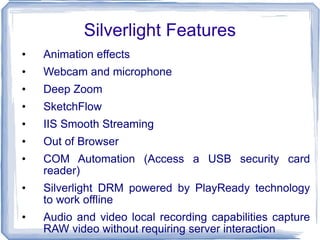
Animation effects Webcam and microphone  Deep Zoom SketchFlow IIS Smooth Streaming Out of Browser COM Automation (Access a USB security card reader) Silverlight DRM powered by PlayReady technology to work offline Audio and video local recording capabilities capture RAW video without requiring server interaction Silverlight Features
Bring data in to your application with features such as copy and paste or drag and drop.  Long lists can now be scrolled effortlessly with the mouse wheel.  Support conventional desktop interaction models through right-click context menu.  Support for Google’s Chrome browser.  Multi-touch support enables a range of gestures and touch interactions to be integrated into user experiences.  Performance optimizations mean Silverlight 4 applications start quicker and run  faster
Questions?

Silver Light By Nyros Developer

  • 1.
  • 2.
    What is RIA? Rich Internet applications (RIA) are Web applications that have the features and functionality of traditional desktop applications. RIAs typically transfer the processing necessary for the user interface to the Web client but keep the bulk of the data (i.e., maintaining the state of the program, the data etc) back on the application server.
  • 3.
    run in aWeb browser, or do not require software installation run locally in a secure environment called a sandbox can be &quot;occasionally connected&quot; hybrid between traditional desktop applications and Web-based applications Low maintenance: no update or patch required High availability: accessible through a networked computer Platform independence, Low development cost Advantages of RIA
  • 4.
    Differences between atraditional web application and RIAs
  • 5.
    Major Players inRIA Frameworks AJAX JAVA applet Adobe Flex/AIR JAVA FX Microsoft Silver Light Example : javafx-vs-flash-vs-silverlight
  • 6.
  • 7.
    What is SilverLight? Cross browser, Cross platform plug in It is a flexible programming model that supports AJAX, Visual Basic and C# Basic motto is to provide Rich Internet effects to the web applications Adobe Flex is also competitor for Silver light It also is a slimmed-down, cross-platform version of Microsoft’s WPF programming model It is a client side technology, It doesn't matter what backend server software or platform we are using
  • 8.
    Silver Light VersionsSilver Light 1.0 released in 2007 Silver Light 2 Released in 2008 (previously referred to as version 1.1) Silver Light 3 Released in July 2009 Silver Light 4 Released in June 2010
  • 9.
    Target Operating SystemsPlatforms Windows 2000,2003/XP/Home Server, Windows Server 2008 R1/R2, Vista/Windows 7 Mac 10.4/10.5 PowerPC, Intel Linux via the compatible third-party Moonlight run time Windows Phone 7 Android Iphone OS
  • 10.
    Supported Web BrowsersBrowsers IE IE 6(sp1,sp2), IE 7/8 Firefox 3 Safari Chrome Opera Sea Monkey
  • 11.
    Supported web platforms.Net JAVA ROR PHP HTML
  • 12.
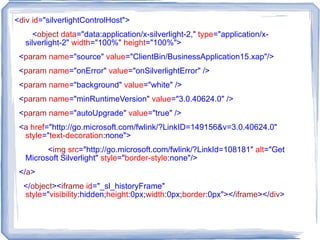
    < div id =&quot;silverlightControlHost&quot;> < object data =&quot;data:application/x-silverlight-2,&quot; type =&quot;application/x-silverlight-2&quot; width =&quot;100%&quot; height =&quot;100%&quot;> < param name =&quot;source&quot; value =&quot;ClientBin/BusinessApplication15.xap&quot;/> < param name =&quot;onError&quot; value =&quot;onSilverlightError&quot; /> < param name =&quot;background&quot; value =&quot;white&quot; /> < param name =&quot;minRuntimeVersion&quot; value =&quot;3.0.40624.0&quot; /> < param name =&quot;autoUpgrade&quot; value =&quot;true&quot; /> < a href =&quot;http://go.microsoft.com/fwlink/?LinkID=149156&v=3.0.40624.0&quot; style =&quot; text-decoration : none&quot;> < img src =&quot;http://go.microsoft.com/fwlink/?LinkId=108181&quot; alt =&quot;Get Microsoft Silverlight&quot; style =&quot; border-style : none&quot;/> </ a > </ object >< iframe id =&quot;_sl_historyFrame&quot; style =&quot; visibility : hidden ; height : 0px ; width : 0px ; border : 0px&quot;></ iframe ></ div >
  • 13.
    Prerequisite to createa new Silverlight Application Visual Studio 2008 SP1 for Silverlight 3 or Visual Studio 2010 for Silverlight 3 & Silverlight 4 Silverlight 3 Tools for Visual Studio 2008 SP1 or Silverlight 4 Tools for Visual Studio 2010 Expression Blend 3 for Silverlight 3 or Expression Blend 4 Preview for Silverlight 4 (optional) WCF RIA Services for Silverlight (optional) Silverlight 3 Toolkit or Silverlight 4 Toolkit based on your earlier version of Silverlight (optional)
  • 14.
    Concepts to knowWhat is XAML? What is App.xaml file? What is MainPage.xaml file? What is XAP file? How can I host a Silverlight Application?
  • 15.
    < div id =&quot;silverlightControlHost&quot;> < object data =&quot;data:application/x-silverlight-2,&quot; type =&quot;application/x-silverlight-2&quot; width =&quot;100%&quot; height =&quot;100%&quot;> < param name =&quot;source&quot; value =&quot;ClientBin/BusinessApplication15.xap&quot;/> < param name =&quot;onError&quot; value =&quot;onSilverlightError&quot; /> < param name =&quot;background&quot; value =&quot;white&quot; /> < param name =&quot;minRuntimeVersion&quot; value =&quot;3.0.40624.0&quot; /> < param name =&quot;autoUpgrade&quot; value =&quot;true&quot; /> < a href =&quot;http://go.microsoft.com/fwlink/?LinkID=149156&v=3.0.40624.0&quot; style =&quot; text-decoration : none&quot;> < img src =&quot;http://go.microsoft.com/fwlink/?LinkId=108181&quot; alt =&quot;Get Microsoft Silverlight&quot; style =&quot; border-style : none&quot;/> </ a > </ object >< iframe id =&quot;_sl_historyFrame&quot; style =&quot; visibility : hidden ; height : 0px ; width : 0px ; border : 0px&quot;></ iframe ></ div >
  • 16.
    Animation effects Webcamand microphone Deep Zoom SketchFlow IIS Smooth Streaming Out of Browser COM Automation (Access a USB security card reader) Silverlight DRM powered by PlayReady technology to work offline Audio and video local recording capabilities capture RAW video without requiring server interaction Silverlight Features
  • 17.
    Bring data into your application with features such as copy and paste or drag and drop. Long lists can now be scrolled effortlessly with the mouse wheel. Support conventional desktop interaction models through right-click context menu. Support for Google’s Chrome browser. Multi-touch support enables a range of gestures and touch interactions to be integrated into user experiences. Performance optimizations mean Silverlight 4 applications start quicker and run faster
  • 18.