
Mobile Widgets Jose Palazon Mobile Engineer
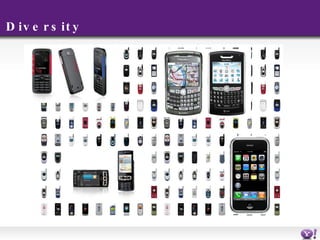
Where do I start I want to develop a mobile app. Where do I start? Problems Screen resolution and sizes OS and SDKs M emory
Diversity
Write once, best everywhere!
What is blueprint? T h e name of the platform The name of the language You write your apps once in blueprint The platform will make them work in as much devices as possible. Widgets and snippets.
Blueprint guidelines Takes care of UI and interaction You can concentrate on features Create complex elements easily (maps, pagination, …) Choose the best possible experience for each handset No extra effort on your side
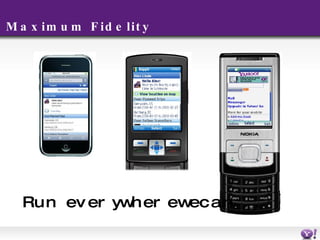
Maximum Fidelity Run everywhere we can..
Snippets Live in the mobile home page Have 2 views: normal Extended [opt]
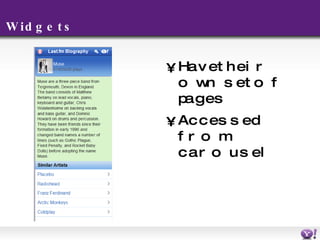
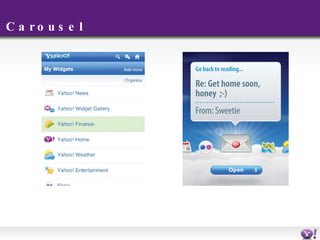
Widgets Have their own set of pages Accessed from carousel
Carousel
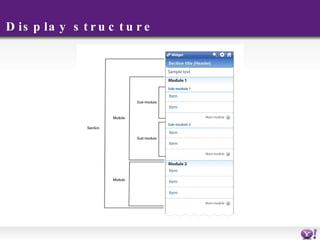
Display structure
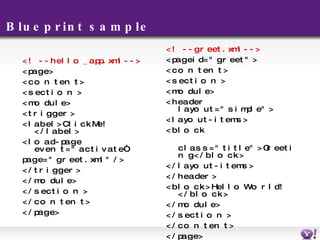
Blueprint sample <!-- hello_app.xml --> <page> <content> <section> <module> <trigger> <label>Click Me!</label> <load-page event=&quot;activate“ page=&quot;greet.xml&quot; /> </trigger> </module> </section> </content> </page> <!-- greet.xml --> <page id=&quot;greet&quot;> <content> <section> <module> <header layout=&quot;simple&quot;> <layout-items> <block  class=&quot;title&quot;>Greeting</block> </layout-items> </header> <block>Hello World!</block> </module> </section> </content> </page>
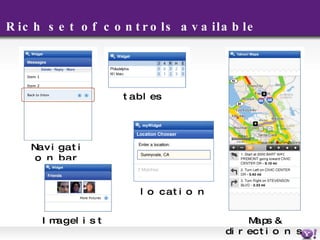
Rich set of controls available Navigation bar Image list tables Maps & directions location
Display controls Blocks, placards, image lists, data input (simple, multiline, passwd)… Complex elements: maps, driving directions, pagination … Complete spec document in SDK
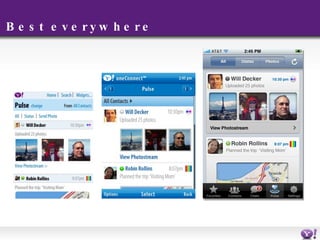
Best everywhere
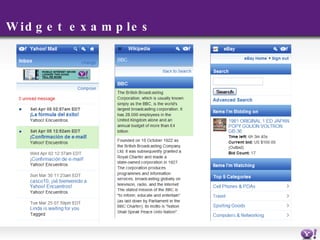
Widget examples
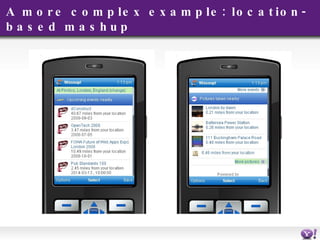
A more complex example: location-based mashup
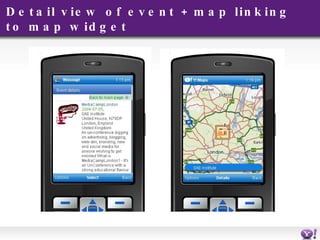
Detail view of event + map linking to map widget
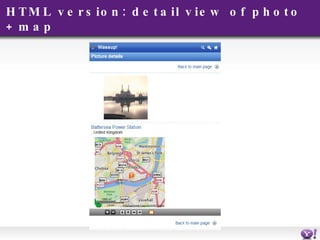
HTML version: detail view of photo + map
Parts of a widgets Part 1: resides on Y! Servers: C onfig.xml G allery.xml R esources/images Part 2: resides on public Server: Server side code generates your BP
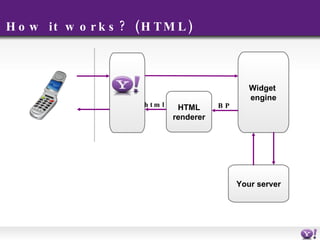
How it works? (HTML) HTML renderer Widget  engine Your server html BP
What’s in the SDK Templates for creating your apps. Code samples A php helper class XML Schemas for validation The blueprint specification guide Readme and release notes
A note on Images Automatic handling of different sizes Naming convention makes it work <name>_<width>x<height>.<extension> Just reference by identifier <image reference=&quot;icon&quot; size=&quot;small&quot;/> Fill-styles only work on uploaded images Check the manual for screen/size optimal sizes.
Server code Use your preferred technology. Just output bluepirnt. Content type application/x-ywidget+xml application/x-ysnippet+xml Cache-control : no-cache
C onfig.xml <?xml version=&quot;1.0&quot; encoding=&quot;UTF-8&quot;?> <config xmlns:xsi=&quot;http://www.w3.org/2001/XMLSchema-instance&quot; xmlns=&quot;http://mobile.yahoo.com/widgets/schema/1.0/config/&quot;> <title>YDN Widget</title> <version>1.0</version> <identifier>ydn-widget-1</identifier> <description>YDN Widget</description> <icon>ybang</icon>  <author organization=&quot;Yahoo!&quot; href=&quot;http://developer.yahoo.com&quot; email= [email_address] >Jose Palazon</author> <!-- change this widget base to your server url --> <widget base=&quot;http://www.noletia.com/ydn&quot;> <preview> <icon>ybang</icon>  <label>YDN Widget</label> </preview> <shortcuts> <item default=&quot;true&quot;> <label>YDN Widget</label> <href>index.php</href>  </item> </shortcuts> </widget> </config>
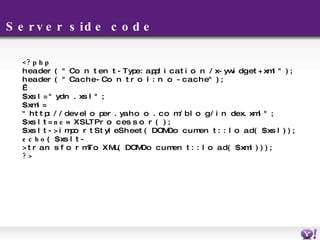
Server side code <?php header( &quot;Content-Type: application/x-ywidget+xml&quot; ); header( &quot;Cache-Control: no-cache&quot; );   $xsl = &quot;ydn.xsl&quot;; $xml = &quot;http://developer.yahoo.com/blog/index.xml&quot;; $xslt =  new  XSLTProcessor(); $xslt->importStyleSheet(DOMDocument::load($xsl)); echo ($xslt->transformToXML(DOMDocument::load($xml))); ?>
Server side code <?xml version=&quot;1.0&quot; encoding=&quot;ISO-8859-1&quot;?> <xsl:stylesheet version=&quot;1.0&quot; xmlns:xsl=&quot;http://www.w3.org/1999/XSL/Transform&quot;> <xsl:output method=&quot;xml&quot; encoding=&quot;utf-8&quot;  doctype-public=&quot;-//W3C//DTD XHTML 1.0 Transitional//EN&quot; doctype-system= http://www.w3.org/TR/xhtml1/DTD/xhtml1-transitional.dtd indent=&quot;yes&quot;/>   <xsl:template match='//channel'> <page> <content> <section> <header layout=&quot;simple&quot;> <layout-items> <block class=&quot;title&quot;>YDN Widget</block> </layout-items> </header> </section> <xsl:apply-templates select=&quot;item&quot; /> </content> </page> </xsl:template> <xsl:template match=&quot;item&quot;> <placard layout=&quot;card&quot; class=&quot;link&quot;> <layout-items> <image resource=&quot;ybang&quot;/> <block class=&quot;title&quot;><xsl:value-of select=&quot;title&quot;/></block> <block class=&quot;description&quot;><xsl:value-of select=&quot;pubDate&quot;/></block> <block class=&quot;subtext&quot;><xsl:value-of select=&quot;category&quot;/></block> </layout-items> <load resource=&quot;{link}&quot; event=&quot;activate&quot;/> </placard> </xsl:template> </xsl:stylesheet>
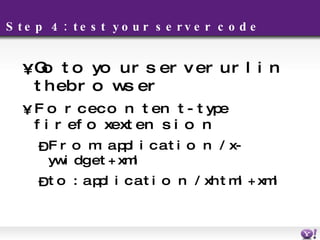
Step 4: test your server code Go to your server url in the browser Force content-type firefox extension F rom:  application/x-ywidget+xml to: application/xhtml+xml
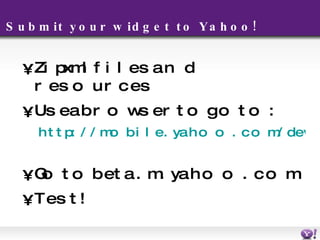
Submit your widget to Yahoo!  Zip xml files and resources Use a browser to go to: http://mobile.yahoo.com/developers/test/upload   Go to beta.m.yahoo.com Test!
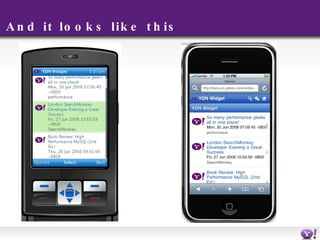
And it looks like this
Note: Work in progress! For more help: Dev Guide  Developers Group http://tech.groups.yahoo.com/group/yhoomobiledevelopers
Questions? Jose Palazon [email_address]

BluePrint Mobile Framework

  • 1.
    Mobile Widgets JosePalazon Mobile Engineer
  • 2.
    Where do Istart I want to develop a mobile app. Where do I start? Problems Screen resolution and sizes OS and SDKs M emory
  • 3.
  • 4.
    Write once, besteverywhere!
  • 5.
    What is blueprint?T h e name of the platform The name of the language You write your apps once in blueprint The platform will make them work in as much devices as possible. Widgets and snippets.
  • 6.
    Blueprint guidelines Takescare of UI and interaction You can concentrate on features Create complex elements easily (maps, pagination, …) Choose the best possible experience for each handset No extra effort on your side
  • 7.
    Maximum Fidelity Runeverywhere we can..
  • 8.
    Snippets Live inthe mobile home page Have 2 views: normal Extended [opt]
  • 9.
    Widgets Have theirown set of pages Accessed from carousel
  • 10.
  • 11.
  • 12.
    Blueprint sample <!--hello_app.xml --> <page> <content> <section> <module> <trigger> <label>Click Me!</label> <load-page event=&quot;activate“ page=&quot;greet.xml&quot; /> </trigger> </module> </section> </content> </page> <!-- greet.xml --> <page id=&quot;greet&quot;> <content> <section> <module> <header layout=&quot;simple&quot;> <layout-items> <block class=&quot;title&quot;>Greeting</block> </layout-items> </header> <block>Hello World!</block> </module> </section> </content> </page>
  • 13.
    Rich set ofcontrols available Navigation bar Image list tables Maps & directions location
  • 14.
    Display controls Blocks,placards, image lists, data input (simple, multiline, passwd)… Complex elements: maps, driving directions, pagination … Complete spec document in SDK
  • 15.
  • 16.
  • 17.
    A more complexexample: location-based mashup
  • 18.
    Detail view ofevent + map linking to map widget
  • 19.
    HTML version: detailview of photo + map
  • 20.
    Parts of awidgets Part 1: resides on Y! Servers: C onfig.xml G allery.xml R esources/images Part 2: resides on public Server: Server side code generates your BP
  • 21.
    How it works?(HTML) HTML renderer Widget engine Your server html BP
  • 22.
    What’s in theSDK Templates for creating your apps. Code samples A php helper class XML Schemas for validation The blueprint specification guide Readme and release notes
  • 23.
    A note onImages Automatic handling of different sizes Naming convention makes it work <name>_<width>x<height>.<extension> Just reference by identifier <image reference=&quot;icon&quot; size=&quot;small&quot;/> Fill-styles only work on uploaded images Check the manual for screen/size optimal sizes.
  • 24.
    Server code Useyour preferred technology. Just output bluepirnt. Content type application/x-ywidget+xml application/x-ysnippet+xml Cache-control : no-cache
  • 25.
    C onfig.xml <?xmlversion=&quot;1.0&quot; encoding=&quot;UTF-8&quot;?> <config xmlns:xsi=&quot;http://www.w3.org/2001/XMLSchema-instance&quot; xmlns=&quot;http://mobile.yahoo.com/widgets/schema/1.0/config/&quot;> <title>YDN Widget</title> <version>1.0</version> <identifier>ydn-widget-1</identifier> <description>YDN Widget</description> <icon>ybang</icon> <author organization=&quot;Yahoo!&quot; href=&quot;http://developer.yahoo.com&quot; email= [email_address] >Jose Palazon</author> <!-- change this widget base to your server url --> <widget base=&quot;http://www.noletia.com/ydn&quot;> <preview> <icon>ybang</icon> <label>YDN Widget</label> </preview> <shortcuts> <item default=&quot;true&quot;> <label>YDN Widget</label> <href>index.php</href> </item> </shortcuts> </widget> </config>
  • 26.
    Server side code<?php header( &quot;Content-Type: application/x-ywidget+xml&quot; ); header( &quot;Cache-Control: no-cache&quot; );   $xsl = &quot;ydn.xsl&quot;; $xml = &quot;http://developer.yahoo.com/blog/index.xml&quot;; $xslt = new XSLTProcessor(); $xslt->importStyleSheet(DOMDocument::load($xsl)); echo ($xslt->transformToXML(DOMDocument::load($xml))); ?>
  • 27.
    Server side code<?xml version=&quot;1.0&quot; encoding=&quot;ISO-8859-1&quot;?> <xsl:stylesheet version=&quot;1.0&quot; xmlns:xsl=&quot;http://www.w3.org/1999/XSL/Transform&quot;> <xsl:output method=&quot;xml&quot; encoding=&quot;utf-8&quot; doctype-public=&quot;-//W3C//DTD XHTML 1.0 Transitional//EN&quot; doctype-system= http://www.w3.org/TR/xhtml1/DTD/xhtml1-transitional.dtd indent=&quot;yes&quot;/>   <xsl:template match='//channel'> <page> <content> <section> <header layout=&quot;simple&quot;> <layout-items> <block class=&quot;title&quot;>YDN Widget</block> </layout-items> </header> </section> <xsl:apply-templates select=&quot;item&quot; /> </content> </page> </xsl:template> <xsl:template match=&quot;item&quot;> <placard layout=&quot;card&quot; class=&quot;link&quot;> <layout-items> <image resource=&quot;ybang&quot;/> <block class=&quot;title&quot;><xsl:value-of select=&quot;title&quot;/></block> <block class=&quot;description&quot;><xsl:value-of select=&quot;pubDate&quot;/></block> <block class=&quot;subtext&quot;><xsl:value-of select=&quot;category&quot;/></block> </layout-items> <load resource=&quot;{link}&quot; event=&quot;activate&quot;/> </placard> </xsl:template> </xsl:stylesheet>
  • 28.
    Step 4: testyour server code Go to your server url in the browser Force content-type firefox extension F rom: application/x-ywidget+xml to: application/xhtml+xml
  • 29.
    Submit your widgetto Yahoo! Zip xml files and resources Use a browser to go to: http://mobile.yahoo.com/developers/test/upload Go to beta.m.yahoo.com Test!
  • 30.
    And it lookslike this
  • 31.
    Note: Work inprogress! For more help: Dev Guide Developers Group http://tech.groups.yahoo.com/group/yhoomobiledevelopers
  • 32.
    Questions? Jose Palazon[email_address]