About Me
• ask@baddaz.com
• @baddaz
• www.baddaz.com
About You
About this Session
ž How we organise, classify and control information
ž Challenges and Opportunities of the Cloud
ž Focus on Microsoft Office 365 and Labels
ž Overview of the Key Features
Agenda
ž The Back Story
ž Create, Publish and Use Labels
ž Leveraging the Power of Labels
ž Summary and Getting Starting
TheBackStory
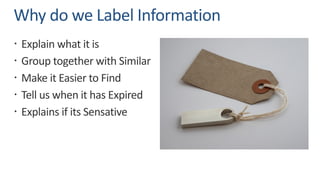
Why do we Label Information
ž Explain what it is
ž Group together with Similar
ž Make it Easier to Find
ž Tell us when it has Expired
ž Explains if its Sensative
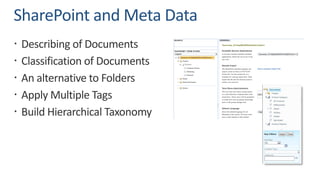
SharePoint and Meta Data
ž Describing of Documents
ž Classification of Documents
ž An alternative to Folders
ž Apply Multiple Tags
ž Build Hierarchical Taxonomy
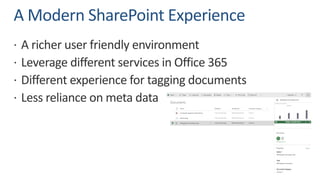
A Modern SharePoint Experience
ž A richer user friendly environment
ž Leverage different services in Office 365
ž Different experience for tagging documents
ž Less reliance on meta data
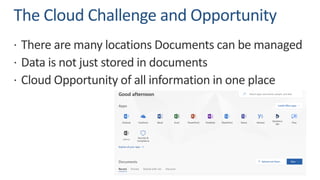
The Cloud Challenge and Opportunity
ž There are many locations Documents can be managed
ž Data is not just stored in documents
ž Cloud Opportunity of all information in one place
Create,PublishandUseLabels
What are Office 365 Labels
ž Let you classify data across your organization for governance,
and enforce retention rules based on that classification
ž Works across SharePoint, OneDrive and Exchange
ž Managed in Security & Compliance Center
ž Central to Microsoft’s GDPR Vision
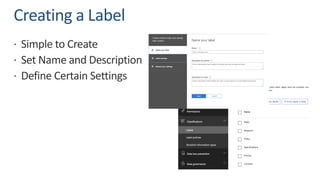
Creating a Label
ž Simple to Create
ž Set Name and Description
ž Define Certain Settings
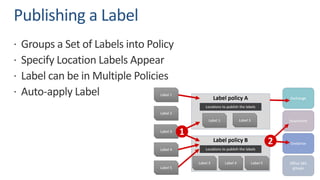
Publishing a Label
ž Groups a Set of Labels into Policy
ž Specify Location Labels Appear
ž Label can be in Multiple Policies
ž Auto-apply Label
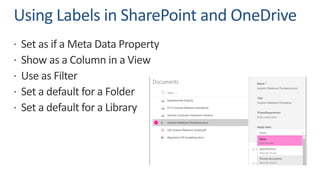
Using Labels in SharePoint and OneDrive
ž Set as if a Meta Data Property
ž Show as a Column in a View
ž Use as Filter
ž Set a default for a Folder
ž Set a default for a Library
Using Labels in Outlook
ž Outlook on the Web
ž Outlook 2010 or Later
ž Apply Label to a Folder
ž Set using Rules in Outlook
LeveragingthePowerofLabels
Label Activity Explorer
ž Label Activity Explorer
ž Quickly search and view label activity for all content across SharePoint and OneDrive
for Business over the past 30 days.
ž Data Governance Reports
ž With these reports, you can quickly view label trends and activity for all content
across Exchange, SharePoint, and OneDrive for Business over the past 90 days.
Content Search
ž Find Content Classified with Label
ž Various Keyworks and Conditions
ž Use the Compliance Tag
ž Can pre design certain Searches
ž Results are Exportable
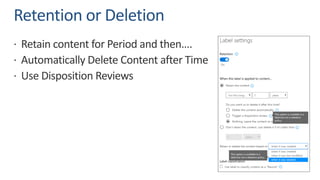
Retention or Deletion
ž Retain content for Period and then….
ž Automatically Delete Content after Time
ž Use Disposition Reviews
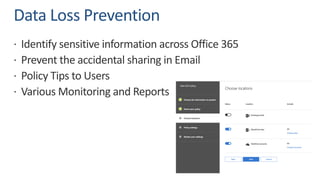
Data Loss Prevention
ž Identify sensitive information across Office 365
ž Prevent the accidental sharing in Email
ž Policy Tips to Users
ž Various Monitoring and Reports
SummaryandGettingStarting
How do I get Labels?
ž Office 365 E3 or E5
ž Global Admin does not have all the Permissions
ž Getting Started set of Labels
ž Lots of Great Resources available
How should I use them?
ž They could be used to define type of Content
ž They could be used to manage current State
ž They could be used to set Sensitivity
Considerations
ž Labels vs Meta Data
ž Content can only have one Label
ž Planning and Testing Approach
ž The Compliance Manager Role
ž This is not a Quick Implementation
Questions
Resources
ž https://support.office.com/en-gb/article/overview-of-labels-af398293-c69d-465e-a249-
d74561552d30?ui=en-US&rs=en-GB&ad=GB
ž https://support.office.com/en-gb/article/send-email-notifications-and-show-policy-tips-for-
dlp-policies-87496bc5-9601-4473-8021-cb05c71369c1?ui=en-US&rs=en-GB&ad=GB
ž https://docs.microsoft.com/en-us/office365/enterprise/office-365-information-protection-for-
gdpr
ž https://docs.microsoft.com/en-us/office365/enterprise/protect-sharepoint-online-files-with-
office-365-labels-and-dlp
ž https://joannecklein.com/2017/04/30/label-retention-across-o365/
ž https://support.office.com/en-us/article/bulk-create-and-publish-labels-by-using-powershell-
8986701b-ffa1-46ec-8fd0-8f7e81d5b25f
Get in Contact
• ask@baddaz.com
• @Baddaz
• www.baddaz.com

BCS ISG 24-05-18 - labelling your data in the cloud

  • 2.
    About Me • ask@baddaz.com •@baddaz • www.baddaz.com
  • 3.
  • 4.
    About this Session žHow we organise, classify and control information ž Challenges and Opportunities of the Cloud ž Focus on Microsoft Office 365 and Labels ž Overview of the Key Features
  • 5.
    Agenda ž The BackStory ž Create, Publish and Use Labels ž Leveraging the Power of Labels ž Summary and Getting Starting
  • 6.
  • 7.
    Why do weLabel Information ž Explain what it is ž Group together with Similar ž Make it Easier to Find ž Tell us when it has Expired ž Explains if its Sensative
  • 8.
    SharePoint and MetaData ž Describing of Documents ž Classification of Documents ž An alternative to Folders ž Apply Multiple Tags ž Build Hierarchical Taxonomy
  • 9.
    A Modern SharePointExperience ž A richer user friendly environment ž Leverage different services in Office 365 ž Different experience for tagging documents ž Less reliance on meta data
  • 10.
    The Cloud Challengeand Opportunity ž There are many locations Documents can be managed ž Data is not just stored in documents ž Cloud Opportunity of all information in one place
  • 11.
  • 12.
    What are Office365 Labels ž Let you classify data across your organization for governance, and enforce retention rules based on that classification ž Works across SharePoint, OneDrive and Exchange ž Managed in Security & Compliance Center ž Central to Microsoft’s GDPR Vision
  • 13.
    Creating a Label žSimple to Create ž Set Name and Description ž Define Certain Settings
  • 14.
    Publishing a Label žGroups a Set of Labels into Policy ž Specify Location Labels Appear ž Label can be in Multiple Policies ž Auto-apply Label
  • 15.
    Using Labels inSharePoint and OneDrive ž Set as if a Meta Data Property ž Show as a Column in a View ž Use as Filter ž Set a default for a Folder ž Set a default for a Library
  • 16.
    Using Labels inOutlook ž Outlook on the Web ž Outlook 2010 or Later ž Apply Label to a Folder ž Set using Rules in Outlook
  • 17.
  • 18.
    Label Activity Explorer žLabel Activity Explorer ž Quickly search and view label activity for all content across SharePoint and OneDrive for Business over the past 30 days. ž Data Governance Reports ž With these reports, you can quickly view label trends and activity for all content across Exchange, SharePoint, and OneDrive for Business over the past 90 days.
  • 19.
    Content Search ž FindContent Classified with Label ž Various Keyworks and Conditions ž Use the Compliance Tag ž Can pre design certain Searches ž Results are Exportable
  • 20.
    Retention or Deletion žRetain content for Period and then…. ž Automatically Delete Content after Time ž Use Disposition Reviews
  • 21.
    Data Loss Prevention žIdentify sensitive information across Office 365 ž Prevent the accidental sharing in Email ž Policy Tips to Users ž Various Monitoring and Reports
  • 22.
  • 23.
    How do Iget Labels? ž Office 365 E3 or E5 ž Global Admin does not have all the Permissions ž Getting Started set of Labels ž Lots of Great Resources available
  • 24.
    How should Iuse them? ž They could be used to define type of Content ž They could be used to manage current State ž They could be used to set Sensitivity
  • 25.
    Considerations ž Labels vsMeta Data ž Content can only have one Label ž Planning and Testing Approach ž The Compliance Manager Role ž This is not a Quick Implementation
  • 26.
  • 27.
    Resources ž https://support.office.com/en-gb/article/overview-of-labels-af398293-c69d-465e-a249- d74561552d30?ui=en-US&rs=en-GB&ad=GB ž https://support.office.com/en-gb/article/send-email-notifications-and-show-policy-tips-for- dlp-policies-87496bc5-9601-4473-8021-cb05c71369c1?ui=en-US&rs=en-GB&ad=GB žhttps://docs.microsoft.com/en-us/office365/enterprise/office-365-information-protection-for- gdpr ž https://docs.microsoft.com/en-us/office365/enterprise/protect-sharepoint-online-files-with- office-365-labels-and-dlp ž https://joannecklein.com/2017/04/30/label-retention-across-o365/ ž https://support.office.com/en-us/article/bulk-create-and-publish-labels-by-using-powershell- 8986701b-ffa1-46ec-8fd0-8f7e81d5b25f
  • 28.
    Get in Contact •ask@baddaz.com • @Baddaz • www.baddaz.com