A PRIMER ON THE
PRINCIPLES OF RETENTION
IN MICROSOFT 365
THE ESSENTIALS TO UNDERSTAND
A presentation by Joanne C Klein to IRMS on October 14, 2021
SYNOPSIS
There's only 4 of them, but they're important. Really important.
This session will talk about why it's essential for Records Managers and Information Management teams to
have an authoritative understanding of the principles. They inform the retention and deletion processes
and actions which are the technical underpinning of your Information Governance/Records Management
(IG/RM) implementation. This is what ultimately determines the retention and deletion actions taken on
each piece of content.
Understanding the principles of retention is an important prerequisite to a holistic IG/RM design and
implementation. It can help ensure you are deleting content when you no longer need/require it and
retaining content for as long as you are required to meet your corporate governance requirements and
your legal, business, and regulatory obligations.
Hi! I’m Joanne!
@JoanneCKlein
joannecklein@nexnovus.com
joannecklein.com
SharePoint & Microsoft 365 consultant | Advanced Compliance
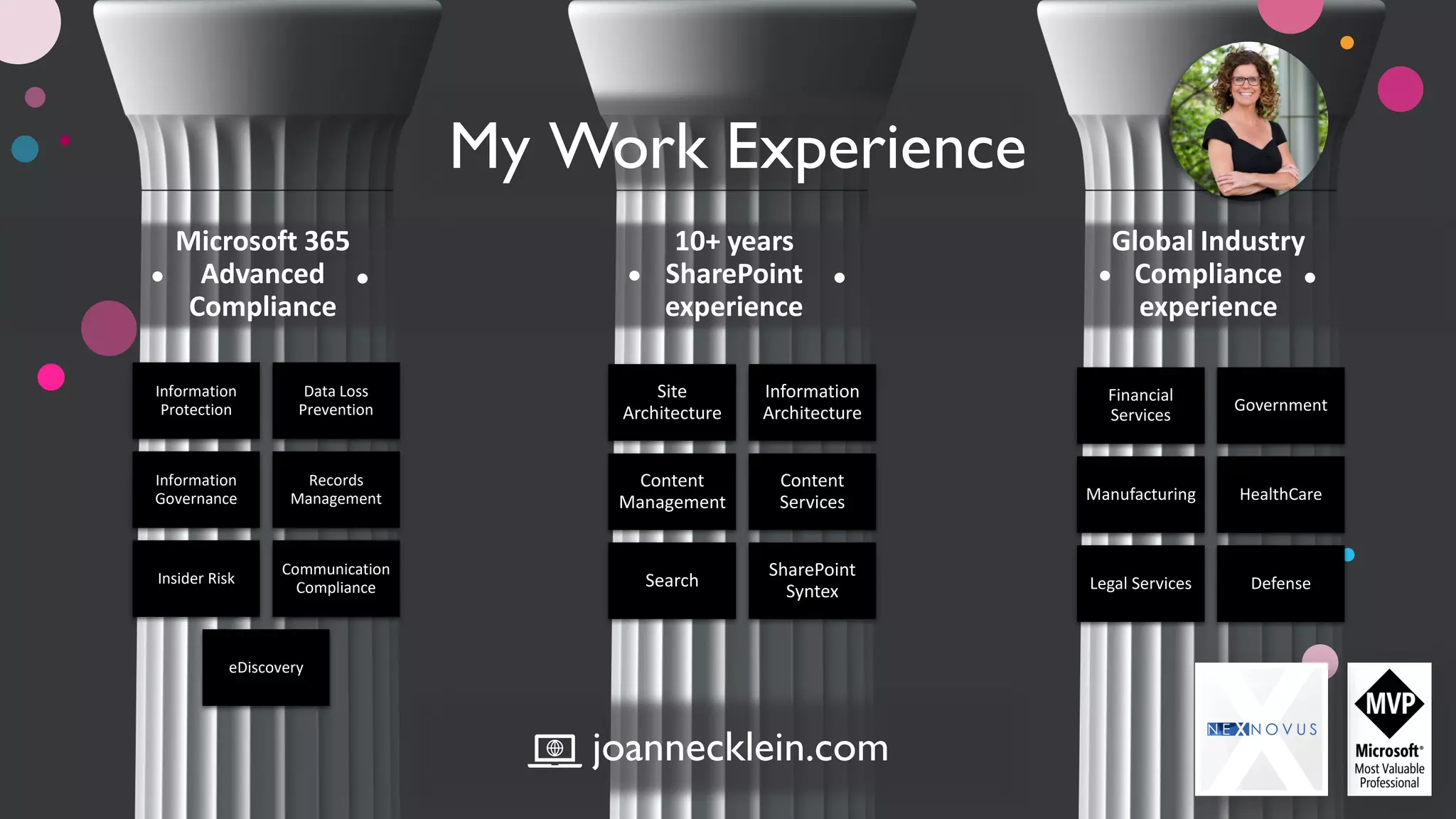
Information
Protection
Data Loss
Prevention
Information
Governance
Records
Management
Insider Risk
Communication
Compliance
eDiscovery
Site
Architecture
Information
Architecture
Content
Management
Content
Services
Search
SharePoint
Syntex
Microsoft 365
Advanced
Compliance
My Work Experience
Financial
Services
Government
Manufacturing HealthCare
Legal Services Defense
10+ years
SharePoint
experience
Global Industry
Compliance
experience
joannecklein.com
My Approach
• Crawl-Walk-Run is a proven, established approach I’ve seen success with
• Aim for progress, not perfection
• The road to compliance is a marathon; not a sprint
• Understand your compliance obligations: business, regulatory, legal before you start
• Understand the cost/benefit of your compliance decisions
• Don’t customize unless…
• It is functionality you can’t live without
• It is a differentiator for your business
joannecklein@nexnovus.com linkedin.com/in/joannecklein joannecklein.com +1-306-527-7580
AGENDA | PRINCIPLES OF RETENTION
WHY ARE THEY
NECESSARY?
THE ESSENTIALS TO
UNDERSTAND
(BEFORE YOU GET
INTO THE
PRINCIPLES)
THE PRINCIPLES WALK-THRU
EXAMPLES
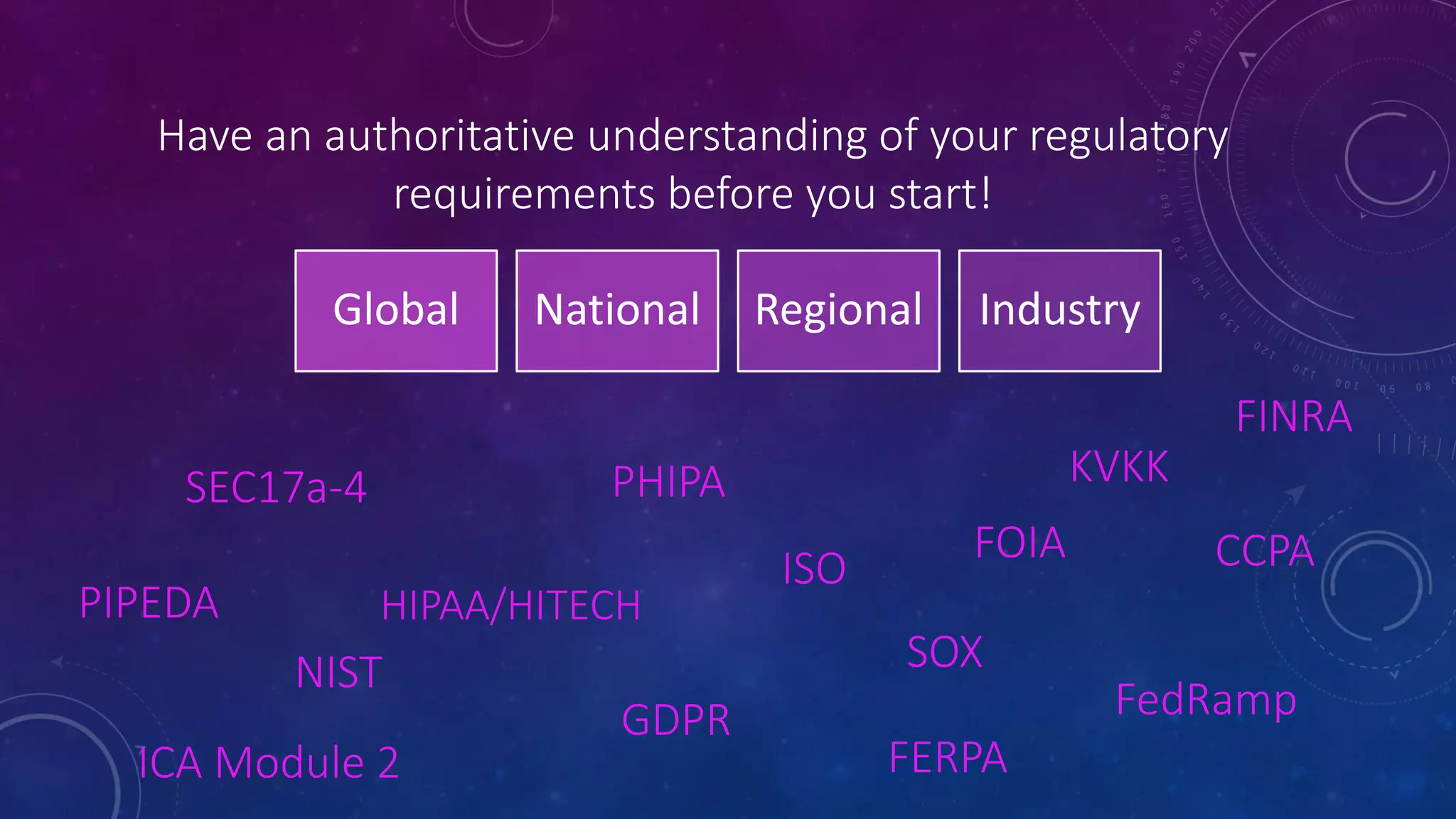
Have an authoritative understanding of your regulatory
requirements before you start!
SEC17a-4
SOX
HIPAA/HITECH
KVKK
GDPR
NIST
ISO
FedRamp
CCPA
PHIPA
PIPEDA
FOIA
Global National Regional Industry
ICA Module 2
FINRA
FERPA
WHY ARE THE PRINCIPLES NECESSARY?
• They work alongside your retention policies and labels to be the technical implementation of your:
• Regulatory requirements
• Information Governance requirements
• They ensure your “rules of Compliance” are being adhered to!
• They ensure Legal Holds are taken into consideration… “One rule to rule them all”
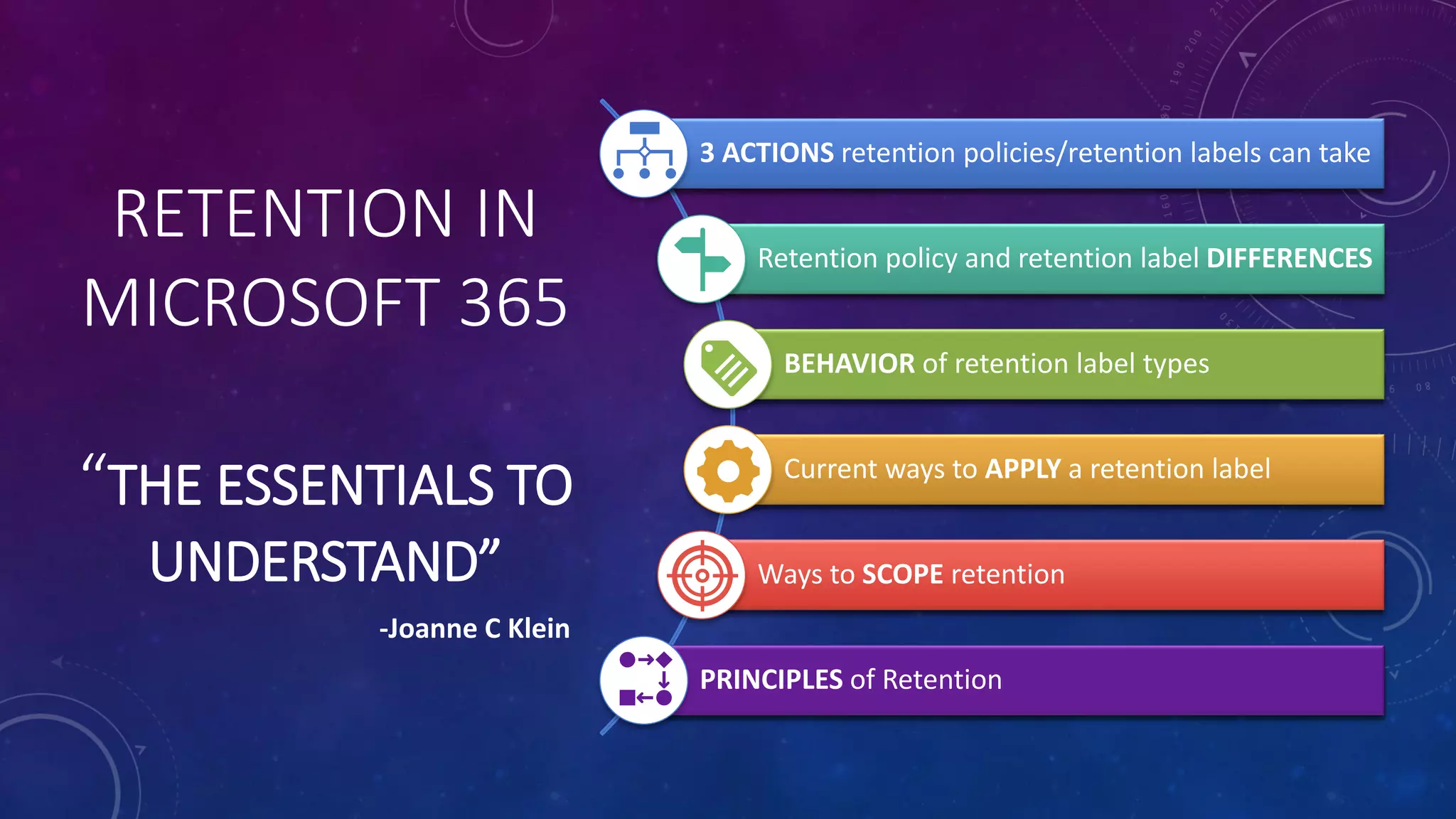
RETENTION IN
MICROSOFT 365
“THE ESSENTIALS TO
UNDERSTAND”
Current ways to APPLY a retention label
Ways to SCOPE retention
BEHAVIOR of retention label types
Retention policy and retention label DIFFERENCES
PRINCIPLES of Retention
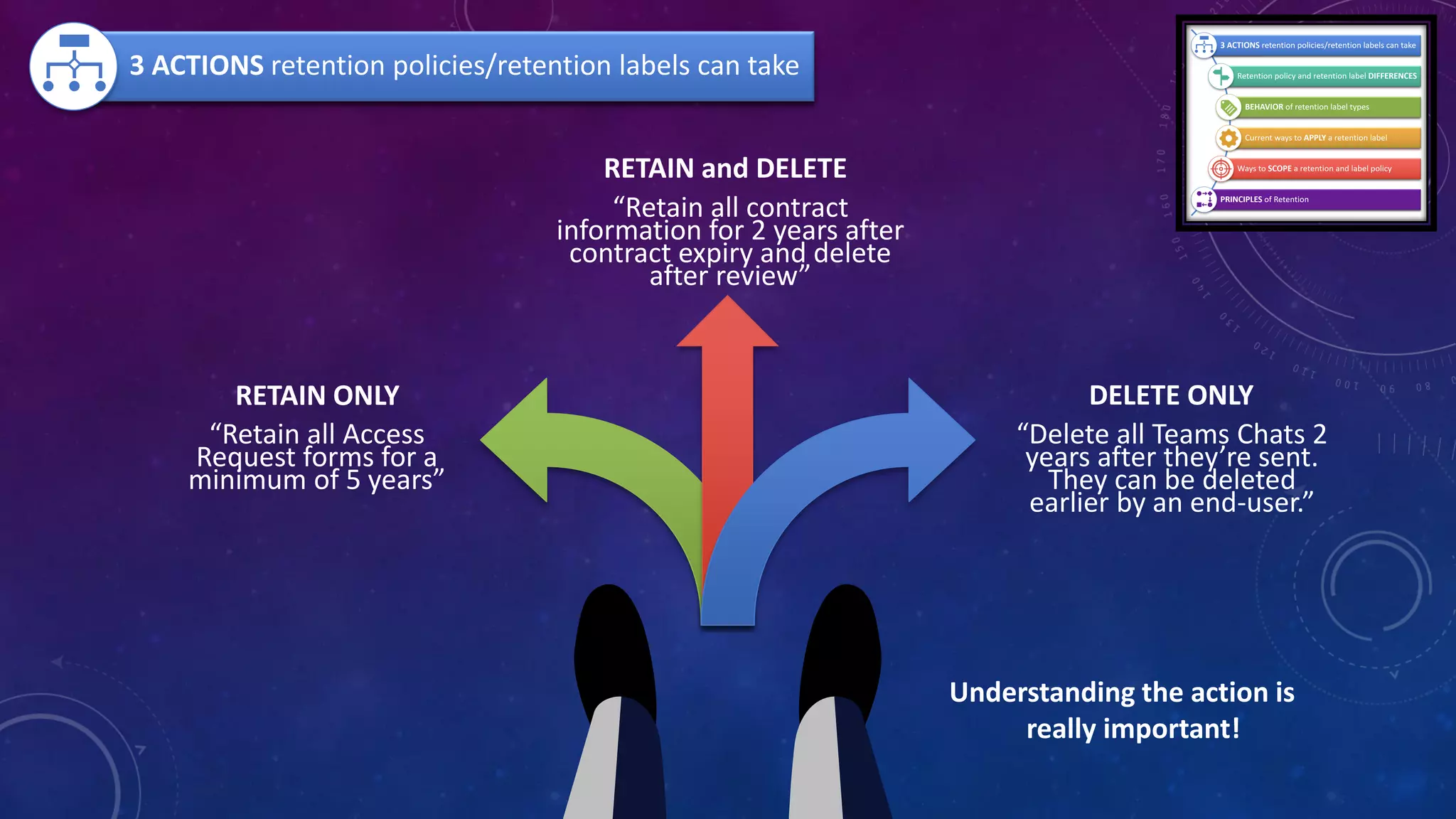
3 ACTIONS retention policies/retention labels can take
-Joanne C Klein
DELETE ONLY
“Delete all Teams Chats 2
years after they’re sent.
They can be deleted
earlier by an end-user.”
RETAIN ONLY
“Retain all Access
Request forms for a
minimum of 5 years”
RETAIN and DELETE
“Retain all contract
information for 2 years after
contract expiry and delete
after review”
3 ACTIONS retention policies/retention labels can take
Understanding the action is
really important!
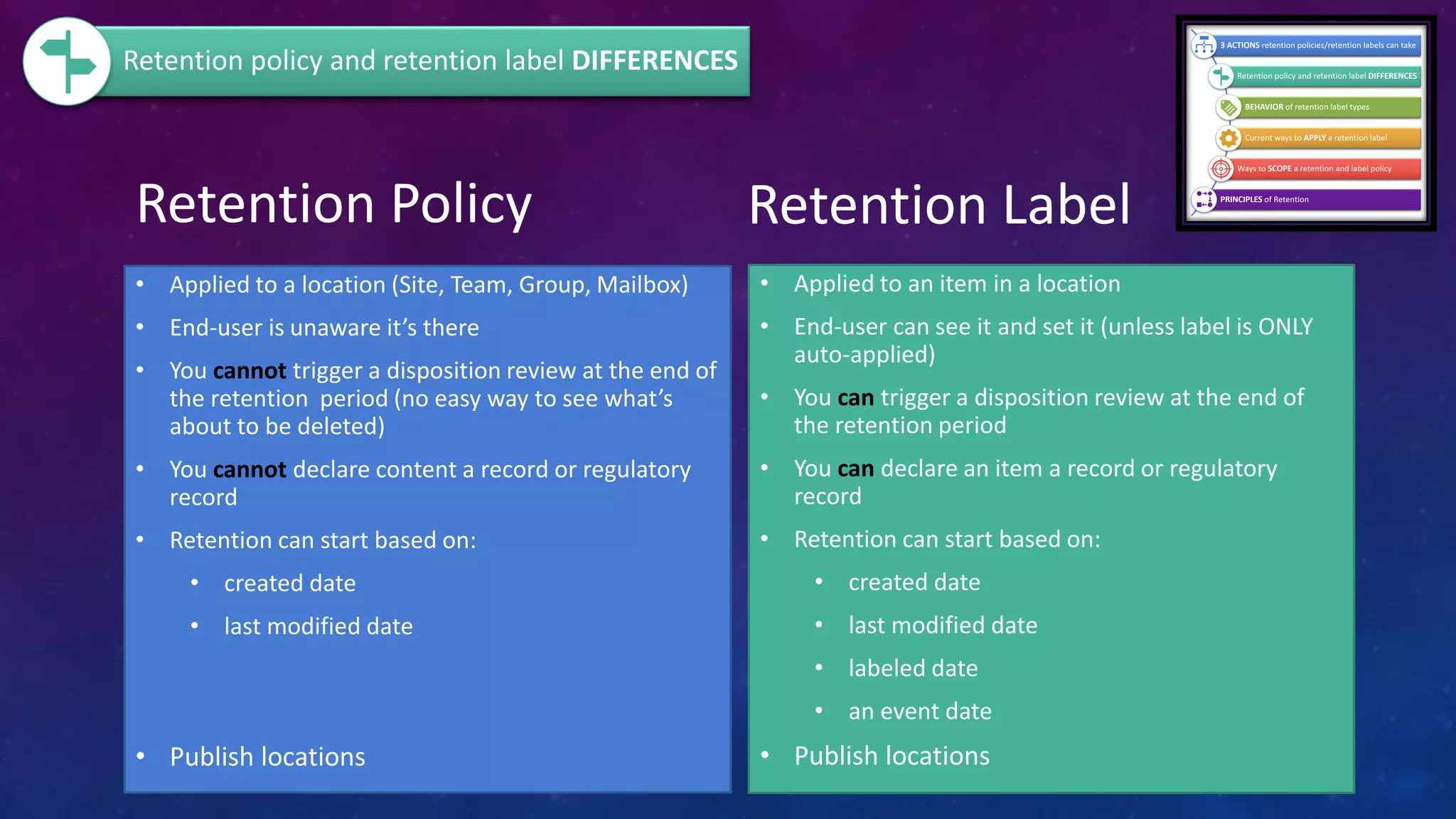
Retention Policy
• Applied to a location (Site, Team, Group, Mailbox)
• End-user is unaware it’s there
• You cannot trigger a disposition review at the end of
the retention period (no easy way to see what’s
about to be deleted)
• You cannot declare content a record or regulatory
record
• Retention can start based on:
• created date
• last modified date
• Publish locations
Retention Label
• Applied to an item in a location
• End-user can see it and set it (unless label is ONLY
auto-applied)
• You can trigger a disposition review at the end of
the retention period
• You can declare an item a record or regulatory
record
• Retention can start based on:
• created date
• last modified date
• labeled date
• an event date
• Publish locations
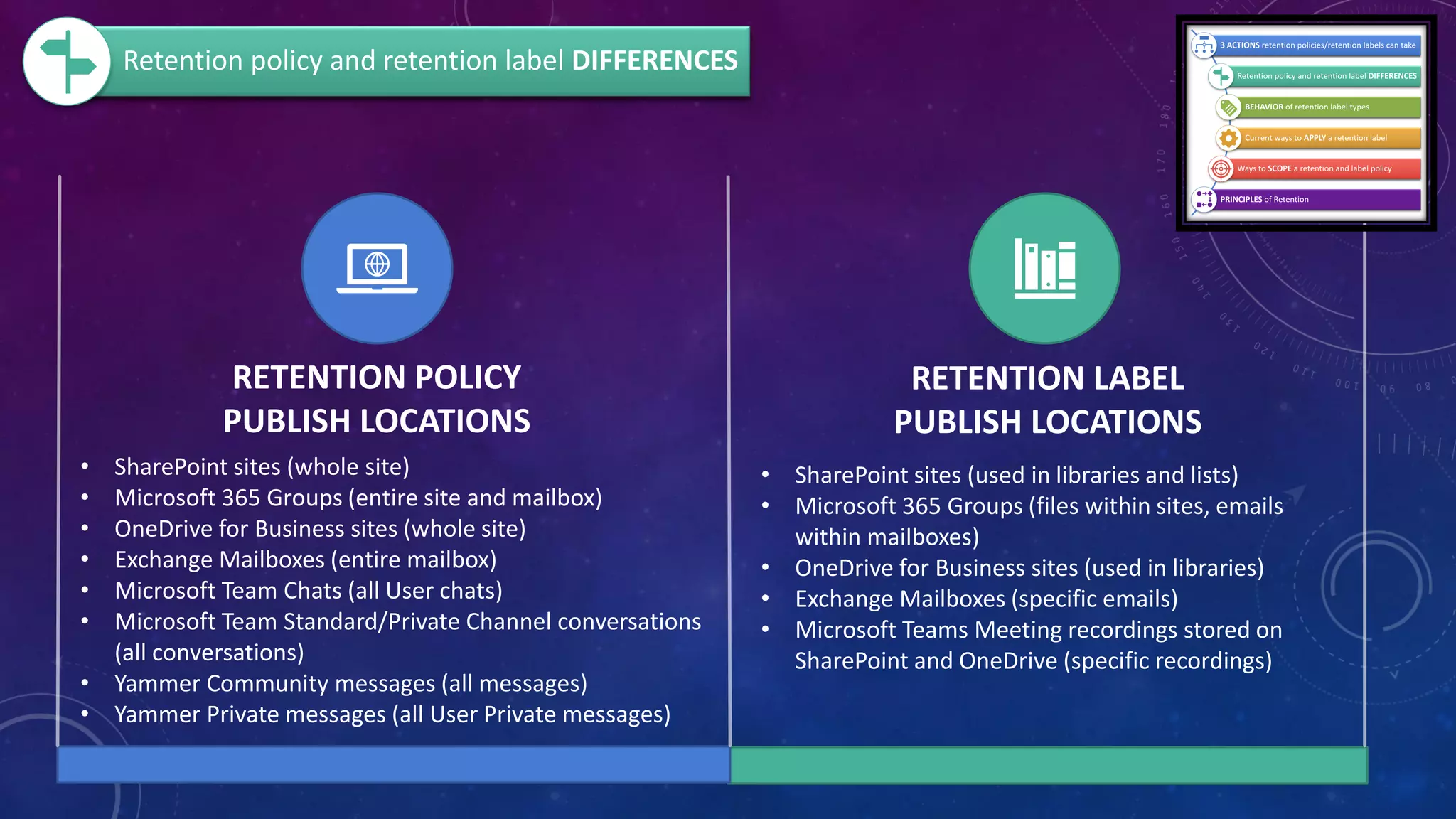
Retention policy and retention label DIFFERENCES
RETENTION POLICY
PUBLISH LOCATIONS
RETENTION LABEL
PUBLISH LOCATIONS
• SharePoint sites (whole site)
• Microsoft 365 Groups (entire site and mailbox)
• OneDrive for Business sites (whole site)
• Exchange Mailboxes (entire mailbox)
• Microsoft Team Chats (all User chats)
• Microsoft Team Standard/Private Channel conversations
(all conversations)
• Yammer Community messages (all messages)
• Yammer Private messages (all User Private messages)
• SharePoint sites (used in libraries and lists)
• Microsoft 365 Groups (files within sites, emails
within mailboxes)
• OneDrive for Business sites (used in libraries)
• Exchange Mailboxes (specific emails)
• Microsoft Teams Meeting recordings stored on
SharePoint and OneDrive (specific recordings)
Retention policy and retention label DIFFERENCES
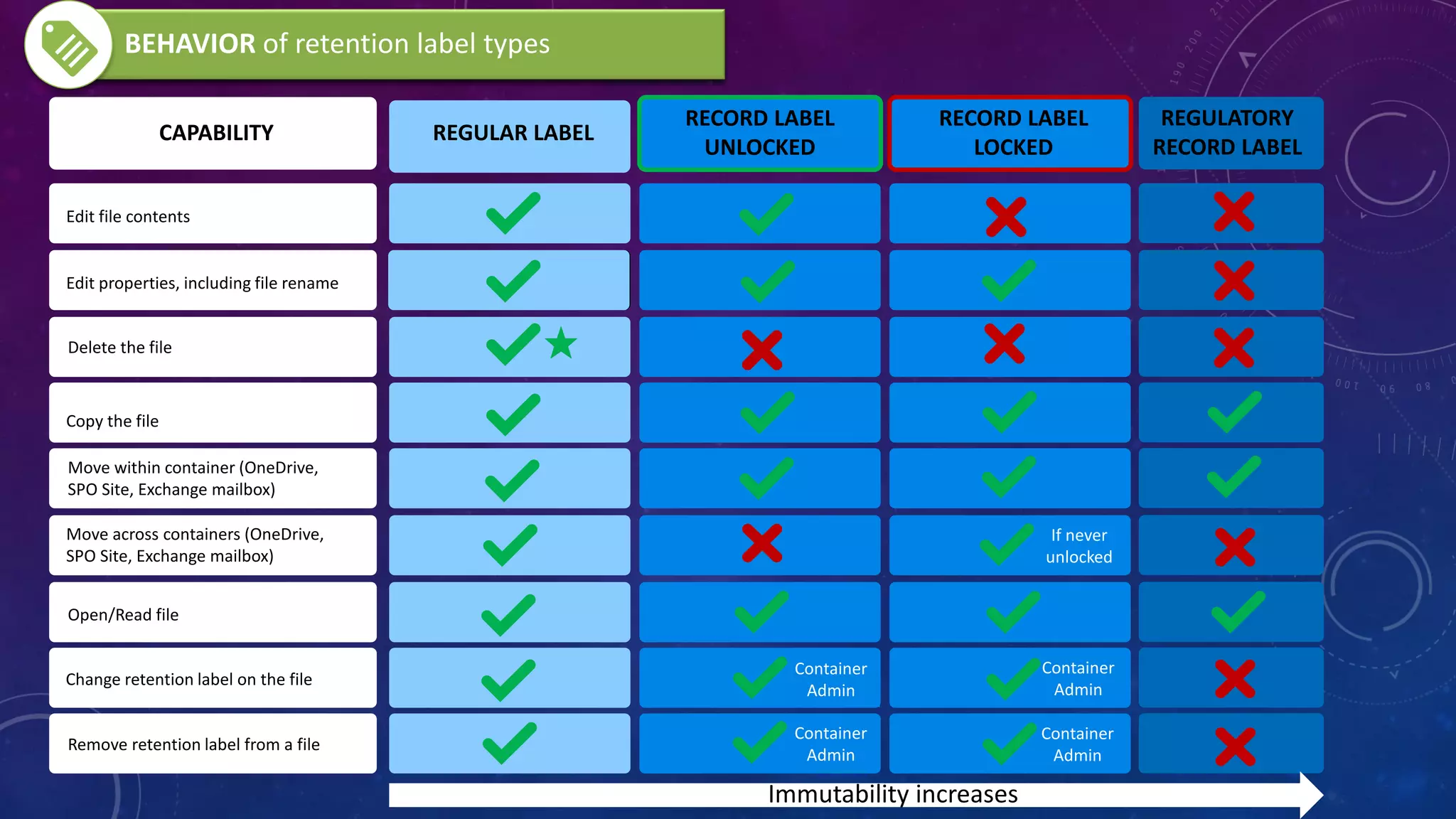
CAPABILITY REGULAR LABEL
RECORD LABEL
UNLOCKED
RECORD LABEL
LOCKED
Edit file contents
Edit properties, including file rename
Delete the file
Copy the file
Move within container (OneDrive,
SPO Site, Exchange mailbox)
Move across containers (OneDrive,
SPO Site, Exchange mailbox)
Open/Read file
Change retention label on the file
Remove retention label from a file
REGULATORY
RECORD LABEL
If never
unlocked
Container
Admin
Container
Admin
Container
Admin
Container
Admin
BEHAVIOR of retention label types
Immutability increases
Microsoft 365 Roadmap - Retention Label deletion behavior change in SharePoint and OneDrive
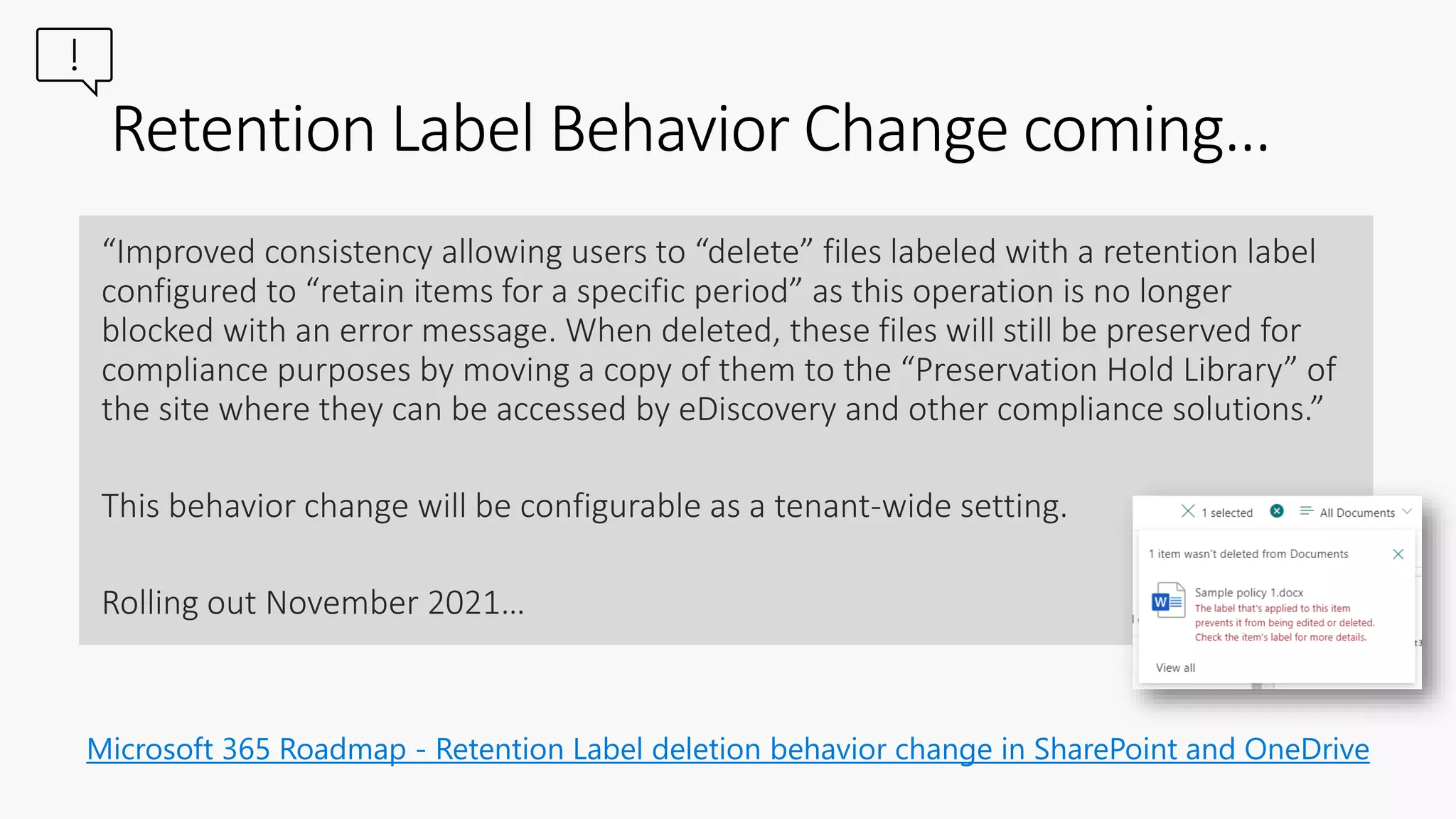
Retention Label Behavior Change coming…
“Improved consistency allowing users to “delete” files labeled with a retention label
configured to “retain items for a specific period” as this operation is no longer
blocked with an error message. When deleted, these files will still be preserved for
compliance purposes by moving a copy of them to the “Preservation Hold Library” of
the site where they can be accessed by eDiscovery and other compliance solutions.”
This behavior change will be configurable as a tenant-wide setting.
Rolling out November 2021…
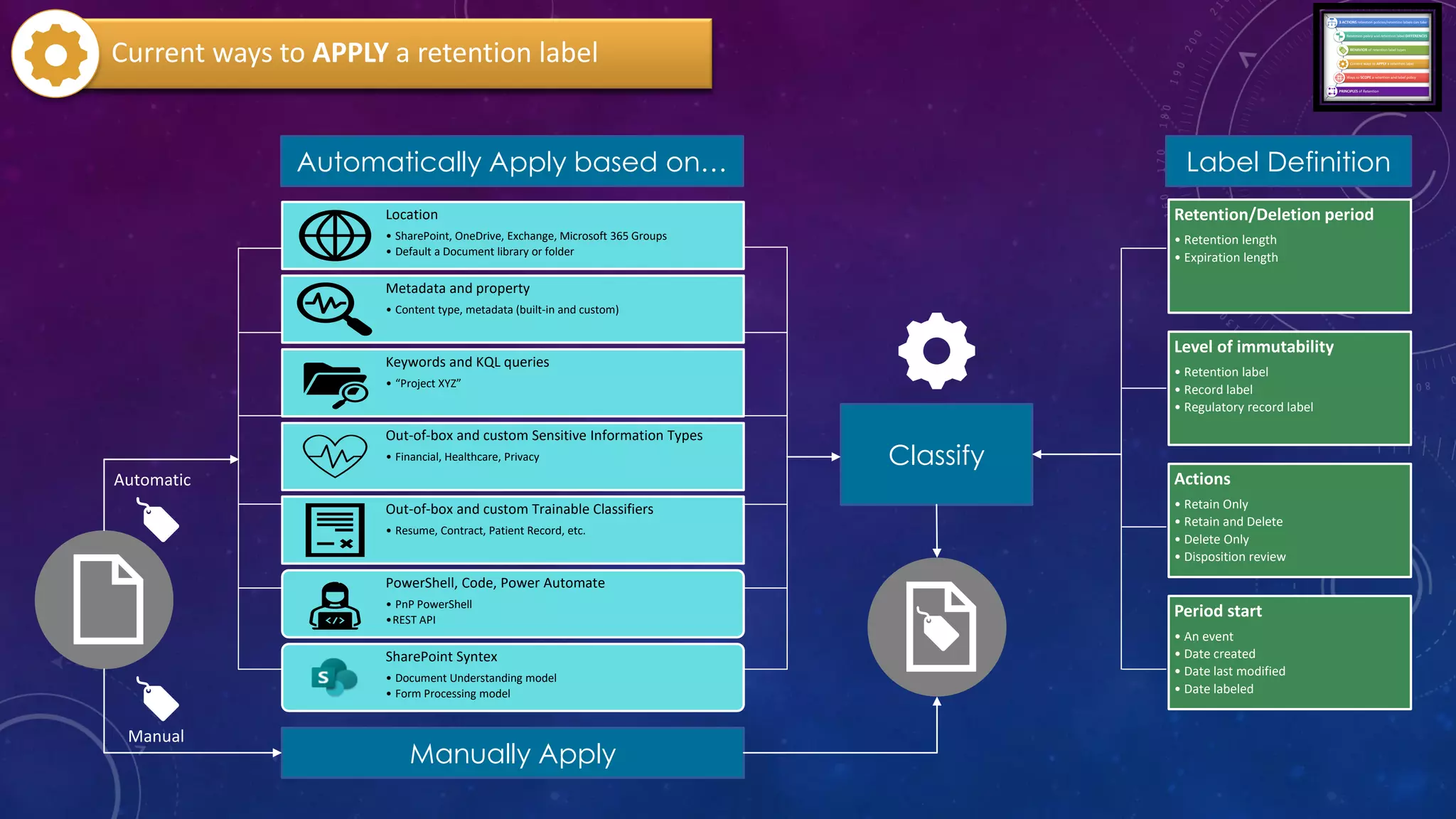
Location
• SharePoint, OneDrive, Exchange, Microsoft 365 Groups
• Default a Document library or folder
Metadata and property
• Content type, metadata (built-in and custom)
Keywords and KQL queries
• “Project XYZ”
Out-of-box and custom Sensitive Information Types
• Financial, Healthcare, Privacy
Out-of-box and custom Trainable Classifiers
• Resume, Contract, Patient Record, etc.
PowerShell, Code, Power Automate
• PnP PowerShell
•REST API
SharePoint Syntex
• Document Understanding model
• Form Processing model
Automatically Apply based on…
Manually Apply
Retention/Deletion period
• Retention length
• Expiration length
Level of immutability
• Retention label
• Record label
• Regulatory record label
Actions
• Retain Only
• Retain and Delete
• Delete Only
• Disposition review
Period start
• An event
• Date created
• Date last modified
• Date labeled
Classify
Label Definition
Current ways to APPLY a retention label
Automatic
Manual
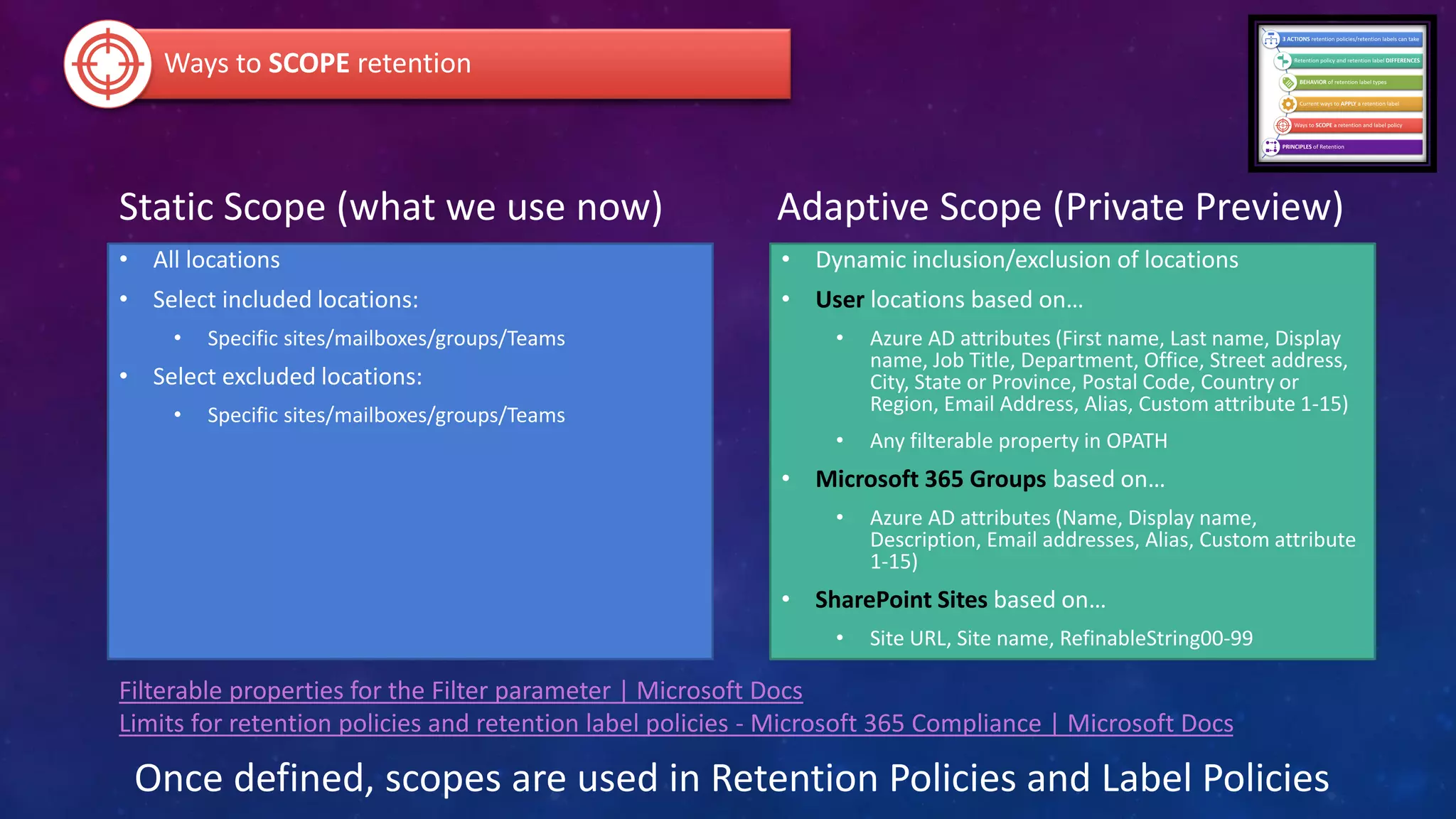
Static Scope (what we use now)
• All locations
• Select included locations:
• Specific sites/mailboxes/groups/Teams
• Select excluded locations:
• Specific sites/mailboxes/groups/Teams
Adaptive Scope (Private Preview)
• Dynamic inclusion/exclusion of locations
• User locations based on…
• Azure AD attributes (First name, Last name, Display
name, Job Title, Department, Office, Street address,
City, State or Province, Postal Code, Country or
Region, Email Address, Alias, Custom attribute 1-15)
• Any filterable property in OPATH
• Microsoft 365 Groups based on…
• Azure AD attributes (Name, Display name,
Description, Email addresses, Alias, Custom attribute
1-15)
• SharePoint Sites based on…
• Site URL, Site name, RefinableString00-99
Ways to SCOPE retention
Once defined, scopes are used in Retention Policies and Label Policies
Filterable properties for the Filter parameter | Microsoft Docs
Limits for retention policies and retention label policies - Microsoft 365 Compliance | Microsoft Docs
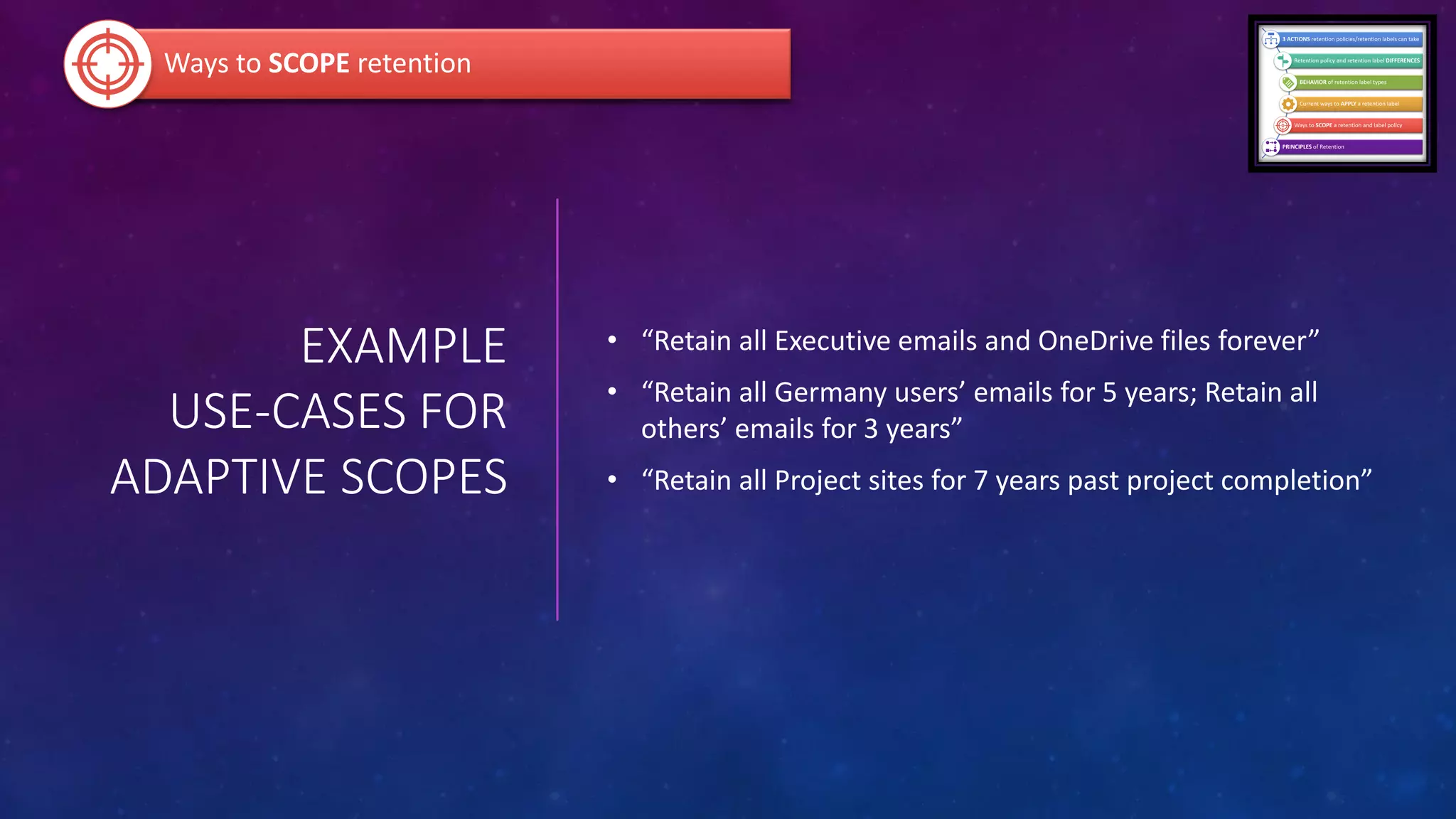
EXAMPLE
USE-CASES FOR
ADAPTIVE SCOPES
• “Retain all Executive emails and OneDrive files forever”
• “Retain all Germany users’ emails for 5 years; Retain all
others’ emails for 3 years”
• “Retain all Project sites for 7 years past project completion”
Ways to SCOPE retention
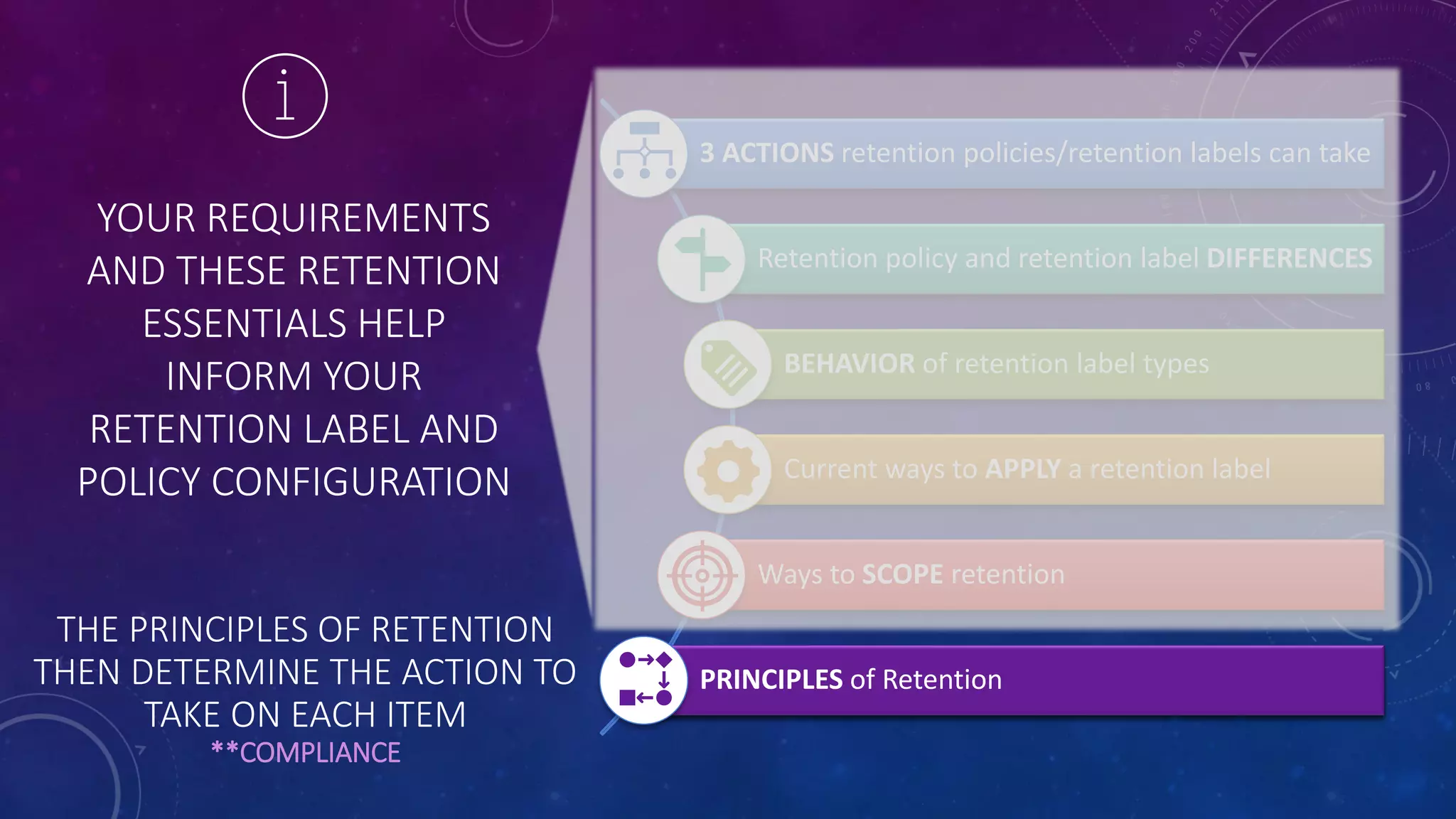
YOUR REQUIREMENTS
AND THESE RETENTION
ESSENTIALS HELP
INFORM YOUR
RETENTION LABEL AND
POLICY CONFIGURATION Current ways to APPLY a retention label
Ways to SCOPE retention
BEHAVIOR of retention label types
Retention policy and retention label DIFFERENCES
PRINCIPLES of Retention
3 ACTIONS retention policies/retention labels can take
THE PRINCIPLES OF RETENTION
THEN DETERMINE THE ACTION TO
TAKE ON EACH ITEM
**COMPLIANCE
FINALLY…
THE
PRINCIPLES OF RETENTION
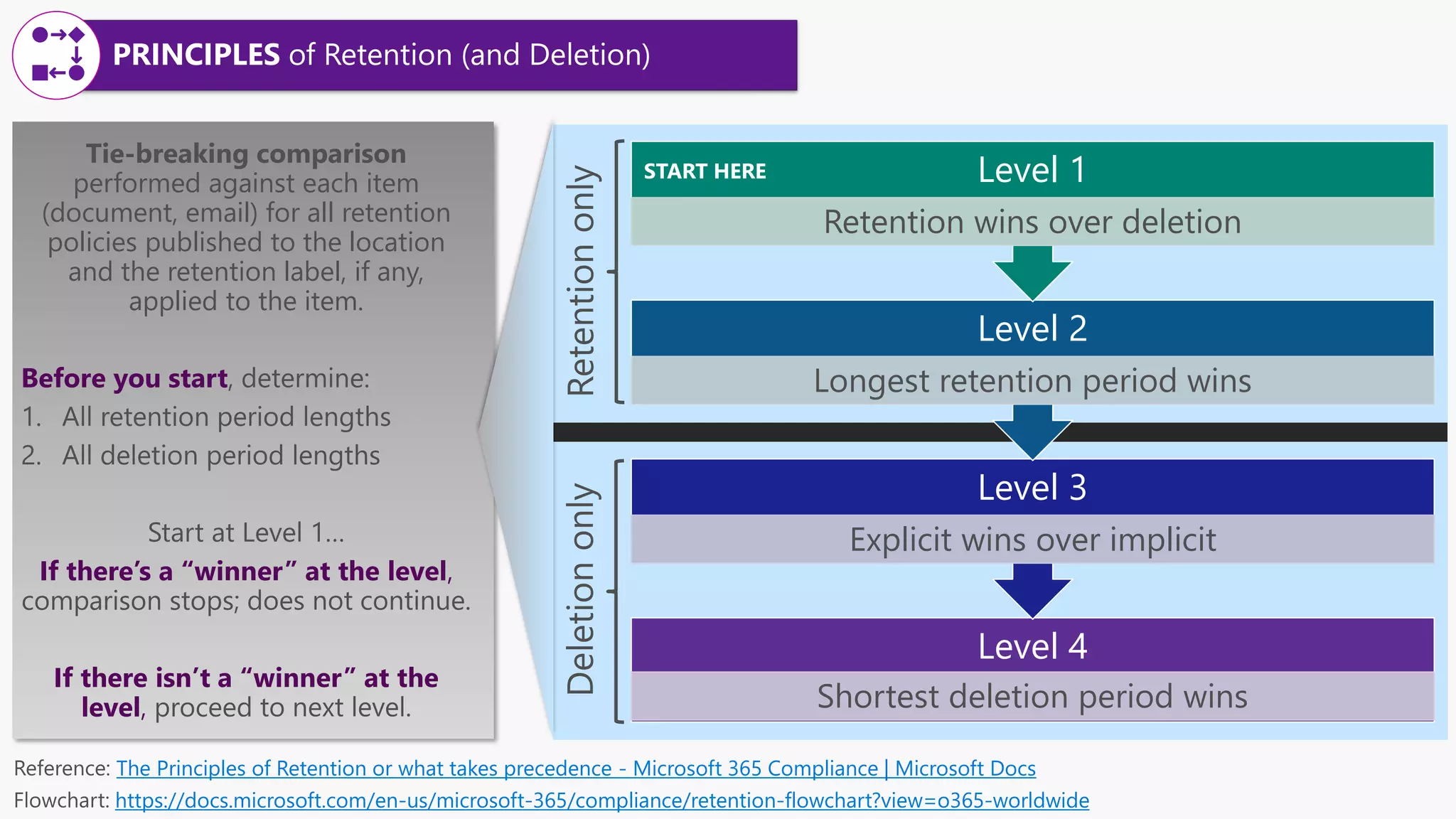
Level 4
Shortest deletion period wins
Level 3
Explicit wins over implicit
Level 2
Longest retention period wins
Level 1
Retention wins over deletion
Tie-breaking comparison
performed against each item
(document, email) for all retention
policies published to the location
and the retention label, if any,
applied to the item.
Before you start
If there’s a “winner” at the level,
comparison stops
If there isn’t a “winner” at the
level, proceed
The Principles of Retention or what takes precedence - Microsoft 365 Compliance | Microsoft Docs
https://docs.microsoft.com/en-us/microsoft-365/compliance/retention-flowchart?view=o365-worldwide
START HERE
PRINCIPLES of Retention (and Deletion)
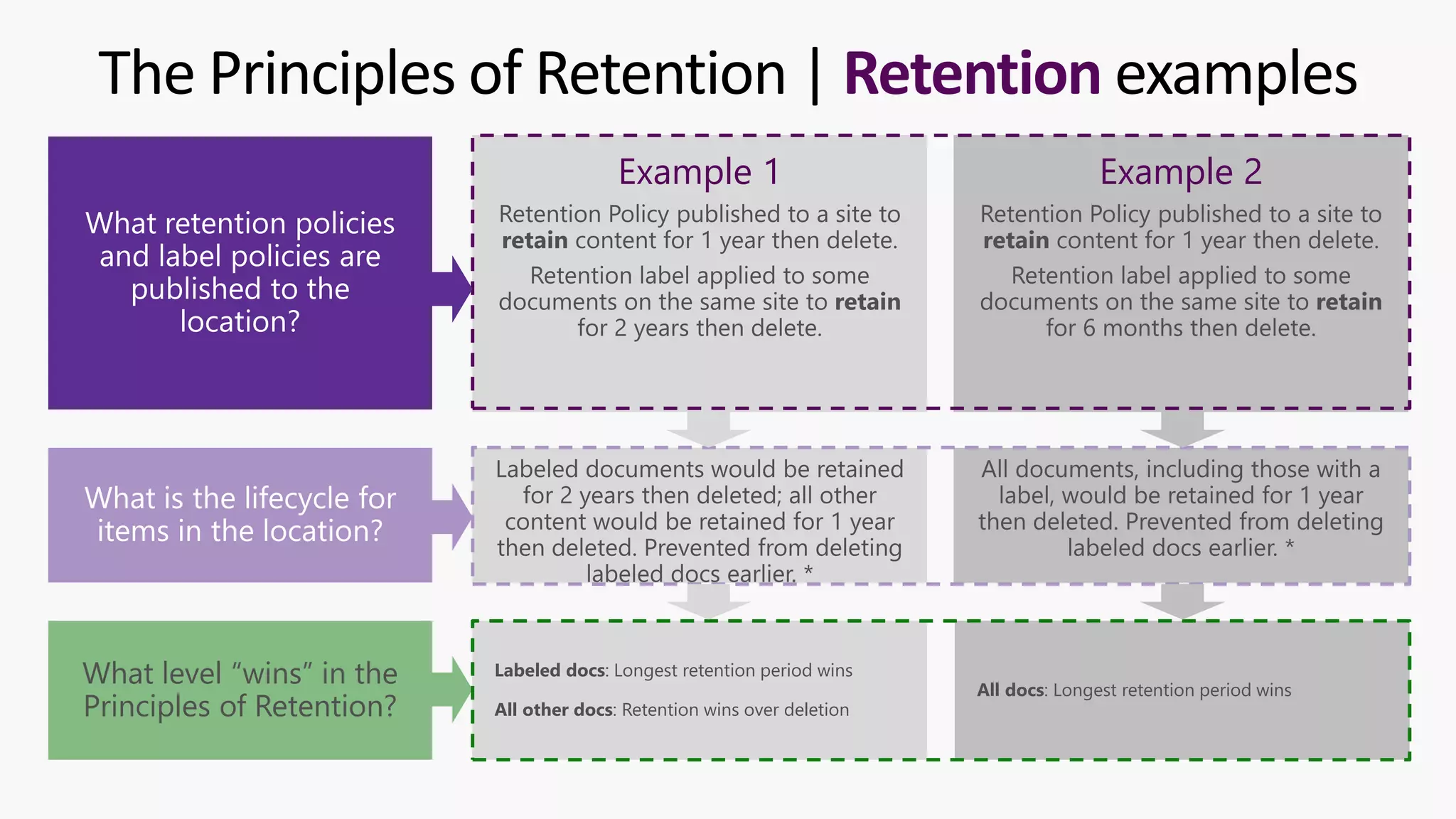
The Principles of Retention | Retention examples
Example 1 Example 2
Labeled docs: Longest retention period wins
All other docs: Retention wins over deletion
All docs: Longest retention period wins
What level “wins” in the
Principles of Retention?
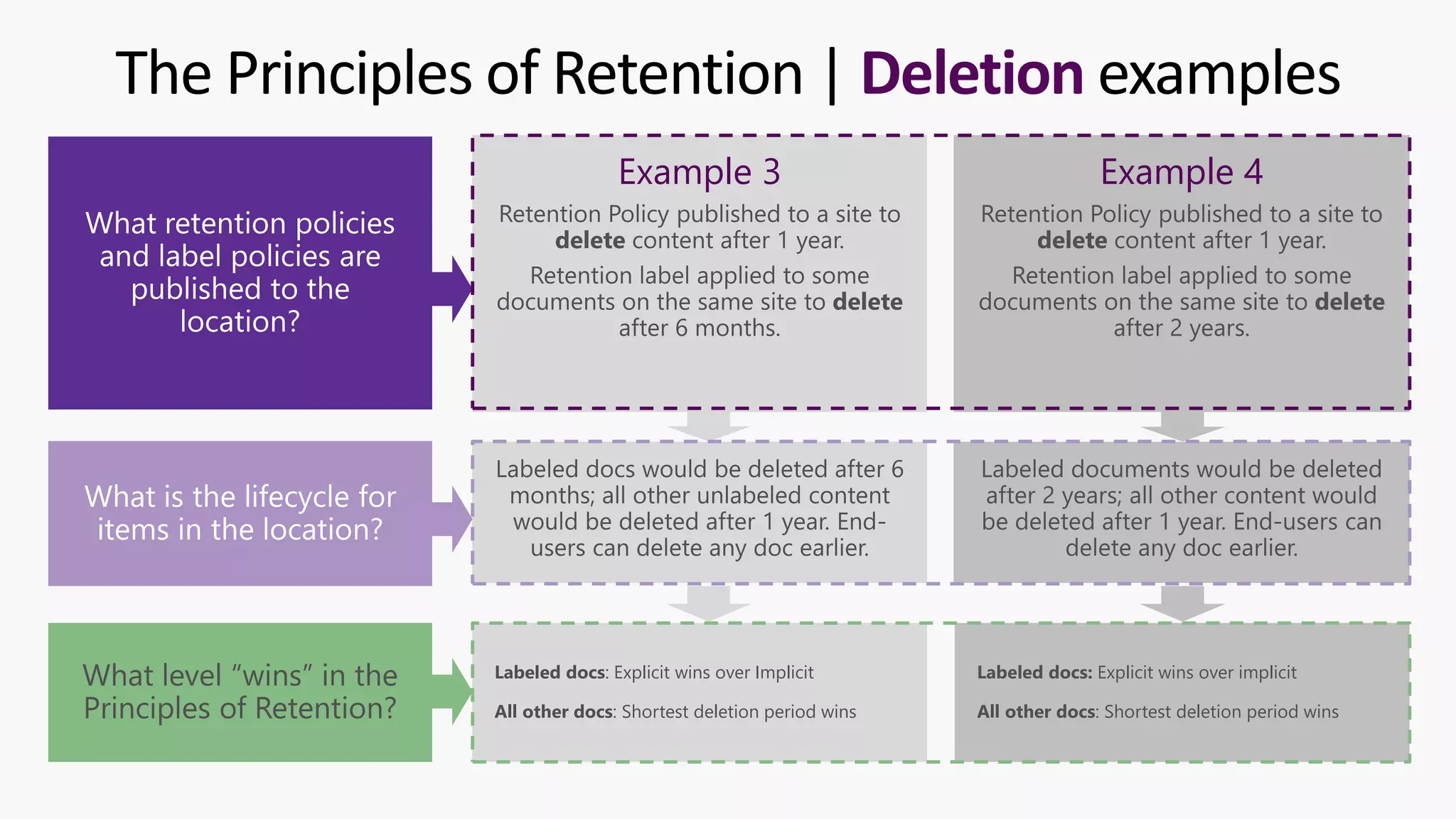
The Principles of Retention | Deletion examples
Example 3 Example 4
Labeled docs: Explicit wins over Implicit
All other docs: Shortest deletion period wins
Labeled docs: Explicit wins over implicit
All other docs: Shortest deletion period wins
What level “wins” in the
Principles of Retention?
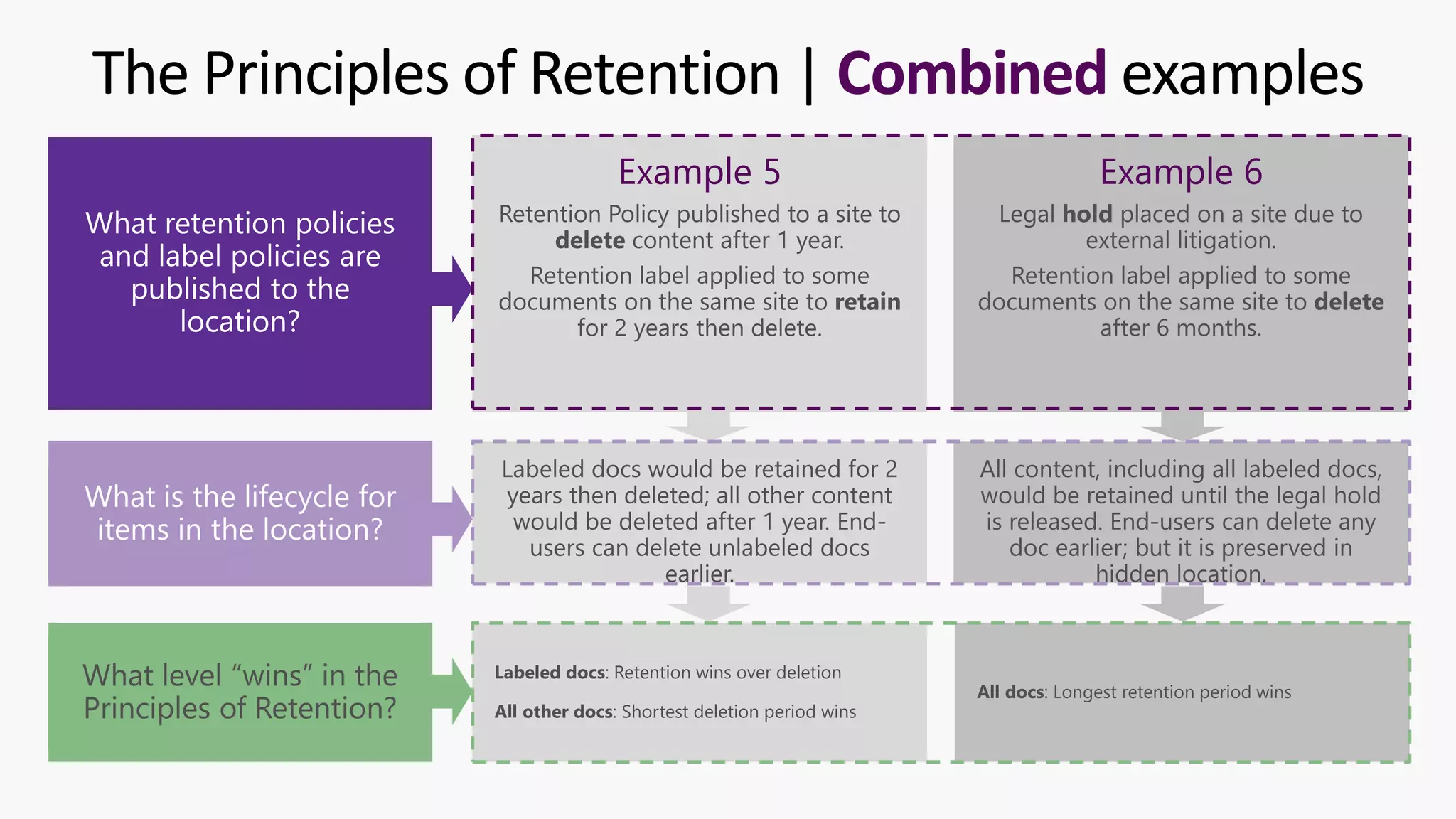
The Principles of Retention | Combined examples
Example 5 Example 6
Labeled docs: Retention wins over deletion
All other docs: Shortest deletion period wins
All docs: Longest retention period wins
What level “wins” in the
Principles of Retention?
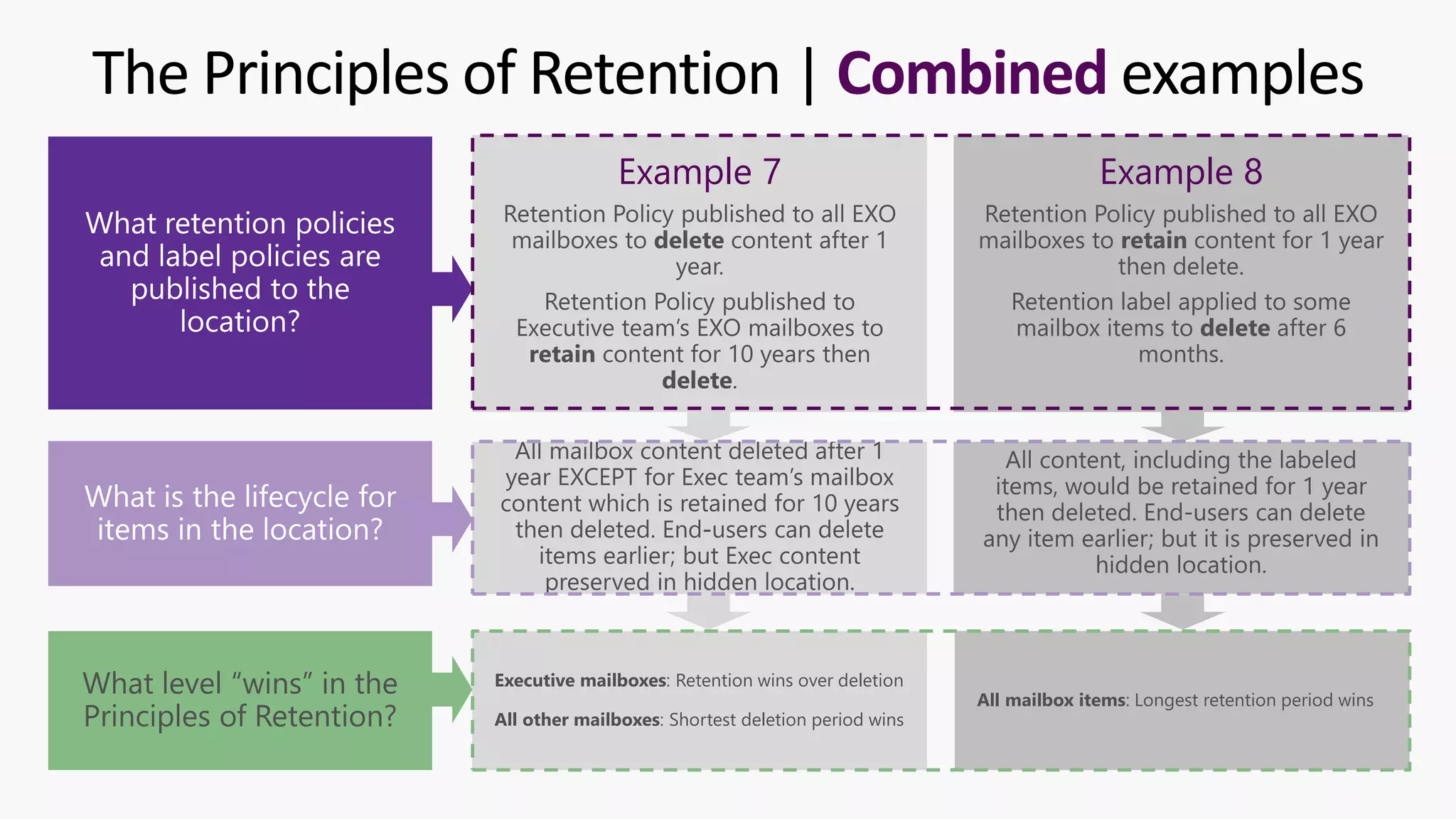
The Principles of Retention | Combined examples
Example 7 Example 8
Executive mailboxes: Retention wins over deletion
All other mailboxes: Shortest deletion period wins
All mailbox items: Longest retention period wins
What level “wins” in the
Principles of Retention?
PRINCIPLES OF RETENTION
FUN CHALLENGE
TEST YOUR KNOWLEDGE ACROSS 6 SCENARIOS!
LINK: HTTPS://JOANNECKLEIN.COM/2021/07/05/PRINCIPLES-OF-RETENTION-IN-MICROSOFT-365
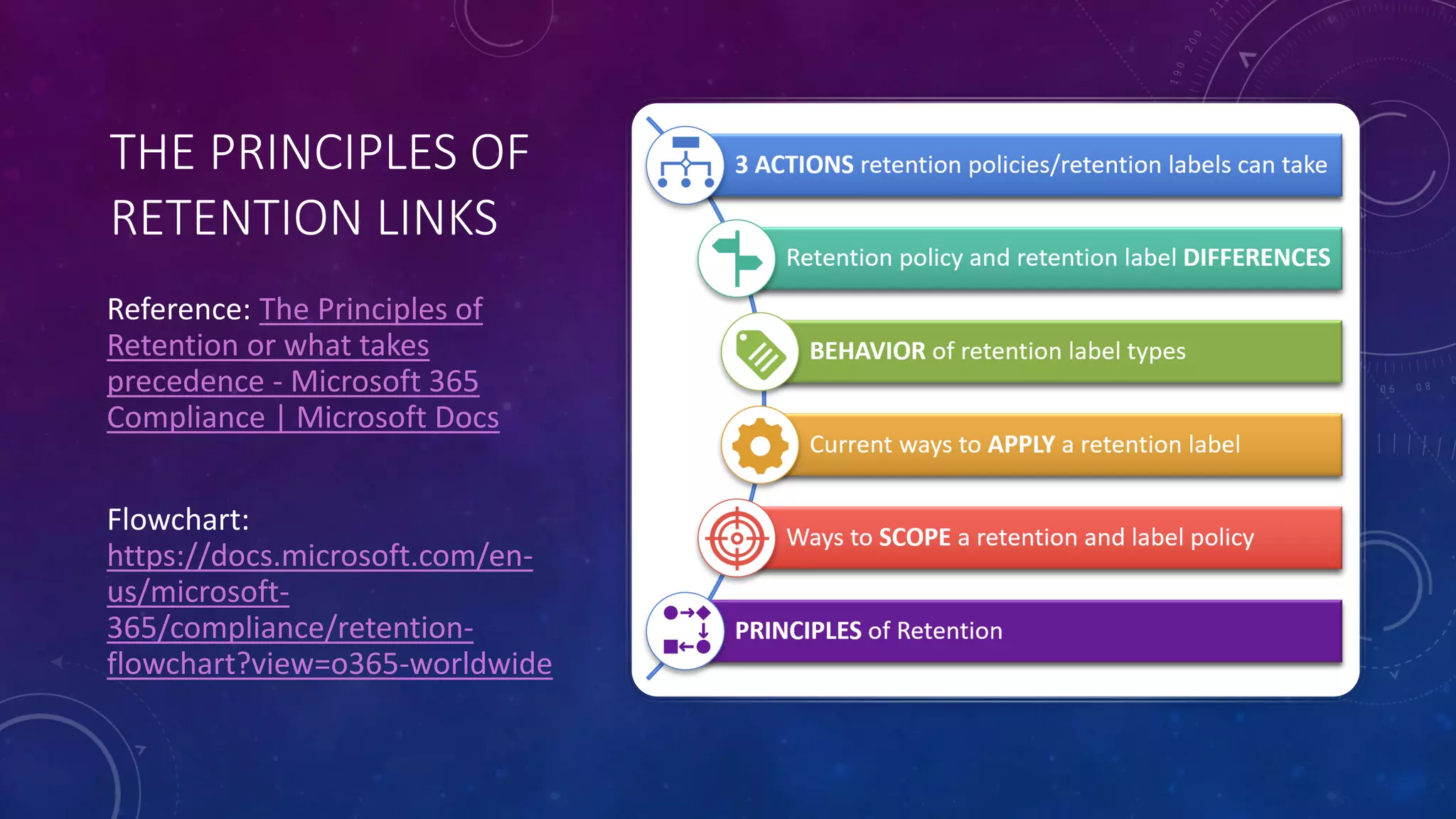
THE PRINCIPLES OF
RETENTION LINKS
Reference: The Principles of
Retention or what takes
precedence - Microsoft 365
Compliance | Microsoft Docs
Flowchart:
https://docs.microsoft.com/en-
us/microsoft-
365/compliance/retention-
flowchart?view=o365-worldwide
Thank you IRMS!
Let’s Connect!
@JoanneCKlein
joannecklein@nexnovus.com
joannecklein.com
SharePoint & Microsoft 365 consultant | Advanced Compliance

IRMS UG Principles of Retention in Microsoft 365

  • 1.
    A PRIMER ONTHE PRINCIPLES OF RETENTION IN MICROSOFT 365 THE ESSENTIALS TO UNDERSTAND A presentation by Joanne C Klein to IRMS on October 14, 2021
  • 2.
    SYNOPSIS There's only 4of them, but they're important. Really important. This session will talk about why it's essential for Records Managers and Information Management teams to have an authoritative understanding of the principles. They inform the retention and deletion processes and actions which are the technical underpinning of your Information Governance/Records Management (IG/RM) implementation. This is what ultimately determines the retention and deletion actions taken on each piece of content. Understanding the principles of retention is an important prerequisite to a holistic IG/RM design and implementation. It can help ensure you are deleting content when you no longer need/require it and retaining content for as long as you are required to meet your corporate governance requirements and your legal, business, and regulatory obligations.
  • 3.
  • 4.
    Information Protection Data Loss Prevention Information Governance Records Management Insider Risk Communication Compliance eDiscovery Site Architecture Information Architecture Content Management Content Services Search SharePoint Syntex Microsoft365 Advanced Compliance My Work Experience Financial Services Government Manufacturing HealthCare Legal Services Defense 10+ years SharePoint experience Global Industry Compliance experience joannecklein.com
  • 5.
    My Approach • Crawl-Walk-Runis a proven, established approach I’ve seen success with • Aim for progress, not perfection • The road to compliance is a marathon; not a sprint • Understand your compliance obligations: business, regulatory, legal before you start • Understand the cost/benefit of your compliance decisions • Don’t customize unless… • It is functionality you can’t live without • It is a differentiator for your business joannecklein@nexnovus.com linkedin.com/in/joannecklein joannecklein.com +1-306-527-7580
  • 6.
    AGENDA | PRINCIPLESOF RETENTION WHY ARE THEY NECESSARY? THE ESSENTIALS TO UNDERSTAND (BEFORE YOU GET INTO THE PRINCIPLES) THE PRINCIPLES WALK-THRU EXAMPLES
  • 7.
    Have an authoritativeunderstanding of your regulatory requirements before you start! SEC17a-4 SOX HIPAA/HITECH KVKK GDPR NIST ISO FedRamp CCPA PHIPA PIPEDA FOIA Global National Regional Industry ICA Module 2 FINRA FERPA
  • 8.
    WHY ARE THEPRINCIPLES NECESSARY? • They work alongside your retention policies and labels to be the technical implementation of your: • Regulatory requirements • Information Governance requirements • They ensure your “rules of Compliance” are being adhered to! • They ensure Legal Holds are taken into consideration… “One rule to rule them all”
  • 9.
    RETENTION IN MICROSOFT 365 “THEESSENTIALS TO UNDERSTAND” Current ways to APPLY a retention label Ways to SCOPE retention BEHAVIOR of retention label types Retention policy and retention label DIFFERENCES PRINCIPLES of Retention 3 ACTIONS retention policies/retention labels can take -Joanne C Klein
  • 10.
    DELETE ONLY “Delete allTeams Chats 2 years after they’re sent. They can be deleted earlier by an end-user.” RETAIN ONLY “Retain all Access Request forms for a minimum of 5 years” RETAIN and DELETE “Retain all contract information for 2 years after contract expiry and delete after review” 3 ACTIONS retention policies/retention labels can take Understanding the action is really important!
  • 11.
    Retention Policy • Appliedto a location (Site, Team, Group, Mailbox) • End-user is unaware it’s there • You cannot trigger a disposition review at the end of the retention period (no easy way to see what’s about to be deleted) • You cannot declare content a record or regulatory record • Retention can start based on: • created date • last modified date • Publish locations Retention Label • Applied to an item in a location • End-user can see it and set it (unless label is ONLY auto-applied) • You can trigger a disposition review at the end of the retention period • You can declare an item a record or regulatory record • Retention can start based on: • created date • last modified date • labeled date • an event date • Publish locations Retention policy and retention label DIFFERENCES
  • 12.
    RETENTION POLICY PUBLISH LOCATIONS RETENTIONLABEL PUBLISH LOCATIONS • SharePoint sites (whole site) • Microsoft 365 Groups (entire site and mailbox) • OneDrive for Business sites (whole site) • Exchange Mailboxes (entire mailbox) • Microsoft Team Chats (all User chats) • Microsoft Team Standard/Private Channel conversations (all conversations) • Yammer Community messages (all messages) • Yammer Private messages (all User Private messages) • SharePoint sites (used in libraries and lists) • Microsoft 365 Groups (files within sites, emails within mailboxes) • OneDrive for Business sites (used in libraries) • Exchange Mailboxes (specific emails) • Microsoft Teams Meeting recordings stored on SharePoint and OneDrive (specific recordings) Retention policy and retention label DIFFERENCES
  • 13.
    CAPABILITY REGULAR LABEL RECORDLABEL UNLOCKED RECORD LABEL LOCKED Edit file contents Edit properties, including file rename Delete the file Copy the file Move within container (OneDrive, SPO Site, Exchange mailbox) Move across containers (OneDrive, SPO Site, Exchange mailbox) Open/Read file Change retention label on the file Remove retention label from a file REGULATORY RECORD LABEL If never unlocked Container Admin Container Admin Container Admin Container Admin BEHAVIOR of retention label types Immutability increases
  • 14.
    Microsoft 365 Roadmap- Retention Label deletion behavior change in SharePoint and OneDrive Retention Label Behavior Change coming… “Improved consistency allowing users to “delete” files labeled with a retention label configured to “retain items for a specific period” as this operation is no longer blocked with an error message. When deleted, these files will still be preserved for compliance purposes by moving a copy of them to the “Preservation Hold Library” of the site where they can be accessed by eDiscovery and other compliance solutions.” This behavior change will be configurable as a tenant-wide setting. Rolling out November 2021…
  • 15.
    Location • SharePoint, OneDrive,Exchange, Microsoft 365 Groups • Default a Document library or folder Metadata and property • Content type, metadata (built-in and custom) Keywords and KQL queries • “Project XYZ” Out-of-box and custom Sensitive Information Types • Financial, Healthcare, Privacy Out-of-box and custom Trainable Classifiers • Resume, Contract, Patient Record, etc. PowerShell, Code, Power Automate • PnP PowerShell •REST API SharePoint Syntex • Document Understanding model • Form Processing model Automatically Apply based on… Manually Apply Retention/Deletion period • Retention length • Expiration length Level of immutability • Retention label • Record label • Regulatory record label Actions • Retain Only • Retain and Delete • Delete Only • Disposition review Period start • An event • Date created • Date last modified • Date labeled Classify Label Definition Current ways to APPLY a retention label Automatic Manual
  • 16.
    Static Scope (whatwe use now) • All locations • Select included locations: • Specific sites/mailboxes/groups/Teams • Select excluded locations: • Specific sites/mailboxes/groups/Teams Adaptive Scope (Private Preview) • Dynamic inclusion/exclusion of locations • User locations based on… • Azure AD attributes (First name, Last name, Display name, Job Title, Department, Office, Street address, City, State or Province, Postal Code, Country or Region, Email Address, Alias, Custom attribute 1-15) • Any filterable property in OPATH • Microsoft 365 Groups based on… • Azure AD attributes (Name, Display name, Description, Email addresses, Alias, Custom attribute 1-15) • SharePoint Sites based on… • Site URL, Site name, RefinableString00-99 Ways to SCOPE retention Once defined, scopes are used in Retention Policies and Label Policies Filterable properties for the Filter parameter | Microsoft Docs Limits for retention policies and retention label policies - Microsoft 365 Compliance | Microsoft Docs
  • 17.
    EXAMPLE USE-CASES FOR ADAPTIVE SCOPES •“Retain all Executive emails and OneDrive files forever” • “Retain all Germany users’ emails for 5 years; Retain all others’ emails for 3 years” • “Retain all Project sites for 7 years past project completion” Ways to SCOPE retention
  • 18.
    YOUR REQUIREMENTS AND THESERETENTION ESSENTIALS HELP INFORM YOUR RETENTION LABEL AND POLICY CONFIGURATION Current ways to APPLY a retention label Ways to SCOPE retention BEHAVIOR of retention label types Retention policy and retention label DIFFERENCES PRINCIPLES of Retention 3 ACTIONS retention policies/retention labels can take THE PRINCIPLES OF RETENTION THEN DETERMINE THE ACTION TO TAKE ON EACH ITEM **COMPLIANCE
  • 19.
  • 20.
    Level 4 Shortest deletionperiod wins Level 3 Explicit wins over implicit Level 2 Longest retention period wins Level 1 Retention wins over deletion Tie-breaking comparison performed against each item (document, email) for all retention policies published to the location and the retention label, if any, applied to the item. Before you start If there’s a “winner” at the level, comparison stops If there isn’t a “winner” at the level, proceed The Principles of Retention or what takes precedence - Microsoft 365 Compliance | Microsoft Docs https://docs.microsoft.com/en-us/microsoft-365/compliance/retention-flowchart?view=o365-worldwide START HERE PRINCIPLES of Retention (and Deletion)
  • 21.
    The Principles ofRetention | Retention examples Example 1 Example 2 Labeled docs: Longest retention period wins All other docs: Retention wins over deletion All docs: Longest retention period wins What level “wins” in the Principles of Retention?
  • 22.
    The Principles ofRetention | Deletion examples Example 3 Example 4 Labeled docs: Explicit wins over Implicit All other docs: Shortest deletion period wins Labeled docs: Explicit wins over implicit All other docs: Shortest deletion period wins What level “wins” in the Principles of Retention?
  • 23.
    The Principles ofRetention | Combined examples Example 5 Example 6 Labeled docs: Retention wins over deletion All other docs: Shortest deletion period wins All docs: Longest retention period wins What level “wins” in the Principles of Retention?
  • 24.
    The Principles ofRetention | Combined examples Example 7 Example 8 Executive mailboxes: Retention wins over deletion All other mailboxes: Shortest deletion period wins All mailbox items: Longest retention period wins What level “wins” in the Principles of Retention?
  • 25.
    PRINCIPLES OF RETENTION FUNCHALLENGE TEST YOUR KNOWLEDGE ACROSS 6 SCENARIOS! LINK: HTTPS://JOANNECKLEIN.COM/2021/07/05/PRINCIPLES-OF-RETENTION-IN-MICROSOFT-365
  • 26.
    THE PRINCIPLES OF RETENTIONLINKS Reference: The Principles of Retention or what takes precedence - Microsoft 365 Compliance | Microsoft Docs Flowchart: https://docs.microsoft.com/en- us/microsoft- 365/compliance/retention- flowchart?view=o365-worldwide
  • 27.
    Thank you IRMS! Let’sConnect! @JoanneCKlein joannecklein@nexnovus.com joannecklein.com SharePoint & Microsoft 365 consultant | Advanced Compliance