
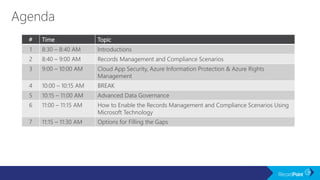


# Time Topic
1 8:30 – 8:40 AM Introductions
2 8:40 – 9:00 AM Records Management and Compliance Scenarios
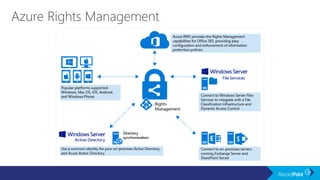
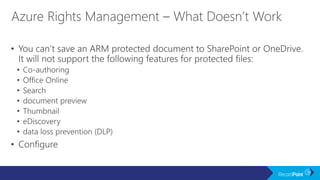
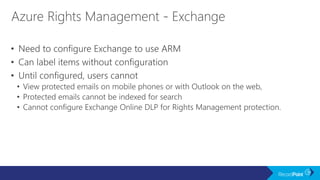
3 9:00 – 10:00 AM Cloud App Security, Azure Information Protection & Azure Rights
Management
4 10:00 – 10:15 AM BREAK
5 10:15 – 11:00 AM Advanced Data Governance
6 11:00 – 11:15 AM How to Enable the Records Management and Compliance Scenarios Using
Microsoft Technology
7 11:15 – 11:30 AM Options for Filling the Gaps
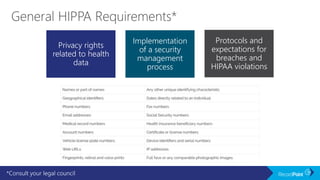
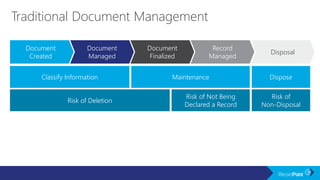
*Consult your legal council
Privacy rights
related to health
data
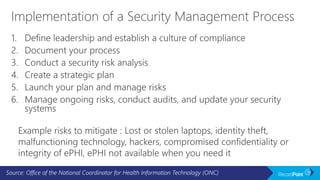
Implementation
of a security
management
process
Protocols and
expectations for
breaches and
HIPAA violations
Source: Office of the National Coordinator for Health Information Technology (ONC)
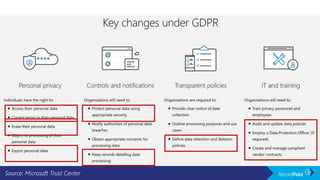
Source: Microsoft Trust Center
Perform good
records
management
practices
Train employees
to follow policies
and processes
Have
documented
processes in
place to protect
data
(and follow them)
Allow people to
access their data
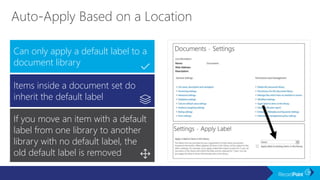
and ensure data
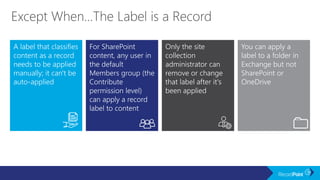
integrity
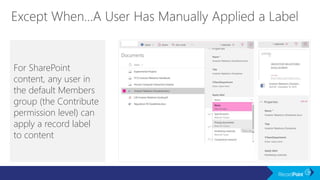
Perform good
records
management
practices
Train employees
to follow policies
and processes
Have
documented
processes in
place to protect
data
(and follow them)
Allow people to
access their data
and ensure data
integrity
Risk of
Non-Disposal
Risk of Not Being
Declared a Record
Risk of Deletion
Classify Information Maintenance Dispose
Document
Created
Document
Managed
Document
Finalized
Record
Managed
Disposal
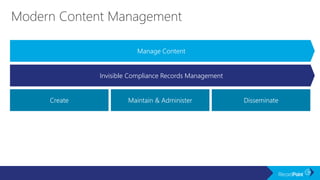
DisseminateMaintain & AdministerCreate
Manage Content
Invisible Compliance Records Management
Microsoft Trust Center
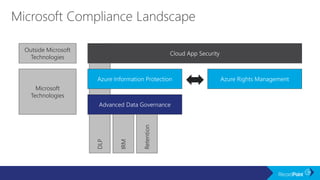
Retention
IRM
DLP
Outside Microsoft
Technologies
Microsoft
Technologies
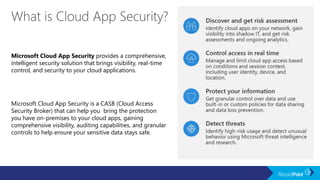
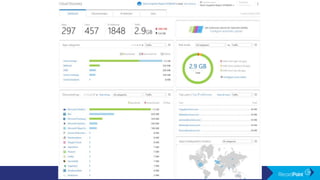
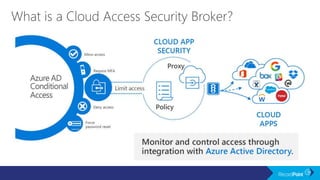
Microsoft Cloud App Security is a CASB (Cloud Access
Security Broker) that can help you bring the protection
you have on-premises to your cloud apps, gaining
comprehensive visibility, auditing capabilities, and granular
controls to help ensure your sensitive data stays safe.
Microsoft Cloud App Security provides a comprehensive,
intelligent security solution that brings visibility, real-time
control, and security to your cloud applications.
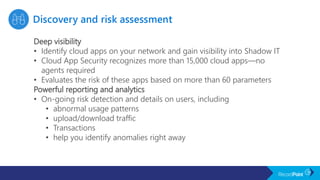
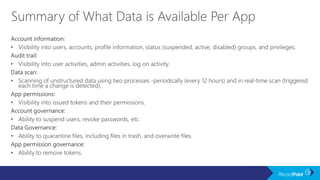
Deep visibility
• Identify cloud apps on your network and gain visibility into Shadow IT
• Cloud App Security recognizes more than 15,000 cloud apps—no
agents required
• Evaluates the risk of these apps based on more than 60 parameters
Powerful reporting and analytics
• On-going risk detection and details on users, including
• abnormal usage patterns
• upload/download traffic
• Transactions
• help you identify anomalies right away
Data loss prevention (DLP)
• Enables granular control policies
• Single-click remediation
• Document quarantine
• Sharing restrictions
• Apply policies—out of the box or customized—to apps from Microsoft or other
vendors
• Scan and classify files in the cloud, and apply Azure Information Protection labels for
protection—including encryption
Compliance
• Supports your compliance journey with regulatory mandates such as Payment Card
Industry (PCI), Health Insurance Accountability and Portability Act (HIPAA), Sarbanes-
Oxley (SOX), General Data Protection Regulation (GDPR), and others.
• Factors compliance with regulations into the risk assessment score for each app
• Helps you further control and protect sensitive files through policies and governance
Real-time monitoring and control
• Helps you limit activities performed within user sessions in SaaS apps based on user identity,
location, device state, and detected sign-in risk level
• Allow access to SaaS apps but protect downloads from unfamiliar locations
• Block downloads of sensitive documents from unmanaged devices
Behavioral analytics
• Identify anomalies in cloud usage that may indicate a data breach
• Learns how each user interacts with each SaaS app and, through
behavioral analytics, assesses the risks in each transaction
Integration with existing SIEM and DLP solutions
• Cloud App Security helps preserve your familiar workflow
• Enables a consistent policy across on-premises and cloud activities,
while automating security procedures to better protect your cloud
applications
Mitigation of ransomware attacks
• Offers a built-in policy template to detect potential ransomware activity
• Specify governance actions to suspend suspect users and prevent
further encryption of the user’s files
https://docs.microsoft.com/en-us/cloud-app-security/risk-score
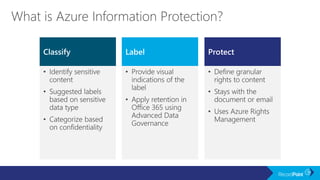
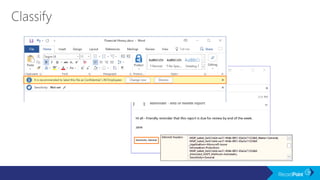
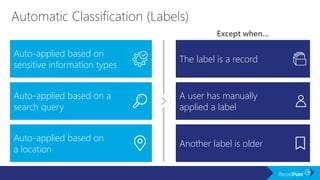
Classify ProtectLabel
Auto-applied based on
sensitive information types
Auto-applied based on a
search query
The label is a record
A user has manually
applied a label
Auto-applied based on
a location
Another label is older
Except when…
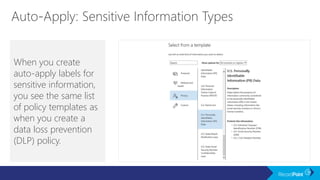
When you create
auto-apply labels for
sensitive information,
you see the same list
of policy templates as
when you create a
data loss prevention
(DLP) policy.
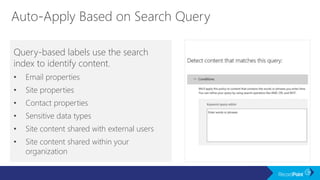
Query-based labels use the search
index to identify content.
• Email properties
• Site properties
• Contact properties
• Sensitive data types
• Site content shared with external users
• Site content shared within your
organization
Can only apply a default label to a
document library
Items inside a document set do
inherit the default label
If you move an item with a default
label from one library to another
library with no default label, the
old default label is removed
A label that classifies
content as a record
needs to be applied
manually; it can't be
auto-applied
For SharePoint
content, any user in
the default
Members group (the
Contribute
permission level)
can apply a record
label to content
Only the site
collection
administrator can
remove or change
that label after it's
been applied
You can apply a
label to a folder in
Exchange but not
SharePoint or
OneDrive
For SharePoint
content, any user in
the default Members
group (the Contribute
permission level) can
apply a record label
to content
If there are multiple rules that assign an auto-apply label and
content meets the conditions of multiple rules, the label for the
oldest rule is assigned.
PERIOD. NO OTHER OPTION.
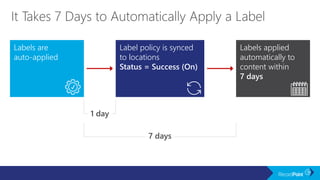
Labels are
auto-applied
Label policy is synced
to locations
Status = Success (On)
Labels applied
automatically to
content within
7 days
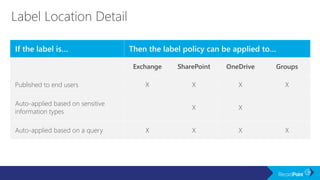
If the label is… Then the label policy can be applied to…
Exchange SharePoint OneDrive Groups
Published to end users X X X X
Auto-applied based on sensitive
information types
X X
Auto-applied based on a query X X X X
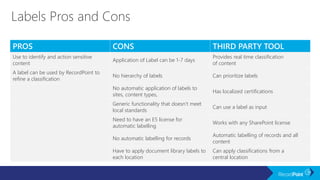
PROS CONS THIRD PARTY TOOL
Use to identify and action sensitive
content
Application of Label can be 1-7 days
Provides real time classification
of content
A label can be used by RecordPoint to
refine a classification
No hierarchy of labels Can prioritize labels
No automatic application of labels to
sites, content types,
Has localized certifications
Generic functionality that doesn’t meet
local standards
Can use a label as input
Need to have an E5 license for
automatic labelling
Works with any SharePoint license
No automatic labelling for records
Automatic labelling of records and all
content
Have to apply document library labels to
each location
Can apply classifications from a
central location
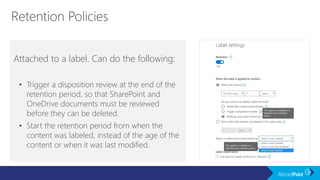
Attached to a label. Can do the following:
• Trigger a disposition review at the end of the
retention period, so that SharePoint and
OneDrive documents must be reviewed
before they can be deleted.
• Start the retention period from when the
content was labeled, instead of the age of the
content or when it was last modified.
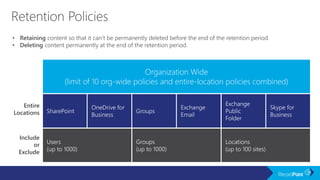
• Retaining content so that it can’t be permanently deleted before the end of the retention period.
• Deleting content permanently at the end of the retention period.
Entire
Locations
Include
or
Exclude
Organization Wide
(limit of 10 org-wide policies and entire-location policies combined)
SharePoint
OneDrive for
Business
Groups
Skype for
Business
Exchange
Email
Exchange
Public
Folder
Users
(up to 1000)
Groups
(up to 1000)
Locations
(up to 100 sites)
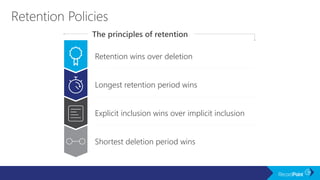
Retention wins over deletion
Longest retention period wins
Explicit inclusion wins over implicit inclusion
Shortest deletion period wins
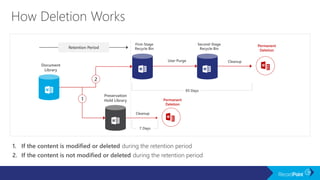
1. If the content is modified or deleted during the retention period
2. If the content is not modified or deleted during the retention period
2
1
Preservation
Hold Library
Document
Library
First-Stage
Recycle Bin
Second-Stage
Recycle Bin
Cleanup
Retention Period
User Purge Cleanup
Permanent
Deletion
Permanent
Deletion
93 Days
7 Days
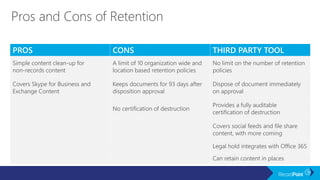
PROS CONS THIRD PARTY TOOL
Simple content clean-up for
non-records content
A limit of 10 organization wide and
location based retention policies
No limit on the number of retention
policies
Covers Skype for Business and
Exchange Content
Keeps documents for 93 days after
disposition approval
Dispose of document immediately
on approval
No certification of destruction
Provides a fully auditable
certification of destruction
Covers social feeds and file share
content, with more coming
Legal hold integrates with Office 365
Can retain content in places
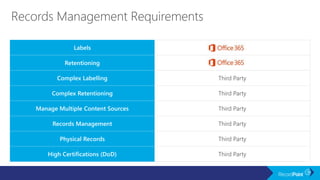
Labels
Retentioning
Complex Labelling Third Party
Complex Retentioning Third Party
Manage Multiple Content Sources Third Party
Records Management Third Party
Physical Records Third Party
High Certifications (DoD) Third Party
Create a Compliance Strategy for Office 365

Create a Compliance Strategy for Office 365

  • 3.
    # Time Topic 18:30 – 8:40 AM Introductions 2 8:40 – 9:00 AM Records Management and Compliance Scenarios 3 9:00 – 10:00 AM Cloud App Security, Azure Information Protection & Azure Rights Management 4 10:00 – 10:15 AM BREAK 5 10:15 – 11:00 AM Advanced Data Governance 6 11:00 – 11:15 AM How to Enable the Records Management and Compliance Scenarios Using Microsoft Technology 7 11:15 – 11:30 AM Options for Filling the Gaps
  • 5.
    *Consult your legalcouncil Privacy rights related to health data Implementation of a security management process Protocols and expectations for breaches and HIPAA violations
  • 6.
    Source: Office ofthe National Coordinator for Health Information Technology (ONC)
  • 7.
  • 8.
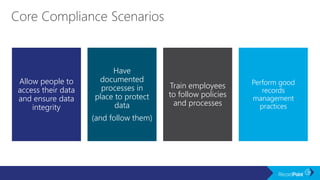
    Perform good records management practices Train employees tofollow policies and processes Have documented processes in place to protect data (and follow them) Allow people to access their data and ensure data integrity
  • 9.
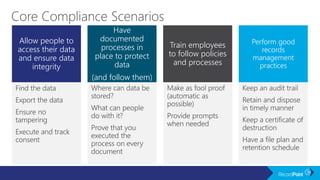
    Perform good records management practices Train employees tofollow policies and processes Have documented processes in place to protect data (and follow them) Allow people to access their data and ensure data integrity
  • 10.
    Risk of Non-Disposal Risk ofNot Being Declared a Record Risk of Deletion Classify Information Maintenance Dispose Document Created Document Managed Document Finalized Record Managed Disposal
  • 11.
    DisseminateMaintain & AdministerCreate ManageContent Invisible Compliance Records Management
  • 13.
  • 15.
  • 17.
    Microsoft Cloud AppSecurity is a CASB (Cloud Access Security Broker) that can help you bring the protection you have on-premises to your cloud apps, gaining comprehensive visibility, auditing capabilities, and granular controls to help ensure your sensitive data stays safe. Microsoft Cloud App Security provides a comprehensive, intelligent security solution that brings visibility, real-time control, and security to your cloud applications.
  • 18.
    Deep visibility • Identifycloud apps on your network and gain visibility into Shadow IT • Cloud App Security recognizes more than 15,000 cloud apps—no agents required • Evaluates the risk of these apps based on more than 60 parameters Powerful reporting and analytics • On-going risk detection and details on users, including • abnormal usage patterns • upload/download traffic • Transactions • help you identify anomalies right away
  • 20.
    Data loss prevention(DLP) • Enables granular control policies • Single-click remediation • Document quarantine • Sharing restrictions • Apply policies—out of the box or customized—to apps from Microsoft or other vendors • Scan and classify files in the cloud, and apply Azure Information Protection labels for protection—including encryption Compliance • Supports your compliance journey with regulatory mandates such as Payment Card Industry (PCI), Health Insurance Accountability and Portability Act (HIPAA), Sarbanes- Oxley (SOX), General Data Protection Regulation (GDPR), and others. • Factors compliance with regulations into the risk assessment score for each app • Helps you further control and protect sensitive files through policies and governance
  • 21.
    Real-time monitoring andcontrol • Helps you limit activities performed within user sessions in SaaS apps based on user identity, location, device state, and detected sign-in risk level • Allow access to SaaS apps but protect downloads from unfamiliar locations • Block downloads of sensitive documents from unmanaged devices
  • 22.
    Behavioral analytics • Identifyanomalies in cloud usage that may indicate a data breach • Learns how each user interacts with each SaaS app and, through behavioral analytics, assesses the risks in each transaction Integration with existing SIEM and DLP solutions • Cloud App Security helps preserve your familiar workflow • Enables a consistent policy across on-premises and cloud activities, while automating security procedures to better protect your cloud applications Mitigation of ransomware attacks • Offers a built-in policy template to detect potential ransomware activity • Specify governance actions to suspend suspect users and prevent further encryption of the user’s files
  • 27.
  • 29.
  • 36.
    Auto-applied based on sensitiveinformation types Auto-applied based on a search query The label is a record A user has manually applied a label Auto-applied based on a location Another label is older Except when…
  • 37.
    When you create auto-applylabels for sensitive information, you see the same list of policy templates as when you create a data loss prevention (DLP) policy.
  • 38.
    Query-based labels usethe search index to identify content. • Email properties • Site properties • Contact properties • Sensitive data types • Site content shared with external users • Site content shared within your organization
  • 39.
    Can only applya default label to a document library Items inside a document set do inherit the default label If you move an item with a default label from one library to another library with no default label, the old default label is removed
  • 40.
    A label thatclassifies content as a record needs to be applied manually; it can't be auto-applied For SharePoint content, any user in the default Members group (the Contribute permission level) can apply a record label to content Only the site collection administrator can remove or change that label after it's been applied You can apply a label to a folder in Exchange but not SharePoint or OneDrive
  • 41.
    For SharePoint content, anyuser in the default Members group (the Contribute permission level) can apply a record label to content
  • 42.
    If there aremultiple rules that assign an auto-apply label and content meets the conditions of multiple rules, the label for the oldest rule is assigned. PERIOD. NO OTHER OPTION.
  • 43.
    Labels are auto-applied Label policyis synced to locations Status = Success (On) Labels applied automatically to content within 7 days
  • 45.
    If the labelis… Then the label policy can be applied to… Exchange SharePoint OneDrive Groups Published to end users X X X X Auto-applied based on sensitive information types X X Auto-applied based on a query X X X X
  • 46.
    PROS CONS THIRDPARTY TOOL Use to identify and action sensitive content Application of Label can be 1-7 days Provides real time classification of content A label can be used by RecordPoint to refine a classification No hierarchy of labels Can prioritize labels No automatic application of labels to sites, content types, Has localized certifications Generic functionality that doesn’t meet local standards Can use a label as input Need to have an E5 license for automatic labelling Works with any SharePoint license No automatic labelling for records Automatic labelling of records and all content Have to apply document library labels to each location Can apply classifications from a central location
  • 49.
    Attached to alabel. Can do the following: • Trigger a disposition review at the end of the retention period, so that SharePoint and OneDrive documents must be reviewed before they can be deleted. • Start the retention period from when the content was labeled, instead of the age of the content or when it was last modified.
  • 50.
    • Retaining contentso that it can’t be permanently deleted before the end of the retention period. • Deleting content permanently at the end of the retention period. Entire Locations Include or Exclude Organization Wide (limit of 10 org-wide policies and entire-location policies combined) SharePoint OneDrive for Business Groups Skype for Business Exchange Email Exchange Public Folder Users (up to 1000) Groups (up to 1000) Locations (up to 100 sites)
  • 51.
    Retention wins overdeletion Longest retention period wins Explicit inclusion wins over implicit inclusion Shortest deletion period wins
  • 52.
    1. If thecontent is modified or deleted during the retention period 2. If the content is not modified or deleted during the retention period 2 1 Preservation Hold Library Document Library First-Stage Recycle Bin Second-Stage Recycle Bin Cleanup Retention Period User Purge Cleanup Permanent Deletion Permanent Deletion 93 Days 7 Days
  • 53.
    PROS CONS THIRDPARTY TOOL Simple content clean-up for non-records content A limit of 10 organization wide and location based retention policies No limit on the number of retention policies Covers Skype for Business and Exchange Content Keeps documents for 93 days after disposition approval Dispose of document immediately on approval No certification of destruction Provides a fully auditable certification of destruction Covers social feeds and file share content, with more coming Legal hold integrates with Office 365 Can retain content in places
  • 55.
    Labels Retentioning Complex Labelling ThirdParty Complex Retentioning Third Party Manage Multiple Content Sources Third Party Records Management Third Party Physical Records Third Party High Certifications (DoD) Third Party

Editor's Notes

  • #11 Also: Do the above at the lowest possible cost & prepare to be audited
  • #12 Note: Risks will appear on click This slide highlights some of the issues we saw on the typical solutions slide Records controls didn’t come in until after the document is finalised/declared Users needed to be “in on” the declaration process Additionally, here are some of the other risks highlighted by this process: Risk of deletion: before the document has been declared a record Risk of note being declare a record Risk of non-disposal: the content is kept too long opening us up to liability
  • #13 Note: 2nd and 3rd rows will appear on the 2nd and 3rd click Benefits of Managing Content as a Record The correct retention and disposition policy is applied to content from the beginning No need to reclassify information as a record later No risk of accidental deletion of content Risk of Not Using This Approach See risks of deletion and risks of non-disposal above Lengthy and cumbersome disposal approval processes Other ISO Notes X x Jeremy Comments: Would be great if we could hide the records management, then have a click through that makes it appear. Really want to call out that really all we need from the user is to manage content, and we do the rest – which then ties into next slide
  • #45 Manual label will always override automatic label
  • #47 Manual label will always override automatic label
  • #52 Who is it for?
  • #53 Who is it for?