BBC Mobile Style Guide 1.1
— Global Visual Language for the mobile web


                             BBC Mobile Style Guide - Global Visual Language for the mobile web. Ben Guyer, Riikka Puustinen, Claudia Urschbach, Dan Dumitriu. Last modified at 5:16 PM, 09 June 2009
Contents


1. Introduction                                                               3                4. Page templates                                                                                             22

2. Design principles                                                          5                         4.1. Index pages                                                                                     24

        2.1. Navigaton & interaction                                          6                         4.2. Articles                                                                                        28

        2.2. Usability considerations                                         7                         4.3. Listings                                                                                        33

        2.3. Tone of voice                                                    8                         4.4. Media gallery pages                                                                             41

        2.4. Editorial principles                                             9                         4.5. Actionable pages                                                                                45

3. Visual guidelines                                                        10                          4.6. Administrative pages                                                                            50

        3.1 Page structure                                                   12                5. Modules                                                                                                    55

        3.2 Module structure                                                 13                6. Technical requirements                                                                                     82

        3.3. Margins and layout                                              14                         6.1. Basic technical guidelines                                                                      83

        3.4. Images & Screen elements                                        15                References                                                                                                    84

        3.5. fonts                                                           16

        3.6. Text colours                                                    19

        3.7. Background colours                                              20

        3.8. Branding                                                        21


                                        BBC Mobile Style Guide - Global Visual Language for the mobile web. Ben Guyer, Riikka Puustinen, Claudia Urschbach, Dan Dumitriu. Last modified at 5:16 PM, 09 June 2009   2
1. Introduction

This style guide outlines the principles and standards for     Approval process
the creation of mobile web pages for the BBC. It is in-        These guidelines have been defined in collaboration with
tended to be used by designers, developers and produc-         user experience teams and mobile teams in the BBC.
ers.                                                           Approval for mobile web proposals (and any subsequent
                                                               alterations and/or additions) sits with the BBC Mobile
this document does not set out to constrain what sites         team, and they should be made aware of mobile web
should or should not be implemented, but aims instead          projects before they go live. Mobile team contacts are:
to establish a consistent quality of treatment for funda-
mental elements across the BBC mobile web.                     Ulyssa Macmillan
                                                               Executive Producer for Mobile Browser
Main areas covered
1. High level wireframes of all major page types and the       Jason Quinn
   rules for constructing them                                 Team Leader for Mobile Client Side Development
2. Information on the structure and the limitations of
   each section                                                Ben Guyer
3. Detailed visual styles and specification of screen ele-     Creative Director Mobile UX&D
   ments
4. Technical requirements and standards for BBC mobile
   web pages.                                                  Please see References section for a full list of documents
                                                               that have been used as a source material.


                                                       BBC Mobile Style Guide - Global Visual Language for the mobile web. Ben Guyer, Riikka Puustinen, Claudia Urschbach, Dan Dumitriu. Last modified at 5:16 PM, 09 June 2009   3
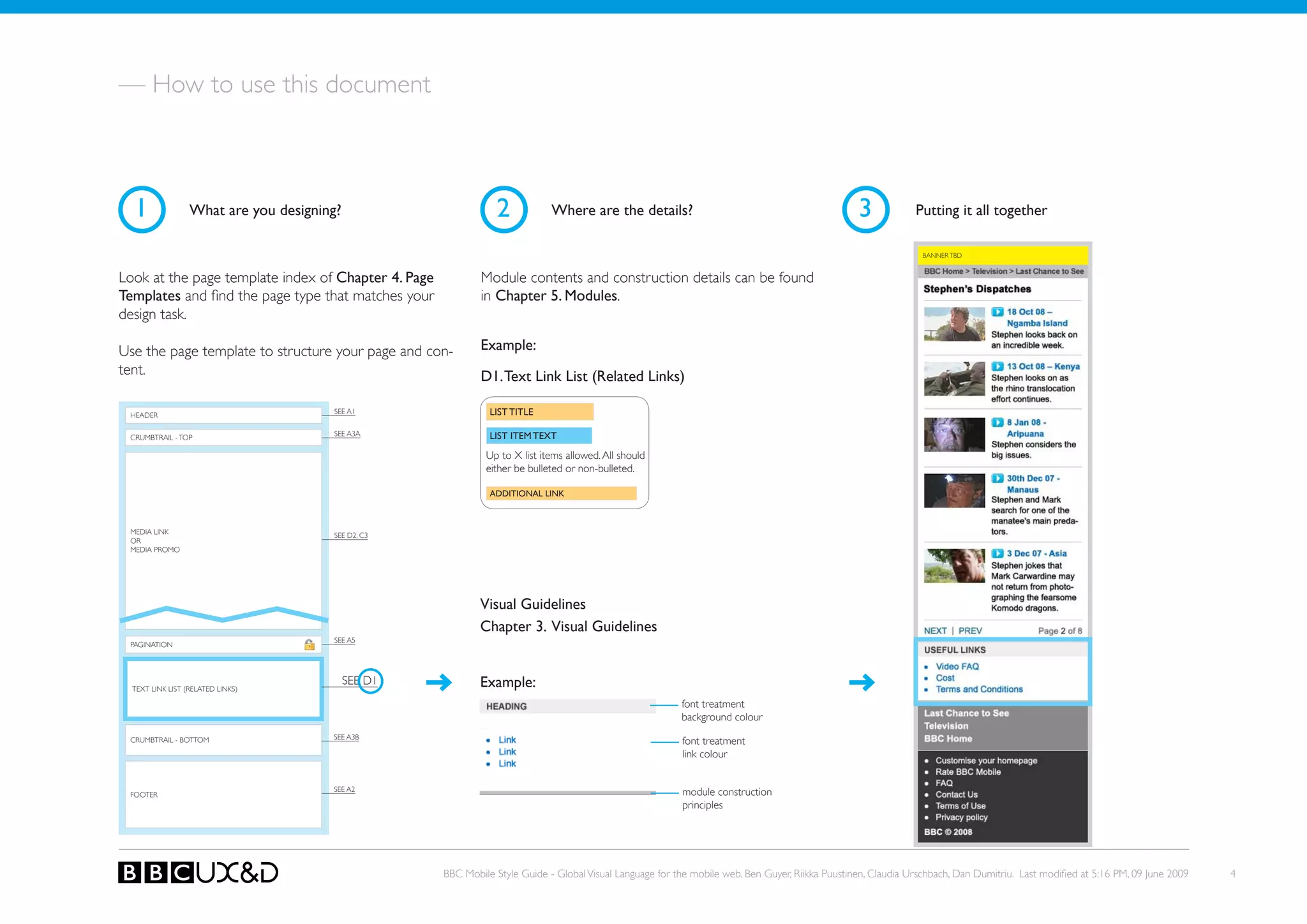
— How to use this document


  1               What are you designing?                       2            Where are the details?                                               3            Putting it all together

                                                                                                                                                                BANNER TBD


Look at the page template index of Chapter 4. Page           Module contents and construction details can be found
Templates and find the page type that matches your           in Chapter 5. Modules.
design task.

Use the page template to structure your page and con-        Example:
tent.                                                        D1. Text Link List (Related Links)

 HEADER
                                       SEE A1                  LIST TITLE

                                       SEE A3A                 LIST ITEM TEXT
 CRUMBTRAIL - ToP

                                                              Up to X list items allowed. All should
                                                              either be bulleted or non-bulleted.

                                                               ADDITIONAL LINK


 MEDIA LINk                            SEE D2, C3
 oR
 MEDIA PRoMo


                                                             Visual Guidelines
                                                             Chapter 3. Visual Guidelines
                                       SEE A5
 PAGINATIoN


  TEXT LINk LIST (RELATED LINkS)
                                            SEE D1           Example:
                                                                                                          font treatment
                                                                                                          background colour
                                       SEE A3B
 CRUMBTRAIL - BoTToM                                                                                      font treatment
                                                                                                          link colour


                                       SEE A2                                                             module construction
 FooteR
                                                                                                          principles


                                                     BBC Mobile Style Guide - Global Visual Language for the mobile web. Ben Guyer, Riikka Puustinen, Claudia Urschbach, Dan Dumitriu. Last modified at 5:16 PM, 09 June 2009   4
2. Design principles
— Look and feel


The BBC Mobile Web service is

•   Reliable and consistent
•   Responsive
•   Competent
•   Accessible
•   Courteous - polite, respectful, considerable, and
    friendly
•   Communicative - we use language that the users
    understand
•   Credible - trustworthy, believable and honest
•   secure - free from danger, risk or doubt
•   Understanding - we know the customers’ needs


                                                        BBC Mobile Style Guide - Global Visual Language for the mobile web. Ben Guyer, Riikka Puustinen, Claudia Urschbach, Dan Dumitriu. Last modified at 5:16 PM, 09 June 2009   5
2.1. NAVIGAToN & INTERACTIoN


Structure                                                    Navigation                                                                       Interaction

• keep sitemap wide and shallow.                             • offer consistent navigation across the service. This                           Input
• Take into account the trade-off between having too           helps users orient themselves and allows them to                               • keep the number of keystrokes to a minimum
  many links on a page and asking the user to follow           identify navigation more easily.                                               • Avoid free text entry where possible
  too many links to reach what they are looking for.         • Index pages work as a table of contents to each sec-                           • Provide pre-selected default values where possible
• Inform the user about his or her location in the serv-       tion.                                                                          • Specify a default text entry mode, language and/or
  ice. This can be done with a crumbtrail navigation,        • Crumbtrail navigation helps users to get back to the                              input format, if the target device is known to support
  page titles, informative link names and branding ele-        home page and other main sections.                                                it. This will be a great help for users who then can
  ments.                                                     • Footer navigation is shown on every page, as the links                            complete the forms with fewer keypresses.
                                                               lead to utility pages, like FAQ and Contact Us.
                                                             • Since mobile phones represent the information in se-                           Content
                                                               quences, it is important to provide links on each page                         • Arrange the page contents so that the order is logi-
                                                               to avoid dead-ends.                                                              cal when scrolling a page from top to bottom. Re-
                                                             • Users of devices that do not have pointing devices                               member that only a fraction of the page is visible on
                                                               have to scroll between hyperlinks using the keypad.                              screen.
                                                               Contextual grouping can assist usability.                                      • ensure that content is suitable for use in a mobile
                                                                                                                                                context.
                                                                                                                                              • Limit content to what the user has requested.
                                                                                                                                              • Provide a short but descriptive page title to allow
                                                                                                                                                easy identification.

                                                                                                                                              Scrolling
                                                                                                                                              • only vertical page scrolling is alllowed.
                                                                                                                                              • ensure that material that is central to the meaning of
                                                                                                                                                 the page precedes material that is not.


                                                     BBC Mobile Style Guide - Global Visual Language for the mobile web. Ben Guyer, Riikka Puustinen, Claudia Urschbach, Dan Dumitriu. Last modified at 5:16 PM, 09 June 2009   6
2.2. USABILITy CoNSIDERATIoNS


•	 Meet users’ needs quickly. Remember that mobile             •	 Make user input as easy as possible. Allow users
   web users are likely to experience distractions, various       to input information by making selections instead of
   lighting conditions and short attention span depend-           entering free text, or at least give this as an alternative
   ing on their environment. They are also likely to want         method.
   information that is useful at their location or time.
                                                               •	 Show only essential information. Tiny mobile phone
•	 Do not repeat the navigation on every page, as it              screens show only a fraction of the page. This is why it
   takes a lot of valuable space on small screen. Instead         is important to condense the message and prioritise
   display navigation on the homepage and index pages.            the most relevant content on each page. Also be sure
   on other pages include links back to the home page             to identify page requests coming from mobiles, and
   and the most important sections along the path users           offer a suitable version for them.
   have taken. Practically this is done with the help of
   crumbtrail menu, which is shown at the top and bot-         •	 Design	mobile-friendly,	flexible	page	layouts. Make
   tom of the page.                                               sure that the content is in right order and the page
                                                                  can adapt to various screen types and widths. This is
•	 Distinguish clearly items that are selected. Most mo-          important especially for devices that can be used both
   bile devices have poor cursor control, and the lighting        in landscape or portrait modes.
   conditions can make it difficult to see links or fields
   that are in focus. this can be done by changing the
   font and background colour of links and buttons.


                                                       BBC Mobile Style Guide - Global Visual Language for the mobile web. Ben Guyer, Riikka Puustinen, Claudia Urschbach, Dan Dumitriu. Last modified at 5:16 PM, 09 June 2009   7
2.3. ToNE oF VoICE


Write On Your Level                                              Get Off The Fence

you’re writing on behalf of the BBC, but you can still           When writing as the BBC, it’s easy to add so many ifs,
make your writing sound personal.                                buts, passives and caveats that you don’t get to the point.

• Write like you’d speak. Talk about the BBC as we, and          • Take responsibility. Cut hesitant words (like may, might,
  the reader as you.                                               could).
• Write with someone in mind.                                    • Advise, don’t diagnose.
• Use contractions.                                              • Active not passive.
• Use words people say.                                          • Use imperatives, particularly in headlines.
• Use less jargon.
• keep it simple.
• Use analogies.


                                                                                                                                                  TONE OF VOICE GuIDELINE:
                                                                                                                                                  http://www.bbc.co.uk/guidelines/futuremedia/restricted/
                                                                                                                                                  desed/tov.shtml


                                                         BBC Mobile Style Guide - Global Visual Language for the mobile web. Ben Guyer, Riikka Puustinen, Claudia Urschbach, Dan Dumitriu. Last modified at 5:16 PM, 09 June 2009   8
2.4. EDIToRIAL PRINCIPLES


Grammar and style                                                   Link and title lengths                                                           External links
The same grammatical rules apply to mobile as to the                Try to keep link text and page titles short, otherwise                           When editorially relevant, you may wish to link to an
web - refer to the BBC Editorial Guidelines. However, in            these may wrap onto a second line. Ideally, links and page                       external mobile site. Ensure the link is accompanied with
terms of writing style, bear in mind that mobile devices            titles should not exceed 15 characters (including spaces).                       a disclaimer as well as a link to our external linking policy.
are smaller, and that users of mobile content tend to like                                                                                           Linking to external mobile sites should generally be lim-
‘snacking’ on content. keep sentences short, use more               Site introductions                                                               ited to those that offer something the BBC mobile site
paragraphs rather than less, and if possible limit page size        Each site should contain a clear and brief descrip-                              does not offer.
to no more than 500 words.                                          tion. This can either be done on the homepage itself if
                                                                                                                            Editorial Guidelines
                                                                    space allows or if not, from a clearly labelled link off the
Punctuation                                                         homepage (such as Introduction, About xyz, etc).        For information on the guidelines behind the usage of
Again, ensure that all content is properly punctuated, and                                                                  SMS/MMS and for guidance on user interaction via mo-
that full stops are followed by a space. The use of txt spk         Paragraphs                                              bile, see Mobile Devices Guidance at bbc.co.uk/guide-
is not recommended – though there are not specific                  Ideally paragraphs should be no more than 2-3 sentences lines/editorialguidelines/advice/mobiledevices
guidelines outlawing it.                                            long. The shorter the paragraph, and the more white
                                                                    space between paragraphs, the better in terms of making
Capitals                                                            your content more readable.
Ensure that the first letters of all lists, stories and section
titles are capitalised. This helps to distinguish a new story       Use only <p></p> tags to indicate a new paragraph
from one that has wrapped over two lines.                           instead of two line breaks. this will add to the site’s uni-
                                                                    formity.


                                                                                                                                                     ThE BBC EDITORIAL GuIDELINES:
                                                                                                                                                     http://www.bbc.co.uk/guidelines/editorialguidelines/

                                                                                                                                                     MOBILE DEVICES GuIDANCE:
                                                                                                                                                     bbc.co.uk/guidelines/editorialguidelines/advice/mobilede-
                                                                                                                                                     vices


                                                            BBC Mobile Style Guide - Global Visual Language for the mobile web. Ben Guyer, Riikka Puustinen, Claudia Urschbach, Dan Dumitriu. Last modified at 5:16 PM, 09 June 2009   9
3. Visual guidelines
— A visual framework
Considerations when designing for mobile                                                 Example of stretchy design


•	 Display sizes: optimise the design for small screens.
   Take into account limited screen estate, processing
   power and memory.
•	 Multiple variations: Consider that web pages are
   browsed with various devices with different charac-
   teristics. Some have 4-way navikey and a keypad, while
   some work with touch screen only.
•	 Screen differences: Please note that the screen reso-
   lution and pixel density varies from device group to
   another. this needs to be taken into account when
   designing visual elements such as icons for mobile
   devices.
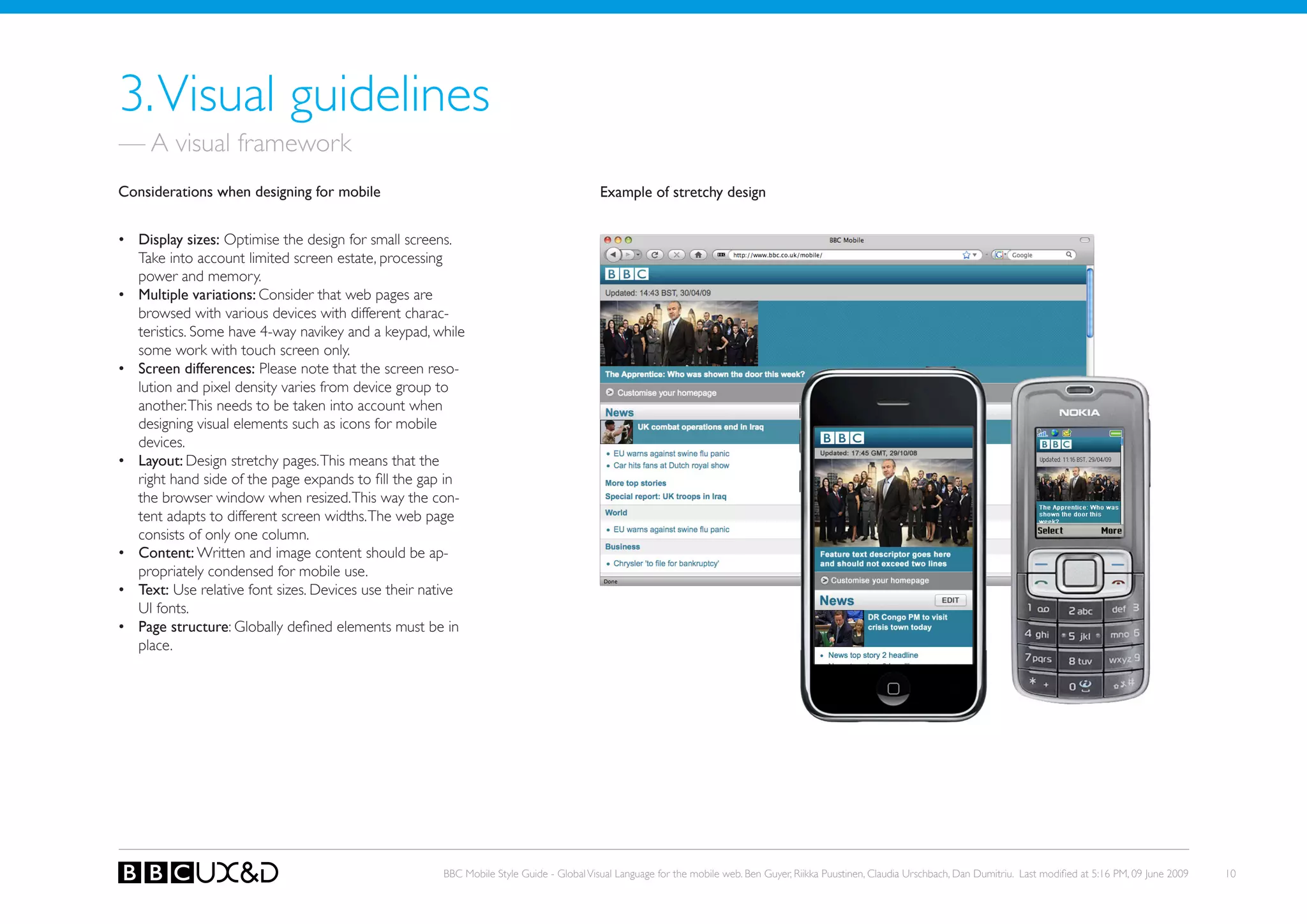
•	 Layout: Design stretchy pages. This means that the
   right hand side of the page expands to fill the gap in
   the browser window when resized. This way the con-
   tent adapts to different screen widths. The web page
   consists of only one column.
•	 Content: Written and image content should be ap-
   propriately condensed for mobile use.
•	 Text: Use relative font sizes. Devices use their native
   UI fonts.
•	 Page structure: Globally defined elements must be in
   place.


                                                      BBC Mobile Style Guide - Global Visual Language for the mobile web. Ben Guyer, Riikka Puustinen, Claudia Urschbach, Dan Dumitriu. Last modified at 5:16 PM, 09 June 2009   10
— Portrait and landscape screen modes

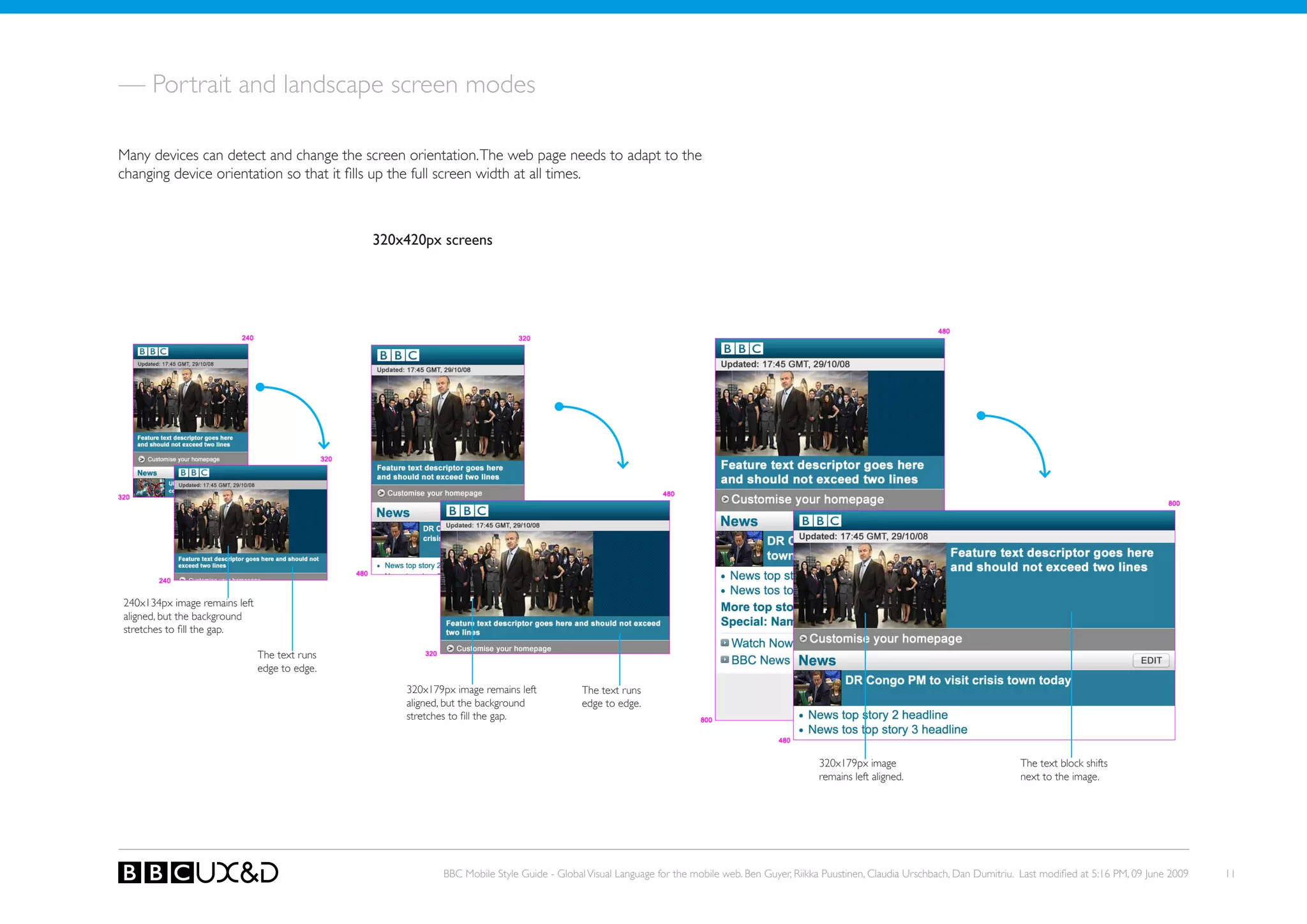
Many devices can detect and change the screen orientation. The web page needs to adapt to the
changing device orientation so that it fills up the full screen width at all times.


                                               320x420px screens


240x134px image remains left
aligned, but the background
stretches to fill the gap.

                               The text runs
                               edge to edge.
                                                   320x179px image remains left          The text runs
                                                   aligned, but the background           edge to edge.
                                                   stretches to fill the gap.


                                                                                                                                              320x179px image                               The text block shifts
                                                                                                                                              remains left aligned.                         next to the image.


                                                          BBC Mobile Style Guide - Global Visual Language for the mobile web. Ben Guyer, Riikka Puustinen, Claudia Urschbach, Dan Dumitriu. Last modified at 5:16 PM, 09 June 2009   11
3.1 PAGE STRUCTURE


Core principles                                               Example page


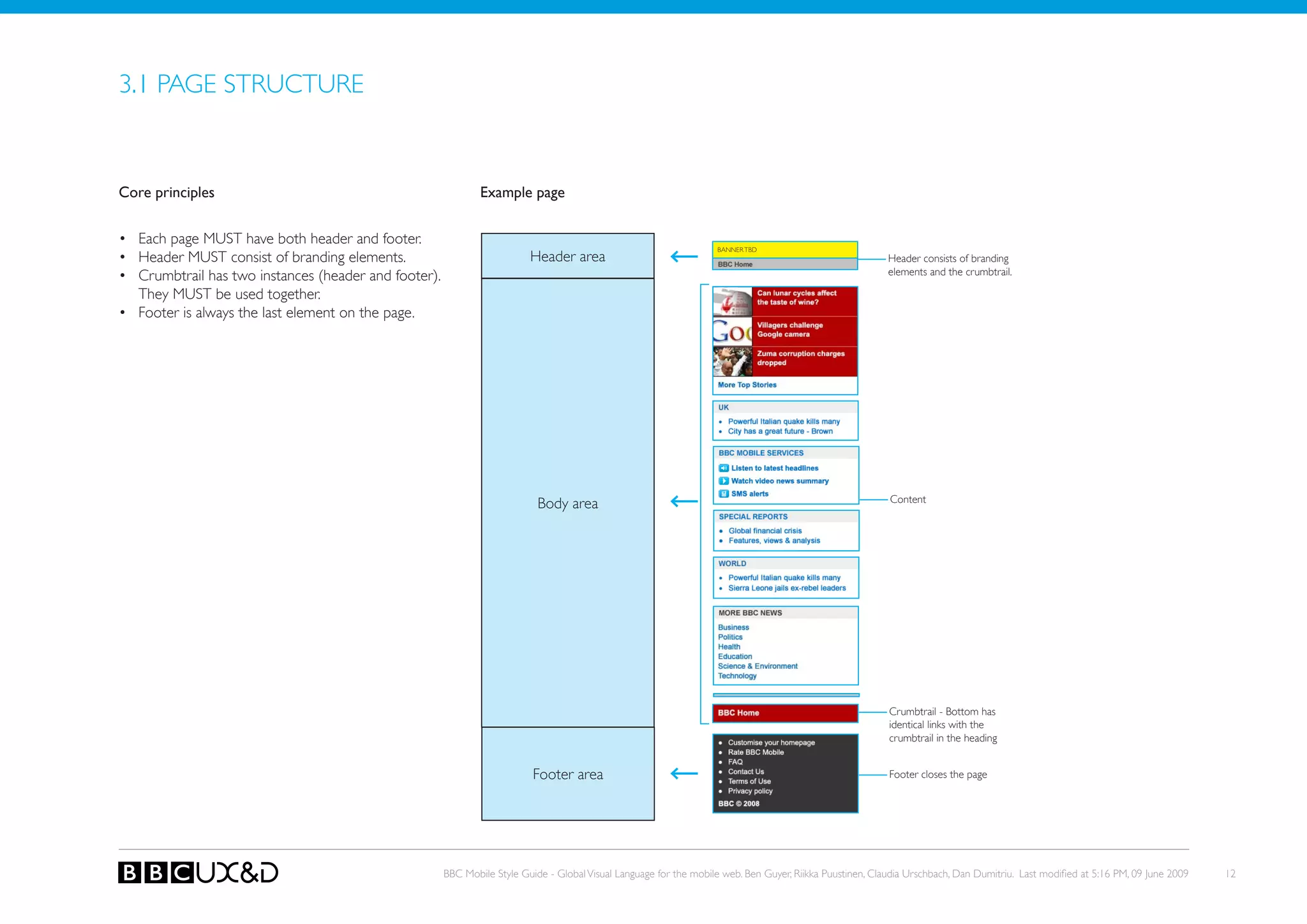
• Each page MUST have both header and footer.
                                                                                                                   BANNER TBD
• Header MUst consist of branding elements.                              Header area                                                                      Header consists of branding
• Crumbtrail has two instances (header and footer).                                                                                                       elements and the crumbtrail.

  they MUst be used together.
• Footer is always the last element on the page.


                                                                           Body area                                                                      Content


                                                                                                                                                          Crumbtrail - Bottom has
                                                                                                                                                          identical links with the
                                                                                                                                                          crumbtrail in the heading


                                                                          Footer area                                                                     Footer closes the page


                                                      BBC Mobile Style Guide - Global Visual Language for the mobile web. Ben Guyer, Riikka Puustinen, Claudia Urschbach, Dan Dumitriu. Last modified at 5:16 PM, 09 June 2009   12
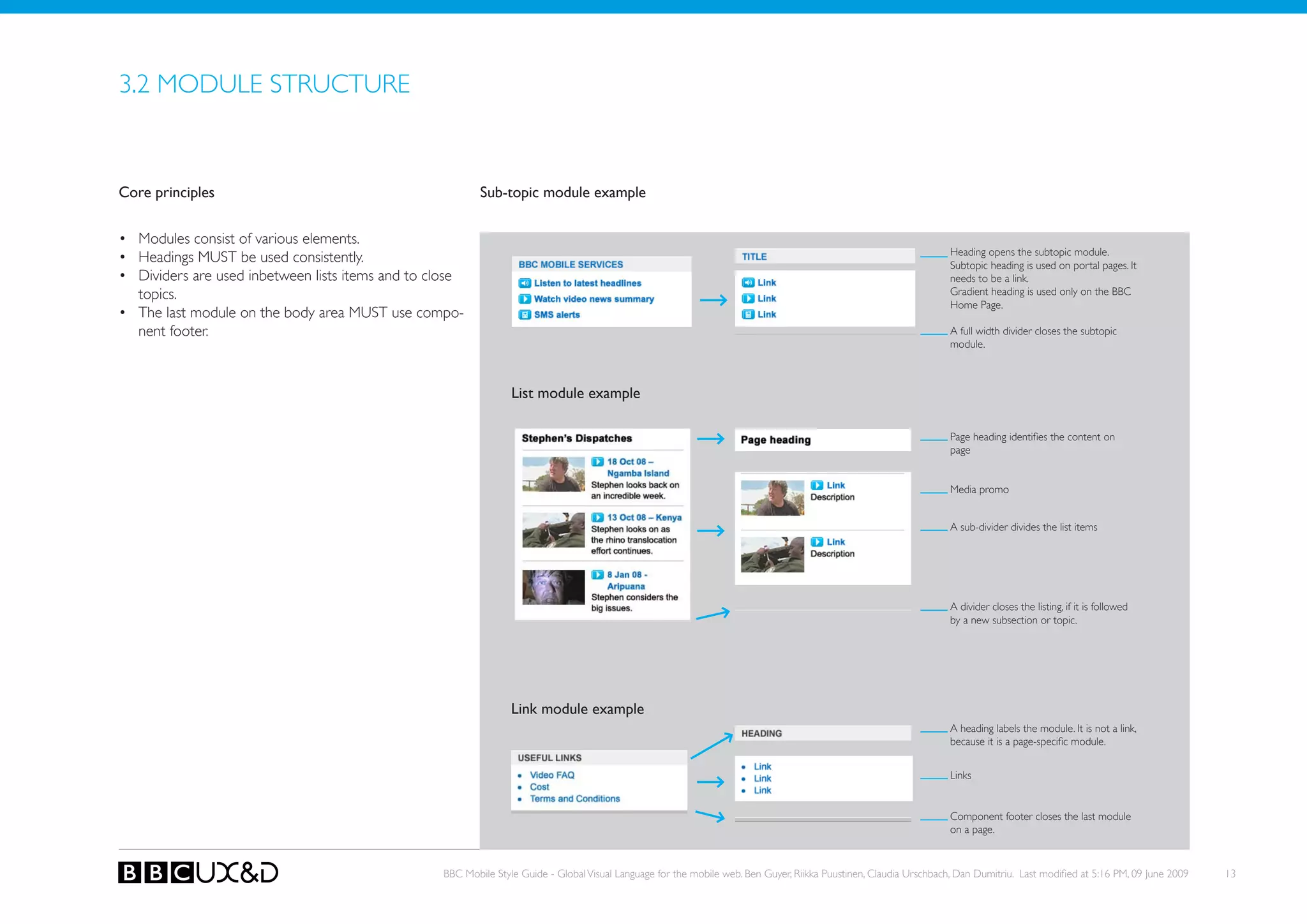
3.2 MoDULE STRUCTURE


Core principles                                           Sub-topic module example


• Modules consist of various elements.
                                                                                                                                                                    Heading opens the subtopic module.
• Headings MUst be used consistently.                                                                                                                               Subtopic heading is used on portal pages. It
• Dividers are used inbetween lists items and to close                                                                                                              needs to be a link.
  topics.                                                                                                                                                           Gradient heading is used only on the BBC
                                                                                                                                                                    Home Page.
• The last module on the body area MUST use compo-
  nent footer.                                                                                                                                                      A full width divider closes the subtopic
                                                                                                                                                                    module.


                                                                 List module example

                                                                                                                                                                    Page heading identifies the content on
                                                                                                                                                                    page


                                                                                                                                                                    Media promo


                                                                                                                                                                    A sub-divider divides the list items


                                                                                                                                                                    A divider closes the listing, if it is followed
                                                                                                                                                                    by a new subsection or topic.


                                                                 Link module example
                                                                                                                                                                    A heading labels the module. It is not a link,
                                                                                                                                                                    because it is a page-specific module.


                                                                                                                                                                    Links


                                                                                                                                                                    Component footer closes the last module
                                                                                                                                                                    on a page.


                                                  BBC Mobile Style Guide - Global Visual Language for the mobile web. Ben Guyer, Riikka Puustinen, Claudia Urschbach, Dan Dumitriu. Last modified at 5:16 PM, 09 June 2009   13
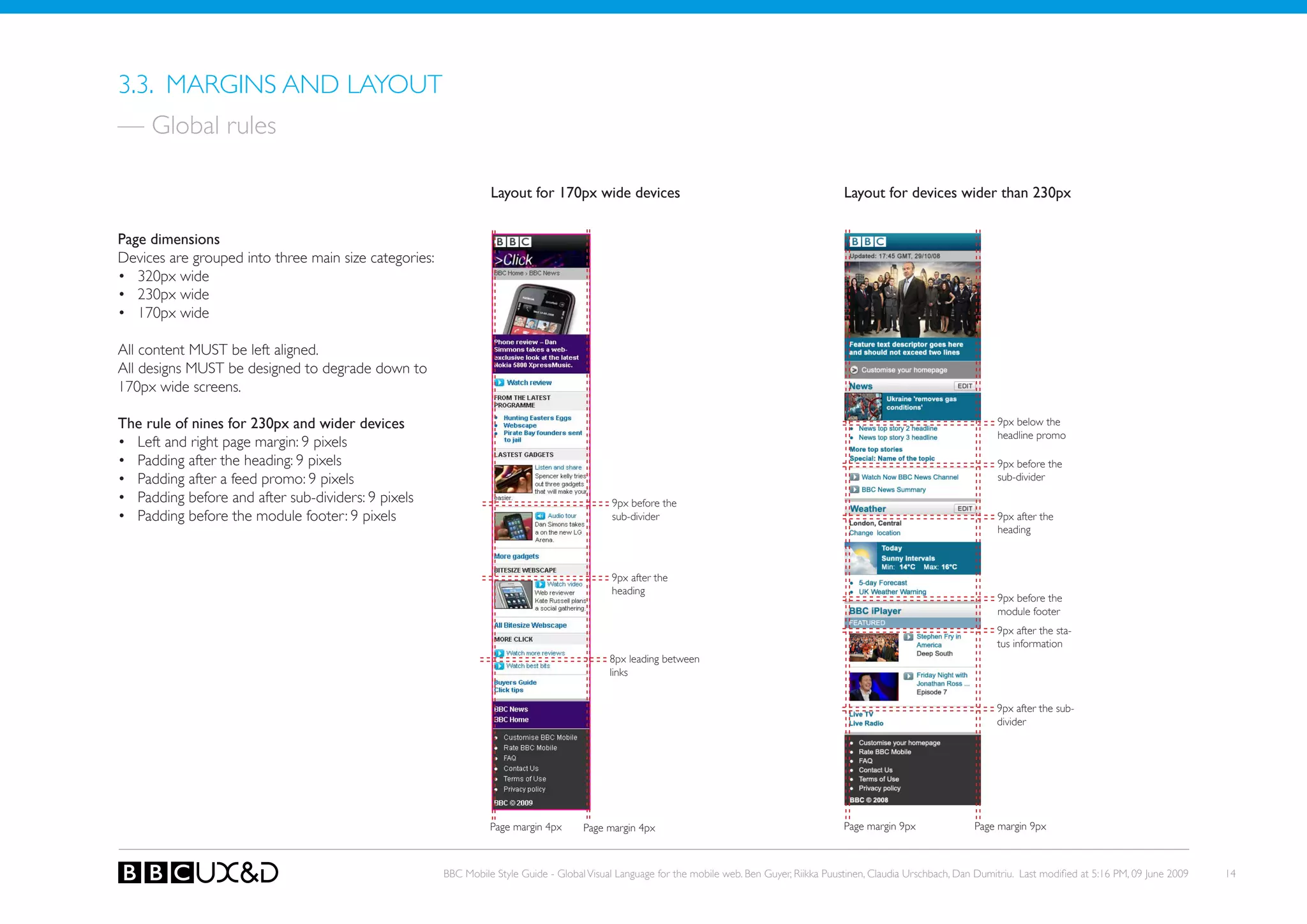
3.3. MARGINS AND LAyoUT
— Global rules

                                                                 Layout for 170px wide devices                                                   Layout for devices wider than 230px


Page dimensions
Devices are grouped into three main size categories:
• 320px wide
• 230px wide
• 170px wide

All content MUST be left aligned.
All designs MUST be designed to degrade down to
170px wide screens.

The rule of nines for 230px and wider devices                                                                                                                                      9px below the
                                                                                                                                                                                   headline promo
• Left and right page margin: 9 pixels
• Padding after the heading: 9 pixels                                                                                                                                              9px before the
• Padding after a feed promo: 9 pixels                                                                                                                                             sub-divider
• Padding before and after sub-dividers: 9 pixels                                           9px before the
• Padding before the module footer: 9 pixels                                                sub-divider                                                                            9px after the
                                                                                                                                                                                   heading


                                                                                            9px after the
                                                                                            heading
                                                                                                                                                                                   9px before the
                                                                                                                                                                                   module footer
                                                                                                                                                                                   9px after the sta-
                                                                                                                                                                                   tus information
                                                                                            8px leading between
                                                                                            links


                                                                                                                                                                                   9px after the sub-
                                                                                                                                                                                   divider


                                                                 Page margin 4px      Page margin 4px                                            Page margin 9px              Page margin 9px


                                                       BBC Mobile Style Guide - Global Visual Language for the mobile web. Ben Guyer, Riikka Puustinen, Claudia Urschbach, Dan Dumitriu. Last modified at 5:16 PM, 09 June 2009   14
3.4. IMAGES & SCREEN ELEMENTS


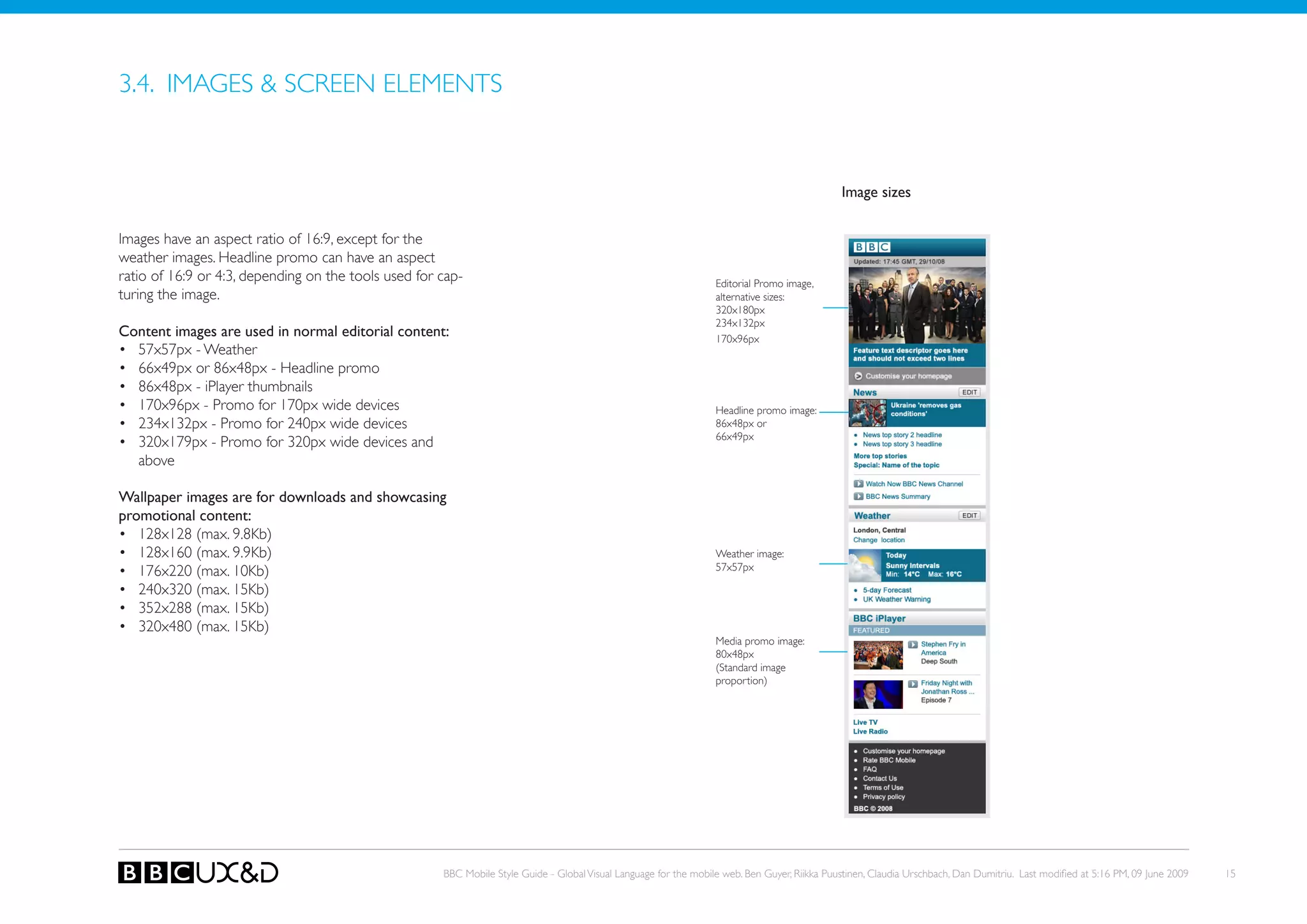
                                                                                                                                               Image sizes


Images have an aspect ratio of 16:9, except for the
weather images. Headline promo can have an aspect
ratio of 16:9 or 4:3, depending on the tools used for cap-                                                         editorial Promo image,
turing the image.                                                                                                  alternative sizes:
                                                                                                                   320x180px
                                                                                                                   234x132px
Content images are used in normal editorial content:                                                               170x96px
• 57x57px - Weather
• 66x49px or 86x48px - Headline promo
• 86x48px - iPlayer thumbnails
• 170x96px - Promo for 170px wide devices                                                                          Headline promo image:
• 234x132px - Promo for 240px wide devices                                                                         86x48px or
                                                                                                                   66x49px
• 320x179px - Promo for 320px wide devices and
  above

Wallpaper images are for downloads and showcasing
promotional content:
• 128x128 (max. 9.8kb)
• 128x160 (max. 9.9kb)                                                                                             Weather image:
• 176x220 (max. 10kb)                                                                                              57x57px

• 240x320 (max. 15kb)
• 352x288 (max. 15kb)
• 320x480 (max. 15kb)
                                                                                                                   Media promo image:
                                                                                                                   80x48px
                                                                                                                   (Standard image
                                                                                                                   proportion)


                                                      BBC Mobile Style Guide - Global Visual Language for the mobile web. Ben Guyer, Riikka Puustinen, Claudia Urschbach, Dan Dumitriu. Last modified at 5:16 PM, 09 June 2009   15
3.5. FoNTS


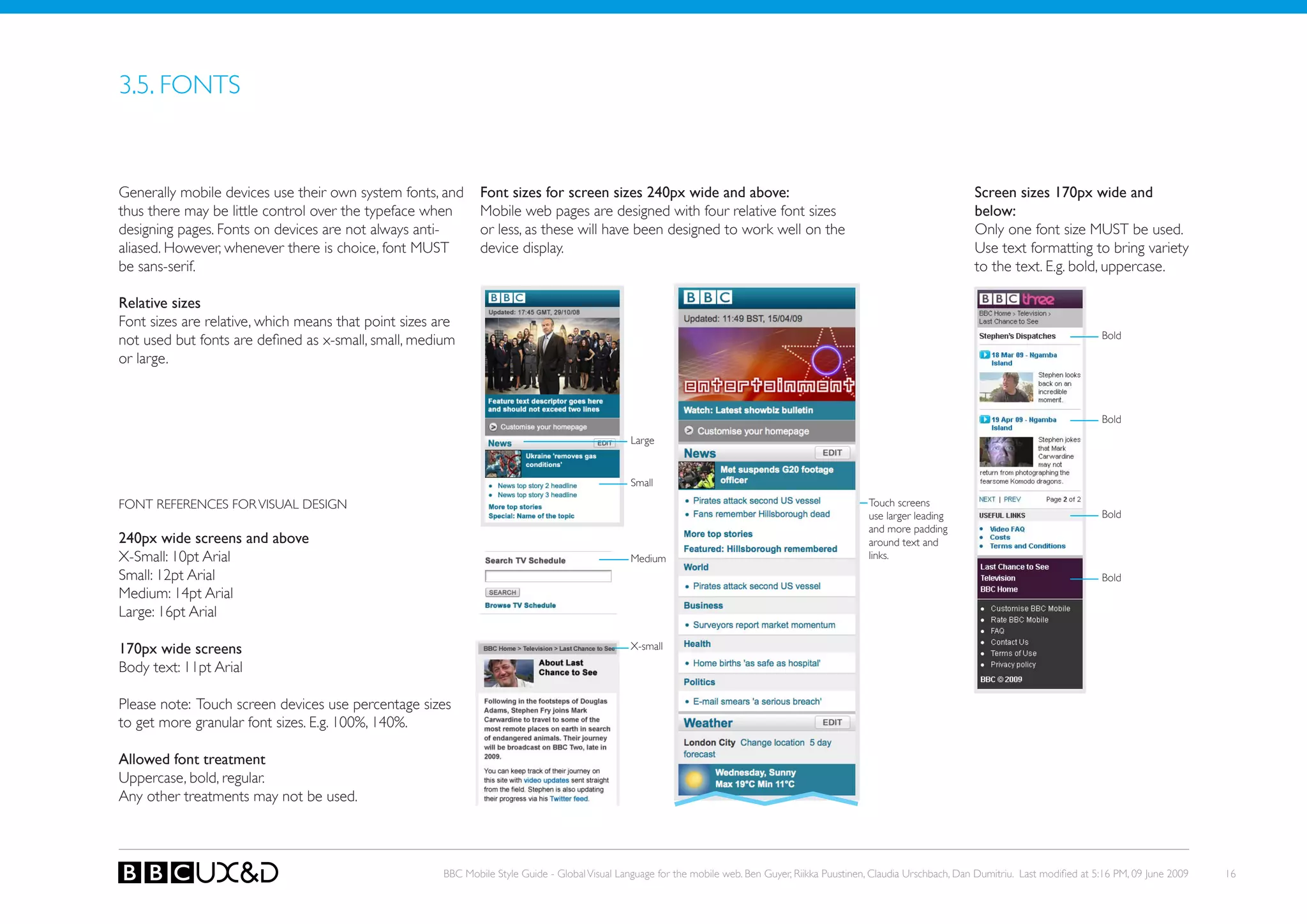
Generally mobile devices use their own system fonts, and       Font sizes for screen sizes 240px wide and above:                                                              Screen sizes 170px wide and
thus there may be little control over the typeface when        Mobile web pages are designed with four relative font sizes                                                    below:
designing pages. Fonts on devices are not always anti-         or less, as these will have been designed to work well on the                                                  only one font size MUST be used.
aliased. However, whenever there is choice, font MUST          device display.                                                                                                Use text formatting to bring variety
be sans-serif.                                                                                                                                                                to the text. E.g. bold, uppercase.

Relative sizes
Font sizes are relative, which means that point sizes are
                                                                                                                                                                                                           Bold
not used but fonts are defined as x-small, small, medium
or large.


                                                                                                                                                                                                           Bold
                                                                                                 Large


                                                                                                 small

FoNT REFERENCES FoR VISUAL DESIGN                                                                                                                     touch screens
                                                                                                                                                      use larger leading                                   Bold
                                                                                                                                                      and more padding
240px wide screens and above                                                                                                                          around text and
X-Small: 10pt Arial                                                                              Medium                                               links.
Small: 12pt Arial                                                                                                                                                                                          Bold
Medium: 14pt Arial
Large: 16pt Arial

170px wide screens                                                                               X-small

Body text: 11pt Arial

Please note: Touch screen devices use percentage sizes
to get more granular font sizes. E.g. 100%, 140%.

Allowed font treatment
Uppercase, bold, regular.
Any other treatments may not be used.


                                                       BBC Mobile Style Guide - Global Visual Language for the mobile web. Ben Guyer, Riikka Puustinen, Claudia Urschbach, Dan Dumitriu. Last modified at 5:16 PM, 09 June 2009   16
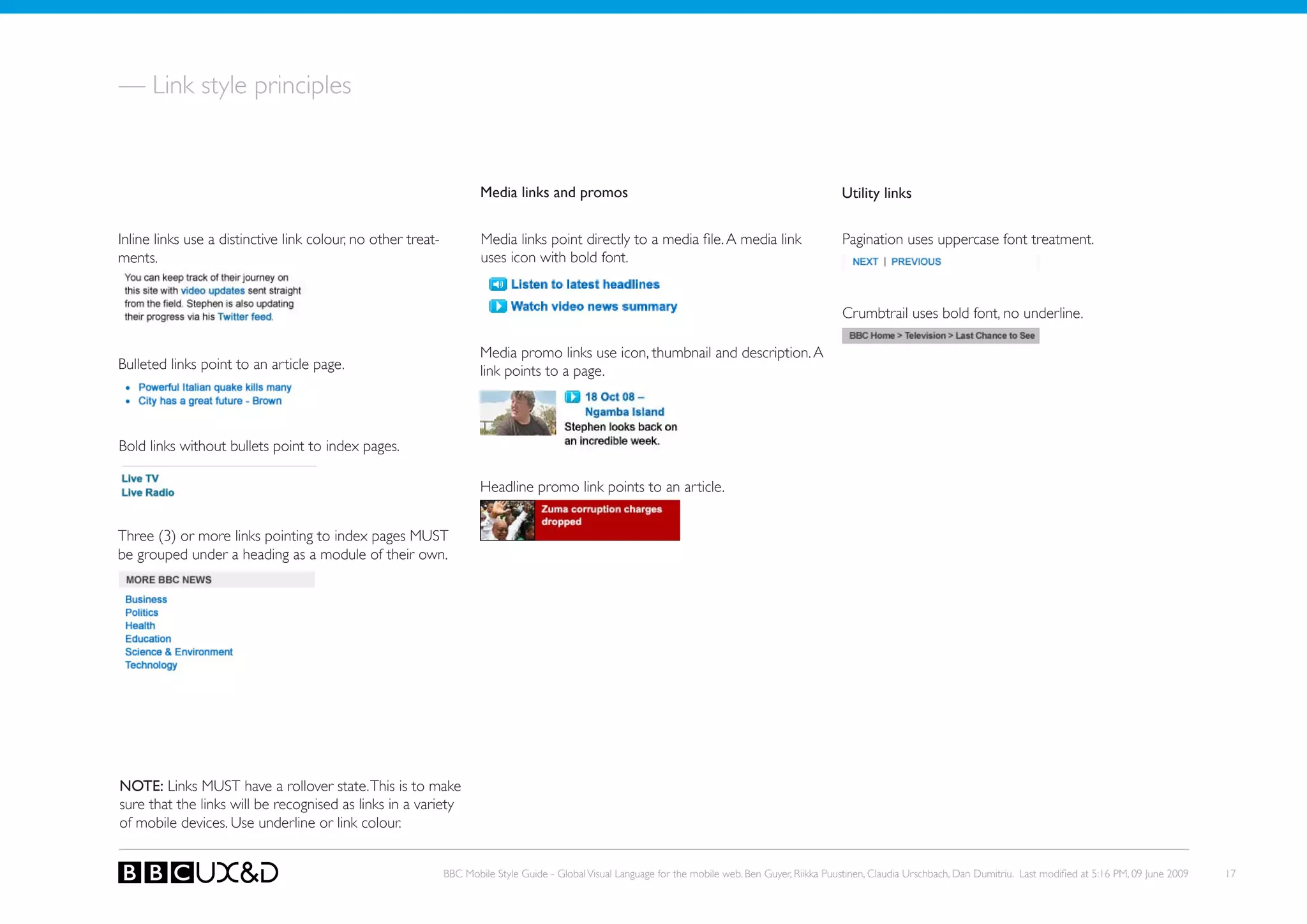
— Link style principles


                                                                      Media links and promos                                                           utility links


Inline links use a distinctive link colour, no other treat-           Media links point directly to a media file. A media link                         Pagination uses uppercase font treatment.
ments.                                                                uses icon with bold font.


                                                                                                                                                       Crumbtrail uses bold font, no underline.

                                                                      Media promo links use icon, thumbnail and description. A
Bulleted links point to an article page.                              link points to a page.


Bold links without bullets point to index pages.

                                                                      Headline promo link points to an article.


Three (3) or more links pointing to index pages MUST
be grouped under a heading as a module of their own.


NOTE: Links MUST have a rollover state. This is to make
sure that the links will be recognised as links in a variety
of mobile devices. Use underline or link colour.


                                                              BBC Mobile Style Guide - Global Visual Language for the mobile web. Ben Guyer, Riikka Puustinen, Claudia Urschbach, Dan Dumitriu. Last modified at 5:16 PM, 09 June 2009   17
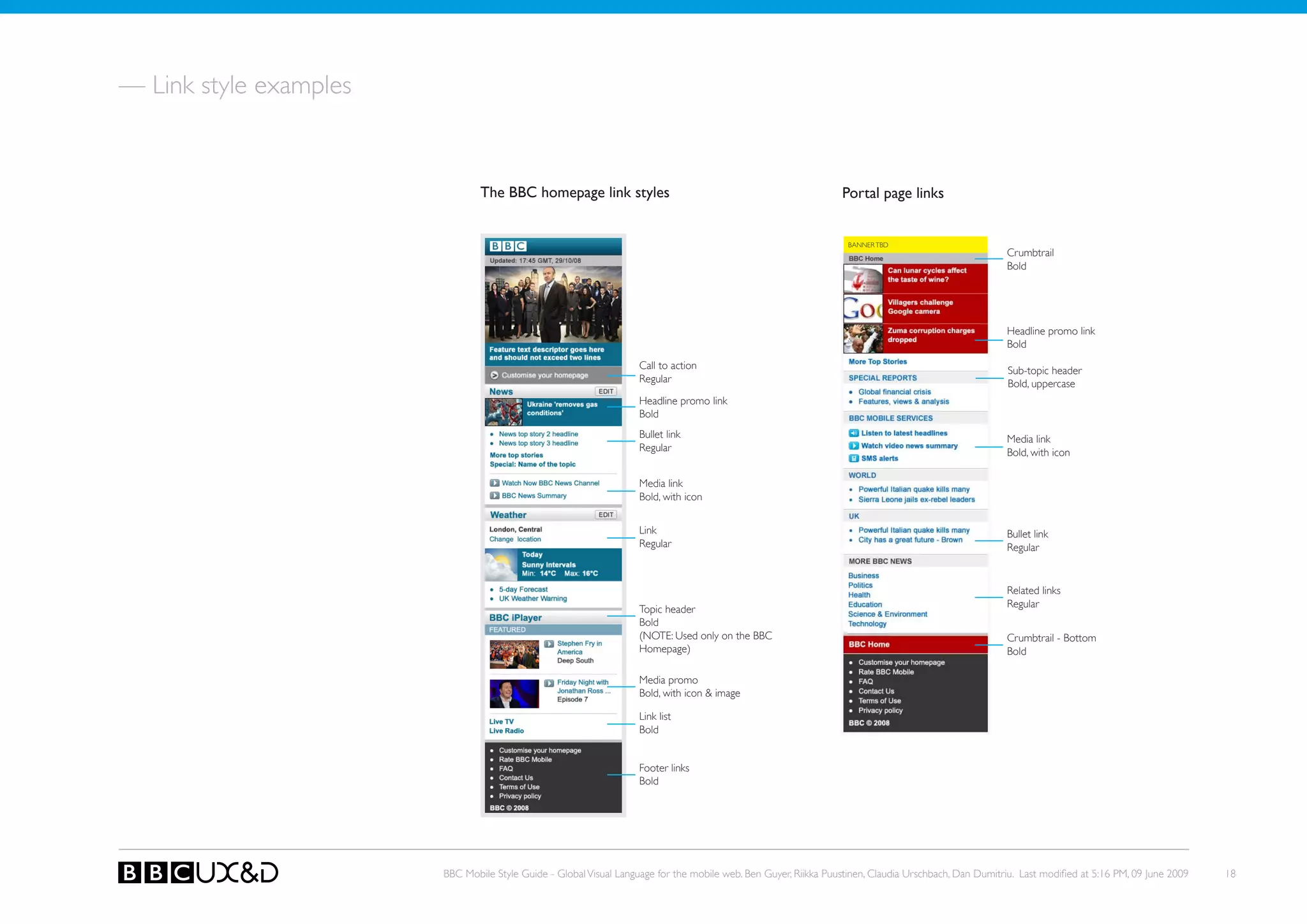
— Link style examples


                                The BBC homepage link styles                                                     Portal page links


                                                                                                                   BANNER TBD
                                                                                                                                                       Crumbtrail
                                                                                                                                                       Bold


                                                                                                                                                       Headline promo link
                                                                                                                                                       Bold
                                                                    Call to action                                                                     Sub-topic header
                                                                    Regular                                                                            Bold, uppercase
                                                                    Headline promo link
                                                                    Bold
                                                                    Bullet link                                                                        Media link
                                                                    Regular                                                                            Bold, with icon

                                                                    Media link
                                                                    Bold, with icon


                                                                    Link                                                                               Bullet link
                                                                    Regular                                                                            Regular


                                                                                                                                                       Related links
                                                                                                                                                       Regular
                                                                    Topic header
                                                                    Bold
                                                                    (NoTE: Used only on the BBC                                                        Crumbtrail - Bottom
                                                                    Homepage)                                                                          Bold

                                                                    Media promo
                                                                    Bold, with icon & image

                                                                    Link list
                                                                    Bold


                                                                    Footer links
                                                                    Bold


                        BBC Mobile Style Guide - Global Visual Language for the mobile web. Ben Guyer, Riikka Puustinen, Claudia Urschbach, Dan Dumitriu. Last modified at 5:16 PM, 09 June 2009   18
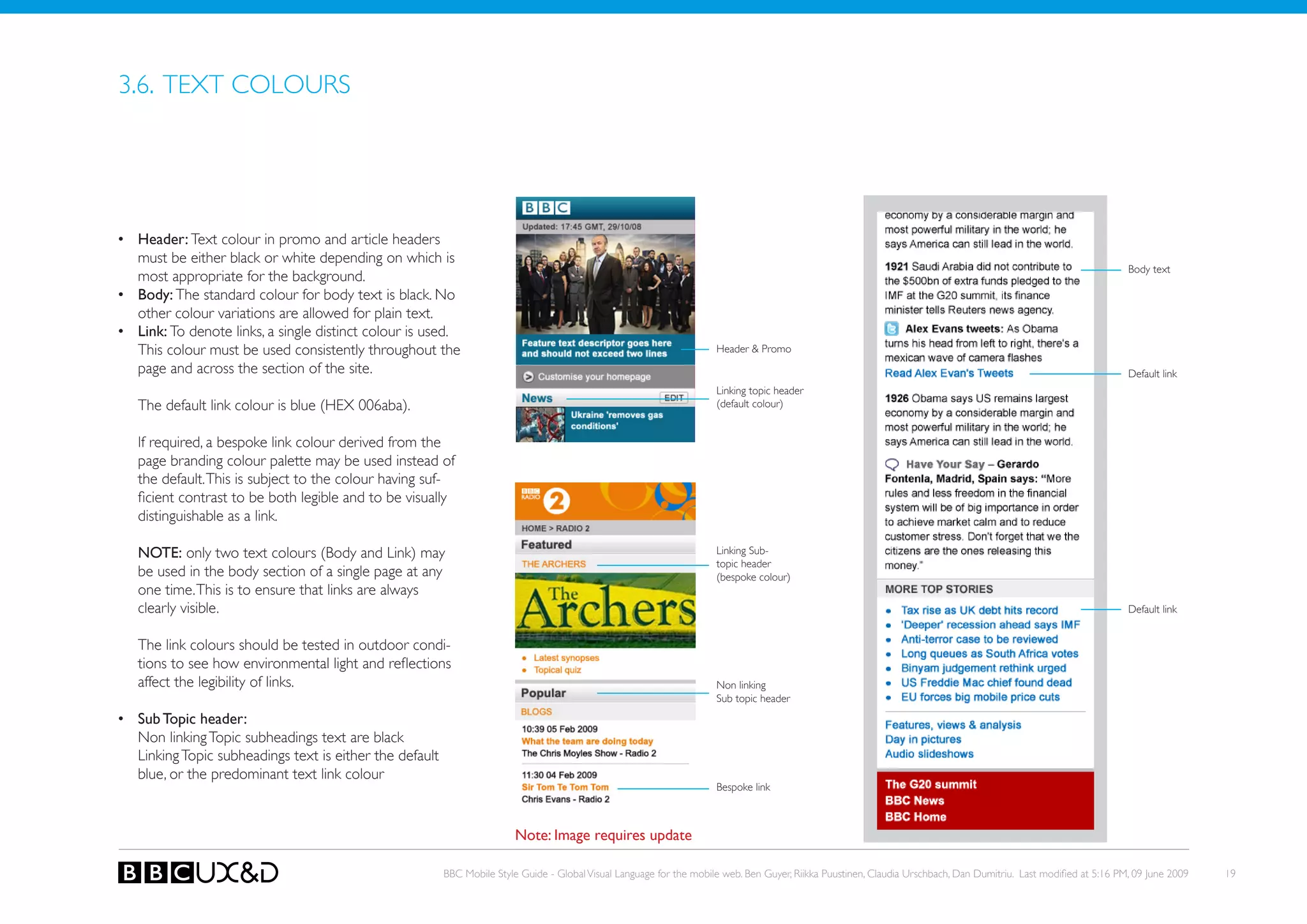
3.6. TEXT CoLoURS


•	 header: Text colour in promo and article headers
   must be either black or white depending on which is
                                                                                                                                                                                                                    Body text
   most appropriate for the background.
•	 Body: The standard colour for body text is black. No
   other colour variations are allowed for plain text.
•	 Link: to denote links, a single distinct colour is used.
   this colour must be used consistently throughout the                                                                Header & Promo
   page and across the section of the site.                                                                                                                                                                         Default link
                                                                                                                       Linking topic header
   The default link colour is blue (HEX 006aba).                                                                       (default colour)


   If required, a bespoke link colour derived from the
   page branding colour palette may be used instead of
   the default. This is subject to the colour having suf-
   ficient contrast to be both legible and to be visually
   distinguishable as a link.

   NOTE: only two text colours (Body and Link) may                                                                     Linking sub-
                                                                                                                       topic header
   be used in the body section of a single page at any                                                                 (bespoke colour)
   one time. this is to ensure that links are always
   clearly visible.                                                                                                                                                                                                 Default link


   the link colours should be tested in outdoor condi-
   tions to see how environmental light and reflections
   affect the legibility of links.                                                                                     non linking
                                                                                                                       Sub topic header
•	 Sub Topic header:
   Non linking Topic subheadings text are black
   Linking Topic subheadings text is either the default
   blue, or the predominant text link colour
                                                                                                                       Bespoke link


                                                                          Note: Image requires update

                                                          BBC Mobile Style Guide - Global Visual Language for the mobile web. Ben Guyer, Riikka Puustinen, Claudia Urschbach, Dan Dumitriu. Last modified at 5:16 PM, 09 June 2009   19
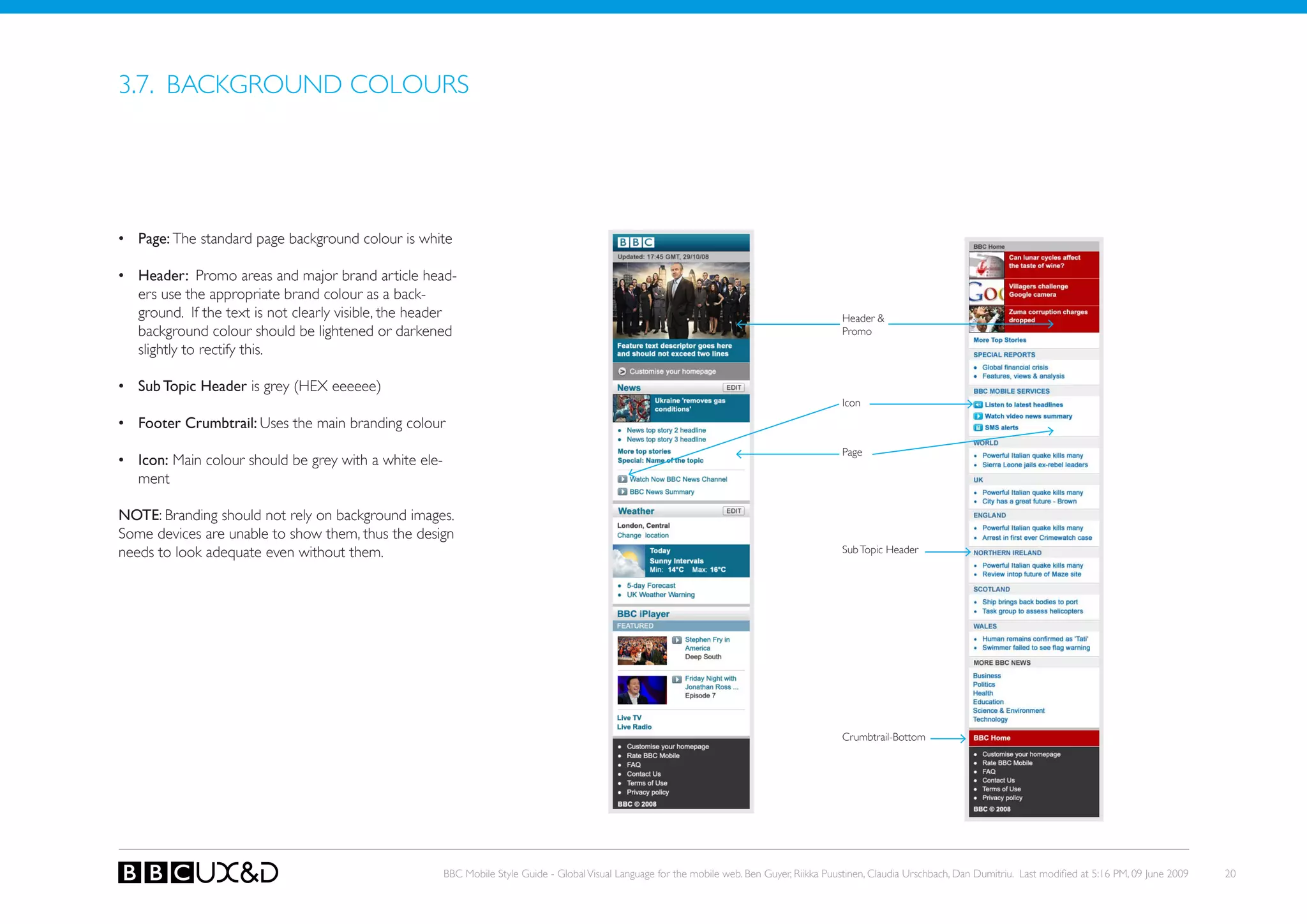
3.7. BACkGRoUND CoLoURS


•	 Page: The standard page background colour is white

•	 header: Promo areas and major brand article head-
   ers use the appropriate brand colour as a back-
   ground. If the text is not clearly visible, the header                                                                                        Header &
   background colour should be lightened or darkened                                                                                             Promo
   slightly to rectify this.

•	 Sub Topic header is grey (HEX eeeeee)
                                                                                                                                                 Icon
•	 Footer Crumbtrail: Uses the main branding colour
                                                                                                                                                 Page
•	 Icon: Main colour should be grey with a white ele-
   ment

NOTE: Branding should not rely on background images.
Some devices are unable to show them, thus the design
needs to look adequate even without them.                                                                                                        Sub Topic Header


                                                                                                                                                 Crumbtrail-Bottom


                                                        BBC Mobile Style Guide - Global Visual Language for the mobile web. Ben Guyer, Riikka Puustinen, Claudia Urschbach, Dan Dumitriu. Last modified at 5:16 PM, 09 June 2009   20
3.8. BRANDING


Header element
- Generic BBC
- Branded (channel)
- Programme / event specific branding


                                                  IN PROGRESS


                                        BBC Mobile Style Guide - Global Visual Language for the mobile web. Ben Guyer, Riikka Puustinen, Claudia Urschbach, Dan Dumitriu. Last modified at 5:16 PM, 09 June 2009   21
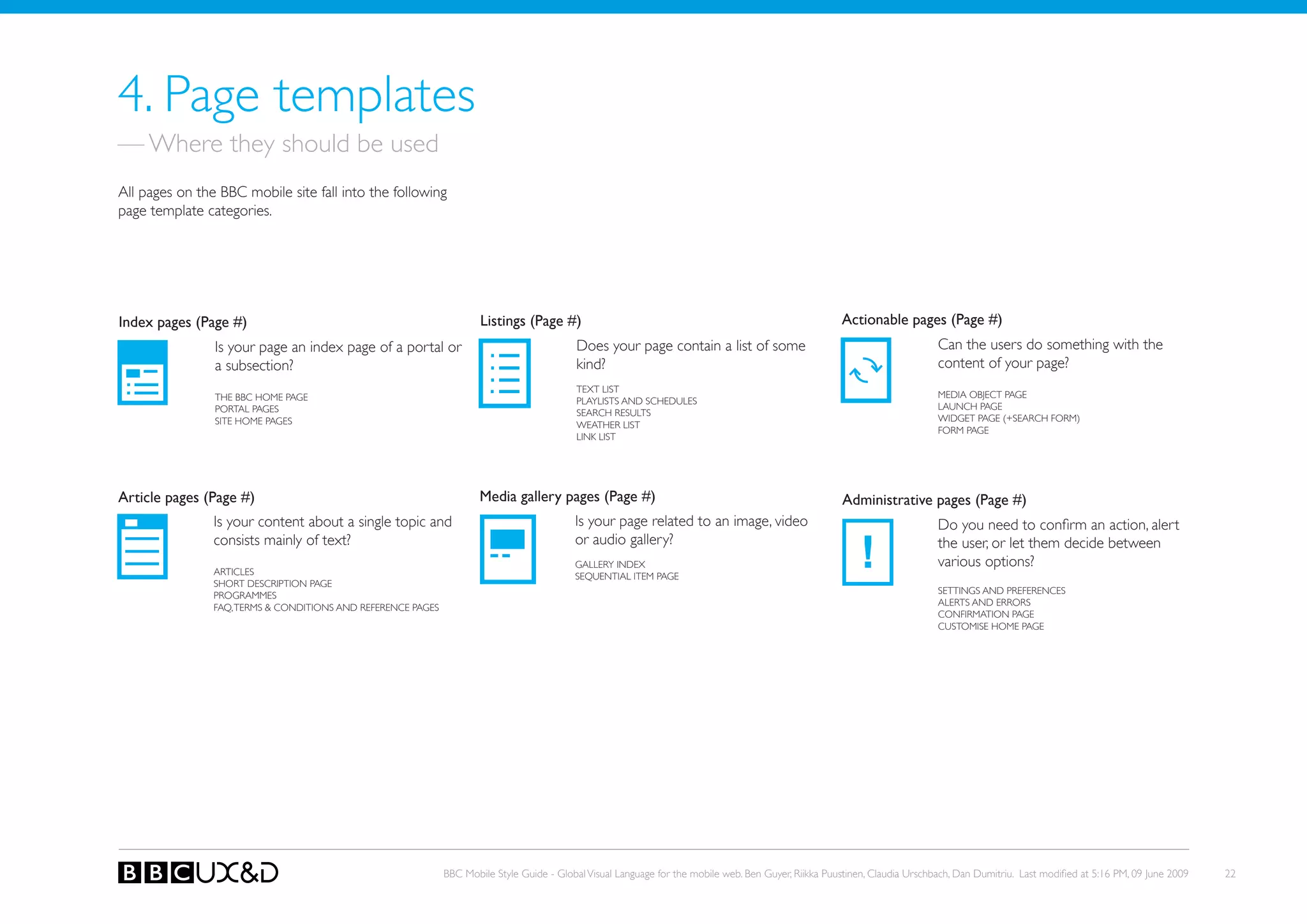
4. Page templates
— Where they should be used
All pages on the BBC mobile site fall into the following
page template categories.


Index pages (Page #)                                                  Listings (Page #)                                                                Actionable pages (Page #)
                Is your page an index page of a portal or                                  Does your page contain a list of some                                             Can the users do something with the
                a subsection?                                                              kind?                                                                             content of your page?
                                                                                           TEXT LIST
                THE BBC HoME PAGE                                                                                                                                            MEDIA oBJECT PAGE
                                                                                           PLAyLISTS AND SCHEDULES
                PoRTAL PAGES                                                                                                                                                 LAUNCH PAGE
                                                                                           SEARCH RESULTS
                SITE HoME PAGES                                                                                                                                              WIDGET PAGE (+SEARCH FoRM)
                                                                                           WEATHER LIST
                                                                                                                                                                             FoRM PAGE
                                                                                           LINk LIST


Article pages (Page #)                                                Media gallery pages (Page #)                                                     Administrative pages (Page #)
                Is your content about a single topic and                                   Is your page related to an image, video                                           Do you need to confirm an action, alert

                                                                                                                                                            !
                consists mainly of text?                                                   or audio gallery?                                                                 the user, or let them decide between
                                                                                           GALLERy INDEX                                                                     various options?
                ARTICLES                                                                   SEQUENTIAL ITEM PAGE
                SHoRT DESCRIPTIoN PAGE
                PRoGRAMMES                                                                                                                                                   SETTINGS AND PREFERENCES
                FAQ, TERMS & CoNDITIoNS AND REFERENCE PAGES                                                                                                                  ALERTS AND ERRoRS
                                                                                                                                                                             CoNFIRMATIoN PAGE
                                                                                                                                                                             CUSToMISE HoME PAGE


                                                              BBC Mobile Style Guide - Global Visual Language for the mobile web. Ben Guyer, Riikka Puustinen, Claudia Urschbach, Dan Dumitriu. Last modified at 5:16 PM, 09 June 2009   22
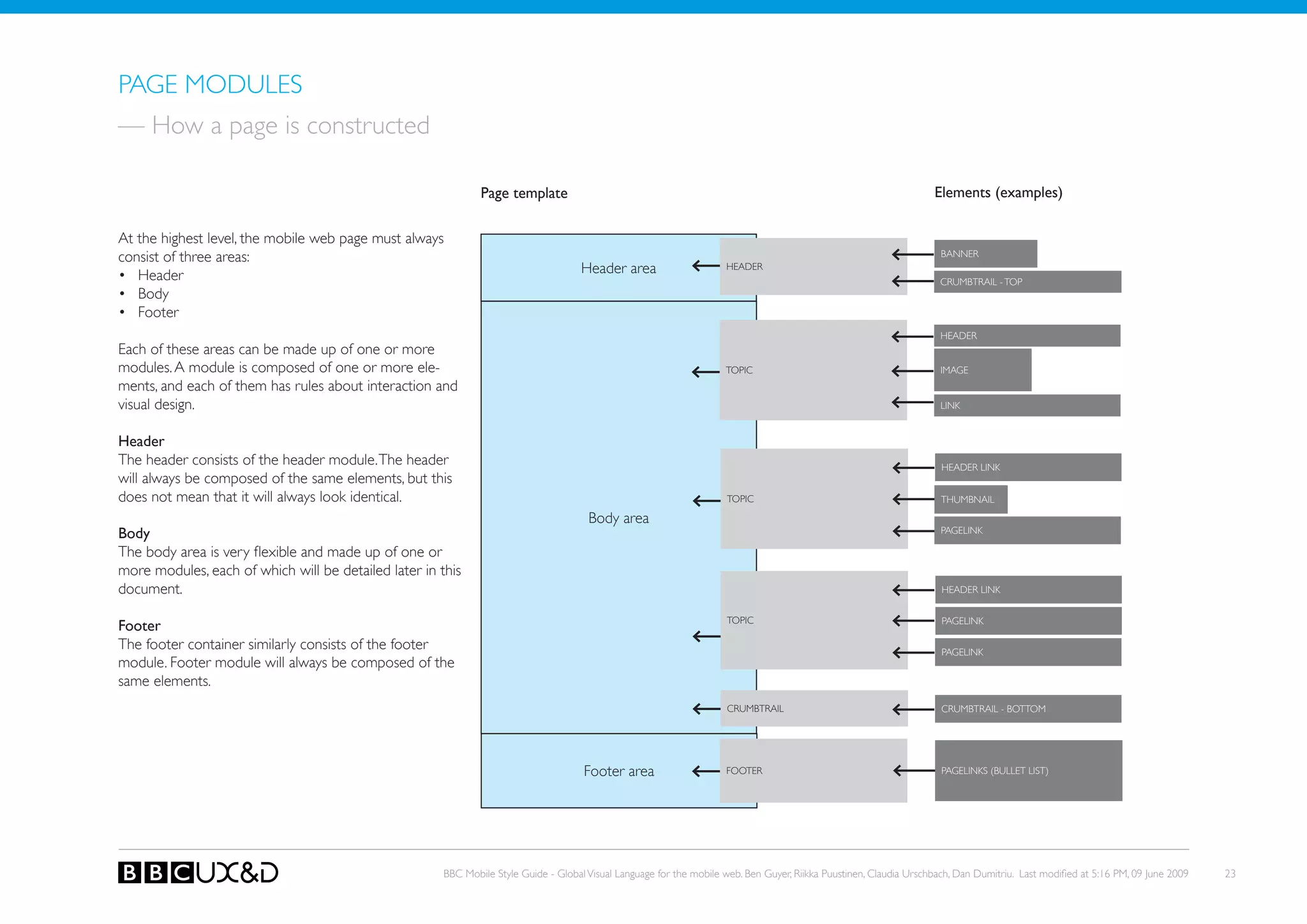
PAGE MoDULES
— How a page is constructed

                                                               Page template                                                                                         Elements (examples)

At the highest level, the mobile web page must always
consist of three areas:                                                                                                                                                BANNER

• Header                                                                              Header area                     HEADER
                                                                                                                                                                      CRUMBTRAIL - ToP
• Body
• Footer
                                                                                                                                                                       HEADER
Each of these areas can be made up of one or more
modules. A module is composed of one or more ele-                                                                     ToPIC                                            IMAGE
ments, and each of them has rules about interaction and
visual design.                                                                                                                                                         LINk


header
the header consists of the header module. the header                                                                                                                   HEADER LINk
will always be composed of the same elements, but this
does not mean that it will always look identical.                                                                     ToPIC                                            THUMBNAIL

                                                                                       Body area
Body                                                                                                                                                                   PAGELINk

The body area is very flexible and made up of one or
more modules, each of which will be detailed later in this
document.                                                                                                                                                              HEADER LINk


                                                                                                                      ToPIC                                            PAGELINk
Footer
the footer container similarly consists of the footer                                                                                                                  PAGELINk
module. Footer module will always be composed of the
same elements.
                                                                                                                      CRUMBTRAIL                                       CRUMBTRAIL - BoTToM


                                                                                      Footer area                     FooteR                                           PAGELINkS (BULLET LIST)


                                                       BBC Mobile Style Guide - Global Visual Language for the mobile web. Ben Guyer, Riikka Puustinen, Claudia Urschbach, Dan Dumitriu. Last modified at 5:16 PM, 09 June 2009   23
4.1. INDEX PAGES


An Index page gives an access to various subsections of
the site.

There are three types of index pages:
• The BBC home page
• Portal pages
• Site index pages


                                                     BBC Mobile Style Guide - Global Visual Language for the mobile web. Ben Guyer, Riikka Puustinen, Claudia Urschbach, Dan Dumitriu. Last modified at 5:16 PM, 09 June 2009   24
Index pages


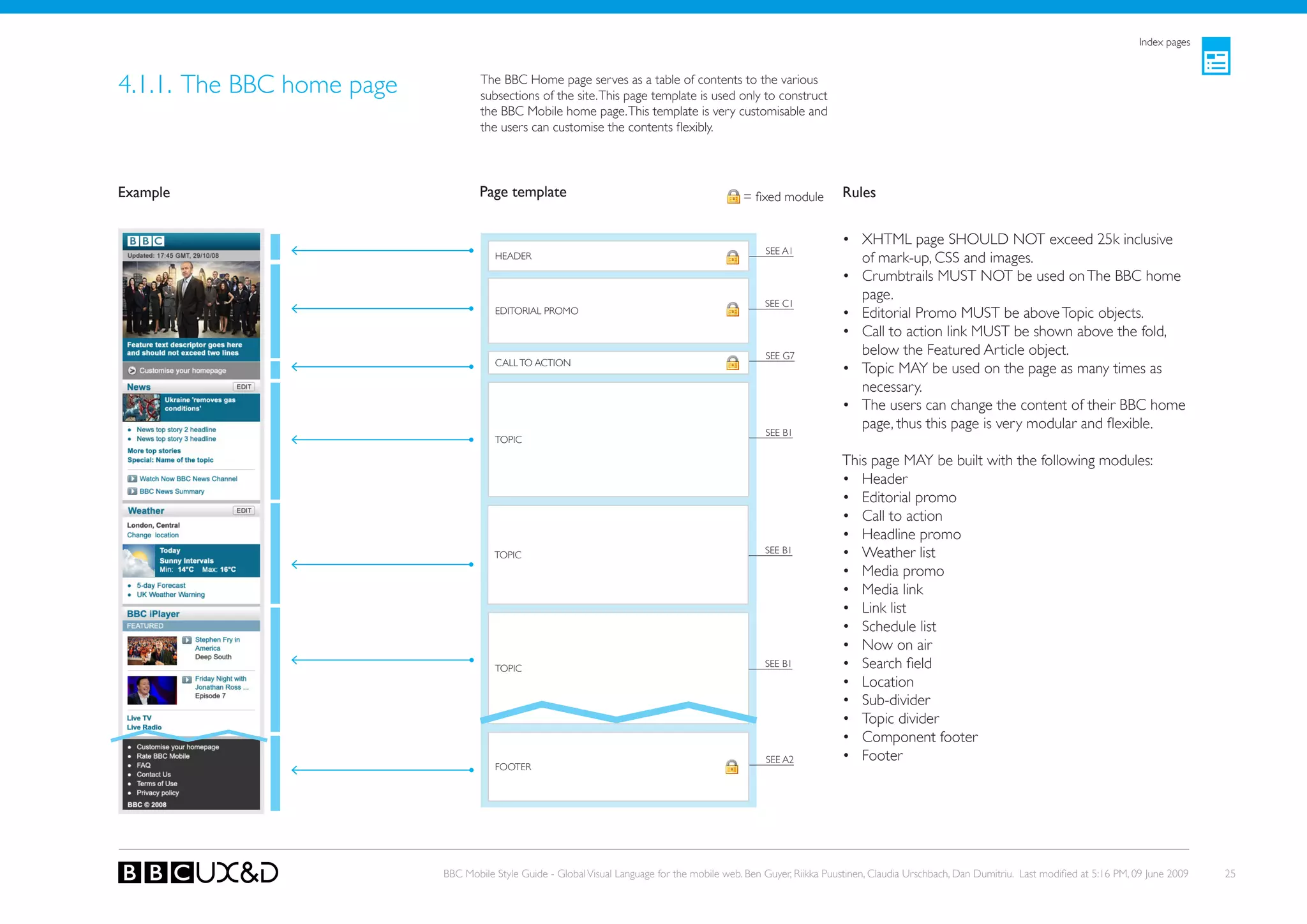
4.1.1. The BBC home page           The BBC Home page serves as a table of contents to the various
                                   subsections of the site. This page template is used only to construct
                                   the BBC Mobile home page. This template is very customisable and
                                   the users can customise the contents flexibly.


Example                            Page template                                              = fixed module        Rules


                                                                                                                    • XHTML page SHoULD NoT exceed 25k inclusive
                                                                                                   SEE A1
                                      HEADER                                                                          of mark-up, CSS and images.
                                                                                                                    • Crumbtrails MUst not be used on the BBC home
                                                                                                                      page.
                                                                                                   SEE C1
                                      EDIToRIAL PRoMo                                                               • Editorial Promo MUST be above Topic objects.
                                                                                                                    • Call to action link MUST be shown above the fold,
                                                                                                   see G7             below the Featured Article object.
                                      CALL To ACTIoN
                                                                                                                    • Topic MAy be used on the page as many times as
                                                                                                                      necessary.
                                                                                                                    • the users can change the content of their BBC home
                                                                                                   SEE B1
                                                                                                                      page, thus this page is very modular and flexible.
                                      ToPIC

                                                                                                                    This page MAy be built with the following modules:
                                                                                                                    • Header
                                                                                                                    • Editorial promo
                                                                                                                    • Call to action
                                                                                                                    • Headline promo
                                      ToPIC                                                        SEE B1           • Weather list
                                                                                                                    • Media promo
                                                                                                                    • Media link
                                                                                                                    • Link list
                                                                                                                    • schedule list
                                                                                                                    • now on air
                                      ToPIC                                                        SEE B1           • Search field
                                                                                                                    • Location
                                                                                                                    • Sub-divider
                                                                                                                    • Topic divider
                                                                                                                    • Component footer
                                                                                                   SEE A2           • Footer
                                      FooteR


                           BBC Mobile Style Guide - Global Visual Language for the mobile web. Ben Guyer, Riikka Puustinen, Claudia Urschbach, Dan Dumitriu. Last modified at 5:16 PM, 09 June 2009   25
Index pages


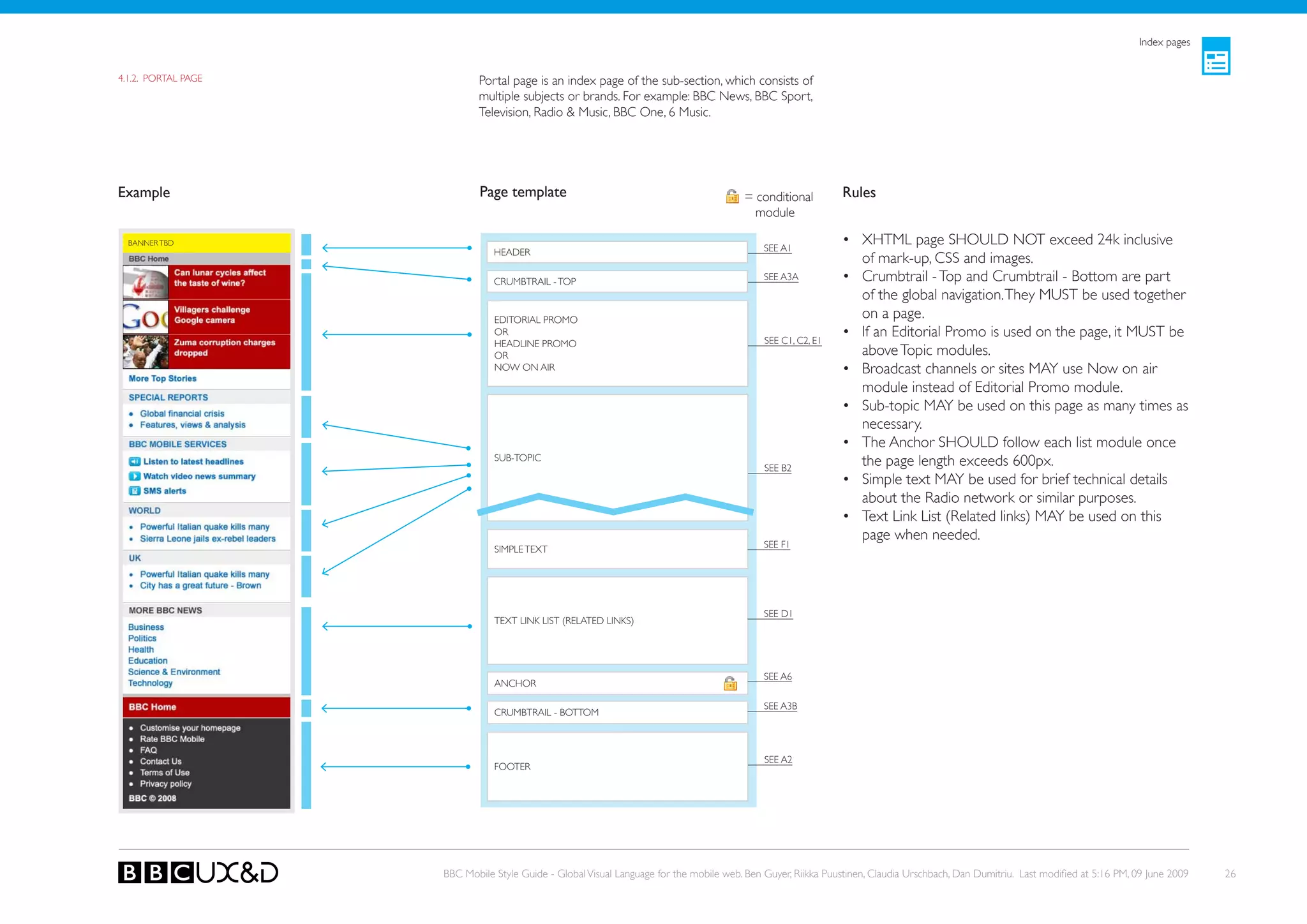
4.1.2. PoRTAL PAGE          Portal page is an index page of the sub-section, which consists of
                            multiple subjects or brands. For example: BBC News, BBC Sport,
                            Television, Radio & Music, BBC one, 6 Music.


Example                      Page template                                              = conditional         Rules
                                                                                          module

  BANNER TBD
                                                                                             SEE A1
                                                                                                              • XHTML page SHoULD NoT exceed 24k inclusive
                                HEADER
                                                                                                                of mark-up, CSS and images.
                                CRUMBTRAIL - ToP                                             SEE A3A          • Crumbtrail - Top and Crumbtrail - Bottom are part
                                                                                                                of the global navigation. They MUST be used together
                                EDIToRIAL PRoMo
                                                                                                                on a page.
                                oR
                                                                                             SEE C1, C2, E1
                                                                                                              • If an Editorial Promo is used on the page, it MUST be
                                HEADLINE PRoMo
                                oR                                                                              above Topic modules.
                                NoW oN AIR                                                                    • Broadcast channels or sites MAy use Now on air
                                                                                                                module instead of editorial Promo module.
                                                                                                              • Sub-topic MAy be used on this page as many times as
                                                                                                                necessary.
                                                                                                              • The Anchor SHoULD follow each list module once
                                SUB-ToPIC
                                                                                             SEE B2
                                                                                                                the page length exceeds 600px.
                                                                                                              • Simple text MAy be used for brief technical details
                                                                                                                about the Radio network or similar purposes.
                                                                                                              • Text Link List (Related links) MAy be used on this
                                                                                                                page when needed.
                                SIMPLE TEXT                                                  SEE F1


                                                                                             SEE D1
                                TEXT LINk LIST (RELATED LINkS)


                                                                                             SEE A6
                                ANCHoR

                                                                                             SEE A3B
                                CRUMBTRAIL - BoTToM


                                                                                             SEE A2
                                FooteR


                     BBC Mobile Style Guide - Global Visual Language for the mobile web. Ben Guyer, Riikka Puustinen, Claudia Urschbach, Dan Dumitriu. Last modified at 5:16 PM, 09 June 2009   26
Index pages


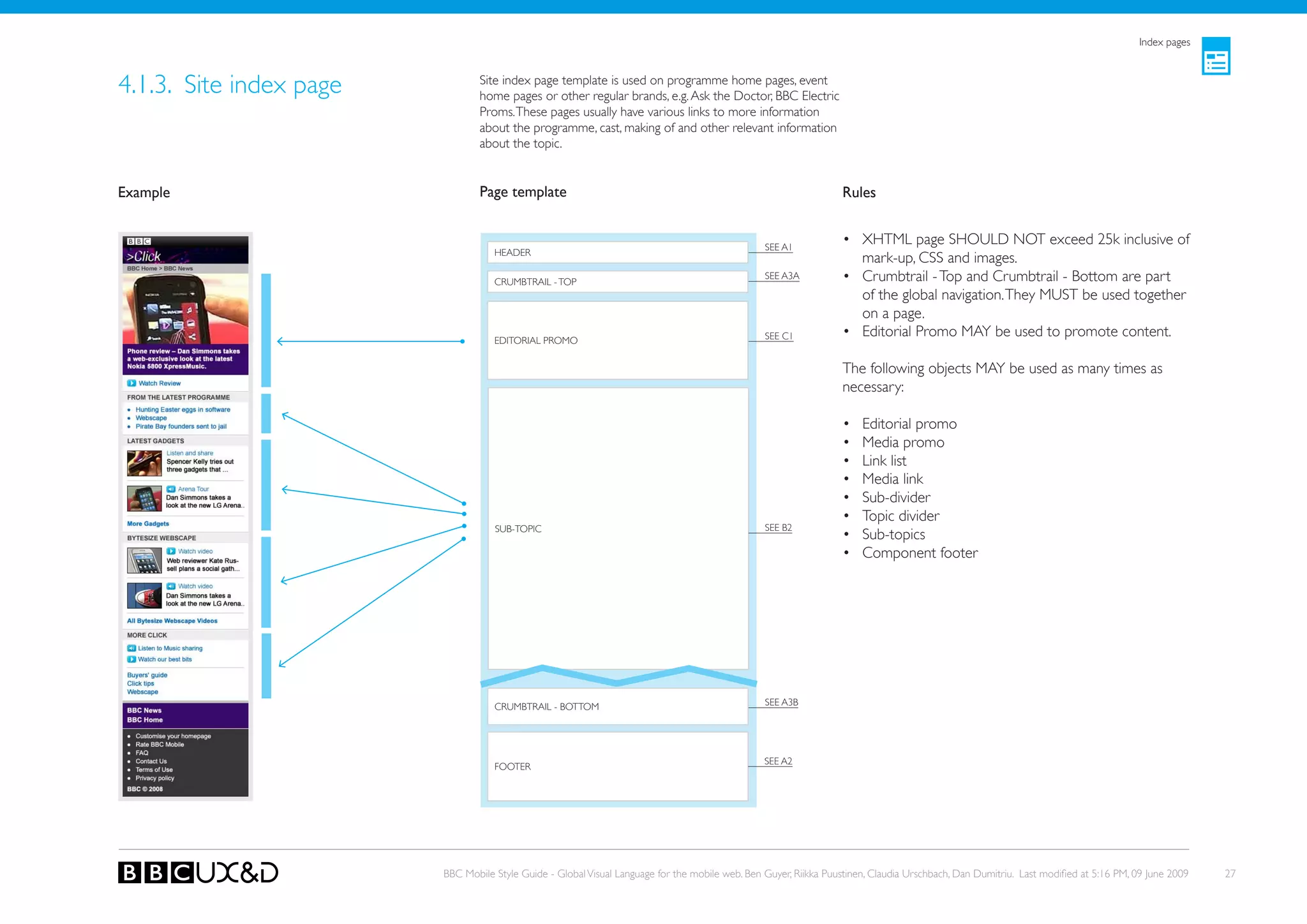
4.1.3. Site index page           Site index page template is used on programme home pages, event
                                 home pages or other regular brands, e.g. Ask the Doctor, BBC Electric
                                 Proms. These pages usually have various links to more information
                                 about the programme, cast, making of and other relevant information
                                 about the topic.


Example                          Page template                                                                    Rules


                                                                                                 SEE A1
                                                                                                                  • XHTML page SHoULD NoT exceed 25k inclusive of
                                    HEADER
                                                                                                                    mark-up, CSS and images.
                                    CRUMBTRAIL - ToP
                                                                                                 SEE A3A          • Crumbtrail - Top and Crumbtrail - Bottom are part
                                                                                                                    of the global navigation. They MUST be used together
                                                                                                                    on a page.
                                    EDIToRIAL PRoMo                                              SEE C1           • Editorial Promo MAy be used to promote content.

                                                                                                                  The following objects MAy be used as many times as
                                                                                                                  necessary:

                                                                                                                  •    Editorial promo
                                                                                                                  •    Media promo
                                                                                                                  •    Link list
                                                                                                                  •    Media link
                                                                                                                  •    Sub-divider
                                                                                                                  •    Topic divider
                                    SUB-ToPIC                                                    SEE B2
                                                                                                                  •    Sub-topics
                                                                                                                  •    Component footer


                                    CRUMBTRAIL - BoTToM                                          SEE A3B


                                                                                                 SEE A2
                                    FooteR


                         BBC Mobile Style Guide - Global Visual Language for the mobile web. Ben Guyer, Riikka Puustinen, Claudia Urschbach, Dan Dumitriu. Last modified at 5:16 PM, 09 June 2009   27
4.2. ARTICLES


There are three types of article templates:
• Article page
• Short description pages
• Programme page


                                              BBC Mobile Style Guide - Global Visual Language for the mobile web. Ben Guyer, Riikka Puustinen, Claudia Urschbach, Dan Dumitriu. Last modified at 5:16 PM, 09 June 2009   28
Articles


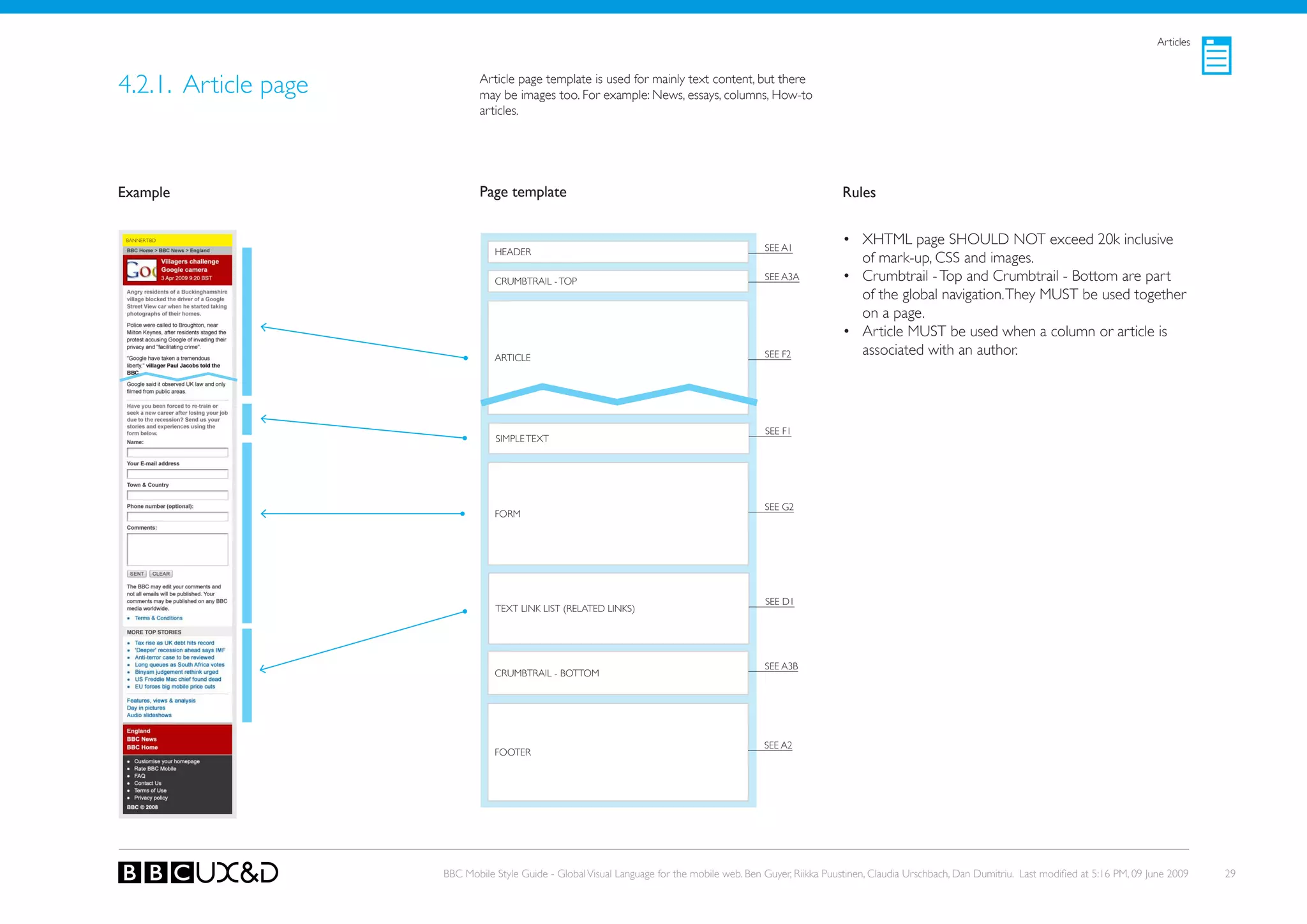
4.2.1. Article page           Article page template is used for mainly text content, but there
                              may be images too. For example: News, essays, columns, How-to
                              articles.


Example                       Page template                                                                    Rules

 BANNER TBD
                                                                                              SEE A1
                                                                                                               • XHTML page SHoULD NoT exceed 20k inclusive
                                 HEADER
                                                                                                                 of mark-up, CSS and images.
                                 CRUMBTRAIL - ToP                                             SEE A3A          • Crumbtrail - Top and Crumbtrail - Bottom are part
                                                                                                                 of the global navigation. They MUST be used together
                                                                                                                 on a page.
                                                                                                               • Article MUST be used when a column or article is
                                 ARTICLE                                                      SEE F2             associated with an author.


                                                                                              SEE F1
                                 SIMPLE TEXT


                                                                                              SEE G2
                                 FoRM


                                                                                              SEE D1
                                 TEXT LINk LIST (RELATED LINkS)


                                                                                              SEE A3B
                                 CRUMBTRAIL - BoTToM


                                                                                              SEE A2
                                 FooteR


                      BBC Mobile Style Guide - Global Visual Language for the mobile web. Ben Guyer, Riikka Puustinen, Claudia Urschbach, Dan Dumitriu. Last modified at 5:16 PM, 09 June 2009   29
Articles


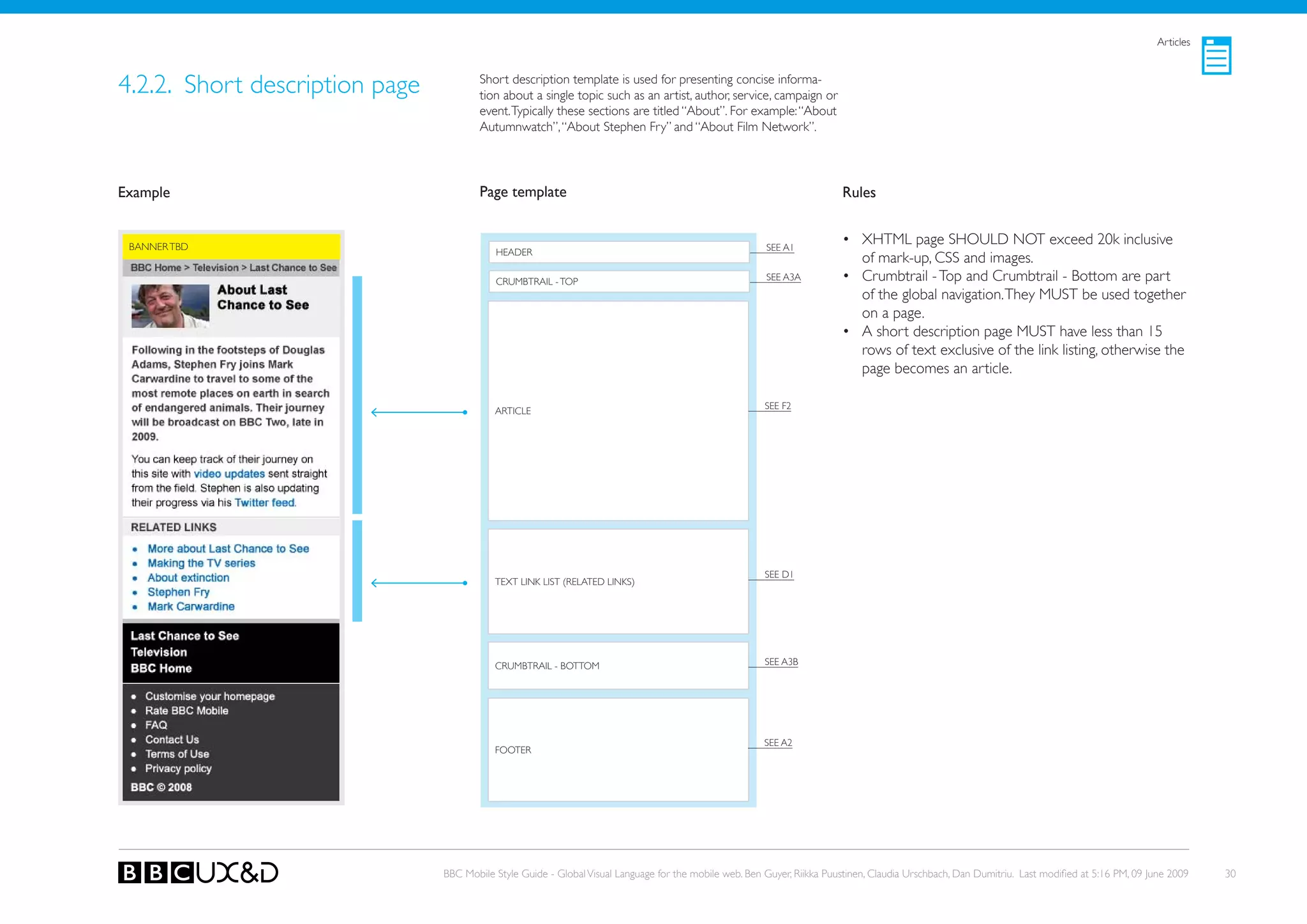
4.2.2. Short description page           Short description template is used for presenting concise informa-
                                        tion about a single topic such as an artist, author, service, campaign or
                                        event. Typically these sections are titled “About”. For example: “About
                                        Autumnwatch”, “About Stephen Fry” and “About Film Network”.


Example                                 Page template                                                                    Rules


 BANNER TBD                                                                                             SEE A1
                                                                                                                         • XHTML page SHoULD NoT exceed 20k inclusive
                                           HEADER
                                                                                                                           of mark-up, CSS and images.
                                           CRUMBTRAIL - ToP                                             SEE A3A          • Crumbtrail - Top and Crumbtrail - Bottom are part
                                                                                                                           of the global navigation. They MUST be used together
                                                                                                                           on a page.
                                                                                                                         • A short description page MUST have less than 15
                                                                                                                           rows of text exclusive of the link listing, otherwise the
                                                                                                                           page becomes an article.

                                                                                                        SEE F2
                                           ARTICLE


                                                                                                        SEE D1
                                           TEXT LINk LIST (RELATED LINkS)


                                           CRUMBTRAIL - BoTToM                                          SEE A3B


                                                                                                        SEE A2
                                           FooteR


                                BBC Mobile Style Guide - Global Visual Language for the mobile web. Ben Guyer, Riikka Puustinen, Claudia Urschbach, Dan Dumitriu. Last modified at 5:16 PM, 09 June 2009   30
Articles


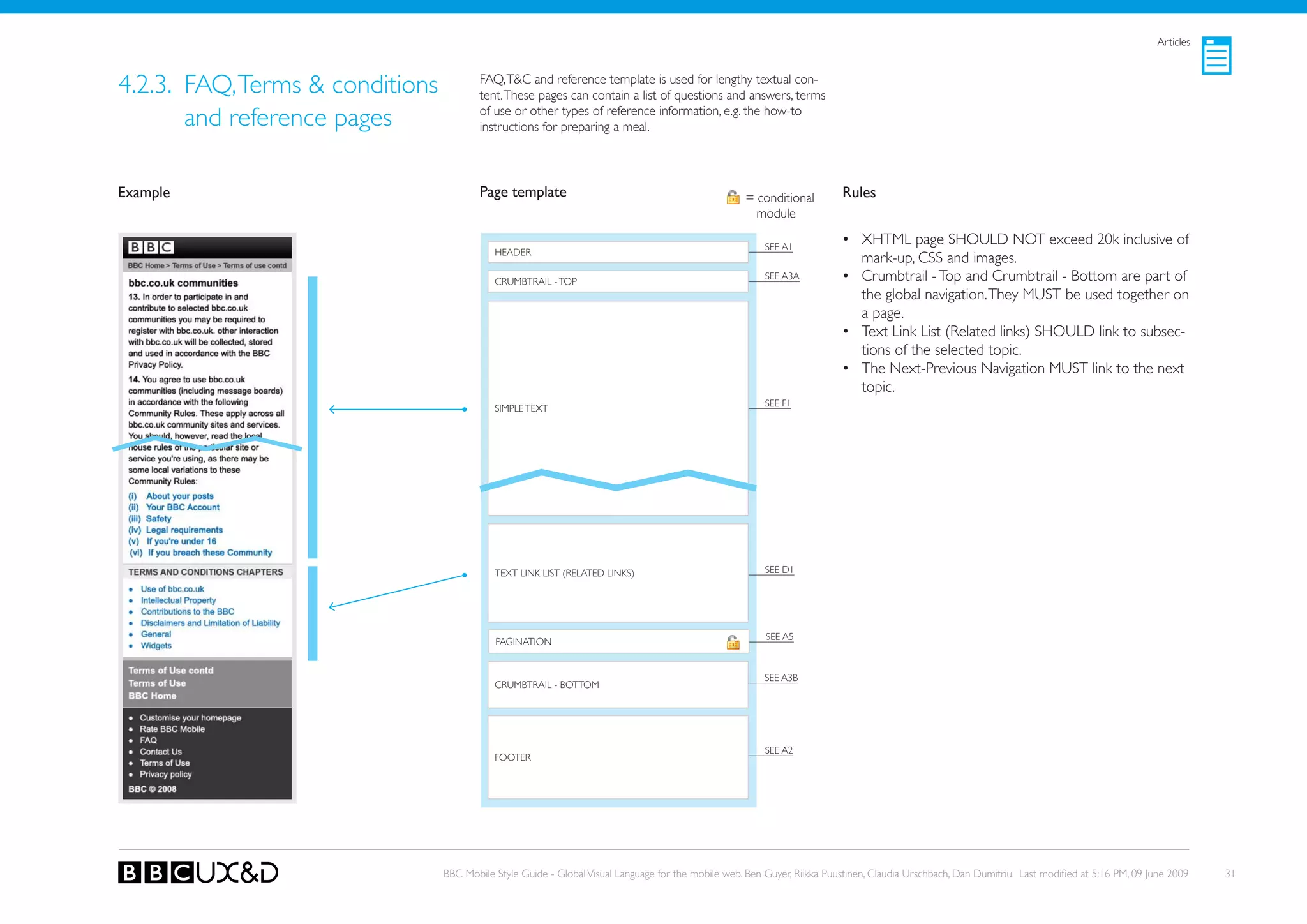
4.2.3. FAQ, Terms & conditions           FAQ, T&C and reference template is used for lengthy textual con-
                                         tent. These pages can contain a list of questions and answers, terms

       and reference pages               of use or other types of reference information, e.g. the how-to
                                         instructions for preparing a meal.


Example                                  Page template                                               = conditional        Rules
                                                                                                       module

                                                                                                         SEE A1
                                                                                                                          • XHTML page SHoULD NoT exceed 20k inclusive of
                                            HEADER
                                                                                                                            mark-up, CSS and images.
                                            CRUMBTRAIL - ToP
                                                                                                         SEE A3A          • Crumbtrail - Top and Crumbtrail - Bottom are part of
                                                                                                                            the global navigation. They MUST be used together on
                                                                                                                            a page.
                                                                                                                          • Text Link List (Related links) SHoULD link to subsec-
                                                                                                                            tions of the selected topic.
                                                                                                                          • The Next-Previous Navigation MUST link to the next
                                                                                                                            topic.
                                                                                                         SEE F1
                                            SIMPLE TEXT


                                            TEXT LINk LIST (RELATED LINkS)                               SEE D1


                                                                                                         SEE A5
                                            PAGINATIoN


                                                                                                         SEE A3B
                                            CRUMBTRAIL - BoTToM


                                                                                                         SEE A2
                                            FooteR


                                 BBC Mobile Style Guide - Global Visual Language for the mobile web. Ben Guyer, Riikka Puustinen, Claudia Urschbach, Dan Dumitriu. Last modified at 5:16 PM, 09 June 2009   31
Articles


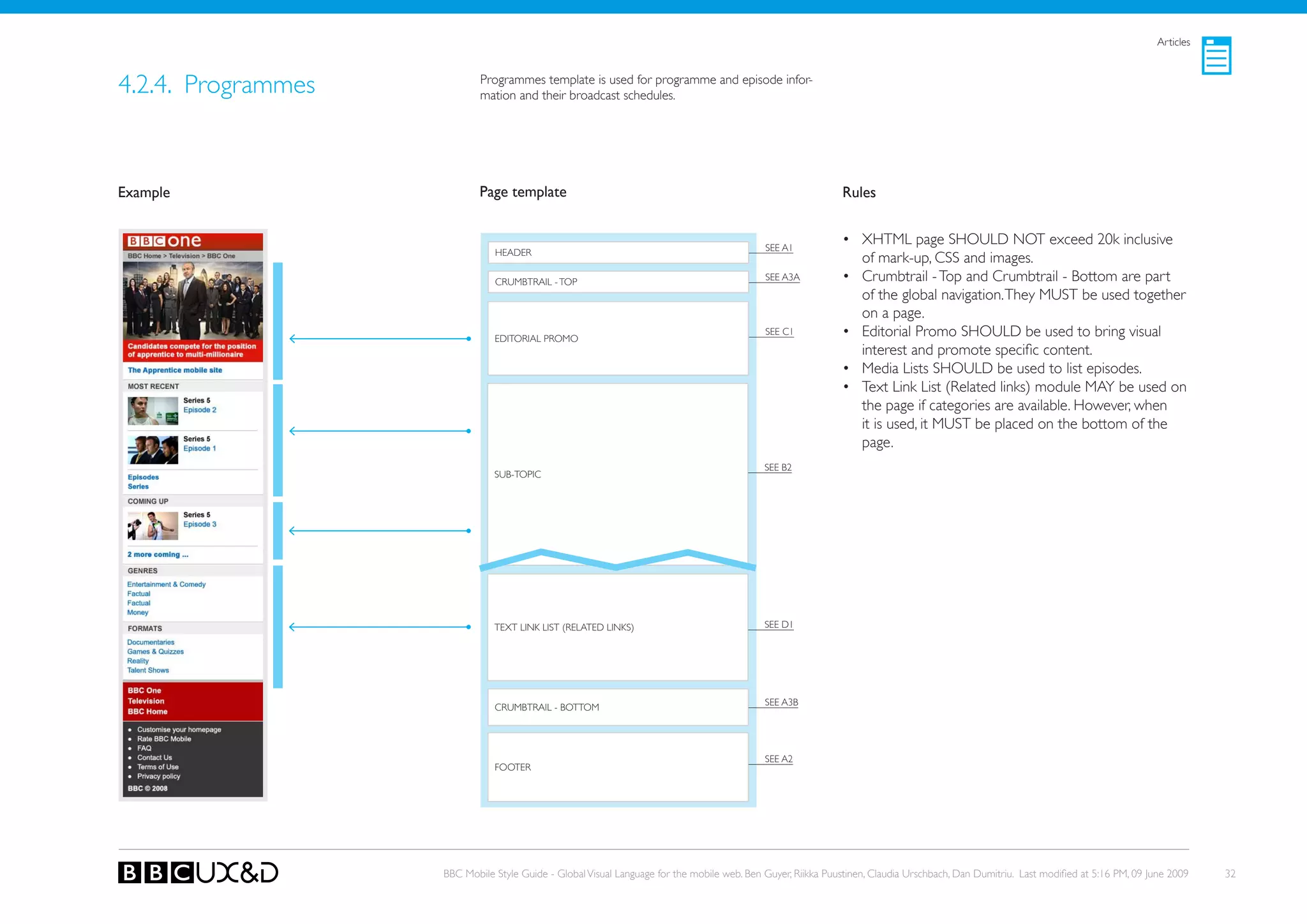
4.2.4. Programmes           Programmes template is used for programme and episode infor-
                            mation and their broadcast schedules.


Example                     Page template                                                                    Rules


                                                                                            SEE A1
                                                                                                             • XHTML page SHoULD NoT exceed 20k inclusive
                               HEADER
                                                                                                               of mark-up, CSS and images.
                               CRUMBTRAIL - ToP                                             SEE A3A          • Crumbtrail - Top and Crumbtrail - Bottom are part
                                                                                                               of the global navigation. They MUST be used together
                                                                                                               on a page.
                               EDIToRIAL PRoMo
                                                                                            SEE C1           • Editorial Promo SHoULD be used to bring visual
                                                                                                               interest and promote specific content.
                                                                                                             • Media Lists SHoULD be used to list episodes.
                                                                                                             • Text Link List (Related links) module MAy be used on
                                                                                                               the page if categories are available. However, when
                                                                                                               it is used, it MUST be placed on the bottom of the
                                                                                                               page.
                                                                                            SEE B2
                               SUB-ToPIC


                               TEXT LINk LIST (RELATED LINkS)                               SEE D1


                                                                                            SEE A3B
                               CRUMBTRAIL - BoTToM


                                                                                            SEE A2
                               FooteR


                    BBC Mobile Style Guide - Global Visual Language for the mobile web. Ben Guyer, Riikka Puustinen, Claudia Urschbach, Dan Dumitriu. Last modified at 5:16 PM, 09 June 2009   32
4.3. LISTINGS


There are various types of list page templates:

•   Text list
•   Playlists and schedules
•   Asset / media list
•   search results
•   Sports results
•   Weather list
•   Link list


                                                  BBC Mobile Style Guide - Global Visual Language for the mobile web. Ben Guyer, Riikka Puustinen, Claudia Urschbach, Dan Dumitriu. Last modified at 5:16 PM, 09 June 2009   33
Listings


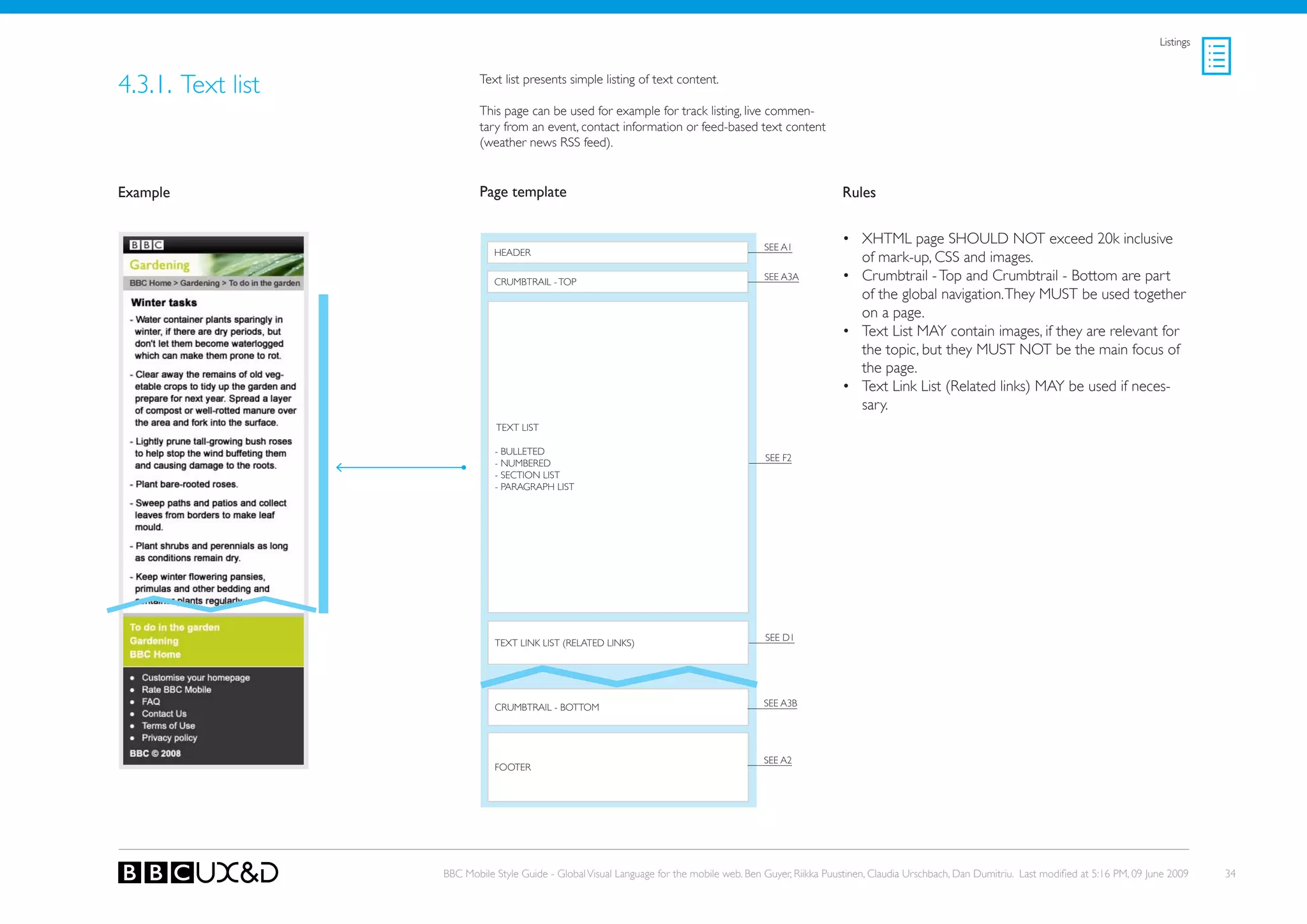
4.3.1. Text list           Text list presents simple listing of text content.

                           This page can be used for example for track listing, live commen-
                           tary from an event, contact information or feed-based text content
                           (weather news RSS feed).


Example                    Page template                                                                    Rules


                                                                                           SEE A1
                                                                                                            • XHTML page SHoULD NoT exceed 20k inclusive
                              HEADER
                                                                                                              of mark-up, CSS and images.
                              CRUMBTRAIL - ToP
                                                                                           SEE A3A          • Crumbtrail - Top and Crumbtrail - Bottom are part
                                                                                                              of the global navigation. They MUST be used together
                                                                                                              on a page.
                                                                                                            • Text List MAy contain images, if they are relevant for
                                                                                                              the topic, but they MUST NoT be the main focus of
                                                                                                              the page.
                                                                                                            • Text Link List (Related links) MAy be used if neces-
                                                                                                              sary.
                              TEXT LIST

                              - BULLeteD
                                                                                           SEE F2
                              - nUMBeReD
                              - SECTIoN LIST
                              - PARAGRAPH LIST


                                                                                           SEE D1
                              TEXT LINk LIST (RELATED LINkS)


                              CRUMBTRAIL - BoTToM                                          SEE A3B


                                                                                           SEE A2
                              FooteR


                   BBC Mobile Style Guide - Global Visual Language for the mobile web. Ben Guyer, Riikka Puustinen, Claudia Urschbach, Dan Dumitriu. Last modified at 5:16 PM, 09 June 2009    34
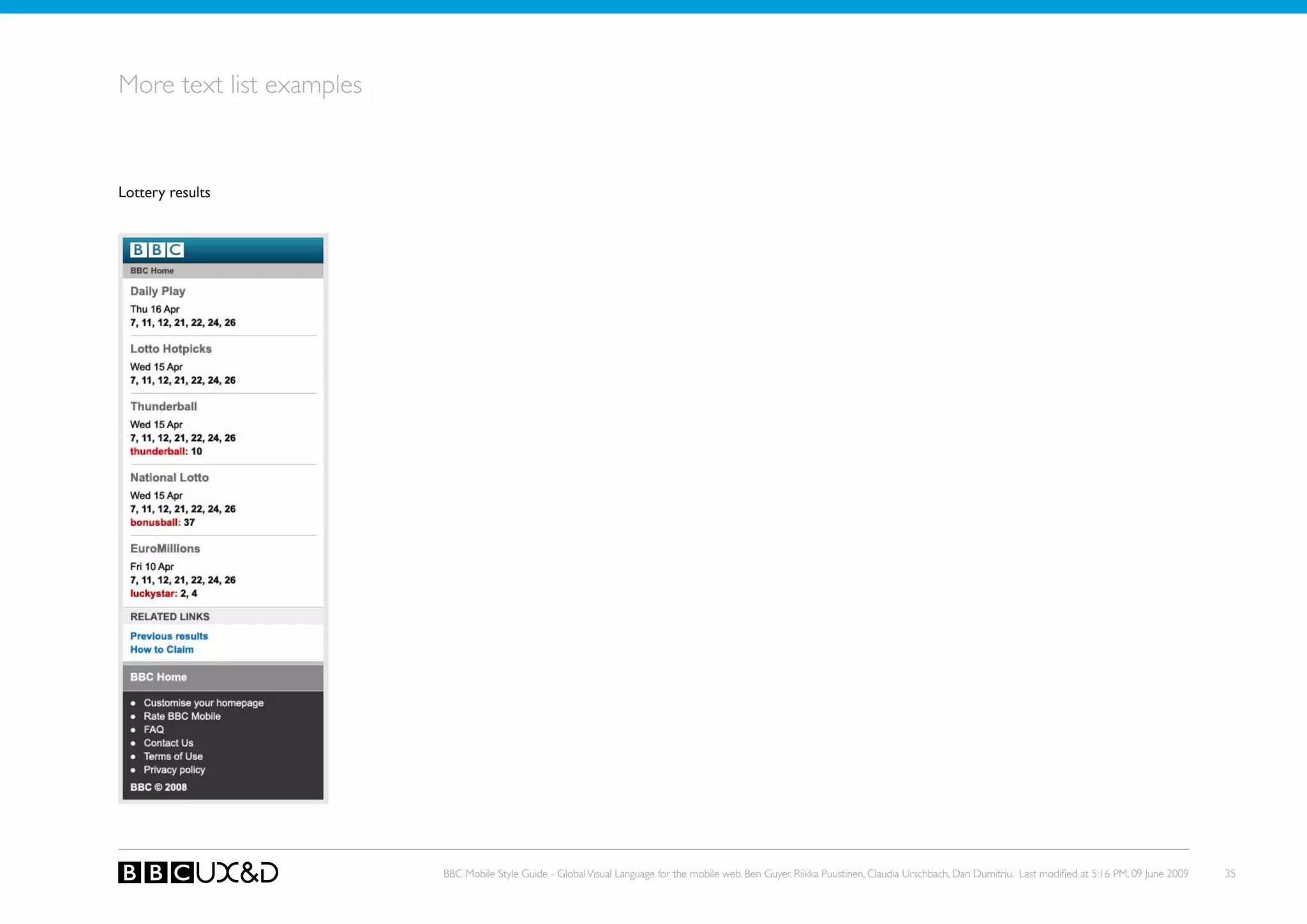
More text list examples


Lottery results


                          BBC Mobile Style Guide - Global Visual Language for the mobile web. Ben Guyer, Riikka Puustinen, Claudia Urschbach, Dan Dumitriu. Last modified at 5:16 PM, 09 June 2009   35
Listings


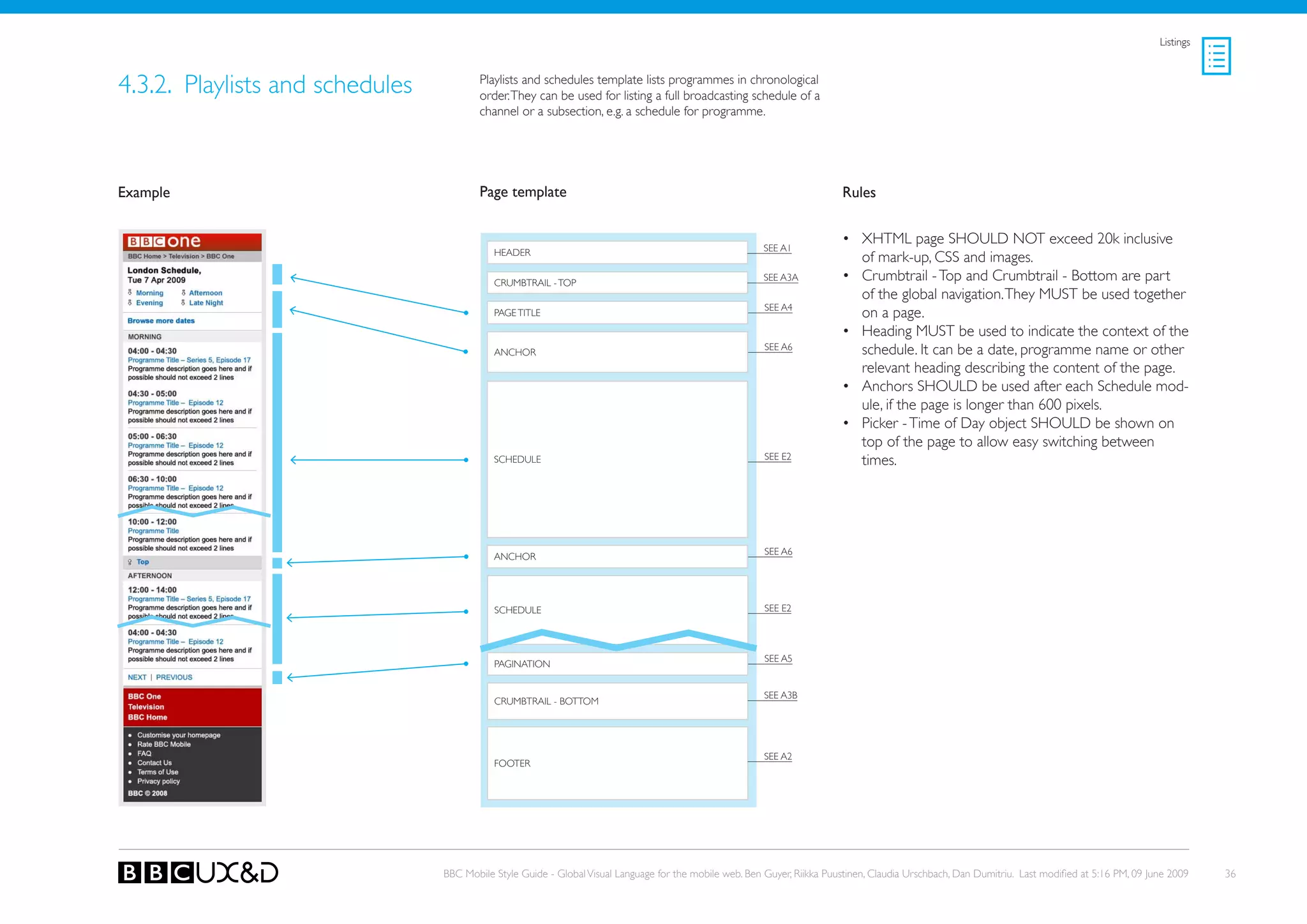
4.3.2. Playlists and schedules           Playlists and schedules template lists programmes in chronological
                                         order. they can be used for listing a full broadcasting schedule of a
                                         channel or a subsection, e.g. a schedule for programme.


Example                                  Page template                                                                    Rules


                                                                                                                          • XHTML page SHoULD NoT exceed 20k inclusive
                                            HEADER                                                       SEE A1
                                                                                                                            of mark-up, CSS and images.
                                            CRUMBTRAIL - ToP
                                                                                                         SEE A3A          • Crumbtrail - Top and Crumbtrail - Bottom are part
                                                                                                                            of the global navigation. They MUST be used together
                                                                                                         SEE A4
                                            PAGE TITLE                                                                      on a page.
                                                                                                                          • Heading MUST be used to indicate the context of the
                                            ANCHoR
                                                                                                         SEE A6             schedule. It can be a date, programme name or other
                                                                                                                            relevant heading describing the content of the page.
                                                                                                                          • Anchors SHoULD be used after each Schedule mod-
                                                                                                                            ule, if the page is longer than 600 pixels.
                                                                                                                          • Picker - Time of Day object SHoULD be shown on
                                                                                                                            top of the page to allow easy switching between
                                                                                                         SEE E2
                                            sCHeDULe                                                                        times.


                                                                                                         SEE A6
                                            ANCHoR


                                            sCHeDULe                                                     SEE E2


                                                                                                         SEE A5
                                            PAGINATIoN


                                                                                                         SEE A3B
                                            CRUMBTRAIL - BoTToM


                                                                                                         SEE A2
                                            FooteR


                                 BBC Mobile Style Guide - Global Visual Language for the mobile web. Ben Guyer, Riikka Puustinen, Claudia Urschbach, Dan Dumitriu. Last modified at 5:16 PM, 09 June 2009    36
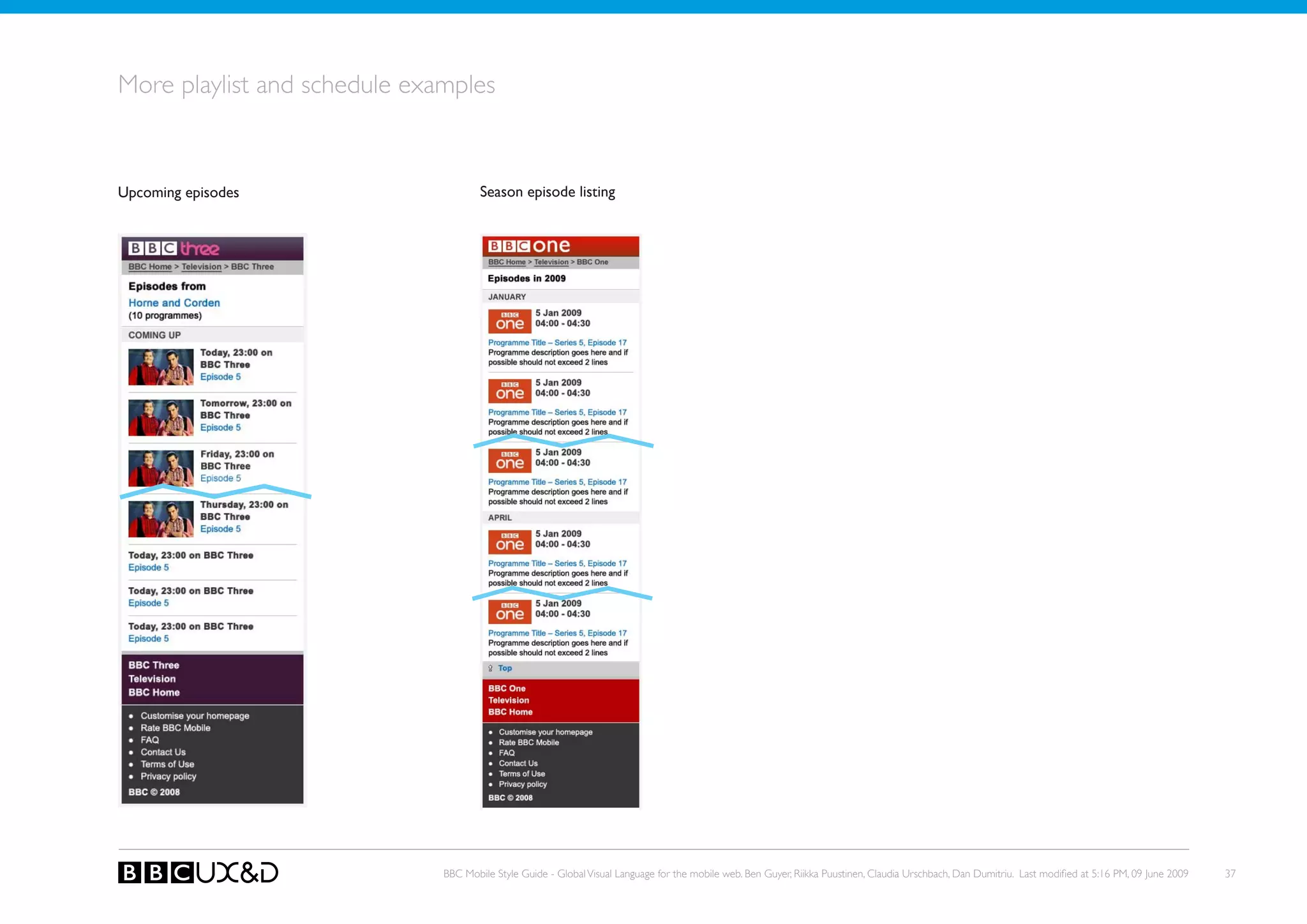
More playlist and schedule examples


upcoming episodes                     Season episode listing


                              BBC Mobile Style Guide - Global Visual Language for the mobile web. Ben Guyer, Riikka Puustinen, Claudia Urschbach, Dan Dumitriu. Last modified at 5:16 PM, 09 June 2009   37
Listings


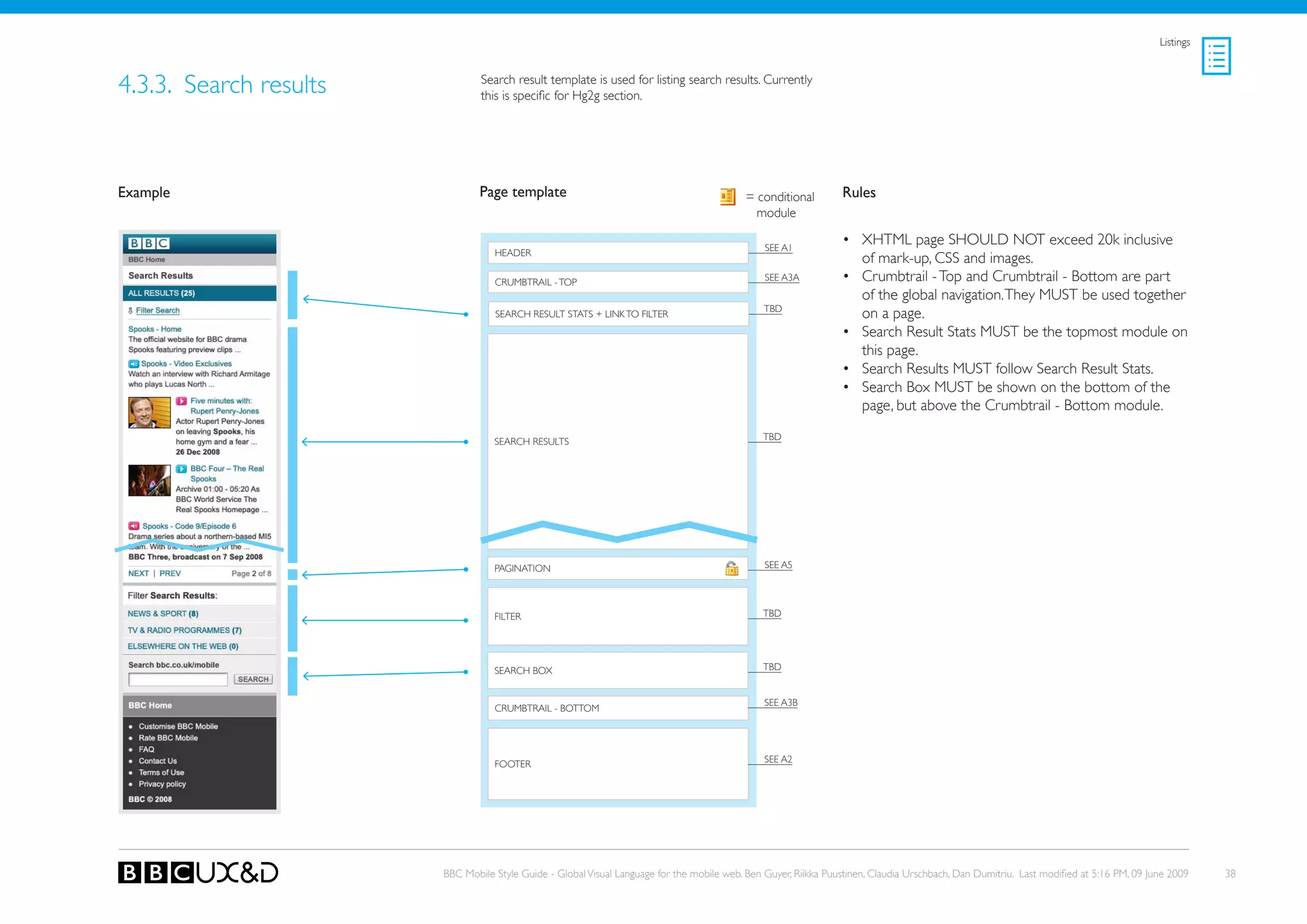
4.3.3. search results           Search result template is used for listing search results. Currently
                                this is specific for Hg2g section.


Example                         Page template                                               = conditional        Rules
                                                                                              module

                                                                                                SEE A1
                                                                                                                 • XHTML page SHoULD NoT exceed 20k inclusive
                                   HEADER
                                                                                                                   of mark-up, CSS and images.
                                   CRUMBTRAIL - ToP                                             SEE A3A          • Crumbtrail - Top and Crumbtrail - Bottom are part
                                                                                                                   of the global navigation. They MUST be used together
                                                                                                tBD
                                   SEARCH RESULT STATS + LINk To FILTER                                            on a page.
                                                                                                                 • Search Result Stats MUST be the topmost module on
                                                                                                                   this page.
                                                                                                                 • search Results MUst follow search Result stats.
                                                                                                                 • Search Box MUST be shown on the bottom of the
                                                                                                                   page, but above the Crumbtrail - Bottom module.

                                   SEARCH RESULTS                                               tBD


                                   PAGINATIoN                                                   SEE A5


                                   FILTER                                                       tBD


                                   SEARCH BoX                                                   tBD


                                                                                                SEE A3B
                                   CRUMBTRAIL - BoTToM


                                                                                                SEE A2
                                   FooteR


                        BBC Mobile Style Guide - Global Visual Language for the mobile web. Ben Guyer, Riikka Puustinen, Claudia Urschbach, Dan Dumitriu. Last modified at 5:16 PM, 09 June 2009    38
Listings


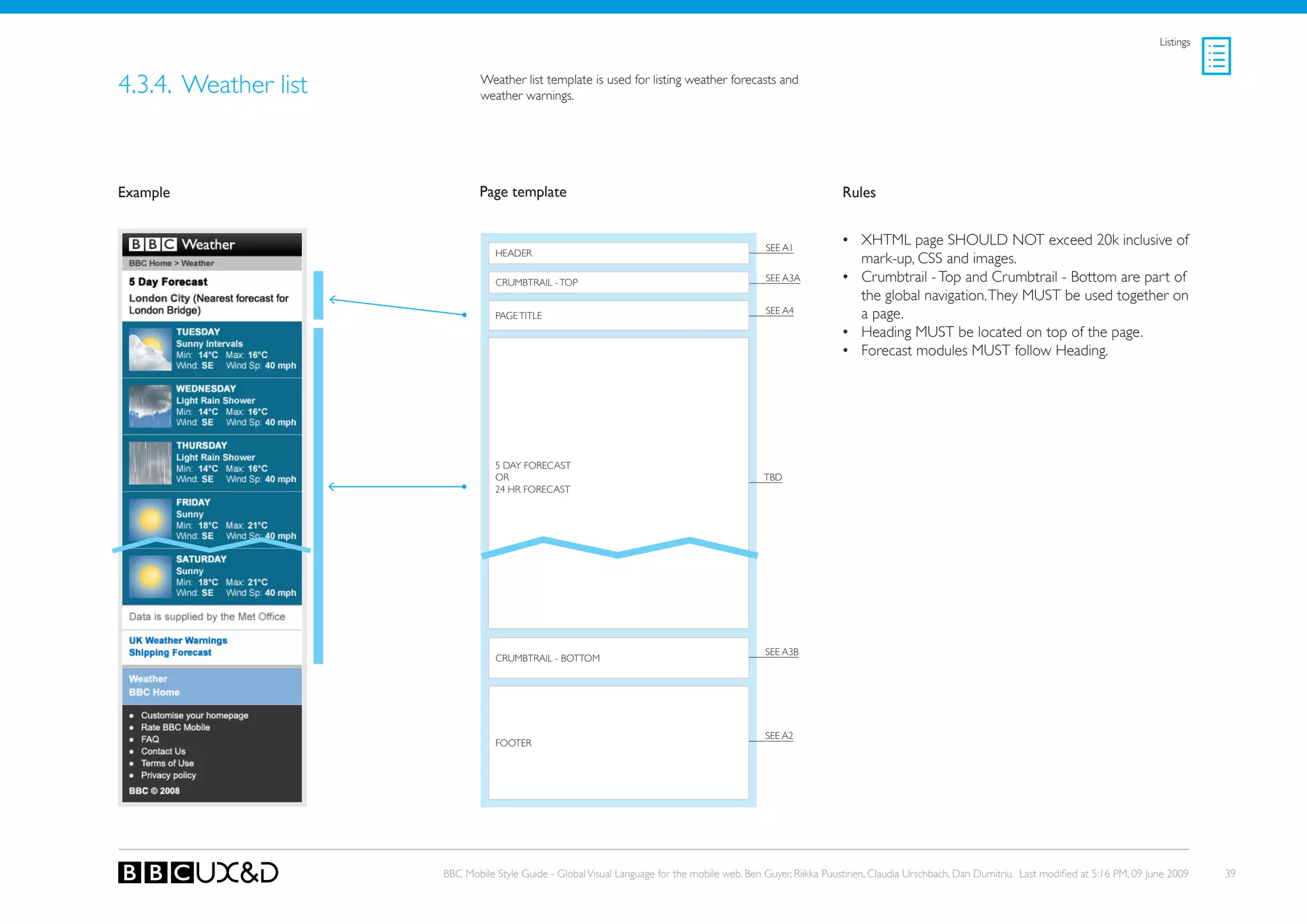
4.3.4. Weather list           Weather list template is used for listing weather forecasts and
                              weather warnings.


Example                       Page template                                                                    Rules


                                                                                              SEE A1
                                                                                                               • XHTML page SHoULD NoT exceed 20k inclusive of
                                 HEADER
                                                                                                                 mark-up, CSS and images.
                                 CRUMBTRAIL - ToP                                             SEE A3A          • Crumbtrail - Top and Crumbtrail - Bottom are part of
                                                                                                                 the global navigation. They MUST be used together on
                                 PAGE TITLE
                                                                                              SEE A4             a page.
                                                                                                               • Heading MUST be located on top of the page.
                                                                                                               • Forecast modules MUst follow Heading.


                                 5 DAy FoRECAST
                                 oR                                                           tBD
                                 24 HR FoRECAST


                                                                                              SEE A3B
                                 CRUMBTRAIL - BoTToM


                                                                                              SEE A2
                                 FooteR


                      BBC Mobile Style Guide - Global Visual Language for the mobile web. Ben Guyer, Riikka Puustinen, Claudia Urschbach, Dan Dumitriu. Last modified at 5:16 PM, 09 June 2009    39
Listings


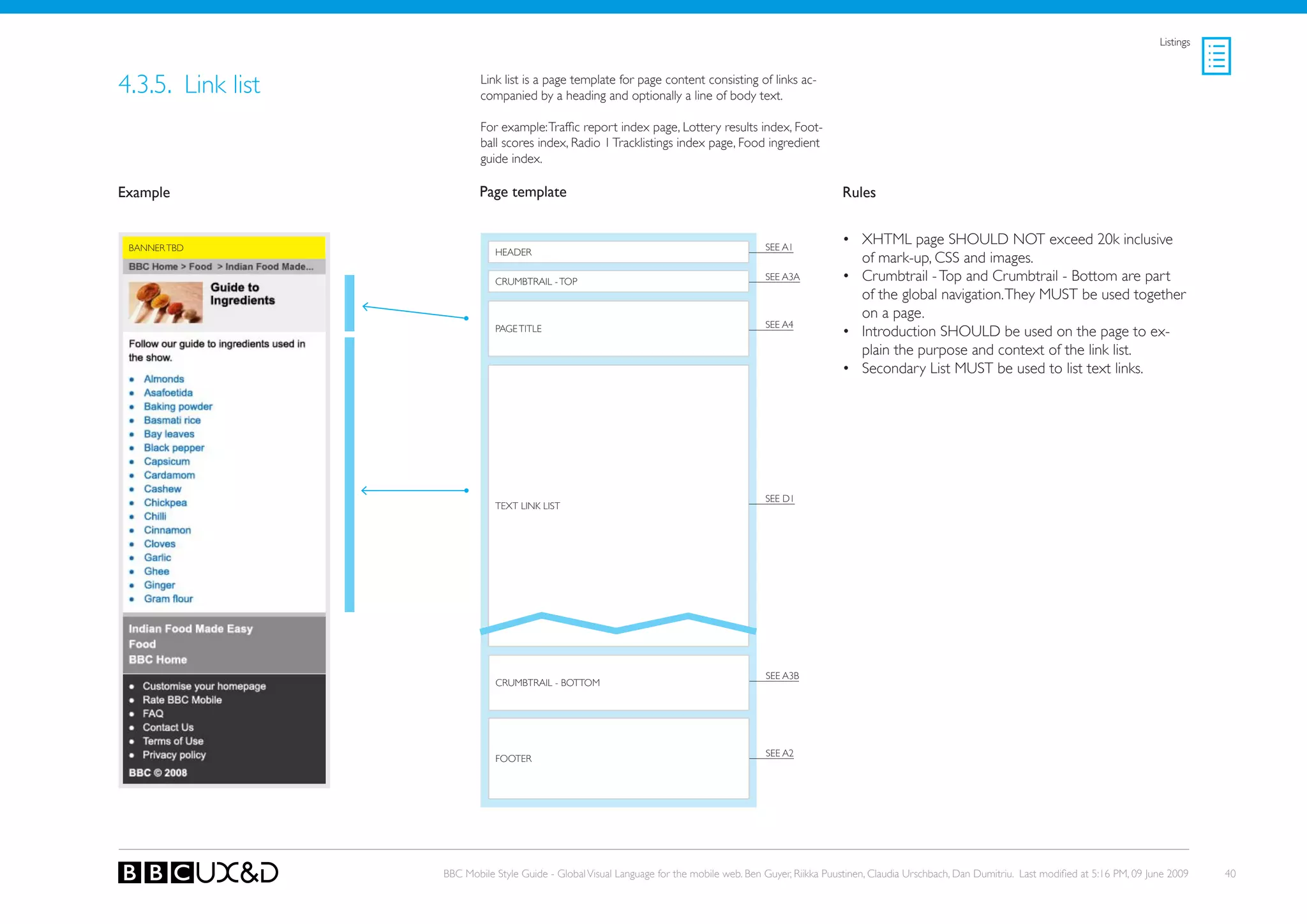
4.3.5. Link list           Link list is a page template for page content consisting of links ac-
                           companied by a heading and optionally a line of body text.

                           For example: Traffic report index page, Lottery results index, Foot-
                           ball scores index, Radio 1 Tracklistings index page, Food ingredient
                           guide index.

Example                    Page template                                                                    Rules


 BANNER TBD                                                                                SEE A1
                                                                                                            • XHTML page SHoULD NoT exceed 20k inclusive
                              HEADER
                                                                                                              of mark-up, CSS and images.
                              CRUMBTRAIL - ToP                                             SEE A3A          • Crumbtrail - Top and Crumbtrail - Bottom are part
                                                                                                              of the global navigation. They MUST be used together
                                                                                                              on a page.
                                                                                           SEE A4
                              PAGE TITLE                                                                    • Introduction SHoULD be used on the page to ex-
                                                                                                              plain the purpose and context of the link list.
                                                                                                            • Secondary List MUST be used to list text links.


                                                                                           SEE D1
                              TEXT LINk LIST


                                                                                           SEE A3B
                              CRUMBTRAIL - BoTToM


                                                                                           SEE A2
                              FooteR


                   BBC Mobile Style Guide - Global Visual Language for the mobile web. Ben Guyer, Riikka Puustinen, Claudia Urschbach, Dan Dumitriu. Last modified at 5:16 PM, 09 June 2009    40
4.4. MEDIA GALLERy PAGES


Media gallery pages are all related to browsing and view-
ing images and videos, or listening to audio through vari-
ous gallery pages.


                                                       BBC Mobile Style Guide - Global Visual Language for the mobile web. Ben Guyer, Riikka Puustinen, Claudia Urschbach, Dan Dumitriu. Last modified at 5:16 PM, 09 June 2009   41
Media Gallery


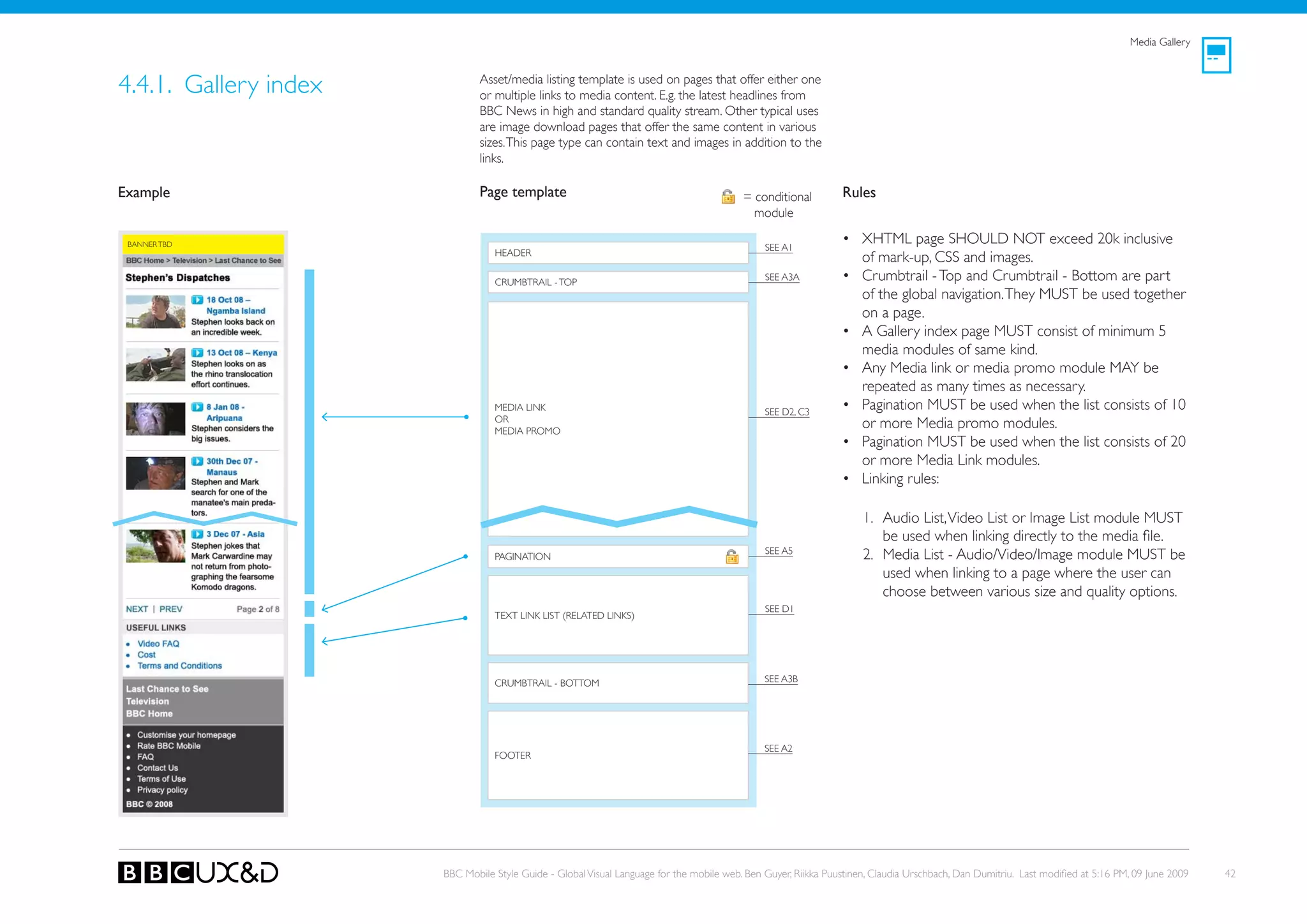
4.4.1. Gallery index           Asset/media listing template is used on pages that offer either one
                               or multiple links to media content. E.g. the latest headlines from
                               BBC News in high and standard quality stream. other typical uses
                               are image download pages that offer the same content in various
                               sizes. This page type can contain text and images in addition to the
                               links.

Example                        Page template                                              = conditional         Rules
                                                                                            module

 BANNER TBD
                                                                                               SEE A1
                                                                                                                • XHTML page SHoULD NoT exceed 20k inclusive
                                  HEADER
                                                                                                                  of mark-up, CSS and images.
                                  CRUMBTRAIL - ToP
                                                                                               SEE A3A          • Crumbtrail - Top and Crumbtrail - Bottom are part
                                                                                                                  of the global navigation. They MUST be used together
                                                                                                                  on a page.
                                                                                                                • A Gallery index page MUST consist of minimum 5
                                                                                                                  media modules of same kind.
                                                                                                                • Any Media link or media promo module MAy be
                                                                                                                  repeated as many times as necessary.
                                  MEDIA LINk                                                   SEE D2, C3
                                                                                                                • Pagination MUST be used when the list consists of 10
                                  oR
                                  MEDIA PRoMo
                                                                                                                  or more Media promo modules.
                                                                                                                • Pagination MUST be used when the list consists of 20
                                                                                                                  or more Media Link modules.
                                                                                                                • Linking rules:

                                                                                                                     1. Audio List, Video List or Image List module MUST
                                                                                                                        be used when linking directly to the media file.
                                                                                               SEE A5
                                  PAGINATIoN                                                                         2. Media List - Audio/Video/Image module MUST be
                                                                                                                        used when linking to a page where the user can
                                                                                                                        choose between various size and quality options.
                                                                                               SEE D1
                                  TEXT LINk LIST (RELATED LINkS)


                                  CRUMBTRAIL - BoTToM                                          SEE A3B


                                                                                               SEE A2
                                  FooteR


                       BBC Mobile Style Guide - Global Visual Language for the mobile web. Ben Guyer, Riikka Puustinen, Claudia Urschbach, Dan Dumitriu. Last modified at 5:16 PM, 09 June 2009   42
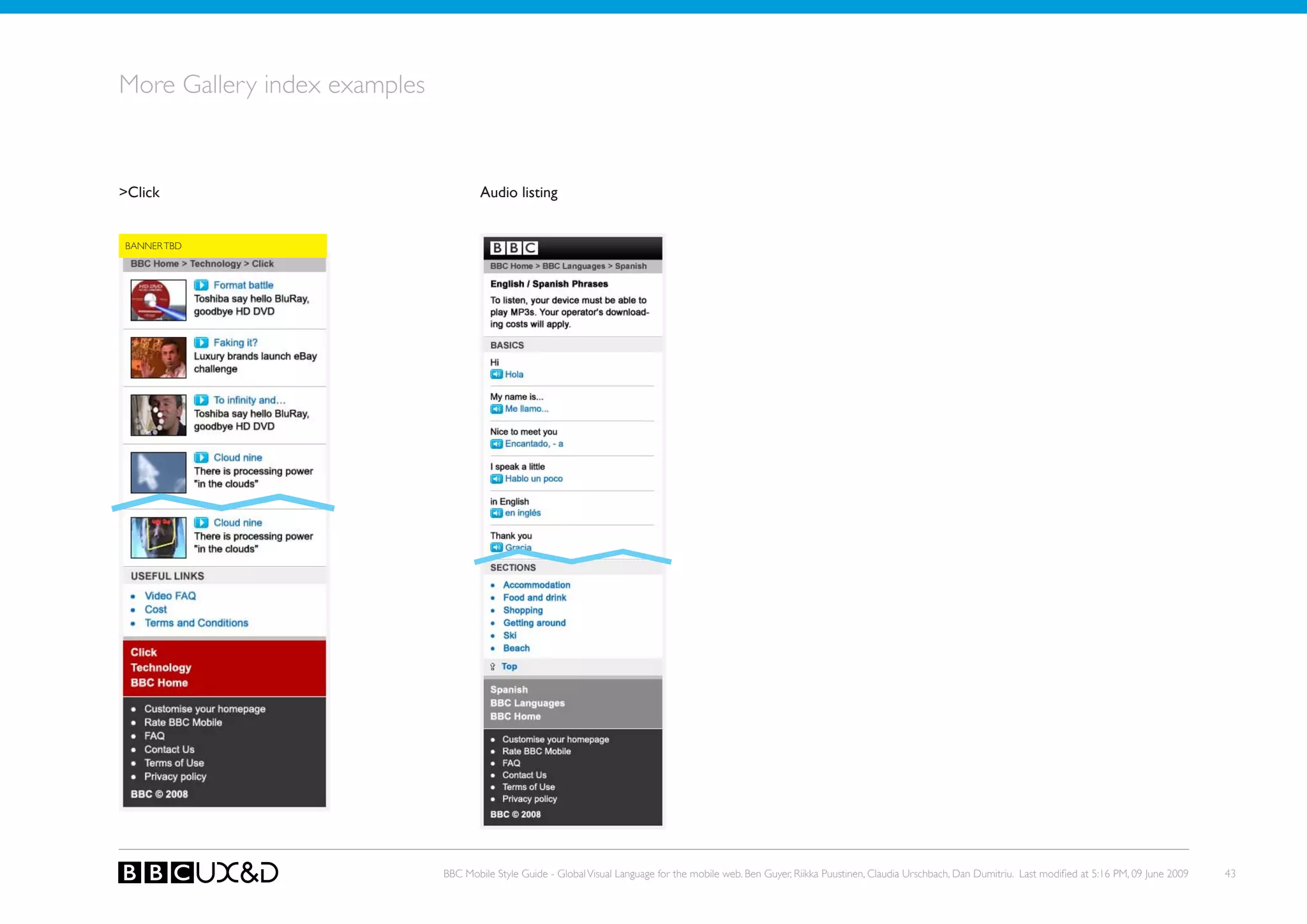
More Gallery index examples


>Click                                Audio listing


BANNER TBD


                              BBC Mobile Style Guide - Global Visual Language for the mobile web. Ben Guyer, Riikka Puustinen, Claudia Urschbach, Dan Dumitriu. Last modified at 5:16 PM, 09 June 2009   43
Media Gallery


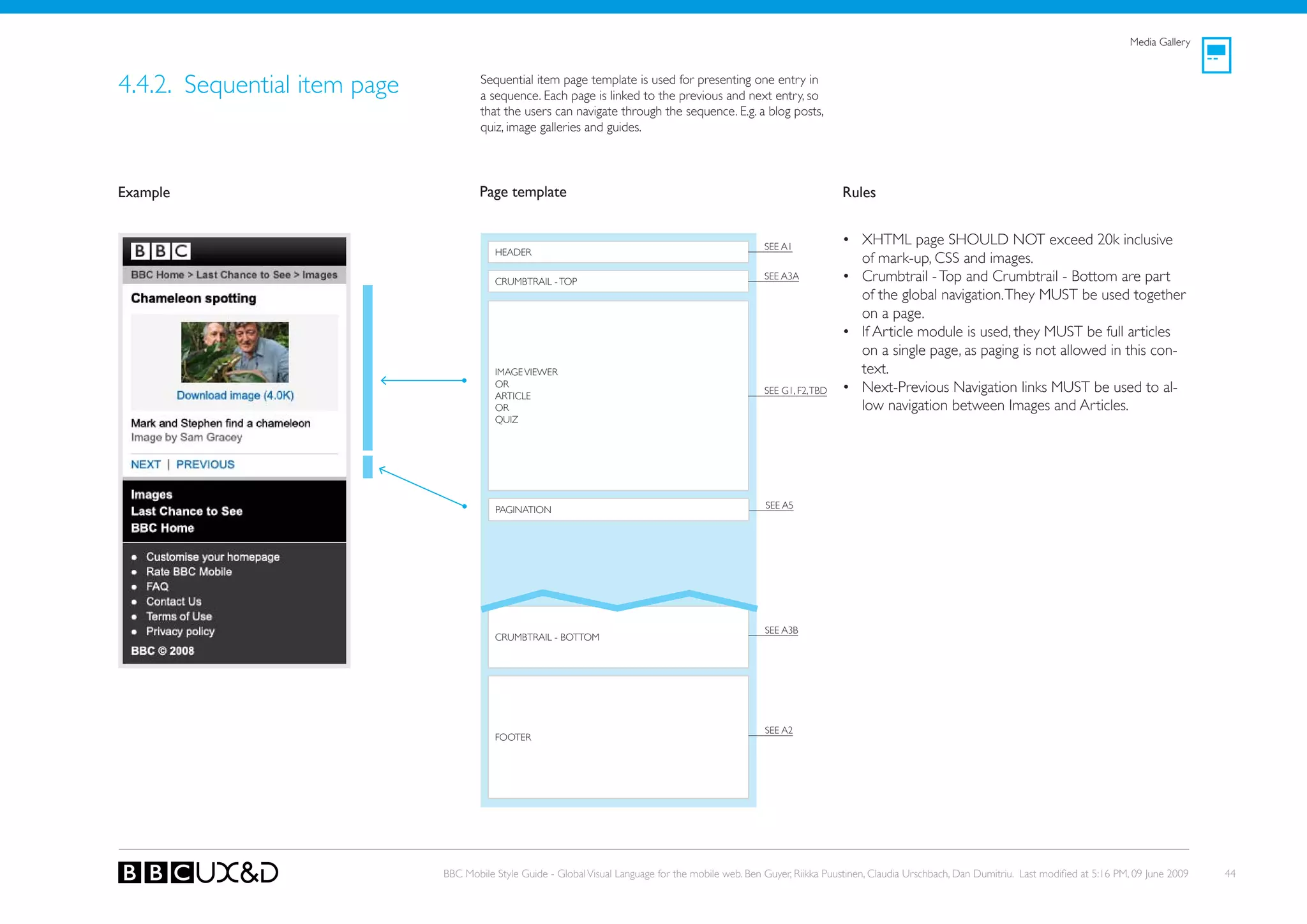
4.4.2. Sequential item page           Sequential item page template is used for presenting one entry in
                                      a sequence. Each page is linked to the previous and next entry, so
                                      that the users can navigate through the sequence. E.g. a blog posts,
                                      quiz, image galleries and guides.


Example                               Page template                                                                     Rules


                                                                                                      SEE A1
                                                                                                                        • XHTML page SHoULD NoT exceed 20k inclusive
                                         HEADER
                                                                                                                          of mark-up, CSS and images.
                                         CRUMBTRAIL - ToP
                                                                                                      SEE A3A           • Crumbtrail - Top and Crumbtrail - Bottom are part
                                                                                                                          of the global navigation. They MUST be used together
                                                                                                                          on a page.
                                                                                                                        • If Article module is used, they MUST be full articles
                                                                                                                          on a single page, as paging is not allowed in this con-
                                         IMAGE VIEWER                                                                     text.
                                         oR
                                         ARTICLE
                                                                                                      SEE G1, F2, TBD   • Next-Previous Navigation links MUST be used to al-
                                         oR                                                                               low navigation between Images and Articles.
                                         QUIz


                                         PAGINATIoN                                                   SEE A5


                                                                                                      SEE A3B
                                         CRUMBTRAIL - BoTToM


                                                                                                      SEE A2
                                         FooteR


                              BBC Mobile Style Guide - Global Visual Language for the mobile web. Ben Guyer, Riikka Puustinen, Claudia Urschbach, Dan Dumitriu. Last modified at 5:16 PM, 09 June 2009   44
4.5. ACTIoNABLE PAGES


There are various types of list page templates:

•   Media object page
•   Launch page
•   Widget page
•   Form page


                                                  BBC Mobile Style Guide - Global Visual Language for the mobile web. Ben Guyer, Riikka Puustinen, Claudia Urschbach, Dan Dumitriu. Last modified at 5:16 PM, 09 June 2009   45
Actionable pages


4.5.1. Media object page           Media object page shows a single image (in some cases also audio
                                   or video) file that can be viewed on the page. There is no other
                                   content on the page.
                                   NoTE: The device plays audio and video files with their native
                                   media player applications, thus this page is a backup option for
                                   audio and video content.

Example                            Page template                                                                    Rules


                                                                                                                    • XHTML page SHoULD NoT exceed 20k inclusive of
                                                                                                                      mark-up, CSS and images.
                                                                                                                    • The users end up on this page when selecting an im-
                                                                                                                      age size from a list of options.
                                                                                                                    • The users can save the image to their devices using
                                                                                                                      the options in the device’s native UI.
                                                                                                                    • This page is a dead-end: The users navigate away from
                                                                                                                      this page by using their device’s native UI logic, e.g.
                                      IMAGE FILE
                                                                                                                      back -option.
                                                                                                                    • The native UI of the device handles the video and au-
                                      [VIDEo FILE oR AUDIo FILE]
                                                                                                                      dio files. E.g. the browser hands over to a media player
                                                                                                                      when the user selects to view a video. When the
                                                                                                                      video has finished, the media player (generally) offers
                                                                                                                      an option to return to the web page.


                           BBC Mobile Style Guide - Global Visual Language for the mobile web. Ben Guyer, Riikka Puustinen, Claudia Urschbach, Dan Dumitriu. Last modified at 5:16 PM, 09 June 2009   46
Actionable pages


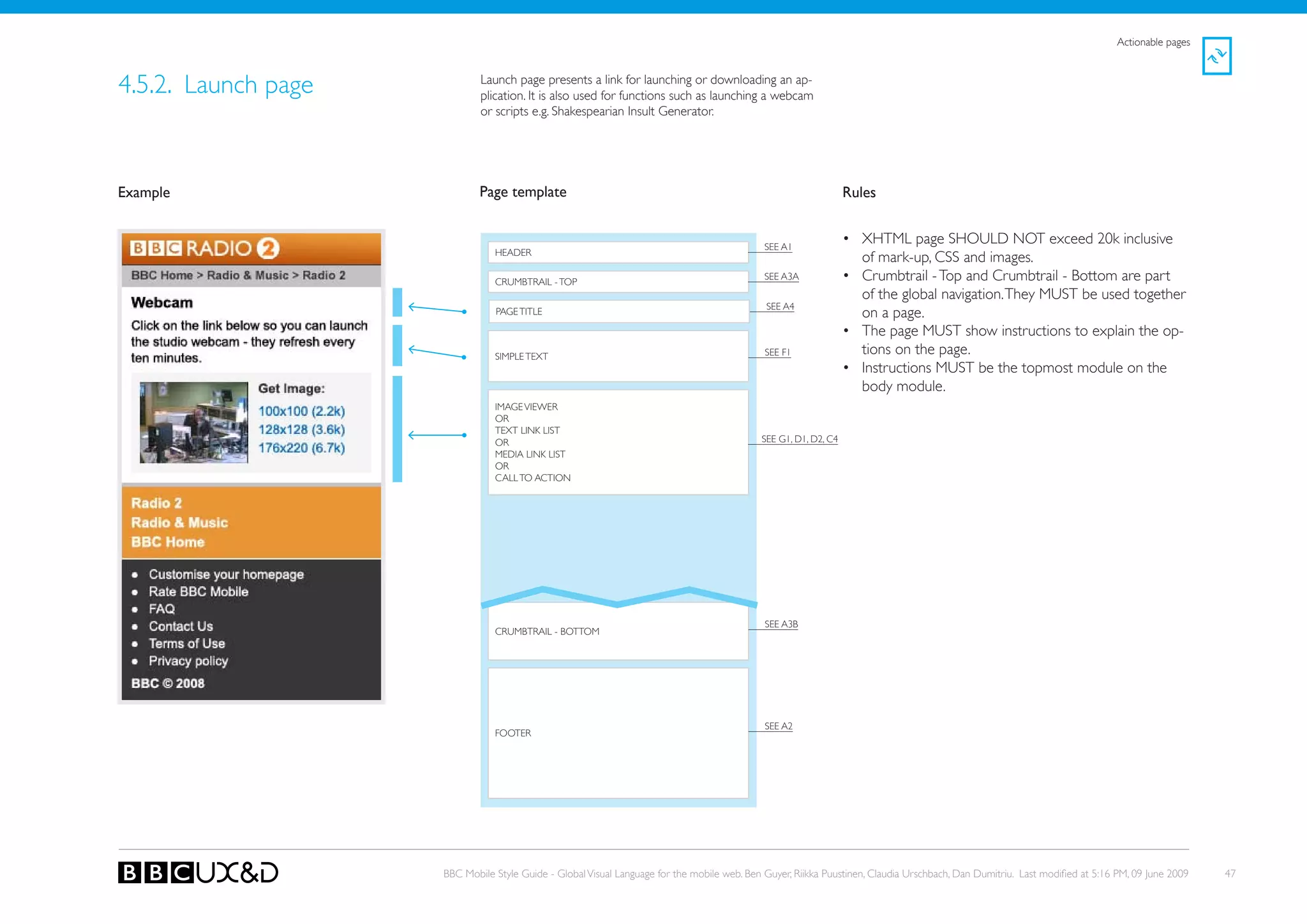
4.5.2. Launch page           Launch page presents a link for launching or downloading an ap-
                             plication. It is also used for functions such as launching a webcam
                             or scripts e.g. Shakespearian Insult Generator.


Example                      Page template                                                                       Rules


                                                                                             SEE A1
                                                                                                                 • XHTML page SHoULD NoT exceed 20k inclusive
                                HEADER
                                                                                                                   of mark-up, CSS and images.
                                CRUMBTRAIL - ToP
                                                                                             SEE A3A             • Crumbtrail - Top and Crumbtrail - Bottom are part
                                                                                                                   of the global navigation. They MUST be used together
                                                                                             SEE A4
                                PAGE TITLE                                                                         on a page.
                                                                                                                 • The page MUST show instructions to explain the op-
                                SIMPLE TEXT                                                  SEE F1                tions on the page.
                                                                                                                 • Instructions MUST be the topmost module on the
                                                                                                                   body module.
                                IMAGE VIEWER
                                oR
                                TEXT LINk LIST
                                oR                                                          SEE G1, D1, D2, C4
                                MEDIA LINk LIST
                                oR
                                CALL To ACTIoN


                                                                                             SEE A3B
                                CRUMBTRAIL - BoTToM


                                                                                             SEE A2
                                FooteR


                     BBC Mobile Style Guide - Global Visual Language for the mobile web. Ben Guyer, Riikka Puustinen, Claudia Urschbach, Dan Dumitriu. Last modified at 5:16 PM, 09 June 2009   47
Actionable pages


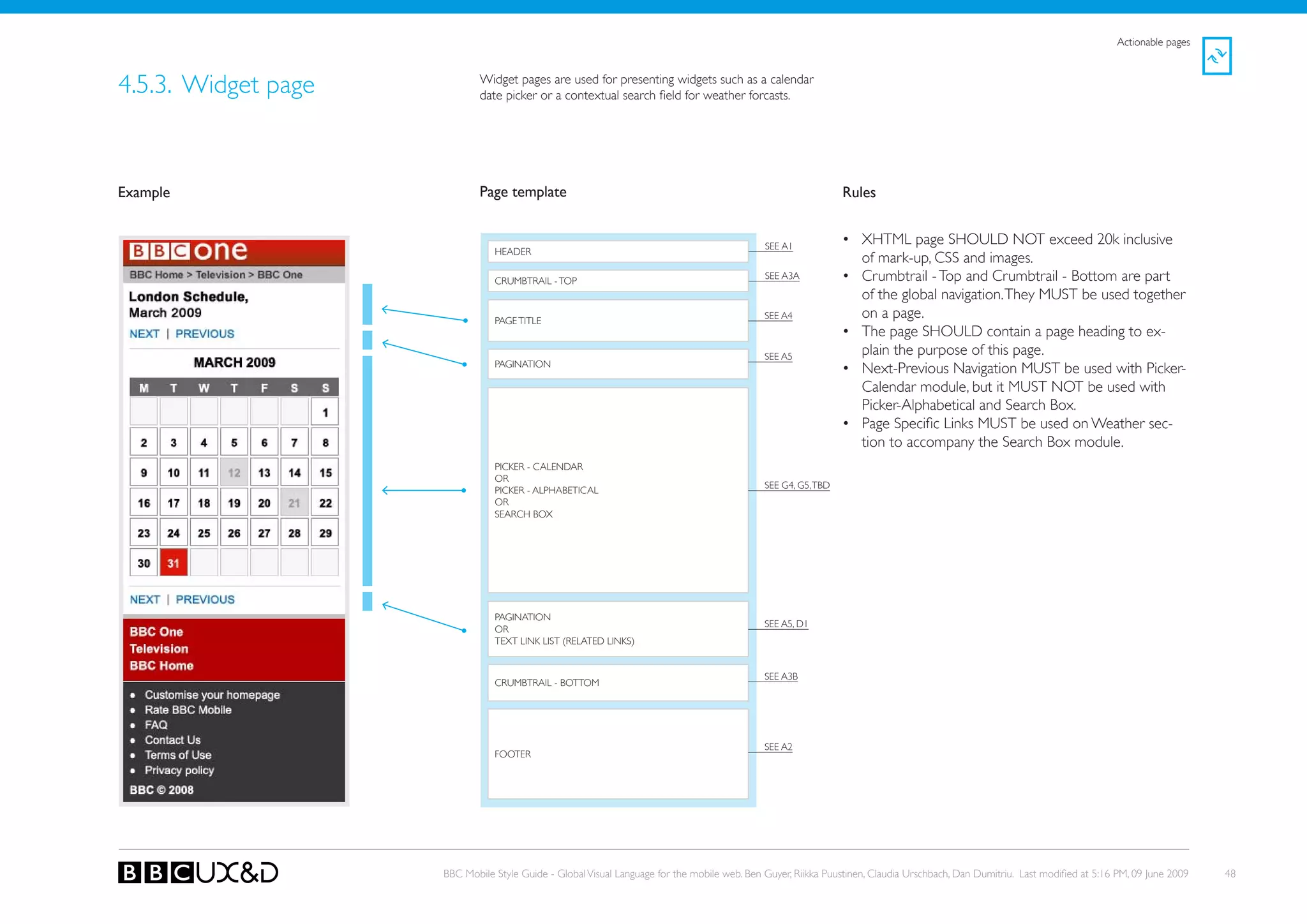
4.5.3. Widget page           Widget pages are used for presenting widgets such as a calendar
                             date picker or a contextual search field for weather forcasts.


Example                      Page template                                                                     Rules


                                                                                             SEE A1
                                                                                                               • XHTML page SHoULD NoT exceed 20k inclusive
                                HEADER
                                                                                                                 of mark-up, CSS and images.
                                CRUMBTRAIL - ToP
                                                                                             SEE A3A           • Crumbtrail - Top and Crumbtrail - Bottom are part
                                                                                                                 of the global navigation. They MUST be used together
                                PAGE TITLE
                                                                                             SEE A4              on a page.
                                                                                                               • The page SHoULD contain a page heading to ex-
                                                                                             SEE A5
                                                                                                                 plain the purpose of this page.
                                PAGINATIoN
                                                                                                               • Next-Previous Navigation MUST be used with Picker-
                                                                                                                 Calendar module, but it MUst not be used with
                                                                                                                 Picker-Alphabetical and Search Box.
                                                                                                               • Page Specific Links MUST be used on Weather sec-
                                                                                                                 tion to accompany the Search Box module.
                                PICkER - CALENDAR
                                oR
                                                                                             SEE G4, G5, TBD
                                PICkER - ALPHABETICAL
                                oR
                                SEARCH BoX


                                PAGINATIoN
                                                                                             SEE A5, D1
                                oR
                                TEXT LINk LIST (RELATED LINkS)


                                                                                             SEE A3B
                                CRUMBTRAIL - BoTToM


                                                                                             SEE A2
                                FooteR


                     BBC Mobile Style Guide - Global Visual Language for the mobile web. Ben Guyer, Riikka Puustinen, Claudia Urschbach, Dan Dumitriu. Last modified at 5:16 PM, 09 June 2009   48
Actionable pages


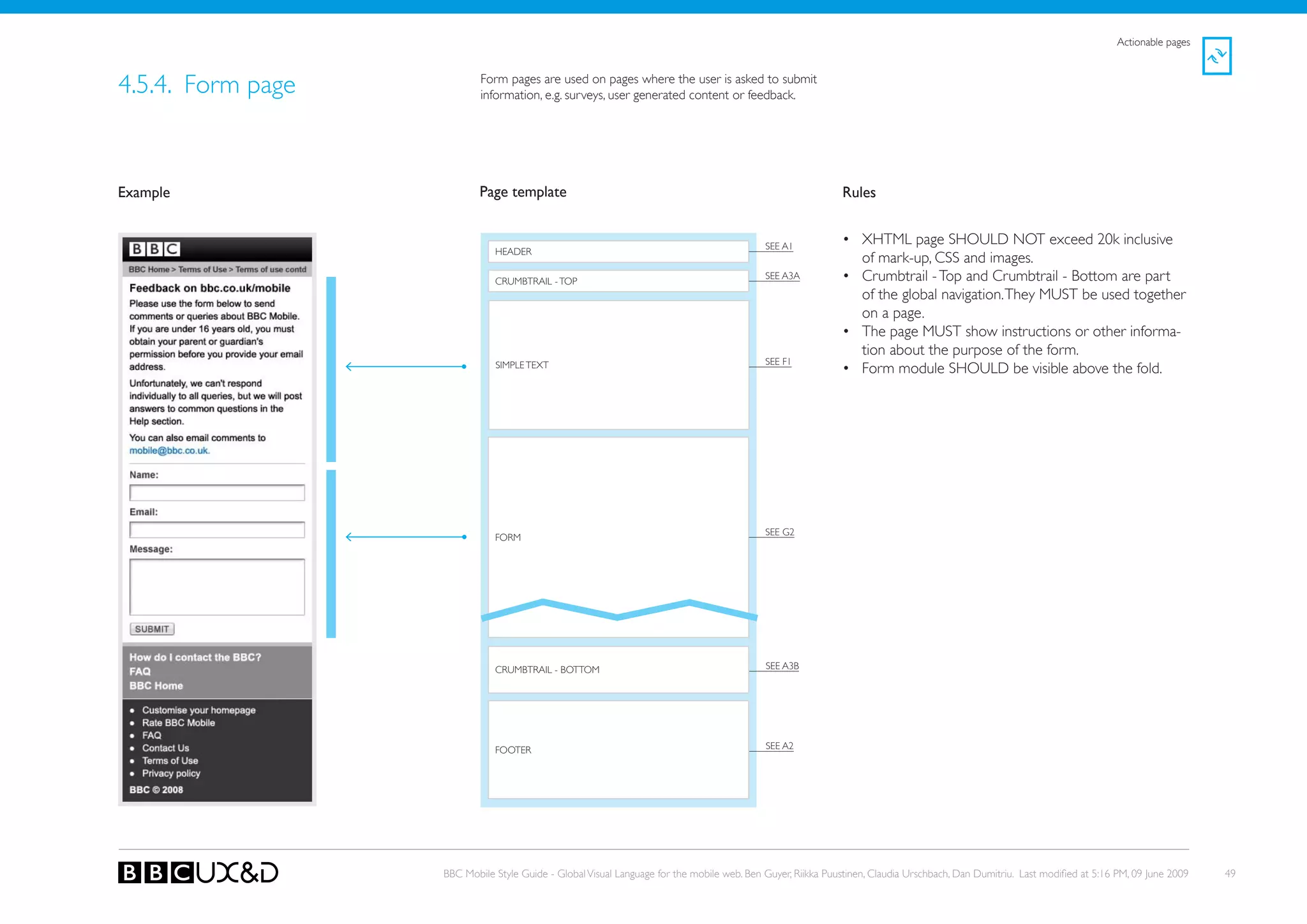
4.5.4. Form page           Form pages are used on pages where the user is asked to submit
                           information, e.g. surveys, user generated content or feedback.


Example                    Page template                                                                    Rules


                                                                                           SEE A1
                                                                                                            • XHTML page SHoULD NoT exceed 20k inclusive
                              HEADER
                                                                                                              of mark-up, CSS and images.
                              CRUMBTRAIL - ToP
                                                                                           SEE A3A          • Crumbtrail - Top and Crumbtrail - Bottom are part
                                                                                                              of the global navigation. They MUST be used together
                                                                                                              on a page.
                                                                                                            • The page MUST show instructions or other informa-
                                                                                                              tion about the purpose of the form.
                                                                                           SEE F1
                              SIMPLE TEXT                                                                   • Form module SHoULD be visible above the fold.


                                                                                           SEE G2
                              FoRM


                              CRUMBTRAIL - BoTToM                                          SEE A3B


                              FooteR                                                       SEE A2


                   BBC Mobile Style Guide - Global Visual Language for the mobile web. Ben Guyer, Riikka Puustinen, Claudia Urschbach, Dan Dumitriu. Last modified at 5:16 PM, 09 June 2009   49
4.6. ADMINISTRATIVE PAGES


There are four types of administrative page templates:

•   Settings and preferences
•   Alerts and errors
•   Confirmation page
•   Customise home page


                                                     BBC Mobile Style Guide - Global Visual Language for the mobile web. Ben Guyer, Riikka Puustinen, Claudia Urschbach, Dan Dumitriu. Last modified at 5:16 PM, 09 June 2009   50
Administrative pages
                                                                                                                                                                                                             !
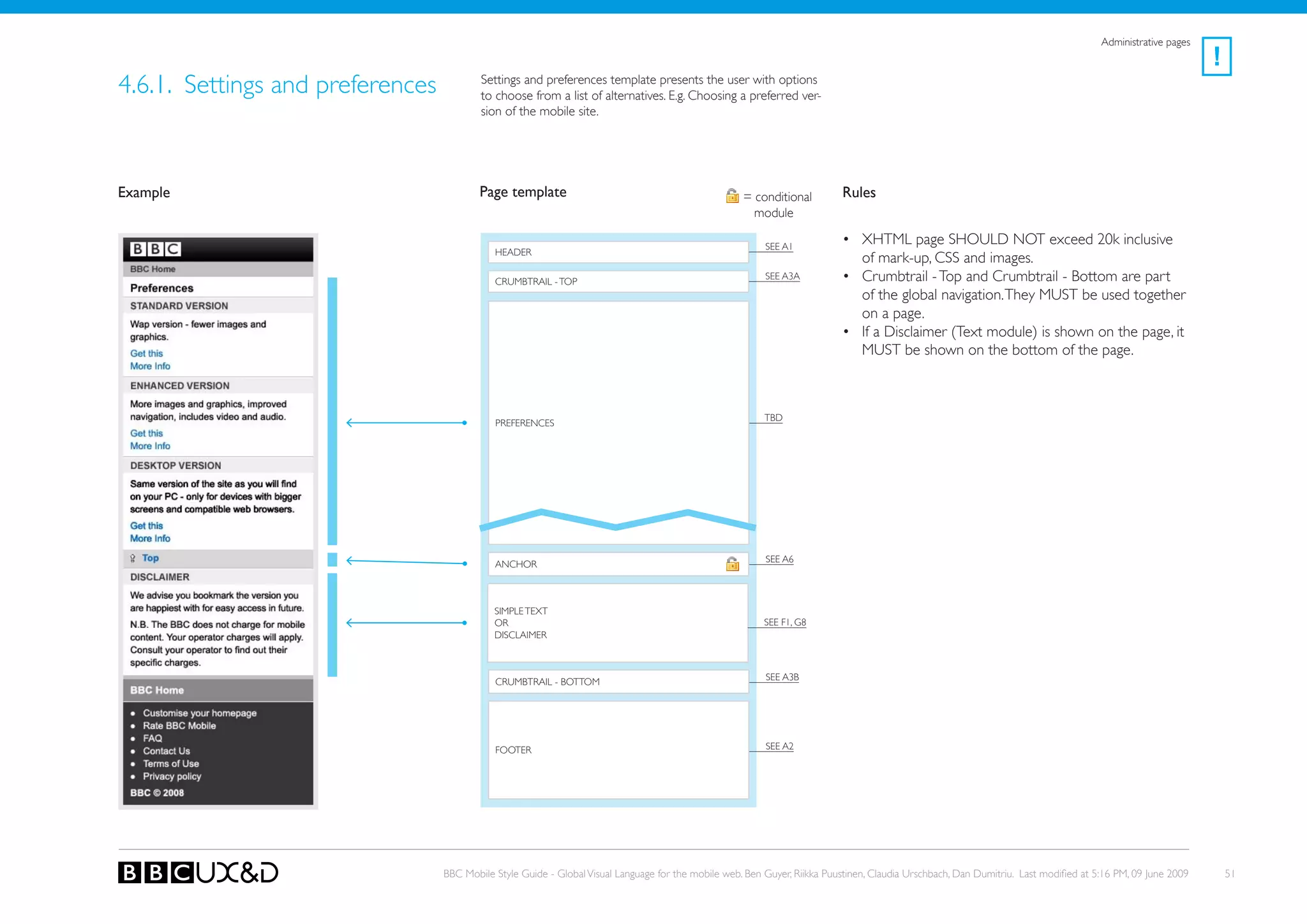
4.6.1. Settings and preferences           Settings and preferences template presents the user with options
                                          to choose from a list of alternatives. E.g. Choosing a preferred ver-
                                          sion of the mobile site.


Example                                   Page template                                              = conditional         Rules
                                                                                                       module

                                                                                                          SEE A1
                                                                                                                           • XHTML page SHoULD NoT exceed 20k inclusive
                                             HEADER
                                                                                                                             of mark-up, CSS and images.
                                             CRUMBTRAIL - ToP
                                                                                                          SEE A3A          • Crumbtrail - Top and Crumbtrail - Bottom are part
                                                                                                                             of the global navigation. They MUST be used together
                                                                                                                             on a page.
                                                                                                                           • If a Disclaimer (Text module) is shown on the page, it
                                                                                                                             MUST be shown on the bottom of the page.


                                                                                                          tBD
                                             PReFeRenCes


                                                                                                          SEE A6
                                             ANCHoR


                                             SIMPLE TEXT
                                             oR                                                           SEE F1, G8
                                             DISCLAIMER


                                             CRUMBTRAIL - BoTToM                                          SEE A3B


                                             FooteR                                                       SEE A2


                                  BBC Mobile Style Guide - Global Visual Language for the mobile web. Ben Guyer, Riikka Puustinen, Claudia Urschbach, Dan Dumitriu. Last modified at 5:16 PM, 09 June 2009       51
Administrative pages
                                                                                                                                                                                                      !
4.6.2. Alerts and errors           This page template informs the user about error situations and
                                   other types of alerts.


Example                            Page template                                                                    Rules


                                                                                                   SEE A1
                                                                                                                    • XHTML page MUST be as light as possible.
                                      HEADER
                                                                                                                    • Crumbtrail - Top and Crumbtrail - Bottom are part of
                                      CRUMBTRAIL - ToP
                                                                                                   SEE A3A            the global navigation. They MUST be used together on
                                                                                                                      a page.
                                                                                                                    • Alert MUST be shown on the top of the page.

                                                                                                   see G3
                                      ALERT


                                      [ANy MoDULE DEPENDING oN THE PAGE CoNTEXT]


                                      CRUMBTRAIL - BoTToM                                          SEE A3B


                                                                                                   SEE A2
                                      FooteR


                           BBC Mobile Style Guide - Global Visual Language for the mobile web. Ben Guyer, Riikka Puustinen, Claudia Urschbach, Dan Dumitriu. Last modified at 5:16 PM, 09 June 2009       52
Administrative pages
                                                                                                                                                                                                      !
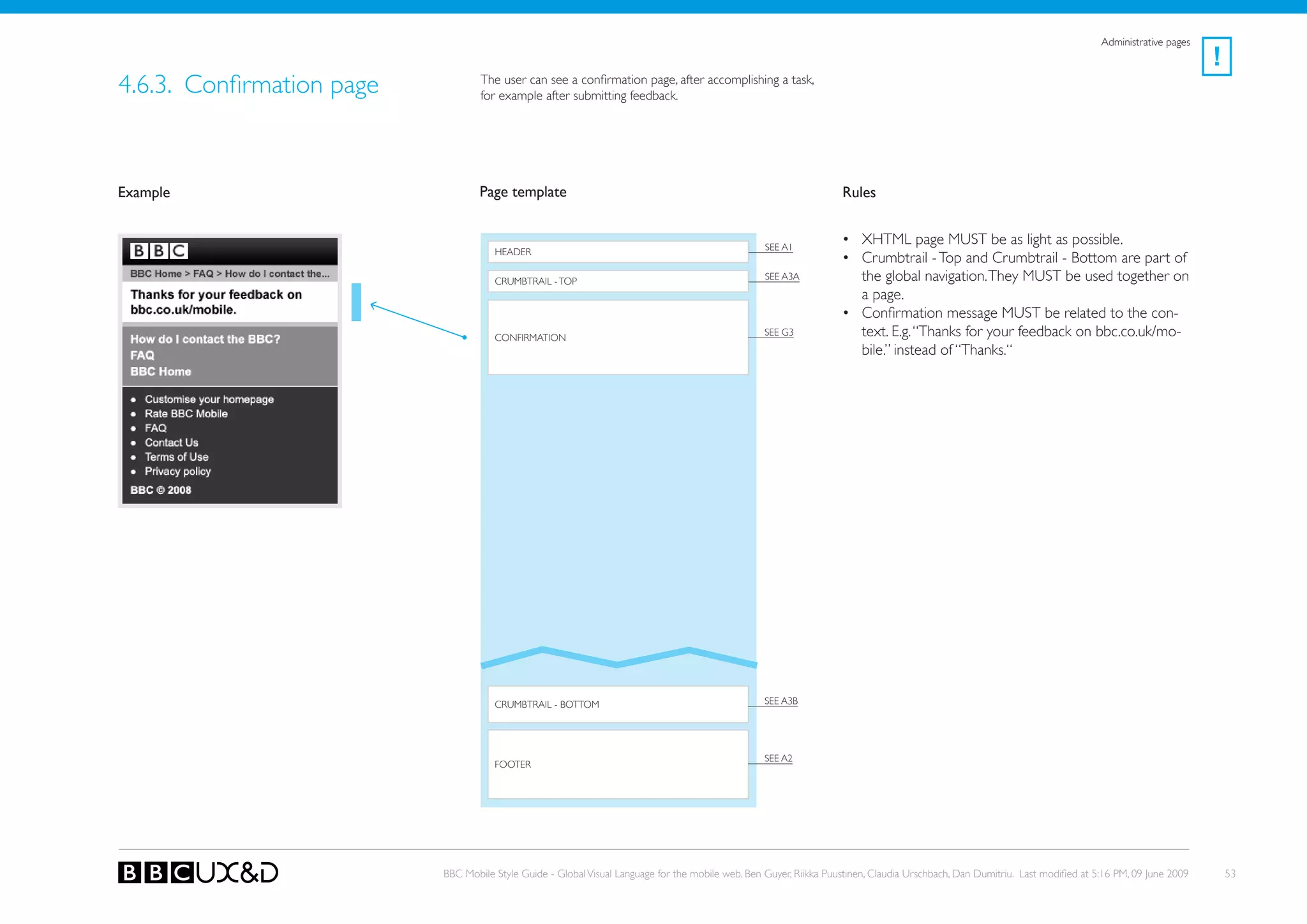
4.6.3. Confirmation page           The user can see a confirmation page, after accomplishing a task,
                                   for example after submitting feedback.


Example                            Page template                                                                    Rules


                                                                                                   SEE A1
                                                                                                                    • XHTML page MUST be as light as possible.
                                      HEADER
                                                                                                                    • Crumbtrail - Top and Crumbtrail - Bottom are part of
                                      CRUMBTRAIL - ToP                                             SEE A3A            the global navigation. They MUST be used together on
                                                                                                                      a page.
                                                                                                                    • Confirmation message MUST be related to the con-
                                      CoNFIRMATIoN
                                                                                                   see G3             text. E.g. “Thanks for your feedback on bbc.co.uk/mo-
                                                                                                                      bile.” instead of “Thanks.“


                                      CRUMBTRAIL - BoTToM                                          SEE A3B


                                                                                                   SEE A2
                                      FooteR


                           BBC Mobile Style Guide - Global Visual Language for the mobile web. Ben Guyer, Riikka Puustinen, Claudia Urschbach, Dan Dumitriu. Last modified at 5:16 PM, 09 June 2009       53
Administrative pages
                                                                                                                                                                                                        !
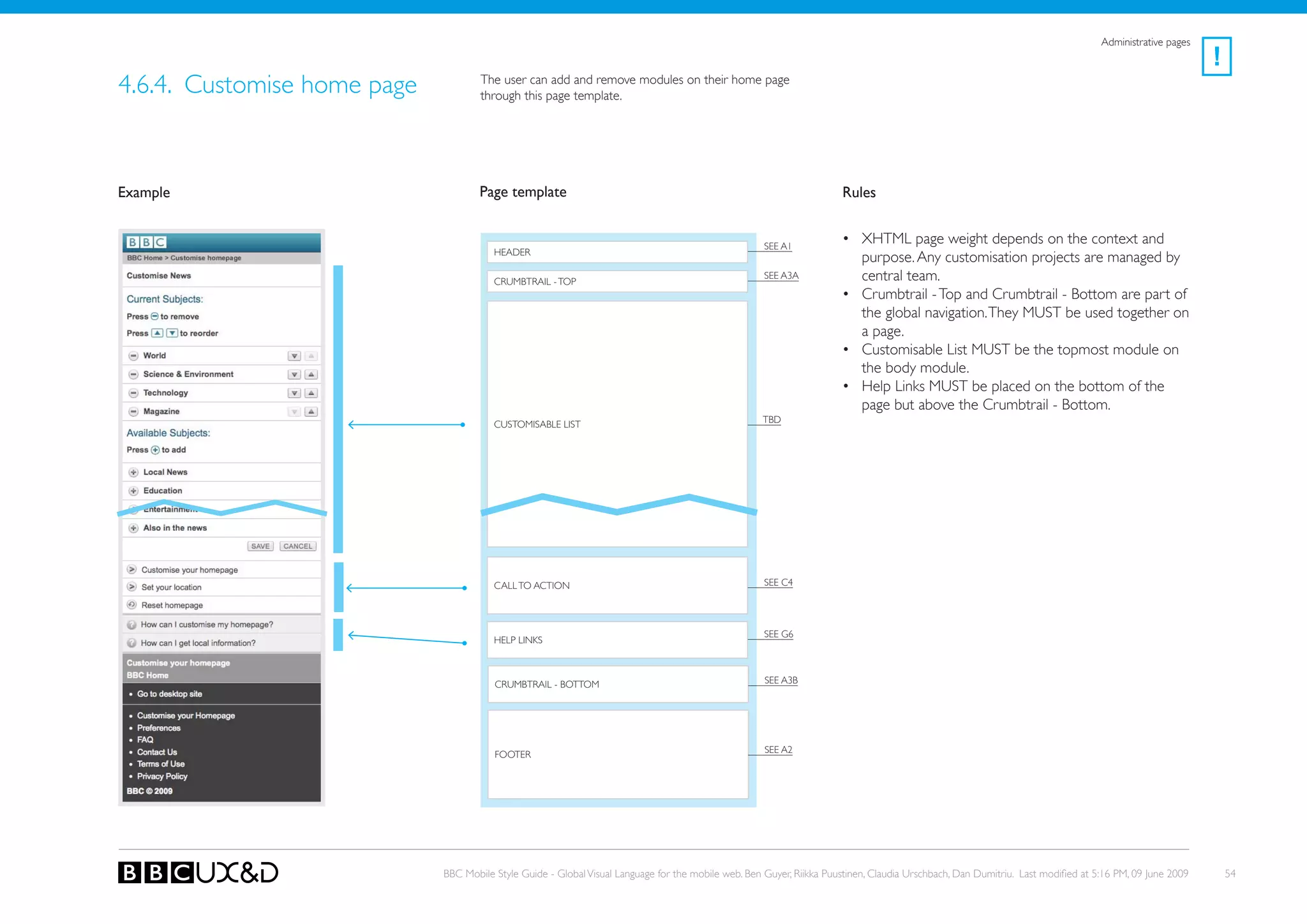
4.6.4. Customise home page           The user can add and remove modules on their home page
                                     through this page template.


Example                              Page template                                                                    Rules


                                                                                                     SEE A1
                                                                                                                      • XHTML page weight depends on the context and
                                        HEADER
                                                                                                                        purpose. Any customisation projects are managed by
                                        CRUMBTRAIL - ToP
                                                                                                     SEE A3A            central team.
                                                                                                                      • Crumbtrail - Top and Crumbtrail - Bottom are part of
                                                                                                                        the global navigation. They MUST be used together on
                                                                                                                        a page.
                                                                                                                      • Customisable List MUST be the topmost module on
                                                                                                                        the body module.
                                                                                                                      • Help Links MUST be placed on the bottom of the
                                                                                                                        page but above the Crumbtrail - Bottom.
                                        CUSToMISABLE LIST                                           tBD


                                        CALL To ACTIoN                                               SEE C4


                                                                                                     SEE G6
                                        HELP LINkS


                                        CRUMBTRAIL - BoTToM                                          SEE A3B


                                        FooteR                                                       SEE A2


                             BBC Mobile Style Guide - Global Visual Language for the mobile web. Ben Guyer, Riikka Puustinen, Claudia Urschbach, Dan Dumitriu. Last modified at 5:16 PM, 09 June 2009       54
Modules


5. Modules
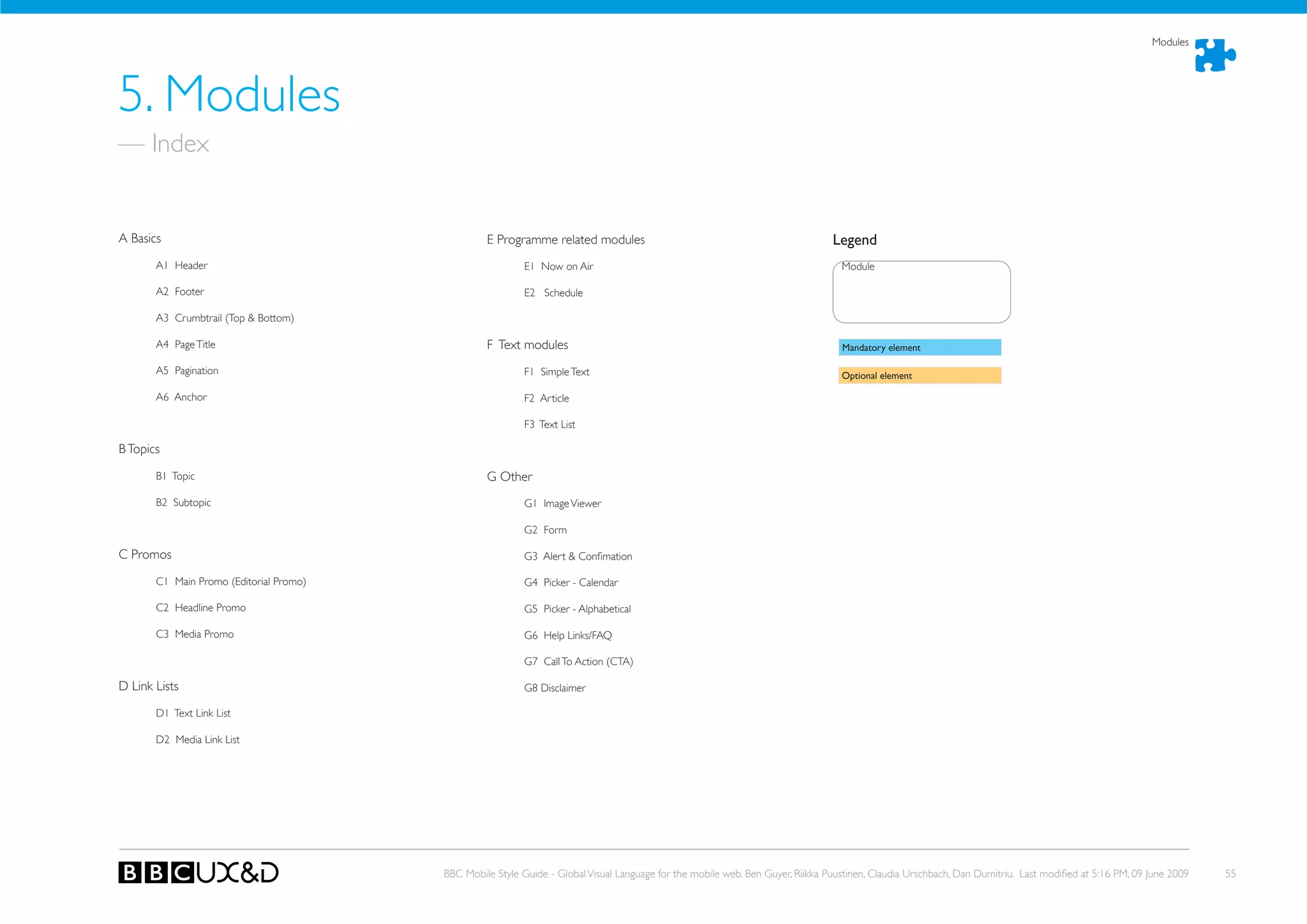
— Index


A Basics                                          e Programme related modules                                                   Legend
       A1 Header                                           E1 Now on Air                                                          Module

       A2 Footer                                           E2 Schedule

       A3 Crumbtrail (Top & Bottom)

       A4 Page Title                              F Text modules                                                                  Mandatory element

       A5 Pagination                                       F1 Simple Text                                                         Optional element

       A6 Anchor                                           F2 Article

                                                           F3 Text List

B Topics

       B1 Topic                                   G other
       B2 Subtopic                                         G1 Image Viewer

                                                           G2 Form

C Promos                                                   G3 Alert & Confimation

       C1 Main Promo (Editorial Promo)                     G4 Picker - Calendar

       C2 Headline Promo                                   G5 Picker - Alphabetical

       C3 Media Promo                                      G6 Help Links/FAQ

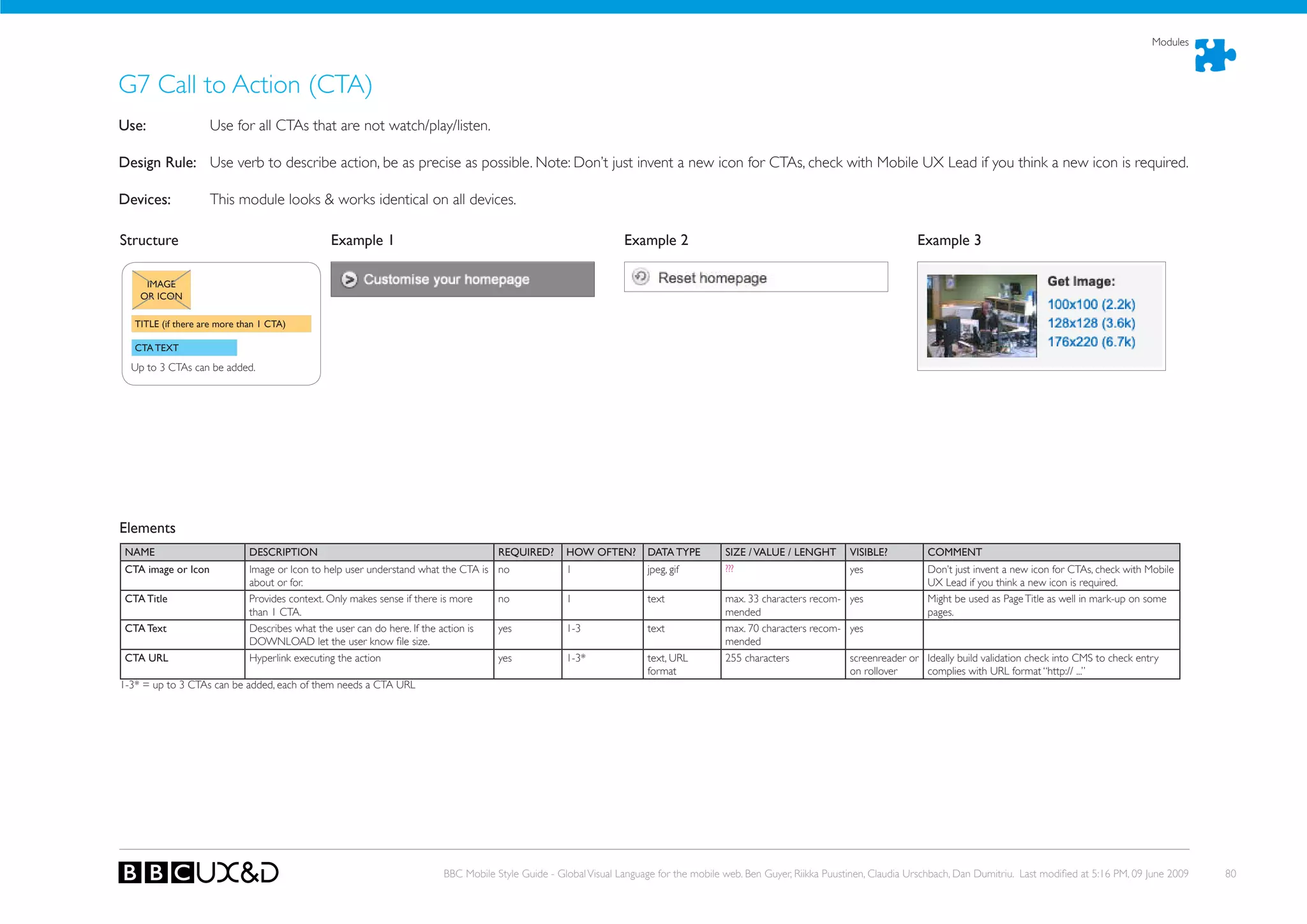
                                                           G7 Call To Action (CTA)

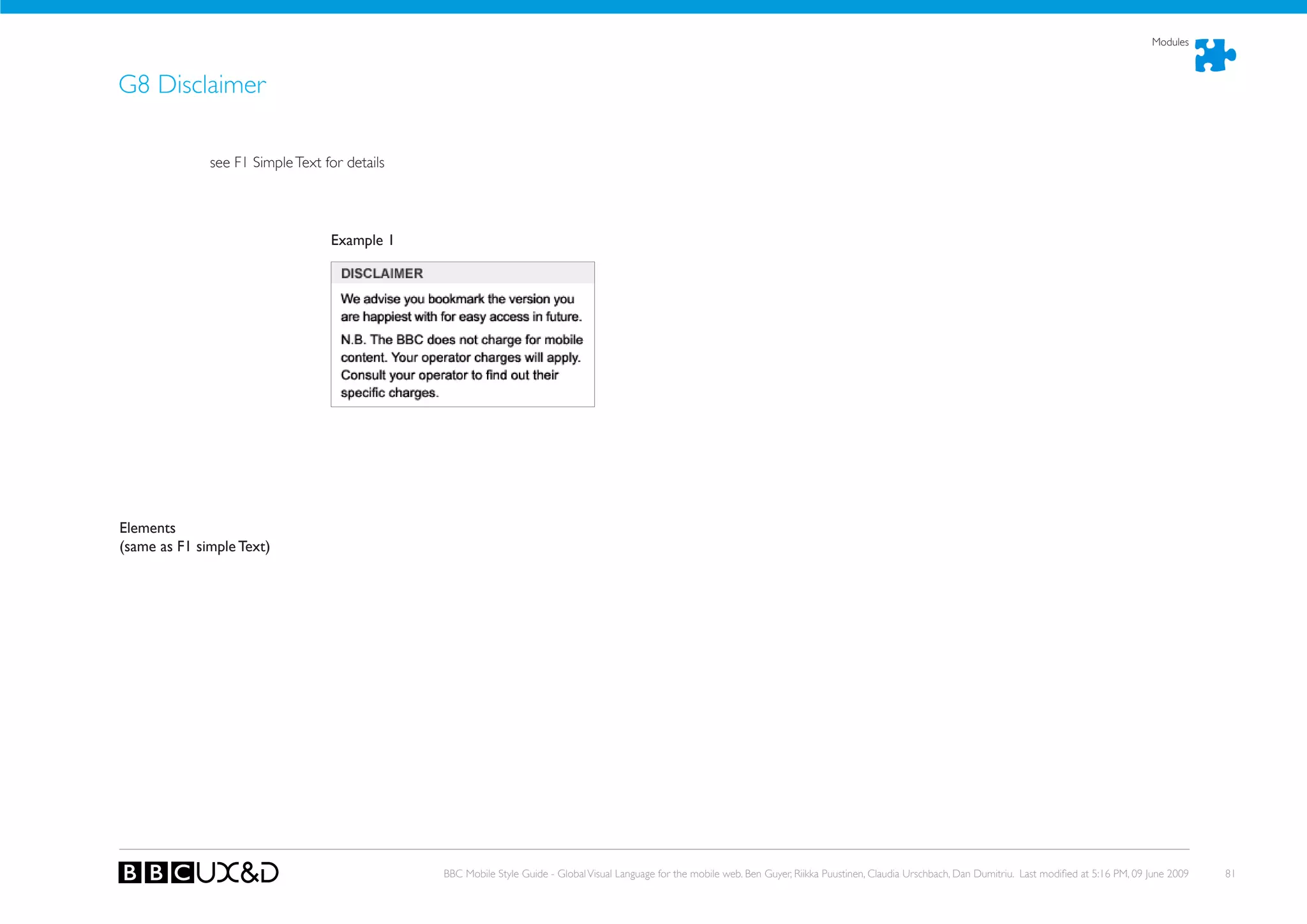
D Link Lists                                               G8 Disclaimer

       D1 Text Link List

       D2 Media Link List


                                         BBC Mobile Style Guide - Global Visual Language for the mobile web. Ben Guyer, Riikka Puustinen, Claudia Urschbach, Dan Dumitriu. Last modified at 5:16 PM, 09 June 2009   55
Modules


A1 Header
use:          First item on a BBC Mobile page.

Design Rule: Currently being defined as part of branding work.

Devices:      This module looks & works identical on all devices.


                                     WORK IN PROGRESS
                                     Currently	being	defined	as	part	of	branding	work.


                                                     BBC Mobile Style Guide - Global Visual Language for the mobile web. Ben Guyer, Riikka Puustinen, Claudia Urschbach, Dan Dumitriu. Last modified at 5:16 PM, 09 June 2009   56
Modules


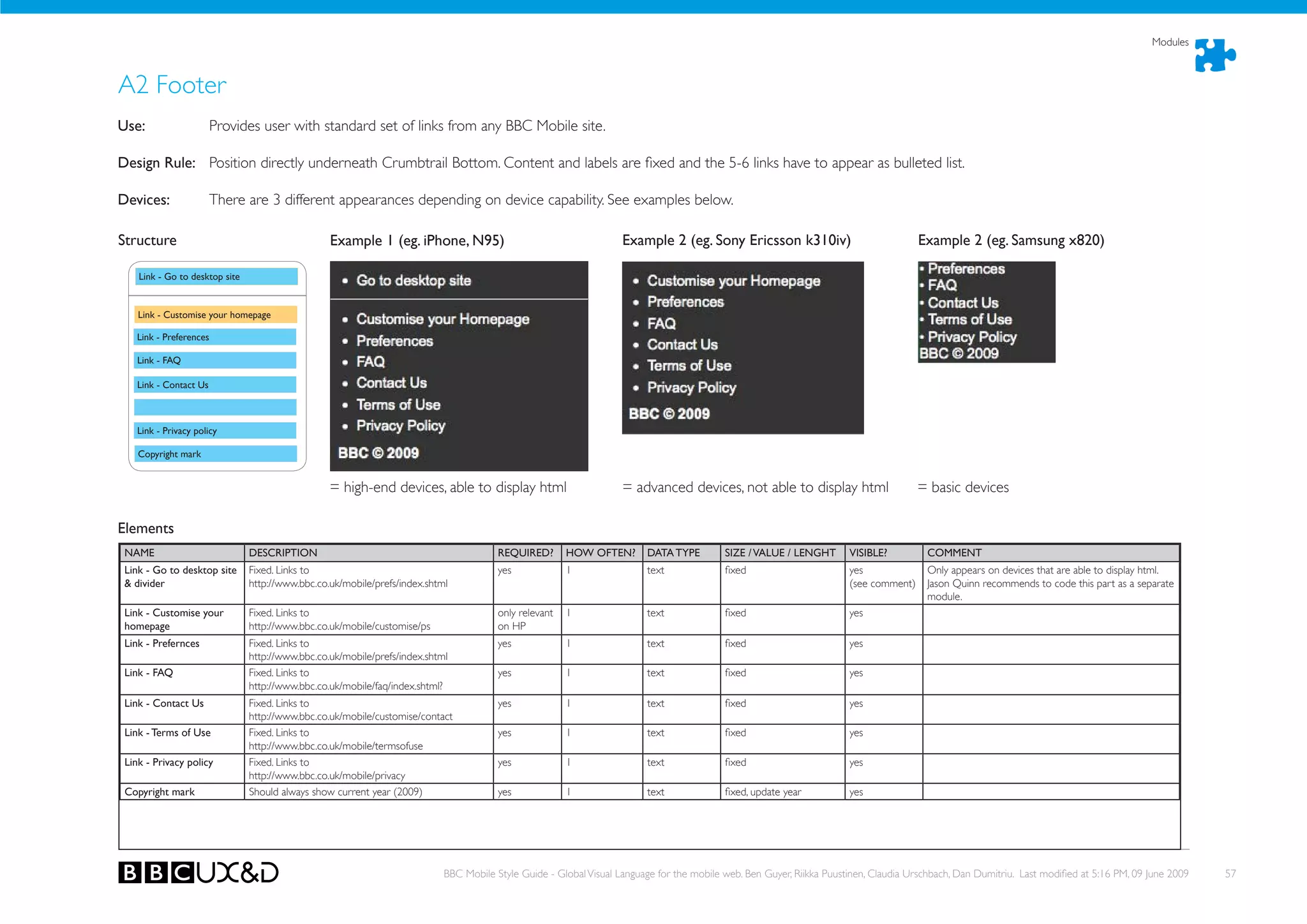
A2 Footer
use:                   Provides user with standard set of links from any BBC Mobile site.

Design Rule: Position directly underneath Crumbtrail Bottom. Content and labels are fixed and the 5-6 links have to appear as bulleted list.

Devices:               There are 3 different appearances depending on device capability. See examples below.

Structure                                         Example 1 (eg. iPhone, N95)                                       Example 2 (eg. Sony Ericsson k310iv)                               Example 2 (eg. Samsung x820)

    Link - Go to desktop site


    Link - Customise your homepage

   Link - Preferences

   Link - FAQ

   Link - Contact us


   Link - Privacy policy

    Copyright mark


                                                  = high-end devices, able to display html                          = advanced devices, not able to display html                       = basic devices

Elements
 NAME                           DESCRIPTION                                             REQuIRED?       hOW OFTEN?       DATA TYPE         SIZE / VALuE / LENGhT       VISIBLE?          COMMENT
 Link - Go to desktop site      Fixed. Links to                                         yes             1                text              fixed                       yes               only appears on devices that are able to display html.
 & divider                      http://www.bbc.co.uk/mobile/prefs/index.shtml                                                                                          (see comment)     Jason Quinn recommends to code this part as a separate
                                                                                                                                                                                         module.
 Link - Customise your          Fixed. Links to                                         only relevant   1                text              fixed                       yes
 homepage                       http://www.bbc.co.uk/mobile/customise/ps                on HP
 Link - Prefernces              Fixed. Links to                                         yes             1                text              fixed                       yes
                                http://www.bbc.co.uk/mobile/prefs/index.shtml
 Link - FAQ                     Fixed. Links to                                         yes             1                text              fixed                       yes
                                http://www.bbc.co.uk/mobile/faq/index.shtml?
 Link - Contact us              Fixed. Links to                                         yes             1                text              fixed                       yes
                                http://www.bbc.co.uk/mobile/customise/contact
 Link - Terms of use            Fixed. Links to                                         yes             1                text              fixed                       yes
                                http://www.bbc.co.uk/mobile/termsofuse
 Link - Privacy policy          Fixed. Links to                                         yes             1                text              fixed                       yes
                                http://www.bbc.co.uk/mobile/privacy
 Copyright mark                 Should always show current year (2009)                  yes             1                text              fixed, update year          yes


                                                                            BBC Mobile Style Guide - Global Visual Language for the mobile web. Ben Guyer, Riikka Puustinen, Claudia Urschbach, Dan Dumitriu. Last modified at 5:16 PM, 09 June 2009   57
Modules


A3 Crumbtail Top & Bottom
use:                  Shows a link to BBC Home plus links to the two following levels in the hierachy of the sitemap. Top & Bottom show the same 3 links, just in reverse order.

Design Rule: Position-Top is directly underneath header. Position-Bottom is above Footer.

Devices:              This module looks & works identical on all devices.

Structure A3a - Top                                 Example - Top                                                       Structure A3b- Bottom (= order opposite)                              Example - Bottom

   BBC	HOME	(fixed	label)
                                                                                                                            3RD hIGhEST PAGE
                                                                                                                            (the one that hierachically sits on level
   2ND hIGhEST PAGE                                                                                                         3 of the Mobile hP sitemap)


   3RD hIGhEST PAGE                                                                                                         2ND hIGhEST PAGE
   (the one that hierachically sits on level
   3 of the Mobile hP sitemap)
                                                                                                                            BBC	HOME	(fixed	label)


Elements
NAME                            DESCRIPTION                                                 REQuIRED?       hOW OFTEN?       DATA TYPE           SIZE / VALuE / LENGhT      VISIBLE?           COMMENT
BBC home                        BBC Home link                                               yes             1                text                fixed                      yes
(= highest page)
BBC home uRL                    URL Mobile HP                                               yes             1                text, URL           fixed                      screenreader or
                                                                                                                             format                                         on rollover
2nd highest page                Page title of the page that sits 2nd highest in the hier-   yes, if there is 1               text                n/a as comes from page     yes
                                achy of the Mobile site.                                    a page above                                         title of page this links
                                                                                            the current                                          refers to
                                                                                            one
2nd highest page uRL            URL for page                                                yes              1               text, URL           n/a as comes from page     screenreader or
(as above)                                                                                                                   format              this links refers to       on rollover
3rd highest page                Page title of the page that sits 3rd highest in the hier-   yes, if there is 1               text                n/a as comes from page     yes
                                achy of the Mobile site. this means the crumbtrail may      a page above                                         title of page this links
                                not show the page that sits right above the displayed       the current                                          refers to
                                page in the site hierachy (eg. if the displayed page sits   one
                                deeper down in the site hierachy then level 4).
3rd highest page uRL            URL for page                                                yes             1                text, URL           n/a as comes from page     screenreader or Ideally build validation check into CMS to check entry
(as above)                                                                                                                   format              this links refers to       on rollover     complies with URL format “http:// ...”


                                                                                BBC Mobile Style Guide - Global Visual Language for the mobile web. Ben Guyer, Riikka Puustinen, Claudia Urschbach, Dan Dumitriu. Last modified at 5:16 PM, 09 June 2009   58
Modules


A4 Page Title
use:             Important for crumbtrail, & search indexing. In many cases the Page Title is identical to the title of the first module used on the page, eg. Article Title, List Title.

Design Rule: If the first module has a title then don’t display the page title if the text would be duplicated then. However, page title always must always be part of the non-visi-
             ble mark-up.
Devices:     This module looks & works identical on all devices.

Structure                                    Example 1                                                          Example 2                                                                    Example 3
   PAGE TITLE


                                              In this case you see a page listing media links. (module              In this case you see an article page with a an Article mod-
                                              ‘Media Link List’). The title given to the list ‘Stephen’s Dis-       ule. the article title is ‘Villagers challenge Google camera’.
                                              patches’ is what should be used as Page Title - however, no           This is what should be used as Page Title - however, no
                                              need to display it again as it already is displayed.                  need to display it again as it already is displayed as part of
                                                                                                                    the article.


Elements
 NAME                   DESCRIPTION                                                   REQuIRED?        hOW OFTEN?     DATA TYPE          SIZE / VALuE / LENGhT          VISIBLE?              COMMENT
 Article title          Story title, functions as page title                          yes              1              text               33 characters*                 not if module         * Might be necessary sometimes to have longer title but
                                                                                                                                                                        title is identical    recommendation is to keep it below 33 characters.
                                                                                                                                                                                              Important: Use Article Title as Page Title in mark-up!


                                                                        BBC Mobile Style Guide - Global Visual Language for the mobile web. Ben Guyer, Riikka Puustinen, Claudia Urschbach, Dan Dumitriu. Last modified at 5:16 PM, 09 June 2009          59
Modules


A5 Pagination
use:                Allows user to navigate through a long listing, for example Search Results.

Design Rule: Position above Crumbtrail-Bottom when content continues. Always keep labels and order as stated below (Next / Previous). Highlight current page number.

Devices:            This module looks & works identical on all devices.

Structure                                    Example 1

   NEXT LINK

   PREVIOuS LINK

   ORIENTATION INFO


Elements
NAME                      DESCRIPTION                                                 REQuIRED?     hOW OFTEN?        DATA TYPE         SIZE / VALuE / LENGhT       VISIBLE?         COMMENT
Next link                 Label fixed. Link is active and links to previous page      yes           1                 text              fixed                       yes              Requires some logic in the code to have this link to the
                          - unless user currently sees page 1 of a series of pages.                                                                                                  right page.
Next link uRL             Page the next link links to                                 yes           1                 text, URL         255 characters              screenreader or
                                                                                                                      format                                        on rollover
Previous link             Label fixed. Link is active and links to previous page      yes           1                 text              fixed                       yes             Requires some logic in the code to have this link to the
                          - unless user currently sees page 1 of a series of pages.                                                                                                 right page.
Previous link uRL         Page the previous link links to                             yes           1                 text, URL         255 characters              screenreader or
                                                                                                                      format                                        on rollover
Orientation info          Tells user how many more pages there are and which          yes           1                 text              Page <insert current> of    yes              Requires some logic to insert info correctly.
                          of these are currently displayed.                                                                             <insert total>


                                                                         BBC Mobile Style Guide - Global Visual Language for the mobile web. Ben Guyer, Riikka Puustinen, Claudia Urschbach, Dan Dumitriu. Last modified at 5:16 PM, 09 June 2009   60
Modules


A6 Anchor
use:               Allows user to quick jump to content further down the same page oR back to the top of the page.

Design Rule: Inserted manually or automatically on long pages. Use standard icons as shown in examples below. Recommendation is that a ‘Top’ link allowing users to get to the
             top of the page should be offered every 3-5 paragraphs.
Devices:     This module looks & works identical on all devices.

Structure                                     Example 1                                                           Example 2

             ANChOR LINK


Elements
NAME                       DESCRIPTION                                                REQuIRED?      hOW OFTEN?        DATA TYPE         SIZE / VALuE / LENGhT       VISIBLE?         COMMENT
Icon                       Standard icons for quick jump up and down.                 yes            1                 text              fixed                     yes
Anchor link text           Label flexible - however if used to allow users to navi-   yes            1                 text              max. 33 characters recom- yes
                           gate to top of the page fixed to ‘Top’.                                                                       mended
Anchor link uRL            Reference to another item on the page (positioned          yes            1                 text              Page <insert current> of yes                 Requires that editor/user can select an other item on the
                           above or below).                                                                                              <insert total>                               page to create the anchor link reference.


                                                                          BBC Mobile Style Guide - Global Visual Language for the mobile web. Ben Guyer, Riikka Puustinen, Claudia Urschbach, Dan Dumitriu. Last modified at 5:16 PM, 09 June 2009   61
Modules


B1 Topic
use:         Separates different content areas on an index page. For this to make sense there should be at least 2 topics per index page. Enables users to scan the page easily
             when scrolling down/scanning the page. Topic headings should link to index pages or other major pages, eg. schedule. Edit functionality is only available on HP.
Design Rule: Used mainly on index pages. Position first topic directly underneath crumbtrail-top or Main Promo.

Devices:             This module looks & works identical on all devices (except Edit button that is not available for some devices).

Structure                                      Example 1
                                                                                                                  ToPIC HEADING is the only element unique to the Topic module. All other elements can be created by
         TOPIC              EDIT                                                                                  inserting other modules into the Topic module (eg. Text Link List or Headline Promo).
        hEADING           BuTTON
                                                                                                                  = Headline Promo


    you can add a variety of modules
    to a topic. Examples:                                                                                         = Text Link List with additonal links
    - Subtopic
    - Headline Promo
    - Media Promo
    - Text Link List
    - Media Link List
    etc.                                                                                                          = Media Link List


                                                                                                                  = Subtopic


Elements
 NAME                       DESCRIPTION                                               REQuIRED?      hOW OFTEN?        DATA TYPE          SIZE / VALuE / LENGhT         VISIBLE?           COMMENT
 Topic heading              Provides context for below content. Label carefully,      yes            1                 text               max. 20 charcters recom-      yes
                            should be short & easy to understand.                                                                         mended
 Topic heading uRL          Page the heading links to                                 yes            1                 text, URL          255 characters                screenreader or Ideally build validation check into CMS to check entry
                                                                                                                       format                                           on rollover     complies with URL format “http:// ...”
 Edit button                CTA linking to customisation page                         no             1                 text               fixed label
 Edit button uRL            Customisation page the promo links to                     yes*           1                 text, URL          255 characters                screenreader or Ideally build validation check into CMS to check entry
                                                                                                                       format                                           on rollover     complies with URL format “http:// ...”
1-3* = up to 3 headline promos can be added, each of them needs image, image alte text, promo text and URL once.
yes * = if edit button has been added, then these fields are required.


                                                                          BBC Mobile Style Guide - Global Visual Language for the mobile web. Ben Guyer, Riikka Puustinen, Claudia Urschbach, Dan Dumitriu. Last modified at 5:16 PM, 09 June 2009    62
Modules


B2 Subtopic
use:         Separates different content areas within a topic on an index page. For this to make sense there should be at least 2 subtopics per topic. Enables users to scan the
             page easily when scrolling down/scanning the page. Subtopic headings can link to index pages, not a must though.
Design Rule: Used mainly on index pages as part of topic modules.

Devices:            This module looks & works identical on all devices.

Structure                                       Example 1
                                                                                                                   = Topic Heading
  Topic


           SuBTOPIC
           hEADING


       you can add a variety of modules
       to a subtopic. Examples:
       - Headline Promo
       - Media Promo
       - Text Link List
       - Media Link List
       etc.

                                                                                                                    SUBToPIC HEADING is the only element unique to the subtopic module. All other elements can be created by
                                                                                                                    inserting other modules into the subtopic module (eg. Text Link List or Headline Promo).


                                                                                                                   = Text Link List with additonal links


Elements
NAME                         DESCRIPTION                                               REQuIRED?      hOW OFTEN?        DATA TYPE          SIZE / VALuE / LENGhT        VISIBLE?           COMMENT
Subtopic heading             Provides context for below content. Label carefully,      yes            1                 text               max. 20 charcters recom-     yes
                             should be short & easy to understand.                                                                         mended
Topic heading uRL            Index page the heading links to                           no             1                 text, URL          255 characters               screenreader or Ideally build validation check into CMS to check entry
                                                                                                                        format                                          on rollover     complies with URL format “http:// ...”


                                                                           BBC Mobile Style Guide - Global Visual Language for the mobile web. Ben Guyer, Riikka Puustinen, Claudia Urschbach, Dan Dumitriu. Last modified at 5:16 PM, 09 June 2009   63
Modules


 C1 Main Promo (also known as ‘Editorial Promo’)
use:         Promotes an article/item. Promo links to a page. Promo image & text only, only additional link can be an av link (for promo with av see ‘Media Promo’).
Design Rule:
Devices:     Position directly underneath breadcrumb on top of an index page.

                      This module looks & works identical on all devices.

Structure                                         Example 1                                                           Example 2                                                          Example 3

                IMAGE


    PROMO TEXT


   ADDITIONAL LINK


Elements
NAME                          DESCRIPTION                                                REQuIRED?       hOW OFTEN?        DATA TYPE         SIZE / VALuE / LENGhT       VISIBLE?         COMMENT
Promo image                   Big promo image                                            yes             1                 jpeg, gif         320 x 179px oR              yes
                                                                                                                                             240 x 134px oR
                                                                                                                                             165 X 93px
Promo image alt text          Describes image content, used for screenreaders            yes             1                 text              125 characters            screenreader or
                                                                                                                                                                       on rollover
Promo text                    Editorial promotion text, functions as call-to-action to   yes             1                 text              max. 70 characters recom- yes
                              encourage user to click on the promo image/text and                                                            mended
                              find out more
Promo uRL                     Page the promo links to                                    yes             1                 text, URL         255 characters            screenreader or Ideally build validation check into CMS to check entry
                                                                                                                           format                                      on rollover     complies with URL format “http:// ...”
Additonal link text           Editorial text, promotes availability of more related      no              1                 text              max. 33 characters recom- yes
                              content                                                                                                        mended
Additonal link uRL            Page the additional link links to                          yes*            1                 text, URL         255 characters            screenreader or Ideally build validation check into CMS to check entry
                                                                                                                           format                                      on rollover     complies with URL format “http:// ...”
Additonal link type           Defines link type, informs whether ‘listen’ or ‘watch’     yes*            1                 controlled list   text oR audio oR video    yes as icon
                              icons are displayed
yes * = if editor chooses to add an additional link, then these fields are required.


                                                                              BBC Mobile Style Guide - Global Visual Language for the mobile web. Ben Guyer, Riikka Puustinen, Claudia Urschbach, Dan Dumitriu. Last modified at 5:16 PM, 09 June 2009   64
Modules


C2 Headline Promo
use:               Promotes 1-3 articles/items. Each promo links to a page. Promos is image & text only. NoT media. Additional link can be av (for av promo see ‘Media Promo’).

Design Rule: Position directly underneath breadcrumb on top of an index page or as first item within a topic module.

Devices:           This module looks & works identical on all devices.

Structure                                     Example 1                                                          Example 2                                                            Example 3 (alternative image size)


       IMAGE       PROMO TEXT


       IMAGE       PROMO TEXT


       IMAGE       PROMO TEXT


Elements
 NAME                       DESCRIPTION                                              REQuIRED?      hOW OFTEN?        DATA TYPE         SIZE / VALuE / LENGhT       VISIBLE?           COMMENT
 Promo image                Small to medium sized promo image                        yes            1-3*              jpeg, gif         86 x 48px oR                yes
                                                                                                                                        66 x 93px
 Promo image alt text       Describes image content, used for screenreaders          yes            1-3*              text              125 characters              screenreader or
                                                                                                                                                                    on rollover
 Promo text                 Editorial promotion text oR headline, functions as       yes            1-3*              text              max. 70 characters rec-     yes
                            call-to-action to encourage user to click on the promo                                                      ommended
                            image/text and find out more
 Promo uRL                  Page the promo links to                                  yes            1-3*              text, URL         255 characters              screenreader or Ideally build validation check into CMS to check entry
                                                                                                                      format                                        on rollover     complies with URL format “http:// ...”
1-3* = up to 3 headline promos can be added, each of them needs image, image alte text, promo text and URL once.


                                                                         BBC Mobile Style Guide - Global Visual Language for the mobile web. Ben Guyer, Riikka Puustinen, Claudia Urschbach, Dan Dumitriu. Last modified at 5:16 PM, 09 June 2009   65
Modules


C3 Media Promo
use:                   Promotes 1-3 av items. Promo takes user to item page where he can than launch the media item.

Design Rule: Position directly underneath breadcrumb on top of an index page or as first item within a topic module. Always has watch/listen icon.

Devices:               Devices that can’t play the media item will not show this module.

Structure                                         Example 1                                                          Example 2

                 LABEL eg. Now on air


                  EPISODE TITLE

                  EPISODE DESCRIP.

                  BROADCAST TIME /
                  LENGTh
   Up to 3 promos. All should have an
   identical arrangement of elements.

   ADDITIONAL LINK

Elements
 NAME                         DESCRIPTION                                               REQuIRED?       hOW OFTEN?        DATA TYPE         SIZE/VALuE/      VISIBLE?          COMMENT
                                                                                                                                            LENGTh
 Promo image                  Small to medium sized promo image                         yes             1-3*              jpeg, gif         86 x 48px oR     yes
                                                                                                                                            66 x 93px
 Promo image alt text         Describes image content, used for screenreaders           yes             1-3*              text              125 characters   screenreader or
                                                                                                                                                             on rollover
 Title, eg. Now on air OR     Provides user with context about the promoted media       no              1-3*              text              max. 33 ch-      yes             Might be used as Page Title as well in mark-up on some
 Next on                      item                                                                                                          arcters recom-                   pages.
                                                                                                                                            mended
 Programme Brand              Core information about media item. Links to /pro-         yes             1-3*              text              ??? PIPS
                              grammes page for the currently broadcasted episode.
                              URL in some cases might come from PIPS.
 Promo uRL                    Page the promo links to                                   yes             1-3*              text, URL         255 characters   screenreader or Ideally build validation check into CMS to check entry
                                                                                                                          format                             on rollover     complies with URL format “http:// ...”
 Episode title &              Additional information about the media item               no              1-3*              text              ??? PIPS         yes
 description
 Broadcast time / Length      Additional information about the media item               no              1-3*              00:00 - 00:00     see comment      yes               Broadcast time comes from PIPS. Length comes from clip
                                                                                                                          oR 0 min                                             oR for clip can be added by editor manually.
 Additonal link text          Editorial text, promotes availability of more related     no              1                 text              max. 33 char-
                              content                                                                                                       acters recom-
                                                                                                                                            mended
 Additonal link uRL           Page the additional link links to                         yes*            1                 text, URL         255 characters   screenreader or Ideally build validation check into CMS to check entry
 (Link should be text link)                                                                                               format                             on rollover     complies with URL format “http:// ...”
 Additonal link type       Defines link type, informs whether ‘listen’ or ‘watch’   yes*          1                   controlled list  text oR audio yes as icon
                           icons are displayed                                                                                         oR video
1-3* = up to 3 promos can be added, each of them needs to have an identical arrangement of elements. yes * = if editor chooses to add an additional link, then these fields are required.


                                                                             BBC Mobile Style Guide - Global Visual Language for the mobile web. Ben Guyer, Riikka Puustinen, Claudia Urschbach, Dan Dumitriu. Last modified at 5:16 PM, 09 June 2009   66
Modules


D1 Text Link List
use:                   Listing simple text links. Note: This module can also be used if only 1list item needs to be listed.

Design Rule: List can have a list title but this is optional. List items can be bulleted or non-bulleted. Use this module for Related Links.

Devices:               This module looks & works identical on all devices. However, on small display devices long items might wrap into a second row.

Structure                                           Example 1                                                           Example 3                                                         Example 5

    LIST TITLE

    LIST ITEM TEXT

   Up to X list items allowed. All should
   either be bulleted or non-bulleted.

    ADDITIONAL LINK
                                                    Example 2                                                           Example 4


Elements
 NAME                          DESCRIPTION                                                 REQuIRED?       hOW OFTEN?        DATA TYPE         SIZE / VALuE / LENGhT       VISIBLE?         COMMENT
 List type                     Bulleted or non-bulleted or numbered.                       yes             1                 controlled list   simple oR bulleted oR       no               Defines if bullet points or numbers should be displayed
                                                                                                                                               numbered.                                    in front of items
 List title                    Provide context                                             no              1                 text              max. 33 characters recom-   yes              Might be used as Page Title as well in mark-up. on some
                                                                                                                                               mended                                       pages.
 List item text                short link title.                                           yes             1-x*              text              max. 70 characters recom-   yes
                                                                                                                                               mended
 List item uRL                 Page the list item links to                                 yes             1-x*              text              255 characters              screenreader or Ideally build validation check into CMS to check entry
                                                                                                                                                                           on rollover     complies with URL format “http:// ...”

 Additonal link text           Editorial text, promotes availability of more related       no              1-3               text              max. 33 characters recom- yes
                               content                                                                                                         mended
 Additonal link uRL            Page the additional link links to                           yes*            1-3               text, URL         255 characters            screenreader or Ideally build validation check into CMS to check entry
                                                                                                                             format                                      on rollover     complies with URL format “http:// ...”
 Additonal link type            Defines link type, informs whether ‘listen’ or ‘watch’     yes*            1-3               controlled list   text oR audio oR video    yes as icon
                                icons are displayed
1-x* = unlimited list items allowed
yes * = if editor chooses to add an additional link, then these fields are required.


                                                                                BBC Mobile Style Guide - Global Visual Language for the mobile web. Ben Guyer, Riikka Puustinen, Claudia Urschbach, Dan Dumitriu. Last modified at 5:16 PM, 09 June 2009   67
Modules


D2 Media Link List
use:                   Listing av items. Note: This module can also be used if only 1media item needs to be listed.

Design Rule: List can have a list title but this is optional. Each list item is shown with the standard av icon (watch/listen, see visual guidelines section).

Devices:               This module looks & works identical on all devices.

Structure                                            Example 1                                                           Example 2                                                          Example 3

    LIST TITLE

    LIST ITEM TEXT

   Up to X list items allowed.

    ADDITIONAL LINK


Elements
 NAME                            DESCRIPTION                                                REQuIRED?       hOW OFTEN?        DATA TYPE         SIZE / VALuE / LENGhT       VISIBLE?         COMMENT
 List title                      Provide context                                            no              1                 text              max. 33 characters recom- yes                Might be used as Page Title as well in mar-up. on some
                                                                                                                                                mended                                       pages.
 List item text                  short link title.                                          yes             1-x*              text              max. 70 characters recom- yes
                                                                                                                                                mended
 List item uRL                   Page the list item links to                                yes             1-x*              text              255 characters            screenreader or    Ideally build validation check into CMS to check entry
                                                                                                                                                                          on rollover        complies with URL format “http:// ...”

 List item type                  Defines link type, informs whether ‘listen’ or ‘watch’     yes             1-x*              controlled list   audio oR video              yes as icon
                                 icons are displayed

 Additonal link text             Editorial text, promotes availability of more related      no              1                 text              max. 33 characters recom- yes
                                 content                                                                                                        mended
 Additonal link uRL              Page the additional link links to                          yes*            1                 text, URL         255 characters            screenreader or Ideally build validation check into CMS to check entry
                                                                                                                              format                                      on rollover     complies with URL format “http:// ...”
 Additonal link type            Defines link type, informs whether ‘listen’ or ‘watch’      yes*            1                 controlled list   text oR audio oR video    yes as icon     In this case this should be a text link.
                                icons are displayed
1-x* = unlimited list items allowed
yes * = if editor chooses to add an additional link, then these fields are required.


                                                                                 BBC Mobile Style Guide - Global Visual Language for the mobile web. Ben Guyer, Riikka Puustinen, Claudia Urschbach, Dan Dumitriu. Last modified at 5:16 PM, 09 June 2009   68
Modules


E1 Now on air
use:                   Provides an overview over current broadcast on 1 or more channels/stations. Data provided by PIPS feed.

Design Rule: Position as first item within a topic module. Always label ‘Now on air’ (either by making this the topic heading or by using the status element).

Devices:               This module looks & works identical on all devices. However, on small display devices the Programme Brand might wrap into a second row.

Structure                                       Example 1                                                           Example 2 (with location customisation)                           Example 3

   STATuS, eg. Now on air


       IMAGE


   STATION/ChANNEL
                                                                                                                                                                                               WORK IN PROGRESS
                                                                                                                                                                                               Please do not use this as a
   PROGRAMME BRAND                                                                                                                                                                             design example
  Up to X channe;ls/stations. All should
  have an identical arrangement of
  elements.
   ADDITIONAL LINK


Elements
 NAME                        DESCRIPTION                                                REQuIRED?      hOW OFTEN?        DATA TYPE          SIZE / VALuE / LENGhT      VISIBLE?          COMMENT
 Status                      Provides user with context about the schedule items.       no             1                  text              max. 33 characters recom- yes                Might be used as Page Title as well in mark-up. on some
                                                                                                                                            mended                                       pages. Status ‘Now on air’ is necessary if topic heading is
                                                                                                                                                                                         ‘Radio’. Status ‘Now on air’ is not necessary if topic head-
                                                                                                                                                                                         ing underneath schedule appears is ‘Now on air’ already.
 Station/Channel             short Label for station/channel as agreed for Mobile.      yes            1-x*               text              15 characters              yes
                             Links to station/channel page. URL to come from PIPS
                             or hardcoded.
 Programme Brand             Core information about a schedule item. Links to /pro-     yes            1-x*               text              PIPS                       yes
                             grammes page for the currently broadcasted episode.
                             URL to come from PIPS.
 Image for Broadcast Item                                                                                                                   iPlayer image size
 (Comes from iPlayer)                                                                                                                       86x48px


 Additonal link text         Editorial text, promotes availability of more related      no             1-3                text              max. 33 characters recom- yes
                             content                                                                                                        mended
 Additonal link uRL          Page the additional link links to                          yes*           1-3                text, URL         255 characters            screenreader or Ideally build validation check into CMS to check entry
                                                                                                                          format                                      on rollover     complies with URL format “http:// ...”
 Additonal link type          Defines link type, informs whether ‘listen’ or ‘watch’ yes*          1-3                    controlled list   text oR audio oR video    yes as icon
                              icons are displayed
1-x* = unlimited stations/channels allowed,, for each one chosen a programme brand needs to be shown.
yes * = if editor chooses to add an additional link, then these fields are required.


                                                                            BBC Mobile Style Guide - Global Visual Language for the mobile web. Ben Guyer, Riikka Puustinen, Claudia Urschbach, Dan Dumitriu. Last modified at 5:16 PM, 09 June 2009      69
Modules


E2 Schedule
use:         Lists directly sequentially broadcasted items. Items link to APS episode pages. Don’t confuse with Now on Air (shows what’s currently broadcasted) or Media Pro-
             mos (lists non-sequential media items).
Design Rule: Ideally a schedule should be its own page or at least be the dominating module on a page. Avoid combining it with too many other modules.

Devices:            This module looks & works identical on all devices.

Structure                                                                                                         Example 2

    SChEDuLE TITLE


                    BROADCAST TIME
       IMAGE
                    PROGRAMME BRAND

                    EPISODE TITLE

                    EPISODE DESCRIP.

    Up to X broadcast items can be listed.
    All should have an identical arrange-
    ment of elements.


 NAME                       DESCRIPTION                                              REQuIRED?       hOW OFTEN?        DATA TYPE                          VISIBLE?          COMMENT
 Schedule Title             tells the user what time frame the schedule is for.      yes             1                 text              max. 33 char-    yes               Might be used as Page Title as well in mar-up. on some
                                                                                                                                         acters recom-                      pages.
                                                                                                                                         mended
 Image for Broadcast Item                                                                                                                66x37px
 Broadcast time             start and end time of the broadcast                      yes             1-x*              00:00 - 00:00     13 characters    yes               Broadcast time comes from PIPS.
 Programme Brand            Core information about media item. Links to APS epi-     yes             1-x*              text              PIPS (/Pro-      yes               Programme brand comes from PIPS.
                            sode page for this item. URL to come from PIPS.                                                              grammes)
 Episode title              Specifies which episode of the brand is broadcasted.     yes             1-x*              text              PIPS (/Pro-      yes               Episode title comes from PIPS.
                            Might also show series number                                                                                grammes)
 Episode description        Short information about the episode.                     no             1-3*               text              PIPS (/Pro-      yes               Episode description comes from PIPS.
 (short)                                                                                                                                 grammes)
1-x* = up to x broadcast items can be shown, each of them needs to have an identical arrangement of elements.
yes * = if editor chooses to add an additional link, then these fields are required.


                                                                          BBC Mobile Style Guide - Global Visual Language for the mobile web. Ben Guyer, Riikka Puustinen, Claudia Urschbach, Dan Dumitriu. Last modified at 5:16 PM, 09 June 2009   70
Modules


F1 Simple Text
use:                   Any form of description or information. Text can contain inline text links. bold words and lists.

Design Rule: Usually used as part of article or form. If used as stand alone item add a title - avoid stand-alone/floating items as they may confuse users. If text is quite long use
             bold paragraph beginnings to help users orientate themselves. you may also want to add anchor links on long pages.
Devices:     This module looks & works identical on all devices.

Structure                                           Example 1

    TITLE

                BODY TEXT

       INLINE LINK

       BOLD /COLOuRED TEXT


    ADDITIONAL LINK


Elements
 NAME                          DESCRIPTION                                                 REQuIRED?       hOW OFTEN?        DATA TYPE         SIZE / VALuE / LENGhT       VISIBLE?         COMMENT
 Text title                    Provide context, heading                                    no              1                 text              max. 33 characters recom- yes                Might be used as Page Title as well in mark-up. on some
                                                                                                                                               mended                                       pages.
 Body text                     Allow for parts of the text to be bold/coloured or be       yes             1                 text              max of 1000 characters (?) yes
                               inline links to other pages.
 Additonal link text           Editorial text, promotes availability of more related       no              1-3               text              max. 33 characters recom- yes
                               content                                                                                                         mended
 Additonal link uRL            Page the additional link links to                           yes*            1-3               text, URL         255 characters            screenreader or Ideally build validation check into CMS to check entry
                                                                                                                             format                                      on rollover     complies with URL format “http:// ...”
 Additonal link type            Defines link type, informs whether ‘listen’ or ‘watch’     yes*            1-3               controlled list   text oR audio oR video    yes as icon
                                icons are displayed
1-x* = unlimited list items allowed
yes * = if editor chooses to add an additional link, then these fields are required.


                                                                                BBC Mobile Style Guide - Global Visual Language for the mobile web. Ben Guyer, Riikka Puustinen, Claudia Urschbach, Dan Dumitriu. Last modified at 5:16 PM, 09 June 2009   71
Modules


F2 Article
use:                  Story page or any other text based content. Paragraphs should not contain more than 5 sentences. Can have ‘Have your say’ content & related links at the end.

Design Rule: Allow for inline links to other pages & anchors to the top of the page. Allow making text bold and/or grey, this will help users orientating themselves on pages.

Devices:              This module looks & works identical on all devices.

Structure                                         Example 1                                                        Example 1 (continued)                                                Example 2

                  ARTICLE TITLE
       IMAGE
                  ARTICLE TIME STAMP


          ARTICLE BODY TEXT


        ANChOR

        BOLD /COLOuRED TEXT


  hAVE YOuR SAY QuOTE WITh ICON


  hAVE YOuR SAY FROM


Elements
NAME                         DESCRIPTION                                               REQuIRED?      hOW OFTEN?        DATA TYPE         SIZE / VALuE / LENGhT       VISIBLE?           COMMENT
Article title image          Small to medium sized image, similar to promo image       no             1                 jpeg, gif         86 x 48px oR                yes
                                                                                                                                          66 x 93px
Article title image alt text Describes image content, used for screenreaders           yes            1                 text              125 characters              screenreader or
                                                                                                                                                                      on rollover
Article title                Story title, functions as page title                      yes            1                 text              33 characters*                                 * Might be necessary sometimes to have longer title but
                                                                                                                                                                                         recommendation is to keep it below 33 characters.
                                                                                                                                                                                         Important: Use Article Title as Page Title in mark-up!
Article time stamp           Informs user about publishing time of the story           no             1                 text,             see example 1for format     yes
                                                                                                                        fixed format
Article body text            Main body text. Ideally consists of lead paragraph and    yes            1                 text              min. 200 characters        yes
                             several paragraphs.. Allow for parts of the text to be                                                       max of 1000 characters (?)
                             bold/coloured or be inline links to other pages. Add
                             anchor links after 3-5 paragraphs to allow user to get
                             to top of the page quickly.
have your say quotes         Like main body text, just allows for a small graphic at   no             1                 text & small      max. 1000 (?)               yes
                             the beginning of the paragraph.                                                            image/icon
have your say form           Allows users to submit a comment.                         no             1                 text              n/a                         yes                This is a separate module, see ‘G2 Form’ for details.
Text Link List               Provides additonal links.                                 no             1                 text, URL         n/a                         screenreader or This is a separate module, see ‘D1 Text Link List’ for
(Related links)                                                                                                         format                                        on rollover     details.


                                                                           BBC Mobile Style Guide - Global Visual Language for the mobile web. Ben Guyer, Riikka Puustinen, Claudia Urschbach, Dan Dumitriu. Last modified at 5:16 PM, 09 June 2009        72
Modules


F3 Text List
use:                   Listing simple text items.

Design Rule: List can have a list title but this is optional. List items can be bulleted or numbered.

Devices:               This module looks & works identical on all devices. However, on small display devices long items might wrap into a second row.

Structure                                           Example 1                                                           Example 2

    LIST TITLE

    LIST ITEM TEXT

   Up to X list items allowed. All should
   either be bulleted or numbered.

    ADDITIONAL LINK


Elements
 NAME                          DESCRIPTION                                                 REQuIRED?       hOW OFTEN?        DATA TYPE         SIZE / VALuE / LENGhT       VISIBLE?         COMMENT
 List type                     Bulleted or numbered.                                       yes             1                 controlled list   bulleted oR numbered.       no               Defines if bullet points or numbers should be displayed
                                                                                                                                                                                            in front of items
 List title                    Provides context.                                           no              1                 text              max. 33 characters recom-   yes              Might be used as Page Title as well in mark-up. on some
                                                                                                                                               mended                                       pages.
 List item text                Text.                                                       yes             1-x*              text              max. 200 characters rec-    yes
                                                                                                                                               ommended
 Additonal link text           Editorial text, promotes availability of more related       no              1-3               text              max. 33 characters recom-   yes
                               content                                                                                                         mended
 Additonal link uRL            Page the additional link links to                           yes*            1-3               text, URL         255 characters              screenreader or Ideally build validation check into CMS to check entry
                                                                                                                             format                                        on rollover     complies with URL format “http:// ...”
 Additonal link type            Defines link type, informs whether ‘listen’ or ‘watch’     yes*            1-3               controlled list   text oR audio oR video      yes as icon
                                icons are displayed
1-x* = unlimited list items allowed
yes * = if editor chooses to add an additional link, then these fields are required.


                                                                                BBC Mobile Style Guide - Global Visual Language for the mobile web. Ben Guyer, Riikka Puustinen, Claudia Urschbach, Dan Dumitriu. Last modified at 5:16 PM, 09 June 2009   73
Modules


G1 Image Viewer
use:                  Displays a single or a collection of images. Allows to offer CTAs for download, add image title, caption and copyright information.

Design Rule: There is no fixed image size. Recommendation is that within a collection images have same sizes to provide consistency.

Devices:              Images are not displayed and may be replaced if the user has set his preferences to not be shown images. The behaviour is handled by the device’s browser.

Structure                                       Example 1                                                           Example 2


     COLLECTION TITLE


                   IMAGE


    DOWLOAD CTA (up to 3)

    IMAGE CAPTION

    IMAGE COPY RIGhT INFORMATION


    PAGINATION


Elements
NAME                        DESCRIPTION                                                  REQuIRED?     hOW OFTEN?        DATA TYPE         SIZE / VALuE / LENGhT       VISIBLE?         COMMENT
Collection title            Provides context. This is also required if there is only 1   yes           1                 text              max. 33 characters recom- yes                Might be used as Page Title as well in mark-up on some
                            image in the collection.                                                                                       mended                                       pages.
Image                       Medium to big sized image                                    yes           1-x               jpeg, gif         flexible                    yes              Images within one collection should have the same size.
Image caption               Describes image content                                      no            1-x               text              max. 150 characters rec-    yes
                                                                                                                                           ommended
Image copyright informa-    Describes who the image is by                                no            1-x               text              max. 70 characters recom-   yes
tion                                                                                                                                       mended
Download CTA                                                                             no            1-x               fixed              ‘Download image (<file     yes              If several file sizes are available we recommend following
(see Module G7 for                                                                                                                         size>)’                                      example 2. (If you use example 1 the image caption &
details)                                                                                                                                                                                pagination elements are pushed down the page too far).
Pagination                                                                               yes           1                 text              fixed                       yes
(see Module A5 for
details)


                                                                            BBC Mobile Style Guide - Global Visual Language for the mobile web. Ben Guyer, Riikka Puustinen, Claudia Urschbach, Dan Dumitriu. Last modified at 5:16 PM, 09 June 2009   74
Modules


G2 Form
use:         Allows end-users to submit content, eg. feedback, stories, opinions or used for registering competition entries. Entry fields can be chosen by editor and be made
             mandatory or optional for end-users to fill in.
Design Rule: Be clear with names for entry fields. Use ‘Send’ as button at the bottom. Be aware that the more entry fields you add the further down the page the ‘send’ button
             gets moved.
Devices:     This module looks & works identical on all devices.

Structure                                          Example 1                                                             Example 2 (combining other modules)                                  Example 3 (combining other modules)
                                                                                                                                                                                                                                = F1 Simple Text
    FORM TITLE
                                                                                                                                                            = F1 Simple Text
                 ENTRY FIELD

       ENTRY FIELD LABEL


       ENTRY FIELD TYPE

                                                                                                                                                                                                                                = G2 Form
    Up to X entry fields allowed.

         SEND
        BuTTON
                                                                                                                                                            = G2 Form


                                                                                                                                                                                                                                = F1 Simple Text


                                                                                                                                                                                                                                = D1 Text Link LIst
Elements
 NAME                          DESCRIPTION                                                     REQuIRED?    hOW OFTEN?        DATA TYPE         SIZE / VALuE / LENGhT       VISIBLE?           COMMENT
 From title                    Provide context. Might not be necessary, eg. if text is         no           1                 text              max. 33 characters recom- yes                  Might be used as Page Title as well in mark-up on some
                               appearing before the from (done by adding Module F1                                                              mended                                         pages.
                               Simple Text on top).
 Entry	field                   Allows user to enter text by selecting field/clicking ‘Edit’    yes          1-x*              form field        1 width =                   yes                Do not make the entry fields bigger than recommended
                               on his handset. 2 sizes available.                                                                               2 heights:                                     as this will push the ‘send’ button down the page. Data
                                                                                                                                                1 line = for name/phone/                       entry anyway happens on end-user’s handset edit view.
                                                                                                                                                number/email/town
                                                                                                                                                3 lines = for comments,                        Requires that the editor makes a choice for each entry
                                                                                                                                                stories etc                                    field (in the CMS).
 Entry	field	label	            Tells user what to type into the field.                         yes          1-x*              text              30 characters               yes


 Entry	field	type              Display if the user has to fill in the field or whether it is   yes          1-x*              controlled list   optional vs. mandatory      yes, f optional    Requires that the editor makes a choice for each entry
                               optional. If it is optional then add ‘(optional)’ behind the                                                                                                    field (in the CMS).
                               field label. Do not show * or other indicators.
 Send button                   Allows user to submit his information. Do not rename.           yes          1                 jpeg, gif         fixed                       yes                Use standard button provided by Mobile team.

yes * = if editor chooses to add an entry field, then these fields are required.


                                                                                 BBC Mobile Style Guide - Global Visual Language for the mobile web. Ben Guyer, Riikka Puustinen, Claudia Urschbach, Dan Dumitriu. Last modified at 5:16 PM, 09 June 2009    75
Modules


G3 Alert & Confirmation
use:         Provides user with feedback to an action. Feedback can be positive or negative. Use the additional link to offer users where to go/what to do next. Text can con-
             tain bold words.
Design Rule: keep this page simple. Don’t combine this module with other modules on a page (exception Header, Crumbtrail & Footer).

Devices:               This module looks & works identical on all devices.

Structure                                          Example 1                                                          Example 2

   TITLE

             MESSAGE TEXT

      BOLD /COLOuRED TEXT


   ADDITIONAL LINK


Elements
 NAME                          DESCRIPTION                                               REQuIRED?       hOW OFTEN?        DATA TYPE         SIZE / VALuE / LENGhT       VISIBLE?         COMMENT
 Alert/Confirmation	Title	     Provide context, heading                                  no              1                 text              max. 33 characters recom-   yes              Might be used as Page Title as well in mark-up on some
                                                                                                                                             mended                                       pages.
 Message Text                  Use very simple and easy-to-understand English. Allow     yes             1                 text              max. of 200 characters      yes
                               for parts of the text to be bold/coloured.                                                                    recommended
 Additonal link text           Editorial text, promotes availability of more related     no              1-3               text              max. 33 characters recom-   yes
                               content                                                                                                       mended
 Additonal link uRL            Page the additional link links to                         yes*            1-3               text, URL         255 characters              screenreader or Ideally build validation check into CMS to check entry
                                                                                                                           format                                        on rollover     complies with URL format “http:// ...”
 Additonal link type          Defines link type, informs whether ‘listen’ or ‘watch’     yes*            1-3               controlled list   text oR audio oR video      yes as icon
                              icons are displayed
yes * = if editor chooses to add an additional link, then these fields are required.


                                                                              BBC Mobile Style Guide - Global Visual Language for the mobile web. Ben Guyer, Riikka Puustinen, Claudia Urschbach, Dan Dumitriu. Last modified at 5:16 PM, 09 June 2009   76
Modules


G4 Calendar Picker
use:         Allows users to make a selection by date. Main use scenario are schedule pages. Some days in the calendar might not be available for selection (inactive). once
             the user has clicked on a date it should take him to a confirmation screen.
Design Rule: Position directly underneath breadcrumb on top of a page or after a very short Simple Text paragraph (see module F1). The smallest width for the calendar is
             170px, the width should be stretchy so it adapts to the screen.
Devices:     This module looks & works identical on all devices.

Structure                                         Example 1

    TITLE - MONTh

    TEXT

       30 or 31 times
                        DAY


Elements
NAME                          DESCRIPTION                                                  REQuIRED?     hOW OFTEN?        DATA TYPE         SIZE / VALuE / LENGhT       VISIBLE?         COMMENT
Picker title showing          Provides context.                                            yes           1                 text              max. 33 characters recom- yes                Might be used as Page Title as well in mark-up on some
month                                                                                                                                        mended                                       pages.
Picker text                   Simple text module. If required the editor can provide       no            1                 text              max. 150 characters rec-    yes
(not shown in example)        some additional information what the user should                                                               ommended
                              do on this page, eg. ‘Choose your preferred date for
                              X.’. However, this should be short as the calendar will
                              otherwise move further down the page.
Active days                   Days available for selection. In this example eg,. 1         yes           1-31              text/number       <00>                        yes              Active days have two stati:
                              March. Each active day is a link. When the users clicks it                                                                                                  non-selected = default, eg. 1 March in example
                              should take him to a confirmation screen oR - when                                                                                                          selected = the user has focussed on a day already, eg. 31
                              used for schedule browsing - to the schedule listing for                                                                                                    March in example
                              the selected day.
Active days uRL               Page the day links to                                        yes           1-31              text, URL         255 characters              screenreader or Ideally build validation check into CMS to check entry
                                                                                                                           format                                        on rollover     complies with URL format “http:// ...”
Inactive days                 Days NoT available for selection. In this example eg.        yes           1-31              text/number       <00>                        yes
                              12 March.


                                                                              BBC Mobile Style Guide - Global Visual Language for the mobile web. Ben Guyer, Riikka Puustinen, Claudia Urschbach, Dan Dumitriu. Last modified at 5:16 PM, 09 June 2009   77
Modules


G5 Time of Day Picker
use:                Allows users to make a selection by time of day. Main use scenario are schedule pages.

Design Rule: Position directly underneath breadcrumb on top of a page. Do not change any labelling. If used for schedule browsing do offer link to Calender Picker (see G4).

Devices:            This module looks & works identical on all devices.

Structure                                       Example 1

    TITLE

    DATE

       ICON    MORNIING


       ICON    AFTERNOON


       ICON    EVENING


       ICON    LATE NIGhT


    BROWSE MORE DATES LINK


Elements
NAME                        DESCRIPTION                                                   REQuIRED?      hOW OFTEN?        DATA TYPE         SIZE / VALuE / LENGhT       VISIBLE?         COMMENT
Picker title                Provides context.                                             yes            1                 text              max. 33 characters recom- yes                Might be used as Page Title as well in mark-up on some
                                                                                                                                             mended                                       pages.
Picker date                 shows date.                                                   yes            1                 text              fixed - show date in for-   yes
                                                                                                                                             mat shown in example
Time of day links           Fixed labelling for all times of day, as shown in example.    yes            4                 text                                          yes
                            When the user clicks on fo them it should take him
                            to the schedule listing for that time of day. this may be
                            further down the same page (anchor) or on a different
                            page.
Browse more days link       Allows user to change the date. Takes user to calendar        yes            1                 text              fixed label                 yes
                            picker page (see module G4).
Browse more days link       Page with the calendar icker this link links to               yes            1                 text, URL         255 characters              screenreader or Ideally build validation check into CMS to check entry
uRL                                                                                                                        format                                        on rollover     complies with URL format “http:// ...”
Icon                        Standard anchor icon (see module A6), shown before            yes            1                 text              fixed                       yes
                            each time of day link.


                                                                              BBC Mobile Style Guide - Global Visual Language for the mobile web. Ben Guyer, Riikka Puustinen, Claudia Urschbach, Dan Dumitriu. Last modified at 5:16 PM, 09 June 2009   78
Modules


G6 Help Links/FAQ
use:                   Points user to help information. Use for FAQ lists. Note: This module can also be used if only 1 help item needs to be listed.

Design Rule: If more then 1 help link is listed it may make sense mend you may want to use a title. Each help item is shown with the standard help icon (see visual guidelines
             section).
Devices:     This module looks & works identical on all devices.

Structure                                          Example 1                                                        Example 2

   hELP LIST TITLE


    ICON          hELP ITEM TEXT


  Up to X list items allowed.


Elements
NAME                            DESCRIPTION                                             REQuIRED?      hOW OFTEN?        DATA TYPE         SIZE / VALuE / LENGhT       VISIBLE?          COMMENT
help list title                 Provide context                                         no             1                 text              max. 33 characters recom- yes                 Might be used as Page Title as well in mark-up on some
                                                                                                                                           mended                                        pages.
help Icon                       Standard icons for audio and video items.               yes            1-x*              jpeg,,gif         fixed size                yes                 Must use standard icons.
help item text                  Help link title.                                        yes            1-x*              text              max. 70 characters recom- yes
                                                                                                                                           mended
help item uRL                   Page the help item links to                             yes            1-x*              text              255 characters            screenreader or Ideally build validation check into CMS to check entry
                                                                                                                                                                     on rollover     complies with URL format “http:// ...”


                                                                            BBC Mobile Style Guide - Global Visual Language for the mobile web. Ben Guyer, Riikka Puustinen, Claudia Urschbach, Dan Dumitriu. Last modified at 5:16 PM, 09 June 2009   79
Modules


G7 Call to Action (CTA)
use:                 Use for all CTAs that are not watch/play/listen.

Design Rule: Use verb to describe action, be as precise as possible. Note: Don’t just invent a new icon for CTAs, check with Mobile UX Lead if you think a new icon is required.

Devices:             This module looks & works identical on all devices.

Structure                                       Example 1                                                        Example 2                                                         Example 3

     IMAGE
    OR ICON

   TITLE (if there are more than 1 CTA)

   CTA TEXT

  Up to 3 CTAs can be added.


Elements
 NAME                         DESCRIPTION                                             REQuIRED?     hOW OFTEN?        DATA TYPE         SIZE / VALuE / LENGhT       VISIBLE?          COMMENT
 CTA image or Icon            Image or Icon to help user understand what the CTA is   no            1                 jpeg, gif         ???                         yes               Don’t just invent a new icon for CTAs, check with Mobile
                              about or for.                                                                                                                                           UX Lead if you think a new icon is required.
 CTA Title                    Provides context. only makes sense if there is more     no            1                 text              max. 33 characters recom- yes                 Might be used as Page Title as well in mark-up on some
                              than 1 CTA.                                                                                               mended                                        pages.
 CTA Text                     Describes what the user can do here. If the action is   yes           1-3               text              max. 70 characters recom- yes
                              DoWNLoAD let the user know file size.                                                                     mended
 CTA uRL                      Hyperlink executing the action                          yes           1-3*              text, URL         255 characters            screenreader or Ideally build validation check into CMS to check entry
                                                                                                                      format                                      on rollover     complies with URL format “http:// ...”
1-3* = up to 3 CTAs can be added, each of them needs a CTA URL


                                                                         BBC Mobile Style Guide - Global Visual Language for the mobile web. Ben Guyer, Riikka Puustinen, Claudia Urschbach, Dan Dumitriu. Last modified at 5:16 PM, 09 June 2009   80
Modules


G8 Disclaimer

              see F1 Simple Text for details


                                  Example 1


Elements
(same as F1 simple Text)


                                               BBC Mobile Style Guide - Global Visual Language for the mobile web. Ben Guyer, Riikka Puustinen, Claudia Urschbach, Dan Dumitriu. Last modified at 5:16 PM, 09 June 2009   81
6. Technical requirements
                                                              Re-skinned page examples                                                               WAT published page examples

                                                              The BBC homepage                              BBC News                                 heroes homepage                         News page
The BBC Mobile site comes in two distinct flavours,
WML (legacy) and XHTML.

Around 90% of the site is managed and published
through our CMS called the Wap Admin Tool. The WAT
was originally created for the management of WML sites
and though it was repurposed to output XHTML, it’s
internal understanding of XHTML, CSS, objects, Classes
etc, is pretty much non existent. For this reason we also
output hand coded hybrid pages (which we call re-
skinned or re-freshed pages) that cater to higher design
requirements.

At first glance there doesn’t seem too much difference.
But when you ignore the globally handled elements such
as the Banners and global navigations such as Crumb and
Footers, the content in-between is relatively bland on the
WAT pages. With no semantic handling of modules such
as Headers (H2’s, H3’s) or lists.

obviously, our ideal layout and global visual language
moving forward (for xhtml sites) would be the re-skinned
pages that have been designed and coded the way we
wanted it.


                                                      BBC Mobile Style Guide - Global Visual Language for the mobile web. Ben Guyer, Riikka Puustinen, Claudia Urschbach, Dan Dumitriu. Last modified at 5:16 PM, 09 June 2009   82
6.1. BASIC TECHNICAL GUIDELINES


• All sites/pages should have a WML and XHTML ver-
  sions unless redirection and access has been locked
  out from CMS (WAT) pages.
• WML pages must not exceed 2k in mark-up or 6k
  inclusive of images
• XHTML page sizes depend on the page type, please
  see the page templates (Chapter 3).
• XHTML pages should cater to a minimum width of
  170 pixels and support a stretchy design/layout.
• Fonts should expected to be sans-serif and use no
  more than three relative sizes as only “x-small”, “small”
  and “medium” must be used in CSS mark-up.
• The crumbtrail top and bottom navigation echo each
  other, and currently* relates to structural hierarchy
  and must not be more than three links long with the
  highest point of navigation always being “BBC Home”.
• Templating (mark-up) for global objects such as Ban-
  ners, Crumbtrail (top and bottom) and Footer links
  must use provided global includes and should not be
  duplicated or modified.

* The site is mostly non-dynamic, and therefore naviga-
tion in the crumb and footer are hierarchical. Moving for-
ward to dynamic publishing, (on Forge for example) it’s
quite possible that navigation can be offered historically.


                                                       BBC Mobile Style Guide - Global Visual Language for the mobile web. Ben Guyer, Riikka Puustinen, Claudia Urschbach, Dan Dumitriu. Last modified at 5:16 PM, 09 June 2009   83
References

Mobile best practices
W3C, Mobile Web Best Practices 1.0
http://www.w3.org/TR/mobile-bp/

7 usability guidelines for websites on mobile devices
http://www.webcredible.co.uk/user-friendly-resources/web-usability/mobile-guidelines.shtml

Editorial guidelines
Jim Haryott & Alice Gardiner, WAP Admin Tool User Guide & Syle Guide, WAT_User_Guide_1Dec08.docx
WAT Training, http://wikis.gateway.bbc.co.uk/confluence/display/NMMoB/WAT+Training

Tone of Voice Guidelines vs 1.0
http://www.bbc.co.uk/guidelines/futuremedia/restricted/desed/tov.shtml

the BBC editorial Guidelines
http://www.bbc.co.uk/guidelines/editorialguidelines/

Mobile Devices Guidance
bbc.co.uk/guidelines/editorialguidelines/advice/mobiledevices

Visual design
Mobile screen resolution calculator: http://www.raydreams.com/prog/dpi.aspx
Effective design for Multiple Screen Sizes: http://mobiforge.com/designing/story/effective-design-multiple-screen-sizes

Technical details
Jason Quinn, Mobile Template and Design Quick-Guide, Mobile_quick-guide_1.doc


                                                       BBC Mobile Style Guide - Global Visual Language for the mobile web. Ben Guyer, Riikka Puustinen, Claudia Urschbach, Dan Dumitriu. Last modified at 5:16 PM, 09 June 2009   84

BBC Mobile - Style Guide

  • 1.
    BBC Mobile StyleGuide 1.1 — Global Visual Language for the mobile web BBC Mobile Style Guide - Global Visual Language for the mobile web. Ben Guyer, Riikka Puustinen, Claudia Urschbach, Dan Dumitriu. Last modified at 5:16 PM, 09 June 2009
  • 2.
    Contents 1. Introduction 3 4. Page templates 22 2. Design principles 5 4.1. Index pages 24 2.1. Navigaton & interaction 6 4.2. Articles 28 2.2. Usability considerations 7 4.3. Listings 33 2.3. Tone of voice 8 4.4. Media gallery pages 41 2.4. Editorial principles 9 4.5. Actionable pages 45 3. Visual guidelines 10 4.6. Administrative pages 50 3.1 Page structure 12 5. Modules 55 3.2 Module structure 13 6. Technical requirements 82 3.3. Margins and layout 14 6.1. Basic technical guidelines 83 3.4. Images & Screen elements 15 References 84 3.5. fonts 16 3.6. Text colours 19 3.7. Background colours 20 3.8. Branding 21 BBC Mobile Style Guide - Global Visual Language for the mobile web. Ben Guyer, Riikka Puustinen, Claudia Urschbach, Dan Dumitriu. Last modified at 5:16 PM, 09 June 2009 2
  • 3.
    1. Introduction This styleguide outlines the principles and standards for Approval process the creation of mobile web pages for the BBC. It is in- These guidelines have been defined in collaboration with tended to be used by designers, developers and produc- user experience teams and mobile teams in the BBC. ers. Approval for mobile web proposals (and any subsequent alterations and/or additions) sits with the BBC Mobile this document does not set out to constrain what sites team, and they should be made aware of mobile web should or should not be implemented, but aims instead projects before they go live. Mobile team contacts are: to establish a consistent quality of treatment for funda- mental elements across the BBC mobile web. Ulyssa Macmillan Executive Producer for Mobile Browser Main areas covered 1. High level wireframes of all major page types and the Jason Quinn rules for constructing them Team Leader for Mobile Client Side Development 2. Information on the structure and the limitations of each section Ben Guyer 3. Detailed visual styles and specification of screen ele- Creative Director Mobile UX&D ments 4. Technical requirements and standards for BBC mobile web pages. Please see References section for a full list of documents that have been used as a source material. BBC Mobile Style Guide - Global Visual Language for the mobile web. Ben Guyer, Riikka Puustinen, Claudia Urschbach, Dan Dumitriu. Last modified at 5:16 PM, 09 June 2009 3
  • 4.
    — How touse this document 1 What are you designing? 2 Where are the details? 3 Putting it all together BANNER TBD Look at the page template index of Chapter 4. Page Module contents and construction details can be found Templates and find the page type that matches your in Chapter 5. Modules. design task. Use the page template to structure your page and con- Example: tent. D1. Text Link List (Related Links) HEADER SEE A1 LIST TITLE SEE A3A LIST ITEM TEXT CRUMBTRAIL - ToP Up to X list items allowed. All should either be bulleted or non-bulleted. ADDITIONAL LINK MEDIA LINk SEE D2, C3 oR MEDIA PRoMo Visual Guidelines Chapter 3. Visual Guidelines SEE A5 PAGINATIoN TEXT LINk LIST (RELATED LINkS) SEE D1 Example: font treatment background colour SEE A3B CRUMBTRAIL - BoTToM font treatment link colour SEE A2 module construction FooteR principles BBC Mobile Style Guide - Global Visual Language for the mobile web. Ben Guyer, Riikka Puustinen, Claudia Urschbach, Dan Dumitriu. Last modified at 5:16 PM, 09 June 2009 4
  • 5.
    2. Design principles —Look and feel The BBC Mobile Web service is • Reliable and consistent • Responsive • Competent • Accessible • Courteous - polite, respectful, considerable, and friendly • Communicative - we use language that the users understand • Credible - trustworthy, believable and honest • secure - free from danger, risk or doubt • Understanding - we know the customers’ needs BBC Mobile Style Guide - Global Visual Language for the mobile web. Ben Guyer, Riikka Puustinen, Claudia Urschbach, Dan Dumitriu. Last modified at 5:16 PM, 09 June 2009 5
  • 6.
    2.1. NAVIGAToN &INTERACTIoN Structure Navigation Interaction • keep sitemap wide and shallow. • offer consistent navigation across the service. This Input • Take into account the trade-off between having too helps users orient themselves and allows them to • keep the number of keystrokes to a minimum many links on a page and asking the user to follow identify navigation more easily. • Avoid free text entry where possible too many links to reach what they are looking for. • Index pages work as a table of contents to each sec- • Provide pre-selected default values where possible • Inform the user about his or her location in the serv- tion. • Specify a default text entry mode, language and/or ice. This can be done with a crumbtrail navigation, • Crumbtrail navigation helps users to get back to the input format, if the target device is known to support page titles, informative link names and branding ele- home page and other main sections. it. This will be a great help for users who then can ments. • Footer navigation is shown on every page, as the links complete the forms with fewer keypresses. lead to utility pages, like FAQ and Contact Us. • Since mobile phones represent the information in se- Content quences, it is important to provide links on each page • Arrange the page contents so that the order is logi- to avoid dead-ends. cal when scrolling a page from top to bottom. Re- • Users of devices that do not have pointing devices member that only a fraction of the page is visible on have to scroll between hyperlinks using the keypad. screen. Contextual grouping can assist usability. • ensure that content is suitable for use in a mobile context. • Limit content to what the user has requested. • Provide a short but descriptive page title to allow easy identification. Scrolling • only vertical page scrolling is alllowed. • ensure that material that is central to the meaning of the page precedes material that is not. BBC Mobile Style Guide - Global Visual Language for the mobile web. Ben Guyer, Riikka Puustinen, Claudia Urschbach, Dan Dumitriu. Last modified at 5:16 PM, 09 June 2009 6
  • 7.
    2.2. USABILITy CoNSIDERATIoNS • Meet users’ needs quickly. Remember that mobile • Make user input as easy as possible. Allow users web users are likely to experience distractions, various to input information by making selections instead of lighting conditions and short attention span depend- entering free text, or at least give this as an alternative ing on their environment. They are also likely to want method. information that is useful at their location or time. • Show only essential information. Tiny mobile phone • Do not repeat the navigation on every page, as it screens show only a fraction of the page. This is why it takes a lot of valuable space on small screen. Instead is important to condense the message and prioritise display navigation on the homepage and index pages. the most relevant content on each page. Also be sure on other pages include links back to the home page to identify page requests coming from mobiles, and and the most important sections along the path users offer a suitable version for them. have taken. Practically this is done with the help of crumbtrail menu, which is shown at the top and bot- • Design mobile-friendly, flexible page layouts. Make tom of the page. sure that the content is in right order and the page can adapt to various screen types and widths. This is • Distinguish clearly items that are selected. Most mo- important especially for devices that can be used both bile devices have poor cursor control, and the lighting in landscape or portrait modes. conditions can make it difficult to see links or fields that are in focus. this can be done by changing the font and background colour of links and buttons. BBC Mobile Style Guide - Global Visual Language for the mobile web. Ben Guyer, Riikka Puustinen, Claudia Urschbach, Dan Dumitriu. Last modified at 5:16 PM, 09 June 2009 7
  • 8.
    2.3. ToNE oFVoICE Write On Your Level Get Off The Fence you’re writing on behalf of the BBC, but you can still When writing as the BBC, it’s easy to add so many ifs, make your writing sound personal. buts, passives and caveats that you don’t get to the point. • Write like you’d speak. Talk about the BBC as we, and • Take responsibility. Cut hesitant words (like may, might, the reader as you. could). • Write with someone in mind. • Advise, don’t diagnose. • Use contractions. • Active not passive. • Use words people say. • Use imperatives, particularly in headlines. • Use less jargon. • keep it simple. • Use analogies. TONE OF VOICE GuIDELINE: http://www.bbc.co.uk/guidelines/futuremedia/restricted/ desed/tov.shtml BBC Mobile Style Guide - Global Visual Language for the mobile web. Ben Guyer, Riikka Puustinen, Claudia Urschbach, Dan Dumitriu. Last modified at 5:16 PM, 09 June 2009 8
  • 9.
    2.4. EDIToRIAL PRINCIPLES Grammarand style Link and title lengths External links The same grammatical rules apply to mobile as to the Try to keep link text and page titles short, otherwise When editorially relevant, you may wish to link to an web - refer to the BBC Editorial Guidelines. However, in these may wrap onto a second line. Ideally, links and page external mobile site. Ensure the link is accompanied with terms of writing style, bear in mind that mobile devices titles should not exceed 15 characters (including spaces). a disclaimer as well as a link to our external linking policy. are smaller, and that users of mobile content tend to like Linking to external mobile sites should generally be lim- ‘snacking’ on content. keep sentences short, use more Site introductions ited to those that offer something the BBC mobile site paragraphs rather than less, and if possible limit page size Each site should contain a clear and brief descrip- does not offer. to no more than 500 words. tion. This can either be done on the homepage itself if Editorial Guidelines space allows or if not, from a clearly labelled link off the Punctuation homepage (such as Introduction, About xyz, etc). For information on the guidelines behind the usage of Again, ensure that all content is properly punctuated, and SMS/MMS and for guidance on user interaction via mo- that full stops are followed by a space. The use of txt spk Paragraphs bile, see Mobile Devices Guidance at bbc.co.uk/guide- is not recommended – though there are not specific Ideally paragraphs should be no more than 2-3 sentences lines/editorialguidelines/advice/mobiledevices guidelines outlawing it. long. The shorter the paragraph, and the more white space between paragraphs, the better in terms of making Capitals your content more readable. Ensure that the first letters of all lists, stories and section titles are capitalised. This helps to distinguish a new story Use only <p></p> tags to indicate a new paragraph from one that has wrapped over two lines. instead of two line breaks. this will add to the site’s uni- formity. ThE BBC EDITORIAL GuIDELINES: http://www.bbc.co.uk/guidelines/editorialguidelines/ MOBILE DEVICES GuIDANCE: bbc.co.uk/guidelines/editorialguidelines/advice/mobilede- vices BBC Mobile Style Guide - Global Visual Language for the mobile web. Ben Guyer, Riikka Puustinen, Claudia Urschbach, Dan Dumitriu. Last modified at 5:16 PM, 09 June 2009 9
  • 10.
    3. Visual guidelines —A visual framework Considerations when designing for mobile Example of stretchy design • Display sizes: optimise the design for small screens. Take into account limited screen estate, processing power and memory. • Multiple variations: Consider that web pages are browsed with various devices with different charac- teristics. Some have 4-way navikey and a keypad, while some work with touch screen only. • Screen differences: Please note that the screen reso- lution and pixel density varies from device group to another. this needs to be taken into account when designing visual elements such as icons for mobile devices. • Layout: Design stretchy pages. This means that the right hand side of the page expands to fill the gap in the browser window when resized. This way the con- tent adapts to different screen widths. The web page consists of only one column. • Content: Written and image content should be ap- propriately condensed for mobile use. • Text: Use relative font sizes. Devices use their native UI fonts. • Page structure: Globally defined elements must be in place. BBC Mobile Style Guide - Global Visual Language for the mobile web. Ben Guyer, Riikka Puustinen, Claudia Urschbach, Dan Dumitriu. Last modified at 5:16 PM, 09 June 2009 10
  • 11.
    — Portrait andlandscape screen modes Many devices can detect and change the screen orientation. The web page needs to adapt to the changing device orientation so that it fills up the full screen width at all times. 320x420px screens 240x134px image remains left aligned, but the background stretches to fill the gap. The text runs edge to edge. 320x179px image remains left The text runs aligned, but the background edge to edge. stretches to fill the gap. 320x179px image The text block shifts remains left aligned. next to the image. BBC Mobile Style Guide - Global Visual Language for the mobile web. Ben Guyer, Riikka Puustinen, Claudia Urschbach, Dan Dumitriu. Last modified at 5:16 PM, 09 June 2009 11
  • 12.
    3.1 PAGE STRUCTURE Coreprinciples Example page • Each page MUST have both header and footer. BANNER TBD • Header MUst consist of branding elements. Header area Header consists of branding • Crumbtrail has two instances (header and footer). elements and the crumbtrail. they MUst be used together. • Footer is always the last element on the page. Body area Content Crumbtrail - Bottom has identical links with the crumbtrail in the heading Footer area Footer closes the page BBC Mobile Style Guide - Global Visual Language for the mobile web. Ben Guyer, Riikka Puustinen, Claudia Urschbach, Dan Dumitriu. Last modified at 5:16 PM, 09 June 2009 12
  • 13.
    3.2 MoDULE STRUCTURE Coreprinciples Sub-topic module example • Modules consist of various elements. Heading opens the subtopic module. • Headings MUst be used consistently. Subtopic heading is used on portal pages. It • Dividers are used inbetween lists items and to close needs to be a link. topics. Gradient heading is used only on the BBC Home Page. • The last module on the body area MUST use compo- nent footer. A full width divider closes the subtopic module. List module example Page heading identifies the content on page Media promo A sub-divider divides the list items A divider closes the listing, if it is followed by a new subsection or topic. Link module example A heading labels the module. It is not a link, because it is a page-specific module. Links Component footer closes the last module on a page. BBC Mobile Style Guide - Global Visual Language for the mobile web. Ben Guyer, Riikka Puustinen, Claudia Urschbach, Dan Dumitriu. Last modified at 5:16 PM, 09 June 2009 13
  • 14.
    3.3. MARGINS ANDLAyoUT — Global rules Layout for 170px wide devices Layout for devices wider than 230px Page dimensions Devices are grouped into three main size categories: • 320px wide • 230px wide • 170px wide All content MUST be left aligned. All designs MUST be designed to degrade down to 170px wide screens. The rule of nines for 230px and wider devices 9px below the headline promo • Left and right page margin: 9 pixels • Padding after the heading: 9 pixels 9px before the • Padding after a feed promo: 9 pixels sub-divider • Padding before and after sub-dividers: 9 pixels 9px before the • Padding before the module footer: 9 pixels sub-divider 9px after the heading 9px after the heading 9px before the module footer 9px after the sta- tus information 8px leading between links 9px after the sub- divider Page margin 4px Page margin 4px Page margin 9px Page margin 9px BBC Mobile Style Guide - Global Visual Language for the mobile web. Ben Guyer, Riikka Puustinen, Claudia Urschbach, Dan Dumitriu. Last modified at 5:16 PM, 09 June 2009 14
  • 15.
    3.4. IMAGES &SCREEN ELEMENTS Image sizes Images have an aspect ratio of 16:9, except for the weather images. Headline promo can have an aspect ratio of 16:9 or 4:3, depending on the tools used for cap- editorial Promo image, turing the image. alternative sizes: 320x180px 234x132px Content images are used in normal editorial content: 170x96px • 57x57px - Weather • 66x49px or 86x48px - Headline promo • 86x48px - iPlayer thumbnails • 170x96px - Promo for 170px wide devices Headline promo image: • 234x132px - Promo for 240px wide devices 86x48px or 66x49px • 320x179px - Promo for 320px wide devices and above Wallpaper images are for downloads and showcasing promotional content: • 128x128 (max. 9.8kb) • 128x160 (max. 9.9kb) Weather image: • 176x220 (max. 10kb) 57x57px • 240x320 (max. 15kb) • 352x288 (max. 15kb) • 320x480 (max. 15kb) Media promo image: 80x48px (Standard image proportion) BBC Mobile Style Guide - Global Visual Language for the mobile web. Ben Guyer, Riikka Puustinen, Claudia Urschbach, Dan Dumitriu. Last modified at 5:16 PM, 09 June 2009 15
  • 16.
    3.5. FoNTS Generally mobiledevices use their own system fonts, and Font sizes for screen sizes 240px wide and above: Screen sizes 170px wide and thus there may be little control over the typeface when Mobile web pages are designed with four relative font sizes below: designing pages. Fonts on devices are not always anti- or less, as these will have been designed to work well on the only one font size MUST be used. aliased. However, whenever there is choice, font MUST device display. Use text formatting to bring variety be sans-serif. to the text. E.g. bold, uppercase. Relative sizes Font sizes are relative, which means that point sizes are Bold not used but fonts are defined as x-small, small, medium or large. Bold Large small FoNT REFERENCES FoR VISUAL DESIGN touch screens use larger leading Bold and more padding 240px wide screens and above around text and X-Small: 10pt Arial Medium links. Small: 12pt Arial Bold Medium: 14pt Arial Large: 16pt Arial 170px wide screens X-small Body text: 11pt Arial Please note: Touch screen devices use percentage sizes to get more granular font sizes. E.g. 100%, 140%. Allowed font treatment Uppercase, bold, regular. Any other treatments may not be used. BBC Mobile Style Guide - Global Visual Language for the mobile web. Ben Guyer, Riikka Puustinen, Claudia Urschbach, Dan Dumitriu. Last modified at 5:16 PM, 09 June 2009 16
  • 17.
    — Link styleprinciples Media links and promos utility links Inline links use a distinctive link colour, no other treat- Media links point directly to a media file. A media link Pagination uses uppercase font treatment. ments. uses icon with bold font. Crumbtrail uses bold font, no underline. Media promo links use icon, thumbnail and description. A Bulleted links point to an article page. link points to a page. Bold links without bullets point to index pages. Headline promo link points to an article. Three (3) or more links pointing to index pages MUST be grouped under a heading as a module of their own. NOTE: Links MUST have a rollover state. This is to make sure that the links will be recognised as links in a variety of mobile devices. Use underline or link colour. BBC Mobile Style Guide - Global Visual Language for the mobile web. Ben Guyer, Riikka Puustinen, Claudia Urschbach, Dan Dumitriu. Last modified at 5:16 PM, 09 June 2009 17
  • 18.
    — Link styleexamples The BBC homepage link styles Portal page links BANNER TBD Crumbtrail Bold Headline promo link Bold Call to action Sub-topic header Regular Bold, uppercase Headline promo link Bold Bullet link Media link Regular Bold, with icon Media link Bold, with icon Link Bullet link Regular Regular Related links Regular Topic header Bold (NoTE: Used only on the BBC Crumbtrail - Bottom Homepage) Bold Media promo Bold, with icon & image Link list Bold Footer links Bold BBC Mobile Style Guide - Global Visual Language for the mobile web. Ben Guyer, Riikka Puustinen, Claudia Urschbach, Dan Dumitriu. Last modified at 5:16 PM, 09 June 2009 18
  • 19.
    3.6. TEXT CoLoURS • header: Text colour in promo and article headers must be either black or white depending on which is Body text most appropriate for the background. • Body: The standard colour for body text is black. No other colour variations are allowed for plain text. • Link: to denote links, a single distinct colour is used. this colour must be used consistently throughout the Header & Promo page and across the section of the site. Default link Linking topic header The default link colour is blue (HEX 006aba). (default colour) If required, a bespoke link colour derived from the page branding colour palette may be used instead of the default. This is subject to the colour having suf- ficient contrast to be both legible and to be visually distinguishable as a link. NOTE: only two text colours (Body and Link) may Linking sub- topic header be used in the body section of a single page at any (bespoke colour) one time. this is to ensure that links are always clearly visible. Default link the link colours should be tested in outdoor condi- tions to see how environmental light and reflections affect the legibility of links. non linking Sub topic header • Sub Topic header: Non linking Topic subheadings text are black Linking Topic subheadings text is either the default blue, or the predominant text link colour Bespoke link Note: Image requires update BBC Mobile Style Guide - Global Visual Language for the mobile web. Ben Guyer, Riikka Puustinen, Claudia Urschbach, Dan Dumitriu. Last modified at 5:16 PM, 09 June 2009 19
  • 20.
    3.7. BACkGRoUND CoLoURS • Page: The standard page background colour is white • header: Promo areas and major brand article head- ers use the appropriate brand colour as a back- ground. If the text is not clearly visible, the header Header & background colour should be lightened or darkened Promo slightly to rectify this. • Sub Topic header is grey (HEX eeeeee) Icon • Footer Crumbtrail: Uses the main branding colour Page • Icon: Main colour should be grey with a white ele- ment NOTE: Branding should not rely on background images. Some devices are unable to show them, thus the design needs to look adequate even without them. Sub Topic Header Crumbtrail-Bottom BBC Mobile Style Guide - Global Visual Language for the mobile web. Ben Guyer, Riikka Puustinen, Claudia Urschbach, Dan Dumitriu. Last modified at 5:16 PM, 09 June 2009 20
  • 21.
    3.8. BRANDING Header element -Generic BBC - Branded (channel) - Programme / event specific branding IN PROGRESS BBC Mobile Style Guide - Global Visual Language for the mobile web. Ben Guyer, Riikka Puustinen, Claudia Urschbach, Dan Dumitriu. Last modified at 5:16 PM, 09 June 2009 21
  • 22.
    4. Page templates —Where they should be used All pages on the BBC mobile site fall into the following page template categories. Index pages (Page #) Listings (Page #) Actionable pages (Page #) Is your page an index page of a portal or Does your page contain a list of some Can the users do something with the a subsection? kind? content of your page? TEXT LIST THE BBC HoME PAGE MEDIA oBJECT PAGE PLAyLISTS AND SCHEDULES PoRTAL PAGES LAUNCH PAGE SEARCH RESULTS SITE HoME PAGES WIDGET PAGE (+SEARCH FoRM) WEATHER LIST FoRM PAGE LINk LIST Article pages (Page #) Media gallery pages (Page #) Administrative pages (Page #) Is your content about a single topic and Is your page related to an image, video Do you need to confirm an action, alert ! consists mainly of text? or audio gallery? the user, or let them decide between GALLERy INDEX various options? ARTICLES SEQUENTIAL ITEM PAGE SHoRT DESCRIPTIoN PAGE PRoGRAMMES SETTINGS AND PREFERENCES FAQ, TERMS & CoNDITIoNS AND REFERENCE PAGES ALERTS AND ERRoRS CoNFIRMATIoN PAGE CUSToMISE HoME PAGE BBC Mobile Style Guide - Global Visual Language for the mobile web. Ben Guyer, Riikka Puustinen, Claudia Urschbach, Dan Dumitriu. Last modified at 5:16 PM, 09 June 2009 22
  • 23.
    PAGE MoDULES — Howa page is constructed Page template Elements (examples) At the highest level, the mobile web page must always consist of three areas: BANNER • Header Header area HEADER CRUMBTRAIL - ToP • Body • Footer HEADER Each of these areas can be made up of one or more modules. A module is composed of one or more ele- ToPIC IMAGE ments, and each of them has rules about interaction and visual design. LINk header the header consists of the header module. the header HEADER LINk will always be composed of the same elements, but this does not mean that it will always look identical. ToPIC THUMBNAIL Body area Body PAGELINk The body area is very flexible and made up of one or more modules, each of which will be detailed later in this document. HEADER LINk ToPIC PAGELINk Footer the footer container similarly consists of the footer PAGELINk module. Footer module will always be composed of the same elements. CRUMBTRAIL CRUMBTRAIL - BoTToM Footer area FooteR PAGELINkS (BULLET LIST) BBC Mobile Style Guide - Global Visual Language for the mobile web. Ben Guyer, Riikka Puustinen, Claudia Urschbach, Dan Dumitriu. Last modified at 5:16 PM, 09 June 2009 23
  • 24.
    4.1. INDEX PAGES AnIndex page gives an access to various subsections of the site. There are three types of index pages: • The BBC home page • Portal pages • Site index pages BBC Mobile Style Guide - Global Visual Language for the mobile web. Ben Guyer, Riikka Puustinen, Claudia Urschbach, Dan Dumitriu. Last modified at 5:16 PM, 09 June 2009 24
  • 25.
    Index pages 4.1.1. TheBBC home page The BBC Home page serves as a table of contents to the various subsections of the site. This page template is used only to construct the BBC Mobile home page. This template is very customisable and the users can customise the contents flexibly. Example Page template = fixed module Rules • XHTML page SHoULD NoT exceed 25k inclusive SEE A1 HEADER of mark-up, CSS and images. • Crumbtrails MUst not be used on the BBC home page. SEE C1 EDIToRIAL PRoMo • Editorial Promo MUST be above Topic objects. • Call to action link MUST be shown above the fold, see G7 below the Featured Article object. CALL To ACTIoN • Topic MAy be used on the page as many times as necessary. • the users can change the content of their BBC home SEE B1 page, thus this page is very modular and flexible. ToPIC This page MAy be built with the following modules: • Header • Editorial promo • Call to action • Headline promo ToPIC SEE B1 • Weather list • Media promo • Media link • Link list • schedule list • now on air ToPIC SEE B1 • Search field • Location • Sub-divider • Topic divider • Component footer SEE A2 • Footer FooteR BBC Mobile Style Guide - Global Visual Language for the mobile web. Ben Guyer, Riikka Puustinen, Claudia Urschbach, Dan Dumitriu. Last modified at 5:16 PM, 09 June 2009 25
  • 26.
    Index pages 4.1.2. PoRTALPAGE Portal page is an index page of the sub-section, which consists of multiple subjects or brands. For example: BBC News, BBC Sport, Television, Radio & Music, BBC one, 6 Music. Example Page template = conditional Rules module BANNER TBD SEE A1 • XHTML page SHoULD NoT exceed 24k inclusive HEADER of mark-up, CSS and images. CRUMBTRAIL - ToP SEE A3A • Crumbtrail - Top and Crumbtrail - Bottom are part of the global navigation. They MUST be used together EDIToRIAL PRoMo on a page. oR SEE C1, C2, E1 • If an Editorial Promo is used on the page, it MUST be HEADLINE PRoMo oR above Topic modules. NoW oN AIR • Broadcast channels or sites MAy use Now on air module instead of editorial Promo module. • Sub-topic MAy be used on this page as many times as necessary. • The Anchor SHoULD follow each list module once SUB-ToPIC SEE B2 the page length exceeds 600px. • Simple text MAy be used for brief technical details about the Radio network or similar purposes. • Text Link List (Related links) MAy be used on this page when needed. SIMPLE TEXT SEE F1 SEE D1 TEXT LINk LIST (RELATED LINkS) SEE A6 ANCHoR SEE A3B CRUMBTRAIL - BoTToM SEE A2 FooteR BBC Mobile Style Guide - Global Visual Language for the mobile web. Ben Guyer, Riikka Puustinen, Claudia Urschbach, Dan Dumitriu. Last modified at 5:16 PM, 09 June 2009 26
  • 27.
    Index pages 4.1.3. Siteindex page Site index page template is used on programme home pages, event home pages or other regular brands, e.g. Ask the Doctor, BBC Electric Proms. These pages usually have various links to more information about the programme, cast, making of and other relevant information about the topic. Example Page template Rules SEE A1 • XHTML page SHoULD NoT exceed 25k inclusive of HEADER mark-up, CSS and images. CRUMBTRAIL - ToP SEE A3A • Crumbtrail - Top and Crumbtrail - Bottom are part of the global navigation. They MUST be used together on a page. EDIToRIAL PRoMo SEE C1 • Editorial Promo MAy be used to promote content. The following objects MAy be used as many times as necessary: • Editorial promo • Media promo • Link list • Media link • Sub-divider • Topic divider SUB-ToPIC SEE B2 • Sub-topics • Component footer CRUMBTRAIL - BoTToM SEE A3B SEE A2 FooteR BBC Mobile Style Guide - Global Visual Language for the mobile web. Ben Guyer, Riikka Puustinen, Claudia Urschbach, Dan Dumitriu. Last modified at 5:16 PM, 09 June 2009 27
  • 28.
    4.2. ARTICLES There arethree types of article templates: • Article page • Short description pages • Programme page BBC Mobile Style Guide - Global Visual Language for the mobile web. Ben Guyer, Riikka Puustinen, Claudia Urschbach, Dan Dumitriu. Last modified at 5:16 PM, 09 June 2009 28
  • 29.
    Articles 4.2.1. Article page Article page template is used for mainly text content, but there may be images too. For example: News, essays, columns, How-to articles. Example Page template Rules BANNER TBD SEE A1 • XHTML page SHoULD NoT exceed 20k inclusive HEADER of mark-up, CSS and images. CRUMBTRAIL - ToP SEE A3A • Crumbtrail - Top and Crumbtrail - Bottom are part of the global navigation. They MUST be used together on a page. • Article MUST be used when a column or article is ARTICLE SEE F2 associated with an author. SEE F1 SIMPLE TEXT SEE G2 FoRM SEE D1 TEXT LINk LIST (RELATED LINkS) SEE A3B CRUMBTRAIL - BoTToM SEE A2 FooteR BBC Mobile Style Guide - Global Visual Language for the mobile web. Ben Guyer, Riikka Puustinen, Claudia Urschbach, Dan Dumitriu. Last modified at 5:16 PM, 09 June 2009 29
  • 30.
    Articles 4.2.2. Short descriptionpage Short description template is used for presenting concise informa- tion about a single topic such as an artist, author, service, campaign or event. Typically these sections are titled “About”. For example: “About Autumnwatch”, “About Stephen Fry” and “About Film Network”. Example Page template Rules BANNER TBD SEE A1 • XHTML page SHoULD NoT exceed 20k inclusive HEADER of mark-up, CSS and images. CRUMBTRAIL - ToP SEE A3A • Crumbtrail - Top and Crumbtrail - Bottom are part of the global navigation. They MUST be used together on a page. • A short description page MUST have less than 15 rows of text exclusive of the link listing, otherwise the page becomes an article. SEE F2 ARTICLE SEE D1 TEXT LINk LIST (RELATED LINkS) CRUMBTRAIL - BoTToM SEE A3B SEE A2 FooteR BBC Mobile Style Guide - Global Visual Language for the mobile web. Ben Guyer, Riikka Puustinen, Claudia Urschbach, Dan Dumitriu. Last modified at 5:16 PM, 09 June 2009 30
  • 31.
    Articles 4.2.3. FAQ, Terms& conditions FAQ, T&C and reference template is used for lengthy textual con- tent. These pages can contain a list of questions and answers, terms and reference pages of use or other types of reference information, e.g. the how-to instructions for preparing a meal. Example Page template = conditional Rules module SEE A1 • XHTML page SHoULD NoT exceed 20k inclusive of HEADER mark-up, CSS and images. CRUMBTRAIL - ToP SEE A3A • Crumbtrail - Top and Crumbtrail - Bottom are part of the global navigation. They MUST be used together on a page. • Text Link List (Related links) SHoULD link to subsec- tions of the selected topic. • The Next-Previous Navigation MUST link to the next topic. SEE F1 SIMPLE TEXT TEXT LINk LIST (RELATED LINkS) SEE D1 SEE A5 PAGINATIoN SEE A3B CRUMBTRAIL - BoTToM SEE A2 FooteR BBC Mobile Style Guide - Global Visual Language for the mobile web. Ben Guyer, Riikka Puustinen, Claudia Urschbach, Dan Dumitriu. Last modified at 5:16 PM, 09 June 2009 31
  • 32.
    Articles 4.2.4. Programmes Programmes template is used for programme and episode infor- mation and their broadcast schedules. Example Page template Rules SEE A1 • XHTML page SHoULD NoT exceed 20k inclusive HEADER of mark-up, CSS and images. CRUMBTRAIL - ToP SEE A3A • Crumbtrail - Top and Crumbtrail - Bottom are part of the global navigation. They MUST be used together on a page. EDIToRIAL PRoMo SEE C1 • Editorial Promo SHoULD be used to bring visual interest and promote specific content. • Media Lists SHoULD be used to list episodes. • Text Link List (Related links) module MAy be used on the page if categories are available. However, when it is used, it MUST be placed on the bottom of the page. SEE B2 SUB-ToPIC TEXT LINk LIST (RELATED LINkS) SEE D1 SEE A3B CRUMBTRAIL - BoTToM SEE A2 FooteR BBC Mobile Style Guide - Global Visual Language for the mobile web. Ben Guyer, Riikka Puustinen, Claudia Urschbach, Dan Dumitriu. Last modified at 5:16 PM, 09 June 2009 32
  • 33.
    4.3. LISTINGS There arevarious types of list page templates: • Text list • Playlists and schedules • Asset / media list • search results • Sports results • Weather list • Link list BBC Mobile Style Guide - Global Visual Language for the mobile web. Ben Guyer, Riikka Puustinen, Claudia Urschbach, Dan Dumitriu. Last modified at 5:16 PM, 09 June 2009 33
  • 34.
    Listings 4.3.1. Text list Text list presents simple listing of text content. This page can be used for example for track listing, live commen- tary from an event, contact information or feed-based text content (weather news RSS feed). Example Page template Rules SEE A1 • XHTML page SHoULD NoT exceed 20k inclusive HEADER of mark-up, CSS and images. CRUMBTRAIL - ToP SEE A3A • Crumbtrail - Top and Crumbtrail - Bottom are part of the global navigation. They MUST be used together on a page. • Text List MAy contain images, if they are relevant for the topic, but they MUST NoT be the main focus of the page. • Text Link List (Related links) MAy be used if neces- sary. TEXT LIST - BULLeteD SEE F2 - nUMBeReD - SECTIoN LIST - PARAGRAPH LIST SEE D1 TEXT LINk LIST (RELATED LINkS) CRUMBTRAIL - BoTToM SEE A3B SEE A2 FooteR BBC Mobile Style Guide - Global Visual Language for the mobile web. Ben Guyer, Riikka Puustinen, Claudia Urschbach, Dan Dumitriu. Last modified at 5:16 PM, 09 June 2009 34
  • 35.
    More text listexamples Lottery results BBC Mobile Style Guide - Global Visual Language for the mobile web. Ben Guyer, Riikka Puustinen, Claudia Urschbach, Dan Dumitriu. Last modified at 5:16 PM, 09 June 2009 35
  • 36.
    Listings 4.3.2. Playlists andschedules Playlists and schedules template lists programmes in chronological order. they can be used for listing a full broadcasting schedule of a channel or a subsection, e.g. a schedule for programme. Example Page template Rules • XHTML page SHoULD NoT exceed 20k inclusive HEADER SEE A1 of mark-up, CSS and images. CRUMBTRAIL - ToP SEE A3A • Crumbtrail - Top and Crumbtrail - Bottom are part of the global navigation. They MUST be used together SEE A4 PAGE TITLE on a page. • Heading MUST be used to indicate the context of the ANCHoR SEE A6 schedule. It can be a date, programme name or other relevant heading describing the content of the page. • Anchors SHoULD be used after each Schedule mod- ule, if the page is longer than 600 pixels. • Picker - Time of Day object SHoULD be shown on top of the page to allow easy switching between SEE E2 sCHeDULe times. SEE A6 ANCHoR sCHeDULe SEE E2 SEE A5 PAGINATIoN SEE A3B CRUMBTRAIL - BoTToM SEE A2 FooteR BBC Mobile Style Guide - Global Visual Language for the mobile web. Ben Guyer, Riikka Puustinen, Claudia Urschbach, Dan Dumitriu. Last modified at 5:16 PM, 09 June 2009 36
  • 37.
    More playlist andschedule examples upcoming episodes Season episode listing BBC Mobile Style Guide - Global Visual Language for the mobile web. Ben Guyer, Riikka Puustinen, Claudia Urschbach, Dan Dumitriu. Last modified at 5:16 PM, 09 June 2009 37
  • 38.
    Listings 4.3.3. search results Search result template is used for listing search results. Currently this is specific for Hg2g section. Example Page template = conditional Rules module SEE A1 • XHTML page SHoULD NoT exceed 20k inclusive HEADER of mark-up, CSS and images. CRUMBTRAIL - ToP SEE A3A • Crumbtrail - Top and Crumbtrail - Bottom are part of the global navigation. They MUST be used together tBD SEARCH RESULT STATS + LINk To FILTER on a page. • Search Result Stats MUST be the topmost module on this page. • search Results MUst follow search Result stats. • Search Box MUST be shown on the bottom of the page, but above the Crumbtrail - Bottom module. SEARCH RESULTS tBD PAGINATIoN SEE A5 FILTER tBD SEARCH BoX tBD SEE A3B CRUMBTRAIL - BoTToM SEE A2 FooteR BBC Mobile Style Guide - Global Visual Language for the mobile web. Ben Guyer, Riikka Puustinen, Claudia Urschbach, Dan Dumitriu. Last modified at 5:16 PM, 09 June 2009 38
  • 39.
    Listings 4.3.4. Weather list Weather list template is used for listing weather forecasts and weather warnings. Example Page template Rules SEE A1 • XHTML page SHoULD NoT exceed 20k inclusive of HEADER mark-up, CSS and images. CRUMBTRAIL - ToP SEE A3A • Crumbtrail - Top and Crumbtrail - Bottom are part of the global navigation. They MUST be used together on PAGE TITLE SEE A4 a page. • Heading MUST be located on top of the page. • Forecast modules MUst follow Heading. 5 DAy FoRECAST oR tBD 24 HR FoRECAST SEE A3B CRUMBTRAIL - BoTToM SEE A2 FooteR BBC Mobile Style Guide - Global Visual Language for the mobile web. Ben Guyer, Riikka Puustinen, Claudia Urschbach, Dan Dumitriu. Last modified at 5:16 PM, 09 June 2009 39
  • 40.
    Listings 4.3.5. Link list Link list is a page template for page content consisting of links ac- companied by a heading and optionally a line of body text. For example: Traffic report index page, Lottery results index, Foot- ball scores index, Radio 1 Tracklistings index page, Food ingredient guide index. Example Page template Rules BANNER TBD SEE A1 • XHTML page SHoULD NoT exceed 20k inclusive HEADER of mark-up, CSS and images. CRUMBTRAIL - ToP SEE A3A • Crumbtrail - Top and Crumbtrail - Bottom are part of the global navigation. They MUST be used together on a page. SEE A4 PAGE TITLE • Introduction SHoULD be used on the page to ex- plain the purpose and context of the link list. • Secondary List MUST be used to list text links. SEE D1 TEXT LINk LIST SEE A3B CRUMBTRAIL - BoTToM SEE A2 FooteR BBC Mobile Style Guide - Global Visual Language for the mobile web. Ben Guyer, Riikka Puustinen, Claudia Urschbach, Dan Dumitriu. Last modified at 5:16 PM, 09 June 2009 40
  • 41.
    4.4. MEDIA GALLERyPAGES Media gallery pages are all related to browsing and view- ing images and videos, or listening to audio through vari- ous gallery pages. BBC Mobile Style Guide - Global Visual Language for the mobile web. Ben Guyer, Riikka Puustinen, Claudia Urschbach, Dan Dumitriu. Last modified at 5:16 PM, 09 June 2009 41
  • 42.
    Media Gallery 4.4.1. Galleryindex Asset/media listing template is used on pages that offer either one or multiple links to media content. E.g. the latest headlines from BBC News in high and standard quality stream. other typical uses are image download pages that offer the same content in various sizes. This page type can contain text and images in addition to the links. Example Page template = conditional Rules module BANNER TBD SEE A1 • XHTML page SHoULD NoT exceed 20k inclusive HEADER of mark-up, CSS and images. CRUMBTRAIL - ToP SEE A3A • Crumbtrail - Top and Crumbtrail - Bottom are part of the global navigation. They MUST be used together on a page. • A Gallery index page MUST consist of minimum 5 media modules of same kind. • Any Media link or media promo module MAy be repeated as many times as necessary. MEDIA LINk SEE D2, C3 • Pagination MUST be used when the list consists of 10 oR MEDIA PRoMo or more Media promo modules. • Pagination MUST be used when the list consists of 20 or more Media Link modules. • Linking rules: 1. Audio List, Video List or Image List module MUST be used when linking directly to the media file. SEE A5 PAGINATIoN 2. Media List - Audio/Video/Image module MUST be used when linking to a page where the user can choose between various size and quality options. SEE D1 TEXT LINk LIST (RELATED LINkS) CRUMBTRAIL - BoTToM SEE A3B SEE A2 FooteR BBC Mobile Style Guide - Global Visual Language for the mobile web. Ben Guyer, Riikka Puustinen, Claudia Urschbach, Dan Dumitriu. Last modified at 5:16 PM, 09 June 2009 42
  • 43.
    More Gallery indexexamples >Click Audio listing BANNER TBD BBC Mobile Style Guide - Global Visual Language for the mobile web. Ben Guyer, Riikka Puustinen, Claudia Urschbach, Dan Dumitriu. Last modified at 5:16 PM, 09 June 2009 43
  • 44.
    Media Gallery 4.4.2. Sequentialitem page Sequential item page template is used for presenting one entry in a sequence. Each page is linked to the previous and next entry, so that the users can navigate through the sequence. E.g. a blog posts, quiz, image galleries and guides. Example Page template Rules SEE A1 • XHTML page SHoULD NoT exceed 20k inclusive HEADER of mark-up, CSS and images. CRUMBTRAIL - ToP SEE A3A • Crumbtrail - Top and Crumbtrail - Bottom are part of the global navigation. They MUST be used together on a page. • If Article module is used, they MUST be full articles on a single page, as paging is not allowed in this con- IMAGE VIEWER text. oR ARTICLE SEE G1, F2, TBD • Next-Previous Navigation links MUST be used to al- oR low navigation between Images and Articles. QUIz PAGINATIoN SEE A5 SEE A3B CRUMBTRAIL - BoTToM SEE A2 FooteR BBC Mobile Style Guide - Global Visual Language for the mobile web. Ben Guyer, Riikka Puustinen, Claudia Urschbach, Dan Dumitriu. Last modified at 5:16 PM, 09 June 2009 44
  • 45.
    4.5. ACTIoNABLE PAGES Thereare various types of list page templates: • Media object page • Launch page • Widget page • Form page BBC Mobile Style Guide - Global Visual Language for the mobile web. Ben Guyer, Riikka Puustinen, Claudia Urschbach, Dan Dumitriu. Last modified at 5:16 PM, 09 June 2009 45
  • 46.
    Actionable pages 4.5.1. Mediaobject page Media object page shows a single image (in some cases also audio or video) file that can be viewed on the page. There is no other content on the page. NoTE: The device plays audio and video files with their native media player applications, thus this page is a backup option for audio and video content. Example Page template Rules • XHTML page SHoULD NoT exceed 20k inclusive of mark-up, CSS and images. • The users end up on this page when selecting an im- age size from a list of options. • The users can save the image to their devices using the options in the device’s native UI. • This page is a dead-end: The users navigate away from this page by using their device’s native UI logic, e.g. IMAGE FILE back -option. • The native UI of the device handles the video and au- [VIDEo FILE oR AUDIo FILE] dio files. E.g. the browser hands over to a media player when the user selects to view a video. When the video has finished, the media player (generally) offers an option to return to the web page. BBC Mobile Style Guide - Global Visual Language for the mobile web. Ben Guyer, Riikka Puustinen, Claudia Urschbach, Dan Dumitriu. Last modified at 5:16 PM, 09 June 2009 46
  • 47.
    Actionable pages 4.5.2. Launchpage Launch page presents a link for launching or downloading an ap- plication. It is also used for functions such as launching a webcam or scripts e.g. Shakespearian Insult Generator. Example Page template Rules SEE A1 • XHTML page SHoULD NoT exceed 20k inclusive HEADER of mark-up, CSS and images. CRUMBTRAIL - ToP SEE A3A • Crumbtrail - Top and Crumbtrail - Bottom are part of the global navigation. They MUST be used together SEE A4 PAGE TITLE on a page. • The page MUST show instructions to explain the op- SIMPLE TEXT SEE F1 tions on the page. • Instructions MUST be the topmost module on the body module. IMAGE VIEWER oR TEXT LINk LIST oR SEE G1, D1, D2, C4 MEDIA LINk LIST oR CALL To ACTIoN SEE A3B CRUMBTRAIL - BoTToM SEE A2 FooteR BBC Mobile Style Guide - Global Visual Language for the mobile web. Ben Guyer, Riikka Puustinen, Claudia Urschbach, Dan Dumitriu. Last modified at 5:16 PM, 09 June 2009 47
  • 48.
    Actionable pages 4.5.3. Widgetpage Widget pages are used for presenting widgets such as a calendar date picker or a contextual search field for weather forcasts. Example Page template Rules SEE A1 • XHTML page SHoULD NoT exceed 20k inclusive HEADER of mark-up, CSS and images. CRUMBTRAIL - ToP SEE A3A • Crumbtrail - Top and Crumbtrail - Bottom are part of the global navigation. They MUST be used together PAGE TITLE SEE A4 on a page. • The page SHoULD contain a page heading to ex- SEE A5 plain the purpose of this page. PAGINATIoN • Next-Previous Navigation MUST be used with Picker- Calendar module, but it MUst not be used with Picker-Alphabetical and Search Box. • Page Specific Links MUST be used on Weather sec- tion to accompany the Search Box module. PICkER - CALENDAR oR SEE G4, G5, TBD PICkER - ALPHABETICAL oR SEARCH BoX PAGINATIoN SEE A5, D1 oR TEXT LINk LIST (RELATED LINkS) SEE A3B CRUMBTRAIL - BoTToM SEE A2 FooteR BBC Mobile Style Guide - Global Visual Language for the mobile web. Ben Guyer, Riikka Puustinen, Claudia Urschbach, Dan Dumitriu. Last modified at 5:16 PM, 09 June 2009 48
  • 49.
    Actionable pages 4.5.4. Formpage Form pages are used on pages where the user is asked to submit information, e.g. surveys, user generated content or feedback. Example Page template Rules SEE A1 • XHTML page SHoULD NoT exceed 20k inclusive HEADER of mark-up, CSS and images. CRUMBTRAIL - ToP SEE A3A • Crumbtrail - Top and Crumbtrail - Bottom are part of the global navigation. They MUST be used together on a page. • The page MUST show instructions or other informa- tion about the purpose of the form. SEE F1 SIMPLE TEXT • Form module SHoULD be visible above the fold. SEE G2 FoRM CRUMBTRAIL - BoTToM SEE A3B FooteR SEE A2 BBC Mobile Style Guide - Global Visual Language for the mobile web. Ben Guyer, Riikka Puustinen, Claudia Urschbach, Dan Dumitriu. Last modified at 5:16 PM, 09 June 2009 49
  • 50.
    4.6. ADMINISTRATIVE PAGES Thereare four types of administrative page templates: • Settings and preferences • Alerts and errors • Confirmation page • Customise home page BBC Mobile Style Guide - Global Visual Language for the mobile web. Ben Guyer, Riikka Puustinen, Claudia Urschbach, Dan Dumitriu. Last modified at 5:16 PM, 09 June 2009 50
  • 51.
    Administrative pages ! 4.6.1. Settings and preferences Settings and preferences template presents the user with options to choose from a list of alternatives. E.g. Choosing a preferred ver- sion of the mobile site. Example Page template = conditional Rules module SEE A1 • XHTML page SHoULD NoT exceed 20k inclusive HEADER of mark-up, CSS and images. CRUMBTRAIL - ToP SEE A3A • Crumbtrail - Top and Crumbtrail - Bottom are part of the global navigation. They MUST be used together on a page. • If a Disclaimer (Text module) is shown on the page, it MUST be shown on the bottom of the page. tBD PReFeRenCes SEE A6 ANCHoR SIMPLE TEXT oR SEE F1, G8 DISCLAIMER CRUMBTRAIL - BoTToM SEE A3B FooteR SEE A2 BBC Mobile Style Guide - Global Visual Language for the mobile web. Ben Guyer, Riikka Puustinen, Claudia Urschbach, Dan Dumitriu. Last modified at 5:16 PM, 09 June 2009 51
  • 52.
    Administrative pages ! 4.6.2. Alerts and errors This page template informs the user about error situations and other types of alerts. Example Page template Rules SEE A1 • XHTML page MUST be as light as possible. HEADER • Crumbtrail - Top and Crumbtrail - Bottom are part of CRUMBTRAIL - ToP SEE A3A the global navigation. They MUST be used together on a page. • Alert MUST be shown on the top of the page. see G3 ALERT [ANy MoDULE DEPENDING oN THE PAGE CoNTEXT] CRUMBTRAIL - BoTToM SEE A3B SEE A2 FooteR BBC Mobile Style Guide - Global Visual Language for the mobile web. Ben Guyer, Riikka Puustinen, Claudia Urschbach, Dan Dumitriu. Last modified at 5:16 PM, 09 June 2009 52
  • 53.
    Administrative pages ! 4.6.3. Confirmation page The user can see a confirmation page, after accomplishing a task, for example after submitting feedback. Example Page template Rules SEE A1 • XHTML page MUST be as light as possible. HEADER • Crumbtrail - Top and Crumbtrail - Bottom are part of CRUMBTRAIL - ToP SEE A3A the global navigation. They MUST be used together on a page. • Confirmation message MUST be related to the con- CoNFIRMATIoN see G3 text. E.g. “Thanks for your feedback on bbc.co.uk/mo- bile.” instead of “Thanks.“ CRUMBTRAIL - BoTToM SEE A3B SEE A2 FooteR BBC Mobile Style Guide - Global Visual Language for the mobile web. Ben Guyer, Riikka Puustinen, Claudia Urschbach, Dan Dumitriu. Last modified at 5:16 PM, 09 June 2009 53
  • 54.
    Administrative pages ! 4.6.4. Customise home page The user can add and remove modules on their home page through this page template. Example Page template Rules SEE A1 • XHTML page weight depends on the context and HEADER purpose. Any customisation projects are managed by CRUMBTRAIL - ToP SEE A3A central team. • Crumbtrail - Top and Crumbtrail - Bottom are part of the global navigation. They MUST be used together on a page. • Customisable List MUST be the topmost module on the body module. • Help Links MUST be placed on the bottom of the page but above the Crumbtrail - Bottom. CUSToMISABLE LIST tBD CALL To ACTIoN SEE C4 SEE G6 HELP LINkS CRUMBTRAIL - BoTToM SEE A3B FooteR SEE A2 BBC Mobile Style Guide - Global Visual Language for the mobile web. Ben Guyer, Riikka Puustinen, Claudia Urschbach, Dan Dumitriu. Last modified at 5:16 PM, 09 June 2009 54
  • 55.
    Modules 5. Modules — Index ABasics e Programme related modules Legend A1 Header E1 Now on Air Module A2 Footer E2 Schedule A3 Crumbtrail (Top & Bottom) A4 Page Title F Text modules Mandatory element A5 Pagination F1 Simple Text Optional element A6 Anchor F2 Article F3 Text List B Topics B1 Topic G other B2 Subtopic G1 Image Viewer G2 Form C Promos G3 Alert & Confimation C1 Main Promo (Editorial Promo) G4 Picker - Calendar C2 Headline Promo G5 Picker - Alphabetical C3 Media Promo G6 Help Links/FAQ G7 Call To Action (CTA) D Link Lists G8 Disclaimer D1 Text Link List D2 Media Link List BBC Mobile Style Guide - Global Visual Language for the mobile web. Ben Guyer, Riikka Puustinen, Claudia Urschbach, Dan Dumitriu. Last modified at 5:16 PM, 09 June 2009 55
  • 56.
    Modules A1 Header use: First item on a BBC Mobile page. Design Rule: Currently being defined as part of branding work. Devices: This module looks & works identical on all devices. WORK IN PROGRESS Currently being defined as part of branding work. BBC Mobile Style Guide - Global Visual Language for the mobile web. Ben Guyer, Riikka Puustinen, Claudia Urschbach, Dan Dumitriu. Last modified at 5:16 PM, 09 June 2009 56
  • 57.
    Modules A2 Footer use: Provides user with standard set of links from any BBC Mobile site. Design Rule: Position directly underneath Crumbtrail Bottom. Content and labels are fixed and the 5-6 links have to appear as bulleted list. Devices: There are 3 different appearances depending on device capability. See examples below. Structure Example 1 (eg. iPhone, N95) Example 2 (eg. Sony Ericsson k310iv) Example 2 (eg. Samsung x820) Link - Go to desktop site Link - Customise your homepage Link - Preferences Link - FAQ Link - Contact us Link - Privacy policy Copyright mark = high-end devices, able to display html = advanced devices, not able to display html = basic devices Elements NAME DESCRIPTION REQuIRED? hOW OFTEN? DATA TYPE SIZE / VALuE / LENGhT VISIBLE? COMMENT Link - Go to desktop site Fixed. Links to yes 1 text fixed yes only appears on devices that are able to display html. & divider http://www.bbc.co.uk/mobile/prefs/index.shtml (see comment) Jason Quinn recommends to code this part as a separate module. Link - Customise your Fixed. Links to only relevant 1 text fixed yes homepage http://www.bbc.co.uk/mobile/customise/ps on HP Link - Prefernces Fixed. Links to yes 1 text fixed yes http://www.bbc.co.uk/mobile/prefs/index.shtml Link - FAQ Fixed. Links to yes 1 text fixed yes http://www.bbc.co.uk/mobile/faq/index.shtml? Link - Contact us Fixed. Links to yes 1 text fixed yes http://www.bbc.co.uk/mobile/customise/contact Link - Terms of use Fixed. Links to yes 1 text fixed yes http://www.bbc.co.uk/mobile/termsofuse Link - Privacy policy Fixed. Links to yes 1 text fixed yes http://www.bbc.co.uk/mobile/privacy Copyright mark Should always show current year (2009) yes 1 text fixed, update year yes BBC Mobile Style Guide - Global Visual Language for the mobile web. Ben Guyer, Riikka Puustinen, Claudia Urschbach, Dan Dumitriu. Last modified at 5:16 PM, 09 June 2009 57
  • 58.
    Modules A3 Crumbtail Top& Bottom use: Shows a link to BBC Home plus links to the two following levels in the hierachy of the sitemap. Top & Bottom show the same 3 links, just in reverse order. Design Rule: Position-Top is directly underneath header. Position-Bottom is above Footer. Devices: This module looks & works identical on all devices. Structure A3a - Top Example - Top Structure A3b- Bottom (= order opposite) Example - Bottom BBC HOME (fixed label) 3RD hIGhEST PAGE (the one that hierachically sits on level 2ND hIGhEST PAGE 3 of the Mobile hP sitemap) 3RD hIGhEST PAGE 2ND hIGhEST PAGE (the one that hierachically sits on level 3 of the Mobile hP sitemap) BBC HOME (fixed label) Elements NAME DESCRIPTION REQuIRED? hOW OFTEN? DATA TYPE SIZE / VALuE / LENGhT VISIBLE? COMMENT BBC home BBC Home link yes 1 text fixed yes (= highest page) BBC home uRL URL Mobile HP yes 1 text, URL fixed screenreader or format on rollover 2nd highest page Page title of the page that sits 2nd highest in the hier- yes, if there is 1 text n/a as comes from page yes achy of the Mobile site. a page above title of page this links the current refers to one 2nd highest page uRL URL for page yes 1 text, URL n/a as comes from page screenreader or (as above) format this links refers to on rollover 3rd highest page Page title of the page that sits 3rd highest in the hier- yes, if there is 1 text n/a as comes from page yes achy of the Mobile site. this means the crumbtrail may a page above title of page this links not show the page that sits right above the displayed the current refers to page in the site hierachy (eg. if the displayed page sits one deeper down in the site hierachy then level 4). 3rd highest page uRL URL for page yes 1 text, URL n/a as comes from page screenreader or Ideally build validation check into CMS to check entry (as above) format this links refers to on rollover complies with URL format “http:// ...” BBC Mobile Style Guide - Global Visual Language for the mobile web. Ben Guyer, Riikka Puustinen, Claudia Urschbach, Dan Dumitriu. Last modified at 5:16 PM, 09 June 2009 58
  • 59.
    Modules A4 Page Title use: Important for crumbtrail, & search indexing. In many cases the Page Title is identical to the title of the first module used on the page, eg. Article Title, List Title. Design Rule: If the first module has a title then don’t display the page title if the text would be duplicated then. However, page title always must always be part of the non-visi- ble mark-up. Devices: This module looks & works identical on all devices. Structure Example 1 Example 2 Example 3 PAGE TITLE In this case you see a page listing media links. (module In this case you see an article page with a an Article mod- ‘Media Link List’). The title given to the list ‘Stephen’s Dis- ule. the article title is ‘Villagers challenge Google camera’. patches’ is what should be used as Page Title - however, no This is what should be used as Page Title - however, no need to display it again as it already is displayed. need to display it again as it already is displayed as part of the article. Elements NAME DESCRIPTION REQuIRED? hOW OFTEN? DATA TYPE SIZE / VALuE / LENGhT VISIBLE? COMMENT Article title Story title, functions as page title yes 1 text 33 characters* not if module * Might be necessary sometimes to have longer title but title is identical recommendation is to keep it below 33 characters. Important: Use Article Title as Page Title in mark-up! BBC Mobile Style Guide - Global Visual Language for the mobile web. Ben Guyer, Riikka Puustinen, Claudia Urschbach, Dan Dumitriu. Last modified at 5:16 PM, 09 June 2009 59
  • 60.
    Modules A5 Pagination use: Allows user to navigate through a long listing, for example Search Results. Design Rule: Position above Crumbtrail-Bottom when content continues. Always keep labels and order as stated below (Next / Previous). Highlight current page number. Devices: This module looks & works identical on all devices. Structure Example 1 NEXT LINK PREVIOuS LINK ORIENTATION INFO Elements NAME DESCRIPTION REQuIRED? hOW OFTEN? DATA TYPE SIZE / VALuE / LENGhT VISIBLE? COMMENT Next link Label fixed. Link is active and links to previous page yes 1 text fixed yes Requires some logic in the code to have this link to the - unless user currently sees page 1 of a series of pages. right page. Next link uRL Page the next link links to yes 1 text, URL 255 characters screenreader or format on rollover Previous link Label fixed. Link is active and links to previous page yes 1 text fixed yes Requires some logic in the code to have this link to the - unless user currently sees page 1 of a series of pages. right page. Previous link uRL Page the previous link links to yes 1 text, URL 255 characters screenreader or format on rollover Orientation info Tells user how many more pages there are and which yes 1 text Page <insert current> of yes Requires some logic to insert info correctly. of these are currently displayed. <insert total> BBC Mobile Style Guide - Global Visual Language for the mobile web. Ben Guyer, Riikka Puustinen, Claudia Urschbach, Dan Dumitriu. Last modified at 5:16 PM, 09 June 2009 60
  • 61.
    Modules A6 Anchor use: Allows user to quick jump to content further down the same page oR back to the top of the page. Design Rule: Inserted manually or automatically on long pages. Use standard icons as shown in examples below. Recommendation is that a ‘Top’ link allowing users to get to the top of the page should be offered every 3-5 paragraphs. Devices: This module looks & works identical on all devices. Structure Example 1 Example 2 ANChOR LINK Elements NAME DESCRIPTION REQuIRED? hOW OFTEN? DATA TYPE SIZE / VALuE / LENGhT VISIBLE? COMMENT Icon Standard icons for quick jump up and down. yes 1 text fixed yes Anchor link text Label flexible - however if used to allow users to navi- yes 1 text max. 33 characters recom- yes gate to top of the page fixed to ‘Top’. mended Anchor link uRL Reference to another item on the page (positioned yes 1 text Page <insert current> of yes Requires that editor/user can select an other item on the above or below). <insert total> page to create the anchor link reference. BBC Mobile Style Guide - Global Visual Language for the mobile web. Ben Guyer, Riikka Puustinen, Claudia Urschbach, Dan Dumitriu. Last modified at 5:16 PM, 09 June 2009 61
  • 62.
    Modules B1 Topic use: Separates different content areas on an index page. For this to make sense there should be at least 2 topics per index page. Enables users to scan the page easily when scrolling down/scanning the page. Topic headings should link to index pages or other major pages, eg. schedule. Edit functionality is only available on HP. Design Rule: Used mainly on index pages. Position first topic directly underneath crumbtrail-top or Main Promo. Devices: This module looks & works identical on all devices (except Edit button that is not available for some devices). Structure Example 1 ToPIC HEADING is the only element unique to the Topic module. All other elements can be created by TOPIC EDIT inserting other modules into the Topic module (eg. Text Link List or Headline Promo). hEADING BuTTON = Headline Promo you can add a variety of modules to a topic. Examples: = Text Link List with additonal links - Subtopic - Headline Promo - Media Promo - Text Link List - Media Link List etc. = Media Link List = Subtopic Elements NAME DESCRIPTION REQuIRED? hOW OFTEN? DATA TYPE SIZE / VALuE / LENGhT VISIBLE? COMMENT Topic heading Provides context for below content. Label carefully, yes 1 text max. 20 charcters recom- yes should be short & easy to understand. mended Topic heading uRL Page the heading links to yes 1 text, URL 255 characters screenreader or Ideally build validation check into CMS to check entry format on rollover complies with URL format “http:// ...” Edit button CTA linking to customisation page no 1 text fixed label Edit button uRL Customisation page the promo links to yes* 1 text, URL 255 characters screenreader or Ideally build validation check into CMS to check entry format on rollover complies with URL format “http:// ...” 1-3* = up to 3 headline promos can be added, each of them needs image, image alte text, promo text and URL once. yes * = if edit button has been added, then these fields are required. BBC Mobile Style Guide - Global Visual Language for the mobile web. Ben Guyer, Riikka Puustinen, Claudia Urschbach, Dan Dumitriu. Last modified at 5:16 PM, 09 June 2009 62
  • 63.
    Modules B2 Subtopic use: Separates different content areas within a topic on an index page. For this to make sense there should be at least 2 subtopics per topic. Enables users to scan the page easily when scrolling down/scanning the page. Subtopic headings can link to index pages, not a must though. Design Rule: Used mainly on index pages as part of topic modules. Devices: This module looks & works identical on all devices. Structure Example 1 = Topic Heading Topic SuBTOPIC hEADING you can add a variety of modules to a subtopic. Examples: - Headline Promo - Media Promo - Text Link List - Media Link List etc. SUBToPIC HEADING is the only element unique to the subtopic module. All other elements can be created by inserting other modules into the subtopic module (eg. Text Link List or Headline Promo). = Text Link List with additonal links Elements NAME DESCRIPTION REQuIRED? hOW OFTEN? DATA TYPE SIZE / VALuE / LENGhT VISIBLE? COMMENT Subtopic heading Provides context for below content. Label carefully, yes 1 text max. 20 charcters recom- yes should be short & easy to understand. mended Topic heading uRL Index page the heading links to no 1 text, URL 255 characters screenreader or Ideally build validation check into CMS to check entry format on rollover complies with URL format “http:// ...” BBC Mobile Style Guide - Global Visual Language for the mobile web. Ben Guyer, Riikka Puustinen, Claudia Urschbach, Dan Dumitriu. Last modified at 5:16 PM, 09 June 2009 63
  • 64.
    Modules C1 MainPromo (also known as ‘Editorial Promo’) use: Promotes an article/item. Promo links to a page. Promo image & text only, only additional link can be an av link (for promo with av see ‘Media Promo’). Design Rule: Devices: Position directly underneath breadcrumb on top of an index page. This module looks & works identical on all devices. Structure Example 1 Example 2 Example 3 IMAGE PROMO TEXT ADDITIONAL LINK Elements NAME DESCRIPTION REQuIRED? hOW OFTEN? DATA TYPE SIZE / VALuE / LENGhT VISIBLE? COMMENT Promo image Big promo image yes 1 jpeg, gif 320 x 179px oR yes 240 x 134px oR 165 X 93px Promo image alt text Describes image content, used for screenreaders yes 1 text 125 characters screenreader or on rollover Promo text Editorial promotion text, functions as call-to-action to yes 1 text max. 70 characters recom- yes encourage user to click on the promo image/text and mended find out more Promo uRL Page the promo links to yes 1 text, URL 255 characters screenreader or Ideally build validation check into CMS to check entry format on rollover complies with URL format “http:// ...” Additonal link text Editorial text, promotes availability of more related no 1 text max. 33 characters recom- yes content mended Additonal link uRL Page the additional link links to yes* 1 text, URL 255 characters screenreader or Ideally build validation check into CMS to check entry format on rollover complies with URL format “http:// ...” Additonal link type Defines link type, informs whether ‘listen’ or ‘watch’ yes* 1 controlled list text oR audio oR video yes as icon icons are displayed yes * = if editor chooses to add an additional link, then these fields are required. BBC Mobile Style Guide - Global Visual Language for the mobile web. Ben Guyer, Riikka Puustinen, Claudia Urschbach, Dan Dumitriu. Last modified at 5:16 PM, 09 June 2009 64
  • 65.
    Modules C2 Headline Promo use: Promotes 1-3 articles/items. Each promo links to a page. Promos is image & text only. NoT media. Additional link can be av (for av promo see ‘Media Promo’). Design Rule: Position directly underneath breadcrumb on top of an index page or as first item within a topic module. Devices: This module looks & works identical on all devices. Structure Example 1 Example 2 Example 3 (alternative image size) IMAGE PROMO TEXT IMAGE PROMO TEXT IMAGE PROMO TEXT Elements NAME DESCRIPTION REQuIRED? hOW OFTEN? DATA TYPE SIZE / VALuE / LENGhT VISIBLE? COMMENT Promo image Small to medium sized promo image yes 1-3* jpeg, gif 86 x 48px oR yes 66 x 93px Promo image alt text Describes image content, used for screenreaders yes 1-3* text 125 characters screenreader or on rollover Promo text Editorial promotion text oR headline, functions as yes 1-3* text max. 70 characters rec- yes call-to-action to encourage user to click on the promo ommended image/text and find out more Promo uRL Page the promo links to yes 1-3* text, URL 255 characters screenreader or Ideally build validation check into CMS to check entry format on rollover complies with URL format “http:// ...” 1-3* = up to 3 headline promos can be added, each of them needs image, image alte text, promo text and URL once. BBC Mobile Style Guide - Global Visual Language for the mobile web. Ben Guyer, Riikka Puustinen, Claudia Urschbach, Dan Dumitriu. Last modified at 5:16 PM, 09 June 2009 65
  • 66.
    Modules C3 Media Promo use: Promotes 1-3 av items. Promo takes user to item page where he can than launch the media item. Design Rule: Position directly underneath breadcrumb on top of an index page or as first item within a topic module. Always has watch/listen icon. Devices: Devices that can’t play the media item will not show this module. Structure Example 1 Example 2 LABEL eg. Now on air EPISODE TITLE EPISODE DESCRIP. BROADCAST TIME / LENGTh Up to 3 promos. All should have an identical arrangement of elements. ADDITIONAL LINK Elements NAME DESCRIPTION REQuIRED? hOW OFTEN? DATA TYPE SIZE/VALuE/ VISIBLE? COMMENT LENGTh Promo image Small to medium sized promo image yes 1-3* jpeg, gif 86 x 48px oR yes 66 x 93px Promo image alt text Describes image content, used for screenreaders yes 1-3* text 125 characters screenreader or on rollover Title, eg. Now on air OR Provides user with context about the promoted media no 1-3* text max. 33 ch- yes Might be used as Page Title as well in mark-up on some Next on item arcters recom- pages. mended Programme Brand Core information about media item. Links to /pro- yes 1-3* text ??? PIPS grammes page for the currently broadcasted episode. URL in some cases might come from PIPS. Promo uRL Page the promo links to yes 1-3* text, URL 255 characters screenreader or Ideally build validation check into CMS to check entry format on rollover complies with URL format “http:// ...” Episode title & Additional information about the media item no 1-3* text ??? PIPS yes description Broadcast time / Length Additional information about the media item no 1-3* 00:00 - 00:00 see comment yes Broadcast time comes from PIPS. Length comes from clip oR 0 min oR for clip can be added by editor manually. Additonal link text Editorial text, promotes availability of more related no 1 text max. 33 char- content acters recom- mended Additonal link uRL Page the additional link links to yes* 1 text, URL 255 characters screenreader or Ideally build validation check into CMS to check entry (Link should be text link) format on rollover complies with URL format “http:// ...” Additonal link type Defines link type, informs whether ‘listen’ or ‘watch’ yes* 1 controlled list text oR audio yes as icon icons are displayed oR video 1-3* = up to 3 promos can be added, each of them needs to have an identical arrangement of elements. yes * = if editor chooses to add an additional link, then these fields are required. BBC Mobile Style Guide - Global Visual Language for the mobile web. Ben Guyer, Riikka Puustinen, Claudia Urschbach, Dan Dumitriu. Last modified at 5:16 PM, 09 June 2009 66
  • 67.
    Modules D1 Text LinkList use: Listing simple text links. Note: This module can also be used if only 1list item needs to be listed. Design Rule: List can have a list title but this is optional. List items can be bulleted or non-bulleted. Use this module for Related Links. Devices: This module looks & works identical on all devices. However, on small display devices long items might wrap into a second row. Structure Example 1 Example 3 Example 5 LIST TITLE LIST ITEM TEXT Up to X list items allowed. All should either be bulleted or non-bulleted. ADDITIONAL LINK Example 2 Example 4 Elements NAME DESCRIPTION REQuIRED? hOW OFTEN? DATA TYPE SIZE / VALuE / LENGhT VISIBLE? COMMENT List type Bulleted or non-bulleted or numbered. yes 1 controlled list simple oR bulleted oR no Defines if bullet points or numbers should be displayed numbered. in front of items List title Provide context no 1 text max. 33 characters recom- yes Might be used as Page Title as well in mark-up. on some mended pages. List item text short link title. yes 1-x* text max. 70 characters recom- yes mended List item uRL Page the list item links to yes 1-x* text 255 characters screenreader or Ideally build validation check into CMS to check entry on rollover complies with URL format “http:// ...” Additonal link text Editorial text, promotes availability of more related no 1-3 text max. 33 characters recom- yes content mended Additonal link uRL Page the additional link links to yes* 1-3 text, URL 255 characters screenreader or Ideally build validation check into CMS to check entry format on rollover complies with URL format “http:// ...” Additonal link type Defines link type, informs whether ‘listen’ or ‘watch’ yes* 1-3 controlled list text oR audio oR video yes as icon icons are displayed 1-x* = unlimited list items allowed yes * = if editor chooses to add an additional link, then these fields are required. BBC Mobile Style Guide - Global Visual Language for the mobile web. Ben Guyer, Riikka Puustinen, Claudia Urschbach, Dan Dumitriu. Last modified at 5:16 PM, 09 June 2009 67
  • 68.
    Modules D2 Media LinkList use: Listing av items. Note: This module can also be used if only 1media item needs to be listed. Design Rule: List can have a list title but this is optional. Each list item is shown with the standard av icon (watch/listen, see visual guidelines section). Devices: This module looks & works identical on all devices. Structure Example 1 Example 2 Example 3 LIST TITLE LIST ITEM TEXT Up to X list items allowed. ADDITIONAL LINK Elements NAME DESCRIPTION REQuIRED? hOW OFTEN? DATA TYPE SIZE / VALuE / LENGhT VISIBLE? COMMENT List title Provide context no 1 text max. 33 characters recom- yes Might be used as Page Title as well in mar-up. on some mended pages. List item text short link title. yes 1-x* text max. 70 characters recom- yes mended List item uRL Page the list item links to yes 1-x* text 255 characters screenreader or Ideally build validation check into CMS to check entry on rollover complies with URL format “http:// ...” List item type Defines link type, informs whether ‘listen’ or ‘watch’ yes 1-x* controlled list audio oR video yes as icon icons are displayed Additonal link text Editorial text, promotes availability of more related no 1 text max. 33 characters recom- yes content mended Additonal link uRL Page the additional link links to yes* 1 text, URL 255 characters screenreader or Ideally build validation check into CMS to check entry format on rollover complies with URL format “http:// ...” Additonal link type Defines link type, informs whether ‘listen’ or ‘watch’ yes* 1 controlled list text oR audio oR video yes as icon In this case this should be a text link. icons are displayed 1-x* = unlimited list items allowed yes * = if editor chooses to add an additional link, then these fields are required. BBC Mobile Style Guide - Global Visual Language for the mobile web. Ben Guyer, Riikka Puustinen, Claudia Urschbach, Dan Dumitriu. Last modified at 5:16 PM, 09 June 2009 68
  • 69.
    Modules E1 Now onair use: Provides an overview over current broadcast on 1 or more channels/stations. Data provided by PIPS feed. Design Rule: Position as first item within a topic module. Always label ‘Now on air’ (either by making this the topic heading or by using the status element). Devices: This module looks & works identical on all devices. However, on small display devices the Programme Brand might wrap into a second row. Structure Example 1 Example 2 (with location customisation) Example 3 STATuS, eg. Now on air IMAGE STATION/ChANNEL WORK IN PROGRESS Please do not use this as a PROGRAMME BRAND design example Up to X channe;ls/stations. All should have an identical arrangement of elements. ADDITIONAL LINK Elements NAME DESCRIPTION REQuIRED? hOW OFTEN? DATA TYPE SIZE / VALuE / LENGhT VISIBLE? COMMENT Status Provides user with context about the schedule items. no 1 text max. 33 characters recom- yes Might be used as Page Title as well in mark-up. on some mended pages. Status ‘Now on air’ is necessary if topic heading is ‘Radio’. Status ‘Now on air’ is not necessary if topic head- ing underneath schedule appears is ‘Now on air’ already. Station/Channel short Label for station/channel as agreed for Mobile. yes 1-x* text 15 characters yes Links to station/channel page. URL to come from PIPS or hardcoded. Programme Brand Core information about a schedule item. Links to /pro- yes 1-x* text PIPS yes grammes page for the currently broadcasted episode. URL to come from PIPS. Image for Broadcast Item iPlayer image size (Comes from iPlayer) 86x48px Additonal link text Editorial text, promotes availability of more related no 1-3 text max. 33 characters recom- yes content mended Additonal link uRL Page the additional link links to yes* 1-3 text, URL 255 characters screenreader or Ideally build validation check into CMS to check entry format on rollover complies with URL format “http:// ...” Additonal link type Defines link type, informs whether ‘listen’ or ‘watch’ yes* 1-3 controlled list text oR audio oR video yes as icon icons are displayed 1-x* = unlimited stations/channels allowed,, for each one chosen a programme brand needs to be shown. yes * = if editor chooses to add an additional link, then these fields are required. BBC Mobile Style Guide - Global Visual Language for the mobile web. Ben Guyer, Riikka Puustinen, Claudia Urschbach, Dan Dumitriu. Last modified at 5:16 PM, 09 June 2009 69
  • 70.
    Modules E2 Schedule use: Lists directly sequentially broadcasted items. Items link to APS episode pages. Don’t confuse with Now on Air (shows what’s currently broadcasted) or Media Pro- mos (lists non-sequential media items). Design Rule: Ideally a schedule should be its own page or at least be the dominating module on a page. Avoid combining it with too many other modules. Devices: This module looks & works identical on all devices. Structure Example 2 SChEDuLE TITLE BROADCAST TIME IMAGE PROGRAMME BRAND EPISODE TITLE EPISODE DESCRIP. Up to X broadcast items can be listed. All should have an identical arrange- ment of elements. NAME DESCRIPTION REQuIRED? hOW OFTEN? DATA TYPE VISIBLE? COMMENT Schedule Title tells the user what time frame the schedule is for. yes 1 text max. 33 char- yes Might be used as Page Title as well in mar-up. on some acters recom- pages. mended Image for Broadcast Item 66x37px Broadcast time start and end time of the broadcast yes 1-x* 00:00 - 00:00 13 characters yes Broadcast time comes from PIPS. Programme Brand Core information about media item. Links to APS epi- yes 1-x* text PIPS (/Pro- yes Programme brand comes from PIPS. sode page for this item. URL to come from PIPS. grammes) Episode title Specifies which episode of the brand is broadcasted. yes 1-x* text PIPS (/Pro- yes Episode title comes from PIPS. Might also show series number grammes) Episode description Short information about the episode. no 1-3* text PIPS (/Pro- yes Episode description comes from PIPS. (short) grammes) 1-x* = up to x broadcast items can be shown, each of them needs to have an identical arrangement of elements. yes * = if editor chooses to add an additional link, then these fields are required. BBC Mobile Style Guide - Global Visual Language for the mobile web. Ben Guyer, Riikka Puustinen, Claudia Urschbach, Dan Dumitriu. Last modified at 5:16 PM, 09 June 2009 70
  • 71.
    Modules F1 Simple Text use: Any form of description or information. Text can contain inline text links. bold words and lists. Design Rule: Usually used as part of article or form. If used as stand alone item add a title - avoid stand-alone/floating items as they may confuse users. If text is quite long use bold paragraph beginnings to help users orientate themselves. you may also want to add anchor links on long pages. Devices: This module looks & works identical on all devices. Structure Example 1 TITLE BODY TEXT INLINE LINK BOLD /COLOuRED TEXT ADDITIONAL LINK Elements NAME DESCRIPTION REQuIRED? hOW OFTEN? DATA TYPE SIZE / VALuE / LENGhT VISIBLE? COMMENT Text title Provide context, heading no 1 text max. 33 characters recom- yes Might be used as Page Title as well in mark-up. on some mended pages. Body text Allow for parts of the text to be bold/coloured or be yes 1 text max of 1000 characters (?) yes inline links to other pages. Additonal link text Editorial text, promotes availability of more related no 1-3 text max. 33 characters recom- yes content mended Additonal link uRL Page the additional link links to yes* 1-3 text, URL 255 characters screenreader or Ideally build validation check into CMS to check entry format on rollover complies with URL format “http:// ...” Additonal link type Defines link type, informs whether ‘listen’ or ‘watch’ yes* 1-3 controlled list text oR audio oR video yes as icon icons are displayed 1-x* = unlimited list items allowed yes * = if editor chooses to add an additional link, then these fields are required. BBC Mobile Style Guide - Global Visual Language for the mobile web. Ben Guyer, Riikka Puustinen, Claudia Urschbach, Dan Dumitriu. Last modified at 5:16 PM, 09 June 2009 71
  • 72.
    Modules F2 Article use: Story page or any other text based content. Paragraphs should not contain more than 5 sentences. Can have ‘Have your say’ content & related links at the end. Design Rule: Allow for inline links to other pages & anchors to the top of the page. Allow making text bold and/or grey, this will help users orientating themselves on pages. Devices: This module looks & works identical on all devices. Structure Example 1 Example 1 (continued) Example 2 ARTICLE TITLE IMAGE ARTICLE TIME STAMP ARTICLE BODY TEXT ANChOR BOLD /COLOuRED TEXT hAVE YOuR SAY QuOTE WITh ICON hAVE YOuR SAY FROM Elements NAME DESCRIPTION REQuIRED? hOW OFTEN? DATA TYPE SIZE / VALuE / LENGhT VISIBLE? COMMENT Article title image Small to medium sized image, similar to promo image no 1 jpeg, gif 86 x 48px oR yes 66 x 93px Article title image alt text Describes image content, used for screenreaders yes 1 text 125 characters screenreader or on rollover Article title Story title, functions as page title yes 1 text 33 characters* * Might be necessary sometimes to have longer title but recommendation is to keep it below 33 characters. Important: Use Article Title as Page Title in mark-up! Article time stamp Informs user about publishing time of the story no 1 text, see example 1for format yes fixed format Article body text Main body text. Ideally consists of lead paragraph and yes 1 text min. 200 characters yes several paragraphs.. Allow for parts of the text to be max of 1000 characters (?) bold/coloured or be inline links to other pages. Add anchor links after 3-5 paragraphs to allow user to get to top of the page quickly. have your say quotes Like main body text, just allows for a small graphic at no 1 text & small max. 1000 (?) yes the beginning of the paragraph. image/icon have your say form Allows users to submit a comment. no 1 text n/a yes This is a separate module, see ‘G2 Form’ for details. Text Link List Provides additonal links. no 1 text, URL n/a screenreader or This is a separate module, see ‘D1 Text Link List’ for (Related links) format on rollover details. BBC Mobile Style Guide - Global Visual Language for the mobile web. Ben Guyer, Riikka Puustinen, Claudia Urschbach, Dan Dumitriu. Last modified at 5:16 PM, 09 June 2009 72
  • 73.
    Modules F3 Text List use: Listing simple text items. Design Rule: List can have a list title but this is optional. List items can be bulleted or numbered. Devices: This module looks & works identical on all devices. However, on small display devices long items might wrap into a second row. Structure Example 1 Example 2 LIST TITLE LIST ITEM TEXT Up to X list items allowed. All should either be bulleted or numbered. ADDITIONAL LINK Elements NAME DESCRIPTION REQuIRED? hOW OFTEN? DATA TYPE SIZE / VALuE / LENGhT VISIBLE? COMMENT List type Bulleted or numbered. yes 1 controlled list bulleted oR numbered. no Defines if bullet points or numbers should be displayed in front of items List title Provides context. no 1 text max. 33 characters recom- yes Might be used as Page Title as well in mark-up. on some mended pages. List item text Text. yes 1-x* text max. 200 characters rec- yes ommended Additonal link text Editorial text, promotes availability of more related no 1-3 text max. 33 characters recom- yes content mended Additonal link uRL Page the additional link links to yes* 1-3 text, URL 255 characters screenreader or Ideally build validation check into CMS to check entry format on rollover complies with URL format “http:// ...” Additonal link type Defines link type, informs whether ‘listen’ or ‘watch’ yes* 1-3 controlled list text oR audio oR video yes as icon icons are displayed 1-x* = unlimited list items allowed yes * = if editor chooses to add an additional link, then these fields are required. BBC Mobile Style Guide - Global Visual Language for the mobile web. Ben Guyer, Riikka Puustinen, Claudia Urschbach, Dan Dumitriu. Last modified at 5:16 PM, 09 June 2009 73
  • 74.
    Modules G1 Image Viewer use: Displays a single or a collection of images. Allows to offer CTAs for download, add image title, caption and copyright information. Design Rule: There is no fixed image size. Recommendation is that within a collection images have same sizes to provide consistency. Devices: Images are not displayed and may be replaced if the user has set his preferences to not be shown images. The behaviour is handled by the device’s browser. Structure Example 1 Example 2 COLLECTION TITLE IMAGE DOWLOAD CTA (up to 3) IMAGE CAPTION IMAGE COPY RIGhT INFORMATION PAGINATION Elements NAME DESCRIPTION REQuIRED? hOW OFTEN? DATA TYPE SIZE / VALuE / LENGhT VISIBLE? COMMENT Collection title Provides context. This is also required if there is only 1 yes 1 text max. 33 characters recom- yes Might be used as Page Title as well in mark-up on some image in the collection. mended pages. Image Medium to big sized image yes 1-x jpeg, gif flexible yes Images within one collection should have the same size. Image caption Describes image content no 1-x text max. 150 characters rec- yes ommended Image copyright informa- Describes who the image is by no 1-x text max. 70 characters recom- yes tion mended Download CTA no 1-x fixed ‘Download image (<file yes If several file sizes are available we recommend following (see Module G7 for size>)’ example 2. (If you use example 1 the image caption & details) pagination elements are pushed down the page too far). Pagination yes 1 text fixed yes (see Module A5 for details) BBC Mobile Style Guide - Global Visual Language for the mobile web. Ben Guyer, Riikka Puustinen, Claudia Urschbach, Dan Dumitriu. Last modified at 5:16 PM, 09 June 2009 74
  • 75.
    Modules G2 Form use: Allows end-users to submit content, eg. feedback, stories, opinions or used for registering competition entries. Entry fields can be chosen by editor and be made mandatory or optional for end-users to fill in. Design Rule: Be clear with names for entry fields. Use ‘Send’ as button at the bottom. Be aware that the more entry fields you add the further down the page the ‘send’ button gets moved. Devices: This module looks & works identical on all devices. Structure Example 1 Example 2 (combining other modules) Example 3 (combining other modules) = F1 Simple Text FORM TITLE = F1 Simple Text ENTRY FIELD ENTRY FIELD LABEL ENTRY FIELD TYPE = G2 Form Up to X entry fields allowed. SEND BuTTON = G2 Form = F1 Simple Text = D1 Text Link LIst Elements NAME DESCRIPTION REQuIRED? hOW OFTEN? DATA TYPE SIZE / VALuE / LENGhT VISIBLE? COMMENT From title Provide context. Might not be necessary, eg. if text is no 1 text max. 33 characters recom- yes Might be used as Page Title as well in mark-up on some appearing before the from (done by adding Module F1 mended pages. Simple Text on top). Entry field Allows user to enter text by selecting field/clicking ‘Edit’ yes 1-x* form field 1 width = yes Do not make the entry fields bigger than recommended on his handset. 2 sizes available. 2 heights: as this will push the ‘send’ button down the page. Data 1 line = for name/phone/ entry anyway happens on end-user’s handset edit view. number/email/town 3 lines = for comments, Requires that the editor makes a choice for each entry stories etc field (in the CMS). Entry field label Tells user what to type into the field. yes 1-x* text 30 characters yes Entry field type Display if the user has to fill in the field or whether it is yes 1-x* controlled list optional vs. mandatory yes, f optional Requires that the editor makes a choice for each entry optional. If it is optional then add ‘(optional)’ behind the field (in the CMS). field label. Do not show * or other indicators. Send button Allows user to submit his information. Do not rename. yes 1 jpeg, gif fixed yes Use standard button provided by Mobile team. yes * = if editor chooses to add an entry field, then these fields are required. BBC Mobile Style Guide - Global Visual Language for the mobile web. Ben Guyer, Riikka Puustinen, Claudia Urschbach, Dan Dumitriu. Last modified at 5:16 PM, 09 June 2009 75
  • 76.
    Modules G3 Alert &Confirmation use: Provides user with feedback to an action. Feedback can be positive or negative. Use the additional link to offer users where to go/what to do next. Text can con- tain bold words. Design Rule: keep this page simple. Don’t combine this module with other modules on a page (exception Header, Crumbtrail & Footer). Devices: This module looks & works identical on all devices. Structure Example 1 Example 2 TITLE MESSAGE TEXT BOLD /COLOuRED TEXT ADDITIONAL LINK Elements NAME DESCRIPTION REQuIRED? hOW OFTEN? DATA TYPE SIZE / VALuE / LENGhT VISIBLE? COMMENT Alert/Confirmation Title Provide context, heading no 1 text max. 33 characters recom- yes Might be used as Page Title as well in mark-up on some mended pages. Message Text Use very simple and easy-to-understand English. Allow yes 1 text max. of 200 characters yes for parts of the text to be bold/coloured. recommended Additonal link text Editorial text, promotes availability of more related no 1-3 text max. 33 characters recom- yes content mended Additonal link uRL Page the additional link links to yes* 1-3 text, URL 255 characters screenreader or Ideally build validation check into CMS to check entry format on rollover complies with URL format “http:// ...” Additonal link type Defines link type, informs whether ‘listen’ or ‘watch’ yes* 1-3 controlled list text oR audio oR video yes as icon icons are displayed yes * = if editor chooses to add an additional link, then these fields are required. BBC Mobile Style Guide - Global Visual Language for the mobile web. Ben Guyer, Riikka Puustinen, Claudia Urschbach, Dan Dumitriu. Last modified at 5:16 PM, 09 June 2009 76
  • 77.
    Modules G4 Calendar Picker use: Allows users to make a selection by date. Main use scenario are schedule pages. Some days in the calendar might not be available for selection (inactive). once the user has clicked on a date it should take him to a confirmation screen. Design Rule: Position directly underneath breadcrumb on top of a page or after a very short Simple Text paragraph (see module F1). The smallest width for the calendar is 170px, the width should be stretchy so it adapts to the screen. Devices: This module looks & works identical on all devices. Structure Example 1 TITLE - MONTh TEXT 30 or 31 times DAY Elements NAME DESCRIPTION REQuIRED? hOW OFTEN? DATA TYPE SIZE / VALuE / LENGhT VISIBLE? COMMENT Picker title showing Provides context. yes 1 text max. 33 characters recom- yes Might be used as Page Title as well in mark-up on some month mended pages. Picker text Simple text module. If required the editor can provide no 1 text max. 150 characters rec- yes (not shown in example) some additional information what the user should ommended do on this page, eg. ‘Choose your preferred date for X.’. However, this should be short as the calendar will otherwise move further down the page. Active days Days available for selection. In this example eg,. 1 yes 1-31 text/number <00> yes Active days have two stati: March. Each active day is a link. When the users clicks it non-selected = default, eg. 1 March in example should take him to a confirmation screen oR - when selected = the user has focussed on a day already, eg. 31 used for schedule browsing - to the schedule listing for March in example the selected day. Active days uRL Page the day links to yes 1-31 text, URL 255 characters screenreader or Ideally build validation check into CMS to check entry format on rollover complies with URL format “http:// ...” Inactive days Days NoT available for selection. In this example eg. yes 1-31 text/number <00> yes 12 March. BBC Mobile Style Guide - Global Visual Language for the mobile web. Ben Guyer, Riikka Puustinen, Claudia Urschbach, Dan Dumitriu. Last modified at 5:16 PM, 09 June 2009 77
  • 78.
    Modules G5 Time ofDay Picker use: Allows users to make a selection by time of day. Main use scenario are schedule pages. Design Rule: Position directly underneath breadcrumb on top of a page. Do not change any labelling. If used for schedule browsing do offer link to Calender Picker (see G4). Devices: This module looks & works identical on all devices. Structure Example 1 TITLE DATE ICON MORNIING ICON AFTERNOON ICON EVENING ICON LATE NIGhT BROWSE MORE DATES LINK Elements NAME DESCRIPTION REQuIRED? hOW OFTEN? DATA TYPE SIZE / VALuE / LENGhT VISIBLE? COMMENT Picker title Provides context. yes 1 text max. 33 characters recom- yes Might be used as Page Title as well in mark-up on some mended pages. Picker date shows date. yes 1 text fixed - show date in for- yes mat shown in example Time of day links Fixed labelling for all times of day, as shown in example. yes 4 text yes When the user clicks on fo them it should take him to the schedule listing for that time of day. this may be further down the same page (anchor) or on a different page. Browse more days link Allows user to change the date. Takes user to calendar yes 1 text fixed label yes picker page (see module G4). Browse more days link Page with the calendar icker this link links to yes 1 text, URL 255 characters screenreader or Ideally build validation check into CMS to check entry uRL format on rollover complies with URL format “http:// ...” Icon Standard anchor icon (see module A6), shown before yes 1 text fixed yes each time of day link. BBC Mobile Style Guide - Global Visual Language for the mobile web. Ben Guyer, Riikka Puustinen, Claudia Urschbach, Dan Dumitriu. Last modified at 5:16 PM, 09 June 2009 78
  • 79.
    Modules G6 Help Links/FAQ use: Points user to help information. Use for FAQ lists. Note: This module can also be used if only 1 help item needs to be listed. Design Rule: If more then 1 help link is listed it may make sense mend you may want to use a title. Each help item is shown with the standard help icon (see visual guidelines section). Devices: This module looks & works identical on all devices. Structure Example 1 Example 2 hELP LIST TITLE ICON hELP ITEM TEXT Up to X list items allowed. Elements NAME DESCRIPTION REQuIRED? hOW OFTEN? DATA TYPE SIZE / VALuE / LENGhT VISIBLE? COMMENT help list title Provide context no 1 text max. 33 characters recom- yes Might be used as Page Title as well in mark-up on some mended pages. help Icon Standard icons for audio and video items. yes 1-x* jpeg,,gif fixed size yes Must use standard icons. help item text Help link title. yes 1-x* text max. 70 characters recom- yes mended help item uRL Page the help item links to yes 1-x* text 255 characters screenreader or Ideally build validation check into CMS to check entry on rollover complies with URL format “http:// ...” BBC Mobile Style Guide - Global Visual Language for the mobile web. Ben Guyer, Riikka Puustinen, Claudia Urschbach, Dan Dumitriu. Last modified at 5:16 PM, 09 June 2009 79
  • 80.
    Modules G7 Call toAction (CTA) use: Use for all CTAs that are not watch/play/listen. Design Rule: Use verb to describe action, be as precise as possible. Note: Don’t just invent a new icon for CTAs, check with Mobile UX Lead if you think a new icon is required. Devices: This module looks & works identical on all devices. Structure Example 1 Example 2 Example 3 IMAGE OR ICON TITLE (if there are more than 1 CTA) CTA TEXT Up to 3 CTAs can be added. Elements NAME DESCRIPTION REQuIRED? hOW OFTEN? DATA TYPE SIZE / VALuE / LENGhT VISIBLE? COMMENT CTA image or Icon Image or Icon to help user understand what the CTA is no 1 jpeg, gif ??? yes Don’t just invent a new icon for CTAs, check with Mobile about or for. UX Lead if you think a new icon is required. CTA Title Provides context. only makes sense if there is more no 1 text max. 33 characters recom- yes Might be used as Page Title as well in mark-up on some than 1 CTA. mended pages. CTA Text Describes what the user can do here. If the action is yes 1-3 text max. 70 characters recom- yes DoWNLoAD let the user know file size. mended CTA uRL Hyperlink executing the action yes 1-3* text, URL 255 characters screenreader or Ideally build validation check into CMS to check entry format on rollover complies with URL format “http:// ...” 1-3* = up to 3 CTAs can be added, each of them needs a CTA URL BBC Mobile Style Guide - Global Visual Language for the mobile web. Ben Guyer, Riikka Puustinen, Claudia Urschbach, Dan Dumitriu. Last modified at 5:16 PM, 09 June 2009 80
  • 81.
    Modules G8 Disclaimer see F1 Simple Text for details Example 1 Elements (same as F1 simple Text) BBC Mobile Style Guide - Global Visual Language for the mobile web. Ben Guyer, Riikka Puustinen, Claudia Urschbach, Dan Dumitriu. Last modified at 5:16 PM, 09 June 2009 81
  • 82.
    6. Technical requirements Re-skinned page examples WAT published page examples The BBC homepage BBC News heroes homepage News page The BBC Mobile site comes in two distinct flavours, WML (legacy) and XHTML. Around 90% of the site is managed and published through our CMS called the Wap Admin Tool. The WAT was originally created for the management of WML sites and though it was repurposed to output XHTML, it’s internal understanding of XHTML, CSS, objects, Classes etc, is pretty much non existent. For this reason we also output hand coded hybrid pages (which we call re- skinned or re-freshed pages) that cater to higher design requirements. At first glance there doesn’t seem too much difference. But when you ignore the globally handled elements such as the Banners and global navigations such as Crumb and Footers, the content in-between is relatively bland on the WAT pages. With no semantic handling of modules such as Headers (H2’s, H3’s) or lists. obviously, our ideal layout and global visual language moving forward (for xhtml sites) would be the re-skinned pages that have been designed and coded the way we wanted it. BBC Mobile Style Guide - Global Visual Language for the mobile web. Ben Guyer, Riikka Puustinen, Claudia Urschbach, Dan Dumitriu. Last modified at 5:16 PM, 09 June 2009 82
  • 83.
    6.1. BASIC TECHNICALGUIDELINES • All sites/pages should have a WML and XHTML ver- sions unless redirection and access has been locked out from CMS (WAT) pages. • WML pages must not exceed 2k in mark-up or 6k inclusive of images • XHTML page sizes depend on the page type, please see the page templates (Chapter 3). • XHTML pages should cater to a minimum width of 170 pixels and support a stretchy design/layout. • Fonts should expected to be sans-serif and use no more than three relative sizes as only “x-small”, “small” and “medium” must be used in CSS mark-up. • The crumbtrail top and bottom navigation echo each other, and currently* relates to structural hierarchy and must not be more than three links long with the highest point of navigation always being “BBC Home”. • Templating (mark-up) for global objects such as Ban- ners, Crumbtrail (top and bottom) and Footer links must use provided global includes and should not be duplicated or modified. * The site is mostly non-dynamic, and therefore naviga- tion in the crumb and footer are hierarchical. Moving for- ward to dynamic publishing, (on Forge for example) it’s quite possible that navigation can be offered historically. BBC Mobile Style Guide - Global Visual Language for the mobile web. Ben Guyer, Riikka Puustinen, Claudia Urschbach, Dan Dumitriu. Last modified at 5:16 PM, 09 June 2009 83
  • 84.
    References Mobile best practices W3C,Mobile Web Best Practices 1.0 http://www.w3.org/TR/mobile-bp/ 7 usability guidelines for websites on mobile devices http://www.webcredible.co.uk/user-friendly-resources/web-usability/mobile-guidelines.shtml Editorial guidelines Jim Haryott & Alice Gardiner, WAP Admin Tool User Guide & Syle Guide, WAT_User_Guide_1Dec08.docx WAT Training, http://wikis.gateway.bbc.co.uk/confluence/display/NMMoB/WAT+Training Tone of Voice Guidelines vs 1.0 http://www.bbc.co.uk/guidelines/futuremedia/restricted/desed/tov.shtml the BBC editorial Guidelines http://www.bbc.co.uk/guidelines/editorialguidelines/ Mobile Devices Guidance bbc.co.uk/guidelines/editorialguidelines/advice/mobiledevices Visual design Mobile screen resolution calculator: http://www.raydreams.com/prog/dpi.aspx Effective design for Multiple Screen Sizes: http://mobiforge.com/designing/story/effective-design-multiple-screen-sizes Technical details Jason Quinn, Mobile Template and Design Quick-Guide, Mobile_quick-guide_1.doc BBC Mobile Style Guide - Global Visual Language for the mobile web. Ben Guyer, Riikka Puustinen, Claudia Urschbach, Dan Dumitriu. Last modified at 5:16 PM, 09 June 2009 84