




Citrix Troubleshooting: Deep Dive
Denis Gundarev
Senior Consultant
Entisys Solutions
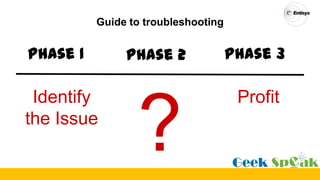
Guide to troubleshooting
Phase 1 Phase 2 Phase 3
Identify
the Issue
Profit
StoreFront Troubleshooting
What’s the topic?
• Not a basic “Restart the computer” stuff
• Do not restart the computer if you going to troubleshoot the issue
• Not a CDF tracing tutorial
• Search for TechEdge presentations on citrix.com
• Not a dump analysis workshop
• Check Dmitry Vostokov’s dumpanalosys.com
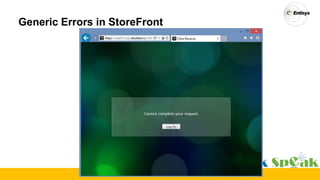
Generic Errors in StoreFront
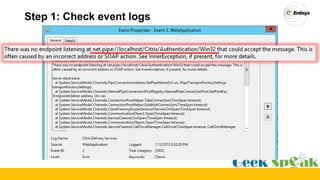
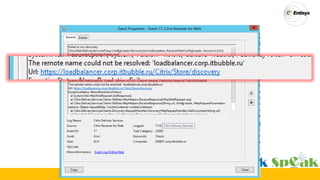
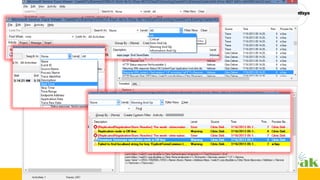
Step 1: Check event logs
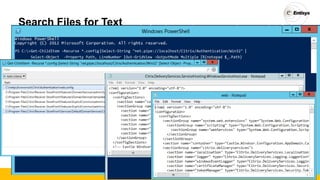
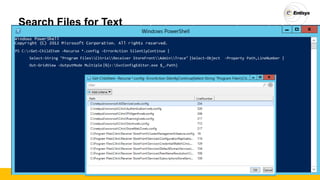
Search Files for Text
PS C:>Get-ChildItem -Recurse *.config|Select-String "net.pipe://localhost/Citrix/Authentication/Win32"
Select-Object -Property Path, LineNumber
|
|Out-GridView -OutputMode Multiple |%{notepad $_.Path}
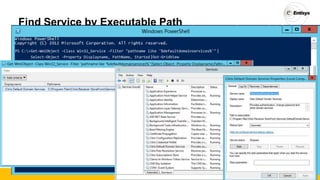
Find Service by Executable Path
PS C:>Get-WmiObject -Class Win32_Service -Filter "pathname like '%defaultdomainservices%'"
Select-Object -Property Displayname, PathName, Started
|
|Out-GridView
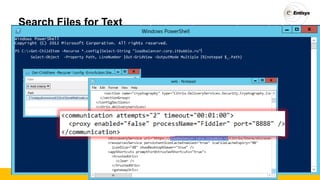
Search Files for Text
PS C:>Get-ChildItem -Recurse *.config|Select-String "loadbalancer.corp.itbubble.ru"
Select-Object -Property Path, LineNumber
|
|Out-GridView -OutputMode Multiple |%{notepad $_.Path}
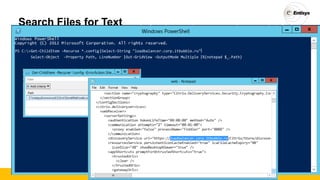
Search Files for Text
PS C:>Get-ChildItem -Recurse *.config|Select-String "loadbalancer.corp.itbubble.ru"
Select-Object -Property Path, LineNumber
|
|Out-GridView -OutputMode Multiple |%{notepad $_.Path}
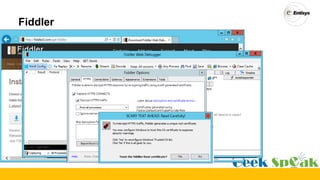
Fiddler
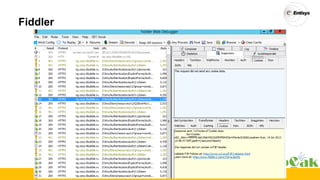
Fiddler
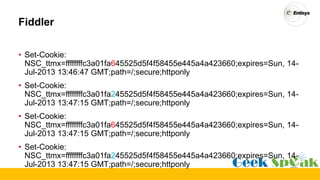
Fiddler
• Set-Cookie:
NSC_ttmx=ffffffffc3a01fa645525d5f4f58455e445a4a423660;expires=Sun, 14-
Jul-2013 13:46:47 GMT;path=/;secure;httponly
• Set-Cookie:
NSC_ttmx=ffffffffc3a01fa245525d5f4f58455e445a4a423660;expires=Sun, 14-
Jul-2013 13:47:15 GMT;path=/;secure;httponly
• Set-Cookie:
NSC_ttmx=ffffffffc3a01fa645525d5f4f58455e445a4a423660;expires=Sun, 14-
Jul-2013 13:47:15 GMT;path=/;secure;httponly
• Set-Cookie:
NSC_ttmx=ffffffffc3a01fa245525d5f4f58455e445a4a423660;expires=Sun, 14-
Jul-2013 13:47:15 GMT;path=/;secure;httponly
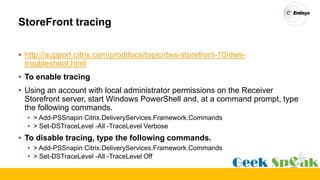
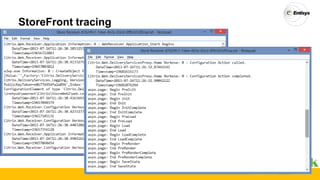
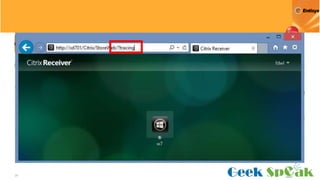
StoreFront tracing
• http://support.citrix.com/proddocs/topic/dws-storefront-10/dws-
troubleshoot.html
• To enable tracing
• Using an account with local administrator permissions on the Receiver
Storefront server, start Windows PowerShell and, at a command prompt, type
the following commands.
• > Add-PSSnapin Citrix.DeliveryServices.Framework.Commands
• > Set-DSTraceLevel -All -TraceLevel Verbose
• To disable tracing, type the following commands.
• > Add-PSSnapin Citrix.DeliveryServices.Framework.Commands
• > Set-DSTraceLevel -All -TraceLevel Off
StoreFront tracing
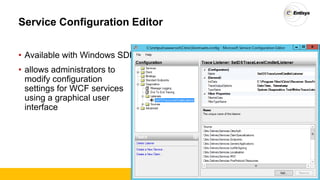
Service Configuration Editor
• Available with Windows SDK
• allows administrators to
modify configuration
settings for WCF services
using a graphical user
interface
Search Files for Text
PS C:>Get-ChildItem -Recurse *.config -ErrorAction SilentlyContinue |
|Select-Object -Property Path,LineNumber |Select-String "Program FilesCitrixReceiver StoreFrontAdminTrace"
Out-GridView -OutputMode Multiple |%{c:SvcConfigEditor.exe $_.Path}
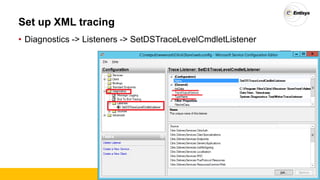
Set up XML tracing
• Diagnostics -> Listeners -> SetDSTraceLevelCmdletListener
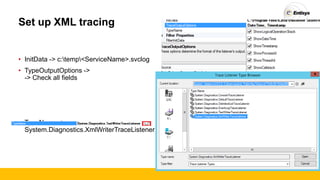
Set up XML tracing
• InitData -> c:temp<ServiceName>.svclog
• TypeOutputOptions ->
-> Check all fields
• TypeName ->
System.Diagnostics.XmlWriterTraceListener
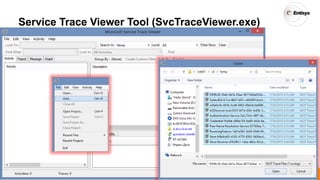
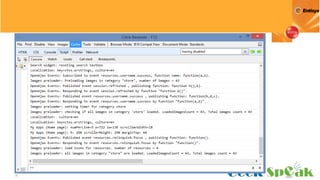
Service Trace Viewer Tool (SvcTraceViewer.exe)
Receiver for Web
26
27
28
29
30
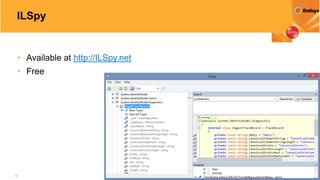
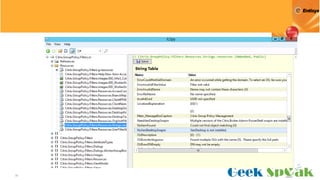
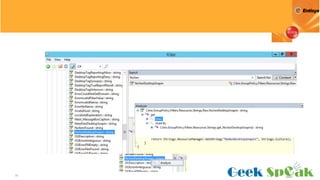
ILSpy .Net Decomplier
32
ILSpy
• Available at http://ILSpy.net
• Free
33
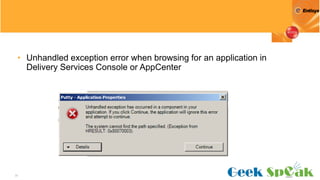
• Unhandled exception error when browsing for an application in
Delivery Services Console or AppCenter
34
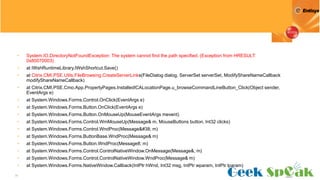
• System.IO.DirectoryNotFoundException: The system cannot find the path specified. (Exception from HRESULT:
0x80070003)
• at IWshRuntimeLibrary.IWshShortcut.Save()
• at Citrix.CMI.PSE.Utils.FileBrowsing.CreateServerLinks(FileDialog dialog, ServerSet serverSet, ModifyShareNameCallback
modifyShareNameCallback)
• at Citrix.CMI.PSE.Cmo.App.PropertyPages.InstalledICALocationPage.u_browseCommandLineButton_Click(Object sender,
EventArgs e)
• at System.Windows.Forms.Control.OnClick(EventArgs e)
• at System.Windows.Forms.Button.OnClick(EventArgs e)
• at System.Windows.Forms.Button.OnMouseUp(MouseEventArgs mevent)
• at System.Windows.Forms.Control.WmMouseUp(Message& m, MouseButtons button, Int32 clicks)
• at System.Windows.Forms.Control.WndProc(Message&#38; m)
• at System.Windows.Forms.ButtonBase.WndProc(Message& m)
• at System.Windows.Forms.Button.WndProc(Message8; m)
• at System.Windows.Forms.Control.ControlNativeWindow.OnMessage(Message&; m)
• at System.Windows.Forms.Control.ControlNativeWindow.WndProc(Message& m)
• at System.Windows.Forms.NativeWindow.Callback(IntPtr hWnd, Int32 msg, IntPtr wparam, IntPtr lparam)
35
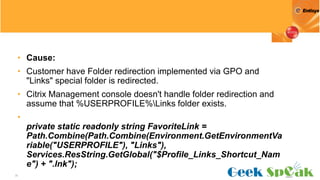
• Cause:
• Customer have Folder redirection implemented via GPO and
"Links" special folder is redirected.
• Citrix Management console doesn't handle folder redirection and
assume that %USERPROFILE%Links folder exists.
•
private static readonly string FavoriteLink =
Path.Combine(Path.Combine(Environment.GetEnvironmentVa
riable("USERPROFILE"), "Links"),
Services.ResString.GetGlobal("$Profile_Links_Shortcut_Nam
e") + ".lnk");
36
37
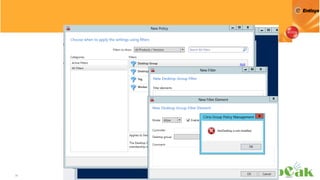
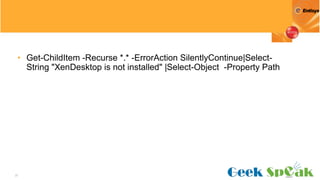
• Get-ChildItem -Recurse *.* -ErrorAction SilentlyContinue|Select-
String "XenDesktop is not installed" |Select-Object -Property Path
38
39
40
Q&A
• @fdwl
• denisg@entisys.com
• http://BayCUG.com
• http://blog.itbubble.ru

Deep dive in Citrix Troubleshooting

  • 1.
    Citrix Troubleshooting: DeepDive Denis Gundarev Senior Consultant Entisys Solutions
  • 2.
    Guide to troubleshooting Phase1 Phase 2 Phase 3 Identify the Issue Profit
  • 4.
  • 5.
    What’s the topic? •Not a basic “Restart the computer” stuff • Do not restart the computer if you going to troubleshoot the issue • Not a CDF tracing tutorial • Search for TechEdge presentations on citrix.com • Not a dump analysis workshop • Check Dmitry Vostokov’s dumpanalosys.com
  • 6.
  • 7.
    Step 1: Checkevent logs
  • 8.
    Search Files forText PS C:>Get-ChildItem -Recurse *.config|Select-String "net.pipe://localhost/Citrix/Authentication/Win32" Select-Object -Property Path, LineNumber | |Out-GridView -OutputMode Multiple |%{notepad $_.Path}
  • 9.
    Find Service byExecutable Path PS C:>Get-WmiObject -Class Win32_Service -Filter "pathname like '%defaultdomainservices%'" Select-Object -Property Displayname, PathName, Started | |Out-GridView
  • 11.
    Search Files forText PS C:>Get-ChildItem -Recurse *.config|Select-String "loadbalancer.corp.itbubble.ru" Select-Object -Property Path, LineNumber | |Out-GridView -OutputMode Multiple |%{notepad $_.Path}
  • 12.
    Search Files forText PS C:>Get-ChildItem -Recurse *.config|Select-String "loadbalancer.corp.itbubble.ru" Select-Object -Property Path, LineNumber | |Out-GridView -OutputMode Multiple |%{notepad $_.Path}
  • 13.
  • 14.
  • 15.
    Fiddler • Set-Cookie: NSC_ttmx=ffffffffc3a01fa645525d5f4f58455e445a4a423660;expires=Sun, 14- Jul-201313:46:47 GMT;path=/;secure;httponly • Set-Cookie: NSC_ttmx=ffffffffc3a01fa245525d5f4f58455e445a4a423660;expires=Sun, 14- Jul-2013 13:47:15 GMT;path=/;secure;httponly • Set-Cookie: NSC_ttmx=ffffffffc3a01fa645525d5f4f58455e445a4a423660;expires=Sun, 14- Jul-2013 13:47:15 GMT;path=/;secure;httponly • Set-Cookie: NSC_ttmx=ffffffffc3a01fa245525d5f4f58455e445a4a423660;expires=Sun, 14- Jul-2013 13:47:15 GMT;path=/;secure;httponly
  • 17.
    StoreFront tracing • http://support.citrix.com/proddocs/topic/dws-storefront-10/dws- troubleshoot.html •To enable tracing • Using an account with local administrator permissions on the Receiver Storefront server, start Windows PowerShell and, at a command prompt, type the following commands. • > Add-PSSnapin Citrix.DeliveryServices.Framework.Commands • > Set-DSTraceLevel -All -TraceLevel Verbose • To disable tracing, type the following commands. • > Add-PSSnapin Citrix.DeliveryServices.Framework.Commands • > Set-DSTraceLevel -All -TraceLevel Off
  • 18.
  • 19.
    Service Configuration Editor •Available with Windows SDK • allows administrators to modify configuration settings for WCF services using a graphical user interface
  • 20.
    Search Files forText PS C:>Get-ChildItem -Recurse *.config -ErrorAction SilentlyContinue | |Select-Object -Property Path,LineNumber |Select-String "Program FilesCitrixReceiver StoreFrontAdminTrace" Out-GridView -OutputMode Multiple |%{c:SvcConfigEditor.exe $_.Path}
  • 21.
    Set up XMLtracing • Diagnostics -> Listeners -> SetDSTraceLevelCmdletListener
  • 22.
    Set up XMLtracing • InitData -> c:temp<ServiceName>.svclog • TypeOutputOptions -> -> Check all fields • TypeName -> System.Diagnostics.XmlWriterTraceListener
  • 23.
    Service Trace ViewerTool (SvcTraceViewer.exe)
  • 24.
    Service Trace ViewerTool (SvcTraceViewer.exe)
  • 25.
  • 26.
  • 27.
  • 28.
  • 29.
  • 30.
  • 31.
  • 32.
    32 ILSpy • Available athttp://ILSpy.net • Free
  • 33.
    33 • Unhandled exceptionerror when browsing for an application in Delivery Services Console or AppCenter
  • 34.
    34 • System.IO.DirectoryNotFoundException: Thesystem cannot find the path specified. (Exception from HRESULT: 0x80070003) • at IWshRuntimeLibrary.IWshShortcut.Save() • at Citrix.CMI.PSE.Utils.FileBrowsing.CreateServerLinks(FileDialog dialog, ServerSet serverSet, ModifyShareNameCallback modifyShareNameCallback) • at Citrix.CMI.PSE.Cmo.App.PropertyPages.InstalledICALocationPage.u_browseCommandLineButton_Click(Object sender, EventArgs e) • at System.Windows.Forms.Control.OnClick(EventArgs e) • at System.Windows.Forms.Button.OnClick(EventArgs e) • at System.Windows.Forms.Button.OnMouseUp(MouseEventArgs mevent) • at System.Windows.Forms.Control.WmMouseUp(Message& m, MouseButtons button, Int32 clicks) • at System.Windows.Forms.Control.WndProc(Message&#38; m) • at System.Windows.Forms.ButtonBase.WndProc(Message& m) • at System.Windows.Forms.Button.WndProc(Message8; m) • at System.Windows.Forms.Control.ControlNativeWindow.OnMessage(Message&; m) • at System.Windows.Forms.Control.ControlNativeWindow.WndProc(Message& m) • at System.Windows.Forms.NativeWindow.Callback(IntPtr hWnd, Int32 msg, IntPtr wparam, IntPtr lparam)
  • 35.
    35 • Cause: • Customerhave Folder redirection implemented via GPO and "Links" special folder is redirected. • Citrix Management console doesn't handle folder redirection and assume that %USERPROFILE%Links folder exists. • private static readonly string FavoriteLink = Path.Combine(Path.Combine(Environment.GetEnvironmentVa riable("USERPROFILE"), "Links"), Services.ResString.GetGlobal("$Profile_Links_Shortcut_Nam e") + ".lnk");
  • 36.
  • 37.
    37 • Get-ChildItem -Recurse*.* -ErrorAction SilentlyContinue|Select- String "XenDesktop is not installed" |Select-Object -Property Path
  • 38.
  • 39.
  • 40.
  • 41.
    Q&A • @fdwl • denisg@entisys.com •http://BayCUG.com • http://blog.itbubble.ru

Editor's Notes

  • #9 PS C:\&gt; Get-ChildItem -Recurse *.config |Select-String &quot;net.pipe://localhost/Citrix/Authentication/Win32&quot; |Select-Object -Property Path,LineNumber|Out-GridView -OutputMode Multiple|%{notepad $_.Path}
  • #10 PS C:\&gt; Get-WmiObject -Class Win32_Service -Filter &quot;pathname like &apos;%defaultdomainservices%&apos;&quot;|Select-Object -Property Displayname, PathName, Started|Out-GridView
  • #12 PS C:\&gt; Get-ChildItem -Recurse *.config |Select-String &quot;net.pipe://localhost/Citrix/Authentication/Win32&quot; |Select-Object -Property Path,LineNumber|Out-GridView -OutputMode Multiple|%{notepad $_.Path}
  • #13 PS C:\&gt; Get-ChildItem -Recurse *.config |Select-String &quot;net.pipe://localhost/Citrix/Authentication/Win32&quot; |Select-Object -Property Path,LineNumber|Out-GridView -OutputMode Multiple|%{notepad $_.Path}
  • #21 Get-ChildItem -Recurse *.config -ErrorActionSilentlyContinue|Select-String &quot;Program Files\\Citrix\\Receiver StoreFront\\Admin\\Trace&quot; |Select-Object -Property Path,LineNumber|Out-GridView -OutputMode Multiple|%{c:\SvcConfigEditor.exe $_.Path}