Troubleshooting a XenDesktop
Environment Using the PowerShell SDK
Shaun Wendland, Senior Escalation Engineer
© 2013 Citrix© 2013 Citrix© 2013 Citrix2
What is the PowerShell SDK?
Working with the XenDesktop PowerShell SDK
© 2013 Citrix© 2013 Citrix
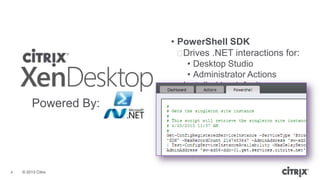
• PowerShell SDK
ᵒDrives .NET interactions for:
• Desktop Studio
• Administrator Actions
ᵒInstalled by default
ᵒRequired for advanced
configurations
ᵒAutomates common tasks
ᵒProvides a foundation for
troubleshooting issues
Powered By:
4
© 2013 Citrix© 2013 Citrix
Windows PowerShell
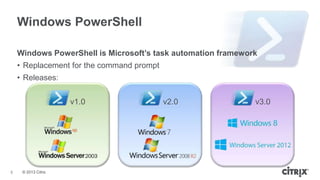
Windows PowerShell is Microsoft’s task automation framework
• Replacement for the command prompt
• Releases:
v1.0 v3.0v2.0
5
© 2013 Citrix© 2013 Citrix
Windows PowerShell
Windows PowerShell is Microsoft’s task automation framework
• Extensible snap-in architecture provides a .NET “bridge” to virtually any aspect
of a Windows machine
• Snap-Ins consist of cmdlets, and provide a common scripting environment for
both administrators and applications
• Cmdlets represent instances of .NET Framework classes; they are not stand-
alone executables
6
© 2013 Citrix© 2013 Citrix
The XenDesktop PowerShell SDK at a Glance
• 7 Snap-Ins with nearly 300 cmdlets in the XenDesktop 5.6 PowerShell SDK
• XenDesktop PowerShell cmdlets perform an action with the XenDesktop
environment
• Two “types” of cmdlets – configuring and polling
• Most cmdlets return a Microsoft .NET Framework object
• Parameters allow filtered data to be returned
• Cmdlets can be executed from a remote PowerShell session with the SDK
installed
7
© 2013 Citrix© 2013 Citrix
Working with the XenDesktop PowerShell SDK
• The XenDesktop PowerShell SDK is split into separate snap-ins for each
service on a Desktop Delivery Controller
• Installable on any Windows computer that supports PowerShell v2.0
ᵒSeparate installers for each snap-in
ᵒLocated on XenDesktop install disc
• [x86/x64]Citrix Desktop Delivery Controller
- Citrix.Common.Commands
- 6 x “PowerShellSnapIn”
8
© 2013 Citrix© 2013 Citrix
Working with the XenDesktop PowerShell SDK
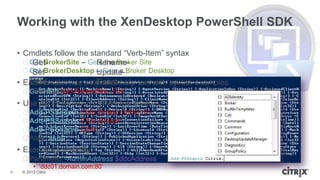
• Cmdlets follow the standard “Verb-Item” syntax
ᵒGet-BrokerSite – Gets the Broker Site
ᵒGet-BrokerDesktop – Gets a Broker Desktop
• Each cmdlet has extensive help text with syntax examples
ᵒGet-Help Get-BrokerSite -Full
• Use Add-PSSnapin to load the snap-in
ᵒAdd-PSSnapin Citrix.Broker.Admin.V1
ᵒAdd-PSSnapin Citrix.Broker*
ᵒAdd-PSSnapin Citrix.*
ᵒAlias: asnp
• Executing remotely
ᵒParameter -AdminAddress $ddcAddress
• „ddc01.domain.com:80‟
Get- Rename-
Set- Update-
Add- Reset-
Remove-
9
XenDesktop Scripting
Common PowerShell SDK cmdlets and scripts
© 2013 Citrix© 2013 Citrix
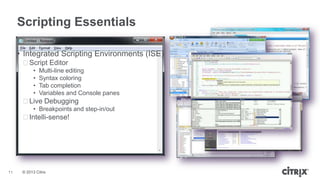
Scripting Essentials
• Integrated Scripting Environments (ISE)
ᵒScript Editor
• Multi-line editing
• Syntax coloring
• Tab completion
• Variables and Console panes
ᵒLive Debugging
• Breakpoints and step-in/out
ᵒIntelli-sense!
11
© 2013 Citrix© 2013 Citrix
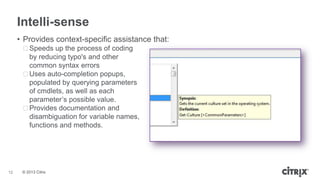
Intelli-sense
• Provides context-specific assistance that:
ᵒSpeeds up the process of coding
by reducing typo's and other
common syntax errors
ᵒUses auto-completion popups,
populated by querying parameters
of cmdlets, as well as each
parameter‟s possible value.
ᵒProvides documentation and
disambiguation for variable names,
functions and methods.
12
© 2013 Citrix© 2013 Citrix
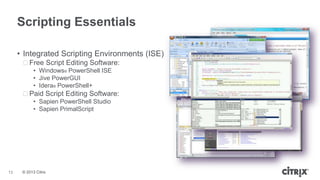
Scripting Essentials
• Integrated Scripting Environments (ISE)
ᵒFree Script Editing Software:
• Windows® PowerShell ISE
• Jive PowerGUI
• Idera® PowerShell+
ᵒPaid Script Editing Software:
• Sapien PowerShell Studio
• Sapien PrimalScript
13
© 2013 Citrix© 2013 Citrix
XenDesktop CmdletsCommon Desktop Cmdlets
Desktop
Desktop Delivery
Controller
14
© 2013 Citrix© 2013 Citrix
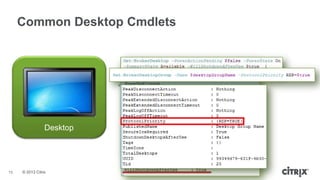
Common Desktop Cmdlets
• Get-BrokerDesktop
• Get-BrokerDesktopGroup /
Set-BrokerDesktopGroup
Desktop
15
© 2013 Citrix© 2013 Citrix
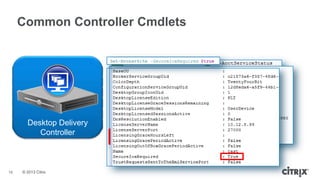
Common Controller Cmdlets
• Get-ServiceServiceStatus
• Get-ConfigRegisteredServiceInstance |
Test-ConfigServiceInstanceAvailability
• Get-BrokerSite / Set-BrokerSite
AD Identity Service
Broker Service
Configuration Service
Host Service
Machine Creation Service
Machine Identity ServiceDesktop Delivery
Controller
– Get-ConfigServiceStatus
– Get-AcctServiceStatus
– Get-HypServiceStatus
– Get-ProvServiceStatus
– Get-PvsVmServiceStatus
– Get-BrokerServiceStatus
– Instances3
– Instance1
– Instances2
– Instances3
– Instance1
– Instances2
16
Advanced XenDesktop
Troubleshooting / Configuring
Using PowerShell SDK cmdlets to
troubleshoot complex issues and automate tasks
© 2013 Citrix© 2013 Citrix
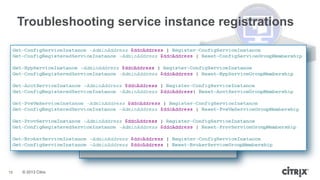
Troubleshooting service instance registrations
• Broken or “Missing” service instance registrations
ᵒClear all service instance registrations but the licensing service before re-registering
• $instance | Unregister-ConfigRegisteredServiceinstance
ᵒRe-register the DDCs to the site
• Get-ServiceServiceInstance -AdminAddress $ddcAddress | Register-ConfigServiceInstance
• Get-ConfigRegisteredServiceInstance -AdminAddress $ddcAddress |
Reset-ServiceServiceGroupMembership
18
© 2013 Citrix© 2013 Citrix
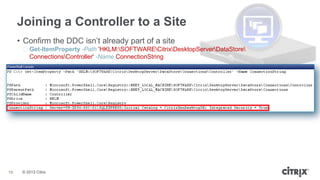
Joining a Controller to a Site
• Confirm the DDC isn‟t already part of a site
ᵒGet-ItemProperty -Path 'HKLM:SOFTWARECitrixDesktopServerDataStore
ConnectionsController' -Name ConnectionString
• Generate the T-SQL join script for each service
ᵒGet-ServiceDBSchema -DatabaseName $dbName -ScriptType Instance
19
© 2013 Citrix© 2013 Citrix
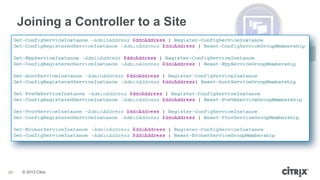
Joining a Controller to a Site
• Set database connection strings for each service
ᵒSet-ServiceDBConnection -DBConnection $cs
• Register service instances to the site
ᵒGet-ServiceServiceInstance | Register-ConfigServiceInstance
ᵒGet-ConfigRegisteredServiceInstance | Reset-ServiceServiceGroupMembership
20
© 2013 Citrix© 2013 Citrix
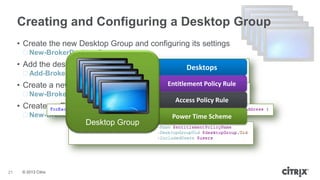
Creating and Configuring a Desktop Group
• Create the new Desktop Group and configuring its settings
ᵒNew-BrokerDesktopGroup
• Add the desktop machines to the Desktop Group
ᵒAdd-BrokerMachinesToDesktopGroup
• Create a new Broker User for each user or user group
ᵒNew-BrokerUser
• Create an Entitlement Policy Rule to grant the users access
ᵒNew-BrokerEntitlementPolicyRule
Desktops
Entitlement Policy Rule
Access Policy Rule
Power Time Scheme
Desktop Group
21
© 2013 Citrix© 2013 Citrix
Creating and Configuring a Desktop Group
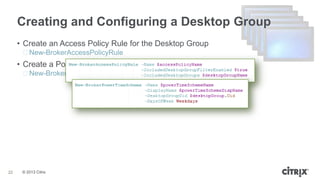
• Create an Access Policy Rule for the Desktop Group
ᵒNew-BrokerAccessPolicyRule
• Create a Power Time Scheme for the Desktop Group
ᵒNew-BrokerPowerTimeScheme
22
© 2013 Citrix© 2013 Citrix
Removing Desktops & Deleting Desktop Groups
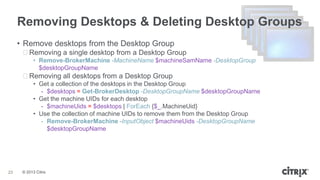
• Remove desktops from the Desktop Group
ᵒRemoving a single desktop from a Desktop Group
• Remove-BrokerMachine -MachineName $machineSamName -DesktopGroup
$desktopGroupName
ᵒRemoving all desktops from a Desktop Group
• Get a collection of the desktops in the Desktop Group
- $desktops = Get-BrokerDesktop -DesktopGroupName $desktopGroupName
• Get the machine UIDs for each desktop
- $machineUids = $desktops | ForEach {$_.MachineUid}
• Use the collection of machine UIDs to remove them from the Desktop Group
- Remove-BrokerMachine -InputObject $machineUids -DesktopGroupName
$desktopGroupName
23
© 2013 Citrix© 2013 Citrix
Removing Desktops & Deleting Desktop Groups
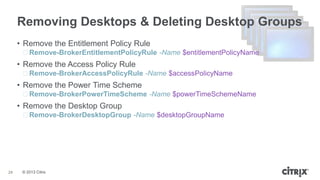
• Remove the Entitlement Policy Rule
ᵒRemove-BrokerEntitlementPolicyRule -Name $entitlementPolicyName
• Remove the Access Policy Rule
ᵒRemove-BrokerAccessPolicyRule -Name $accessPolicyName
• Remove the Power Time Scheme
ᵒRemove-BrokerPowerTimeScheme -Name $powerTimeSchemeName
• Remove the Desktop Group
ᵒRemove-BrokerDesktopGroup -Name $desktopGroupName
24
© 2013 Citrix© 2013 Citrix
Monitoring and Managing Desktops
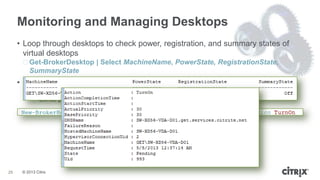
• Loop through desktops to check power, registration, and summary states of
virtual desktops
ᵒGet-BrokerDesktop | Select MachineName, PowerState, RegistrationState,
SummaryState
• Use XenDesktop power actions to manage desktop power states
ᵒNew-BrokerHostingPowerAction
• Sends power actions through XenDesktop
25
© 2013 Citrix© 2013 Citrix
Monitoring and Managing Desktops
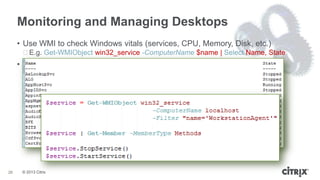
• Use WMI to check Windows vitals (services, CPU, Memory, Disk, etc.)
ᵒE.g. Get-WMIObject win32_service -ComputerName $name | Select Name, State
• Use methods on WMI objects to perform actions against them
ᵒFind methods of an object
• $object | Get-Member -MemberType Methods
ᵒE.g. Restarting the VDA service
26
XenDesktop
Site Checker & WorkerDiag
Citrix tools that leverage the PowerShell SDK
© 2013 Citrix© 2013 Citrix
Site Checker
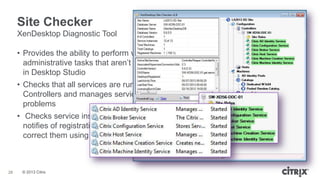
• Provides the ability to perform various
administrative tasks that aren‟t available
in Desktop Studio
• Checks that all services are running on all
Controllers and manages services to correct
problems
• Checks service instance registrations and
notifies of registration issues found and can
correct them using the PowerShell SDK
XenDesktop Diagnostic Tool
28
© 2013 Citrix© 2013 Citrix
Site Checker
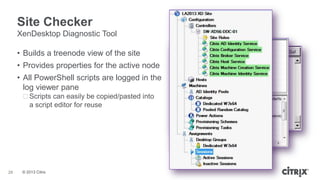
• Builds a treenode view of the site
• Provides properties for the active node
• All PowerShell scripts are logged in the
log viewer pane
ᵒScripts can easily be copied/pasted into
a script editor for reuse
XenDesktop Diagnostic Tool
29
© 2013 Citrix© 2013 Citrix
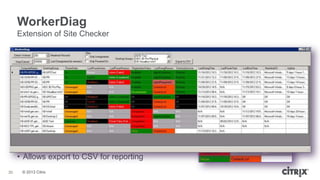
WorkerDiag
Extension of Site Checker
• Provides reporting of desktops that combines XenDesktop PowerShell SDK
with Windows Management Instrumentation
• Checks workers for common issues
ᵒVDA services
ᵒListOfDDCs registry value
ᵒLast Deregistration time, Last Power Action Reason
• Right-click context allows quick
management of VMs
• Sorting and color coding make it easy to
identify problematic VMs
• Allows export to CSV for reporting
30
Wrap-up
Troubleshooting a XenDesktop Environment
Using the PowerShell SDK
© 2013 Citrix© 2013 Citrix
Resources Discussed
• ShareFile Download for the Presentation Example Scripts
• https://citrix.sharefile.com/d/sf33d6a504d747f0b
• XenDesktop PowerShell SDK Help
• http://support.citrix.com/CTX127254
• XenDesktop Site Checker
• http://support.citrix.com/article/CTX133767
• XenDesktop WorkerDiag
• http://blogs.citrix.com/2012/11/23/xendesktop-workerdiag
• Microsoft PowerShell Script Center
• http://technet.microsoft.com/en-us/scriptcenter/powershell.aspx
• PowerShell v2.0 Download
• http://support.microsoft.com/kb/968929
• PowerShell v3.0 Download
• http://www.microsoft.com/en-us/download/details.aspx?id=34595
32
Q&A
Troubleshooting a XenDesktop Environment
Using the PowerShell SDK
© 2013 Citrix© 2013 Citrix
Next Webinar: October
• Title: Using NetScaler Insight to Troubleshoot network and server performance
issues
• Description: During this session we will cover NetScaler Insight, which gives
you visibility across your network AND allows you to see the end user
experience. In this session, Ronan will install and configure Insight, and
demonstrate how to use it to drill down and pinpoint network or performance
issues.
• When: Oct 31st
• Registration Now!
Work better. Live better.Work better. Live better.

Troubleshooting a XenDesktop Environment using the PowerShell SDK

  • 1.
    Troubleshooting a XenDesktop EnvironmentUsing the PowerShell SDK Shaun Wendland, Senior Escalation Engineer
  • 2.
    © 2013 Citrix©2013 Citrix© 2013 Citrix2
  • 3.
    What is thePowerShell SDK? Working with the XenDesktop PowerShell SDK
  • 4.
    © 2013 Citrix©2013 Citrix • PowerShell SDK ᵒDrives .NET interactions for: • Desktop Studio • Administrator Actions ᵒInstalled by default ᵒRequired for advanced configurations ᵒAutomates common tasks ᵒProvides a foundation for troubleshooting issues Powered By: 4
  • 5.
    © 2013 Citrix©2013 Citrix Windows PowerShell Windows PowerShell is Microsoft’s task automation framework • Replacement for the command prompt • Releases: v1.0 v3.0v2.0 5
  • 6.
    © 2013 Citrix©2013 Citrix Windows PowerShell Windows PowerShell is Microsoft’s task automation framework • Extensible snap-in architecture provides a .NET “bridge” to virtually any aspect of a Windows machine • Snap-Ins consist of cmdlets, and provide a common scripting environment for both administrators and applications • Cmdlets represent instances of .NET Framework classes; they are not stand- alone executables 6
  • 7.
    © 2013 Citrix©2013 Citrix The XenDesktop PowerShell SDK at a Glance • 7 Snap-Ins with nearly 300 cmdlets in the XenDesktop 5.6 PowerShell SDK • XenDesktop PowerShell cmdlets perform an action with the XenDesktop environment • Two “types” of cmdlets – configuring and polling • Most cmdlets return a Microsoft .NET Framework object • Parameters allow filtered data to be returned • Cmdlets can be executed from a remote PowerShell session with the SDK installed 7
  • 8.
    © 2013 Citrix©2013 Citrix Working with the XenDesktop PowerShell SDK • The XenDesktop PowerShell SDK is split into separate snap-ins for each service on a Desktop Delivery Controller • Installable on any Windows computer that supports PowerShell v2.0 ᵒSeparate installers for each snap-in ᵒLocated on XenDesktop install disc • [x86/x64]Citrix Desktop Delivery Controller - Citrix.Common.Commands - 6 x “PowerShellSnapIn” 8
  • 9.
    © 2013 Citrix©2013 Citrix Working with the XenDesktop PowerShell SDK • Cmdlets follow the standard “Verb-Item” syntax ᵒGet-BrokerSite – Gets the Broker Site ᵒGet-BrokerDesktop – Gets a Broker Desktop • Each cmdlet has extensive help text with syntax examples ᵒGet-Help Get-BrokerSite -Full • Use Add-PSSnapin to load the snap-in ᵒAdd-PSSnapin Citrix.Broker.Admin.V1 ᵒAdd-PSSnapin Citrix.Broker* ᵒAdd-PSSnapin Citrix.* ᵒAlias: asnp • Executing remotely ᵒParameter -AdminAddress $ddcAddress • „ddc01.domain.com:80‟ Get- Rename- Set- Update- Add- Reset- Remove- 9
  • 10.
  • 11.
    © 2013 Citrix©2013 Citrix Scripting Essentials • Integrated Scripting Environments (ISE) ᵒScript Editor • Multi-line editing • Syntax coloring • Tab completion • Variables and Console panes ᵒLive Debugging • Breakpoints and step-in/out ᵒIntelli-sense! 11
  • 12.
    © 2013 Citrix©2013 Citrix Intelli-sense • Provides context-specific assistance that: ᵒSpeeds up the process of coding by reducing typo's and other common syntax errors ᵒUses auto-completion popups, populated by querying parameters of cmdlets, as well as each parameter‟s possible value. ᵒProvides documentation and disambiguation for variable names, functions and methods. 12
  • 13.
    © 2013 Citrix©2013 Citrix Scripting Essentials • Integrated Scripting Environments (ISE) ᵒFree Script Editing Software: • Windows® PowerShell ISE • Jive PowerGUI • Idera® PowerShell+ ᵒPaid Script Editing Software: • Sapien PowerShell Studio • Sapien PrimalScript 13
  • 14.
    © 2013 Citrix©2013 Citrix XenDesktop CmdletsCommon Desktop Cmdlets Desktop Desktop Delivery Controller 14
  • 15.
    © 2013 Citrix©2013 Citrix Common Desktop Cmdlets • Get-BrokerDesktop • Get-BrokerDesktopGroup / Set-BrokerDesktopGroup Desktop 15
  • 16.
    © 2013 Citrix©2013 Citrix Common Controller Cmdlets • Get-ServiceServiceStatus • Get-ConfigRegisteredServiceInstance | Test-ConfigServiceInstanceAvailability • Get-BrokerSite / Set-BrokerSite AD Identity Service Broker Service Configuration Service Host Service Machine Creation Service Machine Identity ServiceDesktop Delivery Controller – Get-ConfigServiceStatus – Get-AcctServiceStatus – Get-HypServiceStatus – Get-ProvServiceStatus – Get-PvsVmServiceStatus – Get-BrokerServiceStatus – Instances3 – Instance1 – Instances2 – Instances3 – Instance1 – Instances2 16
  • 17.
    Advanced XenDesktop Troubleshooting /Configuring Using PowerShell SDK cmdlets to troubleshoot complex issues and automate tasks
  • 18.
    © 2013 Citrix©2013 Citrix Troubleshooting service instance registrations • Broken or “Missing” service instance registrations ᵒClear all service instance registrations but the licensing service before re-registering • $instance | Unregister-ConfigRegisteredServiceinstance ᵒRe-register the DDCs to the site • Get-ServiceServiceInstance -AdminAddress $ddcAddress | Register-ConfigServiceInstance • Get-ConfigRegisteredServiceInstance -AdminAddress $ddcAddress | Reset-ServiceServiceGroupMembership 18
  • 19.
    © 2013 Citrix©2013 Citrix Joining a Controller to a Site • Confirm the DDC isn‟t already part of a site ᵒGet-ItemProperty -Path 'HKLM:SOFTWARECitrixDesktopServerDataStore ConnectionsController' -Name ConnectionString • Generate the T-SQL join script for each service ᵒGet-ServiceDBSchema -DatabaseName $dbName -ScriptType Instance 19
  • 20.
    © 2013 Citrix©2013 Citrix Joining a Controller to a Site • Set database connection strings for each service ᵒSet-ServiceDBConnection -DBConnection $cs • Register service instances to the site ᵒGet-ServiceServiceInstance | Register-ConfigServiceInstance ᵒGet-ConfigRegisteredServiceInstance | Reset-ServiceServiceGroupMembership 20
  • 21.
    © 2013 Citrix©2013 Citrix Creating and Configuring a Desktop Group • Create the new Desktop Group and configuring its settings ᵒNew-BrokerDesktopGroup • Add the desktop machines to the Desktop Group ᵒAdd-BrokerMachinesToDesktopGroup • Create a new Broker User for each user or user group ᵒNew-BrokerUser • Create an Entitlement Policy Rule to grant the users access ᵒNew-BrokerEntitlementPolicyRule Desktops Entitlement Policy Rule Access Policy Rule Power Time Scheme Desktop Group 21
  • 22.
    © 2013 Citrix©2013 Citrix Creating and Configuring a Desktop Group • Create an Access Policy Rule for the Desktop Group ᵒNew-BrokerAccessPolicyRule • Create a Power Time Scheme for the Desktop Group ᵒNew-BrokerPowerTimeScheme 22
  • 23.
    © 2013 Citrix©2013 Citrix Removing Desktops & Deleting Desktop Groups • Remove desktops from the Desktop Group ᵒRemoving a single desktop from a Desktop Group • Remove-BrokerMachine -MachineName $machineSamName -DesktopGroup $desktopGroupName ᵒRemoving all desktops from a Desktop Group • Get a collection of the desktops in the Desktop Group - $desktops = Get-BrokerDesktop -DesktopGroupName $desktopGroupName • Get the machine UIDs for each desktop - $machineUids = $desktops | ForEach {$_.MachineUid} • Use the collection of machine UIDs to remove them from the Desktop Group - Remove-BrokerMachine -InputObject $machineUids -DesktopGroupName $desktopGroupName 23
  • 24.
    © 2013 Citrix©2013 Citrix Removing Desktops & Deleting Desktop Groups • Remove the Entitlement Policy Rule ᵒRemove-BrokerEntitlementPolicyRule -Name $entitlementPolicyName • Remove the Access Policy Rule ᵒRemove-BrokerAccessPolicyRule -Name $accessPolicyName • Remove the Power Time Scheme ᵒRemove-BrokerPowerTimeScheme -Name $powerTimeSchemeName • Remove the Desktop Group ᵒRemove-BrokerDesktopGroup -Name $desktopGroupName 24
  • 25.
    © 2013 Citrix©2013 Citrix Monitoring and Managing Desktops • Loop through desktops to check power, registration, and summary states of virtual desktops ᵒGet-BrokerDesktop | Select MachineName, PowerState, RegistrationState, SummaryState • Use XenDesktop power actions to manage desktop power states ᵒNew-BrokerHostingPowerAction • Sends power actions through XenDesktop 25
  • 26.
    © 2013 Citrix©2013 Citrix Monitoring and Managing Desktops • Use WMI to check Windows vitals (services, CPU, Memory, Disk, etc.) ᵒE.g. Get-WMIObject win32_service -ComputerName $name | Select Name, State • Use methods on WMI objects to perform actions against them ᵒFind methods of an object • $object | Get-Member -MemberType Methods ᵒE.g. Restarting the VDA service 26
  • 27.
    XenDesktop Site Checker &WorkerDiag Citrix tools that leverage the PowerShell SDK
  • 28.
    © 2013 Citrix©2013 Citrix Site Checker • Provides the ability to perform various administrative tasks that aren‟t available in Desktop Studio • Checks that all services are running on all Controllers and manages services to correct problems • Checks service instance registrations and notifies of registration issues found and can correct them using the PowerShell SDK XenDesktop Diagnostic Tool 28
  • 29.
    © 2013 Citrix©2013 Citrix Site Checker • Builds a treenode view of the site • Provides properties for the active node • All PowerShell scripts are logged in the log viewer pane ᵒScripts can easily be copied/pasted into a script editor for reuse XenDesktop Diagnostic Tool 29
  • 30.
    © 2013 Citrix©2013 Citrix WorkerDiag Extension of Site Checker • Provides reporting of desktops that combines XenDesktop PowerShell SDK with Windows Management Instrumentation • Checks workers for common issues ᵒVDA services ᵒListOfDDCs registry value ᵒLast Deregistration time, Last Power Action Reason • Right-click context allows quick management of VMs • Sorting and color coding make it easy to identify problematic VMs • Allows export to CSV for reporting 30
  • 31.
    Wrap-up Troubleshooting a XenDesktopEnvironment Using the PowerShell SDK
  • 32.
    © 2013 Citrix©2013 Citrix Resources Discussed • ShareFile Download for the Presentation Example Scripts • https://citrix.sharefile.com/d/sf33d6a504d747f0b • XenDesktop PowerShell SDK Help • http://support.citrix.com/CTX127254 • XenDesktop Site Checker • http://support.citrix.com/article/CTX133767 • XenDesktop WorkerDiag • http://blogs.citrix.com/2012/11/23/xendesktop-workerdiag • Microsoft PowerShell Script Center • http://technet.microsoft.com/en-us/scriptcenter/powershell.aspx • PowerShell v2.0 Download • http://support.microsoft.com/kb/968929 • PowerShell v3.0 Download • http://www.microsoft.com/en-us/download/details.aspx?id=34595 32
  • 33.
    Q&A Troubleshooting a XenDesktopEnvironment Using the PowerShell SDK
  • 34.
    © 2013 Citrix©2013 Citrix Next Webinar: October • Title: Using NetScaler Insight to Troubleshoot network and server performance issues • Description: During this session we will cover NetScaler Insight, which gives you visibility across your network AND allows you to see the end user experience. In this session, Ronan will install and configure Insight, and demonstrate how to use it to drill down and pinpoint network or performance issues. • When: Oct 31st • Registration Now!
  • 35.
    Work better. Livebetter.Work better. Live better.

Editor's Notes

  • #10 (1) Cmdlets in the PowerShell SDK all follow the standard PowerShell syntax, where you have a verb, a hyphen, then the object or item the verb is acting on. (2) Some common verbs you’ll see in the PowerShell SDK are Get, Set, Add, Remove, Rename, Update, Reset. Get being the primary polling verb that would retrieve the current configuration, but not make any changes.For instance: (3) Get-BrokerSite would return a .NET object containing all the top-level information about a broker site – all the site-wide attributes used by the brokering service. (4) And Get-BrokerDesktop is a good example of why it’s important to have parameters to filter results. By itself, it returns the details for every desktop in the site. So imagine if you had 1000, 5000, 10000 desktops in the site and you were searching for a specific desktop. Without some other filtering on those results, it would likely take some time to find the one you’re looking for.Thankfully, if we pull up (5) the parameters available, there are a few we can use to try to isolate down which exact desktop we want and get a more limited result list to search through, such that we can get to the data we really want faster.(6) Each cmdlet in the SDK has extensive help text which contains examples of syntax. The screenshot for the Get-BrokerDesktop syntax was actually an example of that. To view it, you’d use (7) PowerShell’s native Get-Help cmdlet, type the SDK cmdlet name, then ‘-Full’. (8) To be able to use the cmdlets available in the snap-ins you first need to load the snap-in, and (9) that’s done using the Add-Snapin cmdlet and then specifying the snap-in name; for instance, the Citrix.Broker snap-in. The cmdlet allows wildcards, (10) so to load all the Citrix snap-ins, you can use Citrix.*Additionally, Add-Snapin has an alias, so if you ever get tired of typing the whole thing out or if you just like efficient shortcuts like me, you can just use asnp and then the snap-in name.Lastly, I talk a little bit about (12) executing cmdlets from the PowerShell SDK using a remote system. All thecmdlets in the PowerShell SDK will by default try to run against the system their being run from. When you’re running cmdlets from a remote system, (13) the -AdminAddress parameter needs to be specified such that it knows who to contact. (14) ddcAddress being a string for the DDC’s FQDN and the port.