Interface in Java
Interface in Java :
An interface in java is a blueprint of a class. It has static
constants and abstract methods.
The interface in Java is a mechanism to achieve
abstraction. There can be only abstract methods in the
Java interface, not method body. It is used to achieve
abstraction and multiple inheritance in Java.
In other words, you can say that interfaces can have
abstract methods and variables. It cannot have a method
body.
Interface in Java
Why use Java interface ?
There are mainly three reasons to use interface. They are
given below.
It is used to achieve abstraction.
By interface, we can support the functionality of
multiple inheritance.
It can be used to achieve loose coupling.
Interface in Java
How to declare an interface ?
An interface is declared by using the interface keyword. It
provides total abstraction; means all the methods in an
interface are declared with the empty body, and all the
fields are public, static and final by default. A class that
implements an interface must implement all the methods
declared in the interface.
Interface in Java
Syntax:
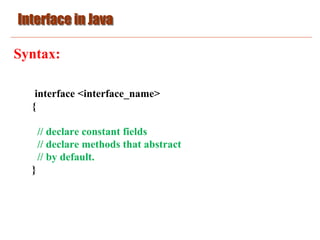
interface <interface_name>
{
// declare constant fields
// declare methods that abstract
// by default.
}
Interface in Java
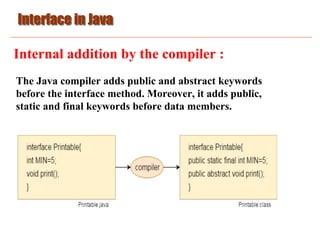
Internal addition by the compiler :
The Java compiler adds public and abstract keywords
before the interface method. Moreover, it adds public,
static and final keywords before data members.
Interface in Java
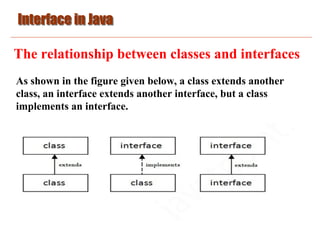
The relationship between classes and interfaces
As shown in the figure given below, a class extends another
class, an interface extends another interface, but a class
implements an interface.
Interface in Java
Java Interface Example :
interface printable{
void print();
}
class A implements printable{
public void print(){System.out.println("Hello");}
public static void main(String args[]){
A obj = new A();
obj.print();
}
}
Interface in Java
Java Interface Example :
//Interface declaration: by first user
interface Drawable{
void draw();
}
//Implementation: by second user
class Rectangle implements Drawable{
public void draw(){System.out.println("drawing rectangle");}
}
class Circle implements Drawable{
public void draw(){System.out.println("drawing circle");}
}
Interface in Java
Java Interface Example :
//Using interface: by third user
class TestInterface{
public static void main(String args[]){
Drawable d=new Circle();
d.draw();
}
}
Interface in Java
Java Interface Example :
interface Bank
{
float rateOfInterest();
}
class SBI implements Bank
{
public float rateOfInterest()
{return 9.15f;}
}
Interface in Java
Java Interface Example :
class PNB implements Bank{
public float rateOfInterest(){return 9.7f;}
}
class TestInterface2{
public static void main(String[] args){
Bank b=new SBI();
System.out.println("ROI: "+b.rateOfInterest());
}}
Interface in Java
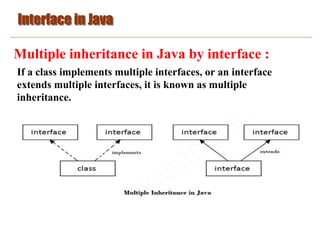
Multiple inheritance in Java by interface :
If a class implements multiple interfaces, or an interface
extends multiple interfaces, it is known as multiple
inheritance.
Interface in Java
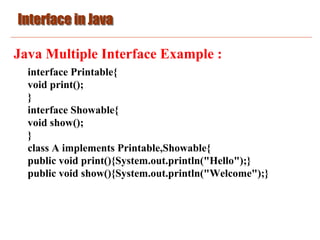
Java Multiple Interface Example :
interface Printable{
void print();
}
interface Showable{
void show();
}
class A implements Printable,Showable{
public void print(){System.out.println("Hello");}
public void show(){System.out.println("Welcome");}
Interface in Java
Java Multiple Interface Example :
public static void main(String args[]){
A obj = new A();
obj.print();
obj.show();
}
}
Interface in Java
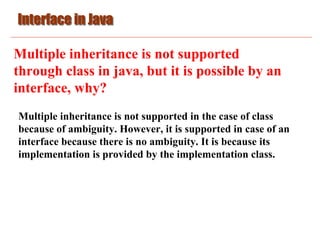
Multiple inheritance is not supported
through class in java, but it is possible by an
interface, why?
Multiple inheritance is not supported in the case of class
because of ambiguity. However, it is supported in case of an
interface because there is no ambiguity. It is because its
implementation is provided by the implementation class.
Interface in Java
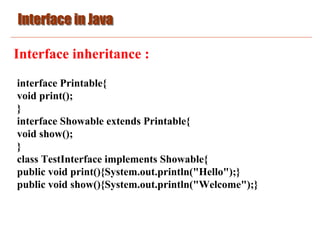
Interface inheritance :
interface Printable{
void print();
}
interface Showable extends Printable{
void show();
}
class TestInterface implements Showable{
public void print(){System.out.println("Hello");}
public void show(){System.out.println("Welcome");}
Interface in Java
Interface inheritance :
public static void main(String args[]){
TestInterface obj = new TestInterface();
obj.print();
obj.show();
}
}
Interface in Java
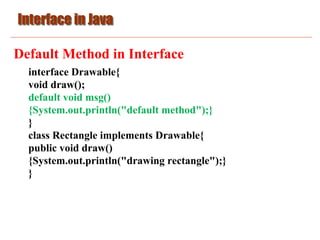
Default Method in Interface
interface Drawable{
void draw();
default void msg()
{System.out.println("default method");}
}
class Rectangle implements Drawable{
public void draw()
{System.out.println("drawing rectangle");}
}
Interface in Java
Default Method in Interface
class TestInterfaceDefault{
public static void main(String args[]){
Drawable d=new Rectangle();
d.draw();
d.msg();
}}
Interface in Java
Static Method in Interface
interface Drawable
{
void draw();
static int cube(int x)
{return x*x*x;}
}
class Rectangle implements Drawable
{
public void draw()
{System.out.println("drawing rectangle");}
}
Interface in Java
Static Method in Interface
class TestInterfaceStatic
{
public static void main(String args[])
{
Drawable d=new Rectangle();
d.draw();
System.out.println(Drawable.cube(3));
}
}
Interface in Java
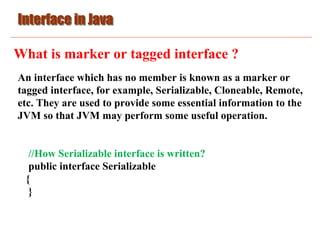
What is marker or tagged interface ?
An interface which has no member is known as a marker or
tagged interface, for example, Serializable, Cloneable, Remote,
etc. They are used to provide some essential information to the
JVM so that JVM may perform some useful operation.
//How Serializable interface is written?
public interface Serializable
{
}
Interface in Java
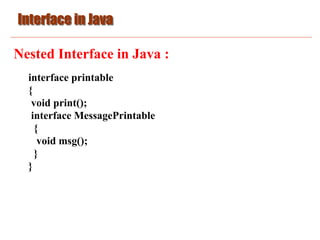
Nested Interface in Java :
interface printable
{
void print();
interface MessagePrintable
{
void msg();
}
}
Interface in Java
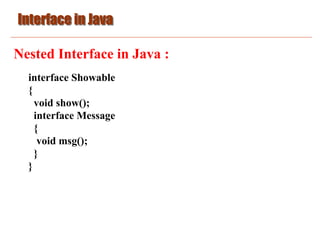
Nested Interface in Java :
interface Showable
{
void show();
interface Message
{
void msg();
}
}
Interface in Java
Nested Interface in Java :
class TestNestedInterface implements Showable.Message
{
public void msg()
{System.out.println("Hello nested interface");}
public static void main(String args[])
{
Showable.Message message=new TestNestedInterface();
//upcasting here
message.msg();
}
}
Interface in Java
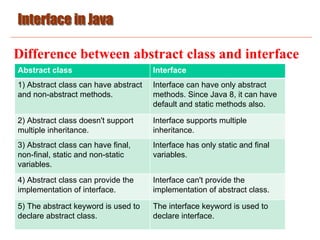
Difference between abstract class and interface
Abstract class Interface
1) Abstract class can have abstract
and non-abstract methods.
Interface can have only abstract
methods. Since Java 8, it can have
default and static methods also.
2) Abstract class doesn't support
multiple inheritance.
Interface supports multiple
inheritance.
3) Abstract class can have final,
non-final, static and non-static
variables.
Interface has only static and final
variables.
4) Abstract class can provide the
implementation of interface.
Interface can't provide the
implementation of abstract class.
5) The abstract keyword is used to
declare abstract class.
The interface keyword is used to
declare interface.
Interface in Java
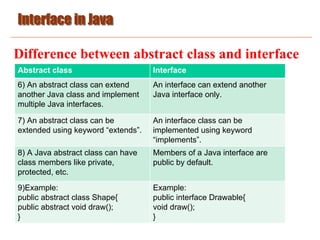
Difference between abstract class and interface
Abstract class Interface
6) An abstract class can extend
another Java class and implement
multiple Java interfaces.
An interface can extend another
Java interface only.
7) An abstract class can be
extended using keyword “extends”.
An interface class can be
implemented using keyword
“implements”.
8) A Java abstract class can have
class members like private,
protected, etc.
Members of a Java interface are
public by default.
9)Example:
public abstract class Shape{
public abstract void draw();
}
Example:
public interface Drawable{
void draw();
}
Interface in Java
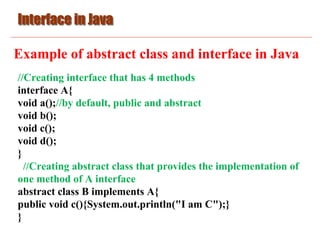
Example of abstract class and interface in Java
//Creating interface that has 4 methods
interface A{
void a();//by default, public and abstract
void b();
void c();
void d();
}
//Creating abstract class that provides the implementation of
one method of A interface
abstract class B implements A{
public void c(){System.out.println("I am C");}
}
Interface in Java
Example of abstract class and interface in Java
//Creating subclass of abstract class, now we need to provide
the implementation of rest of the methods
class M extends B{
public void a(){System.out.println("I am a");}
public void b(){System.out.println("I am b");}
public void d(){System.out.println("I am d");}
}
//Creating a test class that calls the methods of A interface
class Test{
public static void main(String args[]){
A a=new M();
a.a(); a.b(); a.c(); a.d(); }}

Basic_Java_10.pdf

  • 1.
    Interface in Java Interfacein Java : An interface in java is a blueprint of a class. It has static constants and abstract methods. The interface in Java is a mechanism to achieve abstraction. There can be only abstract methods in the Java interface, not method body. It is used to achieve abstraction and multiple inheritance in Java. In other words, you can say that interfaces can have abstract methods and variables. It cannot have a method body.
  • 2.
    Interface in Java Whyuse Java interface ? There are mainly three reasons to use interface. They are given below. It is used to achieve abstraction. By interface, we can support the functionality of multiple inheritance. It can be used to achieve loose coupling.
  • 3.
    Interface in Java Howto declare an interface ? An interface is declared by using the interface keyword. It provides total abstraction; means all the methods in an interface are declared with the empty body, and all the fields are public, static and final by default. A class that implements an interface must implement all the methods declared in the interface.
  • 4.
    Interface in Java Syntax: interface<interface_name> { // declare constant fields // declare methods that abstract // by default. }
  • 5.
    Interface in Java Internaladdition by the compiler : The Java compiler adds public and abstract keywords before the interface method. Moreover, it adds public, static and final keywords before data members.
  • 6.
    Interface in Java Therelationship between classes and interfaces As shown in the figure given below, a class extends another class, an interface extends another interface, but a class implements an interface.
  • 7.
    Interface in Java JavaInterface Example : interface printable{ void print(); } class A implements printable{ public void print(){System.out.println("Hello");} public static void main(String args[]){ A obj = new A(); obj.print(); } }
  • 8.
    Interface in Java JavaInterface Example : //Interface declaration: by first user interface Drawable{ void draw(); } //Implementation: by second user class Rectangle implements Drawable{ public void draw(){System.out.println("drawing rectangle");} } class Circle implements Drawable{ public void draw(){System.out.println("drawing circle");} }
  • 9.
    Interface in Java JavaInterface Example : //Using interface: by third user class TestInterface{ public static void main(String args[]){ Drawable d=new Circle(); d.draw(); } }
  • 10.
    Interface in Java JavaInterface Example : interface Bank { float rateOfInterest(); } class SBI implements Bank { public float rateOfInterest() {return 9.15f;} }
  • 11.
    Interface in Java JavaInterface Example : class PNB implements Bank{ public float rateOfInterest(){return 9.7f;} } class TestInterface2{ public static void main(String[] args){ Bank b=new SBI(); System.out.println("ROI: "+b.rateOfInterest()); }}
  • 12.
    Interface in Java Multipleinheritance in Java by interface : If a class implements multiple interfaces, or an interface extends multiple interfaces, it is known as multiple inheritance.
  • 13.
    Interface in Java JavaMultiple Interface Example : interface Printable{ void print(); } interface Showable{ void show(); } class A implements Printable,Showable{ public void print(){System.out.println("Hello");} public void show(){System.out.println("Welcome");}
  • 14.
    Interface in Java JavaMultiple Interface Example : public static void main(String args[]){ A obj = new A(); obj.print(); obj.show(); } }
  • 15.
    Interface in Java Multipleinheritance is not supported through class in java, but it is possible by an interface, why? Multiple inheritance is not supported in the case of class because of ambiguity. However, it is supported in case of an interface because there is no ambiguity. It is because its implementation is provided by the implementation class.
  • 16.
    Interface in Java Interfaceinheritance : interface Printable{ void print(); } interface Showable extends Printable{ void show(); } class TestInterface implements Showable{ public void print(){System.out.println("Hello");} public void show(){System.out.println("Welcome");}
  • 17.
    Interface in Java Interfaceinheritance : public static void main(String args[]){ TestInterface obj = new TestInterface(); obj.print(); obj.show(); } }
  • 18.
    Interface in Java DefaultMethod in Interface interface Drawable{ void draw(); default void msg() {System.out.println("default method");} } class Rectangle implements Drawable{ public void draw() {System.out.println("drawing rectangle");} }
  • 19.
    Interface in Java DefaultMethod in Interface class TestInterfaceDefault{ public static void main(String args[]){ Drawable d=new Rectangle(); d.draw(); d.msg(); }}
  • 20.
    Interface in Java StaticMethod in Interface interface Drawable { void draw(); static int cube(int x) {return x*x*x;} } class Rectangle implements Drawable { public void draw() {System.out.println("drawing rectangle");} }
  • 21.
    Interface in Java StaticMethod in Interface class TestInterfaceStatic { public static void main(String args[]) { Drawable d=new Rectangle(); d.draw(); System.out.println(Drawable.cube(3)); } }
  • 22.
    Interface in Java Whatis marker or tagged interface ? An interface which has no member is known as a marker or tagged interface, for example, Serializable, Cloneable, Remote, etc. They are used to provide some essential information to the JVM so that JVM may perform some useful operation. //How Serializable interface is written? public interface Serializable { }
  • 23.
    Interface in Java NestedInterface in Java : interface printable { void print(); interface MessagePrintable { void msg(); } }
  • 24.
    Interface in Java NestedInterface in Java : interface Showable { void show(); interface Message { void msg(); } }
  • 25.
    Interface in Java NestedInterface in Java : class TestNestedInterface implements Showable.Message { public void msg() {System.out.println("Hello nested interface");} public static void main(String args[]) { Showable.Message message=new TestNestedInterface(); //upcasting here message.msg(); } }
  • 26.
    Interface in Java Differencebetween abstract class and interface Abstract class Interface 1) Abstract class can have abstract and non-abstract methods. Interface can have only abstract methods. Since Java 8, it can have default and static methods also. 2) Abstract class doesn't support multiple inheritance. Interface supports multiple inheritance. 3) Abstract class can have final, non-final, static and non-static variables. Interface has only static and final variables. 4) Abstract class can provide the implementation of interface. Interface can't provide the implementation of abstract class. 5) The abstract keyword is used to declare abstract class. The interface keyword is used to declare interface.
  • 27.
    Interface in Java Differencebetween abstract class and interface Abstract class Interface 6) An abstract class can extend another Java class and implement multiple Java interfaces. An interface can extend another Java interface only. 7) An abstract class can be extended using keyword “extends”. An interface class can be implemented using keyword “implements”. 8) A Java abstract class can have class members like private, protected, etc. Members of a Java interface are public by default. 9)Example: public abstract class Shape{ public abstract void draw(); } Example: public interface Drawable{ void draw(); }
  • 28.
    Interface in Java Exampleof abstract class and interface in Java //Creating interface that has 4 methods interface A{ void a();//by default, public and abstract void b(); void c(); void d(); } //Creating abstract class that provides the implementation of one method of A interface abstract class B implements A{ public void c(){System.out.println("I am C");} }
  • 29.
    Interface in Java Exampleof abstract class and interface in Java //Creating subclass of abstract class, now we need to provide the implementation of rest of the methods class M extends B{ public void a(){System.out.println("I am a");} public void b(){System.out.println("I am b");} public void d(){System.out.println("I am d");} } //Creating a test class that calls the methods of A interface class Test{ public static void main(String args[]){ A a=new M(); a.a(); a.b(); a.c(); a.d(); }}