Basic Computer Skills Training
WELCOME TO THE BASIC COMPUTER
SKILLSTRAINING COURSE!
Introduction To Basic Computer Skills Training
 This training is designed to introduce
you to the fundamental concepts
and practical skills needed to operate
a computer confidently and effectively.
Why Learn Basic Computer Skills?
In today’s digital world, computers are used
everywhere — in schools, offices, businesses, health
care, communication, and daily life. Knowing how to
use a computer can help you:
Get a job or improve your current job
Learn new skills and information
Communicate with others more easily
Access important services online (banking,
education, government services)
📘 WhatYou Will Learn:
 During this short training, you will be introduced to:
 What a computer is and how it works
 The main parts of a computer (hardware and software)
 The basic functions of a computer (input, process, output,
storage)
 Types of computers and their uses
 Using a keyboard and mouse
 Using operating systems and common application software
 Introduction to the internet and how to browse safely
 Advantages and disadvantages of internet use
What Is A Computer?
 - Electronic device that processes data
 - Used for writing, browsing, watching videos, etc.
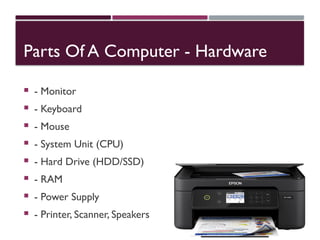
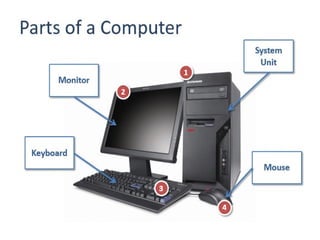
Parts Of A Computer - Hardware
 - Monitor
 - Keyboard
 - Mouse
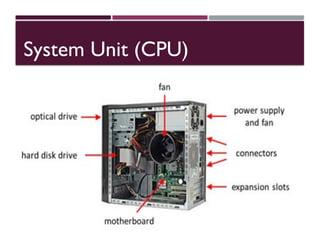
 - System Unit (CPU)
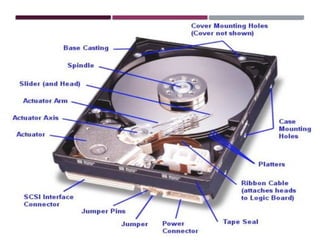
 - Hard Drive (HDD/SSD)
 - RAM
 - Power Supply
 - Printer, Scanner, Speakers
System Unit (CPU)
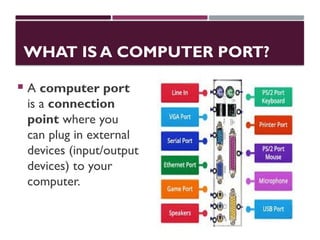
WHAT IS A COMPUTER PORT?
 A computer port
is a connection
point where you
can plug in external
devices (input/output
devices) to your
computer.
PARTS OF A COMPUTER - SOFTWARE
 **Software = Programs inside the computer**
 **1. Operating System (OS):**
 - Controls hardware & software
 - Examples:Windows, macOS, Linux,Android
 **2.Application Software:**
 - Used for specific tasks
 - Examples:Word, Excel, Chrome,VLC
Basic Functions Of A Computer
1. Input – Keyboard, mouse, scanner
2. Processing – CPU processes data
3. Storage – HDD, SSD, USB
4. Output – Monitor, printer,
speakers
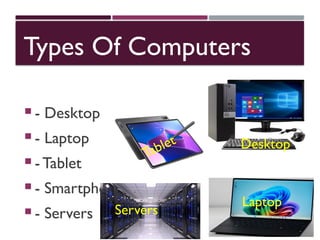
Types Of Computers
 - Desktop
 - Laptop
 - Tablet
 - Smartphone
 - Servers
Desktop
Laptop
Tablet
Servers
Computer Languages (Programming)
 - Used to create software
 **Types:**
 - Machine Language – 0s and 1s
 - Assembly Language – Low-level
 - High-Level Languages – Python, Java, C+
+, HTML
Using The Keyboard
- Enter – New line
- Backspace – Delete
- Shift – Capital letters
- Ctrl + S – Save
- Ctrl + P – Print
Using The Mouse
- Left Click – Select
- Right Click – Menu
- Double Click – Open
- Scroll – Move up/down
Using The Internet
- Connect to Wi-Fi
- Open browser (e.g. Chrome)
-Visit sites (e.g. Google,YouTube)
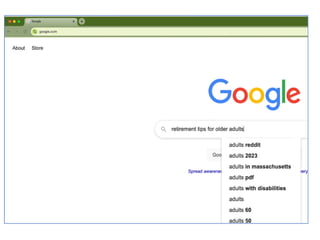
- Use search engine
COMMON USES OFTHE INTERNET
 - Email
 - Online Learning
 - WatchingVideos
 - Social Media
 - Online Services (banking, shopping)
Advantages Of The Internet
 - Fast communication (e.g., email,WhatsApp, video calls)
 - Access to information (e.g., using Google for research)
 - Online services (e.g., online shopping, banking, booking)
 - Education & learning (e.g., online courses,YouTube
tutorials)
 - Entertainment (e.g., streaming music, watching movies)
 - Social connection (e.g., staying in touch via Facebook)
Disadvantages Of The Internet
- Cybercrime (scams, hacking)
- Addiction
- Misinformation
- Health issues
- Privacy risk
- Inappropriate content
Internet browsing
Steps for Internet Browsing
1. Turn on the Computer
Make sure your device is powered on and working properly.
2. Connect to the Internet
1. Use Wi-Fi or a wired (LAN) connection
2. Ensure your connection is active (check signal icon)
3. Open a Web Browser
1. Examples: Google Chrome, Mozilla Firefox, Microsoft Edge, Safari
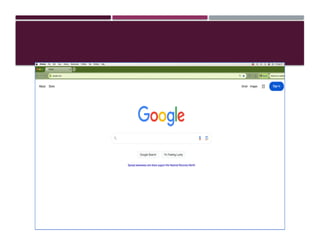
4. Enter a Website Address (URL)
1. Example: www.google.com, www.youtube.com
2. You can also type a question or keyword in the search bar
CONT.
•Use a Search Engine
•If you don’t know the exact address, search for
keywords
•Example:Type “how to bake bread” in Google
•Click on the Search Results
•Choose a result that looks helpful and click to open it
•Read,Watch, or Interact
•Read articles, watch videos, download files, or fill out
forms
•CloseTabs or Exit When Done
•Close the browser tab or app to finish
What Is Artificial Intelligence (AI)?
• "Artificial" = Man-made
• "Intelligence" = Ability to learn and solve problems
• AI = Man-made thinking power
• AI is a branch of computer science that creates machines that:
• Think
• Learn
• Make decisions like humans.
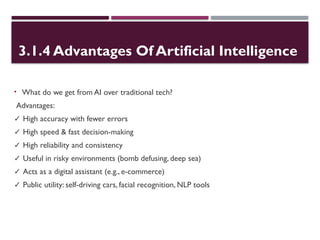
3.1.4 Advantages Of Artificial Intelligence
• What do we get from AI over traditional tech?
Advantages:
✓ High accuracy with fewer errors
✓ High speed & fast decision-making
✓ High reliability and consistency
✓ Useful in risky environments (bomb defusing, deep sea)
✓ Acts as a digital assistant (e.g., e-commerce)
✓ Public utility: self-driving cars, facial recognition, NLP tools
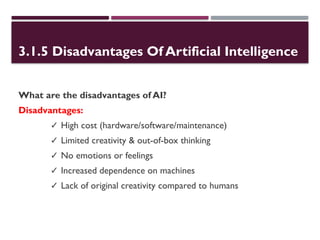
3.1.5 Disadvantages Of Artificial Intelligence
What are the disadvantages of AI?
Disadvantages:
✓ High cost (hardware/software/maintenance)
✓ Limited creativity & out-of-box thinking
✓ No emotions or feelings
✓ Increased dependence on machines
✓ Lack of original creativity compared to humans
SUMMARY
 - Parts of a computer
 - OS vs Application Software
 - Functions of a computer
 -Types of computers
 - Computer languages
 - Keyboard & mouse use
 - Internet usage and safety
Practice Activities
- Turn computer on/off
- Type and save Word document
- Browse a website
- Send an email
THANKYOU!
 Questions and Answers

Basic_Computer_Skills_Training fundamentatl

  • 1.
    Basic Computer SkillsTraining WELCOME TO THE BASIC COMPUTER SKILLSTRAINING COURSE!
  • 2.
    Introduction To BasicComputer Skills Training  This training is designed to introduce you to the fundamental concepts and practical skills needed to operate a computer confidently and effectively.
  • 3.
    Why Learn BasicComputer Skills? In today’s digital world, computers are used everywhere — in schools, offices, businesses, health care, communication, and daily life. Knowing how to use a computer can help you: Get a job or improve your current job Learn new skills and information Communicate with others more easily Access important services online (banking, education, government services)
  • 4.
    📘 WhatYou WillLearn:  During this short training, you will be introduced to:  What a computer is and how it works  The main parts of a computer (hardware and software)  The basic functions of a computer (input, process, output, storage)  Types of computers and their uses  Using a keyboard and mouse  Using operating systems and common application software  Introduction to the internet and how to browse safely  Advantages and disadvantages of internet use
  • 5.
    What Is AComputer?  - Electronic device that processes data  - Used for writing, browsing, watching videos, etc.
  • 6.
    Parts Of AComputer - Hardware  - Monitor  - Keyboard  - Mouse  - System Unit (CPU)  - Hard Drive (HDD/SSD)  - RAM  - Power Supply  - Printer, Scanner, Speakers
  • 7.
  • 8.
    WHAT IS ACOMPUTER PORT?  A computer port is a connection point where you can plug in external devices (input/output devices) to your computer.
  • 11.
    PARTS OF ACOMPUTER - SOFTWARE  **Software = Programs inside the computer**  **1. Operating System (OS):**  - Controls hardware & software  - Examples:Windows, macOS, Linux,Android  **2.Application Software:**  - Used for specific tasks  - Examples:Word, Excel, Chrome,VLC
  • 12.
    Basic Functions OfA Computer 1. Input – Keyboard, mouse, scanner 2. Processing – CPU processes data 3. Storage – HDD, SSD, USB 4. Output – Monitor, printer, speakers
  • 13.
    Types Of Computers - Desktop  - Laptop  - Tablet  - Smartphone  - Servers Desktop Laptop Tablet Servers
  • 14.
    Computer Languages (Programming) - Used to create software  **Types:**  - Machine Language – 0s and 1s  - Assembly Language – Low-level  - High-Level Languages – Python, Java, C+ +, HTML
  • 15.
    Using The Keyboard -Enter – New line - Backspace – Delete - Shift – Capital letters - Ctrl + S – Save - Ctrl + P – Print
  • 16.
    Using The Mouse -Left Click – Select - Right Click – Menu - Double Click – Open - Scroll – Move up/down
  • 17.
    Using The Internet -Connect to Wi-Fi - Open browser (e.g. Chrome) -Visit sites (e.g. Google,YouTube) - Use search engine
  • 18.
    COMMON USES OFTHEINTERNET  - Email  - Online Learning  - WatchingVideos  - Social Media  - Online Services (banking, shopping)
  • 19.
    Advantages Of TheInternet  - Fast communication (e.g., email,WhatsApp, video calls)  - Access to information (e.g., using Google for research)  - Online services (e.g., online shopping, banking, booking)  - Education & learning (e.g., online courses,YouTube tutorials)  - Entertainment (e.g., streaming music, watching movies)  - Social connection (e.g., staying in touch via Facebook)
  • 20.
    Disadvantages Of TheInternet - Cybercrime (scams, hacking) - Addiction - Misinformation - Health issues - Privacy risk - Inappropriate content
  • 21.
    Internet browsing Steps forInternet Browsing 1. Turn on the Computer Make sure your device is powered on and working properly. 2. Connect to the Internet 1. Use Wi-Fi or a wired (LAN) connection 2. Ensure your connection is active (check signal icon) 3. Open a Web Browser 1. Examples: Google Chrome, Mozilla Firefox, Microsoft Edge, Safari 4. Enter a Website Address (URL) 1. Example: www.google.com, www.youtube.com 2. You can also type a question or keyword in the search bar
  • 25.
    CONT. •Use a SearchEngine •If you don’t know the exact address, search for keywords •Example:Type “how to bake bread” in Google •Click on the Search Results •Choose a result that looks helpful and click to open it •Read,Watch, or Interact •Read articles, watch videos, download files, or fill out forms •CloseTabs or Exit When Done •Close the browser tab or app to finish
  • 26.
    What Is ArtificialIntelligence (AI)? • "Artificial" = Man-made • "Intelligence" = Ability to learn and solve problems • AI = Man-made thinking power • AI is a branch of computer science that creates machines that: • Think • Learn • Make decisions like humans.
  • 27.
    3.1.4 Advantages OfArtificial Intelligence • What do we get from AI over traditional tech? Advantages: ✓ High accuracy with fewer errors ✓ High speed & fast decision-making ✓ High reliability and consistency ✓ Useful in risky environments (bomb defusing, deep sea) ✓ Acts as a digital assistant (e.g., e-commerce) ✓ Public utility: self-driving cars, facial recognition, NLP tools
  • 28.
    3.1.5 Disadvantages OfArtificial Intelligence What are the disadvantages of AI? Disadvantages: ✓ High cost (hardware/software/maintenance) ✓ Limited creativity & out-of-box thinking ✓ No emotions or feelings ✓ Increased dependence on machines ✓ Lack of original creativity compared to humans
  • 29.
    SUMMARY  - Partsof a computer  - OS vs Application Software  - Functions of a computer  -Types of computers  - Computer languages  - Keyboard & mouse use  - Internet usage and safety
  • 30.
    Practice Activities - Turncomputer on/off - Type and save Word document - Browse a website - Send an email
  • 31.