Getting Started with
Computers: Essential
Knowledge for New Users
A Beginner's Guide to Understanding and Using Computers
Introduction
Welcome to this beginner's guide to computer literacy. In today’s digital age, having basic knowledge
about computers is invaluable. This presentation is designed for new computer users and aims to
facilitate their journey into the digital world.
Objectives
Computer Hardware and Software
Gain an understanding of what hardware and software is and how they interact in a
computer system.
Basics of Using a Computer
Learn the essential skills required to use a computer, like how to use a mouse and
keyboard, and how to navigate the desktop.
Essential Computer Skills
Develop useful skills such as creating documents, using email, and navigating the
internet.
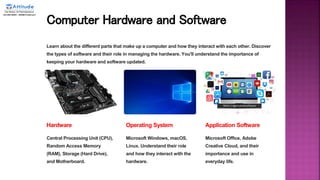
Computer Hardware and Software
Learn about the different parts that make up a computer and how they interact with each other. Discover
the types of software and their role in managing the hardware. You'll understand the importance of
keeping your hardware and software updated.
Hardware
Central Processing Unit (CPU),
Random Access Memory
(RAM), Storage (Hard Drive),
and Motherboard.
Operating System
Microsoft Windows, macOS,
Linux. Understand their role
and how they interact with the
hardware.
Application Software
Microsoft Office, Adobe
Creative Cloud, and their
importance and use in
everyday life.
Basics of Using a Computer
Learn the most important skills required to use a computer to its fullest potential. Discover
how to use a mouse and keyboard and learn time-saving keyboard shortcuts. Understand
how to navigate files and folders, and manage files and data.
1 Keyboard and Mouse Skills
Understand the basics of using a keyboard and mouse, and how to save time using
keyboard shortcuts.
2 Navigating the Desktop
Learn how to manage files and folders, and customize your desktop to suit your workflow.
3 Using Applications Programs
Discover how to use applications such as Internet browsers, email clients, and
Microsoft Office.
Essential Computer Skills
Develop useful skills such as creating and modifying documents, emails, and navigating the internet.
1 Document Creation Skills
Learn how to use Microsoft Word to create and format professional-looking
documents.
2 Email Skills
Take advantage of email to communicate with colleagues, businesses and friends.
3 Internet Navigation Skills
Discover how to search the internet efficiently, how to recognize scams and the
basics of online safety.
Conclusion
Congratulations! You should now have a basic understanding of computer systems. Continue to practice
and learn new skills for an easy and efficient computing experience.

Getting Started with Computer Essentials.pptx

  • 1.
    Getting Started with Computers:Essential Knowledge for New Users A Beginner's Guide to Understanding and Using Computers
  • 2.
    Introduction Welcome to thisbeginner's guide to computer literacy. In today’s digital age, having basic knowledge about computers is invaluable. This presentation is designed for new computer users and aims to facilitate their journey into the digital world.
  • 3.
    Objectives Computer Hardware andSoftware Gain an understanding of what hardware and software is and how they interact in a computer system. Basics of Using a Computer Learn the essential skills required to use a computer, like how to use a mouse and keyboard, and how to navigate the desktop. Essential Computer Skills Develop useful skills such as creating documents, using email, and navigating the internet.
  • 4.
    Computer Hardware andSoftware Learn about the different parts that make up a computer and how they interact with each other. Discover the types of software and their role in managing the hardware. You'll understand the importance of keeping your hardware and software updated. Hardware Central Processing Unit (CPU), Random Access Memory (RAM), Storage (Hard Drive), and Motherboard. Operating System Microsoft Windows, macOS, Linux. Understand their role and how they interact with the hardware. Application Software Microsoft Office, Adobe Creative Cloud, and their importance and use in everyday life.
  • 5.
    Basics of Usinga Computer Learn the most important skills required to use a computer to its fullest potential. Discover how to use a mouse and keyboard and learn time-saving keyboard shortcuts. Understand how to navigate files and folders, and manage files and data. 1 Keyboard and Mouse Skills Understand the basics of using a keyboard and mouse, and how to save time using keyboard shortcuts. 2 Navigating the Desktop Learn how to manage files and folders, and customize your desktop to suit your workflow. 3 Using Applications Programs Discover how to use applications such as Internet browsers, email clients, and Microsoft Office.
  • 6.
    Essential Computer Skills Developuseful skills such as creating and modifying documents, emails, and navigating the internet. 1 Document Creation Skills Learn how to use Microsoft Word to create and format professional-looking documents. 2 Email Skills Take advantage of email to communicate with colleagues, businesses and friends. 3 Internet Navigation Skills Discover how to search the internet efficiently, how to recognize scams and the basics of online safety.
  • 7.
    Conclusion Congratulations! You shouldnow have a basic understanding of computer systems. Continue to practice and learn new skills for an easy and efficient computing experience.