1
Basics of Software Testing and Testing
Methods
SIT COE Yadrav-Ichalkaranji
1.1 Software Testing ,Objectives of Testing
What is Software Testing?
Testing is the execution of programs with the intent of finding defects.
Testing is a the process of exercising a software component using a
selected set of test cases, with the intent of revealing defects and
evaluating quality.
Software testing is a technical investigation of a product, i.e.
an empirical search for quality-related information of value to a
project’s stakeholders
SIT COE Yadrav-Ichalkaranji 2
SIT COE Yadrav-Ichalkaranji 3
Skills Required for Tester:
• Communication skills
• Domain knowledge
• Desire to learn
• Technical skills
• Analytical skills
• Planning skills
• Think from users perspective
• Be a good judge of your product
SIT COE Yadrav-Ichalkaranji 4
Objectives of Software Testing:
• To find defects before they cause a production system
to fail.
• To bring the tested software, after correction of the
identified defects and retesting, to an acceptable level
of quality.
• To perform the required tests efficiently and
effectively, within the limits budgetary and scheduling
limitation.
• To compile a record of software errors for use in error
prevention (by corrective and preventive actions)
Fault, Error, Bug and Failure:
Fault: A fault is the representation of an error where representation is the
mode of expression such as data flow diagrams, ER diagrams, source
code, use cases, etc. If fault is in the source code, we call it a bug.
Error: A Human mistake in coding is called as an ‘error’ When we run a
program the error that we get during execution is termed on the basis of
runtime error, compile time error, computational error, and assignment
error.
SIT COE Yadrav-Ichalkaranji 3
SIT COE Yadrav-Ichalkaranji 6
Bug: If testers find any mismatch in the system/application in testing
phase is called as ‘Bug’. A bug can be defined as the initiation of
error or a problem due to which fault, failure, incident or an anomaly
occurs.
Defect: The variation between the actual results and expected
results is known as ‘defect’. If a developer finds an issue and
corrects it by himself in the development phase then it’s called a
defect.
Failure: Once the product is deployed and customers find any issues
then they call the product as a failure product. After release, if an
end user finds an issue then that particular issue is called as
failure.
SIT COE Yadrav-Ichalkaranji 7
Test Cases:
A Test case is a set of conditions or variables under which a
tester will determine whether a system under test satisfies
requirements or works correctly.
A test case consists of inputs given to the program and its
expected outputs.
A Test case is a documentation that specifies the input that has
to be given and the output that is expected from the system and
the precondition that must be met for executing the test case.
SIT COE Yadrav-Ichalkaranji 8
Test Case Template:
Test Case ID: Test Designed by:<Name>
Test Priority(Low/Medium/High): Test Designed Date:<Date>
Module Name: Test Executed by: <Name>
Test Title: Test Executed Date:<Date>
Description:
Pre-Conditions:
Step Test Step Test Data Expected
Result
Actual
Result
Status
(Pass/Fail)
SIT COE Yadrav-Ichalkaranji 9
How to write test Cases?
SIT COE Yadrav-Ichalkaranji 10
When to Start and Stop testing of Software (Entry
And Exit Criteria):
Entry Criteria for STLC phases can be defined as specific
conditions; or, all those documents which are required to start a
particular phase of STLC should be present before entering any
of the STLC phase.
Exit Criteria for STLC phases can be defined as
items/documents/actions/tasks that must be completed before
concluding the current phase and moving on to the next phase.
SIT COE Yadrav-Ichalkaranji 11
Entry Criteria:
Entry criteria, specifies when that phase can be started also
included the inputs for the phase.
Entry Criteria for STLC phases can be defined as specific
conditions; or, all those documents which are required to start a
particular phase of STLC should be present before entering any
of the STLC phase.
While setting the entry criteria, it is also important to define the
time-frame when the entry criteria item is available to start the
process.
SIT COE Yadrav-Ichalkaranji 12
Exit Criteria:
Exit Criteria for STLC phases can be defined as
items/documents/actions/tasks that must be completed before
concluding the current phase and moving on to the next phase.
Exit criteria is a set of expectations; this should be met before
concluding the STLC phase.
Exit Criteria is defined as “The specific conditions or on-going
activities that must be present before a life cycle phase can be
considered complete.
SIT COE Yadrav-Ichalkaranji 13
1.4 Verification and Validation(V Model):
Verification: It involves a static analysis method (review) done
without executing code. It is the process of evaluation of the
product development process to find whether specified
requirements meet.
Validation: It involves dynamic analysis method (functional,
non-functional), testing is done by executing code. Validation
is the process to classify the software after the completion of
the development process to determine whether the software
meets the customer expectations and requirements.
SIT COE Yadrav-Ichalkaranji 14
Fig. V Model
SIT COE Yadrav-Ichalkaranji 15
Verification Phase:
• Overall Business Requirement
• Software Requirement
• High level design
• Low level design
• Coding
SIT COE Yadrav-Ichalkaranji 16
1. Overall Business Requirement: In this first phase of
the development cycle, the product requirements are
understood from customer perspective. This phase involves
detailed communication with the customer to understand his
expectations and exact requirements.
2. Software Requirement: Once the product requirements
are clearly known, the system can be designed. The system
design comprises of understanding & detailing the complete
hardware, software & communication set up for the product
under development. System test plan is designed based on
system design. Doing this at earlier stage leaves more time for
actual test execution later.
SIT COE Yadrav-Ichalkaranji 17
3. High level design: High level specification are
understood & designed in this phase. Usually more than one
technical approach is proposed & based on the technical &
financial feasibility, the final decision is taken. System design
is broken down further into modules taking up different
functionality.
4. Low level design: In this phase the detailed integral
design for all the system modules is specified. It is important
that the design is compatible with the other modules in the
system & other external system. Components tests can be
designed at this stage based on the internal module design.
SIT COE Yadrav-Ichalkaranji 18
5. Coding: The actual coding of the system modules
designed in the design phase is taken up in the coding phase.
The base suitable programming language is decided base on
requirements. Coding is done based on the coding guidelines &
standards.
SIT COE Yadrav-Ichalkaranji 19
Validation:
Unit Testing
Components testing
Integration Testing
System Testing
Acceptance Testing
SIT COE Yadrav-Ichalkaranji 20
Unit Testing: Unit testing designed in coding are executed on
the code during this validation phase. This helps to eliminate
bugs at an early stage.
2. Components testing: This is associated with module design
helps to eliminate defects in individual modules.
3. Integration Testing: It is associated with high level design
phase & it is performed to test the coexistence &
communication of the internal modules within the system
SIT COE Yadrav-Ichalkaranji 21
5. System Testing: It is associated with system design phase. It
checks the entire system functionality & the communication of
the system under development with external systems. Most of
the software & hardware compatibility issues can be uncovered
using system test execution.
6. Acceptance Testing: It is associated with overall & involves
testing the product in user environment. These tests uncover
the compatibility issues with the other systems available in the
user environment. It also uncovers the non-functional issues
such as load & performance defects in the actual user
environment.
Verification Validation
1. Verification is a static practice of verifying documents,
design, code and program.
1. Validation is a dynamic mechanism of validating and
testing the actual product.
2. It does not involve executing the code. 2. It always involves executing the code.
3. It is human based checking of documents and files. 3. It is computer based execution of program.
4. Verification uses methods like inspections, reviews,
walkthroughs, and Desk-checking etc.
4. Validation uses methods like black box
(functional) testing, gray box testing, and white box
(structural) testing etc.
5. Verification is to check whether the software conforms
to specifications.
5. Validation is to check whether software meets the
customer expectations and requirements.
6. It can catch errors that validation cannot catch. It is low
level exercise.
6. It can catch errors that verification cannot catch. It is
High Level Exercise.
7. Target is requirements specification, application and
software architecture, high level, complete design, and
database design etc.
7. Target is actual product-a unit, a module, a bent of
integrated modules, and effective final product.
8. Verification is done by QA team to ensure that the
software is as per the specifications in the SRS document.
8. Validation is carried out with the involvement of testing
team.
9. It generally comes first-done before validation. 9. It generally follows after verification.
22
SIT COE Yadrav-Ichalkaranji
SIT COE Yadrav-Ichalkaranji 23
The advantages of the V-Model method are as
follows −
• This is a highly-disciplined model and Phases are completed
one at a time.
• Works well for smaller projects where requirements are very
well understood.
• Simple and easy to understand and use.
• Easy to manage due to the rigidity of the model. Each phase
has specific deliverables and a review process.
SIT COE Yadrav-Ichalkaranji 24
The disadvantages of the V-Model method are as follows −
• High risk and uncertainty.
• Not a good model for complex and object-oriented projects.
• Poor model for long and ongoing projects.
• Not suitable for the projects where requirements are at a
moderate to high risk of changing.
• Once an application is in the testing stage, it is difficult to go
back and change a functionality.
• No working software is produced until late during the life
cycle.
SIT COE Yadrav-Ichalkaranji 25
Quality Assurance and Quality Control:
What is Quality?
Quality is meeting the requirement, expectation, and needs of
the customer is free from the defects, lacks and substantial
variants. There are standards needs to follow to satisfy the
customer requirements.
What is Assurance?
Assurance is provided by organization management, it means
giving a positive declaration on a product which obtains
confidence for the outcome. It gives a security that the product
will work without any glitches as per the expectations or
requests.
SIT COE Yadrav-Ichalkaranji 26
What is Quality Assurance?
Quality Assurance is known as QA and focuses on preventing
defect. Quality Assurance ensures that the approaches,
techniques, methods and processes are designed for the
projects are implemented correctly.
SIT COE Yadrav-Ichalkaranji 27
What is Quality Control?
Quality Control is known as QC and focuses on identifying a
defect. QC ensures that the approaches, techniques, methods
and processes are designed in the project are following
correctly. QC activities monitor and verify that the project
deliverables meet the defined quality standards.
SIT COE Yadrav-Ichalkaranji 28
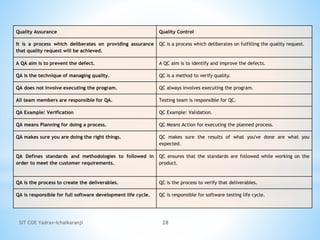
Quality Assurance Quality Control
It is a process which deliberates on providing assurance
that quality request will be achieved.
QC is a process which deliberates on fulfilling the quality request.
A QA aim is to prevent the defect. A QC aim is to identify and improve the defects.
QA is the technique of managing quality. QC is a method to verify quality.
QA does not involve executing the program. QC always involves executing the program.
All team members are responsible for QA. Testing team is responsible for QC.
QA Example: Verification QC Example: Validation.
QA means Planning for doing a process. QC Means Action for executing the planned process.
QA makes sure you are doing the right things. QC makes sure the results of what you've done are what you
expected.
QA Defines standards and methodologies to followed in
order to meet the customer requirements.
QC ensures that the standards are followed while working on the
product.
QA is the process to create the deliverables. QC is the process to verify that deliverables.
QA is responsible for full software development life cycle. QC is responsible for software testing life cycle.
SIT COE Yadrav-Ichalkaranji 29
1.5 Methods of Testing:
Testing is the process of executing a program with the intent of
finding defects.
There are various methods for testing software. Two methods
are chosen by different testers based on their requirement and
methodologies.
•Static Testing
•Dynamic Testing.
SIT COE Yadrav-Ichalkaranji 30
1. Static Testing:
• Static testing is testing, which checks the application without
executing the code. It is a verification process.
• Static testing is performed in the white box testing phase,
where the programmer checks every line of the code before
handling over to the Test Engineer.
• Static testing can be done manually or with the help of tools
to improve the quality of the application by finding the error
at the early stage of development; that why it is also called the
verification process.
SIT COE Yadrav-Ichalkaranji 31
Advantages of Static Testing:
• Since static testing can start early in the life cycle, early
feedback on quality issues can be established.
• By detecting defects at an early stage, rework costs are
most often relatively low.
• Since rework effort is substantially reduced,
development productivity figures are likely to increase.
• The evaluation by a team has the additional advantage
that there is an exchange of information between the
participants.
• Static tests contribute to an increased awareness of
quality issues
SIT COE Yadrav-Ichalkaranji 32
Disadvantages of Static Testing
• Demand great amount of time when done manually
• Automated tools works with only few programming
languages
• Automated tools may provide false positives and false
negatives
• Automated tools only scan the code
• Automated tools cannot pinpoint weak points that may create
troubles in run-time
SIT COE Yadrav-Ichalkaranji 33
Dynamic Testing:
• Dynamic testing is testing, which is done when the
code is executed at the run time environment.
• It is a validation process where functional testing
[unit, integration, and system testing] and non-
functional testing [user acceptance testing] are
performed.
• Dynamic testing (or dynamic analysis) is a term used
in software engineering to describe the testing of the
dynamic behavior of code.
SIT COE Yadrav-Ichalkaranji 34
Advantages of Dynamic Testing:
• Dynamic testing could identify the weak areas in the runtime
environment.
• Dynamic testing supports application analysis even if the
tester does not have an actual code.
• Dynamic testing could identify some vulnerabilities that are
difficult to find by static testing.
• Dynamic testing also could verify the correctness of static
testing results.
• Dynamic testing could be applied to any application.
SIT COE Yadrav-Ichalkaranji 35
Disadvantages of Dynamic Testing
• Automated tools may give the wrong security, such as check
everything.
• Automated tools can generate false positives and false
negatives.
• Finding trained dynamic test professionals is not easy.
• Dynamic testing is hard to track down the vulnerabilities in
the code, and it takes longer to fix the problem. Therefore,
fixing bugs becomes expensive.
SIT COE Yadrav-Ichalkaranji 36
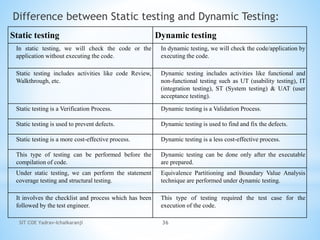
Difference between Static testing and Dynamic Testing:
Static testing Dynamic testing
In static testing, we will check the code or the
application without executing the code.
In dynamic testing, we will check the code/application by
executing the code.
Static testing includes activities like code Review,
Walkthrough, etc.
Dynamic testing includes activities like functional and
non-functional testing such as UT (usability testing), IT
(integration testing), ST (System testing) & UAT (user
acceptance testing).
Static testing is a Verification Process. Dynamic testing is a Validation Process.
Static testing is used to prevent defects. Dynamic testing is used to find and fix the defects.
Static testing is a more cost-effective process. Dynamic testing is a less cost-effective process.
This type of testing can be performed before the
compilation of code.
Dynamic testing can be done only after the executable
are prepared.
Under static testing, we can perform the statement
coverage testing and structural testing.
Equivalence Partitioning and Boundary Value Analysis
technique are performed under dynamic testing.
It involves the checklist and process which has been
followed by the test engineer.
This type of testing required the test case for the
execution of the code.
SIT COE Yadrav-Ichalkaranji 37
1.6 The Box Approach:
Software testing methods are traditionally divided into white-
and black-box testing. These two approaches are used to
describe the point of view that a test engineer takes when
designing test cases.
•White Box Testing
•Black Box Testing
SIT COE Yadrav-Ichalkaranji 38
White Box Testing:
White box testing also known as Clear Box Testing, Open Box
Testing, Glass Box Testing.
It is a software testing method in which the internal
structure/design/implementation of the item being tested is known
to the tester.
The tester chooses inputs to exercise paths through the code and
determines the appropriate outputs. Programming know-how and
the implementation knowledge is essential.
SIT COE Yadrav-Ichalkaranji 39
Classification white box testing techniques:
SIT COE Yadrav-Ichalkaranji 40
Static White Box Testing:
• Static testing is testing, which checks the application without
executing the code. It is a verification process.
• Static White-box Testing is a type of testing in which the
program source code is tested without running it. We only
need to examine and review the code. It means that we need
not execute the code.
• Static testing is a form of software testing which requires only
the source code of the software product, not the binaries of
executable.
SIT COE Yadrav-Ichalkaranji 41
Classification of Static white box Testing:
SIT COE Yadrav-Ichalkaranji 42
Reviews:
Typically review is used to find and eliminate errors or
ambiguities in documents such as requirements, design,
test cases, etc.
There are two types of reviews:
(i) Informal review: A review not based on a formal
(documented) procedure.
(ii)Formal reviews: A formal review is the process under
which static white-box testing is performed.
A formal review can range from a simple meeting between
two programmers to a detailed, rigorous inspection of the
software's design or its code.
SIT COE Yadrav-Ichalkaranji 43
There are four essential elements to a formal
review:
• Identify Problems
• Follow Rules
• Prepare
• Write a Report
SIT COE Yadrav-Ichalkaranji 44
Inspection:
• Inspections are the most formal type of reviews.
• They are highly structured and require training for each participant.
• Inspections are different from peer reviews and walkthroughs in
that the person who presents the code, the presenter or reader, isn't
the original programmer.
• Inspection is usually led by a trained moderator, who is not the
author. Moderator's role is to do a peer examination of a document
• Inspection is most formal and driven by checklists and rules.
• It is essential to have a pre-meeting preparation.
• Inspection report is prepared and shared with the author for
appropriate actions.
SIT COE Yadrav-Ichalkaranji 45
Structured Walkthroughs :
• In a walkthrough, the programmer who wrote the code formally
presents it to a small group of five or so other programmers and
testers.
• The reviewers should receive copies of the software in advance of
the review so they can examine it and write comments and questions
that they want to ask at the review.
• Having at least one senior programmer as a reviewer is very
important. The presenter reads through the code line by line, or
function by function, explaining what the code does and why.
SIT COE Yadrav-Ichalkaranji 46
Walkthroughs cont…
A structured walkthrough, a static testing technique performed in an
organized manner between a group of peers to review and discuss
the technical aspects of software development process.
• The main objective in a structured walkthrough is to find defects
in order to improve the quality of the product.
• Structured walkthroughs are a series of reviews designed to detect
the errors made in an item of documentation, a diagram or a piece
of code.
• As such, a walkthrough is not a review of people but more as a
review of documentation itself.
• Structured walkthroughs are usually not used for technical
discussions or to discuss the solutions for the issues found.
SIT COE Yadrav-Ichalkaranji 47
Technical Review
• A Technical review is a static white-box testing technique
which is conducted to spot the defects early in the life cycle
that cannot be detected by black-box testing techniques.
SIT COE Yadrav-Ichalkaranji 48
Technical Review Characteristics:
1. Technical Reviews are documented and uses a defect
detection process that has peers and technical specialist as part
of the review process.
2. The Review process doesn't involve management
participation.
3. It is usually led by trained moderator who is not the author.
4. The report is prepared with the list of issues that needs to be
addressed.
SIT COE Yadrav-Ichalkaranji 49
Structural White Box Testing:
Structural Testing involves testing a running program. So, now
binaries and executable are desired. We try to test the internal
logic of the program now.
It entails running the actual product against some pre-designed test
cases to exercise as much of the code as possible.
SIT COE Yadrav-Ichalkaranji 50
Classification white box testing techniques:
SIT COE Yadrav-Ichalkaranji 51
Code Functional Testing:
This initial part of structural testing corresponds to some quick
checks that a developer performs before subjecting the code to
more extensive code coverage testing or code complexity testing.
This can happen by several methods.
1. Initially, the developer can perform certain obvious tests,
knowing the input variables and the corresponding expected
output variables.
2. Debug version of the product by putting intermediate print
statements and making sure the program is passing through the
right loops and iterations the right number of times.
3. To do the initial test is to run the product under a debugger or an
IDE (Integrated Development Environment). These tools allow
single stepping of instructions.
SIT COE Yadrav-Ichalkaranji 52
Code Functional Testing:
This initial part of structural testing corresponds to some quick
checks that a developer performs before subjecting the code to
more extensive code coverage testing or code complexity testing.
This can happen by several methods.
1. Initially, the developer can perform certain obvious tests,
knowing the input variables and the corresponding expected
output variables.
2. Debug version of the product by putting intermediate print
statements and making sure the program is passing through the
right loops and iterations the right number of times.
3. To do the initial test is to run the product under a debugger or an
IDE (Integrated Development Environment). These tools allow
single stepping of instructions.
SIT COE Yadrav-Ichalkaranji 53
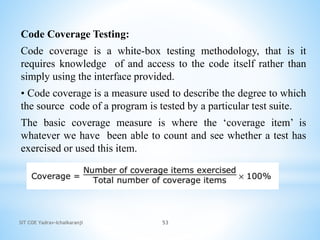
Code Coverage Testing:
Code coverage is a white-box testing methodology, that is it
requires knowledge of and access to the code itself rather than
simply using the interface provided.
• Code coverage is a measure used to describe the degree to which
the source code of a program is tested by a particular test suite.
The basic coverage measure is where the ‘coverage item’ is
whatever we have been able to count and see whether a test has
exercised or used this item.
SIT COE Yadrav-Ichalkaranji 54
Types of code coverage testing:
Statement/Line coverage
Branch Coverage
Condition Coverage
Function Coverage
Path Coverage
SIT COE Yadrav-Ichalkaranji 55
Statement / Line Coverage:
The most straightforward form of code coverage is called
statement coverage or line coverage. A statement is covered if it is
executed.
The statement coverage is also known as line coverage or segment
coverage.
The statement coverage covers only the true conditions.
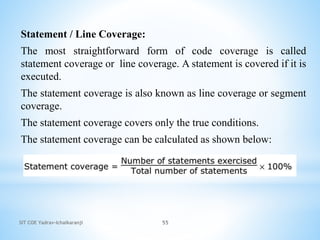
The statement coverage can be calculated as shown below:
SIT COE Yadrav-Ichalkaranji 56
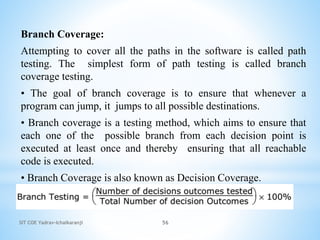
Branch Coverage:
Attempting to cover all the paths in the software is called path
testing. The simplest form of path testing is called branch
coverage testing.
• The goal of branch coverage is to ensure that whenever a
program can jump, it jumps to all possible destinations.
• Branch coverage is a testing method, which aims to ensure that
each one of the possible branch from each decision point is
executed at least once and thereby ensuring that all reachable
code is executed.
• Branch Coverage is also known as Decision Coverage.
SIT COE Yadrav-Ichalkaranji 57
Condition Coverage:
Condition coverage is also known as Predicate Coverage in which
each one of the Boolean expression have been evaluated to both
TRUE and FALSE.
Condition coverage testing takes the extra conditions on the
branch statements into account.
SIT COE Yadrav-Ichalkaranji 58
Function Coverage:
• This is to identify how many program functions are covered by
test cases.
• The requirements of a product are mapped into functions during
the design phase and each of the functions form a logical unit.
Each function could, in turn, be implemented using other
function. While providing function coverage, test cases can be
written so as to exercise each of the different functions in the
code.
SIT COE Yadrav-Ichalkaranji 59
Path Coverage:
• In this coverage we split a computer program into number of
distinct paths.
• A program can start from the beginning and take any of the paths
to its completion.
• The formula is:
SIT COE Yadrav-Ichalkaranji 60
Code Complexity Testing:
Code complexity testing is a type of testing through which system
design and system coding is verified.
Complexity performs the verification through reviews,
walkthroughs, or inspections as per planned arrangement.
Customers has some specific requirements for measurement of
complexity.
Cyclomatic complexity measures the amount of decision logic in a
single software unit. Cyclomatic complexity is based entirely on
the structure of the software control flow graph.
SIT COE Yadrav-Ichalkaranji 61
McCabe’s Cyclomatic Complexity:
Cyclomatic complexity measures the amount of decision logic in
the program module.
Cyclomatic complexity is a software metric that provides a
quantitative measure of the logical complexity of a program.
Cyclomatic complexity has a foundation in graph theory and
provides you with an extremely useful software metric.
SIT COE Yadrav-Ichalkaranji 62
Cyclomatic Complexity measures:
Complexity is computed in one of three ways:
1. The number of regions of the flow graph corresponds to the
cyclomatic complexity.
2. Cyclomatic complexity V(G) for a flow graph G is defined as
V(G) =E - N + 2 where E is the number of flow graph edges and
N is the number of flow graph nodes.
3. Cyclomatic complexity V(G) for a flow graph G is also defined
as V(G) =P +1 where P is the number of predicate nodes
contained in the flow graph G (Number of Decision Points).
Example:
SIT COE Yadrav-Ichalkaranji 63
Black Box Testing:
• Black-box (or functional) testing checks the functional
requirements and examines the input and output data of these
requirements.
• Once, the specified function for which the software has been
designed is known, tests are performed to ensure that each
function is working properly. This is referred to as black-box
testing.
• Black-box testing, also known as Behavioral Testing, is a
software testing method in which the internal
structure/design/implementation of the item being tested is not
known to the tester.
SIT COE Yadrav-Ichalkaranji 64
• In black-box testing, the tester only knows what the
software is supposed to do he/she cannot look in the box to
see how it operates. If he types in a certain input, he gets a
certain output. He doesn't know how or why it happens, just
that it does.
• It is a software testing method in which the internal
structure/design/ implementation of the item being tested is
not known to the tester.
SIT COE Yadrav-Ichalkaranji 65
Black Box Testing Techniques:
SIT COE Yadrav-Ichalkaranji 66
Static Black Box Testing:
Testing the specification is static black-box testing. The
specification is a document, not an executing program, so it's
considered static. It's also something that was created using data
from many sources us ability studies, focus groups, marketing
input, and so on.
Dynamic Black Box Testing:
Testing software without having an insight into the details of
underlying code is dynamic black-box testing. It is dynamic
because the program is running you are using it as a customer
would. And, it's black-box because you are testing it without
knowing exactly how it works with blinders on.
SIT COE Yadrav-Ichalkaranji 67
1. Requirement Based Testing:
Requirements-based testing is a testing approach in which test
cases, conditions and data are derived from requirements.
• It includes functional tests and also non-functional attributes
such as performance, reliability or usability.
• Requirements testing deals with validating the requirements
given in the Software Requirements Specifications (SRS) of the
software testing.
SIT COE Yadrav-Ichalkaranji 68
Requirements Testing Process:
1. Testing must be carried out in a timely manner.
2. Testing process should add value to the software life cycle,
hence it needs to be effective.
3. Testing the system exhaustively is impossible hence the testing
process needs to be efficient as well.
4. Testing must provide the overall status of the project, hence it
should be manageable.
SIT COE Yadrav-Ichalkaranji 69
1. Positive and Negative Testing
Positive Testing
• Positive testing can be performed on the system by providing
the valid data as input.
• It checks whether an application behaves as expected with the
positive input.
• This is to test to check the application that does what it is
supposed to do so.
• For example,
SIT COE Yadrav-Ichalkaranji 70
Negative Testing
• Negative Testing can be performed on the system by providing
invalid data as input.
• It checks whether an application behaves as expected with the
negative input.
• This is to test the application that does not do anything that it is
not supposed to do so.
• For example,
SIT COE Yadrav-Ichalkaranji 71
SIT COE Yadrav-Ichalkaranji 72
2. Boundary Values Analysis
• The simplest view of software is to divide its world into two parts i.e.,
the data (or its domain) and the program.
• The data is the keyboard input, mouse clicks, disk files, printouts, and
soon. The program is the executable flow, transitions, logic, and
computations.
• A common approach to software testing is to divide up the test work
along the same lines.
A boundary value is any input or output value on the edge of an
equivalence partition.
• Boundary Value Analysis (BVA) is a black-box test design technique where
test case are designed by using boundary values.
• Boundary Value Analysis is a software testing technique that selects the input
data which represents boundary values. These data includes both boundary and
each side of boundary which should be in the smallest increment.
SIT COE Yadrav-Ichalkaranji 73
Example:
Suppose you have very important tool at office, accepts valid User
Name and Password field to work on that tool, and accepts
minimum 8 characters and maximum 12 characters. Valid range 8-
12, Invalid range 7 or less than 7 and Invalid range 13 or more
than 13.
Test Cases 1: Consider password length less than 8.
Test Cases 2: Consider password of length exactly 8.
Test Cases 3: Consider password of length between 9 and 11.
Test Cases 4: Consider password of length exactly 12.
Test Cases 5: Consider password of length more than 12.
SIT COE Yadrav-Ichalkaranji 74
Test cases for the application whose input box accepts numbers
between 1-1000. Valid range 1-1000, Invalid range 0 and Invalid
range 1001 or more.
• Test Cases 1: Consider test data exactly as the input boundaries
of input domain i.e. values 1 and 1000.
• Test Cases 2: Consider test data with values just below the
extreme edges of input domains i.e. values 0 and 999.
• Test Cases 3: Consider test data with values just above the
extreme edges of input domain i.e. values 2 and 1001.
SIT COE Yadrav-Ichalkaranji 75
3.Decision Tables:
A decision table is a good way to deal with different combination
inputs with their associated outputs and also called cause-effect
table.
Used to determine the test scenarios for complex business
logic.
It helps testers to search the effects of combinations of different
inputs
Provides a regular way of stating complex business rules
SIT COE Yadrav-Ichalkaranji 76
Way to use decision tables in test designing:
Firstly; get to know a suitable function or subsystem that acts
according to a combination of inputs or events.
Taken system should be with fewer inputs or else combinations
will become impossible. Always better to take maximum numbers
of conditions, split them into subsets and use these subsets one at a
time.
After getting features that need to be combined, add them to a
table showing all combinations of “Yes” and “No” for each of the
feature.
SIT COE Yadrav-Ichalkaranji 77
Example of a finance application, where users pay money –
monthly Repayment or year wise (the term of loan). If user
chooses both options, the system will create a negotiation between
two. So, there are two conditions of the loan amount, mention in
the given below table,
TABLE 1: Blank decision table
SIT COE Yadrav-Ichalkaranji 78
TABLE 2: Decision table – Input combination
SIT COE Yadrav-Ichalkaranji 79
4. Equivalence Partitioning:
• In this method, the input domain data is divided into different
equivalence data classes. This method is typically used to
reduce the total number of test cases to a finite set of testable
test cases, still covering maximum requirements.
• Equivalence partitioning is a software testing technique to
minimize number of permutation and combination of input data.
In equivalence partitioning, data is selected in such a way that it
gives as many different output as possible with the minimal set
of data.
• In equivalence partitioning, input data is analyzed and divided
into equivalence classes which produces different output.
SIT COE Yadrav-Ichalkaranji 80
1. For example, consider a very simple function for awarding grades to the
students. This program follow these guideline to award grades
Marks 00 - 39 ------------ Grade D
Marks 40 - 59 ------------ Grade C
Marks 60 - 70 ------------ Grade B
Marks 71 - 100 ------------ Grade A
Based on the equivalence partitioning techniques, partitions for this
program could be as follows:
Marks between 0 to 39 - Valid Input
Marks between 40 to 59 - Valid Input
Marks between 60 to 70 - Valid Input
Marks between 71 to 100 - Valid Input
Marks less than 0 - Invalid Input
Marks more than 100 - Invalid Input
Non numeric input - Invalid Input
SIT COE Yadrav-Ichalkaranji 81
5. .
User Documentation Testing :
User Documentation covers all the manuals, user guides,
installation guides, setup guides, read me files, software release
notes, and online help that are provided along with the software
to help the end user to understand the software system.
User Documentation testing should have two objectives:
1. To check if what is stated in the document is available in the
software.
2. To check if what is there in the product is explained correctly
in the document.
• Software documentation can make up a huge portion of the
overall product. Here's a list of software components that can be
classified as documentation.
SIT COE Yadrav-Ichalkaranji 82
6. Graph Based Testing :
• Graph based testing also called as state graph based testing.
• State Graphs provide framework for model based testing. After
arriving at an executable state graph model, we execute or simulate
that state graph model with event sequences as test cases.
• This is done before starting the actual implementation phase. This
would support for testing the system implementation (program)
against the system specification (State Graph) and also, support for
automatic generation of test cases for the implementation.
SIT COE Yadrav-Ichalkaranji 7

Basic of Software Testing.pptx

  • 1.
    1 Basics of SoftwareTesting and Testing Methods SIT COE Yadrav-Ichalkaranji
  • 2.
    1.1 Software Testing,Objectives of Testing What is Software Testing? Testing is the execution of programs with the intent of finding defects. Testing is a the process of exercising a software component using a selected set of test cases, with the intent of revealing defects and evaluating quality. Software testing is a technical investigation of a product, i.e. an empirical search for quality-related information of value to a project’s stakeholders SIT COE Yadrav-Ichalkaranji 2
  • 3.
    SIT COE Yadrav-Ichalkaranji3 Skills Required for Tester: • Communication skills • Domain knowledge • Desire to learn • Technical skills • Analytical skills • Planning skills • Think from users perspective • Be a good judge of your product
  • 4.
    SIT COE Yadrav-Ichalkaranji4 Objectives of Software Testing: • To find defects before they cause a production system to fail. • To bring the tested software, after correction of the identified defects and retesting, to an acceptable level of quality. • To perform the required tests efficiently and effectively, within the limits budgetary and scheduling limitation. • To compile a record of software errors for use in error prevention (by corrective and preventive actions)
  • 5.
    Fault, Error, Bugand Failure: Fault: A fault is the representation of an error where representation is the mode of expression such as data flow diagrams, ER diagrams, source code, use cases, etc. If fault is in the source code, we call it a bug. Error: A Human mistake in coding is called as an ‘error’ When we run a program the error that we get during execution is termed on the basis of runtime error, compile time error, computational error, and assignment error. SIT COE Yadrav-Ichalkaranji 3
  • 6.
    SIT COE Yadrav-Ichalkaranji6 Bug: If testers find any mismatch in the system/application in testing phase is called as ‘Bug’. A bug can be defined as the initiation of error or a problem due to which fault, failure, incident or an anomaly occurs. Defect: The variation between the actual results and expected results is known as ‘defect’. If a developer finds an issue and corrects it by himself in the development phase then it’s called a defect. Failure: Once the product is deployed and customers find any issues then they call the product as a failure product. After release, if an end user finds an issue then that particular issue is called as failure.
  • 7.
    SIT COE Yadrav-Ichalkaranji7 Test Cases: A Test case is a set of conditions or variables under which a tester will determine whether a system under test satisfies requirements or works correctly. A test case consists of inputs given to the program and its expected outputs. A Test case is a documentation that specifies the input that has to be given and the output that is expected from the system and the precondition that must be met for executing the test case.
  • 8.
    SIT COE Yadrav-Ichalkaranji8 Test Case Template: Test Case ID: Test Designed by:<Name> Test Priority(Low/Medium/High): Test Designed Date:<Date> Module Name: Test Executed by: <Name> Test Title: Test Executed Date:<Date> Description: Pre-Conditions: Step Test Step Test Data Expected Result Actual Result Status (Pass/Fail)
  • 9.
    SIT COE Yadrav-Ichalkaranji9 How to write test Cases?
  • 10.
    SIT COE Yadrav-Ichalkaranji10 When to Start and Stop testing of Software (Entry And Exit Criteria): Entry Criteria for STLC phases can be defined as specific conditions; or, all those documents which are required to start a particular phase of STLC should be present before entering any of the STLC phase. Exit Criteria for STLC phases can be defined as items/documents/actions/tasks that must be completed before concluding the current phase and moving on to the next phase.
  • 11.
    SIT COE Yadrav-Ichalkaranji11 Entry Criteria: Entry criteria, specifies when that phase can be started also included the inputs for the phase. Entry Criteria for STLC phases can be defined as specific conditions; or, all those documents which are required to start a particular phase of STLC should be present before entering any of the STLC phase. While setting the entry criteria, it is also important to define the time-frame when the entry criteria item is available to start the process.
  • 12.
    SIT COE Yadrav-Ichalkaranji12 Exit Criteria: Exit Criteria for STLC phases can be defined as items/documents/actions/tasks that must be completed before concluding the current phase and moving on to the next phase. Exit criteria is a set of expectations; this should be met before concluding the STLC phase. Exit Criteria is defined as “The specific conditions or on-going activities that must be present before a life cycle phase can be considered complete.
  • 13.
    SIT COE Yadrav-Ichalkaranji13 1.4 Verification and Validation(V Model): Verification: It involves a static analysis method (review) done without executing code. It is the process of evaluation of the product development process to find whether specified requirements meet. Validation: It involves dynamic analysis method (functional, non-functional), testing is done by executing code. Validation is the process to classify the software after the completion of the development process to determine whether the software meets the customer expectations and requirements.
  • 14.
  • 15.
    SIT COE Yadrav-Ichalkaranji15 Verification Phase: • Overall Business Requirement • Software Requirement • High level design • Low level design • Coding
  • 16.
    SIT COE Yadrav-Ichalkaranji16 1. Overall Business Requirement: In this first phase of the development cycle, the product requirements are understood from customer perspective. This phase involves detailed communication with the customer to understand his expectations and exact requirements. 2. Software Requirement: Once the product requirements are clearly known, the system can be designed. The system design comprises of understanding & detailing the complete hardware, software & communication set up for the product under development. System test plan is designed based on system design. Doing this at earlier stage leaves more time for actual test execution later.
  • 17.
    SIT COE Yadrav-Ichalkaranji17 3. High level design: High level specification are understood & designed in this phase. Usually more than one technical approach is proposed & based on the technical & financial feasibility, the final decision is taken. System design is broken down further into modules taking up different functionality. 4. Low level design: In this phase the detailed integral design for all the system modules is specified. It is important that the design is compatible with the other modules in the system & other external system. Components tests can be designed at this stage based on the internal module design.
  • 18.
    SIT COE Yadrav-Ichalkaranji18 5. Coding: The actual coding of the system modules designed in the design phase is taken up in the coding phase. The base suitable programming language is decided base on requirements. Coding is done based on the coding guidelines & standards.
  • 19.
    SIT COE Yadrav-Ichalkaranji19 Validation: Unit Testing Components testing Integration Testing System Testing Acceptance Testing
  • 20.
    SIT COE Yadrav-Ichalkaranji20 Unit Testing: Unit testing designed in coding are executed on the code during this validation phase. This helps to eliminate bugs at an early stage. 2. Components testing: This is associated with module design helps to eliminate defects in individual modules. 3. Integration Testing: It is associated with high level design phase & it is performed to test the coexistence & communication of the internal modules within the system
  • 21.
    SIT COE Yadrav-Ichalkaranji21 5. System Testing: It is associated with system design phase. It checks the entire system functionality & the communication of the system under development with external systems. Most of the software & hardware compatibility issues can be uncovered using system test execution. 6. Acceptance Testing: It is associated with overall & involves testing the product in user environment. These tests uncover the compatibility issues with the other systems available in the user environment. It also uncovers the non-functional issues such as load & performance defects in the actual user environment.
  • 22.
    Verification Validation 1. Verificationis a static practice of verifying documents, design, code and program. 1. Validation is a dynamic mechanism of validating and testing the actual product. 2. It does not involve executing the code. 2. It always involves executing the code. 3. It is human based checking of documents and files. 3. It is computer based execution of program. 4. Verification uses methods like inspections, reviews, walkthroughs, and Desk-checking etc. 4. Validation uses methods like black box (functional) testing, gray box testing, and white box (structural) testing etc. 5. Verification is to check whether the software conforms to specifications. 5. Validation is to check whether software meets the customer expectations and requirements. 6. It can catch errors that validation cannot catch. It is low level exercise. 6. It can catch errors that verification cannot catch. It is High Level Exercise. 7. Target is requirements specification, application and software architecture, high level, complete design, and database design etc. 7. Target is actual product-a unit, a module, a bent of integrated modules, and effective final product. 8. Verification is done by QA team to ensure that the software is as per the specifications in the SRS document. 8. Validation is carried out with the involvement of testing team. 9. It generally comes first-done before validation. 9. It generally follows after verification. 22 SIT COE Yadrav-Ichalkaranji
  • 23.
    SIT COE Yadrav-Ichalkaranji23 The advantages of the V-Model method are as follows − • This is a highly-disciplined model and Phases are completed one at a time. • Works well for smaller projects where requirements are very well understood. • Simple and easy to understand and use. • Easy to manage due to the rigidity of the model. Each phase has specific deliverables and a review process.
  • 24.
    SIT COE Yadrav-Ichalkaranji24 The disadvantages of the V-Model method are as follows − • High risk and uncertainty. • Not a good model for complex and object-oriented projects. • Poor model for long and ongoing projects. • Not suitable for the projects where requirements are at a moderate to high risk of changing. • Once an application is in the testing stage, it is difficult to go back and change a functionality. • No working software is produced until late during the life cycle.
  • 25.
    SIT COE Yadrav-Ichalkaranji25 Quality Assurance and Quality Control: What is Quality? Quality is meeting the requirement, expectation, and needs of the customer is free from the defects, lacks and substantial variants. There are standards needs to follow to satisfy the customer requirements. What is Assurance? Assurance is provided by organization management, it means giving a positive declaration on a product which obtains confidence for the outcome. It gives a security that the product will work without any glitches as per the expectations or requests.
  • 26.
    SIT COE Yadrav-Ichalkaranji26 What is Quality Assurance? Quality Assurance is known as QA and focuses on preventing defect. Quality Assurance ensures that the approaches, techniques, methods and processes are designed for the projects are implemented correctly.
  • 27.
    SIT COE Yadrav-Ichalkaranji27 What is Quality Control? Quality Control is known as QC and focuses on identifying a defect. QC ensures that the approaches, techniques, methods and processes are designed in the project are following correctly. QC activities monitor and verify that the project deliverables meet the defined quality standards.
  • 28.
    SIT COE Yadrav-Ichalkaranji28 Quality Assurance Quality Control It is a process which deliberates on providing assurance that quality request will be achieved. QC is a process which deliberates on fulfilling the quality request. A QA aim is to prevent the defect. A QC aim is to identify and improve the defects. QA is the technique of managing quality. QC is a method to verify quality. QA does not involve executing the program. QC always involves executing the program. All team members are responsible for QA. Testing team is responsible for QC. QA Example: Verification QC Example: Validation. QA means Planning for doing a process. QC Means Action for executing the planned process. QA makes sure you are doing the right things. QC makes sure the results of what you've done are what you expected. QA Defines standards and methodologies to followed in order to meet the customer requirements. QC ensures that the standards are followed while working on the product. QA is the process to create the deliverables. QC is the process to verify that deliverables. QA is responsible for full software development life cycle. QC is responsible for software testing life cycle.
  • 29.
    SIT COE Yadrav-Ichalkaranji29 1.5 Methods of Testing: Testing is the process of executing a program with the intent of finding defects. There are various methods for testing software. Two methods are chosen by different testers based on their requirement and methodologies. •Static Testing •Dynamic Testing.
  • 30.
    SIT COE Yadrav-Ichalkaranji30 1. Static Testing: • Static testing is testing, which checks the application without executing the code. It is a verification process. • Static testing is performed in the white box testing phase, where the programmer checks every line of the code before handling over to the Test Engineer. • Static testing can be done manually or with the help of tools to improve the quality of the application by finding the error at the early stage of development; that why it is also called the verification process.
  • 31.
    SIT COE Yadrav-Ichalkaranji31 Advantages of Static Testing: • Since static testing can start early in the life cycle, early feedback on quality issues can be established. • By detecting defects at an early stage, rework costs are most often relatively low. • Since rework effort is substantially reduced, development productivity figures are likely to increase. • The evaluation by a team has the additional advantage that there is an exchange of information between the participants. • Static tests contribute to an increased awareness of quality issues
  • 32.
    SIT COE Yadrav-Ichalkaranji32 Disadvantages of Static Testing • Demand great amount of time when done manually • Automated tools works with only few programming languages • Automated tools may provide false positives and false negatives • Automated tools only scan the code • Automated tools cannot pinpoint weak points that may create troubles in run-time
  • 33.
    SIT COE Yadrav-Ichalkaranji33 Dynamic Testing: • Dynamic testing is testing, which is done when the code is executed at the run time environment. • It is a validation process where functional testing [unit, integration, and system testing] and non- functional testing [user acceptance testing] are performed. • Dynamic testing (or dynamic analysis) is a term used in software engineering to describe the testing of the dynamic behavior of code.
  • 34.
    SIT COE Yadrav-Ichalkaranji34 Advantages of Dynamic Testing: • Dynamic testing could identify the weak areas in the runtime environment. • Dynamic testing supports application analysis even if the tester does not have an actual code. • Dynamic testing could identify some vulnerabilities that are difficult to find by static testing. • Dynamic testing also could verify the correctness of static testing results. • Dynamic testing could be applied to any application.
  • 35.
    SIT COE Yadrav-Ichalkaranji35 Disadvantages of Dynamic Testing • Automated tools may give the wrong security, such as check everything. • Automated tools can generate false positives and false negatives. • Finding trained dynamic test professionals is not easy. • Dynamic testing is hard to track down the vulnerabilities in the code, and it takes longer to fix the problem. Therefore, fixing bugs becomes expensive.
  • 36.
    SIT COE Yadrav-Ichalkaranji36 Difference between Static testing and Dynamic Testing: Static testing Dynamic testing In static testing, we will check the code or the application without executing the code. In dynamic testing, we will check the code/application by executing the code. Static testing includes activities like code Review, Walkthrough, etc. Dynamic testing includes activities like functional and non-functional testing such as UT (usability testing), IT (integration testing), ST (System testing) & UAT (user acceptance testing). Static testing is a Verification Process. Dynamic testing is a Validation Process. Static testing is used to prevent defects. Dynamic testing is used to find and fix the defects. Static testing is a more cost-effective process. Dynamic testing is a less cost-effective process. This type of testing can be performed before the compilation of code. Dynamic testing can be done only after the executable are prepared. Under static testing, we can perform the statement coverage testing and structural testing. Equivalence Partitioning and Boundary Value Analysis technique are performed under dynamic testing. It involves the checklist and process which has been followed by the test engineer. This type of testing required the test case for the execution of the code.
  • 37.
    SIT COE Yadrav-Ichalkaranji37 1.6 The Box Approach: Software testing methods are traditionally divided into white- and black-box testing. These two approaches are used to describe the point of view that a test engineer takes when designing test cases. •White Box Testing •Black Box Testing
  • 38.
    SIT COE Yadrav-Ichalkaranji38 White Box Testing: White box testing also known as Clear Box Testing, Open Box Testing, Glass Box Testing. It is a software testing method in which the internal structure/design/implementation of the item being tested is known to the tester. The tester chooses inputs to exercise paths through the code and determines the appropriate outputs. Programming know-how and the implementation knowledge is essential.
  • 39.
    SIT COE Yadrav-Ichalkaranji39 Classification white box testing techniques:
  • 40.
    SIT COE Yadrav-Ichalkaranji40 Static White Box Testing: • Static testing is testing, which checks the application without executing the code. It is a verification process. • Static White-box Testing is a type of testing in which the program source code is tested without running it. We only need to examine and review the code. It means that we need not execute the code. • Static testing is a form of software testing which requires only the source code of the software product, not the binaries of executable.
  • 41.
    SIT COE Yadrav-Ichalkaranji41 Classification of Static white box Testing:
  • 42.
    SIT COE Yadrav-Ichalkaranji42 Reviews: Typically review is used to find and eliminate errors or ambiguities in documents such as requirements, design, test cases, etc. There are two types of reviews: (i) Informal review: A review not based on a formal (documented) procedure. (ii)Formal reviews: A formal review is the process under which static white-box testing is performed. A formal review can range from a simple meeting between two programmers to a detailed, rigorous inspection of the software's design or its code.
  • 43.
    SIT COE Yadrav-Ichalkaranji43 There are four essential elements to a formal review: • Identify Problems • Follow Rules • Prepare • Write a Report
  • 44.
    SIT COE Yadrav-Ichalkaranji44 Inspection: • Inspections are the most formal type of reviews. • They are highly structured and require training for each participant. • Inspections are different from peer reviews and walkthroughs in that the person who presents the code, the presenter or reader, isn't the original programmer. • Inspection is usually led by a trained moderator, who is not the author. Moderator's role is to do a peer examination of a document • Inspection is most formal and driven by checklists and rules. • It is essential to have a pre-meeting preparation. • Inspection report is prepared and shared with the author for appropriate actions.
  • 45.
    SIT COE Yadrav-Ichalkaranji45 Structured Walkthroughs : • In a walkthrough, the programmer who wrote the code formally presents it to a small group of five or so other programmers and testers. • The reviewers should receive copies of the software in advance of the review so they can examine it and write comments and questions that they want to ask at the review. • Having at least one senior programmer as a reviewer is very important. The presenter reads through the code line by line, or function by function, explaining what the code does and why.
  • 46.
    SIT COE Yadrav-Ichalkaranji46 Walkthroughs cont… A structured walkthrough, a static testing technique performed in an organized manner between a group of peers to review and discuss the technical aspects of software development process. • The main objective in a structured walkthrough is to find defects in order to improve the quality of the product. • Structured walkthroughs are a series of reviews designed to detect the errors made in an item of documentation, a diagram or a piece of code. • As such, a walkthrough is not a review of people but more as a review of documentation itself. • Structured walkthroughs are usually not used for technical discussions or to discuss the solutions for the issues found.
  • 47.
    SIT COE Yadrav-Ichalkaranji47 Technical Review • A Technical review is a static white-box testing technique which is conducted to spot the defects early in the life cycle that cannot be detected by black-box testing techniques.
  • 48.
    SIT COE Yadrav-Ichalkaranji48 Technical Review Characteristics: 1. Technical Reviews are documented and uses a defect detection process that has peers and technical specialist as part of the review process. 2. The Review process doesn't involve management participation. 3. It is usually led by trained moderator who is not the author. 4. The report is prepared with the list of issues that needs to be addressed.
  • 49.
    SIT COE Yadrav-Ichalkaranji49 Structural White Box Testing: Structural Testing involves testing a running program. So, now binaries and executable are desired. We try to test the internal logic of the program now. It entails running the actual product against some pre-designed test cases to exercise as much of the code as possible.
  • 50.
    SIT COE Yadrav-Ichalkaranji50 Classification white box testing techniques:
  • 51.
    SIT COE Yadrav-Ichalkaranji51 Code Functional Testing: This initial part of structural testing corresponds to some quick checks that a developer performs before subjecting the code to more extensive code coverage testing or code complexity testing. This can happen by several methods. 1. Initially, the developer can perform certain obvious tests, knowing the input variables and the corresponding expected output variables. 2. Debug version of the product by putting intermediate print statements and making sure the program is passing through the right loops and iterations the right number of times. 3. To do the initial test is to run the product under a debugger or an IDE (Integrated Development Environment). These tools allow single stepping of instructions.
  • 52.
    SIT COE Yadrav-Ichalkaranji52 Code Functional Testing: This initial part of structural testing corresponds to some quick checks that a developer performs before subjecting the code to more extensive code coverage testing or code complexity testing. This can happen by several methods. 1. Initially, the developer can perform certain obvious tests, knowing the input variables and the corresponding expected output variables. 2. Debug version of the product by putting intermediate print statements and making sure the program is passing through the right loops and iterations the right number of times. 3. To do the initial test is to run the product under a debugger or an IDE (Integrated Development Environment). These tools allow single stepping of instructions.
  • 53.
    SIT COE Yadrav-Ichalkaranji53 Code Coverage Testing: Code coverage is a white-box testing methodology, that is it requires knowledge of and access to the code itself rather than simply using the interface provided. • Code coverage is a measure used to describe the degree to which the source code of a program is tested by a particular test suite. The basic coverage measure is where the ‘coverage item’ is whatever we have been able to count and see whether a test has exercised or used this item.
  • 54.
    SIT COE Yadrav-Ichalkaranji54 Types of code coverage testing: Statement/Line coverage Branch Coverage Condition Coverage Function Coverage Path Coverage
  • 55.
    SIT COE Yadrav-Ichalkaranji55 Statement / Line Coverage: The most straightforward form of code coverage is called statement coverage or line coverage. A statement is covered if it is executed. The statement coverage is also known as line coverage or segment coverage. The statement coverage covers only the true conditions. The statement coverage can be calculated as shown below:
  • 56.
    SIT COE Yadrav-Ichalkaranji56 Branch Coverage: Attempting to cover all the paths in the software is called path testing. The simplest form of path testing is called branch coverage testing. • The goal of branch coverage is to ensure that whenever a program can jump, it jumps to all possible destinations. • Branch coverage is a testing method, which aims to ensure that each one of the possible branch from each decision point is executed at least once and thereby ensuring that all reachable code is executed. • Branch Coverage is also known as Decision Coverage.
  • 57.
    SIT COE Yadrav-Ichalkaranji57 Condition Coverage: Condition coverage is also known as Predicate Coverage in which each one of the Boolean expression have been evaluated to both TRUE and FALSE. Condition coverage testing takes the extra conditions on the branch statements into account.
  • 58.
    SIT COE Yadrav-Ichalkaranji58 Function Coverage: • This is to identify how many program functions are covered by test cases. • The requirements of a product are mapped into functions during the design phase and each of the functions form a logical unit. Each function could, in turn, be implemented using other function. While providing function coverage, test cases can be written so as to exercise each of the different functions in the code.
  • 59.
    SIT COE Yadrav-Ichalkaranji59 Path Coverage: • In this coverage we split a computer program into number of distinct paths. • A program can start from the beginning and take any of the paths to its completion. • The formula is:
  • 60.
    SIT COE Yadrav-Ichalkaranji60 Code Complexity Testing: Code complexity testing is a type of testing through which system design and system coding is verified. Complexity performs the verification through reviews, walkthroughs, or inspections as per planned arrangement. Customers has some specific requirements for measurement of complexity. Cyclomatic complexity measures the amount of decision logic in a single software unit. Cyclomatic complexity is based entirely on the structure of the software control flow graph.
  • 61.
    SIT COE Yadrav-Ichalkaranji61 McCabe’s Cyclomatic Complexity: Cyclomatic complexity measures the amount of decision logic in the program module. Cyclomatic complexity is a software metric that provides a quantitative measure of the logical complexity of a program. Cyclomatic complexity has a foundation in graph theory and provides you with an extremely useful software metric.
  • 62.
    SIT COE Yadrav-Ichalkaranji62 Cyclomatic Complexity measures: Complexity is computed in one of three ways: 1. The number of regions of the flow graph corresponds to the cyclomatic complexity. 2. Cyclomatic complexity V(G) for a flow graph G is defined as V(G) =E - N + 2 where E is the number of flow graph edges and N is the number of flow graph nodes. 3. Cyclomatic complexity V(G) for a flow graph G is also defined as V(G) =P +1 where P is the number of predicate nodes contained in the flow graph G (Number of Decision Points). Example:
  • 63.
    SIT COE Yadrav-Ichalkaranji63 Black Box Testing: • Black-box (or functional) testing checks the functional requirements and examines the input and output data of these requirements. • Once, the specified function for which the software has been designed is known, tests are performed to ensure that each function is working properly. This is referred to as black-box testing. • Black-box testing, also known as Behavioral Testing, is a software testing method in which the internal structure/design/implementation of the item being tested is not known to the tester.
  • 64.
    SIT COE Yadrav-Ichalkaranji64 • In black-box testing, the tester only knows what the software is supposed to do he/she cannot look in the box to see how it operates. If he types in a certain input, he gets a certain output. He doesn't know how or why it happens, just that it does. • It is a software testing method in which the internal structure/design/ implementation of the item being tested is not known to the tester.
  • 65.
    SIT COE Yadrav-Ichalkaranji65 Black Box Testing Techniques:
  • 66.
    SIT COE Yadrav-Ichalkaranji66 Static Black Box Testing: Testing the specification is static black-box testing. The specification is a document, not an executing program, so it's considered static. It's also something that was created using data from many sources us ability studies, focus groups, marketing input, and so on. Dynamic Black Box Testing: Testing software without having an insight into the details of underlying code is dynamic black-box testing. It is dynamic because the program is running you are using it as a customer would. And, it's black-box because you are testing it without knowing exactly how it works with blinders on.
  • 67.
    SIT COE Yadrav-Ichalkaranji67 1. Requirement Based Testing: Requirements-based testing is a testing approach in which test cases, conditions and data are derived from requirements. • It includes functional tests and also non-functional attributes such as performance, reliability or usability. • Requirements testing deals with validating the requirements given in the Software Requirements Specifications (SRS) of the software testing.
  • 68.
    SIT COE Yadrav-Ichalkaranji68 Requirements Testing Process: 1. Testing must be carried out in a timely manner. 2. Testing process should add value to the software life cycle, hence it needs to be effective. 3. Testing the system exhaustively is impossible hence the testing process needs to be efficient as well. 4. Testing must provide the overall status of the project, hence it should be manageable.
  • 69.
    SIT COE Yadrav-Ichalkaranji69 1. Positive and Negative Testing Positive Testing • Positive testing can be performed on the system by providing the valid data as input. • It checks whether an application behaves as expected with the positive input. • This is to test to check the application that does what it is supposed to do so. • For example,
  • 70.
    SIT COE Yadrav-Ichalkaranji70 Negative Testing • Negative Testing can be performed on the system by providing invalid data as input. • It checks whether an application behaves as expected with the negative input. • This is to test the application that does not do anything that it is not supposed to do so. • For example,
  • 71.
  • 72.
    SIT COE Yadrav-Ichalkaranji72 2. Boundary Values Analysis • The simplest view of software is to divide its world into two parts i.e., the data (or its domain) and the program. • The data is the keyboard input, mouse clicks, disk files, printouts, and soon. The program is the executable flow, transitions, logic, and computations. • A common approach to software testing is to divide up the test work along the same lines. A boundary value is any input or output value on the edge of an equivalence partition. • Boundary Value Analysis (BVA) is a black-box test design technique where test case are designed by using boundary values. • Boundary Value Analysis is a software testing technique that selects the input data which represents boundary values. These data includes both boundary and each side of boundary which should be in the smallest increment.
  • 73.
    SIT COE Yadrav-Ichalkaranji73 Example: Suppose you have very important tool at office, accepts valid User Name and Password field to work on that tool, and accepts minimum 8 characters and maximum 12 characters. Valid range 8- 12, Invalid range 7 or less than 7 and Invalid range 13 or more than 13. Test Cases 1: Consider password length less than 8. Test Cases 2: Consider password of length exactly 8. Test Cases 3: Consider password of length between 9 and 11. Test Cases 4: Consider password of length exactly 12. Test Cases 5: Consider password of length more than 12.
  • 74.
    SIT COE Yadrav-Ichalkaranji74 Test cases for the application whose input box accepts numbers between 1-1000. Valid range 1-1000, Invalid range 0 and Invalid range 1001 or more. • Test Cases 1: Consider test data exactly as the input boundaries of input domain i.e. values 1 and 1000. • Test Cases 2: Consider test data with values just below the extreme edges of input domains i.e. values 0 and 999. • Test Cases 3: Consider test data with values just above the extreme edges of input domain i.e. values 2 and 1001.
  • 75.
    SIT COE Yadrav-Ichalkaranji75 3.Decision Tables: A decision table is a good way to deal with different combination inputs with their associated outputs and also called cause-effect table. Used to determine the test scenarios for complex business logic. It helps testers to search the effects of combinations of different inputs Provides a regular way of stating complex business rules
  • 76.
    SIT COE Yadrav-Ichalkaranji76 Way to use decision tables in test designing: Firstly; get to know a suitable function or subsystem that acts according to a combination of inputs or events. Taken system should be with fewer inputs or else combinations will become impossible. Always better to take maximum numbers of conditions, split them into subsets and use these subsets one at a time. After getting features that need to be combined, add them to a table showing all combinations of “Yes” and “No” for each of the feature.
  • 77.
    SIT COE Yadrav-Ichalkaranji77 Example of a finance application, where users pay money – monthly Repayment or year wise (the term of loan). If user chooses both options, the system will create a negotiation between two. So, there are two conditions of the loan amount, mention in the given below table, TABLE 1: Blank decision table
  • 78.
    SIT COE Yadrav-Ichalkaranji78 TABLE 2: Decision table – Input combination
  • 79.
    SIT COE Yadrav-Ichalkaranji79 4. Equivalence Partitioning: • In this method, the input domain data is divided into different equivalence data classes. This method is typically used to reduce the total number of test cases to a finite set of testable test cases, still covering maximum requirements. • Equivalence partitioning is a software testing technique to minimize number of permutation and combination of input data. In equivalence partitioning, data is selected in such a way that it gives as many different output as possible with the minimal set of data. • In equivalence partitioning, input data is analyzed and divided into equivalence classes which produces different output.
  • 80.
    SIT COE Yadrav-Ichalkaranji80 1. For example, consider a very simple function for awarding grades to the students. This program follow these guideline to award grades Marks 00 - 39 ------------ Grade D Marks 40 - 59 ------------ Grade C Marks 60 - 70 ------------ Grade B Marks 71 - 100 ------------ Grade A Based on the equivalence partitioning techniques, partitions for this program could be as follows: Marks between 0 to 39 - Valid Input Marks between 40 to 59 - Valid Input Marks between 60 to 70 - Valid Input Marks between 71 to 100 - Valid Input Marks less than 0 - Invalid Input Marks more than 100 - Invalid Input Non numeric input - Invalid Input
  • 81.
    SIT COE Yadrav-Ichalkaranji81 5. . User Documentation Testing : User Documentation covers all the manuals, user guides, installation guides, setup guides, read me files, software release notes, and online help that are provided along with the software to help the end user to understand the software system. User Documentation testing should have two objectives: 1. To check if what is stated in the document is available in the software. 2. To check if what is there in the product is explained correctly in the document. • Software documentation can make up a huge portion of the overall product. Here's a list of software components that can be classified as documentation.
  • 82.
    SIT COE Yadrav-Ichalkaranji82 6. Graph Based Testing : • Graph based testing also called as state graph based testing. • State Graphs provide framework for model based testing. After arriving at an executable state graph model, we execute or simulate that state graph model with event sequences as test cases. • This is done before starting the actual implementation phase. This would support for testing the system implementation (program) against the system specification (State Graph) and also, support for automatic generation of test cases for the implementation.
  • 83.