
BASIC MATHEMATICS
Grade 4 learners
Click on the button to go on
OUTCOMES








On completion of this lesson you will be able
to:
Demonstrate that you have mastered simple
addition
Apply simple addition in a variety of learning
areas
Use basic addition in every day life situations
INTRODUCTION






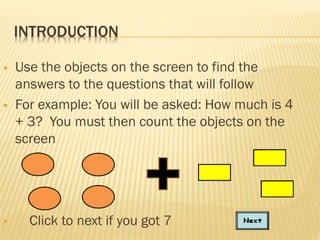
Use the objects on the screen to find the
answers to the questions that will follow
For example: You will be asked: How much is 4
+ 3? You must then count the objects on the
screen

Click to next if you got 7
HOW THIS USE THIS TUTORIAL







Read each screen carefully.
Use your left click button on the mouse to
click on the links at the bottom of you
screen.
Click on menu links (in any order) but
remember to try them all!
Answer questions by clicking on the answer
of your choice.
CLICK ON ONE OF THE FOLLOWING MENU ITEMS








Simple edition
Counting
Revision
Exit the tutorial
Engineering
Help
SIMPLE ADDITION


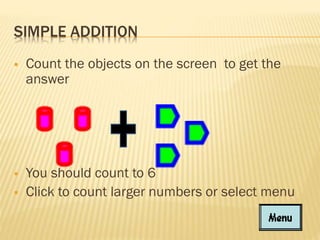
Count the objects on the screen to get the
answer



You should count to 6
Click to count larger numbers or select menu


COUNTING LARGER


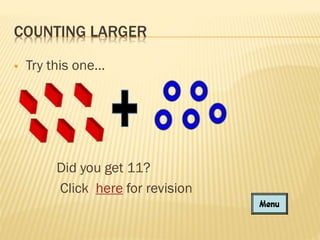
Try this one…

Did you get 11?
Click here for revision
REVISION QUESTION


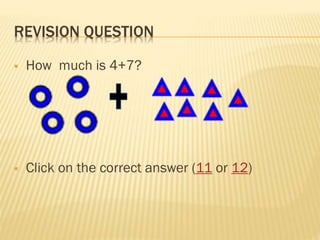
How much is 4+7?



Click on the correct answer (11 or 12)
CORRECT ANSWER



Yes, 11 is the correct answer
Click on the menu button to return to the
tutorial
INCORRECT ANSWER



No, 12 is too much.
Click on the button below to try again
ENGINEERING


Draw a house with:
two windows, different shapes
o
a brown 3D door (fill),
o
black roof (fill)
Use arrows to identify parts of the house and label
those parts
o
THANK YOU FOR USING THIS TUTORIAL
Click to exit the program

Basic mathematics activity for grade;4

  • 1.
    BASIC MATHEMATICS Grade 4learners Click on the button to go on
  • 2.
    OUTCOMES     On completion ofthis lesson you will be able to: Demonstrate that you have mastered simple addition Apply simple addition in a variety of learning areas Use basic addition in every day life situations
  • 3.
    INTRODUCTION    Use the objectson the screen to find the answers to the questions that will follow For example: You will be asked: How much is 4 + 3? You must then count the objects on the screen Click to next if you got 7
  • 4.
    HOW THIS USETHIS TUTORIAL     Read each screen carefully. Use your left click button on the mouse to click on the links at the bottom of you screen. Click on menu links (in any order) but remember to try them all! Answer questions by clicking on the answer of your choice.
  • 5.
    CLICK ON ONEOF THE FOLLOWING MENU ITEMS       Simple edition Counting Revision Exit the tutorial Engineering Help
  • 6.
    SIMPLE ADDITION  Count theobjects on the screen to get the answer  You should count to 6 Click to count larger numbers or select menu 
  • 7.
    COUNTING LARGER  Try thisone… Did you get 11? Click here for revision
  • 8.
    REVISION QUESTION  How muchis 4+7?  Click on the correct answer (11 or 12)
  • 9.
    CORRECT ANSWER   Yes, 11is the correct answer Click on the menu button to return to the tutorial
  • 10.
    INCORRECT ANSWER   No, 12is too much. Click on the button below to try again
  • 11.
    ENGINEERING  Draw a housewith: two windows, different shapes o a brown 3D door (fill), o black roof (fill) Use arrows to identify parts of the house and label those parts o
  • 12.
    THANK YOU FORUSING THIS TUTORIAL Click to exit the program