1
Basic Introduction on
Computer Science
2
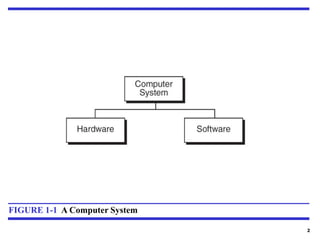
FIGURE 1-1 A Computer System
3
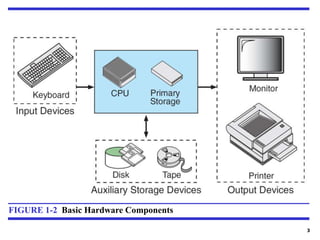
FIGURE 1-2 Basic Hardware Components
4
Operating System
An operating system (OS) is system software that manages
computer hardware, software resources, and provides common
services for computer programs.
Windows
Linux
Android
iOS
Mac…and the list goes on
Few Example OS:
5
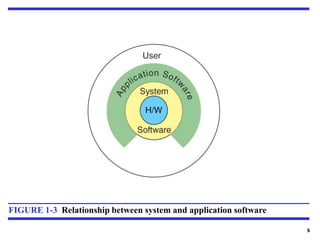
FIGURE 1-3 Relationship between system and application software
6
Computer Languages
To write a program for a computer, we must use a computer
language. Over the years computer languages have evolved
from machine language to natural languages.
Machine Languages
Symbolic Languages
High-Level Languages
Topics discussed in this section:
7
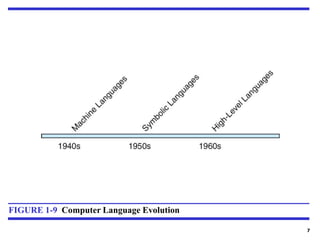
FIGURE 1-9 Computer Language Evolution
# 8
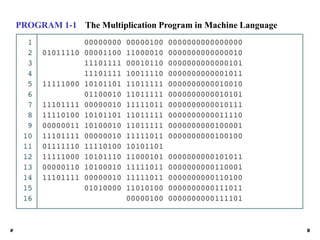
PROGRAM 1-1 The Multiplication Program in Machine Language
9
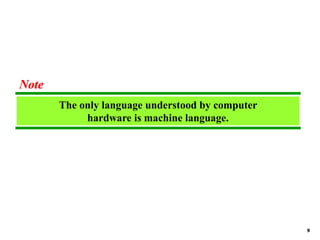
The only language understood by computer
hardware is machine language.
Note
10
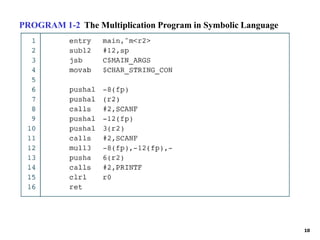
PROGRAM 1-2 The Multiplication Program in Symbolic Language
11
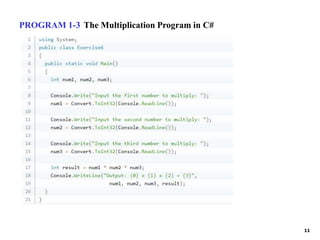
PROGRAM 1-3 The Multiplication Program in C#
12
Compiler
A compiler is primarily used for programs that
translate source code from a high-level programming
language to a lower level language (e.g. assembly
language, object code, or machine code) to create
an executable program
13
Interpreter
An interpreter is a computer program that directly executes
instructions written in a programming or scripting language,
without requiring them previously to have been compiled into
a machine language program
14
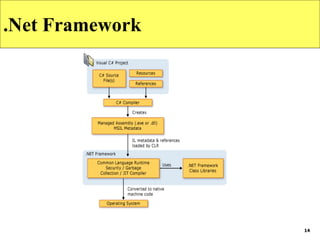
.Net Framework
15
IDE
An integrated development environment (IDE) is a software
application that provides comprehensive facilities
to computer programmers for software development. An IDE
normally consists of at least a source code editor, build
automation tools and a debugger.
• Editing Source Code
• Syntax Highlighting
• Building Executables
• Debugging
• Local build automation
16
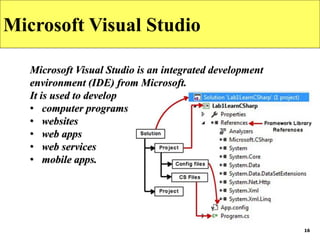
Microsoft Visual Studio
Microsoft Visual Studio is an integrated development
environment (IDE) from Microsoft.
It is used to develop
• computer programs
• websites
• web apps
• web services
• mobile apps.
17
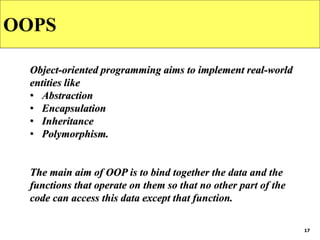
OOPS
Object-oriented programming aims to implement real-world
entities like
• Abstraction
• Encapsulation
• Inheritance
• Polymorphism.
The main aim of OOP is to bind together the data and the
functions that operate on them so that no other part of the
code can access this data except that function.
18
C# Introduction
Features Of C#
C-sharp is an object-oriented programming language that offers tons
of features to programmers.
Some of which are:
•Simple and easy to understand syntax.
•It offers Interoperability, scalability and is updatable.
•It is based on components.
•It has a rich library and is a structured language.
•It is type-safe i.e. it only allows code to access the memory
location for which it has authorized access.
19
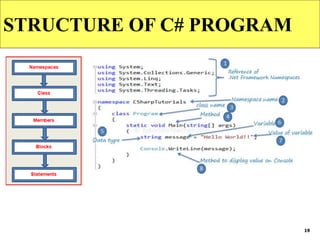
STRUCTURE OF C# PROGRAM
20
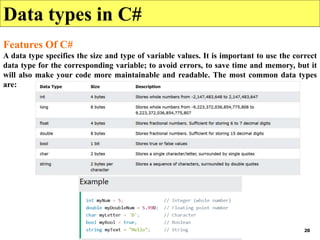
Data types in C#
Features Of C#
A data type specifies the size and type of variable values. It is important to use the correct
data type for the corresponding variable; to avoid errors, to save time and memory, but it
will also make your code more maintainable and readable. The most common data types
are:

Basic Computer Science Introduction.pptx

  • 1.
  • 2.
    2 FIGURE 1-1 AComputer System
  • 3.
    3 FIGURE 1-2 BasicHardware Components
  • 4.
    4 Operating System An operatingsystem (OS) is system software that manages computer hardware, software resources, and provides common services for computer programs. Windows Linux Android iOS Mac…and the list goes on Few Example OS:
  • 5.
    5 FIGURE 1-3 Relationshipbetween system and application software
  • 6.
    6 Computer Languages To writea program for a computer, we must use a computer language. Over the years computer languages have evolved from machine language to natural languages. Machine Languages Symbolic Languages High-Level Languages Topics discussed in this section:
  • 7.
    7 FIGURE 1-9 ComputerLanguage Evolution
  • 8.
    # 8 PROGRAM 1-1The Multiplication Program in Machine Language
  • 9.
    9 The only languageunderstood by computer hardware is machine language. Note
  • 10.
    10 PROGRAM 1-2 TheMultiplication Program in Symbolic Language
  • 11.
    11 PROGRAM 1-3 TheMultiplication Program in C#
  • 12.
    12 Compiler A compiler isprimarily used for programs that translate source code from a high-level programming language to a lower level language (e.g. assembly language, object code, or machine code) to create an executable program
  • 13.
    13 Interpreter An interpreter isa computer program that directly executes instructions written in a programming or scripting language, without requiring them previously to have been compiled into a machine language program
  • 14.
  • 15.
    15 IDE An integrated developmentenvironment (IDE) is a software application that provides comprehensive facilities to computer programmers for software development. An IDE normally consists of at least a source code editor, build automation tools and a debugger. • Editing Source Code • Syntax Highlighting • Building Executables • Debugging • Local build automation
  • 16.
    16 Microsoft Visual Studio MicrosoftVisual Studio is an integrated development environment (IDE) from Microsoft. It is used to develop • computer programs • websites • web apps • web services • mobile apps.
  • 17.
    17 OOPS Object-oriented programming aimsto implement real-world entities like • Abstraction • Encapsulation • Inheritance • Polymorphism. The main aim of OOP is to bind together the data and the functions that operate on them so that no other part of the code can access this data except that function.
  • 18.
    18 C# Introduction Features OfC# C-sharp is an object-oriented programming language that offers tons of features to programmers. Some of which are: •Simple and easy to understand syntax. •It offers Interoperability, scalability and is updatable. •It is based on components. •It has a rich library and is a structured language. •It is type-safe i.e. it only allows code to access the memory location for which it has authorized access.
  • 19.
  • 20.
    20 Data types inC# Features Of C# A data type specifies the size and type of variable values. It is important to use the correct data type for the corresponding variable; to avoid errors, to save time and memory, but it will also make your code more maintainable and readable. The most common data types are: