Author ANDREA ENSABELLA
FRANCESCO GIUSEPPE SPAMPINATO
Project SoundBeatsTime
soundbeatstime@gmail.com
soundbeatstime.com
Partners Yellow Shirts – Romania
Institutul Român de Educație a Adulților – Romania
Giovani senza Frontiere – Italy
Disclaimer This project has been funded with support from the European Commission.
This publication reflects the views only of the author, and the Commission
cannot be held responsible for any use which may be made of the
information contained therein.
This manual has been elaborated during the project “SoundBeatsTime”
(with the ref. no. 2020–1–RO01–KA227–YOU–095777), funded by the
European Union through the Romanian National Agency, in the context of
the Erasmus+ KA2 – Cooperation for innovation and the exchange of good
practices action, Partnership for Creativity sub–action.
CONTENTS
MUSIC THEORY .............................................................................................. 5
Introduction ................................................................................................................................................ 5
Basic elements of music theory ............................................................................................................ 6
THE SOUND .................................................................................................. 25
Description ............................................................................................................................................... 25
Harmonics and complex waveforms ............................................................................................... 29
Hints of psychoacoustics ..................................................................................................................... 33
Decibels and representation .............................................................................................................. 35
REQUIRED EQUIPMENT................................................................................ 38
Personal computers and features ..................................................................................................... 39
Laptop vs. Desktop ................................................................................................................................ 39
Audio interface ........................................................................................................................................ 42
Audio monitor.......................................................................................................................................... 45
Monitor headphones ............................................................................................................................ 47
Microphones ............................................................................................................................................ 49
DAW and MIDI controllers.................................................................................................................... 50
Audio cables, types and connections............................................................................................... 51
Accessories ............................................................................................................................................... 54
THE SOFTWARE ........................................................................................... 56
Introduction .............................................................................................................................................. 56
Digital audio.............................................................................................................................................. 56
What is a DAW? ........................................................................................................................................ 60
How a DAW works................................................................................................................................... 61
The recording software......................................................................................................................... 62
Tracks and channels, types and management ............................................................................. 69
MIDI ............................................................................................................................................................. 73
VST instruments....................................................................................................................................... 76
Effects plug-ins......................................................................................................................................... 77
RECORDING .................................................................................................. 92
Recording .................................................................................................................................................. 92
Multitrack recording .............................................................................................................................. 93
Recording acoustic sources and basic microphone techniques .............................................98
Editing of recorded tracks ................................................................................................................. 102
Mixing ....................................................................................................................................................... 105
Notes on Mastering ............................................................................................................................. 110
COPYRIGHT ............................................................................................ 112
Introduction ........................................................................................................................................... 112
How copyright is obtained ................................................................................................................ 113
The SAP .................................................................................................................................................... 114
Knowing the law ................................................................................................................................... 115
Moral law ................................................................................................................................................. 116
How long does copyright last? ........................................................................................................ 117
Public Domain ....................................................................................................................................... 118
Conclusions ............................................................................................................................................ 119
BIBLIOGRAPHY ..................................................................................... 120
5
MUSIC THEORY
Introduction
After learning the scientific aspects of what the sound is, how to use the software and
purchasing the equipment that will allow you to record your voice or instrument, it is
important not to overlook one small detail – the music!
The recording process has always been a very important part of music history through
which, often, significant songs and famous anecdotes were born. To give some examples:
Bohemian Rhapsody by Queen; The Dark Side of the Moon by Pink Floyd; the birth of
Scat singing thanks to Louis Armstrong.
The recording studio, therefore, is seen as a sacred space by every musician, a dream that
perhaps is a little scary, but a great source of motivation, because as you know, this is how
many of the records we cherish were made. Even the greats of the past, were not ready
during their early studio days so don't give up!
Unlike back then, now it is much easier and more convenient to recreate a small home
recording studio. Obviously it is not the same as a professional studio room however, if
you go in with clear ideas before you record, by bringing a demo/rehearsal made in your
little sacred musical corner, you will simplify and speed up the time and work for the
sound engineer.
Therefore it is important to follow some guidelines before recording your own songs or
covers in a home studio.
First tip: Planning
Planning may be the most tedious part but it helps to focus and get the job done right.
Before you start recording make sure the strings or skins of the instrument are well tuned
or make sure to change them if they are too old. Also, check if the cables are working
properly.
Another tip: decide on the bpm (beats per minute) of the song in question before you
start recording and integrate the click track (metronomic track), thanks to which you will
get a solid rhythmic base during and after the recording is finished in the mixing phase (a
topic covered in the next chapter). Well, now create some guide tracks (basic version of
the song, e.g. vocals and guitar) so you can speed up the process of creating or recording
the various instruments.
Second piece of advice: Play, Study, Prepare, Create!
That fateful time has come for the artist – playing with music! For some it simply
represents entertainment, for others a spiritual and profound moment that has the power
6
to communicate and arouse emotions. We often come across musicians who, in the
moment, create major harmonically complex compositions thinking that it is just the
result of their natural gift. In reality, it is not just talent, but rather the many years of
studying the instrument and harmonic language.
Although people think that anything goes “allowed” in music, in reality one must follow
certain rules to have clarity about the right way to use notes. Obviously, to get to a good
level, even the greats started with the basics of music theory however for those who
haven't started yet and want to do so now? Where should they start?
Well the next few paragraphs will discuss the basic elements of music for those who want
to delve into the world of harmony. It would take a two–hundred–page book to fully
explain music harmony in specific detail but we will attempt to give you a clear and
transparent outline in a few pages so that you can then experiment and move on.
Basic elements of music theory
While in the English language we use words made up of the letters of the alphabet, in
music we use an alphabet made up of seven musical notes:
C – D – E – F – G – A – B / Do – Re – Mi – Fa – Sol – La – Si
These can be read on the staff, a set of five lines and four spaces on which musical notes
are written. The image below is an example of the classical C major scale / Do major
scale. The major scale is a familiar structure, typical in Western music, and since most of
the songs on the market are based on it, it will surely be of help and a good reference
point for all the chords, scales and various musical structures that you can study and
create music on. The major scale is composed of seven different and consecutive sounds
that will end with the starting note but an octave above, and you can move up or down.
When we deal with scales composed of seven notes, we are talking about tonal music, the
succession of notes related to the tonic (the first note of the scale), giving us a sense of
stability and most importantly it will establish the key.
7
When we talk about notes and scales, however, it is important to learn a fundamental
aspect: the interval. The interval is the distance between two different sounds that can be
spaced in tones (T) and semitones (St).
Let's take an example in the C major / Do major scale:
C – D / Do – Re = Tone Interval
C – C# / Do – Re# = Semitone Interval
You can understand this better by looking at an octave on the piano keyboard:
As you will see, between the white keys (the natural notes), you will see black keys
(accidentals) that rise (# = sharp) or lower (b = flat) the natural notes. Let's see some
examples: if we played the white key for the note C / Do and went up one black key, we
would get C# / Do#, thus creating our semitone in an ascending direction, or if we started
from D / Re and went down one black key, we would get Db / Reb, thus creating a distance
of one semitone in a descending direction.
In the case of C# / Do# and Db /Reb, you may wonder, why do they have different names if
they are placed on the same key? In music theory, these two notes are called enharmonic,
meaning they have the same sound, but can be written in two different ways. Other
examples are:
D# = Eb / Re# = Mib G# = Ab / Sol# = Lab
F# = Gb / Fa# = Solb A# = Bb / La# = Sib
8
Be careful: between E / Mi and F / La and between B / Si and C / Do there are no black keys,
so the distance between them is one semitone. If we continued to play by semitone
intervals we would recreate a chromatic scale, consisting of 12 semitones (seven natural
notes and five accidentals). Here you will find an example of an ascending and descending
chromatic C / Do scale:
Having understood what a semitone is, we can ultimately say that:
A semitone is the closest distance between two sounds.
A tone is nothing more than the sum of two semitones.
If we wanted to give some examples of one–tone distances, they would be:
C – D; D – E; F – G; G – A; A – B
Do – Re; Re – Mi; Fa – Sol; Sol – La; La – Si
Returning to our major scale, now it is important to know how it is structured by following
the sequence of tones and semitones according to the order:
Tone (T) – Tone (T) – Semitone (St) – Tone (T) – Tone (T) – Tone (T) – Semitone (St)
In the case of C / Do, we have not encountered any accidentals, only natural notes, but
depending on the starting note (following the pattern above) the others will be altered.
For example starting from the note D / Re we would get:
9
Re Mi Fa# Sol La Si Do# Re
D E F# G A B C# D
T T St T T T St
Thus, it will be possible to construct major scales of different pitches, following the
arrangement of the tones and semitones of the major scale.
Remember: the major scale will have to contain seven different notes, so it will never be:
D – E – Gb – G – A – B – Db – D
Re – Mi – Solb – Sol – La – Si – Reb – Re
Exercise: write and play the major scales for all keys following the order of the intervals.
Watch out for the accidentals!
G Major / Sol Major will have →(#) F / (#) Fa
D Major / Re Major will have →(# #) F, C/ (# #) Fa, Do
A Major / La Major will have →(# # #) F, C, G / (# # #) Fa, Do, Sol
E Major / Mi Major will have →(# # #) F, C, G, D / (# # # #) Fa, Do, Sol, Re
B Major / Si Major will have →(# # # #) F, C G, D, A / (# # # # #) Fa, Do Sol,
F# Major / Fa# Major will have →(# # # # #) F, C, G, D , A, E / Re, La / (# # # # # #) Fa,
Do, Sol, Re , La, Mi
C# Major / Do# Major will have →(# # # # #) F, C, G, D, A, E, B / (# # # # # # #) Fa,
Do, Sol, Re, La, Mi, Si
F Major / Fa Major will have →(b) B / (b) Si
Bb Major / Sib Major will have →(b b) B, E / (b b) Si, Mi
Eb Major / Mib Major will have →(b b b) B, E, A / (b b b) Si, Mi, La
Ab Major / Lab Major will have →(b b b b) B, E, A, D / (b b b b) Si, Mi, La, Re
10
Db Major / Reb Major will have →(b b b b) B, E, A, D, G / (b b b b b) Si, Mi, La, Re,
Sol
Gb Major / Solb Major will have →(b b b b b) B, E, A, D, G, C / (b b b b b b) Si, Mi,
La, Re, Sol, Do
Cb Major / Dob Major will have →(b b b b b b) B, E, A, D, G, C, F / (b b b b b b b) Si,
Mi, La, Re, Sol, Do, Fa
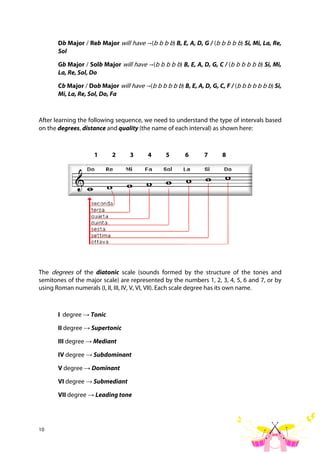
After learning the following sequence, we need to understand the type of intervals based
on the degrees, distance and quality (the name of each interval) as shown here:
1 2 3 4 5 6 7 8
The degrees of the diatonic scale (sounds formed by the structure of the tones and
semitones of the major scale) are represented by the numbers 1, 2, 3, 4, 5, 6 and 7, or by
using Roman numerals (I, II, III, IV, V, VI, VII). Each scale degree has its own name.
I degree → Tonic
II degree → Supertonic
III degree → Mediant
IV degree → Subdominant
V degree → Dominant
VI degree → Submediant
VII degree → Leading tone
11
Distance means the interval of 2nd, 3rd, 4th, 5th, etc. (C–D / Do–Re is a 2nd; C–G / Do–Sol
is a 5th). The quality determines whether it will be major, minor, perfect, augmented,
diminished, doubly augmented or doubly diminished. Here is an example following the C
/ Do major scale:
C – C / Do – Do = Unison (no interval)
C – D / Do – Re = Major Second (1 Tone)
C – E / Do – Mi = Major Third (2 Tones)
C – F / Do – Fa = Perfect Fourth (2 Tones + 1 Semitone)
C – G / Do – Sol = Perfect Fifth (3 Tones + 1 Semitone)
C – A / Do – La = Major Sixth (4 Tones + 1 Semitone)
C – B / Do – Si = Major Seventh (5 Tones + 1 Semitone)
C – C / Do – Do = Perfect Octave (6 Tones)
The major intervals in the major scale are the:
• Second (C–D / Do–Re);
• Third (C–E / Do–La);
• Sixth (C–A / Do–La);
• Seventh (C–B / Do–Si).
They may become:
• Minor if lowered by a semitone (e.g. C – Bb / Do–Sib);
• Diminished if lowered by a whole tone (e.g. C – Sibb / Do–Sibb);
• Augmented if raised by a semitone (e.g. C – A# / Do–La#);
• Doubly augmented if raised by a tone (C – A## / Do–La##).
The perfect intervals in the major scale are:
• Unison (C1–C1 / Do1–Do1);
• Fourth (C–F / Do–Fa);
• Fifth (C–G / Do–Sol);
• Octave (C1–C8 / Do1–Do8).
12
They may become:
• Diminished if lowered by a semitone (C – Solb / Do–Solb);
• More than diminished if lowered by a tone (C–Gbb / Do–Solbb);
• Augmented if raised by a semitone (C – F# / Do–Fa#);
• Doubly augmented if raised by a tone (C–F## / Do–Fa##).
As you may have noticed:
• If we raise a major or augmented interval by a half step (semitone), we add #;
• If a major interval becomes minor or a perfect interval becomes diminished we
lower it by a half step b;
• If a major interval becomes diminished or a perfect interval becomes doubly
diminished we lower it by one tone bb (double flat);
• If a major or perfect interval goes up one tone it becomes doubly augmented and
we add ##.
Major (2nd
, 3rd
, 6th
, 7th
)
(b) Minor (#) Augmented
(bb) Diminished (##) Doubly Augmented
Perfect (1st
, 4th
, 5th
, 8th
)
(b) Diminished (#) Augmented
(bb) Doubly Diminished (##) Doubly Augmented
13
In addition to the classic major scale we have another important scale: the major
pentatonic scale. This is a scale consisting of five notes that follow the structure 1, 2 , 3, 5,
6, useful for those who will want to improvise melodically on major chords (for many
musical genres). In music, however, there are more than just major scales.
Let's start with relative scales. In every major scale there is its relative minor, and vice
versa, every minor scale will have its relative major, moreover, they are composed of the
same sounds but starting from different notes, but how do we derive them?
• If we have a major scale and need to derive its relative minor, we will get it from the
sixth degree.
Example: in the C /Do major scale its sixth is A / La, so its relative minor will be A / La
minor.
1 2 3 4 5 6 7
The sequence of the tones and semitones of the relative minor is: T, St, T, St, T, T.
14
Let's take an example on the A / La minor scale.
A – A / La – La = Unison
A – B / La – Si = Major Second (1 Tone)
A – C / La – Do = Minor Third (1 Tone + 1 Semitone)
A – D / La – Re = Perfect Fourth (2 Tones + 1 Semitone)
A – E / La – Mi = Perfect Fifth (3 Tones + 1 Semitone)
A – F / La – Fa = Minor Sixth (4 Tones)
A – G / La – Sol = Minor Seventh (5 Tones)
A – A / La – La = Perfect Octave (6 Tones)
Finally, should we have a minor scale and need to derive its relative major, we obtain it
from the third degree. Example: In the E / Mi minor scale, its relative major will be G / Sol.
E – F# – G – A – B – C – D
Mi – Fa# – Sol – La – Si – Do – Re
The minor scale shown is the classic natural minor scale and we will recognize it by the
sequence of degrees: 1, 2, b3, 4, 5, b6, b7. The third, sixth and seventh will remain minor
in both the ascending and descending directions.
Then we have other types of minor scales, among the most important ones:
• The melodic minor scale will follow the sequence of degrees: 1, 2, b3, 4, 5, 6, 7 in
the ascending direction, while in the descending direction it will be: 1, 2, b3, 4, 5,
b6, b7;
• The harmonic minor scale will follow the sequence of degrees: 1, 2, b3, 4, 5, b6, 7
in both ascending and descending directions;
• The minor pentatonic scale which will consist of: 1, b3, 4, 5, b7 in both ascending
and descending directions;
• The Blues scale formed by: 1, b3, 4, #4, 5, b7 in both ascending and descending
directions.
15
Exercises:
• Begin playing minor scales in all keys.
• Transpose the melody of a song to another key.
• Play skipping intervals in both ascending and descending directions.
Having learned the importance of scales and horizontal reading (notes written
consecutively), now it is time to find out what is meant by vertical reading or writing.
Vertical reading is, precisely, the reading of a combination of three or more notes written
for intervals of thirds in an overlapping manner.
Here are some examples of vertical and horizontal writing:
Such a combination is called a chord. Let's start with chords formed by three sounds:
triads. A triad may be major, minor, diminished and augmented and is formed by the
root, third and fifth. An example of C / Do triads:
• Major triad is formed by a major third and a perfect fifth;
Example: 1, 3, 5 = C, E, G / Do, Mi, Sol
• Minor triad is formed by a minor third and a perfect fifth;
Example: 1, b3, 5 = C, Eb, G / Do, Mib, Sol
• Diminished triad is formed by a minor third and a diminished fifth;
Example: 1, b3, b5 = C, Eb, Gb / do, Mib, Solb
16
• Augmented triad is formed by a major third and an augmented fifth.
Example: 1, 3, #5 = C, E, F# / Do, Mi, Fa#
Before moving on, you need to know the international notation, by which chords are
often denoted.
A = LA B = SI C = DO D = RE E = MI F = FA G = SOL
By adding a sixth or seventh interval we would create tetrads or seventh chords.
Let's start with the major tetrad.
• The major sixth tetrad is formed by: 1, 3, 5, 6 →C, E, G, A / Do, Mi, Sol, La (C6);
• The minor sixth tetrad is formed by: 1, b3, 5, 6 →C, Eb, G, A / Do, Mib, Sol, La (C–
6);
• The major seventh tetrad is formed by: 1, 3, 5, 7 → C, E, G, B / Do, Mi, Sol, Si
(CMaj7 or CΔ7);
• The dominant seventh tetrad is formed by: 1, 3, 5, b7 →C, E, G, Bb / Do, Mi, Sol,
Sib (C7);
• The minor seventh tetrad consists of: 1, b3, 5, b7 →C, Eb, G, B / Do, Mib, Sol, Sib
(Cmin7 or C–7);
• The minor seventh flat five tetrad (better known as the half–diminished chord) is
formed by: 1, b3, b5, b7 →C, Eb, Gb, B / Do, Mib, Solb, Sib (C –7b5 or CØ);
• The diminished seventh tetrad is formed by: 1, b3, b5, bb7 →C, Eb, Gb, Bbb / Do,
Mib, Solb, SIbb (C°7);
• The dominant seventh tetrad with a suspended fourth is formed by: 1, 4, 5, b7 →
DO, F, G, Bb / Do, Fa, Sol, SIb (C7sus4);
• The dominant seventh tetrad with an augmented fifth is formed by: 1, 3, #5, b7 →
C, E, G#, Bb / Do, Mi, Sol#, SIb (C+7 or C7#5);
17
Overlapping chords can also be written in a different order without changing the quality
and function of the chord. Such a change in overlap is called inversion. Inversions can be
root position, first inversion, second inversion, and third inversion:
Inversions
Inversions of seventh chords
Examples:
Examples of Triad: Examples of Tetrad:
Root position → 1, 3, 5 Root position → 1, 3, 5, 7
First inversion → 3, 5, 1 First inversion → 3, 5, 7, 1
Second inversion → 5, 1, 3 Second inversion → 5, 7, 1, 3
Third inversion → 7, 1, 3, 5
But why and how are inversions used? If we were to play a progression of different chords
on the piano, using only their root position, it would create harmonic jumps that are not
very linear and homogeneous, whereas, if we used the inversions of each chord, we would
create a smooth progression that is catchy to listen to, trying to make micro–shifts, using
the common notes between one chord and the next one.
18
2nd
Inversion 2nd
Inversion 1st
Inversion 2nd
Inversion
Harmonic progression in C / Do
After understanding scales and chord creation, let's go to the next step – creating chords
on the degrees of the major scale using the notes belonging to it. To give you a better
understanding, here is an example depicted:
Seventh chords built on the C / Do major scale
As you may have noticed, not only does each chord respect the notes of the C major / Do
major scale, thus defining the key, but the chords following CMaj7 / DoMaj7 have different
seventh chords. Let's take an example and analyze the second degree, Dm7 / Rem7.
If it were a major chord it would be: D–F#–A–C# / Re–Fa#–La–Do#, but since the C / Do
major scale has no accidentals it will be: D–F–A–C / Re–Fa–La–Do.
The second degree, then, will be a minor seventh tetrad, which will determine the
relationship to the tonal centre, in this case of CMaj7, and the mode in relation to the
tonic.
Example of tonality (key) on CMaj7 / DoMaj7 and Dm7 / Rem7 using numbers that
correspond to the degrees of the C / Do major scale:
1 3 5 7 2 4 6 1
C – E – G – B D – F – A – C
Do – Mi – Sol – Si Re – Fa – La – Do
19
Example of tonality (key) on CMaj7 / DoMaj7 and Dm7 / Rem7 using numbers that
correspond to the internal structure of each single chord:
1 3 5 7 1 b3 5 b7
C – E – G – B D – F – A – C
Do – Mi – Sol – Si Re – Fa – La – Do
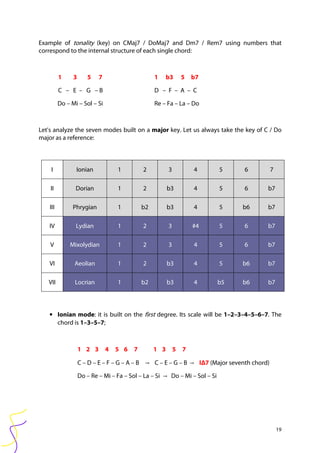
Let's analyze the seven modes built on a major key. Let us always take the key of C / Do
major as a reference:
I Ionian 1 2 3 4 5 6 7
II Dorian 1 2 b3 4 5 6 b7
III Phrygian 1 b2 b3 4 5 b6 b7
IV Lydian 1 2 3 #4 5 6 b7
V Mixolydian 1 2 3 4 5 6 b7
VI Aeolian 1 2 b3 4 5 b6 b7
VII Locrian 1 b2 b3 4 b5 b6 b7
• Ionian mode: it is built on the first degree. Its scale will be 1–2–3–4–5–6–7. The
chord is 1–3–5–7;
1 2 3 4 5 6 7 1 3 5 7
C – D – E – F – G – A – B → C – E – G – B → IΔ7 (Major seventh chord)
Do – Re – Mi – Fa – Sol – La – Si → Do – Mi – Sol – Si
20
• Dorian mode: it is built on the second degree. Its scale will be 1–2–b3–4–5–6–b7.
The chord is 1–b3–5–b7;
1 2 b3 4 5 6 b7 1 b3 5 b7
D – E – F – G – A – B – C → D – F – A – C → II–7 (Minor seventh chord)
Re – Mi – Fa – Sol – La – Si – Do → Re – Fa – La – Do
• Phrygian mode: it is built on the third degree. Its scale will be 1–b2–b3–4–5–b6–
b7. The chord is 1–b3–5–b7;
1 b2 b3 4 5 b6 b7 1 b3 5 b7
E – F – G – A – B – C – D → E – G – B – D → III–7 (minor seventh chord)
Mi – Fa – Sol – La – Si – Do – Re → Mi – Sol – Si – Re
• Lydian mode: it is built on the fourth degree. Its scale will be 1–2–3–#4–5–6–7.
The chord is 1–3–5–7;
1 2 3 #4 5 6 7 1 3 5 7
F – G – A – B – C – D – E → F – A – C – E → IVΔ7 (Major seventh chord)
Fa – Sol – La – Si – Do – Re – Mi → Fa – La – Do – Mi
• Mixolydian mode: it is built on the fifth degree. Its scale will be 1–2–3–4–5–6–b7.
The chord is 1–3–5–b7:
1 2 3 4 5 6 7b 1 3 5 7b
G – A – B – C – D – E – F → G – B – D – F → V7 (dominant seventh
chord)
Sol – La – Si – Do – Re – Mi – Fa → Sol – Si – Re – Fa
21
• Aeolian mode: it is built on the sixth degree. Its scale will be 1–2–b3–4–5–b6–b7.
The chord is 1–b3–5–b7;
1 2 3b 4 5 6b 7b 1 3b 5 7b
A – B – C – D – E – F – G → A – C – E – G → VI–7 (minor seventh chord)
La – Si – Do – Re – Mi – Fa – Sol → La – Do – Mi – Sol
• Locrian mode: it is built on the seventh degree. Its scale will be 1–b2–b3–4–b5–
b6–b7. The chord is 1–b3–b5–b7;
1 2b 3b 4 5b 6b 7b 1 3b 5b 7b
B – C – D – E – F – G – A → B – D – F – A → VII–7b5 (Half–diminished
seventh chord).
Si – Do – Re – Mi – Fa – Sol – La → Si – Re – Fa – La
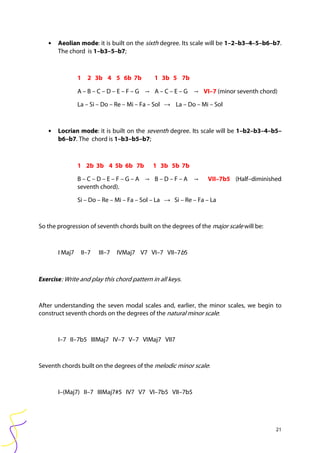
So the progression of seventh chords built on the degrees of the major scale will be:
I Maj7 II–7 III–7 IVMaj7 V7 VI–7 VII–7b5
Exercise: Write and play this chord pattern in all keys.
After understanding the seven modal scales and, earlier, the minor scales, we begin to
construct seventh chords on the degrees of the natural minor scale:
I–7 II–7b5 IIIMaj7 IV–7 V–7 VIMaj7 VII7
Seventh chords built on the degrees of the melodic minor scale:
I–(Maj7) II–7 IIIMaj7#5 IV7 V7 VI–7b5 VII–7b5
22
Seventh chords built on the degrees of the harmonic minor scale:
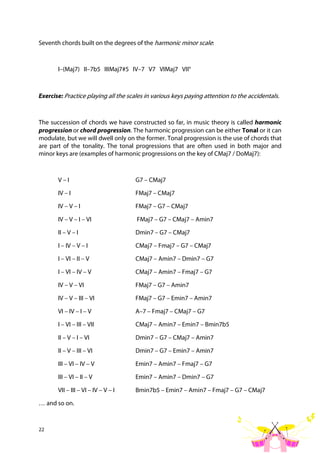
I–(Maj7) II–7b5 IIIMaj7#5 IV–7 V7 VIMaj7 VII°
Exercise: Practice playing all the scales in various keys paying attention to the accidentals.
The succession of chords we have constructed so far, in music theory is called harmonic
progression or chord progression. The harmonic progression can be either Tonal or it can
modulate, but we will dwell only on the former. Tonal progression is the use of chords that
are part of the tonality. The tonal progressions that are often used in both major and
minor keys are (examples of harmonic progressions on the key of CMaj7 / DoMaj7):
V – I G7 – CMaj7
IV – I FMaj7 – CMaj7
IV – V – I FMaj7 – G7 – CMaj7
IV – V – I – VI FMaj7 – G7 – CMaj7 – Amin7
II – V – I Dmin7 – G7 – CMaj7
I – IV – V – I CMaj7 – Fmaj7 – G7 – CMaj7
I – VI – II – V CMaj7 – Amin7 – Dmin7 – G7
I – VI – IV – V CMaj7 – Amin7 – Fmaj7 – G7
IV – V – VI FMaj7 – G7 – Amin7
IV – V – III – VI FMaj7 – G7 – Emin7 – Amin7
VI – IV – I – V A–7 – Fmaj7 – CMaj7 – G7
I – VI – III – VII CMaj7 – Amin7 – Emin7 – Bmin7b5
II – V – I – VI Dmin7 – G7 – CMaj7 – Amin7
II – V – III – VI Dmin7 – G7 – Emin7 – Amin7
III – VI – IV – V Emin7 – Amin7 – Fmaj7 – G7
III – VI – II – V Emin7 – Amin7 – Dmin7 – G7
VII – III – VI – IV – V – I Bmin7b5 – Emin7 – Amin7 – Fmaj7 – G7 – CMaj7
… and so on.
23
Exercise: play by following these examples of harmonic progressions in all keys, both
major and minor.
Well, now you have a basic smattering of what scales, chords and harmonic progressions
are. However let us not forget that in music it is not only important to get the melody and
harmony right but to give rhythmic meaning to what you want to express! It is important,
therefore, in addition to the study of harmony, to learn how to write music on the staff.
Throughout the chapter, we came across various examples of notes written on the staff in
an effort to know to which line or space each note belonged.
Now it is time to discover the value and duration of each musical symbol.
24
Exercise: To improve your music writing skills, practice writing the previous exercises on
the staff!
If you want to take it up a notch and play rhythmically, you will find several examples of
rhythm patterns on the Internet that you can use by playing and singing along with them
or perhaps reuse them for song writing.
There are various digital writing softwares for PC that you can buy on the Internet. The
most popular are:
• Finale;
• Sibelius;
• Musescore;
• Doric.
We have come to the end of the chapter, now it is your time! We wish you the best in
creating and experimenting with your music.
25
THE SOUND
Description
Sound, from a physical point of view, can be defined as a change in pressure of an elastic
body that tends to compress and expand cyclically through a transport medium that is
also elastic. It is precisely the cyclic, the uniform repetition over a given period of time that
makes our auditory system perceive a sound.
The transport medium, environmental conditions and the density of the medium itself
naturally affect the propagation speed. In general, the stiffer the medium, the faster the
sound will spread. Here is a list of some of the most common materials:
Air 343 m/s (meters per second)
Water 1484 m/s
Wood 3300 m/s
Steel 5900 m/s
A vibrating guitar string (source) will create with its oscillation a compression and
consequent rarefaction of the air surrounding it (transport medium). This vibration will
reach the listener in the form of sound.
Later we will see that sound has physical and psychoacoustic characteristics that vary due
to multiple factors.
Transmission of sound in the space
26
Characteristics and properties
It will be important to assimilate these concepts as they will serve to better understand the
operation of the equipment and software we will be using. The descriptions below will be
based on a simple waveform: the sine wave; all other so-called “complex” waveforms will
be derived from it.
Sound is characterized by several physical factors and has various properties. Here is a list
and brief description of those we will find frequently mentioned in this pathway:
• Frequency;
• Period;
• Breadth;
• Phase.
Frequency
As we have said, sound is a cyclic variation, a vibration, so it has a unit of measurement
called Hertz (from the German physicist Heinrich Hertz). Frequency defines the number of
complete cyclic variations – in our case a sine wave – that occur in one second. Thus, in the
case of our sine wave, we can say that if it will have a frequency of 10 Hz (Hz short for
Hertz) this will complete 10 full cycles in one second, 100 Hz: 100 cycles per second, etc.
The human ear, under conditions of total integrity, has a limited sensitivity to frequencies
ranging from 20 Hz to 20000 Hz with a peak occurring in the range between 500 Hz and
4000 Hz, where below and above them it becomes increasingly attenuated. Therefore,
with the same intensity, we will tend to hear one sound within the interval louder and the
others weaker.
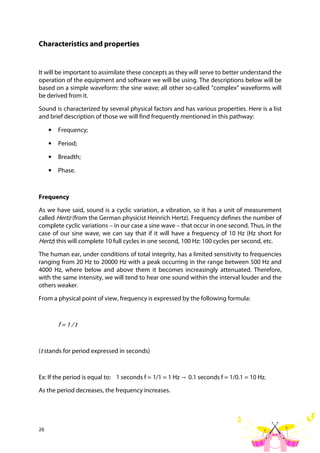
From a physical point of view, frequency is expressed by the following formula:
f = 1 / t
(t stands for period expressed in seconds)
Ex: If the period is equal to: 1 seconds f = 1/1 = 1 Hz → 0.1 seconds f = 1/0.1 = 10 Hz.
As the period decreases, the frequency increases.
27
Period
The period can be described as the time it takes the sine wave to complete one cycle and
is, as mentioned, expressed in seconds.
From a physical point of view, it is represented by the following formula:
t = 1 / f
Ex: If the sine wave has a frequency equal to:
1 Hz then t = 1 / 1 = 1 seconds → 10 Hz then t = 1/10 = 0.1 seconds.
So, if a sine wave cycle takes 1/10th of a second (0.1), in one second it will complete 10
cycles, precisely 10 Hz (10 cycles per second). It can be seen from these two formulas that
frequency f and period t are inversely proportional, that is, as one increase, the other
decreases.
Amplitude
In a sinusoid, represented in a Cartesian axis system, the amplitude can be described as
the distance between the maximum point and the point in between the compression and
expansion of the waveform.
Frequency and period
28
To simplify, it is the distance between the maximum point of the sine wave and the point
that intersects the X axis (time), the 0.
Phase
This property is important to understand the interaction between different sine waves
that are layered to form complex waves and, consequently, also in the future to avoid
phase alignment issues that might occur during the making of a recording or during
mixing.
Amplitude
We might define phase as the representation in degrees of our sine wave. It will tell us the
position within a cycle of the wave we are in. By defining the starting point at 0°, at 90°
there will be the positive maximum point, at 180° negative half-wave start, 270° negative
maximum point and 360° end of the cycle. The sum of two identical but out-of-phase sine
waves will be zero because they will cancel each other out.
29
Phase and counterphase
Of course, this happens even to the most complex waveforms.
Harmonics and complex waveforms
Harmonics
Harmonic frequencies are those whose value is given by an integer multiple of the
frequency of the fundamental reference wave.
If in our case, for example, the sine wave has a frequency of 1000 Hz, its harmonics will be
even f x 2, f x 4, f x 6 and odd f x 3, f x 5, f x 7, etc., so we will have:
1000 Hz = fundamental
2000 Hz = 1000 x 2 second harmonic (even)
3000 Hz = 1000 x 3 third harmonic (odd) and so on
This will serve to better understand how complex waveforms are formed.
30
Complex waveforms
These consist of the sum of a fundamental sine wave with its harmonics of multiple
frequencies. The frequency of the fundamental sine wave will be what defines the pitch of
the sound itself, so if it has a value of 500 Hz, the sound will have the same pitch.
Fundamental frequency and harmonics
The harmonics generated, on the other hand, can be different depending on the
waveform generated and, in any case, decrease in amplitude as the frequency of the
harmonic increases.
Among the different complex waveforms we have:
• Square wave
Formed by a fundamental sine wave and odd harmonic sine waves of which the
amplitude decreases according to the number of the harmonic itself.
For example, a square wave at 1000 Hz will have:
3rd
harmonic 3000 Hz amplitude 1/3 of the fundamental
5th
harmonic 5000 Hz amplitude 1/5
7th
harmonic 7000 Hz amplitude 1/7
9th
harmonic 9000 Hz amplitude 1/9
31
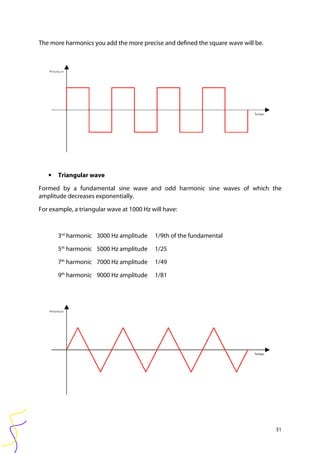
The more harmonics you add the more precise and defined the square wave will be.
• Triangular wave
Formed by a fundamental sine wave and odd harmonic sine waves of which the
amplitude decreases exponentially.
For example, a triangular wave at 1000 Hz will have:
3rd
harmonic 3000 Hz amplitude 1/9th of the fundamental
5th
harmonic 5000 Hz amplitude 1/25
7th
harmonic 7000 Hz amplitude 1/49
9th
harmonic 9000 Hz amplitude 1/81
32
• Sawtooth wave
Formed by a fundamental sine wave and even and odd harmonic sine waves of which the
amplitude decreases in the following way.
For example, a sawtooth wave at 1000 Hz will have:
2nd
harmonic 2000 Hz amplitude 1/2 of the fundamental
3rd
harmonic 3000 Hz amplitude 1/3
4th
harmonic 4000 Hz amplitude 1/4
5th
harmonic 5000 Hz amplitude 1/5
6th
harmonic 6000 Hz amplitude 1/6
7th
harmonic 7000 Hz amplitude 1/7
Sound spectrum
At this point we can also introduce a new property of sound, and that is the spectrum,
which is the graphical representation of sound as a function of all the frequencies and
relative amplitudes of which it consists.
As shown in the diagram below we will have the frequencies on the abscissa and the
amplitudes on the ordinates.
33
Hints of psychoacoustics
From the title it might sound like a difficult topic to understand but it is actually less
complex than you might think. In fact psychoacoustics is a discipline that deals with the
characteristics of sound when it stimulates our auditory system.
Sound spectrum
So far we have talked about sound from a purely physical point of view (objective
characteristics). Now we will introduce some concepts about how it will be perceived by
our brain (subjective characteristics).
To simplify, we could say that psychoacoustics studies certain properties such as timbre,
volume, pitch interactions with the external environment, etc., and how these factors can
be perceived and interpreted by the brain.
Hence the need to represent these characteristics, particularly volume, which is closely
related to signal amplitude, and to do this, we will use the decibel.
Timbre
The timbre of a sound is what makes us distinguish, for example, one instrument or voice
from another. This is possible because each instrument generates a sound made up of
harmonics, each of different amplitude from the fundamental, as these change the timbre
of the sound changes too.
Of course, the timbre also depends on other factors such as, for example, the type of
instrument, its construction, materials used and even the environment in which it is
located.
34
Perception
The following are some of the effects caused by the brain's perception and subsequent
interpretation of external stimuli. Some of these will be helpful in understanding what
often happens during a music production.
Beat
This effect is caused by the summation of two sounds with very close but not equal
frequencies. This will cause an oscillation due to the fact that the two waves, which are not
perfectly identical, will in some places be in phase by adding together, while in others in
counter-phase by cancelling out.
This is what happens on the guitar, for example: by playing two strings with the same
note, we will hear a wobble if they are not perfectly tuned.
Doppler
This occurs when we will have a moving sound source and a stationary listener or vice
versa. An example that you will have heard so many times is that of a rescue vehicle siren,
the sound of which will have a higher pitch (frequency) as it approaches (sound
compression), and a lower pitch as it moves away.
Binaural fusion
This is the ability the brain has to merge two similar sounds by creating a virtual one. For
example, two tracks recorded by the same musician with the same instrument performing
the same part, if played together, one on the left and the other on the right, will appear to
be merged into one.
Stereophony
The ability of our brain to simultaneously interpret and reconstruct two different sound
information is called stereophony. It enables us to identify and focus different sounds in
the space in which they are located. This characteristic is also very important in the world
of mixing, what we will in fact often do is to position in the most correct way the different
sounds of which the song will be composed.
Masking
Another effect that is particularly important and will come in handy for us to know when
working on the mix is the masking. It occurs when two sounds played at the same time,
occupy the same frequency range; in this case, the one with greater amplitude will tend to
35
cover and, indeed, mask the other. This is why it will always be important to diversify the
sounds and their position in the mix.
Source localization
This is the brain's ability to understand the location of the sound source. This is due to the
type of binaural structure and factors that are a result of the interpretation of the same.
The important factors for interpretation are:
• Phase and time difference: a sound source will arrive differently to our ears. This is
sufficient to generate a phase difference of sound between one ear and the other;
• Amplitude difference: a sound source will arrive with different amplitude
depending on the distance from the ears. If, for example, the source is shifted more
to our left, the amplitude of the signal that will reach the right ear will be lower;
• Difference in timbre: in this case the difference in sound will be caused by
diffraction, so some frequencies (especially higher frequencies) will be perceived
more attenuated by one ear than the other.
The shape of the ear, in particular, acts as a filter and causes precisely a diffraction of
sound, which is why we are, for example, able to tell when a sound arrives anteriorly or
posteriorly with respect to the position of our head. Of course, so many other variables
such as the environment and the reflections within it will have to be evaluated.
Decibels and representation
In this section we will not go into too much detail because it covers a topic that is quite
complex from a physical/mathematical point of view. The purpose is to provide a basic
knowledge to help us understand and interpret the information we will acquire for more
correct use of equipment and software.
The Decibel (dB) in audio, as we have already mentioned, is not a unit of measurement,
but rather a representation of the level of sound, and, in particular, the variation in its
amplitude. Therefore it is not an absolute quantity but relative to a reference value.
Because of this, we will often have to deal with different types of dBs that will not
correspond with each other, risking misunderstanding the references.
To make a very simplified distinction we will say:
• dBspl – refers to the sound pressure produced by a source that stresses our ear;
This value is checked, for example, at live concerts or in cases of noise pollution to quantify
the level and thus allow it to be within the allowed limits.
36
The following are some examples of sound pressure applied to everyday life:
30dB Silent library;
60dB Normal conversation;
85dB City car traffic;
95dB Metropolitan train (dangerous level to hearing if exposed for a long time);
115dB Rock Concert;
125dB Pneumatic hammer (pain threshold);
140dB Jet engine (even brief exposure can cause permanent damage);
• dBu: unlike dBspl, it does not refer to an acoustic pressure level, but to an electrical
voltage (volts). Its reference value is 0.775 V;
• dBvu: as with dBu also refers to an electrical voltage, but the reference will be 1.23
V;
• dBv: with reference to 1 V;
We will have to take into account the values of dBu, dBvu and dBv when we talk about
audio equipment. They are the ones that will help us calibrate the input or output levels of
a preamplifier, interface an external compressor or equalizer with our audio interface, or
adjust the correct input level for recording.
• dBFS: In this case we are in the digital domain, so we will no longer have a voltage
reference.
The dBFS (full scale) will have a maximum value of 0dB, so you will always work with
negative levels.
The levels in this scale should never exceed the maximum point of 0 because, in this case,
we will not have progressive saturation as with analogue equipment, but real clipping that
is unpleasant to listen to.
We can relate the main scales we will use, considering that in a reference table of audio
levels we will have this correspondence:
0dBvu = +4dBu = -18dBfs
The tools we will have to visualize these levels will be meters that will have different scales
depending on where placed. For example, in analogue equipment such as preamplifiers,
37
equalizers or compressors we might find VU Meters where the 0 will indicate the reference
voltage level in dB according to the type: if professional it will be +4db, semi-professional
or Hi-Fi 10db.
Within the digital domain and thus within our audio workstation, levels will be displayed
in dBFS, so it will be important to interpret the values we detect in the right way to also
understand how to make external equipment and software interact.
Below is shown a table with correspondences between the different scales of
representation of signal levels, both in the analogue and digital domains.
38
REQUIRED EQUIPMENT
Having examined “sound” in the previous chapter, we can now finally talk about what
fascinates us most, the instrumentation. The choice of instrumentation brings us directly
into the technical-audio realm where we need to understand in detail what we really need
to create and implement our recording studio.
In this chapter we will discover together all the instrumentation that we need and that
absolutely cannot be lacking in our recording studio in order to start recording our
“passions,” and we will analyze it in detail giving a comprehensive description of their
operation.
The best choice to begin this journey is to think about setting up one's studio in small
steps, making targeted purchases that will allow us to kick-start our dream and our real
needs.
Are you ready to dive in and dream about your personal recording studio or shared with
your crew? Then buckle up and let's get into the swing of things by discovering together
what a recording studio is.
The recording studio
A recording studio is a concentration of technology put to the service of music. Inside it
we find all the equipment necessary to record sounds, manipulate them to our liking and
finally fuse them together. The scheme that is presented in this chapter should be
considered as a possible standard configuration to be kept as a theoretical reference; each
studio then has its own characteristics and its own equipment, the choice of which
depends on personal taste, the budget at our disposal and the result we wish to obtain.
In our ideal recording studio we have included what we can and cannot do without, but
with time we can safely integrate:
• Personal Computer or Desktop;
• External audio interface;
• Audio monitor;
• Monitor headphones;
• Microphones;
• DAW and MIDI controllers;
• Audio cables, types and connections;
• Accessories.
39
Personal computers and features
All music recording today takes place digitally, and when we set out to create our own
recording studio, the first question each of us asks is:
What computer should I buy?
A million-dollar question, but basically we all know the answer: it changes according to
the needs of the individual and does not apply to everyone.
There are many variables to consider:
• The budget we have available;
• The speed of data processing;
• Portability.
The ideal option might be completely different from another. But now let's take a broad
overview of everything you need to know to choose the perfect PC for every need.
Laptop vs. Desktop
Laptop and notebook are two words that describe a portable computer differentiating it
from a desktop unit. These days, as technology becomes more “mobile”, desktop
computers are slowly slipping into the past, but for music recording they are still used in
all professional studios. Here's why:
Laptop Desktop PC
• They are generally faster – the case offers plenty of space, ideal for maximizing PC
performance and meeting the high resource demands of today's DAWs and plug-
ins.
• They have more IN/OUTs – this allows you to have more sophisticated and
numerous connections, so you can keep your ever-evolving setup up to date.
40
• They allow for greater customization – you are then able to add more RAM, extra
hard-disks, additional video cards and more, if needed.
• They solve the “noise” problem – this allows you to keep the tower in a separate
room from your studio monitors and microphones.
In spite of all these advantages, the one thing desktop computers lack is portability. And in
today's world of DJs and mobile studios, the portability of a laptop is critical.
Features
After making a distinction between desktop and laptop systems, we will move on to a
description of what are the main features to consider when choosing a PC to use for music
production, and in particular:
• Processor;
• RAM memory;
• Filing.
Processor
This is the main element to evaluate as it will do all the digital processing of our DAW
(digital audio workstation). It will need to be performing enough to handle recording and,
especially, mixing sessions with many tracks and plug-in instances.
Modern DAWs have been optimized for the use of multicore processors (multiple internal
processors in a single enclosure). When choosing a processor, it will not be the
manufacturer (Intel, AMD or Apple, among the main ones) that will be important, but
rather the number of cores present and the frequency of each of them; therefore it is
better to choose according to these evaluation criteria and, above all, considering that this
will not be easily upgradeable if we will be using a laptop PC.
Of course, we will also have to take into consideration the type of audio work we will be
doing. To make music today you don't necessarily need the latest, top-of-the-line
supercomputer.
RAM memory
This is very important because this is where the processor will store and modify all the
data used during the processes. In this memory will also rest the applications or files we
are using and in our case also the VST (virtual studio technology) instruments that are fond
of it. Therefore, it is better to choose a PC with as much RAM as possible, especially if we
already know in advance that we will have to use many plug-ins and VST instruments.
Compared to processors (often soldered onto the motherboard of laptops) this element is
41
more replaceable, ensuring that we will have future upgrades. Thus, the characteristics we
will need to evaluate will be:
• The quantity: the minimum required today is 16 GB, but recommended is at least
32 GB;
• Speed: different depending on the type of memory and platform used.
Archiving
Another fundamentally important element is archiving. The RAM memory is volatile and
when we turn off the PC everything in it will be erased and so we will need a place to save
everything to be able to recall later. For this we need mechanical hard-disks (HDDs) or
solid-state drives (SSDs). Unlike RAM, these will definitely have slower access times, but
higher storage capacities, so much so that we will be able to store even very large projects.
One of the criteria for choosing is the type of construction: SSD (Solid State Disk) or HDD
(Hard Disk Drive). Regarding the installation of the operating system, programs and the
project processing phase, we recommend the former, as they are much faster in the time it
takes to access, search, and write data.
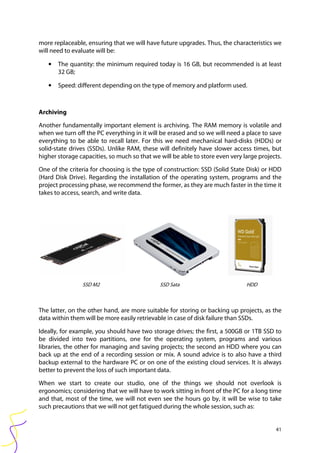
SSD M2 SSD Sata HDD
The latter, on the other hand, are more suitable for storing or backing up projects, as the
data within them will be more easily retrievable in case of disk failure than SSDs.
Ideally, for example, you should have two storage drives; the first, a 500GB or 1TB SSD to
be divided into two partitions, one for the operating system, programs and various
libraries, the other for managing and saving projects; the second an HDD where you can
back up at the end of a recording session or mix. A sound advice is to also have a third
backup external to the hardware PC or on one of the existing cloud services. It is always
better to prevent the loss of such important data.
When we start to create our studio, one of the things we should not overlook is
ergonomics; considering that we will have to work sitting in front of the PC for a long time
and that, most of the time, we will not even see the hours go by, it will be wise to take
such precautions that we will not get fatigued during the whole session, such as:
42
• Choose a well-lit place in which to place all our equipment;
• Place the most frequently used equipment so that it is within easy reach;
• Use of an additional, quality video monitor to split the work screens and thus have
more information displayed at the same time; this increases the speed of the
workflow;
• Comfortable and ergonomic workstation, important for maintaining correct
posture.
Audio interface
If the PC is the essential element for running our DAW software and processing and
storing the acquired data, the audio card (or interface) is the essential element for
handling the input and output audio signals.
There are two existing types:
• Internal: installed inside the computer in a PCIe slot on the motherboard, they
perform very well in terms of speed of communication with the processor,
guarantee very low latencies and do not take up space outside; on the other hand,
they cannot be used with laptops, are limited in inputs and outputs unless they can
be expanded with external units and, in addition, are more prone to noise caused
by the PC's internal power supply. They are often used in professional systems
combined with external converters and preamplifiers, which we can then choose
according to our needs.
Internal sound card External sound card
• External: certainly the most common. They are connected to the computer via a
communication port (USB, FireWire, etc.). They are, in general, integrated systems
and, in fact, within them we find some signal processing elements such as
preamplifiers for capturing the analogue signal, converters for subsequent
transformation to digital and vice versa, analogue outputs and headphone
amplifiers for monitoring. These are the most common basic features.
43
Specifically we will deal with external ones, partly because the market offers much more
choice and with a high price/quality ratio. Moreover, as we have already mentioned, they
are complete systems with all essential components; as usual, the choice will be dictated
by what our needs will be.
One piece of advice that should not be underestimated is to choose a model that has
slightly more features than what we think we may need; for example, if two inputs may be
enough let's take it with four, so we will have two extra inputs in reserve, useful for any
eventuality. Similarly, let's avoid buying something we are unlikely to use; an interface
with eight or more inputs will not only be bulky in terms of the space it takes up, but also
useless for our purposes unless we are going to use it to record acoustic drums or live
bands.
Another parameter to consider will be the type of interface driver. This is software that will
allow the computer to recognize the hardware of our interface and make it talk to the
DAW in the best way possible; the most common are ASIO drivers, and their stability will
be crucial.
Having made these clarifications we now go into what are the evaluation characteristics:
Type of computer connection, to be chosen according to those on the PC; there are
different types such as:
• USB 2: older standard, but very stable;
• USB 3: Much faster than the 2, they allow a higher data throughput and also a
higher number of channels that can be recorded simultaneously;
• Thunderbolt: very high-speed communication standard, similar to PCIe, suitable
for systems with many input and output channels. Several peripherals or video
monitors will be able to be connected in the same bus.
Audio inputs
As mentioned, one of the main selection criteria, determine the maximum number of
signals that can be recorded simultaneously; the most common types are:
• Microphone input: suitable for low-impedance signals, coming from a
microphone or D.I. The type of connection used is balanced female XLR;
• Line input: suitable for high impedance signals such as keyboards and synths.
They can be connected via balanced TRS jacks;
• Instrument input: suitable for receiving high impedance unbalanced signals such
as electric guitar, bass guitar, electrified acoustic guitar.
44
Audio outputs
Essential for sending signal to our listening devices such as headphone amplifiers or audio
monitors; they are also used to send signal to external hardware equipment such as
compressors, equalizers or effects processors. The most commonly used connection types
are balanced male TRS or XLR jacks.
Digital connections
These are inputs and outputs that carry the audio signal already converted to digital; we
can find them in different format and protocol, for example:
• S/PDIF: Stereo digital audio signal, connected to the board via RCA jack or Toslink
with fibre optic;
• AES/EBU: similar to the S/PDIF protocol but professional grade. It is carried with a
certified cable with XLR connectors;
• ADAT: protocol created by Alesis. Via optical Toslink port it can carry 8 channels up
to 48 KHz sampling rate;
• MADI: similar to the ADAT connection, but capable of carrying up to 64 digital
audio channels simultaneously. This type of protocol will be found in very high-end
audio interfaces;
• MIDI: does not carry audio signals, but rather MIDI information useful for
instruments that implement this protocol to communicate with each other. It will
be explained in more detail later.
Among the selection criteria we could also include:
• The quality of the converters, evaluated by their maximum sampling rate and
especially their dynamic range;
• The quality of microphone preamplifiers;
• The presence of more accurate meters for quick adjustment of levels;
• The amount of monitor headphone outputs;
• The increased popularity of a product, often related to compatibility with different
operating system platforms, DAWs used and excellent support from the
manufacturer.
45
Audio monitor
Audio monitors, of all equipment, play a very important role in the audio production
phase. In fact, through them we will have the opportunity to listen to and evaluate the
quality of the recordings and mixes made.
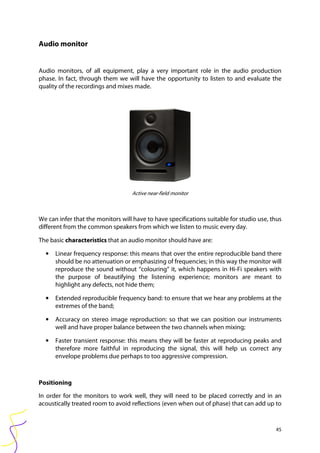
Active near-field monitor
We can infer that the monitors will have to have specifications suitable for studio use, thus
different from the common speakers from which we listen to music every day.
The basic characteristics that an audio monitor should have are:
• Linear frequency response: this means that over the entire reproducible band there
should be no attenuation or emphasizing of frequencies; in this way the monitor will
reproduce the sound without “colouring” it, which happens in Hi-Fi speakers with
the purpose of beautifying the listening experience; monitors are meant to
highlight any defects, not hide them;
• Extended reproducible frequency band: to ensure that we hear any problems at the
extremes of the band;
• Accuracy on stereo image reproduction: so that we can position our instruments
well and have proper balance between the two channels when mixing;
• Faster transient response: this means they will be faster at reproducing peaks and
therefore more faithful in reproducing the signal, this will help us correct any
envelope problems due perhaps to too aggressive compression.
Positioning
In order for the monitors to work well, they will need to be placed correctly and in an
acoustically treated room to avoid reflections (even when out of phase) that can add up to
46
the direct sound of the monitors and thus give us a completely different listening
experience from the real thing.
One of the most common placements is to arrange them in such a way as to keep the
operator's head equidistant from the two monitors, forming an equilateral triangle; the
monitors should have a 30-degree tilt toward the centre, and the high-frequency speaker
(tweeter), pointed at ear height.
Often the monitors, due to lack of space, will be placed a very short distance from the rear
wall; in this case it will be advisable to choose a speaker with front bass reflex; otherwise
(rear bass reflex) we will have predominant low frequencies that will distort the listening.
In fact, the bass reflex is an opening in the speaker that serves to phase the low
frequencies of the speaker, thus a hole from which the sound comes out, a displacement
of air, so it is best to keep it at a distance from the wall.
There are however monitors with the ability to remedy misplacement by going to
electronically compensate the frequency response with the help of filters that can be
adjusted as needed.
Types
Audio monitors can be divided into two categories:
• Active: have an amplifier inside them or, often, one for each way. We can directly
connect the signal coming from the mixer or sound card;
• Passive: they will need an external amplifier to function;
Among these, actives are the most popular in home recording, in fact the market offers a
very wide variety and quality in different price ranges. In addition, we can distinguish
monitors by the size and diameter of the installed speakers, dividing them into:
• Near-field monitors: these are the monitors we will keep on the workstation or
desk, so very close to the listener. They are usually two-way, 1” tweeters and 3” to
7” woofers. In all likelihood these will be the ones we choose, recommended in
untreated rooms and best handled in a home recording context. It will be wise not
to overdo the woofer size especially if used in a very small room, otherwise we
would only increase the problems of “disposing” of low-frequency reflections; in
general for desktop use in an average small room a monitor with 4 “to 6” woofers
will be sufficient;
• Mid-field monitors: will be placed at a distance of about 1.5 to 2 meters. Often
two- or three-way, with 8” to 10” woofers, or dual 6” to 7” woofers; they need a lot
of space to function at their best;
• Far-field monitors: the main monitors of studios with quite large directorates. They
are very powerful and have woofers that can go up to 18”.
47
Monitor headphones
Headphones cannot be considered as secondary, but rather alternative listening. Their use
is related to different production contexts, such as at the recording stage of an acoustic
instrument or voice, avoiding the indentations of the sound of the base or metronome
into the microphones used for recording.
Useful in the mix phase, especially for very extreme stereo image reproduction, it is
helping us to place instruments with the appropriate precision in the stereo landscape. It
is also often used to perform a listening comparison with audio monitors in both mixing
and mastering.
Headphones allow us to listen to the audio produced without the influence of the
environment, thus going to neutralize any problems of reflections from our room;
therefore especially in cases of home recording, in which there is no possibility of
significantly correcting the room acoustics, or if there is a need to work at night hours, the
advice is to invest more on a good pair of monitor headphones than speakers, all the more
so if we will have to work on them for very long sessions.
Working with headphones tires a lot, so it will be wise to choose a quality model both in
materials and components, and, most importantly, comfortable to wear. There are
different types of headphones and among them we can mention the most common ones:
• Over-ear headphones;
• Ear buds;
• In-ear.
We will leave out ear buds and in-ears because they are mainly used at the consumer level
or, in some cases, as monitoring in live situations; instead, we will deal with those most
used in the studio environment: Over-ear headphones.
The kind of over-ear headphones we will need to consider are studio headphones, not Hi-
Fi, and should have similar characteristics to audio monitors, so:
• Wide band of reproducible frequencies;
• Frequency response as linear as possible;
• Transient response.
We can divide them into two categories:
• Circum-aural (over-ear): cover the outer ear by enclosing them inside, thus
attenuating sounds from outside;
• Supra-aural (on-ear): only resting on the outer ear. They are much more
comfortable than the previous ones; however we will have less isolation from the
outside.
48
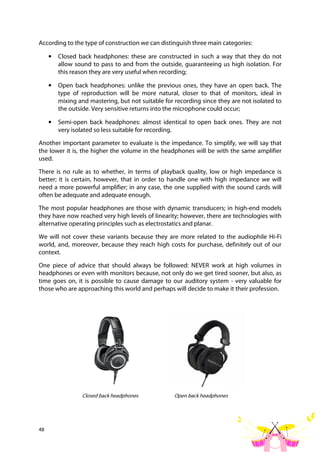
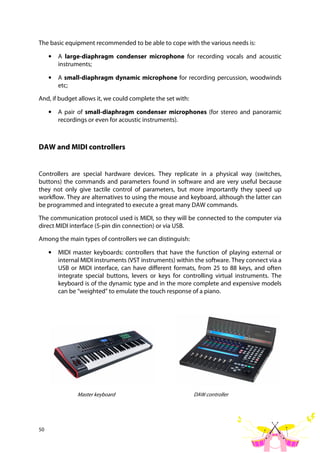
According to the type of construction we can distinguish three main categories:
• Closed back headphones: these are constructed in such a way that they do not
allow sound to pass to and from the outside, guaranteeing us high isolation. For
this reason they are very useful when recording;
• Open back headphones: unlike the previous ones, they have an open back. The
type of reproduction will be more natural, closer to that of monitors, ideal in
mixing and mastering, but not suitable for recording since they are not isolated to
the outside. Very sensitive returns into the microphone could occur;
• Semi-open back headphones: almost identical to open back ones. They are not
very isolated so less suitable for recording.
Another important parameter to evaluate is the impedance. To simplify, we will say that
the lower it is, the higher the volume in the headphones will be with the same amplifier
used.
There is no rule as to whether, in terms of playback quality, low or high impedance is
better; it is certain, however, that in order to handle one with high impedance we will
need a more powerful amplifier; in any case, the one supplied with the sound cards will
often be adequate and adequate enough.
The most popular headphones are those with dynamic transducers; in high-end models
they have now reached very high levels of linearity; however, there are technologies with
alternative operating principles such as electrostatics and planar.
We will not cover these variants because they are more related to the audiophile Hi-Fi
world, and, moreover, because they reach high costs for purchase, definitely out of our
context.
One piece of advice that should always be followed: NEVER work at high volumes in
headphones or even with monitors because, not only do we get tired sooner, but also, as
time goes on, it is possible to cause damage to our auditory system - very valuable for
those who are approaching this world and perhaps will decide to make it their profession.
Closed back headphones Open back headphones
49
Microphones
We will cover this topic later and in much more detail, for now we will just describe the
main peculiarities that affect the eventual decision and choice of purchasing a
microphone to use.
First of all, we need to be quite clear about the type of projects we are going to carry out:
the choice of whether to buy one or more microphones will depend on this.
It is always best to have at least one in your studio. It may come in handy at any time; of
course, if our work will be focused on producing music using only virtual instruments, we
might as well omit it from our setup; otherwise, if it is needed to record vocals or acoustic
instruments we will undoubtedly need it.
According to the principle of operation, the most common types are:
• Dynamic microphones: a category that includes both moving-coil and ribbon
microphones; They are best suited for picking up percussion instruments,
amplifiers, wind instruments and, in special cases, even vocals. They are also
recommended in poorly acoustically controlled environments therefore preferable
to electrostatic condenser microphones, which are much more sensitive;
• Electrostatic condenser microphones: as mentioned, they have higher sensitivity
and thus can transduce sounds with low acoustic intensity. They return a much
more detailed sound compared to dynamic microphones. They are suitable for
acoustic instruments with high dynamics and especially for vocals when we want
to capture their expressive details. As mentioned before, these are not very suitable
for use in poorly controlled or noisy environments.
Condenser Dynamic Pair of condenser microphones
50
The basic equipment recommended to be able to cope with the various needs is:
• A large-diaphragm condenser microphone for recording vocals and acoustic
instruments;
• A small-diaphragm dynamic microphone for recording percussion, woodwinds
etc;
And, if budget allows it, we could complete the set with:
• A pair of small-diaphragm condenser microphones (for stereo and panoramic
recordings or even for acoustic instruments).
DAW and MIDI controllers
Controllers are special hardware devices. They replicate in a physical way (switches,
buttons) the commands and parameters found in software and are very useful because
they not only give tactile control of parameters, but more importantly they speed up
workflow. They are alternatives to using the mouse and keyboard, although the latter can
be programmed and integrated to execute a great many DAW commands.
The communication protocol used is MIDI, so they will be connected to the computer via
direct MIDI interface (5-pin din connection) or via USB.
Among the main types of controllers we can distinguish:
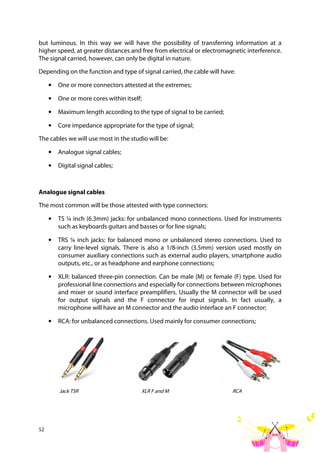
• MIDI master keyboards: controllers that have the function of playing external or
internal MIDI instruments (VST instruments) within the software. They connect via a
USB or MIDI interface, can have different formats, from 25 to 88 keys, and often
integrate special buttons, levers or keys for controlling virtual instruments. The
keyboard is of the dynamic type and in the more complete and expensive models
can be “weighted” to emulate the touch response of a piano.
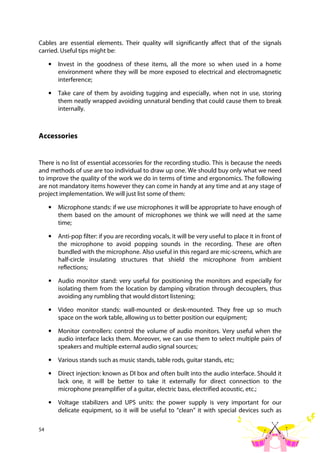
Master keyboard DAW controller
51
• DAW controllers: control surfaces consisting of buttons, displays and faders
(including motorized ones) that control precisely our DAW and, in particular, mixer
faders, track solo and mute controls, transport, play, record, stop, etc. buttons. They
show the information via displays and the levels via meters. In short, they are
hardware replicas of our software. Note that they only control the software, not
affecting the quality of the audio at all. They too communicate with the PC via USB
or MIDI interface; they can support Mackie HUI and Mackie Control protocols,
depending on the DAW used.
• MIDI controllers: more generic. In fact they are often tied to one specific software
rather than another. They may have a sequencer or arpeggiator in them, pads for
percussive use, etc. It is often the primary choice of producers or musicians for live
performances.
MIDI controller
Audio cables, types and connections
Cables are key elements in ensuring connections in a studio between equipment and
various instruments. Depending on construction and materials, cables can carry an
electrical or optical signal. In the case of electrical signals, the main materials of which they
are composed must necessarily be of a conducting type, we are of course talking about
metals such as copper, silver or gold.
The amount of conducting material is important in increasing its conductivity and thus the
“ease” with which it gets a signal through, ensuring minimal loss. Conversely, however, the
greater length of a cable will directly affect signal loss. The cables we will use in the studio
will all be of the shielded type. This will give us greater resistance to electromagnetic
interference coming from outside.
A cable may be able to carry one or more signals simultaneously through the use of
multicore: these have multiple conductors inside them that are insulated and shielded
from each other. Power cables are capable of carrying both an analogue and digital signal.
In the case of optical cables, on the other hand, the signal travels through an optical fibre
composed of glass or plastic with high optical properties; the signal carried is not electrical
52
but luminous. In this way we will have the possibility of transferring information at a
higher speed, at greater distances and free from electrical or electromagnetic interference.
The signal carried, however, can only be digital in nature.
Depending on the function and type of signal carried, the cable will have:
• One or more connectors attested at the extremes;
• One or more cores within itself;
• Maximum length according to the type of signal to be carried;
• Core impedance appropriate for the type of signal;
The cables we will use most in the studio will be:
• Analogue signal cables;
• Digital signal cables;
Analogue signal cables
The most common will be those attested with type connectors:
• TS ¼ inch (6.3mm) jacks: for unbalanced mono connections. Used for instruments
such as keyboards guitars and basses or for line signals;
• TRS ¼ inch jacks: for balanced mono or unbalanced stereo connections. Used to
carry line-level signals. There is also a 1/8-inch (3.5mm) version used mostly on
consumer auxiliary connections such as external audio players, smartphone audio
outputs, etc., or as headphone and earphone connections;
• XLR: balanced three-pin connection. Can be male (M) or female (F) type. Used for
professional line connections and especially for connections between microphones
and mixer or sound interface preamplifiers. Usually the M connector will be used
for output signals and the F connector for input signals. In fact usually, a
microphone will have an M connector and the audio interface an F connector;
• RCA: for unbalanced connections. Used mainly for consumer connections;
Jack TSR XLR F and M RCA
53
Of course, other types of connections also exist, however, many of them are used in highly
professional environments in which the signals carried are quantitatively larger and cover
greater distances.
Digital signal cables
In this case we may have electrical or optical signals; among the most common connectors
we will find the following:
• XLR: as with analogue cables there are two types: M and F. They are used for
connections and transport of two digital audio signals with professional AES/EBU
protocol;
• RCA: used for S/PDIF type connections, digital protocol similar to AES/EBU, carries
two digital audio channels;
• Toslink: optical type connector for S/PDIF or ADAT connections, carrying, in that
case, up to 8 channels at 48 KHz;
• BNC: coaxial connector with locking ring, often used to connect synchronization
signals such as word clock, or to carry MADI signals;
• RJ45: attested to a CAT6 cable (such as Ethernet network cables). They are used in
some professional audio devices such as interfaces, controllers, converters and
preamplifiers. The protocol used in this connection is called DANTE and can carry a
very high number of audio channels (1024) simultaneously with low latency;
• DIN 5-pin: connects audio devices via MIDI protocol, which is almost in disuse due
to greater use of the USB connection, but still found in many musical instruments
and controllers.
Optical Toslink BNC
RJ45 CAT6 DIN 5-pole – MIDI
54
Cables are essential elements. Their quality will significantly affect that of the signals
carried. Useful tips might be:
• Invest in the goodness of these items, all the more so when used in a home
environment where they will be more exposed to electrical and electromagnetic
interference;
• Take care of them by avoiding tugging and especially, when not in use, storing
them neatly wrapped avoiding unnatural bending that could cause them to break
internally.
Accessories
There is no list of essential accessories for the recording studio. This is because the needs
and methods of use are too individual to draw up one. We should buy only what we need
to improve the quality of the work we do in terms of time and ergonomics. The following
are not mandatory items however they can come in handy at any time and at any stage of
project implementation. We will just list some of them:
• Microphone stands: if we use microphones it will be appropriate to have enough of
them based on the amount of microphones we think we will need at the same
time;
• Anti-pop filter: if you are recording vocals, it will be very useful to place it in front of
the microphone to avoid popping sounds in the recording. These are often
bundled with the microphone. Also useful in this regard are mic-screens, which are
half-circle insulating structures that shield the microphone from ambient
reflections;
• Audio monitor stand: very useful for positioning the monitors and especially for
isolating them from the location by damping vibration through decouplers, thus
avoiding any rumbling that would distort listening;
• Video monitor stands: wall-mounted or desk-mounted. They free up so much
space on the work table, allowing us to better position our equipment;
• Monitor controllers: control the volume of audio monitors. Very useful when the
audio interface lacks them. Moreover, we can use them to select multiple pairs of
speakers and multiple external audio signal sources;
• Various stands such as music stands, table rods, guitar stands, etc;
• Direct injection: known as DI box and often built into the audio interface. Should it
lack one, it will be better to take it externally for direct connection to the
microphone preamplifier of a guitar, electric bass, electrified acoustic, etc.;
• Voltage stabilizers and UPS units: the power supply is very important for our
delicate equipment, so it will be useful to “clean” it with special devices such as
55
voltage stabilizers that provide constant voltage regulation. Power conditioners
that eliminate any interference. UPS, or uninterruptible power supplies, guarantee
a constant supply of voltage in the event of a blackout. This will allow us to save
our work and be able to turn everything off while also preventing damage to
delicate components such as hard-disk drives;
• Furniture elements such as rack holders, drawer units, seating, etc.;
• Acoustic elements such as sound-absorbing panels, bass traps, diffusers, acoustic
curtains, etc. Essential to acoustically correct the place where we will make
recordings and mix projects. They do not guarantee total sound insulation though,
which is much more complex to perform as a treatment.
This is an indicative list. It will then be up to each of us, with time and especially with
experience in the field, to understand what our personal needs will be. In this way we will
dynamically refine our personal “wish list” more and more, adding and removing the tools
and implements we need to buy.
Then again, as the wise Bob Marley once said:
“When faced with two choices, simply toss a coin. It works not because it settles the
question for you, but because in that brief moment when the coin is in the air, you
suddenly know what you are hoping for.”
56
THE SOFTWARE
Introduction
In the previous chapter, an analysis was made of the kind of instrumentation we would
need for an audio recording; in this one we will focus on what will be perhaps the main
element of the whole system: the audio software.
To a great extent it has taken the place of what used to be hardware equipment, and the
last twenty years have witnessed a great evolution in the field of audio-related computing,
making it possible and usable for everyone (with sometimes a minimal expense,
sometimes even free) to create their own musical projects thanks to the use of a personal
computer, an audio interface and, above all, the software that we will choose based on our
needs or experiences.
So far we have talked generically about software, which will be divided into categories and
subcategories, each dependent on the type and function it will have.
Below is a list of the main categories:
• Sequencers (sequencers);
• Plug-in effect (effects);
• Virtual instruments (virtual instruments);
• Mastering (finalization)
• Score (scores).
Due to the evolution and high quality that is achievable today, many software programs
integrate multiple categories within them, making even a single application installed on
one's system more than sufficient.
The set of equipment and software that make-up the recording system can be referred to
by one name: DAW.
Digital audio
Before moving on to the description of a DAW it will be necessary to understand some
properties belonging to digital audio.
We will definitely not do an electronics lesson based on the binary algebraic system;
57
however we will try to understand the basic concepts that we will need to know in order
to use our audio equipment.
We could therefore simplify by saying that since all the acquisitions and processing we will
do will be in the digital domain, they will all be transformed into digital data, which will be
stored in our personal computer. The quantity and quality of them will depend on the
settings of these properties in the DAW used.
Sampling
By this term we denote precisely the phase of converting a signal, from analogue
(electrical) to digital. An analogue signal consists of an infinite series of points: in order to
transform it into digital, it will be necessary to take “samples” from the waveform to
transform it into finite points. The reconstruction of the signal will no longer be
continuous, but will obviously appear in levels or rather steps.
To give an example, it is like joining dots to reconstruct an image, so by intuition, the
greater the number of dots, the more faithful to the original the image will be. This is also
what happens in the world of digital photography, when we enlarge the digitized image
and notice more and more of the dots (pixels) of which it consists.
Sample rate
This value refers to the number of samples taken in one second in the analogue-to-digital
conversion operation and vice versa. To reconstruct a signal as faithfully as possible, the
sample rate should be at least twice the audible bandwidth (Nyquist's theorem).
Thus, as 20000 Hz is the maximum audible limit of our ear, 40000 Hz could be a more than
sufficient sample rate, however, because of some problems that could be generated at the
band extremes and the higher costs to eliminate them, it was preferred to raise it to 44100
Hz (22050 Hz band) or 48000 Hz, and their respective multiples.
This parameter will be important to set at the beginning of each project, also based on the
destination it will have. For example, the audio CD standard is 44100 Hz at 16bit; that of
video productions 48000 Hz at 24bit.
As can obviously be guessed, the higher the sampling rate and quantization bits, the more
defined the signal will be, and, likewise the more digital data will be produced. This will
result in the consequent occupation of more mass storage and greater use of the PC's
CPU, which will have to process more data per second.
Bit depth
Bit depth is closely related to sampling. If with the former we defined the number of
samples taken in a second, with this other parameter we define the number of steps (our
dots to be joined) that can be used for signal reconstruction.
58
This parameter will tell us the number of quantization bits and, consequently, the amount
of levels each sample can have. In fact, it will suffice to raise 2 by the number of bits in
order to obtain the value:
16 bits: 65,536 values
24 bits: 16,777,216 values
So, for example, a signal sampled at 48000 Hz and 24 bits will have 48000 samples in one
second, and the value of each will be between 0 and 16,777,216.
The most commonly used standards are 16 and 24 bits, in some cases even 32. With these
values we will have very high dynamics, just know that each bit corresponds to 6 dB of
dynamics so:
16 bit: 96dB
24 bit: 144dB
32 bit: 192dB
Latency
The time it takes for an input signal to be sampled processed and converted back to
analogue is called latency. It will be experienced as a delay of the sound from its
generation until the same is sent out.
To explain such an event we need to know that the PC CPU processes the acquired
samples in groups that it stores in a buffer memory. At the end of processing, it will be
emptied and filled with another group of data to be processed. Therefore, the size of the
buffer will affect the latency time: the larger it is, the greater the delay.
It is usually indicated by a digit that defines its number of samples. For example, a buffer
size of 512 indicates that the computer will process blocks of 512 samples. Given that we
are sampling at 48000 Hz, we can derive the delay time from the following formula:
latency = (buffer/sampling rate) x 1000
latency = (512 / 48000) x 1000= 10.6 ms (milliseconds)
59
It should be pointed out that other intermediate latencies caused by processes inserted in
the signal path such as those of the effects and also by the reconversion to analogue must
be added to this delay.
To lower the latency we will therefore have to decrease the buffer level and bring it to
values that are therefore negligible. This, however, will intensify the work of the CPU,
which, when not adequate enough for the required performance, will go into overload
causing the audio stream to block with consequent interruptions and clicks in listening.
For these very reasons, it will be advisable to vary the buffer size dynamically as needed.
For example, we can lower it in the recording phase so that the delay remains
imperceptible to the musician, where it can still be increased in the mix phase, in which
more CPU performance will be needed to process effects and dynamics, making low
latencies unnecessary.
Conclusions
To conclude the topic we will make a very brief summary of what we will need to set up in
our DAW:
• Sample rate: depending on the needs and purpose of the project, 44100Hz will be
a good value for audio-quality work;
• Bit depth: same thing, although it is advisable to work at higher levels such as 24
bits (sufficient for all work both home and pro);
• Buffer size: dependent on the characteristics of the audio interface and the quality
of the drivers supplied with it, the type of connection to the computer (USB,
FireWire, PCIe, Thunderbolt, LAN), the performance of the computer itself, and the
type of operation we are performing (recording or mixing). To decrease as much as
possible in recording and then increase in mix;
• Audio format: the most commonly used ones are as follows:
o wav - lossless up to 2Gb without metadata
o w64 – identical to wav but allows files larger than 2Gb
o aiff – lossless format developed by Apple with metadata
o mp3 – loose format (compression results in loss of quality)
We recommend any lossless format supported by your DAW.
60
What is a DAW?
DAW is an acronym that stands for Digital Audio Workstation and is, as mentioned earlier,
a system consisting of hardware and software specifically for recording, editing and audio
playback in the digital domain.
In today's common usage we tend to define DAW as the sequencing software that now
encompasses within it all the useful tools for music production such as effects and virtual
instruments, making it an indispensable tool and, in fact, the heart of the whole system.
With this application we will be able to run the complete path of our music production,
from its conception, composition, arrangement, recording, editing, mixing and finalization
with master, all in one package.
There are so many offerings for this type of music software, all of which are very good and
each with specific peculiarities, although the features of each are tending to conform to
each other, varying more on operability and appearance than anything else.
Thus, the choice of a DAW will depend on several factors such as: the budget we would
like to employ, the use to be made of it, the basic equipment of effects or instruments, the
operability and simplicity in editing and mixing, the integration or not of the MIDI
protocol, the stability, the compatibility with third-party software, the spread of use, the
operating system employed, etc.
61
The software will not appreciably affect the quality of the final product, which instead will
depend more on the microphones and their positioning in the case of shooting, the
preamplifiers and converters used in the audio interface, the listening (monitoring), and,
most importantly, the more or less correct use of the entire system.
Precisely for this reason, one piece of advice that should not be underestimated is to
spend what is necessary, adjusting to our needs. In fact, as already mentioned, a higher
expense will not be synonymous with a better product: software that costs more will have
features useful, for example, for record postproduction processes such as surround sound
management, dubbing tools, editing and advanced automations, or the provision for the
simultaneous use of hundreds of audio inputs and outputs to and from the outside world;
features that are potentially very expensive and that we would probably never use.
Among the most commonly used DAWs we will mention a few:
– Pro tools from Avid; – FL studio from Image line;
– Cubase or Steinberg's Nuendo; – Reason's Reason Studio;
– Logic Pro or Garage band from Apple; – Motu's Digital Performer;
– Studio One by Presonus; – Samplitude or Sequoia from Magix;
– Reaper by Cockos; – Cakewalk by BandLab (free);
– Ableton Live; – Bitwig studio;
For many of them, moreover, it will be possible to install a trial or free version in order to
be able to evaluate their functions, compatibility and general feeling before making a
possible purchase.
How a DAW works
A DAW consists of an interface or sound card, a computer, recording software and a
listening system.
The audio interface can be internal (it will be installed inside the PC on a free slot of the
motherboard) or external. For external interfaces the market offers us different types of
products related to the type of connection (USB 2 or 3, Thunderbolt, LAN or FireWire), the
amount of analog and/or digital inputs and outputs, or the presence of MIDI ports.
The interface will be used to connect our microphones (MIC input), electronic instruments
(LINE input), an electric guitar or bass guitar (INSTRUMENT input) via the analog inputs.
62
Then the signals taken will undergo a transformation into digital data via the internal
converters.
The data produced will be stored as audio files in a mass storage connected to the PC and,
later, displayed as waveforms through the sequencer software. Similarly, the audio signal,
once processed within the PC through the software, will be converted back to analog and
sent out to be listened to by audio monitors or headphones.
The computer and the recording software are the basic elements for a DAW to exist.
Diagram of connections between DAW elements
PC features have already been covered. In any case, the advice we can give is to equip
yourself with a high-performance multicore processor, plenty of RAM memory and fast
mass storage (hard-disk) such as SSDs. In any case, personal computers of the latest
generations will be able to sufficiently meet the minimum requirements for audio use.
The recording software
The element of the DAW that orchestrates all this flow of signals, processes, management
of audio/MIDI inputs and outputs, etc., is the recording software. It can be defined as the
heart of a DAW, that is, the one that will allow us to realize our musical productions
through the instruments we will find internally.
63
Example of a typical DAW screenshot
After installing the chosen software, special attention should be paid to setting the audio
interface drivers within the settings of the software itself.
The drivers (provided by the audio interface manufacturer) are very important because
they ensure perfect communication between the DAW sequencer and the audio interface,
thus for the recognition of all inputs and outputs.
If, for example, our interface has two microphone inputs and 4 line outputs, with a well-set
driver, they will all be visible in the list.
ASIO drivers are the most suitable and compatible drivers in most audio applications, and
they also provide more complex routing (routing of audio signals) and lower latencies
because they were developed for this purpose. Their use is always advisable.
Next, some important parameters must be set for proper operation and to limit possible
stability problems. Among the main ones we will have:
• The sample rate at which we intend to use (dependent on the type of work) usually
44100 Hz or 48000 Hz at 24bit;
• The buffer to be used (important for latency). The value will vary depending on PC
performance and the quality of drivers and audio interface. Usually 512 samples is a
sufficient value that gives us a good compromise between latency and PC
processor load;
• The resolution of internal processes, 32 or 64 bits with or without floating point,
also dependent on the performance of the PC used;
• The types of files generated (wave, aiff or mp3);
64
• Any MIDI ports used for external instruments or controllers such as master
keyboards and control surfaces for DAWs. These are often USB devices but will be
installed and considered by the software as MIDI devices;
Example of ASIO driver settings Example of project settings
Example of MIDI settings
After setting the main parameters, we will move on to describing the most common
components for the audio/MIDI sequencers in our DAW. The basic elements of a DAW (a
term by which we will henceforth denote only recording software) are:
• Project window;
• The mixer window;
• Editor's window;
65
These three windows can be displayed alternately or simultaneously on the same page.
Alternatively, if you have two or more video monitors, you can display them on them as a
full page.
The project window is the main one: we will definitely spend more time there. In fact,
from here you will be able to manage almost all DAW functionality and, as previously
discussed, in some cases it will also integrate the other mixer and editor windows.
This window consists of several elements; we will mention the most important and
common to all DAWs:
• Track list: usually placed on the left, this area will list all the tracks created and used
in the project. Each one will have within it management controls, an area for
entering the name, an indication of the type, or even information about the inputs
and outputs of the same track. We will discuss the tracks in more detail later;
• Events area: located to the right of the track list, it displays on the timeline all
events recorded in the respective tracks. In it, it will be possible to edit the same
events, for example, with tools such as copy, cut or paste, create fade in/out, etc.
The timeline can usually be managed on the basis of times or measures and is
linked to a grid that will allow us to have precise reference points on which to clip
the events themselves;
Project screen, track list on the left, event area on the right
• Transport bar: generally placed at the top or bottom, it contains all the commands
not dissimilar to the recorder such as play, record, fast forward/reverse, cycle, etc. In
some cases it is integrated into the toolbar;
66
Transport bar
Toolbar
• Toolbar: consisting of editing tools (copy, paste, select, etc. ), metronome settings,
quantization tools, and markers. It is often customizable by inserting the functions
we will use most;
• Info bar: where project information such as duration, frequency and quantization
settings, amount of data used, system performance, etc. will be displayed. Often
placed at the top or bottom;
• Menu bar: at the top, where we will find indicated each access menu to the
functions of the audio program, from file management to editing, preferences and
audio and MIDI configuration, etc.
The mixer window is closely related to the project window, in fact each track created in
the list will also be displayed on the mixer in the form of a channel with the same
positioning order. In this window, the channels will run vertically similar to an analog
mixer, so we will find them next to each other. Many DAWs, in order to simplify the
identification of the channels/tracks in the mixer, in case they are quite numerous, allow
differentiating them with different color according to the type.
Mixer window
67
Example of mixer channel elements
The common elements often found in each channel, starting from top to bottom, are:
• Routing: in this section we will have the ability to configure the physical input of
the signal into the track (audio interface input) and its destination after the volume
fader, which can be either physical (audio interface output) or software (master bus
or auxiliary);
• Insert slots: where it will be possible to insert dynamics processors or various
effects in series with the signal in the form of a plug-in or, if the DAW allows it, as an
external hardware processor. A control that is often integrated is that of assigning
the slot into pre-fader mode (signal taken before the volume control) or post-fader
mode (signal taken after it);
68
• Send slots: in this case we will assign each slot a destination (aux bus or effect bus)
from which a part of the signal will be sent to be processed in parallel. Also here, in
some cases, pre or post-fader assignment will be possible;
• Pan (panorama) control: is used to distribute the signal between the left and right
channels of the target bus. If placed in the center, the signal will have the same
value in both channels;
• Volume fader: serves to increase or decrease the volume of the track within the
mix, at the 0dB (unity gain) position. In the absence of processes in the channel, it
inputs the same value to the output as the input signal. Usually a meter is also
placed beside it to indicate the input or output value of the signal;
• Channel controls: these are usually buttons that replicate those found in the tracks
on the project page. They are used to activate mute, solo, automations,
monitoring, arm the track to enable recording, etc.
Any action performed on the mixer controls will be synchronized to the same controls on
the corresponding track, and vice versa. If we enable a mute in a track in the mixer it will
automatically be enabled in the corresponding track in the project window.
The editor window is the one that will show us only the selected event and allow us to
edit or process it independently of the others. The events that can be displayed can be
either audio or MIDI. In this area it will be possible, for example, to edit the notes of a
recorded MIDI track, or edit an audio track by changing its length, tempo, pitch or
intonation. The implementation of this window and each of its functions – more or less
advanced – will always depend on the DAW we choose.
Editor window
69
Tracks and channels, types and management
When creating a new music session, the initial page will be just that of the project. It will
appear empty, and it will be up to us, as needed, to create new tracks into which we can
record or import our instruments or voices in the form of events.
This is precisely why it is good to specify the different types of tracks, their functionality,
and how they can best be managed. There are four types of tracks most common to all
DAWs:
• Audio tracks;
• MIDI tracks;
• Instrument tracks;
• AUX tracks;
More advanced DAWs have many more options with specialized tracks for specific uses
such as video tracks, VCAA, folder, group, effects, etc.
For pure audio use these four types will be more than sufficient.
Audio tracks
We will use these to import external audio files or to record and play our instruments and
vocals directly from an audio input on the interface for, later, editing and processing.
The most common settings are:
• Mono (one channel) or stereo (two channels) type;
• Audio input track: this is used to set which audio input the signal will come from. In
the case of imported files this function is irrelevant;
• Audio track output: sets the output from which the signal will be routed. As already
mentioned, it could be the DAW's master bus, which will then send it out of the
interface. Or it could be an auxiliary bus to create, for example, a submix of multiple
tracks;
• Track name: here, for example, the name of the instrument will be entered to make
its content clear
• MUTE button: if this function is activated, we will mute the selected track;
• SOLO button: will mute all tracks in which we have not activated this function;
• RECORD ENABLE button: if active, will allow recording to be made on the relevant
track when the RECORD button on the transport bar is pressed;
70
• MONITOR ENABLE button: allows you to listen to the signal present at the track
input. Often this function is not present, but still integrated into the record enable
function;
• READ AND WRITE AUTOMATION buttons: not present unfortunately in all DAWs;
they are very useful in managing automated control of track parameters such as
volume or pan;
• VOLUME control: will allow us to adjust the volume of the selected track;
• PAN control: allows you to position the signal in the stereo panorama (left and
right).
Audio tracks MIDI tracks
71
MIDI tracks
The MIDI tracks will be used to import, record and play back MIDI parts. Unlike audio
tracks, this type handles only digital information related exclusively to the MIDI
communication protocol. The files generated by this type of track, contain information
related to notes and their respective parameters such as dynamics, volume, etc. From this
we can infer that the amount of data produced will be much smaller than that of audio.
The most common parameters are:
• MIDI input track: usually provides a list of all MIDI input ports enabled in the
computer, and from here we will indicate which of the connected devices will
record to the track. Be they digital pianos, master keyboards or controllers
connected via MIDI interface or directly with a USB cable to the PC;
• Output MIDI track: again a list of MIDI output ports will be displayed, plus we could
also detect the presence of active virtual instruments (VST instrument). With this
parameter we will indicate what the destination of the track will be, then assign the
instrument, internal or external to the DAW, that will play the MIDI parts present;
• MIDI channel: a value between 1 and 16. In fact, this protocol stipulates that
information belonging to 16 channels may travel on each port at the same time.
For example, 16 MIDI tracks with different channel could play sixteen external MIDI
instruments at a single port.
Then as for the audio tracks:
• Track name;
• MUTE;
• ONLY;
• ENABLING RECORDING;
• VOLUME;
• Reading and writing automations;
Instrument tracks
We could define them as a combination of a virtual instrument and a MIDI track, in fact the
recorded events will be of this type, but the audio handling of the VST will be assigned to
the mixer. The routing of the output signal is usually handled by the VST instrument itself.
The parameters are the same as those found in MIDI tracks.
72
Aux tracks
These are auxiliary tracks that do not possess a specific function, but because of this they
lend themselves to having several, for example, as a mix bus, effect bus or cue bus. Usage
is very simple; if, for example, we wanted to create a drum submix, we would have to
insert an aux track, name it “drum bus” and assign its output to the DAW's master bus.
Then route the outputs of the individual drum tracks (kick drum, snare drum, hi-hat,
overhead, toms, etc.) to the drum bus. By doing this we will have created a separate drum
mix controlled by a single volume fader.
With this principle, multiple submixes can be created for guitars, keyboards, horns, vocals,
etc., so as to simplify mixing operations.
No events will be created in these tracks: they are service tracks that allow for better
management of audio routing and, in some cases, to be used creatively in the mix as well.
The parameters of these tracks are comparable to those of audio tracks, except that they
do not possess recording and monitoring enablement.
AUX or effect tracks
73
Track Management
It concerns the operations we will be able to do on tracks of any type. Among the most
common ones we will have:
• Inserting or creating a new track;
• Deleting a track;
• Importing and exporting tracks;
• Moving a track;
• Copying or duplicating a track;
• Grouping of multiple tracks even in folders;
• Trace coloring;
It will be possible to find other, sometimes more advanced, operations in some DAWs
rather than others.
MIDI
By this term we denote an acronym: Musical Instrument Digital Interface. This protocol
originated in the early 1980s in order to enable communication and data exchange
between electronic musical instruments such as synthesizers, sequencers, drum machines,
etc. It is a set consisting of both software technical specifications and a hardware interface.
MIDI interface
74
One thing to make clear from the outset is that this interface does not carry sound, but
rather all the information needed to make our musical instrument play, which may be
hardware (synth) or software (VST instrument). This is precisely why we could define a
MIDI message or event as a score to be played by our instrument.
The type of connection between instruments is through ports, which are:
• MIDI in: input port of MIDI messages;
o This is where the master device, the one that will send MIDI messages to the
other instruments, will be connected. The master could be a hardware
sequencer, software (our DAW), a controller or, most commonly, a master
keyboard or mute keyboard. Only a signal from a MIDI out or thru
belonging to another instrument may be connected to it;
• MIDI out: output port of MIDI messages;
o Devices to be controlled as sound modules will be connected here: the
DAW with VST inside, the hardware or software sequencer to record MIDI
parts, etc. This port can only be connected to the MIDI in of another
instrument;
• MIDI thru: duplicates outgoing messages coming in;
o It is used to connect multiple receiving instruments on the same master
port, in fact the MIDI thru will be connected to the MIDI in belonging to
another instrument.
MIDI Connections
75
Note that the DAW or sequencer is found in both the MIDI in and MIDI out descriptions.
This is because they can operate simultaneously in both receiving (recording MIDI parts to
their respective tracks) and transmitting, playing internal VST or external hardware
instruments through the MIDI interface.
Most MIDI devices (both control and sound) to communicate with our DAW use nowadays
the USB connection, however, should it be necessary, the more “classic” method can be
used, by means of 5-pin din cables connected directly to our audio interface (if it has built-
in MIDI) or by using a MIDI-to-USB conversion interface.
As mentioned earlier, the MIDI protocol can handle 16 channels simultaneously on the
same port; for that reason, for example, our DAW can assign 16 different tracks, each with
its own channel, to a single MIDI instrument that can generate 16 different sounds, one for
each track sent.
Undoubtedly, in order to make two instruments communicate, it will be mandatory for
them to have the same MIDI channel.
In practical use, we may need MIDI, for example, to play and to record our virtual
instruments within the DAW, via an external controller such as a master keyboard, which,
connected through a MIDI or USB port, will be available in the track's MIDI input list. Once
we have selected and set the same channel (by default 1 or all) we will assign a virtual
instrument to the MIDI output of the track, so that we can start recording parts on our
project track.
The messages (or data) we transmit for each note played will generate an event that will
contain, in turn, a set of information that can be handled by our DAW.
The most important information of each MIDI note (or event) is:
• Note on/off: indicates whether the key is pressed or released and the pitch of the
note;
• Velocity: indicates the pressure with which a note is pressed;
• Aftertouch: indicates the change in pressure on a previously pressed note;
• Pitch: to vary the pitch of a note already playing.
After recording the MIDI parts into the project, this information will be available and can
be corrected or edited rather easily by means of a tool found in almost every DAW: the
piano roll.
Thanks to it, we will have a very clear view of all stored information and it will be, for
example, possible to add notes, change their volume or duration, etc.
76
Example of piano roll, similar for many DAWs
Another MIDI-related function is that of scoring, that is, writing the scores on the staff.
Then the software will transform the scores into MIDI events to be played by the virtual
instruments. Inevitably, it will also be possible to perform the reverse operation: turning
one or more MIDI events into a score.
Not all DAWs implement this feature.
VST instruments
VST instruments (Virtual Studio Technology) are virtual musical instruments and therefore
software, used as plug-ins (DAW dependent) or standalone (DAW independent). The types
and offerings of these instruments are truly vast and can include: synthesizers, samplers,
electronic drums, sound generators, sample players, etc.
They are able to generate audio as if they were real synthesizers, and being integrated into
our DAW, they are controlled by MIDI messages via the recorded tracks or via a master
keyboard connected to the DAW.
Thanks to the technological evolution of recent years, a VST, today can emulate or even
play samples of real instruments such as: acoustic pianos, electric pianos, acoustic drums,
synthesizers, vintage keyboards, etc. The market offers quite a wide choice; moreover,
these instruments can be included in stock in various DAWs or can be found for free on
the net.
With this technology, we will be able to have an arsenal of sounds without necessarily
77
having to own the actual instruments, which would incur us onerous expenses for
purchase, maintenance, transportation and, most importantly, bulk.
The usage has already been described above. In summary, we can say that many DAWs
today handle VST instruments either as a destination for MIDI tracks or as independent
tracks with their own events, with their own recorded or imported parts.
VST instrument – Drums VST instrument - Sample
Effects plug-ins
A plug-in is software that adds specific functions to another software, so it is not created to
be used independently. The program that hosts it is indeed called the host and, in our
specific case, it is the DAW used.
The most common categories of audio plug-ins are:
• Plug-in instrument;
• Plug-in effects;
Of the first category are the virtual instruments discussed above while, of the second, all
those plug-ins that will be used to process audio signals within the DAW. In fact, we can
already find them supplied stock in the recording software we have chosen, or we can
install them later, depending on our needs.
There are several developers of audio plug-ins, so it will be possible to choose from a wide
availability of types, quality, and prices. Inevitably, there are cheaper or sometimes free
alternatives that offer us equally high quality comparable to the more expensive ones.
The advice is always the same: spend the right amount, considering that, with our DAW,
we will already have all the tools we need to work and finalize a project.
78
One property to consider when installing plug-ins is that of format: it should be
compatible with our DAW.
There are several and the most common are:
• VST: arrived at version 3, it is the most popular among the various DAWs such as
Cubase, Reaper, Studio one, etc., usable on both PC and Mac;
• Au: Audio unit, Apple's proprietary format. Logic's native format but also working
in Reaper, Ableton, and Digital performer, but always only on Mac;
• Aax: Avid format, used in Pro tools on both PC and Mac, has replaced RTAs format.
We can divide the main categories of processors into:
• Equalization processors;
• Dynamics processors;
• Modulation and spatialisation processors;
• Delay processors.
Equalization processors
An equalizer, in audio applications, is a device used to filter one or more frequency bands
by managing to emphasize or attenuate them without acting on the surrounding ones.
This will help us compensate for the frequency balance of a sound, for example, by
amplifying one band or eliminating another. Of course, all this will have to be done
depending on the context and the sound we want to achieve.
Four-bands parametric equalizer plug-in
79
An equalizer, therefore, may serve us in a variety of uses such as, for example, in correcting
the timbre of sound during recording, during mixing or mastering and thus, to eliminate
problems such as hums, crackles or resonances generated by the recorded source.
In the mixing stage, it will also help us adapt and put together multiple sounds that must
then share the same frequency band.
Among the most commonly used equalizers we can mention:
• Parametric and semi-parametric equalizers;
• Fixed-band equalizers;
• Graphic equalizers;
Parametric and semi-parametric
This particular type of equalizer has, within it, one or more bell-shaped equalization
bands each of which will have three controls:
• Central frequency;
• Gain;
• Q factor;
It is called so because its intervention acts graphically with the shape of a bell in case of
band amplification, and, in case of attenuation, of inverted bell.
The three parameters we have listed will be used to determine the shape and position of
the bell in the spectrum.
• Center frequency: establishes what the position of the band will be in the
spectrum and thus the frequency that will have the maximum gain or attenuation,
and, of course, will be given in Hz.
• Gain: is used to amplify or attenuate the bell with the frequencies within it; it is
indicated in dB.
• Q factor: indicates how far away the cut-off frequencies will be from the center
frequency. In practice, it is used to determine the width of the bell and thus of the
band of frequencies we are treating. The higher the number indicating this, the
narrower the bell will be; conversely, the smaller the number, the wider the band
will be.
This type of equalizer is widely used in the mix phase since it allows us to intervene on
specific frequencies with great precision.
For example, we might set it with a very narrow Q factor (higher value) to eliminate an
annoying resonance of a drum, with a wider Q (lower value) to emphasize or attenuate
frequencies on a voice in order to make it clearer and more intelligible.
80
In the context of plug-ins, these equalizers are often configurable to multiple bands (even
more than 12) and can have multiple types of filters inside.
In a parametric equalizer, we could use a shelving equalization band instead of a bell
band if necessary.
They are used mainly at the extremes of the spectrum of the treated sound. The
parameters we will have will be only two:
• Cut-off frequency;
• Gain;
They are distinguished into low shelving and high shelving based on their action at the
beginning or end of the spectrum, respectively; in fact, unlike bell filters, they work
differently:
• In the case of low shelving equalizers, the filter will amplify or attenuate everything
below the cutoff frequency (cut-off);
• In high shelving ones the opposite will happen: all frequencies above the cut-off
frequency will be amplified or attenuated;
Other controls found in parametric EQs could be the HP and LP filters. They are very useful
because they allow us to eliminate everything below or above a certain cut-off frequency,
in effect, cleaning up our signal. They usually have only one parameter and that is the cut-
off frequency, however, in some cases, in the more comprehensive equalizers, the filter
slope (in dB/octave) will also be present.
In the case of HPF (high pass filter) everything below the set cut-off frequency will be cut
off. When present, the filter slope will set by how much the signal will be attenuated for
each octave of frequency down. Very useful for cutting out, for example, low-frequency
noises such as buzzing or ambient noise. LPFs (low pass filters), on the other hand, will
take care of cutting off everything above a cutoff frequency. The slope will indicate the
attenuation at octave up.
We specify that an octave up corresponds to a doubling of the reference frequency, down
corresponds to a halving. For example, the frequency of 1000 Hz corresponds to an octave
up by 2000 Hz and down by 500 Hz.
Semi-parametric EQs, on the other hand, are bell-shaped equalizers that will have the
ability to vary only two of the three parameters, such as:
• Central frequency;
• Gain.
81
They will possess a fixed Q factor. Often we might have semi-parameters configured with
three bands consisting of two shelving and one center bell.
Eight-band parametric equalization plug-in
Fixed band
This equalizer is derived from bell and shelving equalizers, but with appreciable limitations
that make it less precise in its interventions.
Often found in three-band configuration of which two shelving bands with fixed cut-off
frequency and one bell band with fixed center frequency and Q factor. In practice, the only
modifiable parameter for the bands will be the gain.
Graphic EQs
This type of equalizer consists of several bands of bell filters each of which will have fixed
center frequency and Q factor. It usually has a series of sliders placed side by side from left
(lower frequencies) to right (higher frequencies) that act only on the one variable
parameter, gain.
The Q factor of each slider or band, will depend on the number of them and thus on the
context of use. In this way we can have 1-octave (10-band), 1/2-octave (20-band) 1/3-
octave (31-band) equalizers. With this type of equalizer, we will have a much more
intuitive graphical view of the trend of the equalization curve.
82
Dynamics processors
These are devices that, through the modification of their own parameters, act to control
the dynamics of a signal.
The most common types of processes in this category include:
• Compressor;
• Limiter;
• Expander;
• Gate;
• De-esser.
31-band graphic equalization plug-in
83
Compressor
Such a processor modifies the dynamics by attenuating the maximum peaks of a signal
the moment it exceeds a certain threshold. The result will be attenuation of dynamics with
lower peaks approaching higher ones while keeping the decibel level unchanged.
We will be able to use this process not only to limit the maximum amplitude, but also to
emphasize details that are often lost because they are too low in volume, such as, for
example, ghosts in the snare drum or even increasing the ambient effect of the room in
which the instrument was played.
The construction type of a compressor may be chosen according to the type of work to be
completed. The most commonly used are:
• FET: compressors with very fast response, suitable for use with instruments with
very fast transients such as percussion, electric guitars, etc;
• VCA: fast response, very similar to FETs as features, in hardware versions they differ
on internal circuitry;
• Optical: smoother and more natural response, often also in tube technology, they
are very suitable for instruments with slower transients, excellent on bass and
vocals;
• Valve (or tube): slower response so more suitable for instruments with slower
transients, have the peculiarity of coloring and characterizing the signal.
The most common parameters in compressors are:
• Threshold: expressed in dB, this is used to set the signal threshold above which the
compressor will begin to attenuate;
• Ratio: is expressed as n:1 and is used to set the amount of amplitude to be reduced
in the signal;
o With a 1:1 ratio there is no compression, at 2:1 the signal passing over the
threshold will be reduced to 1/2 , 3:1 to 1/3 and so on;
o With ratio values greater than 10:1 we will have limiter-like behavior.
• Attack: expressed in milliseconds, it indicates the compressor intervention time
when the threshold is exceeded by the signal;
• Release: expressed in milliseconds, indicates the time when the compressor will
stop compressing once the signal returns below the threshold;
• Make up gain: expressed in dB, it is used to restore dB to the signal after
compression
84
Compression plug-in
Limiter
This processor behaves like a compressor; however it differs from it in the type of
intervention which will be much sharper. In fact, the compression ratio (ratio) will have
very high values, from 12:1 to ∞:1. Thus, the signal that exceeds the threshold will be
blocked or otherwise attenuated significantly. It is often used to protect equipment from
sudden peaks. In mastering, it is an indispensable tool for signal leveling.
Expander
It is a dynamics processor that works in reverse to the compressor. The parameters are the
same, however they work differently. Here the threshold will set the value below which
the signal will be attenuated with a 1:n ratio value. For example, a signal 2 dB below the
threshold with a ratio of 1:2 will be attenuated by 4dB, 1:4 by 8dB, and so on.
In this way we will have precisely not a compression but an expansion of the signal since
we will move the maximum point of the signal away from its minimum. Often used to
eliminate background noise or attenuate instrument tails.
Gate
The operation is similar to that of an expander and consists of total attenuation of a signal
below the set threshold. The ratio values will be much higher, generally on 1:∞. In practice,
only the signal that exceeds the set threshold will pass through. It is very useful in
controlling percussion like toms or floor toms, to eliminate reverb tails, etc.
85
Plug-in gate
De-esser
The de-esser is a special type of dynamic processor that does not act on the entire signal
spectrum but on a narrow band of high frequencies. Basically, it is a compressor that acts
on high frequencies, such as those emphasized by the pronunciation of consonants such
as "s," or is used to "sweeten" the sound of drum cymbals. The frequency band to act on
will be settable among the processor parameters.
De-esser plug-in
86
Modulation processors
This category includes those processors that modify a sound through the use of a low-
frequency oscillator called an LFO. Such an oscillator generates a signal with a certain
frequency (rate) and certain amplitude (depth), which will modulate a parameter
belonging to a device by varying its sound cyclically through it.
The type of the modulation process and, therefore, of the effect obtained, will depend on
the modulated parameter and the logic of construction of the processor itself. In any case,
among the control parameters we will often have those of rate or speed and depth, and, in
some cases, also the waveform of the modulating signal (sine wave, triangular, etc.).
Among the most common modulation effects will be:
• Chorus: an effect generated by minute changes in phase and frequency of a signal,
added to the original unaltered signal;
Modulation plug-in – chorus
• Phaser: generated by the sum of two identical signals of which one is modulated in
phase;
Modulation plug-in - phaser
87
• Flanger: similar to phaser but a little more invasive. It gives a canceling and
emphasizing effect to some frequencies. It is generated by the sum of two identical
signals where one is modulated on delay time;
Modulation plug-in – flanger
• Tremolo: is an effect that modulates the amplitude of a signal, in fact the result will
be a cyclic change in the “volume” of the signal;
Modulation plug-in – tremolo
• Vibrato: similar to tremolo in structure, however it differs from it in that the
modulated parameter is the delay time of a delay. The effect we will hear is that of
a cyclic variation in the frequency of the original signal.
88
Modulation plug-in – vibrato
Delay processors
Belonging to this category are those processors that do not change either the spectrum or
the dynamics of the sound, but generate a delay that will later be added to the original
sound. We can distinguish two main categories: Reverb and Delay.
Reverb
Reverb is an effect obtained from reflections from the walls of a room when a source
signal propagates into it. The reflections in turn generate further reflections with
diminishing amplitude until they are totally damped. Even after attenuation of the source
signal, the reflections remain, creating that very room effect: reverb.
Convolutional reverb plug-in
89
Based on the construction principle we can distinguish different types of reverb emulated
by plug-ins today. Among the most common we will have:
• Plate: mechanical type, based on a metal plate and transducer system. Often used
on vocals;
• Spring: similar to plate, but with one or more springs instead of a plate. Often used
in guitar amplifiers;
• Room: emulates the reverb of a room of varying size. Nice for giving ambience to
instruments such as guitar, strings or drums;
• Hall: the hall reverb. Emulates very large, reverberant environments such as concert
halls. Used to create great spaciousness, often in classical and pop music;
• Cathedral: the natural reverb generated inside stone and very tall buildings such as
churches. Very beautiful on choirs, strings and organs.
The most widely used technologies in the software domain of reverb plug-ins are:
• Algorithm-based: the most popular and recreate the effect by using algorithms
that generate the reflections;
• Convolutional: much more realistic, they manage to reproduce the reverb of a
given place sampled earlier through pulses recorded at the place itself. By
processing the recorded information, the software will be able to emulate its
environmental peculiarities. They require more resources from the CPU.
Algorithm reverb plug-in
90
The most common control parameters of a software reverb are:
• Pre-delay: is the time between the source signal and the first reflections;
• Early reflection: sets the duration of the first reflections;
• Early reflection diffusion: sets the amount of early reflections;
• Reverb time: sets the duration of reverb decay;
• Reverb diffusion: sets the amount of reverb reflections;
• Mix: sets the balance between amount of source sound and reverberated sound.
Delay
When the first reflections have a time greater than 35 ms, the type of effect generated is
called delay (echo). The sound that goes back to the source has the same timbre as the
original sound; at most, only a decay of high frequencies might be experienced with each
repetition.
The main parameters of a delay are.
• Delay time: is the time between repetitions, expressed in milliseconds;
• Feedback: is the amount of repetitions, expressed as a percentage;
Delay plug-in
91
We can distinguish different types of delays such as:
• Single or mono: with only one pair of delay time and feedback control parameters;
• Dual or stereo: with two pairs of controls, one for each channel – left and right –
useful for generating special repetition or rhythmic effects;
• Pingpong: with a single pair of controls. Unlike mono, repetitions will be sent
alternately to the right and left.
Stereo delay plug-in
There are, of course, much more complex forms and types of all the effect types discussed,
we have limited ourselves to describing the most widely used and basic ones, from which,
however, it will be possible to make even the most elaborate ones.
92
RECORDING
In this chapter we will cover the basic themes of music production, which we can divide
into three sections:
• Pre-production: takes care of the whole stage of composition and arrangement;
• Production: based on the recording and mix of the project;
• Post-production: the stage of finalizing the project with mastering.
We will mainly deal with recording and mix then we will mention mastering, which is
essential as it will allow us to“package”the project to make it optimal for distribution.
Recording
Recording is the stage of capturing the audio sources that are part of our project, such as
vocals or musical instruments.
At this stage it will be important to figure out what technical methods and strategies to
use based on the type of source to be treated, the genre of music, the type of sound we
93
want to achieve, the musician performing the part, and even the location. The methods of
recording a song can be different, each suited to one context rather than another.
If we have, for example, a room with a lot of space and acoustically treated, with the
possibility of separating the various sound sources to avoid returns to the microphones,
we could make a live studio recording, often the best in some genres such as acoustic
music or jazz. In such a circumstance, all musicians will play simultaneously in the
recording session. With this method, in addition to the venue, we will need to have
adequate recording equipment.
Another method is to record a single instrument at a time. It starts by recording, for
example, the drums: the musician will be listening only to the metronome or even a guide
track previously worked out in preproduction; next, another musician, such as the bass
player, will record his part following the drums, then it will be the guitarist's turn, and so
on until the complete recording of all parts of the arrangement is completed. This method
is the most widely used in pop music, rock, electronic, and, more generally, in most current
productions. Doing so, in fact, guarantees more precision for the played or sung parts,
ensuring the possibility of repeating as many times as the musician needs, so that the best
recording can be chosen.
Another advantage is the cleanliness of the final product, which will be free from
indentations of other instruments in the microphone. In both cases, recording will be done
by routing each instrument to a different track in our DAW. This method of recording is
called multitrack.
Choosing which method to use is also related to the type of DAW we’re using, especially
the availability of inputs and outputs we have on our audio interface. As a result, when
recording an acoustic drum kit or even a full live band, we would need an interface with a
large number of inputs, especially microphone inputs.
In most cases, however, an interface with two inputs will be fine to cover common
recording needs such as a voice, guitar, bass, keyboard, etc., when recorded individually.
Multitrack recording
We will now enter the operational phase of the recording process.
Project creation
The first step will be to create a project or track with our DAW, assigning it a target folder
and basic settings.
A sound advice is not to use the same destination folder for several projects, but each to
its own. This will make it easier to manage and identify within the PC of the project itself.
94
Metronome
Next, if the song will have a fixed tempo, the basic metronome should be set otherwise a
tempo-track with metronome variations on the timeline (the song's timeline) should be
used. Of course, in some cases, the use of the metronome may not be provided.
Metronome settings
Marker
The next operation – however optional – may be to mark the track on the timeline. It
consists of creating a marker track where we will indicate specific points of the song. For
example:
• marker 1 – intro
• marker 2 – verse 01
• marker 3 – chorus 01
• marker 4 – verse 02
... and so on.
By doing so we will have a more precise cognizance of where in the song we are with a
noticeable gain in time.
Overview of tracks, markers, tempo and metric
95
Guide track
The making of a guide track is a recording made during preproduction that contains both
harmonic and rhythmic references of the piece, maintaining both its structure and tempo.
A piano and vocals, for example, could be the guide tracks of the piece, so that the first
musician to record his or her part will easily know where in the piece he or she is, thus
devoting himself or herself more to performance and expression than to keeping track of
measures.
Inserting tracks
At this point we can start entering the tracks to be recorded according to the type of
source to be acquired. We can thus distinguish:
• MIDI sources: these involve the use of virtual instruments (drum machines, synths,
etc.) or external instruments controlled via MIDI protocol;
• InLine sources: such as electronic pianos and synthesizers or electric guitars and
basses;
• Miked sources: that is, taken through the use of a microphone, as in the case of
acoustic instruments or vocals.
MIDI source
In this case we will insert a MIDI track or rather an instrument track into the project. We
connect the MIDI controller we want to use to the PC (it is always better to do this before
opening the DAW program). Next we will go on to set the parameters of the track:
• MIDI in: this will be used to set up the controller that will be used to play the parts,
such as a master keyboard (mute keyboard) connected via USB port or via MIDI in
port recognized by the PC;
• MIDI out: this is used to set the destination of the track, that is, the instrument that
will play the part or what was recorded on it. This could be a VST instrument
internal to the DAW, or the MIDI out port on the PC that will be used to play, via
MIDI protocol, an external instrument;
• Record enable: a usually red button that, when lit, will allow parts from the MIDI
input port being recorded to the track;
• Set the headphone listening level to the musician by increasing or decreasing the
audio volume of the virtual instrument, relative to the tracks already recorded,
through the mixer screen;
• Record by pressing Record in the transport bar – this begins the acquisition of the
signal in the track or tracks enabled for recording. To stop recording press Stop.
96
MIDI track settings Audio track settings
InLine Source (line signal)
For this type of source we will need to enter an audio track, mono or stereo depending on
the nature of the instrument connected.
We connect the instrument to the Line (instruments with line signals) or instrument
(electric guitar, electrified acoustic, bass guitar, etc.) input port(s). Should we have the
need and possibility, we could also acquire two or more tracks with different instruments
at the same time, e.g.“input1: bass guitar”,“input2: guitar.”
The settings we are going to adjust will be:
• Audio in: will set the audio input port in the interface from which we will acquire
the signal;
• Audio out: will set the destination of the track signal after passing through the
volume fader. It will usually be the stereo master bus, but can be used to send the
signal to an auxiliary bus to create groupings of tracks such as acoustic guitars,
backing vocals, drums, etc.;
• Volume fader placed at 0 dB: to have neither gain nor attenuation in the input
signal;
• Adjustment of input gain: this is a very important step; it is carried out via the
channel gain potentiometer of the audio interface, usually marked“Gain.”
Starting from the lowest gain position (rotated to the left), we check the signal input level
using the meter on the board (if present), or that of the newly opened track. In this case,
the meter must be set to measure the input signal; otherwise, we will have no display
before monitoring is activated.
By playing the instrument the meter will display the input level (usually peak). It will need
to be raised or lowered by rotation of the gain until it is between -18 and -12 dBfs. We
won't go into detail explaining why these values are set; let's just say that, by doing so, the
97
signal will have sufficient signal-to-noise ratio (S/N) and headroom to ensure that it is
clean of background noise and also has a good “escape route” in the case of higher
transients, avoiding saturation. In addition, we will have all signals recorded at the same
level and therefore with the same references.
Line, Instruments and Gain pot inputs
In some cases the input signal may be very high despite the gain position at minimum. It
will potentially be possible to attenuate it through the PAD button on the audio interface.
• Monitoring: will be used to listen to the signal coming from the audio input, set to
the track;
• Set the musician's headphone listening level by increasing or decreasing the audio
volume in the mixer, either in the instrument to be recorded or in those already
recorded;
• Record enable: as previously explained;
• Record: pressing Record in the transport bar starts signal acquisition in the tracks
enabled for recording. To stop press Stop.
Transport bar - RECORD
98
Microphone source
Again we will need to enter an audio track, mono or stereo depending on the nature of
the instrument connected.
For sources recorded with two microphones, it is advisable to use two mono tracks rather
than one stereo track, so as to have more accurate control of the two signals and also of
their relative positioning (L R).
We connect the microphone to the MIC input connector via balanced XLR cable and
enable phantom power (also indicated with 48V), should the connected microphone need
it (especially condenser microphones).
As before, should we have the need and the possibility, we could also acquire two or more
tracks simultaneously with different instruments. Other settings will be handled in the
same way as used for inLine inputs.
Functions in recording
Having made the recording, if it satisfies us, we will go on with the other tracks. Should we
have made mistakes in performance or expression, we may decide whether to replace it or
overlay it with other recordings (overdubbing), so that we can then choose the best one.
Recording of events in tracks can be started either in manual mode by pressing the Record
button or in automatic mode by enabling the punch in and out function. It is used to
record between the start and end markers. Whenever the cursor slides through the two
points, recording will start automatically.
A very useful function is that of loop recording. It is set up in the same way as before, but,
this time, when the cursor reaches the end marker, it automatically returns to the start
marker by restarting and overlapping the new recording with the previous one.
In general, the operation of the most common functions may vary between DAWs. Just
read the operations manual to understand the type of integration and how to use it.
Recording acoustic sources and basic microphone techniques
After listing the main operations to be carried out in making a recording, we will elaborate
on the methods of acquisition when the source is of the acoustic type making the use of a
microphone essential.
A microphone is a transducer that “transforms” sound pressure energy into an electrical
signal. According to the type of electrical principle employed, we can distinguish three
main categories of microphones:
99
• Moving-coil dynamic: has low sensitivity, so it needs higher sound pressure for it to
transduce the signal. It will need to be placed close to the sound source. Very
suitable for picking up high sound pressure instruments such as percussion, guitar
amplifiers, etc., requires no power supply;
• Tape dynamic: similarly to moving-coil dynamic, it has low sensitivity, and is
therefore not suitable for recording distant sources. The very delicate type of
construction does not allow great acoustic pressures, which could generate
distortion or even tape breakage. It does, however, enjoy very good transient
response, and is therefore very suitable for picking up vocals, guitars, etc. It
generally needs no power supply, except for some models that incorporate a pre-
amplifier inside;
• Electrostatic condenser: very sensitive to acoustic pressures, which, if high, could
also damage it. Convenient for picking up distant sources, has a wider frequency
response than dynamic ones. Needs to be powered for the internal electronic
circuit to work. Because of its quality in picking up details (it has a high dynamic
range), it is very suitable for picking up acoustic instruments such as guitar, strings,
percussion, piano and especially vocals. It is not recommended when using it in
“noisy” environments due to its high sensitivity. In fact, along with the sound
source any ambient noise would be imaged.
Directionality is another distinguishing characteristic of a microphone and will be
indicated by the polar plot, a circular graph that displays the level of sensitivity
attenuation as a function of the angle of incidence of the sound source.
We can distinguish three categories:
• Unidirectional: sensitive to sounds coming from the front of the microphone
capsule. Strongly attenuated sensitivity at the rear.
Belonging to this category are microphones that have polar diagrams to: cardioid, with
full attenuation on the back side; supercardioid, attenuates more on the sides but regains
sensitivity posteriorly; hypercardioid, which, compared to the previous one increases
sensitivity on the back and attenuates it laterally.
100
• Bidirectional, or figure-of-eight: sensitive to sounds from both the front and back of
the capsule. Attenuated sensitivity at the sides of the capsule;
• Omnidirectional: sensitive to sounds from all directions.
The choice of one or more microphones and their diagram will be dictated by the
environmental context, the type of instrument to be recorded and also the microphone
technique to be used.
Basic microphone techniques
Successful microphone recording will be possible if we take into account the type of
instrument to be recorded, the environment in which it is located, and the quality of
sound we want to achieve. Based on this we will have to choose the microphones and the
technique to be used to position them.
The most commonly recorded instruments are:
• Piano: often taken with at least two condenser microphones, one on the low strings
and the other on the high strings;
• Wind instruments: positioning changes depending on the type of instrument. For
example, on the trumpet and trombone, the microphone should be pointed
toward the bell not directly but slightly off-axis, at an average distance of 40 to 50
cm. For the clarinet or sax, one microphone pointed in the direction of the keys or
between the keys and the bell (sax) or two, also picking up the sound from the bell
– always off-axis. A condenser microphone is the best choice;
• Strings: possess similar dynamics and envelope. Usually taken with a condenser
microphone placed at a distance of 50 to 60 cm at the sound box between the
strings and the soundhole;
101
• Guitars: with a condenser microphone about 30 cm in the direction of the twelfth
fret, not toward the soundhole to avoid a sound too full of resonant bass. A second
microphone can also be used on the soundboard, under the bridge, to get a fuller
sound of frequencies;
• Amplifiers: because of the high sound pressure produced, it is advisable to use
dynamic moving-coil microphones placed perpendicularly or off-axis on the centre
or radius of the loudspeaker;
• Drums: there will be an obvious need for a suitable environment and equipment for
recording this instrument. The most common is to mic each individual drum and
also the entire drumset complete with cymbals via two overheads. The shooting of
the drums is generally done with a moving coil dynamic with a 45-degree
incidence toward the inside of the beating skin, about 5/10 cm high. The bass
drum, on the other hand, will have two solutions related to the presence or
absence of the hole on the resonant skin: in the first case, the microphone will be
placed inside the hole at a distance of about 40 cm from the centre of the beating
skin; in the second case, about 20 cm from the centre of the resonant skin. The hi-
hat will have a condenser microphone placed on the centre radius of the cymbal in
a vertical or 45-degree incidence position.
Instead, the overheads are placed above the drums and will need to be equidistant
from the snare drum to ensure a good balance of volume and stereo panorama.
The microphones used are condenser microphones. A type of shooting that is as
simple as it is effective involves using the simplified version, namely, with four
microphones: bass drum, snare drum and two overheads;
• Voice: a condenser microphone (to pick up more vocal details and if we are in a
noise-protected environment) or dynamic (highly recommended for example in
home recording), placed about 10/15 cm (5 cm if dynamic) from the mouth on axis
or off axis (listen to the effect obtained) from above or below the head, using an
antipop filter in between.
Those just described are some of the modes used to mic the most common instruments.
They are, of course, to be considered only as guidelines: indeed it will be important to
experiment and customize the shots according to the context.
In general, we can say that with a good dynamic and a wide-diaphragm condenser we will
be able to do most of the instrumental and vocal shooting.
Stereophonic footage is used to emulate the kind of binaural listening, that is, the kind
that our auditory system consisting of two ears perceives. This type allows us to give our
take a space due in part to the environment and reflections there. It is often used to record
drums, woodwind sections, strings or choirs, as the main take or in addition to the single
take to capture both detail (microphone on instrument) and an overview of the whole.
It would be excellent to use paired microphones for this purpose and that is not only
identical in pattern, but also with minimal electrical differences from each other so that
they have the same behaviour and response to acoustic pressures.
102
There are many stereo shooting techniques. The most important ones to consider are:
• XY: a technique using two cardioid condenser microphones with coincident
capsules at an angle between them of 90/110 degrees;
• ORTF: This method is also using two cardioid condenser microphones. The
capsules, on the other hand, are 17 cm apart and have a 90/110 degree angle;
• NOS: using two cardioid condenser microphones with the capsules positioned
perpendicular to the sound source and about 30cm apart;
• AB: This technique involves omnidirectional condenser microphones placed a
minimum of 60 cm apart. The distance varies according to the size of the
source;
• Decca Tree: similar to the previous one, it uses three omnidirectional condenser
microphones. The two side ones are about two meters apart, the middle one
1.5 meters from the centre axis of the two, thus going to form a T.
Editing of recorded tracks
After acquiring all the tracks that are part of the arrangement we will move on to the
editing phase, that is the set of those operations that will allow us to arrange and clean up
all the recorded audio and MIDI material.
To speed up the workflow it will be appropriate to start by grouping and colouring the
tracks by instrument type, e.g. all guitar tracks in orange, percussion in red, keyboards in
green, woodwinds in yellow, vocals in blue, etc. If possible, we could also place them
within a folder track, which is useful for doing group editing.
Editing tools
The most commonly used tools for this purpose are cut, copy and paste; we can find them
in the form of buttons with their corresponding symbols, on the toolbar – positioned at
the top or bottom depending on the DAW used.
Thanks to these tools we will be able, for example, to cut or copy a part or event to move it
or paste it precisely elsewhere in the song. In this way it will also be possible to experiment
with alternative arrangements. The only limitation will be our own creativity.
Toolbar example
103
Fades
An essential operation for cleaning up recorded events, especially when we make cuts at
the beginning, middle or end. By doing so, we will avoid the generation of clips due to
abrupt cutting of the waveform.
They are divided into:
• Fade-in: generated at the beginning of the event;
• Fade-out: generated at the end of the event;
• Crossfade: useful for joining two events and not making the junction point felt.
Quantization
This is a very important operation to synchronize the parts with each other, using the
tempo grid of the song, the bpm, as a reference. Through this operation we will be able,
for example, to put the inaccurate parts of each instrument in time (or grid).
Until a few years ago it was a function related only to MIDI events, however, with the
evolution of DAWs that has taken place in recent times, audio events will also be able to
take advantage of it.
Intonation
The intonation is a function used to correct some pitch errors or to change a note in the
melody of an instrument or voice. It is advisable not to intervene too sensitively to
preserve the naturalness of the performance. It can also be used to create artefacts on the
part and achieve special effects.
104
Editor for tuning the voice or instruments
Noise reduction
This is an important operation for cleaning up all noise, especially in quiet moments when
there are no played parts, in order to prevent it from adding to the sounds in the mix. It
can be done through manual event cuts (not forgetting any fades in/out), or if appropriate,
automatically, using dynamics plug-ins such as the gate or expander.
In the case of very persistent noise summed to the played parts, we can use special plug-
ins that sample the noise, invert its phase, and sum it to the signal, achieving its
elimination.
De-essing, De-popping, De-breathing
These are three editing operations used mainly on vocals.
• De-essing is the attenuation of those frequencies generated by the pronunciation
of sibilant letters such as “S,”“Z,”and “F.” It can be done either manually by selecting
the part of the track that contains it and attenuating its volume, or automatically by
use of the de-esser (described earlier).
105
• De-popping, on the other hand, mitigates the problems generated by letters such
as “T,”“B,”and“P”. Their pronunciation generates “pops,”due to strong air movement
toward the microphone. They are attenuated in recovery with an anti-pop filter
placed between the mouth and the microphone, or by using a high-pass filter on
about 80 Hz.
• De-breathing, on the other hand, is an optional operation; in fact, it is used to
attenuate or eliminate breaths on a sung or spoken part. There is often a tendency
to leave them in as these give a more natural appearance to the lead vocals, where
they will be eliminated altogether for secondary vocals and choruses in general.
This will be done either manually with the editing and fading tools, or
automatically with plug-ins specifically for this purpose.
Mixing
The time has come to put everything together. The mixing stage is really about making all
the recorded parts sound good, enhancing them for what will be the guideline dictated by
the artist, giving the right position and priority to each event.
To do this, there is no good guideline for everything: the mixing strategy will depend on so
many factors such as the genre, the instrumentation used, the artist's personal taste, the
trend of the moment, the quality of the arrangement, etc. We can therefore understand
that the final result will depend on so many variables and so will have several final
solutions that may all be valid, the final choice will most likely be up to the producer or the
artist – which often coincide.
A premise that needs to be made is that for sure making a good mix will also take some
time and experience; it will teach us to listen and evaluate well the audio material we have
and to choose from time to time the strategies and techniques best suited to the result we
want to achieve. A very useful tip is to experiment with sounds as much as possible, so as
to gain more mastery and understand the potential of the means in one's possession.
Well, after recording, editing and arranging our tracks, we can now embark on the mixing
phase through operations to be performed on the recorded tracks:
• Gain staging;
• Application of timbral processes;
• Application of dynamic processes;
• Application of spatialisation processes;
• Application of reverb processes;
• Grouping;
• Automations.
106
Of course we will not necessarily have to process all recorded signals, it will be done only
when necessary: for example, to adapt and make two sounds coexist in the mix, to correct
or change the dynamics or simply for creative use.
Gain staging
This operation is used to level all the signals of the tracks that will enter the mixer
channels; we will need this to have the same volume reference for each channel.
Basically, all channels will sound at the same volume when their faders are at the same 0dB
position. By doing this we will have a signal that is not very amplified so as to generate
distortion, nor is it too low that there is a prevalence of background noise.
Considering that each track will be added to all the others, it will be necessary not to work
at very high gain staging levels. An optimal value is between -18 and -12 dBfs. Of course,
the more tracks we have to sum, the closer to -18dBfs we will agree to stay.
This can be done via gain potentiometer at the input of the mixer channel, not to be
confused with the volume fader, which adjusts only the output volume of the track.
Another solution is to use plug-ins placed at the beginning of the insert chain which will
automatically level the input signal.
Timbral processes
Timbral processes consist of using those processors that can correct or change the
frequency spectrum of a sound and thus its timbre. In the frequency spectrum, a sound
indeed occupies a certain space that, often, it will have to share with other sounds from
other instruments.
Posing an example, guitars, keyboards, snare drum and vocals share many frequencies
that will sum up and mask each other; the task of these processes is to place them and
make them intelligible to each other, using a hierarchical or priority order.
The most commonly used method is to cut unnecessary frequencies to free up space for
the instruments that will use them the most. For example, the spectrum of the kick drum
will mostly hover below 120 Hz; in this way (in principle) we can attenuate everything
above that frequency. Conversely, vocals or guitars will never go below those frequencies,
and so we can filter them out to prevent them from adding the aforementioned
background noise. High-pass and low-pass filters are ideal for this purpose. Instead, we
can use equalizers to define the sound, taking only the parts we need, attenuating some
frequencies and emphasizing others.
On the other hand, in the case of instruments that share the same spectrum, to prevent
one from masking the other, the one with the most “priority”, i.e., the one most functional
to the arrangement, is chosen and emphasized on the main frequencies, making it more
present while the other fades out.
107
An operation often performed on the bass guitar is to create attenuation with a narrow Q
factor on the frequency shared with the kick drum, usually on 70/100 Hz, so that the two
sounds can be better distinguished.
Equalizers can also be used for sound correction, for example, to eliminate a very strong
resonance of a drum, synth, acoustic guitar etc. The most suitable placement is always in
the insert chain.
Dynamic processes
These are those processes that work on the dynamics of the signal and control both its
level and envelope. The main processors that deal with this are compressors, limiters,
expanders and gates. How they work we have discussed previously, summarizing we could
say that:
• Compressors are used to control signal peaks by attenuating those that exceed a
set threshold. Widely used in all instruments that have high dynamics, but that is
counter-productive for mix purposes. With the compressor we go to decrease the
dynamics by bringing the upper peaks closer to the lower ones. Used in all
instruments with wide dynamics and especially on vocals for proper levelling;
• A limiter is a compressor with a very high compression ratio; anything above the
threshold will have the same level. Used to prevent the signal from exceeding
certain values;
• Expander and gate have the same principle of operation, that is, the“reverse”of the
compressor. The gate removes everything below the threshold, where the
expander attenuates it. These processors are used, for example, to clean up
background noise in a voice or to attenuate the sustaining of a drum, etc.
Dynamics processors will also be used mainly in the insert.
Spatialisation processes
These processes deal with the management of sounds in the mix space. In a stereophonic
mix the audio signals are distributed along a 180 degree arc, in the centre of which we will
have the signal arriving at the two channels L (left) and R (right) with the same level. By
convention we will put here the carrier signals such as the kick drum, the bass, the lead
vocals, while everything else can be distributed between left and right trying to keep the
balance between the two channels, not only with levels, but also with the distribution of
instruments, frequencies and envelope.
For example, if we put a synth at the far left, it would then be convenient to compensate at
the far right with an instrument possessing a similar frequency range such as another
synth or a guitar. The same principle will also apply to percussive instruments (such as
maracas or cymbals), placed at both ends to compensate for the envelope type. We can
108
also spatialise a signal in depth for example by inserting reverbs thus moving the source
away from the listener or the use of volume, high frequency attenuation, etc.
One important aspect of the mix must be taken into consideration is that of mono
compatibility. This will be made possible only if there should not be too much phase shift
between the left and right channels.
In fact, in monophonic music broadcasting systems the signals of the two channels are
summed, therefore, the parts that will be out of phase (very nice in stereo broadcasting)
will all be cancelled.
Reverb processes
These are those operations used to place sound in an environmental context to make it
natural to listen to. This process is done naturally by our brain, which is able to perceive the
environment in which a sound is placed (some of these concepts have been explained
with psychoacoustics). In practice, to give ambience to the sound, we will have to carefully
consider the context in which we want to place it in relation to the other instruments.
The most commonly used processors are reverbs and delays. They are usually inserted
into an auxiliary channel or a dedicated FX channel (if the DAW has them). In this way, a
single reverb can be used by several tracks at once; we only need to send it the signal from
the send of the channels we want to process.
Grouping
One very useful operation for the purposes of compacting and better controlling the mix
is to create audio subgroups with instruments. This will allow us to simultaneously level
the instruments of a section that pass through that group thus facilitating the balancing
phase of the various sections. For example:
• Drums group: where the tracks of kick drum, snare drum, tom, overhead, etc.
converge;
• Acoustic guitars group: with acoustic guitar L and R;
• Electric guitars group: with arpeggio guitar L and R or distorted L and R;
• Horns group: with trumpet, trombone, sax, etc;
• Backing vocals group: with voice 1, 2, 3, etc;
• Lead vocals group: with verse vocals, chorus vocals, bridge vocals, etc.
Group tracks can in turn be processed and/or grouped onto other groups, thus creating
more complex mixes.
109
Example of signal flow assigned to a group
Automations
They are used to automatically vary most of the controllable parameters of a DAW such as
volume, pan, enable effects in insert or send, etc., making the mix much more precise and
dynamic. The automation curve inevitably we will have to draw it ourselves through
“writing” the movement of the fader or software button, or through an external DAW
controller.
In this way, we will be able to manage the mix to enhance or simply attenuate its sound at
a specific point; for example, to emphasize the guitar during a phrasing or solo, to lower a
vocal in the presence of a few instruments, to move one instrument to the right and one to
the left through the pan, to enable an effect during the chorus and turn it off in the verse,
etc.
Track with volume automation events
110
Finalization and listening
After applying all the processes necessary to correct and obtain the desired sounds, we
will move on to finalizing the mix. It will serve to glue and level the signals making them
more balanced with each other. It will then be important to bring them to an optimal
dynamic level for listening and for the later stages of post-production.
To achieve this, it may be necessary to control all the groups created with a limiter in the
bus, albeit not too aggressive to avoid crushing the dynamics too much; the groups
further processed we can then level them out with each other and send them to a Master
group on which to insert a bus compressor (this too will have to have settings that are not
very aggressive) to blend the groups together.
At this stage the output level from the master in dB RMS will be advisable to keep it at a
value between -14 and -8 dBfs. This is to ensure that we have good headroom and thus be
able to work in postproduction.
At this point, if satisfied with the result, we can export the song by performing the
mixdown or bounce to an uncompressed stereo file and listen to the song on different
delivery systems (notebooks, tablets, smartphones, car stereos, etc.) to assess any mix
deficiencies to be corrected later. This can also be done with the help of people who have
never heard the song throughout the production phase, thus having a more critical and
less conditioned ear. When the mix is finished, we can create the file that we will use in the
next step: mastering.
To avoid loss of quality and information, it is advisable to export with the same production
format as the project, for example, if we recorded at 48 KHz and 24 bit, we will need to
have the same settings in mixdown.
Notes on Mastering
We came to the third and final stage of music production: mastering.
This operation allows us to finalize our production to conform to what the technical
standards are required by the music industry. To do this, useful tools will be used to correct
any errors in the mix.
One clarification to be made is that mastering will act on the product that has already
been mixed, so interventions made at this stage will have an impact on the overall sound
of the song.
The most accomplished interventions will be:
• Correction of errors such as: noise elimination, reworking of spectrum or dynamics,
channel balancing, stereo spatialisation, phase correction, etc;
• Processes on loudness: in order to bring our product in line with what are
commercial standards we are going to treat it with dynamics processors such as
111
compressors, multiband compressors and limiters, trying to obtain a loudness
suitable for the type of platform that will have to reproduce it such as, for example,
the various streaming sites, record contexts and physical media such as CD-audio.
There are lists describing loudness, maximum peak and dynamic range to be
achieved depending on the platform used;
• Adaptation to different listening systems, useful for maintaining mix balances as
much as possible on any type of platform, from Hi-Fi to laptop to smartphone;
• Metadata insertion: this is information that is added into the track file regarding
track and album title, author, ISRC codes, etc. In the case of mastering an entire
album to CD, we will have to deal with the creation of the DDP project, a file that
contains all the information of audio, track list and metadata of the media (a kind of
ISO image) to be sent to whoever will be doing the duplication.
The most common types of mastering are:
• Stereo mastering: done directly on the stereo mixed signal, this is the most
common technique and is mostly done on mixes with few errors since any
corrections we can make will be more limited;
• Stem mastering: a technique that works directly on the stems, that is, on the mix of
the individual instrumental groups. In this way, the sound engineer can act
separately on each group (drums, bass, guitars, vocals, etc.), creating a more correct
balance and preventing any errors on each group from adding up to the final mix.
112
COPYRIGHT
Introduction
It will have happened a bit to everyone to look at any logo belonging to a major brand
and realize that next to it, in small print, stood out a circled C ©, or an R ® or even TM ™.
Well, for those who do not know, such wordings are in the international code, the deposits
that a company, an author or a simple private individual make so that the ownership of
the work they have produced is recognized to them.
Acknowledging intellectual property, of course, does not imply simply saying, “Do you
know that the logo of such-and-such brand was designed by such-and-such?” The
intellectual property of something, also known precisely as “Copyright,” is a monetary
recognition that is paid to the creator of that specific work whenever someone uses it in
the most diverse context.
If a restaurant moves tables to organize an evening of smooth dancing to the notes of
Raul Casadei - and as children, how many times did we happen to be in certain contexts -
he will then have to fill out a specific form on which to report which Raul Casadei songs
were radiated.
For each of these songs, the agency in charge – whose name we all know, but we prefer to
go step by step – will pay the artist his share. But, of course, this was a sometimes ironic
example; let's take a slightly more complex one: the purchase of an album is a process
involving several personalities, since it will inevitably be produced by a record company or
related.
Whenever we buy an album of a favorite artist, the money we spent paying the cover price
will be split between the shopkeeper who sold it to us, the record company that produced
it and the artist, plus any fees to the distributor when afferent to outside agencies.
Let's take a borderline case: Thriller, Michael Jackson's masterpiece released in 1982 and
which has sold – it is thought – more than one hundred million copies in those forty years.
The production company is Epic, and, once it has collected the money from the various
retailers where people bought the 33 RPM, it has to distribute it in the following way:
European distribution is entrusted to another record company, Columbia, so they get a
nice chunk of change; the producer is Quincy Jones, a name in the black music elite, an
award-winner and recognized as one of the top people in the business, so his contract will
not be just any contract, ergo, it would be worth a lot of money; the shopkeepers have to
be paid; all the musicians who have collaborated – and they are not musicians who are still
studying major scales – have to be paid; those who have worked at the press offices, the
graphics department, and all those who belong to the large apparatus of such a famous
record company have to be paid; and Michael Jackson?
Here, when Michael Jackson recorded Thriller he was already a successful artist. He had
113
begun to make a name for himself as a 13 years old prodigy along with his brothers at the
Jackson 5 band, and he had recorded his first single, Ben, when he was not even 15 years
old. So, you can't give Michael Jackson a pittance, partly because, if you do that, the guy
changes record companies, he doesn't take the record on tour, and you, Epic, lose out.
Therefore, copyright, in the case of Michael Jackson, is no longer a simple
acknowledgment of “you did this,” but it becomes a kind of “with what you did, a plethora
of people tonight will eat their fill.”
It was a borderline case of how far one can go. Smaller production companies these days
cannot afford to pay disproportionate amounts to young artists, signing contracts in
which the percentage of engagement is more than – and we want to exaggerate – 20%. If
we think that for Harry Potter and the Heir's Curse in 2016 J.K. Rowling netted 42% just for
giving consent to the use of her intellectual property, then we understand how copyright
is something strictly “author-related”; an unknown author will not be able to go home
with overflowing pockets: he will have to be content to take a rather modest percentage,
cover his eyes with dreams and hope to get to those levels after certain efforts and
sacrifices.
How copyright is obtained
But a question arises: is copyright obtained through a producer? Obviously not. It may be
done that way, but it is unlikely to happen. An artist who always publishes his work with
the same producer or publisher will perhaps sign special contracts that may allow him to
delegate the deposit stage to someone else; Umberto Eco published most of his writings
with Bompiani and undoubtedly he had no fear at all that someone would rob him of his
work because he knew that no one in his right mind would write a brick like The
Pendulum of Foucault as an unknown author and therefore by calling to the publisher he
briefly explained to him how long it would take him to finish it, etc. In short, we always go
back there.
Nonetheless, it can also happen that a young musician sends his own demo to a record
company and receives a proposal for publication; in that case, by sealing the contract, he
surrenders his intellectual property to the production for a certain period of time – usually
starting from two years. On the other hand, it is rather complex to break through like this
blindly and it takes a moment to cover one's back, not least because, although we will
always be told around that no one is intent on “ripping off” your work, caution, as we
know, is never too much.
The aforementioned Michael Jackson, if he had not had the good fortune of already being
in an established family in the music scene – or bad luck given the disagreements within it
– when at the age of fourteen he decided to submit Ben to a record company, the latter
perhaps might even have thought of handing it over to an already established author and
so much for the child prodigy. Copyright serves to protect oneself and theoretically
protection is equivalent to depositing one's work with the national Society of Authors and
Publishers (SAP).
114
The SAP
The national SAP is the main – at one time unique – and indeed, a body that is responsible
for safeguarding each author's intellectual property. I write a book, send it to a publishing
house, and that publisher surprisingly publishes it with a signature different from mine; if
my book is deposited with SAP and therefore already has its own copyright – which has an
official filing date that can be compared as needed – and scrabbling around on the
Internet I find that title with another individual's signature, I can proceed through the
courts, proving my intellectual property has been violated.
Put like that, of course, it sounds like living in Thomas More's Utopia: we make our own
criminals and punish them. But, quoting ancient wisdom “made the law, found the
deception”. A book is made up of a certain number of words, and some of them can
undergo changes even the day before the so-called “visa stamps”. By modifying them just
enough our intellectual property will be as much infringed as legally not infringed.
What about in music? If a book is made of a certain number of words, a song is made of a
certain number of notes and the same applies. Just change a sequence of notes a tad and
you will create something different, which will circumvent copyright laws.
Let's take a practical example. In 1993, as part of the soundtrack to the movie Free Willy,
Michael Jackson – him again – released the eighth single from his Dangerous album,
which came out two years earlier, Will You Be There. At that time, the king of pop was a
single machine and none of the songs he released could be called “bad”.
However, some time ago, Italian singer-songwriter Albano Carrisi had filed a lawsuit
against the U.S. artist for plagiarism, since the aforementioned song was very similar to a
1987 song of his, I cigni di Balaka, contained in the album Lbertà! The lawsuit involved the
Rome civil court, which ordered the seizure of the Dangerous album in December 1994;
the order was lifted when Michael Jackson agreed to answer the charges. The trial took
place in Rome in 1997, and expert witnesses determined that there was even a sequence
of 37 consecutive identical notes in the refrain, agreeing with Albano.
However, on appeal, the civil court in Milan revised the ruling since it appeared that both
songs plagiarized a song, Bless You for Being an Angel, by the 1939 band The Ink Spots –
for those who do not know them, they are now remembered for the very famous
beginning of the film The Shawshank Redemption –, which also casually carried a melody
belonging to composer Sergej Prokofiev, although it was inspired by a Native American
song and, most importantly, was not copyrighted.
Quite a mess, isn't it? Albano denied that he had been inspired by Ink Spots or Prokofiev,
but since the tune had never been filed, and the Russian composer's tune was different
anyway except for some passages, the singer-songwriter from Salento was given a rather
light punishment, namely payment of court costs.
How can one tell who is right and who is at fault in this story? There is an answer that will
not please supporters of political correctness, but it may be the most plausible one. Many
have called the case a “sham,” asserting that “Michael Jackson did not even know Albano
115
existed,” yet one cannot help but notice how the predominant melody is far too similar in
both songs not to harbour some suspicions.
It is pragmatic and plausible to think that Michael Jackson, on tour in Italy, overheard I
cigni di Balaka and, believing that Albano was a local singer-songwriter, one of those who,
in the 1960s made one famous single and made a living out of it – characters of whom
Woody Allen gleefully tells us about in his Broadway Danny Rose –, wanted to make the
song his own without thinking about the consequences. This might sound silly but in the
past, it was quite a widespread practice. It was difficult for a record recorded in Italy to
become famous immediately abroad, especially since Italian is not a language even
comparable to English in terms of the number of speakers. At most, certain titles could be
mispronounced.
In fact, in 1956, Domenico Modugno recorded his most famous hit entitled Nel blu dipinto
di blu. The fact that most readers will have immediately thought the original title was
Volare is a good testimony that helps to fluidize this discourse. The song was filed under
that title but since several performers, on the document to be delivered to the SAP, wrote
Volare, he decided to file it that way as well, to avoid receiving not even a bit of anything
from that collective mistake. Dean Martin, the celebrated American confidential singer,
recorded his own version of Nel blu dipinto di blu in 1960 under the title Volare. On the
other hand, it was the only word in Italian in his lyrics, as all the others were translated and
interpreted into English.
And so, the technical quibbles that prevent us from getting what we think we are entitled
to for the intellectual property of something unfortunately are there, and they are not few.
Then again, just as musicians would like to make a living from their art, lawyers try to do
so, and their art consists of quibbling. We are all artists and all philosophers, Plato would
have said.
Knowing the law
So how can we avoid falling into the net of loopholes? By knowing the regulations in our
favour. Check the national regulations regarding the intellectual property as well as the
latest updates they had.
Like all laws governing our republic, it can be consulted at archives, etc., or thanks in part
to our new deviltry, it can be easily retrieved on the Internet, either on the SAP website or
by specifically searching for it.
We will not stand here to enumerate each and every article therein; however, since it is
only fair to shed some light on the regulations, an important clarification concerns the
value given to contracts: if a contract does not specify something, then, in case of
litigation, reference must be made to the regulations.
An example? The most famous songwriting duet in music history is universally
remembered as Lennon-McCartney; should John Lennon have recorded a solo song, but it
was indicated in the contract that the authorship was also Paul McCartney's – this is a
116
leapfrog example, unthinkable in the major world, but let's work with some imagination –
then good Paul would get half of the revenue, even without having done anything. Why?
Because if the article mentions that, in the case of shared authorship, the “parties shall be
presumed to be of equal value, unless evidenced in writing to the contrary.”
A juicier example is that of the employees: the author of an industrial design, if an
employee of a company, is not considered the owner of the work, but rather that benefit
goes to the employer – unless otherwise indicated in writing. Who designed the apple
logo for Apple? Perhaps many people will know the answer to this, however, when a TV
series decides to stage a product placement through the image of a laptop with that logo
on the back, compensation will be due to the company and not to the original creator –
who perhaps will be due a small fee if stipulated.
Obviously, this is an example that does not quite fit reality, since it is more plausible that
Apple is the one proposing the sponsor so that it will have its own product and logo on
television during a series, and then, presumably, will pay a fee to the production company.
Moral law
Another aspect that may be of interest to us on the protection of our intellectual property
in case of attempts at quibbling is that of moral right. The moral right is the ability of the
author to claim authorship should the exploitation of the work fail to satisfy him, etc. This
right is important because, fundamentally, it is the one on which it is easiest to quibble.
I sign a contract with a major label to release my album; maybe I had only sent demos
recorded with piano and vocals, and I had in mind to make an album of acoustic music,
although the record company has already equipped itself with instrumentalists, sound
engineers and whatever else is needed to make an EDM album. I object and the record
company objects to my objections in turn. If it doesn't suit me, I can request the
termination of the contract, though I have to be aware of the clauses therein. If, with the
assignment of rights, I have also given up the possibility of syndicating certain editorial
choices, then I will know that this whole game will be resolved with my richest lawyer and
that's it. But I could always try to appeal to the moral right and hope to recover my
product.
An example might well be screenwriter Alan Moore. The author of comic book works such
as V for Vendetta, From Hell, The Legend of the Extraordinary Gentlemen and Watchmen,
he always waived his rights because he was highly critical of how his works were being
marketed. He has never taken a shine to record transpositions of his comic books, since he
was convinced that they did not share the original spirit at all – and also because of certain
reluctance he has towards cinema. In essence he gave up the moral right, not least
because contracts with the majors often circumvent that clause like leprosy.
Vladimir Nabokov saw his novel Lolita transposed by Stanley Kubrick in 1962. Of the final
work he was not satisfied, although he had collaborated on the subject. Kubrick and his
staff altered several aspects of the original plot, attempting to stay within Hollywood
117
standards with a story that was also too rough for the time. Yet, once the gentleman's
agreement was signed, the Russian writer could say very little, since we could compare
screenwriters, scriptwriters, cinematographers, etc., as to the most important employees
of a company that has its employer in the director or producer anyway – today, more
often the latter, yesterday, more often the former – and, as we have said, regarding a
company, the reference is who is in charge.
Quite theoretically, moral rights should not be waivable however in reality it is not that
simple. Otherwise, the various Mike Oldfield, Lou Reed, etc., would never have recorded
records with livorous words against their former producers – like Oldfield –, or a forty–
minute ellipse made only of revenge noises – like Reed. You always have to take a look at
what is written before the signature line otherwise you will run the risk of ending up with
tears in your eyes and your ears full of the mockery of those who mock you.
How long does copyright last?
This is a good question. There is a very simple answer, but as usual it needs to be argued.
First of all, with Legislative Decree No. 22 of 21.02.2014, implementing Directive
2011/77/EU that amended Directive 2006/116/EC, the law intervened to change a
previous instance that posed differences on the type of work but, in a nutshell,
summarized everything with the famous fifty years from the death of the author.
In Italy as of 2014, we can say that copyright expires seventy years after the death of the
author. This does not mean that all records, books or films published seventy years ago are
now in the public domain. Each author may have heirs, who will settle according to what
is stated in the aforementioned legislation. The practices for the succession of copyright,
in itself, are similar to those for the succession of private property such as may be land, a
house, etc.
The law provides that the heirs enjoy the proceeds of the right, unless there is a useful
dispute to call in the law. In the absence of clarification on the future of the property, SAP
takes over and becomes the owner – say, assumes the role of a commissioner. This occurs
in the event that the heirs failed to agree or precisely neglected the choice of an
administrator when the succession paperwork was initiated.
In the absence of an agreement, or upon the forfeiture of the heirs' benefits by default, the
work may be turned over to whoever requests it, as if the said private property ended up
at a bankruptcy auction. The discretion will, of course, rest with the SAP. It may be,
however, that due to lack of interest on the part of some or other third party, the work
remains without administration and, therefore, falls into the public domain.
So should you happen to see lists of free viewable movies on the Internet, you would be
inclined to say: it's because there was no agreement on intellectual property between the
heirs or there was no demand. Actually, the world of entertainment a few decades ago
was quite different from what it is today. With television becoming the true companion of
adventure for the average individual, the demand for products, both for the purpose of
118
dissemination and for the need for continuous replication, led to an exponential increase
in the need to protect oneself.
Think of it this way: in the 1960s, as mentioned when we talked about Albano, it was
plausible that a singer would record a 45 RPM record and with it be able to support his
family for who knows how long. Nowadays, also because of the diffusion with which the
Internet has imposed a frenzied pace on productions, it is plausible that an artist can
survive for a season.
Let's take an example. Which artist came second in the 2014 edition of Sanremo? Perhaps,
if we were in 1972 and asked who came second in the 1964 edition, someone would have
been able to answer – not least because he or she would have remembered the victory of
Gigliola Cinquetti, then 16 years old. This is not a criticism; it's really a different way of
conceiving art in general: fruition today is something you choose instantaneously, without
any qualms; back then you had to get up from the couch, go to the store and choose
wisely the record you wanted. And if a record failed to outlive others of its
contemporaries, and the rights died with it for lack of revenue and interest, or direct
succession, the work soon became at the mercy of everyone.
Public Domain
Therefore several public domain works that we find on the Internet, such as movies or
certain books are free because, in several cases, there was no heir, or because the heir had
failed to place the work with anyone, either due to his own demerits or the disinterest of
others.
Or, simply, some works were created before the birth of copyright, and can be reproduced
at will. When you hear musicians performing a rendition of Mozart's Magic Flute, know
that, armed with just as many skilled instrumentalists, you too could offer your own
version. Or, going to the Greek theatre in Syracuse, observing the staging of Medea, you
will not believe that the producers are paying the heirs of Euripides; like them, you too can
reproduce that work, modifying it as much and as much as you like.
Translating a classic book that came out before the invention of copyright is at the
discretion of the translator, for example. It happened in the past by state provisions; in the
fascist era, the regime demanded that all texts from England, France, the United States
and the Soviet Union, be “corrected” or “interpreted” according to its wishes; in particular,
it is still possible today to find novels by Agatha Christie with arbitrary additions made
during those years.
This would assume that, opening War and Peace, an editor might decide to insert dragons
instead of Napoleon's army as the enemy. Of course, it is not all as rosy as it seems, for
there are bodies that are also concerned with preservation if the works fall within their
records. A fellow who is ignorant of Latin could not set about marketing Baruch Spinoza's
very complicated Ethica more geometrico demonstrata with his own translations, since
the work is preserved anyway. Copies of it exist in national libraries, freely available for
119
consultation, and one can even be sued if someone, a purchaser of that translation, were
to complain about it. In the case of the above mentioned fascism, there could be no body
to prevent the government from imposing its own censorships, since it was the
government itself that was in charge of it, and freedoms, we know, were not that many.
Conclusions
And so, in conclusion, we must be careful in reminding ourselves of one thing: art belongs
to everyone, but there would be no art without an artist. If that were the case, we could
have also written this chapter without mentioning any names, dealing only with works.
And if, with all the flaws the law may have, we are still able to avail ourselves of protection
over what is ours, why shouldn't we? After all, we are not like Alessandro Manzoni. We
cannot afford Gustave Dorè's illustrations to testify that the reproductions of The
Betrothed that have been going around for thirteen years are undue, at a time when there
was no law to regulate it.
Consult the regulations, always read contracts carefully and you will be pretty much safe.
We can’t say you’ll be a 100% safe because, as anticipated, there are those who make an
art out of quibbles just as you will make an art out of your music, your paintings, your
books or your logos.
Creating something out of nothing is the ultimate form of expression as well as one of the
main necessities of our nature, and for that reason, the creator always deserves to be
safeguarded.
120
BIBLIOGRAPHY
• Ambroselli P.,Capozzi F., De Angelis M., Valerini F. – The sound technician's
manual–Theory and applications of audio – Studios Academy – Rome – 2019;
• Aiello V. – The Piano Accompanist – Handbook for Piano Accompaniment in Pop /
Jazz Style – Independently published – 2018;
• Bartlett B. – Stereo microphone techniques – Basic concepts – Equipment–
Procedures – Applications – Hoepli – 1998;
• Grantham J. – Jazzmaster Cookbook – Jazz theory and improvisation – Volonté &
Co – 2010;
• Massimi M. – MITB Mastering in the box – ConTempoNet s.a.s. – Rome – 2018.
121
122

Basic audio recording and mixing

  • 4.
    Author ANDREA ENSABELLA FRANCESCOGIUSEPPE SPAMPINATO Project SoundBeatsTime soundbeatstime@gmail.com soundbeatstime.com Partners Yellow Shirts – Romania Institutul Român de Educație a Adulților – Romania Giovani senza Frontiere – Italy Disclaimer This project has been funded with support from the European Commission. This publication reflects the views only of the author, and the Commission cannot be held responsible for any use which may be made of the information contained therein. This manual has been elaborated during the project “SoundBeatsTime” (with the ref. no. 2020–1–RO01–KA227–YOU–095777), funded by the European Union through the Romanian National Agency, in the context of the Erasmus+ KA2 – Cooperation for innovation and the exchange of good practices action, Partnership for Creativity sub–action.
  • 5.
    CONTENTS MUSIC THEORY ..............................................................................................5 Introduction ................................................................................................................................................ 5 Basic elements of music theory ............................................................................................................ 6 THE SOUND .................................................................................................. 25 Description ............................................................................................................................................... 25 Harmonics and complex waveforms ............................................................................................... 29 Hints of psychoacoustics ..................................................................................................................... 33 Decibels and representation .............................................................................................................. 35 REQUIRED EQUIPMENT................................................................................ 38 Personal computers and features ..................................................................................................... 39 Laptop vs. Desktop ................................................................................................................................ 39 Audio interface ........................................................................................................................................ 42 Audio monitor.......................................................................................................................................... 45 Monitor headphones ............................................................................................................................ 47 Microphones ............................................................................................................................................ 49 DAW and MIDI controllers.................................................................................................................... 50 Audio cables, types and connections............................................................................................... 51 Accessories ............................................................................................................................................... 54 THE SOFTWARE ........................................................................................... 56 Introduction .............................................................................................................................................. 56 Digital audio.............................................................................................................................................. 56
  • 6.
    What is aDAW? ........................................................................................................................................ 60 How a DAW works................................................................................................................................... 61 The recording software......................................................................................................................... 62 Tracks and channels, types and management ............................................................................. 69 MIDI ............................................................................................................................................................. 73 VST instruments....................................................................................................................................... 76 Effects plug-ins......................................................................................................................................... 77 RECORDING .................................................................................................. 92 Recording .................................................................................................................................................. 92 Multitrack recording .............................................................................................................................. 93 Recording acoustic sources and basic microphone techniques .............................................98 Editing of recorded tracks ................................................................................................................. 102 Mixing ....................................................................................................................................................... 105 Notes on Mastering ............................................................................................................................. 110 COPYRIGHT ............................................................................................ 112 Introduction ........................................................................................................................................... 112 How copyright is obtained ................................................................................................................ 113 The SAP .................................................................................................................................................... 114 Knowing the law ................................................................................................................................... 115 Moral law ................................................................................................................................................. 116 How long does copyright last? ........................................................................................................ 117 Public Domain ....................................................................................................................................... 118 Conclusions ............................................................................................................................................ 119 BIBLIOGRAPHY ..................................................................................... 120
  • 7.
    5 MUSIC THEORY Introduction After learningthe scientific aspects of what the sound is, how to use the software and purchasing the equipment that will allow you to record your voice or instrument, it is important not to overlook one small detail – the music! The recording process has always been a very important part of music history through which, often, significant songs and famous anecdotes were born. To give some examples: Bohemian Rhapsody by Queen; The Dark Side of the Moon by Pink Floyd; the birth of Scat singing thanks to Louis Armstrong. The recording studio, therefore, is seen as a sacred space by every musician, a dream that perhaps is a little scary, but a great source of motivation, because as you know, this is how many of the records we cherish were made. Even the greats of the past, were not ready during their early studio days so don't give up! Unlike back then, now it is much easier and more convenient to recreate a small home recording studio. Obviously it is not the same as a professional studio room however, if you go in with clear ideas before you record, by bringing a demo/rehearsal made in your little sacred musical corner, you will simplify and speed up the time and work for the sound engineer. Therefore it is important to follow some guidelines before recording your own songs or covers in a home studio. First tip: Planning Planning may be the most tedious part but it helps to focus and get the job done right. Before you start recording make sure the strings or skins of the instrument are well tuned or make sure to change them if they are too old. Also, check if the cables are working properly. Another tip: decide on the bpm (beats per minute) of the song in question before you start recording and integrate the click track (metronomic track), thanks to which you will get a solid rhythmic base during and after the recording is finished in the mixing phase (a topic covered in the next chapter). Well, now create some guide tracks (basic version of the song, e.g. vocals and guitar) so you can speed up the process of creating or recording the various instruments. Second piece of advice: Play, Study, Prepare, Create! That fateful time has come for the artist – playing with music! For some it simply represents entertainment, for others a spiritual and profound moment that has the power
  • 8.
    6 to communicate andarouse emotions. We often come across musicians who, in the moment, create major harmonically complex compositions thinking that it is just the result of their natural gift. In reality, it is not just talent, but rather the many years of studying the instrument and harmonic language. Although people think that anything goes “allowed” in music, in reality one must follow certain rules to have clarity about the right way to use notes. Obviously, to get to a good level, even the greats started with the basics of music theory however for those who haven't started yet and want to do so now? Where should they start? Well the next few paragraphs will discuss the basic elements of music for those who want to delve into the world of harmony. It would take a two–hundred–page book to fully explain music harmony in specific detail but we will attempt to give you a clear and transparent outline in a few pages so that you can then experiment and move on. Basic elements of music theory While in the English language we use words made up of the letters of the alphabet, in music we use an alphabet made up of seven musical notes: C – D – E – F – G – A – B / Do – Re – Mi – Fa – Sol – La – Si These can be read on the staff, a set of five lines and four spaces on which musical notes are written. The image below is an example of the classical C major scale / Do major scale. The major scale is a familiar structure, typical in Western music, and since most of the songs on the market are based on it, it will surely be of help and a good reference point for all the chords, scales and various musical structures that you can study and create music on. The major scale is composed of seven different and consecutive sounds that will end with the starting note but an octave above, and you can move up or down. When we deal with scales composed of seven notes, we are talking about tonal music, the succession of notes related to the tonic (the first note of the scale), giving us a sense of stability and most importantly it will establish the key.
  • 9.
    7 When we talkabout notes and scales, however, it is important to learn a fundamental aspect: the interval. The interval is the distance between two different sounds that can be spaced in tones (T) and semitones (St). Let's take an example in the C major / Do major scale: C – D / Do – Re = Tone Interval C – C# / Do – Re# = Semitone Interval You can understand this better by looking at an octave on the piano keyboard: As you will see, between the white keys (the natural notes), you will see black keys (accidentals) that rise (# = sharp) or lower (b = flat) the natural notes. Let's see some examples: if we played the white key for the note C / Do and went up one black key, we would get C# / Do#, thus creating our semitone in an ascending direction, or if we started from D / Re and went down one black key, we would get Db / Reb, thus creating a distance of one semitone in a descending direction. In the case of C# / Do# and Db /Reb, you may wonder, why do they have different names if they are placed on the same key? In music theory, these two notes are called enharmonic, meaning they have the same sound, but can be written in two different ways. Other examples are: D# = Eb / Re# = Mib G# = Ab / Sol# = Lab F# = Gb / Fa# = Solb A# = Bb / La# = Sib
  • 10.
    8 Be careful: betweenE / Mi and F / La and between B / Si and C / Do there are no black keys, so the distance between them is one semitone. If we continued to play by semitone intervals we would recreate a chromatic scale, consisting of 12 semitones (seven natural notes and five accidentals). Here you will find an example of an ascending and descending chromatic C / Do scale: Having understood what a semitone is, we can ultimately say that: A semitone is the closest distance between two sounds. A tone is nothing more than the sum of two semitones. If we wanted to give some examples of one–tone distances, they would be: C – D; D – E; F – G; G – A; A – B Do – Re; Re – Mi; Fa – Sol; Sol – La; La – Si Returning to our major scale, now it is important to know how it is structured by following the sequence of tones and semitones according to the order: Tone (T) – Tone (T) – Semitone (St) – Tone (T) – Tone (T) – Tone (T) – Semitone (St) In the case of C / Do, we have not encountered any accidentals, only natural notes, but depending on the starting note (following the pattern above) the others will be altered. For example starting from the note D / Re we would get:
  • 11.
    9 Re Mi Fa#Sol La Si Do# Re D E F# G A B C# D T T St T T T St Thus, it will be possible to construct major scales of different pitches, following the arrangement of the tones and semitones of the major scale. Remember: the major scale will have to contain seven different notes, so it will never be: D – E – Gb – G – A – B – Db – D Re – Mi – Solb – Sol – La – Si – Reb – Re Exercise: write and play the major scales for all keys following the order of the intervals. Watch out for the accidentals! G Major / Sol Major will have →(#) F / (#) Fa D Major / Re Major will have →(# #) F, C/ (# #) Fa, Do A Major / La Major will have →(# # #) F, C, G / (# # #) Fa, Do, Sol E Major / Mi Major will have →(# # #) F, C, G, D / (# # # #) Fa, Do, Sol, Re B Major / Si Major will have →(# # # #) F, C G, D, A / (# # # # #) Fa, Do Sol, F# Major / Fa# Major will have →(# # # # #) F, C, G, D , A, E / Re, La / (# # # # # #) Fa, Do, Sol, Re , La, Mi C# Major / Do# Major will have →(# # # # #) F, C, G, D, A, E, B / (# # # # # # #) Fa, Do, Sol, Re, La, Mi, Si F Major / Fa Major will have →(b) B / (b) Si Bb Major / Sib Major will have →(b b) B, E / (b b) Si, Mi Eb Major / Mib Major will have →(b b b) B, E, A / (b b b) Si, Mi, La Ab Major / Lab Major will have →(b b b b) B, E, A, D / (b b b b) Si, Mi, La, Re
  • 12.
    10 Db Major /Reb Major will have →(b b b b) B, E, A, D, G / (b b b b b) Si, Mi, La, Re, Sol Gb Major / Solb Major will have →(b b b b b) B, E, A, D, G, C / (b b b b b b) Si, Mi, La, Re, Sol, Do Cb Major / Dob Major will have →(b b b b b b) B, E, A, D, G, C, F / (b b b b b b b) Si, Mi, La, Re, Sol, Do, Fa After learning the following sequence, we need to understand the type of intervals based on the degrees, distance and quality (the name of each interval) as shown here: 1 2 3 4 5 6 7 8 The degrees of the diatonic scale (sounds formed by the structure of the tones and semitones of the major scale) are represented by the numbers 1, 2, 3, 4, 5, 6 and 7, or by using Roman numerals (I, II, III, IV, V, VI, VII). Each scale degree has its own name. I degree → Tonic II degree → Supertonic III degree → Mediant IV degree → Subdominant V degree → Dominant VI degree → Submediant VII degree → Leading tone
  • 13.
    11 Distance means theinterval of 2nd, 3rd, 4th, 5th, etc. (C–D / Do–Re is a 2nd; C–G / Do–Sol is a 5th). The quality determines whether it will be major, minor, perfect, augmented, diminished, doubly augmented or doubly diminished. Here is an example following the C / Do major scale: C – C / Do – Do = Unison (no interval) C – D / Do – Re = Major Second (1 Tone) C – E / Do – Mi = Major Third (2 Tones) C – F / Do – Fa = Perfect Fourth (2 Tones + 1 Semitone) C – G / Do – Sol = Perfect Fifth (3 Tones + 1 Semitone) C – A / Do – La = Major Sixth (4 Tones + 1 Semitone) C – B / Do – Si = Major Seventh (5 Tones + 1 Semitone) C – C / Do – Do = Perfect Octave (6 Tones) The major intervals in the major scale are the: • Second (C–D / Do–Re); • Third (C–E / Do–La); • Sixth (C–A / Do–La); • Seventh (C–B / Do–Si). They may become: • Minor if lowered by a semitone (e.g. C – Bb / Do–Sib); • Diminished if lowered by a whole tone (e.g. C – Sibb / Do–Sibb); • Augmented if raised by a semitone (e.g. C – A# / Do–La#); • Doubly augmented if raised by a tone (C – A## / Do–La##). The perfect intervals in the major scale are: • Unison (C1–C1 / Do1–Do1); • Fourth (C–F / Do–Fa); • Fifth (C–G / Do–Sol); • Octave (C1–C8 / Do1–Do8).
  • 14.
    12 They may become: •Diminished if lowered by a semitone (C – Solb / Do–Solb); • More than diminished if lowered by a tone (C–Gbb / Do–Solbb); • Augmented if raised by a semitone (C – F# / Do–Fa#); • Doubly augmented if raised by a tone (C–F## / Do–Fa##). As you may have noticed: • If we raise a major or augmented interval by a half step (semitone), we add #; • If a major interval becomes minor or a perfect interval becomes diminished we lower it by a half step b; • If a major interval becomes diminished or a perfect interval becomes doubly diminished we lower it by one tone bb (double flat); • If a major or perfect interval goes up one tone it becomes doubly augmented and we add ##. Major (2nd , 3rd , 6th , 7th ) (b) Minor (#) Augmented (bb) Diminished (##) Doubly Augmented Perfect (1st , 4th , 5th , 8th ) (b) Diminished (#) Augmented (bb) Doubly Diminished (##) Doubly Augmented
  • 15.
    13 In addition tothe classic major scale we have another important scale: the major pentatonic scale. This is a scale consisting of five notes that follow the structure 1, 2 , 3, 5, 6, useful for those who will want to improvise melodically on major chords (for many musical genres). In music, however, there are more than just major scales. Let's start with relative scales. In every major scale there is its relative minor, and vice versa, every minor scale will have its relative major, moreover, they are composed of the same sounds but starting from different notes, but how do we derive them? • If we have a major scale and need to derive its relative minor, we will get it from the sixth degree. Example: in the C /Do major scale its sixth is A / La, so its relative minor will be A / La minor. 1 2 3 4 5 6 7 The sequence of the tones and semitones of the relative minor is: T, St, T, St, T, T.
  • 16.
    14 Let's take anexample on the A / La minor scale. A – A / La – La = Unison A – B / La – Si = Major Second (1 Tone) A – C / La – Do = Minor Third (1 Tone + 1 Semitone) A – D / La – Re = Perfect Fourth (2 Tones + 1 Semitone) A – E / La – Mi = Perfect Fifth (3 Tones + 1 Semitone) A – F / La – Fa = Minor Sixth (4 Tones) A – G / La – Sol = Minor Seventh (5 Tones) A – A / La – La = Perfect Octave (6 Tones) Finally, should we have a minor scale and need to derive its relative major, we obtain it from the third degree. Example: In the E / Mi minor scale, its relative major will be G / Sol. E – F# – G – A – B – C – D Mi – Fa# – Sol – La – Si – Do – Re The minor scale shown is the classic natural minor scale and we will recognize it by the sequence of degrees: 1, 2, b3, 4, 5, b6, b7. The third, sixth and seventh will remain minor in both the ascending and descending directions. Then we have other types of minor scales, among the most important ones: • The melodic minor scale will follow the sequence of degrees: 1, 2, b3, 4, 5, 6, 7 in the ascending direction, while in the descending direction it will be: 1, 2, b3, 4, 5, b6, b7; • The harmonic minor scale will follow the sequence of degrees: 1, 2, b3, 4, 5, b6, 7 in both ascending and descending directions; • The minor pentatonic scale which will consist of: 1, b3, 4, 5, b7 in both ascending and descending directions; • The Blues scale formed by: 1, b3, 4, #4, 5, b7 in both ascending and descending directions.
  • 17.
    15 Exercises: • Begin playingminor scales in all keys. • Transpose the melody of a song to another key. • Play skipping intervals in both ascending and descending directions. Having learned the importance of scales and horizontal reading (notes written consecutively), now it is time to find out what is meant by vertical reading or writing. Vertical reading is, precisely, the reading of a combination of three or more notes written for intervals of thirds in an overlapping manner. Here are some examples of vertical and horizontal writing: Such a combination is called a chord. Let's start with chords formed by three sounds: triads. A triad may be major, minor, diminished and augmented and is formed by the root, third and fifth. An example of C / Do triads: • Major triad is formed by a major third and a perfect fifth; Example: 1, 3, 5 = C, E, G / Do, Mi, Sol • Minor triad is formed by a minor third and a perfect fifth; Example: 1, b3, 5 = C, Eb, G / Do, Mib, Sol • Diminished triad is formed by a minor third and a diminished fifth; Example: 1, b3, b5 = C, Eb, Gb / do, Mib, Solb
  • 18.
    16 • Augmented triadis formed by a major third and an augmented fifth. Example: 1, 3, #5 = C, E, F# / Do, Mi, Fa# Before moving on, you need to know the international notation, by which chords are often denoted. A = LA B = SI C = DO D = RE E = MI F = FA G = SOL By adding a sixth or seventh interval we would create tetrads or seventh chords. Let's start with the major tetrad. • The major sixth tetrad is formed by: 1, 3, 5, 6 →C, E, G, A / Do, Mi, Sol, La (C6); • The minor sixth tetrad is formed by: 1, b3, 5, 6 →C, Eb, G, A / Do, Mib, Sol, La (C– 6); • The major seventh tetrad is formed by: 1, 3, 5, 7 → C, E, G, B / Do, Mi, Sol, Si (CMaj7 or CΔ7); • The dominant seventh tetrad is formed by: 1, 3, 5, b7 →C, E, G, Bb / Do, Mi, Sol, Sib (C7); • The minor seventh tetrad consists of: 1, b3, 5, b7 →C, Eb, G, B / Do, Mib, Sol, Sib (Cmin7 or C–7); • The minor seventh flat five tetrad (better known as the half–diminished chord) is formed by: 1, b3, b5, b7 →C, Eb, Gb, B / Do, Mib, Solb, Sib (C –7b5 or CØ); • The diminished seventh tetrad is formed by: 1, b3, b5, bb7 →C, Eb, Gb, Bbb / Do, Mib, Solb, SIbb (C°7); • The dominant seventh tetrad with a suspended fourth is formed by: 1, 4, 5, b7 → DO, F, G, Bb / Do, Fa, Sol, SIb (C7sus4); • The dominant seventh tetrad with an augmented fifth is formed by: 1, 3, #5, b7 → C, E, G#, Bb / Do, Mi, Sol#, SIb (C+7 or C7#5);
  • 19.
    17 Overlapping chords canalso be written in a different order without changing the quality and function of the chord. Such a change in overlap is called inversion. Inversions can be root position, first inversion, second inversion, and third inversion: Inversions Inversions of seventh chords Examples: Examples of Triad: Examples of Tetrad: Root position → 1, 3, 5 Root position → 1, 3, 5, 7 First inversion → 3, 5, 1 First inversion → 3, 5, 7, 1 Second inversion → 5, 1, 3 Second inversion → 5, 7, 1, 3 Third inversion → 7, 1, 3, 5 But why and how are inversions used? If we were to play a progression of different chords on the piano, using only their root position, it would create harmonic jumps that are not very linear and homogeneous, whereas, if we used the inversions of each chord, we would create a smooth progression that is catchy to listen to, trying to make micro–shifts, using the common notes between one chord and the next one.
  • 20.
    18 2nd Inversion 2nd Inversion 1st Inversion2nd Inversion Harmonic progression in C / Do After understanding scales and chord creation, let's go to the next step – creating chords on the degrees of the major scale using the notes belonging to it. To give you a better understanding, here is an example depicted: Seventh chords built on the C / Do major scale As you may have noticed, not only does each chord respect the notes of the C major / Do major scale, thus defining the key, but the chords following CMaj7 / DoMaj7 have different seventh chords. Let's take an example and analyze the second degree, Dm7 / Rem7. If it were a major chord it would be: D–F#–A–C# / Re–Fa#–La–Do#, but since the C / Do major scale has no accidentals it will be: D–F–A–C / Re–Fa–La–Do. The second degree, then, will be a minor seventh tetrad, which will determine the relationship to the tonal centre, in this case of CMaj7, and the mode in relation to the tonic. Example of tonality (key) on CMaj7 / DoMaj7 and Dm7 / Rem7 using numbers that correspond to the degrees of the C / Do major scale: 1 3 5 7 2 4 6 1 C – E – G – B D – F – A – C Do – Mi – Sol – Si Re – Fa – La – Do
  • 21.
    19 Example of tonality(key) on CMaj7 / DoMaj7 and Dm7 / Rem7 using numbers that correspond to the internal structure of each single chord: 1 3 5 7 1 b3 5 b7 C – E – G – B D – F – A – C Do – Mi – Sol – Si Re – Fa – La – Do Let's analyze the seven modes built on a major key. Let us always take the key of C / Do major as a reference: I Ionian 1 2 3 4 5 6 7 II Dorian 1 2 b3 4 5 6 b7 III Phrygian 1 b2 b3 4 5 b6 b7 IV Lydian 1 2 3 #4 5 6 b7 V Mixolydian 1 2 3 4 5 6 b7 VI Aeolian 1 2 b3 4 5 b6 b7 VII Locrian 1 b2 b3 4 b5 b6 b7 • Ionian mode: it is built on the first degree. Its scale will be 1–2–3–4–5–6–7. The chord is 1–3–5–7; 1 2 3 4 5 6 7 1 3 5 7 C – D – E – F – G – A – B → C – E – G – B → IΔ7 (Major seventh chord) Do – Re – Mi – Fa – Sol – La – Si → Do – Mi – Sol – Si
  • 22.
    20 • Dorian mode:it is built on the second degree. Its scale will be 1–2–b3–4–5–6–b7. The chord is 1–b3–5–b7; 1 2 b3 4 5 6 b7 1 b3 5 b7 D – E – F – G – A – B – C → D – F – A – C → II–7 (Minor seventh chord) Re – Mi – Fa – Sol – La – Si – Do → Re – Fa – La – Do • Phrygian mode: it is built on the third degree. Its scale will be 1–b2–b3–4–5–b6– b7. The chord is 1–b3–5–b7; 1 b2 b3 4 5 b6 b7 1 b3 5 b7 E – F – G – A – B – C – D → E – G – B – D → III–7 (minor seventh chord) Mi – Fa – Sol – La – Si – Do – Re → Mi – Sol – Si – Re • Lydian mode: it is built on the fourth degree. Its scale will be 1–2–3–#4–5–6–7. The chord is 1–3–5–7; 1 2 3 #4 5 6 7 1 3 5 7 F – G – A – B – C – D – E → F – A – C – E → IVΔ7 (Major seventh chord) Fa – Sol – La – Si – Do – Re – Mi → Fa – La – Do – Mi • Mixolydian mode: it is built on the fifth degree. Its scale will be 1–2–3–4–5–6–b7. The chord is 1–3–5–b7: 1 2 3 4 5 6 7b 1 3 5 7b G – A – B – C – D – E – F → G – B – D – F → V7 (dominant seventh chord) Sol – La – Si – Do – Re – Mi – Fa → Sol – Si – Re – Fa
  • 23.
    21 • Aeolian mode:it is built on the sixth degree. Its scale will be 1–2–b3–4–5–b6–b7. The chord is 1–b3–5–b7; 1 2 3b 4 5 6b 7b 1 3b 5 7b A – B – C – D – E – F – G → A – C – E – G → VI–7 (minor seventh chord) La – Si – Do – Re – Mi – Fa – Sol → La – Do – Mi – Sol • Locrian mode: it is built on the seventh degree. Its scale will be 1–b2–b3–4–b5– b6–b7. The chord is 1–b3–b5–b7; 1 2b 3b 4 5b 6b 7b 1 3b 5b 7b B – C – D – E – F – G – A → B – D – F – A → VII–7b5 (Half–diminished seventh chord). Si – Do – Re – Mi – Fa – Sol – La → Si – Re – Fa – La So the progression of seventh chords built on the degrees of the major scale will be: I Maj7 II–7 III–7 IVMaj7 V7 VI–7 VII–7b5 Exercise: Write and play this chord pattern in all keys. After understanding the seven modal scales and, earlier, the minor scales, we begin to construct seventh chords on the degrees of the natural minor scale: I–7 II–7b5 IIIMaj7 IV–7 V–7 VIMaj7 VII7 Seventh chords built on the degrees of the melodic minor scale: I–(Maj7) II–7 IIIMaj7#5 IV7 V7 VI–7b5 VII–7b5
  • 24.
    22 Seventh chords builton the degrees of the harmonic minor scale: I–(Maj7) II–7b5 IIIMaj7#5 IV–7 V7 VIMaj7 VII° Exercise: Practice playing all the scales in various keys paying attention to the accidentals. The succession of chords we have constructed so far, in music theory is called harmonic progression or chord progression. The harmonic progression can be either Tonal or it can modulate, but we will dwell only on the former. Tonal progression is the use of chords that are part of the tonality. The tonal progressions that are often used in both major and minor keys are (examples of harmonic progressions on the key of CMaj7 / DoMaj7): V – I G7 – CMaj7 IV – I FMaj7 – CMaj7 IV – V – I FMaj7 – G7 – CMaj7 IV – V – I – VI FMaj7 – G7 – CMaj7 – Amin7 II – V – I Dmin7 – G7 – CMaj7 I – IV – V – I CMaj7 – Fmaj7 – G7 – CMaj7 I – VI – II – V CMaj7 – Amin7 – Dmin7 – G7 I – VI – IV – V CMaj7 – Amin7 – Fmaj7 – G7 IV – V – VI FMaj7 – G7 – Amin7 IV – V – III – VI FMaj7 – G7 – Emin7 – Amin7 VI – IV – I – V A–7 – Fmaj7 – CMaj7 – G7 I – VI – III – VII CMaj7 – Amin7 – Emin7 – Bmin7b5 II – V – I – VI Dmin7 – G7 – CMaj7 – Amin7 II – V – III – VI Dmin7 – G7 – Emin7 – Amin7 III – VI – IV – V Emin7 – Amin7 – Fmaj7 – G7 III – VI – II – V Emin7 – Amin7 – Dmin7 – G7 VII – III – VI – IV – V – I Bmin7b5 – Emin7 – Amin7 – Fmaj7 – G7 – CMaj7 … and so on.
  • 25.
    23 Exercise: play byfollowing these examples of harmonic progressions in all keys, both major and minor. Well, now you have a basic smattering of what scales, chords and harmonic progressions are. However let us not forget that in music it is not only important to get the melody and harmony right but to give rhythmic meaning to what you want to express! It is important, therefore, in addition to the study of harmony, to learn how to write music on the staff. Throughout the chapter, we came across various examples of notes written on the staff in an effort to know to which line or space each note belonged. Now it is time to discover the value and duration of each musical symbol.
  • 26.
    24 Exercise: To improveyour music writing skills, practice writing the previous exercises on the staff! If you want to take it up a notch and play rhythmically, you will find several examples of rhythm patterns on the Internet that you can use by playing and singing along with them or perhaps reuse them for song writing. There are various digital writing softwares for PC that you can buy on the Internet. The most popular are: • Finale; • Sibelius; • Musescore; • Doric. We have come to the end of the chapter, now it is your time! We wish you the best in creating and experimenting with your music.
  • 27.
    25 THE SOUND Description Sound, froma physical point of view, can be defined as a change in pressure of an elastic body that tends to compress and expand cyclically through a transport medium that is also elastic. It is precisely the cyclic, the uniform repetition over a given period of time that makes our auditory system perceive a sound. The transport medium, environmental conditions and the density of the medium itself naturally affect the propagation speed. In general, the stiffer the medium, the faster the sound will spread. Here is a list of some of the most common materials: Air 343 m/s (meters per second) Water 1484 m/s Wood 3300 m/s Steel 5900 m/s A vibrating guitar string (source) will create with its oscillation a compression and consequent rarefaction of the air surrounding it (transport medium). This vibration will reach the listener in the form of sound. Later we will see that sound has physical and psychoacoustic characteristics that vary due to multiple factors. Transmission of sound in the space
  • 28.
    26 Characteristics and properties Itwill be important to assimilate these concepts as they will serve to better understand the operation of the equipment and software we will be using. The descriptions below will be based on a simple waveform: the sine wave; all other so-called “complex” waveforms will be derived from it. Sound is characterized by several physical factors and has various properties. Here is a list and brief description of those we will find frequently mentioned in this pathway: • Frequency; • Period; • Breadth; • Phase. Frequency As we have said, sound is a cyclic variation, a vibration, so it has a unit of measurement called Hertz (from the German physicist Heinrich Hertz). Frequency defines the number of complete cyclic variations – in our case a sine wave – that occur in one second. Thus, in the case of our sine wave, we can say that if it will have a frequency of 10 Hz (Hz short for Hertz) this will complete 10 full cycles in one second, 100 Hz: 100 cycles per second, etc. The human ear, under conditions of total integrity, has a limited sensitivity to frequencies ranging from 20 Hz to 20000 Hz with a peak occurring in the range between 500 Hz and 4000 Hz, where below and above them it becomes increasingly attenuated. Therefore, with the same intensity, we will tend to hear one sound within the interval louder and the others weaker. From a physical point of view, frequency is expressed by the following formula: f = 1 / t (t stands for period expressed in seconds) Ex: If the period is equal to: 1 seconds f = 1/1 = 1 Hz → 0.1 seconds f = 1/0.1 = 10 Hz. As the period decreases, the frequency increases.
  • 29.
    27 Period The period canbe described as the time it takes the sine wave to complete one cycle and is, as mentioned, expressed in seconds. From a physical point of view, it is represented by the following formula: t = 1 / f Ex: If the sine wave has a frequency equal to: 1 Hz then t = 1 / 1 = 1 seconds → 10 Hz then t = 1/10 = 0.1 seconds. So, if a sine wave cycle takes 1/10th of a second (0.1), in one second it will complete 10 cycles, precisely 10 Hz (10 cycles per second). It can be seen from these two formulas that frequency f and period t are inversely proportional, that is, as one increase, the other decreases. Amplitude In a sinusoid, represented in a Cartesian axis system, the amplitude can be described as the distance between the maximum point and the point in between the compression and expansion of the waveform. Frequency and period
  • 30.
    28 To simplify, itis the distance between the maximum point of the sine wave and the point that intersects the X axis (time), the 0. Phase This property is important to understand the interaction between different sine waves that are layered to form complex waves and, consequently, also in the future to avoid phase alignment issues that might occur during the making of a recording or during mixing. Amplitude We might define phase as the representation in degrees of our sine wave. It will tell us the position within a cycle of the wave we are in. By defining the starting point at 0°, at 90° there will be the positive maximum point, at 180° negative half-wave start, 270° negative maximum point and 360° end of the cycle. The sum of two identical but out-of-phase sine waves will be zero because they will cancel each other out.
  • 31.
    29 Phase and counterphase Ofcourse, this happens even to the most complex waveforms. Harmonics and complex waveforms Harmonics Harmonic frequencies are those whose value is given by an integer multiple of the frequency of the fundamental reference wave. If in our case, for example, the sine wave has a frequency of 1000 Hz, its harmonics will be even f x 2, f x 4, f x 6 and odd f x 3, f x 5, f x 7, etc., so we will have: 1000 Hz = fundamental 2000 Hz = 1000 x 2 second harmonic (even) 3000 Hz = 1000 x 3 third harmonic (odd) and so on This will serve to better understand how complex waveforms are formed.
  • 32.
    30 Complex waveforms These consistof the sum of a fundamental sine wave with its harmonics of multiple frequencies. The frequency of the fundamental sine wave will be what defines the pitch of the sound itself, so if it has a value of 500 Hz, the sound will have the same pitch. Fundamental frequency and harmonics The harmonics generated, on the other hand, can be different depending on the waveform generated and, in any case, decrease in amplitude as the frequency of the harmonic increases. Among the different complex waveforms we have: • Square wave Formed by a fundamental sine wave and odd harmonic sine waves of which the amplitude decreases according to the number of the harmonic itself. For example, a square wave at 1000 Hz will have: 3rd harmonic 3000 Hz amplitude 1/3 of the fundamental 5th harmonic 5000 Hz amplitude 1/5 7th harmonic 7000 Hz amplitude 1/7 9th harmonic 9000 Hz amplitude 1/9
  • 33.
    31 The more harmonicsyou add the more precise and defined the square wave will be. • Triangular wave Formed by a fundamental sine wave and odd harmonic sine waves of which the amplitude decreases exponentially. For example, a triangular wave at 1000 Hz will have: 3rd harmonic 3000 Hz amplitude 1/9th of the fundamental 5th harmonic 5000 Hz amplitude 1/25 7th harmonic 7000 Hz amplitude 1/49 9th harmonic 9000 Hz amplitude 1/81
  • 34.
    32 • Sawtooth wave Formedby a fundamental sine wave and even and odd harmonic sine waves of which the amplitude decreases in the following way. For example, a sawtooth wave at 1000 Hz will have: 2nd harmonic 2000 Hz amplitude 1/2 of the fundamental 3rd harmonic 3000 Hz amplitude 1/3 4th harmonic 4000 Hz amplitude 1/4 5th harmonic 5000 Hz amplitude 1/5 6th harmonic 6000 Hz amplitude 1/6 7th harmonic 7000 Hz amplitude 1/7 Sound spectrum At this point we can also introduce a new property of sound, and that is the spectrum, which is the graphical representation of sound as a function of all the frequencies and relative amplitudes of which it consists. As shown in the diagram below we will have the frequencies on the abscissa and the amplitudes on the ordinates.
  • 35.
    33 Hints of psychoacoustics Fromthe title it might sound like a difficult topic to understand but it is actually less complex than you might think. In fact psychoacoustics is a discipline that deals with the characteristics of sound when it stimulates our auditory system. Sound spectrum So far we have talked about sound from a purely physical point of view (objective characteristics). Now we will introduce some concepts about how it will be perceived by our brain (subjective characteristics). To simplify, we could say that psychoacoustics studies certain properties such as timbre, volume, pitch interactions with the external environment, etc., and how these factors can be perceived and interpreted by the brain. Hence the need to represent these characteristics, particularly volume, which is closely related to signal amplitude, and to do this, we will use the decibel. Timbre The timbre of a sound is what makes us distinguish, for example, one instrument or voice from another. This is possible because each instrument generates a sound made up of harmonics, each of different amplitude from the fundamental, as these change the timbre of the sound changes too. Of course, the timbre also depends on other factors such as, for example, the type of instrument, its construction, materials used and even the environment in which it is located.
  • 36.
    34 Perception The following aresome of the effects caused by the brain's perception and subsequent interpretation of external stimuli. Some of these will be helpful in understanding what often happens during a music production. Beat This effect is caused by the summation of two sounds with very close but not equal frequencies. This will cause an oscillation due to the fact that the two waves, which are not perfectly identical, will in some places be in phase by adding together, while in others in counter-phase by cancelling out. This is what happens on the guitar, for example: by playing two strings with the same note, we will hear a wobble if they are not perfectly tuned. Doppler This occurs when we will have a moving sound source and a stationary listener or vice versa. An example that you will have heard so many times is that of a rescue vehicle siren, the sound of which will have a higher pitch (frequency) as it approaches (sound compression), and a lower pitch as it moves away. Binaural fusion This is the ability the brain has to merge two similar sounds by creating a virtual one. For example, two tracks recorded by the same musician with the same instrument performing the same part, if played together, one on the left and the other on the right, will appear to be merged into one. Stereophony The ability of our brain to simultaneously interpret and reconstruct two different sound information is called stereophony. It enables us to identify and focus different sounds in the space in which they are located. This characteristic is also very important in the world of mixing, what we will in fact often do is to position in the most correct way the different sounds of which the song will be composed. Masking Another effect that is particularly important and will come in handy for us to know when working on the mix is the masking. It occurs when two sounds played at the same time, occupy the same frequency range; in this case, the one with greater amplitude will tend to
  • 37.
    35 cover and, indeed,mask the other. This is why it will always be important to diversify the sounds and their position in the mix. Source localization This is the brain's ability to understand the location of the sound source. This is due to the type of binaural structure and factors that are a result of the interpretation of the same. The important factors for interpretation are: • Phase and time difference: a sound source will arrive differently to our ears. This is sufficient to generate a phase difference of sound between one ear and the other; • Amplitude difference: a sound source will arrive with different amplitude depending on the distance from the ears. If, for example, the source is shifted more to our left, the amplitude of the signal that will reach the right ear will be lower; • Difference in timbre: in this case the difference in sound will be caused by diffraction, so some frequencies (especially higher frequencies) will be perceived more attenuated by one ear than the other. The shape of the ear, in particular, acts as a filter and causes precisely a diffraction of sound, which is why we are, for example, able to tell when a sound arrives anteriorly or posteriorly with respect to the position of our head. Of course, so many other variables such as the environment and the reflections within it will have to be evaluated. Decibels and representation In this section we will not go into too much detail because it covers a topic that is quite complex from a physical/mathematical point of view. The purpose is to provide a basic knowledge to help us understand and interpret the information we will acquire for more correct use of equipment and software. The Decibel (dB) in audio, as we have already mentioned, is not a unit of measurement, but rather a representation of the level of sound, and, in particular, the variation in its amplitude. Therefore it is not an absolute quantity but relative to a reference value. Because of this, we will often have to deal with different types of dBs that will not correspond with each other, risking misunderstanding the references. To make a very simplified distinction we will say: • dBspl – refers to the sound pressure produced by a source that stresses our ear; This value is checked, for example, at live concerts or in cases of noise pollution to quantify the level and thus allow it to be within the allowed limits.
  • 38.
    36 The following aresome examples of sound pressure applied to everyday life: 30dB Silent library; 60dB Normal conversation; 85dB City car traffic; 95dB Metropolitan train (dangerous level to hearing if exposed for a long time); 115dB Rock Concert; 125dB Pneumatic hammer (pain threshold); 140dB Jet engine (even brief exposure can cause permanent damage); • dBu: unlike dBspl, it does not refer to an acoustic pressure level, but to an electrical voltage (volts). Its reference value is 0.775 V; • dBvu: as with dBu also refers to an electrical voltage, but the reference will be 1.23 V; • dBv: with reference to 1 V; We will have to take into account the values of dBu, dBvu and dBv when we talk about audio equipment. They are the ones that will help us calibrate the input or output levels of a preamplifier, interface an external compressor or equalizer with our audio interface, or adjust the correct input level for recording. • dBFS: In this case we are in the digital domain, so we will no longer have a voltage reference. The dBFS (full scale) will have a maximum value of 0dB, so you will always work with negative levels. The levels in this scale should never exceed the maximum point of 0 because, in this case, we will not have progressive saturation as with analogue equipment, but real clipping that is unpleasant to listen to. We can relate the main scales we will use, considering that in a reference table of audio levels we will have this correspondence: 0dBvu = +4dBu = -18dBfs The tools we will have to visualize these levels will be meters that will have different scales depending on where placed. For example, in analogue equipment such as preamplifiers,
  • 39.
    37 equalizers or compressorswe might find VU Meters where the 0 will indicate the reference voltage level in dB according to the type: if professional it will be +4db, semi-professional or Hi-Fi 10db. Within the digital domain and thus within our audio workstation, levels will be displayed in dBFS, so it will be important to interpret the values we detect in the right way to also understand how to make external equipment and software interact. Below is shown a table with correspondences between the different scales of representation of signal levels, both in the analogue and digital domains.
  • 40.
    38 REQUIRED EQUIPMENT Having examined“sound” in the previous chapter, we can now finally talk about what fascinates us most, the instrumentation. The choice of instrumentation brings us directly into the technical-audio realm where we need to understand in detail what we really need to create and implement our recording studio. In this chapter we will discover together all the instrumentation that we need and that absolutely cannot be lacking in our recording studio in order to start recording our “passions,” and we will analyze it in detail giving a comprehensive description of their operation. The best choice to begin this journey is to think about setting up one's studio in small steps, making targeted purchases that will allow us to kick-start our dream and our real needs. Are you ready to dive in and dream about your personal recording studio or shared with your crew? Then buckle up and let's get into the swing of things by discovering together what a recording studio is. The recording studio A recording studio is a concentration of technology put to the service of music. Inside it we find all the equipment necessary to record sounds, manipulate them to our liking and finally fuse them together. The scheme that is presented in this chapter should be considered as a possible standard configuration to be kept as a theoretical reference; each studio then has its own characteristics and its own equipment, the choice of which depends on personal taste, the budget at our disposal and the result we wish to obtain. In our ideal recording studio we have included what we can and cannot do without, but with time we can safely integrate: • Personal Computer or Desktop; • External audio interface; • Audio monitor; • Monitor headphones; • Microphones; • DAW and MIDI controllers; • Audio cables, types and connections; • Accessories.
  • 41.
    39 Personal computers andfeatures All music recording today takes place digitally, and when we set out to create our own recording studio, the first question each of us asks is: What computer should I buy? A million-dollar question, but basically we all know the answer: it changes according to the needs of the individual and does not apply to everyone. There are many variables to consider: • The budget we have available; • The speed of data processing; • Portability. The ideal option might be completely different from another. But now let's take a broad overview of everything you need to know to choose the perfect PC for every need. Laptop vs. Desktop Laptop and notebook are two words that describe a portable computer differentiating it from a desktop unit. These days, as technology becomes more “mobile”, desktop computers are slowly slipping into the past, but for music recording they are still used in all professional studios. Here's why: Laptop Desktop PC • They are generally faster – the case offers plenty of space, ideal for maximizing PC performance and meeting the high resource demands of today's DAWs and plug- ins. • They have more IN/OUTs – this allows you to have more sophisticated and numerous connections, so you can keep your ever-evolving setup up to date.
  • 42.
    40 • They allowfor greater customization – you are then able to add more RAM, extra hard-disks, additional video cards and more, if needed. • They solve the “noise” problem – this allows you to keep the tower in a separate room from your studio monitors and microphones. In spite of all these advantages, the one thing desktop computers lack is portability. And in today's world of DJs and mobile studios, the portability of a laptop is critical. Features After making a distinction between desktop and laptop systems, we will move on to a description of what are the main features to consider when choosing a PC to use for music production, and in particular: • Processor; • RAM memory; • Filing. Processor This is the main element to evaluate as it will do all the digital processing of our DAW (digital audio workstation). It will need to be performing enough to handle recording and, especially, mixing sessions with many tracks and plug-in instances. Modern DAWs have been optimized for the use of multicore processors (multiple internal processors in a single enclosure). When choosing a processor, it will not be the manufacturer (Intel, AMD or Apple, among the main ones) that will be important, but rather the number of cores present and the frequency of each of them; therefore it is better to choose according to these evaluation criteria and, above all, considering that this will not be easily upgradeable if we will be using a laptop PC. Of course, we will also have to take into consideration the type of audio work we will be doing. To make music today you don't necessarily need the latest, top-of-the-line supercomputer. RAM memory This is very important because this is where the processor will store and modify all the data used during the processes. In this memory will also rest the applications or files we are using and in our case also the VST (virtual studio technology) instruments that are fond of it. Therefore, it is better to choose a PC with as much RAM as possible, especially if we already know in advance that we will have to use many plug-ins and VST instruments. Compared to processors (often soldered onto the motherboard of laptops) this element is
  • 43.
    41 more replaceable, ensuringthat we will have future upgrades. Thus, the characteristics we will need to evaluate will be: • The quantity: the minimum required today is 16 GB, but recommended is at least 32 GB; • Speed: different depending on the type of memory and platform used. Archiving Another fundamentally important element is archiving. The RAM memory is volatile and when we turn off the PC everything in it will be erased and so we will need a place to save everything to be able to recall later. For this we need mechanical hard-disks (HDDs) or solid-state drives (SSDs). Unlike RAM, these will definitely have slower access times, but higher storage capacities, so much so that we will be able to store even very large projects. One of the criteria for choosing is the type of construction: SSD (Solid State Disk) or HDD (Hard Disk Drive). Regarding the installation of the operating system, programs and the project processing phase, we recommend the former, as they are much faster in the time it takes to access, search, and write data. SSD M2 SSD Sata HDD The latter, on the other hand, are more suitable for storing or backing up projects, as the data within them will be more easily retrievable in case of disk failure than SSDs. Ideally, for example, you should have two storage drives; the first, a 500GB or 1TB SSD to be divided into two partitions, one for the operating system, programs and various libraries, the other for managing and saving projects; the second an HDD where you can back up at the end of a recording session or mix. A sound advice is to also have a third backup external to the hardware PC or on one of the existing cloud services. It is always better to prevent the loss of such important data. When we start to create our studio, one of the things we should not overlook is ergonomics; considering that we will have to work sitting in front of the PC for a long time and that, most of the time, we will not even see the hours go by, it will be wise to take such precautions that we will not get fatigued during the whole session, such as:
  • 44.
    42 • Choose awell-lit place in which to place all our equipment; • Place the most frequently used equipment so that it is within easy reach; • Use of an additional, quality video monitor to split the work screens and thus have more information displayed at the same time; this increases the speed of the workflow; • Comfortable and ergonomic workstation, important for maintaining correct posture. Audio interface If the PC is the essential element for running our DAW software and processing and storing the acquired data, the audio card (or interface) is the essential element for handling the input and output audio signals. There are two existing types: • Internal: installed inside the computer in a PCIe slot on the motherboard, they perform very well in terms of speed of communication with the processor, guarantee very low latencies and do not take up space outside; on the other hand, they cannot be used with laptops, are limited in inputs and outputs unless they can be expanded with external units and, in addition, are more prone to noise caused by the PC's internal power supply. They are often used in professional systems combined with external converters and preamplifiers, which we can then choose according to our needs. Internal sound card External sound card • External: certainly the most common. They are connected to the computer via a communication port (USB, FireWire, etc.). They are, in general, integrated systems and, in fact, within them we find some signal processing elements such as preamplifiers for capturing the analogue signal, converters for subsequent transformation to digital and vice versa, analogue outputs and headphone amplifiers for monitoring. These are the most common basic features.
  • 45.
    43 Specifically we willdeal with external ones, partly because the market offers much more choice and with a high price/quality ratio. Moreover, as we have already mentioned, they are complete systems with all essential components; as usual, the choice will be dictated by what our needs will be. One piece of advice that should not be underestimated is to choose a model that has slightly more features than what we think we may need; for example, if two inputs may be enough let's take it with four, so we will have two extra inputs in reserve, useful for any eventuality. Similarly, let's avoid buying something we are unlikely to use; an interface with eight or more inputs will not only be bulky in terms of the space it takes up, but also useless for our purposes unless we are going to use it to record acoustic drums or live bands. Another parameter to consider will be the type of interface driver. This is software that will allow the computer to recognize the hardware of our interface and make it talk to the DAW in the best way possible; the most common are ASIO drivers, and their stability will be crucial. Having made these clarifications we now go into what are the evaluation characteristics: Type of computer connection, to be chosen according to those on the PC; there are different types such as: • USB 2: older standard, but very stable; • USB 3: Much faster than the 2, they allow a higher data throughput and also a higher number of channels that can be recorded simultaneously; • Thunderbolt: very high-speed communication standard, similar to PCIe, suitable for systems with many input and output channels. Several peripherals or video monitors will be able to be connected in the same bus. Audio inputs As mentioned, one of the main selection criteria, determine the maximum number of signals that can be recorded simultaneously; the most common types are: • Microphone input: suitable for low-impedance signals, coming from a microphone or D.I. The type of connection used is balanced female XLR; • Line input: suitable for high impedance signals such as keyboards and synths. They can be connected via balanced TRS jacks; • Instrument input: suitable for receiving high impedance unbalanced signals such as electric guitar, bass guitar, electrified acoustic guitar.
  • 46.
    44 Audio outputs Essential forsending signal to our listening devices such as headphone amplifiers or audio monitors; they are also used to send signal to external hardware equipment such as compressors, equalizers or effects processors. The most commonly used connection types are balanced male TRS or XLR jacks. Digital connections These are inputs and outputs that carry the audio signal already converted to digital; we can find them in different format and protocol, for example: • S/PDIF: Stereo digital audio signal, connected to the board via RCA jack or Toslink with fibre optic; • AES/EBU: similar to the S/PDIF protocol but professional grade. It is carried with a certified cable with XLR connectors; • ADAT: protocol created by Alesis. Via optical Toslink port it can carry 8 channels up to 48 KHz sampling rate; • MADI: similar to the ADAT connection, but capable of carrying up to 64 digital audio channels simultaneously. This type of protocol will be found in very high-end audio interfaces; • MIDI: does not carry audio signals, but rather MIDI information useful for instruments that implement this protocol to communicate with each other. It will be explained in more detail later. Among the selection criteria we could also include: • The quality of the converters, evaluated by their maximum sampling rate and especially their dynamic range; • The quality of microphone preamplifiers; • The presence of more accurate meters for quick adjustment of levels; • The amount of monitor headphone outputs; • The increased popularity of a product, often related to compatibility with different operating system platforms, DAWs used and excellent support from the manufacturer.
  • 47.
    45 Audio monitor Audio monitors,of all equipment, play a very important role in the audio production phase. In fact, through them we will have the opportunity to listen to and evaluate the quality of the recordings and mixes made. Active near-field monitor We can infer that the monitors will have to have specifications suitable for studio use, thus different from the common speakers from which we listen to music every day. The basic characteristics that an audio monitor should have are: • Linear frequency response: this means that over the entire reproducible band there should be no attenuation or emphasizing of frequencies; in this way the monitor will reproduce the sound without “colouring” it, which happens in Hi-Fi speakers with the purpose of beautifying the listening experience; monitors are meant to highlight any defects, not hide them; • Extended reproducible frequency band: to ensure that we hear any problems at the extremes of the band; • Accuracy on stereo image reproduction: so that we can position our instruments well and have proper balance between the two channels when mixing; • Faster transient response: this means they will be faster at reproducing peaks and therefore more faithful in reproducing the signal, this will help us correct any envelope problems due perhaps to too aggressive compression. Positioning In order for the monitors to work well, they will need to be placed correctly and in an acoustically treated room to avoid reflections (even when out of phase) that can add up to
  • 48.
    46 the direct soundof the monitors and thus give us a completely different listening experience from the real thing. One of the most common placements is to arrange them in such a way as to keep the operator's head equidistant from the two monitors, forming an equilateral triangle; the monitors should have a 30-degree tilt toward the centre, and the high-frequency speaker (tweeter), pointed at ear height. Often the monitors, due to lack of space, will be placed a very short distance from the rear wall; in this case it will be advisable to choose a speaker with front bass reflex; otherwise (rear bass reflex) we will have predominant low frequencies that will distort the listening. In fact, the bass reflex is an opening in the speaker that serves to phase the low frequencies of the speaker, thus a hole from which the sound comes out, a displacement of air, so it is best to keep it at a distance from the wall. There are however monitors with the ability to remedy misplacement by going to electronically compensate the frequency response with the help of filters that can be adjusted as needed. Types Audio monitors can be divided into two categories: • Active: have an amplifier inside them or, often, one for each way. We can directly connect the signal coming from the mixer or sound card; • Passive: they will need an external amplifier to function; Among these, actives are the most popular in home recording, in fact the market offers a very wide variety and quality in different price ranges. In addition, we can distinguish monitors by the size and diameter of the installed speakers, dividing them into: • Near-field monitors: these are the monitors we will keep on the workstation or desk, so very close to the listener. They are usually two-way, 1” tweeters and 3” to 7” woofers. In all likelihood these will be the ones we choose, recommended in untreated rooms and best handled in a home recording context. It will be wise not to overdo the woofer size especially if used in a very small room, otherwise we would only increase the problems of “disposing” of low-frequency reflections; in general for desktop use in an average small room a monitor with 4 “to 6” woofers will be sufficient; • Mid-field monitors: will be placed at a distance of about 1.5 to 2 meters. Often two- or three-way, with 8” to 10” woofers, or dual 6” to 7” woofers; they need a lot of space to function at their best; • Far-field monitors: the main monitors of studios with quite large directorates. They are very powerful and have woofers that can go up to 18”.
  • 49.
    47 Monitor headphones Headphones cannotbe considered as secondary, but rather alternative listening. Their use is related to different production contexts, such as at the recording stage of an acoustic instrument or voice, avoiding the indentations of the sound of the base or metronome into the microphones used for recording. Useful in the mix phase, especially for very extreme stereo image reproduction, it is helping us to place instruments with the appropriate precision in the stereo landscape. It is also often used to perform a listening comparison with audio monitors in both mixing and mastering. Headphones allow us to listen to the audio produced without the influence of the environment, thus going to neutralize any problems of reflections from our room; therefore especially in cases of home recording, in which there is no possibility of significantly correcting the room acoustics, or if there is a need to work at night hours, the advice is to invest more on a good pair of monitor headphones than speakers, all the more so if we will have to work on them for very long sessions. Working with headphones tires a lot, so it will be wise to choose a quality model both in materials and components, and, most importantly, comfortable to wear. There are different types of headphones and among them we can mention the most common ones: • Over-ear headphones; • Ear buds; • In-ear. We will leave out ear buds and in-ears because they are mainly used at the consumer level or, in some cases, as monitoring in live situations; instead, we will deal with those most used in the studio environment: Over-ear headphones. The kind of over-ear headphones we will need to consider are studio headphones, not Hi- Fi, and should have similar characteristics to audio monitors, so: • Wide band of reproducible frequencies; • Frequency response as linear as possible; • Transient response. We can divide them into two categories: • Circum-aural (over-ear): cover the outer ear by enclosing them inside, thus attenuating sounds from outside; • Supra-aural (on-ear): only resting on the outer ear. They are much more comfortable than the previous ones; however we will have less isolation from the outside.
  • 50.
    48 According to thetype of construction we can distinguish three main categories: • Closed back headphones: these are constructed in such a way that they do not allow sound to pass to and from the outside, guaranteeing us high isolation. For this reason they are very useful when recording; • Open back headphones: unlike the previous ones, they have an open back. The type of reproduction will be more natural, closer to that of monitors, ideal in mixing and mastering, but not suitable for recording since they are not isolated to the outside. Very sensitive returns into the microphone could occur; • Semi-open back headphones: almost identical to open back ones. They are not very isolated so less suitable for recording. Another important parameter to evaluate is the impedance. To simplify, we will say that the lower it is, the higher the volume in the headphones will be with the same amplifier used. There is no rule as to whether, in terms of playback quality, low or high impedance is better; it is certain, however, that in order to handle one with high impedance we will need a more powerful amplifier; in any case, the one supplied with the sound cards will often be adequate and adequate enough. The most popular headphones are those with dynamic transducers; in high-end models they have now reached very high levels of linearity; however, there are technologies with alternative operating principles such as electrostatics and planar. We will not cover these variants because they are more related to the audiophile Hi-Fi world, and, moreover, because they reach high costs for purchase, definitely out of our context. One piece of advice that should always be followed: NEVER work at high volumes in headphones or even with monitors because, not only do we get tired sooner, but also, as time goes on, it is possible to cause damage to our auditory system - very valuable for those who are approaching this world and perhaps will decide to make it their profession. Closed back headphones Open back headphones
  • 51.
    49 Microphones We will coverthis topic later and in much more detail, for now we will just describe the main peculiarities that affect the eventual decision and choice of purchasing a microphone to use. First of all, we need to be quite clear about the type of projects we are going to carry out: the choice of whether to buy one or more microphones will depend on this. It is always best to have at least one in your studio. It may come in handy at any time; of course, if our work will be focused on producing music using only virtual instruments, we might as well omit it from our setup; otherwise, if it is needed to record vocals or acoustic instruments we will undoubtedly need it. According to the principle of operation, the most common types are: • Dynamic microphones: a category that includes both moving-coil and ribbon microphones; They are best suited for picking up percussion instruments, amplifiers, wind instruments and, in special cases, even vocals. They are also recommended in poorly acoustically controlled environments therefore preferable to electrostatic condenser microphones, which are much more sensitive; • Electrostatic condenser microphones: as mentioned, they have higher sensitivity and thus can transduce sounds with low acoustic intensity. They return a much more detailed sound compared to dynamic microphones. They are suitable for acoustic instruments with high dynamics and especially for vocals when we want to capture their expressive details. As mentioned before, these are not very suitable for use in poorly controlled or noisy environments. Condenser Dynamic Pair of condenser microphones
  • 52.
    50 The basic equipmentrecommended to be able to cope with the various needs is: • A large-diaphragm condenser microphone for recording vocals and acoustic instruments; • A small-diaphragm dynamic microphone for recording percussion, woodwinds etc; And, if budget allows it, we could complete the set with: • A pair of small-diaphragm condenser microphones (for stereo and panoramic recordings or even for acoustic instruments). DAW and MIDI controllers Controllers are special hardware devices. They replicate in a physical way (switches, buttons) the commands and parameters found in software and are very useful because they not only give tactile control of parameters, but more importantly they speed up workflow. They are alternatives to using the mouse and keyboard, although the latter can be programmed and integrated to execute a great many DAW commands. The communication protocol used is MIDI, so they will be connected to the computer via direct MIDI interface (5-pin din connection) or via USB. Among the main types of controllers we can distinguish: • MIDI master keyboards: controllers that have the function of playing external or internal MIDI instruments (VST instruments) within the software. They connect via a USB or MIDI interface, can have different formats, from 25 to 88 keys, and often integrate special buttons, levers or keys for controlling virtual instruments. The keyboard is of the dynamic type and in the more complete and expensive models can be “weighted” to emulate the touch response of a piano. Master keyboard DAW controller
  • 53.
    51 • DAW controllers:control surfaces consisting of buttons, displays and faders (including motorized ones) that control precisely our DAW and, in particular, mixer faders, track solo and mute controls, transport, play, record, stop, etc. buttons. They show the information via displays and the levels via meters. In short, they are hardware replicas of our software. Note that they only control the software, not affecting the quality of the audio at all. They too communicate with the PC via USB or MIDI interface; they can support Mackie HUI and Mackie Control protocols, depending on the DAW used. • MIDI controllers: more generic. In fact they are often tied to one specific software rather than another. They may have a sequencer or arpeggiator in them, pads for percussive use, etc. It is often the primary choice of producers or musicians for live performances. MIDI controller Audio cables, types and connections Cables are key elements in ensuring connections in a studio between equipment and various instruments. Depending on construction and materials, cables can carry an electrical or optical signal. In the case of electrical signals, the main materials of which they are composed must necessarily be of a conducting type, we are of course talking about metals such as copper, silver or gold. The amount of conducting material is important in increasing its conductivity and thus the “ease” with which it gets a signal through, ensuring minimal loss. Conversely, however, the greater length of a cable will directly affect signal loss. The cables we will use in the studio will all be of the shielded type. This will give us greater resistance to electromagnetic interference coming from outside. A cable may be able to carry one or more signals simultaneously through the use of multicore: these have multiple conductors inside them that are insulated and shielded from each other. Power cables are capable of carrying both an analogue and digital signal. In the case of optical cables, on the other hand, the signal travels through an optical fibre composed of glass or plastic with high optical properties; the signal carried is not electrical
  • 54.
    52 but luminous. Inthis way we will have the possibility of transferring information at a higher speed, at greater distances and free from electrical or electromagnetic interference. The signal carried, however, can only be digital in nature. Depending on the function and type of signal carried, the cable will have: • One or more connectors attested at the extremes; • One or more cores within itself; • Maximum length according to the type of signal to be carried; • Core impedance appropriate for the type of signal; The cables we will use most in the studio will be: • Analogue signal cables; • Digital signal cables; Analogue signal cables The most common will be those attested with type connectors: • TS ¼ inch (6.3mm) jacks: for unbalanced mono connections. Used for instruments such as keyboards guitars and basses or for line signals; • TRS ¼ inch jacks: for balanced mono or unbalanced stereo connections. Used to carry line-level signals. There is also a 1/8-inch (3.5mm) version used mostly on consumer auxiliary connections such as external audio players, smartphone audio outputs, etc., or as headphone and earphone connections; • XLR: balanced three-pin connection. Can be male (M) or female (F) type. Used for professional line connections and especially for connections between microphones and mixer or sound interface preamplifiers. Usually the M connector will be used for output signals and the F connector for input signals. In fact usually, a microphone will have an M connector and the audio interface an F connector; • RCA: for unbalanced connections. Used mainly for consumer connections; Jack TSR XLR F and M RCA
  • 55.
    53 Of course, othertypes of connections also exist, however, many of them are used in highly professional environments in which the signals carried are quantitatively larger and cover greater distances. Digital signal cables In this case we may have electrical or optical signals; among the most common connectors we will find the following: • XLR: as with analogue cables there are two types: M and F. They are used for connections and transport of two digital audio signals with professional AES/EBU protocol; • RCA: used for S/PDIF type connections, digital protocol similar to AES/EBU, carries two digital audio channels; • Toslink: optical type connector for S/PDIF or ADAT connections, carrying, in that case, up to 8 channels at 48 KHz; • BNC: coaxial connector with locking ring, often used to connect synchronization signals such as word clock, or to carry MADI signals; • RJ45: attested to a CAT6 cable (such as Ethernet network cables). They are used in some professional audio devices such as interfaces, controllers, converters and preamplifiers. The protocol used in this connection is called DANTE and can carry a very high number of audio channels (1024) simultaneously with low latency; • DIN 5-pin: connects audio devices via MIDI protocol, which is almost in disuse due to greater use of the USB connection, but still found in many musical instruments and controllers. Optical Toslink BNC RJ45 CAT6 DIN 5-pole – MIDI
  • 56.
    54 Cables are essentialelements. Their quality will significantly affect that of the signals carried. Useful tips might be: • Invest in the goodness of these items, all the more so when used in a home environment where they will be more exposed to electrical and electromagnetic interference; • Take care of them by avoiding tugging and especially, when not in use, storing them neatly wrapped avoiding unnatural bending that could cause them to break internally. Accessories There is no list of essential accessories for the recording studio. This is because the needs and methods of use are too individual to draw up one. We should buy only what we need to improve the quality of the work we do in terms of time and ergonomics. The following are not mandatory items however they can come in handy at any time and at any stage of project implementation. We will just list some of them: • Microphone stands: if we use microphones it will be appropriate to have enough of them based on the amount of microphones we think we will need at the same time; • Anti-pop filter: if you are recording vocals, it will be very useful to place it in front of the microphone to avoid popping sounds in the recording. These are often bundled with the microphone. Also useful in this regard are mic-screens, which are half-circle insulating structures that shield the microphone from ambient reflections; • Audio monitor stand: very useful for positioning the monitors and especially for isolating them from the location by damping vibration through decouplers, thus avoiding any rumbling that would distort listening; • Video monitor stands: wall-mounted or desk-mounted. They free up so much space on the work table, allowing us to better position our equipment; • Monitor controllers: control the volume of audio monitors. Very useful when the audio interface lacks them. Moreover, we can use them to select multiple pairs of speakers and multiple external audio signal sources; • Various stands such as music stands, table rods, guitar stands, etc; • Direct injection: known as DI box and often built into the audio interface. Should it lack one, it will be better to take it externally for direct connection to the microphone preamplifier of a guitar, electric bass, electrified acoustic, etc.; • Voltage stabilizers and UPS units: the power supply is very important for our delicate equipment, so it will be useful to “clean” it with special devices such as
  • 57.
    55 voltage stabilizers thatprovide constant voltage regulation. Power conditioners that eliminate any interference. UPS, or uninterruptible power supplies, guarantee a constant supply of voltage in the event of a blackout. This will allow us to save our work and be able to turn everything off while also preventing damage to delicate components such as hard-disk drives; • Furniture elements such as rack holders, drawer units, seating, etc.; • Acoustic elements such as sound-absorbing panels, bass traps, diffusers, acoustic curtains, etc. Essential to acoustically correct the place where we will make recordings and mix projects. They do not guarantee total sound insulation though, which is much more complex to perform as a treatment. This is an indicative list. It will then be up to each of us, with time and especially with experience in the field, to understand what our personal needs will be. In this way we will dynamically refine our personal “wish list” more and more, adding and removing the tools and implements we need to buy. Then again, as the wise Bob Marley once said: “When faced with two choices, simply toss a coin. It works not because it settles the question for you, but because in that brief moment when the coin is in the air, you suddenly know what you are hoping for.”
  • 58.
    56 THE SOFTWARE Introduction In theprevious chapter, an analysis was made of the kind of instrumentation we would need for an audio recording; in this one we will focus on what will be perhaps the main element of the whole system: the audio software. To a great extent it has taken the place of what used to be hardware equipment, and the last twenty years have witnessed a great evolution in the field of audio-related computing, making it possible and usable for everyone (with sometimes a minimal expense, sometimes even free) to create their own musical projects thanks to the use of a personal computer, an audio interface and, above all, the software that we will choose based on our needs or experiences. So far we have talked generically about software, which will be divided into categories and subcategories, each dependent on the type and function it will have. Below is a list of the main categories: • Sequencers (sequencers); • Plug-in effect (effects); • Virtual instruments (virtual instruments); • Mastering (finalization) • Score (scores). Due to the evolution and high quality that is achievable today, many software programs integrate multiple categories within them, making even a single application installed on one's system more than sufficient. The set of equipment and software that make-up the recording system can be referred to by one name: DAW. Digital audio Before moving on to the description of a DAW it will be necessary to understand some properties belonging to digital audio. We will definitely not do an electronics lesson based on the binary algebraic system;
  • 59.
    57 however we willtry to understand the basic concepts that we will need to know in order to use our audio equipment. We could therefore simplify by saying that since all the acquisitions and processing we will do will be in the digital domain, they will all be transformed into digital data, which will be stored in our personal computer. The quantity and quality of them will depend on the settings of these properties in the DAW used. Sampling By this term we denote precisely the phase of converting a signal, from analogue (electrical) to digital. An analogue signal consists of an infinite series of points: in order to transform it into digital, it will be necessary to take “samples” from the waveform to transform it into finite points. The reconstruction of the signal will no longer be continuous, but will obviously appear in levels or rather steps. To give an example, it is like joining dots to reconstruct an image, so by intuition, the greater the number of dots, the more faithful to the original the image will be. This is also what happens in the world of digital photography, when we enlarge the digitized image and notice more and more of the dots (pixels) of which it consists. Sample rate This value refers to the number of samples taken in one second in the analogue-to-digital conversion operation and vice versa. To reconstruct a signal as faithfully as possible, the sample rate should be at least twice the audible bandwidth (Nyquist's theorem). Thus, as 20000 Hz is the maximum audible limit of our ear, 40000 Hz could be a more than sufficient sample rate, however, because of some problems that could be generated at the band extremes and the higher costs to eliminate them, it was preferred to raise it to 44100 Hz (22050 Hz band) or 48000 Hz, and their respective multiples. This parameter will be important to set at the beginning of each project, also based on the destination it will have. For example, the audio CD standard is 44100 Hz at 16bit; that of video productions 48000 Hz at 24bit. As can obviously be guessed, the higher the sampling rate and quantization bits, the more defined the signal will be, and, likewise the more digital data will be produced. This will result in the consequent occupation of more mass storage and greater use of the PC's CPU, which will have to process more data per second. Bit depth Bit depth is closely related to sampling. If with the former we defined the number of samples taken in a second, with this other parameter we define the number of steps (our dots to be joined) that can be used for signal reconstruction.
  • 60.
    58 This parameter willtell us the number of quantization bits and, consequently, the amount of levels each sample can have. In fact, it will suffice to raise 2 by the number of bits in order to obtain the value: 16 bits: 65,536 values 24 bits: 16,777,216 values So, for example, a signal sampled at 48000 Hz and 24 bits will have 48000 samples in one second, and the value of each will be between 0 and 16,777,216. The most commonly used standards are 16 and 24 bits, in some cases even 32. With these values we will have very high dynamics, just know that each bit corresponds to 6 dB of dynamics so: 16 bit: 96dB 24 bit: 144dB 32 bit: 192dB Latency The time it takes for an input signal to be sampled processed and converted back to analogue is called latency. It will be experienced as a delay of the sound from its generation until the same is sent out. To explain such an event we need to know that the PC CPU processes the acquired samples in groups that it stores in a buffer memory. At the end of processing, it will be emptied and filled with another group of data to be processed. Therefore, the size of the buffer will affect the latency time: the larger it is, the greater the delay. It is usually indicated by a digit that defines its number of samples. For example, a buffer size of 512 indicates that the computer will process blocks of 512 samples. Given that we are sampling at 48000 Hz, we can derive the delay time from the following formula: latency = (buffer/sampling rate) x 1000 latency = (512 / 48000) x 1000= 10.6 ms (milliseconds)
  • 61.
    59 It should bepointed out that other intermediate latencies caused by processes inserted in the signal path such as those of the effects and also by the reconversion to analogue must be added to this delay. To lower the latency we will therefore have to decrease the buffer level and bring it to values that are therefore negligible. This, however, will intensify the work of the CPU, which, when not adequate enough for the required performance, will go into overload causing the audio stream to block with consequent interruptions and clicks in listening. For these very reasons, it will be advisable to vary the buffer size dynamically as needed. For example, we can lower it in the recording phase so that the delay remains imperceptible to the musician, where it can still be increased in the mix phase, in which more CPU performance will be needed to process effects and dynamics, making low latencies unnecessary. Conclusions To conclude the topic we will make a very brief summary of what we will need to set up in our DAW: • Sample rate: depending on the needs and purpose of the project, 44100Hz will be a good value for audio-quality work; • Bit depth: same thing, although it is advisable to work at higher levels such as 24 bits (sufficient for all work both home and pro); • Buffer size: dependent on the characteristics of the audio interface and the quality of the drivers supplied with it, the type of connection to the computer (USB, FireWire, PCIe, Thunderbolt, LAN), the performance of the computer itself, and the type of operation we are performing (recording or mixing). To decrease as much as possible in recording and then increase in mix; • Audio format: the most commonly used ones are as follows: o wav - lossless up to 2Gb without metadata o w64 – identical to wav but allows files larger than 2Gb o aiff – lossless format developed by Apple with metadata o mp3 – loose format (compression results in loss of quality) We recommend any lossless format supported by your DAW.
  • 62.
    60 What is aDAW? DAW is an acronym that stands for Digital Audio Workstation and is, as mentioned earlier, a system consisting of hardware and software specifically for recording, editing and audio playback in the digital domain. In today's common usage we tend to define DAW as the sequencing software that now encompasses within it all the useful tools for music production such as effects and virtual instruments, making it an indispensable tool and, in fact, the heart of the whole system. With this application we will be able to run the complete path of our music production, from its conception, composition, arrangement, recording, editing, mixing and finalization with master, all in one package. There are so many offerings for this type of music software, all of which are very good and each with specific peculiarities, although the features of each are tending to conform to each other, varying more on operability and appearance than anything else. Thus, the choice of a DAW will depend on several factors such as: the budget we would like to employ, the use to be made of it, the basic equipment of effects or instruments, the operability and simplicity in editing and mixing, the integration or not of the MIDI protocol, the stability, the compatibility with third-party software, the spread of use, the operating system employed, etc.
  • 63.
    61 The software willnot appreciably affect the quality of the final product, which instead will depend more on the microphones and their positioning in the case of shooting, the preamplifiers and converters used in the audio interface, the listening (monitoring), and, most importantly, the more or less correct use of the entire system. Precisely for this reason, one piece of advice that should not be underestimated is to spend what is necessary, adjusting to our needs. In fact, as already mentioned, a higher expense will not be synonymous with a better product: software that costs more will have features useful, for example, for record postproduction processes such as surround sound management, dubbing tools, editing and advanced automations, or the provision for the simultaneous use of hundreds of audio inputs and outputs to and from the outside world; features that are potentially very expensive and that we would probably never use. Among the most commonly used DAWs we will mention a few: – Pro tools from Avid; – FL studio from Image line; – Cubase or Steinberg's Nuendo; – Reason's Reason Studio; – Logic Pro or Garage band from Apple; – Motu's Digital Performer; – Studio One by Presonus; – Samplitude or Sequoia from Magix; – Reaper by Cockos; – Cakewalk by BandLab (free); – Ableton Live; – Bitwig studio; For many of them, moreover, it will be possible to install a trial or free version in order to be able to evaluate their functions, compatibility and general feeling before making a possible purchase. How a DAW works A DAW consists of an interface or sound card, a computer, recording software and a listening system. The audio interface can be internal (it will be installed inside the PC on a free slot of the motherboard) or external. For external interfaces the market offers us different types of products related to the type of connection (USB 2 or 3, Thunderbolt, LAN or FireWire), the amount of analog and/or digital inputs and outputs, or the presence of MIDI ports. The interface will be used to connect our microphones (MIC input), electronic instruments (LINE input), an electric guitar or bass guitar (INSTRUMENT input) via the analog inputs.
  • 64.
    62 Then the signalstaken will undergo a transformation into digital data via the internal converters. The data produced will be stored as audio files in a mass storage connected to the PC and, later, displayed as waveforms through the sequencer software. Similarly, the audio signal, once processed within the PC through the software, will be converted back to analog and sent out to be listened to by audio monitors or headphones. The computer and the recording software are the basic elements for a DAW to exist. Diagram of connections between DAW elements PC features have already been covered. In any case, the advice we can give is to equip yourself with a high-performance multicore processor, plenty of RAM memory and fast mass storage (hard-disk) such as SSDs. In any case, personal computers of the latest generations will be able to sufficiently meet the minimum requirements for audio use. The recording software The element of the DAW that orchestrates all this flow of signals, processes, management of audio/MIDI inputs and outputs, etc., is the recording software. It can be defined as the heart of a DAW, that is, the one that will allow us to realize our musical productions through the instruments we will find internally.
  • 65.
    63 Example of atypical DAW screenshot After installing the chosen software, special attention should be paid to setting the audio interface drivers within the settings of the software itself. The drivers (provided by the audio interface manufacturer) are very important because they ensure perfect communication between the DAW sequencer and the audio interface, thus for the recognition of all inputs and outputs. If, for example, our interface has two microphone inputs and 4 line outputs, with a well-set driver, they will all be visible in the list. ASIO drivers are the most suitable and compatible drivers in most audio applications, and they also provide more complex routing (routing of audio signals) and lower latencies because they were developed for this purpose. Their use is always advisable. Next, some important parameters must be set for proper operation and to limit possible stability problems. Among the main ones we will have: • The sample rate at which we intend to use (dependent on the type of work) usually 44100 Hz or 48000 Hz at 24bit; • The buffer to be used (important for latency). The value will vary depending on PC performance and the quality of drivers and audio interface. Usually 512 samples is a sufficient value that gives us a good compromise between latency and PC processor load; • The resolution of internal processes, 32 or 64 bits with or without floating point, also dependent on the performance of the PC used; • The types of files generated (wave, aiff or mp3);
  • 66.
    64 • Any MIDIports used for external instruments or controllers such as master keyboards and control surfaces for DAWs. These are often USB devices but will be installed and considered by the software as MIDI devices; Example of ASIO driver settings Example of project settings Example of MIDI settings After setting the main parameters, we will move on to describing the most common components for the audio/MIDI sequencers in our DAW. The basic elements of a DAW (a term by which we will henceforth denote only recording software) are: • Project window; • The mixer window; • Editor's window;
  • 67.
    65 These three windowscan be displayed alternately or simultaneously on the same page. Alternatively, if you have two or more video monitors, you can display them on them as a full page. The project window is the main one: we will definitely spend more time there. In fact, from here you will be able to manage almost all DAW functionality and, as previously discussed, in some cases it will also integrate the other mixer and editor windows. This window consists of several elements; we will mention the most important and common to all DAWs: • Track list: usually placed on the left, this area will list all the tracks created and used in the project. Each one will have within it management controls, an area for entering the name, an indication of the type, or even information about the inputs and outputs of the same track. We will discuss the tracks in more detail later; • Events area: located to the right of the track list, it displays on the timeline all events recorded in the respective tracks. In it, it will be possible to edit the same events, for example, with tools such as copy, cut or paste, create fade in/out, etc. The timeline can usually be managed on the basis of times or measures and is linked to a grid that will allow us to have precise reference points on which to clip the events themselves; Project screen, track list on the left, event area on the right • Transport bar: generally placed at the top or bottom, it contains all the commands not dissimilar to the recorder such as play, record, fast forward/reverse, cycle, etc. In some cases it is integrated into the toolbar;
  • 68.
    66 Transport bar Toolbar • Toolbar:consisting of editing tools (copy, paste, select, etc. ), metronome settings, quantization tools, and markers. It is often customizable by inserting the functions we will use most; • Info bar: where project information such as duration, frequency and quantization settings, amount of data used, system performance, etc. will be displayed. Often placed at the top or bottom; • Menu bar: at the top, where we will find indicated each access menu to the functions of the audio program, from file management to editing, preferences and audio and MIDI configuration, etc. The mixer window is closely related to the project window, in fact each track created in the list will also be displayed on the mixer in the form of a channel with the same positioning order. In this window, the channels will run vertically similar to an analog mixer, so we will find them next to each other. Many DAWs, in order to simplify the identification of the channels/tracks in the mixer, in case they are quite numerous, allow differentiating them with different color according to the type. Mixer window
  • 69.
    67 Example of mixerchannel elements The common elements often found in each channel, starting from top to bottom, are: • Routing: in this section we will have the ability to configure the physical input of the signal into the track (audio interface input) and its destination after the volume fader, which can be either physical (audio interface output) or software (master bus or auxiliary); • Insert slots: where it will be possible to insert dynamics processors or various effects in series with the signal in the form of a plug-in or, if the DAW allows it, as an external hardware processor. A control that is often integrated is that of assigning the slot into pre-fader mode (signal taken before the volume control) or post-fader mode (signal taken after it);
  • 70.
    68 • Send slots:in this case we will assign each slot a destination (aux bus or effect bus) from which a part of the signal will be sent to be processed in parallel. Also here, in some cases, pre or post-fader assignment will be possible; • Pan (panorama) control: is used to distribute the signal between the left and right channels of the target bus. If placed in the center, the signal will have the same value in both channels; • Volume fader: serves to increase or decrease the volume of the track within the mix, at the 0dB (unity gain) position. In the absence of processes in the channel, it inputs the same value to the output as the input signal. Usually a meter is also placed beside it to indicate the input or output value of the signal; • Channel controls: these are usually buttons that replicate those found in the tracks on the project page. They are used to activate mute, solo, automations, monitoring, arm the track to enable recording, etc. Any action performed on the mixer controls will be synchronized to the same controls on the corresponding track, and vice versa. If we enable a mute in a track in the mixer it will automatically be enabled in the corresponding track in the project window. The editor window is the one that will show us only the selected event and allow us to edit or process it independently of the others. The events that can be displayed can be either audio or MIDI. In this area it will be possible, for example, to edit the notes of a recorded MIDI track, or edit an audio track by changing its length, tempo, pitch or intonation. The implementation of this window and each of its functions – more or less advanced – will always depend on the DAW we choose. Editor window
  • 71.
    69 Tracks and channels,types and management When creating a new music session, the initial page will be just that of the project. It will appear empty, and it will be up to us, as needed, to create new tracks into which we can record or import our instruments or voices in the form of events. This is precisely why it is good to specify the different types of tracks, their functionality, and how they can best be managed. There are four types of tracks most common to all DAWs: • Audio tracks; • MIDI tracks; • Instrument tracks; • AUX tracks; More advanced DAWs have many more options with specialized tracks for specific uses such as video tracks, VCAA, folder, group, effects, etc. For pure audio use these four types will be more than sufficient. Audio tracks We will use these to import external audio files or to record and play our instruments and vocals directly from an audio input on the interface for, later, editing and processing. The most common settings are: • Mono (one channel) or stereo (two channels) type; • Audio input track: this is used to set which audio input the signal will come from. In the case of imported files this function is irrelevant; • Audio track output: sets the output from which the signal will be routed. As already mentioned, it could be the DAW's master bus, which will then send it out of the interface. Or it could be an auxiliary bus to create, for example, a submix of multiple tracks; • Track name: here, for example, the name of the instrument will be entered to make its content clear • MUTE button: if this function is activated, we will mute the selected track; • SOLO button: will mute all tracks in which we have not activated this function; • RECORD ENABLE button: if active, will allow recording to be made on the relevant track when the RECORD button on the transport bar is pressed;
  • 72.
    70 • MONITOR ENABLEbutton: allows you to listen to the signal present at the track input. Often this function is not present, but still integrated into the record enable function; • READ AND WRITE AUTOMATION buttons: not present unfortunately in all DAWs; they are very useful in managing automated control of track parameters such as volume or pan; • VOLUME control: will allow us to adjust the volume of the selected track; • PAN control: allows you to position the signal in the stereo panorama (left and right). Audio tracks MIDI tracks
  • 73.
    71 MIDI tracks The MIDItracks will be used to import, record and play back MIDI parts. Unlike audio tracks, this type handles only digital information related exclusively to the MIDI communication protocol. The files generated by this type of track, contain information related to notes and their respective parameters such as dynamics, volume, etc. From this we can infer that the amount of data produced will be much smaller than that of audio. The most common parameters are: • MIDI input track: usually provides a list of all MIDI input ports enabled in the computer, and from here we will indicate which of the connected devices will record to the track. Be they digital pianos, master keyboards or controllers connected via MIDI interface or directly with a USB cable to the PC; • Output MIDI track: again a list of MIDI output ports will be displayed, plus we could also detect the presence of active virtual instruments (VST instrument). With this parameter we will indicate what the destination of the track will be, then assign the instrument, internal or external to the DAW, that will play the MIDI parts present; • MIDI channel: a value between 1 and 16. In fact, this protocol stipulates that information belonging to 16 channels may travel on each port at the same time. For example, 16 MIDI tracks with different channel could play sixteen external MIDI instruments at a single port. Then as for the audio tracks: • Track name; • MUTE; • ONLY; • ENABLING RECORDING; • VOLUME; • Reading and writing automations; Instrument tracks We could define them as a combination of a virtual instrument and a MIDI track, in fact the recorded events will be of this type, but the audio handling of the VST will be assigned to the mixer. The routing of the output signal is usually handled by the VST instrument itself. The parameters are the same as those found in MIDI tracks.
  • 74.
    72 Aux tracks These areauxiliary tracks that do not possess a specific function, but because of this they lend themselves to having several, for example, as a mix bus, effect bus or cue bus. Usage is very simple; if, for example, we wanted to create a drum submix, we would have to insert an aux track, name it “drum bus” and assign its output to the DAW's master bus. Then route the outputs of the individual drum tracks (kick drum, snare drum, hi-hat, overhead, toms, etc.) to the drum bus. By doing this we will have created a separate drum mix controlled by a single volume fader. With this principle, multiple submixes can be created for guitars, keyboards, horns, vocals, etc., so as to simplify mixing operations. No events will be created in these tracks: they are service tracks that allow for better management of audio routing and, in some cases, to be used creatively in the mix as well. The parameters of these tracks are comparable to those of audio tracks, except that they do not possess recording and monitoring enablement. AUX or effect tracks
  • 75.
    73 Track Management It concernsthe operations we will be able to do on tracks of any type. Among the most common ones we will have: • Inserting or creating a new track; • Deleting a track; • Importing and exporting tracks; • Moving a track; • Copying or duplicating a track; • Grouping of multiple tracks even in folders; • Trace coloring; It will be possible to find other, sometimes more advanced, operations in some DAWs rather than others. MIDI By this term we denote an acronym: Musical Instrument Digital Interface. This protocol originated in the early 1980s in order to enable communication and data exchange between electronic musical instruments such as synthesizers, sequencers, drum machines, etc. It is a set consisting of both software technical specifications and a hardware interface. MIDI interface
  • 76.
    74 One thing tomake clear from the outset is that this interface does not carry sound, but rather all the information needed to make our musical instrument play, which may be hardware (synth) or software (VST instrument). This is precisely why we could define a MIDI message or event as a score to be played by our instrument. The type of connection between instruments is through ports, which are: • MIDI in: input port of MIDI messages; o This is where the master device, the one that will send MIDI messages to the other instruments, will be connected. The master could be a hardware sequencer, software (our DAW), a controller or, most commonly, a master keyboard or mute keyboard. Only a signal from a MIDI out or thru belonging to another instrument may be connected to it; • MIDI out: output port of MIDI messages; o Devices to be controlled as sound modules will be connected here: the DAW with VST inside, the hardware or software sequencer to record MIDI parts, etc. This port can only be connected to the MIDI in of another instrument; • MIDI thru: duplicates outgoing messages coming in; o It is used to connect multiple receiving instruments on the same master port, in fact the MIDI thru will be connected to the MIDI in belonging to another instrument. MIDI Connections
  • 77.
    75 Note that theDAW or sequencer is found in both the MIDI in and MIDI out descriptions. This is because they can operate simultaneously in both receiving (recording MIDI parts to their respective tracks) and transmitting, playing internal VST or external hardware instruments through the MIDI interface. Most MIDI devices (both control and sound) to communicate with our DAW use nowadays the USB connection, however, should it be necessary, the more “classic” method can be used, by means of 5-pin din cables connected directly to our audio interface (if it has built- in MIDI) or by using a MIDI-to-USB conversion interface. As mentioned earlier, the MIDI protocol can handle 16 channels simultaneously on the same port; for that reason, for example, our DAW can assign 16 different tracks, each with its own channel, to a single MIDI instrument that can generate 16 different sounds, one for each track sent. Undoubtedly, in order to make two instruments communicate, it will be mandatory for them to have the same MIDI channel. In practical use, we may need MIDI, for example, to play and to record our virtual instruments within the DAW, via an external controller such as a master keyboard, which, connected through a MIDI or USB port, will be available in the track's MIDI input list. Once we have selected and set the same channel (by default 1 or all) we will assign a virtual instrument to the MIDI output of the track, so that we can start recording parts on our project track. The messages (or data) we transmit for each note played will generate an event that will contain, in turn, a set of information that can be handled by our DAW. The most important information of each MIDI note (or event) is: • Note on/off: indicates whether the key is pressed or released and the pitch of the note; • Velocity: indicates the pressure with which a note is pressed; • Aftertouch: indicates the change in pressure on a previously pressed note; • Pitch: to vary the pitch of a note already playing. After recording the MIDI parts into the project, this information will be available and can be corrected or edited rather easily by means of a tool found in almost every DAW: the piano roll. Thanks to it, we will have a very clear view of all stored information and it will be, for example, possible to add notes, change their volume or duration, etc.
  • 78.
    76 Example of pianoroll, similar for many DAWs Another MIDI-related function is that of scoring, that is, writing the scores on the staff. Then the software will transform the scores into MIDI events to be played by the virtual instruments. Inevitably, it will also be possible to perform the reverse operation: turning one or more MIDI events into a score. Not all DAWs implement this feature. VST instruments VST instruments (Virtual Studio Technology) are virtual musical instruments and therefore software, used as plug-ins (DAW dependent) or standalone (DAW independent). The types and offerings of these instruments are truly vast and can include: synthesizers, samplers, electronic drums, sound generators, sample players, etc. They are able to generate audio as if they were real synthesizers, and being integrated into our DAW, they are controlled by MIDI messages via the recorded tracks or via a master keyboard connected to the DAW. Thanks to the technological evolution of recent years, a VST, today can emulate or even play samples of real instruments such as: acoustic pianos, electric pianos, acoustic drums, synthesizers, vintage keyboards, etc. The market offers quite a wide choice; moreover, these instruments can be included in stock in various DAWs or can be found for free on the net. With this technology, we will be able to have an arsenal of sounds without necessarily
  • 79.
    77 having to ownthe actual instruments, which would incur us onerous expenses for purchase, maintenance, transportation and, most importantly, bulk. The usage has already been described above. In summary, we can say that many DAWs today handle VST instruments either as a destination for MIDI tracks or as independent tracks with their own events, with their own recorded or imported parts. VST instrument – Drums VST instrument - Sample Effects plug-ins A plug-in is software that adds specific functions to another software, so it is not created to be used independently. The program that hosts it is indeed called the host and, in our specific case, it is the DAW used. The most common categories of audio plug-ins are: • Plug-in instrument; • Plug-in effects; Of the first category are the virtual instruments discussed above while, of the second, all those plug-ins that will be used to process audio signals within the DAW. In fact, we can already find them supplied stock in the recording software we have chosen, or we can install them later, depending on our needs. There are several developers of audio plug-ins, so it will be possible to choose from a wide availability of types, quality, and prices. Inevitably, there are cheaper or sometimes free alternatives that offer us equally high quality comparable to the more expensive ones. The advice is always the same: spend the right amount, considering that, with our DAW, we will already have all the tools we need to work and finalize a project.
  • 80.
    78 One property toconsider when installing plug-ins is that of format: it should be compatible with our DAW. There are several and the most common are: • VST: arrived at version 3, it is the most popular among the various DAWs such as Cubase, Reaper, Studio one, etc., usable on both PC and Mac; • Au: Audio unit, Apple's proprietary format. Logic's native format but also working in Reaper, Ableton, and Digital performer, but always only on Mac; • Aax: Avid format, used in Pro tools on both PC and Mac, has replaced RTAs format. We can divide the main categories of processors into: • Equalization processors; • Dynamics processors; • Modulation and spatialisation processors; • Delay processors. Equalization processors An equalizer, in audio applications, is a device used to filter one or more frequency bands by managing to emphasize or attenuate them without acting on the surrounding ones. This will help us compensate for the frequency balance of a sound, for example, by amplifying one band or eliminating another. Of course, all this will have to be done depending on the context and the sound we want to achieve. Four-bands parametric equalizer plug-in
  • 81.
    79 An equalizer, therefore,may serve us in a variety of uses such as, for example, in correcting the timbre of sound during recording, during mixing or mastering and thus, to eliminate problems such as hums, crackles or resonances generated by the recorded source. In the mixing stage, it will also help us adapt and put together multiple sounds that must then share the same frequency band. Among the most commonly used equalizers we can mention: • Parametric and semi-parametric equalizers; • Fixed-band equalizers; • Graphic equalizers; Parametric and semi-parametric This particular type of equalizer has, within it, one or more bell-shaped equalization bands each of which will have three controls: • Central frequency; • Gain; • Q factor; It is called so because its intervention acts graphically with the shape of a bell in case of band amplification, and, in case of attenuation, of inverted bell. The three parameters we have listed will be used to determine the shape and position of the bell in the spectrum. • Center frequency: establishes what the position of the band will be in the spectrum and thus the frequency that will have the maximum gain or attenuation, and, of course, will be given in Hz. • Gain: is used to amplify or attenuate the bell with the frequencies within it; it is indicated in dB. • Q factor: indicates how far away the cut-off frequencies will be from the center frequency. In practice, it is used to determine the width of the bell and thus of the band of frequencies we are treating. The higher the number indicating this, the narrower the bell will be; conversely, the smaller the number, the wider the band will be. This type of equalizer is widely used in the mix phase since it allows us to intervene on specific frequencies with great precision. For example, we might set it with a very narrow Q factor (higher value) to eliminate an annoying resonance of a drum, with a wider Q (lower value) to emphasize or attenuate frequencies on a voice in order to make it clearer and more intelligible.
  • 82.
    80 In the contextof plug-ins, these equalizers are often configurable to multiple bands (even more than 12) and can have multiple types of filters inside. In a parametric equalizer, we could use a shelving equalization band instead of a bell band if necessary. They are used mainly at the extremes of the spectrum of the treated sound. The parameters we will have will be only two: • Cut-off frequency; • Gain; They are distinguished into low shelving and high shelving based on their action at the beginning or end of the spectrum, respectively; in fact, unlike bell filters, they work differently: • In the case of low shelving equalizers, the filter will amplify or attenuate everything below the cutoff frequency (cut-off); • In high shelving ones the opposite will happen: all frequencies above the cut-off frequency will be amplified or attenuated; Other controls found in parametric EQs could be the HP and LP filters. They are very useful because they allow us to eliminate everything below or above a certain cut-off frequency, in effect, cleaning up our signal. They usually have only one parameter and that is the cut- off frequency, however, in some cases, in the more comprehensive equalizers, the filter slope (in dB/octave) will also be present. In the case of HPF (high pass filter) everything below the set cut-off frequency will be cut off. When present, the filter slope will set by how much the signal will be attenuated for each octave of frequency down. Very useful for cutting out, for example, low-frequency noises such as buzzing or ambient noise. LPFs (low pass filters), on the other hand, will take care of cutting off everything above a cutoff frequency. The slope will indicate the attenuation at octave up. We specify that an octave up corresponds to a doubling of the reference frequency, down corresponds to a halving. For example, the frequency of 1000 Hz corresponds to an octave up by 2000 Hz and down by 500 Hz. Semi-parametric EQs, on the other hand, are bell-shaped equalizers that will have the ability to vary only two of the three parameters, such as: • Central frequency; • Gain.
  • 83.
    81 They will possessa fixed Q factor. Often we might have semi-parameters configured with three bands consisting of two shelving and one center bell. Eight-band parametric equalization plug-in Fixed band This equalizer is derived from bell and shelving equalizers, but with appreciable limitations that make it less precise in its interventions. Often found in three-band configuration of which two shelving bands with fixed cut-off frequency and one bell band with fixed center frequency and Q factor. In practice, the only modifiable parameter for the bands will be the gain. Graphic EQs This type of equalizer consists of several bands of bell filters each of which will have fixed center frequency and Q factor. It usually has a series of sliders placed side by side from left (lower frequencies) to right (higher frequencies) that act only on the one variable parameter, gain. The Q factor of each slider or band, will depend on the number of them and thus on the context of use. In this way we can have 1-octave (10-band), 1/2-octave (20-band) 1/3- octave (31-band) equalizers. With this type of equalizer, we will have a much more intuitive graphical view of the trend of the equalization curve.
  • 84.
    82 Dynamics processors These aredevices that, through the modification of their own parameters, act to control the dynamics of a signal. The most common types of processes in this category include: • Compressor; • Limiter; • Expander; • Gate; • De-esser. 31-band graphic equalization plug-in
  • 85.
    83 Compressor Such a processormodifies the dynamics by attenuating the maximum peaks of a signal the moment it exceeds a certain threshold. The result will be attenuation of dynamics with lower peaks approaching higher ones while keeping the decibel level unchanged. We will be able to use this process not only to limit the maximum amplitude, but also to emphasize details that are often lost because they are too low in volume, such as, for example, ghosts in the snare drum or even increasing the ambient effect of the room in which the instrument was played. The construction type of a compressor may be chosen according to the type of work to be completed. The most commonly used are: • FET: compressors with very fast response, suitable for use with instruments with very fast transients such as percussion, electric guitars, etc; • VCA: fast response, very similar to FETs as features, in hardware versions they differ on internal circuitry; • Optical: smoother and more natural response, often also in tube technology, they are very suitable for instruments with slower transients, excellent on bass and vocals; • Valve (or tube): slower response so more suitable for instruments with slower transients, have the peculiarity of coloring and characterizing the signal. The most common parameters in compressors are: • Threshold: expressed in dB, this is used to set the signal threshold above which the compressor will begin to attenuate; • Ratio: is expressed as n:1 and is used to set the amount of amplitude to be reduced in the signal; o With a 1:1 ratio there is no compression, at 2:1 the signal passing over the threshold will be reduced to 1/2 , 3:1 to 1/3 and so on; o With ratio values greater than 10:1 we will have limiter-like behavior. • Attack: expressed in milliseconds, it indicates the compressor intervention time when the threshold is exceeded by the signal; • Release: expressed in milliseconds, indicates the time when the compressor will stop compressing once the signal returns below the threshold; • Make up gain: expressed in dB, it is used to restore dB to the signal after compression
  • 86.
    84 Compression plug-in Limiter This processorbehaves like a compressor; however it differs from it in the type of intervention which will be much sharper. In fact, the compression ratio (ratio) will have very high values, from 12:1 to ∞:1. Thus, the signal that exceeds the threshold will be blocked or otherwise attenuated significantly. It is often used to protect equipment from sudden peaks. In mastering, it is an indispensable tool for signal leveling. Expander It is a dynamics processor that works in reverse to the compressor. The parameters are the same, however they work differently. Here the threshold will set the value below which the signal will be attenuated with a 1:n ratio value. For example, a signal 2 dB below the threshold with a ratio of 1:2 will be attenuated by 4dB, 1:4 by 8dB, and so on. In this way we will have precisely not a compression but an expansion of the signal since we will move the maximum point of the signal away from its minimum. Often used to eliminate background noise or attenuate instrument tails. Gate The operation is similar to that of an expander and consists of total attenuation of a signal below the set threshold. The ratio values will be much higher, generally on 1:∞. In practice, only the signal that exceeds the set threshold will pass through. It is very useful in controlling percussion like toms or floor toms, to eliminate reverb tails, etc.
  • 87.
    85 Plug-in gate De-esser The de-esseris a special type of dynamic processor that does not act on the entire signal spectrum but on a narrow band of high frequencies. Basically, it is a compressor that acts on high frequencies, such as those emphasized by the pronunciation of consonants such as "s," or is used to "sweeten" the sound of drum cymbals. The frequency band to act on will be settable among the processor parameters. De-esser plug-in
  • 88.
    86 Modulation processors This categoryincludes those processors that modify a sound through the use of a low- frequency oscillator called an LFO. Such an oscillator generates a signal with a certain frequency (rate) and certain amplitude (depth), which will modulate a parameter belonging to a device by varying its sound cyclically through it. The type of the modulation process and, therefore, of the effect obtained, will depend on the modulated parameter and the logic of construction of the processor itself. In any case, among the control parameters we will often have those of rate or speed and depth, and, in some cases, also the waveform of the modulating signal (sine wave, triangular, etc.). Among the most common modulation effects will be: • Chorus: an effect generated by minute changes in phase and frequency of a signal, added to the original unaltered signal; Modulation plug-in – chorus • Phaser: generated by the sum of two identical signals of which one is modulated in phase; Modulation plug-in - phaser
  • 89.
    87 • Flanger: similarto phaser but a little more invasive. It gives a canceling and emphasizing effect to some frequencies. It is generated by the sum of two identical signals where one is modulated on delay time; Modulation plug-in – flanger • Tremolo: is an effect that modulates the amplitude of a signal, in fact the result will be a cyclic change in the “volume” of the signal; Modulation plug-in – tremolo • Vibrato: similar to tremolo in structure, however it differs from it in that the modulated parameter is the delay time of a delay. The effect we will hear is that of a cyclic variation in the frequency of the original signal.
  • 90.
    88 Modulation plug-in –vibrato Delay processors Belonging to this category are those processors that do not change either the spectrum or the dynamics of the sound, but generate a delay that will later be added to the original sound. We can distinguish two main categories: Reverb and Delay. Reverb Reverb is an effect obtained from reflections from the walls of a room when a source signal propagates into it. The reflections in turn generate further reflections with diminishing amplitude until they are totally damped. Even after attenuation of the source signal, the reflections remain, creating that very room effect: reverb. Convolutional reverb plug-in
  • 91.
    89 Based on theconstruction principle we can distinguish different types of reverb emulated by plug-ins today. Among the most common we will have: • Plate: mechanical type, based on a metal plate and transducer system. Often used on vocals; • Spring: similar to plate, but with one or more springs instead of a plate. Often used in guitar amplifiers; • Room: emulates the reverb of a room of varying size. Nice for giving ambience to instruments such as guitar, strings or drums; • Hall: the hall reverb. Emulates very large, reverberant environments such as concert halls. Used to create great spaciousness, often in classical and pop music; • Cathedral: the natural reverb generated inside stone and very tall buildings such as churches. Very beautiful on choirs, strings and organs. The most widely used technologies in the software domain of reverb plug-ins are: • Algorithm-based: the most popular and recreate the effect by using algorithms that generate the reflections; • Convolutional: much more realistic, they manage to reproduce the reverb of a given place sampled earlier through pulses recorded at the place itself. By processing the recorded information, the software will be able to emulate its environmental peculiarities. They require more resources from the CPU. Algorithm reverb plug-in
  • 92.
    90 The most commoncontrol parameters of a software reverb are: • Pre-delay: is the time between the source signal and the first reflections; • Early reflection: sets the duration of the first reflections; • Early reflection diffusion: sets the amount of early reflections; • Reverb time: sets the duration of reverb decay; • Reverb diffusion: sets the amount of reverb reflections; • Mix: sets the balance between amount of source sound and reverberated sound. Delay When the first reflections have a time greater than 35 ms, the type of effect generated is called delay (echo). The sound that goes back to the source has the same timbre as the original sound; at most, only a decay of high frequencies might be experienced with each repetition. The main parameters of a delay are. • Delay time: is the time between repetitions, expressed in milliseconds; • Feedback: is the amount of repetitions, expressed as a percentage; Delay plug-in
  • 93.
    91 We can distinguishdifferent types of delays such as: • Single or mono: with only one pair of delay time and feedback control parameters; • Dual or stereo: with two pairs of controls, one for each channel – left and right – useful for generating special repetition or rhythmic effects; • Pingpong: with a single pair of controls. Unlike mono, repetitions will be sent alternately to the right and left. Stereo delay plug-in There are, of course, much more complex forms and types of all the effect types discussed, we have limited ourselves to describing the most widely used and basic ones, from which, however, it will be possible to make even the most elaborate ones.
  • 94.
    92 RECORDING In this chapterwe will cover the basic themes of music production, which we can divide into three sections: • Pre-production: takes care of the whole stage of composition and arrangement; • Production: based on the recording and mix of the project; • Post-production: the stage of finalizing the project with mastering. We will mainly deal with recording and mix then we will mention mastering, which is essential as it will allow us to“package”the project to make it optimal for distribution. Recording Recording is the stage of capturing the audio sources that are part of our project, such as vocals or musical instruments. At this stage it will be important to figure out what technical methods and strategies to use based on the type of source to be treated, the genre of music, the type of sound we
  • 95.
    93 want to achieve,the musician performing the part, and even the location. The methods of recording a song can be different, each suited to one context rather than another. If we have, for example, a room with a lot of space and acoustically treated, with the possibility of separating the various sound sources to avoid returns to the microphones, we could make a live studio recording, often the best in some genres such as acoustic music or jazz. In such a circumstance, all musicians will play simultaneously in the recording session. With this method, in addition to the venue, we will need to have adequate recording equipment. Another method is to record a single instrument at a time. It starts by recording, for example, the drums: the musician will be listening only to the metronome or even a guide track previously worked out in preproduction; next, another musician, such as the bass player, will record his part following the drums, then it will be the guitarist's turn, and so on until the complete recording of all parts of the arrangement is completed. This method is the most widely used in pop music, rock, electronic, and, more generally, in most current productions. Doing so, in fact, guarantees more precision for the played or sung parts, ensuring the possibility of repeating as many times as the musician needs, so that the best recording can be chosen. Another advantage is the cleanliness of the final product, which will be free from indentations of other instruments in the microphone. In both cases, recording will be done by routing each instrument to a different track in our DAW. This method of recording is called multitrack. Choosing which method to use is also related to the type of DAW we’re using, especially the availability of inputs and outputs we have on our audio interface. As a result, when recording an acoustic drum kit or even a full live band, we would need an interface with a large number of inputs, especially microphone inputs. In most cases, however, an interface with two inputs will be fine to cover common recording needs such as a voice, guitar, bass, keyboard, etc., when recorded individually. Multitrack recording We will now enter the operational phase of the recording process. Project creation The first step will be to create a project or track with our DAW, assigning it a target folder and basic settings. A sound advice is not to use the same destination folder for several projects, but each to its own. This will make it easier to manage and identify within the PC of the project itself.
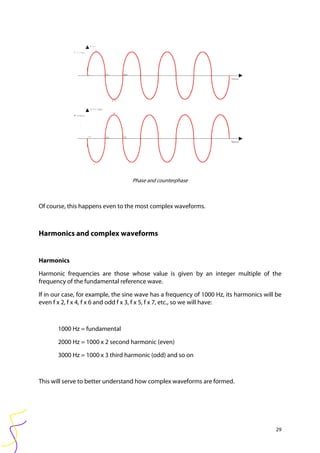
  • 96.
    94 Metronome Next, if thesong will have a fixed tempo, the basic metronome should be set otherwise a tempo-track with metronome variations on the timeline (the song's timeline) should be used. Of course, in some cases, the use of the metronome may not be provided. Metronome settings Marker The next operation – however optional – may be to mark the track on the timeline. It consists of creating a marker track where we will indicate specific points of the song. For example: • marker 1 – intro • marker 2 – verse 01 • marker 3 – chorus 01 • marker 4 – verse 02 ... and so on. By doing so we will have a more precise cognizance of where in the song we are with a noticeable gain in time. Overview of tracks, markers, tempo and metric
  • 97.
    95 Guide track The makingof a guide track is a recording made during preproduction that contains both harmonic and rhythmic references of the piece, maintaining both its structure and tempo. A piano and vocals, for example, could be the guide tracks of the piece, so that the first musician to record his or her part will easily know where in the piece he or she is, thus devoting himself or herself more to performance and expression than to keeping track of measures. Inserting tracks At this point we can start entering the tracks to be recorded according to the type of source to be acquired. We can thus distinguish: • MIDI sources: these involve the use of virtual instruments (drum machines, synths, etc.) or external instruments controlled via MIDI protocol; • InLine sources: such as electronic pianos and synthesizers or electric guitars and basses; • Miked sources: that is, taken through the use of a microphone, as in the case of acoustic instruments or vocals. MIDI source In this case we will insert a MIDI track or rather an instrument track into the project. We connect the MIDI controller we want to use to the PC (it is always better to do this before opening the DAW program). Next we will go on to set the parameters of the track: • MIDI in: this will be used to set up the controller that will be used to play the parts, such as a master keyboard (mute keyboard) connected via USB port or via MIDI in port recognized by the PC; • MIDI out: this is used to set the destination of the track, that is, the instrument that will play the part or what was recorded on it. This could be a VST instrument internal to the DAW, or the MIDI out port on the PC that will be used to play, via MIDI protocol, an external instrument; • Record enable: a usually red button that, when lit, will allow parts from the MIDI input port being recorded to the track; • Set the headphone listening level to the musician by increasing or decreasing the audio volume of the virtual instrument, relative to the tracks already recorded, through the mixer screen; • Record by pressing Record in the transport bar – this begins the acquisition of the signal in the track or tracks enabled for recording. To stop recording press Stop.
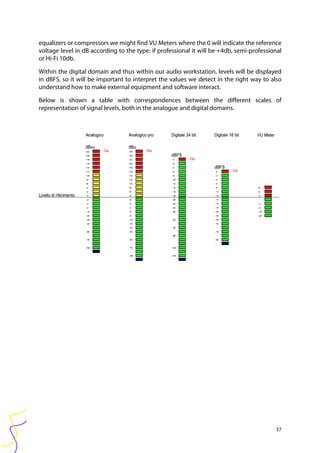
  • 98.
    96 MIDI track settingsAudio track settings InLine Source (line signal) For this type of source we will need to enter an audio track, mono or stereo depending on the nature of the instrument connected. We connect the instrument to the Line (instruments with line signals) or instrument (electric guitar, electrified acoustic, bass guitar, etc.) input port(s). Should we have the need and possibility, we could also acquire two or more tracks with different instruments at the same time, e.g.“input1: bass guitar”,“input2: guitar.” The settings we are going to adjust will be: • Audio in: will set the audio input port in the interface from which we will acquire the signal; • Audio out: will set the destination of the track signal after passing through the volume fader. It will usually be the stereo master bus, but can be used to send the signal to an auxiliary bus to create groupings of tracks such as acoustic guitars, backing vocals, drums, etc.; • Volume fader placed at 0 dB: to have neither gain nor attenuation in the input signal; • Adjustment of input gain: this is a very important step; it is carried out via the channel gain potentiometer of the audio interface, usually marked“Gain.” Starting from the lowest gain position (rotated to the left), we check the signal input level using the meter on the board (if present), or that of the newly opened track. In this case, the meter must be set to measure the input signal; otherwise, we will have no display before monitoring is activated. By playing the instrument the meter will display the input level (usually peak). It will need to be raised or lowered by rotation of the gain until it is between -18 and -12 dBfs. We won't go into detail explaining why these values are set; let's just say that, by doing so, the
  • 99.
    97 signal will havesufficient signal-to-noise ratio (S/N) and headroom to ensure that it is clean of background noise and also has a good “escape route” in the case of higher transients, avoiding saturation. In addition, we will have all signals recorded at the same level and therefore with the same references. Line, Instruments and Gain pot inputs In some cases the input signal may be very high despite the gain position at minimum. It will potentially be possible to attenuate it through the PAD button on the audio interface. • Monitoring: will be used to listen to the signal coming from the audio input, set to the track; • Set the musician's headphone listening level by increasing or decreasing the audio volume in the mixer, either in the instrument to be recorded or in those already recorded; • Record enable: as previously explained; • Record: pressing Record in the transport bar starts signal acquisition in the tracks enabled for recording. To stop press Stop. Transport bar - RECORD
  • 100.
    98 Microphone source Again wewill need to enter an audio track, mono or stereo depending on the nature of the instrument connected. For sources recorded with two microphones, it is advisable to use two mono tracks rather than one stereo track, so as to have more accurate control of the two signals and also of their relative positioning (L R). We connect the microphone to the MIC input connector via balanced XLR cable and enable phantom power (also indicated with 48V), should the connected microphone need it (especially condenser microphones). As before, should we have the need and the possibility, we could also acquire two or more tracks simultaneously with different instruments. Other settings will be handled in the same way as used for inLine inputs. Functions in recording Having made the recording, if it satisfies us, we will go on with the other tracks. Should we have made mistakes in performance or expression, we may decide whether to replace it or overlay it with other recordings (overdubbing), so that we can then choose the best one. Recording of events in tracks can be started either in manual mode by pressing the Record button or in automatic mode by enabling the punch in and out function. It is used to record between the start and end markers. Whenever the cursor slides through the two points, recording will start automatically. A very useful function is that of loop recording. It is set up in the same way as before, but, this time, when the cursor reaches the end marker, it automatically returns to the start marker by restarting and overlapping the new recording with the previous one. In general, the operation of the most common functions may vary between DAWs. Just read the operations manual to understand the type of integration and how to use it. Recording acoustic sources and basic microphone techniques After listing the main operations to be carried out in making a recording, we will elaborate on the methods of acquisition when the source is of the acoustic type making the use of a microphone essential. A microphone is a transducer that “transforms” sound pressure energy into an electrical signal. According to the type of electrical principle employed, we can distinguish three main categories of microphones:
  • 101.
    99 • Moving-coil dynamic:has low sensitivity, so it needs higher sound pressure for it to transduce the signal. It will need to be placed close to the sound source. Very suitable for picking up high sound pressure instruments such as percussion, guitar amplifiers, etc., requires no power supply; • Tape dynamic: similarly to moving-coil dynamic, it has low sensitivity, and is therefore not suitable for recording distant sources. The very delicate type of construction does not allow great acoustic pressures, which could generate distortion or even tape breakage. It does, however, enjoy very good transient response, and is therefore very suitable for picking up vocals, guitars, etc. It generally needs no power supply, except for some models that incorporate a pre- amplifier inside; • Electrostatic condenser: very sensitive to acoustic pressures, which, if high, could also damage it. Convenient for picking up distant sources, has a wider frequency response than dynamic ones. Needs to be powered for the internal electronic circuit to work. Because of its quality in picking up details (it has a high dynamic range), it is very suitable for picking up acoustic instruments such as guitar, strings, percussion, piano and especially vocals. It is not recommended when using it in “noisy” environments due to its high sensitivity. In fact, along with the sound source any ambient noise would be imaged. Directionality is another distinguishing characteristic of a microphone and will be indicated by the polar plot, a circular graph that displays the level of sensitivity attenuation as a function of the angle of incidence of the sound source. We can distinguish three categories: • Unidirectional: sensitive to sounds coming from the front of the microphone capsule. Strongly attenuated sensitivity at the rear. Belonging to this category are microphones that have polar diagrams to: cardioid, with full attenuation on the back side; supercardioid, attenuates more on the sides but regains sensitivity posteriorly; hypercardioid, which, compared to the previous one increases sensitivity on the back and attenuates it laterally.
  • 102.
    100 • Bidirectional, orfigure-of-eight: sensitive to sounds from both the front and back of the capsule. Attenuated sensitivity at the sides of the capsule; • Omnidirectional: sensitive to sounds from all directions. The choice of one or more microphones and their diagram will be dictated by the environmental context, the type of instrument to be recorded and also the microphone technique to be used. Basic microphone techniques Successful microphone recording will be possible if we take into account the type of instrument to be recorded, the environment in which it is located, and the quality of sound we want to achieve. Based on this we will have to choose the microphones and the technique to be used to position them. The most commonly recorded instruments are: • Piano: often taken with at least two condenser microphones, one on the low strings and the other on the high strings; • Wind instruments: positioning changes depending on the type of instrument. For example, on the trumpet and trombone, the microphone should be pointed toward the bell not directly but slightly off-axis, at an average distance of 40 to 50 cm. For the clarinet or sax, one microphone pointed in the direction of the keys or between the keys and the bell (sax) or two, also picking up the sound from the bell – always off-axis. A condenser microphone is the best choice; • Strings: possess similar dynamics and envelope. Usually taken with a condenser microphone placed at a distance of 50 to 60 cm at the sound box between the strings and the soundhole;
  • 103.
    101 • Guitars: witha condenser microphone about 30 cm in the direction of the twelfth fret, not toward the soundhole to avoid a sound too full of resonant bass. A second microphone can also be used on the soundboard, under the bridge, to get a fuller sound of frequencies; • Amplifiers: because of the high sound pressure produced, it is advisable to use dynamic moving-coil microphones placed perpendicularly or off-axis on the centre or radius of the loudspeaker; • Drums: there will be an obvious need for a suitable environment and equipment for recording this instrument. The most common is to mic each individual drum and also the entire drumset complete with cymbals via two overheads. The shooting of the drums is generally done with a moving coil dynamic with a 45-degree incidence toward the inside of the beating skin, about 5/10 cm high. The bass drum, on the other hand, will have two solutions related to the presence or absence of the hole on the resonant skin: in the first case, the microphone will be placed inside the hole at a distance of about 40 cm from the centre of the beating skin; in the second case, about 20 cm from the centre of the resonant skin. The hi- hat will have a condenser microphone placed on the centre radius of the cymbal in a vertical or 45-degree incidence position. Instead, the overheads are placed above the drums and will need to be equidistant from the snare drum to ensure a good balance of volume and stereo panorama. The microphones used are condenser microphones. A type of shooting that is as simple as it is effective involves using the simplified version, namely, with four microphones: bass drum, snare drum and two overheads; • Voice: a condenser microphone (to pick up more vocal details and if we are in a noise-protected environment) or dynamic (highly recommended for example in home recording), placed about 10/15 cm (5 cm if dynamic) from the mouth on axis or off axis (listen to the effect obtained) from above or below the head, using an antipop filter in between. Those just described are some of the modes used to mic the most common instruments. They are, of course, to be considered only as guidelines: indeed it will be important to experiment and customize the shots according to the context. In general, we can say that with a good dynamic and a wide-diaphragm condenser we will be able to do most of the instrumental and vocal shooting. Stereophonic footage is used to emulate the kind of binaural listening, that is, the kind that our auditory system consisting of two ears perceives. This type allows us to give our take a space due in part to the environment and reflections there. It is often used to record drums, woodwind sections, strings or choirs, as the main take or in addition to the single take to capture both detail (microphone on instrument) and an overview of the whole. It would be excellent to use paired microphones for this purpose and that is not only identical in pattern, but also with minimal electrical differences from each other so that they have the same behaviour and response to acoustic pressures.
  • 104.
    102 There are manystereo shooting techniques. The most important ones to consider are: • XY: a technique using two cardioid condenser microphones with coincident capsules at an angle between them of 90/110 degrees; • ORTF: This method is also using two cardioid condenser microphones. The capsules, on the other hand, are 17 cm apart and have a 90/110 degree angle; • NOS: using two cardioid condenser microphones with the capsules positioned perpendicular to the sound source and about 30cm apart; • AB: This technique involves omnidirectional condenser microphones placed a minimum of 60 cm apart. The distance varies according to the size of the source; • Decca Tree: similar to the previous one, it uses three omnidirectional condenser microphones. The two side ones are about two meters apart, the middle one 1.5 meters from the centre axis of the two, thus going to form a T. Editing of recorded tracks After acquiring all the tracks that are part of the arrangement we will move on to the editing phase, that is the set of those operations that will allow us to arrange and clean up all the recorded audio and MIDI material. To speed up the workflow it will be appropriate to start by grouping and colouring the tracks by instrument type, e.g. all guitar tracks in orange, percussion in red, keyboards in green, woodwinds in yellow, vocals in blue, etc. If possible, we could also place them within a folder track, which is useful for doing group editing. Editing tools The most commonly used tools for this purpose are cut, copy and paste; we can find them in the form of buttons with their corresponding symbols, on the toolbar – positioned at the top or bottom depending on the DAW used. Thanks to these tools we will be able, for example, to cut or copy a part or event to move it or paste it precisely elsewhere in the song. In this way it will also be possible to experiment with alternative arrangements. The only limitation will be our own creativity. Toolbar example
  • 105.
    103 Fades An essential operationfor cleaning up recorded events, especially when we make cuts at the beginning, middle or end. By doing so, we will avoid the generation of clips due to abrupt cutting of the waveform. They are divided into: • Fade-in: generated at the beginning of the event; • Fade-out: generated at the end of the event; • Crossfade: useful for joining two events and not making the junction point felt. Quantization This is a very important operation to synchronize the parts with each other, using the tempo grid of the song, the bpm, as a reference. Through this operation we will be able, for example, to put the inaccurate parts of each instrument in time (or grid). Until a few years ago it was a function related only to MIDI events, however, with the evolution of DAWs that has taken place in recent times, audio events will also be able to take advantage of it. Intonation The intonation is a function used to correct some pitch errors or to change a note in the melody of an instrument or voice. It is advisable not to intervene too sensitively to preserve the naturalness of the performance. It can also be used to create artefacts on the part and achieve special effects.
  • 106.
    104 Editor for tuningthe voice or instruments Noise reduction This is an important operation for cleaning up all noise, especially in quiet moments when there are no played parts, in order to prevent it from adding to the sounds in the mix. It can be done through manual event cuts (not forgetting any fades in/out), or if appropriate, automatically, using dynamics plug-ins such as the gate or expander. In the case of very persistent noise summed to the played parts, we can use special plug- ins that sample the noise, invert its phase, and sum it to the signal, achieving its elimination. De-essing, De-popping, De-breathing These are three editing operations used mainly on vocals. • De-essing is the attenuation of those frequencies generated by the pronunciation of sibilant letters such as “S,”“Z,”and “F.” It can be done either manually by selecting the part of the track that contains it and attenuating its volume, or automatically by use of the de-esser (described earlier).
  • 107.
    105 • De-popping, onthe other hand, mitigates the problems generated by letters such as “T,”“B,”and“P”. Their pronunciation generates “pops,”due to strong air movement toward the microphone. They are attenuated in recovery with an anti-pop filter placed between the mouth and the microphone, or by using a high-pass filter on about 80 Hz. • De-breathing, on the other hand, is an optional operation; in fact, it is used to attenuate or eliminate breaths on a sung or spoken part. There is often a tendency to leave them in as these give a more natural appearance to the lead vocals, where they will be eliminated altogether for secondary vocals and choruses in general. This will be done either manually with the editing and fading tools, or automatically with plug-ins specifically for this purpose. Mixing The time has come to put everything together. The mixing stage is really about making all the recorded parts sound good, enhancing them for what will be the guideline dictated by the artist, giving the right position and priority to each event. To do this, there is no good guideline for everything: the mixing strategy will depend on so many factors such as the genre, the instrumentation used, the artist's personal taste, the trend of the moment, the quality of the arrangement, etc. We can therefore understand that the final result will depend on so many variables and so will have several final solutions that may all be valid, the final choice will most likely be up to the producer or the artist – which often coincide. A premise that needs to be made is that for sure making a good mix will also take some time and experience; it will teach us to listen and evaluate well the audio material we have and to choose from time to time the strategies and techniques best suited to the result we want to achieve. A very useful tip is to experiment with sounds as much as possible, so as to gain more mastery and understand the potential of the means in one's possession. Well, after recording, editing and arranging our tracks, we can now embark on the mixing phase through operations to be performed on the recorded tracks: • Gain staging; • Application of timbral processes; • Application of dynamic processes; • Application of spatialisation processes; • Application of reverb processes; • Grouping; • Automations.
  • 108.
    106 Of course wewill not necessarily have to process all recorded signals, it will be done only when necessary: for example, to adapt and make two sounds coexist in the mix, to correct or change the dynamics or simply for creative use. Gain staging This operation is used to level all the signals of the tracks that will enter the mixer channels; we will need this to have the same volume reference for each channel. Basically, all channels will sound at the same volume when their faders are at the same 0dB position. By doing this we will have a signal that is not very amplified so as to generate distortion, nor is it too low that there is a prevalence of background noise. Considering that each track will be added to all the others, it will be necessary not to work at very high gain staging levels. An optimal value is between -18 and -12 dBfs. Of course, the more tracks we have to sum, the closer to -18dBfs we will agree to stay. This can be done via gain potentiometer at the input of the mixer channel, not to be confused with the volume fader, which adjusts only the output volume of the track. Another solution is to use plug-ins placed at the beginning of the insert chain which will automatically level the input signal. Timbral processes Timbral processes consist of using those processors that can correct or change the frequency spectrum of a sound and thus its timbre. In the frequency spectrum, a sound indeed occupies a certain space that, often, it will have to share with other sounds from other instruments. Posing an example, guitars, keyboards, snare drum and vocals share many frequencies that will sum up and mask each other; the task of these processes is to place them and make them intelligible to each other, using a hierarchical or priority order. The most commonly used method is to cut unnecessary frequencies to free up space for the instruments that will use them the most. For example, the spectrum of the kick drum will mostly hover below 120 Hz; in this way (in principle) we can attenuate everything above that frequency. Conversely, vocals or guitars will never go below those frequencies, and so we can filter them out to prevent them from adding the aforementioned background noise. High-pass and low-pass filters are ideal for this purpose. Instead, we can use equalizers to define the sound, taking only the parts we need, attenuating some frequencies and emphasizing others. On the other hand, in the case of instruments that share the same spectrum, to prevent one from masking the other, the one with the most “priority”, i.e., the one most functional to the arrangement, is chosen and emphasized on the main frequencies, making it more present while the other fades out.
  • 109.
    107 An operation oftenperformed on the bass guitar is to create attenuation with a narrow Q factor on the frequency shared with the kick drum, usually on 70/100 Hz, so that the two sounds can be better distinguished. Equalizers can also be used for sound correction, for example, to eliminate a very strong resonance of a drum, synth, acoustic guitar etc. The most suitable placement is always in the insert chain. Dynamic processes These are those processes that work on the dynamics of the signal and control both its level and envelope. The main processors that deal with this are compressors, limiters, expanders and gates. How they work we have discussed previously, summarizing we could say that: • Compressors are used to control signal peaks by attenuating those that exceed a set threshold. Widely used in all instruments that have high dynamics, but that is counter-productive for mix purposes. With the compressor we go to decrease the dynamics by bringing the upper peaks closer to the lower ones. Used in all instruments with wide dynamics and especially on vocals for proper levelling; • A limiter is a compressor with a very high compression ratio; anything above the threshold will have the same level. Used to prevent the signal from exceeding certain values; • Expander and gate have the same principle of operation, that is, the“reverse”of the compressor. The gate removes everything below the threshold, where the expander attenuates it. These processors are used, for example, to clean up background noise in a voice or to attenuate the sustaining of a drum, etc. Dynamics processors will also be used mainly in the insert. Spatialisation processes These processes deal with the management of sounds in the mix space. In a stereophonic mix the audio signals are distributed along a 180 degree arc, in the centre of which we will have the signal arriving at the two channels L (left) and R (right) with the same level. By convention we will put here the carrier signals such as the kick drum, the bass, the lead vocals, while everything else can be distributed between left and right trying to keep the balance between the two channels, not only with levels, but also with the distribution of instruments, frequencies and envelope. For example, if we put a synth at the far left, it would then be convenient to compensate at the far right with an instrument possessing a similar frequency range such as another synth or a guitar. The same principle will also apply to percussive instruments (such as maracas or cymbals), placed at both ends to compensate for the envelope type. We can
  • 110.
    108 also spatialise asignal in depth for example by inserting reverbs thus moving the source away from the listener or the use of volume, high frequency attenuation, etc. One important aspect of the mix must be taken into consideration is that of mono compatibility. This will be made possible only if there should not be too much phase shift between the left and right channels. In fact, in monophonic music broadcasting systems the signals of the two channels are summed, therefore, the parts that will be out of phase (very nice in stereo broadcasting) will all be cancelled. Reverb processes These are those operations used to place sound in an environmental context to make it natural to listen to. This process is done naturally by our brain, which is able to perceive the environment in which a sound is placed (some of these concepts have been explained with psychoacoustics). In practice, to give ambience to the sound, we will have to carefully consider the context in which we want to place it in relation to the other instruments. The most commonly used processors are reverbs and delays. They are usually inserted into an auxiliary channel or a dedicated FX channel (if the DAW has them). In this way, a single reverb can be used by several tracks at once; we only need to send it the signal from the send of the channels we want to process. Grouping One very useful operation for the purposes of compacting and better controlling the mix is to create audio subgroups with instruments. This will allow us to simultaneously level the instruments of a section that pass through that group thus facilitating the balancing phase of the various sections. For example: • Drums group: where the tracks of kick drum, snare drum, tom, overhead, etc. converge; • Acoustic guitars group: with acoustic guitar L and R; • Electric guitars group: with arpeggio guitar L and R or distorted L and R; • Horns group: with trumpet, trombone, sax, etc; • Backing vocals group: with voice 1, 2, 3, etc; • Lead vocals group: with verse vocals, chorus vocals, bridge vocals, etc. Group tracks can in turn be processed and/or grouped onto other groups, thus creating more complex mixes.
  • 111.
    109 Example of signalflow assigned to a group Automations They are used to automatically vary most of the controllable parameters of a DAW such as volume, pan, enable effects in insert or send, etc., making the mix much more precise and dynamic. The automation curve inevitably we will have to draw it ourselves through “writing” the movement of the fader or software button, or through an external DAW controller. In this way, we will be able to manage the mix to enhance or simply attenuate its sound at a specific point; for example, to emphasize the guitar during a phrasing or solo, to lower a vocal in the presence of a few instruments, to move one instrument to the right and one to the left through the pan, to enable an effect during the chorus and turn it off in the verse, etc. Track with volume automation events
  • 112.
    110 Finalization and listening Afterapplying all the processes necessary to correct and obtain the desired sounds, we will move on to finalizing the mix. It will serve to glue and level the signals making them more balanced with each other. It will then be important to bring them to an optimal dynamic level for listening and for the later stages of post-production. To achieve this, it may be necessary to control all the groups created with a limiter in the bus, albeit not too aggressive to avoid crushing the dynamics too much; the groups further processed we can then level them out with each other and send them to a Master group on which to insert a bus compressor (this too will have to have settings that are not very aggressive) to blend the groups together. At this stage the output level from the master in dB RMS will be advisable to keep it at a value between -14 and -8 dBfs. This is to ensure that we have good headroom and thus be able to work in postproduction. At this point, if satisfied with the result, we can export the song by performing the mixdown or bounce to an uncompressed stereo file and listen to the song on different delivery systems (notebooks, tablets, smartphones, car stereos, etc.) to assess any mix deficiencies to be corrected later. This can also be done with the help of people who have never heard the song throughout the production phase, thus having a more critical and less conditioned ear. When the mix is finished, we can create the file that we will use in the next step: mastering. To avoid loss of quality and information, it is advisable to export with the same production format as the project, for example, if we recorded at 48 KHz and 24 bit, we will need to have the same settings in mixdown. Notes on Mastering We came to the third and final stage of music production: mastering. This operation allows us to finalize our production to conform to what the technical standards are required by the music industry. To do this, useful tools will be used to correct any errors in the mix. One clarification to be made is that mastering will act on the product that has already been mixed, so interventions made at this stage will have an impact on the overall sound of the song. The most accomplished interventions will be: • Correction of errors such as: noise elimination, reworking of spectrum or dynamics, channel balancing, stereo spatialisation, phase correction, etc; • Processes on loudness: in order to bring our product in line with what are commercial standards we are going to treat it with dynamics processors such as
  • 113.
    111 compressors, multiband compressorsand limiters, trying to obtain a loudness suitable for the type of platform that will have to reproduce it such as, for example, the various streaming sites, record contexts and physical media such as CD-audio. There are lists describing loudness, maximum peak and dynamic range to be achieved depending on the platform used; • Adaptation to different listening systems, useful for maintaining mix balances as much as possible on any type of platform, from Hi-Fi to laptop to smartphone; • Metadata insertion: this is information that is added into the track file regarding track and album title, author, ISRC codes, etc. In the case of mastering an entire album to CD, we will have to deal with the creation of the DDP project, a file that contains all the information of audio, track list and metadata of the media (a kind of ISO image) to be sent to whoever will be doing the duplication. The most common types of mastering are: • Stereo mastering: done directly on the stereo mixed signal, this is the most common technique and is mostly done on mixes with few errors since any corrections we can make will be more limited; • Stem mastering: a technique that works directly on the stems, that is, on the mix of the individual instrumental groups. In this way, the sound engineer can act separately on each group (drums, bass, guitars, vocals, etc.), creating a more correct balance and preventing any errors on each group from adding up to the final mix.
  • 114.
    112 COPYRIGHT Introduction It will havehappened a bit to everyone to look at any logo belonging to a major brand and realize that next to it, in small print, stood out a circled C ©, or an R ® or even TM ™. Well, for those who do not know, such wordings are in the international code, the deposits that a company, an author or a simple private individual make so that the ownership of the work they have produced is recognized to them. Acknowledging intellectual property, of course, does not imply simply saying, “Do you know that the logo of such-and-such brand was designed by such-and-such?” The intellectual property of something, also known precisely as “Copyright,” is a monetary recognition that is paid to the creator of that specific work whenever someone uses it in the most diverse context. If a restaurant moves tables to organize an evening of smooth dancing to the notes of Raul Casadei - and as children, how many times did we happen to be in certain contexts - he will then have to fill out a specific form on which to report which Raul Casadei songs were radiated. For each of these songs, the agency in charge – whose name we all know, but we prefer to go step by step – will pay the artist his share. But, of course, this was a sometimes ironic example; let's take a slightly more complex one: the purchase of an album is a process involving several personalities, since it will inevitably be produced by a record company or related. Whenever we buy an album of a favorite artist, the money we spent paying the cover price will be split between the shopkeeper who sold it to us, the record company that produced it and the artist, plus any fees to the distributor when afferent to outside agencies. Let's take a borderline case: Thriller, Michael Jackson's masterpiece released in 1982 and which has sold – it is thought – more than one hundred million copies in those forty years. The production company is Epic, and, once it has collected the money from the various retailers where people bought the 33 RPM, it has to distribute it in the following way: European distribution is entrusted to another record company, Columbia, so they get a nice chunk of change; the producer is Quincy Jones, a name in the black music elite, an award-winner and recognized as one of the top people in the business, so his contract will not be just any contract, ergo, it would be worth a lot of money; the shopkeepers have to be paid; all the musicians who have collaborated – and they are not musicians who are still studying major scales – have to be paid; those who have worked at the press offices, the graphics department, and all those who belong to the large apparatus of such a famous record company have to be paid; and Michael Jackson? Here, when Michael Jackson recorded Thriller he was already a successful artist. He had
  • 115.
    113 begun to makea name for himself as a 13 years old prodigy along with his brothers at the Jackson 5 band, and he had recorded his first single, Ben, when he was not even 15 years old. So, you can't give Michael Jackson a pittance, partly because, if you do that, the guy changes record companies, he doesn't take the record on tour, and you, Epic, lose out. Therefore, copyright, in the case of Michael Jackson, is no longer a simple acknowledgment of “you did this,” but it becomes a kind of “with what you did, a plethora of people tonight will eat their fill.” It was a borderline case of how far one can go. Smaller production companies these days cannot afford to pay disproportionate amounts to young artists, signing contracts in which the percentage of engagement is more than – and we want to exaggerate – 20%. If we think that for Harry Potter and the Heir's Curse in 2016 J.K. Rowling netted 42% just for giving consent to the use of her intellectual property, then we understand how copyright is something strictly “author-related”; an unknown author will not be able to go home with overflowing pockets: he will have to be content to take a rather modest percentage, cover his eyes with dreams and hope to get to those levels after certain efforts and sacrifices. How copyright is obtained But a question arises: is copyright obtained through a producer? Obviously not. It may be done that way, but it is unlikely to happen. An artist who always publishes his work with the same producer or publisher will perhaps sign special contracts that may allow him to delegate the deposit stage to someone else; Umberto Eco published most of his writings with Bompiani and undoubtedly he had no fear at all that someone would rob him of his work because he knew that no one in his right mind would write a brick like The Pendulum of Foucault as an unknown author and therefore by calling to the publisher he briefly explained to him how long it would take him to finish it, etc. In short, we always go back there. Nonetheless, it can also happen that a young musician sends his own demo to a record company and receives a proposal for publication; in that case, by sealing the contract, he surrenders his intellectual property to the production for a certain period of time – usually starting from two years. On the other hand, it is rather complex to break through like this blindly and it takes a moment to cover one's back, not least because, although we will always be told around that no one is intent on “ripping off” your work, caution, as we know, is never too much. The aforementioned Michael Jackson, if he had not had the good fortune of already being in an established family in the music scene – or bad luck given the disagreements within it – when at the age of fourteen he decided to submit Ben to a record company, the latter perhaps might even have thought of handing it over to an already established author and so much for the child prodigy. Copyright serves to protect oneself and theoretically protection is equivalent to depositing one's work with the national Society of Authors and Publishers (SAP).
  • 116.
    114 The SAP The nationalSAP is the main – at one time unique – and indeed, a body that is responsible for safeguarding each author's intellectual property. I write a book, send it to a publishing house, and that publisher surprisingly publishes it with a signature different from mine; if my book is deposited with SAP and therefore already has its own copyright – which has an official filing date that can be compared as needed – and scrabbling around on the Internet I find that title with another individual's signature, I can proceed through the courts, proving my intellectual property has been violated. Put like that, of course, it sounds like living in Thomas More's Utopia: we make our own criminals and punish them. But, quoting ancient wisdom “made the law, found the deception”. A book is made up of a certain number of words, and some of them can undergo changes even the day before the so-called “visa stamps”. By modifying them just enough our intellectual property will be as much infringed as legally not infringed. What about in music? If a book is made of a certain number of words, a song is made of a certain number of notes and the same applies. Just change a sequence of notes a tad and you will create something different, which will circumvent copyright laws. Let's take a practical example. In 1993, as part of the soundtrack to the movie Free Willy, Michael Jackson – him again – released the eighth single from his Dangerous album, which came out two years earlier, Will You Be There. At that time, the king of pop was a single machine and none of the songs he released could be called “bad”. However, some time ago, Italian singer-songwriter Albano Carrisi had filed a lawsuit against the U.S. artist for plagiarism, since the aforementioned song was very similar to a 1987 song of his, I cigni di Balaka, contained in the album Lbertà! The lawsuit involved the Rome civil court, which ordered the seizure of the Dangerous album in December 1994; the order was lifted when Michael Jackson agreed to answer the charges. The trial took place in Rome in 1997, and expert witnesses determined that there was even a sequence of 37 consecutive identical notes in the refrain, agreeing with Albano. However, on appeal, the civil court in Milan revised the ruling since it appeared that both songs plagiarized a song, Bless You for Being an Angel, by the 1939 band The Ink Spots – for those who do not know them, they are now remembered for the very famous beginning of the film The Shawshank Redemption –, which also casually carried a melody belonging to composer Sergej Prokofiev, although it was inspired by a Native American song and, most importantly, was not copyrighted. Quite a mess, isn't it? Albano denied that he had been inspired by Ink Spots or Prokofiev, but since the tune had never been filed, and the Russian composer's tune was different anyway except for some passages, the singer-songwriter from Salento was given a rather light punishment, namely payment of court costs. How can one tell who is right and who is at fault in this story? There is an answer that will not please supporters of political correctness, but it may be the most plausible one. Many have called the case a “sham,” asserting that “Michael Jackson did not even know Albano
  • 117.
    115 existed,” yet onecannot help but notice how the predominant melody is far too similar in both songs not to harbour some suspicions. It is pragmatic and plausible to think that Michael Jackson, on tour in Italy, overheard I cigni di Balaka and, believing that Albano was a local singer-songwriter, one of those who, in the 1960s made one famous single and made a living out of it – characters of whom Woody Allen gleefully tells us about in his Broadway Danny Rose –, wanted to make the song his own without thinking about the consequences. This might sound silly but in the past, it was quite a widespread practice. It was difficult for a record recorded in Italy to become famous immediately abroad, especially since Italian is not a language even comparable to English in terms of the number of speakers. At most, certain titles could be mispronounced. In fact, in 1956, Domenico Modugno recorded his most famous hit entitled Nel blu dipinto di blu. The fact that most readers will have immediately thought the original title was Volare is a good testimony that helps to fluidize this discourse. The song was filed under that title but since several performers, on the document to be delivered to the SAP, wrote Volare, he decided to file it that way as well, to avoid receiving not even a bit of anything from that collective mistake. Dean Martin, the celebrated American confidential singer, recorded his own version of Nel blu dipinto di blu in 1960 under the title Volare. On the other hand, it was the only word in Italian in his lyrics, as all the others were translated and interpreted into English. And so, the technical quibbles that prevent us from getting what we think we are entitled to for the intellectual property of something unfortunately are there, and they are not few. Then again, just as musicians would like to make a living from their art, lawyers try to do so, and their art consists of quibbling. We are all artists and all philosophers, Plato would have said. Knowing the law So how can we avoid falling into the net of loopholes? By knowing the regulations in our favour. Check the national regulations regarding the intellectual property as well as the latest updates they had. Like all laws governing our republic, it can be consulted at archives, etc., or thanks in part to our new deviltry, it can be easily retrieved on the Internet, either on the SAP website or by specifically searching for it. We will not stand here to enumerate each and every article therein; however, since it is only fair to shed some light on the regulations, an important clarification concerns the value given to contracts: if a contract does not specify something, then, in case of litigation, reference must be made to the regulations. An example? The most famous songwriting duet in music history is universally remembered as Lennon-McCartney; should John Lennon have recorded a solo song, but it was indicated in the contract that the authorship was also Paul McCartney's – this is a
  • 118.
    116 leapfrog example, unthinkablein the major world, but let's work with some imagination – then good Paul would get half of the revenue, even without having done anything. Why? Because if the article mentions that, in the case of shared authorship, the “parties shall be presumed to be of equal value, unless evidenced in writing to the contrary.” A juicier example is that of the employees: the author of an industrial design, if an employee of a company, is not considered the owner of the work, but rather that benefit goes to the employer – unless otherwise indicated in writing. Who designed the apple logo for Apple? Perhaps many people will know the answer to this, however, when a TV series decides to stage a product placement through the image of a laptop with that logo on the back, compensation will be due to the company and not to the original creator – who perhaps will be due a small fee if stipulated. Obviously, this is an example that does not quite fit reality, since it is more plausible that Apple is the one proposing the sponsor so that it will have its own product and logo on television during a series, and then, presumably, will pay a fee to the production company. Moral law Another aspect that may be of interest to us on the protection of our intellectual property in case of attempts at quibbling is that of moral right. The moral right is the ability of the author to claim authorship should the exploitation of the work fail to satisfy him, etc. This right is important because, fundamentally, it is the one on which it is easiest to quibble. I sign a contract with a major label to release my album; maybe I had only sent demos recorded with piano and vocals, and I had in mind to make an album of acoustic music, although the record company has already equipped itself with instrumentalists, sound engineers and whatever else is needed to make an EDM album. I object and the record company objects to my objections in turn. If it doesn't suit me, I can request the termination of the contract, though I have to be aware of the clauses therein. If, with the assignment of rights, I have also given up the possibility of syndicating certain editorial choices, then I will know that this whole game will be resolved with my richest lawyer and that's it. But I could always try to appeal to the moral right and hope to recover my product. An example might well be screenwriter Alan Moore. The author of comic book works such as V for Vendetta, From Hell, The Legend of the Extraordinary Gentlemen and Watchmen, he always waived his rights because he was highly critical of how his works were being marketed. He has never taken a shine to record transpositions of his comic books, since he was convinced that they did not share the original spirit at all – and also because of certain reluctance he has towards cinema. In essence he gave up the moral right, not least because contracts with the majors often circumvent that clause like leprosy. Vladimir Nabokov saw his novel Lolita transposed by Stanley Kubrick in 1962. Of the final work he was not satisfied, although he had collaborated on the subject. Kubrick and his staff altered several aspects of the original plot, attempting to stay within Hollywood
  • 119.
    117 standards with astory that was also too rough for the time. Yet, once the gentleman's agreement was signed, the Russian writer could say very little, since we could compare screenwriters, scriptwriters, cinematographers, etc., as to the most important employees of a company that has its employer in the director or producer anyway – today, more often the latter, yesterday, more often the former – and, as we have said, regarding a company, the reference is who is in charge. Quite theoretically, moral rights should not be waivable however in reality it is not that simple. Otherwise, the various Mike Oldfield, Lou Reed, etc., would never have recorded records with livorous words against their former producers – like Oldfield –, or a forty– minute ellipse made only of revenge noises – like Reed. You always have to take a look at what is written before the signature line otherwise you will run the risk of ending up with tears in your eyes and your ears full of the mockery of those who mock you. How long does copyright last? This is a good question. There is a very simple answer, but as usual it needs to be argued. First of all, with Legislative Decree No. 22 of 21.02.2014, implementing Directive 2011/77/EU that amended Directive 2006/116/EC, the law intervened to change a previous instance that posed differences on the type of work but, in a nutshell, summarized everything with the famous fifty years from the death of the author. In Italy as of 2014, we can say that copyright expires seventy years after the death of the author. This does not mean that all records, books or films published seventy years ago are now in the public domain. Each author may have heirs, who will settle according to what is stated in the aforementioned legislation. The practices for the succession of copyright, in itself, are similar to those for the succession of private property such as may be land, a house, etc. The law provides that the heirs enjoy the proceeds of the right, unless there is a useful dispute to call in the law. In the absence of clarification on the future of the property, SAP takes over and becomes the owner – say, assumes the role of a commissioner. This occurs in the event that the heirs failed to agree or precisely neglected the choice of an administrator when the succession paperwork was initiated. In the absence of an agreement, or upon the forfeiture of the heirs' benefits by default, the work may be turned over to whoever requests it, as if the said private property ended up at a bankruptcy auction. The discretion will, of course, rest with the SAP. It may be, however, that due to lack of interest on the part of some or other third party, the work remains without administration and, therefore, falls into the public domain. So should you happen to see lists of free viewable movies on the Internet, you would be inclined to say: it's because there was no agreement on intellectual property between the heirs or there was no demand. Actually, the world of entertainment a few decades ago was quite different from what it is today. With television becoming the true companion of adventure for the average individual, the demand for products, both for the purpose of
  • 120.
    118 dissemination and forthe need for continuous replication, led to an exponential increase in the need to protect oneself. Think of it this way: in the 1960s, as mentioned when we talked about Albano, it was plausible that a singer would record a 45 RPM record and with it be able to support his family for who knows how long. Nowadays, also because of the diffusion with which the Internet has imposed a frenzied pace on productions, it is plausible that an artist can survive for a season. Let's take an example. Which artist came second in the 2014 edition of Sanremo? Perhaps, if we were in 1972 and asked who came second in the 1964 edition, someone would have been able to answer – not least because he or she would have remembered the victory of Gigliola Cinquetti, then 16 years old. This is not a criticism; it's really a different way of conceiving art in general: fruition today is something you choose instantaneously, without any qualms; back then you had to get up from the couch, go to the store and choose wisely the record you wanted. And if a record failed to outlive others of its contemporaries, and the rights died with it for lack of revenue and interest, or direct succession, the work soon became at the mercy of everyone. Public Domain Therefore several public domain works that we find on the Internet, such as movies or certain books are free because, in several cases, there was no heir, or because the heir had failed to place the work with anyone, either due to his own demerits or the disinterest of others. Or, simply, some works were created before the birth of copyright, and can be reproduced at will. When you hear musicians performing a rendition of Mozart's Magic Flute, know that, armed with just as many skilled instrumentalists, you too could offer your own version. Or, going to the Greek theatre in Syracuse, observing the staging of Medea, you will not believe that the producers are paying the heirs of Euripides; like them, you too can reproduce that work, modifying it as much and as much as you like. Translating a classic book that came out before the invention of copyright is at the discretion of the translator, for example. It happened in the past by state provisions; in the fascist era, the regime demanded that all texts from England, France, the United States and the Soviet Union, be “corrected” or “interpreted” according to its wishes; in particular, it is still possible today to find novels by Agatha Christie with arbitrary additions made during those years. This would assume that, opening War and Peace, an editor might decide to insert dragons instead of Napoleon's army as the enemy. Of course, it is not all as rosy as it seems, for there are bodies that are also concerned with preservation if the works fall within their records. A fellow who is ignorant of Latin could not set about marketing Baruch Spinoza's very complicated Ethica more geometrico demonstrata with his own translations, since the work is preserved anyway. Copies of it exist in national libraries, freely available for
  • 121.
    119 consultation, and onecan even be sued if someone, a purchaser of that translation, were to complain about it. In the case of the above mentioned fascism, there could be no body to prevent the government from imposing its own censorships, since it was the government itself that was in charge of it, and freedoms, we know, were not that many. Conclusions And so, in conclusion, we must be careful in reminding ourselves of one thing: art belongs to everyone, but there would be no art without an artist. If that were the case, we could have also written this chapter without mentioning any names, dealing only with works. And if, with all the flaws the law may have, we are still able to avail ourselves of protection over what is ours, why shouldn't we? After all, we are not like Alessandro Manzoni. We cannot afford Gustave Dorè's illustrations to testify that the reproductions of The Betrothed that have been going around for thirteen years are undue, at a time when there was no law to regulate it. Consult the regulations, always read contracts carefully and you will be pretty much safe. We can’t say you’ll be a 100% safe because, as anticipated, there are those who make an art out of quibbles just as you will make an art out of your music, your paintings, your books or your logos. Creating something out of nothing is the ultimate form of expression as well as one of the main necessities of our nature, and for that reason, the creator always deserves to be safeguarded.
  • 122.
    120 BIBLIOGRAPHY • Ambroselli P.,CapozziF., De Angelis M., Valerini F. – The sound technician's manual–Theory and applications of audio – Studios Academy – Rome – 2019; • Aiello V. – The Piano Accompanist – Handbook for Piano Accompaniment in Pop / Jazz Style – Independently published – 2018; • Bartlett B. – Stereo microphone techniques – Basic concepts – Equipment– Procedures – Applications – Hoepli – 1998; • Grantham J. – Jazzmaster Cookbook – Jazz theory and improvisation – Volonté & Co – 2010; • Massimi M. – MITB Mastering in the box – ConTempoNet s.a.s. – Rome – 2018.
  • 123.
  • 124.