Presented By
Interactive Dictionary
K.Nishanth 23211A7270
M.Sumith Simha Reddy 23211A7271
M.Sai Varshith 23211A7272
M.Sai Thanishq 23211A7273
M.Venkata Sai Suraj 23211A7274
Aim/Objective
Introduction
Algorithm
Implementation/Code
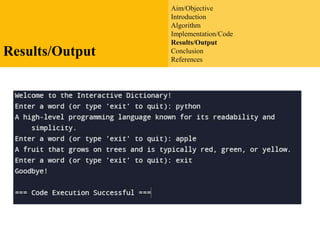
Results/Output
Conclusion
References
Aim/Objective
To Create Interactive
Dictionary Using
Python
Aim/Objective
Introduction
Algorithm
Implementation/Code
Results/Output
Conclusion
References
Introduction
• This Presentation is about creating an Interactive Word
Meaning Dictionary app in Python. Concepts of JSON,
File Reading, Python Data Structure and difflibmodule
are being used.
• This code creates a class called InteractiveDictionary
that has a dictionary of words and definitions. The play()
method randomly selects a word from the dictionary and
asks the user to define it. If the user's definition is
correct, the program prints "Correct!". If the user's
definition is incorrect, the program prints "Incorrect." and
the correct definition. The program then asks the user if
they want to play again.
Aim/Objective
Introduction
Algorithm
Implementation/Code
Results/Output
Conclusion
References
Algorithm
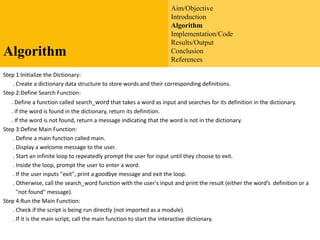
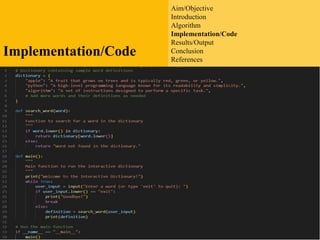
Step 1:Initialize the Dictionary:
. Create a dictionary data structure to store words and their corresponding definitions.
Step 2:Define Search Function:
. Define a function called search_word that takes a word as input and searches for its definition in the dictionary.
. if the word is found in the dictionary, return its definition.
. If the word is not found, return a message indicating that the word is not in the dictionary.
Step 3:Define Main Function:
. Define a main function called main.
. Display a welcome message to the user.
. Start an infinite loop to repeatedly prompt the user for input until they choose to exit.
. Inside the loop, prompt the user to enter a word.
. If the user inputs "exit", print a goodbye message and exit the loop.
. Otherwise, call the search_word function with the user's input and print the result (either the word’s definition or a
"not found" message).
Step 4:Run the Main Function:
. Check if the script is being run directly (not imported as a module).
. If it is the main script, call the main function to start the interactive dictionary.
Aim/Objective
Introduction
Algorithm
Implementation/Code
Results/Output
Conclusion
References
Implementation/Code
Aim/Objective
Introduction
Algorithm
Implementation/Code
Results/Output
Conclusion
References
Results/Output
Aim/Objective
Introduction
Algorithm
Implementation/Code
Results/Output
Conclusion
References
Conclusion
. In conclusion, the provided code presents a basic yet functional interactive
dictionary implemented in Python. The dictionary contains sample word definitions
stored in a dictionary data structure. Users are prompted to input a word, and the
program retrieves and displays the corresponding definition if it exists in the
dictionary. The interactive loop continues until the user chooses to exit.
. This project serves as a foundation for building more sophisticated dictionary
applications.
. By leveraging Python's simplicity and versatility, this interactive dictionary offers a
practical tool for language enthusiasts, learners, and developers alike to explore and
expand their vocabulary effortlessly
Aim/Objective
Introduction
Algorithm
Implementation/Code
Results/Output
Conclusion
References
References
• https://medium.datadriveninvestor.com/intera
ctive-dictionaryapplication-in-python-
16899fe5ae1d
• https://github.com/Dhrumilcse/Interactive-
Dictionary-in-Python
• Microsoft copilot
• https://www.learnpython.org/en/Dictionaries
Thank You !!
?
Q and A?

Interactive Dictionary AIDS-B.pptx aaaaaaaaaaaaaaaaaaaaaaaaaa