Little Coder Program
by
What you’ve learned?
Doing simple drawings using turtle module
Making DecisionsChapter 5
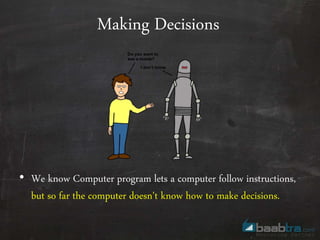
• We know Computer program lets a computer follow instructions,
but so far the computer doesn't know how to make decisions.
Making Decisions
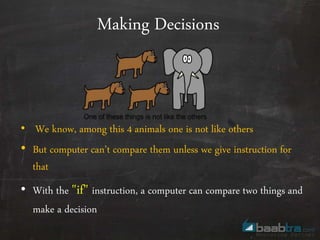
• We know, among this 4 animals one is not like others
• But computer can’t compare them unless we give instruction for
that
• With the "if" instruction, a computer can compare two things and
make a decision
Making Decisions
• Consider the below example
“We might ask, “Are you older than 20?” and if the answer is yes,
respond with “You are too old!”
These sorts of questions are called conditions, and we combine these
conditions and the responses into if statements.
Making Decisions
Example
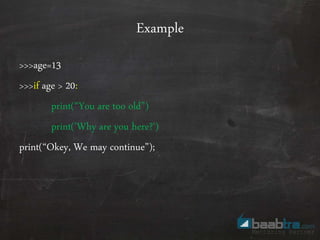
>>>age=13
>>>if age > 20:
print(“You are too old”)
print('Why are you here?')
print(“Okey, We may continue”);
Example
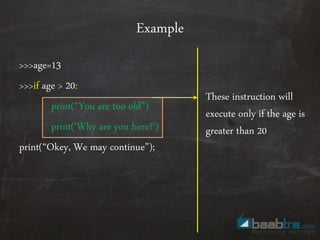
>>>age=13
>>>if age > 20:
print(“You are too old”)
print('Why are you here?')
print(“Okey, We may continue”);
These instruction will
execute only if the age is
greater than 20
Example
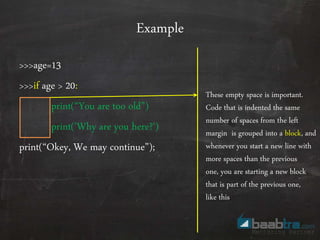
>>>age=13
>>>if age > 20:
print(“You are too old”)
print('Why are you here?')
print(“Okey, We may continue”);
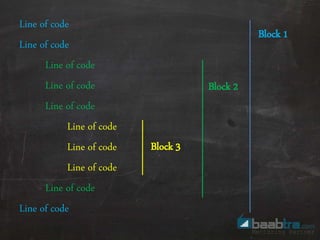
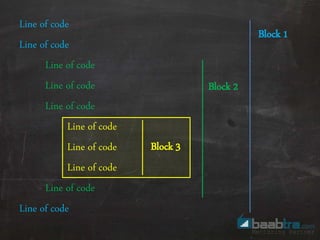
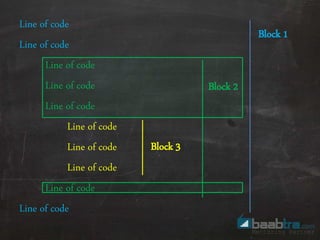
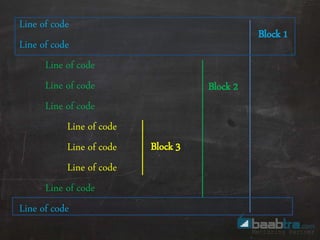
These empty space is important.
Code that is indented the same
number of spaces from the left
margin is grouped into a block, and
whenever you start a new line with
more spaces than the previous
one, you are starting a new block
that is part of the previous one,
like this
Line of code
Line of code
Line of code
Line of code
Line of code
Line of code
Line of code
Line of code
Line of code
Line of code
Block 1
Block 2
Block 3
Line of code
Line of code
Line of code
Line of code
Line of code
Line of code
Line of code
Line of code
Line of code
Line of code
Block 1
Block 2
Block 3
Line of code
Line of code
Line of code
Line of code
Line of code
Line of code
Line of code
Line of code
Line of code
Line of code
Block 1
Block 2
Block 3
Line of code
Line of code
Line of code
Line of code
Line of code
Line of code
Line of code
Line of code
Line of code
Line of code
Block 1
Block 2
Block 3
Try this !
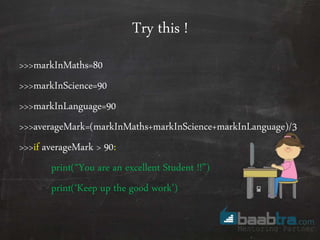
• Write down a simple python program to store your marks in 3
subjects, and calculate the average mark. If the average mark is
greater than 90, print “You are an excellent student” and “Keep up
the good work”
Try this !
>>>markInMaths=80
>>>markInScience=90
>>>markInLanguage=90
>>>averageMark=(markInMaths+markInScience+markInLanguage)/3
>>>if averageMark > 90:
print(“You are an excellent Student !!”)
print(‘Keep up the good work')
IF then Else statements
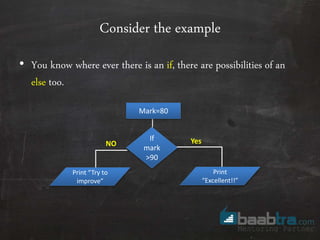
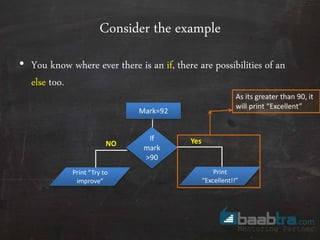
Consider the example
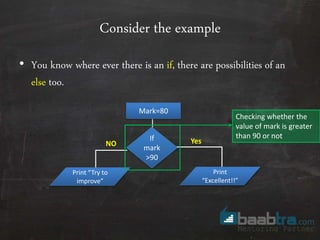
• You know where ever there is an if, there are possibilities of an
else too.
NO Yes
Mark=80
If
mark
>90
Print
“Excellent!!”
Print “Try to
improve”
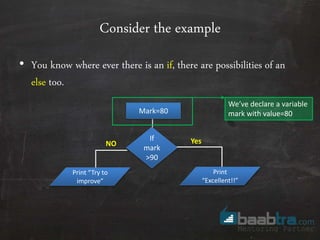
Consider the example
• You know where ever there is an if, there are possibilities of an
else too.
NO Yes
Mark=80
If
mark
>90
Print
“Excellent!!”
Print “Try to
improve”
We’ve declare a variable
mark with value=80
Consider the example
• You know where ever there is an if, there are possibilities of an
else too.
NO Yes
Mark=80
If
mark
>90
Print
“Excellent!!”
Print “Try to
improve”
Checking whether the
value of mark is greater
than 90 or not
Consider the example
• You know where ever there is an if, there are possibilities of an
else too.
NO Yes
Mark=80
If
mark
>90
Print
“Excellent!!”
Print “Try to
improve”
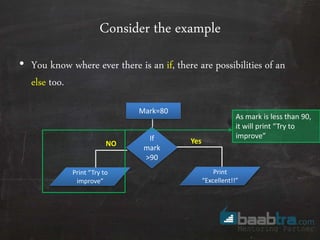
As mark is less than 90,
it will print “Try to
improve”
Consider the example
• You know where ever there is an if, there are possibilities of an
else too.
NO Yes
Mark=92
If
mark
>90
Print
“Excellent!!”
Print “Try to
improve”
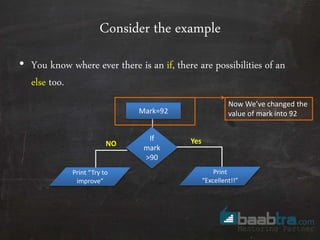
Now We’ve changed the
value of mark into 92
Consider the example
• You know where ever there is an if, there are possibilities of an
else too.
NO Yes
Mark=92
If
mark
>90
Print
“Excellent!!”
Print “Try to
improve”
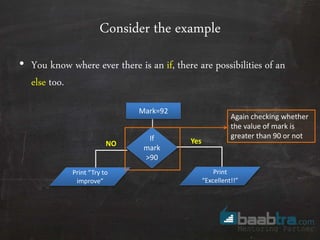
Again checking whether
the value of mark is
greater than 90 or not
Consider the example
• You know where ever there is an if, there are possibilities of an
else too.
NO Yes
Mark=92
If
mark
>90
Print
“Excellent!!”
Print “Try to
improve”
As its greater than 90, it
will print “Excellent”
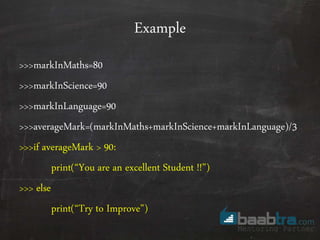
Example
>>>markInMaths=80
>>>markInScience=90
>>>markInLanguage=90
>>>averageMark=(markInMaths+markInScience+markInLanguage)/3
>>>if averageMark > 90:
print(“You are an excellent Student !!”)
>>> else
print(“Try to Improve”)
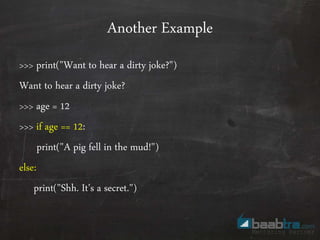
>>> print("Want to hear a dirty joke?")
Want to hear a dirty joke?
>>> age = 12
>>> if age == 12:
print("A pig fell in the mud!")
else:
print("Shh. It's a secret.")
Another Example
if and elif Statements
if and elif
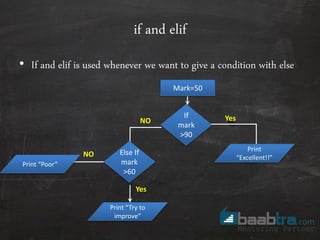
• If and elif is used whenever we want to give a condition with else
NO Yes
Mark=50
If
mark
>90
Print
“Excellent!!”
Print “Try to
improve”
Else If
mark
>60
Yes
Print “Poor”
NO
if and elif
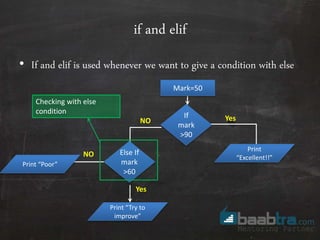
• If and elif is used whenever we want to give a condition with else
NO Yes
Mark=50
If
mark
>90
Print
“Excellent!!”
Print “Try to
improve”
Else If
mark
>60
Yes
Print “Poor”
NO
Checking with else
condition
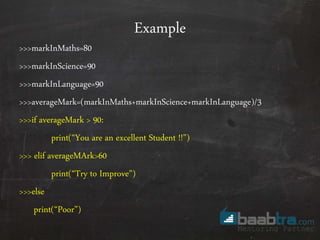
Example
>>>markInMaths=80
>>>markInScience=90
>>>markInLanguage=90
>>>averageMark=(markInMaths+markInScience+markInLanguage)/3
>>>if averageMark > 90:
print(“You are an excellent Student !!”)
>>> elif averageMArk>60
print(“Try to Improve”)
>>>else
print(“Poor”)
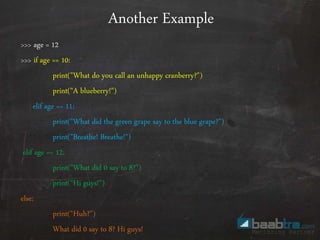
>>> age = 12
>>> if age == 10:
print("What do you call an unhappy cranberry?")
print("A blueberry!")
elif age == 11:
print("What did the green grape say to the blue grape?")
print("Breathe! Breathe!")
elif age == 12:
print("What did 0 say to 8?")
print("Hi guys!")
else:
print("Huh?")
What did 0 say to 8? Hi guys!
Another Example
Combining Conditions
Example
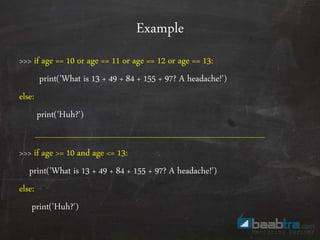
>>> if age == 10 or age == 11 or age == 12 or age == 13:
print('What is 13 + 49 + 84 + 155 + 97? A headache!')
else:
print('Huh?')
>>> if age >= 10 and age <= 13:
print('What is 13 + 49 + 84 + 155 + 97? A headache!')
else:
print('Huh?')
Exercise !
Exercise !
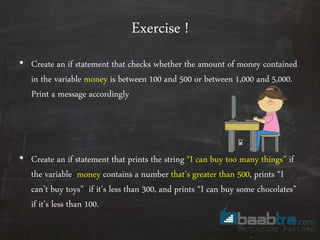
• Create an if statement that checks whether the amount of money contained
in the variable money is between 100 and 500 or between 1,000 and 5,000.
Print a message accordingly
• Create an if statement that prints the string “I can buy too many things” if
the variable money contains a number that’s greater than 500, prints “I
can’t buy toys” if it’s less than 300, and prints “I can buy some chocolates”
if it’s less than 100.
End of Chapter 5

Baabtra.com little coder chapter - 5

  • 1.
  • 2.
    What you’ve learned? Doingsimple drawings using turtle module
  • 3.
  • 4.
    • We knowComputer program lets a computer follow instructions, but so far the computer doesn't know how to make decisions. Making Decisions
  • 5.
    • We know,among this 4 animals one is not like others • But computer can’t compare them unless we give instruction for that • With the "if" instruction, a computer can compare two things and make a decision Making Decisions
  • 6.
    • Consider thebelow example “We might ask, “Are you older than 20?” and if the answer is yes, respond with “You are too old!” These sorts of questions are called conditions, and we combine these conditions and the responses into if statements. Making Decisions
  • 7.
    Example >>>age=13 >>>if age >20: print(“You are too old”) print('Why are you here?') print(“Okey, We may continue”);
  • 8.
    Example >>>age=13 >>>if age >20: print(“You are too old”) print('Why are you here?') print(“Okey, We may continue”); These instruction will execute only if the age is greater than 20
  • 9.
    Example >>>age=13 >>>if age >20: print(“You are too old”) print('Why are you here?') print(“Okey, We may continue”); These empty space is important. Code that is indented the same number of spaces from the left margin is grouped into a block, and whenever you start a new line with more spaces than the previous one, you are starting a new block that is part of the previous one, like this
  • 10.
    Line of code Lineof code Line of code Line of code Line of code Line of code Line of code Line of code Line of code Line of code Block 1 Block 2 Block 3
  • 11.
    Line of code Lineof code Line of code Line of code Line of code Line of code Line of code Line of code Line of code Line of code Block 1 Block 2 Block 3
  • 12.
    Line of code Lineof code Line of code Line of code Line of code Line of code Line of code Line of code Line of code Line of code Block 1 Block 2 Block 3
  • 13.
    Line of code Lineof code Line of code Line of code Line of code Line of code Line of code Line of code Line of code Line of code Block 1 Block 2 Block 3
  • 14.
    Try this ! •Write down a simple python program to store your marks in 3 subjects, and calculate the average mark. If the average mark is greater than 90, print “You are an excellent student” and “Keep up the good work”
  • 15.
    Try this ! >>>markInMaths=80 >>>markInScience=90 >>>markInLanguage=90 >>>averageMark=(markInMaths+markInScience+markInLanguage)/3 >>>ifaverageMark > 90: print(“You are an excellent Student !!”) print(‘Keep up the good work')
  • 16.
    IF then Elsestatements
  • 17.
    Consider the example •You know where ever there is an if, there are possibilities of an else too. NO Yes Mark=80 If mark >90 Print “Excellent!!” Print “Try to improve”
  • 18.
    Consider the example •You know where ever there is an if, there are possibilities of an else too. NO Yes Mark=80 If mark >90 Print “Excellent!!” Print “Try to improve” We’ve declare a variable mark with value=80
  • 19.
    Consider the example •You know where ever there is an if, there are possibilities of an else too. NO Yes Mark=80 If mark >90 Print “Excellent!!” Print “Try to improve” Checking whether the value of mark is greater than 90 or not
  • 20.
    Consider the example •You know where ever there is an if, there are possibilities of an else too. NO Yes Mark=80 If mark >90 Print “Excellent!!” Print “Try to improve” As mark is less than 90, it will print “Try to improve”
  • 21.
    Consider the example •You know where ever there is an if, there are possibilities of an else too. NO Yes Mark=92 If mark >90 Print “Excellent!!” Print “Try to improve” Now We’ve changed the value of mark into 92
  • 22.
    Consider the example •You know where ever there is an if, there are possibilities of an else too. NO Yes Mark=92 If mark >90 Print “Excellent!!” Print “Try to improve” Again checking whether the value of mark is greater than 90 or not
  • 23.
    Consider the example •You know where ever there is an if, there are possibilities of an else too. NO Yes Mark=92 If mark >90 Print “Excellent!!” Print “Try to improve” As its greater than 90, it will print “Excellent”
  • 24.
  • 25.
    >>> print("Want tohear a dirty joke?") Want to hear a dirty joke? >>> age = 12 >>> if age == 12: print("A pig fell in the mud!") else: print("Shh. It's a secret.") Another Example
  • 26.
    if and elifStatements
  • 27.
    if and elif •If and elif is used whenever we want to give a condition with else NO Yes Mark=50 If mark >90 Print “Excellent!!” Print “Try to improve” Else If mark >60 Yes Print “Poor” NO
  • 28.
    if and elif •If and elif is used whenever we want to give a condition with else NO Yes Mark=50 If mark >90 Print “Excellent!!” Print “Try to improve” Else If mark >60 Yes Print “Poor” NO Checking with else condition
  • 29.
    Example >>>markInMaths=80 >>>markInScience=90 >>>markInLanguage=90 >>>averageMark=(markInMaths+markInScience+markInLanguage)/3 >>>if averageMark >90: print(“You are an excellent Student !!”) >>> elif averageMArk>60 print(“Try to Improve”) >>>else print(“Poor”)
  • 30.
    >>> age =12 >>> if age == 10: print("What do you call an unhappy cranberry?") print("A blueberry!") elif age == 11: print("What did the green grape say to the blue grape?") print("Breathe! Breathe!") elif age == 12: print("What did 0 say to 8?") print("Hi guys!") else: print("Huh?") What did 0 say to 8? Hi guys! Another Example
  • 31.
  • 32.
    Example >>> if age== 10 or age == 11 or age == 12 or age == 13: print('What is 13 + 49 + 84 + 155 + 97? A headache!') else: print('Huh?') >>> if age >= 10 and age <= 13: print('What is 13 + 49 + 84 + 155 + 97? A headache!') else: print('Huh?')
  • 33.
  • 34.
    Exercise ! • Createan if statement that checks whether the amount of money contained in the variable money is between 100 and 500 or between 1,000 and 5,000. Print a message accordingly • Create an if statement that prints the string “I can buy too many things” if the variable money contains a number that’s greater than 500, prints “I can’t buy toys” if it’s less than 300, and prints “I can buy some chocolates” if it’s less than 100.
  • 35.