Conditional Execution
Chapter 3
Python for Everybody
www.py4e.com
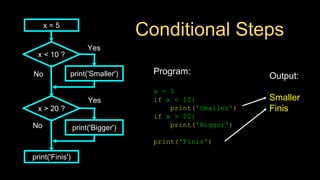
Conditional Steps
Output:
Smaller
Finis
Program:
x = 5
if x < 10:
print('Smaller')
if x > 20:
print('Bigger')
print('Finis')
x = 5
x < 10 ?
print('Smaller')
x > 20 ?
print('Bigger')
print('Finis')
Yes
No
Yes
No
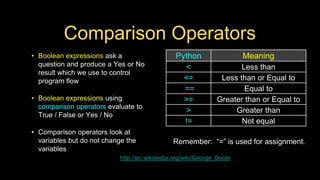
Comparison Operators
• Boolean expressions ask a
question and produce a Yes or No
result which we use to control
program flow
• Boolean expressions using
comparison operators evaluate to
True / False or Yes / No
• Comparison operators look at
variables but do not change the
variables
http://en.wikipedia.org/wiki/George_Boole
Remember: “=” is used for assignment.
Python Meaning
< Less than
<= Less than or Equal to
== Equal to
>= Greater than or Equal to
> Greater than
!= Not equal
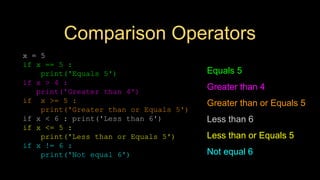
Comparison Operators
x = 5
if x == 5 :
print('Equals 5')
if x > 4 :
print('Greater than 4')
if x >= 5 :
print('Greater than or Equals 5')
if x < 6 : print('Less than 6')
if x <= 5 :
print('Less than or Equals 5')
if x != 6 :
print('Not equal 6')
Equals 5
Greater than 4
Greater than or Equals 5
Less than 6
Less than or Equals 5
Not equal 6
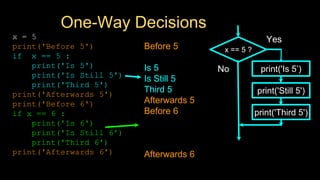
One-Way Decisions
x = 5
print('Before 5')
if x == 5 :
print('Is 5')
print('Is Still 5')
print('Third 5')
print('Afterwards 5')
print('Before 6')
if x == 6 :
print('Is 6')
print('Is Still 6')
print('Third 6')
print('Afterwards 6')
Before 5
Is 5
Is Still 5
Third 5
Afterwards 5
Before 6
Afterwards 6
x == 5 ?
Yes
print('Still 5')
print('Third 5')
No print('Is 5’)
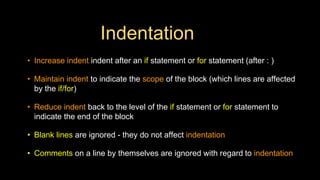
Indentation
• Increase indent indent after an if statement or for statement (after : )
• Maintain indent to indicate the scope of the block (which lines are affected
by the if/for)
• Reduce indent back to the level of the if statement or for statement to
indicate the end of the block
• Blank lines are ignored - they do not affect indentation
• Comments on a line by themselves are ignored with regard to indentation
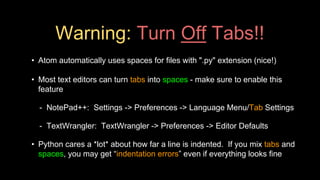
Warning: Turn Off Tabs!!
• Atom automatically uses spaces for files with ".py" extension (nice!)
• Most text editors can turn tabs into spaces - make sure to enable this
feature
- NotePad++: Settings -> Preferences -> Language Menu/Tab Settings
- TextWrangler: TextWrangler -> Preferences -> Editor Defaults
• Python cares a *lot* about how far a line is indented. If you mix tabs and
spaces, you may get “indentation errors” even if everything looks fine
This will save you
much unnecessary
pain.
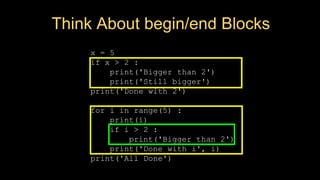
x = 5
if x > 2 :
print('Bigger than 2')
print('Still bigger')
print('Done with 2')
for i in range(5) :
print(i)
if i > 2 :
print('Bigger than 2')
print('Done with i', i)
print('All Done')
increase / maintain after if or for
decrease to indicate end of block
x = 5
if x > 2 :
print('Bigger than 2')
print('Still bigger')
print('Done with 2')
for i in range(5) :
print(i)
if i > 2 :
print('Bigger than 2')
print('Done with i', i)
print('All Done')
Think About begin/end Blocks
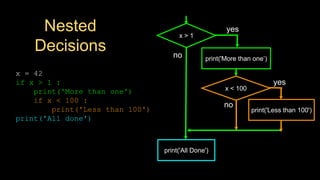
x = 42
if x > 1 :
print('More than one')
if x < 100 :
print('Less than 100')
print('All done')
Nested
Decisions
x > 1
print('More than one’)
x < 100
print('Less than 100')
print('All Done')
yes
yes
no
no
Two-way Decisions
• Sometimes we want to
do one thing if a logical
expression is true and
something else if the
expression is false
• It is like a fork in the
road - we must choose
one or the other path but
not both
x > 2
print('Bigger')
yes
no
x = 4
print('Not bigger')
print('All Done')
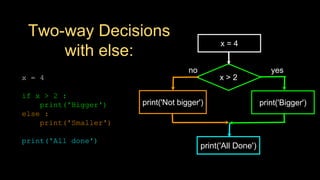
Two-way Decisions
with else:
x > 2
print('Bigger')
yes
no
x = 4
print('All Done')
x = 4
if x > 2 :
print('Bigger')
else :
print('Smaller')
print('All done')
print('Not bigger')
Visualize Blocks
x = 4
if x > 2 :
print('Bigger')
else :
print('Smaller')
print('All done')
x > 2
print('Bigger')
yes
no
x = 4
print('All Done')
print('Not bigger')
More Conditional Structures…
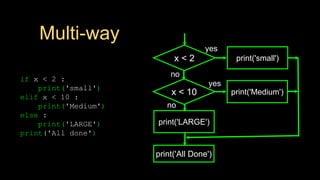
Multi-way
if x < 2 :
print('small')
elif x < 10 :
print('Medium')
else :
print('LARGE')
print('All done')
x < 2 print('small')
yes
no
print('All Done')
x < 10 print('Medium')
yes
print('LARGE')
no
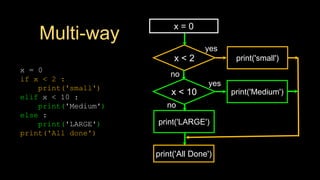
Multi-way
x = 0
if x < 2 :
print('small')
elif x < 10 :
print('Medium')
else :
print('LARGE')
print('All done')
x < 2 print('small')
yes
no
print('All Done')
x < 10 print('Medium')
yes
print('LARGE')
no
x = 0
Multi-way
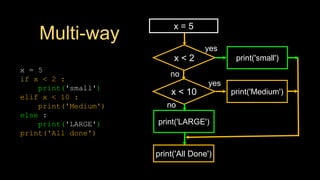
x = 5
if x < 2 :
print('small')
elif x < 10 :
print('Medium')
else :
print('LARGE')
print('All done')
x < 2 print('small')
yes
no
print('All Done')
x < 10 print('Medium')
yes
print('LARGE')
no
x = 5
Multi-way
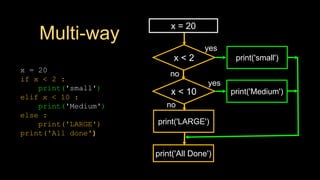
x = 20
if x < 2 :
print('small')
elif x < 10 :
print('Medium')
else :
print('LARGE')
print('All done')
x < 2 print('small')
yes
no
print('All Done')
x < 10 print('Medium')
yes
print('LARGE')
no
x = 20
Multi-way
# No Else
x = 5
if x < 2 :
print('Small')
elif x < 10 :
print('Medium')
print('All done')
if x < 2 :
print('Small')
elif x < 10 :
print('Medium')
elif x < 20 :
print('Big')
elif x < 40 :
print('Large')
elif x < 100:
print('Huge')
else :
print('Ginormous')
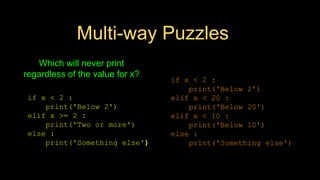
Multi-way Puzzles
if x < 2 :
print('Below 2')
elif x < 20 :
print('Below 20')
elif x < 10 :
print('Below 10')
else :
print('Something else')
if x < 2 :
print('Below 2')
elif x >= 2 :
print('Two or more')
else :
print('Something else')
Which will never print
regardless of the value for x?
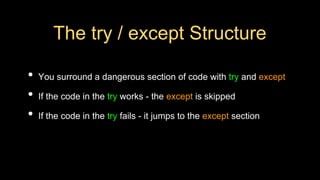
The try / except Structure
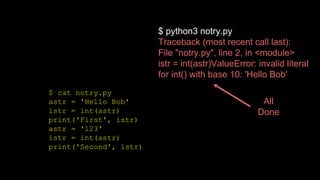
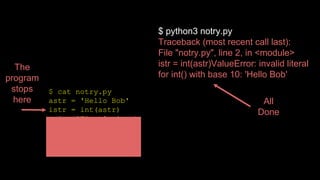
• You surround a dangerous section of code with try and except
• If the code in the try works - the except is skipped
• If the code in the try fails - it jumps to the except section
$ cat notry.py
astr = 'Hello Bob'
istr = int(astr)
print('First', istr)
astr = '123'
istr = int(astr)
print('Second', istr)
$ python3 notry.py
Traceback (most recent call last):
File "notry.py", line 2, in <module>
istr = int(astr)ValueError: invalid literal
for int() with base 10: 'Hello Bob'
All
Done
$ cat notry.py
astr = 'Hello Bob'
istr = int(astr)
print('First', istr)
astr = '123'
istr = int(astr)
print('Second', istr)
$ python3 notry.py
Traceback (most recent call last):
File "notry.py", line 2, in <module>
istr = int(astr)ValueError: invalid literal
for int() with base 10: 'Hello Bob'
All
Done
The
program
stops
here
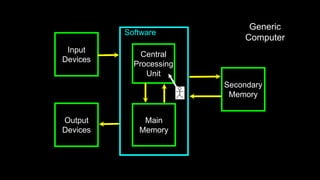
Software
Input
Devices
Central
Processing
Unit
Main
Memory
Output
Devices
Secondary
Memory
Generic
Computer
Software
Input
Devices
Central
Processing
Unit
Main
Memory
Output
Devices
Secondary
Memory
Generic
Computer
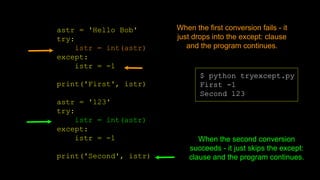
astr = 'Hello Bob'
try:
istr = int(astr)
except:
istr = -1
print('First', istr)
astr = '123'
try:
istr = int(astr)
except:
istr = -1
print('Second', istr)
$ python tryexcept.py
First -1
Second 123
When the first conversion fails - it
just drops into the except: clause
and the program continues.
When the second conversion
succeeds - it just skips the except:
clause and the program continues.
try / except astr = 'Bob'
astr = 'Bob'
try:
print('Hello')
istr = int(astr)
print('There')
except:
istr = -1
print('Done', istr)
print('Hello')
print('There')
istr = int(astr)
print('Done', istr)
istr = -1
Safety net
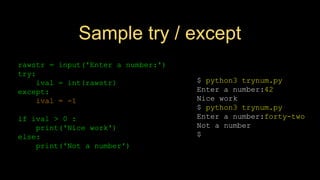
Sample try / except
$ python3 trynum.py
Enter a number:42
Nice work
$ python3 trynum.py
Enter a number:forty-two
Not a number
$
rawstr = input('Enter a number:')
try:
ival = int(rawstr)
except:
ival = -1
if ival > 0 :
print('Nice work')
else:
print('Not a number')
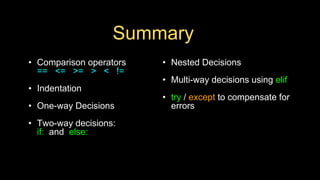
Summary
• Comparison operators
== <= >= > < !=
• Indentation
• One-way Decisions
• Two-way decisions:
if: and else:
• Nested Decisions
• Multi-way decisions using elif
• try / except to compensate for
errors
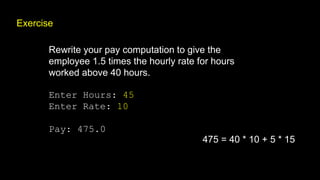
Exercise
Rewrite your pay computation to give the
employee 1.5 times the hourly rate for hours
worked above 40 hours.
Enter Hours: 45
Enter Rate: 10
Pay: 475.0
475 = 40 * 10 + 5 * 15
Exercise
Rewrite your pay program using try and except so
that your program handles non-numeric input
gracefully.
Enter Hours: 20
Enter Rate: nine
Error, please enter numeric input
Enter Hours: forty
Error, please enter numeric input
Acknowledgements / Contributions
These slides are Copyright 2010- Charles R. Severance
(www.dr-chuck.com) of the University of Michigan School of
Information and made available under a Creative Commons
Attribution 4.0 License. Please maintain this last slide in all
copies of the document to comply with the attribution
requirements of the license. If you make a change, feel free to
add your name and organization to the list of contributors on this
page as you republish the materials.
Initial Development: Charles Severance, University of Michigan
School of Information
… Insert new Contributors and Translators here
...

Pythonlearn-03-Conditional.pptx

  • 1.
    Conditional Execution Chapter 3 Pythonfor Everybody www.py4e.com
  • 2.
    Conditional Steps Output: Smaller Finis Program: x =5 if x < 10: print('Smaller') if x > 20: print('Bigger') print('Finis') x = 5 x < 10 ? print('Smaller') x > 20 ? print('Bigger') print('Finis') Yes No Yes No
  • 3.
    Comparison Operators • Booleanexpressions ask a question and produce a Yes or No result which we use to control program flow • Boolean expressions using comparison operators evaluate to True / False or Yes / No • Comparison operators look at variables but do not change the variables http://en.wikipedia.org/wiki/George_Boole Remember: “=” is used for assignment. Python Meaning < Less than <= Less than or Equal to == Equal to >= Greater than or Equal to > Greater than != Not equal
  • 4.
    Comparison Operators x =5 if x == 5 : print('Equals 5') if x > 4 : print('Greater than 4') if x >= 5 : print('Greater than or Equals 5') if x < 6 : print('Less than 6') if x <= 5 : print('Less than or Equals 5') if x != 6 : print('Not equal 6') Equals 5 Greater than 4 Greater than or Equals 5 Less than 6 Less than or Equals 5 Not equal 6
  • 5.
    One-Way Decisions x =5 print('Before 5') if x == 5 : print('Is 5') print('Is Still 5') print('Third 5') print('Afterwards 5') print('Before 6') if x == 6 : print('Is 6') print('Is Still 6') print('Third 6') print('Afterwards 6') Before 5 Is 5 Is Still 5 Third 5 Afterwards 5 Before 6 Afterwards 6 x == 5 ? Yes print('Still 5') print('Third 5') No print('Is 5’)
  • 6.
    Indentation • Increase indentindent after an if statement or for statement (after : ) • Maintain indent to indicate the scope of the block (which lines are affected by the if/for) • Reduce indent back to the level of the if statement or for statement to indicate the end of the block • Blank lines are ignored - they do not affect indentation • Comments on a line by themselves are ignored with regard to indentation
  • 7.
    Warning: Turn OffTabs!! • Atom automatically uses spaces for files with ".py" extension (nice!) • Most text editors can turn tabs into spaces - make sure to enable this feature - NotePad++: Settings -> Preferences -> Language Menu/Tab Settings - TextWrangler: TextWrangler -> Preferences -> Editor Defaults • Python cares a *lot* about how far a line is indented. If you mix tabs and spaces, you may get “indentation errors” even if everything looks fine
  • 8.
    This will saveyou much unnecessary pain.
  • 9.
    x = 5 ifx > 2 : print('Bigger than 2') print('Still bigger') print('Done with 2') for i in range(5) : print(i) if i > 2 : print('Bigger than 2') print('Done with i', i) print('All Done') increase / maintain after if or for decrease to indicate end of block
  • 10.
    x = 5 ifx > 2 : print('Bigger than 2') print('Still bigger') print('Done with 2') for i in range(5) : print(i) if i > 2 : print('Bigger than 2') print('Done with i', i) print('All Done') Think About begin/end Blocks
  • 11.
    x = 42 ifx > 1 : print('More than one') if x < 100 : print('Less than 100') print('All done') Nested Decisions x > 1 print('More than one’) x < 100 print('Less than 100') print('All Done') yes yes no no
  • 12.
    Two-way Decisions • Sometimeswe want to do one thing if a logical expression is true and something else if the expression is false • It is like a fork in the road - we must choose one or the other path but not both x > 2 print('Bigger') yes no x = 4 print('Not bigger') print('All Done')
  • 13.
    Two-way Decisions with else: x> 2 print('Bigger') yes no x = 4 print('All Done') x = 4 if x > 2 : print('Bigger') else : print('Smaller') print('All done') print('Not bigger')
  • 14.
    Visualize Blocks x =4 if x > 2 : print('Bigger') else : print('Smaller') print('All done') x > 2 print('Bigger') yes no x = 4 print('All Done') print('Not bigger')
  • 15.
  • 16.
    Multi-way if x <2 : print('small') elif x < 10 : print('Medium') else : print('LARGE') print('All done') x < 2 print('small') yes no print('All Done') x < 10 print('Medium') yes print('LARGE') no
  • 17.
    Multi-way x = 0 ifx < 2 : print('small') elif x < 10 : print('Medium') else : print('LARGE') print('All done') x < 2 print('small') yes no print('All Done') x < 10 print('Medium') yes print('LARGE') no x = 0
  • 18.
    Multi-way x = 5 ifx < 2 : print('small') elif x < 10 : print('Medium') else : print('LARGE') print('All done') x < 2 print('small') yes no print('All Done') x < 10 print('Medium') yes print('LARGE') no x = 5
  • 19.
    Multi-way x = 20 ifx < 2 : print('small') elif x < 10 : print('Medium') else : print('LARGE') print('All done') x < 2 print('small') yes no print('All Done') x < 10 print('Medium') yes print('LARGE') no x = 20
  • 20.
    Multi-way # No Else x= 5 if x < 2 : print('Small') elif x < 10 : print('Medium') print('All done') if x < 2 : print('Small') elif x < 10 : print('Medium') elif x < 20 : print('Big') elif x < 40 : print('Large') elif x < 100: print('Huge') else : print('Ginormous')
  • 21.
    Multi-way Puzzles if x< 2 : print('Below 2') elif x < 20 : print('Below 20') elif x < 10 : print('Below 10') else : print('Something else') if x < 2 : print('Below 2') elif x >= 2 : print('Two or more') else : print('Something else') Which will never print regardless of the value for x?
  • 22.
    The try /except Structure • You surround a dangerous section of code with try and except • If the code in the try works - the except is skipped • If the code in the try fails - it jumps to the except section
  • 23.
    $ cat notry.py astr= 'Hello Bob' istr = int(astr) print('First', istr) astr = '123' istr = int(astr) print('Second', istr) $ python3 notry.py Traceback (most recent call last): File "notry.py", line 2, in <module> istr = int(astr)ValueError: invalid literal for int() with base 10: 'Hello Bob' All Done
  • 24.
    $ cat notry.py astr= 'Hello Bob' istr = int(astr) print('First', istr) astr = '123' istr = int(astr) print('Second', istr) $ python3 notry.py Traceback (most recent call last): File "notry.py", line 2, in <module> istr = int(astr)ValueError: invalid literal for int() with base 10: 'Hello Bob' All Done The program stops here
  • 25.
  • 26.
  • 27.
    astr = 'HelloBob' try: istr = int(astr) except: istr = -1 print('First', istr) astr = '123' try: istr = int(astr) except: istr = -1 print('Second', istr) $ python tryexcept.py First -1 Second 123 When the first conversion fails - it just drops into the except: clause and the program continues. When the second conversion succeeds - it just skips the except: clause and the program continues.
  • 28.
    try / exceptastr = 'Bob' astr = 'Bob' try: print('Hello') istr = int(astr) print('There') except: istr = -1 print('Done', istr) print('Hello') print('There') istr = int(astr) print('Done', istr) istr = -1 Safety net
  • 29.
    Sample try /except $ python3 trynum.py Enter a number:42 Nice work $ python3 trynum.py Enter a number:forty-two Not a number $ rawstr = input('Enter a number:') try: ival = int(rawstr) except: ival = -1 if ival > 0 : print('Nice work') else: print('Not a number')
  • 30.
    Summary • Comparison operators ==<= >= > < != • Indentation • One-way Decisions • Two-way decisions: if: and else: • Nested Decisions • Multi-way decisions using elif • try / except to compensate for errors
  • 31.
    Exercise Rewrite your paycomputation to give the employee 1.5 times the hourly rate for hours worked above 40 hours. Enter Hours: 45 Enter Rate: 10 Pay: 475.0 475 = 40 * 10 + 5 * 15
  • 32.
    Exercise Rewrite your payprogram using try and except so that your program handles non-numeric input gracefully. Enter Hours: 20 Enter Rate: nine Error, please enter numeric input Enter Hours: forty Error, please enter numeric input
  • 33.
    Acknowledgements / Contributions Theseslides are Copyright 2010- Charles R. Severance (www.dr-chuck.com) of the University of Michigan School of Information and made available under a Creative Commons Attribution 4.0 License. Please maintain this last slide in all copies of the document to comply with the attribution requirements of the license. If you make a change, feel free to add your name and organization to the list of contributors on this page as you republish the materials. Initial Development: Charles Severance, University of Michigan School of Information … Insert new Contributors and Translators here ...